

Birdeye Review: Pros, Cons, Features and Pricing
Birdeye excels with its intuitive interface and robust feature set, making it a standout choice for reputation management.

We review tools independently, and commissions help fund our testing. See our transparency policy, our methodology, or suggest a tool.
Birdeye is a reputation management software for businesses that need to collect, monitor, and respond to customer reviews across dozens of platforms from a single dashboard. I'd consider it over a tool like Podium if your priority is broad review site coverage and centralized listing management—Birdeye tracks and manages your presence across far more channels than Podium's more SMS-focused approach.
Birdeye Evaluation Summary

4.8/5
- Pricing upon request
- Free demo available
Why Trust Our Software Recommendations
6,700+
Reviews
20
Industry experts
16+
Evaluation factors
14
Years
Our team has been testing and reviewing software since 2012. As marketing leaders ourselves, we know how difficult—and important—it is to choose the right software.
For this guide, we evaluated tools using hands-on testing and independent research, scoring tools using our selection criteria.
Our reviews reflect our human editorial judgment, not a sales pitch.
Expert reviewers:
 Gui DrusinaCreative Director
- Shriya GhateSenior Marketing Lead
 Amanda JacquesMarketing Ops Leader

Birdeye Overview
In my opinion, Birdeye is a solid choice for businesses seeking reputation management software. It offers a user-friendly interface and helpful features, though it may lag slightly behind competitors in onboarding and customer support. Birdeye excels in industries like healthcare and hospitality, providing valuable insights for businesses looking to enhance their online presence. While the pricing is fair, some users might find better support elsewhere. If you're deciding on a tool for managing reviews and customer interactions, Birdeye is worth considering, especially for small to medium-sized enterprises.
Pros
- You can easily manage customer reviews from one place.
- Your team will benefit from real-time alerts for new reviews.
- It helps improve your online visibility and presence.
Cons
- The onboarding process can be a bit challenging for new users.
- Customer support sometimes takes longer to respond than expected.
- The user interface might feel less intuitive compared to other tools.


How We Test & Score Tools
We’ve spent years building, refining, and improving our software testing and scoring system. The rubric is designed to capture the nuances of software selection and what makes a tool effective, focusing on critical aspects of the decision-making process.
Below, you can see exactly how our testing and scoring works across seven criteria. It allows us to provide an unbiased evaluation of the software based on core functionality, standout features, ease of use, onboarding, customer support, integrations, customer reviews, and value for money.
Core Functionality (25% of final scoring)
The starting point of our evaluation is always the core functionality of the tool. Does it have the basic features and functions that a user would expect to see? Are any of those core features locked to higher-tiered pricing plans? At its core, we expect a tool to stand up against the baseline capabilities of its competitors.
Standout Features (25% of final scoring)
Next, we evaluate uncommon standout features that go above and beyond the core functionality typically found in tools of its kind. A high score reflects specialized or unique features that make the product faster, more efficient, or offer additional value to the user.
We also evaluate how easy it is to integrate with other tools typically found in the tech stack to expand the functionality and utility of the software. Tools offering plentiful native integrations, 3rd party connections, and API access to build custom integrations score best.
Ease of Use (10% of final scoring)
We consider how quick and easy it is to execute the tasks defined in the core functionality using the tool. High scoring software is well designed, intuitive to use, offers mobile apps, provides templates, and makes relatively complex tasks seem simple.
Onboarding (10% of final scoring)
We know how important rapid team adoption is for a new platform, so we evaluate how easy it is to learn and use a tool with minimal training. We evaluate how quickly a team member can get set up and start using the tool with no experience. High scoring solutions indicate little or no support is required.
Customer Support (10% of final scoring)
We review how quick and easy it is to get unstuck and find help by phone, live chat, or knowledge base. Tools and companies that provide real-time support score best, while chatbots score worst.
Customer Reviews (10% of final scoring)
Beyond our own testing and evaluation, we consider the net promoter score from current and past customers. We review their likelihood, given the option, to choose the tool again for the core functionality. A high scoring software reflects a high net promoter score from current or past customers.
Value for Money (10% of final scoring)
Lastly, in consideration of all the other criteria, we review the average price of entry level plans against the core features and consider the value of the other evaluation criteria. Software that delivers more, for less, will score higher.
Core Features
Review Management: Easily manage and respond to customer reviews from one centralized dashboard. This helps your team maintain a consistent and positive online presence.
Feedback Collection: Gather customer feedback through surveys and polls to strengthen customer communication. You can use these insights to improve your products and services.
Real-time Alerts: Get instant notifications when new reviews or feedback are posted. This lets your team act quickly to address customer concerns.
Online Listing Management: Ensure your business profile information is accurate across various platforms. This feature boosts your visibility, supports local SEO efforts, and helps you reach more customers.
Analytics and Reporting: Access detailed reports on customer sentiment and review trends. Use this data to generate actionable insights that inform your business strategies and decisions.

Ease of Use
Birdeye's user interface is generally straightforward, but it might take some getting used to for new users. The dashboard centralizes key features, making it easy for your team to manage reviews and gather feedback all in one place. However, some users find the navigation less intuitive compared to other platforms. If your team can invest time in initial training, you'll likely find the tools effective for managing your online reputation efficiently.
Integrations
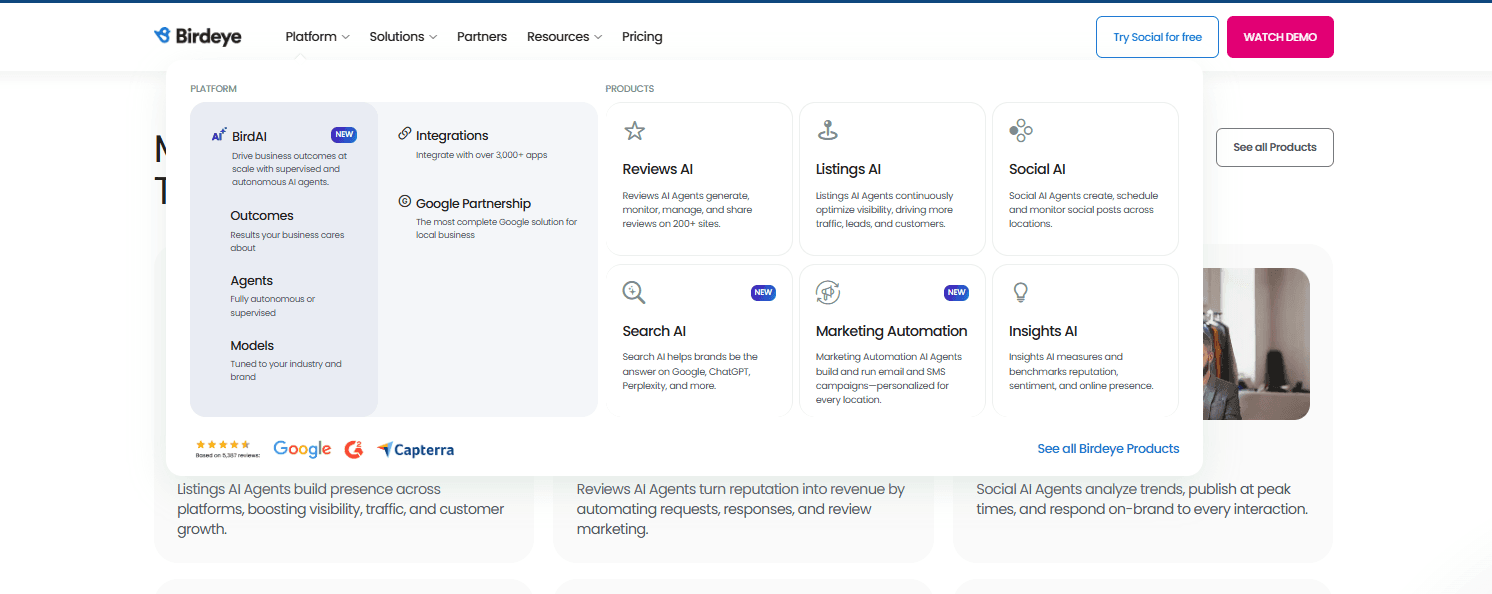
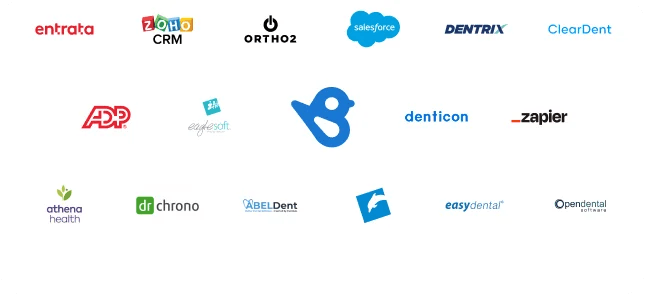
Birdeye integrates with a range of industry-specific platforms, including Dentrix, Eaglesoft, Dentech, Eclipse, Breezeworks, Rooflink, and Albiware, supporting healthcare, dental, and home services businesses.
The platform also offers an API for custom integrations and supports third-party integration tools, allowing organizations to extend Birdeye’s functionality across their existing software ecosystem.
New Product Updates from Birdeye
Birdeye Automates User Access for New Locations
Birdeye has improved location onboarding by automatically extending existing user access rules to any newly created locations. This helps admins save time, maintain consistent permissions, and avoid access gaps when expanding or reorganizing location structures. Highlights include:
- Automatic Access: Grant users access to newly added locations automatically.
- Hierarchy-Based Permissions: Apply access according to existing branches and divisions.
- Location Management: Keep permissions aligned as new locations are added.
- Reduced Admin Work: Limit the need for manual access updates across multiple locations.
Visit Birdeye’s official site for more details.
Birdeye Adds Agent Backlog Responder for Unanswered Reviews
Birdeye’s review response agents can now generate replies for older reviews that have not received a response. Agents configured to suggest replies can also post responses to those past reviews. Highlights include:
- Backlog Responses: Generate replies for older unanswered reviews.
- Review Response Agents: Extend automated review handling beyond newly received reviews.
- Suggested Replies: Let configured agents suggest responses for past reviews.
- Response Posting: Allow eligible agents to post replies to older reviews.
- Backlog Management: Help teams catch up on unanswered customer feedback.
Visit Birdeye’s official site for more details.
Birdeye Adds Recurring Brand Health Reports
Birdeye now lets users schedule Brand Health Reports for weekly or monthly delivery. The recurring reports give teams a regular view of brand performance without requiring manual report generation. Highlights include:
- Recurring Reports: Schedule Brand Health Reports to run automatically.
- Weekly Scheduling: Receive updated brand health reports every week.
- Monthly Scheduling: Set reports to be delivered on a monthly basis.
- Ongoing Tracking: Monitor brand performance over time with regular reporting.
- Reduced Manual Work: Eliminate the need to generate each report individually.
Visit Birdeye’s official site for more details.
Birdeye Adds Toast Integration for Review Requests
Birdeye can now connect with Toast to trigger review requests when an order is marked as paid. The integration automates post-transaction outreach and supports review collection without requiring manual follow-ups. Highlights include:
- Toast Integration: Connect Birdeye with Toast for automated review collection.
- Transaction Triggers: Send review requests when an order is marked as paid.
- Automated Follow-Ups: Reduce manual work after customer transactions.
- Review Collection: Give customers a direct opportunity to share feedback after purchase.
- Customer Availability: Available to both Direct and Channel customers.
Visit Birdeye’s official site for more details.
Birdeye Adds ServiceNow Integration for Customer Feedback
Birdeye adds a ServiceNow integration that links service workflows with automated feedback and review requests. These updates help teams engage customers after service interactions and capture feedback with less manual effort. Highlights include:
- ServiceNow Integration: Connect ServiceNow service workflows with Birdeye customer engagement.
- Automated Feedback Requests: Trigger feedback requests at relevant points in the service journey.
- Review Requests: Turn positive service interactions into opportunities to request reviews.
- Automated Follow-Up: Reduce manual outreach by connecting engagement to service activity.
Visit Birdeye’s official site for more details.
Birdeye Adds Custom Role-Based Access for Listings
Birdeye adds customizable Listings permissions by role instead of using one fixed access level for all users. These controls help businesses and agencies manage access more precisely as teams scale. Highlights include:
- Custom Role Access: Configure Listings permissions based on individual user roles.
- View Controls: Limit which users can access specific Listings capabilities.
- Management Permissions: Control who can manage Listings features based on assigned roles.
- Role Management: Configure access from Birdeye’s Role Management and Permissions settings.
Visit Birdeye’s official site for more details.
Birdeye Adds Prompt Metrics and Preview Tools for AI Visibility
Birdeye adds sentiment, accuracy, and ranking metrics for monitored prompts, plus dynamic token editing and prompt previews across AI models. These updates give users more visibility into prompt performance and more control over how prompts are configured. Highlights include:
- Prompt Performance Metrics: View sentiment, accuracy, and ranking results together for each monitored prompt.
- Dynamic Token Editing: Edit or remove prompt details such as city or location before running the prompt.
- Prompt Preview: Review the exact prompt that will be used before execution.
- AI Model Preview: Preview the prompt and expected response across different AI models.
Visit Birdeye’s official site for more details.
Birdeye Automates Reminders and Adds AI Agent Access Control
Birdeye adds Reminder Agent with email, text, confirmation tracking, and AI voice follow-ups, plus No Access, View, and Full Access permissions for individual AI agent types. These updates help teams automate appointment outreach while controlling who can view or manage AI agents. Highlights include:
- Reminder Agent: Automate appointment reminders and follow-ups through email and text.
- AI Voice Follow-Ups: Call customers automatically when appointments remain unconfirmed.
- Confirmation Tracking: Monitor reminder activity, confirmation status, call outcomes, transcripts, and summaries.
- Role-Based Access: Assign No Access, View, or Full Access permissions by AI agent type.
- Dashboard and API Controls: Apply AI agent permissions across both the dashboard and API.
Visit Birdeye’s official site for more details.
Birdeye Integrates with SkyTab to Sync Restaurant Menus
Birdeye adds a SkyTab integration that syncs restaurant menu information directly from SkyTab into Birdeye. This reduces manual updates and helps restaurants keep listing information consistent across connected platforms. Highlights include:
- SkyTab Integration: Connect SkyTab directly with Birdeye for restaurant menu syncing.
- Automatic Menu Sync: Update menu information without manually re-entering details.
- Consistent Listings: Keep restaurant menu information aligned across supported business listings.
Visit Birdeye’s official site for more details.
Birdeye Launches New Default Experience
Birdeye has launched a refreshed default experience designed to make it easier to understand performance at a glance. The new layout prioritizes the most relevant KPIs and provides an outcome-focused overview so users can act faster with less clutter. Highlights include:
- Cleaner Layout: Reduce interface clutter and make key areas easier to access.
- Relevant KPIs: Surface metrics that help users focus on important performance signals.
- Outcome-Focused Overview: Prioritize insights and actions tied to business outcomes.
- Classic Experience Access: Switch back to the previous interface during the transition period.
Visit Birdeye’s official site for more details.
Birdeye Specs
- API: Yes
- Brand Management: Yes
- Dashboard: Yes
- External Integrations: Yes
- Feedback Management: Yes
- Google Apps Integration: Yes
- Multi-Site: Yes
- Multi-User: Yes
- Net Promoter Score: Yes
- Notifications: Yes
- Review Monitoring: Yes
- Sentiment Analysis: Yes
- Social Media Monitoring: Yes
- Social-Media Integration: Yes


