

VWO-arvostelu: hyvät ja huonot puolet, ominaisuudet ja hinnoittelun erittely
Tässä syy, miksi VWO erottuu edukseen kilpailulla A/B-testausten alalla – ketterät käyttöönotot, monipuoliset näkymät ja hinnoittelu, jonka ansiosta kasvuun keskittyvät tiimit voivat kokeilla uusia asioita huoletta.

We review tools independently, and commissions help fund our testing. See our transparency policy, our methodology, or suggest a tool.
VWO is A/B testing software for marketing and product teams who want to run experiments and optimize conversion rates without heavy developer involvement. It covers the full CRO workflow—from split testing and heatmaps to session recordings—in one platform. I'd consider VWO over Optimizely if you want that same depth of experimentation capability without Optimizely's enterprise price tag or lengthy onboarding.
VWO Evaluation Summary
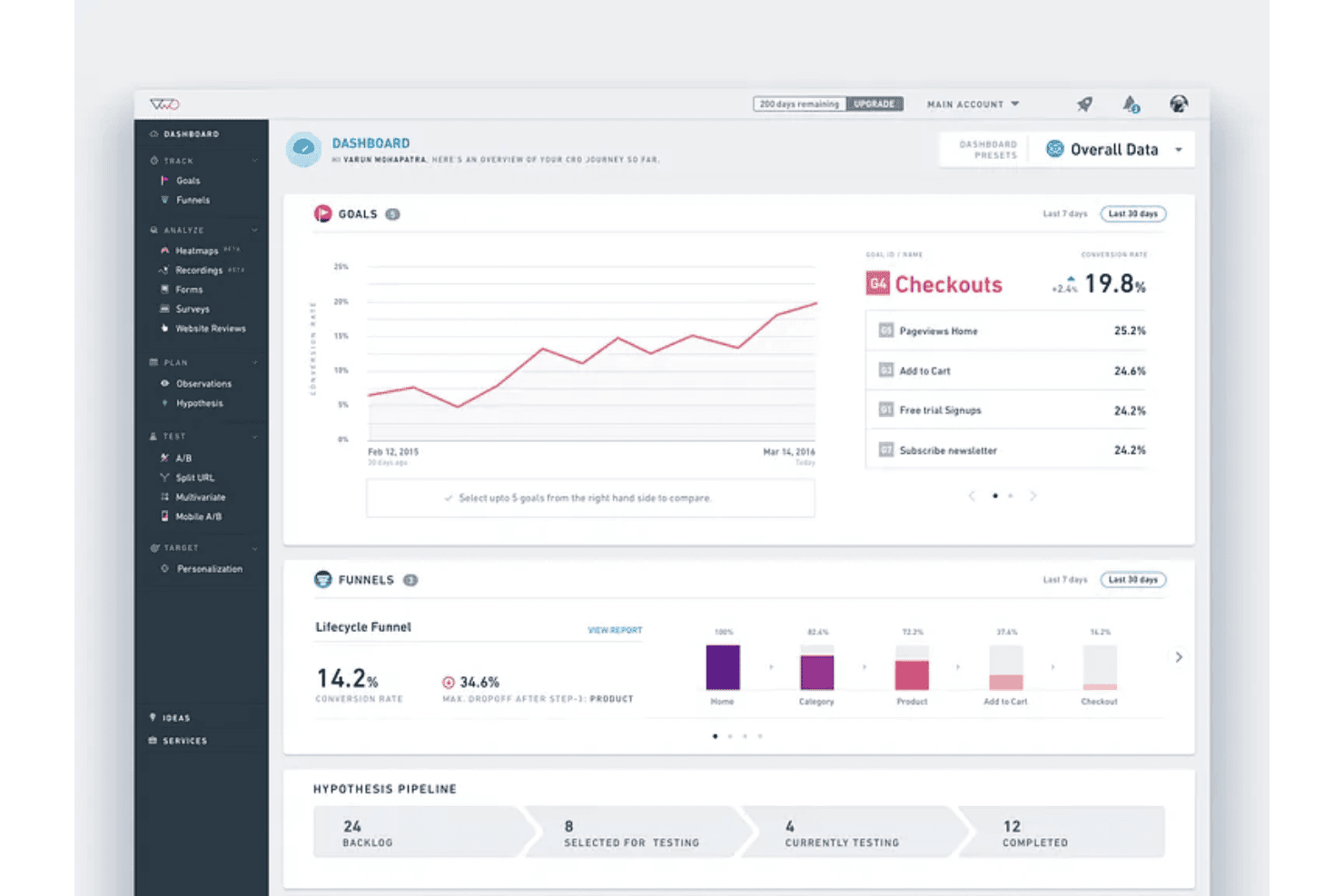
4.3/5
- Pricing upon request
- 30-day free trial + free demo available
Why Trust Our Software Recommendations
6,700+
Reviews
20
Industry experts
16+
Evaluation factors
14
Years
Our team has been testing and reviewing software since 2012. As marketing leaders ourselves, we know how difficult—and important—it is to choose the right software.
For this guide, we evaluated tools using hands-on testing and independent research, scoring tools using our selection criteria.
Our reviews reflect our human editorial judgment, not a sales pitch.
Expert reviewers:
 Gui DrusinaCreative Director
- Shriya GhateSenior Marketing Lead
 Amanda JacquesMarketing Ops Leader

VWO Overview
When I compare VWO against other A/B testing software, I judge it to be a standout pick for teams wanting easy onboarding, an intuitive visual editor, and broad integrations. VWO’s pricing tiers offer flexibility, and its support team responds quickly when issues arise. I think the analytics and reporting stack up well, but more advanced experimenters might find the segmentation and personalization options narrower than top-tier competitors. For marketing teams, agencies, or businesses choosing a solution to grow their optimization program without heavy internal tech resources, VWO is an option I’d recommend.
Pros
- Visual editor simplifies creating and launching web experiments
- Robust user behaviour analytics built into the main workflow
- Custom goal tracking and funnel analysis are available out of the box
Cons
- Limited options for advanced audience targeting
- Pricing scales quickly when traffic volume increases
- Statistical significance sometimes takes longer to achieve on low-traffic sites
Is VWO Right For Your Needs?
Who Would be a Good Fit for VWO?
VWO is ideal for digital-first brands, ecommerce, and enterprise teams that want in-depth website testing and rich behavioral analytics under one roof. Large marketing teams, growth departments, and ecommerce managers will appreciate VWO’s visual editor, multivariate testing, and heatmaps. If you have diverse customer segments or high site traffic, the audience targeting and experiment automation features make iteration fast and insight-driven.
- Ecommerce TeamsVWO’s funnel analysis and conversion optimization tools help uncover and resolve drop-off points on product and checkout pages.
- Enterprise MarketingCentralized hypothesis tracking, advanced segmentation, and integrated analytics are well suited for companies scaling experimentation across many web properties.
- SaaS Growth TeamsVisual editor and rapid test deployment let SaaS teams validate onboarding flows, in-app offers, and landing pages with no developer bottlenecks.
- Digital AgenciesClient work benefits from session recordings, reporting, and unified dashboards, making it easy to demo insights and run structured optimization programs.
- Global BrandsMultilingual site support and advanced targeting let global businesses personalize experiences for diverse geographic audiences.
Who Would be a Bad Fit for VWO?
VWO can be overkill for smaller sites, limited budgets, or teams just starting out with experimentation. Businesses with very low traffic, resource constraints, or static brochure sites won’t see the same returns. Simpler or lighter-weight testing options are better fits for basic needs, as VWO is built for depth, experimentation scale, and ongoing optimization.
- Early-Stage StartupsVWO’s cost and feature set may be more complex than necessary for teams just beginning to test website concepts.
- Small NonprofitsTighter budgets and lower web traffic often make heavily-featured solutions like VWO hard to justify.
- Local Services CompaniesWith static “contact us” websites and simple lead forms, the advanced analytics in VWO are often underutilized.
- SolopreneursUnless they manage high-traffic or complex sites, individual site owners won’t make full use of the platform.
- Government AgenciesProcurement requirements and highly regulated environments may make cloud-based tools like VWO hard to implement.
- Community BlogsHobbyist or small-group blogs typically lack enough daily traffic to produce valid testing results with VWO’s statistical engine.
How We Test & Score Tools
We’ve spent years building, refining, and improving our software testing and scoring system. The rubric is designed to capture the nuances of software selection and what makes a tool effective, focusing on critical aspects of the decision-making process.
Below, you can see exactly how our testing and scoring works across seven criteria. It allows us to provide an unbiased evaluation of the software based on core functionality, standout features, ease of use, onboarding, customer support, integrations, customer reviews, and value for money.
Core Functionality (25% of final scoring)
The starting point of our evaluation is always the core functionality of the tool. Does it have the basic features and functions that a user would expect to see? Are any of those core features locked to higher-tiered pricing plans? At its core, we expect a tool to stand up against the baseline capabilities of its competitors.
Standout Features (25% of final scoring)
Next, we evaluate uncommon standout features that go above and beyond the core functionality typically found in tools of its kind. A high score reflects specialized or unique features that make the product faster, more efficient, or offer additional value to the user.
We also evaluate how easy it is to integrate with other tools typically found in the tech stack to expand the functionality and utility of the software. Tools offering plentiful native integrations, 3rd party connections, and API access to build custom integrations score best.
Ease of Use (10% of final scoring)
We consider how quick and easy it is to execute the tasks defined in the core functionality using the tool. High scoring software is well designed, intuitive to use, offers mobile apps, provides templates, and makes relatively complex tasks seem simple.
Onboarding (10% of final scoring)
We know how important rapid team adoption is for a new platform, so we evaluate how easy it is to learn and use a tool with minimal training. We evaluate how quickly a team member can get set up and start using the tool with no experience. High scoring solutions indicate little or no support is required.
Customer Support (10% of final scoring)
We review how quick and easy it is to get unstuck and find help by phone, live chat, or knowledge base. Tools and companies that provide real-time support score best, while chatbots score worst.
Customer Reviews (10% of final scoring)
Beyond our own testing and evaluation, we consider the net promoter score from current and past customers. We review their likelihood, given the option, to choose the tool again for the core functionality. A high scoring software reflects a high net promoter score from current or past customers.
Value for Money (10% of final scoring)
Lastly, in consideration of all the other criteria, we review the average price of entry level plans against the core features and consider the value of the other evaluation criteria. Software that delivers more, for less, will score higher.
Core Features
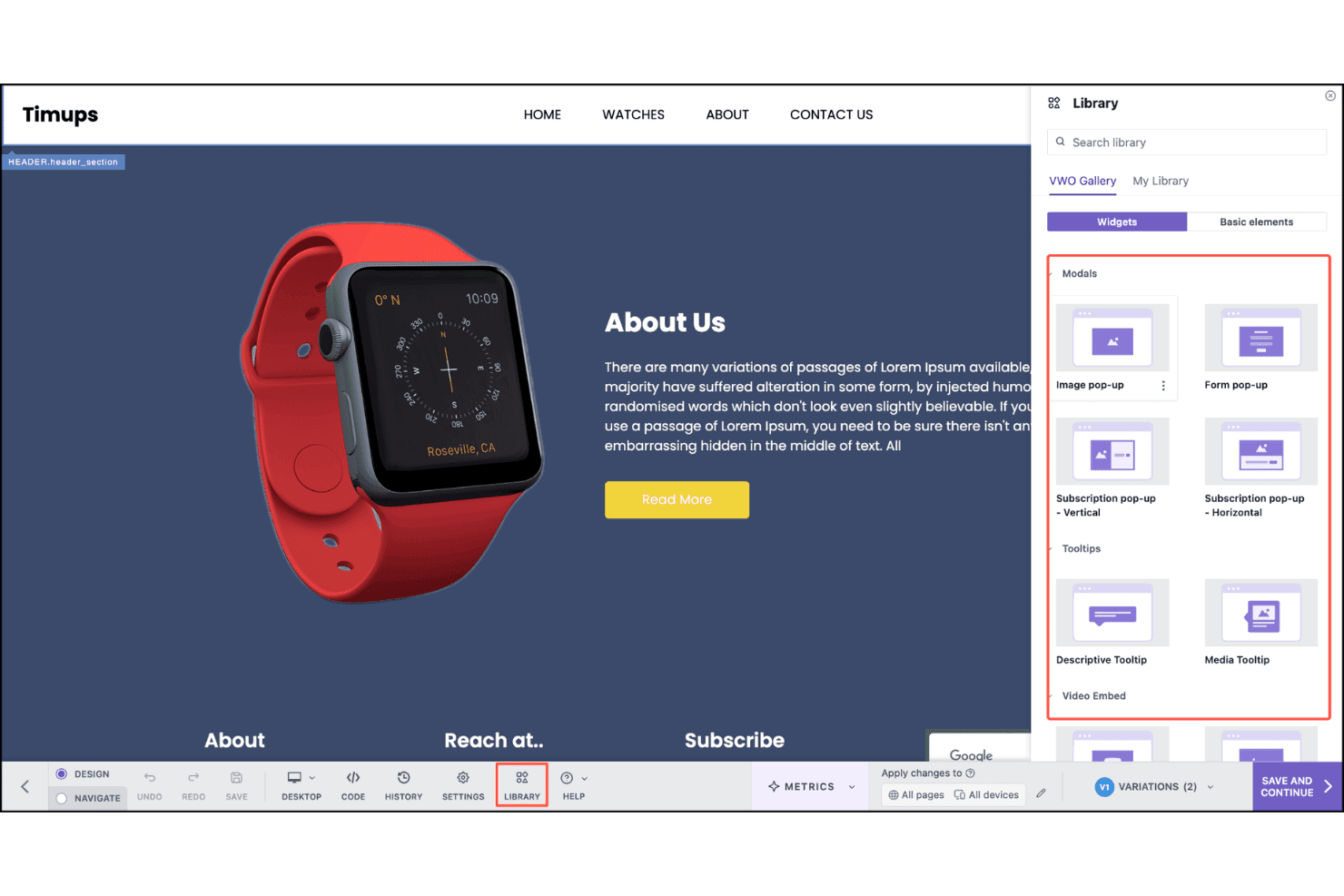
Visual Editor
Make changes to your site’s design, content, and layout with a drag-and-drop interface. You don’t need coding skills to run experiments on live pages.
Split URL Testing
Test entirely different versions of pages using unique URLs. This is ideal for comparing landing page concepts or redesigns.
Audience Targeting
Set up rules to show experiments to specific user segments based on behavior, geography, device, or referral source. Tailor tests to the audiences that matter to your business.
Multivariate Testing
Test multiple elements (like headlines and images) at once to find high-impact combinations. VWO calculates and reports the best-performing variant automatically.
Session Recordings
Watch real visitor sessions to see exactly how users interact with variants. Use insights to refine experiments and spot usability issues.
Heatmaps
Visualize where users click, scroll, or pay attention on your experiment pages. Quickly identify opportunities for improving page engagement and conversion paths.
Ease of Use
VWO stands out for its intuitive workflow and low-friction setup, especially with the visual editor and built-in onboarding guides. Users find launching tests fast, and built-in heatmaps and session recordings save steps compared to juggling multiple tools. Even those without technical backgrounds praise how simple it is to start experimenting.
Integrations
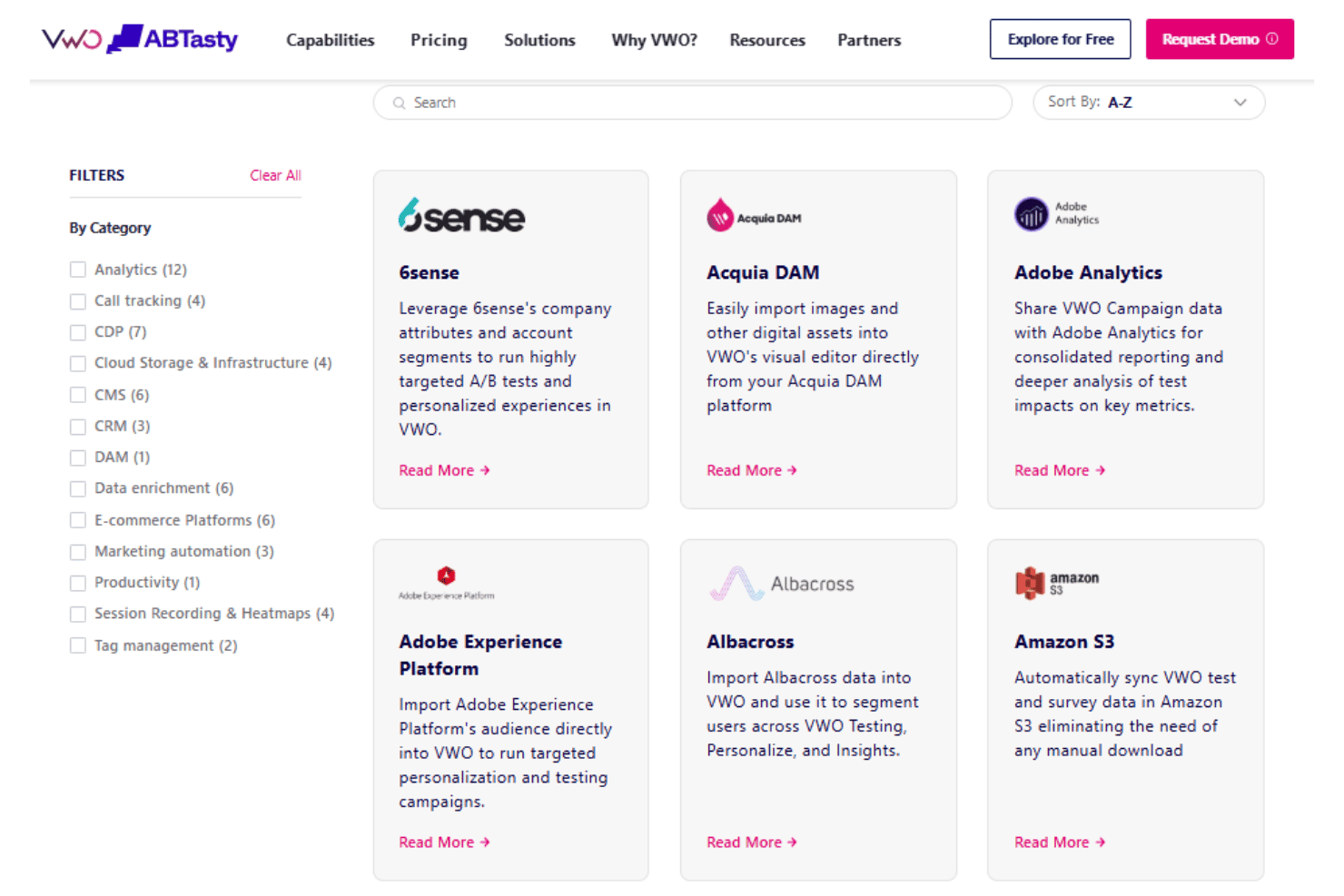
VWO integrates with Google Analytics, Google Tag Manager, Mixpanel, HubSpot, Salesforce, Shopify, Drupal, and WordPress, among others.
VWO also offers an API and supports connections through third-party integration platforms.
VWO Specs
- A/B Testing: Yes
- AI Integration: Yes
- Analytics: Yes
- API: Yes
- Automated Testing: Yes
- Bug Tracking: Yes
- Campaign Management: Yes
- Conversion Tracking: Yes
- Custom Reports: Yes
- Dashboards: Yes
- Data Export: Yes
- Data Import: Yes
- Data Visualization: Yes
- Design Templates: Yes
- External Integrations: Yes
- Feedback Management: Yes
- Form Builder: Yes
- History/Version Control: Yes
- Multi-Site: Yes
- Multi-User: Yes
- Notifications: Yes
- Performance Testing: Yes
- Referral Tracking: Yes
- Regression Testing: Yes
- Release Management: Yes
- Reports: Yes
- Scenario Planning: Yes
- SEO: Yes
- Test Management: Yes
- Visualization: Yes
- Workflow Management: Yes


