

Strapi-arvostelu 2026: hyvät ja huonot puolet, ominaisuudet ja hinnoittelu
I put Strapi’s API-first flexibility to the test, weighing its features, trade-offs, and pricing to see whether it’s the right CMS for your content stack.

We review tools independently, and commissions help fund our testing. See our transparency policy, our methodology, or suggest a tool.
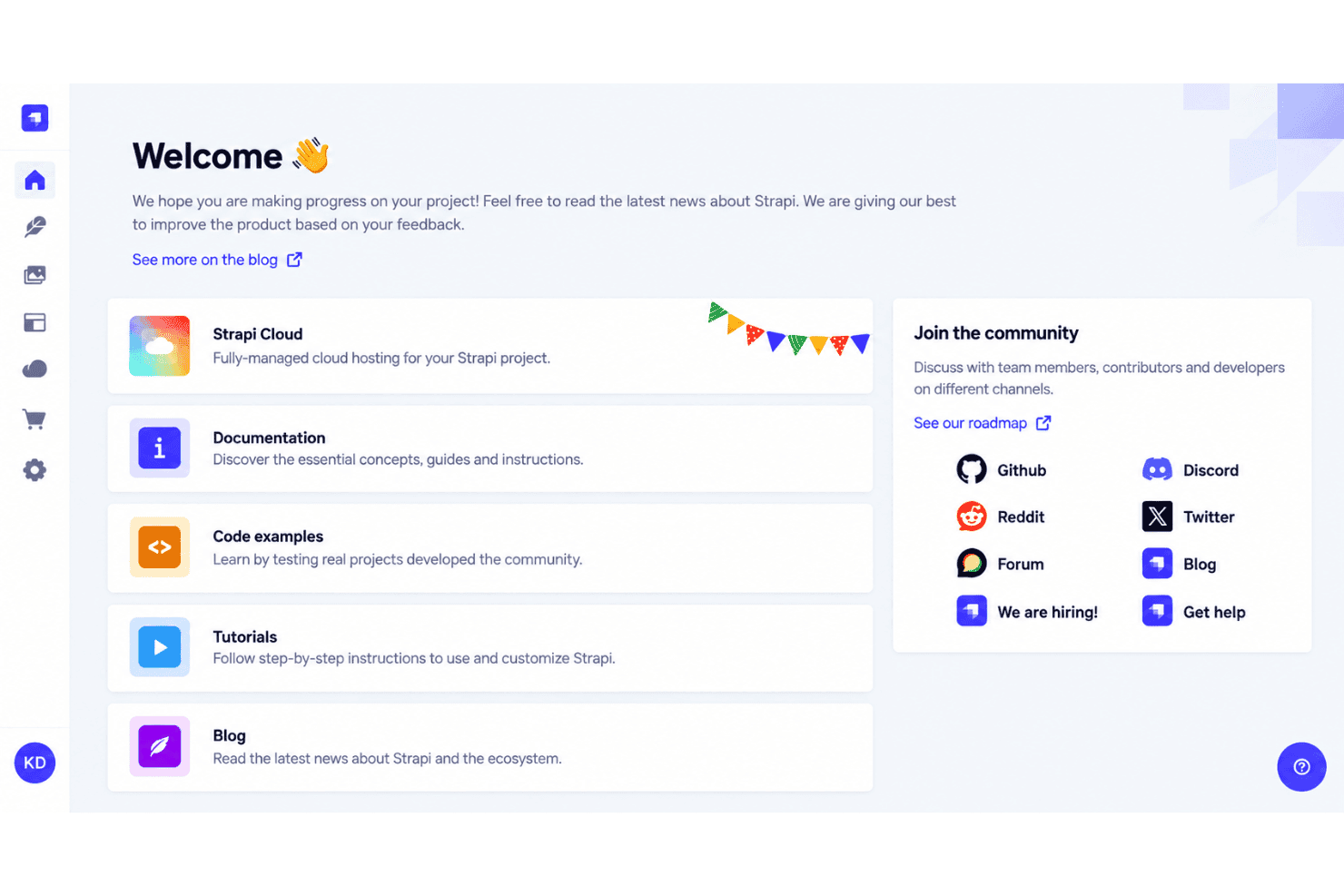
Strapi is an open-source, API-first content management software for teams that need to manage structured content across websites, mobile apps, and other digital channels. I’d choose Strapi over WordPress when developers need a customizable headless architecture, flexible content models, and API delivery without tying content to one presentation layer.
Strapi Evaluation Summary
4.5/5
- From $45/month
- Free plan available
Miksi luottaa ohjelmistosuosituksiimme
6,700+
Reviews
20
Industry experts
16+
Evaluation factors
14
Years
Tiimimme on testannut ja arvioinut ohjelmistoja vuodesta 2012 lähtien. Markkinointijohtajina tiedämme itse, kuinka vaikeaa — ja tärkeää — oikean ohjelmiston valitseminen on.
Tätä opasta varten arvioimme työkaluja käytännön testauksen ja itsenäisen tutkimuksen avulla, pisteyttäen työkalut valintakriteeriemme perusteella.
Arvostelumme perustuvat inhimilliseen toimitukselliseen harkintaamme, eivät myyntipuheeseen.
Asiantuntija-arvioijat:
 Gui DrusinaCreative Director
- Shriya GhateSenior Marketing Lead
 Amanda JacquesMarketing Ops Leader

Strapi Overview
I’d choose Strapi when your team needs an open-source, API-first CMS with customizable content types, REST and GraphQL APIs, role-based access, webhooks, and plugin support. Its admin interface is clear, though onboarding still requires developer involvement for hosting, schemas, and deployments. Self-hosting keeps entry costs low, while cloud and enterprise plans add managed infrastructure and support. Compared with more packaged CMS platforms, Strapi offers greater control, flexible integrations, and cleaner multi-channel delivery, but less out-of-the-box functionality and a steeper technical setup. I think it fits product teams, content operations, and businesses supporting websites, apps, and other digital experiences.
Pros
- Flexible content types and reusable components support diverse content structures.
- REST and GraphQL APIs deliver content across websites and apps.
- Open-source self-hosting permits source-level customization without license fees.
Cons
- Self-hosting requires infrastructure, deployment, database, and maintenance ownership.
- Advanced plugins and admin customizations require substantial JavaScript development.
- Documentation can feel fragmented during complex configurations.
Is Strapi Right For Your Needs?
Who Would be a Good Fit for Strapi?
Strapi suits developer-led teams that need custom content models, REST or GraphQL APIs, and publishing across multiple channels. It works especially well for businesses with technical resources that can manage hosting, deployments, plugins, and integrations.
- Developer-Led StartupsStrapi lets developers create custom content types and automatically generated REST or GraphQL APIs without adopting a fixed frontend.
- Ecommerce BrandsEcommerce teams can connect Strapi with Shopify, BigCommerce, Cloudinary, webhooks, and custom integrations for product and campaign content.
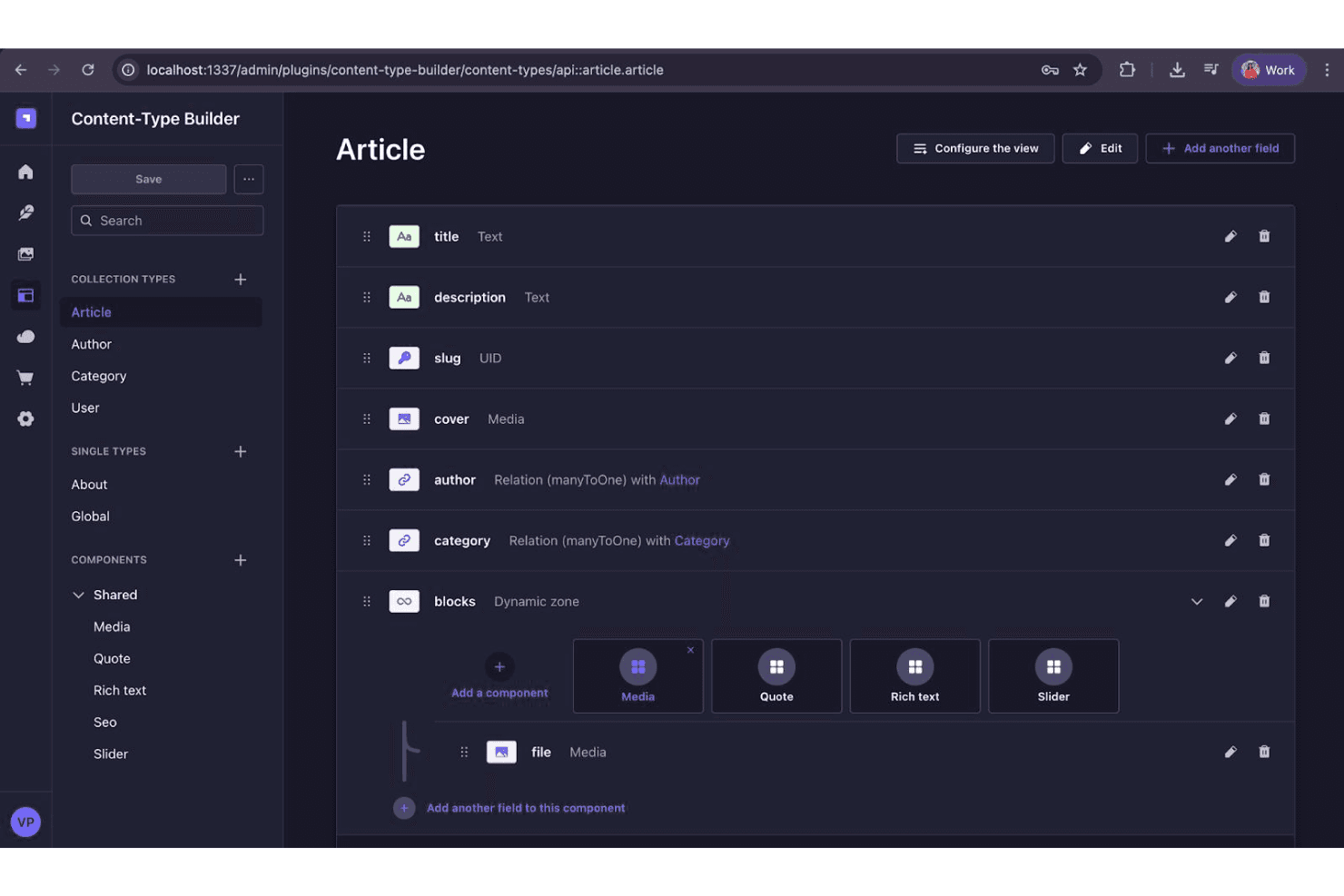
- Digital PublishersPublishers can model articles, authors, categories, and media assets in the Content-Type Builder, then deliver content to websites and applications.
- Marketing DepartmentsMarketing teams with developer support can manage entries in the admin interface while developers control schemas, deployments, plugins, and API connections.
- Content AgenciesAgencies can use Strapi’s open-source edition and custom integrations to build tailored CMS projects for clients with different content structures.
- Multichannel ProductsProduct teams can use Strapi’s REST and GraphQL APIs to distribute shared content across websites, mobile applications, ecommerce experiences, and other interfaces.
Who Would be a Bad Fit for Strapi?
Strapi is a poor match for teams that need a ready-to-use CMS with minimal technical administration. Self-hosting, database setup, schema design, deployment work, and advanced customization can create too much overhead for simple websites or teams without developer access.
- Solo EntrepreneursSolo business owners without technical support may struggle with hosting, deployments, database configuration, and custom plugin requirements.
- Simple Brochure SitesA small business needing only a few static pages may find Strapi’s content modeling and API setup unnecessary for its limited publishing needs.
- No-Code TeamsMarketing teams that need to create and change content without developer involvement may find Strapi less suitable because custom schemas and integrations require technical setup.
- Immediate LaunchesTeams with tight launch deadlines may lose time configuring infrastructure, designing content types, and deploying the CMS before publishing content.
- Guided SupportMarketers who expect hands-on troubleshooting may find the free edition restrictive because ticket-based support requires a Growth or Enterprise plan.
- Heavy GovernanceLarge organizations requiring review workflows, audit logs, and advanced support must choose Enterprise, which uses custom pricing rather than a standard low-cost plan.
How We Test & Score Tools
We’ve spent years building, refining, and improving our software testing and scoring system. The rubric is designed to capture the nuances of software selection and what makes a tool effective, focusing on critical aspects of the decision-making process.
Below, you can see exactly how our testing and scoring works across seven criteria. It allows us to provide an unbiased evaluation of the software based on core functionality, standout features, ease of use, onboarding, customer support, integrations, customer reviews, and value for money.
Core Functionality (25% of final scoring)
The starting point of our evaluation is always the core functionality of the tool. Does it have the basic features and functions that a user would expect to see? Are any of those core features locked to higher-tiered pricing plans? At its core, we expect a tool to stand up against the baseline capabilities of its competitors.
Standout Features (25% of final scoring)
Next, we evaluate uncommon standout features that go above and beyond the core functionality typically found in tools of its kind. A high score reflects specialized or unique features that make the product faster, more efficient, or offer additional value to the user.
We also evaluate how easy it is to integrate with other tools typically found in the tech stack to expand the functionality and utility of the software. Tools offering plentiful native integrations, 3rd party connections, and API access to build custom integrations score best.
Ease of Use (10% of final scoring)
We consider how quick and easy it is to execute the tasks defined in the core functionality using the tool. High scoring software is well designed, intuitive to use, offers mobile apps, provides templates, and makes relatively complex tasks seem simple.
Onboarding (10% of final scoring)
We know how important rapid team adoption is for a new platform, so we evaluate how easy it is to learn and use a tool with minimal training. We evaluate how quickly a team member can get set up and start using the tool with no experience. High scoring solutions indicate little or no support is required.
Customer Support (10% of final scoring)
We review how quick and easy it is to get unstuck and find help by phone, live chat, or knowledge base. Tools and companies that provide real-time support score best, while chatbots score worst.
Customer Reviews (10% of final scoring)
Beyond our own testing and evaluation, we consider the net promoter score from current and past customers. We review their likelihood, given the option, to choose the tool again for the core functionality. A high scoring software reflects a high net promoter score from current or past customers.
Value for Money (10% of final scoring)
Lastly, in consideration of all the other criteria, we review the average price of entry level plans against the core features and consider the value of the other evaluation criteria. Software that delivers more, for less, will score higher.
Core Features
Custom Content Types
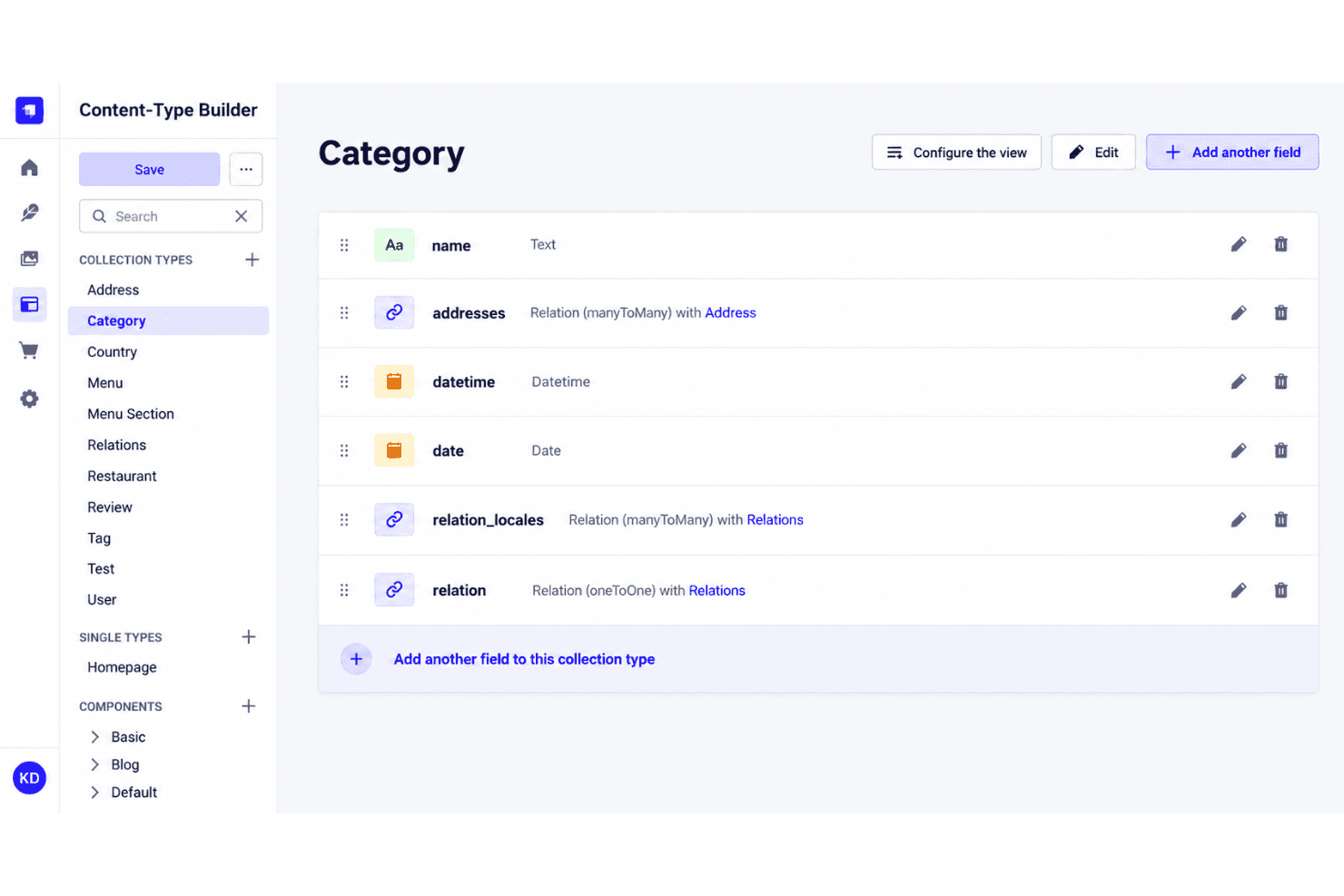
Define structured content types with fields such as text, images, dates, and relationships. A marketing team could create separate models for blog posts, authors, campaigns, and landing pages without changing the front end.
Reusable Components And Dynamic Zones
Build reusable field groups and flexible page sections, then arrange them across content entries. Editors can combine hero banners, testimonials, and calls to action while developers maintain consistent schemas.
Media Library
Upload, organize, and reuse images and other media from Strapi’s admin panel. A content team can manage campaign graphics in one place and attach them to multiple articles or landing pages.
REST And GraphQL APIs
Deliver structured content through REST or GraphQL APIs to websites, mobile apps, and other digital experiences. Developers can choose REST endpoints for straightforward requests or GraphQL queries when clients need specific fields.
Roles And Permissions
Set permissions for administrator, editor, author, and other roles across content types and actions. This lets an author draft articles while restricting publishing or settings changes to approved team members.
Draft And Publish
Create and edit unpublished entries before making them available through the API. Editors can review a campaign page, correct its copy, and publish it only when the content is ready.
Ease of Use
Strapi is user-friendly for developers and content teams once configured, but it isn’t a turnkey CMS. Its Content-Type Builder and automatically generated API endpoints make content modeling and entry management straightforward. However, self-hosting, deployments, and custom plugins require technical skills, which can make onboarding less approachable for nontechnical teams.
Integrations
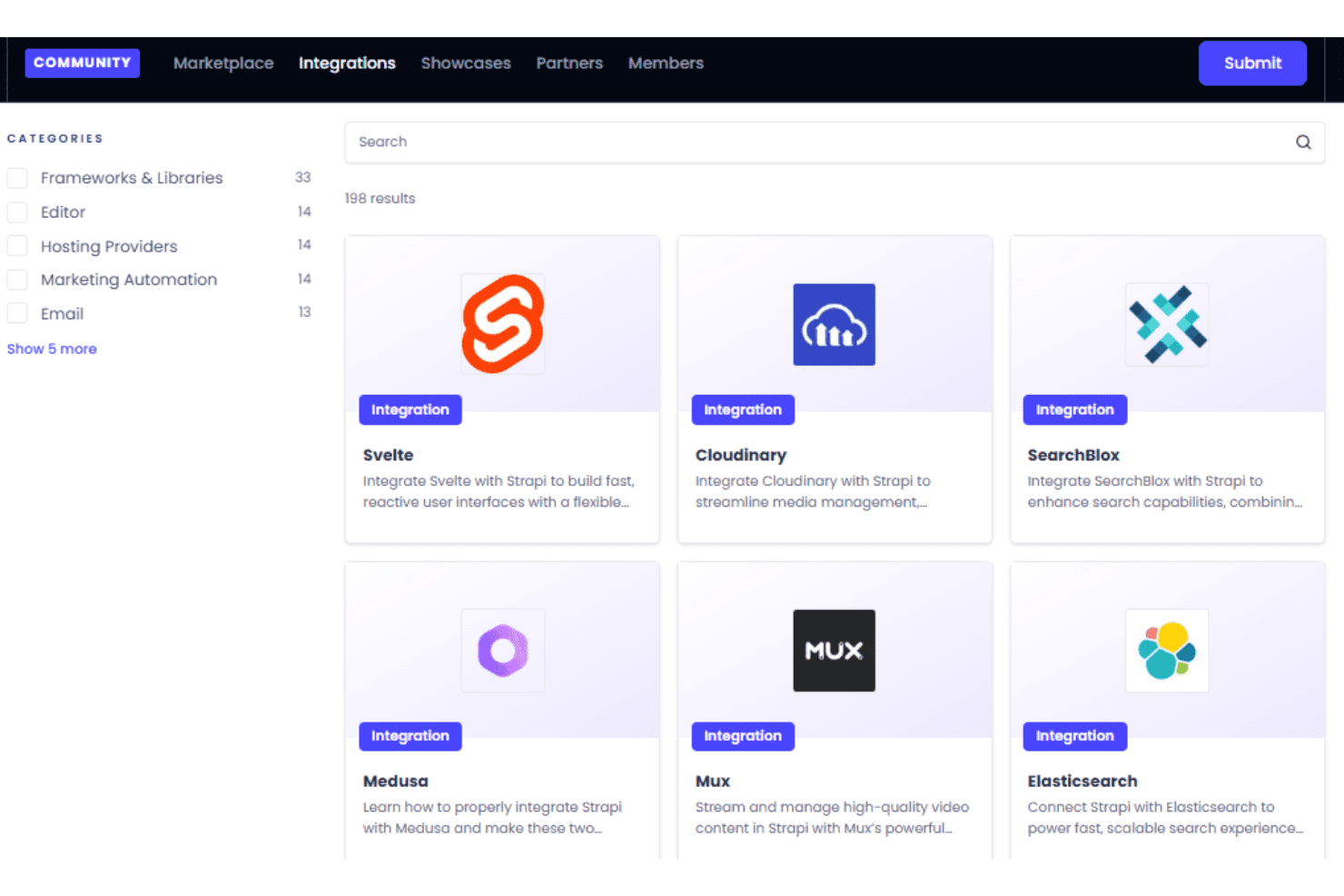
Strapi integrates with Shopify, BigCommerce, and Cloudinary. Strapi also provides REST and GraphQL APIs and connects with third-party tools through webhooks, custom integrations, and plugins.
Strapi Specs
- A/B Testing: No
- Analytics: No
- API: Yes
- Audience Targeting: No
- Automated Conversion: No
- Batch Permissions & Access: No
- Behavioral Tracking: No
- Brand Management: No
- Campaign Management: No
- Contact Management: No
- Contact Sharing: No
- Conversion Tracking: No
- CRM Integration: Yes
- Customer Management: No
- Dashboards: Yes
- Data Export: Yes
- Data Import: Yes
- Email Integration: Yes
- External Integrations: Yes
- Keyword Tracking: No
- Landing Pages: Yes
- Lead Management: No
- Lead Scoring: No
- Link Tracking: No
- Marketing Automation: No
- Multi-User: Yes
- Notifications: Yes
- Password & Access Management: Yes
- Social-Media Integration: Yes


