

Videopodcast-ohjelmisto tarjoaa kaiken, mitä tarvitset visuaalisesti kiinnostavien podcastien tallentamiseen, muokkaamiseen ja julkaisemiseen yleisöllesi. Jos haluat luoda ammattimaisia videopodcasteja – haastatteletpa vieraita etänä tai tuotat täysimittaisia studioluokan ohjelmia – oikean ohjelmiston löytäminen on erittäin tärkeää.
Tarvitset vaihtoehtoja, jotka sopivat työnkulkuusi, auttavat yhteistyössä ja antavat sinun keskittyä sisältöön ilman teknisten ongelmien aiheuttamaa vaivaa. Tässä oppaassa esittelen parhaat saatavilla olevat videopodcast-ohjelmistot, jotta voit valita oikeat työkalut ohjelmasi kehittämiseen tänä vuonna 2026.
Miksi luottaa ohjelmistosuosituksiimme
6,700+
Reviews
20
Industry experts
16+
Evaluation factors
14
Years
Tiimimme on testannut ja arvioinut ohjelmistoja vuodesta 2012 lähtien. Markkinointijohtajina tiedämme itse, kuinka vaikeaa — ja tärkeää — oikean ohjelmiston valitseminen on.
Tätä opasta varten arvioimme työkaluja käytännön testauksen ja itsenäisen tutkimuksen avulla, pisteyttäen työkalut valintakriteeriemme perusteella.
Arvostelumme perustuvat inhimilliseen toimitukselliseen harkintaamme, eivät myyntipuheeseen.
Asiantuntija-arvioijat:
 Gui DrusinaCreative Director
- Shriya GhateSenior Marketing Lead
 Amanda JacquesMarketing Ops Leader

Videopodcast-ohjelmistojen vertailutaulukko
Tässä vertailutaulukossa esitetään yhteenveto parhaiksi arvioimieni videopodcast-ohjelmistojen hinnoittelutiedoista:
| Tool | Best For | Trial Info | Price | ||
|---|---|---|---|---|---|
| 1 | Best for open-source video customization | Free to use | Free to use | Website | |
| 2 | Best for AI-powered video content repurposing | Free plan available | From $15/month | Website | |
| 3 | Best for studio-quality remote collaboration | Free plan available | From $16/user/month (billed annually) | Website | |
| 4 | Best for automated podcast video clipping | Free plan available | From $14.5/month (billed annually) | Website | |
| 5 | Best for hosting with built-in distribution tools | Free plan available | From $12/month (billed annually) | Website | |
| 6 | Best for live event integration | Free demo available | Pricing upon request | Website | |
| 7 | Best for remote interviews with HD recordings | 14-day free trial + free plan + free demo available | From $24/month (billed annually) | Website | |
| 8 | Best for fast editing with text-based tools | Free plan available | From $16/user/month (billed annually) | Website | |
| 9 | Best for multi-track audio and video recording | Free plan + free trial available | From $24/month (billed annually) | Website | |
| 10 | Best for browser-based multi-guest production | Free plan available | From $44.99/month | Website |


Parhaiden videopodcast-ohjelmistojen arvostelut
Alla ovat yksityiskohtaiset yhteenvedot parhaista videopodcast-ohjelmistoista, jotka pääsivät listalleni. Arvosteluissani tarkastellaan perusteellisesti kunkin alustan ominaisuuksia, toimintoja ja integraatioita, jotta löydät itsellesi parhaiten sopivan vaihtoehdon.

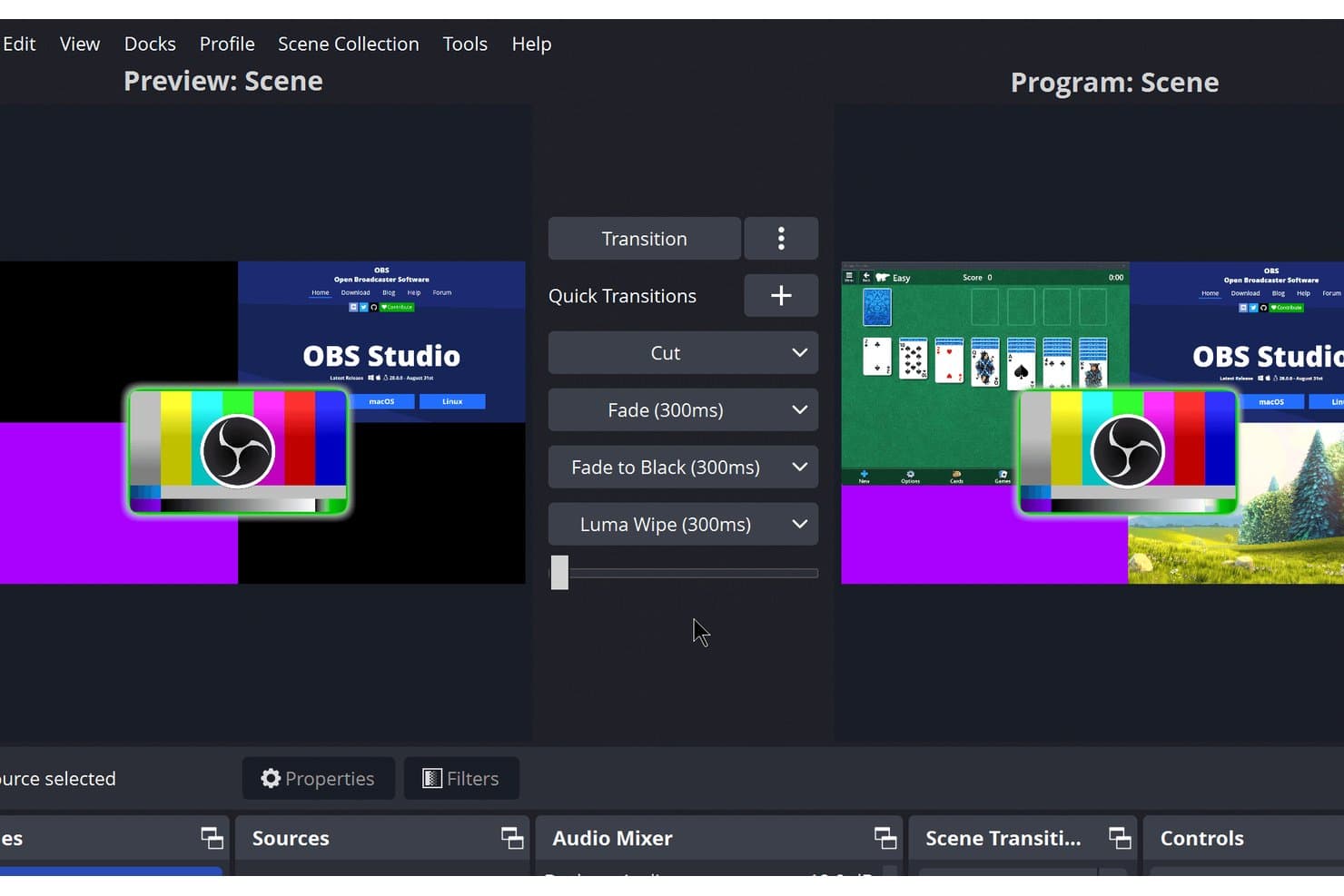
OBS Studio offers a Studio Mode interface with dual preview and program scenes, multiple quick transition options including Cut, Fade, Fade to Black, and Luma Wipe for professional video podcast production. OBS Studio is a free, open-source video recording and live streaming tool that supports scene-based capture, multi-source audio mixing, custom overlays, and broadcasting to platforms like YouTube and Twitch.
Who Is OBS Studio Best For?
OBS Studio is a strong fit for technically inclined content creators and indie podcast producers who want full control over their recording and streaming setup at no cost.
Why I Picked OBS Studio
OBS Studio earns its spot on my shortlist because no other free tool gives you this level of control over your video output. I love that you can build unlimited scenes with custom logos, lower thirds, and branded backgrounds, then switch between them live using Studio Mode. The Lua and Python scripting API lets me automate scene transitions and source behavior in ways no closed platform allows.
OBS Studio Key Features
- Multiview monitor: Preview up to eight scenes at once for live switching control.
- Audio mixer with VST support: Add real-time audio filters and process sound directly inside the mixer.
- Customizable dockable interface: Rearrange panels and pop them out as standalone windows to fit your workflow.
- Scene source variety: Combine screen captures, webcams, images, browser windows, and audio inputs in a single production.
OBS Studio Integrations
OBS Studio offers an API for custom integrations and plugin development.
Pros and Cons
Pros:
- Plugin support expands video workflow capabilities
- Advanced custom overlay and graphic options
- Full scene switching with real-time previews
Cons:
- No native video clip editing tools
- No built-in remote guest recording
Learn more about OBS Studio: Best for AI-powered video content repurposing
- Free plan available
- From $15/month
Visit WebsiteCustomer Rating:4.6/5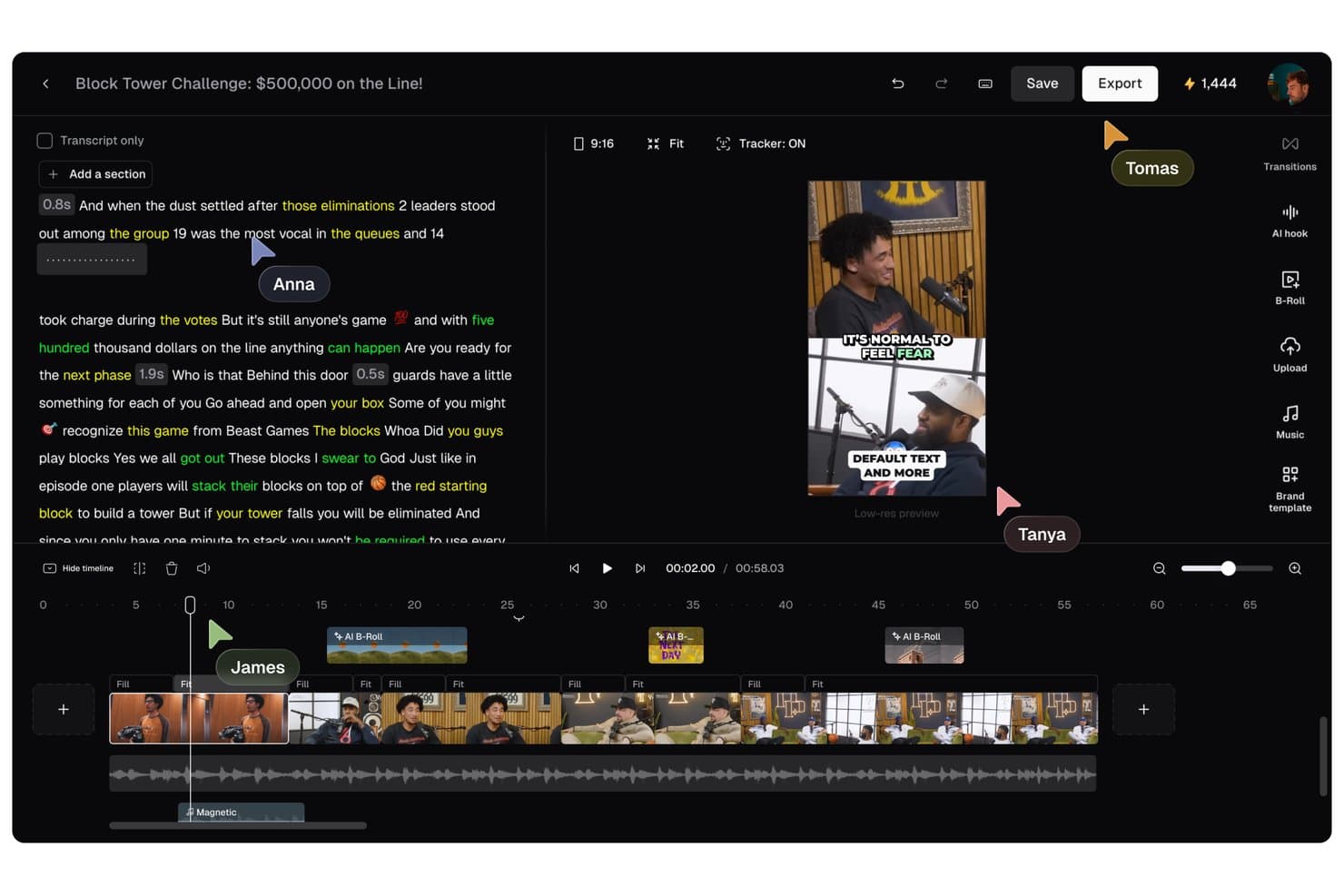
OpusClip offers a collaborative video editing interface with transcript editing, AI B-Roll, multi-track timeline, and real-time cursor tracking for team members. OpusClip is an AI video clipping tool that scans long-form recordings and converts them into short-form vertical clips, with auto-reframing, animated captions, virality scoring, and direct publishing to social platforms.
Who Is OpusClip Best For?
It's a strong fit for social media content leads and content marketing managers who regularly repurpose recorded podcasts, interviews, or long-form videos into clips for TikTok, Reels, and Shorts.
Why I Picked OpusClip
OpusClip earns its spot on my shortlist because ClipAnything scans a full podcast episode and surfaces high-potential moments automatically, each tagged with a Virality Score. I also like the ReframeAnything model, which keeps moving subjects centered in vertical frames without manual tracking adjustments. With animated captions at over 97% accuracy, clips come out nearly publish-ready straight from the tool.
OpusClip Key Features
- AI audio enhancement: Boosts voice clarity and removes background noise from imported podcasts and videos.
- Brand templates: Lets you apply custom logos, fonts, brand colors, intros, and outros to every clip.
- Video import from major platforms: Supports pulling source content directly from YouTube, Google Drive, Vimeo, Zoom, Riverside, and more.
- Multi-language captioning: Auto-generates captions in over 20 languages to support international and multilingual content.
OpusClip Integrations
Native integrations are not clearly documented. It connects with Zapier and provides an API for custom integrations.
Pros and Cons
Pros:
- Animated captions support over 20 languages
- Virality scoring ranks best podcast moments
- AI auto-generation of multiple short clips
Cons:
- No editing tools for full-length episodes
- Cannot record or livestream podcast sessions
Learn more about OpusClip: Best for studio-quality remote collaboration
- Free plan available
- From $16/user/month (billed annually)
Visit WebsiteCustomer Rating:4.4/5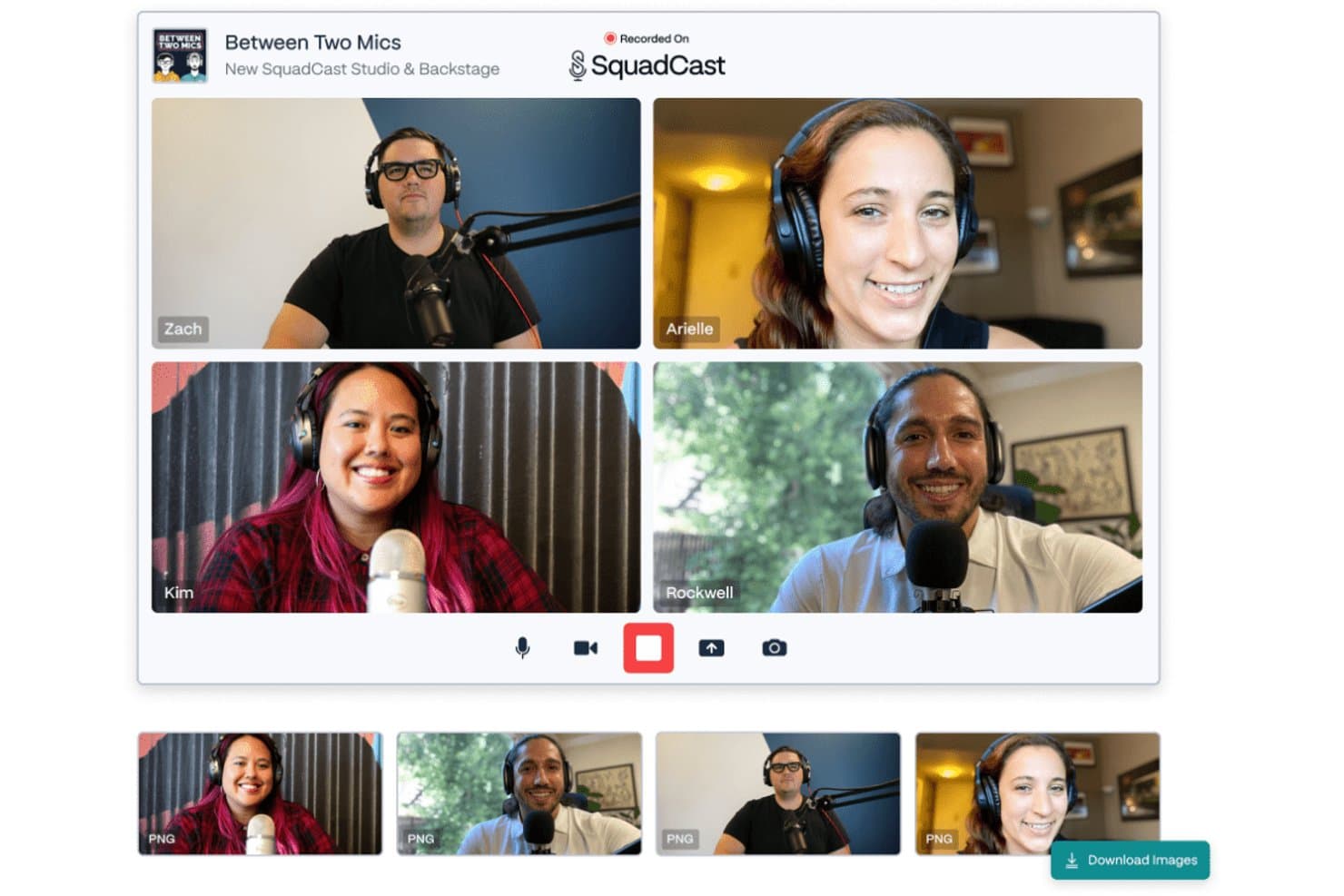
Squadcast offers a multi-participant video recording studio interface with individual video feeds, microphone setups, and a screenshot capture feature for podcast recordings. Squadcast is a browser-based remote recording platform that uses patented Progressive Upload technology to capture separate local audio and video tracks per participant, now bundled with Descript's AI-powered editing and publishing suite.
Who Is Squadcast Best For?
Squadcast is a strong fit for brand podcast producers and content marketing teams who prioritize recording quality over live production features.
Why I Picked Squadcast
Squadcast earns its spot as one of the best on my shortlist because of how it handles the actual moment of recording. The patented Progressive Upload system continuously backs up each participant's local audio and video track to the cloud mid-session, so a dropped connection never means a lost take. I also love that each guest records raw, uncompressed WAV audio at 48kHz locally, which means I'm working with broadcast-quality source files before any editing even begins.
Squadcast Key Features
- AI-powered clip generation: Instantly create short-form social clips with automated vertical video, captions, and transcript search.
- Separate audio and video tracks: Record isolated tracks for each participant to allow flexible post-production edits.
- Guest Backstage mode: Bring producers or talent into a session silently before moving them on mic or camera.
- API and Zapier integration: Automate workflows by connecting Squadcast recording events to other tools in your stack.
Squadcast Integrations
Squadcast offers native integrations with Descript, Dropbox, Google Calendar, Apple iCalendar, Outlook Calendar, Captivate, SavvyCal, Edit Eddy by Headliner, Dolby.io, and Camo, and connects with Zapier. An API is available for custom integrations.
Pros and Cons
Pros:
- Includes AI video editing with Descript
- Progressive upload saves recordings
- Local audio and video tracks for each guest
Cons:
- Maximum video quality is 1080p per participant
- No native multistreaming or livestreaming features
Learn more about Squadcast: Best for automated podcast video clipping
- Free plan available
- From $14.5/month (billed annually)
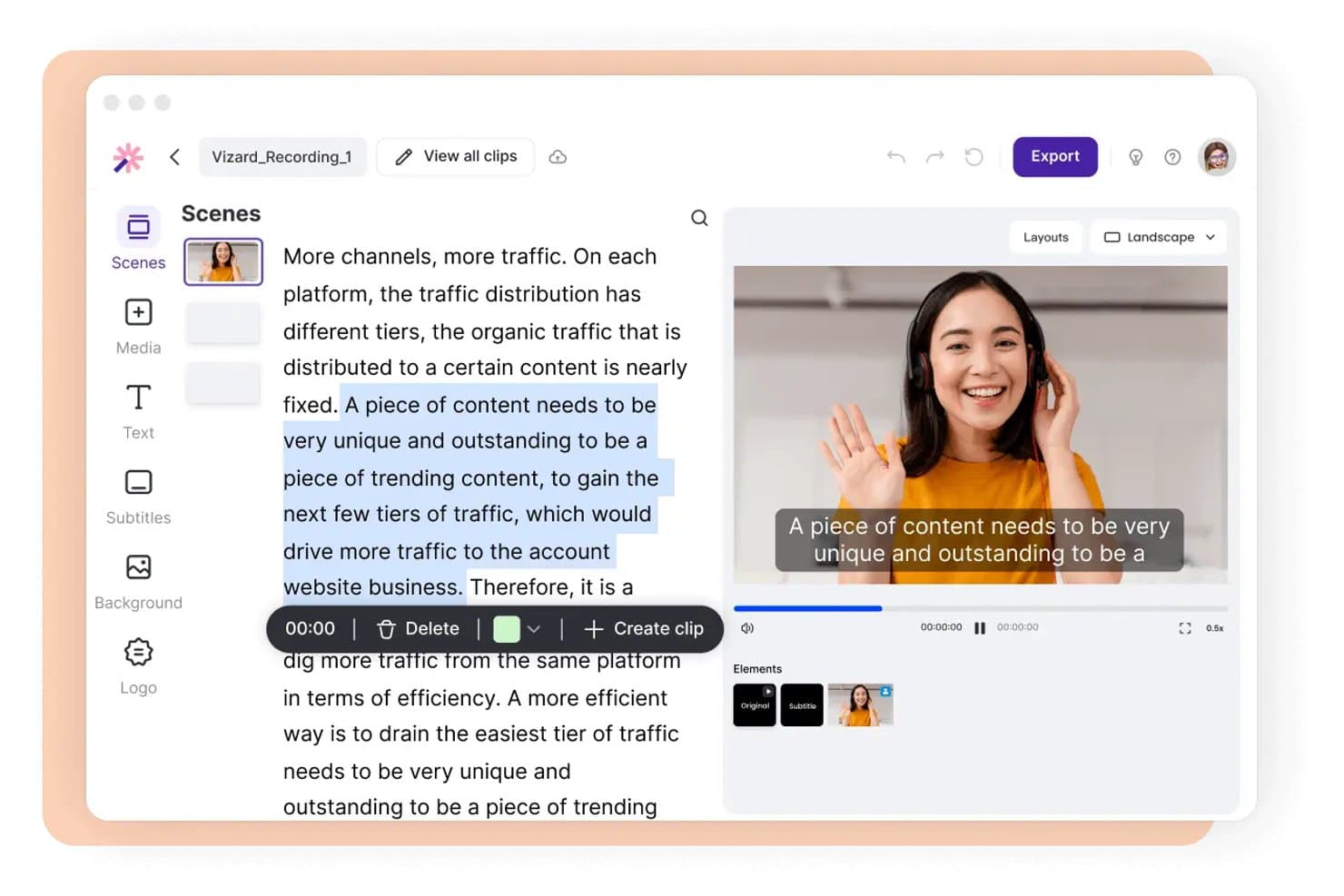
Vizard offers a text-based video editor that lets users select transcript segments and instantly create clips with subtitles. Vizard is an AI-powered video repurposing tool that takes long-form podcast recordings and automatically generates short, captioned, social-ready clips with auto-reframing, transcript-based editing, and direct multi-platform publishing.
Who Is Vizard Best For?
Vizard is a strong fit for social media content leads and content marketing managers who regularly repurpose podcast episodes into short-form clips for TikTok, Reels, and Shorts.
Why I Picked Vizard
Vizard earns its spot on my shortlist because the automated clipping pipeline cuts down the most tedious part of podcast repurposing. I paste a YouTube or Zoom link, and Vizard transcribes the full episode, identifies strong moments, and assigns each one a virality score based on hook strength, pacing, and audio energy. I can then trim clips by editing the transcript directly and export vertically reframed, captioned clips that are ready to publish.
Vizard Key Features
- AI dynamic captions: Automatically generates, customizes, and translates captions in 30+ languages for video clips.
- Team workspace: Lets multiple users collaborate, share projects, and manage brand assets in a centralized interface.
- Direct social publishing: Connects up to 20 social media accounts for scheduling and publishing clips from a content calendar.
- API access: Provides a REST API to automate video clip generation and publishing processes programmatically.
Vizard Integrations
Vizard offers native integrations with YouTube, Zoom, and Google Drive, provides direct social publishing to TikTok, Instagram, Facebook, LinkedIn, and X, and includes an API for custom integrations.
Pros and Cons
Pros:
- Multi-account direct publishing for social platforms
- Auto-captioning supports 30+ languages
- Direct social scheduling across accounts
Cons:
- Export duration limited on standard tiers
- Does not support live recording sessions
Learn more about Vizard: Best for hosting with built-in distribution tools
- Free plan available
- From $12/month (billed annually)
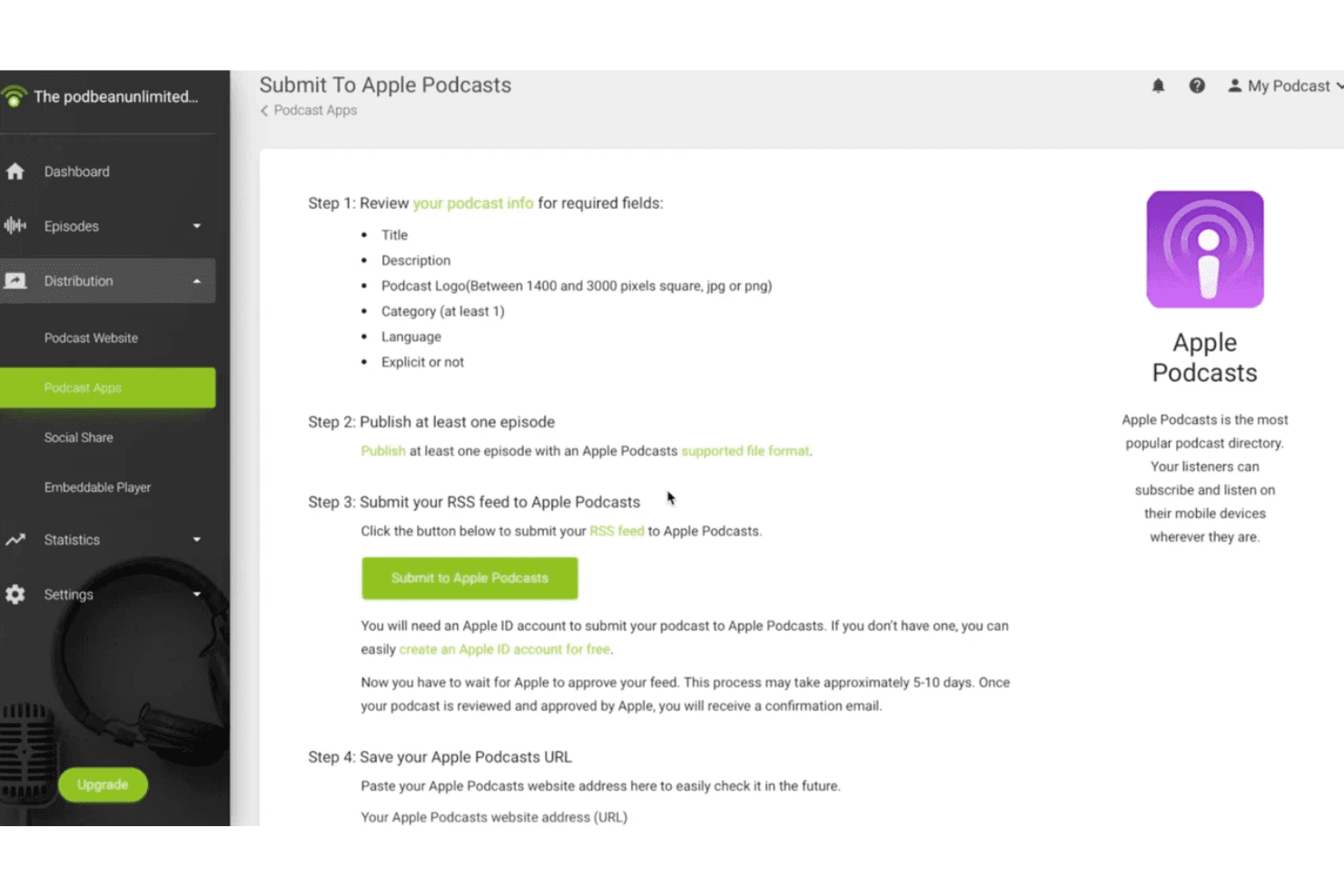
Podbean offers a step-by-step guide to submit your podcast RSS feed directly to Apple Podcasts from its distribution dashboard. Podbean is a podcast hosting platform that supports audio and video podcast publishing, combining unlimited cloud storage, one-click directory distribution, built-in monetization tools, and AI-assisted content creation.
Who Is Podbean Best For?
Podbean suits independent creators and brand content teams who need a centralized hub for hosting, distributing, and monetizing both audio and video podcast content.
Why I Picked Podbean
Podbean earns its spot on my shortlist because one-click distribution to Apple Podcasts, Spotify, Amazon Music, and iHeartRadio means I don't have to manage directory submissions separately. I also like the auto-share feature, which pushes new video episodes directly to YouTube, Facebook, and LinkedIn the moment they publish. The video-to-podcast conversion tool lets me sync a YouTube playlist into a podcast feed automatically, without any manual re-uploading between platforms.
Podbean Key Features
- Video podcast hosting: Upload and host video podcasts on plans that support video alongside audio content.
- Private podcasting: Restrict access to video podcast episodes with private or internal distribution controls.
- AI audio optimization: Use built-in AI tools for noise reduction, audio leveling, and silence removal on uploaded content.
- Custom podcast websites: Generate a mobile-responsive podcast website with customizable themes for your video or audio show.
Podbean Integrations
Podbean offers native integrations with Mailchimp, Dropbox, Google Analytics, Launchsoft, WaveLab, and Dataddo. An API is available for custom integrations.
Pros and Cons
Pros:
- AI-powered audio processing and leveling
- Automated video-to-podcast conversion tool
- Supports video podcast and audiogram uploads
Cons:
- No built-in live video editing tools
- Lacks multi-track video recording support
Learn more about Podbean: Best for live event integration
- Free demo available
- Pricing upon request
Visit WebsiteCustomer Rating:4.9/5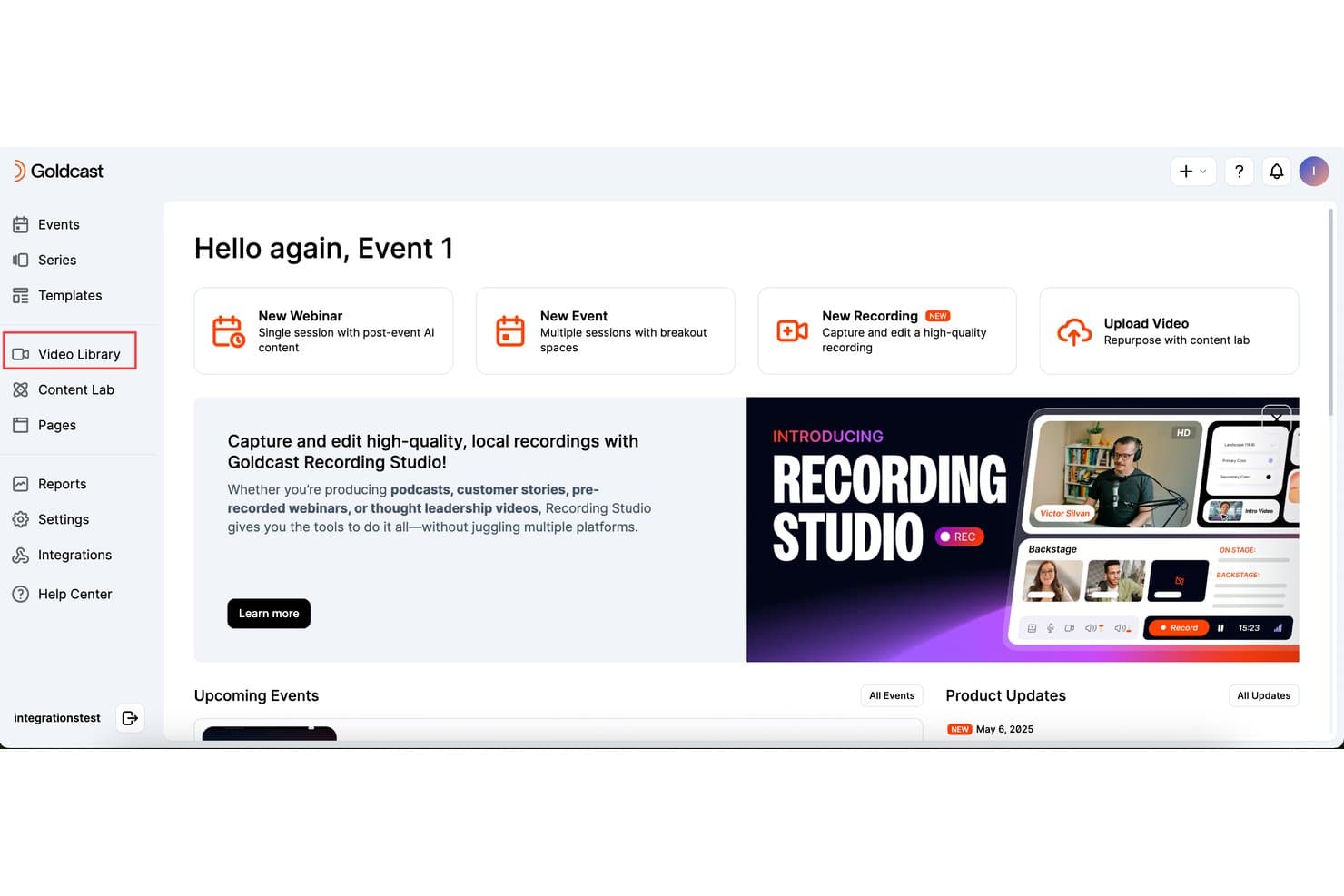
Goldcast offers a Video Library section and a Recording Studio feature for capturing and editing high-quality local recordings, suitable for podcasts and pre-recorded content. Goldcast Recording Studio is a B2B video recording platform that captures HD local multi-track recordings for podcasts, interviews, and pre-recorded webinars, with built-in editing tools and direct publishing to live events and branded video hubs.
Who Is Goldcast Best For?
It's a strong fit for B2B demand generation and content marketing teams that already run webinar or virtual event programs and want to extend that content into a podcast format.
Why I Picked Goldcast
Goldcast earns its spot on my shortlist because no other video podcast tool I've used connects recorded content directly to a live event pipeline the way this one does. I record an interview with per-participant local HD tracks, then publish it straight into a pre-recorded webinar or branded video hub, with no file exporting needed. Content Lab then picks up that same recording and auto-generates clips, captions, and social posts from it automatically.
Goldcast Key Features
- Automatic guest invites and calendar holds: Send scheduling links and calendar blocks automatically to podcast or interview guests.
- Text-based editing tools: Edit video and audio recordings directly by making quick text edits to transcripts.
- Custom branding overlays: Add logos, speaker name cards, backgrounds, and custom layouts during editing.
- Multi-format export options: Download recordings in separate audio and video tracks, suitable for multiple platforms.
Goldcast Integrations
Goldcast offers native integrations with HubSpot, Eloqua, Salesforce Pardot, Salesforce Sales Cloud, Validar, Slack, Wistia, and supports custom integrations via API.
Pros and Cons
Pros:
- Automated calendar holds for interview guests
- Local HD multi-track recording for guests
- Direct publishing to live or simulated events
Cons:
- Editing tools lack multi-clip stitching
- Requires enterprise pricing upon request
Learn more about Goldcast: Best for remote interviews with HD recordings
- 14-day free trial + free plan + free demo available
- From $24/month (billed annually)
Visit WebsiteCustomer Rating:4.8/5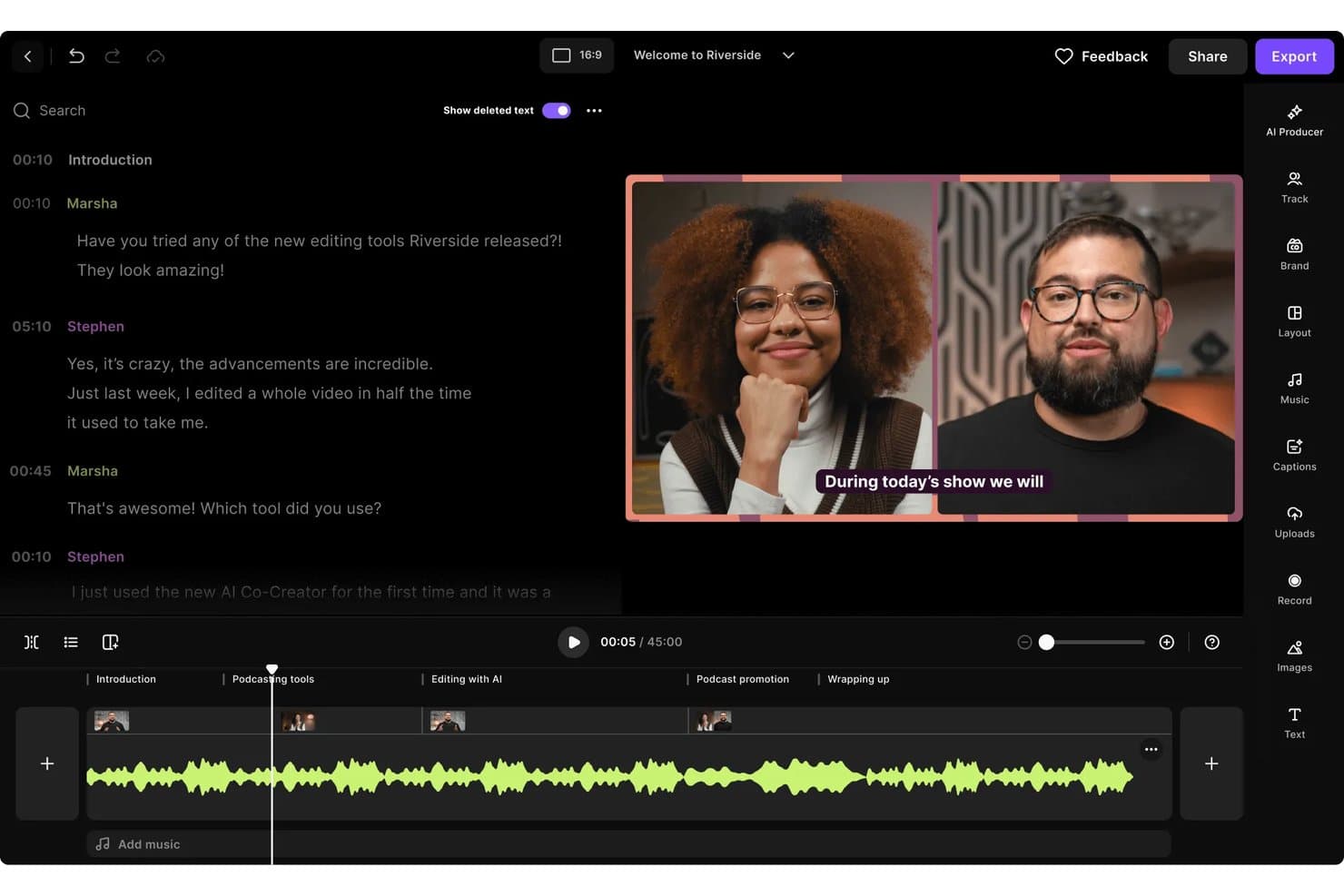
Riverside offers a video podcast editor with transcript-based editing, multi-speaker video preview, captions, and a timeline with labeled sections for easy navigation. Riverside (or Riverside.fm) is an all-in-one video podcast platform that combines local multi-track recording in up to 4K, AI-powered editing, short-form clip generation, multistreaming, and episode publishing tools.
Who Is Riverside Best For?
Riverside is a strong fit for content marketing teams and brand podcast producers who record regularly with remote guests and need quality output without a dedicated production setup.
Why I Picked Riverside
Riverside earns its spot on my shortlist because of how it handles the biggest risk in remote recording: a guest's unstable internet connection. It records each participant's audio and video locally on their device in up to 4K, then uploads automatically, so the output is never at the mercy of a shaky WiFi signal. I also rely on its text-based editor to cut silences and filler words directly from the transcript, turning a raw interview into a clean episode without switching tools.
Riverside Key Features
- AI Magic Clips: Instantly generates vertical, captioned social clips from long-form episodes.
- Multistreaming: Broadcasts live to multiple platforms like YouTube, Facebook, and LinkedIn at once.
- Magic Audio enhancement: Automatically cleans and levels audio tracks during editing.
- Branded studio overlays: Supports custom backgrounds, logos, and lower thirds for consistent brand visuals.
Riverside Integrations
Riverside offers native integrations with Adobe Premiere Pro, Final Cut Pro, Spotify for Podcasters, Transistor, Castos, HubSpot, Salesforce, and Google Calendar. An API is available for custom integrations.
Pros and Cons
Pros:
- Built-in teleprompter for solo recording sessions
- Generates AI transcripts with high accuracy
- Captures local 4K resolution per participant
Cons:
- Mobile recording quality lags behind desktop
- Occasional delays processing large video files
Learn more about Riverside: Best for fast editing with text-based tools
- Free plan available
- From $16/user/month (billed annually)
Visit WebsiteCustomer Rating:4.6/5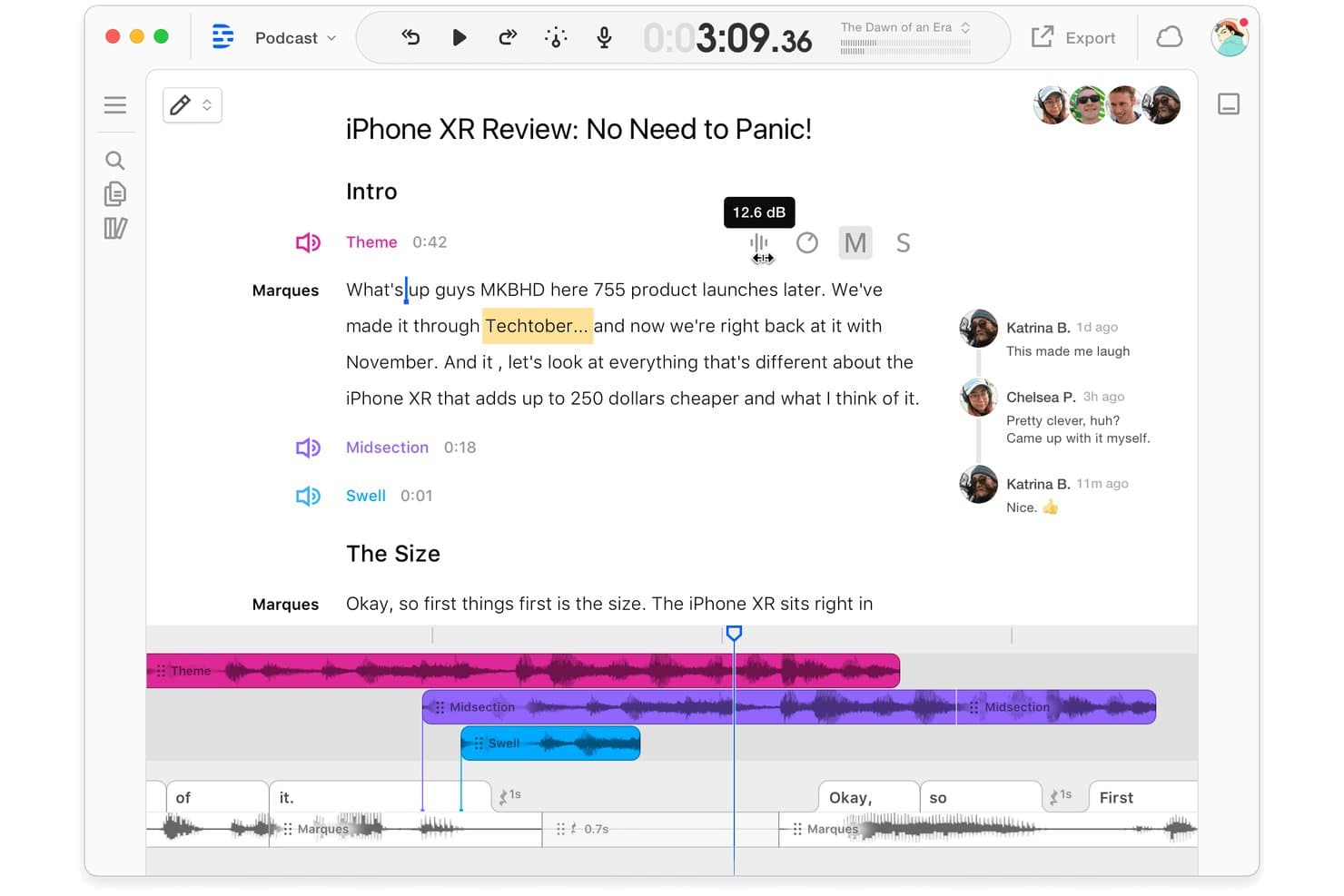
Descript offers a collaborative podcast editing interface with transcript-based editing, multi-track audio timeline, and real-time team commenting. Descript is a video podcast editing platform that combines text-based audio and video editing, remote multi-track recording, AI-powered clip generation, and direct publishing into a single workflow.
Who Is Descript Best For?
Descript works well for solo creators and small marketing teams who need to produce, edit, and distribute video podcasts without a separate post-production setup.
Why I Picked Descript
I picked Descript as one of the best because its text-based editing approach genuinely changes how fast you can cut a video podcast. Instead of scrubbing through a timeline, I edit the auto-generated transcript directly, deleting words or sentences to remove them from the audio and video simultaneously. The Underlord AI co-editor takes this further by automatically identifying and stripping out filler words and retakes across an entire recording in seconds.
Descript Key Features
- Remote multi-track recording: Capture up to 10 participants with local, individual audio and video tracks for each guest.
- Studio Sound audio enhancement: Use AI-powered processing to make every voice recording sound clear and professional.
- Brand Studio customization: Apply custom brand assets, intros, overlays, and templates directly in your editing project.
- AI-powered clip generation: Automatically create short-form, vertical video clips ready for TikTok, Reels, or Shorts.
Descript Integrations
Descript offers native integrations with Zoom, SquadCast, Restream, Wistia, YouTube, Buzzsprout, Captivate, Podbean, Google Drive, and HubSpot.
Pros and Cons
Pros:
- Studio Sound automatically improves vocal clarity
- AI-generated filler word and retake removal
- Overdub feature creates realistic AI voiceovers
Cons:
- Lacks multi-camera video switching features
- Processing speed slows down on large files
Learn more about Descript: Best for multi-track audio and video recording
- Free plan + free trial available
- From $24/month (billed annually)
Visit WebsiteCustomer Rating:3.8/5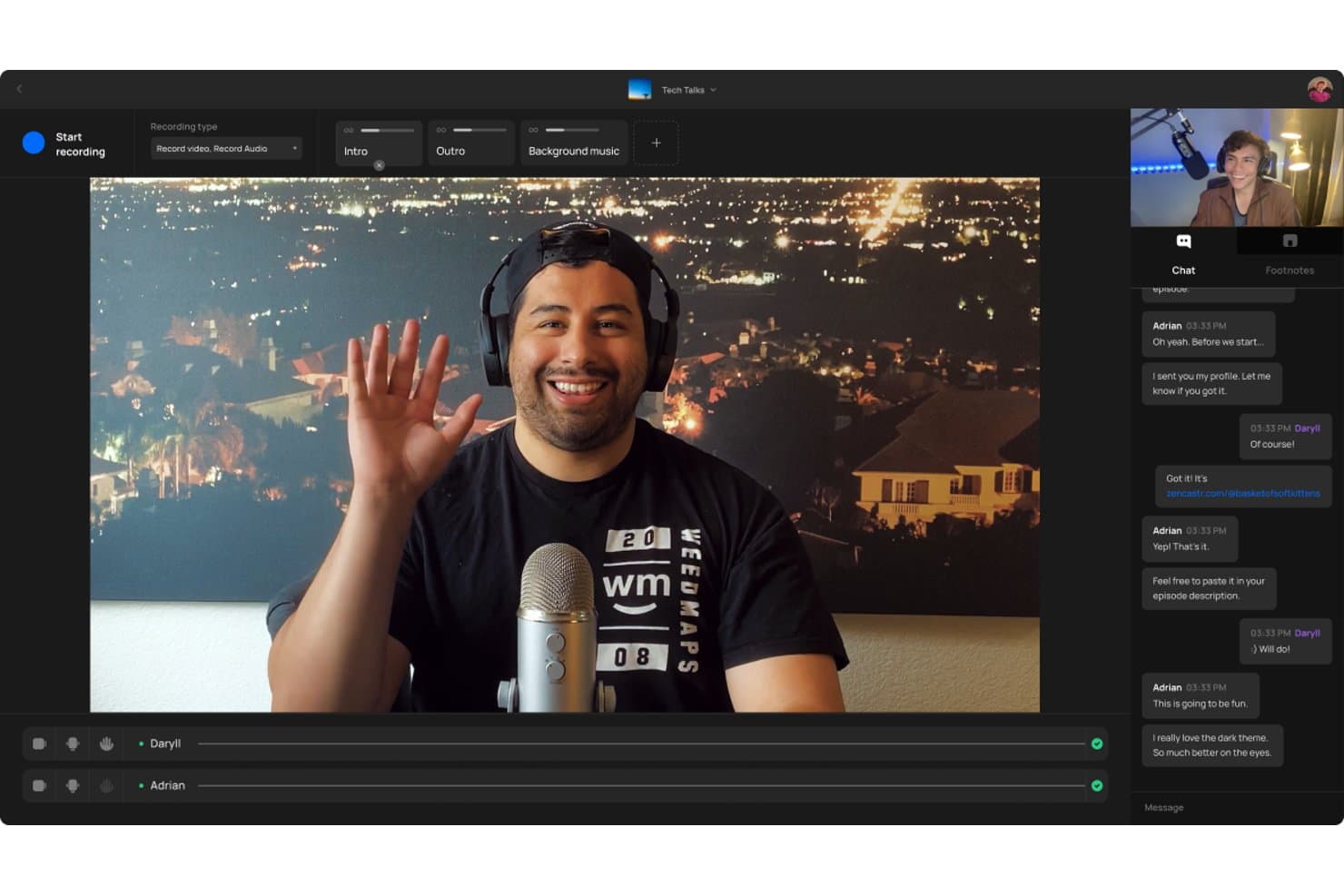
Zencastr offers a video podcast recording interface with multi-participant support, live chat, and audio/video controls including intro, outro, and background music tracks. Zencastr is a browser-based video podcast platform that records separate local audio and video tracks per participant, with built-in AI editing, clip generation, hosting, and social distribution tools.
Who Is Zencastr Best For?
Zencastr is a strong fit for solo creators and small marketing teams who need studio-quality remote recordings without a dedicated post-production setup.
Why I Picked Zencastr
Zencastr earns its spot on my shortlist because of how it handles multi-track recording at the source. Rather than capturing a mixed feed, it records each participant's audio and video locally on their device, so a shaky internet connection won't degrade the final file. I get separate 4K video tracks and lossless 16-bit 48kHz WAV audio per guest, which makes editing in post a much cleaner process.
Zencastr Key Features
- Text-based editing suite: Edit video and audio by editing transcribed text directly in the browser.
- AI-powered clip generation: Automatically create shareable video clips with captions and titles for social platforms.
- Dynamic ad insertion: Insert and manage personalized pre-roll, mid-roll, and post-roll ads in your episodes.
- Team collaboration tools: Invite multiple team members to manage shows, edit content, and handle publishing.
Zencastr Integrations
Zencastr offers native integrations with YouTube, Apple Podcasts, and Spotify.
Pros and Cons
Pros:
- Automatic clip creation with social publishing
- Dynamic ad insertion tools for monetization
- Lossless 16-bit 48kHz WAV audio recording
Cons:
- Customer support response is often delayed
- No live streaming to any platforms
Learn more about Zencastr: Best for browser-based multi-guest production
- Free plan available
- From $44.99/month
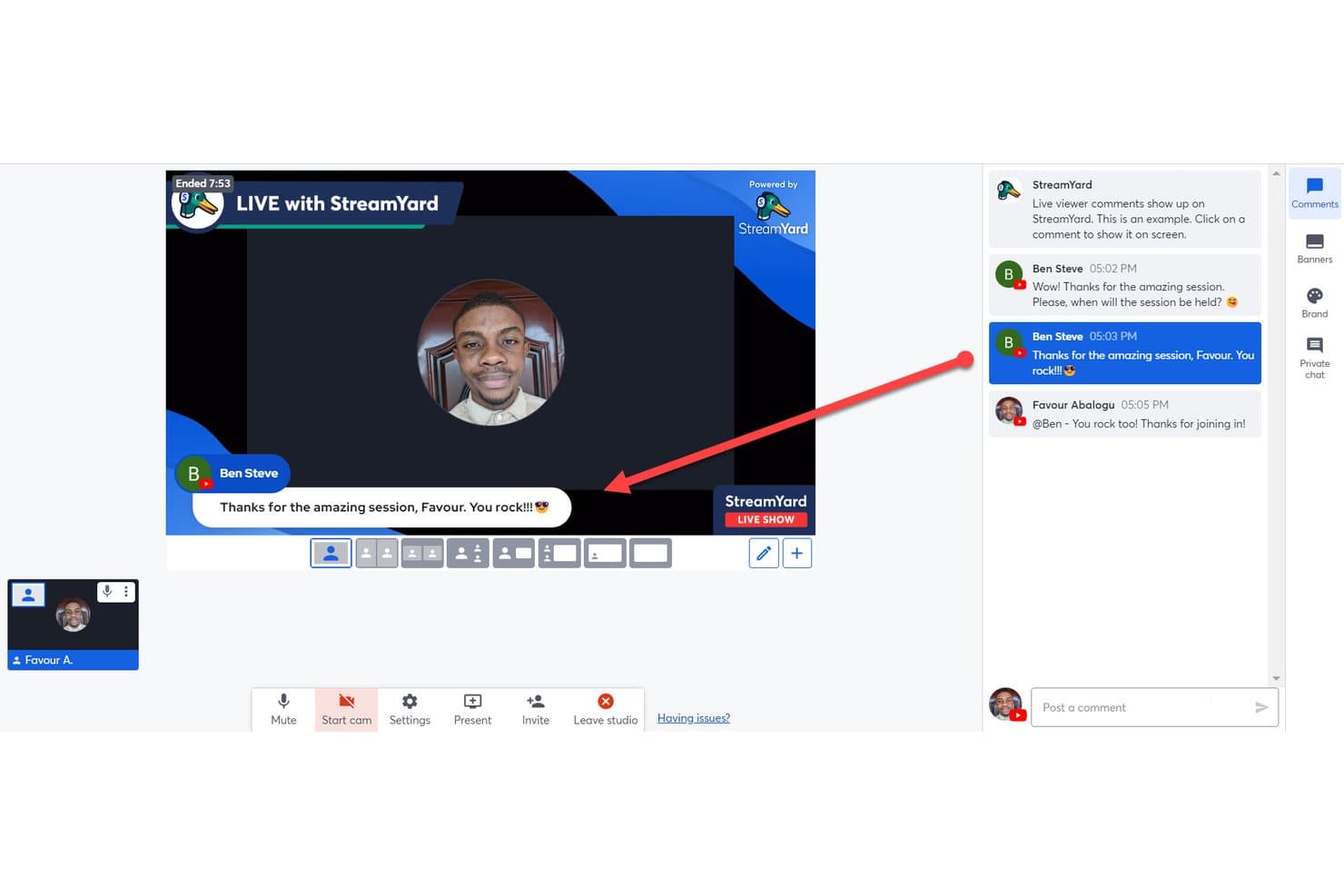
StreamYard offers a live comment display feature that lets hosts pin viewer comments directly onto the broadcast screen during a live show. StreamYard is a browser-based live streaming and video podcast platform that combines multi-guest recording, multi-streaming to social platforms, branded overlays, and AI clip generation in a single studio.
Who Is StreamYard Best For?
StreamYard is a strong fit for content creators, social media teams, and brand podcast producers who prioritize live publishing and multi-guest production over deep post-production editing.
Why I Picked StreamYard
StreamYard earns its spot on my shortlist because no-download, browser-based guest access genuinely removes the biggest friction point in remote podcast production. I can bring up to 10 guests on screen with local recordings captured per participant, so a shaky Wi-Fi connection on someone's end doesn't wreck the final audio or video. The Greenroom feature lets me prep guests off-air before they go live, which I've found invaluable for keeping multi-guest episodes running smoothly.
StreamYard Key Features
- AI Clips: Instantly generate short-form, vertical videos from recorded episodes for social sharing.
- Branded customization tools: Add custom logos, overlays, backgrounds, fonts, and video clips within the studio.
- Multistreaming to multiple platforms: Broadcast live to Facebook, YouTube, LinkedIn, X, Twitch, and custom RTMP destinations at once.
- On-Air webinars: Host webinars with audience registration and embed them directly on your website.
StreamYard Integrations
StreamYard offers native integrations with Facebook, LinkedIn, YouTube, X (Twitter), Twitch, Kick, and Vimeo.
Pros and Cons
Pros:
- Private greenroom simplifies pre-show guest prep
- Supports up to ten on-screen guests
- No-download browser-based guest access
Cons:
- Separate track export is not always available
- Local multi-track recording requires higher plans
Learn more about StreamYard:
Muita videopodcast-ohjelmistoja
Tässä on joitakin muita videopodcast-ohjelmistovaihtoehtoja, jotka eivät päässeet listalleni mutta joihin kannattaa silti tutustua:
- 11AsyncBest for asynchronous team podcasting
- 12EcammBest for live streaming on Mac devices
- 13MelonBest for instant cloud-based broadcasting
- 14CastMagicBest for AI-powered transcript generation
- 15vMixBest for live video mixing features
- 16Adobe Premiere ProBest for professional-grade editing flexibility
- 17Hindenburg ProBest for intuitive audio story editing
- 18LibsynBest for publishing and monetization options
- 19BuzzsproutBest for detailed listener analytics reports
- 20Streamlabs Talk StudioBest for multi-platform streaming from browser
How I Evaluate Video Podcast Software
I evaluate video podcast software in two layers: the core capabilities a tool must have—like multi-track recording—and the differentiators, like AI clip tools and live streaming, that set it apart.
Core Functionality (Table Stakes For This List)
When I'm selecting tools for my list, I rank each one on a scale from 0 (does not offer the functionality) to 5 (excels in this area) for each core functionality listed below. Then, I calculate the tool's total score into a percentage. Each tool needs to achieve a minimum total score of 65% to be considered for inclusion.
- Remote Multi-Track Recording: I check whether each participant's audio and video are captured as separate local tracks, so a guest's weak Wi-Fi won't tank your final mix.
- High-Resolution Video Capture: The minimum I look for is 1080p per participant, with bonus points for tools that offer 4K and individual track exports for post-production.
- Integrated Video Editing: I evaluate the in-platform editor for trimming, transitions, and layout switching—things like multi-cam views that let you skip a round trip to Premiere.
- Short-Form Clip Generation: I look at how each tool handles turning a 45-minute episode into vertical clips for Reels or Shorts, especially AI-driven reframing and caption options.
- Live Streaming & Multistreaming: Can you go live to YouTube, LinkedIn, and Facebook at the same time? I evaluate destination count, RTMP support, and live producer controls.
- Branded Customization: I look for logo overlays, custom backgrounds, lower thirds, and saved brand templates—everything your team needs to keep episodes visually on-brand.
Once I have a list of tools that meet the criteria, I consider what sets each platform apart.
Differentiating Factors (What Sets Vendors Apart)
Here's how I compare and contrast different vendors:
Standout Features
AI-powered clip generation is a major differentiator. I evaluate whether a tool can identify highlight moments from a full episode and auto-reframe them into vertical clips with animated captions for TikTok or Shorts. Automated show notes and transcripts matter just as much—chapter markers and SEO-ready summaries can save your team hours of post-production work. Live simulcast support also stands out, since broadcasting to YouTube, LinkedIn, and custom RTMP destinations at the same time turns one recording session into a multi-channel content event.
Beyond Features
The guest experience matters a lot. I look for browser-based access with pre-session mic and camera checks so non-technical guests can join without downloading anything. Post-production workflow is another big factor—text-based editing and automatic audio leveling can cut hours from your editing pipeline. I also evaluate distribution integrations, like native connections to hosting platforms and YouTube metadata syncing, since one-click publishing keeps your team from juggling multiple dashboards on release day.
Kuinka valita videopodcast-ohjelmisto
Laajoihin ominaisuusluetteloihin ja monimutkaisiin hinnoittelurakenteisiin on helppo juuttua. Jotta voit keskittyä työstäessäsi juuri sinun tarpeisiisi sopivaa ohjelmiston valintaprosessia, pidä seuraavat tekijät mielessä:
| Tekijä | Mitä kannattaa ottaa huomioon |
|---|---|
| TekijäSkaalautuvuus | Mitä kannattaa ottaa huomioonSelviääkö alusta useista podcasteista tai jaksoista tiimisi kasvaessa? Ota huomioon osallistuja- ja tallennustilarajoitukset. |
| TekijäIntegraatiot | Mitä kannattaa ottaa huomioonToimiiko se sujuvasti suosimiesi muokkaustyökalujen, julkaisualustojen tai analytiikan hallintapaneelien kanssa? Vältä tietojen manuaalista siirtämistä. |
| TekijäMukautettavuus | Mitä kannattaa ottaa huomioonVoitko brändätä tallenteet helposti tai mukauttaa asetteluja vastaamaan yrityksesi visuaalista identiteettiä ja luovia tarpeita? |
| TekijäHelppokäyttöisyys | Mitä kannattaa ottaa huomioonKuinka jyrkkä oppimiskäyrä on? Pystyisivätkö teknisesti kokemattomat vieraat tai uudet tiimin jäsenet ottamaan ohjelmiston käyttöön ilman pitkiä opastuksia? |
| TekijäKäyttöönotto ja perehdytys | Mitä kannattaa ottaa huomioonKuinka paljon käyttöönotto vaatii valmisteluja? Etsi ohjattua perehdytystä, tietopankkeja tai sovelluksen sisäistä tukea käynnistysviiveiden välttämiseksi. |
| TekijäKustannukset | Mitä kannattaa ottaa huomioonVastaavatko paketit tallennusmäärääsi, vientitarpeitasi ja käyttäjäroolejasi? Tarkista toistuvat maksut ja päivitysten rajoitukset. |
| TekijäTurvallisuustoimet | Mitä kannattaa ottaa huomioonMiten tietosuoja on järjestetty raakavideon, vieraiden tietojen ja jakelukanavien suojaamiseksi? Kysy salauksesta ja yksityisyysasetuksista. |
| TekijäTuen saatavuus | Mitä kannattaa ottaa huomioonSaatko nopeasti apua, jos jokin menee pieleen? Tarkista työnkulkuusi sopivat live-chat-, sähköposti- tai puhelintukivaihtoehdot. |
Mikä on videopodcast-ohjelmisto?
Videopodcast-ohjelmisto on joukko työkaluja, jotka on suunniteltu sekä video- että äänisisältöä sisältävien podcastien tallentamiseen, muokkaamiseen ja jakeluun. Se tarjoaa kaiken tarvittavan etähaastattelujen tallentamiseen, brändättyjen visuaalisten elementtien luomiseen, sosiaalisen median klippien tuottamiseen ja jaksojen julkaisemiseen useille alustoille yhden työnkulun kautta. Tämän ohjelmiston avulla tiimisi voi tuottaa ammattimaista ja visuaalisesti kiinnostavaa sisältöä ilman teknistä vaivaa.
Videopodcast-ohjelmiston ominaisuudet
Kun valitset videopodcast-ohjelmistoa, kiinnitä huomiota seuraaviin keskeisiin ominaisuuksiin:
- Etämoniraitatallennus: Tallenna erilliset ääni- ja videotiedostot jokaiselle osallistujalle, mikä takaa parhaan mahdollisen muokkausjoustavuuden ja laadukkaan lopputuloksen internet-yhteydestä riippumatta.
- Teräväpiirtovideon tallennus: Tallenna jokaisen osallistujan video Full HD- tai 4K-tarkkuudella, jotta voit tarjota ammattimaisen ja terävän kuvan, joka toimii kaikissa jakelukanavissa.
- Integroitu videonmuokkaus: Muokkaa podcasteja alustalla – leikkaa, lisää siirtymiä tai vaihda asetteluja – ilman siirtymistä ulkoiseen muokkausohjelmistoon.
- Lyhytvideoiden luonti: Luo automaattisesti tai manuaalisesti pystysuuntaisia ja sosiaaliseen mediaan valmiita videokatkelmia TikTokin, Instagram Reelsin ja YouTube Shortsin kaltaisille alustoille.
- Suoratoisto ja monisuoratoisto: Lähetä jaksot suorana samanaikaisesti useisiin kohteisiin, kuten YouTubeen ja LinkedIniin, ja kasvata yleisösi tavoittavuutta yhdestä istunnosta käsin.
- Brändin mukauttaminen: Lisää logot, taustat, peittokuvat ja muut brändielementit suoraan videotuotokseen yhtenäisen ja viimeistellyn ilmeen saavuttamiseksi.
- Tekoälypohjaiset tekstitykset ja ohjelmamuistiinpanot: Luo sisäänrakennetuilla tekoälytyökaluilla tekstityksiä, yhteenvetoja ja lukumerkintöjä, mikä helpottaa sisällön uudelleenkäyttöä ja SEO-optimointia.
- Selaimeen perustuva vieraiden liittyminen: Anna vieraiden liittyä tallenteisiin yksinkertaisen verkkolinkin kautta ilman ohjelmistolatauksia, mikä vähentää etäosallistujien teknisiä haasteita.
- Suoran julkaisun integraatiot: Siirrä valmiit jaksot yhdellä napsautuksella suoraan podcastien isännöintialustoille tai sosiaalisen median kanaviin ja nopeuta jälkituotantoprosessia.
Videopodcast-ohjelmiston hyödyt
Videopodcast-ohjelmiston käyttöönotto tarjoaa useita hyötyjä tiimillesi ja yrityksellesi. Tässä muutamia etuja, joita voit odottaa:
- Korkeampi tuotannon laatu: Paikallinen moniraitatallennus ja teräväpiirtovideo varmistavat, että jaksosi näyttävät ja kuulostavat ammattimaisilta osallistujien sijainnista riippumatta.
- Nopeammat muokkaustyönkulut: Sisäänrakennetut muokkaustyökalut ja tekoälypohjaiset tekstitysominaisuudet nopeuttavat jälkituotantoa, joten voit julkaista jaksot nopeammin.
- Kiinnostavampi sisältö: Brändättyjen visuaalisten elementtien, peittokuvien ja suoratoiston tuki luo visuaalisesti rikkaan ja vuorovaikutteisen kokemuksen, joka houkuttelee katsojia.
- Yksinkertaistettu vieraiden osallistuminen: Selaimeen perustuvat työnkulut poistavat monimutkaiset asetukset ja helpottavat etävieraiden liittymistä vähäisin teknisin haastein.
- Laajempi yleisön tavoittavuus: Suoran julkaisun integraatiot ja suoratoisto useisiin kanaviin auttavat sisältöäsi tavoittamaan kuuntelijat ja katsojat samanaikaisesti useilla alustoilla.
- Helppo uudelleenkäyttö: Lyhytvideoiden luonti ja automaattiset ohjelmamuistiinpanot helpottavat jokaisen jakson muuttamista useiksi sosiaaliseen mediaan ja SEO-optimointiin sopiviksi sisältökokonaisuuksiksi.
- Parempi yhteistyö: Usean käyttäjän suunnitelmat ja roolipohjaiset käyttöoikeudet auttavat tiimejä ja toimistoja hallitsemaan useita ohjelmia ja osallistujia vaivattomasti.
Videopodcast-ohjelmiston kustannukset ja hinnoittelu
Videopodcast-ohjelmiston valinta edellyttää saatavilla olevien hinnoittelumallien ja suunnitelmien ymmärtämistä. Kustannukset vaihtelevat ominaisuuksien, tiimin koon, lisäosien ja muiden tekijöiden perusteella. Alla oleva taulukko sisältää yhteenvedon videopodcast-ohjelmistoratkaisuissa yleisistä suunnitelmista, niiden keskimääräisistä hinnoista ja tyypillisistä ominaisuuksista:
Videopodcast-ohjelmiston suunnitelmien vertailutaulukko
| Suunnitelman tyyppi | Keskimääräinen hinta | Yleiset ominaisuudet |
|---|---|---|
| Suunnitelman tyyppiIlmainen suunnitelma | Keskimääräinen hinta$0 | Yleiset ominaisuudetSallii perustallennuksen, tarjoaa yksiraitaisen äänen, rajoitetun vientitarkkuuden ja perustason muokkaustyökalut. |
| Suunnitelman tyyppiHenkilökohtainen suunnitelma | Keskimääräinen hinta$10-$30/user/month | Yleiset ominaisuudetTukee moniraitatallennusta, 1080p-videota, sosiaalisen median klippien luontia, rajoitettua brändäystä ja perustason tekoälytekstityksiä. |
| Suunnitelman tyyppiYrityssuunnitelma | Keskimääräinen hinta$35-$80/user/month | Yleiset ominaisuudetSisältää 4K-tallennuksen, edistyneen muokkauksen, tiimityöskentelyn, suoratoiston, omalla tuotemerkillä tarjottavan brändäyksen ja analytiikan. |
| Suunnitelman tyyppiYritystason suunnitelma | Keskimääräinen hinta$90+/user/month | Yleiset ominaisuudetTarjoaa nimetyn asiakastuen, mukautetut integraatiot, toimistotyötilat, paremman tietoturvan ja ensisijaisen tuen. |
Videopodcast-ohjelmiston usein kysytyt kysymykset
Tässä on vastauksia videopodcast-ohjelmistoja koskeviin yleisiin kysymyksiin:
Voinko käyttää videopodcast-ohjelmistoa suoratoistoon ja tallentamiseen samanaikaisesti?
Kyllä, monien podcastien tallennusohjelmistojen avulla voit suoratoistaa esimerkiksi YouTubeen ja LinkedIniin samalla, kun tallennat korkealaatuista ääntä ja moniraitaista videota paikallisesti. Voit tallentaa esityksen visuaalisen sisällön näytöntallennuksella ja jopa järjestää yleisösi livepuheluita. Näin saat jälkikäsittelyä varten puhtaat, pakkaamattomat tiedostot riippumatta live-internet-yhteytesi laadusta.
Sopivatko videopodcast-ohjelmistot tekniikkaa tuntemattomille aloittelijavieraille?
Kyllä, useimmat nykyaikaiset ratkaisut tarjoavat selaimessa toimivan vieraiden perehdytyksen, eivätkä vaadi ohjelmistojen lataamista. Lisäksi niissä on usein ohjattuja tutoriaaleja tai ennen istuntoa tehtäviä tarkistuksia kameraa, mikrofonia ja valaistusta varten. Vieraat voivat liittyä tietokoneen selaimella tai iPhonelle tai iPadille tarkoitetuilla mobiilisovelluksilla, joten ensikertalaisetkin voivat osallistua vaivattomasti.
Miten tekoälypohjainen leikkeiden luonti toimii videopodcast-ohjelmistossa?
Tekoälypohjainen leikkeiden luonti tunnistaa pitkistä jaksoista kohokohdat tai jaettavaksi sopivat hetket ja muotoilee ne automaattisesti pysty- tai neliömuotoisiksi videoleikkeiksi sisäänrakennetulla videoeditorilla. Monet työkalut lisäävät automaattisesti tekstitykset, brändielementit ja tekijänoikeusvapaat äänitehosteet, mikä säästää tuntikausia manuaaliselta muokkaukselta, kun sisältöä muokataan uudelleen sosiaalista mediaa varten.
Mitä integraatioita videopodcast-ohjelmistossa kannattaa etsiä?
Etsi integraatioita podcastien isännöintialustoihin, sosiaalisen median kanaviin, ulkoisiin äänenmuokkausohjelmistoihin ja analytiikan hallintapaneeleihin. Alustan yhdistäminen suoraan monipuoliseen ääni- tai videoeditoriin yksinkertaistaa työnkulkuasi, sillä voit julkaista, seurata ja optimoida sisältöä ilman manuaalista lataamista tai lähettämistä.
Voiko videopodcast-ohjelmistossa tehdä yhteistyötä tiimin kanssa?
Kyllä, monet alustat tarjoavat usean käyttäjän tilauksia ja roolipohjaisia käyttöoikeuksia, joiden ansiosta tuottajat, editoijat ja juontajat voivat hallinnoida jaksoja yhdessä, jakaa tehtäviä ja valvoa jälkituotantoa yhden jaetun työtilan sisällä.