

Reseña de SEO PowerSuite: Ventajas, Desventajas, Características y Precios
SEO PowerSuite ofrece una suite robusta de herramientas SEO que destacan por su asequibilidad y conjunto de características completas, lo que lo hace ideal tanto para principiantes como para profesionales del marketing experimentados.

Revisamos herramientas de manera independiente, y las comisiones ayudan a financiar nuestras pruebas. Consulta nuestra política de transparencia, nuestra metodología o sugiere una herramienta.
SEO PowerSuite is a desktop-based SEO reporting tool that covers rank tracking, backlink analysis, site auditing, and white-label report generation. I'd consider it if your team needs agency-grade SEO capabilities without paying Semrush's recurring subscription fees. You get comparable core functionality at a significantly lower cost, which makes it a practical pick for agencies or in-house teams managing multiple sites on a tighter budget.
SEO PowerSuite Evaluation Summary
4.6/5
- From $29.10/month (billed annually)
- Free plan available
Por qué confiar en nuestras recomendaciones de software
6,700+
Reviews
20
Industry experts
16+
Evaluation factors
14
Years
Nuestro equipo lleva probando y evaluando software desde 2012. Como líderes de marketing, sabemos lo difícil —y lo importante— que es elegir el software adecuado.
Para esta guía, evaluamos las herramientas mediante pruebas prácticas e investigación independiente, puntuando las herramientas según nuestros criterios de selección.
Nuestras reseñas reflejan nuestro criterio editorial humano, no un discurso de ventas.
Revisores expertos:
 Gui DrusinaDirector creativo
- Shriya GhateSenior Marketing Lead
 Amanda JacquesLíder de Marketing Ops

SEO PowerSuite Overview
In my opinion, SEO PowerSuite is a solid choice for SEO professionals and small to medium businesses looking for a well-rounded toolset without breaking the bank. It offers excellent value for its price, especially with its comprehensive features. You might find its interface less intuitive compared to other SEO tools, like Semrush and Ahrefs, but it compensates with robust reporting capabilities. Onboarding can be a bit challenging, but their support team is quite responsive. For those who prioritize features over a sleek interface, SEO PowerSuite stands out. It's particularly well-suited for agencies and in-house teams that need detailed analysis and reporting without the high costs of more premium tools.
Pros
- You can perform detailed SEO analysis with its diverse toolset.
- It offers excellent reporting capabilities for tracking progress.
- Your team gets responsive customer support when needed.
Cons
- The interface can feel outdated compared to other tools.
- Onboarding might be challenging for new users.
- You may find the software less intuitive than other options.
Is SEO PowerSuite Right For Your Needs?
Who Would be a Good Fit for SEO PowerSuite?
SEO PowerSuite is a great fit for small to medium businesses and digital marketing agencies needing comprehensive technical SEO tools without high costs. If your team requires detailed SEO reporting and analysis, SEO PowerSuite's diverse toolset can meet those needs. Its affordability and robust features make it ideal for in-house SEO teams and freelancers who want to enhance their SEO strategies without breaking the bank. The software's ability to track progress and offer responsive support is perfect for those who value data-driven decisions.
- Digital Marketing AgenciesYour agency benefits from its detailed reporting and analysis tools, helping you track and improve client outcomes.
- Small BusinessesSEO PowerSuite offers affordable SEO solutions, perfect for small businesses wanting to enhance their online presence.
- Freelance SEO SpecialistsFreelancers can leverage its comprehensive toolset to deliver high-quality SEO services without hefty software costs.
- In-House SEO TeamsYour team will appreciate the extensive features and support, enabling effective management of SEO campaigns.
- E-commerce BusinessesE-commerce sites can track search rankings and site audits, helping improve visibility and drive more traffic.
- Content CreatorsContent creators use its analysis tools to optimize content for better search engine performance and audience reach.
Who Would be a Bad Fit for SEO PowerSuite?
SEO PowerSuite might not suit large enterprises or tech-savvy teams looking for cloud-based solutions that offer seamless integrations with other software. If your team relies heavily on real-time collaboration or requires a sleek, modern interface, you might find SEO PowerSuite lacking. Its desktop-based nature could hinder teams that need access from multiple devices or locations. Additionally, if you expect a highly intuitive user experience, SEO PowerSuite's interface might feel cumbersome, especially for those accustomed to more user-friendly platforms.
- Large EnterprisesYour enterprise may find it lacks the scalability and integration options needed for complex operations.
- Tech-Savvy TeamsTeams expecting advanced, cloud-based features and seamless integrations might find its desktop-based approach limiting.
- Remote WorkforcesIf your team needs real-time collaboration across locations, SEO PowerSuite's desktop nature could be a barrier.
- Design AgenciesAgencies prioritizing sleek, modern interfaces might find its interface outdated compared to other solutions.
- Startups with Limited IT SupportStartups without dedicated IT support could struggle with its onboarding and setup requirements.
- Mobile-First CompaniesCompanies that need mobile accessibility won't find SEO PowerSuite's desktop-only setup accommodating.
Cómo Probamos y Puntuamos las Herramientas
Hemos dedicado años a construir, refinar y mejorar nuestro sistema de prueba y puntuación de software. El marco está diseñado para captar los matices de la selección de software y lo que hace a una herramienta eficaz, enfocándose en los aspectos críticos del proceso de decisión. A continuación, puedes ver exactamente cómo funcionan nuestras pruebas y puntuaciones en siete criterios. Esto nos permite brindar una evaluación imparcial de los programas basada en la funcionalidad principal, características destacadas, facilidad de uso, integración, soporte al cliente, reseñas de clientes y relación calidad-precio.
Funcionalidad Principal (25% de la puntuación final)
El punto de partida de nuestra evaluación siempre es la funcionalidad principal de la herramienta. ¿Cuenta con las funciones básicas que un usuario esperaría? ¿Alguna de esas funciones está reservada solo para planes de pago avanzados? Esperamos que, en esencia, una herramienta se mantenga al nivel de las capacidades mínimas de sus competidores.
Características Destacadas (25% de la puntuación final)
Después, evaluamos las características poco comunes y destacadas que van más allá de la funcionalidad típica de herramientas similares. Una puntuación alta refleja funciones especializadas o únicas que hacen el producto más rápido, eficiente o aportan un valor adicional al usuario. También evaluamos qué tan fácil es integrarse con otras herramientas habituales en el entorno tecnológico para expandir la funcionalidad del software. Las herramientas que ofrecen muchas integraciones nativas, conexiones de terceros y acceso a API para crear integraciones personalizadas tienen la mejor puntuación.
Facilidad de Uso (10% de la puntuación final)
Consideramos cuán rápido y fácil es ejecutar las tareas definidas en la funcionalidad central utilizando la herramienta. El software mejor puntuado está bien diseñado, es intuitivo, ofrece aplicaciones móviles, proporciona plantillas y hace que tareas relativamente complejas parezcan sencillas.
Incorporación (10% de la puntuación final)
Sabemos lo importante que es que un equipo adopte rápidamente una nueva plataforma, por eso evaluamos lo fácil que es aprender y usar una herramienta con la menor formación posible. Analizamos lo rápido que un integrante puede comenzar a usar la herramienta sin experiencia previa. Las soluciones mejor puntuadas requieren poco o ningún soporte.
Soporte al Cliente (10% de la puntuación final)
Vemos cuán rápido y sencillo es obtener ayuda por teléfono, chat en vivo o base de conocimientos. Las empresas y herramientas que ofrecen soporte en tiempo real logran la mejor puntuación, mientras que los chatbots obtienen la peor.
Reseñas de Clientes (10% de la puntuación final)
Más allá de nuestras propias pruebas y evaluaciones, consideramos el puntaje de recomendación de clientes actuales y anteriores. Revisamos la probabilidad de que, de poder elegir de nuevo, seleccionarían la herramienta por su funcionalidad principal. Un software con alta puntuación refleja una elevada recomendación de sus usuarios.
Relación Calidad-Precio (10% de la puntuación final)
Finalmente, considerando todos los demás criterios, revisamos el precio promedio de los planes básicos frente a las funciones y el valor de los demás factores de evaluación. El software que ofrece más por menos obtiene mejor puntuación.
Core Features
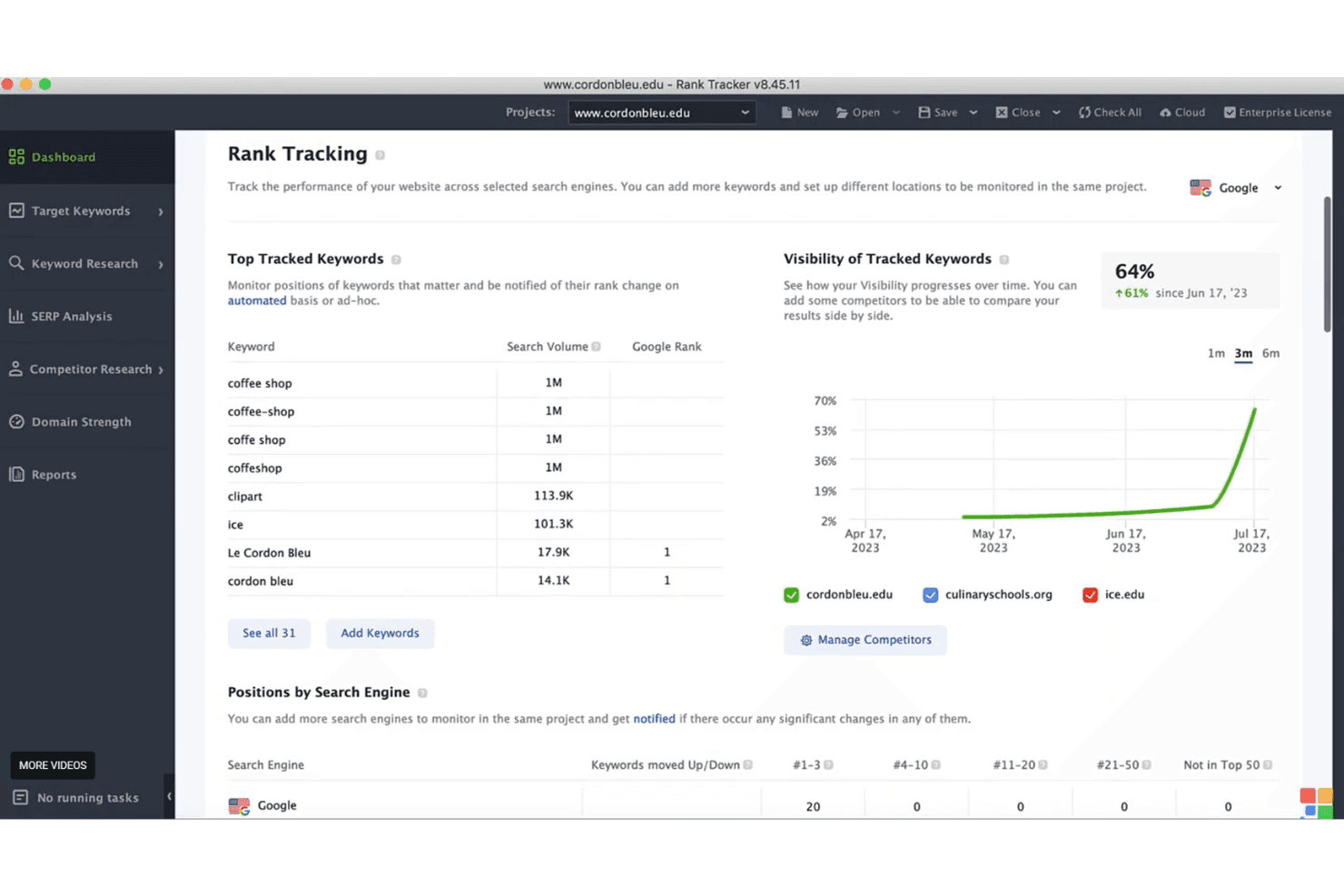
Rank Tracking
Monitor your website's keyword rankings over time with detailed graphs and reports. It helps your team changes in the SERP and adjust strategies quickly.
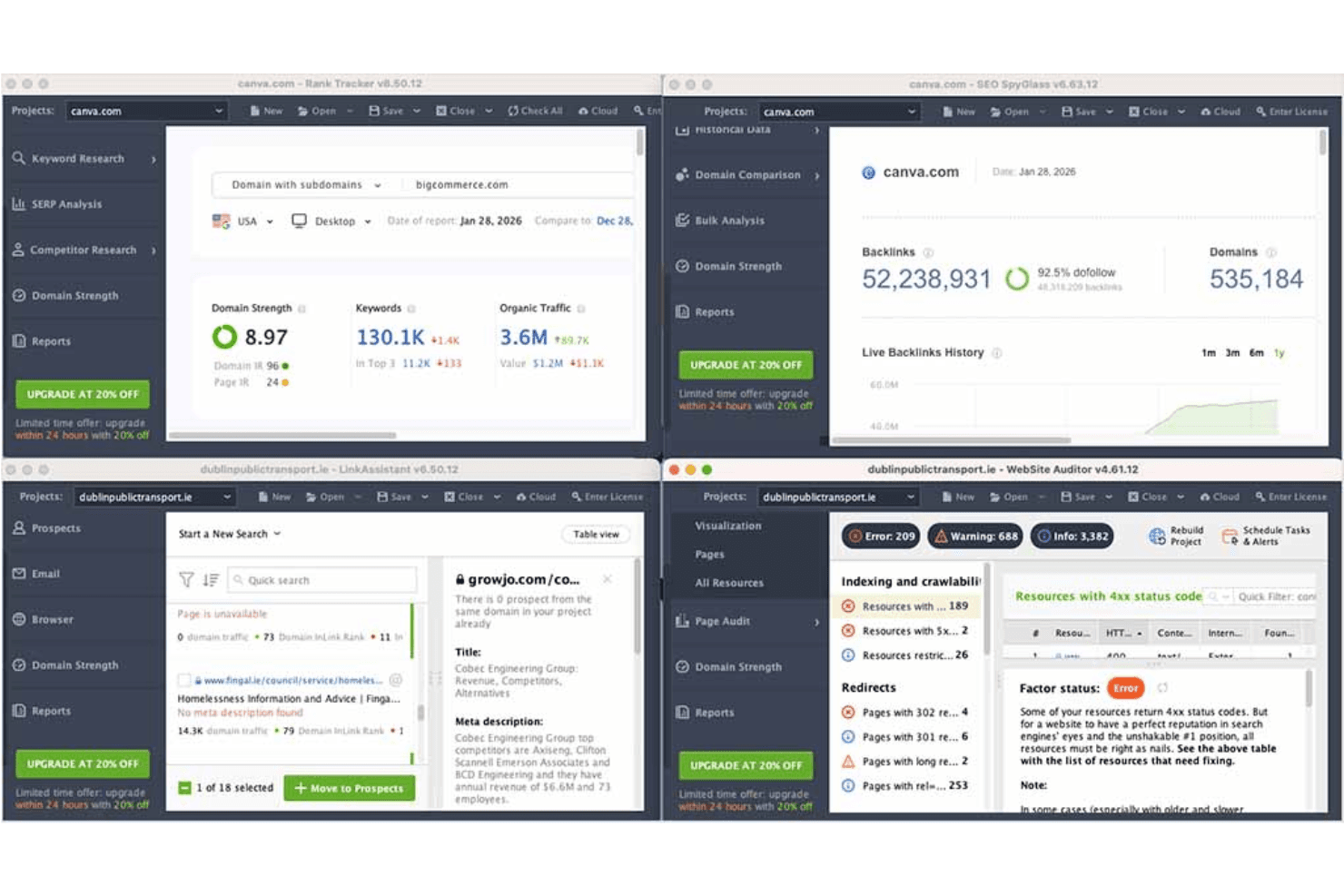
Website Audit
Analyze your site's health with comprehensive audits that pinpoint technical issues, like broken links. This feature ensures your site performs well in search engines.
Backlink Analysis
Discover and evaluate backlinks with SEO SpyGlass, helping you understand your link profile. It lets you spot opportunities and risks in your link-building strategy.
Keyword Research
Track keywords using advanced research tools that uncover search volume and competition. It empowers your team to target the right audience effectively.
Competitor Analysis
Uncover competitors' strategies and compare your site's performance with theirs. This insight helps your team stay ahead in the SEO race.
Reporting
Generate detailed, customizable SEO reports to keep stakeholders informed. These reports allow you to track key metrics and showcase results effectively.
Ease of Use
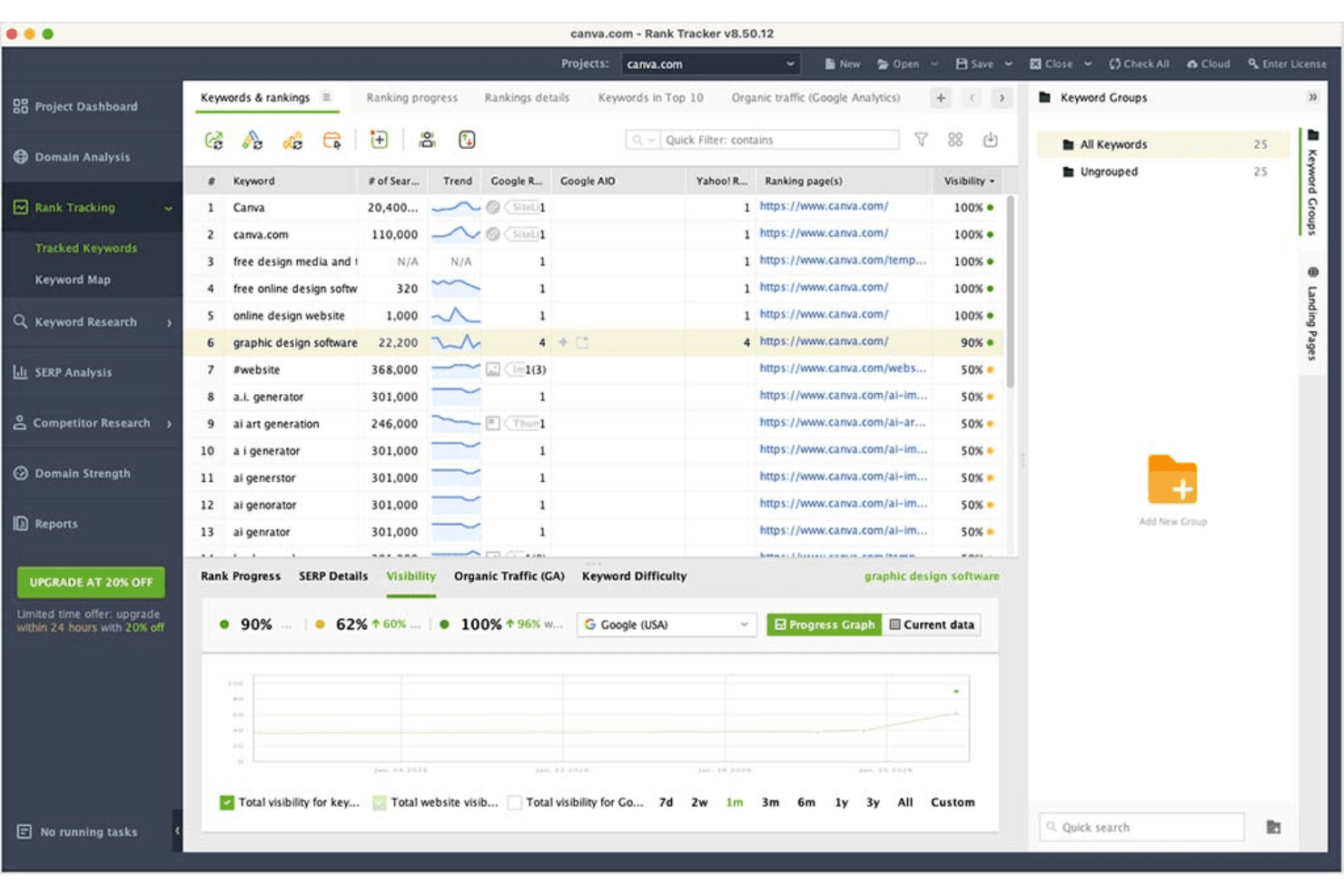
SEO PowerSuite offers a decent user experience but may feel less intuitive compared to some other tools. Its desktop-based nature requires a learning curve, especially for those new to SEO software. However, once you get the hang of it, the comprehensive features and detailed reports can significantly enhance your SEO campaigns. The interface might seem outdated, but it delivers the necessary functionalities to help your team manage SEO tasks effectively.
Integrations
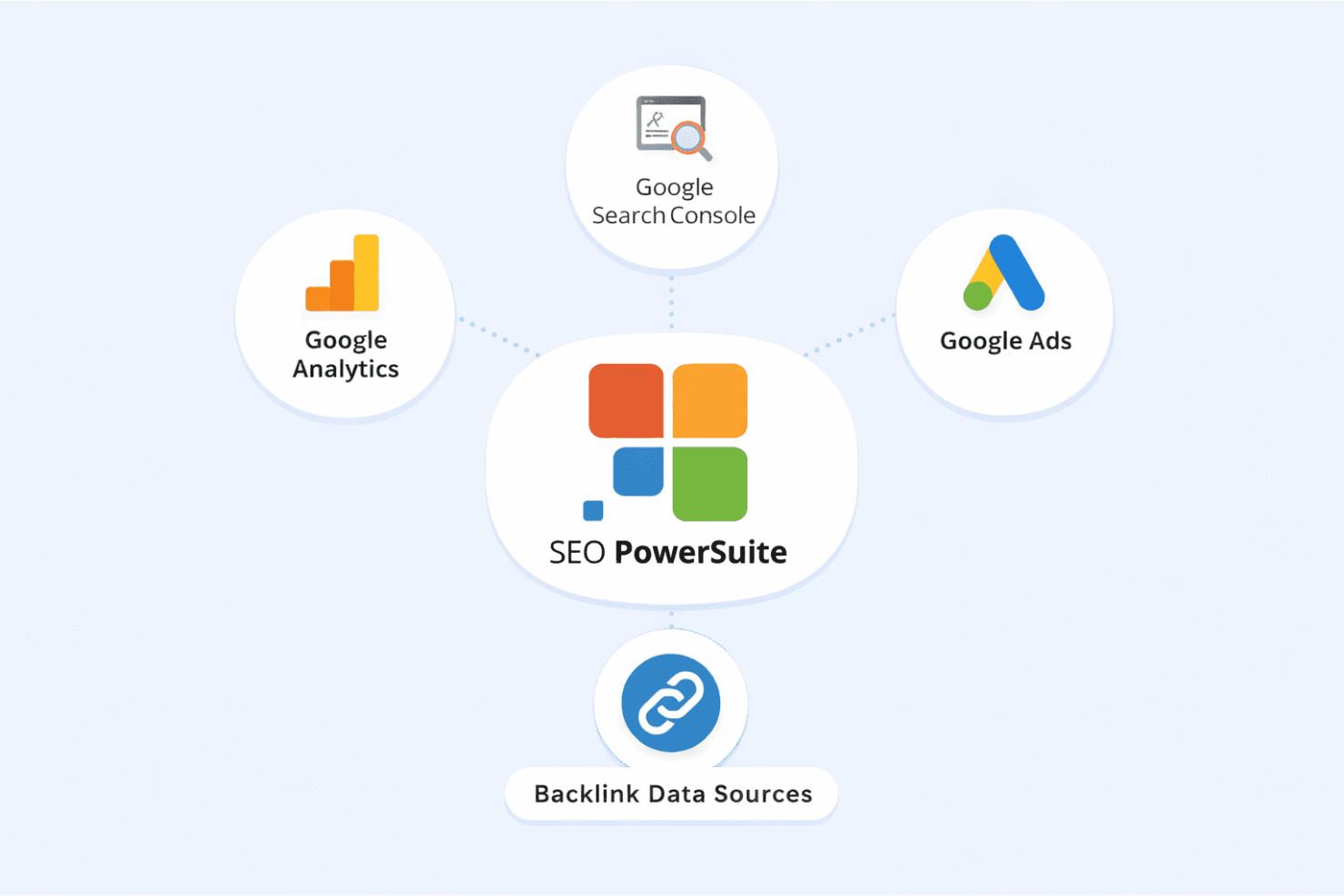
SEO PowerSuite integrates with Google Analytics, Google Search Console, and Google Ads to bring search and traffic data into the platform. It uses backlink data sources for in-depth link analysis, but it does not offer native connections to other third-party tools like CRM, Slack, or Trello.
SEO PowerSuite Specs
- API: Yes
- Audience Targeting: Yes
- Brand Management: No
- Conversion Tracking: No
- Dashboard: Yes
- Data Export: Yes
- Data Import: Yes
- Data Visualization: Yes
- External Integrations: Yes
- Keyword Tracking: Yes
- Link Tracking: Yes
- Marketing Automation: No
- Multi-Account: No
- Multi-User: No
- Notifications: Yes
- Social-Media Integration: No


