

Reseña de Keap 2026: ventajas, desventajas, funciones y precios
I see Keap as a strong all-in-one choice for small businesses that want CRM, marketing automation, and payments together—provided they’re ready for its learning curve and cost.

Revisamos herramientas de manera independiente, y las comisiones ayudan a financiar nuestras pruebas. Consulta nuestra política de transparencia, nuestra metodología o sugiere una herramienta.
Keap is a marketing automation software platform with CRM, email campaigns, sales pipelines, appointment scheduling, and payments for small businesses. I’d consider it when you need one system to manage leads, automate follow-ups, and collect payments, with Keap offering a more small-business-focused setup than HubSpot.
Keap Evaluation Summary
4.2/5
- From $299/month
- 14-day free trial
Por qué confiar en nuestras recomendaciones de software
6,700+
Reviews
20
Industry experts
16+
Evaluation factors
14
Years
Nuestro equipo lleva probando y evaluando software desde 2012. Como líderes de marketing, sabemos lo difícil —y lo importante— que es elegir el software adecuado.
Para esta guía, evaluamos las herramientas mediante pruebas prácticas e investigación independiente, puntuando las herramientas según nuestros criterios de selección.
Nuestras reseñas reflejan nuestro criterio editorial humano, no un discurso de ventas.
Revisores expertos:
 Gui DrusinaDirector creativo
- Shriya GhateSenior Marketing Lead
 Amanda JacquesLíder de Marketing Ops

Keap Overview
I’d choose Keap when your small business needs CRM, email campaigns, sales pipelines, appointment scheduling, and payments in one system. Its automation and contact management go further than basic email tools, while built-in payments reduce the need for separate systems. However, pricing is relatively high, the interface takes time to learn, and onboarding requires planning. Integrations cover common business tools, but larger teams may find customization and reporting less flexible. Support and guided setup help, making Keap best suited to service businesses that value an integrated workflow over the lowest subscription cost.
Pros
- Visual campaign builder connects forms, tags, emails, texts, and payments.
- CRM data, tags, and lead scoring support targeted automated follow-ups.
- Built-in payments and appointment scheduling extend automation beyond email campaigns.
Cons
- Starting prices and contact-based charges exceed many small-business automation alternatives.
- Campaign setup often requires training before teams build reliable workflows.
- Users report inconsistent support and difficult cancellation or billing experiences.
Is Keap Right For Your Needs?
Who Would be a Good Fit for Keap?
Keap suits small and midsize service businesses that need CRM, email and text automation, payments, scheduling, and follow-up tasks in one system. It also fits sales and marketing teams managing revenue-linked customer journeys rather than basic newsletters. The platform’s forms, tags, campaign builder, integrations, and open API support connected workflows, while guided onboarding helps teams handle migration and setup.
- Service BusinessesKeap fits appointment-based businesses that need scheduling, payments, CRM records, and automated follow-up in one subscription.
- Consulting FirmsConsulting firms can connect forms, tags, email, tasks, appointments, and payments to manage prospect and client journeys.
- Small Sales TeamsSmall sales teams can manage customer records and automated follow-up with a subscription that includes two users.
- Revenue TeamsRevenue teams can connect marketing activity to payments, tasks, appointments, and customer records instead of managing separate systems.
- Marketing OperationsMarketing operations teams can build journeys that combine forms, tags, email, text messages, tasks, and payment steps.
- Growing BusinessesGrowing businesses can use Keap’s data migration help, automation templates, integrations, and open API while their customer processes become more complex.
Who Would be a Bad Fit for Keap?
Keap is a poor match for teams that need inexpensive email campaigns, high-volume texting, a lightweight interface, or a fully self-directed setup. Its subscription starts at $299 per month when billed annually, scales with contacts, and charges extra for additional users. The platform also requires more onboarding than simpler tools, while its messaging allowances and integration options need careful review before purchase.
- Basic Email TeamsTeams that only send newsletters or simple email campaigns will pay for CRM, payments, scheduling, and automation features they may not use.
- Early StartupsEarly-stage companies with small contact lists and limited budgets may find the $299 monthly annual-plan starting price difficult to justify.
- Large DepartmentsLarge departments may outgrow the included two users because each additional user costs $39 per month.
- High-Volume TextingTeams sending large text volumes may need paid messaging upgrades because the base text tier includes 500 messages and 100 voice minutes.
- Self-Serve TeamsTeams that want immediate independent setup may struggle with Keap’s longer learning curve and greater need for onboarding and training.
- Specialized StacksBusinesses dependent on tools outside Keap’s listed integrations may face extra setup work because custom connections require its open API or services such as Zapier.
Cómo Probamos y Puntuamos las Herramientas
Hemos dedicado años a construir, refinar y mejorar nuestro sistema de prueba y puntuación de software. El marco está diseñado para captar los matices de la selección de software y lo que hace a una herramienta eficaz, enfocándose en los aspectos críticos del proceso de decisión. A continuación, puedes ver exactamente cómo funcionan nuestras pruebas y puntuaciones en siete criterios. Esto nos permite brindar una evaluación imparcial de los programas basada en la funcionalidad principal, características destacadas, facilidad de uso, integración, soporte al cliente, reseñas de clientes y relación calidad-precio.
Funcionalidad Principal (25% de la puntuación final)
El punto de partida de nuestra evaluación siempre es la funcionalidad principal de la herramienta. ¿Cuenta con las funciones básicas que un usuario esperaría? ¿Alguna de esas funciones está reservada solo para planes de pago avanzados? Esperamos que, en esencia, una herramienta se mantenga al nivel de las capacidades mínimas de sus competidores.
Características Destacadas (25% de la puntuación final)
Después, evaluamos las características poco comunes y destacadas que van más allá de la funcionalidad típica de herramientas similares. Una puntuación alta refleja funciones especializadas o únicas que hacen el producto más rápido, eficiente o aportan un valor adicional al usuario. También evaluamos qué tan fácil es integrarse con otras herramientas habituales en el entorno tecnológico para expandir la funcionalidad del software. Las herramientas que ofrecen muchas integraciones nativas, conexiones de terceros y acceso a API para crear integraciones personalizadas tienen la mejor puntuación.
Facilidad de Uso (10% de la puntuación final)
Consideramos cuán rápido y fácil es ejecutar las tareas definidas en la funcionalidad central utilizando la herramienta. El software mejor puntuado está bien diseñado, es intuitivo, ofrece aplicaciones móviles, proporciona plantillas y hace que tareas relativamente complejas parezcan sencillas.
Incorporación (10% de la puntuación final)
Sabemos lo importante que es que un equipo adopte rápidamente una nueva plataforma, por eso evaluamos lo fácil que es aprender y usar una herramienta con la menor formación posible. Analizamos lo rápido que un integrante puede comenzar a usar la herramienta sin experiencia previa. Las soluciones mejor puntuadas requieren poco o ningún soporte.
Soporte al Cliente (10% de la puntuación final)
Vemos cuán rápido y sencillo es obtener ayuda por teléfono, chat en vivo o base de conocimientos. Las empresas y herramientas que ofrecen soporte en tiempo real logran la mejor puntuación, mientras que los chatbots obtienen la peor.
Reseñas de Clientes (10% de la puntuación final)
Más allá de nuestras propias pruebas y evaluaciones, consideramos el puntaje de recomendación de clientes actuales y anteriores. Revisamos la probabilidad de que, de poder elegir de nuevo, seleccionarían la herramienta por su funcionalidad principal. Un software con alta puntuación refleja una elevada recomendación de sus usuarios.
Relación Calidad-Precio (10% de la puntuación final)
Finalmente, considerando todos los demás criterios, revisamos el precio promedio de los planes básicos frente a las funciones y el valor de los demás factores de evaluación. El software que ofrece más por menos obtiene mejor puntuación.
Core Features
Visual Campaign Builder
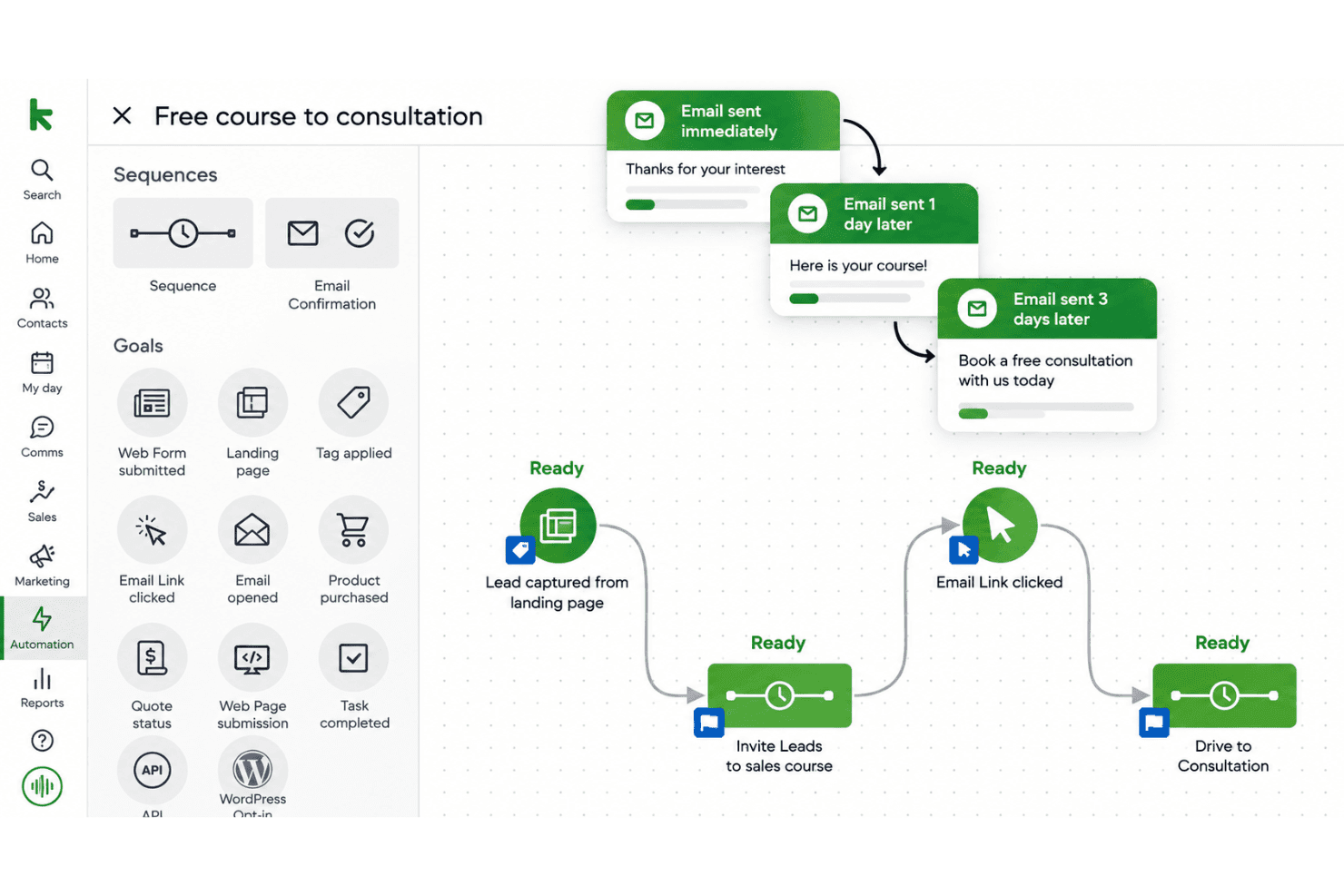
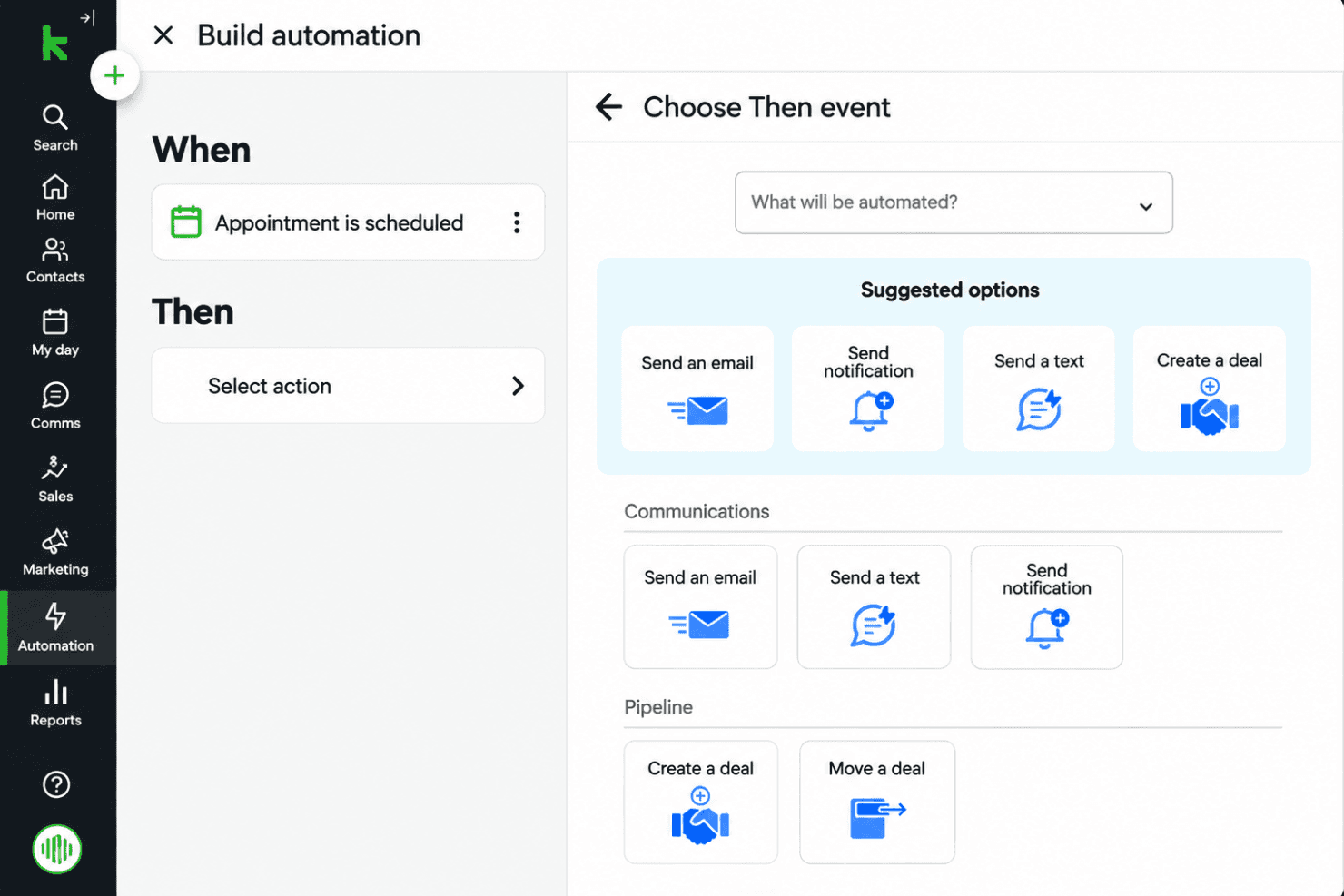
Keap’s visual campaign builder connects forms, tags, emails, text messages, and payments in one workflow. For example, a form submission can trigger a welcome email, apply a tag, and create a follow-up task.
CRM And Contact Management
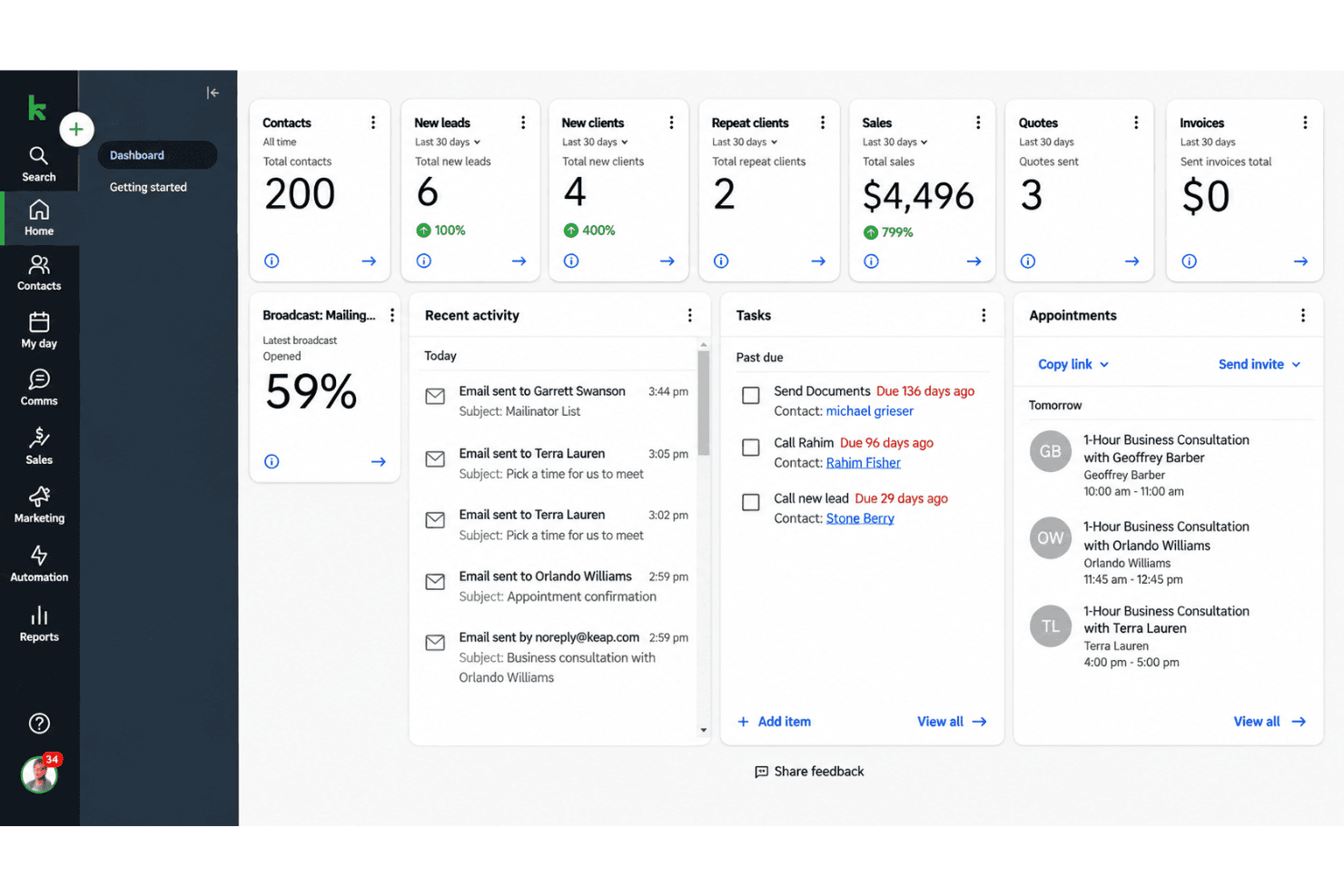
Keap stores contact records, activity data, tags, and lead details for targeted follow-ups. You can group contacts by source, interest, or lifecycle stage before sending a campaign.
Email Marketing
Keap supports broadcast emails and automated email sequences tied to contact actions or campaign stages. A service business could send educational emails after someone downloads a guide, then follow up with an offer.
Lead Capture Forms
Keap forms collect prospect information and can start automated campaigns when someone submits their details. For example, a consultation request can add a contact to the CRM and trigger an immediate confirmation email.
Lead Scoring And Routing
Keap assigns scores based on engagement or potential value, helping teams prioritize contacts for follow-up. A lead that opens several emails can receive a higher score and move into a sales-focused workflow.
Text Message Automation
Keap adds text messages to automated campaigns alongside email and CRM actions. You can send an appointment reminder or follow-up text after a prospect submits a form.
Ease of Use
Keap is usable once configured, but it isn’t the easiest marketing automation software to learn. Its visual campaign builder connects forms, tags, emails, texts, payments, and tasks, giving you one place to manage customer journeys. However, the many options create a steep learning curve, and user reviews often mention difficult setup, inconsistent support, and frustrating billing or cancellation experiences. I’d recommend it to teams willing to invest in onboarding.
Integrations
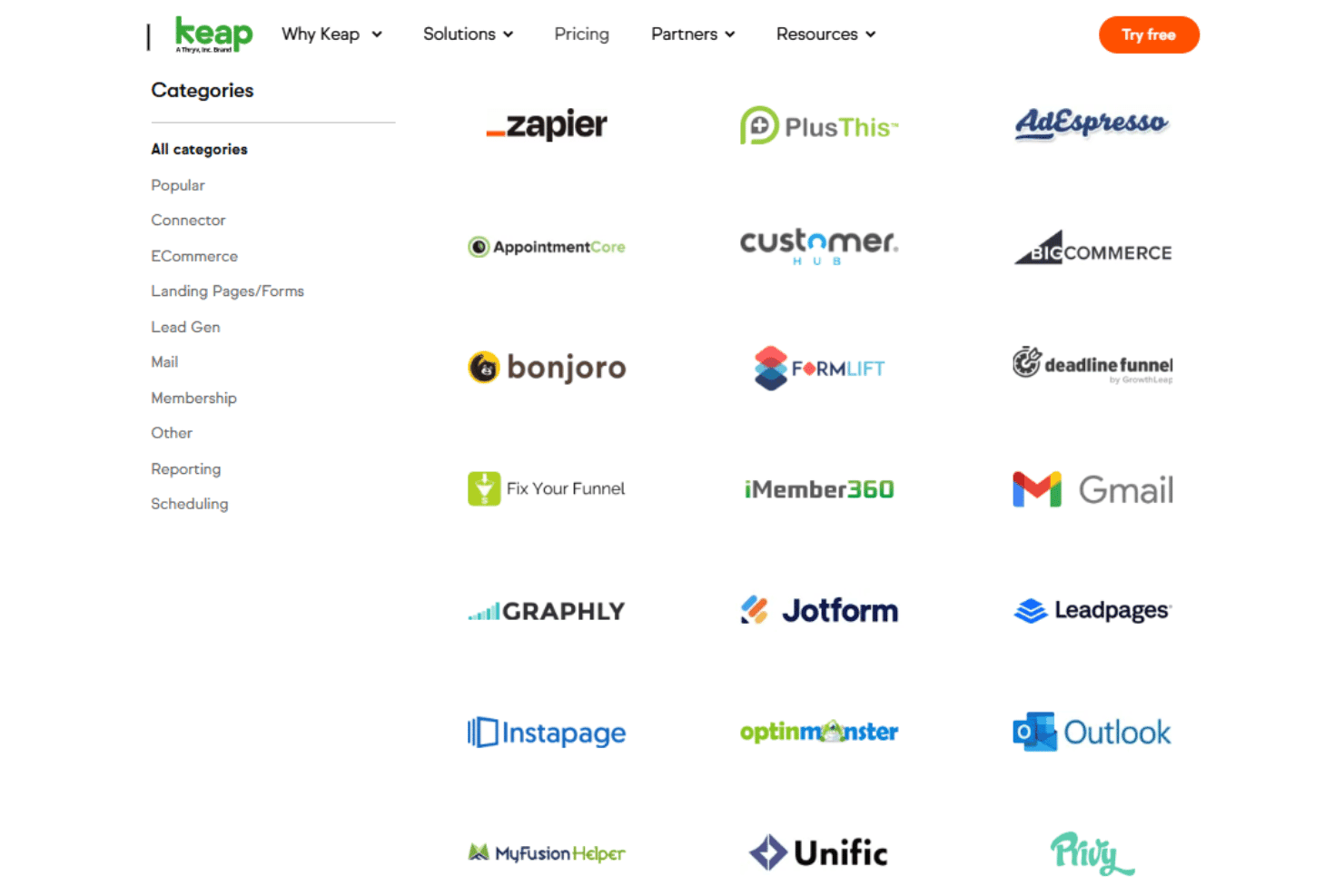
Keap integrates with Gmail, Outlook, WebinarJam, FormLift, Jotform, Typeform, AppointmentCore, and OnceHub (formerly ScheduleOnce).
Keap also offers an open API for custom integrations and connects with third-party tools such as Zapier.
Keap Specs
- A/B Testing: Yes
- Analytics: Yes
- API: Yes
- Audience Targeting: Yes
- Automated Conversion: No
- Batch Permissions & Access: No
- Behavioral Tracking: Yes
- Brand Management: No
- Campaign Management: Yes
- Contact Management: Yes
- Contact Sharing: No
- Conversion Tracking: Yes
- CRM Integration: Yes
- Customer Management: Yes
- Dashboards: Yes
- Data Export: Yes
- Data Import: Yes
- Email Integration: Yes
- External Integrations: Yes
- Keyword Tracking: No
- Landing Pages: Yes
- Lead Management: Yes
- Lead Scoring: Yes
- Link Tracking: Yes
- Marketing Automation: Yes
- Multi-User: Yes
- Notifications: Yes
- Password & Access Management: Yes
- Social-Media Integration: Yes


