
Wrike Testbericht: Vorteile, Nachteile, Funktionen und Preise
Wrike überzeugt mit seinen anpassbaren Workflows und ist damit eine vielseitige Wahl für Teams, die maßgeschneiderte Projektmanagement-Lösungen suchen.

Wir bewerten Tools unabhängig, und Provisionen helfen, unsere Tests zu finanzieren. Siehe unsere Transparenz-Richtlinie, unsere Methodik oder schlagen Sie ein Tool vor.
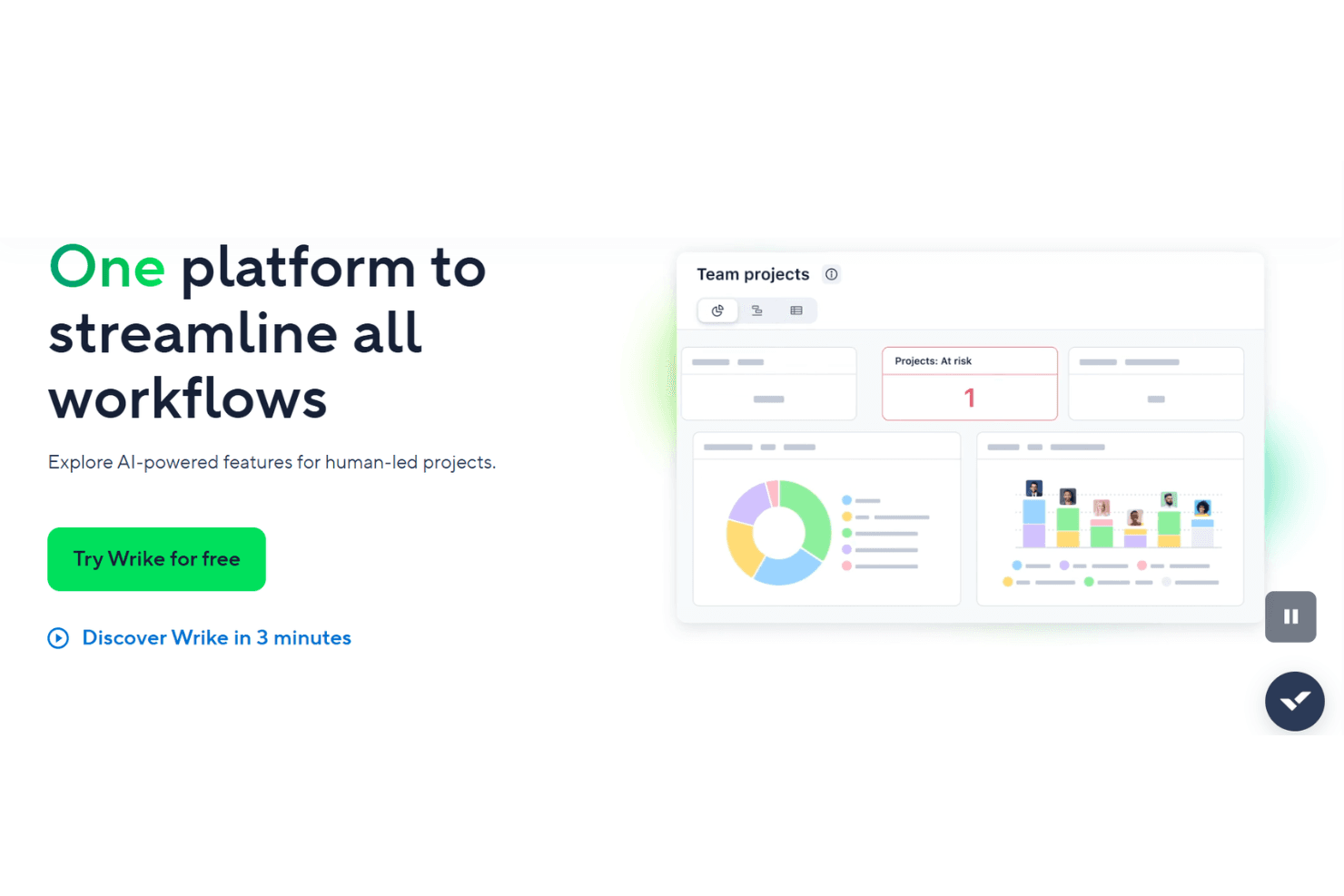
Wrike is a marketing resource management software built for marketing teams that need to plan campaigns, manage creative workflows, and track resource allocation across multiple projects at once. I'd consider it most seriously if you're moving away from a tool like Adobe Workfront—Wrike gives you similar cross-functional visibility and project tracking depth without the heavy implementation lift or enterprise price tag that comes with it.
Wrike Evaluation Summary
4.3/5
- From $10/user/month (billed annually)
- 14-day free trial
Warum Sie unseren Software-Empfehlungen vertrauen können
6,700+
Reviews
20
Industry experts
16+
Evaluation factors
14
Years
Unser Team testet und bewertet Software seit 2012. Als Marketingführungskräfte wissen wir selbst, wie schwierig – und wichtig – es ist, die richtige Software auszuwählen.
Für diesen Leitfaden haben wir Tools mithilfe von praktischen Tests und unabhängiger Recherche bewertet und dabei unsere Bewertungskriterien angewendet.
Unsere Bewertungen spiegeln unser menschliches redaktionelles Urteilsvermögen wider, keine Verkaufsstrategie.
Expertenprüfer:
 Gui DrusinaKreativdirektor
- Shriya GhateSenior Marketing Lead
 Amanda JacquesMarketing Ops Leiterin

Wrike Overview
In my opinion, Wrike is a solid choice for teams needing a customizable project management platform. While it can feel pricey, its integration capabilities and customizable workflows make it worth considering. It stands out with features like time tracking and workload management, which benefit teams needing detailed oversight. However, smaller businesses might find its complexity overwhelming. Wrike excels in environments with cross-functional teams and is best suited for those willing to invest in a versatile tool to improve project visibility and coordination. If you're comparing project management tools, Wrike's flexibility and feature set position it well against competitors, although additional costs for integrations should be considered.
Pros
- You can customize workflows to fit your team's needs.
- The time tracking feature helps you manage project timelines effectively.
- Its task management tools improve collaboration across your team.
Cons
- The interface might feel overwhelming for new users.
- Some features require a steep learning curve.
- Your team might find it complex for simpler projects.
Is Wrike Right For Your Needs?
Who Would be a Good Fit for Wrike?
Wrike is ideal for marketing teams, creative agencies, and professional services needing detailed project tracking and collaboration. Its customizable workflows let you tailor processes to match your team's unique needs. The time tracking and workload management features help ensure projects stay on schedule. If you work in an environment that requires constant collaboration and detailed oversight, Wrike's capabilities can enhance your team's productivity and communication.
- Marketing TeamsWrike's campaign management and collaboration tools make it perfect for coordinating marketing projects efficiently.
- Creative AgenciesThe platform's customizable workflows and proofing tools help creative teams streamline their design and approval processes.
- Professional ServicesWrike's time tracking and project management features support detailed planning and execution for client-based projects.
- IT DepartmentsIts task automation and reporting tools assist IT teams in managing complex technical projects and resources effectively.
- Large EnterprisesWrike's scalability and robust feature set make it well-suited for large companies with diverse project management needs.
- Remote TeamsThe platform's collaboration and communication tools enhance coordination and productivity for teams working from different locations.
Who Would be a Bad Fit for Wrike?
Wrike might not suit small businesses or startups with limited resources and simple project management needs. Its complex interface and extensive features could overwhelm teams that don't require advanced project tracking or customization. If your team values simplicity and ease of use over detailed functionalities, Wrike's robust capabilities may not align with your goals and could lead to unnecessary complexity.
- Small BusinessesThe platform's complexity and cost might be excessive for small teams with straightforward project management needs.
- StartupsStartups with limited budgets and resources may find Wrike's advanced features unnecessary and overwhelming.
- FreelancersFreelancers needing simple task management could find Wrike's detailed features cumbersome and not worth the investment.
- Non-Technical TeamsTeams without technical expertise might struggle with Wrike's interface and require simpler tools for project management.
- Retail OperationsRetail teams focusing on day-to-day operations may not benefit from Wrike's project-focused capabilities.
- Event PlannersEvent planners needing quick and simple coordination might find Wrike's extensive features more than they need.
Wie wir Tools testen und bewerten
Wir haben jahrelang unser Software-Test- und Bewertungssystem aufgebaut, verfeinert und verbessert. Das Bewertungsraster wurde entwickelt, um die Feinheiten der Softwareauswahl zu erfassen und aufzuzeigen, was ein Tool effektiv macht. Dabei konzentrieren wir uns auf kritische Aspekte des Entscheidungsprozesses. Im Folgenden können Sie genau nachvollziehen, wie unsere Tests und Bewertungen über sieben Kriterien hinweg funktionieren. Dies ermöglicht eine unparteiische Bewertung der Software basierend auf Kernfunktionen, besonderen Merkmalen, Benutzerfreundlichkeit, Onboarding, Kundenservice, Integrationen, Kundenrezensionen und Preis-Leistung.
Kernfunktionen (25% der Gesamtbewertung)
Der Ausgangspunkt unserer Bewertung ist stets die Kernfunktionalität des Tools. Verfügt es über die grundlegenden Merkmale und Funktionen, die ein Nutzer erwarten würde? Sind einige dieser Kernfunktionen nur in hochpreisigen Tarifen verfügbar? Im Kern erwarten wir, dass ein Tool den Basisfunktionen der Konkurrenz standhält.
Besondere Merkmale (25% der Gesamtbewertung)
Als nächstes bewerten wir außergewöhnliche, herausragende Funktionen, die über die übliche Kernfunktionalität hinausgehen. Eine hohe Punktzahl spiegelt spezialisierte oder einzigartige Merkmale wider, die das Produkt schneller, effizienter oder wertvoller für den Nutzer machen. Wir bewerten außerdem, wie einfach es ist, das Tool in andere häufig verwendete Anwendungen im Tech-Stack zu integrieren, um die Funktionalität und den Nutzen der Software zu erweitern. Tools, die viele native Integrationen, Drittanbieter-Anbindungen sowie API-Zugriff für eigene Integrationen bieten, schneiden am besten ab.
Benutzerfreundlichkeit (10% der Gesamtbewertung)
Wir berücksichtigen, wie schnell und einfach sich Aufgaben, die zu den Kernfunktionen gehören, mit dem Tool ausführen lassen. Hoch bewertete Software ist gut gestaltet, intuitiv bedienbar, bietet mobile Apps, Vorlagen und lässt auch komplexe Aufgaben einfach erscheinen.
Onboarding (10% der Gesamtbewertung)
Uns ist bewusst, wie wichtig eine schnelle Akzeptanz im Team für eine neue Plattform ist. Daher bewerten wir, wie leicht sich das Tool mit minimaler Einweisung erlernen und anwenden lässt und wie schnell Teammitglieder auch ohne Vorerfahrung loslegen können. Eine hohe Punktzahl deutet darauf hin, dass kaum oder gar keine Unterstützung notwendig ist.
Kundenservice (10% der Gesamtbewertung)
Wir prüfen, wie schnell und einfach es ist, bei Problemen Hilfe per Telefon, Live-Chat oder Wissensdatenbank zu erhalten. Tools und Unternehmen, die Support in Echtzeit anbieten, erhalten die besten Bewertungen; Chatbots schneiden am schlechtesten ab.
Kundenrezensionen (10% der Gesamtbewertung)
Neben unseren eigenen Tests und Bewertungen berücksichtigen wir den Net Promoter Score aktueller und ehemaliger Kunden. Wir prüfen, wie wahrscheinlich sie sich erneut für das Tool bezüglich der Kernfunktionen entscheiden würden. Hoch bewertete Software spiegelt einen hohen Net Promoter Score der Nutzer wider.
Preis-Leistung (10% der Gesamtbewertung)
Abschließend bewerten wir unter Berücksichtigung aller anderen Kriterien den Durchschnittspreis der Einsteiger-Tarife im Verhältnis zu den Kernfunktionen sowie den Wert der anderen bewerteten Aspekte. Software, die mehr für weniger bietet, wird besser bewertet.
Value for Money
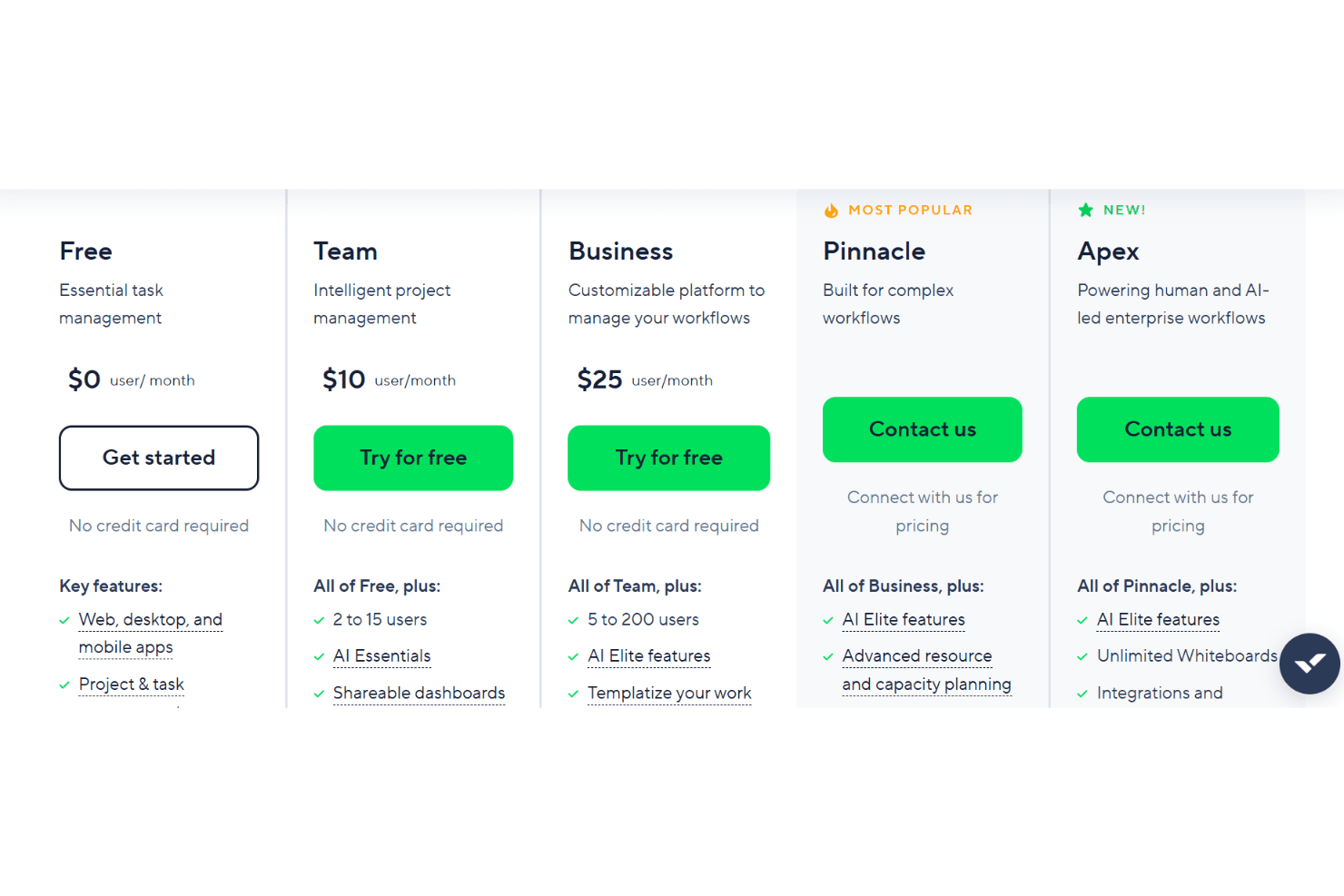
Wrike’s pricing reflects its advanced feature set, with many users finding strong value in its customization, automation, and reporting tools, especially at higher tiers. However, smaller teams or those with basic needs may find the cost high for features they won’t use, and some advanced capabilities are only available on premium plans. A free plan and trial is available to test out the features before committing to a paid plan.
- Free: No cost. Basic task and project management for small teams.
- Team: Adds dashboards, interactive Gantt charts, and up to 25 users.
- Business: Includes custom workflows, advanced reporting, and resource management.
- Enterprise: Offers advanced security, permissions, and scalability for large organizations.
- Apex: Top-tier for enterprise workflows with AI-led automation, unlimited whiteboards, with deeper automation and integration capabilities through Wrike add-ons.
Wrike Specs
- API: Yes
- Batch Permissions & Access: Yes
- Budgeting: Yes
- Calendar Management: Yes
- Collaboration Support: Yes
- Contact Management: Yes
- Contact Sharing: No
- Customer Management: No
- Dashboard: Yes
- Dashboards: Yes
- Data Export: Yes
- Data Import: Yes
- Data Visualization: Yes
- Dependency Tracking: Yes
- Document Sharing: Yes
- Expense Tracking: Yes
- External Integrations: Yes
- File Sharing: Yes
- Gantt Charts: Yes
- Kanban Boards: Yes
- Multi-User: Yes
- Notifications: Yes
- Project Management: Yes
- Resource Management: Yes
- Scheduling: Yes
- Task Scheduling/Tracking: Yes
- Third-Party Plugins/Add-Ons: Yes
- Time Management: Yes
- Travel Management: No
- Workflow Management: Yes
Wrike FAQs
Wrike Company Overview & History
Wrike, founded in 2006 by Andrew Filev, is headquartered in San Jose, California, and has expanded globally with offices in cities like Dublin, Prague, Tokyo, and Melbourne. Known for its collaborative work management platform, Wrike helps teams streamline their work processes. The company is recognized for its innovative approach to project management and has a strong reputation for a supportive work culture. Notable clients include major corporations across various industries, underscoring Wrike's versatile application.
Wrike Major Milestones
2006: Founded by Andrew Filev.
2006: Released the beta version of its software.
2021: Acquired by Citrix Systems.
2025: Named a Leader in the Gartner Magic Quadrant for Collaborative Work Management.