

Joomla-Test 2026: Vor- und Nachteile, Funktionen und Preise
I put Joomla through its paces to see whether its flexible, open-source toolkit still earns a place among today’s CMS options—and where its learning curve starts to bite.

Wir bewerten Tools unabhängig, und Provisionen helfen, unsere Tests zu finanzieren. Siehe unsere Transparenz-Richtlinie, unsere Methodik oder schlagen Sie ein Tool vor.
Joomla is open-source content management software for building and managing websites with structured content, user permissions, and multilingual publishing. I’d consider it when your marketing team needs more content structure and access control than a basic site requires. Compared with WordPress, Joomla is a better choice when built-in user permissions and flexible content organization matter more than a large plugin marketplace.
Joomla Evaluation Summary
4.1/5
- Free and open-source
- Free download available
Warum Sie unseren Software-Empfehlungen vertrauen können
6,700+
Reviews
20
Industry experts
16+
Evaluation factors
14
Years
Unser Team testet und bewertet Software seit 2012. Als Marketingführungskräfte wissen wir selbst, wie schwierig – und wichtig – es ist, die richtige Software auszuwählen.
Für diesen Leitfaden haben wir Tools mithilfe von praktischen Tests und unabhängiger Recherche bewertet und dabei unsere Bewertungskriterien angewendet.
Unsere Bewertungen spiegeln unser menschliches redaktionelles Urteilsvermögen wider, keine Verkaufsstrategie.
Expertenprüfer:
 Gui DrusinaKreativdirektor
- Shriya GhateSenior Marketing Lead
 Amanda JacquesMarketing Ops Leiterin

Joomla Overview
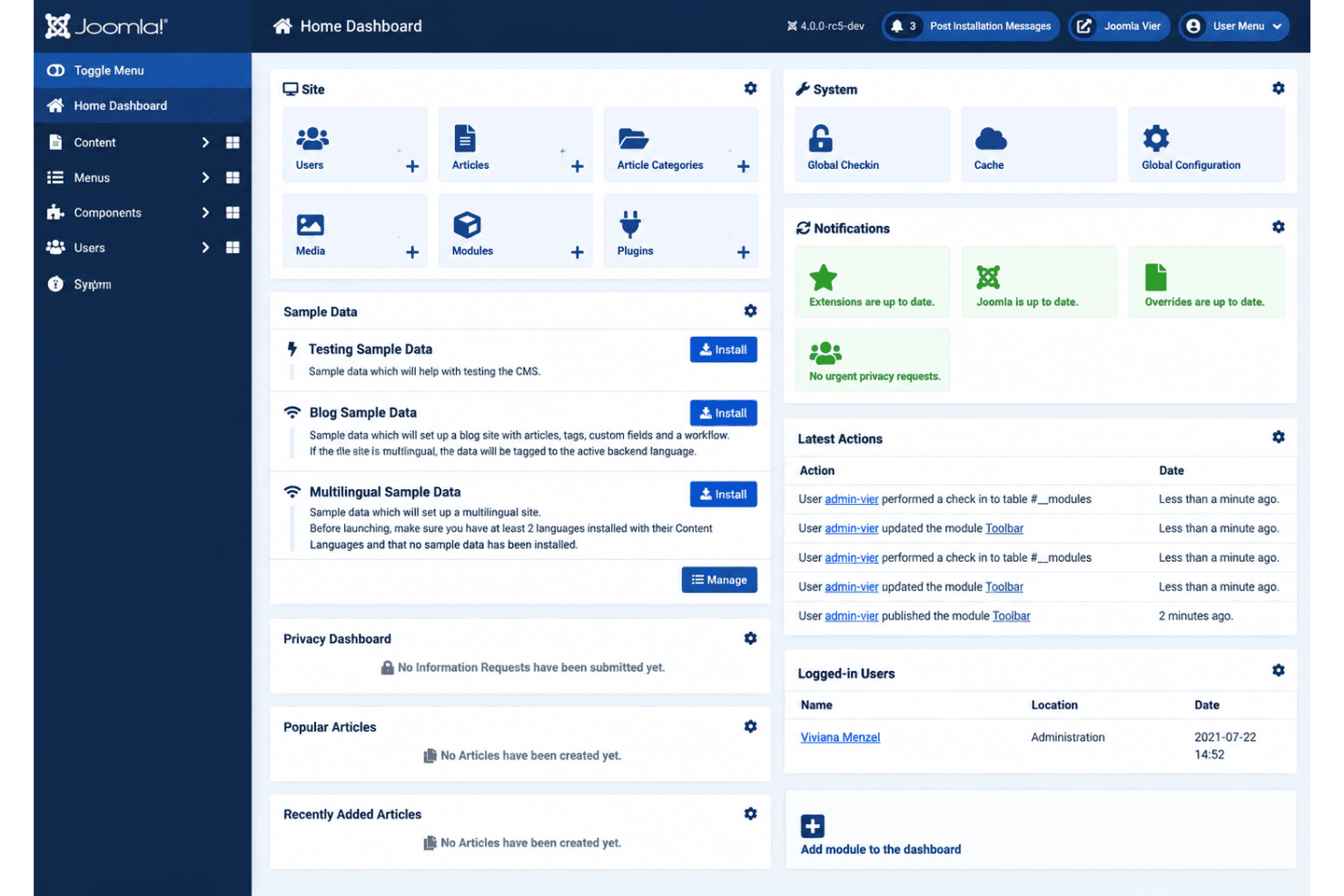
I’d choose Joomla when your team needs open-source flexibility, built-in multilingual publishing, custom fields, and detailed access controls. The software itself is free, but hosting, templates, extensions, and development determine the overall price. Its extension ecosystem, APIs, and permission settings support complex marketing sites, while community forums and documentation provide useful support. The interface is capable but less intuitive, so onboarding takes longer than simpler CMS options. In my view, Joomla outperforms for structured content and governance, but underperforms for plug-and-play setup. It’s best suited to organizations with technical support and defined publishing workflows.
Pros
- Granular ACL supports distinct publishing roles without extra plugins.
- Built-in multilingual tools support localized content without separate core add-ons.
- Custom fields and nested categories structure complex content models.
Cons
- Administration exposes many settings, confusing newcomers during routine publishing.
- Media Manager lacks built-in image resizing, cropping, and folder organization.
- Third-party extensions vary in maintenance, increasing update and compatibility work.
Is Joomla Right For Your Needs?
Who Would be a Good Fit for Joomla?
Joomla suits organizations that need structured content, granular permissions, multilingual publishing, and flexible integrations. Teams with technical support can configure custom fields, nested categories, workflows, APIs, and extensions around defined publishing processes.
- Higher EducationUniversities can use nested categories, custom fields, workflows, multilingual publishing, and granular permissions for complex departmental websites.
- Nonprofit NetworksNonprofit networks can manage many programs, locations, and contributor roles through Joomla’s categories, permissions, custom fields, and workflows.
- Global OrganizationsOrganizations publishing across regions can use Joomla’s multilingual publishing features to manage localized content from one administration area.
- Mid-Sized PublishersPublishing teams with defined editorial processes can use workflows, permissions, custom fields, and categories to organize contributors and content.
- Technical Marketing TeamsTechnical marketing departments can connect Joomla with LDAP, RSS feeds, Gmail, Joomla APIs, and third-party tools such as Make.
- Web Development AgenciesAgencies with Joomla experience can configure extensions, nested categories, workflows, custom fields, and Web Services API connections for varied client requirements.
Who Would be a Bad Fit for Joomla?
Joomla is a poor match for users who need quick setup, guided onboarding, or minimal administration. Its many settings and frequent learning-curve concerns make it less suitable for teams without technical support or defined publishing processes.
- Solo CreatorsSolo creators seeking a plug-and-play website may find Joomla’s settings, categories, permissions, and workflows heavier than necessary.
- Small Startup TeamsSmall teams without technical support may struggle to configure Joomla’s custom fields, extensions, publishing workflows, and granular permissions.
- No-Code DepartmentsDepartments wanting no-code administration may dislike Joomla because maintaining its flexible configuration often requires technical knowledge and process design.
- Rapid Campaign TeamsMarketing teams launching short-lived campaigns may find Joomla too involved when they need quick publishing instead of extensive content configuration.
- Guided OnboardingUsers expecting hands-on vendor onboarding are a poor fit because Joomla support centers on documentation, forums, and extension guidance.
- Minimal WebsitesBusinesses needing a small brochure site may not benefit from Joomla’s nested categories, multilingual publishing, workflows, and permission settings.
Wie wir Tools testen und bewerten
Wir haben jahrelang unser Software-Test- und Bewertungssystem aufgebaut, verfeinert und verbessert. Das Bewertungsraster wurde entwickelt, um die Feinheiten der Softwareauswahl zu erfassen und aufzuzeigen, was ein Tool effektiv macht. Dabei konzentrieren wir uns auf kritische Aspekte des Entscheidungsprozesses. Im Folgenden können Sie genau nachvollziehen, wie unsere Tests und Bewertungen über sieben Kriterien hinweg funktionieren. Dies ermöglicht eine unparteiische Bewertung der Software basierend auf Kernfunktionen, besonderen Merkmalen, Benutzerfreundlichkeit, Onboarding, Kundenservice, Integrationen, Kundenrezensionen und Preis-Leistung.
Kernfunktionen (25% der Gesamtbewertung)
Der Ausgangspunkt unserer Bewertung ist stets die Kernfunktionalität des Tools. Verfügt es über die grundlegenden Merkmale und Funktionen, die ein Nutzer erwarten würde? Sind einige dieser Kernfunktionen nur in hochpreisigen Tarifen verfügbar? Im Kern erwarten wir, dass ein Tool den Basisfunktionen der Konkurrenz standhält.
Besondere Merkmale (25% der Gesamtbewertung)
Als nächstes bewerten wir außergewöhnliche, herausragende Funktionen, die über die übliche Kernfunktionalität hinausgehen. Eine hohe Punktzahl spiegelt spezialisierte oder einzigartige Merkmale wider, die das Produkt schneller, effizienter oder wertvoller für den Nutzer machen. Wir bewerten außerdem, wie einfach es ist, das Tool in andere häufig verwendete Anwendungen im Tech-Stack zu integrieren, um die Funktionalität und den Nutzen der Software zu erweitern. Tools, die viele native Integrationen, Drittanbieter-Anbindungen sowie API-Zugriff für eigene Integrationen bieten, schneiden am besten ab.
Benutzerfreundlichkeit (10% der Gesamtbewertung)
Wir berücksichtigen, wie schnell und einfach sich Aufgaben, die zu den Kernfunktionen gehören, mit dem Tool ausführen lassen. Hoch bewertete Software ist gut gestaltet, intuitiv bedienbar, bietet mobile Apps, Vorlagen und lässt auch komplexe Aufgaben einfach erscheinen.
Onboarding (10% der Gesamtbewertung)
Uns ist bewusst, wie wichtig eine schnelle Akzeptanz im Team für eine neue Plattform ist. Daher bewerten wir, wie leicht sich das Tool mit minimaler Einweisung erlernen und anwenden lässt und wie schnell Teammitglieder auch ohne Vorerfahrung loslegen können. Eine hohe Punktzahl deutet darauf hin, dass kaum oder gar keine Unterstützung notwendig ist.
Kundenservice (10% der Gesamtbewertung)
Wir prüfen, wie schnell und einfach es ist, bei Problemen Hilfe per Telefon, Live-Chat oder Wissensdatenbank zu erhalten. Tools und Unternehmen, die Support in Echtzeit anbieten, erhalten die besten Bewertungen; Chatbots schneiden am schlechtesten ab.
Kundenrezensionen (10% der Gesamtbewertung)
Neben unseren eigenen Tests und Bewertungen berücksichtigen wir den Net Promoter Score aktueller und ehemaliger Kunden. Wir prüfen, wie wahrscheinlich sie sich erneut für das Tool bezüglich der Kernfunktionen entscheiden würden. Hoch bewertete Software spiegelt einen hohen Net Promoter Score der Nutzer wider.
Preis-Leistung (10% der Gesamtbewertung)
Abschließend bewerten wir unter Berücksichtigung aller anderen Kriterien den Durchschnittspreis der Einsteiger-Tarife im Verhältnis zu den Kernfunktionen sowie den Wert der anderen bewerteten Aspekte. Software, die mehr für weniger bietet, wird besser bewertet.
Core Features
WYSIWYG Content Editing
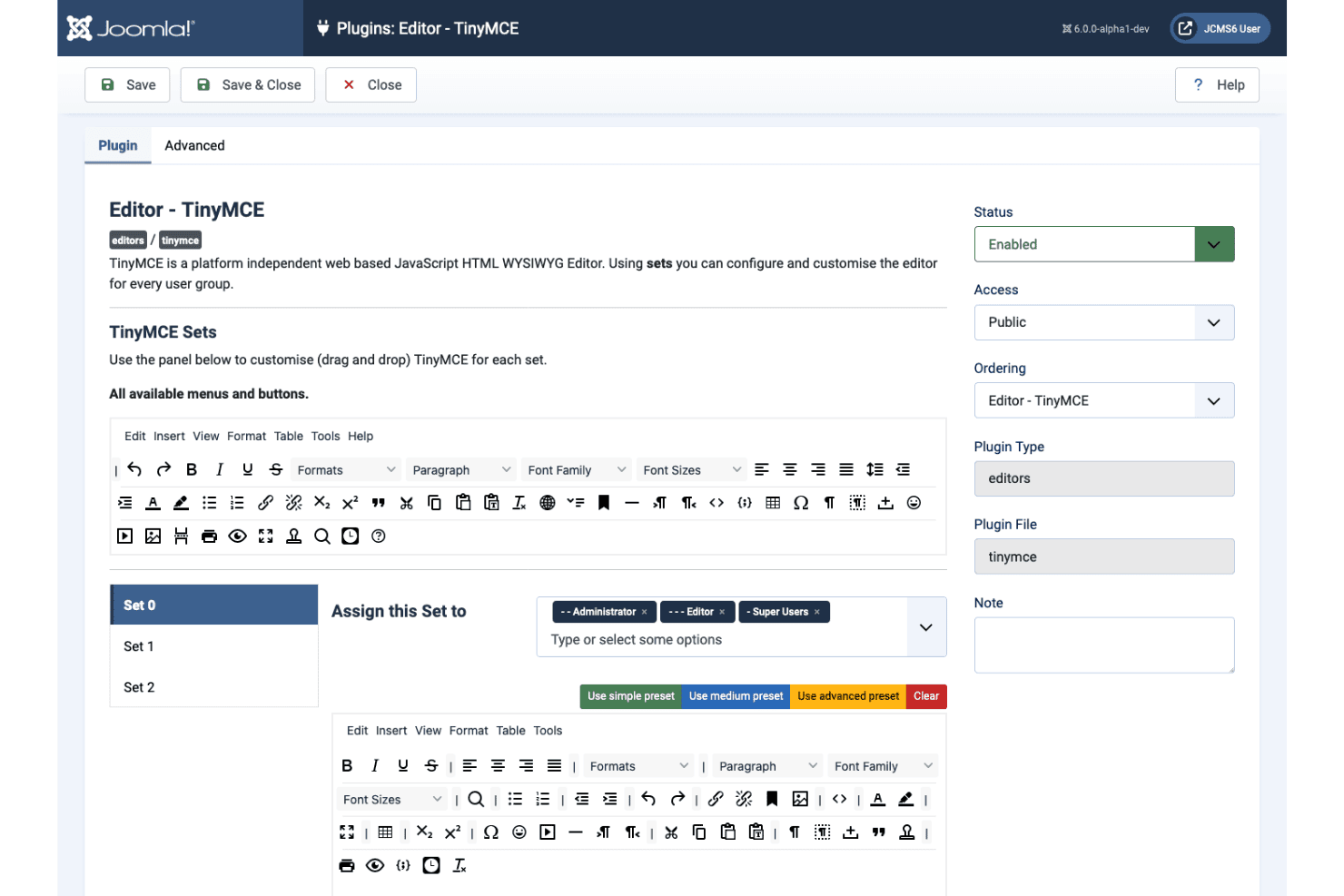
Joomla’s TinyMCE editor lets you create and format articles without writing code, including drag-and-drop image placement. Its toolbar can also insert modules directly into article content.
Categories And Tags
Joomla supports unlimited nested categories and tags with either hierarchical or flat organization. This lets you structure content such as campaigns, product pages, and resource libraries with precise navigation paths.
Custom Fields
Custom fields add structured data to articles, categories, contacts, and users through types such as dates, lists, media, URLs, and repeatable subforms. You can group fields into editor tabs and display values on the front end, creating consistent content templates.
Access Control
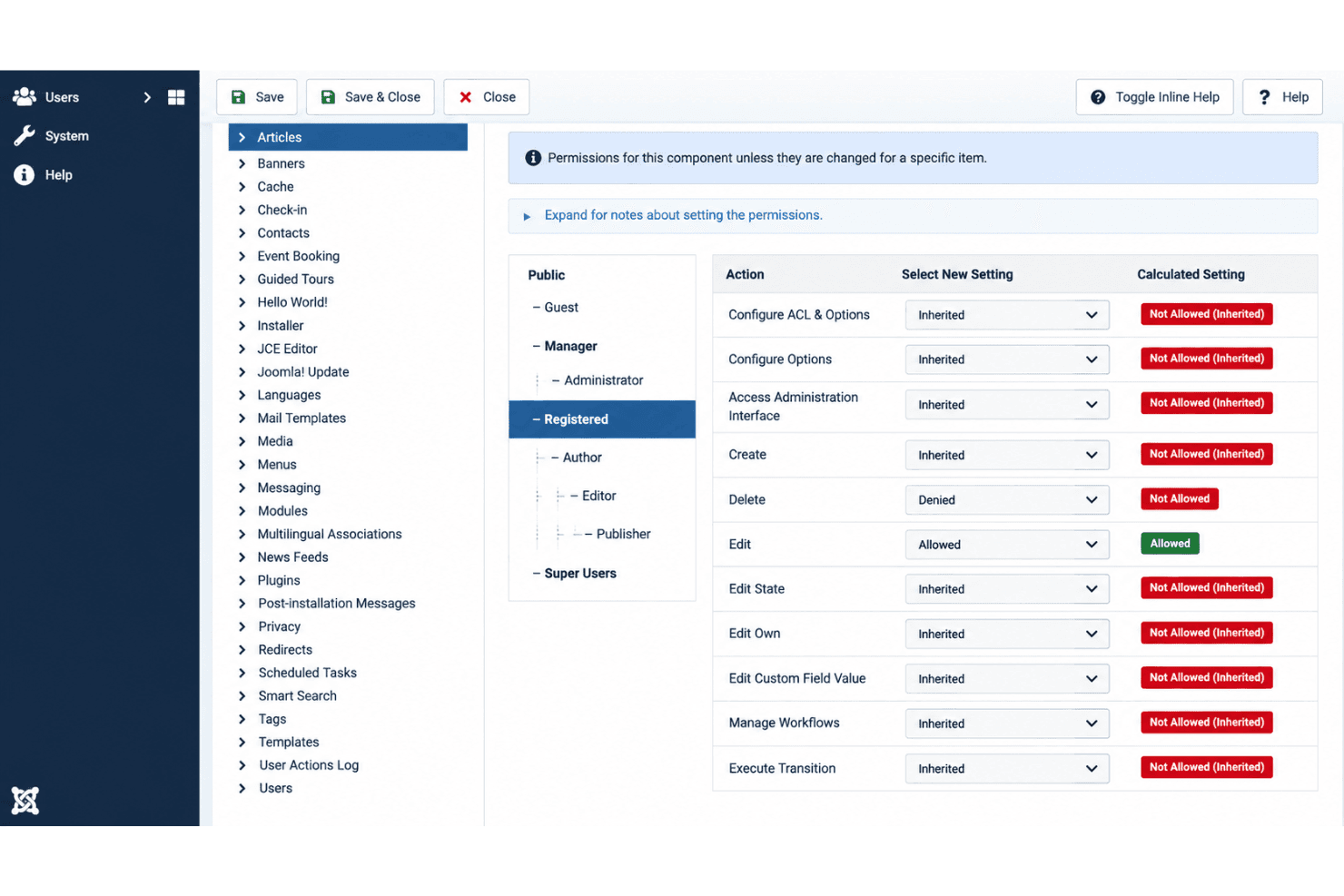
Joomla’s access control list assigns permissions to user groups for actions such as creating, editing, publishing, and accessing content. You can separate workflows for authors, editors, regional teams, and administrators without relying on additional plugins.
Multilingual Publishing
Joomla includes core tools for creating multilingual sites without requiring separate extensions. You can associate translated articles, categories, and menu items so visitors can access localized versions of your content.
Media Management
The Media component lets you upload, organize, and manage files and folders, with configurable MIME-type settings for supported media. Media files also connect directly to the article editor, although Joomla’s core tools don’t include built-in image resizing or cropping.
Ease of Use
Joomla is capable but not especially beginner-friendly. Its administration exposes many settings, while custom fields, nested categories, workflows, multilingual publishing, and granular permissions add configuration work. Capterra reviewers rate it 4.2 out of 5 across 621 reviews, praising flexibility but frequently mentioning a steep learning curve. I’d recommend Joomla for teams with technical support and defined publishing processes, not quick, plug-and-play launches.
Integrations
Joomla supports integrations with LDAP, Gmail, RSS feeds, and third-party applications through extensions, APIs, and automation tools.
Joomla also provides a Web Services API for custom integrations and connects with Make through a dedicated integration that supports automated content publishing, category management, and other workflows.
Joomla Specs
- A/B Testing: Yes
- API: Yes
- Batch Permissions & Access: Yes
- Dashboard: Yes
- Data Export: Yes
- Data Import: Yes
- Data Visualization: No
- External Integrations: Yes
- File Sharing: No
- File Transfer: No
- Multi-User: Yes
- Notifications: Yes
- Third-Party Plugins/Add-Ons: Yes


