

Elastic Email Bewertung 2026: Vorteile, Nachteile, Funktionen und Preise
I put Elastic Email’s features, pricing, and trade-offs under the microscope to see whether its value-focused approach beats pricier email marketing platforms.

Wir bewerten Tools unabhängig, und Provisionen helfen, unsere Tests zu finanzieren. Siehe unsere Transparenz-Richtlinie, unsere Methodik oder schlagen Sie ein Tool vor.
Elastic Email is an email marketing software platform for teams that need newsletters, automated campaigns, signup forms, landing pages, and transactional email through SMTP or an API. I’d choose it over Mailchimp when you need usage-based pricing, developer access, and marketing and transactional email in one platform.
Elastic Email Evaluation Summary

4.2/5
- From $19/month
- Free plan available
Warum Sie unseren Software-Empfehlungen vertrauen können
6,700+
Reviews
20
Industry experts
16+
Evaluation factors
14
Years
Unser Team testet und bewertet Software seit 2012. Als Marketingführungskräfte wissen wir selbst, wie schwierig – und wichtig – es ist, die richtige Software auszuwählen.
Für diesen Leitfaden haben wir Tools mithilfe von praktischen Tests und unabhängiger Recherche bewertet und dabei unsere Bewertungskriterien angewendet.
Unsere Bewertungen spiegeln unser menschliches redaktionelles Urteilsvermögen wider, keine Verkaufsstrategie.
Expertenprüfer:
 Gui DrusinaKreativdirektor
- Shriya GhateSenior Marketing Lead
 Amanda JacquesMarketing Ops Leiterin

Elastic Email Overview
I’d choose Elastic Email when usage-based pricing, SMTP/API access, and marketing plus transactional email matter more than a polished interface. Its campaign tools, automations, signup forms, landing pages, reporting, and developer features cover core workflows, while API and SMTP connections support custom stacks. Onboarding is fairly approachable, though the interface feels less refined and support can be less hands-on than higher-priced platforms. I judge it best for startups, ecommerce teams, agencies, and developers sending variable volumes. Select another platform if you need advanced segmentation, extensive native integrations, or guided implementation.
Pros
- Low pricing supports high-volume marketing and transactional email sending.
- One platform combines campaigns, automations, forms, landing pages, and APIs.
- Users frequently praise deliverability and the well-documented sending API.
Cons
- Template editing offers less design flexibility than leading competitors.
- Reporting aggregates recurring sends instead of separating campaign results.
- Support response times vary during troubleshooting, according to reviewers.
Is Elastic Email Right For Your Needs?
Who Would be a Good Fit for Elastic Email?
Elastic Email suits teams that value usage-based pricing, SMTP or API access, and practical campaign features over a polished interface. It works especially well for high-volume senders, ecommerce brands, lean marketing teams, SaaS developers, agencies, and content creators.
- High Volume SendersElastic Email fits high-volume senders because its $19 API Starter plan includes 50,000 monthly emails through SMTP or API.
- Ecommerce BrandsEcommerce brands can connect Elastic Email with Shopify, WooCommerce, PayPal, and Poptin while using campaigns, signup forms, and automations.
- SaaS Engineering TeamsSaaS engineering teams can use Elastic Email’s REST API and SMTP relay for custom transactional and marketing email workflows.
- Small Marketing TeamsSmall marketing teams get templates, landing pages, signup forms, and visual automations without needing separate tools for basic campaign operations.
- Marketing AgenciesMarketing agencies can use API Pro features such as subaccounts and reseller functionality to manage email services across multiple clients.
- Content CreatorsContent creators can use landing pages, signup forms, templates, and visual automations to build subscriber campaigns without assembling several separate platforms.
Who Would be a Bad Fit for Elastic Email?
Elastic Email is less suitable for teams that need refined design controls, advanced reporting, extensive native integrations, or hands-on support. Enterprise marketing departments, design-led brands, analytics-focused teams, and less technical users should weigh these limitations before choosing it.
- Enterprise Marketing DepartmentsEnterprise marketing departments may find Elastic Email limiting because its interface feels less polished and its editor and reporting features are comparatively limited.
- Design Led BrandsDesign-led brands may prefer another platform because Elastic Email’s template editor restricts design flexibility for campaigns requiring precise visual control.
- Nontechnical BusinessesNontechnical businesses may struggle during setup or troubleshooting because Elastic Email’s technical documentation helps self-directed users, while support response times vary.
- Analytics Focused TeamsAnalytics-focused teams may find Elastic Email unsuitable because reviewers describe its reporting as limited, despite Marketing Pro adding advanced reporting features.
- Integration Heavy TeamsIntegration-heavy teams should verify connector coverage first because Elastic Email’s listed integrations do not guarantee a native connection for every required business system.
- Hands On Support TeamsTeams that need hands-on implementation assistance may prefer another provider because Elastic Email reviewers report inconsistent support during complex troubleshooting.
Wie wir Tools testen und bewerten
Wir haben jahrelang unser Software-Test- und Bewertungssystem aufgebaut, verfeinert und verbessert. Das Bewertungsraster wurde entwickelt, um die Feinheiten der Softwareauswahl zu erfassen und aufzuzeigen, was ein Tool effektiv macht. Dabei konzentrieren wir uns auf kritische Aspekte des Entscheidungsprozesses. Im Folgenden können Sie genau nachvollziehen, wie unsere Tests und Bewertungen über sieben Kriterien hinweg funktionieren. Dies ermöglicht eine unparteiische Bewertung der Software basierend auf Kernfunktionen, besonderen Merkmalen, Benutzerfreundlichkeit, Onboarding, Kundenservice, Integrationen, Kundenrezensionen und Preis-Leistung.
Kernfunktionen (25% der Gesamtbewertung)
Der Ausgangspunkt unserer Bewertung ist stets die Kernfunktionalität des Tools. Verfügt es über die grundlegenden Merkmale und Funktionen, die ein Nutzer erwarten würde? Sind einige dieser Kernfunktionen nur in hochpreisigen Tarifen verfügbar? Im Kern erwarten wir, dass ein Tool den Basisfunktionen der Konkurrenz standhält.
Besondere Merkmale (25% der Gesamtbewertung)
Als nächstes bewerten wir außergewöhnliche, herausragende Funktionen, die über die übliche Kernfunktionalität hinausgehen. Eine hohe Punktzahl spiegelt spezialisierte oder einzigartige Merkmale wider, die das Produkt schneller, effizienter oder wertvoller für den Nutzer machen. Wir bewerten außerdem, wie einfach es ist, das Tool in andere häufig verwendete Anwendungen im Tech-Stack zu integrieren, um die Funktionalität und den Nutzen der Software zu erweitern. Tools, die viele native Integrationen, Drittanbieter-Anbindungen sowie API-Zugriff für eigene Integrationen bieten, schneiden am besten ab.
Benutzerfreundlichkeit (10% der Gesamtbewertung)
Wir berücksichtigen, wie schnell und einfach sich Aufgaben, die zu den Kernfunktionen gehören, mit dem Tool ausführen lassen. Hoch bewertete Software ist gut gestaltet, intuitiv bedienbar, bietet mobile Apps, Vorlagen und lässt auch komplexe Aufgaben einfach erscheinen.
Onboarding (10% der Gesamtbewertung)
Uns ist bewusst, wie wichtig eine schnelle Akzeptanz im Team für eine neue Plattform ist. Daher bewerten wir, wie leicht sich das Tool mit minimaler Einweisung erlernen und anwenden lässt und wie schnell Teammitglieder auch ohne Vorerfahrung loslegen können. Eine hohe Punktzahl deutet darauf hin, dass kaum oder gar keine Unterstützung notwendig ist.
Kundenservice (10% der Gesamtbewertung)
Wir prüfen, wie schnell und einfach es ist, bei Problemen Hilfe per Telefon, Live-Chat oder Wissensdatenbank zu erhalten. Tools und Unternehmen, die Support in Echtzeit anbieten, erhalten die besten Bewertungen; Chatbots schneiden am schlechtesten ab.
Kundenrezensionen (10% der Gesamtbewertung)
Neben unseren eigenen Tests und Bewertungen berücksichtigen wir den Net Promoter Score aktueller und ehemaliger Kunden. Wir prüfen, wie wahrscheinlich sie sich erneut für das Tool bezüglich der Kernfunktionen entscheiden würden. Hoch bewertete Software spiegelt einen hohen Net Promoter Score der Nutzer wider.
Preis-Leistung (10% der Gesamtbewertung)
Abschließend bewerten wir unter Berücksichtigung aller anderen Kriterien den Durchschnittspreis der Einsteiger-Tarife im Verhältnis zu den Kernfunktionen sowie den Wert der anderen bewerteten Aspekte. Software, die mehr für weniger bietet, wird besser bewertet.
Core Features
Email Campaigns
Create and send newsletters or promotional emails to selected contact lists, with campaign controls for recurring or one-time sends. This supports regular audience communication without requiring a separate transactional email platform.
Email Automations
Build automated workflows that send messages based on subscriber actions or defined triggers. For example, you can create welcome or follow-up sequences that run after someone joins a list.
Email Templates And Editor
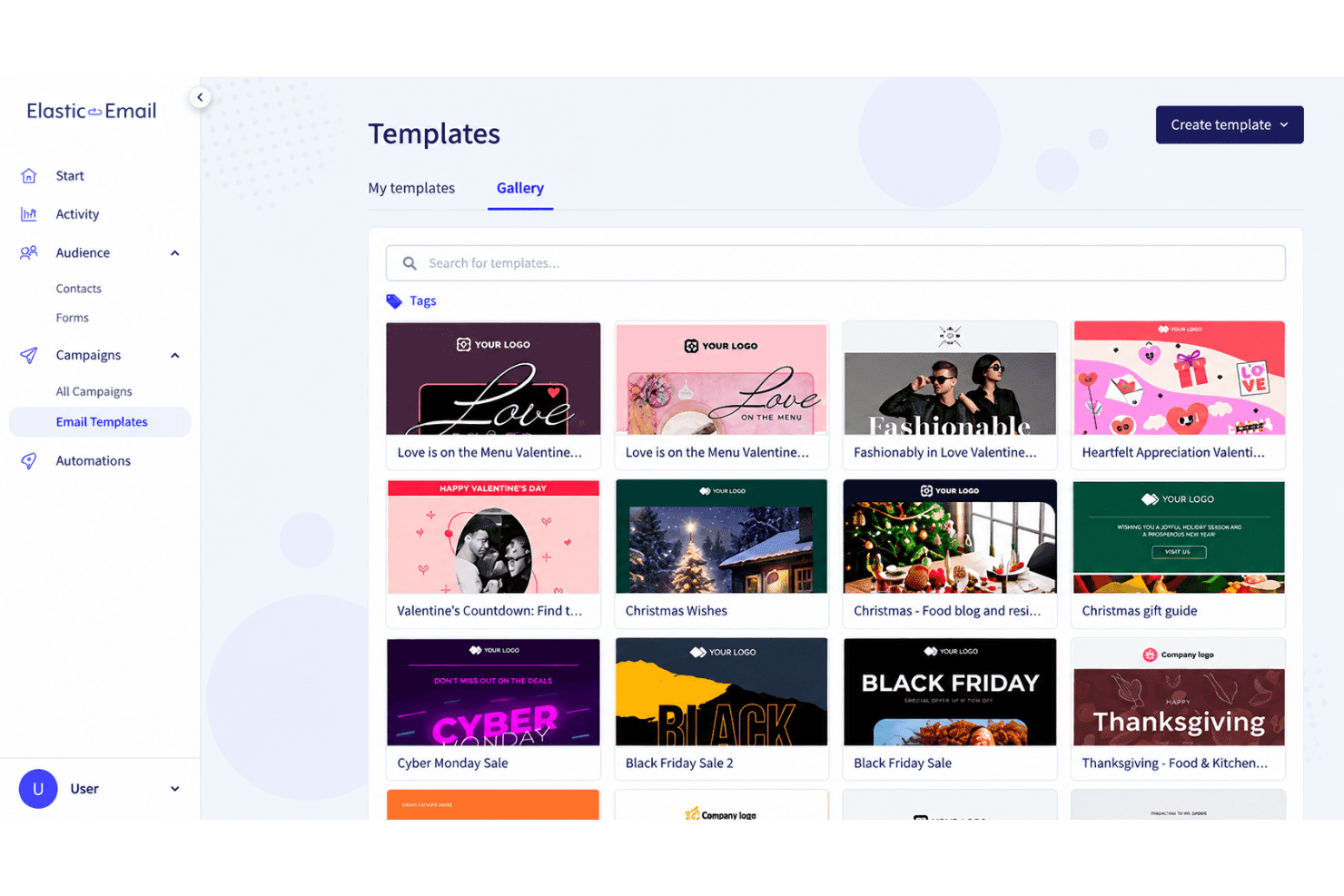
Use templates and the email editor to create campaign messages without coding each email from scratch. Elastic Email covers common campaign layouts, though its design flexibility is more limited than some leading competitors.
Signup Forms
Create signup forms to collect contacts and add them to your email lists. You can place forms on relevant pages to capture newsletter subscribers directly from your website.
Landing Pages
Build landing pages for campaigns, lead capture, or focused calls to action. Pairing a landing page with a signup form gives you a single workflow for attracting and collecting new subscribers.
Reporting And Analytics
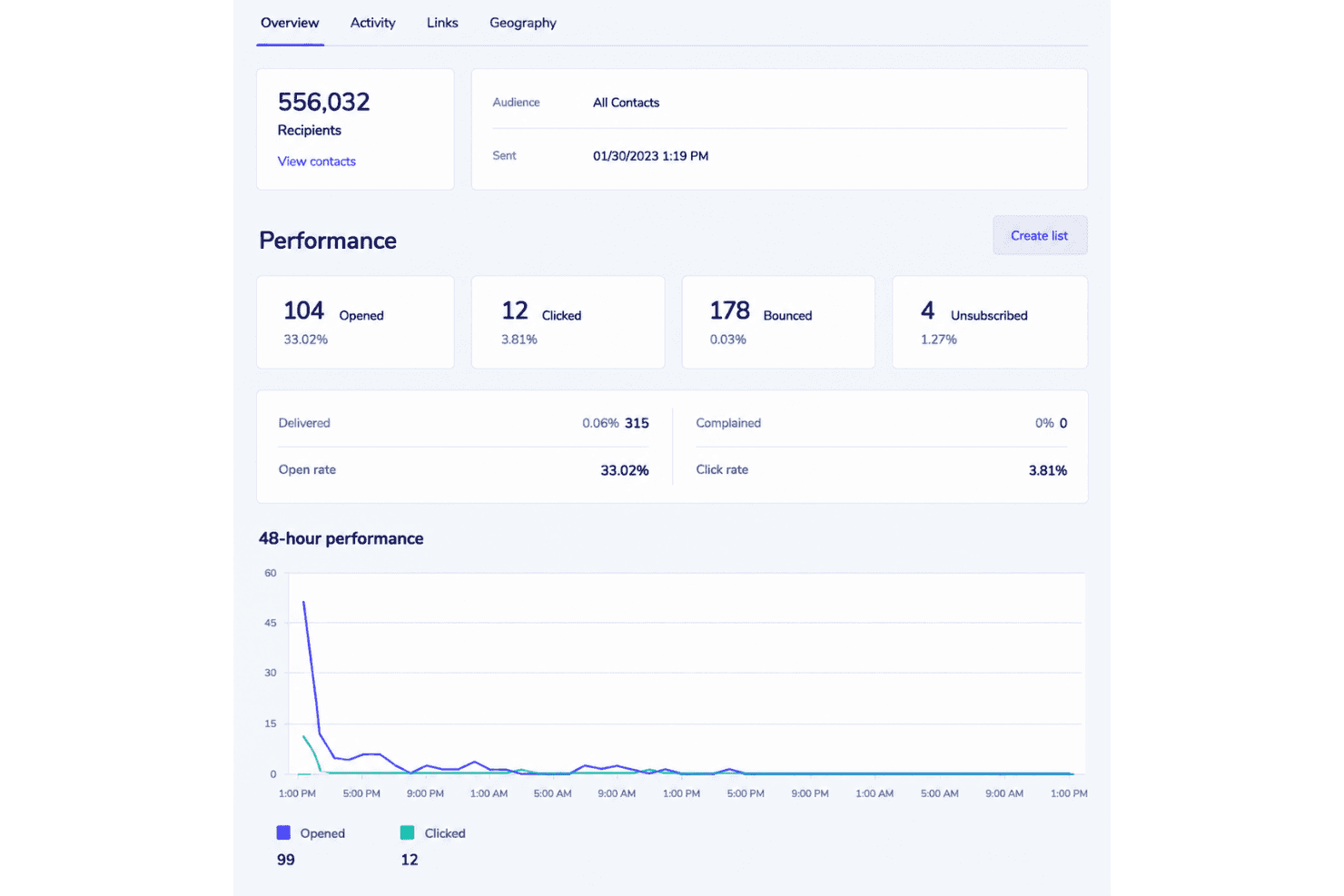
Review campaign metrics that show how recipients interact with your emails. Elastic Email also provides reporting for recurring sends, although aggregated results can make individual campaign comparisons harder.
Ease of Use
Elastic Email is fairly easy to use for core email marketing, with approachable onboarding, campaign templates, signup forms, landing pages, and visual automations. Its SMTP and API documentation also gives technical teams a clear path to custom sending workflows. However, the interface feels less polished than leading platforms, template editing limits design flexibility, and reviewers report inconsistent support during troubleshooting. I’d recommend it when functionality and usage-based pricing matter more than refined usability.
Integrations
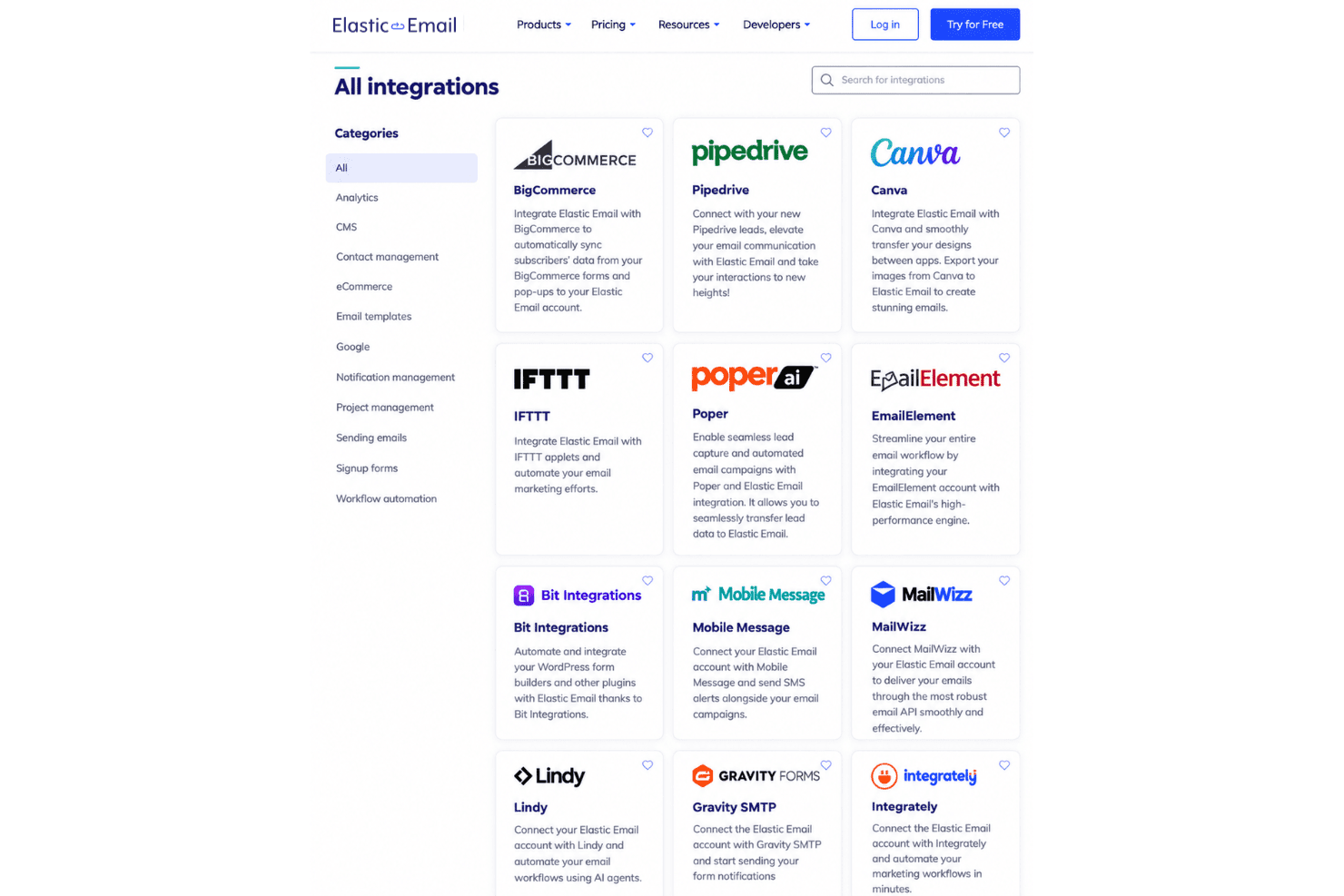
Elastic Email integrates with Cloudways, WordPress, HubSpot, ClickUp, PayPal, WooCommerce, Mautic, Shopify, and Poptin, among others.
It also offers a REST API and SMTP relay for custom integrations and supports third-party connections through Zapier and Pabbly Connect.
Elastic Email Specs
- A/B Testing: Yes
- API: Yes
- Audience Targeting: Yes
- Brand Management: No
- Calendar Management: No
- Campaign Management: Yes
- Compliance Tracking: Yes
- Contact Management: Yes
- Contact Sharing: No
- Conversion Tracking: No
- CRM Integration: Yes
- Customer Management: No
- Dashboard: Yes
- Data Export: Yes
- Data Import: Yes
- Data Visualization: Yes
- Email Integration: Yes
- External Integrations: Yes
- Google Apps Integration: Yes
- Lead Management: No
- Lead Scoring: No
- Link Tracking: Yes
- Marketing Automation: Yes
- Multi-User: Yes
- Notifications: Yes
- Scheduling: Yes
- Social-Media Integration: Yes
- Third-Party Plugins/Add-Ons: Yes


