

Yapay zekâ tasarım oluşturucusu, çok az manuel girdiyle grafikler, görseller ve pazarlama materyalleri oluşturmak için yapay zekâ kullanan bir araçtır; daha hızlı çalışmanıza, marka bütünlüğünüzü korumanıza ve yaratıcı ekiplerin üretkenliğini sürdürmenize yardımcı olur.
En iyi yapay zekâ tasarım oluşturucularını karşılaştırıyorsanız, yalnızca abartılı vaatler sunan değil, gerçek değer sağlayan, iş akışınıza kolayca entegre olan ve güvenilir sonuçlar veren araçları bilmek istersiniz. Bu rehberde en iyi seçimlerimi, her seçeneği benzersiz kılan özellikleri ve farklı yaratıcı ihtiyaçlara nasıl uyum sağladıklarını bulacak, böylece ekibiniz için doğru aracı güvenle seçebileceksiniz.
Why Trust Our Software Recommendations
6,700+
Reviews
20
Industry experts
16+
Evaluation factors
14
Years
Our team has been testing and reviewing software since 2012. As marketing leaders ourselves, we know how difficult—and important—it is to choose the right software.
For this guide, we evaluated tools using hands-on testing and independent research, scoring tools using our selection criteria.
Our reviews reflect our human editorial judgment, not a sales pitch.
Expert reviewers:
 Gui DrusinaCreative Director
- Shriya GhateSenior Marketing Lead
 Amanda JacquesMarketing Ops Leader

Yapay Zekâ Tasarım Oluşturucuları Karşılaştırma Tablosu
Bu karşılaştırma tablosu, en iyi yapay zekâ tasarım oluşturucusu seçimlerimin fiyatlandırma ayrıntılarını özetlemektedir:
Sorted by: Default
| Tool | Starting Price | Website | |
|---|---|---|---|
Best for automated infographic creation | 4.6 out of 5 | $15/user/month Free plan available | Website |
Best for commercial brand safety | 4.4 out of 5 | $9.99/month Free plan available | Website |
Best for high-fidelity original artwork | 4.4 out of 5 | $10/month Not available | Website |
Best for instant custom brand kits | Not rated | $96/year Free plan available | Website |
Best for social media post designs | Not rated | $32/month 7-day free trial | Website |
Best for brand-consistent marketing visuals | 4.6 out of 5 | $144/user/year Free trial + free plan available | Website |
Best for ad creative variation at scale | 4.1 out of 5 | $39/month Free trial available | Website |
Best for advanced typography control | Not rated | $14/month Free plan available | Website |
Best for multi-channel campaign assets | Not rated | $9.90/month Free plan available | Website |
Best for research-driven visual campaigns | Not rated | $20/month Free plan available | Website |


En İyi Yapay Zekâ Tasarım Oluşturucusu İncelemeleri
Kısa listeme giren en iyi yapay zekâ tasarım oluşturucularının ayrıntılı özetlerini aşağıda bulabilirsiniz. İncelemelerim, sizin için en iyi seçeneği bulmanıza yardımcı olmak amacıyla her platformun özelliklerine, en iyi kullanım alanlarına ve yeteneklerine yakından bakmaktadır.
 Best for automated infographic creation
- Free plan available
- From $15/user/month
Visit WebsiteCustomer Rating:4.6/5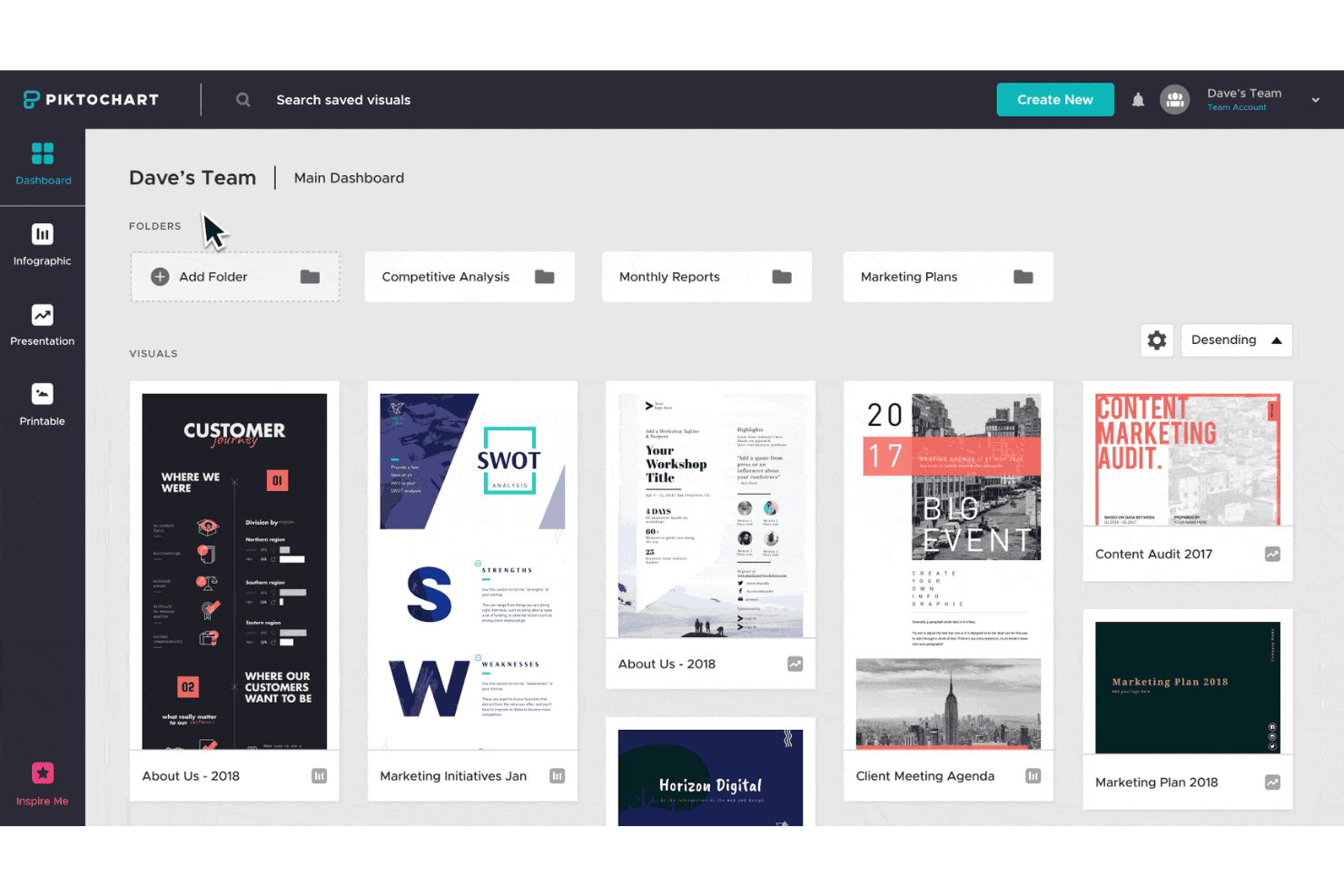
Piktochart offers a team dashboard where users can organize visuals into folders and access infographic, presentation, and printable templates. Piktochart is an AI graphic design generator that converts text prompts and uploaded documents into infographics, presentations, reports, and social media graphics using a template-based generation system.
Who Is Piktochart Best For?
Piktochart is a strong fit for content marketers and non-designers who need to turn data, reports, or written content into polished visual assets quickly.
Why I Picked Piktochart
Piktochart earns its spot on my shortlist because the document-to-visual feature is genuinely impressive: upload a PDF or DOCX and it pulls out key points, structures a layout, and produces a ready-to-edit infographic in about 10 seconds. I also like the AI Outline feature, which organizes raw ideas into a logical structure before any layout is applied. That two-step approach (outline first, design second) produces infographics that actually communicate clearly, not just visually formatted text dumps.
Piktochart Key Features
- Text-to-image AI generator: Lets you create visuals from simple prompts within select formats like banners and Instagram posts.
- Extensive template library: Offers more than 100 editable templates covering posters, social media, reports, and presentations.
- Brand kit application: Lets you set your brand’s fonts, colors, and logo designs for use across designs on Business plans.
- Chart and data import: Supports importing data from Google Sheets, Excel, and CSV files to create visual graphs and charts.
Piktochart Integrations
Native integrations are not clearly documented.
Pros and Cons
Pros:
- Offers infographic template varieties
- Structures content before layout generation
- Fast document-to-infographic conversion
Cons:
- Weak output options for ad creative formats
- AI image generation is limited
Learn more about Piktochart: Best for commercial brand safety
- Free plan available
- From $9.99/month
Visit WebsiteCustomer Rating:4.4/5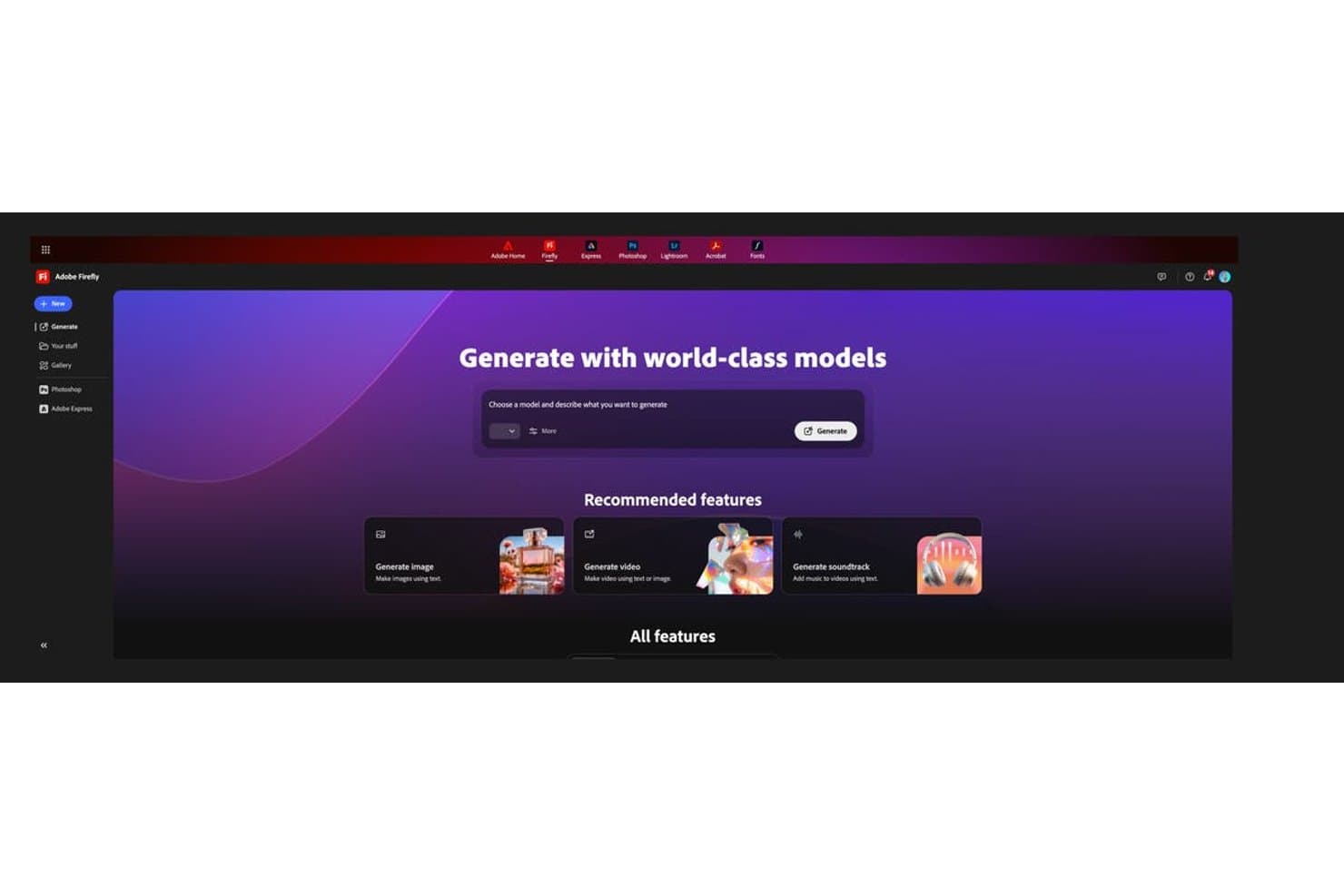
Adobe Firefly offers a centralized AI generation hub with options to generate images and videos using text prompts. Adobe Firefly is an AI creative generation platform that produces images, editable vector graphics, video, and audio from text prompts, with multi-model access and deep integration across the Adobe Creative Cloud suite.
Who Is Adobe Firefly Best For?
It's a strong fit for brand designers and marketing teams at mid-to-large organizations that need AI-generated assets cleared for use in paid advertising and commercial campaigns.
Why I Picked Adobe Firefly
Adobe Firefly earns its spot on my shortlist because it's the only AI design generator that backs outputs with IP indemnification, where Adobe accepts copyright liability if a generated asset is legally challenged. I lean on this specifically when producing visuals for paid campaigns, where legal exposure is real. The Custom Models feature also lets me train Firefly on approved brand imagery, so generations come from a controlled, licensed dataset rather than a broad, unknown training pool.
Adobe Firefly Key Features
- Firefly AI Assistant: Instantly picks the right tool for your creative task without manual switching.
- Editable vector graphics: Generates SVG files you can refine in Illustrator, maintaining full layer and node control.
- Firefly Boards: Visual workspace for brainstorming, storyboarding, and sharing team concepts on an infinite canvas.
- Multilingual prompt support: Accepts text prompts in over 100 languages for global creative campaigns.
Adobe Firefly Integrations
Adobe Firefly offers native integrations with Adobe Creative Cloud apps like Photoshop, Illustrator, Premiere Pro, and Adobe Express. An API is available for custom integrations.
Pros and Cons
Pros:
- Custom Models trained on brand imagery
- Generates editable vector SVGs natively
- IP indemnification covers commercial asset usage
Cons:
- Requires Creative Cloud subscription for full access
- Limited standalone template library for marketers
Learn more about Adobe Firefly: Best for high-fidelity original artwork
- Not available
- From $10/month
Visit WebsiteCustomer Rating:4.4/5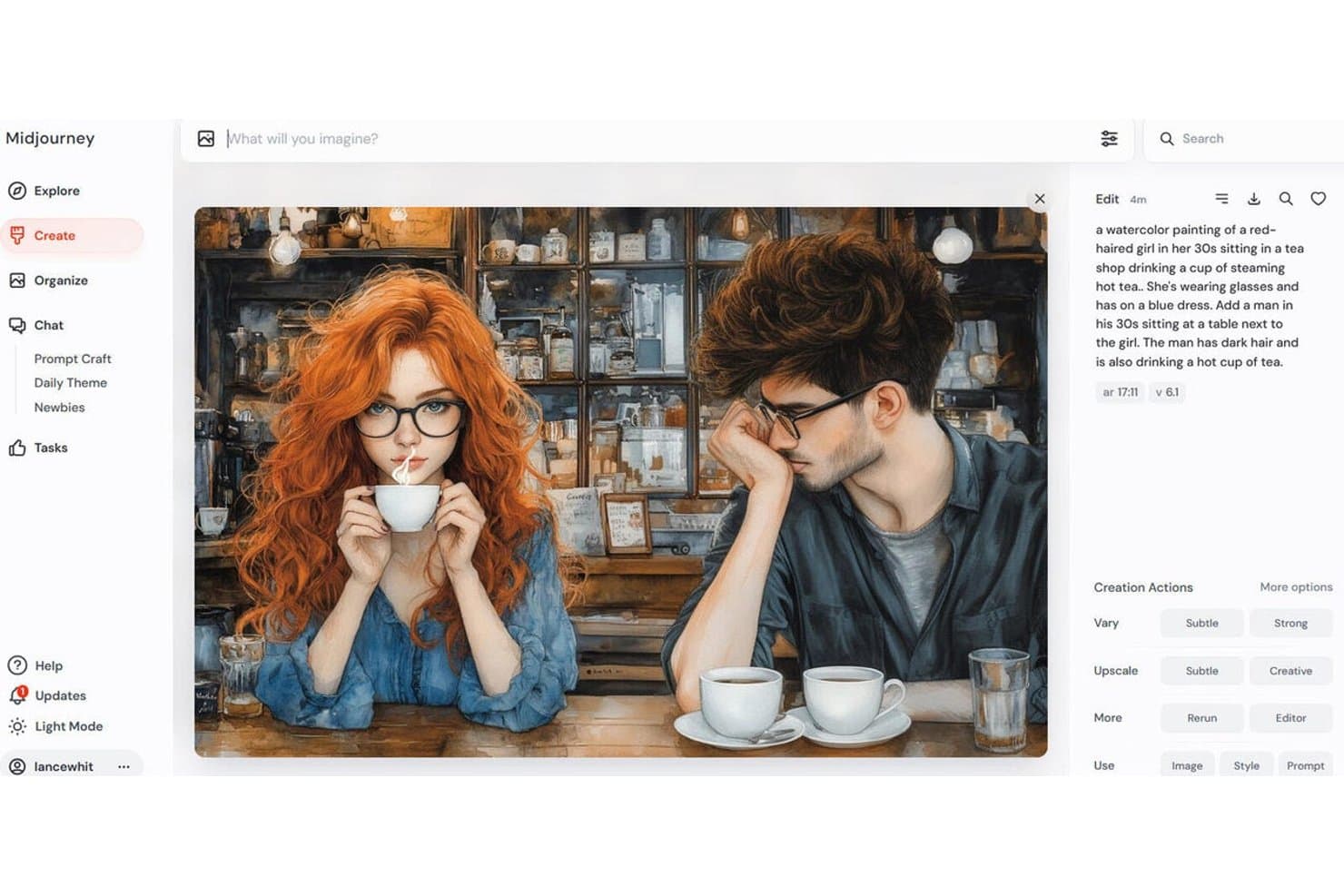
Midjourney offers a watercolor art generation feature, shown here producing a detailed scene of two people drinking tea in a vintage shop. Midjourney is a text-to-image AI art generator that produces high-fidelity visuals from text prompts, with multiple generation models, style and character reference controls, inpainting, outpainting, and a video generation model.
Who Is Midjourney Best For?
Midjourney is a strong fit for brand designers and content marketers who prioritize raw image quality and artistic fidelity over templated design workflows.
Why I Picked Midjourney
Midjourney earns its spot on my shortlist because the image quality it produces is genuinely in a different league. I use Style Reference (Sref) and Moodboards to maintain visual consistency across concept batches, which matters when I'm building out a campaign's look before moving into a design tool. The level of cinematic detail, lighting, texture, and composition that Midjourney generates out of the box is something I haven't reliably replicated in other tools.
Midjourney Key Features
- Discord and web interfaces: Generate images using prompts on both Discord and the web platform.
- Inpainting and outpainting tools: Edit or extend regions of images directly in the web editor.
- Batch variation and permutation prompts: Create multiple image variations at once for rapid ideation.
- Niji model for art styles: Switch to a specialized art model for distinct stylistic control.
Midjourney Integrations
Native integrations are not clearly documented.
Pros and Cons
Pros:
- Style references enforce visual consistency
- Multiple AI models for varied visual styles
- Produces photorealistic imagery
Cons:
- Outputs are flat images, not editable layers
- No template system for marketing formats
Learn more about Midjourney:
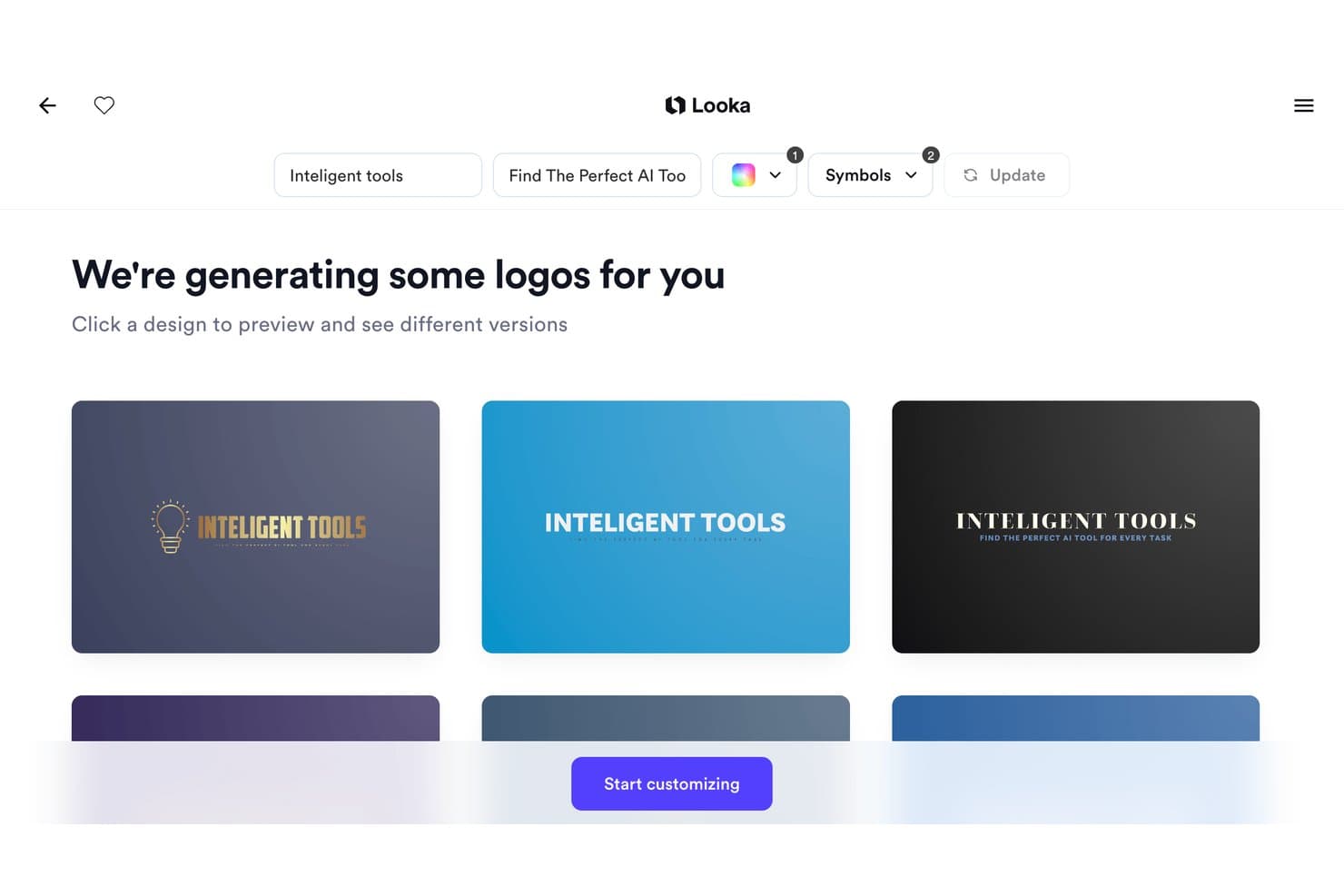
Looka offers an AI-powered logo generator that produces multiple branded logo designs instantly based on your company name and tagline. Looka is an AI-powered logo and brand identity generator that produces custom logos and 300+ branded asset templates based on your business name, industry, and visual preferences.
Who Is Looka Best For?
Looka is a natural fit for early-stage startups and solopreneurs who need a complete brand identity without the budget or timeline for a professional designer.
Why I Picked Looka
I've included Looka in my top picks because its Brand Kit auto-applies your logo, colors, and fonts across 300+ asset templates the moment your logo is finalized. In practice, that means I can go from a generated logo to a complete set of business cards, email signatures, and social media profiles without rebuilding brand specifications from scratch each time. The Brand Guidelines document it generates also locks in font pairings and color usage rules automatically.
Looka Key Features
- AI-powered logo maker: Generates custom logo concepts based on your business name, industry, and design preferences.
- Template library for business assets: Offers 300+ pre-designed templates including invoices, flyers, and social media graphics.
- Multiple logo file formats: Exports logo files in PNG, SVG, EPS, and PDF for versatile use across channels.
- Social media asset generation: Automatically creates correctly-sized logos and graphics for major social platforms.
Looka Integrations
Native integrations are not clearly documented.
Pros and Cons
Pros:
- Offers brand guidelines document creation
- Auto-applies brand assets across templates
- Generates complete brand kits from logos
Cons:
- No collaborative editing for design teams
- Limited generative AI image creation
Learn more about Looka:
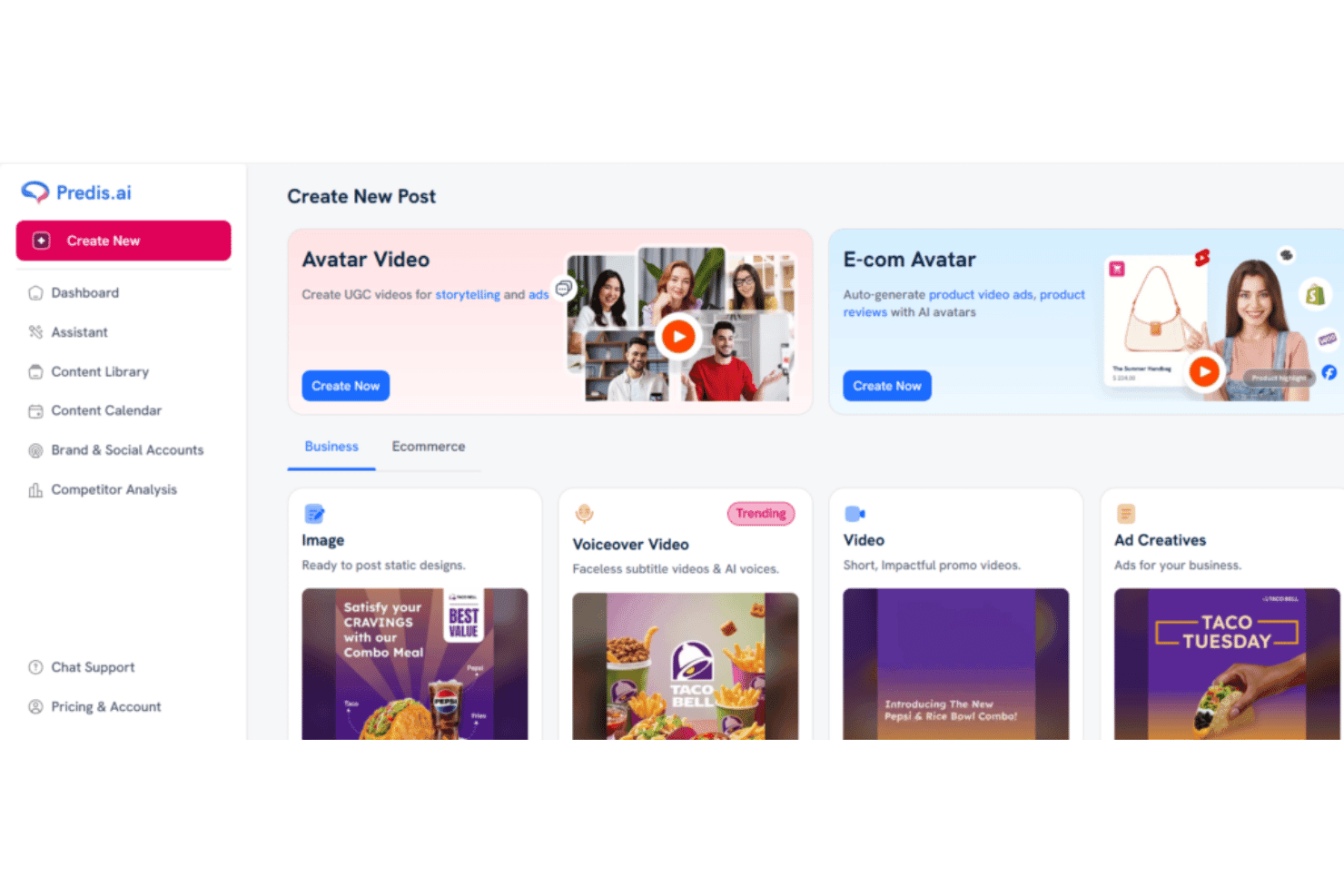
Predis.ai offers a 'Create New Post' dashboard with options for Avatar Video, E-com Avatar, Image, Voiceover Video, Video, and Ad Creatives content types. Predis.ai is an AI content generation platform that produces social media posts, carousels, video reels, and ad creatives from text prompts, with built-in brand kits, multi-format resizing, and native scheduling across major social platforms.
Who Is Predis.ai Best For?
Predis.ai is a strong fit for solo creators, small marketing teams, and social media managers who need to publish consistent, on-brand content across multiple platforms without a dedicated designer.
Why I Picked Predis.ai
Predis.ai earns its spot on my shortlist because its carousel generation is genuinely impressive. I've published Predis-generated LinkedIn and Instagram carousels that outperformed manually designed versions, because the tool builds complete multi-slide sequences from a single text prompt with consistent styling and proper text hierarchy. I also like how brand kits are automatically enforced across every output, so logos, colors, and fonts apply without any manual setup per post.
Predis.ai Key Features
- Multi-model AI image generation: Generates visuals using a mix of Google Veo, Gemini, ByteDance, and proprietary models based on a single prompt.
- Editable design layers: Lets you modify text, images, and layout elements in a built-in editor after generation.
- Automated multi-platform resizing: Automatically adapts a design to fit Instagram, Facebook, TikTok, Pinterest, and YouTube Shorts.
- Direct social publishing: Supports instant scheduling and publishing to major social and ecommerce platforms without leaving the app.
Predis.ai Integrations
Predis.ai offers native integrations with Instagram Ads, TikTok Ads, LinkedIn Ads, YouTube Ads, Pinterest Ads, and offers an API for custom integrations.
Pros and Cons
Pros:
- Native scheduling built into the platform
- Multi-brand kits auto-applied to every output
- Strong social-specific carousel and reel generation
Cons:
- Limited editing controls for complex designs
- Image quality lags behind dedicated AI generators
Learn more about Predis.ai: Best for brand-consistent marketing visuals
- Free trial + free plan available
- From $144/user/year (billed annually)
Visit WebsiteCustomer Rating:4.6/5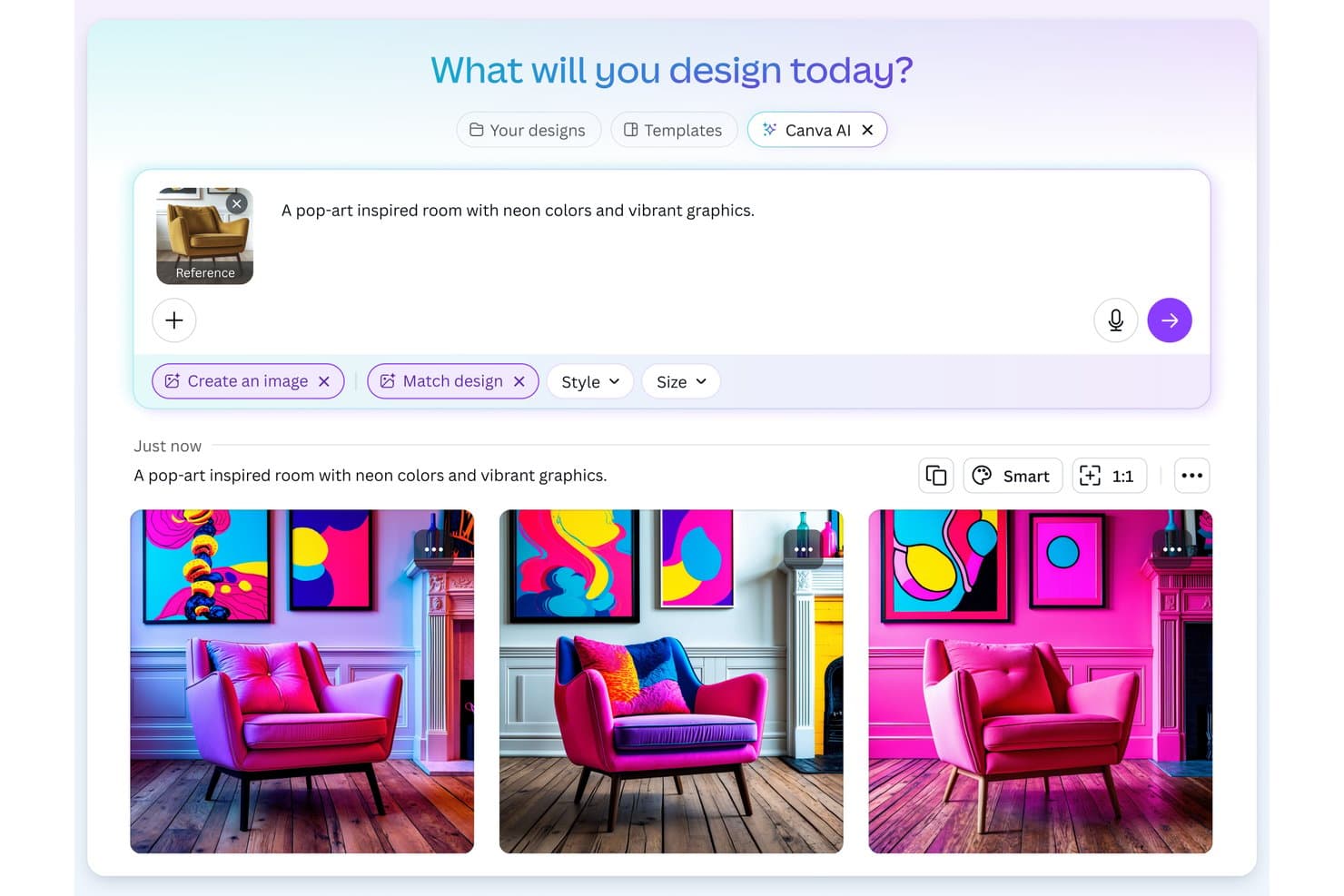
Canva offers an AI image generation feature that transforms text prompts and reference images into designs. Canva's Magic Design is an AI design generator built into Canva's editor that turns text prompts into fully editable designs across social media graphics, presentations, videos, and marketing materials.
Who Is Canva Best For?
Canva is a strong fit for marketing teams and content creators who need to produce brand-consistent visuals at volume without relying on a dedicated design team.
Why I Picked Canva
I picked Canva because no other AI design generator bakes brand enforcement directly into the generation step the way it does. When I run a prompt through Magic Design, my Brand Kit colors, fonts, and logo apply to the output in one click, so the result looks on-brand from the start rather than requiring cleanup after. The multi-brand kit support (up to 100 kits on the Business plan) lets me manage distinct visual identities across separate campaigns without manual re-theming each time.
Canva Key Features
- Magic Design for presentations: Instantly generates complete slide decks from a prompt that include outlines, topics, and sample content.
- AI video generator: Combines video clips, images, and music into short marketing videos with AI-powered editing.
- Layer-based design editor: Lets you edit every AI-generated element, from text layers to images, directly in the browser.
- Content Planner publishing: Schedule and publish generated graphics and videos directly to connected social platforms.
Canva Integrations
Canva offers native integrations with Google Drive, Dropbox, Meta (Facebook and Instagram), Slack, and HubSpot. It also connects with Zapier and provides an API for custom integrations.
Pros and Cons
Pros:
- One-click resizing across multiple ad formats
- Massive library of marketing-ready templates
- Brand Kit applies across all AI outputs
Cons:
- Limited prompt control for advanced image generation
- AI image quality lags behind dedicated generators
Learn more about Canva: Best for ad creative variation at scale
- Free trial available
- From $39/month
Visit WebsiteCustomer Rating:4.1/5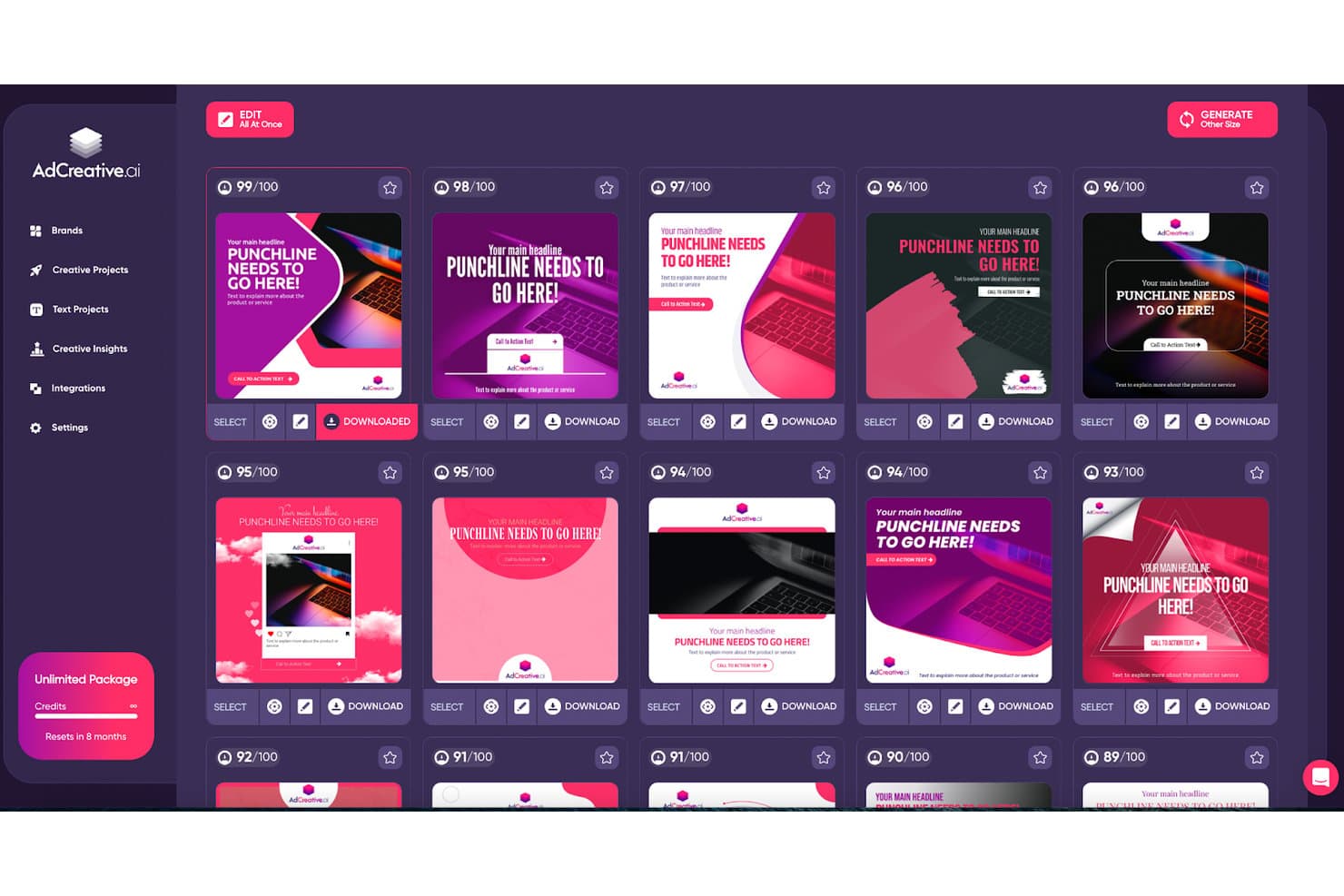
AdCreative.ai displays an AI-scored grid of generated ad creatives with download and edit options. AdCreative.ai is an AI-powered ad creative platform that generates conversion-focused static ads, social posts, product photoshoots, and video creatives, with built-in predictive scoring to evaluate creative performance before launch.
Who Is AdCreative.ai Best For?
It's a strong fit for performance marketing teams and agencies managing multiple brands or clients who need high volumes of ad creatives across Meta and Google campaigns.
Why I Picked AdCreative.ai
AdCreative.ai earns its spot on my shortlist because of how it handles creative volume. I can generate hundreds of ad variants in one session, and the Batch Creatives feature automatically exports them across every platform size, so I'm not manually resizing for Meta, Google, and LinkedIn separately. What I really like is the Creative Scoring AI, which predicts performance before I spend a cent on media.
AdCreative.ai Key Features
- Brand kit training: Upload logos, color palettes, and style guides to guide the AI in creating consistent, on-brand assets.
- AI video generation: Produce video ads, UGC-style clips, and product showcase videos automatically using AI-driven workflows.
- Creative insight reports: Access analytics on asset performance, creative fatigue, and competitor ad trends to inform future campaigns.
- Multi-channel export: Send generated assets directly to ad platforms like Meta, Google, and LinkedIn, or download in PNG, JPG, PDF, and MP4 formats.
AdCreative.ai Integrations
AdCreative.ai offers native integrations with Meta Ads, Google Ads, LinkedIn Ads, and Zapier, and provides an API for custom integrations.
Pros and Cons
Pros:
- Strong multi-brand kit support for agencies
- Creative scoring predicts ad performance pre-launch
- Generates hundreds of ad variants quickly
Cons:
- Outputs can look repetitive across accounts
- Post-generation editing options are fairly limited
Learn more about AdCreative.ai: Best for advanced typography control
- Free plan available
- From $14/month (billed annually)
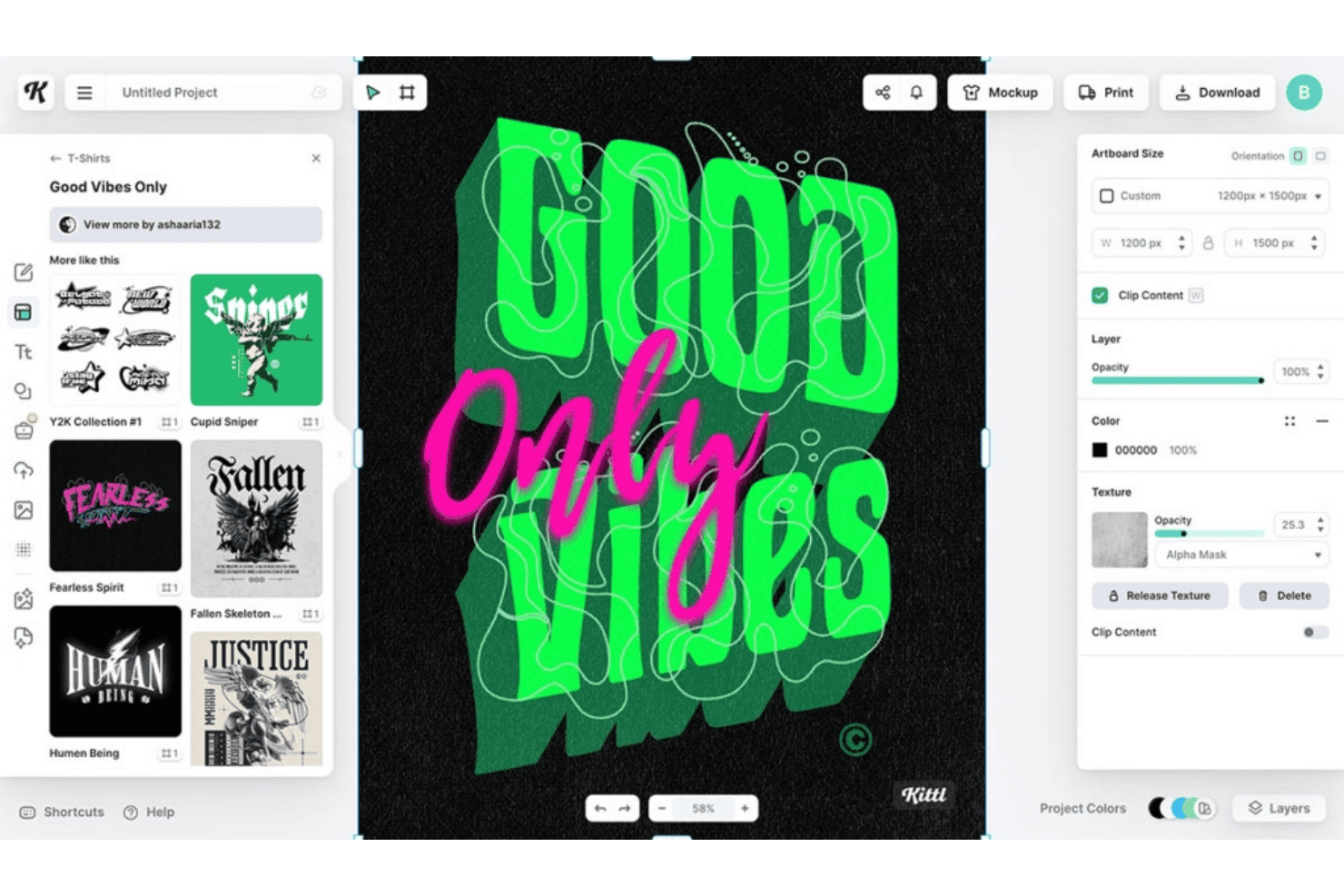
Kittl offers a graphic design editor with customizable t-shirt templates, texture controls, and layering tools for creating bold typographic designs. Kittl is a browser-based AI design platform that combines text-to-image and vector generation across 20+ AI models with a full design editor, template library, and typography tools built for marketing and branded asset creation.
Who Is Kittl Best For?
Kittl suits brand designers and content creators who need precise control over typography and vector assets for logos, merchandise, and print-on-demand projects.
Why I Picked Kittl
Kittl earns its spot on my shortlist because no other AI design generator comes close to its layerable text effects system. I can apply curved text, editable shadows, and vintage lettering to a single word simultaneously, where Canva limits you to one effect at a time. I also rely on Kittl's AI Vector Generator when I need prompt-generated artwork that stays fully editable as vector paths, not flattened pixels.
Kittl Key Features
- AI video generator: Transform static images into animation-ready MP4 clips directly on the design canvas.
- Multi-model AI selection: Switch between 20+ leading AI generation models, including Google Imagen 4 and DALL·E 3, inside a single workflow.
- Infinite canvas workspaces: Create and manage complex, multi-part visual projects on an unlimited-size design area.
- Instant background remover: Remove image backgrounds with a single click using AI processing, then continue editing in the same editor.
Kittl Integrations
Native integrations are not clearly documented.
Pros and Cons
Pros:
- AI vector output stays fully editable
- Access to 20+ AI generation models
- Layerable text effects unmatched by competitors
Cons:
- No built-in social media publishing tools
- Limited brand kit enforcement across AI outputs
Learn more about Kittl:
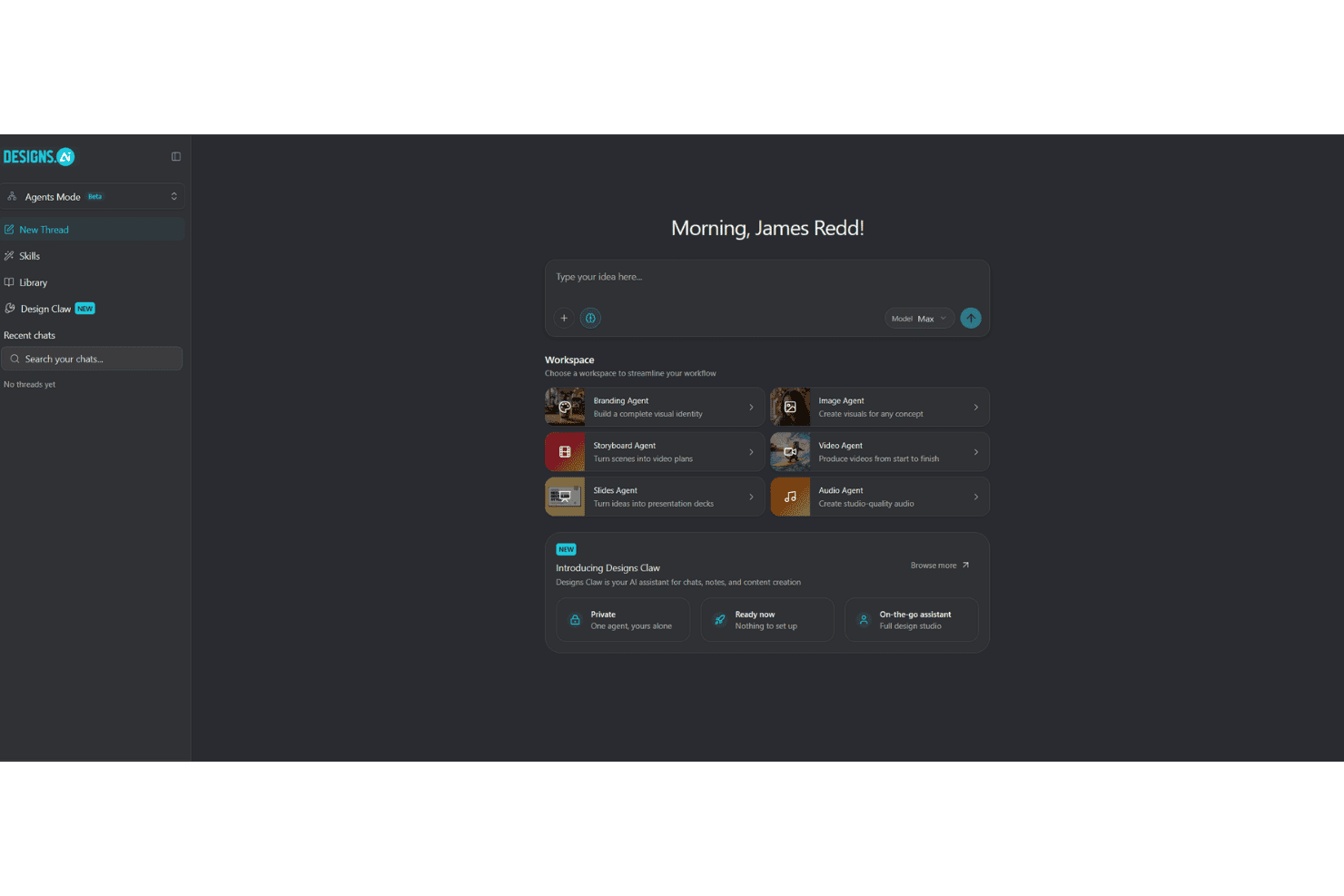
Designs.ai offers an AI-powered Agents Mode workspace with specialized agents for branding, image, video, audio, storyboard, and slides creation. Designs.ai is an AI creative suite that generates images, videos, presentations, and audio assets through specialist AI agents, with built-in brand kit controls and access to multiple LLMs including Claude, Gemini, and OpenAI's ChatGPT.
Who Is Designs.ai Best For?
Designs.ai is a strong fit for content marketers and social media teams who need to produce branded visuals across multiple formats without a dedicated design resource.
Why I Picked Designs.ai
I've included Designs.ai in my top picks because it covers image, video, slides, and audio generation through dedicated AI agents, all in one workspace. What I find especially useful is the one-click brand extraction: paste a URL and your brand colors, fonts, and logo auto-apply across every output you generate. The 1-click resize then adapts each asset across social, web, and print formats without manual reworking.
Designs.ai Key Features
- AI agent chat workspace: Route projects or prompts to specialist AI agents for image, video, slide, and audio generation in a central hub.
- Text-to-design generation: Enter prompts to instantly generate layouts that include images, text, and calls-to-action.
- 20,000+ editable templates: Access a wide template library covering ads, posts, videos, presentations, and branded graphics.
- Multilingual support: Create and edit content in over 15 languages across both text and audio outputs.
Designs.ai Integrations
Native integrations are not clearly documented.
Pros and Cons
Pros:
- Resizes assets across platform formats instantly
- One-click brand extraction from a URL
- Generates images, video, audio, and slides
Cons:
- Limited native third-party integrations available
- AI image quality trails dedicated generators
Learn more about Designs.ai:
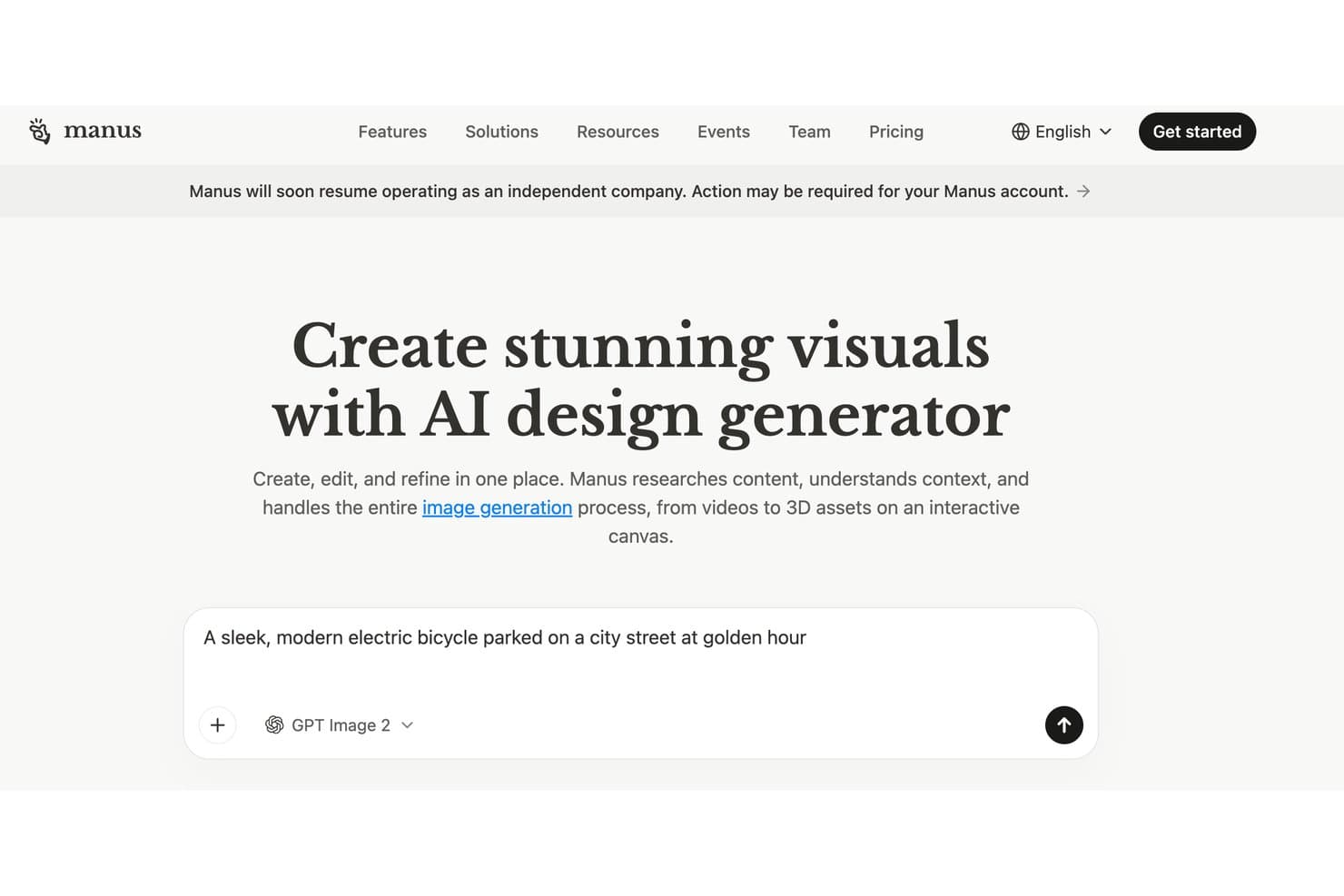
Manus offers an AI design generator that creates, edits, and refines visuals, including images, videos, and 3D assets on an interactive canvas. Manus is an agentic AI design generator that combines a built-in research agent with multi-modal visual generation (images, video, and 3D) and an interactive canvas editor for post-generation editing.
Who Is Manus Best For?
Manus is a strong fit for content marketers and brand teams who need campaign visuals grounded in real-time research rather than static prompts alone.
Why I Picked Manus
I picked Manus as one of the best because no other AI design generator I've used actually researches before it creates. Before generating a single asset, Manus browses websites, watches videos, and analyzes documents to ground its visual output in real context. I've used this to brief campaign visuals against competitor landing pages without ever leaving the tool. The interactive canvas then lets me click into any element to swap backgrounds, adjust colors, or layer in text.
Manus Key Features
- Multi-modal output: Generate not just images but also videos and 3D objects for a range of visual marketing needs.
- API access: Integrate Manus-generated assets directly into your existing workflows using the available API.
- Team credit pools: Share monthly generation credits among team members, adjustable based on project needs.
- One-click background removal: Instantly remove backgrounds from generated visuals within the design editor.
Manus Integrations
Native integrations are not clearly documented.
Pros and Cons
Pros:
- Editable canvas for post-generation refinements
- Outputs images, video, and 3D assets
- Researches web context before generating visuals
Cons:
- Credit-based model limits high-volume output
- No documented brand kit controls
Learn more about Manus:
Diğer Yapay Zekâ Tasarım Oluşturucuları
Kısa listeme giremeyen ancak yine de göz atmaya değer bazı ek yapay zekâ tasarım oluşturucusu seçenekleri şunlardır:
- 11GammaBest for executive presentation decks
- 12GenPPTBest for turning source material into decks
- 13VistaCreateBest for dynamic marketing video templates
- 14VismeBest for collaborative branded content design
- 15UizardBest for UI and app mockup generation
- 16PicsartBest for mobile-first creative editing
- 17RecraftBest for vector-based graphic generation
- 18Smartly.ioBest for dynamic creatives
- 19BrandmarkBest for instant AI logo generation
- 20IdeogramBest for text-heavy creative designs
How I Evaluate AI Design Generators
To earn a spot on this list, a tool needs to do more than slap "AI" on a template library—it has to meaningfully accelerate how marketers create on-brand visuals, ads, and campaign assets. I split my evaluation into core functionality every tool must cover and the differentiating factors that separate the best from the rest.
Core Functionality (Table Stakes for This List)
When I'm selecting tools for my list, I rank each one on a scale from 0 (does not offer the functionality) to 5 (excels in this area) for each core functionality listed below. Then, I calculate the tool's total score into a percentage. Each tool needs to achieve a minimum total score of 65% to be considered for inclusion.
- AI Image Generation: I evaluate prompt flexibility and output quality—whether a tool can turn a brief like "minimalist product hero for a skincare launch" into a polished, usable image.
- Design Template System: Marketing teams need templates for ads, social posts, and banners. I look for libraries that AI can auto-populate, not just static layouts you fill in manually.
- Brand Kit Controls: I check whether you can upload logos, lock brand colors, and set fonts so every AI-generated asset stays on brand without constant manual fixes.
- Multi-Format Output: A single design often needs to live across Instagram, Google Display, and email headers. I look for smart resizing that adapts layouts, not just crops them.
- Editable AI Outputs: I evaluate how much control you get after generation—whether you can swap backgrounds, adjust text layers, or use AI inpainting to refine specific elements.
- Marketing Asset Export: Export needs to match where assets are going. I check for PNG, JPG, PDF, and MP4 support, plus platform-optimized specs for channels like Meta or Google Ads.
Once I have a list of tools that meet the criteria, I consider what sets each platform apart.
Differentiating Factors (What Sets Vendors Apart)
Here's how I compare and contrast different vendors:
Standout Features
Text-to-design prompting is a major differentiator. I look for tools that generate complete layouts with typography, composition, and CTA placement from a single prompt—not just isolated images. Editable vector output also matters when your design team needs to refine AI drafts in tools like Figma or Illustrator rather than working with flat PNGs. I evaluate multi-format resizing closely, checking whether a tool can take one ad concept and intelligently adapt it across dozens of platform-specific dimensions without breaking the layout.
Beyond Features
Commercial usage rights matter a lot here. I check whether AI-generated assets are fully owned by you or subject to licensing restrictions that could create legal risk in paid campaigns. Workflow integrations are equally important—if your team publishes through a social scheduler or manages ads in Meta or Google, direct publishing connections save real time. I also evaluate data privacy policies, especially whether uploaded brand assets are used to train the vendor's AI models.
Yapay Zekâ Tasarım Oluşturucuları Nasıl Seçilir?
Uzun özellik listeleri ve karmaşık fiyatlandırma yapılarına kendinizi kaptırmanız kolaydır. Benzersiz yazılım seçim sürecinizde ilerlerken odağınızı korumanıza yardımcı olmak için göz önünde bulundurmanız gereken faktörlerin bir kontrol listesi aşağıdadır:
| Faktör | Dikkat Edilmesi Gerekenler |
|---|---|
| FaktörÖlçeklenebilirlik | Dikkat Edilmesi GerekenlerAraç, ekibinizin mevcut ve öngörülen materyal hacmini karşılayabilir mi? Büyümeyi düşünün: ayda yüzlerce yaratıcı içerik mi yoksa yalnızca birkaç tane mi oluşturmanız gerekecek? |
| FaktörEntegrasyonlar | Dikkat Edilmesi GerekenlerBirincil pazarlama ve tasarım platformlarınıza (sosyal medya planlayıcıları, CMS, Figma gibi) bağlanabiliyor mu? Manuel yüklemelerin getirdiği zahmetle sorunsuz otomasyon arasındaki farkı değerlendirin. |
| FaktörÖzelleştirilebilirlik | Dikkat Edilmesi GerekenlerMarka yönergelerinizi uygulayabilecek misiniz? Aracın logo kullanımı, renk paletleri ve yaratıcı yönlendirme açısından ne kadar esnek olduğunu sorun. |
| FaktörKullanım kolaylığı | Dikkat Edilmesi GerekenlerAracı en çok kim kullanacak—tasarımcılar, pazarlamacılar veya her ikisi de mi? Fikirden hızlıca dışa aktarmaya geçerken rahat olup olmadığınızı görmek için kullanıcı arayüzünü inceleyin veya ücretsiz bir sürümü deneyin. |
| FaktörUygulama ve kullanıma alıştırma | Dikkat Edilmesi GerekenlerEkibiniz ne kadar hızlı çalışmaya başlayabilir? Benimsenmeyi hızlandırmak için sağlayıcının geçiş desteği, kullanıma alıştırma kılavuzları veya canlı eğitim sunup sunmadığını kontrol edin. |
| FaktörMaliyet | Dikkat Edilmesi GerekenlerFiyatlandırma modeli üretim ihtiyaçlarınıza uyuyor mu? Kredi limitlerini, kullanıcı koltuklarını veya sınırsız katmanları beklenen kampanya hacimleriniz ve öngörülen yatırım getirinizle karşılaştırın. |
| FaktörGüvenlik önlemleri | Dikkat Edilmesi GerekenlerMateryalleriniz ve marka verileriniz korunuyor mu? Yalnızca erişim kontrollerini değil, dosyaların nasıl depolandığını ve şifrelendiğini, ayrıca aracın sektör sertifikalarını karşılayıp karşılamadığını da inceleyin. |
| FaktörDestek erişilebilirliği | Dikkat Edilmesi GerekenlerTeknik bir sorunla karşılaştığınızda ne olur? Özellikle kampanyaları sıkı teslim tarihlerinde yürütüyorsanız, hızlı yanıt veren desteğe kolayca erişebileceğinizden emin olun. |
Yapay Zekâ Tasarım Oluşturucuları Nedir?
Yapay zekâ tasarım oluşturucuları, basit komut istemlerinden veya düzenlenebilir şablonlardan pazarlama görselleri, düzenleri ve grafikler oluşturmak için yapay zekâ kullanan yazılım platformlarıdır. Bu araçlar, pazarlama ve yaratıcı ekiplerin birden çok formatta kampanyaya hazır içerikler üretmesine, marka tutarlılığını korumasına ve tasarım sürecini hızlandırmasına yardımcı olur; üstelik resmî tasarım deneyiminiz olmasa bile.
Yapay Zekâ Tasarım Oluşturucularının Özellikleri
Bir yapay zekâ tasarım oluşturucusu seçerken aşağıdaki temel özelliklere dikkat edin:
- Yapay zekâ ile görsel oluşturma: Metin komut istemlerinden veya referans görsellerden görseller oluşturarak kampanyaya hazır grafiklerin hızlı ve uygulamalı tasarım becerileri olmadan hazırlanmasını mümkün kılar.
- Düzenlenebilir şablonlar: Reklamlar, sosyal medya gönderileri, e-posta üst bilgileri ve web sitesi banner'ları gibi pazarlama içerikleri için özel olarak tasarlanmış özelleştirilebilir düzenler sunar; böylece hızlı başlayabilir ve marka bütünlüğünü koruyabilirsiniz.
- Marka kiti kontrolleri: Logonuzu, yazı tiplerinizi, renklerinizi ve marka yönergelerinizi yükleyip uygulamanıza olanak tanır; böylece oluşturulan her içerik otomatik olarak kuruluşunuzun kimliğiyle uyumlu olur.
- Çoklu formatta dışa aktarma: İçerikleri tek bir tıklamayla birden çok platform (sosyal medya, web, baskı, video) için yeniden boyutlandırmanıza veya dışa aktarmanıza olanak tanır ve tekrarlanan boyutlandırma işlemlerine harcanan zamanı azaltır.
- Katman tabanlı düzenleme: Metin, arka plan ve nesneler gibi öğeleri düzenleyerek oluşturulan içeriklerde ince ayar yapmanızı sağlar; ek denetime ihtiyaç duyan tasarımcılar ve tasarımcı olmayanlar için idealdir.
- Metinden tasarıma komut verme: Önerilen başlıklar, tipografi, CTA yerleşimi ve görsel düzenlemeleriyle eksiksiz düzenler oluşturmak için doğal dildeki talimatları kullanır.
- İçerik sürümleme: Tasarımlarınızın önceki sürümlerini izleme, karşılaştırma ve geri yükleme olanağı sunarak ekip iş birliğini ve yaratıcı incelemeleri kolaylaştırır.
- İş birliği araçları: Kampanyalar üzerinde birlikte çalışan dağıtık ekipler için gerçek zamanlı yorumları, geri bildirimleri ve dosya paylaşımını destekler.
- Veri gizliliği kontrolleri: Yüklemelerinizin ve oluşturulan içeriklerin nasıl depolanacağı, paylaşılacağı veya yapay zekâ modellerini eğitmek için kullanılacağı üzerinde denetim sağlar ve marka içeriklerinizi korur.
- Platform entegrasyonları: İş akışlarını otomatikleştirmeye ve bağlantılı bir pazarlama teknoloji altyapısını korumaya yardımcı olmak için mevcut tasarım, yayınlama veya kampanya yönetimi araçlarınıza bağlanır.
Yapay Zekâ Tasarım Oluşturucularının Faydaları
Bir yapay zekâ tasarım oluşturucusunu uygulamak, ekibiniz ve işletmeniz için çeşitli faydalar sağlar. Yararlanabileceğiniz bazı avantajlar şunlardır:
- Daha hızlı içerik oluşturma: Yapay zekâ destekli görsel ve düzen oluşturma, ilk fikirlerden kampanyaya hazır görseller üretme sürecini önemli ölçüde hızlandırır.
- Tutarlı marka kimliği: Yerleşik marka kiti kontrolleri, logoların, yazı tiplerinin ve renklerin ölçek ne olursa olsun her içeriğe doğru şekilde uygulanmasını sağlar.
- Azalan tasarım darboğazları: Tasarımcı olmayanlar, bir tasarımcının zamanını veya becerilerini beklemeden yüksek kaliteli ve marka uyumlu grafikler üretebilir.
- Kolay çok kanallı uyarlama: Çoklu format çıktısı ve yeniden boyutlandırma araçları, sosyal medya gönderileri, reklamlar, web siteleri veya baskı için mükemmel boyutlandırılmış içerikler oluşturmayı kolaylaştırır.
- Talep üzerine yaratıcı çeşitlilik: Düzenlenebilir şablonları ve esnek komut tabanlı oluşturmayı kullanarak yaratıcı fikirleri veya reklam varyasyonlarını hızla yineleyebilirsiniz.
- Geliştirilmiş ekip iş birliği: Gerçek zamanlı yorumlar, içerik sürümleme ve paylaşılan çalışma alanları, ekiplerin her yerden birlikte tasarım oluşturmasına ve tasarımları geliştirmesine yardımcı olur.
- Korunan marka içerikleri: Veri gizliliği kontrolleri ve uyumluluk özellikleri, özel içeriklerinizi ve yüklemelerinizi yaratıcı iş akışının her aşamasında güvende tutar.
Yapay Zekâ Tasarım Oluşturucularının Maliyetleri ve Fiyatlandırması
Bir yapay zekâ tasarım oluşturucusu seçmek, mevcut çeşitli fiyatlandırma modellerinin ve planların anlaşılmasını gerektirir. Maliyetler özelliklere, ekip büyüklüğüne, eklentilere ve daha fazlasına göre değişir. Aşağıdaki tabloda, yapay zekâ tasarım oluşturucu çözümlerinde yaygın olarak sunulan planlar, ortalama fiyatları ve tipik özellikleri özetlenmektedir:
Yapay Zekâ Tasarım Oluşturucuları İçin Plan Karşılaştırma Tablosu
| Plan Türü | Ortalama Fiyat | Yaygın Özellikler |
|---|---|---|
| Plan TürüÜcretsiz Plan | Ortalama Fiyat$0 | Yaygın ÖzelliklerSınırlı şablon erişimi, temel yapay zekâ oluşturma, standart dışa aktarma seçenekleri ve filigranlı tasarımlar. |
| Plan TürüKişisel Plan | Ortalama Fiyat$5-$25/kullanıcı/ay | Yaygın ÖzelliklerTam şablon kitaplığı, daha yüksek görsel sınırları, özel marka kiti, standart düzenleme araçları ve sınırlı entegrasyonlar. |
| Plan Türüİşletme Planı | Ortalama Fiyat$20-$60/kullanıcı/ay | Yaygın ÖzelliklerÇok kullanıcılı erişim, gelişmiş marka kontrolleri, iş birliği araçları, çoklu formatta dışa aktarma ve öncelikli destek. |
| Plan TürüKurumsal Plan | Ortalama Fiyat$50-$150/kullanıcı/ay | Yaygın ÖzelliklerÖzel entegrasyonlar, API erişimi, kurumsal güvenlik, özel işe alıştırma süreci, yönetici kontrolleri ve SLA destekli destek hizmeti. |
Yapay Zekâ Tasarım Oluşturucuları SSS
Yapay zekâ tasarım oluşturucuları hakkında sık sorulan soruların bazı yanıtları:
Yapay zekâ tasarım oluşturucuları özel marka yönergelerini uygulayabilir mi?
Evet, birçok yapay zekâ tasarım oluşturucusu logo, yazı tipi ve renk paletlerini yüklemenize olanak tanır; böylece her varlık marka standartlarınızla uyumlu olur. Marka tutarlılığı kritik önem taşıyorsa marka kiti özellikleri sunan araçları tercih edin.
Yapay zekâ tasarım oluşturucuları tasarımcı olmayanlar için uygun mu?
Evet, bu araçlar hem tasarımcı olmayanlar hem de yaratıcı profesyoneller için geliştirilmiştir. Sezgisel arayüzler, düzenlenebilir şablonlar ve komut tabanlı oluşturma özellikleri, tasarım geçmişi olmayan pazarlamacıların ve kurucuların profesyonel varlıklar oluşturmasını kolaylaştırır.
Yapay zekâ tasarım oluşturucuları ne tür varlıklar üretebilir?
Yapay zekâ tasarım oluşturucuları sosyal medya gönderileri, reklamlar, banner’lar, e-posta başlıkları, sunumlar ve hatta baskıya hazır materyaller oluşturabilir. Kesin kapsam platforma ve plana bağlıdır.
Yapay zekâ tasarım oluşturucuları tarafından üretilen içerik ticari olarak kullanılabilir mi?
Ücretli planların çoğu, oluşturulan görselleri pazarlama ve ticari projelerde kullanma hakkı verir. Yayınlamadan önce her aracın özel kullanım ve lisans koşullarını mutlaka inceleyin.
Yapay zekâ tasarım oluşturucuları ekip iş birliğini nasıl destekler?
Paylaşılan çalışma alanları, gerçek zamanlı yorum yapma ve varlık sürümleme gibi özellikler, ekiplerin bitmek bilmeyen dosya aktarımları veya e-posta zincirleri olmadan birlikte oluşturmasına ve geri bildirim vermesine olanak tanır. Bu özellikler özellikle uzaktan ve dağıtık ekipler için faydalıdır.
Yapay zekâ tasarım oluşturucuları diğer pazarlama araçlarıyla entegre olur mu?
Birçok platform, Figma, Canva veya popüler sosyal medya planlama uygulamaları gibi yayınlama araçları, tasarım platformları ve kampanya yöneticileriyle entegrasyonlar sunar. Entegrasyon seçeneklerini iş akışınıza göre kontrol edin.