

SEO denetim araçları, arama sıralamalarını etkileyen teknik, sayfa içi ve yapısal sorunları bulmak için web sitenizi tarar. Daha fazla trafik çekmek ve yatırım getirisini kanıtlamak istiyorsanız doğru araca sahip olmak, sorunların kampanyalarınızı sabote etmeden önce tespit edilmesini sağlar. Bu kılavuz, pazarlama liderleri için önemli olan özelliklere, kullanım alanlarına ve her ekip büyüklüğüne uygun seçeneklere odaklanır; böylece hedefleriniz için en uygun çözümü bulabilirsiniz.
Why Trust Our Software Recommendations
6,700+
Reviews
20
Industry experts
16+
Evaluation factors
14
Years
Our team has been testing and reviewing software since 2012. As marketing leaders ourselves, we know how difficult—and important—it is to choose the right software.
For this guide, we evaluated tools using hands-on testing and independent research, scoring tools using our selection criteria.
Our reviews reflect our human editorial judgment, not a sales pitch.
Expert reviewers:
 Gui DrusinaCreative Director
- Shriya GhateSenior Marketing Lead
 Amanda JacquesMarketing Ops Leader

SEO Denetim Araçları Karşılaştırma Tablosu
Bu karşılaştırma tablosu, en iyi SEO denetim aracı seçimlerimin fiyatlandırma ayrıntılarını özetler:
Sorted by: Default
| Tool | Starting Price | Website | |
|---|---|---|---|
Best for customizable website audits | 4.8 out of 5 | $103.20/month 14-day free trial + free demo available | Website |
Best for collaborative site optimization workflows | 4.5 out of 5 | Pricing upon request Free demo available | Website |
Best for automated white-label audit reports | 4.4 out of 5 | Pricing upon request Free demo available | Website |
Best for log file and JavaScript analysis | Not rated | Pricing upon request Free demo available | Website |
Best for advanced SEO data integrations | Not rated | Pricing upon request Free demo available | Website |
Best for multi-channel digital analysis | 4.5 out of 5 | $139/month 14-day free trial | Website |
Best for website issue prioritization | 4.5 out of 5 | $79/month 7-day free trial + free demo available | Website |
Best for desktop-based large-scale crawling | Not rated | $279/license/year Free plan available | Website |
Best for visual technical audit reporting | Not rated | $18/month 14-day free trial + free demo available | Website |
Best for actionable site health insights | Not rated | $108/month Free plan + free trial + free demo available | Website |


SEO Denetim Araçları İncelemeleri
Aşağıda, kısa listeme giren en iyi SEO denetim araçlarının ayrıntılı özetlerini bulabilirsiniz. İncelemelerim, size en uygun aracı bulmanıza yardımcı olmak için her aracın özelliklerine, en iyi kullanım alanlarına ve yeteneklerine ayrıntılı bir bakış sunar.
 Best for customizable website audits
- 14-day free trial + free demo available
- From $103.20/month (billed annually)
Visit WebsiteCustomer Rating:4.8/5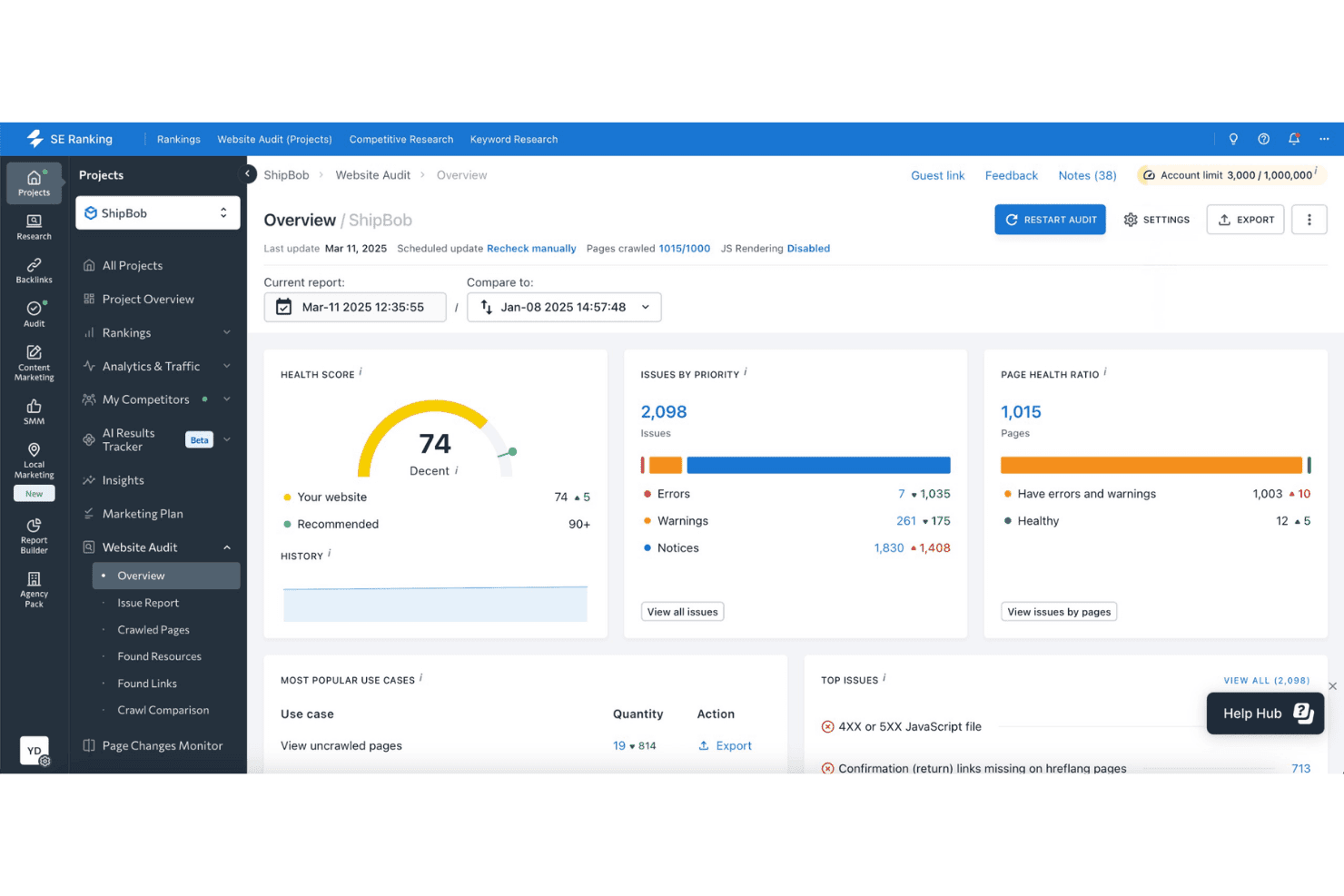
SE Ranking offers a website audit overview for ShipBob with a health score of 74, 2,098 issues by priority, and page health ratio metrics. SE Ranking is an all-in-one SEO platform with a site audit tool that crawls up to 2 million pages, analyzes 115+ technical metrics, and lets you build custom audit rules to target the specific issues that matter most to your site.
Who Is SE Ranking Best For?
SE Ranking is a strong fit for SEO agencies managing multiple client sites who need white-label reporting and flexible crawl configurations at a lower price point than enterprise tools.
Why I Picked SE Ranking
SE Ranking earns its spot on my shortlist because of how much control it gives you over what an audit actually flags. The custom rules feature lets me define exactly which issues to surface, so I'm not sorting through generic notices that don't apply to a client's specific site structure. I also rely on the crawl comparison view to stack multiple audits side by side and show clients clear, timestamped progress between sessions.
SE Ranking Key Features
- JavaScript rendering: Crawl and audit client-side rendered pages to surface SEO issues hidden in dynamic content.
- Scheduled audits: Set up recurring website crawls on a weekly or monthly basis for ongoing monitoring.
- Core Web Vitals analysis: Automatically check site-wide UX metrics like LCP, FID, and CLS as part of every audit.
- White-label reporting: Customize exportable reports with agency branding and deliver client-ready SEO documentation.
SE Ranking Integrations
SE Ranking offers native integrations with Google Analytics 4, Google Search Console, Looker Studio, Whatagraph, and AgencyAnalytics. An API is available for custom integrations.
Pros and Cons
Pros:
- Side-by-side audit comparison view available
- Custom audit rules target site-specific issues
- Crawls up to 2 million pages
Cons:
- Log file analysis not available natively
- Lacks headless browser rendering tools
Learn more about SE Ranking: Best for collaborative site optimization workflows
- Free demo available
- Pricing upon request
Visit WebsiteCustomer Rating:4.5/5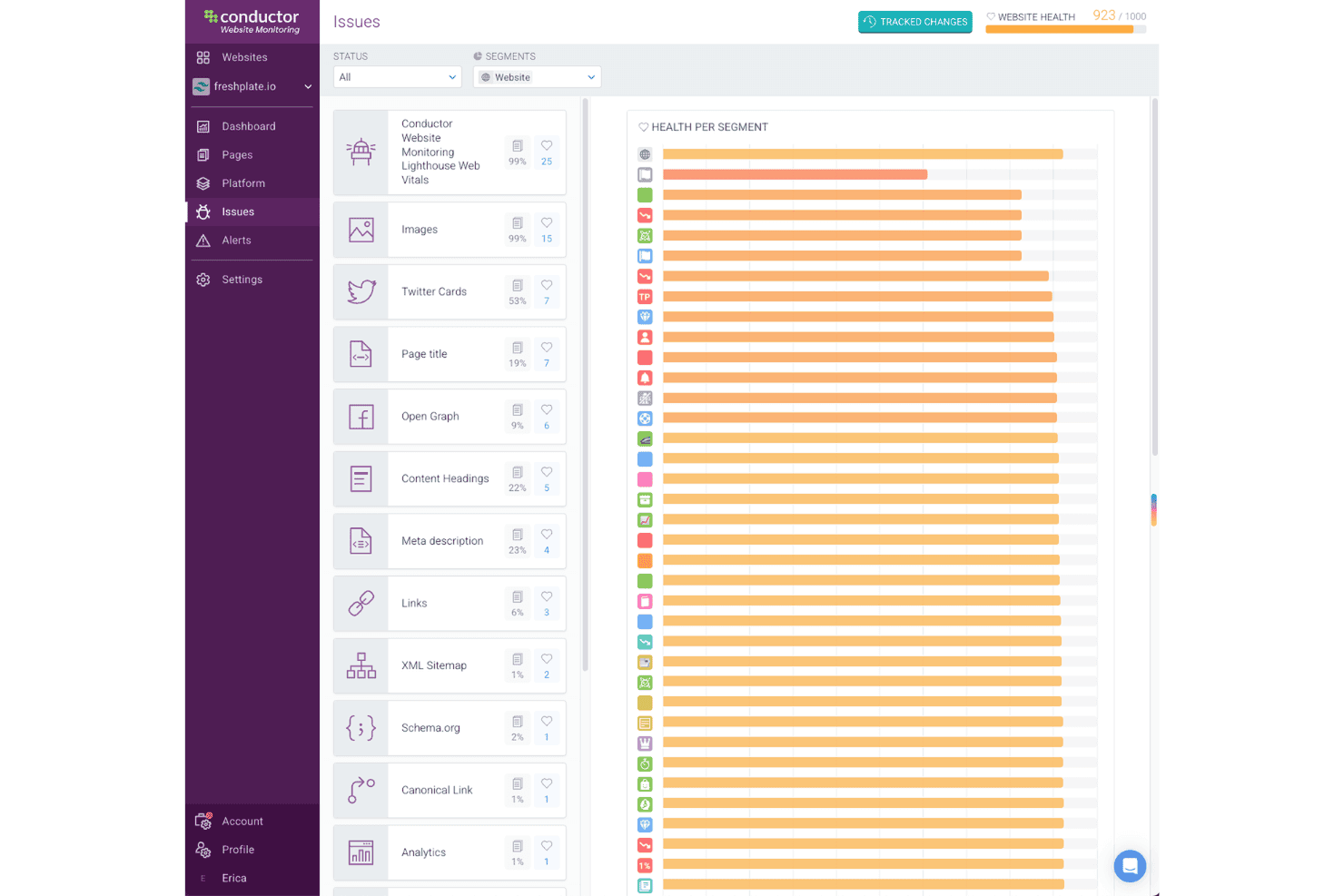
Conductor offers a website health score of 923/1000 alongside a detailed issues panel and health-per-segment chart for SEO monitoring. Conductor is an enterprise SEO and AEO platform that combines 24/7 site monitoring, on-page content auditing, keyword and competitor tracking, and AI search visibility into a single workspace.
Who Is Conductor Best For?
Conductor is a strong fit for large, cross-functional marketing teams that need multiple stakeholders—SEO, content, and digital—working inside one shared platform.
Why I Picked Conductor
I've included Conductor in my top picks because its unlimited user licenses mean my entire team, from content writers to technical SEO specialists, can work inside the same platform without seat-cost friction. I particularly like how Conductor Monitoring's live audit trail and real-time alerts keep everyone aligned when a site change triggers an issue. The native Jira and Asana integrations let my team route fixes directly to developers without switching tools.
Conductor Key Features
- AI topical authority map: Visualizes the site’s coverage and keyword gaps across target topics.
- Real-time change tracking: Logs all edits and site changes for historical audit trails.
- Advanced competitor tracking: Monitors competitors’ keyword rankings and share of voice globally.
- Customizable dashboards: Lets users build and segment dashboards for branded stakeholder or team views.
Conductor Integrations
Conductor offers native integrations with Google Search Console, Adobe Analytics, Google Analytics, Jira, Asana, and Slack, and provides an API for custom integrations.
Pros and Cons
Pros:
- Dedicated onboarding with ongoing CSM support
- Unlimited users share one platform workspace
- Rank trends visible across 30,000+ pages
Cons:
- Keyword data refreshes less frequently than competitors
- Reporting interface has a steep learning curve
Learn more about Conductor: Best for automated white-label audit reports
- Free demo available
- Pricing upon request
Visit WebsiteCustomer Rating:4.4/5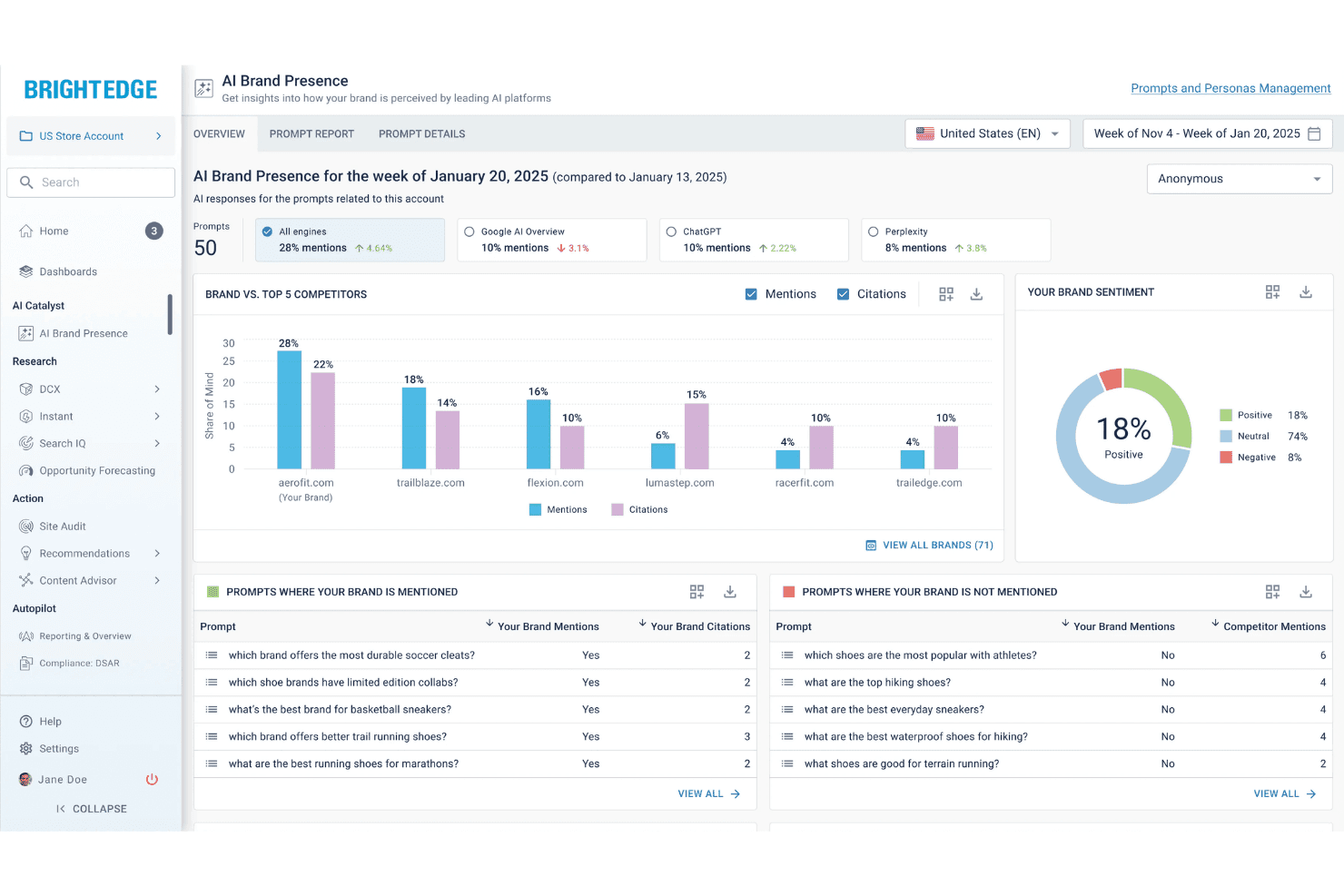
BrightEdge offers an AI Brand Presence dashboard that tracks brand mentions, citations, and sentiment across leading AI platforms like ChatGPT, Google AI Overview, and Perplexity. BrightEdge is an enterprise SEO platform that combines technical site auditing, keyword research, competitive intelligence, AI-driven on-page recommendations, and customizable white-label performance reporting in a single system.
Who Is BrightEdge Best For?
BrightEdge is built for enterprise SEO teams and large digital agencies managing complex, multi-brand or multi-region site portfolios.
Why I Picked BrightEdge
BrightEdge earns its spot on my shortlist because of how ContentIQ and StoryBuilder work together for automated white-label reporting. ContentIQ runs recurring scheduled crawls across millions of pages, including JavaScript-heavy SPAs, and grades overall site health with a proprietary ContentIQ score. StoryBuilder then pulls that crawl data alongside GA4 and Google Search Console metrics into fully branded, client-ready dashboards I can schedule and share automatically.
BrightEdge Key Features
- Data Cube keyword research: Access a large-scale, proprietary keyword index for search demand and competitor benchmarking.
- AI-driven content recommendations: Get automated SEO suggestions to optimize on-page elements and content relevance.
- Share of Voice by page and topic: Monitor competitor ranking presence and identify content gaps at the page or site section level.
- REST API and analytics integrations: Connect BrightEdge data to platforms like GA4, Adobe Analytics, and data visualization tools for unified reporting.
BrightEdge Integrations
BrightEdge offers native integrations with Google Analytics 4, Adobe Analytics, and Google Search Console, and provides a REST API for custom integrations.
Pros and Cons
Pros:
- Data Cube tracks real-time keyword rankings
- StoryBuilder automates branded client performance reports
- ContentIQ crawls millions of pages simultaneously
Cons:
- Not self-serve for smaller in-house teams
- No proprietary backlink index included
Learn more about BrightEdge: Best for log file and JavaScript analysis
- Free demo available
- Pricing upon request
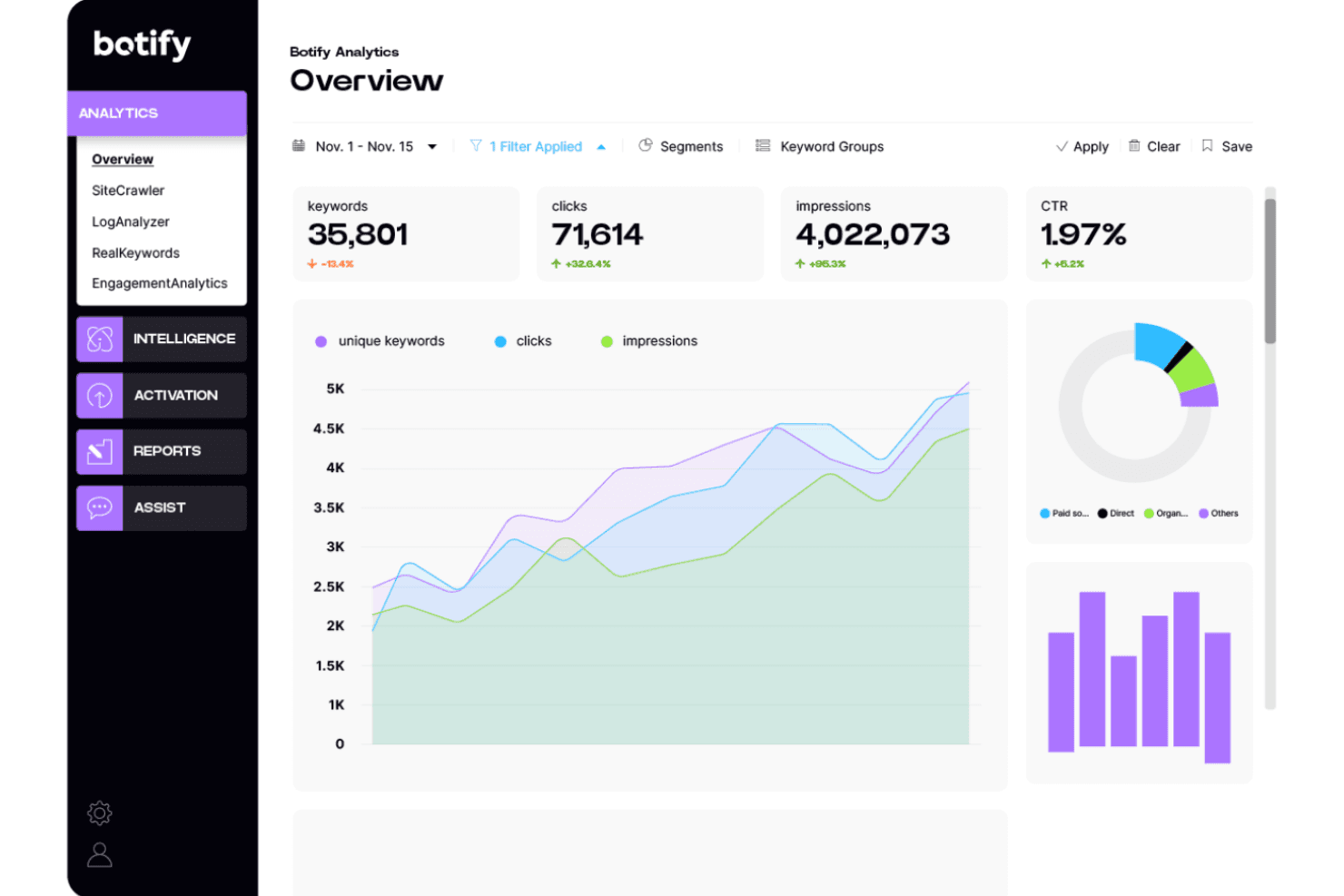
Botify offers an analytics overview dashboard displaying keywords, clicks, impressions, and CTR metrics with trend charts and traffic source breakdowns. Botify is an enterprise-grade technical SEO platform that unifies site crawl data, server log file analysis, and search analytics to surface indexation gaps, crawl inefficiencies, and JavaScript rendering issues across large-scale websites.
Who Is Botify Best For?
Botify is a strong fit for enterprise and mid-market teams managing websites with millions of URLs, where crawl budget waste and JavaScript indexation failures have a direct impact on organic revenue.
Why I Picked Botify
Botify earns its spot on my shortlist because no other SEO audit tool gives me the same depth of server log file analysis. I can see exactly which pages Googlebot is actually crawling versus which pages my sitemap says it should, and the gap between those two datasets is where the real technical issues hide. Botify's SpeedWorkers feature pre-renders JavaScript pages for search bots in under 300ms, which means indexation blind spots on JS-heavy sites surface immediately rather than staying buried.
Botify Key Features
- Custom crawl segmentation: Run targeted audits by subdomain, subfolder, or site template for granular issue discovery.
- Scheduled and automated crawls: Set up recurring website crawls with historical trending and automated alerts for critical changes.
- API and export integration: Access all crawl and log data through a REST API or downloadable CSVs for custom workflows.
- Role-based access controls: Assign different permission levels for SEOs, developers, and content teams within the platform.
Botify Integrations
Botify offers native integrations with Google Search Console, Google Analytics, Adobe Analytics, and Bing Webmaster Tools. An API is available for custom integrations.
Pros and Cons
Pros:
- JavaScript rendering catches post-render indexation issues
- Surfaces Googlebot crawl gaps in real time
- Analyzes user agent server logs
Cons:
- Lacks automated accessibility compliance testing
- No local search visibility data
Learn more about Botify:
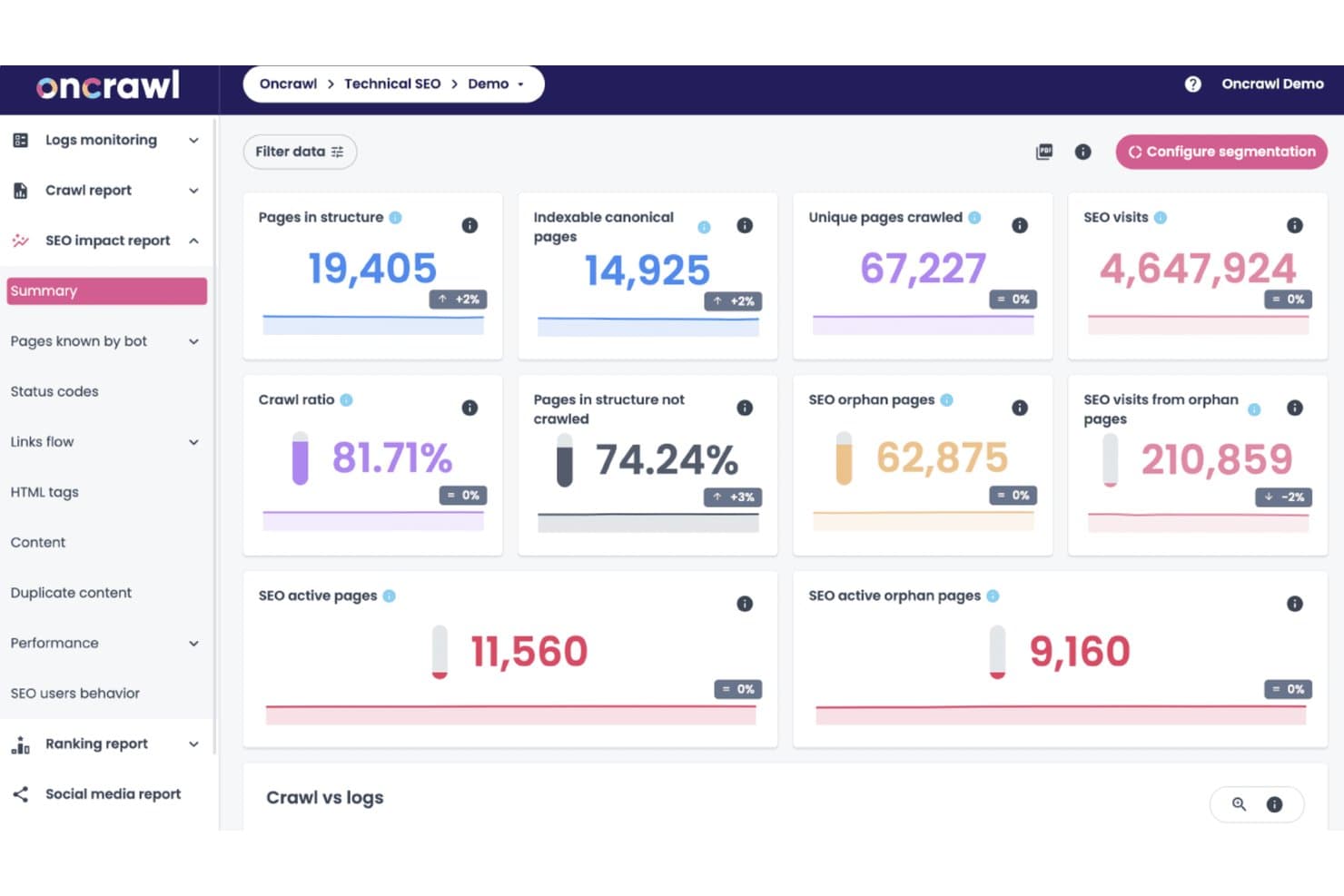
OnCrawl offers a comprehensive SEO impact report dashboard displaying crawl ratio, orphan pages, indexable canonical pages, and SEO visit metrics in a single summary view. OnCrawl is a technical SEO platform that combines site crawling, log file analysis, and multi-source data integration to audit large-scale websites, track indexation, and surface crawl budget and architecture issues.
Who Is OnCrawl Best For?
OnCrawl fits enterprise in-house SEO teams managing large, technically complex websites where crawl budget, log data, and multi-source analysis are day-to-day priorities.
Why I Picked OnCrawl
OnCrawl earns its spot as one of the best on my shortlist because of how deeply it integrates with existing data infrastructure. I can ingest server logs from Cloudflare, AWS, or GCP alongside GSC, GA4, and Majestic, then cross-analyze everything in one place with zero sampling. I also use the MCP server to query crawl and log data directly inside Claude or ChatGPT and trigger audits without switching tools.
OnCrawl Key Features
- JavaScript rendering audits: Crawl and analyze JS-heavy sites to detect content and links loaded dynamically.
- Internal link structure analysis: Surface orphan pages and visualize site architecture to spot bottlenecks.
- AI-driven on-page evaluation: Use Lenses for automated analysis of meta tags, headings, and semantic content.
- Custom crawl segmentation: Run targeted crawls on subdomains, subfolders, or specific templates as needed.
OnCrawl Integrations
OnCrawl offers native integrations with Google Analytics 4, Google Search Console, Adobe Analytics, Piano, Majestic, Cloudflare, Amazon Web Services, Microsoft Azure, and Google Cloud Platform. An API is available for custom integrations.
Pros and Cons
Pros:
- Granular crawl segmentation by template or subfolder
- Evaluates semantic page content quality
- Unmatched server log and crawl data correlation
Cons:
- Backlink analysis is minimal compared to competitors
- Server log ingestion requires technical configuration
Learn more about OnCrawl: Best for multi-channel digital analysis
- 14-day free trial
- From $139/month
Visit WebsiteCustomer Rating:4.5/5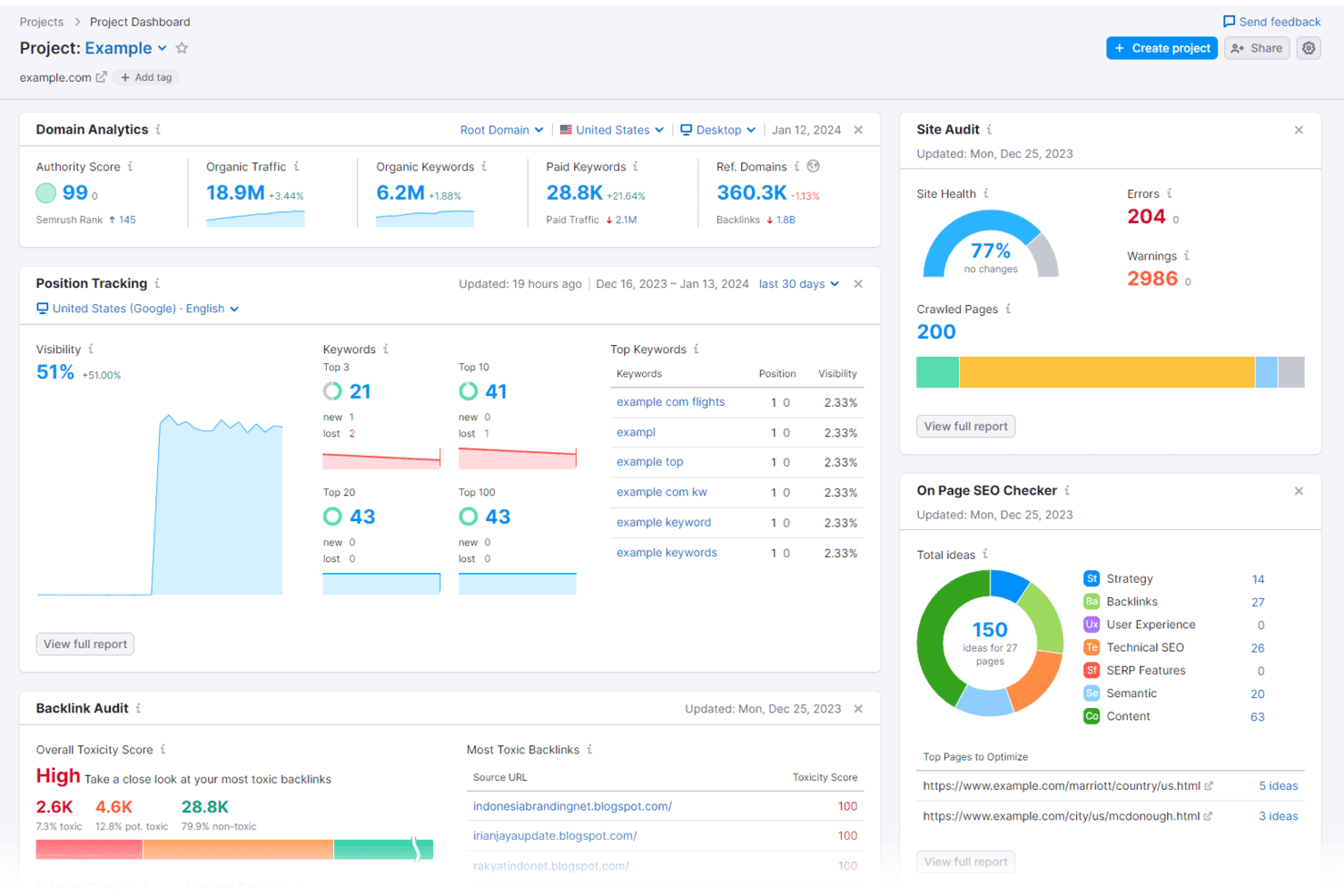
Semrush offers a comprehensive project dashboard featuring domain analytics, position tracking, backlink audit, site audit, and on-page SEO checker tools. Semrush is an all-in-one digital marketing platform that combines site auditing, keyword research, backlink analysis, rank tracking, and competitor intelligence across SEO, PPC, content, and social channels.
Who Is Semrush Best For?
Semrush is a strong fit for SEO agencies and in-house digital marketing teams that need to manage audits, reporting, and competitor tracking across multiple domains from one platform.
Why I Picked Semrush
I picked Semrush as one of the best because no other SEO audit tool gives me a complete picture across organic, paid, and AI search in a single platform. The AI Search Health score is something I find genuinely useful: it flags pages blocked from AI crawlers like ChatGPT Search and Google AI Mode. I also use the Log File Analyzer to see exactly how bots crawl my site, which is a feature most dedicated audit tools still don't offer.
Semrush Key Features
- Scheduled site crawls: Automate recurring crawls to maintain oversight of technical SEO health.
- On-page SEO checker: Analyze individual pages for meta tags, headings, keyword use, and internal links.
- Toxic backlink audit: Detect, categorize, and export high-risk backlinks for disavowal directly to Google.
- White-label reporting: Build fully customizable, agency-branded reports in PDF format for client delivery.
Semrush Integrations
Semrush offers native integrations with Google Analytics, Google Search Console, Google Looker Studio, Trello, and Monday.com. An API is available for custom integrations.
Pros and Cons
Pros:
- Backlink database rivals Ahrefs in index size
- Tracks daily keyword positions globally
- Covers organic, paid, and AI search auditing
Cons:
- Lacks specialized accessibility compliance checks
- Requires manual individual project configuration
 Best for website issue prioritization
- 7-day free trial + free demo available
- From $79/month (billed annually)
Visit WebsiteCustomer Rating:4.5/5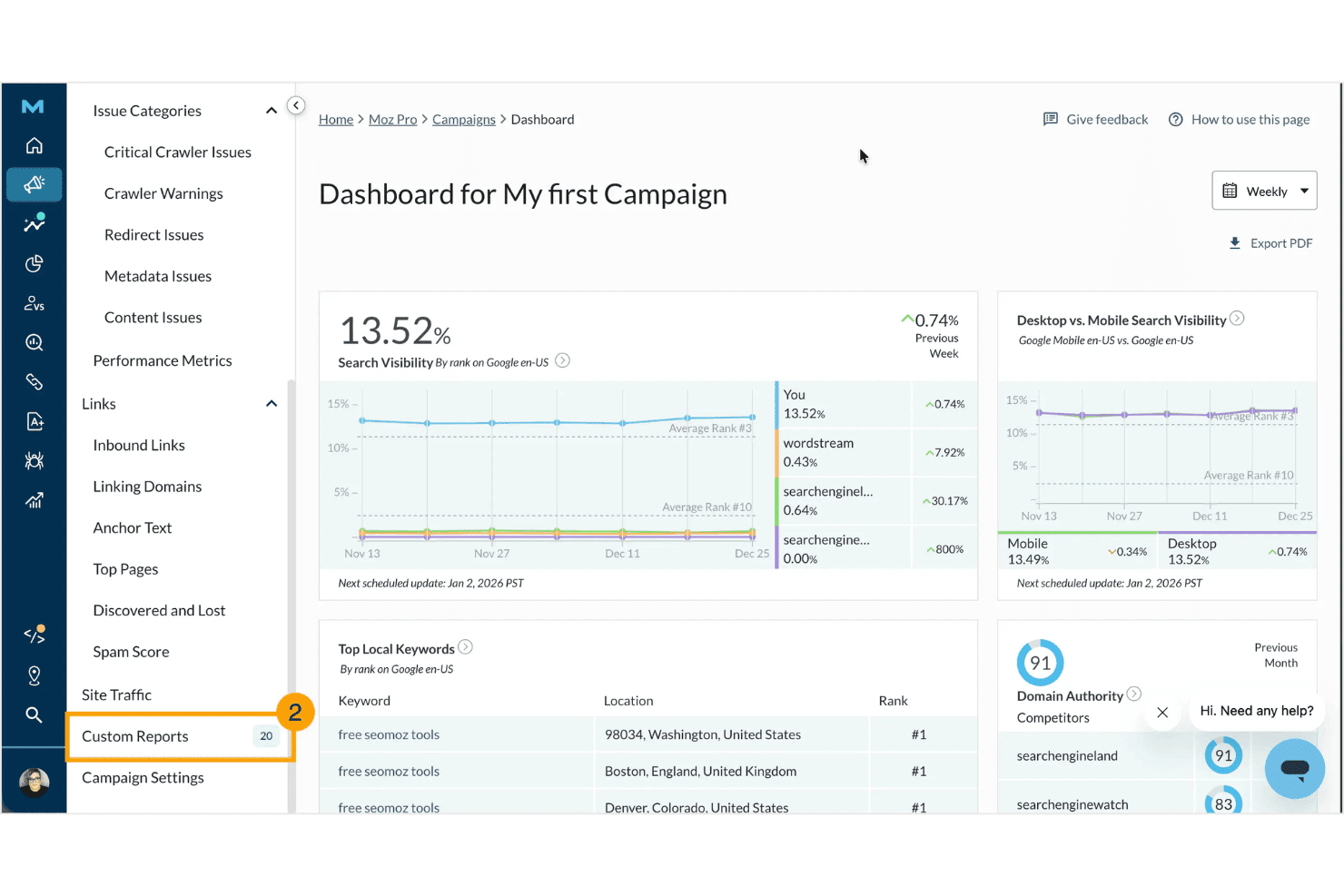
Moz Pro offers a campaign dashboard with search visibility metrics, top local keywords, domain authority scores, and desktop vs. mobile comparisons. Moz Pro is an SEO audit and research suite that covers site crawling, keyword tracking, backlink analysis, on-page grading, and rank monitoring across a single campaign-based interface.
Who Is Moz Pro Best For?
Moz Pro is a strong fit for SMB marketing teams and agencies that manage multiple client sites and need clear, actionable audit results without a steep learning curve.
Why I Picked Moz Pro
Moz Pro earns its spot on my shortlist because its Site Crawl doesn't just surface problems; it ranks them by SEO impact so I know exactly what to fix first. I find the step-by-step fix instructions genuinely useful, especially when handing off work to developers who need clear direction. The performance tracker also alerts me when new issues appear between scheduled crawls, so nothing slips through.
Moz Pro Key Features
- On-demand site crawl: Run instant crawls outside your scheduled audits to check websites after updates or releases.
- Keyword Explorer: Discover new keywords, analyze their potential, and group suggestions by search intent.
- Custom reports: Build client-ready, branded reports using drag-and-drop modules and export options.
- SERP analysis: Evaluate competitors’ rankings, featured snippets, and page authority directly from search results.
Moz Pro Integrations
Moz Pro offers native integrations with Google Analytics and Google Search Console, and provides an API for custom integrations.
Pros and Cons
Pros:
- Moz Academy supports in-house SEO learning
- MozBar adds quick on-page site checks
- Issues ranked clearly by SEO impact
Cons:
- Lacks dedicated accessibility compliance testing
- Crawl limits are low on starter plans
Learn more about Moz Pro: Best for desktop-based large-scale crawling
- Free plan available
- From $279/license/year
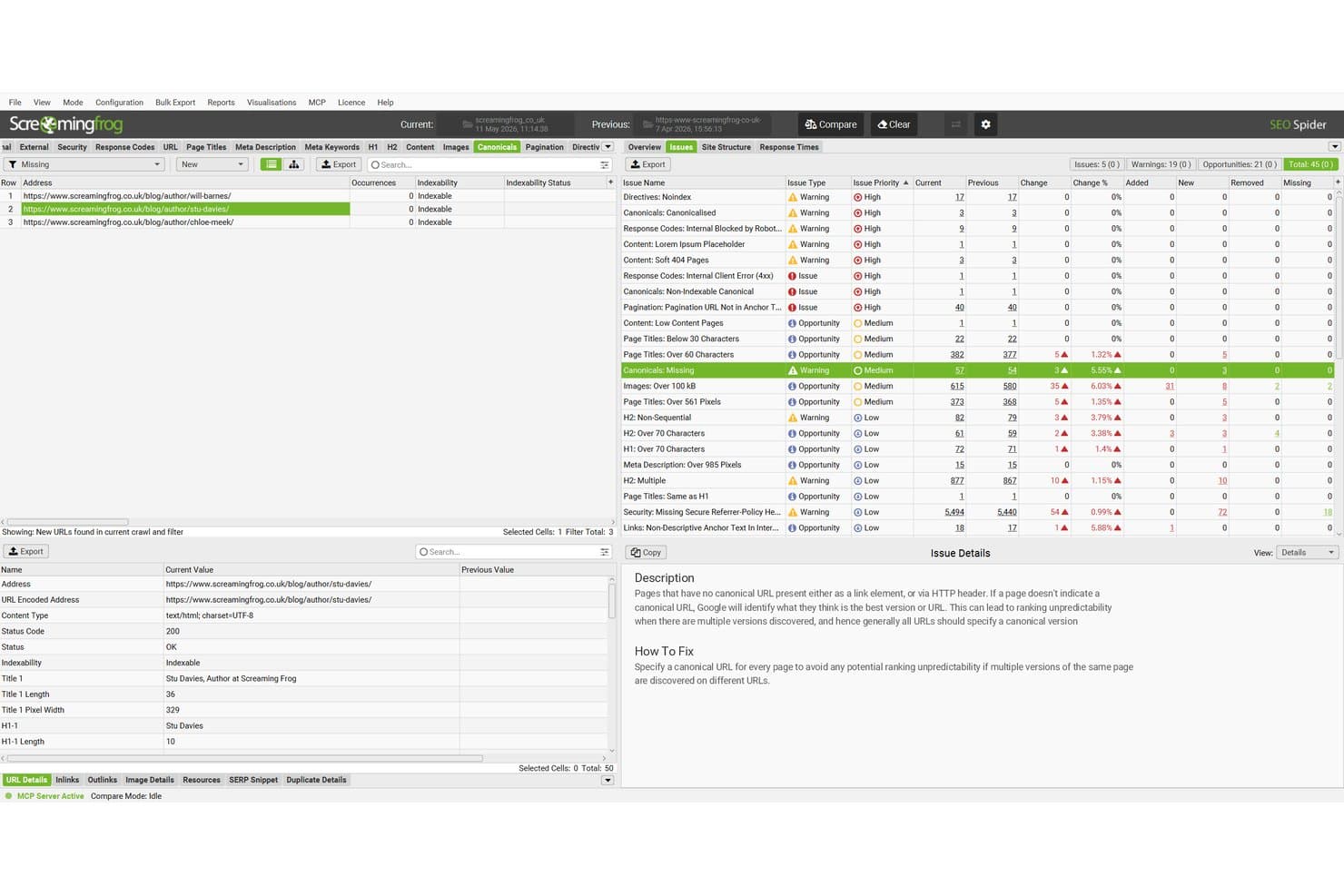
Screaming Frog SEO Spider offers a crawl comparison mode that highlights issues like missing canonicals, page title lengths, and image sizes with change tracking across two crawl dates. Screaming Frog SEO Spider is a desktop website crawler that performs technical SEO audits, analyzing on-page elements, redirect chains, structured data, hreflang, canonicals, and internal link structure across sites of any size.
Who Is Screaming Frog SEO Spider Best For?
It's a strong fit for SEO agency consultants and in-house SEO specialists who need to run deep technical audits on large or complex websites.
Why I Picked Screaming Frog SEO Spider
Screaming Frog SEO Spider earns its spot on my shortlist because no other tool matches its desktop-based crawling architecture for large-scale audits. Unlike cloud-based tools that throttle crawl speed or cap URLs, the paid licence removes all URL limits and lets me run unlimited crawls directly on my local machine. I especially rely on the built-in Chromium JS rendering to accurately audit React and Angular sites, where a surface-level crawl would miss dynamically loaded content entirely.
Screaming Frog SEO Spider Key Features
- Custom extraction: Extract on-page or hidden data using XPath, CSS Path, or regex during crawls.
- Structured data validation: Audit Schema.org and Google rich result markup for errors and warnings.
- Crawl comparison: Track and compare changes between crawls to monitor site health and technical fixes.
- Accessibility auditing: Run automated accessibility checks using the AXE ruleset for WCAG compliance.
Screaming Frog SEO Spider Integrations
Screaming Frog SEO Spider offers native integrations with Google Analytics, Google Search Console, Ahrefs, Moz, and Majestic. An API is available for custom integrations.
Pros and Cons
Pros:
- Extracts custom page elements easily
- Built-in log file analysis included
- Audits structured data implementation automatically
Cons:
- Requires local desktop application installation
- No cloud access or team collaboration
Learn more about Screaming Frog SEO Spider: Best for visual technical audit reporting
- 14-day free trial + free demo available
- From $18/month
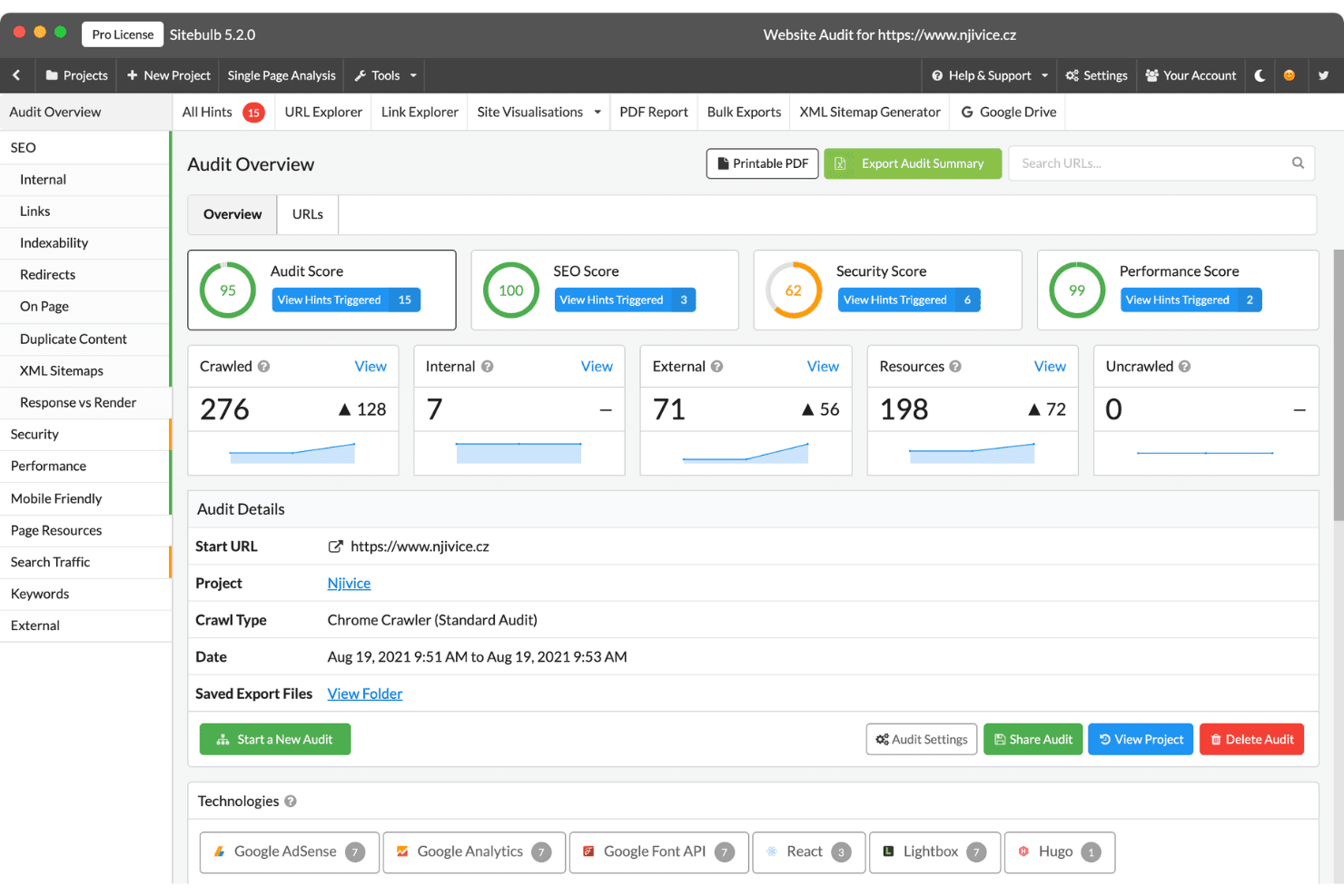
Sitebulb offers a comprehensive audit overview dashboard with scores for SEO, security, and performance alongside crawl statistics. Sitebulb is a desktop and cloud website crawler that runs technical SEO audits using a prioritized "Hints" system, surfacing 300+ on-page and technical issues alongside data visualizations, crawl maps, and white-label reporting.
Who Is Sitebulb Best For?
Sitebulb is a strong fit for SEO agencies and in-house SEO specialists who regularly produce technical audit deliverables for clients or internal stakeholders.
Why I Picked Sitebulb
Sitebulb earns its spot as one of the best on my shortlist because of how it turns raw crawl data into genuinely usable audit deliverables. The Hints system categorizes 300+ issues by severity (Critical, High, Medium, Low) with plain-English explanations I can copy directly into developer tickets without rewriting anything. I especially like the crawl maps and interactive visualizations, which make site architecture problems immediately clear in ways that a flat spreadsheet export simply can't replicate.
Sitebulb Key Features
- Scheduled recurring crawls: Set up automated, recurring website audits to track changes and detect new issues over time.
- JavaScript rendering: Crawl and analyze sites built with modern JS frameworks using an Evergreen Chromium rendering engine.
- Project-level data visualizations: Visualize site structure, crawl paths, and key audit data with interactive maps and charts.
- Google Sheets integration: Export audit data directly into Google Sheets for further analysis or sharing with your team.
Sitebulb Integrations
Sitebulb offers native integrations with Google Sheets, Looker Studio, Slack, and Webhooks on its Cloud platform. An API is available for custom integrations.
Pros and Cons
Pros:
- Generates offline visual site maps
- Each hint includes plain-English fix guidance
- Crawl maps clarify complex site architecture visually
Cons:
- No native backlink analysis included
- Desktop version relies on local machine resources
Learn more about Sitebulb: Best for actionable site health insights
- Free plan + free trial + free demo available
- From $108/month (billed annually)
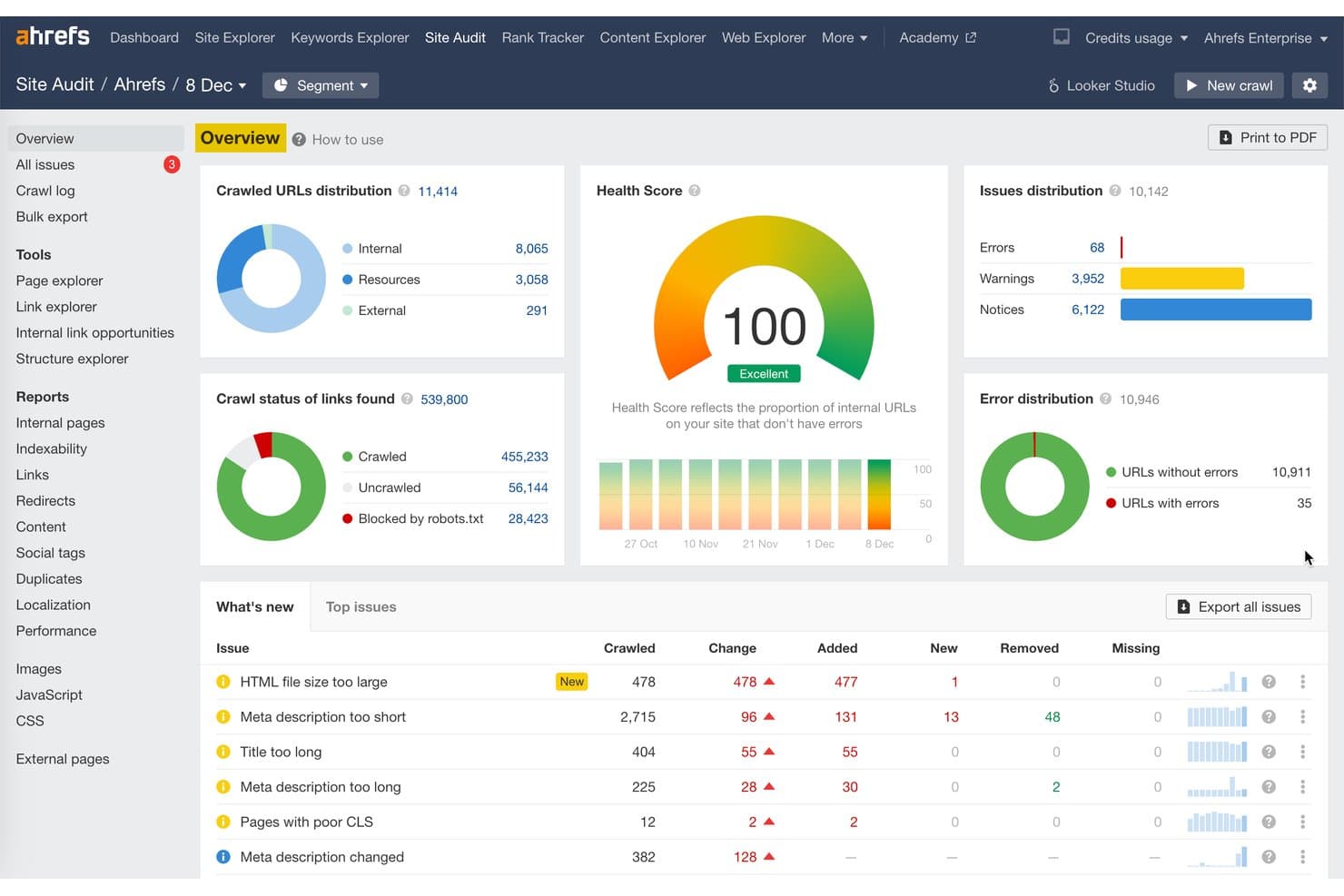
Ahrefs Site Audit offers a comprehensive overview dashboard displaying a perfect Health Score of 100, crawled URL distribution, issue distribution with errors, warnings, and notices, and a 'What's new' issues table. Ahrefs Site Audit is an SEO crawling tool that detects 170+ technical and on-page issues across 19+ categories, including Core Web Vitals, structured data, hreflang, internal linking, and indexability.
Who Is Ahrefs Site Audit Best For?
It's a strong fit for SEO agencies and in-house teams managing multiple sites who need scalable crawling across large or technically complex websites.
Why I Picked Ahrefs Site Audit
Ahrefs Site Audit earns its spot because of how it translates raw crawl data into clear, prioritized actions. I love that every detected issue comes with categorization (errors, warnings, notices) and step-by-step fixing instructions built right into the report. The Patches feature takes it further, letting me deploy SEO fixes directly without waiting on a developer. The Always-on Audit runs 24/7, so I'm catching new issues as they appear, not just during scheduled crawl windows.
Ahrefs Site Audit Key Features
- JavaScript rendering: Fully crawls pages built with JavaScript frameworks to surface hidden technical issues.
- Structured data validation: Checks schema markup against 190+ Google and Schema.org requirements for accuracy.
- Hreflang network visualization: Maps and diagnoses international SEO with interactive hreflang graphing.
- Page Explorer: Lets you filter, segment, and inspect over 250+ data points for every crawled URL.
Ahrefs Site Audit Integrations
Ahrefs Site Audit offers native integrations with Google Search Console, GA4, Bing Webmaster Tools, Google Data Studio (Looker Studio), and supports custom integrations via API.
Pros and Cons
Pros:
- Built-in fix instructions with every flagged issue
- Always-on crawling catches new issues 24/7
- 170+ technical issues detected across 19 categories
Cons:
- White-label reporting unavailable on lower-tier plans
- Backlink data siloed from the audit workflow
Learn more about Ahrefs Site Audit:
Diğer SEO Denetim Araçları
İşte kısa listeme girmeyen ancak yine de göz atmaya değer bazı ek SEO denetim aracı seçenekleri:
- 11LumarBest for enterprise-level crawl scalability
- 12JetOctopusBest for cloud-based unlimited crawling
- 13SerpstatBest for multi-domain site health tracking
- 14WoorankBest for instant technical and on-page reviews
- 15SiteimproveBest for website compliance assessments
- 16RyteBest for monitoring website quality signals
- 17SEOptimerBest for fast, easy-to-understand audit reports
- 18SEO PowerSuite WebSite AuditorBest for unlimited website auditing projects
- 19seoClarityBest for AI-driven audit insights at scale
How I Evaluate SEO Audit Tools
I split my evaluation into baseline criteria—crawl depth, technical checks, and reporting—and differentiators like log file analysis, JS rendering, and pricing model fit.
Core Functionality (Table Stakes For This List)
When I'm selecting tools for my list, I rank each one on a scale from 0 (does not offer the functionality) to 5 (excels in this area) for each core functionality listed below. I then calculate the tool's total score as a percentage, using 75% as a benchmark to help assess its overall fit for the list.
- Site Crawling: I evaluate how well each tool handles full-site crawls, including JavaScript rendering, configurable URL limits, and detection of broken links or redirect chains.
- Technical SEO Analysis: Each tool should cover Core Web Vitals, structured data validation, XML sitemap checks, robots.txt parsing, and mobile-friendliness scoring.
- On-Page SEO Auditing: I look for thorough analysis of meta tags, heading hierarchy, keyword usage, internal linking structure, and duplicate content detection across pages.
- Backlink Analysis: A solid backlink audit surfaces toxic links, referring domain quality, and anchor text distribution—useful when cleaning up a profile before a migration.
- Issue Prioritization: I check whether the tool groups findings by severity and SEO impact, so your team can sequence fixes by what moves the needle rather than scanning raw lists.
- Audit Reporting: Exportable reports matter for stakeholder buy-in, so I evaluate format options, white-label customization, and scheduling for recurring client deliverables.
Once I have a list of tools that meet the criteria, I consider what sets each platform apart.
Differentiating Factors (What Sets Vendors Apart)
Here's how I compare and contrast different vendors:
Standout Features
Log file analysis is a key differentiator—it reveals how search engine bots actually crawl your site, exposing crawl budget waste and orphaned pages that standard crawls miss. JavaScript rendering matters equally if your site runs on React or Angular, since content behind JS won't surface without headless-browser crawling. I also evaluate prioritized issue scoring that quantifies SEO impact and fix effort, helping teams sequence work instead of guessing what to tackle first.
Beyond Features
Crawl scale matters a lot—I evaluate whether a tool handles enterprise sites with millions of URLs or caps out at small projects, and whether you can segment crawls by subdomain or subfolder. Integration depth is another factor I weigh, especially native connections to Google Search Console, GA4, and project management tools like Jira for developer handoff. Pricing structure also shapes fit, since per-project models suit agencies managing many clients while per-seat pricing works better for in-house teams.
SEO Denetim Araçları Nasıl Seçilir?
Mevcut site sağlığınızı, raporlama ve optimizasyon önceliklerinizi ele almak için hangi SEO denetim aracı en uygun seçimdir?
| Önceliğiniz... | Şunlara öncelik verin... |
|---|---|
| Önceliğiniz...Derin tarama veya JS'ye özgü sorunları tespit etmek | Şunlara öncelik verin...Başsız tarayıcıyla görüntüleme özelliklerine sahip araçlar |
| Önceliğiniz...Müşteriye sunulmaya hazır, markasız raporlar hazırlamak | Şunlara öncelik verin...Özelleştirilebilir ve zamanlanmış dışa aktarımlar sunan platformlar |
| Önceliğiniz...SEO veri iş akışı entegrasyonu | Şunlara öncelik verin...Google Search Console ve proje yönetimi entegrasyonlarını destekleyen sağlayıcılar. |
| Önceliğiniz...Büyük ve karmaşık kurumsal siteleri yönetmek | Şunlara öncelik verin...Sınırsız veya yüksek kapasiteli tarama için geliştirilmiş çözümler |
| Önceliğiniz...Önceliklendirilmiş düzeltmeler ve geliştiriciye aktarım | Şunlara öncelik verin...Net SEO etkisi puanlamasına ve dışa aktarma özelliklerine sahip araçlar |
Kısa Listenizi Nasıl Değerlendirmelisiniz?
- Günlük dosyası analizi belgelerini isteyin: Her sağlayıcıdan örnek günlük analizi raporları sunmasını veya verileri alma sürecini açıklamasını isteyin.
- JavaScript görüntüleme derinliğini test edin: Gizli JS içeriğine sahip bir sitede deneme taraması başlatın ve ardından aracın görüntülenen tüm öğeleri ortaya çıkarıp çıkarmadığını kontrol edin.
- Entegrasyon kurulumunu doğrulayın: En az iki SEO veya analiz platformuna yerel bağlantıları gösteren bir tanıtım ya da kanıt isteyin.
- Standart denetim çıktısını isteyin: Markasız rapor ve özelleştirme seçeneklerini değerlendirmek için müşteriye sunulmaya hazır örnek bir rapor talep edin.
- Ölçek ile kullanım kolaylığını karşılaştırın: Kuruluşunuz için şu anda kapsamlı tarama kapasitesinin mi yoksa basit iş akışlarının mı gerçekten daha önemli olduğuna karar verin.
SEO Denetim Araçları Nedir?
SEO denetim araçları, arama motoru sıralamalarını etkileyen teknik, sayfa içi ve geri bağlantı sorunlarını tarayan özel yazılım platformlarıdır. Bu araçlar; bozuk bağlantılar, yavaş yüklenen sayfalar, eksik üst veriler ve tarama hataları gibi sorunları belirlemenize yardımcı olurken uygulanabilir öneriler de sunar. Ekipler, optimizasyon çalışmalarına öncelik vermek, site sağlığını kıyaslamak ve iyileştirme fırsatlarını açıkça ortaya koyan, müşteriye veya paydaşlara sunulmaya hazır denetim raporları oluşturmak için SEO denetim araçlarına güvenir.
SEO Denetim Araçlarının Özellikleri
SEO denetim araçlarını seçerken aşağıdaki temel özelliklere dikkat edin:
- Site tarama: Arama sonuçlarındaki görünürlüğü etkileyen bozuk bağlantıları, yönlendirme zincirlerini, tarama hatalarını ve dizine ekleme sorunlarını bulmak için web sitenizin tamamını tarar.
- Teknik SEO analizi: Site hızını, Önemli Web Verilerini, XML site haritalarını ve mobil uyumluluğu gibi çok çeşitli teknik unsurları değerlendirerek sitenin sağlıklı performans göstermesini sağlar.
- Sayfa içi SEO denetimi: İçerik optimizasyonunu değerlendirmek ve gözden kaçan anahtar kelime veya yapı fırsatlarını ortaya çıkarmak için meta etiketlerini, başlıkları, içerik yapısını ve dahili bağlantıları inceler.
- Geri bağlantı analizi: Bağlantı sağlığını izlemek ve kaldırma veya erişim çalışması gerektiren noktaları ortaya çıkarmak için sitenize gelen bağlantıları kalite, miktar ve zararlılık açısından değerlendirir.
- Sorun önceliklendirme: Bulguları önem derecesine ve olası etkisine göre sınıflandırarak yüksek etkili sorunları küçük veya kozmetik sorunlardan önce ele almanızı sağlar.
- Denetim raporlaması: Birden fazla formatta paylaşılabilir ve müşteriye sunulmaya hazır raporlar oluşturarak gözlemleri, iyileştirmeleri ve sonraki adımları her kitleyle kolayca paylaşmanızı sağlar.
- Yinelenen içerik tespiti: Sıralamaları korumak ve standart URL belirleme gereksinimlerini tespit etmek için sayfalardaki aynı veya çok benzer içerikleri işaretler.
- Mobil uyumluluk kontrolleri: Sitenizin akıllı telefonlarda veya tabletlerde nasıl performans gösterdiğini ve görüntülendiğini test ederek arama motorlarının cezalandırabileceği mobil kullanıcı deneyimi eksikliklerini öne çıkarır.
- Yapılandırılmış veri doğrulaması: Şema işaretlemesinin doğru şekilde uygulanıp uygulanmadığını doğrulayarak zengin sonuçlarda yer alma uygunluğunu artırır ve aramadaki snippet görünürlüğünü iyileştirir.
- Robots.txt ve site haritası incelemesi: Önemli sayfaların taranmasını veya dizine eklenmesini engelleyebilecek yapılandırma hatalarını ya da eksikliklerini kontrol ederek site mimarinizi korumanıza yardımcı olur.
Yaygın SEO Denetim Araçlarının Yapay Zekâ Özellikleri
Yukarıda listelenen standart SEO denetim aracı özelliklerinin ötesinde, bu çözümlerin çoğu aşağıdaki gibi özelliklerle yapay zekâyı kullanmaya başlıyor:
- Otomatik sorun tespiti: Geleneksel kural tabanlı kontrollerin gözden kaçırabileceği karmaşık veya gizli SEO sorunlarını belirlemek için yapay zekâ algoritmalarını kullanır ve site sağlığına yönelik incelikli riskleri ortaya çıkarır.
- Yapay zekâ destekli içerik önerileri: Arama amacı ve rakip analizi temelinde anahtar kelime, yapı veya konu iyileştirmeleri önermek için içeriğinizi analiz eder.
- Tahmine dayalı SEO etki analizi: Belirli sorunları düzeltmenin olası sıralama veya trafik etkisini tahmin etmek için makine öğreniminden yararlanarak ekiplerin eylemlere öncelik vermesine yardımcı olur.
- Denetimler için doğal dil işleme: Temel anahtar kelime kontrollerinden daha derin içgörüler sunarak içerik kalitesini, anlamsal alaka düzeyini ve konu otoritesini değerlendirmek için doğal dil işlemeyi uygular.
- Site değişikliklerinde anomali tespiti: Site güncellemelerini izler ve teknik veya algoritmik sorunlara işaret edebilecek olağandışı kalıpları ya da performanstaki ani düşüşleri işaretlemek için yapay zekâ kullanır.
- Otomatik rakip kıyaslaması: Yapay zekâ kullanarak sitenizin SEO metriklerini rakiplerle sürekli karşılaştırır ve iyileştirme için eksikleri ve fırsatları öne çıkarır.
SEO Denetim Araçlarının Faydaları
SEO denetim araçlarını uygulamak ekibiniz ve işletmeniz için çeşitli faydalar sağlar. Yararlanabileceğiniz birkaç fayda şunlardır:
- Daha hızlı sorun tespiti: Otomatik site taraması ve analizi, teknik ve sayfa içi sorunları hızla ortaya çıkararak bunlar sıralamaları etkilemeden önce harekete geçmenizi sağlar.
- Gelişmiş arama görünürlüğü: Bozuk bağlantıların, yinelenen içeriğin ve site hızı sorunlarının düzeltilmesi, arama motoru sonuçlarında daha üst sıralarda yer almayı doğrudan destekler.
- Daha verimli iş akışları: Önceliklendirilmiş sorun listeleri, otomasyon ve entegrasyon seçenekleri SEO uzmanlarının manuel çabasını azaltır ve çözüm döngülerini hızlandırır.
- Uygulanabilir raporlama: Dışa aktarılabilir ve müşteriye sunulmaya hazır denetim raporları, ilerlemeyi göstermeyi, başarıları paylaşmayı ve ekipler arası iş birliği yapmayı kolaylaştırır.
- Veriye dayalı karar alma: Geri bağlantı analizi, rakip kıyaslaması ve teknik kontroller, stratejinin somut ve gerçek dünyaya dayalı kanıtlarla şekillendirilmesine yardımcı olur.
- Geliştirme ekipleriyle daha güçlü iş birliği: Açık düzeltme yönergeleri, dışa aktarma formatları ve geliştirici aracı entegrasyonları gibi özellikler, görev oluşturmayı ve düzeltmelerin devredilmesini iyileştirir.
- Daha iyi kullanıcı deneyimi: Mobil sorunları, yavaş sayfaları veya engellenen içeriği belirleyip çözerek sitenizin her ziyaretçi için erişilebilir ve ilgi çekici olmasını sağlarsınız.
SEO Denetim Araçlarının Maliyetleri ve Fiyatlandırması
SEO denetim araçlarını seçmek, mevcut çeşitli fiyatlandırma modelleri ve planların anlaşılmasını gerektirir. Maliyetler; özelliklere, ekip büyüklüğüne, eklentilere ve diğer unsurlara göre değişir. Aşağıdaki tablo, SEO denetim aracı çözümlerinde yaygın planları, ortalama fiyatlarını ve genellikle sunulan özellikleri özetlemektedir:
SEO Denetim Araçları İçin Plan Karşılaştırma Tablosu
| Plan Türü | Ortalama Fiyat | Yaygın Özellikler |
|---|---|---|
| Plan TürüÜcretsiz Plan | Ortalama Fiyat$0 | Yaygın ÖzelliklerTemel site taramalarını destekler, sınırlı sayıda sorunu kontrol eder, basit raporlama sunar ve genellikle tarama sınırları uygular. |
| Plan TürüKişisel Plan | Ortalama Fiyat$25–$75/ay | Yaygın ÖzelliklerTam site denetimleri, sayfa içi kontroller, sınırlı sayıda site projesi ve temel dışa aktarma veya raporlama seçeneklerini içerir. |
| Plan Türüİşletme Planı | Ortalama Fiyat$100–$400/ay | Yaygın ÖzelliklerGenişletilmiş tarama kapasitesi, gelişmiş teknik SEO analizi, planlanmış denetimler, API erişimi ve özel raporlama ekler. |
| Plan TürüKurumsal Plan | Ortalama Fiyat$500+/ay | Yaygın ÖzelliklerSınırsız site denetimleri, öncelikli destek, gelişmiş entegrasyonlar, günlük dosyası analizi ve rol tabanlı erişim özelliklerini sunar. |
SEO Denetim Araçları SSS
SEO denetim araçları hakkında sık sorulan bazı soruların yanıtlarını burada bulabilirsiniz:
Web sitemde SEO denetimlerini ne sıklıkla yapmalıyım?
Tam kapsamlı bir SEO denetimini en az üç ayda bir yapmalısınız. Arama motoru optimizasyonuna ve organik trafiğe odaklanan, yüksek trafiğe sahip sitelerde; taranabilirlik sorunlarını, yetersiz içeriği veya sayfa hızı düşüşlerini SEO puanınızı ya da sıralamalarınızı etkilemeden önce tespit etmek için güvenilir bir web sitesi denetim aracıyla haftalık taramalar yapılması gerekebilir.
SEO denetim araçları JavaScript ile oluşturulan içeriklerdeki sorunları bulabilir mi?
Evet, modern SEO denetim araçlarının çoğu başsız tarayıcılarla tarama özelliği içerir. Bu, içerik stratejinizin gizli hatalardan zarar görmemesine yardımcı olur. Bu araçlar; JavaScript oluşturulduktan sonra görünen başlık etiketleri, meta açıklamaları, alternatif metin ve hatta eksik dahili bağlantılarla ilgili sorunları tespit edebilir.
SEO denetim araçları Google arama cezaları konusunda yardımcı olur mu?
Evet, ayrıntılı bir SEO raporu sunan iyi bir araç, manuel işlemleri tetikleyebilecek sorunları ortaya çıkarabilir. Geri bağlantı profilinizi analiz etmek, bağlantı oluşturma çalışmalarınızı güvenli bir şekilde yönlendirmenize yardımcı olurken teknik SEO unsurlarını kontrol etmek algoritmik cezalardan korunmanızı ve sitenizi proaktif biçimde güvence altına almanızı sağlar.
SEO denetim araçları birden fazla müşteri sitesini yöneten ajanslar için uygun mudur?
Evet, çoğu plan iş akışlarını kolaylaştırmak için markasız raporlama, çoklu proje yönetimi ve ekip erişim denetimleri içerir. İster yerel SEO hizmetleri sunun ister ilk müşteri sunumlarında ücretsiz bir SEO denetim aracının yanında bir anahtar kelime araştırma aracı kullanın, ajanslar birden fazla siteyi kolayca yönetebilir.
İyi bir SEO denetim aracından ne tür entegrasyonlar beklemeliyim?
Denetimlerinizin etkisini en üst düzeye çıkarmak için Google Search Console, analiz platformları, proje yönetimi araçları ve popüler bağlantı veya sıralama izleme hizmetleriyle bağlantı sunan araçları tercih edin.