

Podcast analiz araçları, kimlerin dinlediğini, kitlelerin nasıl etkileşim kurduğunu ve podcast kampanyalarının pazarlama sonuçlarına katkı sağlayıp sağlamadığını ölçer. Seçenekler, bölüm istatistikleri sunan barındırma platformlarından ağ raporlama ve reklam ilişkilendirme araçlarına kadar uzanır; bu nedenle doğru seçim, ekibinizin neyi ölçmesi gerektiğine bağlıdır. Bu kılavuz, seçim yapmanıza yardımcı olmak için araçları kitle, elde tutma, programlar arası ve kampanya raporlama özelliklerine göre karşılaştırır.
Why Trust Our Software Recommendations
6,700+
Reviews
20
Industry experts
16+
Evaluation factors
14
Years
Our team has been testing and reviewing software since 2012. As marketing leaders ourselves, we know how difficult—and important—it is to choose the right software.
For this guide, we evaluated tools using hands-on testing and independent research, scoring tools using our selection criteria.
Our reviews reflect our human editorial judgment, not a sales pitch.
Expert reviewers:
 Gui DrusinaCreative Director
- Shriya GhateSenior Marketing Lead
 Amanda JacquesMarketing Ops Leader

Karşılaştırma Tablosu: Podcast Analiz Araçları
Kısa listeme giren podcast analiz araçlarının fiyatlarını ve teknik özelliklerini yan yana karşılaştırın.
Score legend (out of 5)
- Excellent4.5–5
- Good4–4.4
- Average3–3.9
- Below average2–2.9
- Poor1–1.9
Sorted by: Default
| Tool | Starting Price | Website | |||||||
|---|---|---|---|---|---|---|---|---|---|
Best for tracking podcast ad conversions | 3.2 out of 5 | 4 | 3 | 4 | 3 | 3 | 2 | $25/month Free plan available | Website |
Best for tracking public and private shows | 3.2 out of 5 | 3 | 3 | 4 | 3 | 4 | 2 | $17/month Free plan + 14-day free trial available | Website |
Best for comparing audiences across shows | 3.5 out of 5 | 4 | 3 | 4 | 4 | 4 | 2 | $13.50/month 14-day free trial | Website |
Best for producer workflows with built-in analytics | 3.2 out of 5 | 2 | 3 | 4 | 3 | 4 | 3 | $17/month 30-day free trial | Website |
Best for cross-show network reporting | 3.3 out of 5 | 4 | 3 | 4 | 3 | 3 | 3 | $12/month 30-day free trial | Website |
Best for network teams querying show data | 3.0 out of 5 | 3 | 3 | 4 | 3 | 3 | 2 | $19/month 14-day free trial | Website |
Best for sponsor-ready audience proof | 3.2 out of 5 | 3 | 3 | 4 | 3 | 4 | 2 | $5/month Free plan + 30-day free trial available | Website |
Best for attributing sales and verifying ads | 3.2 out of 5 | 4 | 3 | 4 | 3 | 3 | 2 | $250/month Free demo available | Website |
Best for creators who want stats with hosting | 3.0 out of 5 | 3 | 3 | 4 | 3 | 3 | 2 | $20/month Free plan available | Website |
Best for tying audience data to ad revenue | 3.0 out of 5 | 3 | 3 | 4 | 3 | 3 | 2 | Pricing upon request Not available | Website |


En İyi Podcast Analiz Araçları İncelemeleri
Aşağıda, kısa listeme giren en iyi podcast analiz araçlarına ilişkin özetlerimi bulabilirsiniz. İncelemelerim, doğru seçimi bulmanıza yardımcı olmak için her aracın özelliklerini ve raporlama yeteneklerini ele alır.
 Best for tracking podcast ad conversions
- Free plan available
- From $25/month
Visit WebsiteCustomer Rating:3.9/5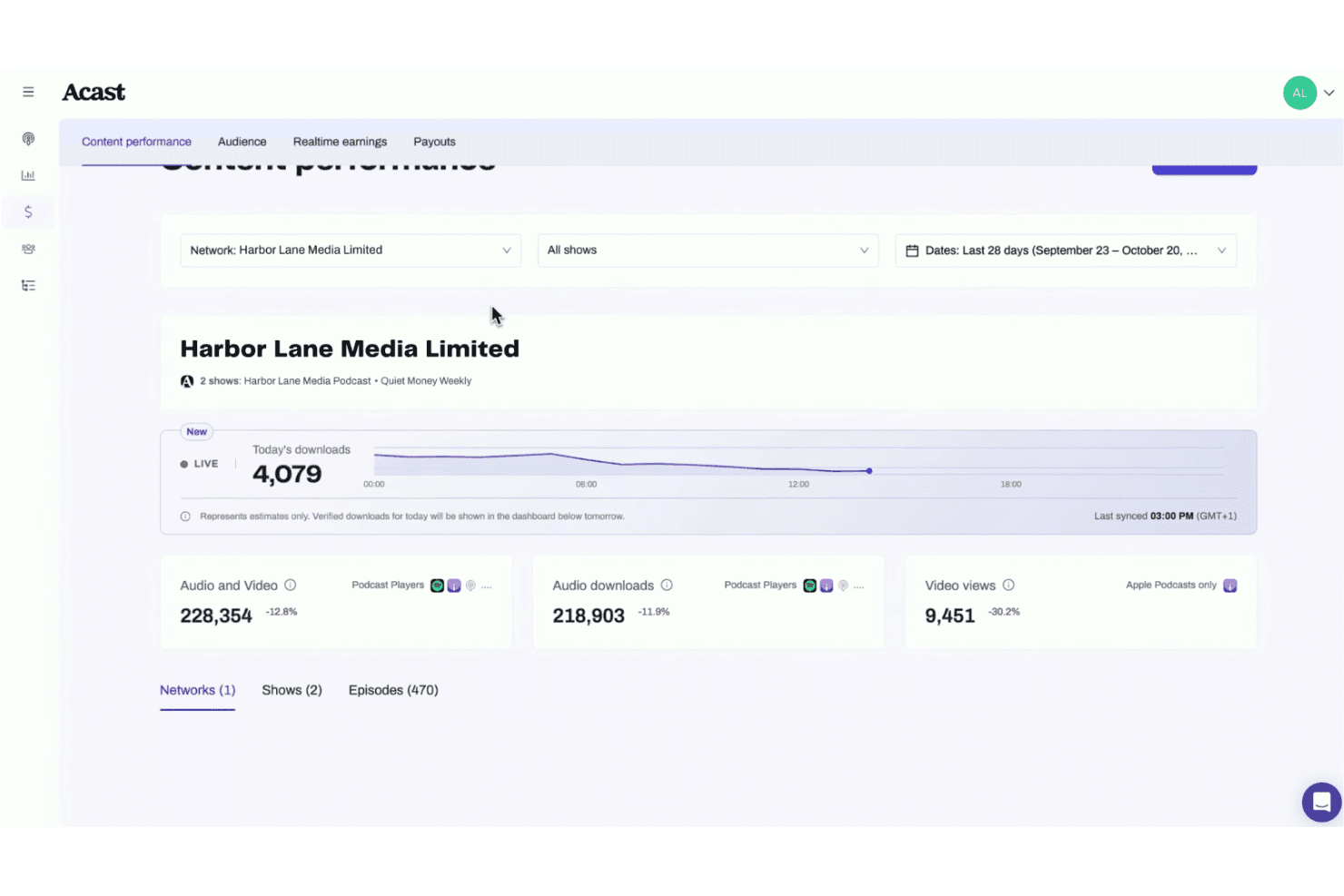
Acast features live download estimates, audio downloads, and video views. Acast is a podcast hosting and analytics platform that offers download tracking, audience reporting, monetization tools, and advertising campaign measurement. Its analytics include IAB 2.2-certified metrics, while third-party attribution solutions support tracking website visits and conversions associated with podcast advertising.
Who Is Acast Best For?
Acast is best for podcast creators, podcast network managers, and advertising teams that need download analytics, audience demographics, episode performance reporting, and advertising campaign measurement.
Why I Picked Acast
I picked Acast because it combines IAB 2.2-certified podcast measurement with detailed audience and episode analytics. Its reporting covers downloads, unique listeners, audience demographics, and episode performance across shows. I also like its audience surveys, which collect anonymous listener feedback to provide additional demographic insights for podcast creators and networks.
Acast Key Features
- IAB 2.2-certified download tracking: Filters known bot traffic and duplicate requests using industry measurement standards.
- Audience location and device reporting: Shows listener geography, podcast apps, websites, and device information.
- Unique listener reporting: Tracks unique audience reach and changes in listener counts over time.
- Audience Surveys: Collects anonymous listener responses and provides aggregated audience reports for podcast creators.
Acast Integrations
Acast integrates with Apple Podcasts, Spotify, Amazon Music, Headliner, and Supercast. It also supports a Publishing API, webhooks, and Zapier for custom connections.
Pros and Cons
Pros:
- Podscribe attribution for advertising conversions
- Cross-network and episode performance comparisons
- Reports Apple Podcasts video consumption data
Cons:
- Marketplace earnings exclude independently sold campaigns
- Custom audience survey questions unavailable
Learn more about Acast: Best for tracking public and private shows
- Free plan + 14-day free trial available
- From $17/month
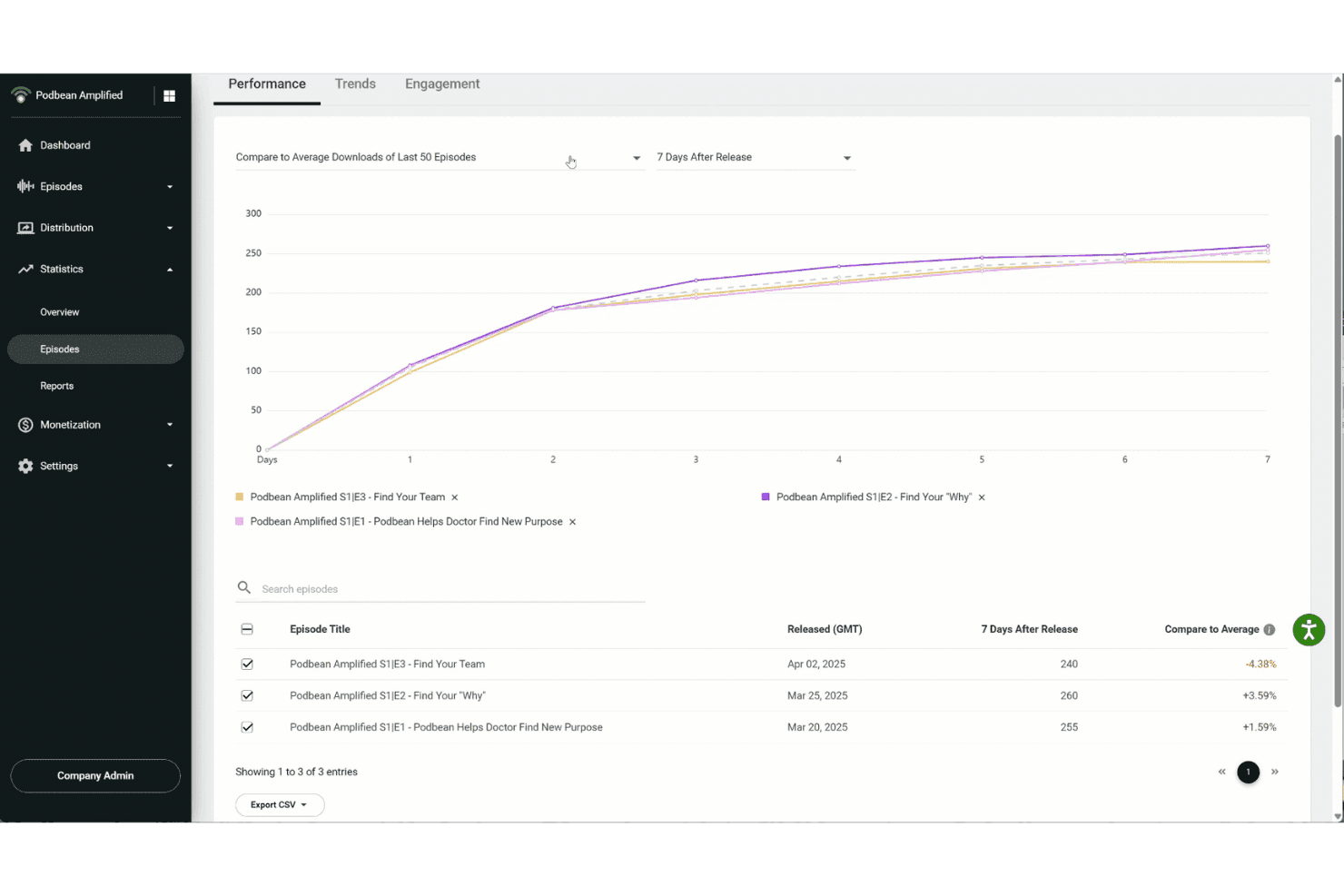
Podbean lets users compare episode download performance over time. Podbean is a podcast hosting and analytics platform offering IAB-certified statistics, episode performance comparisons, listener engagement reporting, and geographic and device breakdowns. It also provides network-level analytics for organizations managing multiple podcast channels.
Who Is Podbean Best For?
Podbean is best for podcast networks, enterprise organizations, and businesses producing podcasts for internal communications, employee training, and brand marketing.
Why I Picked Podbean
I picked Podbean for its network-level podcast analytics and detailed listener engagement reporting. Its organizational statistics include downloads, daily listeners, geographic data, platform sources, and the 10 most downloaded podcasts and episodes across channels. Its Listener Engagement Intel also reports playback behaviour, including pauses, skips, relistens, and episode consumption rates for supported Podbean listening channels.
Podbean Key Features
- IAB-certified statistics: Provides IAB Tech Lab-certified measurement covering podcast downloads, listeners, and ad delivery.
- Geographic and device analytics: Reports listener locations by country and state or province, alongside device and download source information. Geographic statistics support CSV exports.
- Episode Performance comparisons: Compares episode downloads against the average of the last 10, 50, or all episodes (up to 500), with day-by-day comparisons for up to 10 selected episodes.
- Conversion pixel tracking: Tracks visits to designated landing pages following podcast ad exposure, using a 90-day attribution window.
Podbean Integrations
Podbean offers plugins for Mailchimp, Google Analytics, Dataddo, and Dropbox, along with a documented Descript publishing integration. It also provides an API for custom integrations.
Pros and Cons
Pros:
- Reports most active listening hours
- Episode reports track pauses, skips, and relistens
- Unified analytics cover public and private shows
Cons:
- External app engagement isn't captured
- Cross-platform totals aren't fully reconciled
Learn more about Podbean: Best for comparing audiences across shows
- 14-day free trial
- From $13.50/month (billed annually)
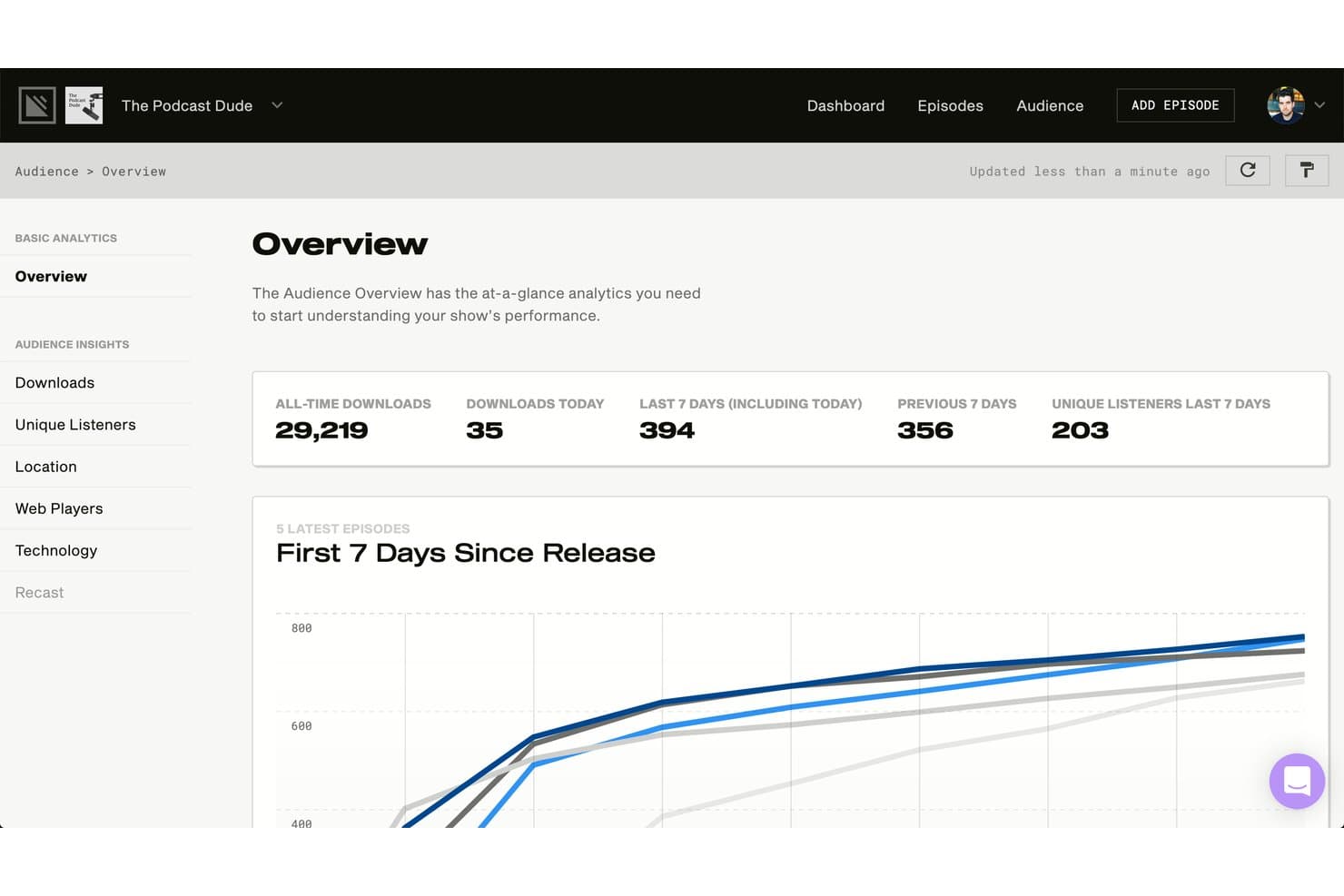
Simplecast tracks all-time downloads, unique listeners, and episode performance. Simplecast is a podcast hosting and analytics platform that supports podcast publishing, distribution, IAB-certified audience measurement, episode-level performance tracking, and customizable content reports across shows.
Who Is Simplecast Best For?
Simplecast is best for podcast networks, production teams, and publishers managing multiple shows that need cross-show audience reporting, episode performance comparisons, and organization-level access controls.
Why I Picked Simplecast
I've included Simplecast in my top picks because its Content Reports support audience analysis across shows, episodes, and networks. I particularly like its customizable reporting dimensions, which allow publishers to compare downloads and unique listeners across their podcast catalogues. Simplecast also offers audience overlap reporting for multi-show networks as an Enterprise add-on.
Simplecast Key Features
- IAB-certified download metrics: Filters bot traffic, preloads, and duplicate downloads using a rolling 24-hour measurement window.
- City-level audience analytics: Provides listener location breakdowns by country, region, sub-region, and city.
- Web player retention charts: Tracks average listening time, episode completion ratios, and listener drop-off across episode segments.
- Scheduled report delivery: Supports automated email reports with daily, weekly, monthly, quarterly, and custom multiweek delivery schedules.
Simplecast Integrations
Simplecast connects with AdsWizz Podcast Marketplace for podcast monetization and supports distribution to Apple Podcasts, Spotify, and Overcast through podcast feeds. It also supports YouTube publishing and analytics, while Enterprise API capabilities cover publishing and campaign management.
Pros and Cons
Pros:
- Supports editing existing scheduled report configurations
- Enterprise reports support cross-show audience overlap
- Supports cross-show episode imports
Cons:
- Some downloads lack location and device data
- On-screen reports limited to four dimension splits
Learn more about Simplecast: Best for producer workflows with built-in analytics
- 30-day free trial
- From $17/month (billed annually)
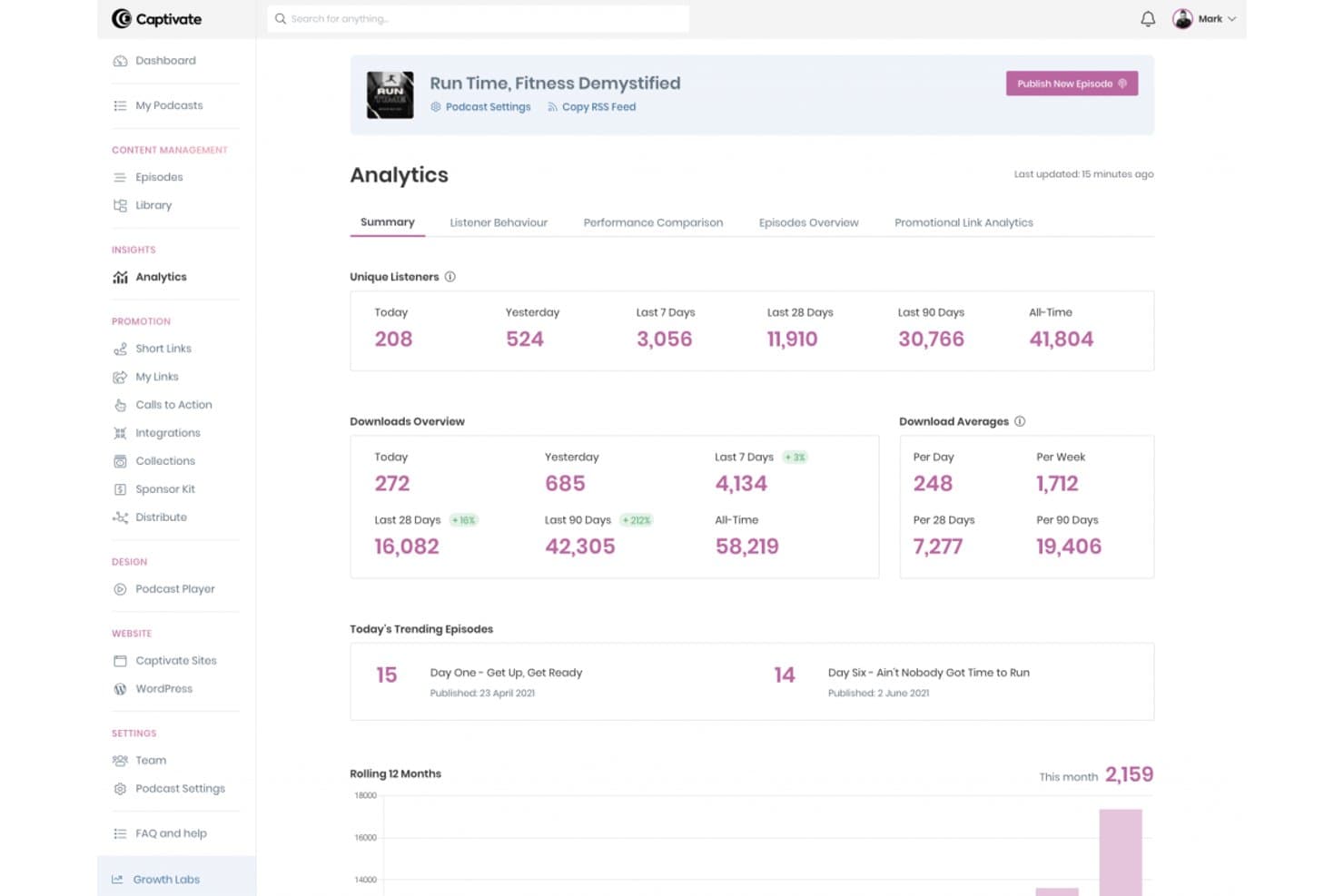
Captivate tracks downloads, unique listeners, and trending episodes. Captivate is a podcast hosting platform offering IAB-certified analytics, episode planning, guest booking, dynamic ad insertion, and sponsorship reporting tools.
Who Is Captivate Best For?
Captivate is best for podcast producers, independent podcasters, and podcast network managers who need episode planning, guest booking, and podcast audience analytics.
Why I Picked Captivate
I've included Captivate in my top picks because it combines podcast production planning with episode-level analytics and sponsorship tools. Its episode planning feature supports research links, production notes, and guest information, while its booking system connects with SquadCast for remote recording scheduling. Captivate also provides Web Player Listener Coverage for reviewing audience engagement and shareable sponsor kits containing podcast performance statistics and an IAB Tech Lab verified seal.
Captivate Key Features
- IAB-certified analytics: Measures podcast downloads using IAB Tech Lab Podcast Measurement 2.3 standards, with filtering and validation for qualifying download requests.
- Web Player Listener Coverage: Tracks minutes played, minutes replayed, and listener drop-off points for episodes played through Captivate's embedded web player.
- Attribution link tracking: Provides promotional links with analytics for monitoring visits generated by podcast marketing campaigns.
- Network analytics: Reports downloads, average downloads, and listener activity across podcasts within a network.
Captivate Integrations
Captivate integrates with SquadCast for guest booking and recording scheduling, WordPress through Captivate Sync, and Zapier for automated workflows. It also supports Alitu through its API.
Pros and Cons
Pros:
- Sponsor kits display IAB verification
- Episode planning with research links
- Supports reusable dynamic show notes
Cons:
- Guest bookings limited to six months ahead
- Listener retention requires Captivate's web player
Learn more about Captivate:
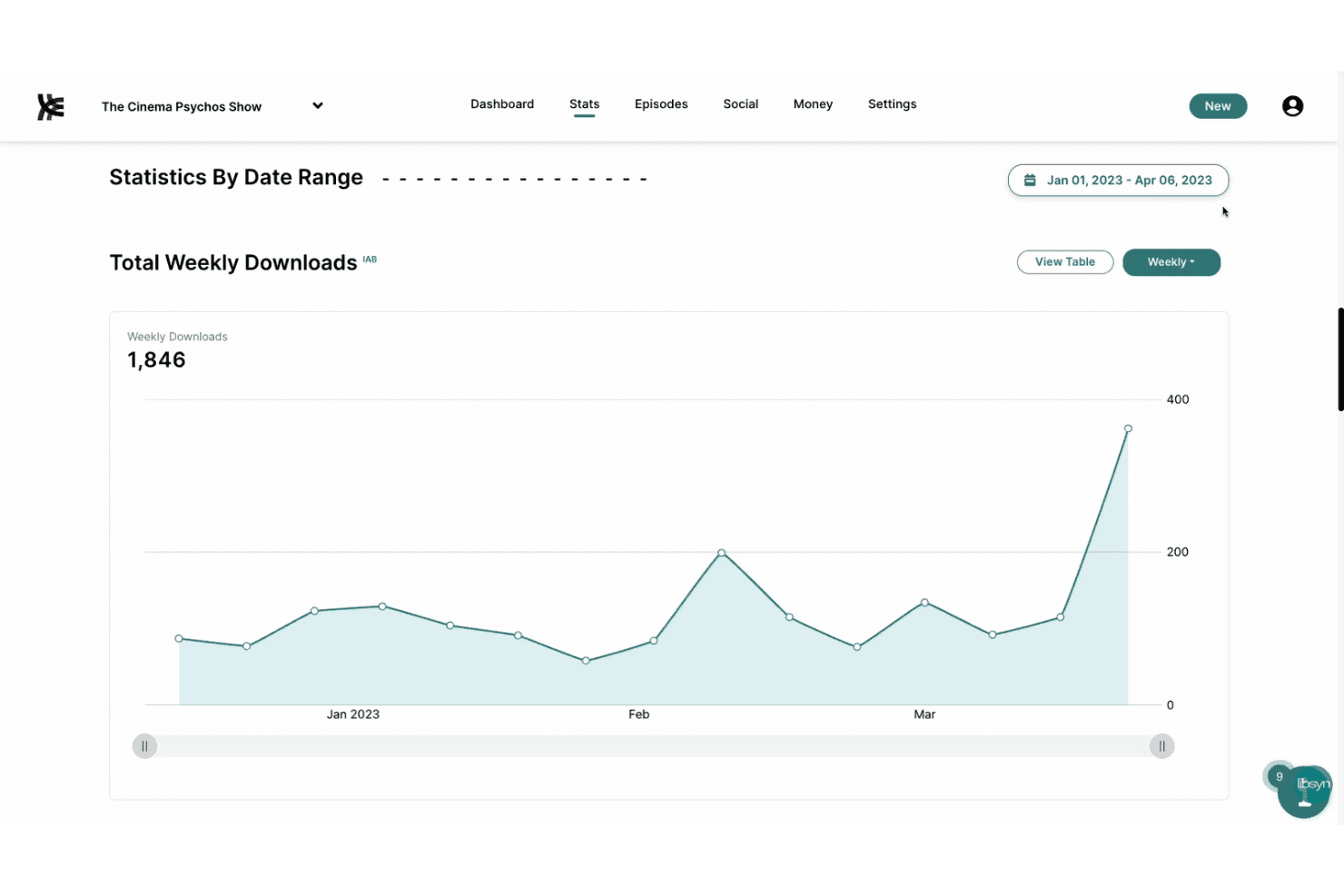
Libsyn provides weekly podcast download statistics with a trend chart. Libsyn is a podcast hosting and analytics platform offering episode publishing, distribution to major listening platforms, IAB-verified download statistics, and geographic audience reporting. Its enterprise offering also supports network-level analytics across multiple shows.
Who Is Libsyn Best For?
Libsyn is best for podcast networks, media organizations, and businesses managing multiple shows that need network-level download reporting and comparisons across podcasts.
Why I Picked Libsyn
I picked Libsyn because its enterprise analytics support reporting at both the individual show and podcast network levels. I particularly like that network administrators can review episode performance, geographic audience data, and download trends across multiple shows. Libsyn also offers exportable reports and a Stats API, providing additional options for analyzing podcast performance.
Libsyn Key Features
- IAB-certified download statistics: Tracks podcast downloads using IAB-certified measurement standards that filter invalid traffic and duplicate requests.
- User-agent reporting: Shows which podcast apps and listening clients request episodes.
- Geographic audience reporting: Provides location-based download statistics for reviewing audience distribution.
- Analytics report exports: Supports exporting podcast performance data for further analysis outside Libsyn.
Libsyn Integrations
Libsyn supports podcast distribution to Apple Podcasts, Spotify, Amazon Music, and other listening platforms. It also offers publishing integrations with YouTube and Spotify, including video distribution, and supports Apple Podcasts Subscriptions for paid content. Its Stats API provides additional options for custom analytics integrations.
Pros and Cons
Pros:
- Stats API supports custom analytics reporting
- IAB-certified metrics filter invalid downloads
- Network-level reporting compares multiple shows
Cons:
- Episode retention data requires listening-platform analytics
- Network reporting requires enterprise offering
Learn more about Libsyn:
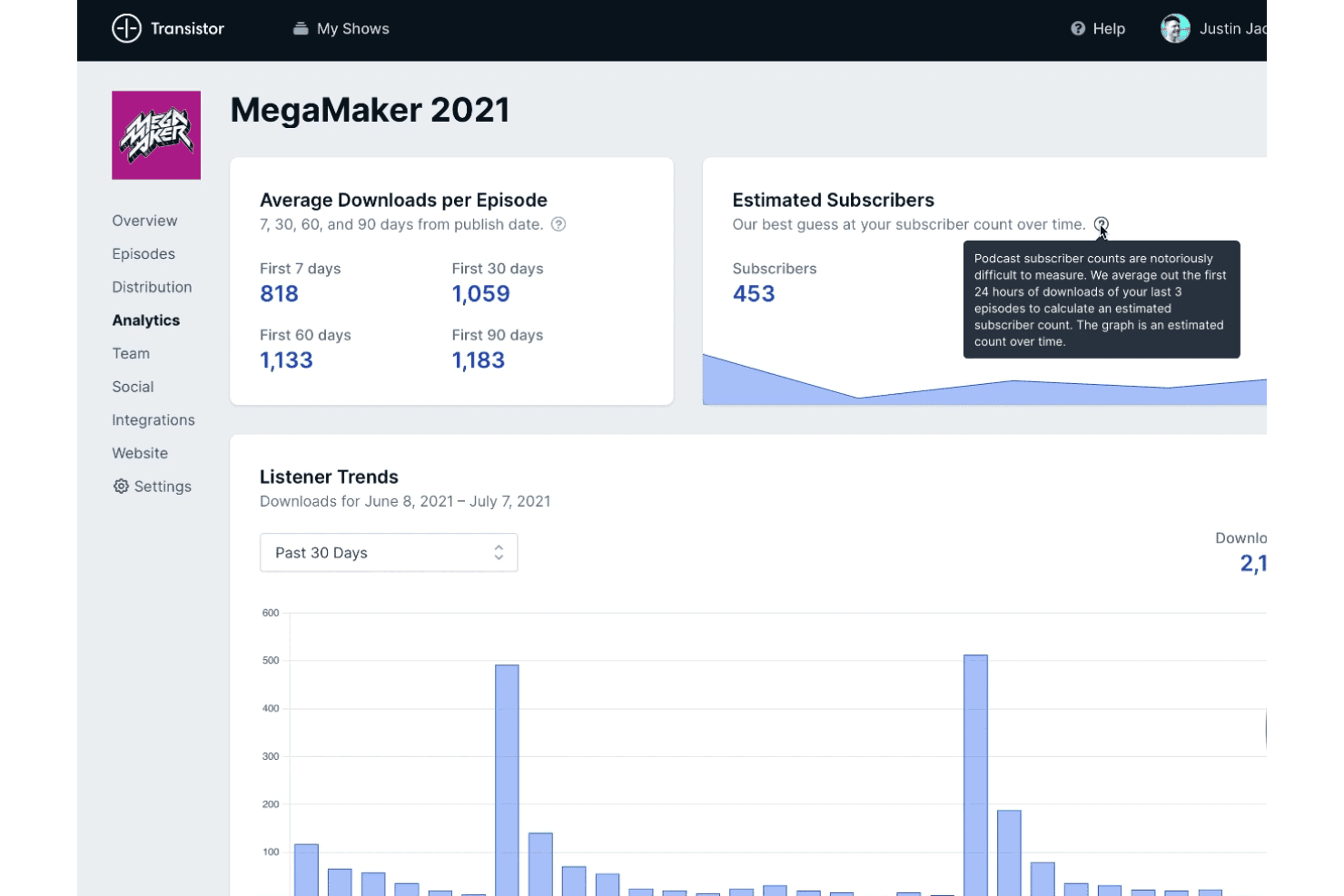
Transistor tracks podcast downloads and estimated subscribers over time. Transistor is a podcast hosting and analytics platform that tracks episode downloads, listener geography, devices, and podcast app usage across unlimited shows. It also provides API and MCP access for programmatic analytics queries.
Who Is Transistor Best For?
Transistor is best for podcast network operators and podcast producers managing multiple shows who need episode-level analytics and download comparisons.
Why I Picked Transistor
I picked Transistor because it provides episode-level analytics and download comparisons for podcasts managed under the same account. Its analytics include daily download counts, listener geography, device breakdowns, and podcast app usage. It also supports custom date ranges and comparisons across multiple shows, making it relevant to podcast networks tracking performance across their catalogues.
Transistor Key Features
- Listener geography breakdown: View podcast downloads by country, with additional state and province-level data where available.
- Episode comparison: Compare daily downloads across episodes during their first 30 days after publication.
- Dynamic ad campaigns: Insert uploaded pre-roll, mid-roll, and post-roll audio clips into episodes, with campaign scheduling options.
- CSV analytics exports: Export listener trends, episode breakdowns, podcast player statistics, and geographic data as separate CSV reports.
Transistor Integrations
Transistor integrates with Ghost, Drip, Mailchimp, HubSpot, Kit, Klaviyo, MailerLite, ActiveCampaign, Zapier, Make, Descript, Riverside.fm, Bluesky, and YouTube. It also provides a REST API with webhook support and an MCP server for programmatic access.
Pros and Cons
Pros:
- CSV exports include daily download data
- Episode comparisons cover the first 30 days
- Tracks individual private subscriber listening
Cons:
- Analytics exports require separate reports
- Subscriber counts are estimates, not exact
Learn more about Transistor: Best for sponsor-ready audience proof
- Free plan + 30-day free trial available
- From $5/month
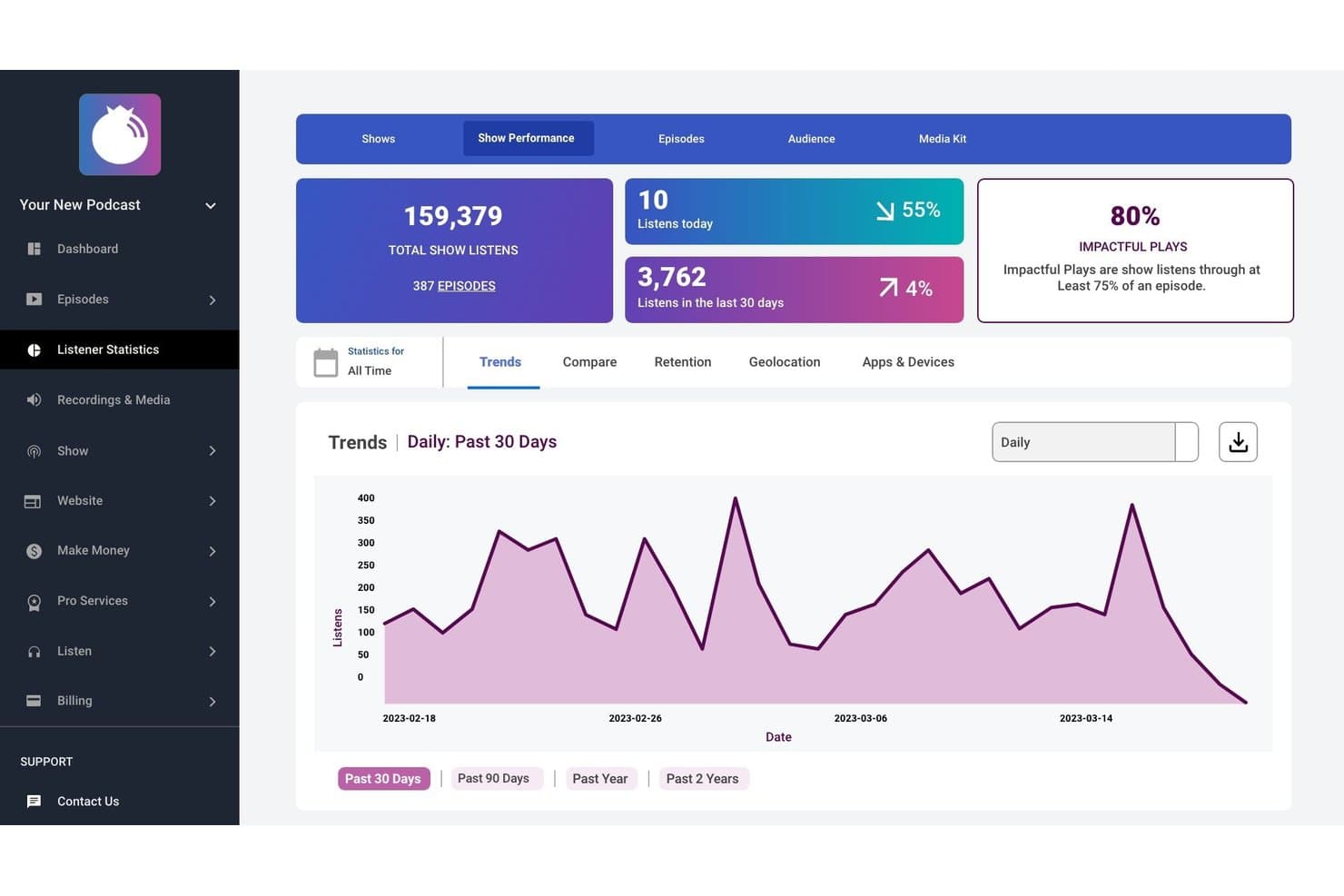
Blubrry includes podcast listening statistics, trends, and play metrics. Blubrry is a podcast analytics platform that tracks downloads, audience locations, listening apps and devices, and episode performance. Its statistics plans include basic audience tracking, episode comparisons, listening trends, and advanced reporting features such as IAB-certified statistics, listener retention, and podcast media kits.
Who Is Blubrry Best For?
Blubrry is best for independent podcasters, podcast producers, and network managers who need audience analytics, episode performance reporting, and podcast statistics for advertising and sponsorship reporting.
Why I Picked Blubrry
I picked Blubrry because it offers podcast audience analytics alongside reporting features for advertisers and sponsors. Its podcast media kit includes podcast statistics and audience survey results, while its certified statistics offering provides additional audience and delivery reporting for show producers and media buyers. These features make Blubrry relevant to podcasters who need audience data for sponsorship discussions.
Blubrry Key Features
- Listener retention graph: Displays completed and partial episode plays, including data on listening duration.
- Episode comparison: Compares the performance of recent episodes, with the number of episodes varying by plan.
- Listening trends: Displays download and listening trends across selected reporting periods, including monthly comparisons.
- Tracking prefix: Measures podcast downloads through a statistics prefix configured in a compatible podcast feed or publishing setup.
Blubrry Integrations
Blubrry integrates with PowerPress for WordPress-based podcast publishing and statistics tracking. It also provides a REST API with OAuth 2 authentication, including Podcast Statistics API endpoints for custom integrations.
Pros and Cons
Pros:
- Statistics tracking without hosting migration
- Nielsen market data for geographic reporting
- Provides podcast audience survey results
Cons:
- Retention metrics require advanced hosting
- Free statistics exclude episode comparisons
Learn more about Blubrry: Best for attributing sales and verifying ads
- Free demo available
- From $250/month
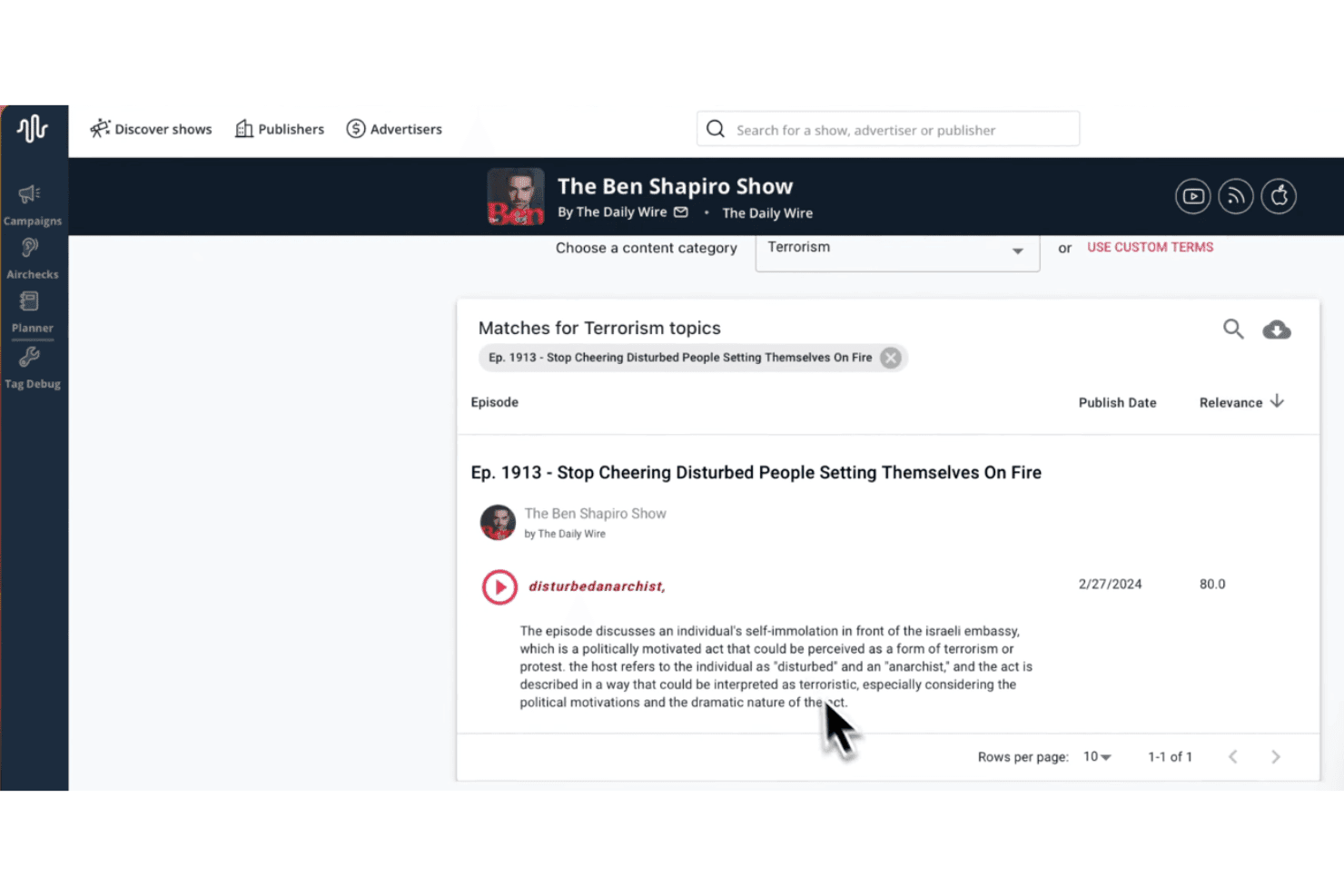
Podscribe flags terrorism-related content matches in podcast episodes. Podscribe is an IAB-certified podcast and audio advertising measurement platform offering pixel-based attribution, ad verification, incrementality testing, competitive intelligence, and cross-channel campaign reporting. It supports measurement across podcasts, streaming audio, and connected TV (CTV).
Who Is Podscribe Best For?
Podscribe is best for advertisers and media agencies managing podcast and cross-channel audio campaigns that need independent attribution reporting, ad verification, and campaign performance measurement.
Why I Picked Podscribe
I picked Podscribe because it combines podcast ad attribution with placement verification and incrementality measurement. Its pixel-based attribution reports conversions associated with ad exposure, including purchases and signups, while its ad verification capabilities support campaign placement monitoring. I also included it for its incrementality measurement tools, which estimate conversions attributable to advertising beyond expected baseline activity.
Podscribe Key Features
- Podscribe Ranker: Provides podcast rankings using audio downloads, YouTube views, Spotify plays, and audience growth trends.
- Competitive intelligence: Provides advertiser spending estimates, podcast ad placement information, and historical advertising trends across supported shows.
- Campaign Planner: Estimates campaign reach, audience overlap, net-new listeners, and projected conversions across selected podcasts.
- SmartServe ad server: Supports audio ad delivery through VAST tags, with audience targeting, frequency capping, and creative management.
Podscribe Integrations
Podscribe supports automated campaign synchronization with Google Sheets and campaign-data ingestion from supported ad servers, including ART19, Megaphone, and AdsWizz. It also offers an API for custom reporting integrations.
Pros and Cons
Pros:
- Competitor spending and placement intelligence
- Pixel attribution reports purchase conversions
- Supports configurable attribution conversion windows
Cons:
- First-party analytics require publisher authorization
- Unconnected YouTube views require estimation
Learn more about Podscribe: Best for creators who want stats with hosting
- Free plan available
- From $20/month
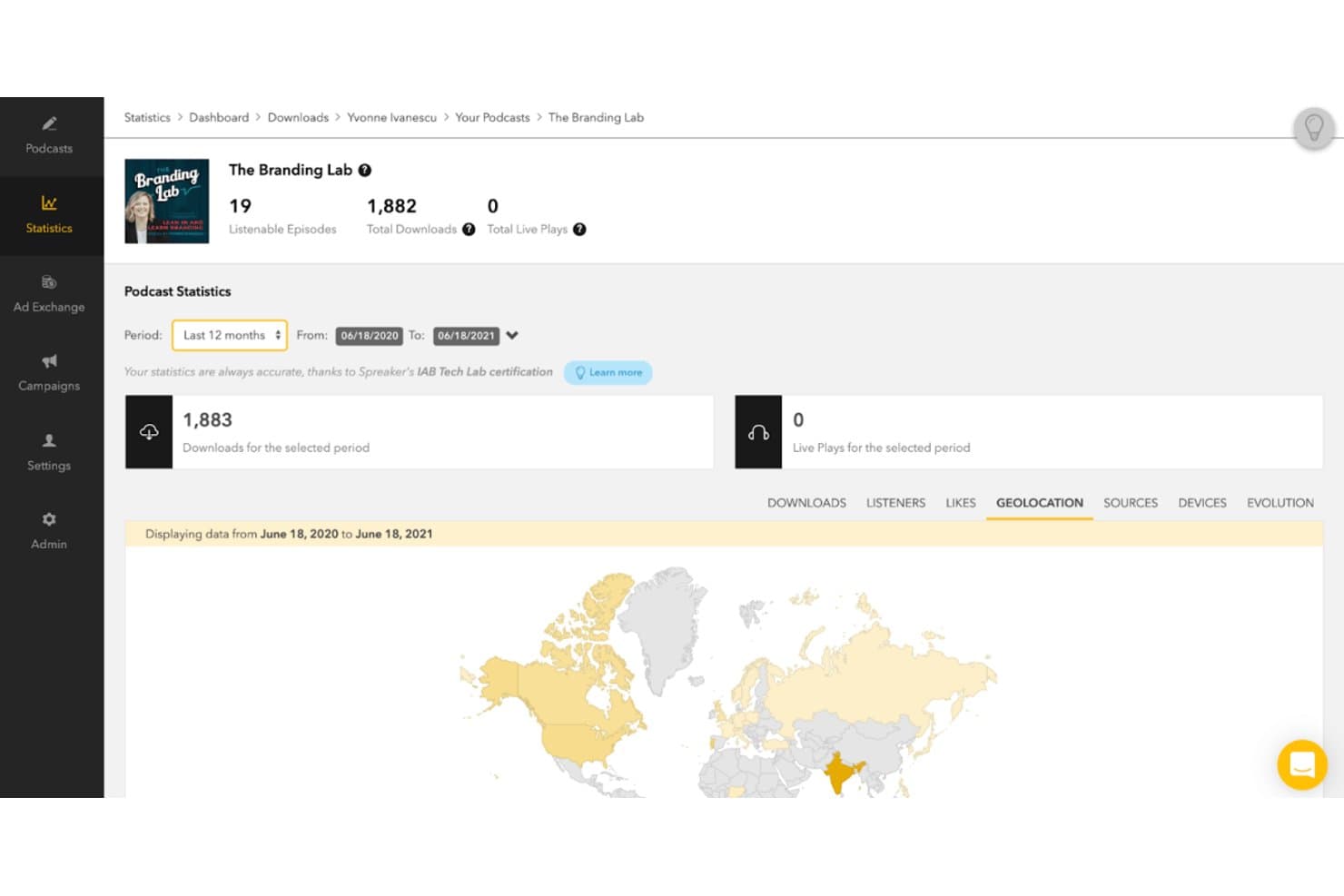
Spreaker tracks podcast downloads and listener geolocation data. Spreaker is a podcast hosting and analytics platform offering episode creation, podcast distribution, monetization tools, and IAB-certified download statistics.
Who Is Spreaker Best For?
Spreaker is best for independent podcasters and podcast publishers who need episode hosting, distribution, and audience analytics.
Why I Picked Spreaker
I picked Spreaker because it combines IAB-certified podcast download statistics with episode-level performance reporting. Its analytics include geographic breakdowns by country, region, and city, along with listening sources such as Apple Podcasts, Spotify, and iHeartRadio. Spreaker also offers Episode Evolution reporting, which tracks cumulative episode downloads from the publication date and supports comparisons across episodes.
Spreaker Key Features
- IAB-certified download metrics: Applies IAB measurement rules to exclude short listens and limit repeated requests from the same device and IP address.
- Geographic reporting: Breaks down podcast downloads by country, region, and city across listening platforms.
- CSV data exports: Provides downloadable reports covering downloads, daily listeners, listening sources, and device information.
- Listening source reporting: Identifies listening activity from Apple Podcasts, Spotify, iHeartRadio, and embedded players at the organization, podcast, or episode level.
Spreaker Integrations
Spreaker supports podcast distribution to Apple Podcasts, Spotify, and iHeartRadio, along with WordPress-compatible embedded players. Its API v2 supports custom integrations and access to podcast statistics.
Pros and Cons
Pros:
- Supports podcast-level collaboration permissions
- City-level listener geographic reporting
- Tracks Spreaker follower growth patterns
Cons:
- Episode Evolution limited to select plans
- No cross-platform listening completion metrics
Learn more about Spreaker:
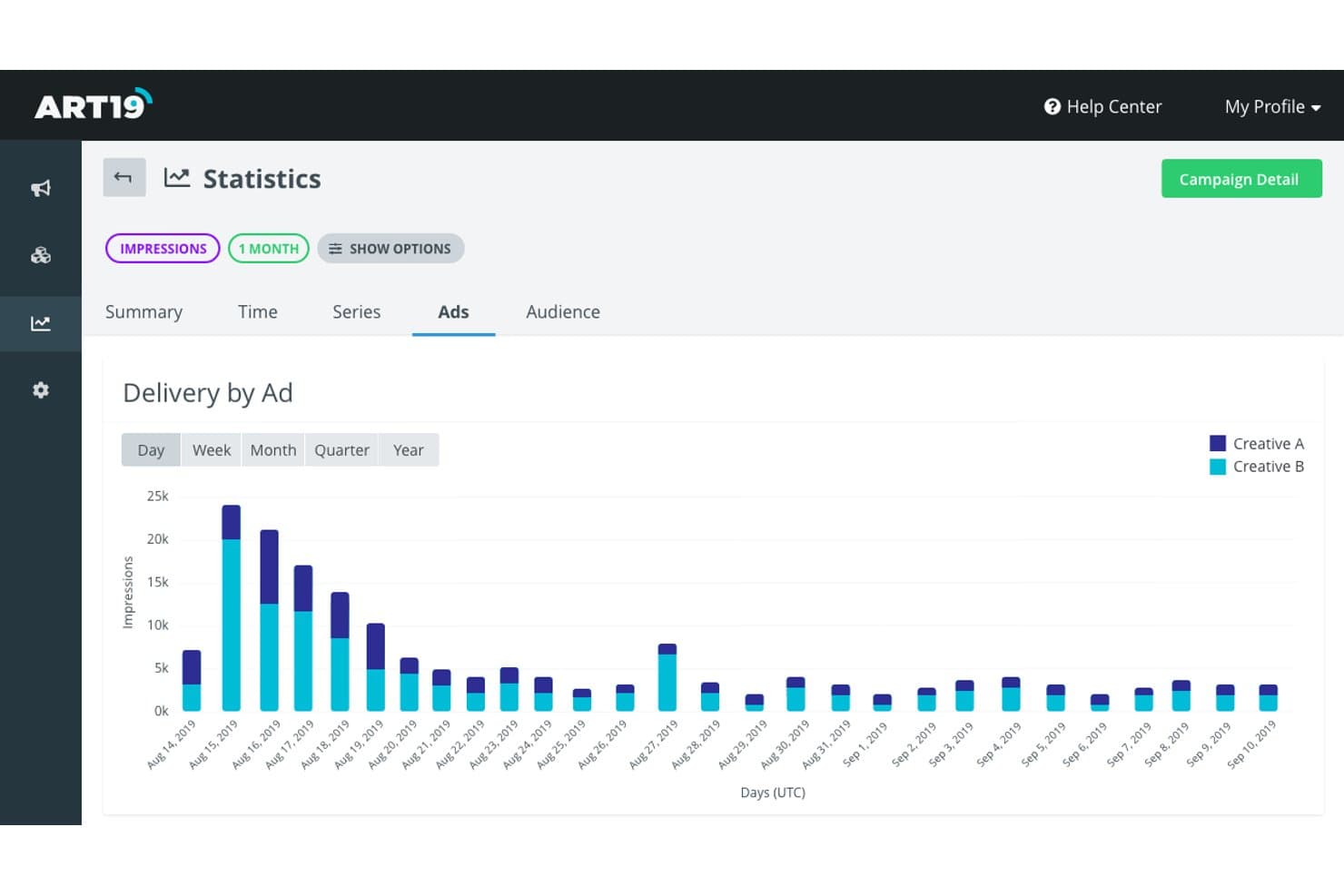
Art19 tracks ad impressions by creative across a date range. ART19 is a podcast hosting, analytics, and advertising platform for podcast publishers and networks. Its capabilities include audience reporting, download measurement, dynamic ad insertion, and advertising campaign management.
Who Is ART19 Best For?
ART19 is best for podcast publishers, podcast networks, and advertising operations teams managing podcast distribution, audience analytics, and advertising campaigns.
Why I Picked ART19
I picked ART19 for its combination of podcast audience analytics and advertising management capabilities. The platform supports download reporting, geographic audience analysis, and dynamic ad insertion for podcast episodes. Its advertising tools also support campaign management and performance reporting, making it relevant to publishers and networks managing both podcast content and advertising operations.
ART19 Key Features
- IAB-certified download measurement: Measures downloads and unique listeners using IABv2.2 methodology, including bot, proxy, and duplicate-request filtering.
- Episode-level analytics: Reports episode downloads and unique listeners over selected reporting periods.
- Geographic audience reporting: Provides listener location data by country, region, city, and designated market area (DMA).
- Role-based user access: Offers Owner, Admin, Stats Only (All), and Stats Only (Listening) permissions for managing series and network access.
ART19 Integrations
ART19 provides APIs for managing podcast content, feeds, ad markers, and embedded players. API credentials are available through ART19 Support. No specific native third-party integrations were confirmed in its public documentation.
Pros and Cons
Pros:
- Ad Ops connects reach, CPM, and revenue
- Users praise episode comparisons and certified analytics
- IAB-certified download and impression measurement
Cons:
- Custom reports limited to 1,000 rows
- No episode completion or listen-through metrics
Learn more about Art19:
Diğer Podcast Analiz Araçları
Kısa listeme girmeyen ancak yine de göz atmaya değer birkaç ek seçenek şunlardır:
- 11MegaphoneBest for sponsorship playback reporting
- 12Omny StudioBest for broadcast networks tracking retention
- 13CastosBest for WordPress publishing with analytics
- 14Spotify for CreatorsBest for free hosting with built-in analytics
- 15BuzzsproutBest for publishing with IAB-certified stats
- 16RSS.comBest for hosting and IAB-certified metrics
- 17PodtracBest for ad delivery and outcome attribution
- 18Podchaser ProBest for podcast sponsorship prospecting
- 19PodigeeBest for asking AI assistants about show trends
- 20Apple Podcasts ConnectBest for Apple listener engagement insights
How I Evaluate Podcast Analytics Tools
I split my evaluation into three parts, with core functionality carrying the most weight: report IAB-standard downloads and show episode-level retention trends. Next, I consider standout features such as ad attribution. Finally, I weigh factors beyond features, including onboarding, support, and pricing value for creators, producers, and networks.
Core Functionality (Table Stakes For This List)
When I'm selecting tools for my list, I score each one on a scale from 0 (does not offer the functionality) to 5 (excels in this area) for each core functionality listed below. I then convert the total into a percentage to help assess each tool's overall fit, with extra weight on any functionalities I’ve deemed essential.
- IAB Download Metrics (Essential): I look for IAB-certified counts with clear filtering methods, so teams can compare reported downloads across shows and support sponsor claims.
- Episode Performance (Essential): I check whether episode reports show consumption trends and completion or drop-off, helping teams connect listener behaviour to specific content.
- Audience Demographics: I assess whether reports break listeners down by location, device, and listening app to help teams understand who they’re reaching.
- Growth Trends: I look for historical charts and date-range controls that help teams track audience growth, retention, and changes in listening over time.
- Cross-Platform Tracking: I evaluate how clearly a tool brings listening data from platforms such as Spotify and Apple Podcasts into a shared view.
- Exportable Reports: I check whether teams can export clear, usable performance data to share with sponsors, advertising partners, or internal stakeholders.
Once I have a list of tools that meet the criteria, I consider what sets each platform apart.
Differentiating Factors (What Sets Vendors Apart)
Here's how I compare and contrast different vendors:
Standout Features
Ad attribution and pixel tracking are where I spend the most time. I check whether a tool can tie a podcast ad exposure to a website visit, app install, or purchase—Podscribe and Acast handle this differently, and the gap matters when a sponsor asks for conversion proof. I also evaluate API and data access, since teams piping metrics into a BI dashboard or CRM need raw exports, not just in-app charts. Competitor benchmarking helps contextualize download numbers against category peers, which is useful when pitching sponsors or setting growth targets.
Beyond Features
I check whether a tool's analytics require hosting on that same platform, since migrating to unlock reporting can mean losing historical data. Integration depth matters too—tools like Megaphone and Acast connect to ad marketplaces and dynamic insertion, but I look at whether metrics can also flow into a CRM or BI tool like HubSpot or Google Analytics. Finally, I evaluate support quality, because data discrepancies right before a sponsorship deadline need fast, knowledgeable responses, not just a help doc.
Podcast Analiz Araçları Nasıl Seçilir?
Podcast analiz araçlarını, sponsor iddialarını doğrulamaktan kampanya etkisini değerlendirmeye kadar ekibinizin alması gereken kararları raporlarının yanıtlayıp yanıtlamadığını test ederek seçin.
| Önceliğiniz… | Şunları arayın… |
|---|---|
| Önceliğiniz…Sponsor iddialarını desteklemek | Şunları arayın…Filtreleme yöntemleri belgelenmiş, örnek bir IAB sertifikalı indirme raporu |
| Önceliğiniz…Bölüm etkileşimini incelemek | Şunları arayın…Elde tutma veya tamamlanma verileri ve net bir raporlama aralığı içeren örnek bir bölüm raporu |
| Önceliğiniz…Programları karşılaştırmak | Şunları arayın…Tutarlı tarih aralıkları ve metrik tanımları içeren programlar arası bir rapor |
| Önceliğiniz…Kampanya etkisini ölçmek | Şunları arayın…Etkileşim, dönüşüm ve ölçüm aralığını tanımlayan bir ilişkilendirme raporu |
Kısa Listeniz Nasıl Değerlendirilir?
- İndirme sayılarını doğrulayın: Bir IAB sertifika belgesi ve örnek rapor isteyin, ardından filtrelemenin bildirilen toplamları nasıl etkilediğini doğrulayın.
- Bölüm raporlamasını test edin: Bir bölümün elde tutma veya tamamlanma verilerini incelemek için deneme sürümünü kullanın ve raporu tarih aralığıyla birlikte kaydedin.
- Programlar arası karşılaştırmaları kontrol edin: En az iki programı kapsayan örnek bir ağ raporu isteyin ve her birinin aynı metrik tanımlarını ve tarihleri kullandığını doğrulayın.
- İlişkilendirmeyi araştırın: Etkileşim ve dönüşüm olaylarını, ilişkilendirme aralığını ve sonuçlara ilişkin sınırlamaları belirleyen örnek bir kampanya raporu isteyin.
- Karar ölçütünü belirleyin: Yayınlama ve kitle raporlamasının aynı iş akışını paylaşması gerekiyorsa barındırma platformunun yerleşik analizlerini seçin; bağımsız kampanya ilişkilendirmesi, raporlamayı barındırma platformu içinde tutmaktan daha önemliyse ayrı bir ölçüm yaklaşımı seçin.
Podcast Analiz Araçları Nedir?
Podcast analiz araçları, podcast indirmeleri, dinleyiciler, bölüm etkileşimi ve bazı durumlarda kampanya sonuçları hakkında veri toplayan ve raporlayan yazılımlardır. Pazarlama ekipleri, kitle eğilimlerini karşılaştırmak ve reklamların ziyaretlere veya dönüşümlere katkı sağlayıp sağlamadığını değerlendirmek için bu raporları kullanır. Metrikler platforma göre değişir; bu nedenle raporların indirmeleri ve ilişkilendirme etkinliklerini nasıl tanımladığını kontrol edin.
Özellikler
Podcast analiz araçlarında aradığım başlıca özellikler şunlardır:
- İndirme metrikleri: Program ve bölüm düzeyindeki indirmeleri izler; bazı sağlayıcılar yinelenen ve geçersiz istekleri filtrelemek için IAB ölçüm yönergelerini uygular.
- Bölüm performansı: Dinleme platformu tarafından desteklendiğinde oynatma, dinleme süresi ve tamamlanma oranları gibi bölüm düzeyindeki metrikleri sağlar.
- Kitle içgörüleri: Her platform tarafından paylaşılan verilere bağlı olarak mevcut coğrafi, demografik, cihaz ve dinleme uygulaması dökümlerini sağlar.
- Büyüme eğilimleri: Raporlama dönemleri arasındaki kitle metriklerini karşılaştırmak için geçmiş grafikler ve tarih aralığı filtreleri sağlar.
- Platformlar arası izleme: Desteklenen podcast platformlarındaki mevcut dinleme etkinliklerini raporlar; veri kapsamı ve metrik tanımları sağlayıcıya göre değişir.
- Dışa aktarılabilir raporlar: Analizlerin CSV gibi biçimlerde indirilmesini destekler; kullanılabilir metrikler, filtreler ve raporlama dönemleri sağlayıcıya göre değişir.
- Reklam ilişkilendirmesi: Desteklenen ilişkilendirme yöntemlerini ve ölçüm aralıklarını kullanarak podcast reklamlarına maruz kalmayla ilişkili web sitesi ziyaretlerini, satın alımları ve diğer dönüşümleri izler veya tahmin eder.
Faydalar
Podcast analiz araçlarından bekleyebileceğiniz bazı yaygın faydalar şunlardır:
- Tanımlı sponsor raporlaması: IAB ölçüm yönergelerine dayalı indirme metrikleri, podcast performansını sponsorlara raporlamak için standartlaştırılmış rakamlar sağlar.
- Bilinçli bölüm planlaması: Tamamlanma ve dinleme süresi metrikleri, bölümler arasındaki etkileşim farklılıklarını belirlemenize ve gelecekteki içerik planlamasına yön vermenize yardımcı olur.
- Kitle içgörüleri: Mevcut konum, cihaz ve dinleme uygulaması verileri, podcast'inizin coğrafi erişimi ve kitlelerin bölümlere nasıl eriştiği hakkında bilgi sağlar.
- Kitle büyümesi karşılaştırmaları: Geçmiş performans verileri ve tarih aralığı kontrolleri, ekibinizin raporlama dönemleri arasındaki kitle etkinliğini karşılaştırmasına ve zaman içindeki değişiklikleri belirlemesine olanak tanır.
- Çoklu platform performans karşılaştırmaları: Farklı podcast dinleme platformlarından elde edilen mevcut veriler, her platformun raporlama sınırlamalarına tabi olarak ekibinizin dağıtım kanalları arasındaki kitle etkinliğini karşılaştırmasına yardımcı olur.
- Kampanya performansı ölçümü: Desteklenen ilişkilendirme araçları, izleme yöntemine ve ilişkilendirme aralığına dayalı olarak podcast reklamlarına maruz kalmayı web sitesi ziyaretleri veya satın alımlar gibi eylemlerle ilişkilendirir.
Fiyatlandırma
Fiyatlandırma; özelliklere, ekip büyüklüğüne ve raporlama ihtiyaçlarına göre değişir. Podcast analiz araçları için tipik aylık fiyat aralıkları aşağıda verilmiştir.
Podcast Analiz Araçları için Plan Karşılaştırma Tablosu
| Plan Türü | Ortalama Fiyat | Yaygın Özellikler |
|---|---|---|
| Plan TürüÜcretsiz Plan | Ortalama Fiyat$0 | Yaygın ÖzelliklerTemel indirme sayıları, sınırlı bölüm raporları ve kısa vadeli veri geçmişi. |
| Plan TürüKişisel Plan | Ortalama Fiyat$5-$25/ay | Yaygın ÖzelliklerIAB filtreli indirme metrikleri, bölüm performansı raporları ve kitle demografisi. |
| Plan Türüİşletme Planı | Ortalama Fiyat$25-$100/ay | Yaygın ÖzelliklerProgramlar arası raporlama, dışa aktarılabilir raporlar ve genişletilmiş kitle içgörüleri. |
| Plan TürüKurumsal Plan | Ortalama Fiyat$100-$500+/ay | Yaygın ÖzelliklerÖzel raporlama, API veya veri erişimi ve özel destek. |
SSS
Podcast analiz araçları hakkında sık sorulan birkaç sorunun yanıtlarını burada bulabilirsiniz:
Platformlar arasında podcast indirmelerini nasıl karşılaştırabilirim?
Platformlar arasında podcast indirmelerini karşılaştırırken tutarlı metrik tanımları ve raporlama dönemleri kullanın. Bazı araçlar indirmeleri raporlarken diğerleri farklı ölçüm yöntemleriyle akışları veya oynatmaları izler. Raporların IAB ölçüm yönergelerini izleyip izlemediğini, geçersiz indirmelerin nasıl filtrelendiğini ve aynı bölümlerin ve tarihlerin dahil edilip edilmediğini kontrol edin. Sponsor raporlaması için kullanılan veri kaynağını ve metriği belirleyin. Ölçüm yöntemleri uyumlu olmadığı ve olası çakışmalar anlaşılmadığı sürece farklı platformlardaki verileri birleştirmekten kaçının.
IAB sertifikası, her indirmenin tam bir dinlemeyi temsil ettiği anlamına mı gelir?
Hayır. IAB sertifikası, bir ölçüm sağlayıcısının değerlendirilen yöntemlerinin belirlenmiş teknik yönergelere uygun olduğunu gösterir. Sayılan her indirmenin tam bir dinlemeyi veya benzersiz bir kişiyi temsil ettiği anlamına gelmez. Geçerli bir indirme, geçerli ölçüm gerekliliklerini karşıladığı sürece bir bölümün yalnızca bir kısmını içerebilir. Dinleme davranışını değerlendirmek için tamamlanma oranları ve dinleme süresi gibi ayrı etkileşim metriklerini inceleyin. Sonuçları karşılaştırmadan önce ölçüm metodolojisini ve raporlama dönemini kontrol edin.
Podcast analiz araçlarının programımı barındırması gerekir mi?
Hayır. Bazı podcast analiz araçları barındırma platformlarına dahildir; üçüncü taraf ölçüm araçları ise programınızı barındırmadan indirmeleri veya reklam performansını izleyebilir. Bir araç seçmeden önce podcast barındırıcınız, RSS akışınız ve dağıtım platformlarınızla uyumluluğunu kontrol edin. Sağlayıcıları değiştirdikten sonra geçmiş raporların erişilebilir kalıp kalmadığını ve analiz verilerinin dışa aktarılıp aktarılamadığını doğrulayın. Ölçüm yöntemleri araçlar arasında da farklılık gösterebilir ve bu durum raporlanan sonuçları etkileyebilir.
Podcast reklam ilişkilendirmesi, bir reklamın satın alma işlemine neden olduğunu kanıtlayabilir mi?
Hayır. Podcast reklam ilişkilendirme araçları, reklam gösterimini web sitesi ziyaretleri veya satın almalar gibi izlenen eylemlerle ilişkilendirir; ancak ilişkilendirme tek başına nedenselliği ortaya koymaz. Sonuçlar izleme yöntemine, ilişkilendirme penceresine ve mevcut dönüşüm verilerine bağlıdır. Araçları karşılaştırırken her sağlayıcının reklam gösterimini nasıl tanımladığını, dönüşümleri nasıl eşleştirdiğini ve eksik izleme verilerini nasıl ele aldığını kontrol edin. Kontrollü testler veya diğer destekleyici kanıtlar, reklamın satın almalara katkıda bulunup bulunmadığını değerlendirmeye yardımcı olabilir.