

En iyi dijital tabela yazılımı, pazarlama ekiplerinin gerçek zamanlı güncellemeler sunmasına, kurum içi etkileşimi artırmasına, dinamik veri panolarını sergilemesine ve birkaç tıklamayla farklı konumlardaki içerikleri kontrol etmesine yardımcı olur. İster ofis iletişimlerini yönetiyor, ister satış ekiplerinin çalışma alanlarında KPI panoları yayınlıyor, ister müşterilere yönelik alanlarda markalı içerikler yürütüyor olun, doğru platform ekranları stratejik bir iletişim kanalına dönüştürür.
Ne yazık ki dijital tabela yazılımı pazarı seçeneklerle şişmiş durumda ve birçok araç ya aşırı pahalı, ya gereğinden fazla karmaşık ya da 2010'lu yılların kullanıcı deneyimi kalıplarına saplanıp kalmış durumda. Hantal içerik yüklemeleri, yavaş yenileme hızları veya donanım uyumluluğu sorunlarıyla daha önce uğraştıysanız, tam olarak neden bahsettiğimi biliyorsunuz.
Gürültüyü ortadan kaldırmak için en iyi dijital tabela platformlarını test edip karşılaştırarak 200'den fazla saat geçirdim. Araçları kullanılabilirlik, içerik yönetimi esnekliği, entegrasyon seçenekleri ve toplam sahip olma maliyeti. açısından değerlendirdim. Son on yılda düzinelerce ekibin kurum içi iletişimlerini ve görüntüleme stratejilerini optimize etmesine yardımcı oldum ve yazılım performansını gerçek hayattaki kullanım senaryolarına göre kıyasladım.
Aşağıda, 2025 yılı için en iyi dijital tabela yazılımlarının ayrıntılı bir listesini bulacaksınız. Böylece deneme-yanılma aşamasını atlayıp ihtiyaçlarınıza gerçekten uyan platformu bulabilirsiniz.
Why Trust Our Software Recommendations
6,700+
Reviews
20
Industry experts
16+
Evaluation factors
14
Years
Our team has been testing and reviewing software since 2012. As marketing leaders ourselves, we know how difficult—and important—it is to choose the right software.
For this guide, we evaluated tools using hands-on testing and independent research, scoring tools using our selection criteria.
Our reviews reflect our human editorial judgment, not a sales pitch.
Expert reviewers:
 Gui DrusinaCreative Director
- Shriya GhateSenior Marketing Lead
 Amanda JacquesMarketing Ops Leader

Karşılaştırma Tablosu: Dijital Tabela Yazılımı
Bu karşılaştırma tablosu, en iyi dijital tabela yazılımı seçimlerimin fiyatlandırma ayrıntılarını özetlemektedir.
Sorted by: Default
| Tool | Starting Price | Website | |
|---|---|---|---|
Best for on-premise or cloud screen deployment | 4.9 out of 5 | $13.50/screen/month 14-day free trial | Website |
Best for internal communications | 4.8 out of 5 | $8/screen/month Free plan + free demo + 30-day free trial available | Website |
Best for budget-friendly multi-screen display | 5.0 out of 5 | $5/screen/month 7-day free trial available | Website |
Best for intranet-to-screen publishing | Not rated | Pricing upon request Free demo available | Website |
Best for small businesses | 4.9 out of 5 | $14/screen/month Free demo + 30-day free trial available | Website |
Best for schools and education | 4.8 out of 5 | $11/screen/month Free demo + 14-day free trial available | Website |
Best for easy digital signage deployment | 4.8 out of 5 | $9/screen/month Free demo + 14-day free trial available | Website |
Best for remote team use | 4.8 out of 5 | $20/screen/month 14-day free trial | Website |
Best for workplace digital signage | Not rated | Pricing upon request Free plan available | Website |
Best for Raspberry Pi signage | Not rated | $1.67/player/month Free plan available | Website |


En İyi Dijital Tabela Yazılımı İncelemeleri
Kısa listeme giren en iyi dijital tabela yazılımlarının ayrıntılı özetlerini aşağıda bulabilirsiniz. İncelemelerim, ihtiyaçlarınıza en uygun aracı bulmanıza yardımcı olmak için her bir aracın temel özelliklerine, artılarına ve eksilerine, entegrasyonlarına ve ideal kullanım alanlarına ayrıntılı bir bakış sunmaktadır.
 Best for on-premise or cloud screen deployment
- 14-day free trial
- From $13.50/screen/month (billed annually)
Visit WebsiteCustomer Rating:4.9/5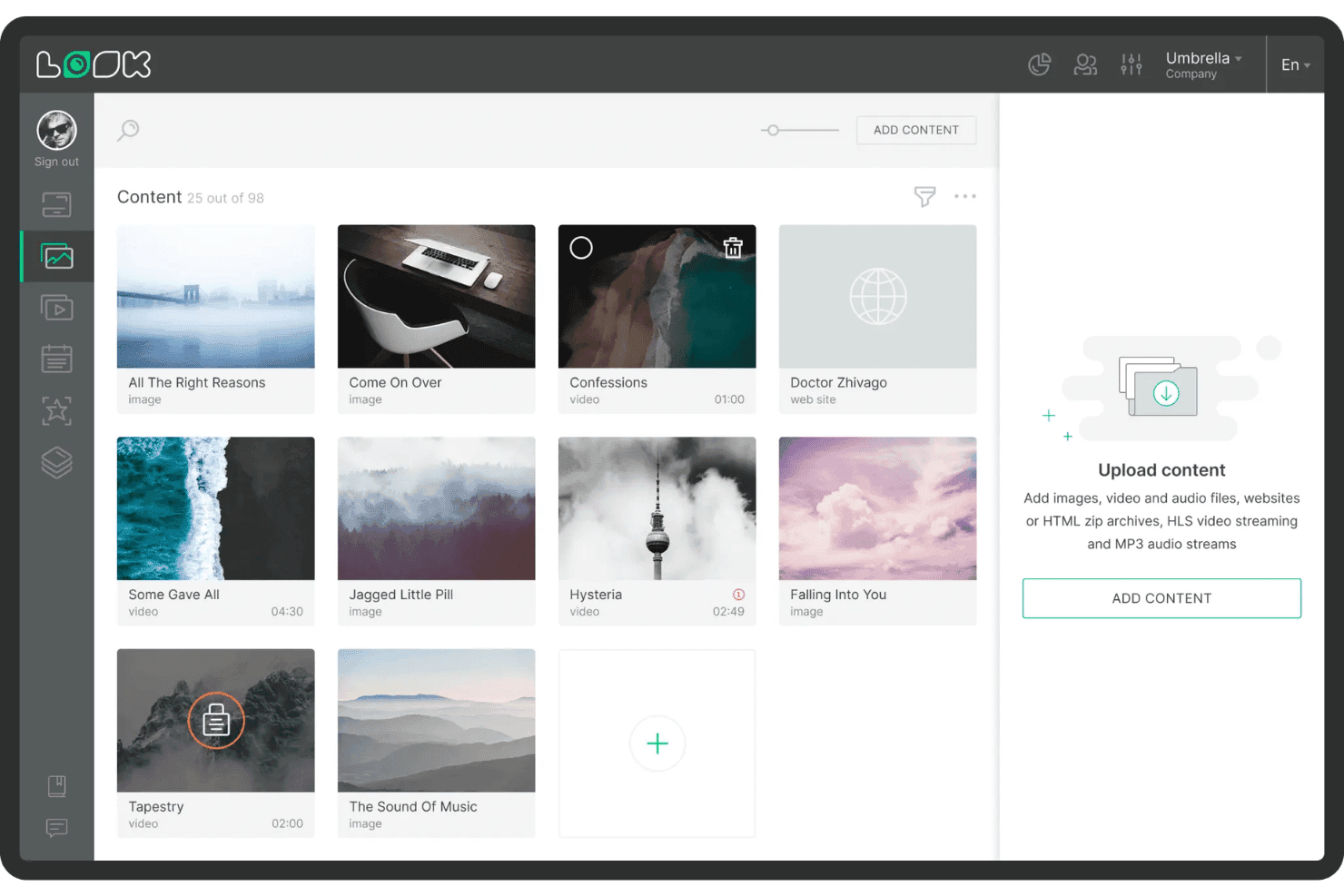
Look Digital Signage lets users organize and upload media content easily. Look Digital Signage is a digital signage platform that combines cloud and on-premise content management, multi-zone screen layouts, playlist scheduling, dynamic data integrations, and an AI-powered content editor across a wide range of devices and operating systems.
Who Is Look Digital Signage Best For?
Look Digital Signage is a strong fit for organizations that need the flexibility to choose between cloud and on-premise deployment without sacrificing content management capabilities.
Why I Picked Look Digital Signage
Look Digital Signage earns its spot on my shortlist because it's one of the few platforms that gives you a genuine choice between cloud and on-premise deployment without cutting features. I particularly like that the on-premise option comes as a one-time lifetime license, which is a real differentiator for security-sensitive environments where cloud hosting isn't an option. The AI Wizard for generating headlines and images directly inside the CMS, combined with daypart scheduling and offline content caching, makes it a strong fit for distributed screen networks that need to stay live no matter what.
Look Digital Signage Key Features
- Multi-zone layout editor: Design screens that display multiple content types simultaneously, such as a promo video, news ticker, and weather widget, in separate zones on a single display.
- Role-based user permissions: Assign Administrator, Moderator, or Guest roles to control who can edit, approve, or view content across your screen network.
- AI Wizard: Generate headlines, images, and layouts using built-in generative AI directly inside the CMS editor without switching to an external design tool.
- Proof-of-play reporting: Access playback logs with timestamps, device health dashboards, and exportable reports to verify what content ran, when, and on which screens.
Look Digital Signage Integrations
Integrations include Google Reviews, Google Slides, YouTube, Instagram, Facebook, X, Power BI, RSS feeds, Weather, and ESPN.
Pros and Cons
Pros:
- Handles large, multi-location deployments smoothly
- Built-in AI wizard for content creation
- Offers on-premise and cloud deployment options
Cons:
- Limited animated and industry-specific template library
- Lacks advanced audience measurement analytics
Learn more about Look Digital Signage: Best for internal communications
- Free plan + free demo + 30-day free trial available
- From $8/screen/month (billed annually)
Visit WebsiteCustomer Rating:4.8/5
Yodeck's main dashboard provides an overview of active screens, their locations, and recent activities. Yodeck is a cloud-based digital signage software that lets you design, schedule, and manage content across multiple screens from any location.
Why I picked Yodeck: Yodeck's ability to schedule content effectively is a key reason to consider it for your digital signage needs. You can plan out your content weeks or even months in advance, ensuring your screens always show the right message when you need it. This is especially handy for aligning your digital displays with marketing campaigns, seasonal promotions, specific events, or even internal communications. Another standout feature is Yodeck's support for various media formats. It allows you to display images, videos, PDFs, and even live web pages, providing flexibility in the type of content you can showcase.
Standout features & integrations:
Features include remote display management, playlist management, layout and design customization, multimedia support, content scheduling, support for Raspberry Pi, free stock images and videos, live streaming capabilities, weather and news tickers, data dashboards, interactive kiosk mode, and role-based user permissions.
Integrations include Canva, Tableau, Zoom, Outlook Calendar, Google Calendar, Microsoft Planner, Asana, Google Analytics, Trello, Xero, Power Bi, and Facebook User Feed.
Pros and Cons
Pros:
- Remote management of multiple screens
- Compatible with Raspberry Pi
- Flexible content scheduling
Cons:
- Initial setup can be confusing for some users
- Advanced scheduling unavailable on basic plan
Learn more about Yodeck: Best for budget-friendly multi-screen display
- 7-day free trial available
- From $5/screen/month
Visit WebsiteCustomer Rating:5/5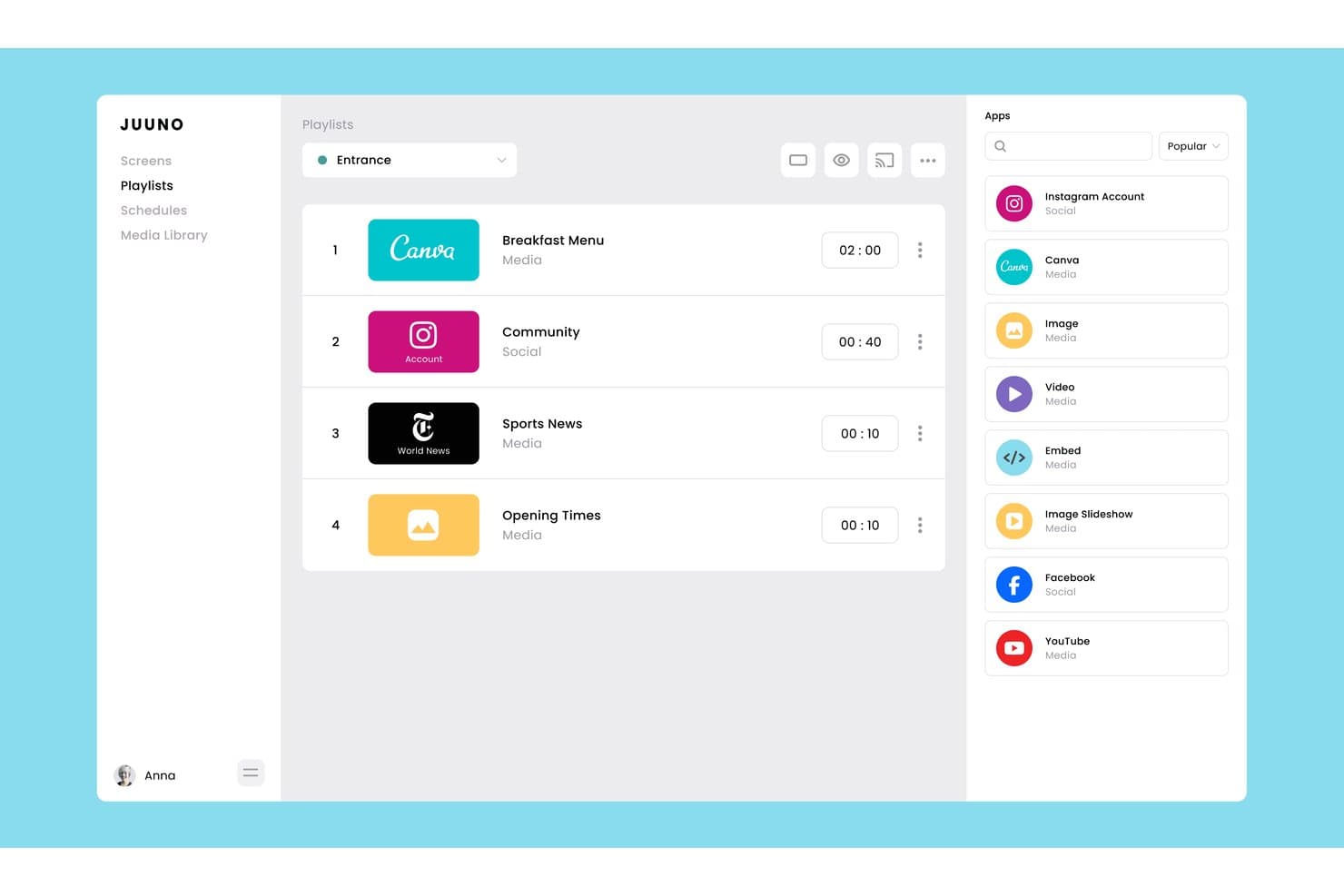
Juuno lets users build and manage playlists with mixed media apps. Juuno is a cloud-based digital signage platform that lets you manage and schedule content across unlimited screens using a browser, Fire Stick, Chromecast, Raspberry Pi, or Android device, with tools for multi-zone layouts, playlist scheduling, and 30+ live content integrations.
Who Is Juuno Best For?
Juuno is a great fit for small to mid-sized businesses and multi-location teams that need affordable, no-fuss digital signage without investing in proprietary hardware.
Why I Picked Juuno
Juuno earns its spot as one of the best on my shortlist because it lets you run content across unlimited screens for as little as $5 per screen per month, without locking you into proprietary hardware. I love that Sequences let head-office teams push immutable brand campaigns to every location while still allowing venues to layer in local content. A 4-digit pairing code gets any Fire Stick, Chromecast, or Raspberry Pi live in minutes, no IT team required.
Juuno Key Features
- Fallback playlist: Automatically plays a designated backup playlist whenever no scheduled content is active on a screen.
- Screen zones: Divides any display into multiple independent zones, each running its own content and playlist simultaneously.
- Proof of Play reporting: Confirms content delivery across screens for compliance and auditing, available on the Growth plan.
- Global Assets library: Stores brand assets in a central library accessible across all workspaces, preventing local teams from removing or replacing them.
Juuno Integrations
Juuno offers 30+ built-in content integrations, including Canva, Instagram, Facebook, X, YouTube, Google Reviews, Google Drive, Microsoft Office, Looker, and Grafana. Its API is coming soon, while Enterprise customers can request custom POS, CMS, HRIS, and internal API integrations.
Pros and Cons
Pros:
- Runs on widely available consumer devices
- Multi-location brand control with global assets
- Simple no-IT setup for screen deployment
Cons:
- No native drag-and-drop content editor
- No audience analytics or campaign reporting
Learn more about Juuno: Best for intranet-to-screen publishing
- Free demo available
- Pricing upon request

Interact Software broadcasts new employee announcements to office screens. Interact is an employee experience and intranet platform that extends to digital signage, letting you publish intranet content, branded templates, videos, and PDFs to workplace screens across multiple sites.
Who Is Interact Best For?
Interact is a strong fit for internal communications teams at mid-to-large enterprises that already use an intranet and want to extend that content to workplace screens without managing a separate signage platform.
Why I Picked Interact Software
I've included Interact Software in my top picks because it's the only tool on this list that treats digital signage as a direct extension of your intranet rather than a separate system to manage. I love that you can publish intranet pages, blog posts, and PDFs straight to workplace screens with automatic appear and expire scheduling, so screens in break rooms or shop floors stay current without anyone manually swapping content. Screens can also be grouped by site or region, with permissions that let local teams manage their own displays under centralized oversight.
Interact Software Key Features
- Audience targeting: Filter and direct content to specific screens by location, department, or audience segment across multiple sites.
- QR code tracking: Embed scannable QR codes in signage content and track scan data alongside channel and playlist analytics.
- USB content updates: Push content to screens via USB when internet connectivity isn't available.
- Role-based screen permissions: Assign local teams control over their own screens while maintaining centralized oversight through configurable permissions.
Interact Software Integrations
Interact offers 100+ integrations, including Microsoft 365, Google Workspace, ServiceNow, Workday, UKG, and SAP SuccessFactors. Its open API framework and Application Developer Kit support custom integrations, although signage-specific connections aren’t documented.
Pros and Cons
Pros:
- Reviewers praise targeted communications for dispersed teams
- QR scans add measurable engagement signals
- Local teams manage screens under central oversight
Cons:
- No live feeds or POS-triggered content
- No documented player health alerts
Learn more about Interact Software: Best for small businesses
- Free demo + 30-day free trial available
- From $14/screen/month (billed annually)
Visit WebsiteCustomer Rating:4.9/5
NoviSign provides easy content control for small businesses. NoviSign is a cloud-based platform designed to help teams create, manage, and display content across multiple screens. The platform supports a variety of media formats and offers drag-and-drop functionality for quick content creation.
Why I picked NoviSign: NoviSign is particularly well-suited for small businesses that need a straightforward yet versatile solution. It offers an intuitive interface that lets you create professional content without technical expertise. You can also schedule content in advance and manage it from anywhere, which is helpful for teams with limited IT resources. Additionally, the software’s offline functionality ensures your displays work even without an internet connection, adding extra reliability for smaller operations.
Standout features & integrations:
Features include drag-and-drop content creation, real-time monitoring of displays, and offline functionality for continuous operation. You can also schedule content ahead of time to ensure your displays are always up to date. Plus, your team can create and display various media formats, including images, videos, and widgets.
Integrations include Chrome OS, Android, Windows, Samsung Tizen, LG WebOS, Facebook, Instagram, Twitter, YouTube, and Google Drive.
Pros and Cons
Pros:
- Reliable offline functionality
- Flexible media format options
- Easy to scale content
Cons:
- Requires stable internet for updates
- Limited customization options
Learn more about NoviSign: Best for schools and education
- Free demo + 14-day free trial available
- From $11/screen/month (USD, billed monthly)
Visit WebsiteCustomer Rating:4.8/5
Rise Vision offers education-focused templates for schools. Rise Vision is a cloud-based platform that helps users create, schedule, and display content on digital screens. It’s primarily used by organizations that need to deliver timely messages to large groups of people.
Why I picked Rise Vision: Rise Vision is tailored for educational settings, offering templates specifically designed for schools. The software’s scheduling feature ensures content is delivered at the right time, making it a reliable option for keeping students and staff informed. Additionally, with remote management capabilities, you can control multiple displays across different locations without being on-site.
Standout features & integrations:
Features include a large collection of pre-designed templates, automatic content scheduling, and the ability to manage displays remotely from any location. You can also send emergency alerts directly to your screens for fast communication.
Integrations include Google Drive, Microsoft OneDrive, Adobe, Dropbox, Twitter, YouTube, Facebook, Instagram, Canva, and Slack.
Pros and Cons
Pros:
- Accessible from multiple locations
- Customizable content scheduling options
- Simple setup for large networks
Cons:
- Mainly geared towards education sector
- Limited custom template design
Learn more about Rise Vision: Best for easy digital signage deployment
- Free demo + 14-day free trial available
- From $9/screen/month (billed annually)
Visit WebsiteCustomer Rating:4.8/5
OptiSigns offers centralized screen management and content deployment. OptiSigns is a cloud-based digital signage platform that lets you manage, schedule, and display content across screens and devices from a single interface, with 140+ app integrations and support for a wide range of hardware.
Who Is OptiSigns Best For?
OptiSigns is a good fit for small to mid-sized businesses in retail, hospitality, and food service that need an affordable way to manage screens across multiple locations.
Why I Picked OptiSigns
I picked OptiSigns as one of the best because it genuinely delivers on the promise of working with any screen. The OptiSync feature is what sets it apart for me: it maps live data directly to on-screen templates, so a restaurant can auto-update a menu based on inventory or a retail team can push real-time pricing without rebuilding slides. I also like the Split Screen app, which lets you run multiple content zones simultaneously on a single display. That's the kind of flexibility most teams need but rarely find without paying enterprise-tier prices.
OptiSigns Key Features
- Content scheduling: Set content to display at specific times of day, on set days, or for special events without manual intervention.
- Offline playback: Download content directly to devices so screens keep running even when internet connectivity drops.
- Multi-user permissions: Add team members with defined roles and approval workflows to control who can edit and publish content.
- Analytics and reporting: View, export, and share real-time playback data to track what content is running across your screens.
OptiSigns Integrations
OptiSigns offers 140+ integrations through its app library, including Canva, YouTube, Instagram, Facebook, Google Slides, Google Sheets, Google Calendar, Power BI, Tableau, and Microsoft PowerPoint. An API is also available for custom integrations.
Pros and Cons
Pros:
- Content stays organized across many locations
- Supports interactive touch screen and kiosks
- Runs natively on smart TVs without players
Cons:
- Content library gets cluttered at scale
- Template design customization lacks depth
Learn more about OptiSigns: Best for remote team use
- 14-day free trial
- From $20/screen/month (billed annually)
Visit WebsiteCustomer Rating:4.8/5
ScreenCloud allows remote teams to manage multiple displays centrally. ScreenCloud is a cloud-based platform that helps organizations manage and display content across multiple screens. It’s designed to be accessible from anywhere, making it easy for teams to control their digital signage remotely.
Why I picked ScreenCloud: ScreenCloud is ideal for remote teams needing centralized control over multiple displays. The software offers a simple interface that allows you to update content from any device with an internet connection. You can also manage and schedule content remotely, ensuring your screens display relevant information even when your team is off-site. Additionally, it provides easy-to-use content creation tools, making it possible to build displays without needing advanced design skills.
Standout features & integrations:
Features include cloud-based management, allowing your team to control screens from anywhere. You can schedule content to play at specific times, ensuring your displays are always relevant. The platform supports a wide range of media formats, including videos, images, and web content, making it flexible for various content needs.
Integrations include Google Drive, Dropbox, Instagram, YouTube, Slack, Microsoft Teams, Twitter, Canva, Facebook, and Trello.
Pros and Cons
Pros:
- Flexible screen layout options
- Supports various media formats
- Easy remote content management
Cons:
- Limited custom design options
- Initial setup can be complex
Learn more about ScreenCloud:

Appspace offers centralized workplace signage and content management. Appspace is a workplace digital signage platform that connects screen content management with employee communications, intranet publishing, and space management tools across a single system.
Who Is Appspace Best For?
Appspace is a strong fit for enterprise internal communications teams that need to manage employee messaging across screens, mobile, and desktop from one place.
Why I Picked Appspace
I picked Appspace as one of the best because it's the only digital signage platform I've seen that genuinely connects screen content to a full employee communications layer. My team can publish a single piece of content to lobby screens, the intranet, and the employee mobile app at once, which is a level of reach most signage tools simply don't offer. I also like the geographic hierarchy in the content management system, which lets admins lock content publishing to specific locations, campuses, or buildings.
Appspace Key Features
- Templated content cards: Choose from pre-built templates that pull live data from tools like YouTube, Salesforce, Zoom, and Instagram directly into your signage layouts.
- IPTV broadcasting: Stream live TV to displays across meeting rooms, lobbies, and team areas through integrations with providers like Vbrick and Haivision.
- Premium content library: Subscribe to a curated library of ready-made content tailored to specific workspace types, so screens stay filled without manual updates.
- Touchscreen kiosk support: Turn displays into interactive kiosks for wayfinding, visitor check-in, and space reservation without separate hardware or software.
Appspace Integrations
Appspace offers native integrations across the Microsoft ecosystem (including Microsoft 365 and Microsoft Teams), as well as Slack, Google Workspace, Cisco Webex, and more. It also provides APIs for pulling data from intranets, wikis, and other custom sources.
Pros and Cons
Pros:
- Publishes once to signage, Slack, and Teams
- Displays auto-resize content to fit any screen
- Playlist folders speed multi-screen content deployment
Cons:
- License model caps admin users, not endpoints
- Signage screens occasionally fall out of sync
Learn more about Appspace:

piSignage offers centralized management for digital signage players. piSignage is a digital signage platform built around Raspberry Pi, Chromebox, and Linux players, offering cloud-based and on-premise server options for managing playlists, schedules, and screen groups.
Who Is piSignage Best For?
piSignage is a strong fit for IT teams and technically inclined operators who want to build cost-effective signage networks on Raspberry Pi or Linux hardware.
Why I Picked piSignage
I've included piSignage in my top picks because it's one of the only digital signage platforms built specifically for Raspberry Pi, Chromebox, and Linux players, which means you're not locked into proprietary hardware. I like that piSignage runs a self-hosted server option alongside its cloud product, giving technically minded teams full control over their infrastructure. The offline playback model is also notable: content files download directly to the player, so a screen in a low-connectivity location keeps running without interruption.
piSignage Key Features
- Playlist management: Build and organize playlists by combining images, videos, web pages, and streaming URLs into a single display sequence.
- Screen grouping: Assign multiple players to groups and push playlist updates to all screens in a group at once.
- Layout zones: Divide a screen into multiple regions to display different content types simultaneously, such as a video alongside a ticker feed.
- Asset scheduling: Set start and end dates for individual assets within a playlist so content rotates in and out automatically.
piSignage Integrations
piSignage supports content from Google Slides, Google Sheets, YouTube, Canva, Instagram, Twitter/X, Facebook, and Power BI, and it can pull live updates through Media RSS feeds. A REST API is available for custom integrations, with Swagger-based documentation.
Pros and Cons
Pros:
- Supports multiple display locations
- Flexible cloud or on-premise setup
- Works well with low-cost hardware
Cons:
- Requires stable internet for cloud control
- Limited customization for advanced users
Learn more about piSignage:
Diğer Dijital Tabela Yazılımları
Kısa listeme giremeyen ancak yine de göz atmaya değer bazı ek dijital tabela yazılımı seçenekleri şunlardır:
- 11TelemetryTVBest for advanced scheduling
- 12ScreenlyBest for Raspberry Pi compatibility
- 13XiboBest for open-source needs
- 14LookBest for global network support
- 15AbleSignBest for easy content updates
- 16NetVisualBest for retail displays
- 17ScalefusionBest for screen-based digital signage
- 18StaffbaseBest for employee communications signage
- 19BuzzblenderBest for AI-powered content curation
- 20SkykitBest for remote team management
- 21Display NOWBest for simple screen control
- 22KorbytBest for interactive signage management
- 23BroadsignBest for large-scale digital networks
How I Evaluate Digital Signage Software
I split my evaluation into two layers: the baseline features every platform needs—like remote CMS and multi-device support—and the differentiators that make one tool the right fit for your team.
Core Functionality (Table Stakes For This List)
When I'm selecting tools for my list, I rank each one on a scale from 0 (does not offer the functionality) to 5 (excels in this area) for each core functionality listed below. Then, I calculate the tool's total score into a percentage. Each tool needs to achieve a minimum total score of 65% to be considered for inclusion.
- Remote Content Management: I evaluate whether the CMS lets you push updated promotions or menu changes to screens across dozens of locations without touching each device individually.
- Content Scheduling & Playlists: The platform should let you build playlists with dayparting and recurrence rules, like running lunch specials at noon and switching to happy hour promos by 4 PM.
- Multi-Screen & Device Support: I check which operating systems and media players each tool supports, from BrightSign and Samsung Tizen to Android sticks and Chrome OS devices.
- Template & Media Design Tools: Marketing teams need a built-in editor where they can drop in brand assets and create polished layouts without exporting from a separate design tool every time.
- Dynamic Content Integration: I look for the ability to pull in live data like social feeds, weather-triggered promotions, or inventory-linked product highlights directly onto the display.
- Screen Monitoring & Analytics: Each platform should provide device health checks and proof-of-play logs so you can confirm that a campaign actually ran on every screen it was supposed to.
Once I have a list of tools that meet this criteria, I consider what sets each platform apart.
Differentiating Factors (What Sets Vendors Apart)
Here's how I compare and contrast different vendors:
Standout Features
I look for audience measurement capabilities that go beyond proof-of-play, like anonymous viewer counting or dwell time tracking, so you can tie in-store signage to actual campaign performance. AI-powered content creation is another differentiator worth evaluating—some platforms let you generate on-brand visuals and copy within the editor, which speeds up production for teams managing frequent promotions. For brands with flagship or experiential locations, multi-zone and video wall support matters too, since coordinating content across synchronized displays requires layout tools most basic platforms lack.
Beyond Features
How a platform fits into your existing marketing tech stack matters. I check for native integrations with tools like Canva, DAM platforms, and social channels so your team isn't manually exporting and re-uploading assets. Hardware flexibility is another factor I weigh—some vendors lock you into proprietary players, while others let you run content on consumer-grade Android sticks or existing smart displays. For teams managing screens across multiple regions, I also evaluate how well a platform handles location-level permissions, letting corporate control brand guidelines while local marketers customize their own content.
Dijital Tabela Yazılımı Nasıl Seçilir?
Uzun özellik listeleri ve karmaşık fiyatlandırma yapıları içinde kaybolmak kolaydır. Benzersiz yazılım seçimi süreciniz üzerinde çalışırken odağınızı korumanıza yardımcı olmak için aklınızda bulundurmanız gereken faktörlerin bir kontrol listesi aşağıda yer alıyor:
| Etken | Dikkat Edilmesi Gerekenler |
| Ölçeklenebilirlik | Şirketinizin ihtiyaçlarıyla birlikte büyüyebilir mi? |
| Entegrasyonlar | Mevcut araçlarınıza bağlanabiliyor mu? |
| Özelleştirilebilirlik | Markanıza ve içeriğinize uyacak şekilde özelleştirebilir misiniz? |
| Kullanım Kolaylığı | Ekibiniz kullanmayı ne kadar hızlı öğrenebilir? |
| Bütçe | Şirketinizin mali planına uyuyor mu? |
| Güvenlik Önlemleri | Veri koruma gereksinimlerinizi karşılıyor mu? |
| İçerik Yönetimi | İçeriği yönetmek ve güncellemek ne kadar kolay? |
| Destek | İhtiyaç duyduğunuzda güvenilir müşteri desteği sunuluyor mu? |
Yazılım seçimi sürecinizi düzenli ve odaklanmış tutmak için bu kontrol listesini kullanın.
Dijital Tabela Yazılımlarındaki Trendler
Araştırmam sırasında farklı dijital tabela yazılımı sağlayıcılarından sayısız ürün güncellemesi, basın bülteni ve sürüm günlüğü inceledim. Takip ettiğim yeni ortaya çıkan trendlerden bazıları şunlar:
- Yapay Zekâ Destekli İçerik Optimizasyonu: Sağlayıcılar, izleyici davranışlarını analiz etmek ve daha iyi etkileşim için içeriği otomatik olarak ayarlamak üzere yapay zekâ kullanmaya başlıyor. Bu, işletmelerin gerçek zamanlı verilere dayalı olarak daha alakalı reklamlar ve mesajlar görüntülemesine yardımcı oluyor.
- Gerçek Zamanlı Veri Entegrasyonu: Daha fazla platform; hisse senedi fiyatları, haber güncellemeleri veya sosyal medya akışları gibi canlı verileri görüntüleme olanağı sunuyor. Bu, özellikle perakende veya kurumsal ortamlarda içeriğin güncel ve ilgi çekici kalmasını sağlıyor.
- Etkileşimli Dokunmatik Ekran Desteği: Dokunmatik ekranlar daha popüler hâle geliyor ve kullanıcıların içerikle doğrudan etkileşime girmesine olanak tanıyor. Perakendeciler ve etkinlik mekânları, daha ilgi çekici müşteri deneyimleri oluşturmak için bundan yararlanıyor.
- Gelişmiş Analizler: Sağlayıcılar, kullanıcıların hangi içeriğin en iyi performansı gösterdiğini takip etmesine yardımcı olan ayrıntılı performans analizlerini dâhil ediyor. Bu özellik, dijital tabela kampanyalarının etkisini ölçmek isteyen işletmeler için özellikle yararlı.
- Çevre Dostu Donanım: Bazı platformlar, yüksek kaliteli görüntüleri korurken güç tüketimini azaltan enerji tasarruflu donanım çözümlerine önem veriyor. Bu trend, sürdürülebilirlik girişimlerine odaklanan şirketlerin ilgisini çekiyor.
Dijital Tabela Yazılımı Nedir?
Dijital tabela yazılımı, çeşitli konumlardaki dijital ekranlarda içerik oluşturmak, yönetmek ve görüntülemek için kullanılan bir platformdur. Zamanlama, uzaktan yönetim ve gerçek zamanlı içerik güncellemeleri için merkezi bir kontrol sistemi olarak çalışır. Genel olarak bu araçlar, birden fazla ekranın yönetimini kolaylaştırır ve doğru içeriğin doğru zamanda doğru kitleye ulaşmasını sağlar. Bu araçlar genellikle pazarlamacılar, perakende yöneticileri ve kurumsal ekipler tarafından bilgi paylaşmak, ürünleri tanıtmak veya kitlelerin ilgisini çekmek için kullanılır.
Dijital Tabela Yazılımının Özellikleri
Dijital tabela yazılımı seçerken aşağıdaki temel özelliklere dikkat edin:
- İçerik Zamanlama: Zamanında mesajlar iletilmesini sağlamak için içeriğin ekranlarınızda ne zaman görüneceğini planlamanıza ve otomatikleştirmenize olanak tanır.
- Uzaktan Yönetim: Ekranları herhangi bir konumdan kontrol etmenize ve güncellemenize olanak tanıyarak zamandan ve kaynaklardan tasarruf sağlar.
- Çoklu Ekran Desteği: Birden fazla konuma sahip işletmeler için ideal olan tek bir kontrol panelinden birden fazla ekranı yönetmenizi sağlar.
- Gerçek Zamanlı Güncellemeler: İçeriği tüm ekranlarda anında güncellemenize olanak tanır; bu özellik, zamana duyarlı mesajlar için kullanışlıdır.
- Özelleştirilebilir Düzenler: İçeriğinizin nasıl görüntüleneceğini tasarlamada esneklik sağlayarak marka tutarlılığı oluşturmanıza olanak tanır.
- Analizler ve Raporlama: İçeriğinizin performansını takip ederek kitleniz için neyin en iyi sonuç verdiğini anlamanıza yardımcı olur.
- Dokunmatik Ekran Uyumluluğu: Etkileşimli ekranları destekleyerek daha ilgi çekici müşteri deneyimleri oluşturur.
- Çevrim Dışı Oynatma: İnternet bağlantısı olmasa bile içeriğin görüntülenmeye devam etmesini sağlayarak kesintisiz hizmet sunar.
- İçerik Kitaplığı: Medya oynatıcı varlıklarını tek bir yerde depolar; böylece gelecekteki kampanyalar için içeriği yeniden kullanmayı ve düzenlemeyi kolaylaştırır.
Dijital Tabela Yazılımının Faydaları
Dijital tabela yazılımını uygulamak ekibiniz ve işletmeniz için çeşitli faydalar sağlar. Yararlanabileceğiniz bazı faydalar şunlardır:
- Artırılmış Etkileşim: Dikkat çeken ve izleyicilerin ilgisini koruyan dinamik içerikler görüntüler.
- Gerçek Zamanlı İletişim: Mesajları anında güncellemenizi sağlayarak içeriğinizin güncel ve zamanında olmasını sağlar.
- Maliyet Açısından Verimli Pazarlama: Basılı materyal ihtiyacını azaltarak yinelenen tanıtım maliyetlerinden tasarruf etmenizi sağlar.
- Merkezi Yönetim: Birden fazla ekranı tek bir yerden kontrol etmenizi sağlayarak farklı konumlardaki işlemleri kolaylaştırır.
- Geliştirilmiş Marka Tutarlılığı: Mesajlarınızın ve görsellerinizin tüm ekranlarda tutarlı kalmasını sağlar.
- Daha İyi Müşteri Deneyimi: Etkileşimli dokunmatik ekranlar ve ilgi çekici içerikler, kullanıcılar için daha sürükleyici bir deneyim oluşturur.
- Veriye Dayalı Kararların İyileştirilmesi: İçerik performansına ilişkin analizler sunarak gelecekteki kampanyalarınızı optimize etmenize yardımcı olur.
Dijital Tabela Yazılımının Maliyetleri ve Fiyatlandırması
Dijital tabela yazılımı seçerken mevcut çeşitli fiyatlandırma modellerini ve planları anlamak gerekir. Maliyetler özelliklere, ekip büyüklüğüne, eklentilere ve diğer unsurlara göre değişir. Aşağıdaki tabloda yaygın planlar, ortalama fiyatları ve dijital tabela yazılımı çözümlerinde genellikle bulunan özellikler özetlenmektedir:
Dijital Tabela Yazılımı İçin Plan Karşılaştırma Tablosu
| Plan Türü | Ortalama Fiyat | Yaygın Özellikler |
| Ücretsiz Plan | $0 | Sınırlı ekran yönetimi, temel şablonlar, sınırlı zamanlama ve bulut depolama. |
| Kişisel Plan | $5-$25/kullanıcı/ay | Tek ekran desteği, içerik zamanlama, bulut depolama ve temel şablonlar. |
| İşletme Planı | $30-$75/kullanıcı/ay | Çoklu ekran desteği, gelişmiş şablonlar, uzaktan yönetim ve gerçek zamanlı güncellemeler. |
| Kurumsal Plan | $100-$250/kullanıcı/ay | Sınırsız ekran, gelişmiş analizler, özel markalama ve özel destek. |
Dijital tabela yazılımı plan türlerinin, maliyetlerinin ve özelliklerinin dökümü.
Dijital Tabela Yazılımı SSS
Dijital tabela yazılımı hakkında sık sorulan soruların bazı yanıtları:
Dijital tabela yazılımı ne kadar güvenli?
Dijital tabela yazılımı, içeriğinizin güvenli kalmasını sağlamak için genellikle şifreli iletişim ve parolayla korunan erişim gibi yerleşik güvenlik önlemleri içerir. Yazılımın şirketinizin veri güvenliği protokollerine uygun olduğunu doğrulamanız önemlidir. Belirli kullanıcıların erişimini kısıtlayarak ek koruma katmanları da ekleyebilirsiniz.
Şablonlar ne ölçüde özelleştirilebilir?
Çoğu platform, şablonları logolar, renkler ve yazı tipleri gibi unsurlarla markanızın tarzına uyacak şekilde değiştirmenize olanak tanır. Bazıları kullanımı kolay sürükle ve bırak düzenleyicileri sunarken, bazıları tam kontrol için kendi tasarımlarınızı yüklemenize izin verir. Bu, mesajlarınızın ve görünümünüzün tüm ekranlarınızda tutarlı kalmasına yardımcı olur.
Dijital tabela yazılımında hangi entegrasyonları aramalıyım?
İçerik yönetim sistemleri, analiz araçları, sosyal medya ve dahili iletişim platformları gibi hâlihazırda kullandığınız araçlara bağlanan yazılımları arayın. İyi entegrasyonlar ekibinizin zaman kazanmasını sağlar ve içeriğinizi tek bir yerden yönetip güncellemeyi kolaylaştırır.
Dijital tabelayı birden fazla ofiste veya ülkede kullanıma sunma konusunda neleri bilmeliyim?
Aracın farklı konumları ve saat dilimlerini yönetebildiğinden ve gerekirse birden fazla dili desteklediğinden emin olun. Tüm ekranları tek bir panodan yönetebildiğinizi ve uzaktan sorun giderme desteği bulunduğunu kontrol edin. İçerik onay süreçlerini planlamak, ekipler farklı konumlara dağılmış olduğunda da yardımcı olur.
Dijital tabela yazılımımın yatırım getirisini nasıl takip ederim?
Yatırım getirisini; ekran görüntülenme sayıları, etkileşim oranları ve içerik performansı gibi yerleşik analizlere bakarak takip edebilirsiniz. Bazı platformlar kampanyaları belirli iş sonuçlarıyla ilişkilendirmenize veya sonuçları neyin etkilediğini görmek için satış ve pazarlama raporlarıyla entegre olmanıza olanak tanır.
Dijital tabela yazılımı ne tür analizler sunar?
Dijital tabela yazılımı genellikle içerik performansı, izleyici etkileşimi ve oynatma süresi hakkında analizler içerir. Hedef kitlenizde hangi içeriğin en iyi karşılık bulduğunu takip etmek ve gelecekteki kampanyalar için bilinçli kararlar almak üzere bu verileri kullanabilirsiniz. Bazı platformlar üçüncü taraf analiz araçlarıyla da entegre olur.
Ekranları uzaktan güncelleyebilir miyim ve herhangi bir sınırlama var mı?
Evet, çoğu dijital tabela yazılımı, internet bağlantısı olan herhangi bir yerden ekranları güncellemenize olanak tanır. Daha düşük düzeyli bazı planlar cihaz sayısı veya zamanlama seçenekleri konusunda sınırlamalar getirebilir; bu nedenle sağlayıcı seçmeden önce özellikleri tekrar kontrol edin.