

Medya satın alma platformları; görüntülü reklam, video, CTV ve perakende medyası gibi kanallardaki reklamları planlamanıza, satın almanıza ve optimize etmenize yardımcı olan dijital araçlardır. Ekibinizin kampanyaları ölçeklendirmesine, gizlilik değişikliklerine uyum sağlamasına ve önemli olduğu yerde kitlelere ulaşmasına yardımcı olacak bir çözüm arıyorsanız doğru yerdesiniz. Bu kılavuz, pazarlama liderlerinin bilmesi gerekenleri öne çıkarır; böylece stratejinize gerçekten uyan en iyi platformları, özellikleri ve kullanım alanlarını karşılaştırabilirsiniz.
Why Trust Our Software Recommendations
6,700+
Reviews
20
Industry experts
16+
Evaluation factors
14
Years
Our team has been testing and reviewing software since 2012. As marketing leaders ourselves, we know how difficult—and important—it is to choose the right software.
For this guide, we evaluated tools using hands-on testing and independent research, scoring tools using our selection criteria.
Our reviews reflect our human editorial judgment, not a sales pitch.
Expert reviewers:
 Gui DrusinaCreative Director
- Shriya GhateSenior Marketing Lead
 Amanda JacquesMarketing Ops Leader

Medya Satın Alma Platformları Karşılaştırma Tablosu
Bu karşılaştırma tablosu, en iyi medya satın alma platformu seçimlerim için fiyatlandırma ayrıntılarını özetler:
Sorted by: Default
| Tool | Starting Price | Website | |
|---|---|---|---|
Best for intent data across Microsoft properties | Not rated | Pricing upon request Not available | Website |
Best for real-time data-driven audience targeting | Not rated | Pricing upon request Free demo available | Website |
Best for customizable audience segments | Not rated | Pricing upon request Not available | Website |
Best for omnichannel buying with CTV integrations | Not rated | Pricing upon request Not available | Website |
Best for cookieless audience activation | Not rated | Pricing upon request Not available | Website |
Best for self-serve campaign management | 4.8 out of 5 | Pricing upon request Free demo available | Website |
Best for consolidated campaign controls | 4.4 out of 5 | Pricing upon request Not available | Website |
Best for access to Amazon audiences and inventory | Not rated | Pricing upon request Not available | Website |
Best for cross-channel premium inventory access | Not rated | Pricing upon request Not available | Website |
Best for workflow and measurement across Google | Not rated | Pricing upon request Not available | Website |


Medya Satın Alma Platformları İncelemeleri
Aşağıda, kısa listeme giren en iyi medya satın alma platformlarının ayrıntılı özetlerini bulabilirsiniz. İncelemelerim, size en uygun platformu bulmanıza yardımcı olmak için her platformun özelliklerine, en iyi kullanım alanlarına ve yeteneklerine ayrıntılı bir bakış sunar.
 Best for intent data across Microsoft properties
- Not available
- Pricing upon request
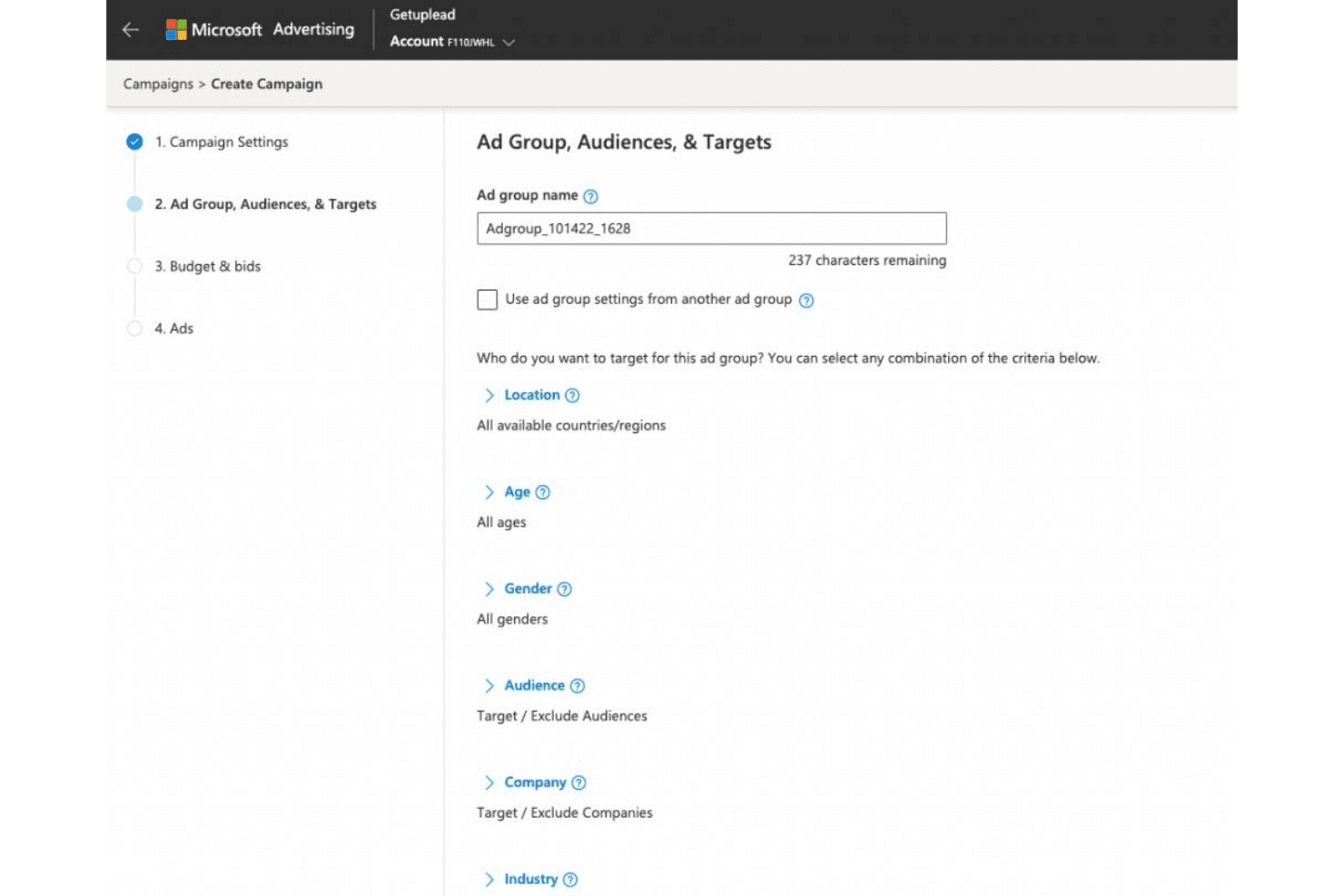
Microsoft Advertising lets users define ad group audiences and targeting criteria. Microsoft Advertising is a cross-channel media buying platform that combines search, display, native, video, CTV, retail media, and gaming inventory with programmatic bidding, audience targeting, and AI-driven campaign optimization tools.
Who Is Microsoft Advertising Best For?
It's a strong fit for paid media managers and agency teams running B2B campaigns who need access to LinkedIn audience signals alongside search and display inventory.
Why I Picked Microsoft Advertising
I've included Microsoft Advertising in my top picks because the intent signals from Bing searches, Edge browsing, and Outlook activity create a first-party data layer that independent DSPs can't replicate. I particularly like the LinkedIn audience overlay, which lets me layer job function, industry, and company size directly onto search campaigns. In practice, that means I can reach someone actively searching on Bing and confirm they're a director-level buyer in financial services at the same time.
Microsoft Advertising Key Features
- Microsoft Audience Network: Native and display placements span MSN, Outlook, Edge, and partner sites.
- Retail media with PromoteIQ: Run sponsored product ads directly on third-party retailer sites.
- Performance Max campaigns: Use AI-driven optimization for automated bidding and cross-channel delivery.
- Bulk campaign management: Edit, duplicate, or optimize large volumes of campaigns using Microsoft Advertising Editor.
Microsoft Advertising Integrations
Microsoft Advertising has native integrations across the Microsoft ecosystem, and an API is also available for custom integrations.
Pros and Cons
Pros:
- Strong first-party intent signals from Bing users
- Lower CPCs than Google on comparable queries
- Exclusive LinkedIn audience data on search campaigns
Cons:
- Limited programmatic display and CTV inventory access
- Smaller reach than Google across search inventory
Learn more about Microsoft Advertising: Best for real-time data-driven audience targeting
- Free demo available
- Pricing upon request
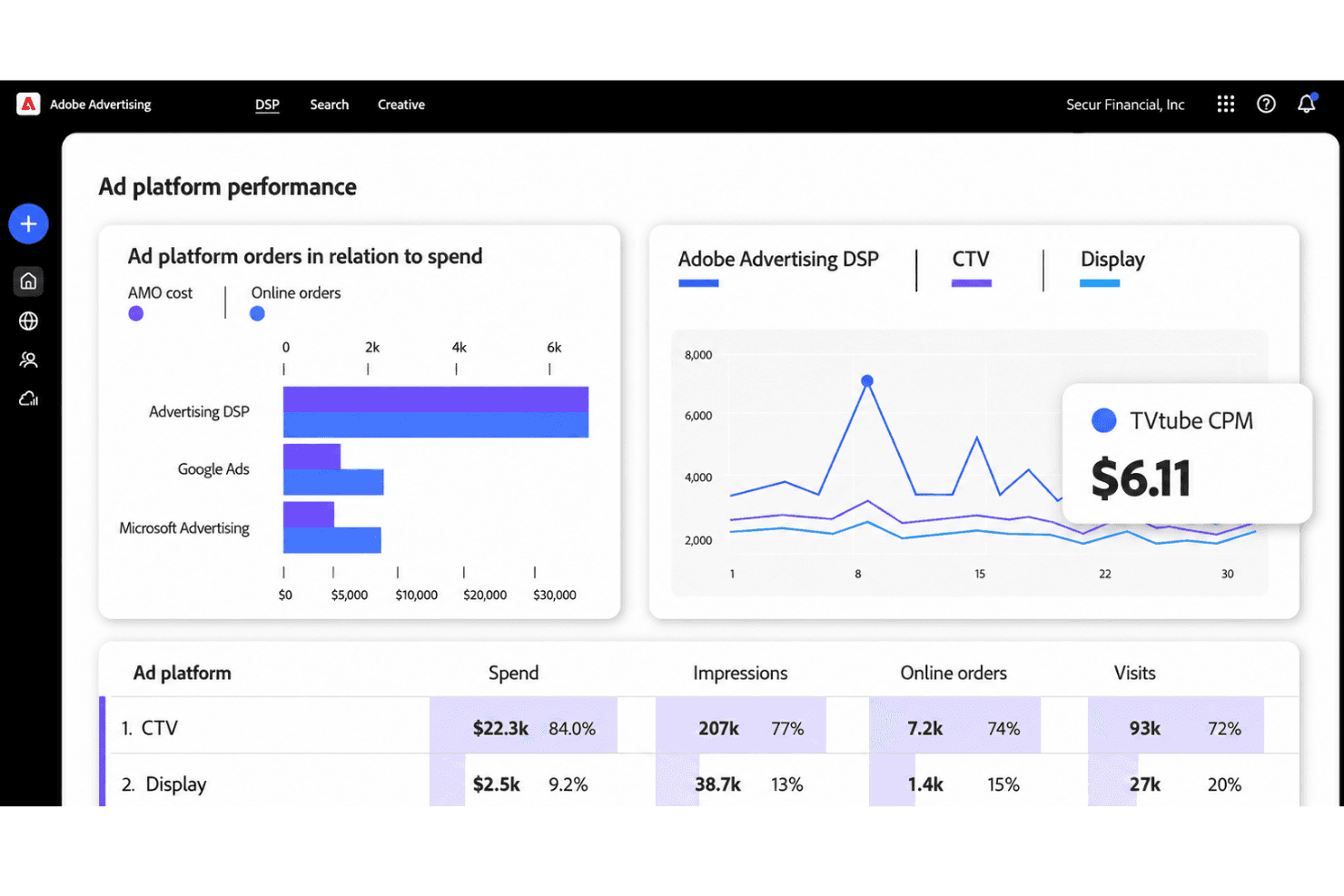
Adobe Advertising tracks ad spend, impressions, and orders across platforms. Adobe Advertising is a DSP that unifies programmatic media buying across display, video, CTV, audio, and search, with integrated first-party data activation, dynamic creative optimization, and cross-channel campaign management.
Who Is Adobe Advertising Best For?
Adobe Advertising is a strong fit for enterprise marketing teams and agencies that already operate within the Adobe Experience Cloud ecosystem.
Why I Picked Adobe Advertising
Adobe Advertising earns its spot on my shortlist because of how it handles first-party data activation. I particularly like that it connects directly to Adobe Real-Time CDP, letting me push authenticated audience segments into the DSP without manual data exports. The LiveRamp integration for cross-device identity resolution also means I can apply frequency caps and measure attribution across a user's known devices natively.
Adobe Advertising Key Features
- Campaign Home interface: Centralized dashboard for campaign setup, monitoring, and optimization across multiple channels.
- Dynamic creative optimization: Automated generation and testing of creative assets tailored to audience segments.
- Advanced media quality suite: Built-in tools for brand safety, viewability checks, and fraud protection during media buying.
- Custom attribution and reporting: Multi-touch attribution modeling and real-time analytics with detailed conversion tracking.
Adobe Advertising Integrations
Adobe Advertising offers native integrations with Adobe Analytics, Adobe Real-Time Customer Data Platform, LiveRamp, and more. An API is available for custom integrations.
Pros and Cons
Pros:
- Pre-bid brand safety filtering via DoubleVerify
- Unified CTV, display, and audio buying
- Native CDP data activation for cookieless targeting
Cons:
- Advanced optimization needs substantial campaign data
- Best value comes within the Adobe ecosystem
Learn more about Adobe Advertising:
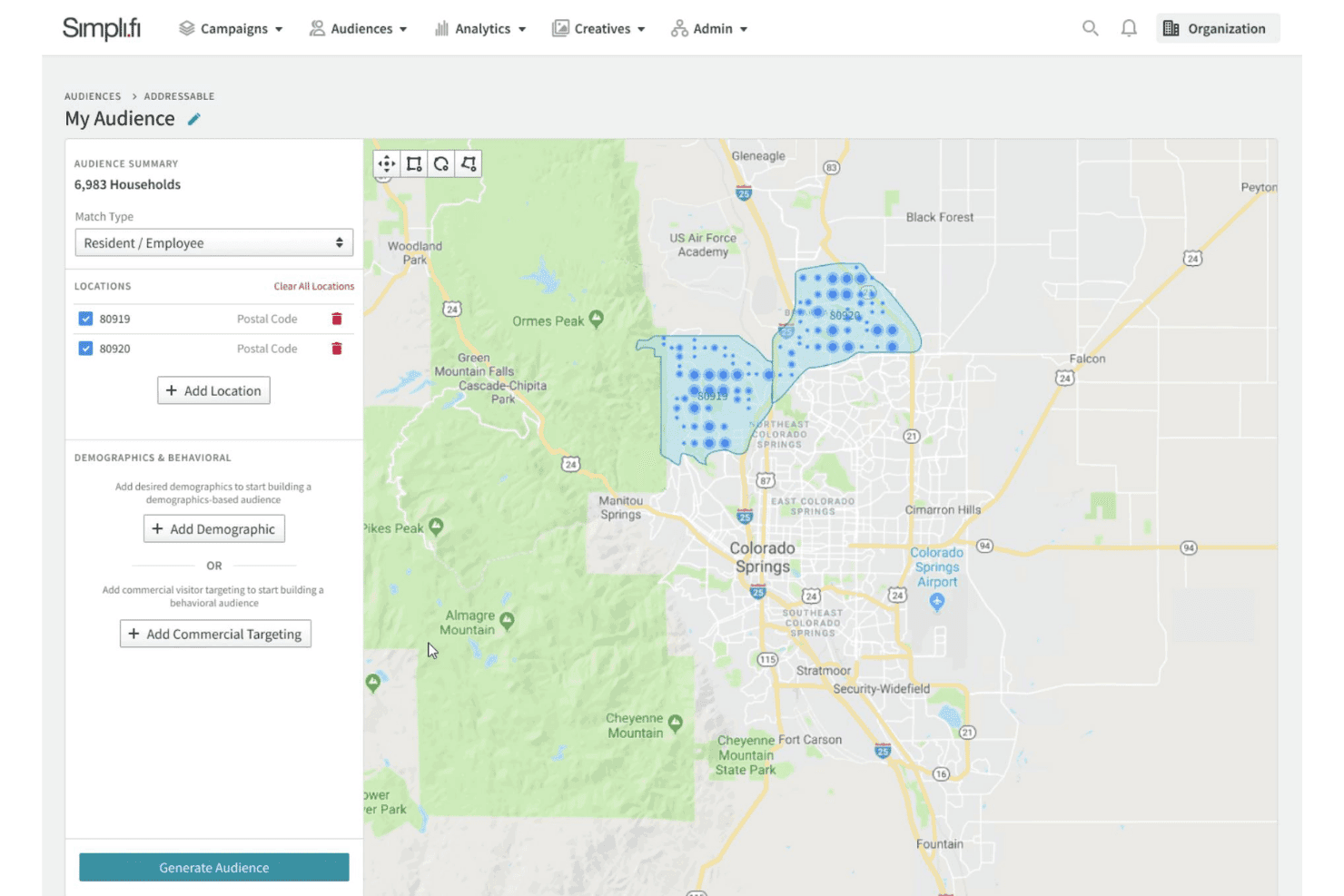
Simpli.fi lets users build addressable audiences by postal code on a map. Simpli.fi is a demand-side platform (DSP) for programmatic media buying across CTV, display, video, mobile, native, audio, and DOOH, with a core focus on hyperlocal and household-level audience targeting powered by unstructured data and Signal-Level AI.
Who Is Simpli.fi Best For?
Simpli.fi is a strong fit for agencies and media teams running location-based or multi-location campaigns that require precise, address-level audience targeting.
Why I Picked Simpli.fi
Simpli.fi earns its spot on my shortlist because the audience targeting here goes well beyond standard DSP options. I can draw precise geo-fences at the address level, activate first-party CRM lists through LiveRamp, and layer in B2B intent signals from Bombora, all within a single campaign setup. The platform's Signal-Level AI then learns which attributes are actually predicting conversions per location and adjusts delivery in real time, which keeps audience segments accurate as campaigns run.
Simpli.fi Key Features
- Multi-channel media buying: Access inventory across CTV, display, video, mobile, audio, and digital out-of-home from one platform.
- Campaign pacing and budget controls: Manage spending at the line-item or campaign level with flight date and pacing options.
- Mapping tool for geo targeting: Draw and manage granular, custom geo-fences directly on an interactive map interface.
- Real-time API reporting integration: Sync campaign performance data with third-party analytics tools such as Improvado and AgencyAnalytics.
Simpli.fi Integrations
Simpli.fi offers native integrations with LiveRamp, Bombora, and provides an API for custom integrations.
Pros and Cons
Pros:
- Unified CTV, display, and DOOH buying
- Real-time AI-driven bid optimization
- Granular address-level geo-targeting capability
Cons:
- Broad media capabilities add platform complexity
- Limited self-serve onboarding documentation available
Learn more about Simpli.fi: Best for omnichannel buying with CTV integrations
- Not available
- Pricing upon request
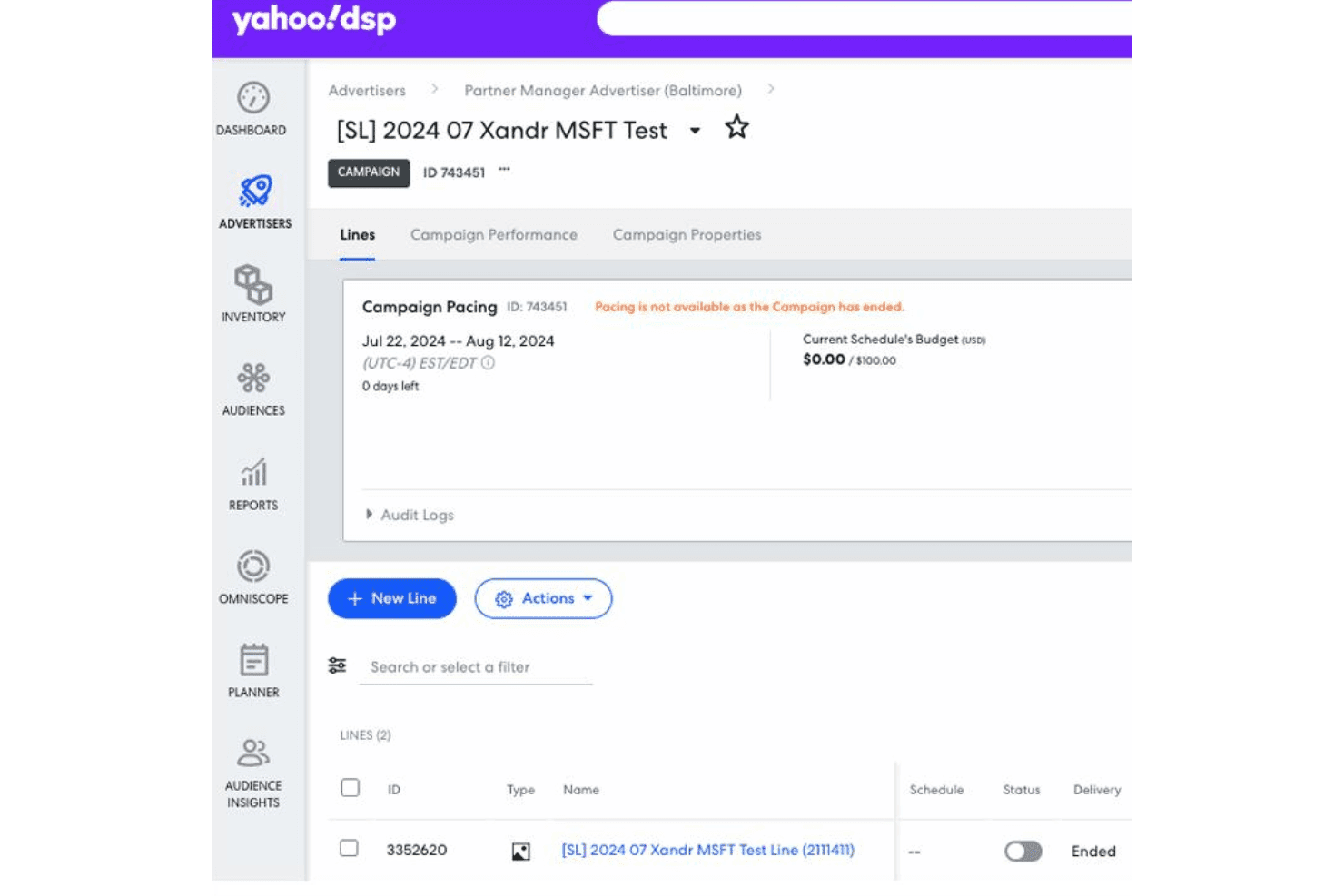
Yahoo DSP lets users monitor campaign pacing, budget, and line items. Yahoo DSP is a demand-side platform that lets media buyers purchase programmatic ad inventory across display, video, CTV, native, audio, and DOOH channels using proprietary audience data, AI-driven optimization, and direct publisher access.
Who Is Yahoo DSP Best For?
Yahoo DSP is a strong fit for programmatic traders and agency media buyers running large-scale, cross-channel campaigns who need direct access to premium CTV and video inventory.
Why I Picked Yahoo DSP
Yahoo DSP earns its spot on my shortlist because of how it handles CTV inventory access specifically. Yahoo Backstage gives my team direct-to-publisher buying paths to networks like Warner Bros. Discovery, Fox, Paramount, and Netflix, cutting out supply chain hops that inflate CPMs. On top of that, Unified TV lets me plan, activate, and measure linear and streaming campaigns in one view, rather than stitching together separate platforms.
Yahoo DSP Key Features
- Agentic AI workflow automation: Automates repetitive campaign tasks so teams can focus on higher-level strategy.
- Yahoo Identity Solutions: Links first-party and third-party data for targeting in a cookieless environment.
- Budget pacing and controls: Lets users manage spend with automated pacing, daily caps, and KPI-driven budget allocation.
- Customizable campaign dashboards: Offers configurable dashboards for monitoring performance metrics and detailed reporting.
Yahoo DSP Integrations
Yahoo DSP offers native integrations with audience data providers like LiveRamp, AWS Clean Rooms, Snowflake, and measurement partners such as DoubleVerify, IAS, and more. An API is available for custom integrations.
Pros and Cons
Pros:
- Unified linear and streaming TV planning
- Proprietary Yahoo audience data at scale
- Direct access to premium CTV inventory
Cons:
- Pixel and targeting-rule setup can feel cumbersome
- Large API reports face row limits
Learn more about Yahoo DSP:
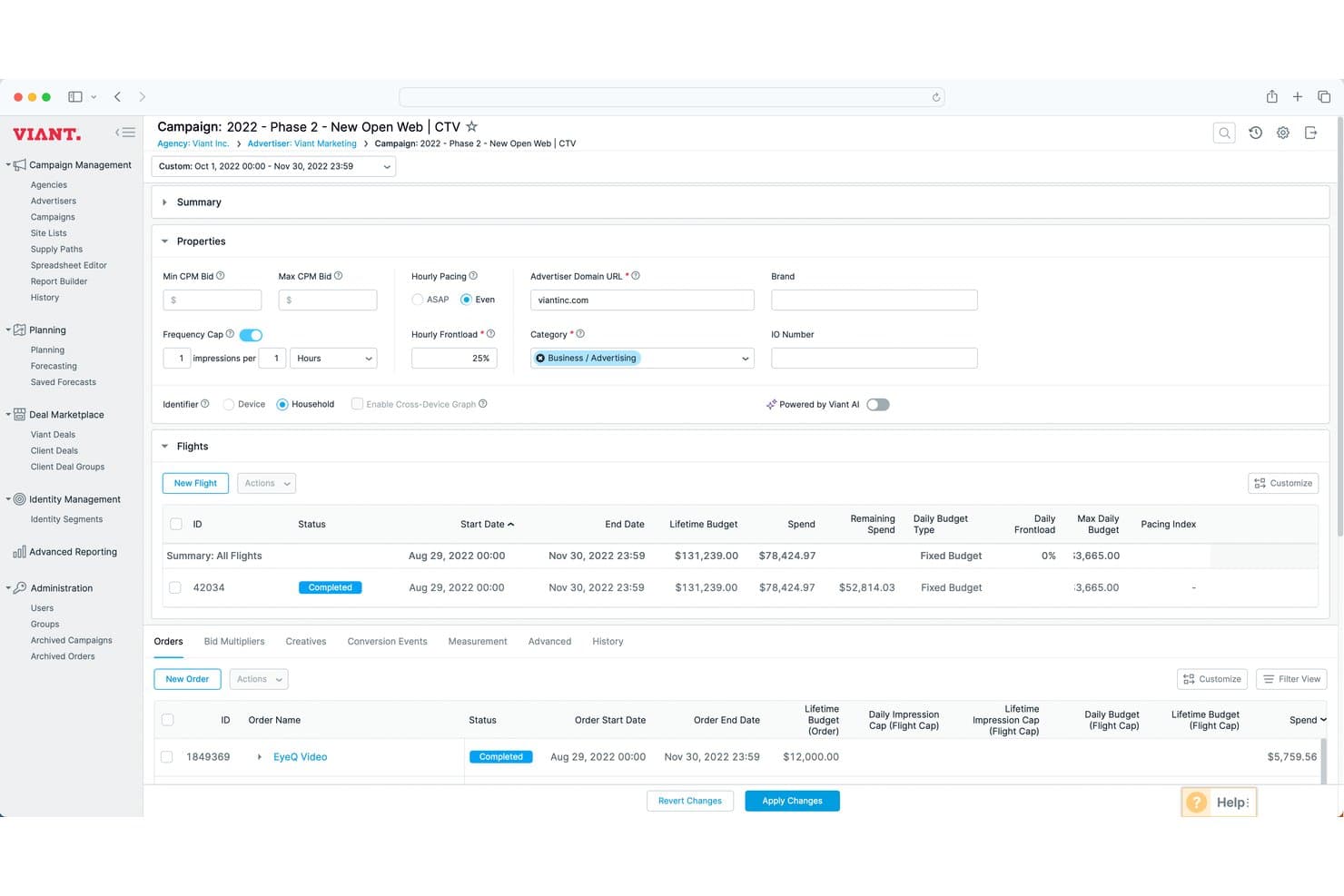
Viant DSP offers a detailed campaign management view with flight scheduling, budget tracking, and order-level performance data. Viant DSP is an omnichannel demand-side platform built around people-based identity resolution, enabling programmatic media buying across CTV, display, mobile, audio, in-game, and DOOH without relying on third-party cookies.
Who Is Viant DSP Best For?
Viant DSP is a strong fit for mid-market to enterprise agencies and brand-direct advertisers running large-scale programmatic campaigns across multiple channels.
Why I Picked Viant DSP
I've included Viant DSP in my top picks because of how it handles audience targeting without relying on third-party cookies. The Household ID™ technology links millions of U.S. households to over one billion connected devices, giving my team real cross-device reach and frequency control across CTV and beyond. On top of that, access to a wide range of audience attributes from multiple data partners means I can build precise audience segments that hold up even as cookie-based targeting erodes.
Viant DSP Key Features
- Omnichannel campaign management: Build and manage campaigns for CTV, mobile, audio, DOOH, and desktop from a single workflow.
- Bulk editing and API access: Make large-scale campaign changes with spreadsheet-based uploads and programmatic management.
- Advanced measurement tools: Access multi-touch attribution, foot-traffic attribution, and conversion lift analyses for performance tracking.
- Third-party data marketplace integration: Tap into 70+ audience data partners directly within the DSP for enriched targeting.
Viant DSP Integrations
Native integrations include Xandr, PubMatic, Index Exchange, and Magnite for supply; LiveRamp, and Snowflake for data onboarding; along with an API for custom integrations.
Pros and Cons
Pros:
- Foot traffic attribution connects ads to visits
- Strong CTV access across premium direct inventory
- Cookieless targeting via 115M household IDs
Cons:
- Household-level identity is heavily U.S.-centric
- Better suited to managed service than self-serve
Learn more about Viant DSP: Best for self-serve campaign management
- Free demo available
- Pricing upon request
Visit WebsiteCustomer Rating:4.8/5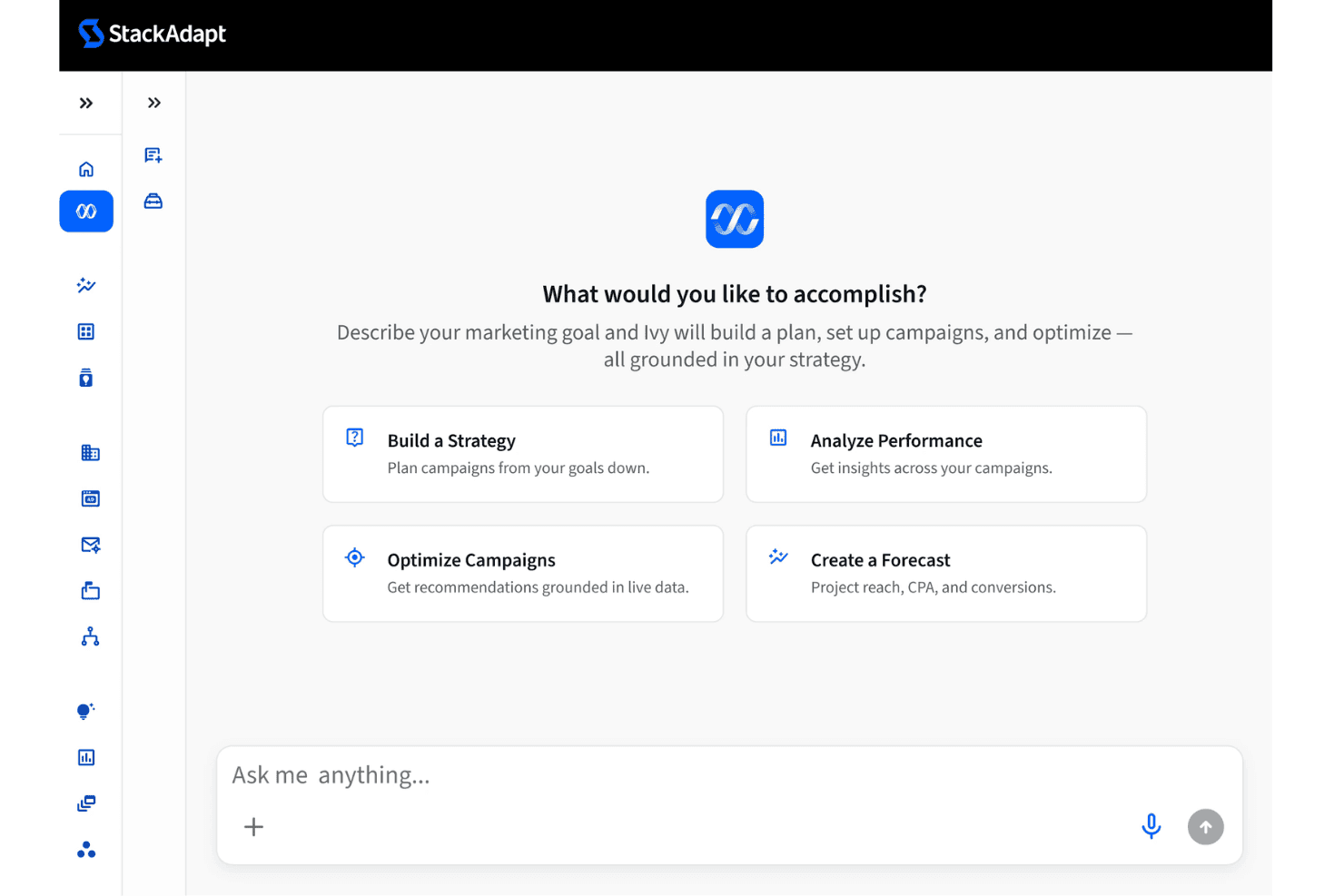
StackAdapt's Ivy AI assistant helps users build, optimize, and forecast campaigns. StackAdapt is a self-serve demand-side platform (DSP) built for programmatic advertising across native, display, video, CTV, DOOH, audio, in-game, and email channels, with AI-driven bidding, audience targeting, and campaign management in a single interface.
Who Is StackAdapt Best For?
StackAdapt is a strong fit for independent agencies and in-house paid media teams that want direct, hands-on control over programmatic campaigns without a managed-service requirement.
Why I Picked StackAdapt
StackAdapt earns its spot on my shortlist because the self-serve model genuinely puts campaign control in your hands from day one. I can sign up, load a credit card, and launch programmatic campaigns across display, CTV, and audio without waiting on a managed service team. What I find especially useful is Ivy Studio, the platform's AI hub, which handles real-time bid optimization and pacing so I'm not manually adjusting every line item.
StackAdapt Key Features
- First-party data hub: Centralizes onboarding and activation of proprietary audience data for targeting without third-party cookies.
- Dynamic creative optimization: Automatically personalizes ad creative variations in real time based on user context and engagement.
- Multi-channel campaign orchestration: Runs campaigns across display, video, CTV, DOOH, audio, in-game, and email from a single workflow.
- Custom attribution reporting: Supports multi-touch conversion paths and custom attribution models for detailed campaign performance insights.
StackAdapt Integrations
StackAdapt offers native integrations with iHeartMedia, Broadsign, Vistar Media, Bombora, LiveRamp, Samba TV, and provides an API for custom integrations.
Pros and Cons
Pros:
- AI-driven bid optimization responds to real-time performance signals
- Native CTV and DOOH inventory without third-party add-ons
- Strong self-serve controls for independent campaign management
Cons:
- Audience overlap visibility is limited
- Reporting UI can slow down with large data volumes
Learn more about StackAdapt: Best for consolidated campaign controls
- Not available
- Pricing upon request
Visit WebsiteCustomer Rating:4.4/5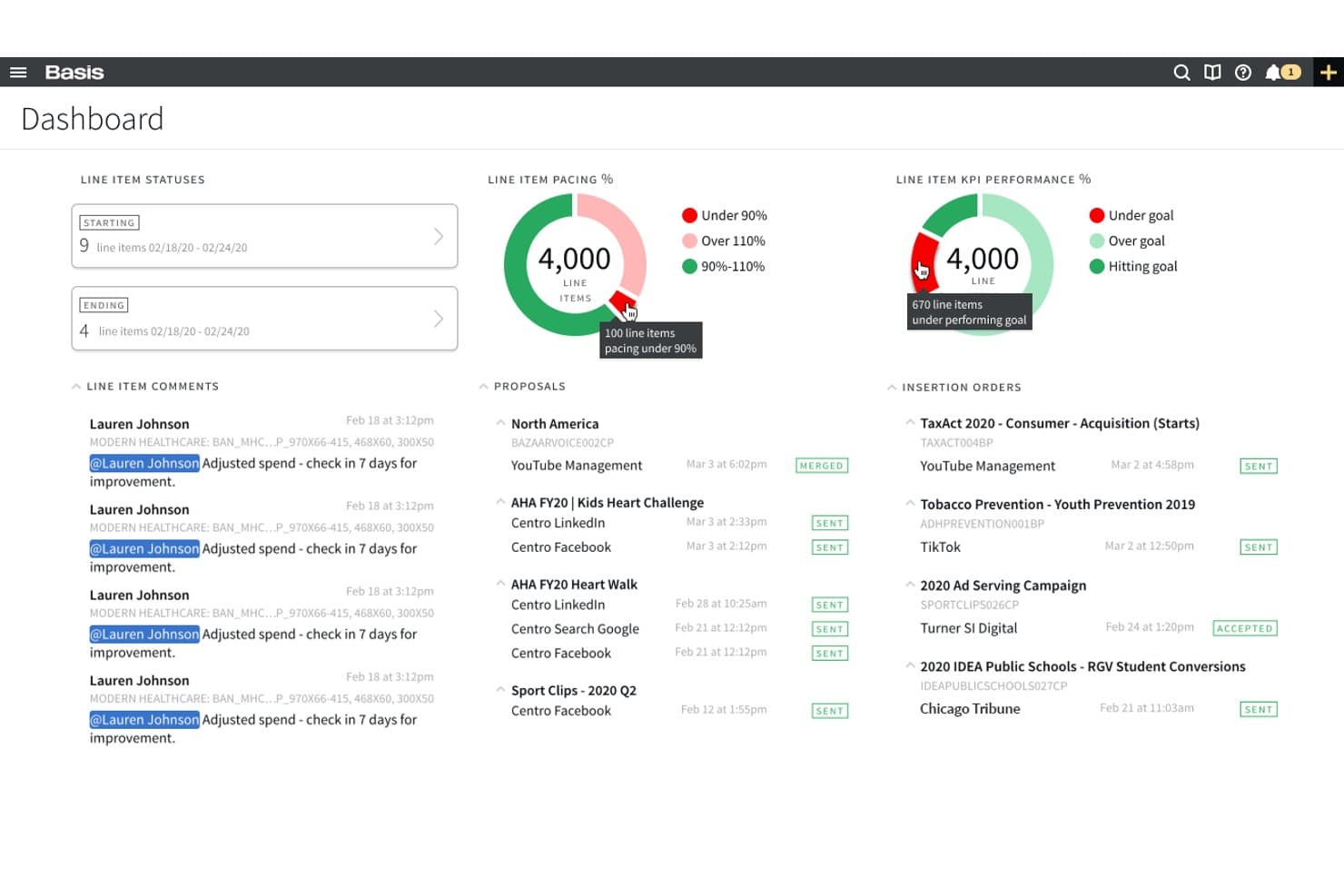
Basis offers a centralized dashboard displaying line item statuses, pacing percentages, KPI performance, proposals, and insertion orders for simplified media buying management. Basis is an omnichannel media buying platform that unifies programmatic DSP, paid search, social, CTV, DOOH, and site direct buying with campaign management, automated workflows, and cross-channel reporting in a single system.
Who Is Basis Best For?
Basis is a strong fit for independent and regional agencies managing omnichannel campaigns across programmatic, search, social, and direct channels for multiple clients.
Why I Picked Basis
Basis earns its spot on my shortlist because it genuinely consolidates every buying channel into one operating system. I can run programmatic, paid search, social, and site direct buys without platform-switching, and the Communication Portal keeps campaign approvals, documents, and history centralized alongside active campaigns. The automated billing reconciliation, which pushes actuals directly into ERP systems, is a capability I rarely see built natively into a DSP.
Basis Key Features
- Multi-channel DSP activation: Centralizes buying for display, video, CTV, DOOH, audio, and native inventory through one interface.
- AI-driven campaign planning: Uses Compass AI to generate omnichannel strategies directly from media briefs.
- Integrated data marketplace: Connects with 100+ data partners for audience enrichment and targeting.
- Unified campaign reporting: Combines performance data from search, social, direct, and programmatic buys in a single dashboard.
Basis Integrations
Basis offers native integrations with platforms like Google Ads, Meta, Xandr, Magnite, PubMatic, Index Exchange, OpenX, Tubi, and Peacock. An API is available for custom integrations.
Pros and Cons
Pros:
- Built-in Communication Portal centralizes client approvals
- Automated billing reconciliation reduces manual invoicing errors
- Unifies DSP, search, and social natively
Cons:
- Inventory transparency can be inconsistent
- Reporting customization is less flexible than competitors
Learn more about Basis: Best for access to Amazon audiences and inventory
- Not available
- Pricing upon request
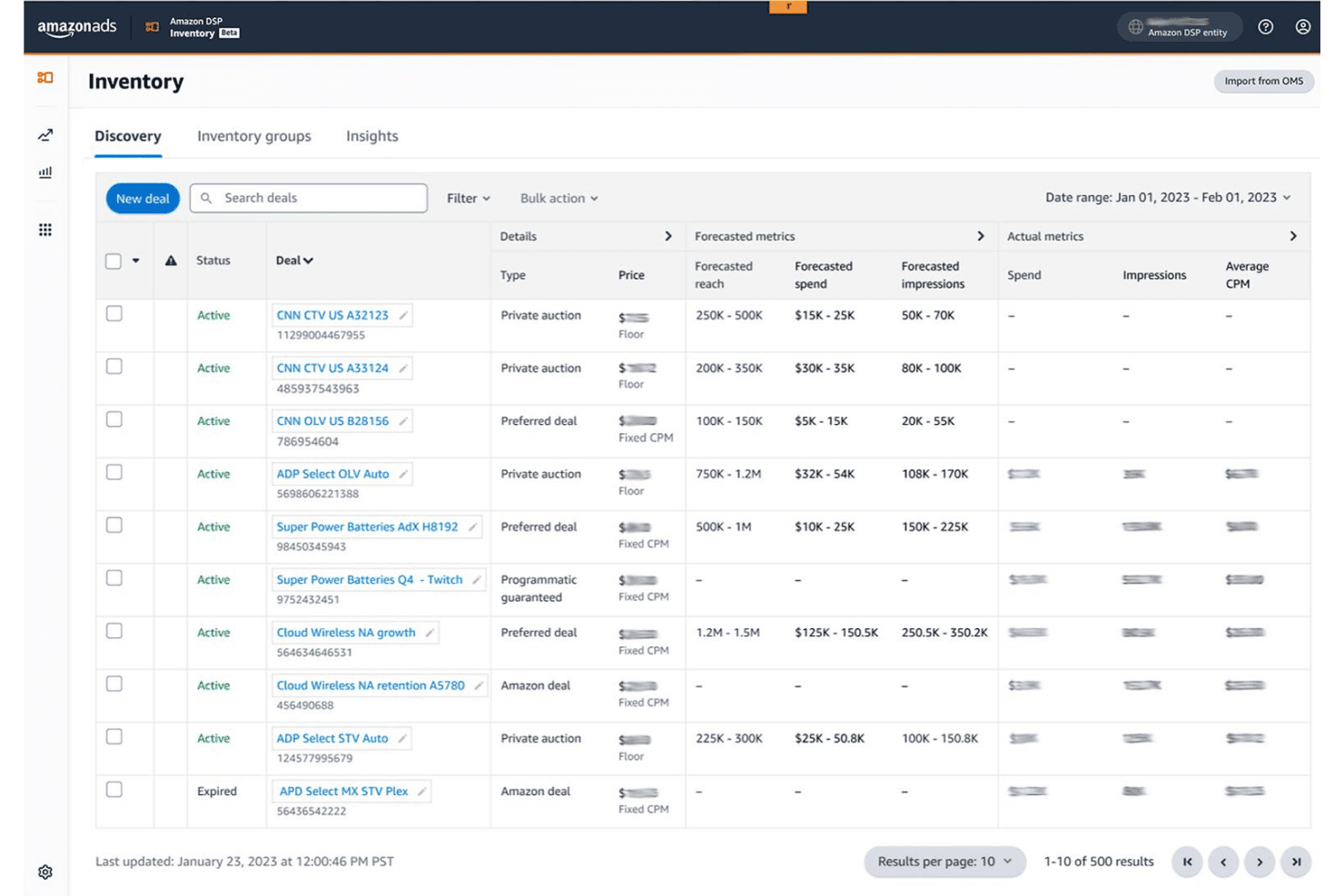
Amazon DSP lets users discover and manage inventory deals in one place. Amazon DSP is a demand-side platform that lets you programmatically buy display, video, CTV, and audio ads across Amazon-owned properties and third-party inventory, using Amazon's first-party shopping and streaming data for audience targeting.
Who Is Amazon DSP Best For?
It's a strong fit for enterprise brands and agencies running large-scale programmatic campaigns who need access to Amazon's shopper data and premium streaming inventory.
Why I Picked Amazon DSP
Amazon DSP earns its spot on my shortlist because no other DSP gives you targeting built on actual purchase intent data at this scale. I can reach audiences segmented by real Amazon shopping behavior, not modeled proxies, which makes campaign targeting far more precise. I also get direct access to premium streaming inventory across Prime Video, Netflix, and Spotify from a single buying interface, cutting out separate publisher-by-publisher negotiations.
Amazon DSP Key Features
- Cross-device frequency management: Set and control frequency caps across campaigns, channels, and devices within the platform.
- Offline sales lift measurement: Track and attribute offline sales directly linked to digital ad campaigns for eligible advertisers.
- Amazon Marketing Cloud integration: Access advanced analytics, custom audience creation, and data clean room tools within the Amazon ecosystem.
- Consolidated campaign management hub: Manage multiple campaigns with new streamlined workflows, line-item setup, and machine learning-powered recommendations.
Amazon DSP Integrations
Amazon DSP offers native integrations with Amazon Marketing Cloud for advanced analytics and supports integrations with verification partners like DoubleVerify, Integral Ad Science, and MOAT. An API is available for custom integrations.
Pros and Cons
Pros:
- Off-Amazon inventory extends reach beyond Amazon properties
- Reaches audiences across Prime Video and Twitch
- Unmatched access to Amazon shopper purchase data
Cons:
- Campaign builds involve many configuration layers
- Reporting lacks granularity outside Amazon properties
Learn more about Amazon DSP: Best for cross-channel premium inventory access
- Not available
- Pricing upon request
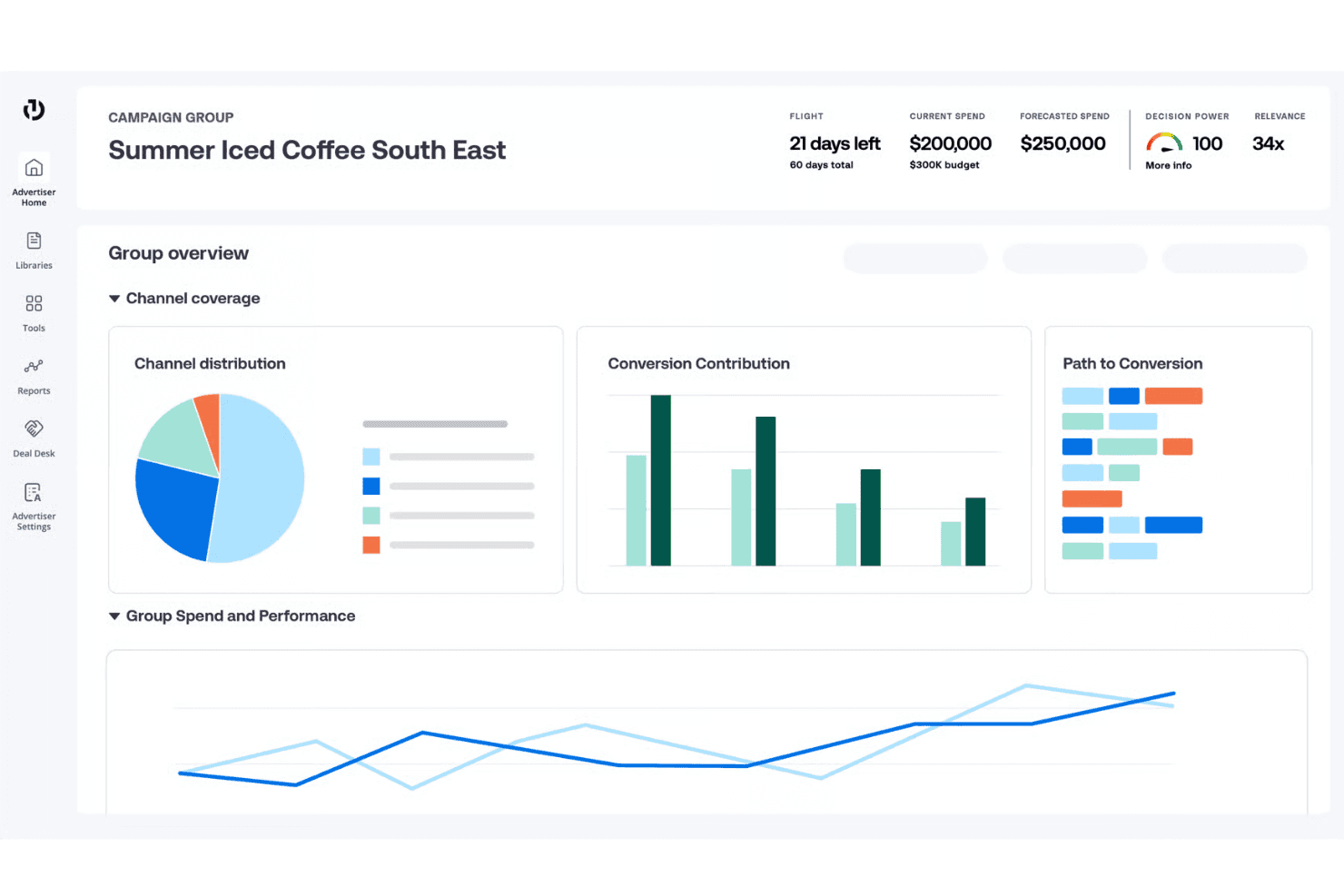
The Trade Desk tracks campaign spend, forecasts, and channel performance. The Trade Desk is an independent demand-side platform for programmatic media buying across display, video, CTV, audio, native, mobile, and digital out-of-home inventory, with AI-driven bidding, audience targeting, and cross-channel campaign management.
Who Is The Trade Desk Best For?
The Trade Desk is a strong fit for agencies and enterprise marketing teams running large-scale programmatic campaigns across multiple channels and inventory sources.
Why I Picked The Trade Desk
The Trade Desk earns its spot on my shortlist because of the sheer breadth of premium inventory it connects to across CTV, audio, display, video, DOOH, native, and mobile. I particularly like OpenPath, which gives my team direct access to publisher supply without an additional SSP layer, cutting fees and improving transparency on where spend actually goes. On top of that, the Kokai AI engine evaluates up to 15 million ad opportunities per second, so bid decisions happen at a scale no manual process can replicate.
The Trade Desk Key Features
- Custom attribution modeling: Build and analyze custom multi-touch conversion paths for campaign measurement.
- Retail data marketplace: Access first-party audience and sales data directly from major retailers for targeting and measurement.
- Brand safety controls: Use pre-bid and post-bid verification with partners like IAS and DoubleVerify to filter out fraud and ensure viewability.
- First-party data onboarding: Integrate with native CDP and clean room partners to activate proprietary audience data while maintaining privacy compliance.
The Trade Desk Integrations
The Trade Desk offers native integrations with IAS, DoubleVerify, MOAT, LiveRamp, and Amazon Web Services. An API is available for custom integrations.
Pros and Cons
Pros:
- Transparent supply path with direct publisher access
- Cookieless targeting via UID2.0 natively supported
- Unmatched premium CTV and DOOH inventory access
Cons:
- Interface requires a dedicated programmatic trader
- High minimum spend excludes smaller advertisers
Learn more about The Trade Desk: Best for workflow and measurement across Google
- Not available
- Pricing upon request
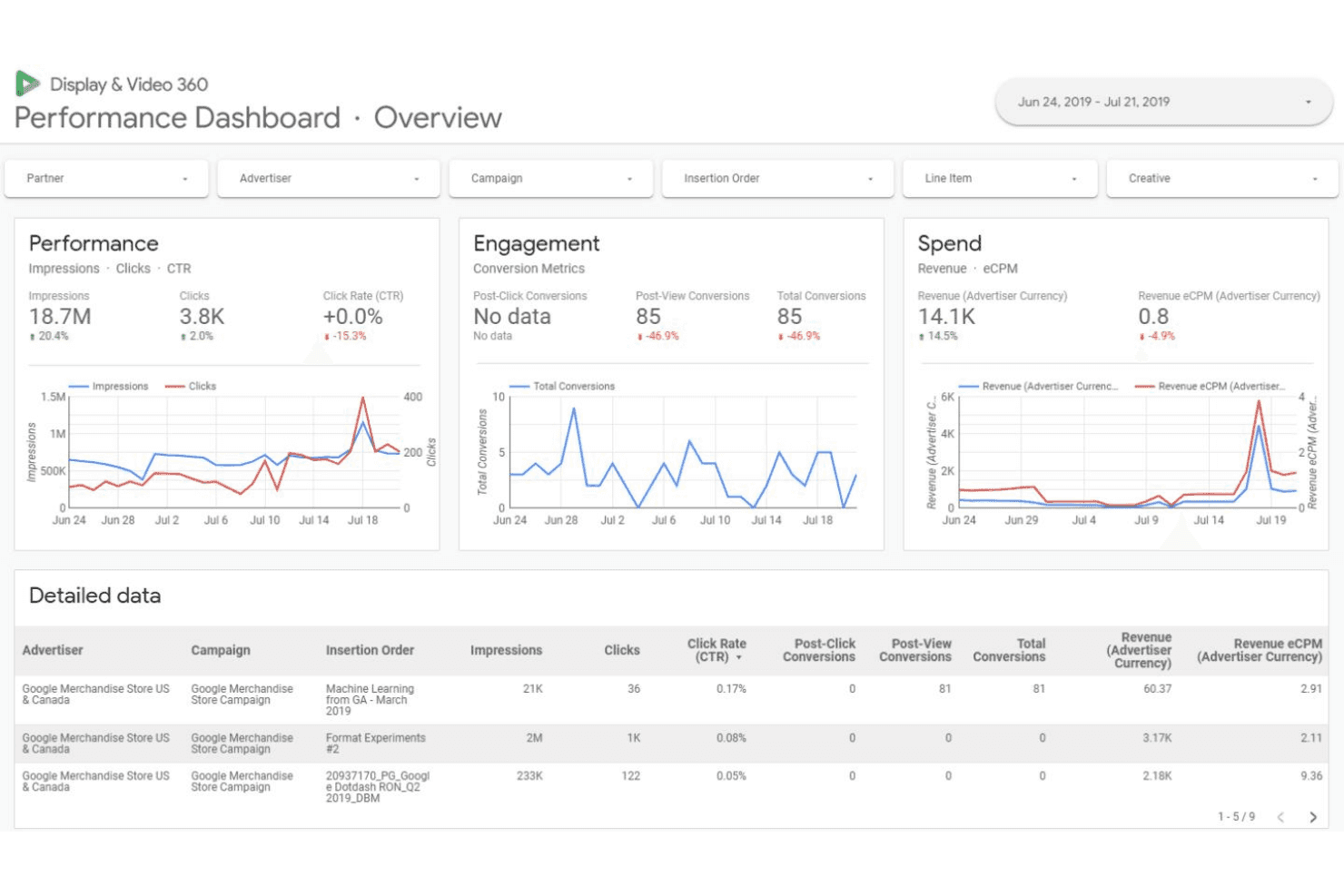
Google Display & Video 360 tracks campaign performance across impressions, clicks, and revenue. Google Display & Video 360 is an enterprise DSP that consolidates programmatic and reserved media buying across display, video, CTV, audio, and YouTube into a single platform with integrated audience management, creative tools, and cross-channel measurement.
Who Is Google Display & Video 360 Best For?
It's a strong fit for enterprise agencies and large brands running substantial programmatic budgets across multiple channels within the Google ecosystem.
Why I Picked Google Display & Video 360
Google Display & Video 360 earns its spot on my shortlist because no other DSP ties measurement and buying workflow together the way it does inside the Google stack. I particularly like how reach forecasting uses a shared metric across TV and digital video, letting my team plan unified budgets without reconciling conflicting numbers. The SDF bulk editing capability means I can push changes across thousands of line items at once, a real operational advantage when managing large multi-campaign setups.
Google Display & Video 360 Key Features
- Premium inventory access: Includes programmatic buying on YouTube Reserve, Google Preferred, and Advanced TV alongside open exchanges.
- Creative workspace: Lets teams collaborate on ad creatives, preview assets, and apply formats for various devices within one platform.
- Audience discovery and management: Builds audiences using first-party and Google data, with advanced segmentation and lookalike modeling.
- Custom reporting integrations: Connects campaign data directly to BigQuery, supporting granular analytics and custom dashboard creation.
Google Display & Video 360 Integrations
Native integrations include Google Analytics 360, Campaign Manager 360, Google Ads Data Hub, Data Studio, and BigQuery. An API is available for custom integrations.
Pros and Cons
Pros:
- Advanced audience segmentation using Google signals
- Unified measurement across Google Marketing Platform
- Deep YouTube and Google inventory access
Cons:
- Steep setup complexity for non-Google campaigns
- Requires significant budget to access premium features
Learn more about Google Display & Video 360:
Diğer Medya Satın Alma Platformları
Kısa listeme giremeyen ancak yine de göz atmaya değer bazı ek medya satın alma platformu seçeneklerini burada bulabilirsiniz:
- 11Commerce MaxBest for retail and commerce-driven ad campaigns
- 12Adform FLOWBest for full-stack programmatic advertising
- 13QuantcastBest for AI-powered real-time audience insights
- 14SmartyAds DSPBest for white-label DSP customization
- 15SkaiBest for omnichannel retail media campaigns
- 16Zeta Marketing PlatformBest for integrating customer data across channels
- 17ChoozleBest for simplified self-serve activation
- 18InfillionBest for unified audience journey management
- 19Roku AdvertisingBest for direct access to Roku TV audiences
- 20Nexxen DSPBest for creative storytelling & data-driven video
How I Evaluate Media Buying Platforms
I split my evaluation into baseline requirements—RTB, cross-channel inventory, and audience targeting—and differentiators like first-party data activation and AI-driven bid optimization.
Core Functionality (Table Stakes for This List)
When I'm selecting tools for my list, I rank each one on a scale from 0 (does not offer the functionality) to 5 (excels in this area) for each core functionality listed below. I then calculate the tool's total score into a percentage, using 65% as a benchmark to help assess its overall fit for the list.
- Multi-Channel Inventory Access: I check whether a platform connects to display, video, CTV, audio, and mobile inventory through major exchanges and direct publisher integrations.
- Programmatic Bidding & RTB: Real-time bidding across multiple exchanges matters, and I look for support for PMPs and programmatic guaranteed deals alongside open auction.
- Campaign Setup & Management: I evaluate how a platform handles budget pacing, flight scheduling, frequency capping, dayparting, and creative rotation across campaigns.
- Audience Targeting: Targeting should span demographic, behavioral, contextual, and geo segments, with options to onboard first-party data or tap third-party marketplaces.
- Bid & Budget Optimization: I look for algorithmic bidding that can optimize toward multiple KPIs at once, not just single-metric rules like target CPA or ROAS alone.
- Reporting & Analytics: Dashboards should go beyond impressions and clicks to include custom attribution views, scheduled exports, and data warehouse or API access.
Once I have a list of tools that meet the criteria, I consider what sets each platform apart.
Differentiating Factors (What Sets Vendors Apart)
Here's how I compare and contrast different vendors:
Standout Features
First-party data activation is a major differentiator. I look for platforms with native CDP integrations and clean room compatibility so teams can onboard and model proprietary audiences without relying on third-party cookies. Cross-channel orchestration also matters: running CTV, display, video, and DOOH campaigns from one interface saves time and improves frequency management. I also evaluate custom attribution modeling, since moving beyond last-click to multi-touch or incrementality testing gives you a clearer picture of what's actually driving conversions.
Beyond Features
Pricing transparency is something I always evaluate. Whether a platform charges a percentage of media spend, a flat SaaS fee, or CPM markups changes how your budget works at scale. Supply path quality also matters: platforms with direct publisher integrations and supply path optimization reduce reseller hops, so more of your spend reaches actual inventory. I also check for privacy and identity readiness, especially cookieless targeting support through frameworks like UID2.0 or ID5, since that directly affects campaign reach as third-party cookies phase out.
Medya Satın Alma Platformları Nasıl Seçilir?
Doğru medya satın alma platformunu seçmek, kampanya ihtiyaçlarınızı, kampanyaları ölçekli bir şekilde yürütmenize en iyi şekilde yardımcı olan platform özellikleri ve envanter seçenekleriyle eşleştirmek anlamına gelir. Kararınızı verirken şu noktalara odaklanabilirsiniz:
| Önceliğiniz... | Şunları arayın... |
|---|---|
| Önceliğiniz...Kanallar arası erişimi en üst düzeye çıkarmak | Şunları arayın...Birleşik kampanya yönetimine sahip platformlar |
| Önceliğiniz...Çerezsiz kitle hedefleme | Şunları arayın...ID tabanlı ve temiz oda verisi desteği |
| Önceliğiniz...Esnek kampanya yürütme | Şunları arayın...Toplu düzenleme ve çok kullanıcılı iş akışları |
| Önceliğiniz...Çalışmayan medya maliyetlerini en aza indirmek | Şunları arayın...Doğrudan yayıncı entegrasyonları ve SPO |
| Önceliğiniz...Hızlı analiz ve optimizasyon | Şunları arayın...Gerçek zamanlı panolar ve API dışa aktarma seçenekleri |
Kısa Listeniz Nasıl Değerlendirilir?
- Envanter yolu şeffaflık raporu isteyin: Tedarikçilerden, geçmiş bir kampanyadaki yayıncı kaynaklarını ve yeniden satıcı geçişlerini gösteren bir örnek sunmalarını isteyin.
- Birinci taraf verileriyle test medya planı yürütün: Kendi listenizi veya segmentinizi yükleyin ve bir deneme planı kapsamında sisteme dahil etme, modelleme ve hedefleme yeteneklerini doğrulayın.
- Kanallar arası metrik aktarımını denetleyin: Bir pilot kampanya oluşturun ve iki gün içinde görüntülü reklam, video ve CTV genelindeki birleşik performans verilerini alabileceğinizi doğrulayın.
- Uyumluluk ve gizlilik çalışma sayfası edinin: Tedarikçiden GDPR, CCPA ve çerezsiz kimlik çerçeveleriyle uyumluluğa ilişkin belgelerini isteyin.
- Yönetilen hizmet ile gerçek self servis seçeneklerini ayırt edin: Platforma doğrudan erişim mi yoksa yüksek düzeyde destek sunan bir hizmet ekibi mi istediğinize karar verin; gerçek iş akışı ve kontrol avantajlarını ve dezavantajlarını değerlendirin.
Medya Satın Alma Platformları Nedir?
Medya satın alma platformları; görüntülü reklam, video, ses ve bağlantılı TV gibi birden fazla kanalda reklam kampanyaları planlamanıza, satın almanıza ve yönetmenize olanak tanıyan dijital araçlardır. Bu platformlar, birleşik raporlama sunarken gerçek zamanlı teklif verme, gelişmiş kitle hedefleme, ekleme emirleri ve bütçe optimizasyonunu destekler. Pazarlamacıların teklif taleplerini yönetmesine, çeşitli envanter kaynaklarına erişmesine, marka bilinirliği oluşturmasına ve kampanya performansını tek bir arayüzden denetlemesine yardımcı olurlar.
Medya Satın Alma Platformlarının Özellikleri
Medya satın alma platformlarını seçerken aşağıdaki temel özelliklere dikkat edin:
- Çok kanallı envanter erişimi: Tek bir platform üzerinden görüntülü reklam, video, CTV, ses ve daha fazlasında dijital medya satın alımını destekleyerek daha geniş kampanya erişimi sağlar.
- Gerçek zamanlı teklif verme (RTB): Reklam envanteri için canlı açık artırmaları destekler; böylece gösterimler için verimli bir şekilde rekabet edebilir ve stratejinizi anında ayarlayabilirsiniz.
- Kitle hedefleme: Demografik özelliklere, davranışlara, ilgi alanlarına ve coğrafi konuma göre segmentasyon yapılmasını sağlayarak reklamlarınızın en alakalı kullanıcılara ulaşmasını sağlar.
- Bütçe ve yayın hızı kontrolleri: Kampanya bütçeleri belirlemenize, günlük veya toplam harcama sınırları tanımlamanıza ve aşırı harcama ya da bütçenin erken tükenmesini önlemek için yayın programlarını yönetmenize olanak tanır.
- Reklam öğesi atama ve yönetimi: Birden fazla format için reklam öğelerinin yüklenmesini, depolanmasını ve yayınlanmasını kolaylaştırarak varlıkların yenilenmesini veya dönüşümlü olarak kullanılmasını kolaylaştırır.
- Sıklık sınırlandırma: Kitlenizin aynı reklamı ne sıklıkta gördüğünü sınırlandırarak reklam yorgunluğunu önler ve kullanıcı deneyimini iyileştirir.
- Kampanya raporlama ve analizleri: Gösterimler, tıklamalar, harcama, dönüşümler ve ROI gibi temel performans ölçümlerini takip edebilmeniz için panolar ve dışa aktarılabilir raporlar sunar.
- Üçüncü taraf veri sağlayıcılarıyla entegrasyon: Harici veri kaynaklarına bağlanarak ve kitle profillerinizi zenginleştirerek hedefleme ve analiz olanaklarını genişletir.
- Doğrudan yayıncı ve borsa entegrasyonları: Kaliteli envantere ve şeffaf tedarik yollarına erişimi artırmak için başlıca reklam borsalarına, yayıncılara ve arz tarafı platformlarına bağlanır.
- İş akışı yönetimi ve izinler: Ekiplerin roller atamasına, kampanyaları onaylamasına ve güvenli bir şekilde iş birliği yapmasına olanak tanıyarak çok kullanıcılı ortamları ve denetim takibini destekler.
Yaygın Medya Satın Alma Platformlarının Yapay Zekâ Özellikleri
Yukarıda listelenen standart medya satın alma platformu özelliklerinin ötesinde, bu çözümlerin çoğu aşağıdaki gibi özelliklerle yapay zekâyı entegre ediyor:
- Tahmine dayalı kitle modelleme: Yapay zekâyı kullanarak geçmiş ve gerçek zamanlı verileri analiz eder, dönüşüm gerçekleştirme olasılığı yüksek yeni kitle segmentlerini belirler ve hedefleme havuzlarını otomatik olarak genişletir.
- Otomatik teklif optimizasyonu: Kampanya verimliliğini en üst düzeye çıkarmak için performans sinyallerine, bütçe kısıtlamalarına ve tahmin edilen sonuçlara göre teklifleri gerçek zamanlı olarak sürekli ayarlar.
- Reklam öğesi performans analizi: Hangi reklam öğelerinin en iyi sonuçları sağladığını değerlendirmek için makine öğrenimini kullanır; daha iyi etkileşim için en başarılı öğeleri önerir veya otomatik olarak dönüşümlü kullanır.
- Anomali tespiti ve uyarılar: Kampanya verilerini olağandışı örüntüler veya aykırı değerler açısından izleyerek harcamalardaki ani artışlar ya da performans düşüşleri gibi sorunları anında işaretler.
- Dinamik bütçe tahsisi: Yapay zekâ, sonuç sağlama olasılığının en yüksek olduğu yatırımlara öncelik vererek harcamaları kanallar, kampanyalar veya kitleler arasında anında yeniden dağıtır.
- Doğal dilde raporlama: Otomatik yorumlama gerektirmeden karmaşık analizleri tüm ekip üyeleri için erişilebilir hâle getirerek anlaşılır dille kampanya özetleri ve içgörüler oluşturur.
Medya Satın Alma Platformlarının Faydaları
Medya satın alma platformlarını uygulamak ekibiniz ve işletmeniz için çeşitli faydalar sağlar. Yararlanmayı bekleyebileceğiniz birkaç fayda şunlardır:
- Merkezi kampanya yönetimi: Dijital reklamları, ücretli sosyal medya reklamlarını ve diğer kanallar arası kampanyaları tek bir arayüzden yürütün; böylece araçlar arasında geçiş yapmak için harcanan zamanı azaltın.
- Çeşitli reklam envanterine erişim: Birleşik bir ortamda yayıncılar, borsalar ve reklam ağları aracılığıyla görüntülü reklam, video reklam, CTV, sesli reklam ve daha fazlası için reklam alanı satın alın.
- Geliştirilmiş bütçe kontrolü: Her doların hedeflerinize ve medya karmasına katkı sağladığından emin olmak için yerleşik bütçe dağıtım hızı, harcama limitleri ve dinamik teklif verme özelliklerini kullanın.
- Gelişmiş hedefleme hassasiyeti: Demografik, davranışsal, coğrafi ve bağlamsal hedeflemenin yanı sıra daha kapsamlı segmentasyon için birinci taraf verilerini sisteme aktararak belirli kitlelere ulaşın.
- Birleşik raporlama ve analiz: Gerçek zamanlı gösterge panellerinde temel performans göstergelerini izleyerek performans değerlendirmesini ve optimizasyonu çok daha hızlı gerçekleştirin.
- Sorunsuz ekip iş birliği: Medya planlamacılarının izinler atamasına, kampanyaları onaylamasına ve birden fazla kullanıcılı operasyonları ve daha güçlü denetim izlerini desteklemek üzere iş akışlarını belgelemesine yardımcı olun.
- Geliştirilmiş gizlilik ve uyumluluk: Çerezsiz reklam ortamına hazırlanmak için kimlik çözümleme, güvenli veri odası entegrasyonları ve gizlilik çerçevelerinden yararlanın.
Medya Satın Alma Platformlarının Maliyetleri ve Fiyatlandırması
Medya satın alma platformlarını seçmek, mevcut çeşitli fiyatlandırma modellerinin ve planların anlaşılmasını gerektirir. Maliyetler özelliklere, ekip büyüklüğüne, eklentilere ve daha fazlasına göre değişir. Aşağıdaki tabloda yaygın planlar, bunların ortalama fiyatları ve medya satın alma platformu çözümlerinde genellikle sunulan özellikler özetlenmektedir:
Medya Satın Alma Platformları İçin Plan Karşılaştırma Tablosu
| Plan Türü | Ortalama Fiyat | Yaygın Özellikler |
|---|---|---|
| Plan TürüÜcretsiz Plan | Ortalama Fiyat$0 | Yaygın ÖzelliklerSınırlı kampanya erişimi, temel raporlama araçları, destek kaynakları ve kısıtlı envanter erişimi. |
| Plan TürüKişisel Plan | Ortalama Fiyat$100-$500/ay | Yaygın ÖzelliklerTek kullanıcı erişimi, standart hedefleme seçenekleri, orta düzeyde raporlama ve sınırlı bütçe veya gösterim limitleri. |
| Plan Türüİşletme Planı | Ortalama Fiyat$1,000-$5,000/ay | Yaygın ÖzelliklerBirden fazla kullanıcıyla iş birliği, gelişmiş hedefleme, premium envanter, eksiksiz analiz paketi ve özel veri aktarımı. |
| Plan TürüKurumsal Plan | Ortalama Fiyat$10,000+/ay | Yaygın ÖzelliklerÖzel hesap yönetimi, özel entegrasyonlar, SLA desteği, kurumsal uyumluluk ve sınırsız envanter erişimi. |
Medya Satın Alma Platformları Hakkında SSS
Medya satın alma platformları hakkında sık sorulan bazı soruların yanıtları aşağıdadır:
Medya satın alma platformları çerezsiz hedeflemeyi nasıl destekler?
Medya satın alma platformları, kimlik tabanlı çözümler, güvenli veri odası entegrasyonları ve UID2.0 gibi gizliliğe odaklanan kimlik sağlayıcılarla iş ortaklıkları sunar; böylece üçüncü taraf çerezler ortadan kalkarken bile kitlelere ulaşabilirsiniz. Bu yaklaşım, uyumluluk gerekliliklerini karşılamanıza yardımcı olurken hedeflemenizin etkili kalmasını sağlar.
Küçük ekipler medya satın alma platformlarını etkili bir şekilde kullanabilir mi?
Evet, birçok platform, özel programatik ekipleri olmayan kurum içi pazarlamacılar için tasarlanmış kendi kendine hizmet seçenekleri, kullanımı kolay gösterge panelleri ve daha küçük ölçekli paketler sunar. Kullanıcı tabanlı fiyatlandırma ve kolay erişilebilir destek kaynakları arayın.
Bu platformlar üzerinden hangi envanter türlerine erişebilirim?
Görüntülü reklam, video, bağlantılı TV (CTV), sesli reklam, dijital dış mekân (DOOH) ve bazen yerel reklam yerleşimlerine erişebilirsiniz. Envanter, tek bir iş akışı içinde genellikle doğrudan büyük yayıncılardan ve açık borsalardan sağlanır.
Bu platformlar marka güvenliğini nasıl sağlar?
Medya satın alma platformları, IAS ve DoubleVerify gibi doğrulama araçlarıyla entegre olur; ayrıca sahtekârlığı engellemek, uygunsuz içerikleri filtrelemek ve bağlamsal marka gerekliliklerini karşılamak için yerleşik teklif öncesi ve teklif sonrası kontroller sunar.
Sözleşmeler esnek midir, yoksa minimum harcama şartı var mıdır?
Sözleşme koşulları değişir; bazı platformlar minimum aylık harcama taahhüdü gerektirirken diğerleri esnek hizmet olarak yazılım (SaaS) tarzı planlar sunar. Kullanıma başlamadan önce her zaman açık koşulları ve teknoloji ücreti yansıtma açıklamalarını isteyin.