

Hesap verilerini yönetmek, özellikle birden fazla sistemi aynı anda kullanıyorsanız, gerçekten baş ağrıtabilir. Bilinçli kararlar verebilmek için doğru verilere ihtiyacınız vardır; ancak manuel süreçler ve güncel olmayan araçlar çoğu zaman hatalara ve zaman kaybına yol açar. Hesap verisi yönetim yazılımları tam da bu noktada devreye girer. Her şeyi düzenli ve erişilebilir tutmanıza yardımcı olarak ekibinizin gerçekten önemli konulara odaklanmasını sağlar.
Deneyimlerime göre doğru aracı seçmek, verileri ele alma şeklinizi dönüştürebilir. Piyasadaki en iyi çözümlerin tarafsız bir listesini sunmak için çeşitli seçenekleri test edip inceledim. Özellikler, kullanılabilirlik ve her aracın karşılaştığınız belirli zorlukları nasıl hafifletebileceği hakkında bilgiler bulacaksınız. Veri yönetiminizi kolaylaştırabilecek seçeneklere birlikte göz atalım.
Why Trust Our Software Recommendations
6,700+
Reviews
20
Industry experts
16+
Evaluation factors
14
Years
Our team has been testing and reviewing software since 2012. As marketing leaders ourselves, we know how difficult—and important—it is to choose the right software.
For this guide, we evaluated tools using hands-on testing and independent research, scoring tools using our selection criteria.
Our reviews reflect our human editorial judgment, not a sales pitch.
Expert reviewers:
 Gui DrusinaCreative Director
- Shriya GhateSenior Marketing Lead
 Amanda JacquesMarketing Ops Leader

Hesap Verisi Yönetim Yazılımları Karşılaştırma Tablosu
Bu karşılaştırma tablosu, en iyi hesap verisi yönetimi yazılımı seçimlerimin fiyatlandırma ayrıntılarını özetlemektedir:
Sorted by: Default
| Tool | Starting Price | Website | |
|---|---|---|---|
Best for B2B account enrichment and scoring | 4.5 out of 5 | $49/user/month Free plan + 14-day trial + demo available | Book Demo |
Best for creating customizable databases | 4.6 out of 5 | $20/user/month Free plan + free demo available | Website |
Best for marketing, sales, and support teams | 4.2 out of 5 | Pricing Upon Request | Website |
Best for accurate B2B contacts | 3.9 out of 5 | $1200/month Free plan available | Website |
Best account data management software for enterprises | Not rated | Pricing is available upon request | Website |
Best for visual contact pipeline managemen | Not rated | $14/user/month 14-day free trial available | Website |
Best account data management software for data enrichment | Not rated | $136/user/month Not available | Website |
Best account data management software for small businesses | Not rated | $69/month Free plan + 15-day free trial + free demo available | Website |
Best account data management software for ease of use | Not rated | $19.90/user/month 14-day free trial + free demo available | Website |
Best account data management software with a user-friendly interface | Not rated | $34/month 14-day free trial | Website |


En İyi Hesap Verisi Yönetim Yazılımları
Aşağıda her bir hesap verisi yönetim yazılımının ayrıntılı açıklamasını bulabilirsiniz. Aracın en iyi yaptığı işleri, öne çıkan özelliklerini, ürün ekran görüntülerini, entegrasyon ayrıntılarını, fiyatlandırma bilgilerini ve artılarını ve eksilerini ele aldım.
 Best for B2B account enrichment and scoring
- Free plan + 14-day trial + demo available
- From $49/user/month (billed annually)
Visit WebsiteCustomer Rating:4.5/5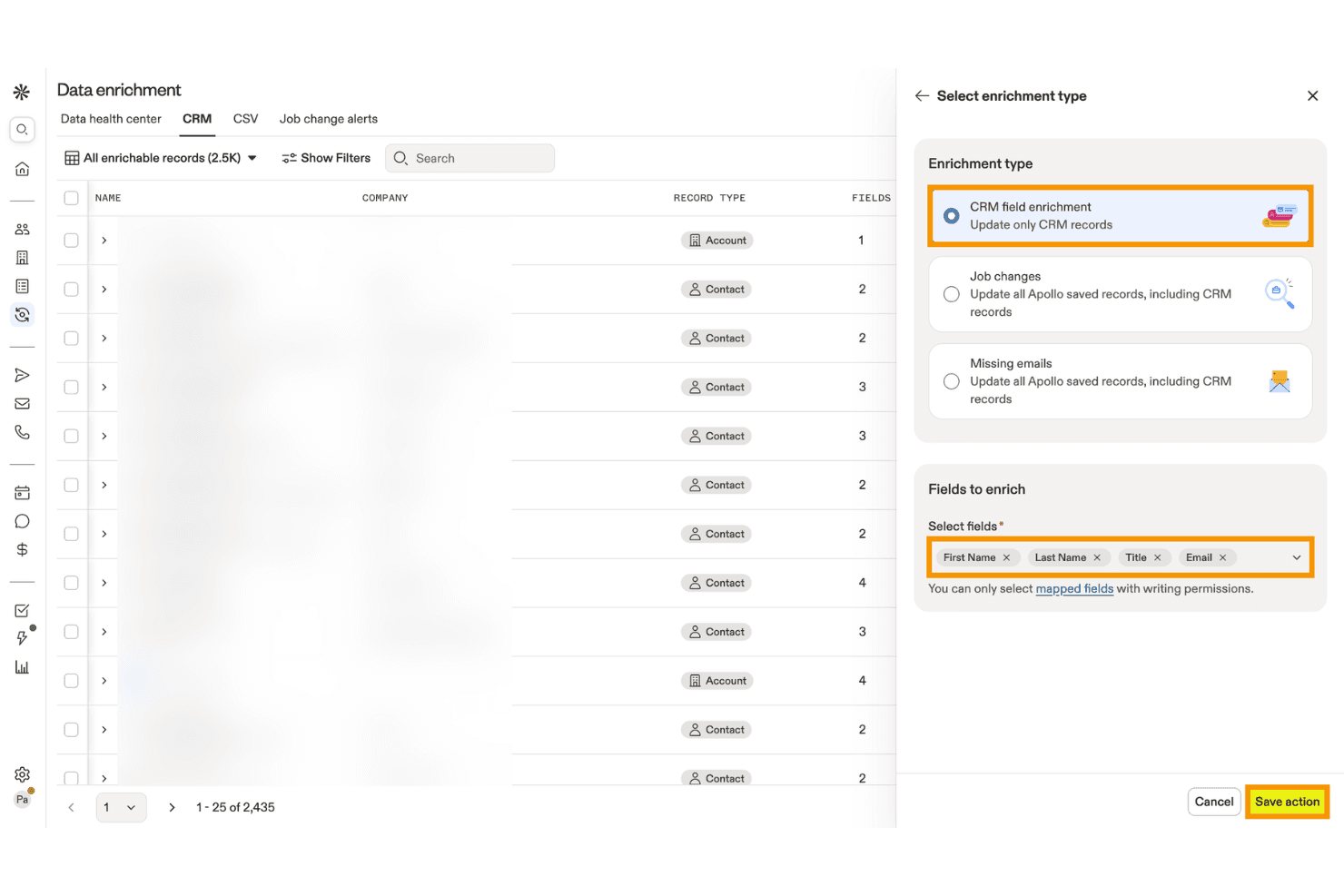
Apollo.io lets users enrich CRM records with selected contact fields. Apollo.io is a B2B sales intelligence and account data management platform that combines contact and company enrichment, deduplication, AI-powered scoring, intent data, and CRM integration across a database of 275M+ contacts and 73M+ companies.
Who Is Apollo.io Best For?
Apollo.io is a strong fit for mid-market demand generation and marketing operations teams that need affordable, high-volume B2B account enrichment and AI-powered scoring without enterprise-level complexity.
Why I Picked Apollo.io
Apollo.io earns its spot on my shortlist because its B2B account enrichment and AI-powered scoring capabilities are genuinely hard to replicate at this price point. I love how the AI scoring models train directly on your CRM's win/loss history and layer in Bombora intent signals across 15,000+ topics, so you're prioritizing accounts showing real buying behavior rather than guessing. The Data Health Center also does solid work surfacing duplicate records and stale fields across connected CRMs automatically.
Apollo.io Key Features
- CRM enrichment jobs: Scheduled or on-demand jobs that automatically update missing or stale fields in your connected CRM using Apollo's live database.
- CSV enrichment: Upload a CSV file, review the enriched output, and receive a completion report before importing records into any external system.
- 65+ segmentation filters: Search and filter accounts by firmographic, technographic, and behavioral attributes to build precise target account lists.
- Role-based permission profiles: Admins on the Organization plan can control feature-level access across prospecting, enrichment, email visibility, and engagement for each team member.
Apollo.io Integrations
Apollo.io offers native bidirectional integrations with Salesforce, HubSpot, Zoho CRM, Pipedrive, Microsoft Dynamics, Adobe Marketo Engage, and Snowflake. It also provides an open REST API and marketplace integrations, including Zapier.
Pros and Cons
Pros:
- AI-powered intent signals layered into scoring
- Real-time enrichment and duplicate detection dashboard
- Massive global B2B contact and account coverage
Cons:
- No advanced cross-system identity resolution
- Intent data sourced entirely from Bombora
Learn more about Apollo.io: Best for creating customizable databases
- Free plan + free demo available
- From $20/user/month (billed annually)
Visit WebsiteCustomer Rating:4.6/5
Airtable templates are pre-designed databases that enable efficient data management and organization. Airtable is a project management and collaboration tool that combines the capabilities of a spreadsheet and a database. It provides users with a flexible and visually appealing interface for organizing and managing various data types. Airtable allows you to create and customize tables, or "bases," to store and manipulate information.
Why I picked Airtable: Airtable is more suitable for project management. However, if you are a small team, you can also use it for account data management. The best thing about the tool is that it lets users create custom fields with specific data types, such as text, number, date, and dropdowns. This ensures data accuracy by enforcing consistent formatting and preventing incorrect entries. By defining field validation rules, you can further enhance data accuracy and maintain consistency.
Airtable provides powerful filtering and sorting options that enable simple data retrieval. You can apply filters based on specific criteria and instantly view a subset of records that meet the defined conditions. Sorting options allow you to arrange data in ascending or descending order based on any field, making it easy to find the desired information.
Airtable Standout Features and Integrations:
Standout features include a collaborative workspace where team members can collaborate on data entry, validation, and updates. This helps maintain data accuracy and consistency by involving multiple stakeholders in data management.
Integrations include Asana, Basecamp, Dropbox, Box, Eventbrite, Evernote, Facebook, GitHub, Google Calendar, Instagram, Jira, Miro, and LinkedIn. You can also avail additional integrations through Zapier and API.
Airtable costs from $10/user/month (billed annually) and comes with a free forever plan.
Pros and Cons
Pros:
- Powerful relational database capabilities
- Intuitive and visually appealing interface
- Customizable data organization
Cons:
- Limited reporting features
- Limited advanced data analysis capabilities
Learn more about Airtable:

NetSuite integrates data from various departments and enables real-time data monitoring and reporting of KPIs. NetSuite is a cloud-based business management software platform that helps businesses manage various aspects of their business, including financials, customer relationship management (CRM), inventory management, e-commerce, and more.
Why I picked NetSuite CRM: NetSuite CRM provides a complete solution for managing customer relationships throughout the entire customer lifecycle. It enables marketing, sales, and support teams to have a unified view of customer data, interactions, and preferences, facilitating personalized and targeted engagement.
NetSuite CRM also integrates with financial and operational data within the NetSuite platform. This integration enables marketing, sales, and support teams to access vital account information in real-time, such as billing history, order status, and support tickets. Having this consolidated data enhances collaboration and enables teams to provide better customer service and support.
NetSuite CRM Standout Features and Integrations:
Standout features include robust reporting and business intelligence capabilities. It provides pre-built and customizable reports and dashboards, enabling marketing, sales, and support teams to monitor key performance indicators, measure campaign success, and track customer satisfaction. This data-driven approach helps teams make informed decisions.
Integrations include Shopify, BigCommerce, Adobe Commerce, WooCommerce, Amazon, eBay, Walmart, Shopify POS, Amazon Supply Chain, and ShipStation.
Pros and Cons
Pros:
- Robust reporting features
- Cloud-based platform
- Robust security features
Cons:
- Steep learning curve
- The initial setup can be complex
Learn more about NetSuite CRM : Best for accurate B2B contacts
- Free plan available
- Pricing starts at $1200/month
Visit WebsiteCustomer Rating:3.9/5
The platform's real-time validation feature and the extensive reach of over 140 million business records contribute to its unique selling proposition. CIENCE GO Data is a comprehensive tool that provides accurate B2B contact information, including over 100 million verified contacts and 10 billion monthly signals for in-market buyers. The platform's unique selling point is its real-time validation and use of real-world data, which ensures the accuracy of sales data.
Why I picked CIENCE GO Data: I chose CIENCE GO Data because it provides a vast database of over 100 million verified B2B contacts, which is essential for any business looking to establish or expand its sales outreach. In determining the best tool for this purpose, I compared various options and found that CIENCE GO Data's emphasis on real-world validation of sales data makes it stand out. This approach ensures that the contact information is not only extensive but also accurate and up-to-date.
CIENCE GO Data Standout Features & Integrations
Standout features include outbound sales engagement with automation, AI models trained for industry-specific content creation, and powerful web analytics. Additionally, CIENCE offers services such as outbound SDR team-as-a-service and inbound SDR, as well as AI models for multi-channel outbound campaigns and artificial voice prospecting conversations. The company also provides resources such as lead prioritization guides, pricing information, and industry-related content through their blog and podcast.
Integrations include HubSpot CRM, CIENCE GO Digital, CIENCE GO Show, and HubSpot Sales Hub.
Pros and Cons
Pros:
- Targeted advertising capabilities to reach specific audiences.
- CRM support for managing leads and customer relationships.
- Customized data packages and services tailored to business needs.
Cons:
- Additional training may be required for clients to fully utilize the platform.
- Potentially more expensive compared to other lead generation services.
Learn more about CIENCE GO Data: Best account data management software for enterprises
- Pricing is available upon request

The Oracle CX Sales mobile app provides users with on-the-go access to critical sales information, customer data, and collaboration tools for efficient sales management. Oracle CX Sales, also known as Oracle Customer Experience Sales, is a comprehensive sales automation and customer relationship management (CRM) software offered by Oracle Corporation. It is part of the Oracle CX Cloud suite, encompassing various applications designed to enhance the customer experience across different touchpoints. It is a good choice for enterprise-level account data management due to its wide range of features and ability to handle large volumes of data.
Why I picked Oracle CX Sales: To maintain data accuracy and integrity, Oracle CX Sales provides tools for data cleansing and deduplication. These features help identify and merge duplicate or inconsistent customer records, ensuring a clean and reliable customer database.
The software enables businesses to segment customer data based on various criteria such as demographics, behavior, purchase history, or custom-defined attributes. This segmentation capability allows for more precise targeting and personalized communication with different customer segments.
Oracle CX Sales Standout Features and Integrations:
Standout features include automated data enrichment capabilities that enhance customer data with additional insights. It can automatically update and enrich customer records with social media profiles, industry information, firmographics, and other relevant data sources.
Integrations include ServiceNow, DbVisualizer, Oracle Sales, Crowdin, 4MDG, Oracle Service, and CipherTrust Cloud Key Manager.
Pros and Cons
Pros:
- Native mobile app
- Good reporting and analytics features
- Native integration with other Oracle products
Cons:
- Complex to set up and configure
- Steep learning curve
Learn more about Oracle CX Sales: Best for visual contact pipeline managemen
- 14-day free trial available
- From $14/user/month (billed annually)

The pipeline management feature of Pipedrive enables users to visually track and manage sales opportunities throughout different stages of the sales process. Pipedrive is a customer relationship management (CRM) and account data management platform that is trusted by more than 100,000 sales teams.
Why I picked Pipedrive: The feature I liked most is the pipeline management feature. It provides an intuitive overview of your sales process and customer interactions. The pipeline displays the various stages of your sales cycle, allowing you to see the progress of each account so that you can identify bottlenecks or opportunities. This visual representation helps sales teams stay organized and focused on moving deals forward.
Within each pipeline stage, Pipedrive enables you to track and log activities related to each account. You can record calls, emails, meetings, and other interactions directly within the platform. This feature ensures that all relevant information and account-related activities are captured and accessible in one centralized location, facilitating better account data management.
Pipedrive Standout Features and Integrations:
Standout features include workflow automation capabilities to automate repetitive tasks and improve efficiency. Users can automate actions such as sending follow-up emails, assigning tasks, updating data fields, and triggering notifications. Additionally, Pipedrive implements strong security measures to protect customer data. It employs industry-standard encryption protocols such as regular security audits and vulnerability assessments.
Integrations are available with 350+ connectors, including Zapier, Google Meet, Zoom Meetings, Facebook Messenger, LinkPort, DocuSign, Lemlist, JustCall, Asana, and HubSpot. You can also avail additional integrations through Pipedrive API and Zapier.
Pros and Cons
Pros:
- Mobile app is available
- Ideal for small to medium-sized businesses
- Modern and intuitive interface
Cons:
- Limited reporting capabilities
- Learning curve for new users
Learn more about Pipedrive : Best account data management software for data enrichment
- Not available
- From $136/user/month

The lead management feature of SAP Sales Cloud enables users to capture, qualify, and nurture leads for enhanced sales conversion and revenue growth. SAP Sales Cloud is a customer relationship management (CRM) solution that helps businesses manage their sales processes and customer relationships and drive revenue growth. It provides tools for managing leads, contacts, accounts, opportunities, and sales pipelines. The platform allows users to track customer interactions, log activities, and capture important information to ensure a complete and up-to-date view of each customer.
Why I picked SAP Sales Cloud: It enriches customer data by automatically pulling in additional information from external sources. This includes company details, social profiles, news updates, and more. By enriching the data, users can have a more comprehensive and up-to-date view of their customers, improving customer segmentation and targeting accuracy.
SAP Sales Cloud integrates with various data sources and systems, such as CRM, marketing automation, and ERP systems. This integration ensures that the data remains consistent across different platforms. It eliminates data silos and provides a centralized source of truth for accurate and reliable information.
SAP Sales Cloud Standout Features and Integrations:
Standout features include robust segmentation capabilities, allowing users to define and create dynamic customer segments based on specific criteria. Users can segment customers based on demographics, behavior, purchase history, and other relevant data points. This enables personalized targeting and tailored marketing efforts, leading to more effective and relevant communication with customers.
Integrations include Microsoft Outlook, Screendragon, Inxmail, Mediafly, Simplifier, EVALANCHE, In Mind Cloud, and Prosafety.
Pros and Cons
Pros:
- Advanced reporting and analytics
- Personalized customer engagement
- Robust data management capabilities
Cons:
- Learning curve for users new to SAP systems
- Initial setup and customization may require technical expertise
Learn more about SAP Sales Cloud: Best account data management software for small businesses
- Free plan + 15-day free trial + free demo available
- From $69/month

The deal management feature of Bitrix24 helps users track and organize sales opportunities, from initial contact to final closure. Bitrix24 is a business management and CRM solution that provides various capabilities, including CRM (Customer Relationship Management), project management, document management, team communication, and more. Bitrix24 is particularly popular among small and medium-sized businesses due to its affordability, user-friendly interface, and extensive functionality.
Why I picked Bitrix24: Bitrix24 allows businesses to create custom fields and forms within the CRM. This feature enables businesses to capture specific data points relevant to their operations and customer interactions. Custom fields ensure the data collected is tailored to the business's needs.
Bitrix24 offers robust search and filtering capabilities within its CRM. This allows users to easily retrieve specific data based on various criteria, such as customer attributes, transaction history, or specific keywords. The advanced search functionality simplifies data retrieval, saving time and effort.
Bitrix24 Standout Features and Integrations:
Standout features include segmentation tools that allow businesses to categorize and group their contacts based on specific criteria or characteristics. Businesses can target specific customer segments by segmenting contacts with tailored marketing campaigns or personalized communication. This segmentation feature enhances data organization and accuracy, and enables targeted messaging.
Integrations include Gmail, Google Calendar, Google Drive, MS Office, Dropbox, Box, Xero, Mailchimp, Docusign, and Recurly.
Pros and Cons
Pros:
- Wide range of features
- Extensive integrations
- Efficient deal management
Cons:
- Steep learning curve for new users
- Limited customization options
Learn more about Bitrix24 : Best account data management software for ease of use
- 14-day free trial + free demo available
- From $19.90/user/month (billed annually)

The project management feature of Scoro enables businesses to efficiently plan, organize, and track tasks, resources, and milestones to ensure successful project execution. Scoro is a business and project management solution that provides a drag-and-drop interface for account data management. In addition, it also provides features for time tracking, collaboration, CRM, billing, and reporting.
Why I picked Scoro: While Scoro is primarily a business management software, it also provides some account data management features. It helps users store and manage customer account data in a centralized location. This data can include contact details, communication history, transactions, projects, invoices, etc. It enables a 360-degree view of each customer and contact so that you can keep track of sales opportunities.
In addition, Scoro also provides features to track sales goals and performance. For example, you can create customizable dashboards that track sales targets of individual sales reps and the entire team.
Scoro Standout Features and Integrations:
Standout features include project and task management features that help users track and manage activities related to customer accounts. This can be useful for organizing and coordinating account-related tasks and activities.
Integrations include Slack, Asana, Jira Software, Evernote, Trello, Harvest, Basecamp, GitHub, Zapier, and Gmail. You can also avail additional integrations through Zapier.
Pros and Cons
Pros:
- Enables team collaboration
- Customizable fields and workflows
- Integrates with popular third-party tools
Cons:
- Not highly customizable
- Limited focus on specialized account data management
Learn more about Scoro : Best account data management software with a user-friendly interface
- 14-day free trial
- From $34/month

AllClients provides a detailed overview of each client, including their preferences, history, and interactions with the company. AllClients is a customer relationship management (CRM) software platform that helps businesses manage and organize client information, track interactions, and manage communication. It also offers features such as contact management, email marketing, task management, and automated workflows to enhance customer relationships.
Why I picked AllClients: AllClients provides users with intuitive filtering options that allow them to quickly and easily sort and segment their client data. Whether filtering contacts based on specific criteria or creating targeted lists for marketing campaigns, the easy filtering feature simplifies the process. It enables users to access the necessary information with just a few clicks.
The platform is designed to be intuitive and accessible, making it easy for users to navigate and utilize its various functionalities. The clean layout and straightforward navigation ensure that users can quickly find what they need and perform tasks efficiently.
AllClients Standout Features and Integrations:
Standout features include a data entry feature that allows users to input and update client information within the system. With this feature, users can easily enter relevant details about their clients, such as names, contact information, demographics, and other custom fields specific to their business needs.
Integrations include Mailchimp, HubSpot CRM, Constant Contact, Campaign Monitor, Robly, ActiveDEMAND, and Akita.
Pros and Cons
Pros:
- Customizable fields for client data
- Easy contact filtering
- User-friendly interface
Cons:
- Limited customization options
- Steep learning curve
Learn more about AllClients :
Diğer Hesap Verisi Yönetim Yazılımları
Araştırmam sırasında, en iyi hesap verisi yönetim araçları listesine giremeyen ancak göz atmaya değer birkaç araç daha buldum:
- 11OCLBest for account data management and collaboration
- 12CapsuleBest for data sorting and segmentation
- 13Salesforce CRMBest all-in-one solution for account data management
- 14SmartsheetBest for capturing account data through customizable sheets and forms
- 15CopperBest for Google Workspace users
- 16WrikeBest for creating custom workflows and data fields
- 17SugarAIBest for managing account hierarchy
- 18ClickUpBest account data management software for collaboration
- 19Zoho CRMBest for a wide range of features
- 20monday CRMBest for creating customizable data fields
- 21JiraBest for issue tracking
- 22InsightlyBest for managing both customer accounts and projects
- 23Microsoft Dynamics 365 SalesBest for Microsoft users
- 24Freshdesk Best unified platform for support and account data management
How I Evaluate Account Data Management Software
I evaluate in two layers: the baseline a tool must have—like lead-to-account matching and CRM enrichment sync—and the differentiators that separate strong options from the rest.
Core Functionality (Table Stakes For This List)
When I'm selecting tools for my list, I rank each one on a scale from 0 (does not offer the functionality) to 5 (excels in this area) for each core functionality listed below. Then, I calculate the tool's total score into a percentage. Each tool needs to achieve a minimum total score of 65% to be considered for inclusion.
- Account Data Enrichment: I check whether a tool can auto-append firmographic and technographic fields to account records—things like employee count, industry, tech stack, and revenue range.
- Deduplication & Cleansing: Messy CRM data is the norm, so I look for automated duplicate detection and merge logic that can handle fuzzy matches across misspelled company names and domain variants.
- CRM & MAP Integration: Each tool needs bidirectional sync with platforms like Salesforce or HubSpot, so enriched records flow back into the systems your marketing and sales teams already use.
- Account Segmentation & List Building: I evaluate how well a tool lets you filter and build target account lists using attributes like industry, headcount, or tech usage for ABM campaign targeting.
- Data Unification & Matching: Strong lead-to-account matching matters here—I look at how well a platform resolves scattered leads, contacts, and accounts into clean, unified account views.
- Account Scoring & Prioritization: I consider whether you can score and tier accounts based on fit and engagement signals, so your team focuses outreach on the accounts most likely to convert.
Once I have a list of tools that meet the criteria, I consider what sets each platform apart.
Differentiating Factors (What Sets Vendors Apart)
Here's how I compare and contrast different vendors:
Standout Features
Intent data is a major differentiator—I look for tools that surface in-market accounts based on real-time buying signals, so your ABM team can act on demand before a competitor does. Predictive AI modeling takes this further by scoring accounts on propensity to buy, not just static firmographic fit. Account hierarchy mapping also matters when you're targeting enterprise organizations with complex parent-child structures and need to coordinate marketing across subsidiaries.
Beyond Features
Data quality and coverage vary widely across vendors, so I evaluate how fresh and global a provider's underlying database is—stale records lead to wasted ad spend and bounced emails. Compliance also matters here, especially when your account lists include contacts across regions with different privacy laws like GDPR or CCPA. I also consider tech stack fit beyond CRM, checking for native connectors to data warehouses like Snowflake or ABM platforms where your enriched account data ultimately needs to land.
Hesap Verisi Yönetim Yazılımı Nasıl Seçilir?
Uzun özellik listeleri ve karmaşık fiyatlandırma yapıları arasında kaybolmak kolaydır. Kendinize özgü yazılım seçim sürecinizde ilerlerken odağınızı korumanıza yardımcı olmak için göz önünde bulundurmanız gereken faktörleri içeren bir kontrol listesi hazırladım:
| Faktör | Dikkat Edilmesi Gerekenler |
|---|---|
| FaktörÖlçeklenebilirlik | Dikkat Edilmesi GerekenlerYazılım işletmenizle birlikte büyüyecek mi? Kullanıcı veya veri hacmindeki artışı sorunsuz şekilde yönetip yönetemeyeceğini değerlendirin. Ölçeklenebilir fiyatlandırma ve kapasite arayın. |
| FaktörEntegrasyonlar | Dikkat Edilmesi GerekenlerEkibinizin hâlihazırda kullandığı araçlarla çalışıyor mu? Veri silolarını ve ek manuel işleri önlemek için mevcut sistemlerle uyumluluğunu kontrol edin. |
| FaktörÖzelleştirilebilirlik | Dikkat Edilmesi Gerekenlerİhtiyaçlarınıza göre uyarlayabilir misiniz? Yazılımı belirli süreçlerinize adapte edebilmek için özelleştirilebilir alanlar ve iş akışları arayın. |
| FaktörKullanım kolaylığı | Dikkat Edilmesi GerekenlerEkibiniz yazılımı sezgisel bulacak mı? Kullanıcı arayüzünü ve gezinme özelliklerini değerlendirin. Öğrenme eğrisinin dik olması benimsenmeyi ve verimliliği yavaşlatabilir. |
| FaktörUygulama ve işe alıştırma | Dikkat Edilmesi GerekenlerNe kadar hızlı kullanmaya başlayabilirsiniz? Kurulum için gereken zamanı ve kaynakları değerlendirin. Eğitimlerin, kılavuzların ve işe alıştırma desteğinin mevcut olup olmadığını göz önünde bulundurun. |
| FaktörMaliyet | Dikkat Edilmesi GerekenlerBütçeniz dahilinde mi? Fiyatlandırma planlarını mali kısıtlarınızla karşılaştırın. Gizli ücretlere karşı dikkatli olun ve yıllık aboneliklerde indirim olup olmadığını kontrol edin. |
| FaktörGüvenlik önlemleri | Dikkat Edilmesi GerekenlerVerileriniz ne kadar güvende? Hassas bilgileri korumak için yazılımın şifreleme, veri yedekleme ve erişim denetimleri sunduğundan emin olun. |
| FaktörUyumluluk gereklilikleri | Dikkat Edilmesi GerekenlerSektör düzenlemelerine uyuyor mu? Düzenlemelere tabi bir sektördeyseniz yazılımın GDPR veya HIPAA gibi ilgili standartlarla uyumlu olduğundan emin olun. |
Hesap Verisi Yönetimi Yazılımı Nedir?
Hesap verisi yönetimi yazılımı, işletmelerin hesaplarıyla ilgili bilgileri verimli bir şekilde düzenlemesine, depolamasına ve yönetmesine yardımcı olan bir araçtır. Pazarlama yöneticileri, muhasebeciler ve veri analistleri, veri doğruluğunu ve erişilebilirliğini sağlamak için genellikle bu araçları kullanır. Veri güvenliği, entegrasyon özellikleri ve kullanıcı erişim denetimi; bilgilerin korunmasına, sistemlerin birbirine bağlanmasına ve izinlerin yönetilmesine yardımcı olur. Genel olarak bu araçlar, veri yönetimini kolaylaştırır ve karar alma süreçlerini iyileştirir.
Özellikler
Hesap verisi yönetimi yazılımı seçerken aşağıdaki temel özelliklere dikkat edin:
- Veri güvenliği: Yalnızca yetkili kullanıcıların verilere erişebilmesini sağlamak için hassas bilgileri şifreleme ve erişim denetimleri aracılığıyla korur.
- Entegrasyon özellikleri: Sorunsuz bir iş akışı oluşturmak ve manuel veri girişini azaltmak için diğer araçlara ve yazılım sistemlerine bağlanır.
- Kullanıcı erişim denetimi: İzinleri ve rolleri yönetmenize olanak tanır ve kullanıcıların yalnızca ihtiyaç duydukları verilere erişebilmesini sağlar.
- Özelleştirilebilir panolar: Verilerinizin kişiselleştirilmiş bir görünümünü sunarak işletmeniz için en önemli ölçümlere odaklanmanıza yardımcı olur.
- Raporlama ve analiz: Verilerinizden içgörüler ve görselleştirmeler oluşturarak bilinçli karar vermeye yardımcı olur.
- Gerçek zamanlı veri senkronizasyonu: Doğruluğu ve tutarlılığı sağlamak için verilerinizi tüm platformlarda güncel tutar.
- Ölçeklenebilirlik: Performans sorunlarına yol açmadan artan veri hacmine ve kullanıcı sayısına uyum sağlayarak işletmenizle birlikte büyür.
- Uyumluluk araçları: GDPR veya HIPAA gibi sektör düzenlemelerine uyumu sağlar ve yasal riskleri azaltır.
- Sezgisel arayüz: Öğrenme süresini en aza indiren ve kullanıcıların benimsemesini artıran, kolay gezinilebilir bir tasarım sunar.
- İlk kullanım desteği: Yeni kullanıcıların yazılıma hızla alışmasına yardımcı olan eğitimler ve kılavuzlar gibi kaynaklar sağlar.
Avantajlar
Hesap verisi yönetimi yazılımını uygulamak, ekibiniz ve işletmeniz için çeşitli avantajlar sağlar. Yararlanabileceğiniz avantajlardan bazıları şunlardır:
- Geliştirilmiş veri doğruluğu: Verileri tüm platformlarda gerçek zamanlı olarak senkronize ederek hataları azaltır ve herkesin en güncel bilgilere erişmesini sağlar.
- Geliştirilmiş karar alma: Raporlama ve analiz aracılığıyla değerli içgörüler sunarak doğru verilere dayalı bilinçli kararlar almanıza yardımcı olur.
- Artan verimlilik: Tekrarlayan görevleri otomatikleştirir ve diğer sistemlerle entegre olarak ekibinizin zaman kazanmasını ve manuel iş yükünün azalmasını sağlar.
- Daha iyi güvenlik: Hassas bilgileri şifreleme ve erişim denetimleriyle koruyarak verilerinizi yetkisiz erişime karşı güvende tutar.
- Ölçeklenebilirlik: Performanstan ödün vermeden daha fazla veriyi ve kullanıcıyı yöneterek büyüyen işletme ihtiyaçlarınıza uyum sağlar.
- Düzenlemelere uyum: Yerleşik uyumluluk araçları sunarak sektör düzenlemelerini karşılamanıza yardımcı olur ve yasal sorun riskini azaltır.
- Kullanıcı dostu deneyim: Öğrenme süresini en aza indiren sezgisel bir arayüz sunarak ekibinizin yazılımı benimsemesini ve kullanmasını kolaylaştırır.
Maliyetler ve Fiyatlandırma
Hesap verisi yönetimi yazılımı seçmek, mevcut çeşitli fiyatlandırma modellerinin ve planların anlaşılmasını gerektirir. Maliyetler özelliklere, ekip büyüklüğüne, eklentilere ve diğer unsurlara göre değişir. Aşağıdaki tabloda, hesap verisi yönetimi yazılımı çözümlerinde yaygın olarak sunulan planlar, ortalama fiyatları ve genellikle dahil edilen özellikler özetlenmiştir:
Hesap Verisi Yönetimi Yazılımı İçin Plan Karşılaştırma Tablosu
| Plan Türü | Ortalama Fiyat | Yaygın Özellikler |
|---|---|---|
| Plan TürüÜcretsiz Plan | Ortalama Fiyat$0 | Yaygın ÖzelliklerTemel veri depolama, sınırlı entegrasyonlar ve temel raporlama. |
| Plan TürüKişisel Plan | Ortalama Fiyat$5-$25/kullanıcı/ay | Yaygın ÖzelliklerVeri depolama, kullanıcı erişim denetimi, temel entegrasyonlar ve standart destek. |
| Plan Türüİşletme Planı | Ortalama Fiyat$50-$100/kullanıcı/ay | Yaygın ÖzelliklerGelişmiş entegrasyonlar, güçlendirilmiş güvenlik, özel panolar ve analiz. |
| Plan TürüKurumsal Plan | Ortalama Fiyat$150-$300/kullanıcı/ay | Yaygın ÖzelliklerSınırsız veri depolama, üst düzey destek, uyumluluk araçları ve tam özelleştirme. |
İnsanlar Ayrıca Şunları da Soruyor
Hesap verileri yönetimi yazılımı hakkında aklınızda olabilecek sık sorulan bazı soruların yanıtlarını burada bulabilirsiniz:
Hesap verileri yönetimi yazılımı diğer araçlarla entegre olabilir mi?
Evet, hesap verileri yönetimi yazılımı CRM sistemleri, pazarlama platformları ve finans yazılımları gibi diğer araçlarla entegre olabilir. Bu entegrasyonlar sistemler arasında kesintisiz veri akışı sağlayarak manuel veri girişini ve hataları azaltır. Satın almadan önce uyumluluğu sağlamak için yazılımın ekibinizin kullandığı belirli araçları destekleyip desteklemediğini kontrol edin.
Hesap verileri yönetimi yazılımını kullanmak için eğitim gerekli mi?
Evet, hesap verileri yönetimi yazılımından en iyi şekilde yararlanmak için genellikle eğitim gerekir. Birçok sağlayıcı, ekibinizin sistemi öğrenmesine yardımcı olmak amacıyla çevrim içi eğitimler, web seminerleri ve kılavuzlar gibi kaynaklar sunar. Bu kaynaklardan yararlanmak, sisteme uyum sürecini hızlandırabilir ve ekibinizin yazılımı etkili bir şekilde kullanmasını sağlayabilir.
Hesap verileri yönetimi yazılımıyla veri güvenliğini nasıl sağlayabilirim?
Veri güvenliğini sağlamak için şifreleme, erişim denetimleri ve düzenli yedeklemeler sunan bir yazılım seçin. Sağlayıcının sektörde kabul gören güvenlik uygulamalarına uyduğunu ve ilgili düzenlemelere uygun hareket ettiğini doğrulayın. Hassas bilgileri korumak için güvenlik ayarlarınızı düzenli olarak gözden geçirin ve ekibinizi en iyi uygulamalar konusunda eğitin.