

En iyi Whatagraph alternatifleri pazarlama, satış ve finans verilerinizi bir araya getirerek çok kaynaklı raporlamayı otomatikleştirir ve Whatagraph’ın kurulumu yetersiz kaldığında ihtiyaç duyduğunuz esneklik ile kontrolü sağlar. Whatagraph alternatifleri arıyorsanız muhtemelen daha geniş entegrasyonlara, daha kapsamlı rapor özelleştirme seçeneklerine veya ajanslar ya da kurum içi ekipler için ölçeklenebilen müşteri gösterge paneli özelliklerine ihtiyacınız vardır.
Bu kılavuz, verileri harmanlamayı, yinelenen raporları otomatikleştirmeyi ve kampanya ilişkilendirmesi ile optimizasyonu için içgörüleri ortaya çıkarmayı kolaylaştıran en yüksek puanlı analiz platformlarını ve raporlama araçlarını belirleyerek karmaşayı ortadan kaldırır. Teknoloji yığınınızla birlikte ölçeklenebilen ve performans pazarlamasının günümüzdeki karmaşık gerçeklerine yanıt veren seçenekleri bulacaksınız.
Whatagraph Nedir?
Whatagraph, birden fazla kanaldan gelen verileri otomatik raporlarda birleştirmenizi sağlayan bir pazarlama analiz ve raporlama platformudur. Reklam platformlarından, web analiz araçlarından, CRM sistemlerinden ve daha fazlasından veri çekerek müşteriler ve paydaşlar için özel gösterge panoları veya planlanmış raporlar oluşturabilirsiniz.
Whatagraph; dağınık kampanya verilerini birleştirmesi, performansı görselleştirmesi ve manuel elektronik tablo çalışmalarına ihtiyaç duymadan yinelenen raporlama görevlerini otomatikleştirmesi gereken ajanslar ve pazarlama ekipleri için tasarlanmıştır.
Why Trust Our Software Recommendations
6,700+
Reviews
20
Industry experts
16+
Evaluation factors
14
Years
Our team has been testing and reviewing software since 2012. As marketing leaders ourselves, we know how difficult—and important—it is to choose the right software.
For this guide, we evaluated tools using hands-on testing and independent research, scoring tools using our selection criteria.
Our reviews reflect our human editorial judgment, not a sales pitch.
Expert reviewers:
 Gui DrusinaCreative Director
- Shriya GhateSenior Marketing Lead
 Amanda JacquesMarketing Ops Leader

Whatagraph Alternatifleri Karşılaştırma Tablosu
Kısa listeme giren Whatagraph alternatiflerinin fiyatlarını ve teknik özelliklerini yan yana karşılaştırın.
Score legend (out of 5)
- Excellent4.5–5
- Good4–4.4
- Average3–3.9
- Below average2–2.9
- Poor1–1.9
Sorted by: Default
| Tool | Starting Price | Website | |||||||
|---|---|---|---|---|---|---|---|---|---|
Best for formula-driven, cross-source dashboards | 4.3 out of 5 | 4 | 3 | 5 | 5 | 4 | 5 | $120/month 14-day free trial | Website |
Best for structuring data for analytics tools | 4.3 out of 5 | 4 | 4 | 4 | 5 | 4 | 5 | Pricing upon request Free demo available | Website |
Best for combining client reporting and invoicing | 4.3 out of 5 | 5 | 5 | 3 | 5 | 4 | 4 | $75/month 14-day free trial available | Website |
Best for syncing ad data to BI tools and warehouses | 4.3 out of 5 | 5 | 3 | 4 | 5 | 4 | 5 | $39/user/month Free trial available | Website |
Best for enterprise performance management | 4.5 out of 5 | 4 | 5 | 4 | 5 | 5 | 4 | Pricing upon request Free demo available | Website |
Best for agency client reporting at scale | 4.8 out of 5 | 5 | 5 | 4 | 5 | 5 | 5 | $20/client/month Free demo + 14-day free trial | Website |
Best for tracking goals alongside multi-source reports | 4.8 out of 5 | 5 | 4 | 5 | 5 | 5 | 5 | $71/month Free plan + 14-day free trial + free demo available | Website |
Best for enterprise BI and data visualization | 4.7 out of 5 | 3 | 5 | 5 | 5 | 5 | 5 | Pricing upon request Free demo available | Website |
Best for automating agency marketing operations | 4.8 out of 5 | 4 | 5 | 5 | 5 | 5 | 5 | Pricing upon request Free demo + 14-day free trial | Website |
Best for end-to-end data warehouse management | 4.7 out of 5 | 3 | 5 | 5 | 5 | 5 | 5 | $265/month Free trial + free demo available | Website |


Whatagraph Alternatifleri İncelemeleri
Aşağıda, kısa listeme giren en iyi Whatagraph alternatiflerinin ayrıntılı özetlerini bulabilirsiniz. İncelemelerim, size en uygun seçeneği bulmanıza yardımcı olmak için her platformun özelliklerine, yeteneklerine ve entegrasyonlarına ayrıntılı bir bakış sunar.
 Best for formula-driven, cross-source dashboards
- 14-day free trial
- From $120/month (billed annually)
Visit WebsiteCustomer Rating:4.7/5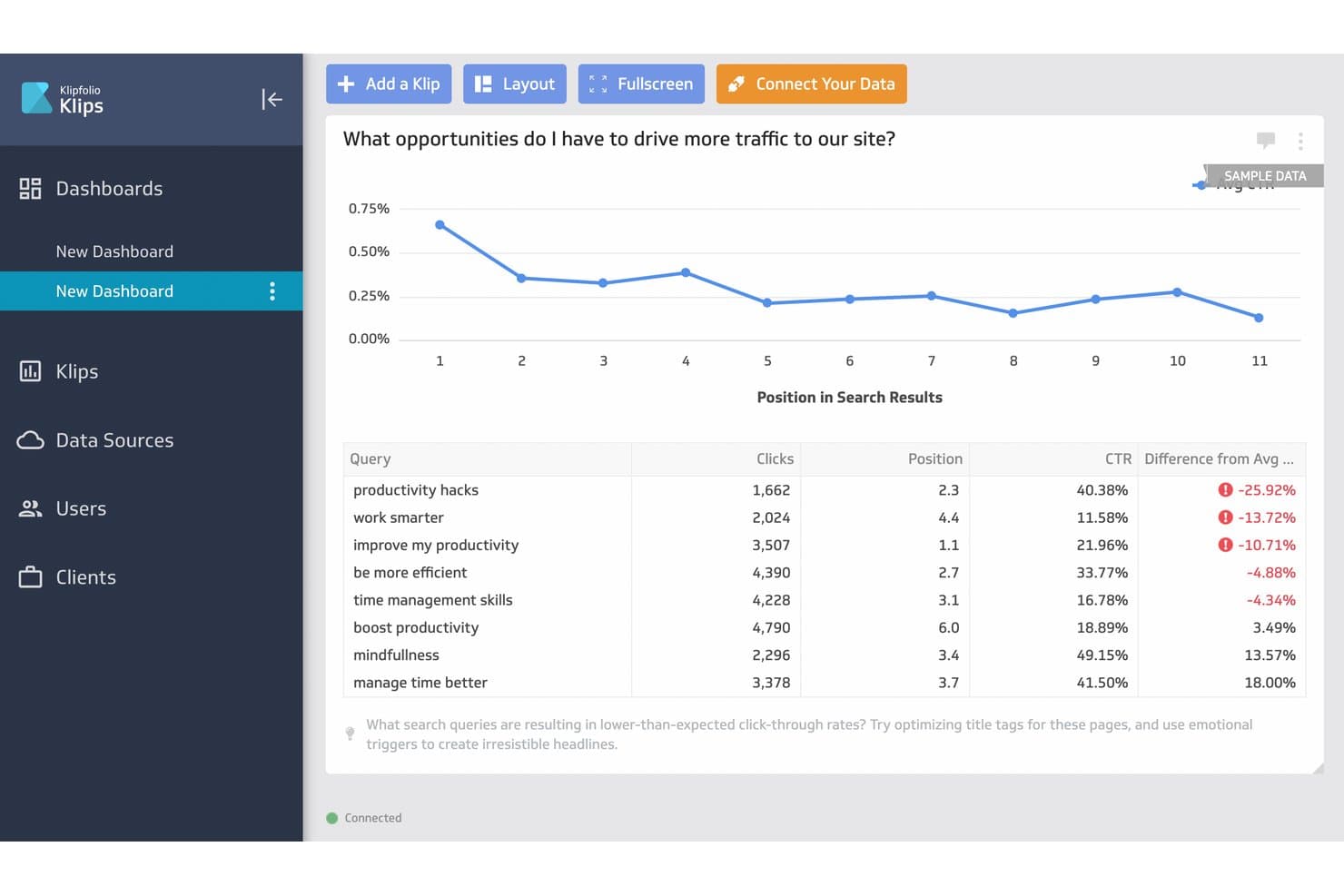
Klipfolio surfaces low-CTR queries to help users improve search traffic. Klipfolio is a cloud-based analytics platform for marketers who need to build custom dashboards using data from multiple sources, making it easier to track KPIs and campaign results in one place.
Who Is Klipfolio Best For?
Klipfolio is a strong fit for marketing teams and agencies that need to consolidate data from multiple channels into interactive dashboards.
Why Klipfolio Is a Good Whatagraph Alternative
I picked Klipfolio as a standout alternative because I can build custom dashboards using formulas across multiple data sources, not just blend preset metrics. In practice, this helps my team track cross-channel KPIs and tailor visualizations to match even the most complex marketing reporting needs.
Klipfolio Key Features
- Pre-built data connectors: Connect to hundreds of marketing and analytics platforms without custom development.
- Scheduled data refresh: Set automatic intervals for data updates so dashboards stay current.
- Custom user roles and permissions: Control who can edit, view, or share dashboards within your workspace.
- White label options: Brand dashboards and reports with your own logo and colours for client-facing use.
Klipfolio Integrations
Klipfolio offers 100+ native integrations, including Google Analytics, Facebook Ads, HubSpot, Salesforce, Google Sheets, Slack, SQL databases, Dropbox, Shopify, Xero, and QuickBooks, with an API available for custom integrations. It also connects with Zapier.
Pros and Cons
Pros:
- Connects unstructured data sources
- Offers dynamic data filtering
- Lets you write formulas for custom KPIs
Cons:
- Limits cross-channel blending
- No templates for ready-to-use reports
Learn more about Klipfolio: Best for structuring data for analytics tools
- Free demo available
- Pricing upon request
Visit WebsiteCustomer Rating:4.5/5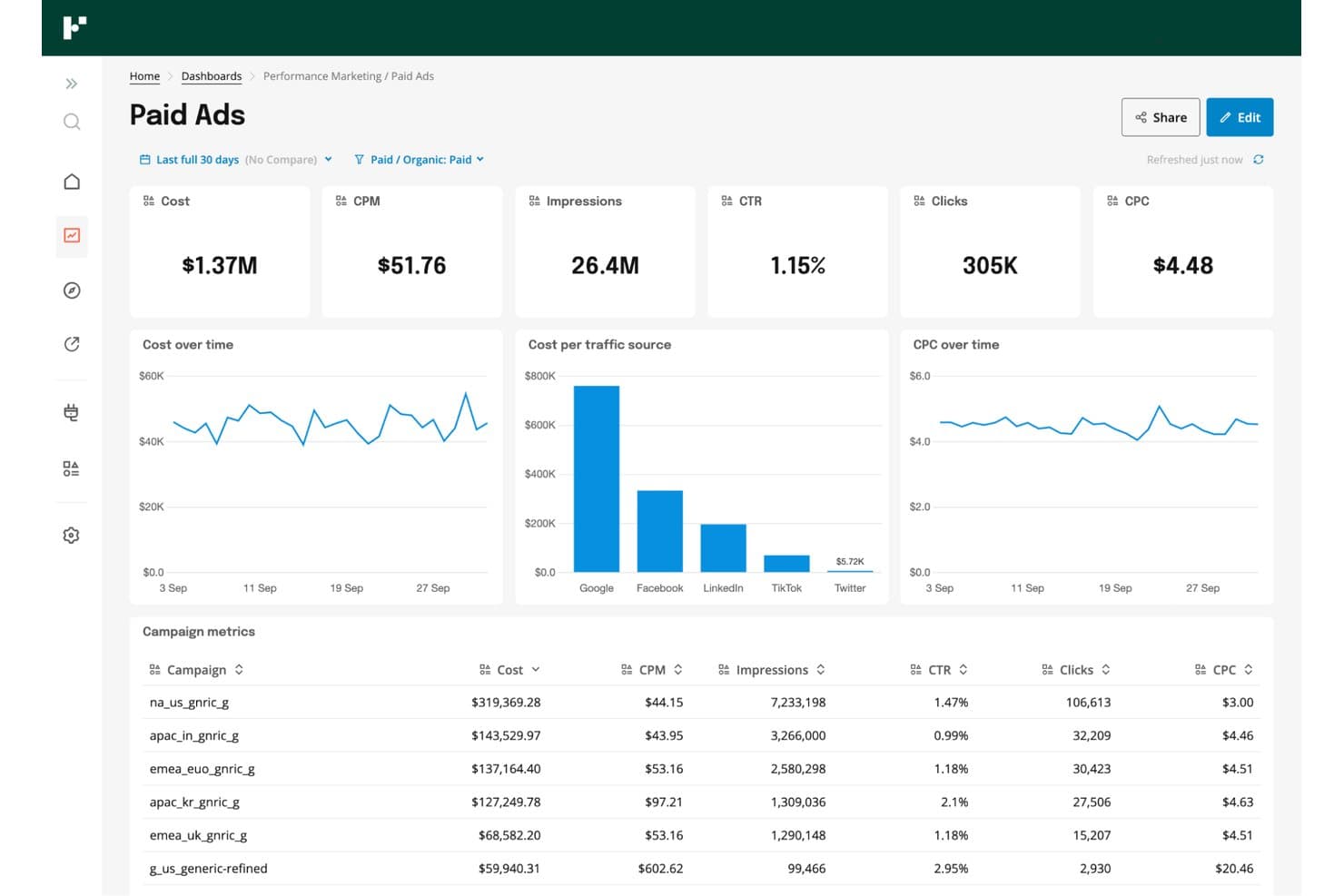
Funnel centralizes paid ads metrics across channels in one dashboard. Funnel is a data integration platform designed for marketers and analytics teams who need to connect, centralize, and prepare marketing data from multiple sources to support better reporting, campaign optimization, and spend analysis across all channels.
Who Is Funnel Best For?
Funnel is a solid choice for marketing teams and analytics professionals at mid-sized to large companies who need to centralize and prep data from multiple channels.
Why Funnel Is a Good Whatagraph Alternative
I like Funnel because my team can centralize and organize marketing data from dozens of sources in one place without manual prep. Funnel’s data transformation and normalization tools let us structure spend and campaign data consistently for analytics platforms, making cross-channel analysis much faster and far more reliable.
Funnel Key Features
- Data connectors: Connect to hundreds of advertising, analytics, and CRM platforms without custom development.
- Scheduled data refresh: Set automatic data import schedules to keep marketing dashboards current and accurate.
- Multi-destination exports: Send prepared data to tools like Google Data Studio, Tableau, Snowflake, and spreadsheets.
- Access management: Control user permissions and manage data access for teams and individual users.
Funnel Integrations
Funnel offers native integrations with platforms like Google Analytics, Google Ads, Facebook Ads, HubSpot, Salesforce, Amazon Ads, LinkedIn Ads, TikTok Ads, Twitter Ads, and Snowflake. An API is available for custom integrations.
Pros and Cons
Pros:
- Granular user permissions for team data governance
- Prepares channel data for analytics tool exports
- Automates data normalization across multiple ad platforms
Cons:
- Does not include built-in visualization tools
- Manual setup can be time-intensive
Learn more about Funnel: Best for combining client reporting and invoicing
- 14-day free trial available
- From $75/month
Visit WebsiteCustomer Rating:4.5/5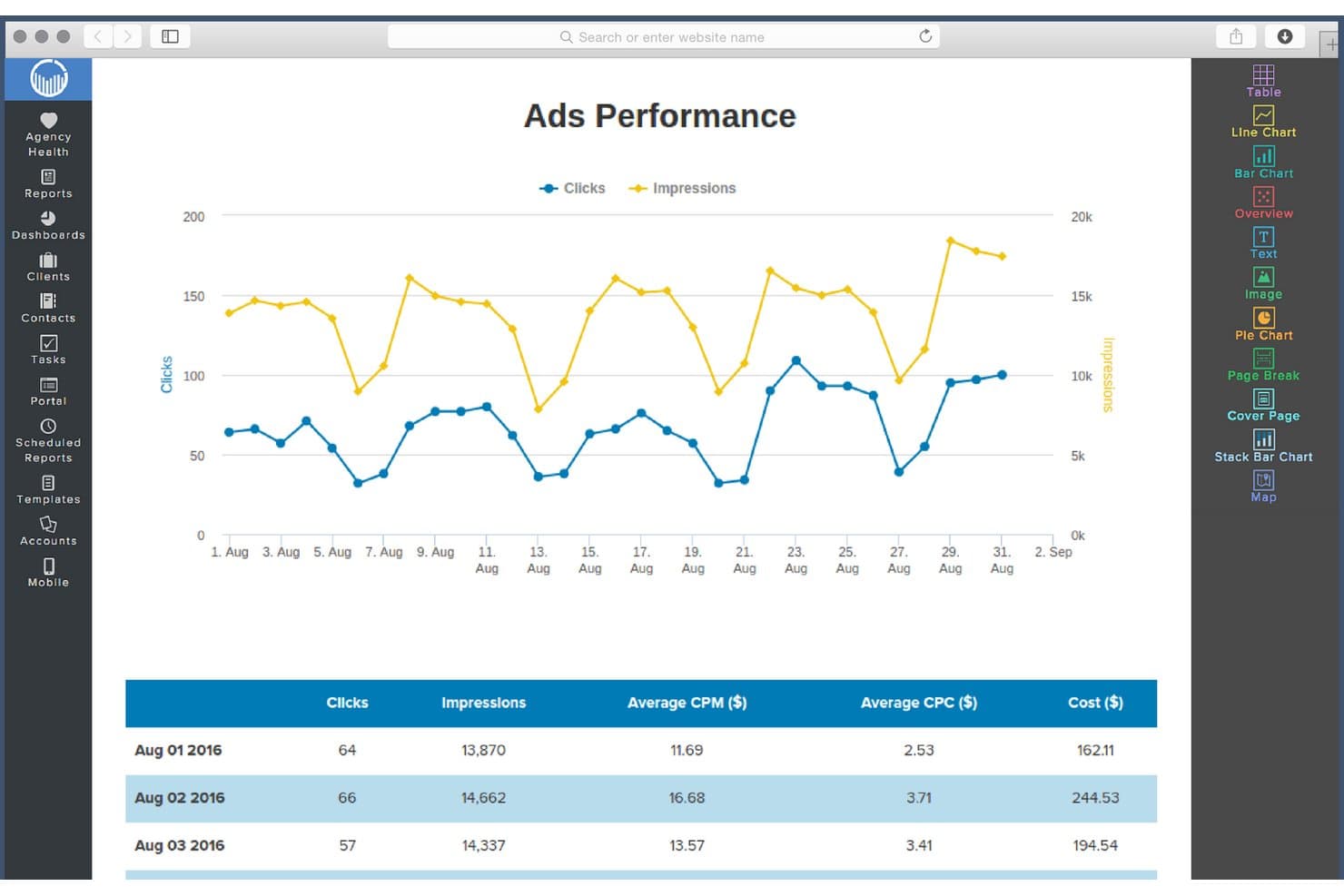
ReportGarden tracks ads clicks and impressions via interactive line charts. ReportGarden gives marketing agencies and freelancers tools for managing analytics, automating client reporting, and connecting ad accounts, helping you centralize campaign data and enhance client transparency in one place.
Who Is ReportGarden Best For?
ReportGarden is a good fit for marketing agencies and freelancers who need to centralize client analytics, reporting, and invoicing in one platform.
Why ReportGarden Is a Good Whatagraph Alternative
I picked ReportGarden as one of my top Whatagraph alternatives because I can blend client reporting with invoicing in one workspace. My team uses its analytics dashboards to connect multiple ad accounts for live performance data, and we automate both report delivery and invoicing workflows for tighter campaign management.
ReportGarden Key Features
- White-label dashboards: Present data on fully branded dashboards for each client account.
- Custom report templates: Create reusable templates tailored to your reporting needs across different clients or campaigns.
- Ad platform integrations: Connect ad accounts from Google Ads, Facebook Ads, Bing, and other major platforms for unified analytics.
- Automated report scheduling: Set automated delivery schedules so recurring reports go out to clients without manual intervention.
ReportGarden Integrations
ReportGarden offers native integrations with Google Ads, Facebook Ads, Bing Ads, Twitter Ads, LinkedIn Ads, Google Analytics, and Mailchimp. An API is available for custom integrations.
Pros and Cons
Pros:
- White-label dashboards for client branding
- Offers reusable custom report templates
- Combines client reporting and invoicing workflows
Cons:
- Limited options for non-ad platform analytics
- Lacks predictive analytics capabilities
Learn more about ReportGarden: Best for syncing ad data to BI tools and warehouses
- Free trial available
- From $39/user/month (billed annually)
Visit WebsiteCustomer Rating:4.4/5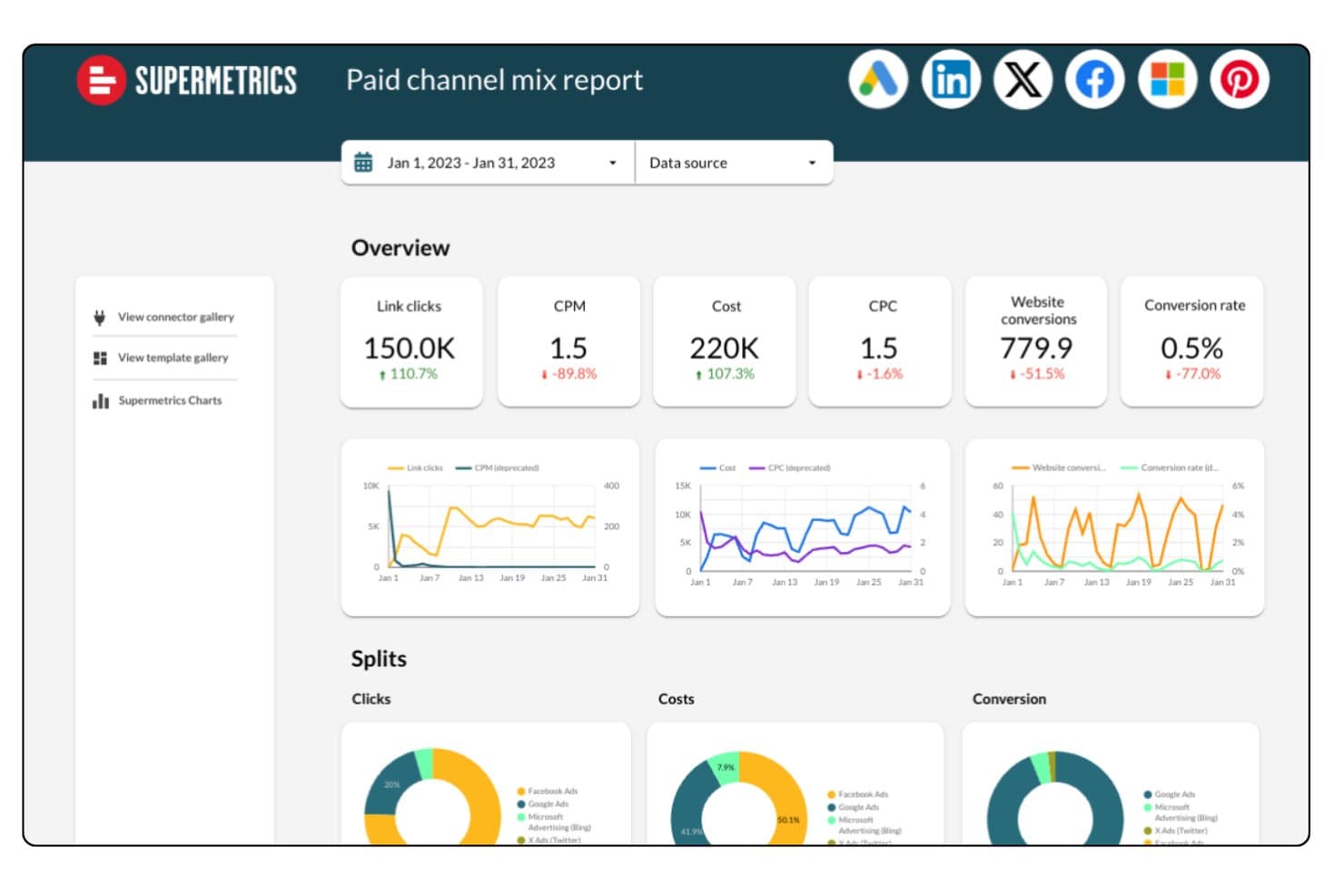
Supermetrics unifies paid channel data across platforms in one report. Supermetrics is a marketing data automation platform built for marketing and analytics teams who need to centralize ad and analytics data from dozens of sources into their existing BI tools, spreadsheets, and data warehouses.
Who Is Supermetrics Best For?
Supermetrics is a solid choice for marketing and analytics teams at mid-sized to large companies who need to centralize data from multiple ad platforms into their existing reporting tools.
Why Supermetrics Is a Good Whatagraph Alternative
I rate Supermetrics highly because my team can easily move ad and analytics data from dozens of sources into our reporting warehouse without manual exports. I like that Supermetrics centralizes channel data feeds, then pipes them directly into BI tools and spreadsheets, letting us build automated dashboards and granular performance models at scale.
Supermetrics Key Features
- Pre-built data connectors: Access a wide range of connectors for ad platforms, analytics services, and social channels.
- Custom query builder: Select and filter exactly what data you want to pull from each source.
- Scheduled data transfers: Automate regular data syncs to keep reports up to date without manual intervention.
- Data transformation tools: Clean, map, and modify data within Supermetrics before sending it to your warehouse or dashboard.
Supermetrics Integrations
Supermetrics offers native integrations with platforms like Google Sheets, Microsoft Excel, Looker Studio, BigQuery, Snowflake, Amazon Redshift, Azure Synapse, Google Analytics, Facebook Ads, Instagram Insights, and HubSpot. An API is available for custom integrations.
Pros and Cons
Pros:
- Custom queries pull only needed data
- Scheduled transfers automate regular report updates
- Data connectors cover dozens of ad platforms
Cons:
- Data sampling issues with very large queries
- Limited custom script additions
Learn more about Supermetrics: Best for enterprise performance management
- Free demo available
- Pricing upon request
Visit WebsiteCustomer Rating:4.2/5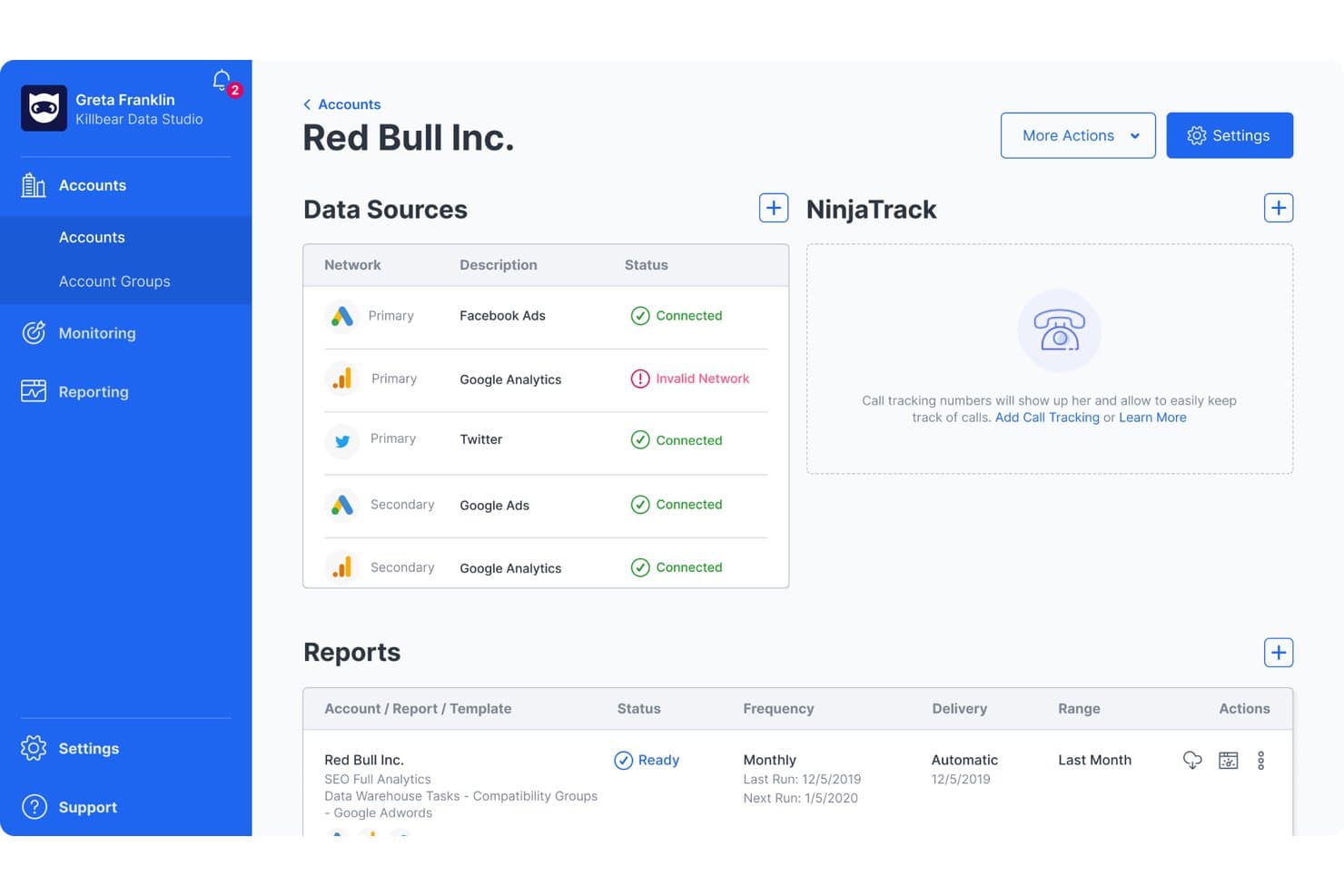
NinjaCat centralizes multi-source ad and analytics data in one account view. NinjaCat is a marketing analytics platform designed for agencies and enterprises that need to unify campaign data, automate client reporting, and manage multi-channel performance from one place.
Who Is NinjaCat Best For?
NinjaCat is a good fit for marketing teams at agencies and large enterprises that need to manage complex, multi-channel reporting and analytics.
Why NinjaCat Is a Good Whatagraph Alternative
I picked NinjaCat as one of the best options because it centralizes multi-channel campaign data, letting my team automate complex client reporting at scale. The platform's focus on enterprise performance management means I can handle large, segmented datasets for agencies and brands needing unified analytics. I use its dashboards and customizable reporting to track granular KPIs across all our digital channels.
NinjaCat Key Features
- White-label reporting: Customize reports with your agency or client branding.
- Multi-source data connectors: Pull data from search, social, and ad platforms into one dashboard.
- Scheduled automated reports: Set up recurring report delivery to clients or stakeholders.
- Call tracking integration: Link inbound call data with campaign analytics for attribution.
NinjaCat Integrations
NinjaCat offers native integrations with Google Ads, Facebook Ads, Google Analytics, Microsoft Advertising, LinkedIn Ads, CallRail, CallTrackingMetrics, Google Sheets, Facebook Insights, Google Search Console, and an API for custom integrations.
Pros and Cons
Pros:
- Merges paid, organic, and offline channels
- Supports custom, white-labeled enterprise dashboards
- Handles high-volume, multi-brand reporting needs
Cons:
- Delays with report template updates and changes
- Requires onboarding to fully configure reports
Learn more about NinjaCat: Best for agency client reporting at scale
- Free demo + 14-day free trial
- From $20/client/month (billed annually)
Visit WebsiteCustomer Rating:4.7/5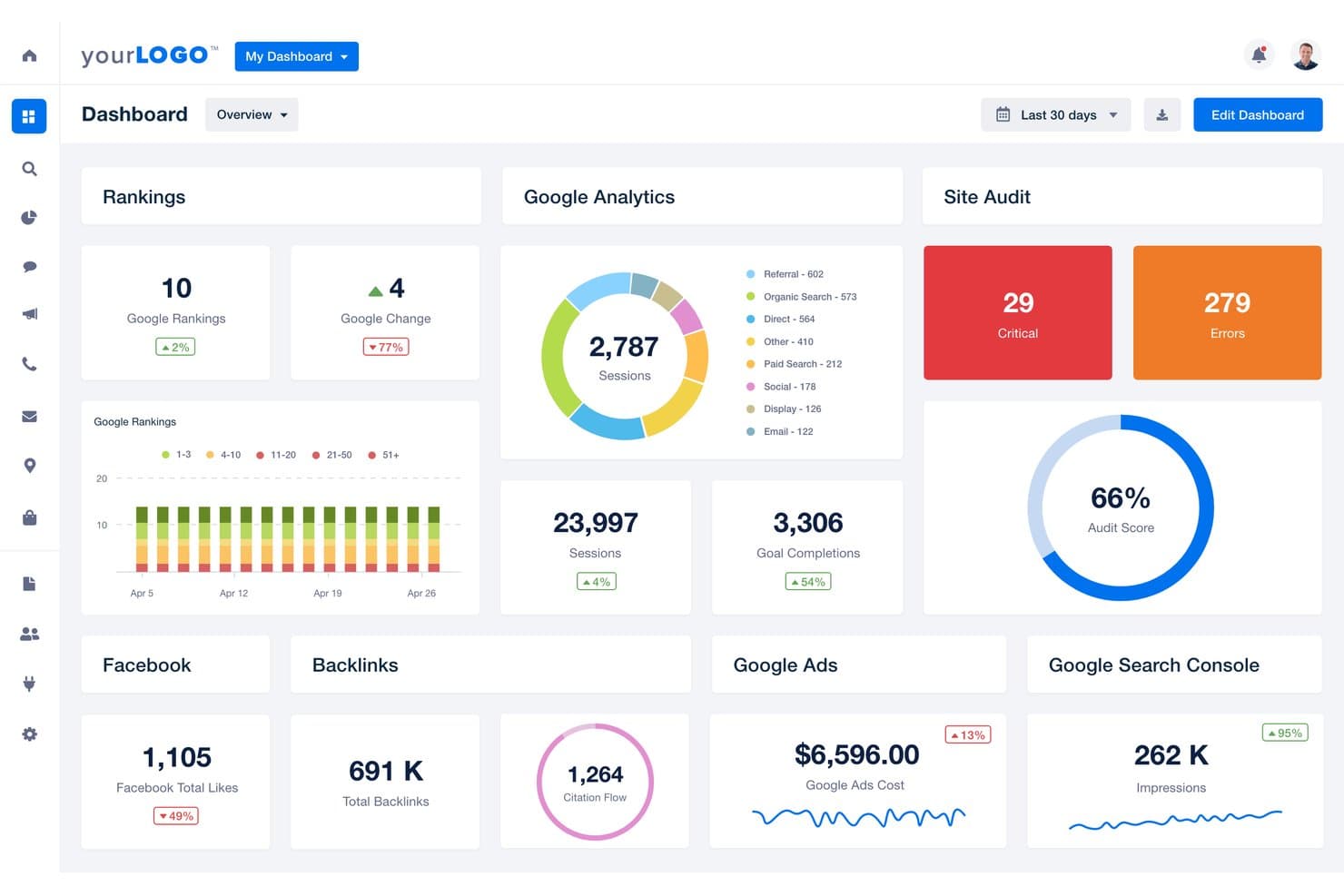
AgencyAnalytics centralizes SEO, ads, and audit data in one dashboard. AgencyAnalytics offers a unified platform for marketing agencies that need to simplify client reporting, monitor campaign KPIs, and centralize analytics across multiple channels.
Who Is AgencyAnalytics Best For?
AgencyAnalytics is a strong fit for marketing agencies that handle reporting and analytics for multiple clients across many channels.
Why AgencyAnalytics Is a Good Whatagraph Alternative
I picked AgencyAnalytics because I need to deliver polished, multi-channel reports at scale without manual data pulls. My team relies on its customizable dashboards, white-label reporting, and automated scheduling to keep hundreds of client stakeholders in the loop. Managing cross-channel KPIs for large portfolios is fast and organized with AgencyAnalytics.
AgencyAnalytics Key Features
- Drag-and-drop dashboard builder: Create custom client dashboards from pre-built widgets and templates.
- SEO audit tools: Run site audits, track keyword rankings, and monitor backlink profiles within your workspace.
- Automated client notifications: Configure instant alerts for metric changes or campaign anomalies across integrated channels.
- Report approval workflow: Review, approve, and comment on scheduled or draft reports before sending them to clients.
AgencyAnalytics Integrations
AgencyAnalytics offers 80+ native integrations, including Google Analytics, Google Ads, Facebook Ads, Facebook Pages, Instagram Insights, LinkedIn Pages, LinkedIn Ads, Twitter, Mailchimp, HubSpot, and Salesforce. An API is available for custom integrations.
Pros and Cons
Pros:
- Automates multi-channel reporting at large scale
- Custom report approvals keep accountability high
- Easy to white-label reports for each client
Cons:
- Visualizations lack advanced customization options
- No granular user permissions for dashboards
Learn more about AgencyAnalytics: Best for tracking goals alongside multi-source reports
- Free plan + 14-day free trial + free demo available
- From $71/month (billed annually)
Visit WebsiteCustomer Rating:4.5/5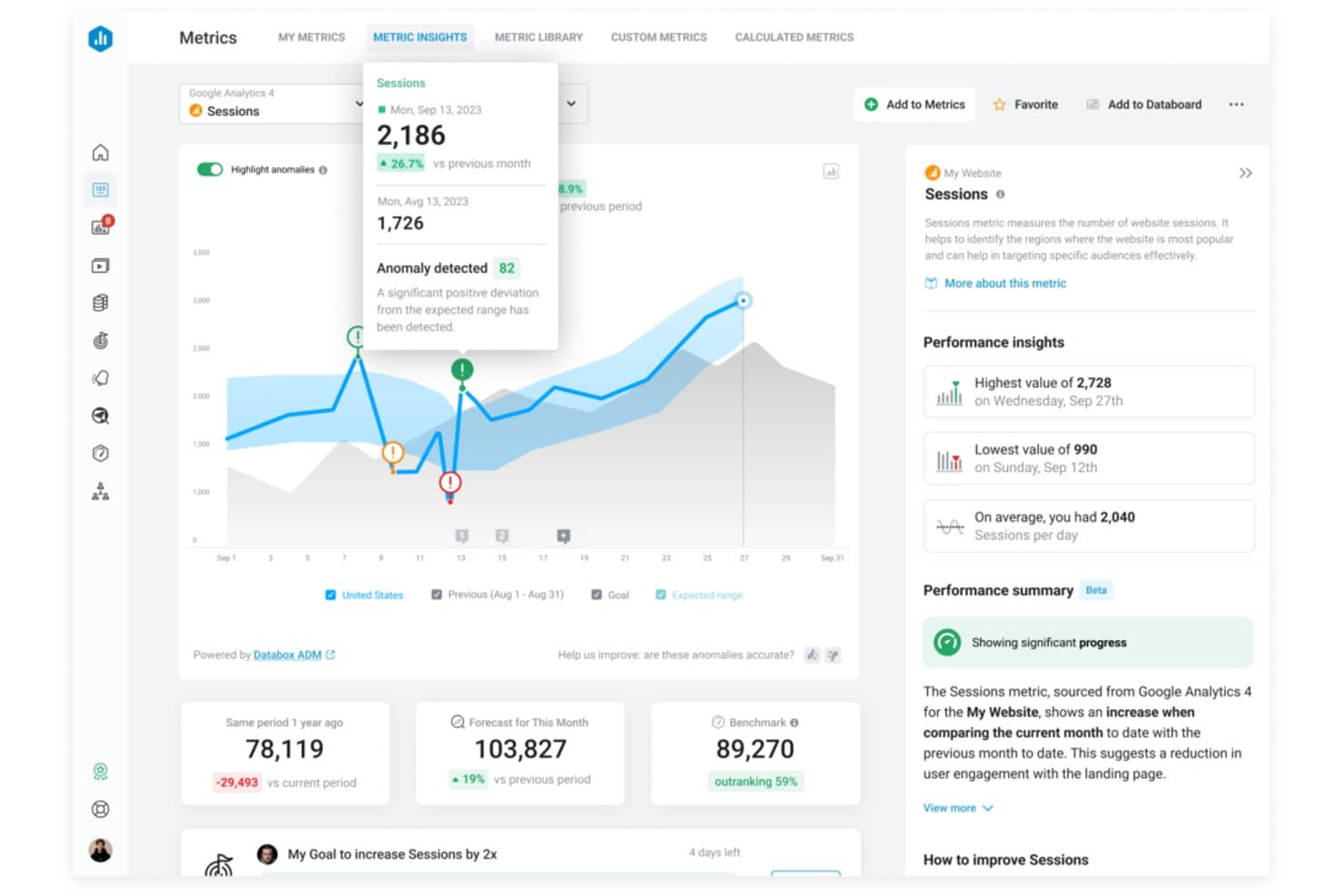
Databox flags session anomalies and surfaces AI-driven performance insights. Databox is a marketing analytics platform built for marketers and agencies who need to centralize and visualize data from multiple sources, making it easier to track campaign performance and inform strategy decisions.
Who Is Databox Best For?
Databox is a good fit for marketing agencies and teams who need to monitor multiple campaigns and data sources in one place.
Why Databox Is a Good Whatagraph Alternative
I picked Databox as one of the best because I can track progress toward specific marketing goals right alongside multi-source dashboards. I use its goal-tracking tools to set and visualize targets across data pulled in from various platforms, helping my team easily align every campaign with our broader objectives.
Databox Key Features
- Custom dashboard builder: Quickly assemble dashboards to visualize data using drag-and-drop widgets.
- Automated data syncing: Connect a wide range of marketing and business data sources for regular updates without manual imports.
- Mobile analytics app: Access and monitor reports or dashboards from Android or iOS devices on the go.
- Alerts and scorecards: Set up custom alerts or daily/weekly scorecards delivered by email or mobile notification.
Databox Integrations
Databox offers 100+ native integrations, including Google Analytics, HubSpot, Google Ads, Facebook Ads, Salesforce, Shopify, Mailchimp, LinkedIn Ads, Intercom, and Stripe. An API is available for custom integrations.
Pros and Cons
Pros:
- Mobile analytics app supports on-the-go monitoring
- Customizes dashboards using drag-and-drop widgets
- Visualizes marketing goals alongside multi-source data
Cons:
- Lacks advanced calculated metrics options
- Lacks predictive modelling features
Learn more about Databox: 8Best for enterprise BI and data visualization
Domo
- Free demo available
- Pricing upon request
Visit WebsiteCustomer Rating:4.4/5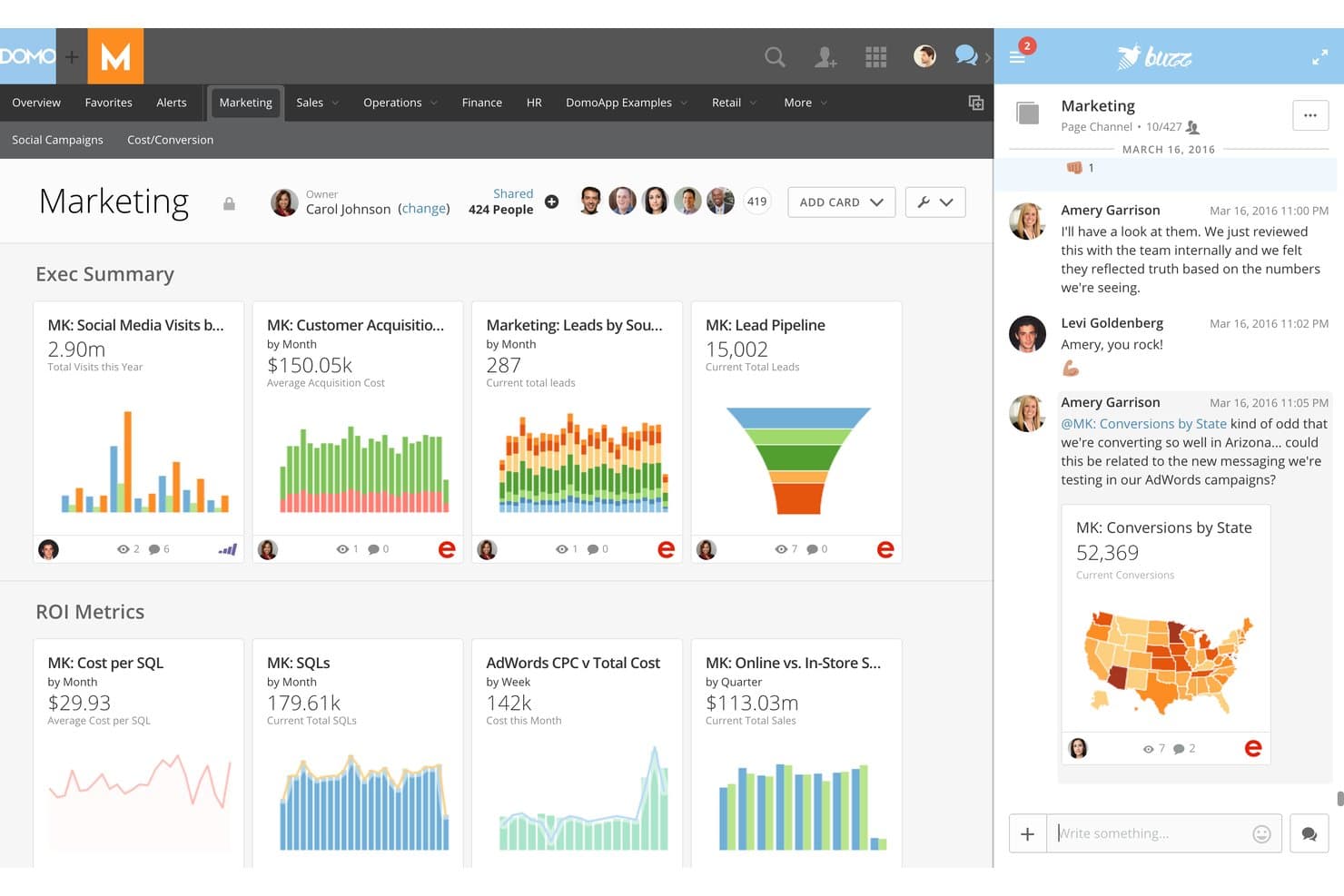
Domo enables real-time team collaboration directly within marketing dashboards. Domo is a marketing analytics platform built for enterprise teams that need to unify complex data, create advanced visualizations, and drive insights across departments. It appeals to businesses that want to bring scattered sources into one interactive environment.
Who Is Domo Best For?
Large marketing teams at enterprise organizations that need to unify and visualize complex data across multiple departments and sources.
Why Domo Is a Good Whatagraph Alternative
I picked Domo as one of the best because it lets my team unite enterprise data from hundreds of complex sources, create interactive dashboards, and share sophisticated visualizations across departments. Domo’s platform handles large-scale data blending, which is a must for aligning marketing analytics in bigger organizations.
Domo Key Features
- App store for custom solutions: Access a marketplace with pre-built apps to extend analytics and reporting.
- Data governance controls: Set user permissions and data access rules for privacy and compliance.
- Mobile analytics app: Review dashboards and alerts from any device with their dedicated mobile app.
- Automated data refresh: Schedule automated updates for data sources so dashboards always show current information.
Domo Integrations
Domo offers over 1,000 native integrations, including Salesforce, Google Analytics, Google Sheets, Facebook Ads, HubSpot, Marketo, Shopify, NetSuite, Snowflake, and Microsoft 365. An API is available for custom integrations.
Pros and Cons
Pros:
- Mobile analytics application available
- Offers a marketplace for pre-built analytics apps
- Handles large-scale, multi-source data blending
Cons:
- Visualization tools can overwhelm smaller teams
- Dashboard setup requires extensive configuration time
Learn more about Domo: Best for automating agency marketing operations
- Free demo + 14-day free trial
- Pricing upon request
Visit WebsiteCustomer Rating:4.3/5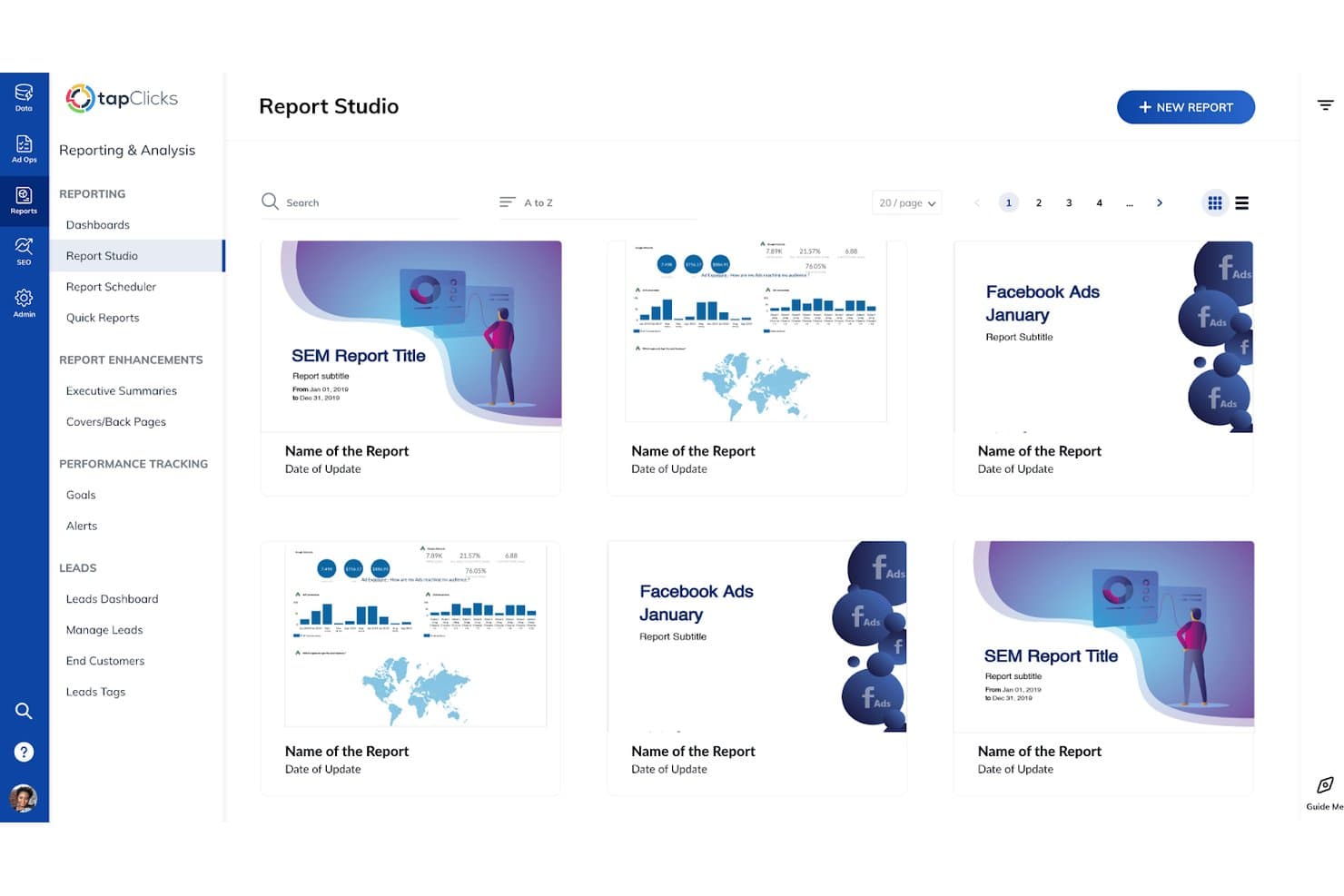
TapClicks lets users browse and manage saved reports in Report Studio. TapClicks is a unified marketing operations platform designed for agencies and multi-brand businesses that want to centralize analytics, automate reporting, and simplify managing diverse client campaigns.
Who Is TapClicks Best For?
TapClicks is a good fit for marketing agencies and multi-brand businesses that need a unified platform to manage analytics and client campaigns at scale.
Why TapClicks Is a Good Whatagraph Alternative
I picked TapClicks as one of the best because it makes it easy to automate reporting across dozens of client accounts and campaigns. I rely on its unified dashboard to centralize analytics, and my team uses built-in workflow automation to reduce manual tasks when managing multi-channel campaigns for agency clients.
TapClicks Key Features
- White-label dashboard: Offers customizable dashboards with your agency’s branding for client-facing reports.
- Data connector library: Provides integrations with hundreds of marketing, advertising, and analytics platforms.
- Role-based access control: Lets you manage permissions for team members and clients at a granular level.
- Automated data import scheduling: Allows you to schedule and automate regular data pulls from connected sources.
TapClicks Integrations
TapClicks offers native integrations with over 250 marketing, advertising, and analytics platforms, including Google Ads, Facebook Ads, HubSpot, Mailchimp, LinkedIn Ads, Google Analytics, Salesforce, Shopify, Twitter Ads, and Adobe Analytics. An API is also available for custom integrations.
Pros and Cons
Pros:
- Triggers automated workflow alerts
- Automates reporting for recurring client needs
- Unifies analytics across multiple client accounts
Cons:
- Initial setup for data connectors takes time
- Advanced dashboard customization requires onboarding
Learn more about TapClicks: 10Best for end-to-end data warehouse management
ClicData
- Free trial + free demo available
- From $265/month (billed annually)
Visit WebsiteCustomer Rating:4.4/5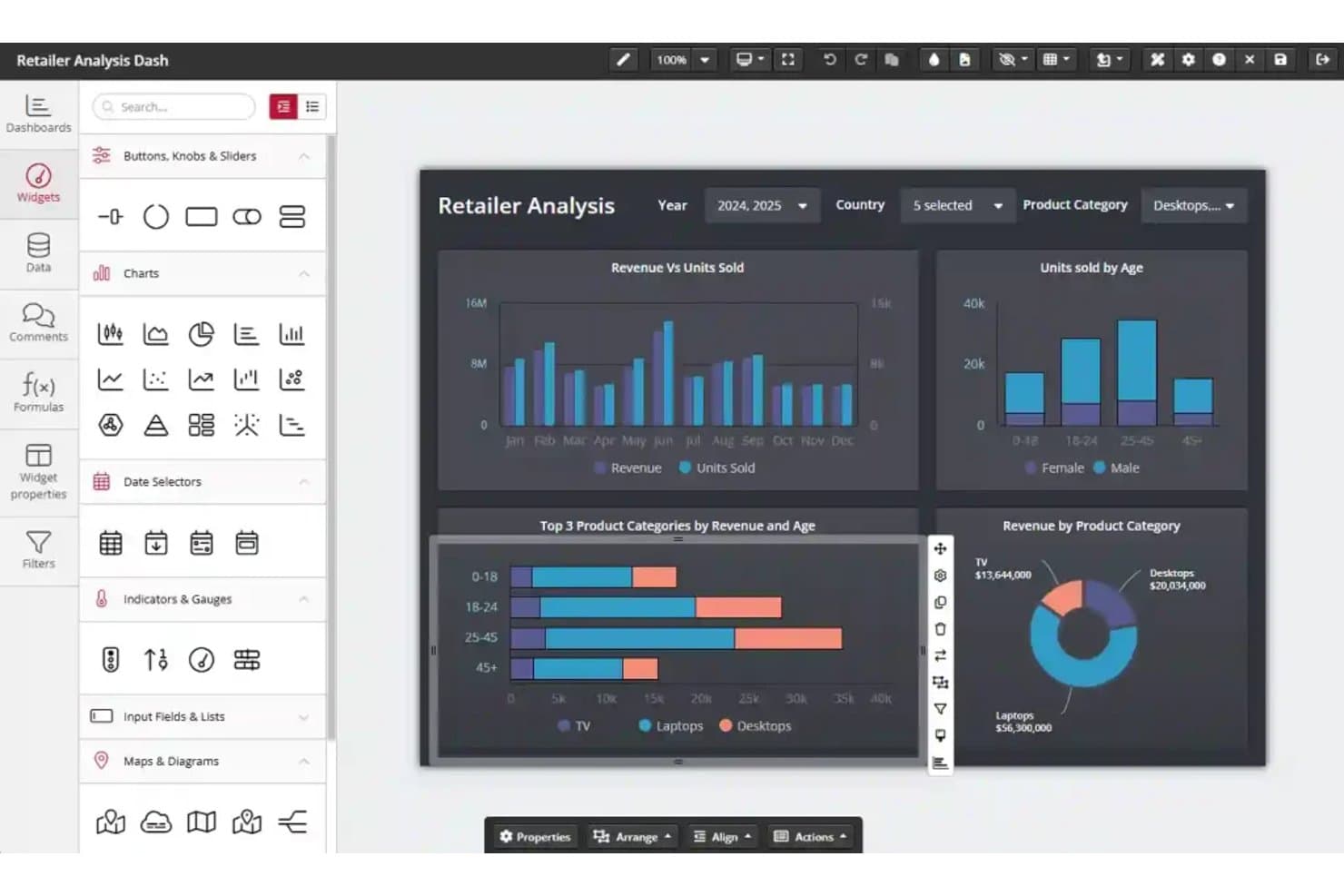
ClicData's drag-and-drop dashboard editor builds retail analytics reports. ClicData is a cloud-based analytics platform built for marketing teams and agencies that want to centralize data, automate reporting, and design custom dashboards to track campaign performance across multiple sources.
Who Is ClicData Best For?
ClicData is a solid option for marketing teams and agencies that need centralized cloud reporting across multiple data sources.
Why ClicData Is a Good Whatagraph Alternative
I picked ClicData because it brings end-to-end data warehouse management to marketing analytics. I pull campaign data from multiple platforms into one cloud hub, automate data refreshes, and build unified dashboards. That lets my team track cross-channel performance and spot trends without juggling spreadsheets or exporting reports.
ClicData Key Features
- Data connectors: Connect to over 250 sources including advertising, CRM, social, and cloud apps.
- Scheduled reporting: Set automated schedules for dashboard delivery to teams or clients.
- Data transformation tools: Clean, merge, and prep data with an in-platform drag-and-drop editor.
- User access controls: Assign user roles and permissions to tailor data visibility and dashboard access.
ClicData Integrations
ClicData offers native integrations with Google Analytics, Facebook Ads, HubSpot, Salesforce, Google Ads, MySQL, SQL Server, Dropbox, OneDrive, and Shopify. An API is available for custom integrations.
Pros and Cons
Pros:
- Automated dashboard delivery to teams and clients
- Centralizes reporting across multiple data sources
- Drag-and-drop editor for data transformation
Cons:
- Learning advanced data prep features takes time
- Mobile dashboard experience can feel limited
Learn more about ClicData:
Diğer Whatagraph Alternatifleri
İşte kısa listeme girmeyen ancak yine de göz atmaya değer bazı ek Whatagraph alternatifleri:
- 11Coupler.ioBest for blending 400+ sources into one report
- 12Zoho AnalyticsBest for blending ad, CRM, and finance data
- 13AdverityBest for warehouse-native marketing data pipelines
- 14SwydoBest for per-data-source agency reporting
- 15DashThisBest for white-label client reporting on any plan
- 16ImprovadoBest for enterprise-scale marketing data consolidation
- 17Two Minute ReportsBest for Google Sheets-based client reporting
- 18OctoboardBest for AI-annotated agency reports
- 19Salesforce Marketing Cloud IntelligenceBest for Salesforce-stack marketing intelligence
- 20PorterBest for Looker Studio agency reporting
How I Evaluate Whatagraph Alternatives
I split my evaluation into two layers: core functionality every tool in this category must offer—like multi-source integrations, automated report scheduling, and customizable dashboards—and differentiating factors like AI-powered insights, goal tracking, or data warehouse sync that separate one platform from another.
Core Functionality (Table Stakes for This List)
When I'm selecting tools for my list, I rank each one on a scale from 0 (does not offer the functionality) to 5 (excels in this area) for each core functionality listed below. I then calculate the tool's total score as a percentage, using 65% as a benchmark to help assess its overall fit for the list.
- Multi-source integrations: I check for native connectors to the channels marketing teams actually use daily—Google Ads, Meta Ads, GA4, LinkedIn Ads, and CRM platforms.
- Automated report scheduling: Recurring report delivery matters, so I evaluate whether you can set cadences, add multiple recipients, and choose formats like PDF or live links.
- Customizable dashboards: I look for drag-and-drop editors that let you build views with flexible chart types, calculated metrics, and layout control beyond rigid templates.
- White-label branding: Agency teams need client-facing polish, so custom logos, colours, branded domains, and the ability to remove vendor references all factor into my evaluation.
- Cross-channel data blending: Comparing Google Ads spend against GA4 conversions in a single widget is a real need—I evaluate how each tool joins and calculates across sources.
- Template library: Pre-built templates for common channels like Meta Ads, Google Ads, or SEO speed up onboarding, so I check both quantity and channel coverage.
Once I have a list of tools that meet the criteria, I consider what sets each platform apart.
Differentiating Factors (What Sets Vendors Apart)
Here's how I compare and contrast different vendors:
Standout Features
I evaluate whether a tool offers goal and pacing tracking with visual indicators against budgets or KPIs. This matters when an agency needs to spot underperformance mid-flight rather than after a campaign ends. I also look for data warehouse sync capabilities, since teams using BigQuery or Snowflake need blended marketing data pushed directly into their BI stack. AI-powered insights that surface anomalies and generate natural-language summaries save real time during weekly reporting cycles.
Beyond Features
Pricing predictability matters a lot when you're scaling from five clients to fifty. I look at whether a tool charges per data source, per user, or per client workspace, since that directly affects how costs grow as your agency adds accounts. Onboarding speed is another factor I evaluate closely—template libraries and guided connector wizards can cut time-to-first-report from days to minutes, which is the difference between a team adopting a tool or abandoning it. I also check how each platform handles multi-client workspace isolation, role permissions, and bulk dashboard duplication, because agencies juggling dozens of brands need those operational shortcuts daily.
Neden Bir Whatagraph Alternatifi Aramalısınız?
Whatagraph iyi bir pazarlama analiz platformu seçeneği olsa da bazı kullanıcıların Whatagraph alternatifleri aramasının çeşitli nedenleri vardır. Aşağıdaki nedenlerden biriyle Whatagraph alternatifi arıyor olabilirsiniz…
- Power BI, Looker Studio veya Data Studio üzerinden otomatik raporlamayı desteklemek gibi, raporlama yazılımınızdan daha ayrıntılı özel raporlama denetimleri istemeniz
- Veri bağlantılarınızı yeni veri hedefleri genelinde genişletmek için daha az yaygın veya niş platformlarla entegrasyonlara ihtiyaç duymanız
- Birçok müşteri genelinde büyük miktarda veri çıkarma ve veri dönüştürme işlemlerini yürütmeniz ve GDPR uyumluluğunu korurken işleme süreçlerini yönetmek için bir ETL aracına ihtiyaç duymanız
- Daha gelişmiş bir pazarlama istihbaratı platformu için daha güçlü veri ambarı veya BI aracı bağlantılarına ihtiyaç duymanız
- Ajansınız büyüdükçe daha esnek fiyatlandırma aramanız
- Daha iyi erişim denetimlerine veya birden fazla müşteriyi yönetme özelliklerine ihtiyaç duymanız
Bunlardan herhangi biri size uyuyorsa doğru yere geldiniz. Listemde, Whatagraph ile ilgili bu zorluklarla karşılaşan ve alternatif çözümler arayan ekipler için daha uygun çeşitli pazarlama raporlama platformu seçenekleri bulunuyor.
Whatagraph’ın Temel Özellikleri
Whatagraph'ın sunduğu alternatif çözümlerin tekliflerini karşılaştırmanıza ve kıyaslamanıza yardımcı olacak bazı temel özellikleri aşağıda bulabilirsiniz:
- Çok kaynaklı entegrasyonlar: Whatagraph'ı çok çeşitli pazarlama platformlarına, reklam ağlarına, web analizi araçlarına ve CRM sistemlerine bağlayarak tüm kampanya ve performans verilerinizi tek bir yerde toplayabilir ve birleşik raporlama gerçekleştirebilirsiniz.
- Otomatik rapor planlama: Raporların paydaşlara, müşterilere veya ekip üyelerine otomatik olarak gönderilmesi için özel zamanlamalar belirleyebilir, manuel çabayı azaltabilir ve kampanya ilerlemesiyle ilgili güncellemelerin zamanında iletilmesini sağlayabilirsiniz.
- Özelleştirilebilir panolar: Sürükle ve bırak bileşenleri, hesaplanan metrikler ve anlaşılır veri görselleştirmeleri kullanarak etkileşimli panolar oluşturabilir, böylece her hedef kitle için en önemli KPI'lara ve verilere odaklanabilirsiniz.
- Beyaz etiketli markalama: Ajansınızın logosunu, marka renklerini ve özel alan adlarını ekleyebilir, beyaz etiketli raporlama sayesinde Whatagraph referanslarını kaldırabilir ve marka kimliğinizle uyumlu, özenli ve profesyonel raporlar ile panolar sunabilirsiniz.
- Kanal çaprazı veri harmanlama: Google Ads harcamalarını Meta Ads dönüşümleriyle ilişkilendirmek gibi farklı pazarlama kanallarındaki metrikleri tek bir bileşen veya pano içinde doğrudan veri harmanlama kullanarak birleştirip karşılaştırabilir ve kampanyaların birlikte nasıl çalıştığını ortaya çıkarabilirsiniz.
- Şablon kitaplığı: Google Ads raporları, SEO performansı veya sosyal medya analizi gibi yaygın kullanım alanları için hazırlanmış şablonlardan oluşan bir koleksiyona erişebilir ve yeni müşteri raporlarını hızlıca başlatabilirsiniz.
- Canlı müşteri panoları: Müşteriler veya yöneticilerle dinamik, gerçek zamanlı panolar paylaşabilir, böylece yeni dosya dışa aktarımlarına ihtiyaç duymadan en güncel kampanya verilerine her zaman erişmelerini sağlayabilirsiniz.
- Role dayalı erişim denetimleri: Ekip üyeleri veya müşteriler için izinler belirleyerek belirli raporları ve panoları kimlerin düzenleyebileceğini, görüntüleyebileceğini veya paylaşabileceğini tanımlayabilir ve veri güvenliğini ve denetimini koruyabilirsiniz.
- Hesaplanan metrikler: Pazarlama platformlarınızda yerel olarak bulunmayan metrikler için özel formüller oluşturabilir, böylece benzersiz KPI'ları raporlayabilir veya harmanlanmış performans göstergelerini izleyebilirsiniz.
- Planlanmış veri yenileme: Otomatik eşitleme aralıklarıyla verilerinizin güncel kalmasını sağlayabilir, böylece her pano ve raporun entegre kaynaklardan alınan en son sonuçları her zaman yansıtmasını sağlayabilirsiniz.
Whatagraph Alternatiflerinin Maliyetleri ve Fiyatlandırması
Whatagraph alternatiflerini seçmek, mevcut çeşitli fiyatlandırma modellerini ve planları anlamayı gerektirir. Maliyetler özelliklere, ekip büyüklüğüne, eklentilere ve daha fazlasına göre değişir. Aşağıdaki tabloda Whatagraph alternatifi çözümlerde yaygın olarak sunulan planlar, ortalama fiyatları ve tipik olarak dahil edilen özellikler özetlenmiştir:
Whatagraph Alternatifleri için Plan Karşılaştırma Tablosu
| Plan Türü | Ortalama Fiyat | Yaygın Özellikler |
| Ücretsiz Plan | $0 | Temel entegrasyonları destekler, sınırlı sayıda pano sunar, standart rapor şablonları sağlar ve temel paylaşım olanağı sunar. |
| Kişisel Plan | $20-$50/kullanıcı/ay | Daha fazla entegrasyon içerir, bazı pano özelleştirmeleri ekler, planlanmış raporlamayı destekler ve şablon kitaplıklarına erişim sağlar. |
| İşletme Planı | $50-$150/kullanıcı/ay | Gelişmiş çok kaynaklı entegrasyonlar sunar, beyaz etiketli markalamayı etkinleştirir, kanal çaprazı veri harmanlama olanağı sağlar, gelişmiş planlamayı destekler ve role dayalı izinler sunar. |
| Kurumsal Plan | $150-$400+/ay | Sınırsız entegrasyon sunar, gelişmiş özel metrikler sağlar, veri ambarı eşitlemesi sunar, birden fazla müşteri çalışma alanını destekler ve ayrıcalıklı kurulum ile destek hizmetlerini içerir. |