

Marka varlıklarını yönetmek, pazarlama yöneticileri için baş ağrısına dönüşebilir. Tutarlılığı korumaya çalışırken logolar, görseller ve belgelerle aynı anda ilgilenmeniz gerekir. Marka varlık yönetimi yazılımı (BAM yazılımı), her şeyi tek bir merkezi konumda düzenleyerek işinizi kolaylaştırabilir ve zamandan tasarruf etmenizi sağlayabilir.
Bu araçları test edip inceledim ve sizin ve ekibiniz için gerçekten önemli olan noktalara odaklandım. Amacım, mevcut en iyi seçeneklere tarafsız bir bakış sunmak. Bu makalede, her biri kendine özgü güçlü yönleri açısından değerlendirilen en iyi seçimlerimi bulacaksınız.
Why Trust Our Software Recommendations
6,700+
Reviews
20
Industry experts
16+
Evaluation factors
14
Years
Our team has been testing and reviewing software since 2012. As marketing leaders ourselves, we know how difficult—and important—it is to choose the right software.
For this guide, we evaluated tools using hands-on testing and independent research, scoring tools using our selection criteria.
Our reviews reflect our human editorial judgment, not a sales pitch.
Expert reviewers:
 Gui DrusinaCreative Director
- Shriya GhateSenior Marketing Lead
 Amanda JacquesMarketing Ops Leader

Marka Varlık Yönetimi Yazılımı Karşılaştırma Tablosu
Bu karşılaştırma tablosu, en iyi marka varlık yönetimi yazılımı seçimlerimin fiyatlandırma ayrıntılarını özetlemektedir:
Sorted by: Default
| Tool | Starting Price | Website | |
|---|---|---|---|
Best for AI-driven metadata tagging | 4.4 out of 5 | Pricing upon request Not available | Website |
Best for cloud storage | 4.6 out of 5 | Pricing upon request Free demo available | Website |
Best for maintaining brand consistency | 4.5 out of 5 | $12/user/month Free plan available; 7-day free trial | Website |
Best for end-to-end project collaboration | 4.6 out of 5 | Pricing upon request Not available | Book Demo |
Best with unlimited users on every plan | 4.8 out of 5 | $99/month Free plan + 14-day free trial + demo available | Website |
Best for brand assets with built-in rules | 4.6 out of 5 | $80/month + $16/user/month 30-day free trial + free demo available | Website |
Best for creative approvals | 5.0 out of 5 | $39/user/month Free plan available | Website |
Best for design teams | Not rated | Pricing upon request Free demo available | Website |
Best for integration capabilities | Not rated | Pricing upon request Free demo available | Website |
Best for brand guidelines | Not rated | Free Free | Website |


En İyi Marka Varlık Yönetimi Yazılımı İncelemeleri
Aşağıda, kısa listeme giren en iyi marka varlık yönetimi yazılımlarının ayrıntılı özetlerini bulabilirsiniz. İncelemelerimde, her aracın temel özelliklerine, artılarına & eksilerine, entegrasyonlarına ve ideal kullanım alanlarına ayrıntılı bir bakış sunarak sizin için en iyisini bulmanıza yardımcı oluyorum.
 Best for AI-driven metadata tagging
- Not available
- Pricing upon request
Visit WebsiteCustomer Rating:4.4/5
Papirfly brand portal centralizes brand guidelines, assets, and campaign creation in one interface. For those looking for a brand asset management solution that prioritizes brand consistency and compliance, Papirfly is a strong option. The platform is built for organizations that need to manage and distribute brand materials efficiently, from logos to marketing templates, while making sure every asset aligns with their brand identity. Its focus on brand-critical assets, along with AI-driven tools and compliance management, helps address the challenge of maintaining brand integrity across global teams.
Why I Picked Papirfly
I chose Papirfly for its ability to centralize brand management with features like AI-driven metadata tagging and customizable brand portals. These tools let your team categorize assets based on specific needs and deliver brand guidelines in a structured, accessible way. Its compliance management is another key feature, ensuring that assets meet regulatory standards and reducing the risk of non-compliance. Together, these capabilities make Papirfly a solid choice for teams that need a focused brand asset management platform.
Papirfly Key Features
In addition to its core functionalities, I also found the following helpful:
- Campaign Management: Enables you to plan, execute, and monitor marketing campaigns while maintaining brand consistency.
- Approval Workflows: Streamlines the review process with customizable workflows to ensure all assets meet brand standards before release.
- Digital Asset Library: Provides a secure, centralized repository for storing and managing brand assets.
- User Permission Controls: Allows you to set role-specific access to ensure that only authorized users can modify or distribute brand materials.
Papirfly Integrations
Native integrations are not currently listed by Papirfly.
Pros and Cons
Pros:
- Centralized campaign performance analytics
- Built-in enterprise design templates
- AI-powered asset search functionality
Cons:
- May require onboarding for templates
- Limited publicly listed integrations
Learn more about Papirfly:

MediaValet offers secure, scalable cloud storage for brand assets. MediaValet is a digital asset management platform designed for teams that require extensive cloud storage capabilities for their brand assets. It offers secure and scalable storage solutions tailored for businesses with large volumes of digital content.
Why I picked MediaValet: MediaValet provides extensive cloud storage, ideal for teams managing large amounts of digital assets. It offers high-level security features to protect your valuable content. The platform's scalability ensures it can grow with your business needs. Additionally, it provides easy access and sharing capabilities, making collaboration straightforward for your team.
Standout features & integrations:
Features include advanced security measures to keep your assets safe. Scalable storage options accommodate growing digital content needs, ensuring you always have space. Easy access and sharing capabilities make collaboration simple and efficient for your team.
Integrations include Adobe Creative Cloud, Microsoft Office 365, Slack, Salesforce, WordPress, Google Workspace, Dropbox, Hootsuite, SharePoint, and Canva.
Pros and Cons
Pros:
- Supports large file uploads
- Simple access and sharing
- Scalable with business growth
- High-level security features
- Extensive cloud storage
Cons:
- Customization options are basic
- Requires a stable internet connection
- Limited offline access
- May require training for new users
- Initial setup can be complex
Learn more about MediaValet: 3Best for maintaining brand consistency
Marq
- Free plan available; 7-day free trial
- From $12/user/month
Visit WebsiteCustomer Rating:4.5/5
marq showcases brand asset management tools. marq is a brand enablement software that helps teams create, customize, and share branded content. It offers tools to maintain brand consistency and manage content efficiently across various industries.
Why I Picked marq: I picked marq for its robust template creation that lets you lock elements like logos and fonts, ensuring brand consistency across all assets. Its smart fields automate data population, saving time on updates. Plus, marq’s centralized content management simplifies access to templates and assets, while its content distribution tools make publishing across multiple platforms seamless.
Standout features & integrations:
Features include a self-service model that empowers your team to manage their own content requests, reducing backlog and wait times. marq also offers real-time approval processes, enabling quick reviews and approvals of designs, which is crucial for timely content deployment. Additionally, marq provides analytics that offer insights into how your branded content is performing, allowing you to make data-driven decisions.
Integrations include Bynder, PhotoShelter, Flowcode, CANTO, Brandfolder, Acquia, HubSpot, Asana, Google Sheets, and Slack.
Pros and Cons
Pros:
- Offers custom page sizes and easy template creation
- Centralized storage of brand assets
- Intuitive drag-and-drop editor
Cons:
- May come with additional setup costs
- No mobile app
Learn more about Marq: Best for end-to-end project collaboration
- Not available
- Pricing upon request
Visit WebsiteCustomer Rating:4.6/5
Screendragon marketing dashboard summarizing budget allocation, brand spend performance, capacity vs. demand, cycle time, and project health. Screendragon is a no-code workflow management platform built for enterprise marketing and agency teams that combines project management, digital approvals, resource planning, brand asset libraries, and budget tracking in a single system.
Who Is Screendragon Best For?
Screendragon is well-suited for enterprise marketing teams, in-house agencies, and large creative departments that manage high volumes of complex, multi-stakeholder projects.
Why I Picked Screendragon
I picked Screendragon as one of the best because it covers the full arc of brand asset work, from brief intake to final approval, without handing off to a separate tool. What I find genuinely useful is the AI-powered briefing and intake system: adaptive forms capture brand requests with built-in business rules, so projects start with the right context before a single asset is created. From there, automated approval workflows route content through legal, regulatory, and brand checkpoints, with Compliance and Proofing AI Agents reducing the manual review load at each stage.
Screendragon Key Features
- Brand asset library: Store, tag, and organize brand assets with custom metadata, filters, and controlled access permissions including expiry dates tied to usage rights.
- Version control: Track every iteration of a brand asset with a full audit trail, so teams always know which version is current and who made changes.
- Localization toolkit management: Package and distribute brand templates and assets to regional teams with built-in rules that preserve global brand standards.
- Configurable project dashboards: Build custom views across active brand campaigns, displaying task status, deadlines, and workload data in a single snapshot.
Screendragon Integrations
Screendragon offers pre-built integrations that connect with tools teams already use, including Aprimo, HubSpot, Microsoft Power BI, Amazon S3, Sitecore, Ziflow, Brandfolder, Smartsheet, and Workato, plus connectors for Jira, Salesforce, Adobe, Google Drive, Box, OneDrive, SAP, and Microsoft 365. An In-house Connection Manager provides centralized control for monitoring and troubleshooting integrations, and a REST-based open API with OAuth 2.0 authentication is available for custom integrations.
Pros and Cons
Pros:
- Granular role-based asset access controls
- Built-in rate cards for agency billing
- Dynamic forms automate creative brief intake
Cons:
- Initial platform setup is time-intensive
- No dedicated mobile app available
Learn more about Screendragon: Best with unlimited users on every plan
- Free plan + 14-day free trial + demo available
- From $99/month
Visit WebsiteCustomer Rating:4.8/5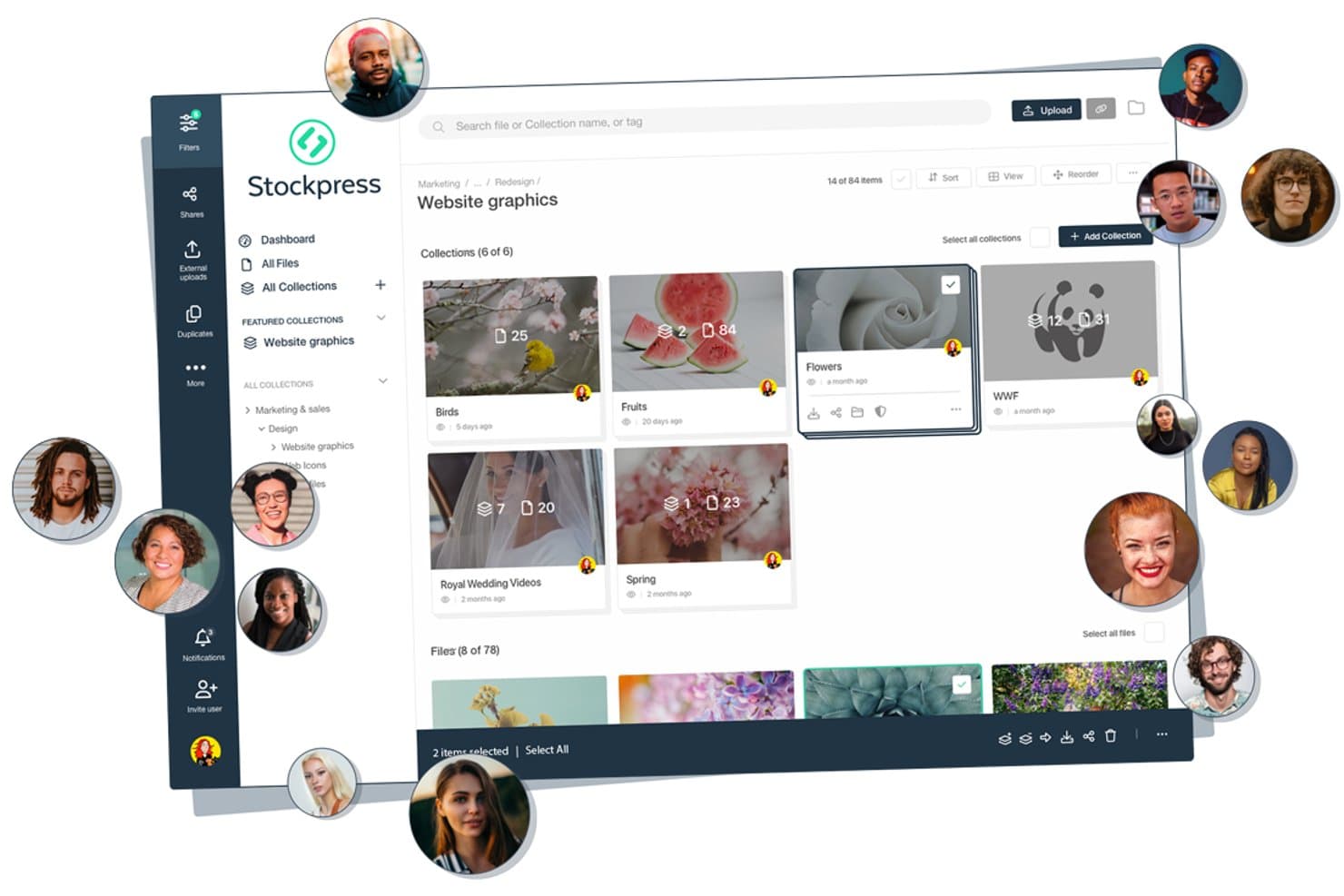
Stockpress offers a visual asset management dashboard where teams can organize files into named collections, collaborate with multiple users, and manage brand assets in a structured folder hierarchy. Stockpress is a cloud-based digital asset management platform that centralizes brand assets—logos, images, video, fonts, and documents—with AI-powered search, metadata tagging, version control, and customizable sharing and permissions.
Who Is Stockpress Best For?
Stockpress suits marketing and creative teams at growing companies that regularly collaborate with external agencies, partners, or resellers.
Why I Picked Stockpress
Stockpress earns its spot on my shortlist because the unlimited users model genuinely changes how brand teams operate. I can add every agency, reseller, and freelancer to the workspace without watching costs multiply. Features like custom user roles, guest upload pages, and password-protected share links with view tracking mean I can give each external partner exactly the right level of access, whether that's uploading raw files or downloading approved brand assets.
Stockpress Key Features
- AI-powered search and tagging: Quickly locate assets using AI-generated tags, facial recognition, and visual search technology.
- Smart collections and sub-collections: Organize assets by project, campaign, or brand with dynamic collections and unlimited nesting.
- Integrated image editing tools: Crop, resize, remove backgrounds, and apply other edits directly within the platform.
- Detailed activity tracking: Monitor file uploads, downloads, and sharing history with comprehensive asset-level reporting.
Stockpress Integrations
Stockpress offers native integrations with Adobe Creative Cloud, Figma, Canva, Box, Dropbox, Google Drive, Slack, Klaviyo, Mailchimp, WordPress, and Webflow. An API is available for custom integrations.
Pros and Cons
Pros:
- Supports all file types without limits
- AI tagging plus facial recognition search
- Unlimited users on every plan
Cons:
- Lacks automated rights enforcement workflows
- No dedicated brand guidelines microsite
Learn more about Stockpress: Best for brand assets with built-in rules
- 30-day free trial + free demo available
- From $80/month + $16/user/month (billed annually)
Visit WebsiteCustomer Rating:4.6/5
Lingo organizes brand assets into a searchable library with detailed tags, formats, and version history. Lingo is a cloud-based brand asset management software that helps your team store, organize, and distribute assets like logos, images, templates, videos and guidelines in one central place. It ties each asset to your brand guidelines so you and your team always know how and when to use the right version.
Why I picked Lingo: I picked Lingo because it manages brand assets with built-in brand rules and self-serve kits. You can build asset kits that combine files with usage context (guidelines, notes, instructions) so non-designers can access what they need without calling the creative team. Lingo also offers automatic file conversion and export control, so whenever someone needs a variant (e.g., PNG instead of SVG or a particular size), you don’t have to manually produce it.
Standout features & integrations:
Features include real-time usage insights to see what assets your team is using most (or not using at all), which helps you prune, optimize or invest in the right brand collateral. It also includes direct links, meaning when you update an asset in Lingo, every place that uses that link updates automatically — helping avoid outdated or off-brand materials.
Integrations include Figma, Dropbox, and Google Drive. You can also use the Lingo API to build your own connections.
Pros and Cons
Pros:
- Automatic file conversions save production time
- AI search removes need for manual tagging
- Unlimited kits support flexible asset grouping
Cons:
- Fewer enterprise-scale integrations available
- Lacks complex approval workflow tools
Learn more about Lingo:

Artwork Flow streamlines asset approvals for compliance and efficiency. Artwork Flow is a brand asset management tool tailored for creative teams seeking to streamline the approval process. It caters to industries like pharma, food and beverages, and cosmetics, focusing on compliance and efficiency in managing digital assets.
Why I picked Artwork Flow: Artwork Flow excels in creative approvals with its AI-powered online proofing tools that simplify the review process. Workflow automation reduces manual tasks, allowing your team to focus on creativity. Compliance automation ensures you meet industry standards without hassle. The platform's version control and smart search capabilities make managing and finding assets straightforward.
Standout features & integrations:
Features include AI-powered proofing, which enhances the review process by catching design errors early. The software's compliance automation helps you maintain industry standards effortlessly. Additionally, its version control and smart tagging make asset management efficient.
Integrations include Adobe Creative Cloud, Slack, Trello, Asana, Microsoft Teams, Google Drive, Dropbox, Box, Jira, and Monday.com.
Pros and Cons
Pros:
- Fast go-to-market speed
- User-friendly interface
- Efficient workflow automation
- Comprehensive compliance checks
- AI-powered proofing tool
Cons:
- Initial setup complexity
- Limited customization options
- Requires internet for full functionality
- Learning curve for new users
- Direct pricing not transparent
Learn more about Artwork Flow:

Frontify helps design teams manage and share brand guidelines efficiently. Frontify is a digital asset management platform designed for design teams that need to manage and collaborate on brand assets. It provides tools for creating, organizing, and sharing brand guidelines to ensure consistency across all materials.
Why I picked Frontify: Frontify caters to design teams with its intuitive interface and collaborative features. It offers customizable brand guidelines that help maintain consistency across all channels. The platform's collaborative workspace allows your team to work together efficiently, regardless of location. Its version control ensures everyone is working with the most up-to-date assets, which is vital for maintaining brand integrity.
Standout features & integrations:
Features include customizable templates that allow you to maintain brand consistency across all visual elements. The collaborative workspace supports teamwork, enabling your team to work together effectively. Version control ensures everyone is using the most current assets, which helps maintain brand integrity.
Integrations include Adobe Creative Cloud, Sketch, Slack, Microsoft Teams, Google Workspace, Dropbox, Trello, Asana, Jira, and InVision.
Pros and Cons
Pros:
- Supports remote collaboration
- Strong version control
- Collaborative workspace
- Customizable brand guidelines
- Ideal for design teams
Cons:
- Direct support may be limited
- Customization options can be complex
- Requires stable internet connection
- Limited offline functionality
- May need initial training
Learn more about Frontify:

Acquia DAM centralizes and secures brand assets for marketing teams. Acquia DAM is a digital asset management platform aimed at businesses looking to centralize and manage their brand assets efficiently. It serves marketing teams by providing tools to organize, share, and protect digital content.
Why I picked Acquia DAM: Acquia DAM excels in integration capabilities, making it ideal for teams that need to connect various systems. It supports smooth data flow across platforms, enhancing productivity. With its automated workflows, your team can streamline content management processes. Its scalable storage options accommodate growing digital content needs, ensuring you always have space.
Standout features & integrations:
Features include automated workflows that help streamline content management processes. Scalable storage options ensure you have space for all your digital content. The platform's security features protect your valuable assets, giving you peace of mind.
Integrations include Adobe Creative Cloud, Drupal, Salesforce, Microsoft Teams, Google Workspace, Slack, SharePoint, Dropbox, Box, and Marketo.
Pros and Cons
Pros:
- Efficient content management
- High-level security features
- Scalable storage options
- Automated workflows
- Strong integration capabilities
Cons:
- Customization options are basic
- Requires stable internet connection
- Limited offline functionality
- Initial setup can be time-consuming
- May require technical expertise
Learn more about Acquia DAM:

Brandy centralizes brand assets to ensure consistent team guidelines. Brandy is a brand management platform designed for teams that need to maintain consistent brand guidelines across all their materials. It offers a centralized platform for managing brand assets, ensuring that everyone in your team adheres to the same standards.
Why I picked Brandy: Brandy excels in providing clear and accessible brand guidelines to keep your team aligned. It offers customizable brand templates, which help maintain brand consistency effortlessly. The platform's centralized asset library ensures that everyone accesses the same materials, reducing discrepancies. Easy sharing options streamline workflows for your team to distribute brand assets both internally and externally.
Standout features & integrations:
Features include centralized asset storage, which keeps all your brand materials in one place. Customizable templates allow you to maintain consistency across your brand's visual elements, including social media formats. The easy sharing options facilitate the distribution of assets to stakeholders quickly and efficiently.
Integrations include Adobe Creative Cloud, Google Workspace, Slack, Microsoft Teams, Dropbox, Trello, Asana, Canva, Hootsuite, and Mailchimp.
Pros and Cons
Pros:
- Quick setup process
- Easy asset sharing
- Centralized asset library
- Customizable templates
- Clear brand guidelines
Cons:
- No mobile app available
- Basic customization options
- Requires internet access
- Not suited for large enterprises
- Limited advanced features
Learn more about Brandy:
Diğer Marka Varlık Yönetimi Yazılımları
Kısa listeme giremeyen ancak yine de göz atmaya değer bazı ek marka varlık yönetimi yazılımı seçenekleri şunlardır:
- 11EthosBest for small businesses
- 12ioMoVoBest for AI-driven insights
- 13SparkfiveBest for compliance needs
- 14FilecampBest for unlimited users
- 15Acquia DAM (Widen)Best for branded portals for asset sharing
- 16BrandfolderBest for user-friendly interface
- 17BynderBest for scalability
- 18AirBest for AI-powered asset discovery
- 194ALLPORTALBest for custom workflows
- 20RocketiumBest for marketing automation
How I Evaluate Brand Asset Management Software
I evaluate these tools in two layers: the baseline a platform must hit—like hosting live brand guidelines, not just storing PDFs—and the differentiators that set tools apart.
Core Functionality (Table Stakes For This List)
When I'm selecting tools for my list, I rank each one on a scale from 0 (does not offer the functionality) to 5 (excels in this area) for each core functionality listed below. Then, I calculate the tool's total score into a percentage. Each tool needs to achieve a minimum total score of 65% to be considered for inclusion.
- Centralized Asset Library: I look for a single, cloud-based hub where teams store logos, videos, fonts, and templates—organized into collections rather than buried in generic folder trees.
- Brand Guidelines Hosting: The platform should let you publish interactive, living guidelines—not just static PDFs—so updates to colour codes or logo usage rules go live instantly.
- Metadata & Search Capabilities: I evaluate how quickly you can find a specific asset variant, like a white-on-transparent logo in SVG format, using tags, filters, and AI-assisted search.
- Access Controls & Permissions: Role-based sharing matters here. I check whether you can grant an external agency download-only access to a campaign folder without exposing internal assets.
- Rights & Version Tracking: Expired licenses and outdated files create real risk. I look for automated expiration alerts, version history, and the ability to flag assets with usage restrictions.
- Creative Tool Integrations: Teams pull assets into Adobe Creative Cloud, Figma, Canva, or their CMS daily. I evaluate native plugin support and whether the connector keeps assets synced in real time.
Once I have a list of tools that meet the criteria, I consider what sets each platform apart.
Differentiating Factors (What Sets Vendors Apart)
Here's how I compare and contrast different vendors:
Standout Features
Brand templates are a major differentiator. I look for platforms that let non-designers customize locked-down layouts—swapping images or copy without touching logo placement or fonts. Approval workflows also matter, especially when regional teams need sign-off before publishing co-branded materials. I check whether the tool routes assets through reviewers with inline annotations. Usage analytics round things out by showing which assets get downloaded and which collect dust, helping brand managers retire underperforming content and focus on what resonates.
Beyond Features
Scalability matters a lot here. A five-person creative team and a global enterprise managing dozens of sub-brands need very different structures, so I evaluate whether a platform supports multi-brand hierarchies and scales without performance hits. Security and compliance also weigh heavily—I check for SOC 2 Type II certification and audit logging, especially when external partners access assets. Pricing transparency rounds out my review. I look at whether costs are tied to users, storage, or asset volume, and whether features like branded portals come bundled or carry add-on fees.
Marka Varlık Yönetimi Yazılımı Nasıl Seçilir?
Uzun özellik listeleri ve karmaşık fiyatlandırma yapıları içinde kaybolmak kolaydır. Kendinize özgü yazılım seçim sürecinizi yürütürken odaklanmanızı korumanıza yardımcı olmak için aklınızda bulundurmanız gereken faktörleri içeren bir kontrol listesi hazırladım:
| Faktör | Dikkate Alınması Gerekenler |
| Ölçeklenebilirlik | Yazılımın işletmenizle birlikte büyüyebildiğinden emin olun. Ekibiniz genişledikçe artan veri ve kullanıcı yüklerini kaldırabilecek çözümler arayın. |
| Entegrasyonlar | İş akışı verimliliğini artırmak için yazılımın Adobe Creative Cloud veya Slack gibi hâlihazırda kullandığınız araçlarla entegre olup olmadığını kontrol edin. |
| Özelleştirilebilirlik | İş akışlarını ve arayüzleri ekibinizin özel ihtiyaçlarına uyacak şekilde düzenlemenize olanak tanıyan bir yazılım seçin; böylece marka gereksinimlerinize uyum sağlamak kolaylaşır. |
| Kullanım Kolaylığı | Öğrenme süresini en aza indiren, kullanıcı dostu bir arayüzü tercih edin; böylece ekibiniz kapsamlı bir eğitim almadan yazılımı hızla benimseyebilir. |
| Bütçe | Finansal planlarınıza uygun olduğundan emin olmak için ek özellikler veya gelecekteki yükseltmeler de dâhil olmak üzere toplam maliyeti göz önünde bulundurun. |
| Güvenlik Önlemleri | Marka varlıklarınızı güvende tutmak için şifreleme ve erişim kontrolleri gibi güçlü veri koruma özellikleri sunan çözümlere öncelik verin. |
| Destek | Gerektiğinde zamanında yardım alabilmek için canlı sohbet veya telefon gibi kanallar da dâhil olmak üzere sunulan müşteri desteği düzeyini değerlendirin. |
| Performans | Ekibinizin varlıklara kesintisiz erişebilmesini sağlamak için yüksek güvenilirliğe ve çalışma süresine sahip yazılımları arayın. |
Marka Varlık Yönetimi Yazılımındaki Trendler
Araştırmam sırasında farklı marka varlık yönetimi yazılımı sağlayıcılarından sayısız ürün güncellemesi, basın bülteni ve sürüm günlüğü derledim. Takip ettiğim yeni trendlerden bazıları şunlar:
- Yapay zekâ destekli etiketleme: Yapay zekâ, varlıkları otomatik olarak etiketleyip kategorilere ayırarak zaman kazandırır ve manuel hataları azaltır. Bynder ve MediaValet gibi sağlayıcıların varlıkların aranabilirliğini ve düzenlenmesini geliştirmek için yapay zekâyı kullanmasıyla bu özellik giderek yaygınlaşıyor.
- Gelişmiş analizler: Artık daha fazla araç, varlık performansını ve kullanımını izlemek için analiz özellikleri sunuyor. Bu veriler, ekiplerin içerik stratejisiyle ilgili bilinçli kararlar almasına yardımcı olur. Brandfolder gibi sağlayıcılar, varlıkların nasıl ve nerede kullanıldığına dair içgörüler sunar.
- Marka tutarlılığı araçları: Tüm materyallerde tutarlı bir marka kimliği sağlamak çok önemlidir. Frontify gibi araçlar, herkesin aynı doğrultuda hareket etmesini sağlamak için marka yönergeleri ve şablonlar sunar; bu da marka bütünlüğünü korumak açısından giderek daha önemli hâle geliyor.
- Kullanıcı izinleri yönetimi: Geliştirilmiş kullanıcı izinleri, varlıklara kimlerin erişebileceği ve bunları kimlerin düzenleyebileceği üzerinde daha iyi kontrol sağlar. Bu, güvenliği korumak için hayati önem taşır ve 4ALLPORTAL gibi platformlarda geliştirilmektedir.
- Bulut tabanlı iş birliği: Gerçek zamanlı iş birliği özellikleri yükselişte; bu özellikler ekiplerin her yerden sorunsuz bir şekilde birlikte çalışmasına olanak tanır. Acquia DAM gibi çözümler, iş birliği yeteneklerini geliştirerek uzaktan çalışan ekiplerin bağlantıda kalmasını kolaylaştırıyor.
Marka Varlığı Yönetimi Yazılımı Nedir?
Marka varlığı yönetimi yazılımı; işletmelerin logolar, görseller ve videolar gibi dijital marka varlıklarını düzenlemesine, depolamasına ve yönetmesine yardımcı olan bir araçtır. Pazarlama profesyonelleri, marka yöneticileri ve yaratıcı ekipler bu araçları genellikle marka tutarlılığını korumak ve iş birliğini geliştirmek için kullanır. Yapay zekâ destekli etiketleme, gelişmiş analizler ve bulut tabanlı iş birliği gibi özellikler verimli varlık yönetimini destekler ve ekip üretkenliğini artırır. Genel olarak bu araçlar, marka varlıklarının yönetimini kolaylaştıran merkezi bir platform sunarak bunların kuruluş genelinde kolayca erişilebilir ve tutarlı şekilde kullanılmasını sağlar.
Marka Varlığı Yönetimi Yazılımının Özellikleri
Marka varlığı yönetimi yazılımı seçerken aşağıdaki temel özelliklere dikkat edin:
- Yapay zekâ destekli etiketleme: Varlıkları otomatik olarak etiketler ve kategorilere ayırır; böylece zaman kazandırır ve aranabilirliği artırır.
- Gelişmiş analizler: Varlık kullanımı ve performansı hakkında içgörüler sunarak ekiplerin içerikle ilgili bilinçli kararlar almasına yardımcı olur.
- Marka tutarlılığı araçları: Tüm materyallerin marka yönergelerine uygun olmasını sağlayarak platformlar genelinde bütünlüğü korur.
- Kullanıcı izinleri yönetimi: Varlıklara erişimi kontrol ederek güvenliği artırır, hassas fikrî mülkiyeti ve bilgileri korur.
- Bulut tabanlı iş birliği: Ekiplerin her yerden gerçek zamanlı olarak birlikte çalışmasına olanak tanıyarak iletişimi ve üretkenliği geliştirir.
- Özelleştirilebilir iş akışları: Süreçleri ekibinizin özel ihtiyaçlarına göre uyarlamanıza olanak tanıyarak operasyonel verimliliği artırır.
- Ölçeklenebilir depolama: Artan dijital içerik miktarlarını karşılayarak ihtiyacınız olan alana sahip olmanızı sağlar.
- Güvenli dosya paylaşımı: İçeriğinizi korurken yetkili kullanıcıların erişimine sunar ve veri güvenliğini sağlar.
Marka Varlığı Yönetimi Yazılımının Faydaları
Marka varlığı yönetimi yazılımını uygulamak, ekibiniz ve işletmeniz için çeşitli faydalar sağlar. Yararlanabileceğiniz bazı faydalar şunlardır:
- Geliştirilmiş marka tutarlılığı: Tüm ekip üyelerinin aynı marka yönergelerini kullanmasını sağlayarak tüm materyallerde yeknesak bir marka imajını korur.
- Geliştirilmiş iş birliği: Bulut tabanlı araçlar gerçek zamanlı ekip çalışmasını mümkün kılarak ekiplerin her yerden kolayca iş birliği yapmasını sağlar.
- Zaman tasarrufu: Yapay zekâ destekli etiketleme ve otomatik iş akışları manuel görevleri azaltarak daha stratejik çalışmalar için zaman kazandırır.
- Artırılmış güvenlik: Kullanıcı izinleri yönetimi ve güvenli dosya paylaşımı, hassas varlıkları yetkisiz erişime karşı korur.
- Daha iyi karar alma: Gelişmiş analizler varlık performansı hakkında içgörüler sunarak ekiplerin içerikle ilgili bilinçli seçimler yapmasına yardımcı olur.
- Ölçeklenebilirlik: Ölçeklenebilir depolama çözümleri işletmenizle birlikte büyüyerek varlıklarınız için gereken alana her zaman sahip olmanızı sağlar.
Marka Varlığı Yönetimi Yazılımının Maliyetleri ve Fiyatlandırması
Marka varlığı yönetimi yazılımı seçmek, mevcut çeşitli fiyatlandırma modellerinin ve planların anlaşılmasını gerektirir. Maliyetler özelliklere, ekip büyüklüğüne, eklentilere ve daha fazlasına göre değişir. Aşağıdaki tabloda, marka varlığı yönetimi yazılımı çözümlerinde yaygın olarak sunulan planlar, bunların ortalama fiyatları ve tipik özellikleri özetlenmiştir:
Marka Varlık Yönetimi Yazılımı İçin Plan Karşılaştırma Tablosu
| Plan Türü | Ortalama Fiyat | Yaygın Özellikler |
| Ücretsiz Plan | $0 | Temel depolama, sınırlı kullanıcı sayısı ve temel arama işlevi. |
| Kişisel Plan | $5-$25/ kullanıcı/ay | Geliştirilmiş depolama, bireysel kullanıcı erişimi ve temel paylaşım özellikleri. |
| İşletme Planı | $30-$75/ kullanıcı/ay | Gelişmiş analizler, ekip iş birliği araçları ve özelleştirilebilir iş akışları. |
| Kurumsal Plan | $100-$200/ kullanıcı/ay | Ölçeklenebilir depolama, gelişmiş güvenlik özellikleri ve kapsamlı entegrasyon seçenekleri. |
Marka Varlık Yönetimi Yazılımı SSS
Marka varlık yönetimi yazılımı hakkında sık sorulan soruların bazı yanıtları:
Varlık yönetimi yazılımı nasıl çalışır?
Varlık yönetimi yazılımı, tüm varlıklarınızı izlemek ve takip etmek için merkezi bir veri tabanı sağlar. Varlığın konumu, durumu ve bakım geçmişi gibi bilgilere kolayca erişebilirsiniz. Bu görünürlük, varlıkları verimli bir şekilde yönetmenize ve kullanım ile bakım hakkında bilinçli kararlar vermenize yardımcı olur.
Varlık yönetimi sektöründeki en büyük zorluk nedir?
En büyük zorluklardan biri veri yönetimi ve güvenliğini sağlamaktır. İşletmeler artan miktarda dijital varlıkla ilgilenirken bunları güvende ve düzenli tutmak kritik önem taşır. Güçlü güvenlik özellikleri ve verimli veri yönetimi araçları sunan çözümler, bu zorlukların azaltılmasına yardımcı olabilir.
Varlık yönetiminin 3 ilkesi nedir?
Temel ilkeler yaşam döngüsü yönetimi, risk yönetimi ve performans optimizasyonunu içerir. Yaşam döngüsü yönetimi, varlıkların kullanım ömürleri boyunca etkili bir şekilde kullanılmasını sağlar. Risk yönetimi varlıkların olası tehditlerden korunmasına yardımcı olur, performans optimizasyonu ise varlık verimliliğini en üst düzeye çıkarmaya odaklanır.
Marka varlık yönetimi neden önemlidir?
Marka varlık yönetimi önemlidir çünkü tüm pazarlama materyallerinde tutarlılık sağlar. Marka bilinirliği ve güveni için kritik olan birleşik bir marka imajının korunmasına yardımcı olur. Ekipler, marka varlıklarını düzenleyip kontrol ederek hatalardan kaçınabilir ve zamandan tasarruf edebilir.
Marka varlık yönetimi yazılımı iş birliğini nasıl geliştirebilir?
Bu araçlar, ekiplerin konumdan bağımsız olarak varlıklara gerçek zamanlı erişmesine ve varlıklar üzerinde çalışmasına olanak tanıyarak iş birliğini geliştirir. Bulut tabanlı depolama ve kullanıcı izin ayarları gibi özellikler, birden fazla kullanıcının varlık erişimi üzerindeki kontrolü korurken verimli bir şekilde iş birliği yapmasını sağlar.
Marka varlık yönetimi yazılımı seçerken neleri göz önünde bulundurmalıyım?
Yazılımın ölçeklenebilirliğini, entegrasyon yeteneklerini ve kullanım kolaylığını göz önünde bulundurun. Ekibinizin ihtiyaçlarıyla uyumlu olduğundan ve işletmenizle birlikte büyüyebileceğinden emin olun. İş akışı gereksinimlerinize uyacak güçlü güvenlik önlemleri ve özelleştirilebilir iş akışları sunan çözümleri tercih edin.