

Şirketinizin çevrimiçi itibarını yönetmek bunaltıcı olabilir. Bir pazarlama yöneticisi olarak müşteri yorumlarının marka imajınız için ne kadar önemli olduğunu biliyorsunuz. Olumsuz yorumlar size zarar verebilirken olumlu yorumlar güvenilirliğinizi artırabilir ve güven oluşturabilir.
Google yorum yönetimi yazılımı, müşteri geri bildirimlerini verimli bir şekilde takip etmenize, yanıtlamanıza ve analiz etmenize yardımcı olabilir. Deneyimlerime göre doğru araçlara sahip olmak bu görevi daha az göz korkutucu ve daha etkili hâle getirebilir.
Size piyasadaki en iyi yazılım çözümlerine tarafsız bir bakış sunmak için çeşitli seçenekleri bağımsız olarak test edip inceledim. Ekibinizin ihtiyaçlarınıza uygun aracı seçmesine yardımcı olacak, kapsamlı araştırmalara dayanan bir rehber bulacaksınız.
Why Trust Our Software Recommendations
6,700+
Reviews
20
Industry experts
16+
Evaluation factors
14
Years
Our team has been testing and reviewing software since 2012. As marketing leaders ourselves, we know how difficult—and important—it is to choose the right software.
For this guide, we evaluated tools using hands-on testing and independent research, scoring tools using our selection criteria.
Our reviews reflect our human editorial judgment, not a sales pitch.
Expert reviewers:
 Gui DrusinaCreative Director
- Shriya GhateSenior Marketing Lead
 Amanda JacquesMarketing Ops Leader

Google Yorum Yönetimi Yazılımları Karşılaştırma Tablosu
Bu karşılaştırma tablosu, en iyi Google yorum yönetimi yazılımı seçimlerimdeki fiyatlandırma ayrıntılarını özetlemektedir:
Sorted by: Default
| Tool | Starting Price | Website | |
|---|---|---|---|
Best for Google-only multi-location monitoring | 4.5 out of 5 | $6.99/month 24-hour free trial + free plan + free demo available | Website |
Best for multi-location Google review management | Not rated | $63/location/month Free trial + free demo available | Website |
Best for analyzing Google review sentiment | Not rated | $10/location/month Free trial + free demo available | Website |
Best for AI-powered review replies | 4.8 out of 5 | Pricing upon request Free demo available | Website |
Best for review management automation | 4.9 out of 5 | $35/month 14-day free trial + free demo available | Website |
Best for social media teams | 4.9 out of 5 | $64/month 14-day free trial available | Website |
Best for multi-channel support | 4.3 out of 5 | Pricing upon request Free demo available | Website |
Best for easy widget integration | Not rated | $29/month 7-day free trial | Website |
Best for small businesses | 4.9 out of 5 | $25/month 14-day free trial | Website |
Best for Zoho users | Not rated | $8.33/month Free plan available | Website |


En İyi Google Yorum Yönetimi Yazılımı İncelemesi
Aşağıda kısa listemde yer alan en iyi Google yorum yönetimi yazılımlarına ilişkin ayrıntılı özetlerimi bulabilirsiniz. İncelemelerim, sizin için en uygun olanı bulmanıza yardımcı olmak amacıyla her aracın temel özelliklerini, avantajlarını & dezavantajlarını, entegrasyonlarını ve ideal kullanım alanlarını ele almaktadır.
 Best for Google-only multi-location monitoring
- 24-hour free trial + free plan + free demo available
- From $6.99/month
Visit WebsiteCustomer Rating:4.5/5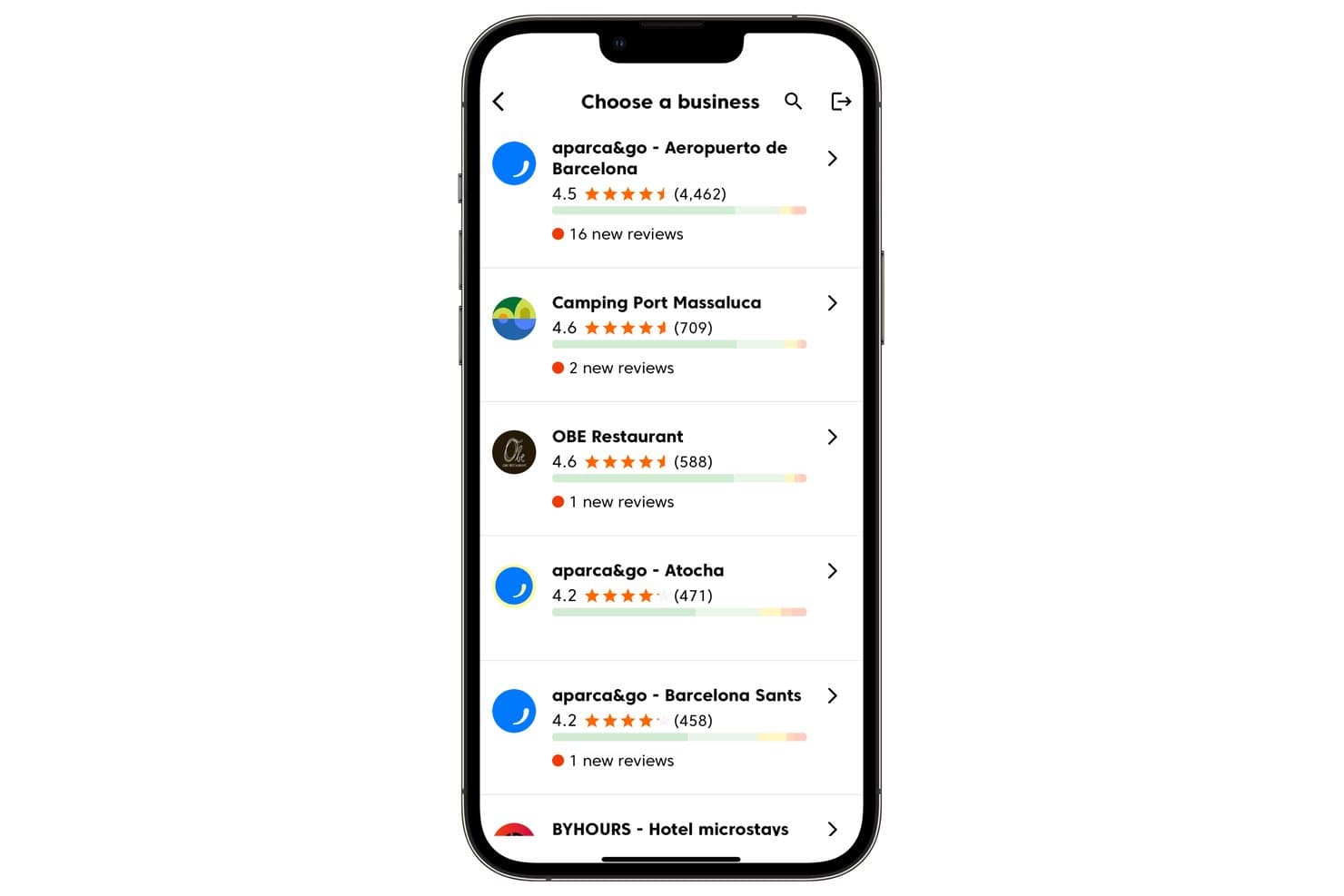
Cinquo lets users manage multiple business locations and track new reviews. Cinquo is a Google-only review management tool that centralizes multi-location monitoring, AI-powered reply automation via its CINTIA agent, trackable QR code–based review requests, and operational rating analytics across a unified mobile and desktop dashboard.
Who Is Cinquo Best For?
Cinquo is a strong fit for multi-location businesses and local SEO specialists who want deep Google-specific review insights without paying per-location fees.
Why I Picked Cinquo
Cinquo earns its spot on my shortlist because it goes deeper on Google-specific data than any multi-platform tool I've seen. I love that it calculates your true, unrounded star rating (think 4.41 vs. 4.49) and tells you exactly how many 5-star reviews you need to hit the next milestone. Add in CINTIA's per-location AI reply automation and real-time push alerts, and you've got a purpose-built monitoring setup that multi-location teams will find hard to replicate elsewhere at this price.
Cinquo Key Features
- Delegated Gmail-based user access: Team members log in with their own Gmail accounts to access Cinquo without being added as Google Business Profile managers.
- Removable review detector: Flags reviews that may violate Google's policies and surfaces them for potential removal request submission.
- Per-star-rating reply automation controls: CINTIA can be configured to auto-publish replies for specific star ratings while holding others for manual review.
- Employee-attributed QR codes: Each staff member gets a unique, trackable QR code that attributes resulting reviews to that individual in the dashboard.
Cinquo Integrations
Cinquo has a native Google Business Profile integration for real-time review, rating, and location syncing.
Pros and Cons
Pros:
- Trackable employee and location QR codes
- Delegated Gmail access keeps GBP roles secure
- Calculates unrounded Google star ratings
Cons:
- No multi-platform review monitoring
- No sentiment analysis or competitor metrics
Learn more about Cinquo: Best for multi-location Google review management
- Free trial + free demo available
- From $63/location/month (billed monthly)
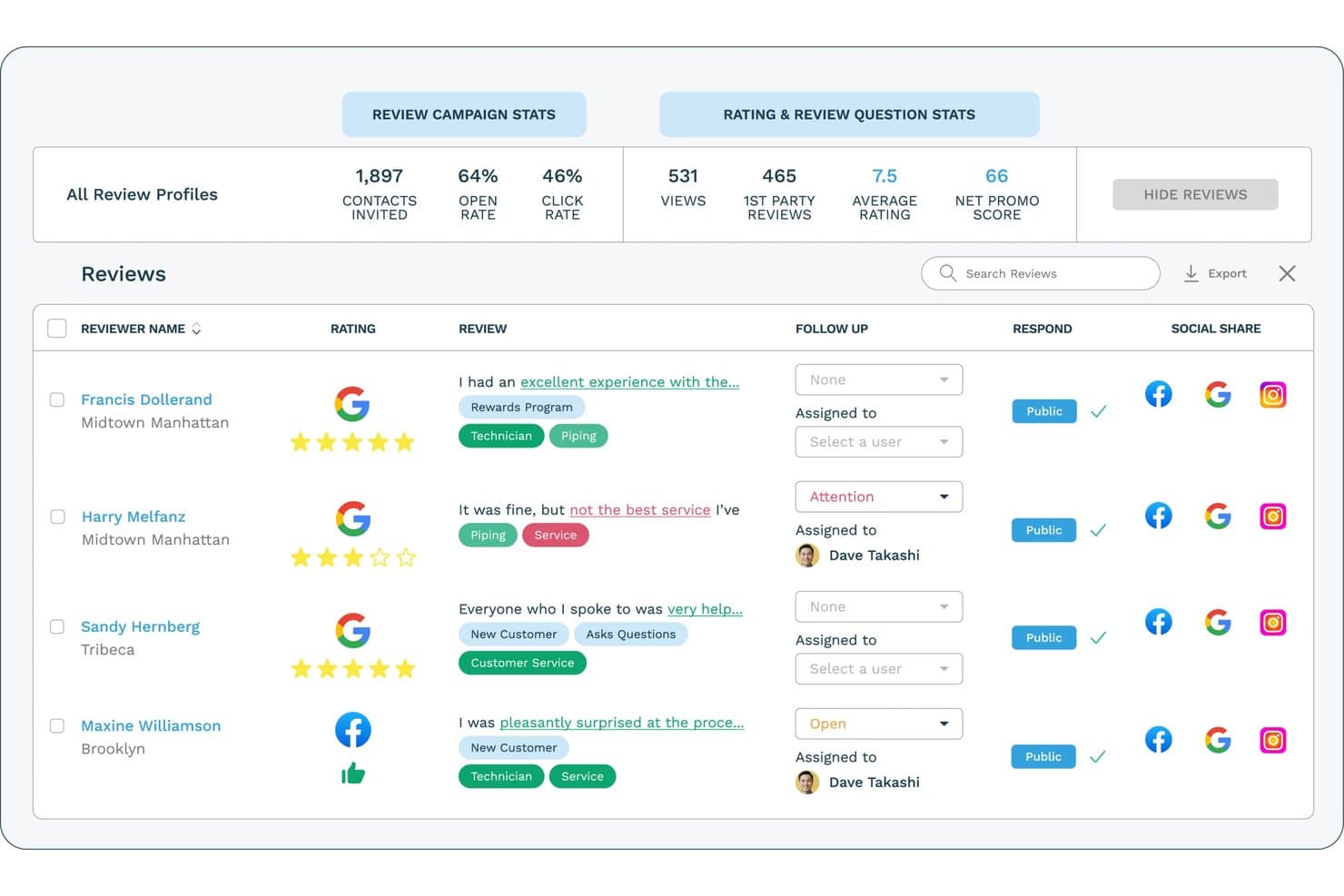
ReputationStacker lets users monitor and respond to Google reviews in one dashboard. ReputationStacker is a review management platform that automates review requests via email and text, monitors reviews across 100+ platforms, and offers AI-powered response drafting, sentiment analysis, and multi-location reporting.
Who Is ReputationStacker Best For?
ReputationStacker is a strong fit for multi-location businesses that need to manage and grow their Google reviews across many locations from a single dashboard.
Why I Picked ReputationStacker
I picked ReputationStacker as one of the best because it's purpose-built for managing Google reviews across many locations from a single dashboard. I love how location analytics lets you compare review volume, rating trends, and customer feedback across individual sites or grouped locations, making it easy to spot which location is falling behind. The AI-powered sentiment analysis goes deeper, using NLP to surface recurring themes like wait times or staff interactions across your entire location footprint.
ReputationStacker Key Features
- Automated review requests: Sends personalized review request emails and texts to customers automatically, with controls for timing, frequency, and message content.
- Multi-location reporting: Compares review performance, ratings, and customer feedback across locations from one centralized dashboard.
- Review widgets: Embeds customizable review displays—carousels, lists, cards, and badges—directly on your website, refreshing automatically as new reviews come in.
- NPS surveys: Collects quantitative customer feedback scores and open-ended comments through automated, branded surveys tied directly to your review workflow.
ReputationStacker Integrations
ReputationStacker offers native integrations with Google Business Profile, Facebook, and Instagram. It also supports integrations through Zapier and an API for custom connections.
Pros and Cons
Pros:
- Sentiment analysis reveals cross-location feedback themes
- Location comparisons surface recurring customer issues
- Automated requests help raise review volume
Cons:
- No local business listing management
- No local rank tracking
Learn more about ReputationStacker: Best for analyzing Google review sentiment
- Free trial + free demo available
- From $10/location/month

RightResponse AI offers a comprehensive dashboard for managing customer reviews. RightResponse AI helps you break down Google reviews into the topics and phrases that actually matter to your business, not just keywords or star ratings. You get a clearer read on what customers are saying, how sentiment shifts across locations, and where competitors may be gaining ground — all while using AI-generated replies that reflect your own business facts and voice.
Why I Picked RightResponse AI: I picked RightResponse AI because of how it analyzes customer sentiment on Google reviews at a business-specific level. Instead of only tagging reviews as “positive” or “negative,” it maps phrases into categories that you care about, giving you a clearer sense of why customers are leaving certain ratings. This makes it easier to identify service gaps, coaching opportunities, and recurring issues across multiple locations.
Standout Features & Integrations:
Features include competitor tracking that compares your average ratings and review volume trends against others, Google Map rank tracking with insights into category-level competition, AI-generated replies that factor in reviewer details, and configurable filters that exclude certain reviews from reply automation. You also get phrase-level sentiment drilldowns that allow you to compare feedback across locations or time periods. An AI-powered review requester (in rollout) is also available for personalized outreach.
Integrations include WhatsApp, Gmail, Outlook, Google Maps, and additional apps via Zapier.
Pros and Cons
Pros:
- Personalized, fact-based AI responses
- Location-based sentiment breakdown
- Competitor benchmarking tools
Cons:
- No public integrations listed
- Some learning curve for setup
Learn more about RightResponse AI: Best for AI-powered review replies
- Free demo available
- Pricing upon request
Visit WebsiteCustomer Rating:4.8/5
Birdeye offers a range of alerts, including for reviews that were left with no response, for better reputation monitoring and management. Birdeye is an AI-powered reputation and customer experience platform built for multi-location and enterprise businesses, helping them manage reviews, listings, social media, surveys, and customer interactions from one centralized system. It serves 200,000+ customers globally across industries such as dental, healthcare, automotive, retail, legal, and home services, where local visibility and online reputation directly influence growth.
Why I Picked Birdeye
I picked Birdeye for its BirdAI agents, which automate review generation, monitoring, and responses across 200+ platforms while staying aligned with your brand voice and industry context. These always-on AI agents reduce manual work and help enterprises manage reputation consistently at scale. Birdeye also stands out for its Search AI and Listings AI, which actively optimize local visibility and improve rankings on Google and AI-driven search results. Combined with Insights AI, the platform makes it easy to track customer sentiment across locations, identify trends, and address issues before they impact brand perception.
Birdeye Key Features
In addition to Birdeye’s core AI-driven review and search capabilities, the platform offers:
- Social AI: Manage and schedule social media content across multiple locations from a single dashboard, with AI-assisted posting to maintain brand consistency.
- Surveys AI: Collect customer and patient feedback, measure satisfaction, and identify churn risks through automated, customizable surveys.
- Messaging AI & Unified Inbox" Centralizes SMS, website chat, and social messages into one inbox, helping teams respond efficiently across channels.
- Reports AI & Location-Level Analytics: Provides enterprise-grade reporting to track performance by location, region, or brand.
Birdeye Integrations
Birdeye supports 3,000+ integrations, including Salesforce, HubSpot, QuickBooks, Facebook, Google My Business, Slack, Microsoft Teams, Zendesk, Shopify, and Mailchimp.
Pros and Cons
Pros:
- BirdAI agents automate reputation management across 200+ review platforms.
- Robust analytics and location-level reporting for tracking performance at scale.
- Unified dashboard simplifies multi-client monitoring.
Cons:
- Enterprise-focused feature set may feel excessive for single-location or very small businesses.
- Onboarding can take time for organizations managing many locations.
Learn more about Birdeye: Best for review management automation
- 14-day free trial + free demo available
- From $35/month (billed annually)
Visit WebsiteCustomer Rating:4.9/5
Reviewflowz alerts teams instantly to reviews for quick, smart replies. Reviewflowz sends real time review alerts to tools like Slack, Teams, and email, helping teams respond quickly to customer feedback. This automation keeps businesses aware of new reviews, supports fast replies, and can improve customer satisfaction.
Why I picked Reviewflowz: I picked Reviewflowz because its AI powered reply system helps you stay on top of reviews without adding extra manual work. You can tune AI Reply Agents to match your brand voice, include a signature, and add contact details. These agents can automatically respond to reviews based on rules you set, such as star rating, keywords, platform, or timing. It also sends customizable alerts so you are notified immediately and can reply right away.
Standout features & integrations:
Features include a centralized dashboard that gathers reviews from multiple platforms, customizable notifications to alert your team to new activity, and sentiment analysis that helps you gauge the tone of customer feedback.
Integrations include Google My Business, Yelp, TripAdvisor, Trustpilot, Zendesk, Intercom, Slack, Google Sheets, ChatGPT, Claude, and Microsoft Teams.
Pros and Cons
Pros:
- Magic link review requests
- Dynamic review widgets
- Competitor review tracking
Cons:
- AI Chat Assistant (Lenny) is limited to higher plans
- Doesn't support listing management
Learn more about ReviewFlowz: Best for social media teams
- 14-day free trial available
- From $64/month (billed annually)
Visit WebsiteCustomer Rating:4.9/5
Vista Social unifies reviews & social media to streamline team workflows. Vista Social centralizes review management and monitoring from major platforms, including Google My Business, Facebook, and TrustPilot. Its integration with various social media channels streamlines workflows to maintain positive customer relationships. You can easily follow-up on any bad reviews, helping to convert naysayers to happy customers.
Why I picked Vista Social: Vista Social brings reviews from platforms like Google, Yelp, and Facebook into one place, making it easy for businesses to track and respond quickly. Along with review management, it includes tools for publishing, analytics, engagement, and social listening, giving you a full suite for managing their online presence. Its user-friendly interface lets users sort, filter, and customize how they view reviews, helping them build more targeted and effective strategies.
Standout features & integrations:
Features include sentiment analysis that helps identify the tone of reviews, a review history tracker for past interactions, and a competitor monitoring tool to see how your brand compares. You can also set up alerts for new reviews to stay updated.
Integrations include Facebook, Twitter, Instagram, LinkedIn, Google My Business, YouTube, Pinterest, TikTok, Reddit, and Slack.
Pros and Cons
Pros:
- Competitor review benchmarking
- Cross-platform review monitoring
- AI-generated review responses
Cons:
- Delayed review notifications
- Limited non-Google integrations
Learn more about Vista Social: Best for multi-channel support
- Free demo available
- Pricing upon request
Visit WebsiteCustomer Rating:4.3/5
Simplify360 unifies customer chats across social, messaging, and reviews. Simplify360 has multi-channel support, allowing businesses to connect with customers on social media, messaging apps, and review sites in one place. It consolidates interactions, streamlines workflows, improves response times, and ensures consistent communication.
Why I picked Simplify360: Simplify360 integrates with over 20 communication channels, allowing you to streamline customer engagement and support processes in one platform. Its AI-driven tools automate up to 90% of review responses, and it offers autoresponders and email escalations for high-priority reviews to help maintain a positive brand reputation. Its in-depth analytics and reporting features provide insights into customer sentiment and support performance.
Standout features & integrations:
Features include a customizable dashboard that allows you to prioritize important reviews. The platform also offers automated alerts for new reviews, ensuring timely responses. Detailed reporting tools help track performance and identify trends in customer feedback.
Integrations include Facebook, Twitter, Instagram, LinkedIn, YouTube, Google My Business, WhatsApp, Pinterest, TripAdvisor, and Trustpilot.
Pros and Cons
Pros:
- Real-time review notifications
- Automated review categorization
- AI-powered review responses
Cons:
- No auto-flagging negatives
- Basic sentiment analysis tools
Learn more about Simplify360:

EmbedSocial offers 80+ customizable widgets that are easy to embed on any site. EmbedSocial offers over 80 pre-built, customizable, and mobile-responsive review widgets that can be embedded into any website with simple JavaScript code. It is compatible with various web builders and CMS platforms, allowing businesses to showcase customer feedback and enhance credibility using real social proof.
Why I picked EmbedSocial: EmbedSocial’s AI tools, like the review summarizer and AI Reply Assistant, help businesses quickly understand feedback and respond with personalized messages. Its widgets are fully responsive, support custom CSS, and work on any platform that supports JavaScript. This makes it easy to match the look and feel of any website. Plus, its combo widgets can pull reviews from multiple sources, giving a well-rounded view of customer sentiment.
Standout features & integrations:
Features include AI review summaries that help potential customers quickly grasp feedback, a Google Posts scheduler to automate updates, and the ability to generate review reports across multiple profiles. Your team will also appreciate the wide compatibility with most web builders and eCommerce platforms.
Integrations include Google, Facebook, Instagram, Twitter, LinkedIn, Shopify, WooCommerce, Wix, Squarespace, and WordPress.
Pros and Cons
Pros:
- Customizable review widgets
- Automated response templates
- AI-powered review summaries
Cons:
- Limited review sentiment analysis
- Customization requires CSS knowledge
Learn more about EmbedSocial: Best for small businesses
- 14-day free trial
- From $25/month (billed annually)
Visit WebsiteCustomer Rating:4.9/5
Freshreview helps small businesses collect and showcase reviews easily. Freshreview is an online reputation management system that streamlines the collection, monitoring, and showcasing of customer feedback across 16 review sites. With minimal setup and no complex learning curve, it empowers small businesses to build credibility and grow their reputation.
Why I picked Freshreview: Freshreview’s user-friendly interface and cost-effective pricing plans allow you to automate multi-channel review requests via WhatsApp, SMS, and email for a steady flow of customer reviews. The platform also provides customizable QR codes so in-store customers can leave immediate feedback. Its AI-driven sentiment analysis offers businesses actionable insights by monitoring and responding to reviews from a centralized dashboard.
Standout features & integrations:
Features include the ability to monitor reviews across multiple platforms, automated review requests to engage customers, and analytics to track performance over time. Your team can also customize review displays to match your branding.
Integrations include Google, Facebook, Yelp, HubSpot, Salesforce, Mailchimp, Shopify, WooCommerce, Squarespace, and WordPress.
Pros and Cons
Pros:
- SEO-friendly response templates
- Multi-channel review campaigns
- AI-optimized review responses
Cons:
- No sentiment analysis tools
- No video testimonial support
Learn more about Freshreview:

Zoho Publish boosts workflows with seamless Zoho app integration. Zoho Publish integrates natively with other Zoho applications, creating a solid data flow that enhances customer engagement, lead tracking, and support workflows. This reduces platform switching and boosts team productivity.
Why I picked Zoho Publish: Zoho Publish syncs business listings across directories like Google Maps, ensuring that accurate information is available for customers, as well as monitoring and responding to customer reviews in real time. This closed-loop feedback system allows you to react to customer experiences and proactively optimize your presence across directories. Its integration with other Zoho tools enables you to link reviews to leads or tickets in Zoho CRM or review ratings and sentiments in Zoho Analytics.
Standout features & integrations:
Features include review monitoring to track customer feedback across platforms, automated response capabilities to save time, and sentiment analysis to prioritize reviews. The platform also provides detailed analytics to help improve your business strategies.
Integrations include Zoho CRM, Zoho Desk, Google My Business, Facebook, Yelp, TripAdvisor, Twitter, LinkedIn, Instagram, and Slack.
Pros and Cons
Pros:
- Automated response workflows
- Real-time review notifications
- Multi-platform review integration
Cons:
- No competitor review tracking
- No keyword-based filtering
Learn more about Zoho Publish:
Diğer Google Yorum Yönetimi Yazılımları
Kısa listeme giremeyen ancak yine de göz atmaya değer bazı ek Google yorum yönetimi yazılımı seçenekleri şunlardır:
- 11Social PilotBest for social media scheduling
- 12SynupBest for local SEO management
- 13LocaloBest for local SEO boost
- 14Local VikingBest for geo-grid tracking
- 15MerchyntBest for local review growth
- 16GomingaBest for large enterprises
- 17SprinklrBest for enterprise-level insights
- 18PodiumBest for text-based interactions
- 19Local RankingBest for small business SEO
- 20RevyooBest for review generation campaigns
How I Evaluate Google Review Management Software
I look at two things: does a tool handle the basics—live GBP syncing, centralized response management, and automated review requests—and does it offer what separates good picks from great ones.
Core Functionality (Table Stakes For This List)
When I'm selecting tools for my list, I rank each one on a scale from 0 (does not offer the functionality) to 5 (excels in this area) for each core functionality listed below. Then, I calculate the tool's total score into a percentage. Each tool needs to achieve a minimum total score of 65% to be considered for inclusion.
- Google Business Profile Connection: I check whether each tool syncs with GBP via API for real-time review and rating updates, or relies on slower scraping and manual imports.
- Review Monitoring & Alerts: Real-time notifications matter when a one-star review hits your busiest location on a Friday night, so I evaluate alert speed, channel options, and filtering.
- Review Response Tools: I look for the ability to reply directly from the dashboard using templates, AI-suggested drafts, or bulk actions—especially for teams managing dozens of locations.
- Review Request Automation: Whether it's a post-purchase SMS drip or a QR code on a receipt, the platform should automate outreach across email and SMS to drive review volume.
- Multi-Location Support: Franchise groups and agencies need location hierarchies, role-based permissions, and grouped dashboards—I evaluate how cleanly a tool handles scaling past a handful of sites.
- Review Analytics & Reporting: I look at whether the platform offers sentiment breakdowns, rating trend tracking, and keyword surfacing that help you tie review data back to campaign or operational decisions.
Once I have a list of tools that meet the criteria, I consider what sets each platform apart.
Differentiating Factors (What Sets Vendors Apart)
Here's how I compare and contrast different vendors:
Standout Features
Competitor benchmarking is a big differentiator—I want to see how a client's ratings and review velocity stack up against nearby rivals. Review widgets that embed Google reviews with schema markup on landing pages can boost both conversions and local SEO. I also evaluate whether a platform bundles local rank tracking and GBP post scheduling, since those features save teams from juggling separate tools. AI-powered review summarization is worth noting too, especially for brands with hundreds of locations where reading every review isn't realistic.
Beyond Features
Pricing structure matters a lot here. Per-location pricing can balloon fast for franchise groups, so I evaluate whether the model scales reasonably as you add sites. Compliance is another area I look at closely—tools that send SMS review requests need to respect opt-in regulations, and platforms should follow Google's own policies against review gating. I also consider how well each tool connects to CRMs and POS systems, since triggering a review request right after a transaction is one of the highest-converting workflows you can set up.
Google Yorum Yönetimi Yazılımı Nasıl Seçilir?
Uzun özellik listeleri ve karmaşık fiyatlandırma yapıları içinde kaybolmak kolaydır. Kendinize özgü yazılım seçim sürecinizi yürütürken odağınızı korumanıza yardımcı olmak için göz önünde bulundurmanız gereken faktörleri içeren bir kontrol listesi hazırladım:
| Faktör | Dikkat Edilmesi Gerekenler |
| Ölçeklenebilirlik | Yazılımın işletmenizle birlikte büyüyebildiğinden emin olun. Artan yorumları yönetebilen ve gerektiğinde işlevlerini genişletebilen araçları tercih edin. |
| Entegrasyonlar | İş akışınızı kolaylaştırmak için CRM sistemleri veya sosyal medya kanalları gibi kullandığınız platformlarla entegre olup olmadığını kontrol edin. |
| Özelleştirilebilirlik | Gösterge tablolarını ve raporları ihtiyaçlarınıza göre uyarlamanıza olanak tanıyan, yorumları nasıl görüntüleyeceğiniz ve yöneteceğiniz konusunda size kontrol sağlayan bir araç seçin. |
| Kullanım Kolaylığı | Ekibinizin eğitim süresini en aza indirmek ve hayal kırıklığını önlemek için sezgisel bir arayüze sahip yazılımları tercih edin. |
| Bütçe | Bütçenizi göz önünde bulundurun ve özelliklerle maliyet etkinliğini dengeleyerek iyi değer sunan bir çözüm arayın. |
| Güvenlik Önlemleri | Aracın veri koruma düzenlemelerine uyduğunu ve müşteri verilerini korumak için güçlü güvenlik önlemleri sunduğunu doğrulayın. |
| Destek | Gerektiğinde yardım alabilmenizi sağlamak için birden fazla kanal üzerinden güçlü müşteri desteği sunan sağlayıcıları arayın. |
| Analiz | Veriye dayalı kararlar almanıza ve yorum yönetimi stratejilerinizi geliştirmenize yardımcı olacak anlamlı analizler sunduğundan emin olun. |
Google Yorum Yönetimi Yazılımındaki Trendler
Araştırmam sırasında, farklı Google yorum yönetimi yazılımı sağlayıcılarının sayısız ürün güncellemesini, basın bültenini ve sürüm günlüğünü inceledim. Takip ettiğim yeni trendlerden bazıları şunlar:
- Yapay Zekâ Destekli İçgörüler: Yapay zekâ, müşteri duyarlılığını analiz etmek ve trendleri tahmin etmek için kullanılıyor. Bu, işletmelerin geri bildirimleri daha kapsamlı bir şekilde anlamasına yardımcı oluyor. Bazı sağlayıcılar, temel içgörüleri öne çıkaran ve eylem önerilerinde bulunan yapay zekâ destekli panolar sunuyor.
- Video Yorumları: Video içeriği giderek daha popüler hâle geliyor ve bazı platformlar artık müşterilerin video yorumu yüklemesine olanak tanıyor. Bu, kişisel bir dokunuş katarak güveni artırabilir. İşletmeler, daha ilgi çekici pazarlama içerikleri oluşturmak için bunlardan yararlanabilir.
- Gerçek Zamanlı Geri Bildirim: Anlık geri bildirim toplama giderek yaygınlaşıyor ve işletmelerin sorunları ortaya çıktıkça ele almasına olanak tanıyor. Bu özellik, müşteri memnuniyetini ve bağlılığını artırmaya yardımcı oluyor. Sağlayıcılar, bir yorum yayınlandığında işletmeleri anında bilgilendiren araçlar geliştiriyor.
- Özel Yorum Bileşenleri: Daha fazla araç, bir markanın estetik anlayışına uyum sağlayan özelleştirilebilir yorum bileşenleri sunuyor. Bu, işletmelerin yorumları web sitelerinde marka kimlikleriyle uyumlu olacak şekilde göstermesini kolaylaştırıyor.
- Zaman İçinde Duyarlılık Takibi: Sağlayıcılar, duyarlılık değişimlerini zaman içinde takip eden araçlara odaklanıyor ve işletmelerin itibarlarının nasıl geliştiğini görmesine yardımcı oluyor. Bu trend, müşteri geri bildirimi kalıplarına dayalı uzun vadeli stratejik planlamaya olanak tanıyor.
Google Yorum Yönetimi Yazılımı Nedir?
Google yorum yönetimi yazılımı, işletmelerin Google'daki müşteri yorumlarını izlemesine, bunlara yanıt vermesine ve yorumları analiz etmesine yardımcı olur. Çevrim içi itibarı ve müşteri memnuniyetini artırmak isteyen pazarlama uzmanları, müşteri hizmetleri ekipleri ve işletme sahipleri tarafından kullanılır.
Özellikleri arasında, müşteri duyarlılığını anlamaya, sorunları zamanında ele almaya ve marka tutarlılığını korumaya yardımcı olan duyarlılık analizi, gerçek zamanlı geri bildirim toplama ve özelleştirilebilir yorum bileşenleri bulunur. Genel olarak bu araçlar, hizmeti geliştirmek ve müşteri güveni oluşturmak için işletmelere değerli içgörüler sağlar.
Google Yorum Yönetimi Yazılımının Özellikleri
Google yorum yönetimi yazılımı seçerken aşağıdaki temel özelliklere dikkat edin:
- Duyarlılık analizi: Bu özellik, bilinçli kararlar alabilmeniz için müşteri geri bildirimlerinin tonunu anlamanıza yardımcı olur.
- Gerçek zamanlı geri bildirim toplama: Yorumları gelir gelmez almanıza ve yanıtlamanıza olanak tanıyarak müşteri memnuniyetini ve etkileşimini artırır.
- Özelleştirilebilir yorum bileşenleri: Güveni ve güvenilirliği artırmak için yorumları web sitenizde markanızın görünümüyle uyumlu olacak şekilde görüntülemenizi sağlar.
- Otomatik yorum uyarıları: Yeni yorumlar yayınlandığında ekibinizi anında bilgilendirerek zamanında yanıt verilmesini ve proaktif itibar yönetimini sağlar.
- Merkezi pano: Müşteri geri bildirimlerini yönetmek ve takip etmek için tüm platformlardaki yorumların kapsamlı bir görünümünü sunar.
- Yerel sıralama takibi: Yerel SEO stratejinizi optimize etmenize yardımcı olmak için işletmenizin yerel arama sonuçlarındaki konumunu izler.
- Yapay zekâ destekli içgörüler: Müşteri yorumlarındaki temel trendleri ve içgörüleri öne çıkarmak için yapay zekâdan yararlanarak stratejik kararlara yön verir.
- Video yorumu desteği: Müşterilerin video yorumu göndermesine olanak tanıyarak geri bildirimlere kişisel bir dokunuş katar ve pazarlama çalışmalarını güçlendirir.
- Özel bildirim ayarları: Uyarıları ve bildirimleri iş akışınıza uyacak şekilde özelleştirmenizi sağlar; böylece ekibiniz gereksiz bilgi yüküyle karşılaşmadan haberdar olur.
Google Yorum Yönetimi Yazılımının Faydaları
Google yorum yönetimi yazılımını uygulamak, ekibiniz ve işletmeniz için çeşitli faydalar sağlar. Yararlanmayı bekleyebileceğiniz avantajlardan bazıları şunlardır:
- Artan müşteri memnuniyeti: Gerçek zamanlı geri bildirim toplama ve otomatik uyarılar, sorunları hızla ele almanıza ve müşteri memnuniyetini artırmanıza yardımcı olur.
- Güçlenen marka itibarı: Duyarlılık analizi ve merkezi panolar, çevrim içi itibarınızı etkili bir şekilde izlemenize ve geliştirmenize olanak tanır.
- Artan yerel görünürlük: Yerel sıralama takibi, yerel SEO çalışmalarınızı optimize etmenize yardımcı olur ve işletmenizin yerel aramalardaki görünürlüğünü artırır.
- Verimli yorum yönetimi: Özelleştirilebilir bileşenler ve merkezi panolar, yorumları yönetmeyi ve görüntülemeyi daha verimli hâle getirir.
- Veriye dayalı kararlar: Yapay zekâ destekli içgörüler, değerli trendler ve analizler sunarak stratejik işletme kararlarınıza yön verir.
- Etkileyici pazarlama içeriği: Video yorumu desteği, müşterilerin kişisel deneyimlerini paylaşmasını sağlar, pazarlama içeriğinizi zenginleştirir ve güven oluşturur.
- İhtiyaca uygun kullanıcı deneyimi: Özel bildirim ayarları, ekibinizin ilgili uyarıları almasını sağlayarak ekibinizi bilgilendirir ve önemli konulara odaklanmasına yardımcı olur.
Google Yorum Yönetimi Yazılımının Maliyetleri ve Fiyatlandırması
Google yorum yönetimi yazılımını seçmek, mevcut çeşitli fiyatlandırma modellerini ve planları anlamayı gerektirir. Maliyetler özelliklere, ekip büyüklüğüne, eklentilere ve daha fazlasına göre değişir. Aşağıdaki tablo, Google yorum yönetimi yazılımı çözümlerinde yaygın planları, ortalama fiyatlarını ve genellikle sunulan özellikleri özetlemektedir:
Google Yorum Yönetimi Yazılımı İçin Plan Karşılaştırma Tablosu
| Plan Türü | Ortalama Fiyat | Yaygın Özellikler |
| Ücretsiz Plan | $0/kullanıcı/ ay | Temel yorum izleme, sınırlı geri bildirim yanıtı ve temel raporlama. |
| Kişisel Plan | $5-$25/ kullanıcı/ay | Yorum izleme, otomatik uyarılar, duygu analizi ve temel raporlama ile analiz. |
| İşletme Planı | $30-$75/ kullanıcı/ay | Birden fazla konum desteği, özelleştirilebilir panolar, gelişmiş analizler ve otomatik yorum istekleri. |
| Kurumsal Plan | $100-$200/kullanıcı/ay | Kapsamlı raporlama, yapay zekâ destekli içgörüler, özel destek ve tam entegrasyon olanakları. |
Google Yorum Yönetimi Yazılımı Hakkında SSS
Google yorum yönetimi yazılımı hakkında sık sorulan bazı soruların yanıtları:
Google yorum sistemi nasıl çalışır?
Google yorumları, müşterilerin bir yıldız sistemi kullanarak işletmeleri değerlendirmesine ve deneyimleri hakkında yazılı geri bildirim sağlamasına olanak tanır. Bu yorumlar Google Arama ve Google Haritalar’da görünür ve işletmeyi arayan herkes tarafından görülebilir. Potansiyel müşterilerin bilgi edinmesine yardımcı olur ve işletmenin itibarını etkiler.
Google yorum politikalarını neler ihlal eder?
Google, aldatıcı veya gerçeğe aykırı yorumlara izin vermez. Kullanıcılar başkalarını yanıltamaz veya yorumları yetkisiz kişi ya da kuruluşlara yanlış biçimde atfedemez. Bu yönergelerin ihlal edilmesi, yorumların kaldırılmasıyla sonuçlanabilir ve işletmenizin güvenilirliğini ve çevrimiçi varlığını etkileyebilir.
Olumsuz yorumlara nasıl etkili şekilde yanıt verebilirim?
Olumsuz yorumlara hızlı ve profesyonel bir şekilde yanıt verin. Müşterinin deneyimini kabul edin ve sorunu özel olarak çözmeyi teklif edin. Bu, potansiyel müşterilere geri bildirimleri önemsediğinizi ve deneyimlerini iyileştirmeye kararlı olduğunuzu gösterir; bu da itibarınızı güçlendirebilir.
Yorum yanıtlarını otomatikleştirebilir miyim?
Evet, birçok yorum yönetimi aracı otomatik yanıt özellikleri sunar. Bu araçlar, yaygın geri bildirim senaryoları için şablonlar oluşturmanıza olanak tanıyarak zamandan tasarruf etmenizi ve iletişimin tutarlı olmasını sağlar. Ancak daha karmaşık sorunlar için kişiselleştirilmiş yanıtlar yine de gerekli olabilir.
Yorum yönetimi yazılımını mevcut sistemlerle nasıl entegre edebilirim?
Yorum yönetimi yazılımı çözümlerinin çoğu CRM platformları ve sosyal medya kanallarıyla entegrasyonlar sunar. Bu sayede iş akışlarını kolaylaştırabilir, müşteri verilerini düzenli tutabilir ve yorumları tek bir arayüzden yönetebilirsiniz; böylece verimlilik ve iş birliği artar.
Google yorumlarına verilen yanıtları otomatikleştirebilir miyim?
Evet, birçok Google yorum yönetimi aracı yorumlara yanıt vermek için otomasyon özellikleri sunar. Kişisel bir yaklaşımı korurken zamandan tasarruf etmek için yaygın yanıtlar için şablonlar oluşturabilirsiniz. Ancak belirli endişeleri ele alırken gerçek müşteri etkileşimini göstermek için yanıtları özelleştirmek önemlidir.