

Sprinklr Review: Pros, Cons, Features and Pricing Explained
I’ve put Sprinklr through its paces—here’s what really sets it apart (and holds it back) as a media monitoring powerhouse for brands in 2026.

We review tools independently, and commissions help fund our testing. See our transparency policy, our methodology, or suggest a tool.
Sprinklr is a media monitoring software built for enterprise brands that need to track conversations, sentiment, and share of voice across social networks, news sites, blogs, forums, podcasts, and review platforms in one place. I'd reach for it when your team is juggling multiple regions, languages, and business units, and you need listening data tied directly to publishing, customer care, and ad workflows instead of living in a separate dashboard. Compared to Brandwatch, which I think of as a listening-first analytics tool, Sprinklr combines similar social listening depth with a broader unified-CXM stack, so insights can move straight into campaign execution and agent workflows without exporting to another system.
Sprinklr Evaluation Summary
4/5
- Pricing upon request
- 30-day free trial
Why Trust Our Software Recommendations
6,700+
Reviews
20
Industry experts
16+
Evaluation factors
14
Years
Our team has been testing and reviewing software since 2012. As marketing leaders ourselves, we know how difficult—and important—it is to choose the right software.
For this guide, we evaluated tools using hands-on testing and independent research, scoring tools using our selection criteria.
Our reviews reflect our human editorial judgment, not a sales pitch.
Expert reviewers:
 Gui DrusinaCreative Director
- Shriya GhateSenior Marketing Lead
 Amanda JacquesMarketing Ops Leader

Sprinklr Overview
If you’re judging media monitoring software on depth and breadth, Sprinklr offers unmatched multichannel coverage and direct integration with publishing, care, and ads. The interface can feel overwhelming if you’re new, but the onboarding help is strong. Pricing runs high, so I’d say Sprinklr suits large brands with complex needs and the resources to join it up with CX and marketing. Compared to others, I find Sprinklr shines in cross-team workflows and campaign execution, while its analytics take a back seat to the unified workflow possibilities. Choose it if you’re prioritizing scale, governance, and global coordination.
Pros
- Tracks sentiment and conversations across dozens of social channels.
- Connects social listening data directly to publishing and care workflows.
- Handles multiple regions, brands, and languages in one platform.
Cons
- High pricing puts it out of reach for smaller teams.
- Interface complexity can slow onboarding for new users.
- Analytics are less flexible than in standalone listening tools.


How We Test & Score Tools
We’ve spent years building, refining, and improving our software testing and scoring system. The rubric is designed to capture the nuances of software selection and what makes a tool effective, focusing on critical aspects of the decision-making process.
Below, you can see exactly how our testing and scoring works across seven criteria. It allows us to provide an unbiased evaluation of the software based on core functionality, standout features, ease of use, onboarding, customer support, integrations, customer reviews, and value for money.
Core Functionality (25% of final scoring)
The starting point of our evaluation is always the core functionality of the tool. Does it have the basic features and functions that a user would expect to see? Are any of those core features locked to higher-tiered pricing plans? At its core, we expect a tool to stand up against the baseline capabilities of its competitors.
Standout Features (25% of final scoring)
Next, we evaluate uncommon standout features that go above and beyond the core functionality typically found in tools of its kind. A high score reflects specialized or unique features that make the product faster, more efficient, or offer additional value to the user.
We also evaluate how easy it is to integrate with other tools typically found in the tech stack to expand the functionality and utility of the software. Tools offering plentiful native integrations, 3rd party connections, and API access to build custom integrations score best.
Ease of Use (10% of final scoring)
We consider how quick and easy it is to execute the tasks defined in the core functionality using the tool. High scoring software is well designed, intuitive to use, offers mobile apps, provides templates, and makes relatively complex tasks seem simple.
Onboarding (10% of final scoring)
We know how important rapid team adoption is for a new platform, so we evaluate how easy it is to learn and use a tool with minimal training. We evaluate how quickly a team member can get set up and start using the tool with no experience. High scoring solutions indicate little or no support is required.
Customer Support (10% of final scoring)
We review how quick and easy it is to get unstuck and find help by phone, live chat, or knowledge base. Tools and companies that provide real-time support score best, while chatbots score worst.
Customer Reviews (10% of final scoring)
Beyond our own testing and evaluation, we consider the net promoter score from current and past customers. We review their likelihood, given the option, to choose the tool again for the core functionality. A high scoring software reflects a high net promoter score from current or past customers.
Value for Money (10% of final scoring)
Lastly, in consideration of all the other criteria, we review the average price of entry level plans against the core features and consider the value of the other evaluation criteria. Software that delivers more, for less, will score higher.
Core Features
Social Listening Across Channels
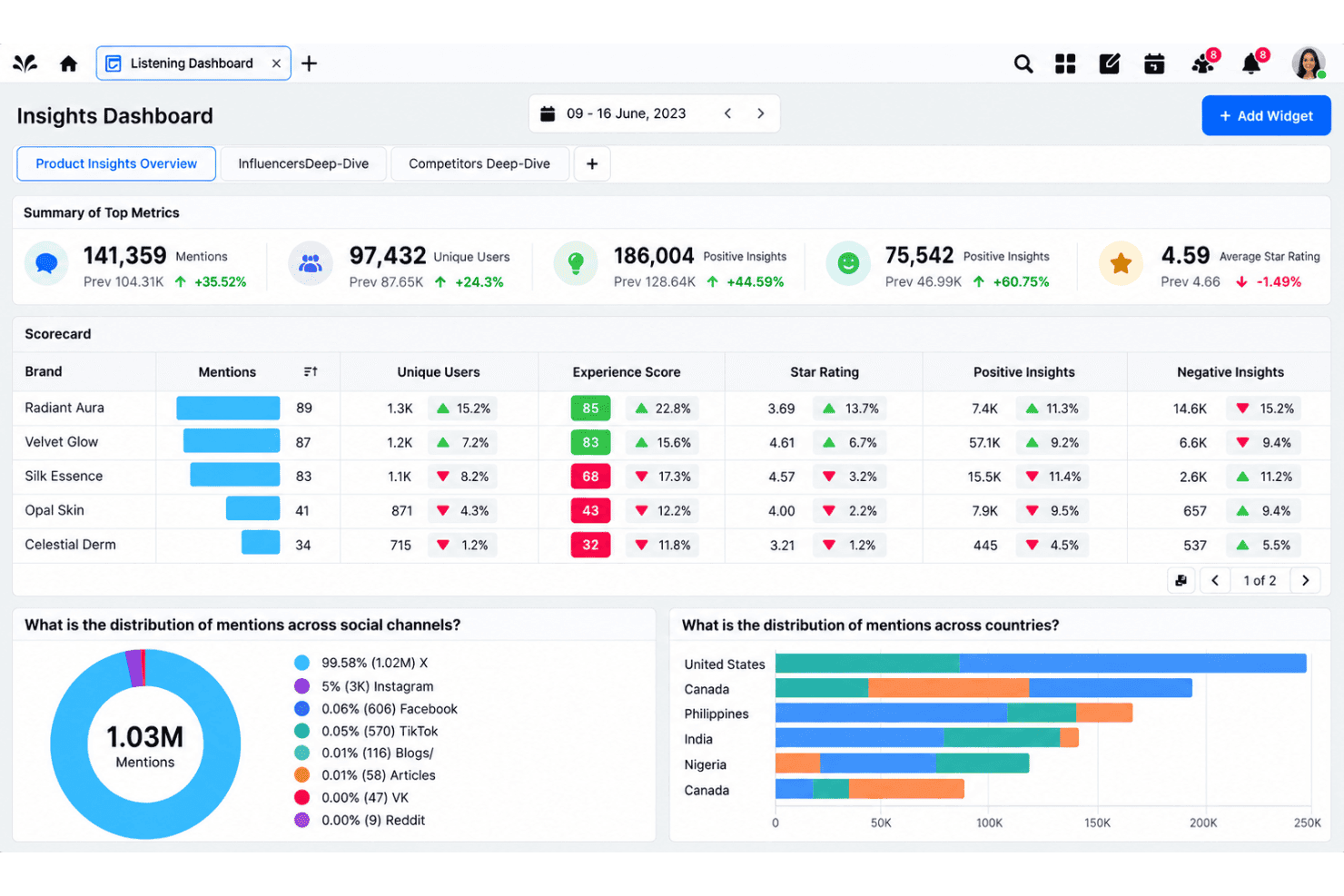
Monitor conversations, mentions, and sentiment across social media, news, blogs, forums, and review sites from a single dashboard. Filter results by keyword, region, language, or channel to surface the most relevant coverage for your brand.
Intent & Sentiment Analysis
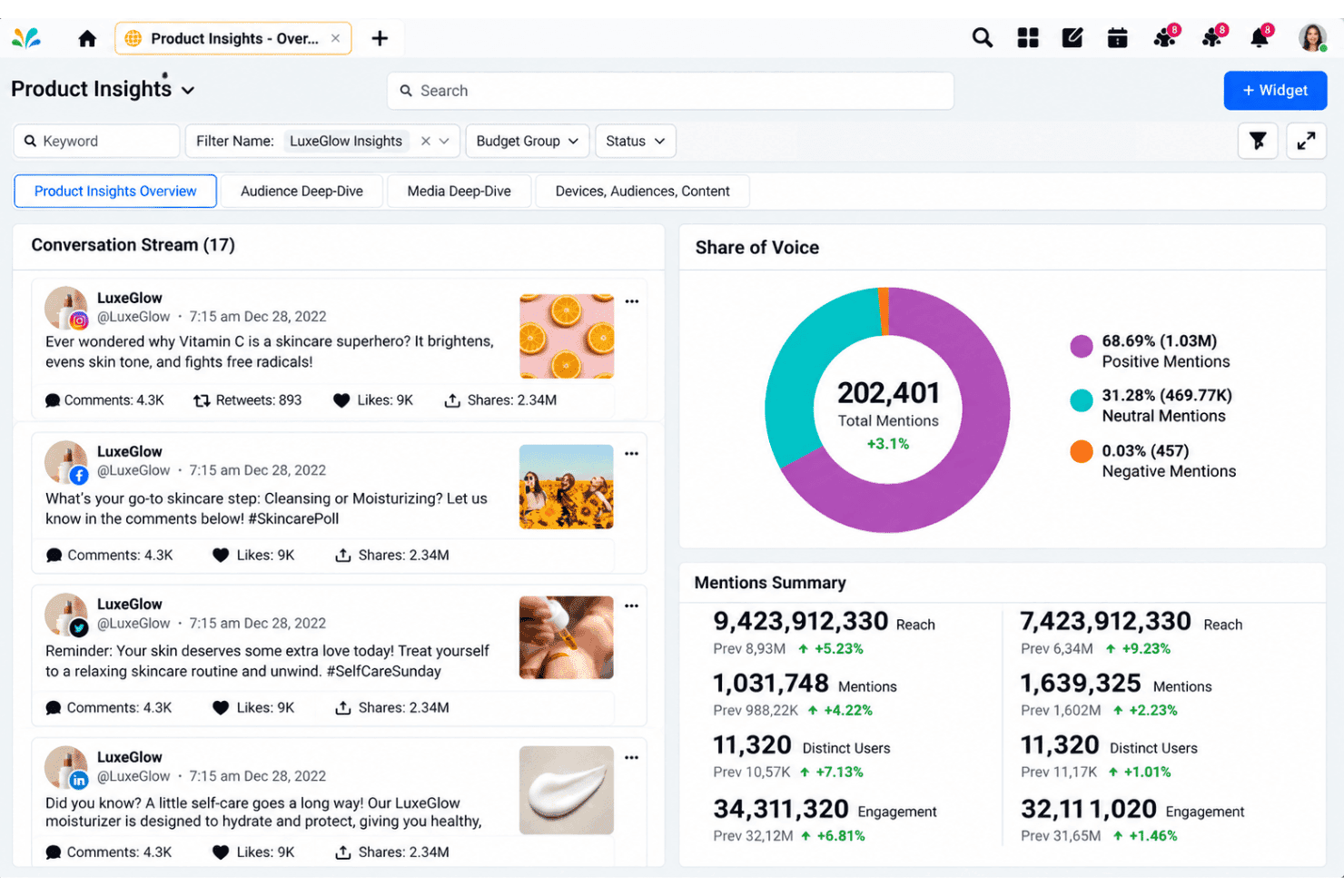
Automatically detect positive, negative, or neutral sentiment and analyze intent behind mentions using AI-powered models. Get a pulse on public perception and identify emerging issues or trends before they escalate.
Real-Time Alerts and Crisis Monitoring
Set up configurable alerts for spikes in volume, sentiment shifts, customer feedback, or specific topics so your team can respond quickly. Use automated rules to trigger notifications to stakeholders or start escalation workflows right in the platform.
Customizable Dashboards and Reporting
Build tailored dashboards with visualizations, charts, and exportable reports to track share of voice, media reach, and influencer impact. Share real-time analytics with other teams through scheduled reports or live links.
Unified Case Management
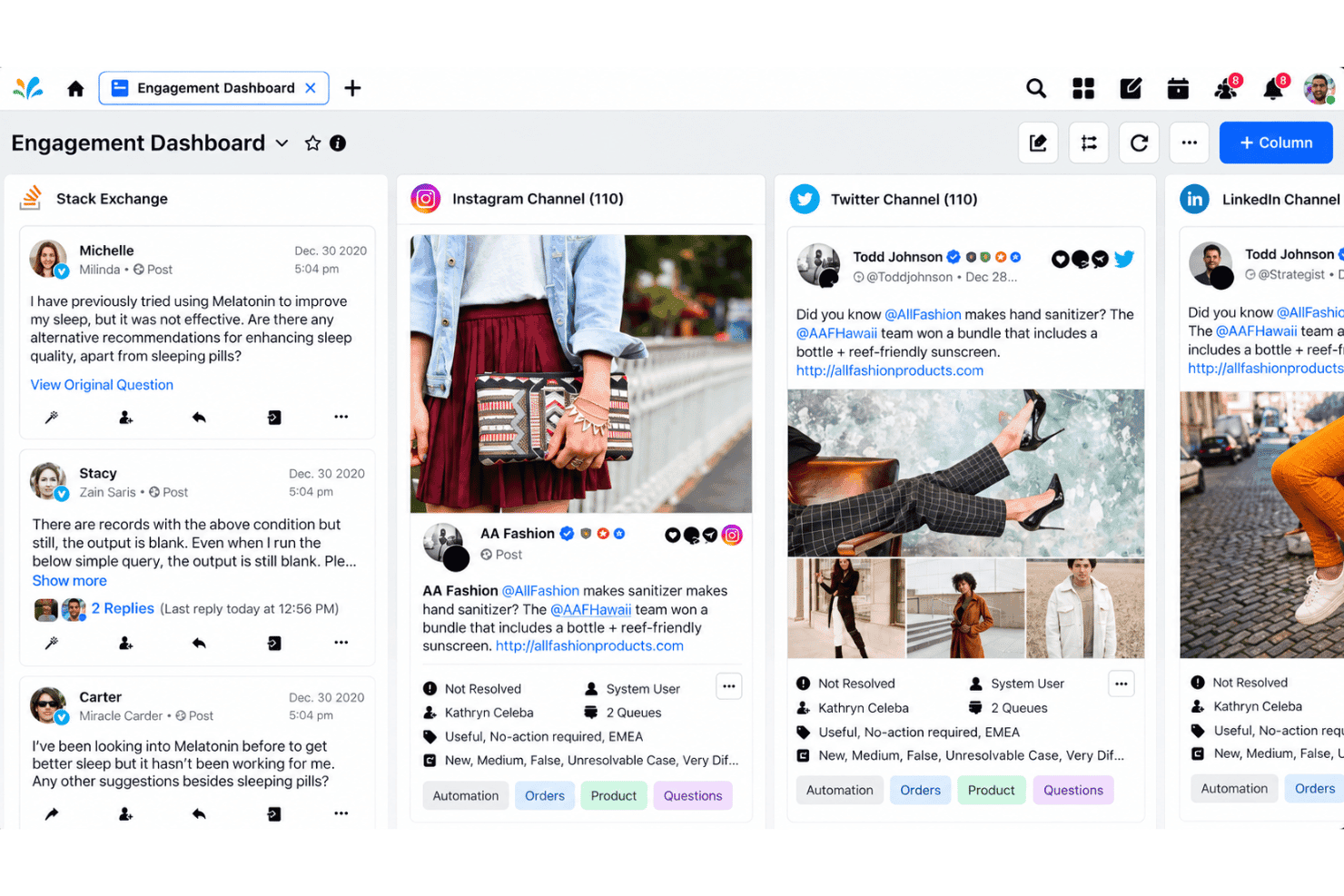
Link media mentions directly to Sprinklr's case management system so care, PR, or marketing teams can respond, assign, and resolve issues without switching platforms. Keep every customer interaction tied to its source for better cross-team follow-up.
Trend and Competitive Analysis
Track trending topics, hashtags, and emerging themes across regions or segments and benchmark your brand against competitors. Pinpoint gaps or opportunities by comparing share of voice, sentiment, and campaign effectiveness over time.
Ease of Use
Sprinklr’s interface is dense and can overwhelm new users, especially during onboarding or when dealing with complex setups. However, strong onboarding support, integrated workflows, and direct links between listening, publishing, and care features make navigation more manageable as you get familiar. If you need unified control of regional or global teams, Sprinklr’s permission and governance options are unmatched, though the learning curve is steeper than most in this category.
Integrations
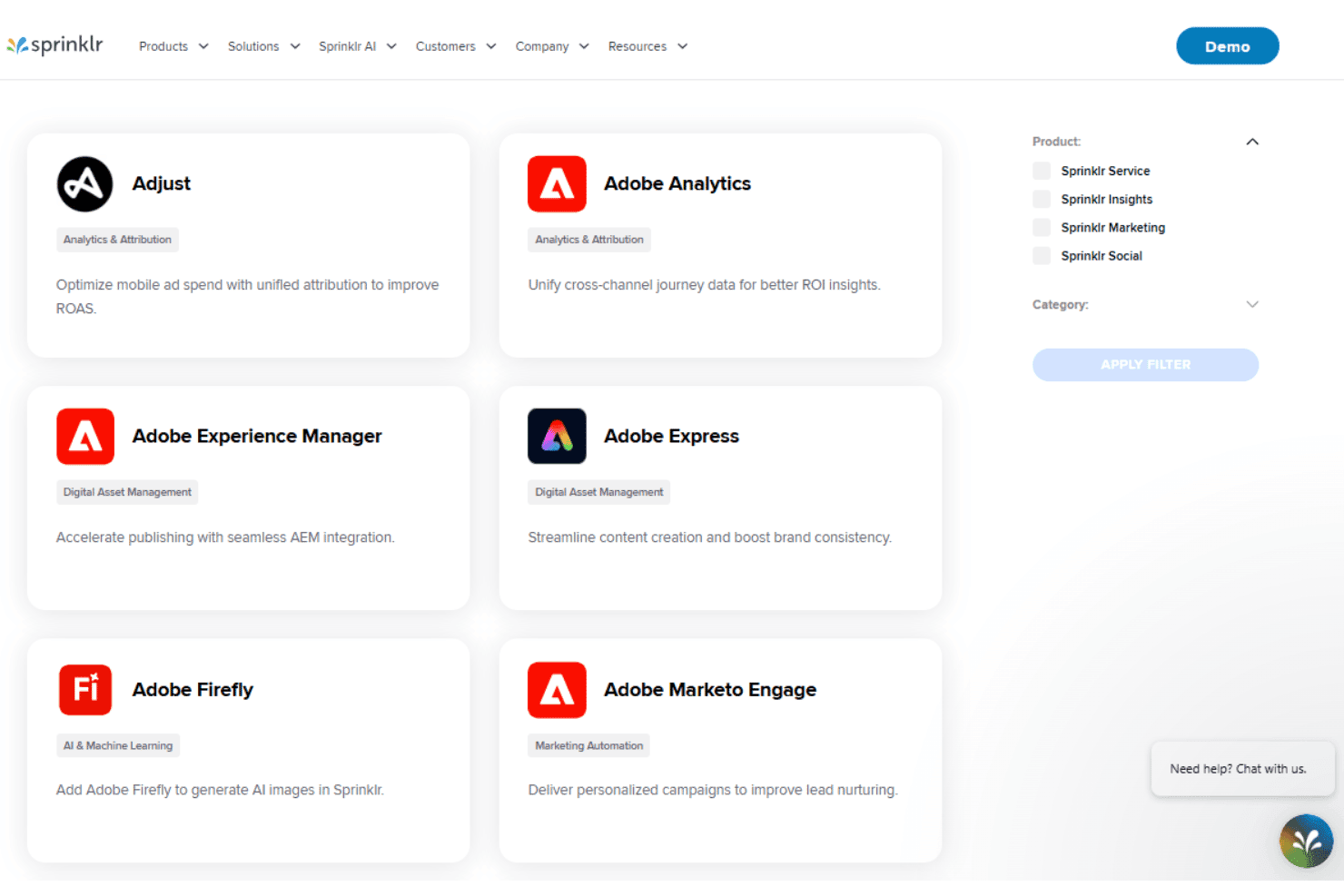
Sprinklr integrates with Adjust, Adobe Analytics, Salesforce, Freshdesk, Jira, Looker Studio, Okta, and Power BI, among others.
Sprinklr also offers an API and connects with third-party integration tools.
Sprinklr Specs
- Analytics: Yes
- API: Yes
- Calendar Management: Yes
- Chat: Yes
- Click-to-Dial: Yes
- CRM Integration: Yes
- Customer Management: Yes
- Customer Service: Yes
- Dashboard: Yes
- Dashboards: Yes
- Data Export: Yes
- Data Import: Yes
- Data Visualization: Yes
- External Integrations: Yes
- Feedback Management: Yes
- Knowledge Base: Yes
- Lead Management: Yes
- Lead Scoring: Yes
- Multi-Source Feedback: Yes
- Multi-User: Yes
- Net Promoter Score: Yes
- Notifications: Yes
- Omnichannel Referrals: Yes
- Online Surveys: Yes
- Review Moderation: Yes
- Scheduling: Yes
- Sentiment Analysis: Yes
- Social Media Monitoring: Yes


