

Cascade Review: Pros, Cons, Features, and Pricing Guide

We review tools independently, and commissions help fund our testing. See our transparency policy, our methodology, or suggest a tool.
Cascade is a marketing strategy software for teams that need to translate big-picture strategy into trackable goals and team-level plans. I'd consider it if your marketing org has outgrown general project management tools like monday.com and needs a purpose-built platform for strategic planning, OKR tracking, and cross-functional visibility—all tied back to measurable outcomes.
Cascade Evaluation Summary
4.8/5
- Pricing upon request
- Free trial + free demo available
Why Trust Our Software Recommendations
6,700+
Reviews
20
Industry experts
16+
Evaluation factors
14
Years
Our team has been testing and reviewing software since 2012. As marketing leaders ourselves, we know how difficult—and important—it is to choose the right software.
For this guide, we evaluated tools using hands-on testing and independent research, scoring tools using our selection criteria.
Our reviews reflect our human editorial judgment, not a sales pitch.
Expert reviewers:
 Gui DrusinaCreative Director
- Shriya GhateSenior Marketing Lead
 Amanda JacquesMarketing Ops Leader

Cascade Overview
If you’re judging Cascade as a marketing strategy software, I think its visual planning tools and real-time progress tracking set it apart for teams who want to move from strategy to execution. The interface is clean, onboarding is straightforward, and integrations cover most needs, though some advanced analytics features lag behind competitors. Pricing is mid-range, and support is responsive.
I’d suggest Cascade is best for marketing teams who need a single source of truth for strategy, especially in fast-moving or cross-functional environments where alignment and accountability matter most.
Pros
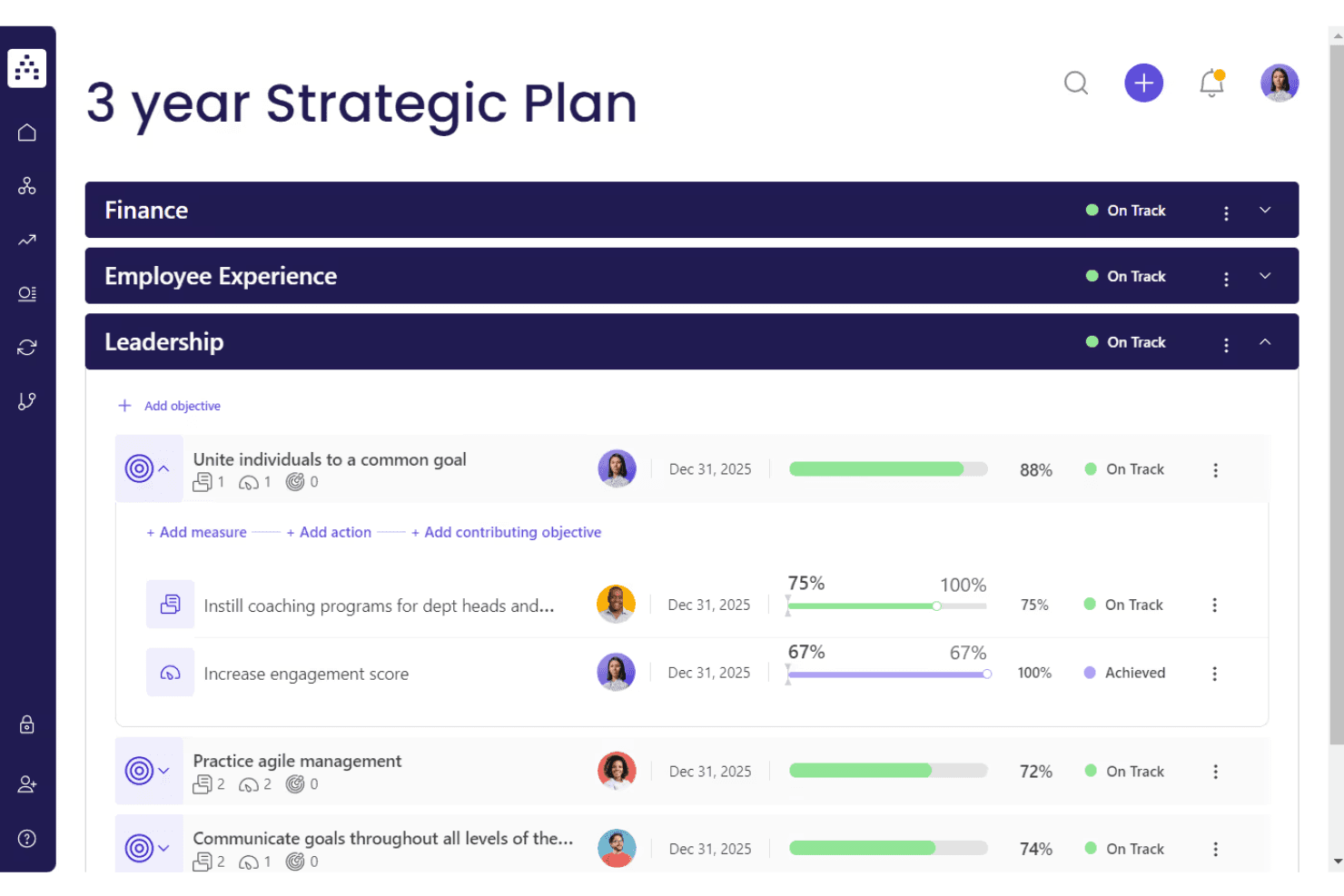
- Built-in OKR and planning frameworks support structured execution.
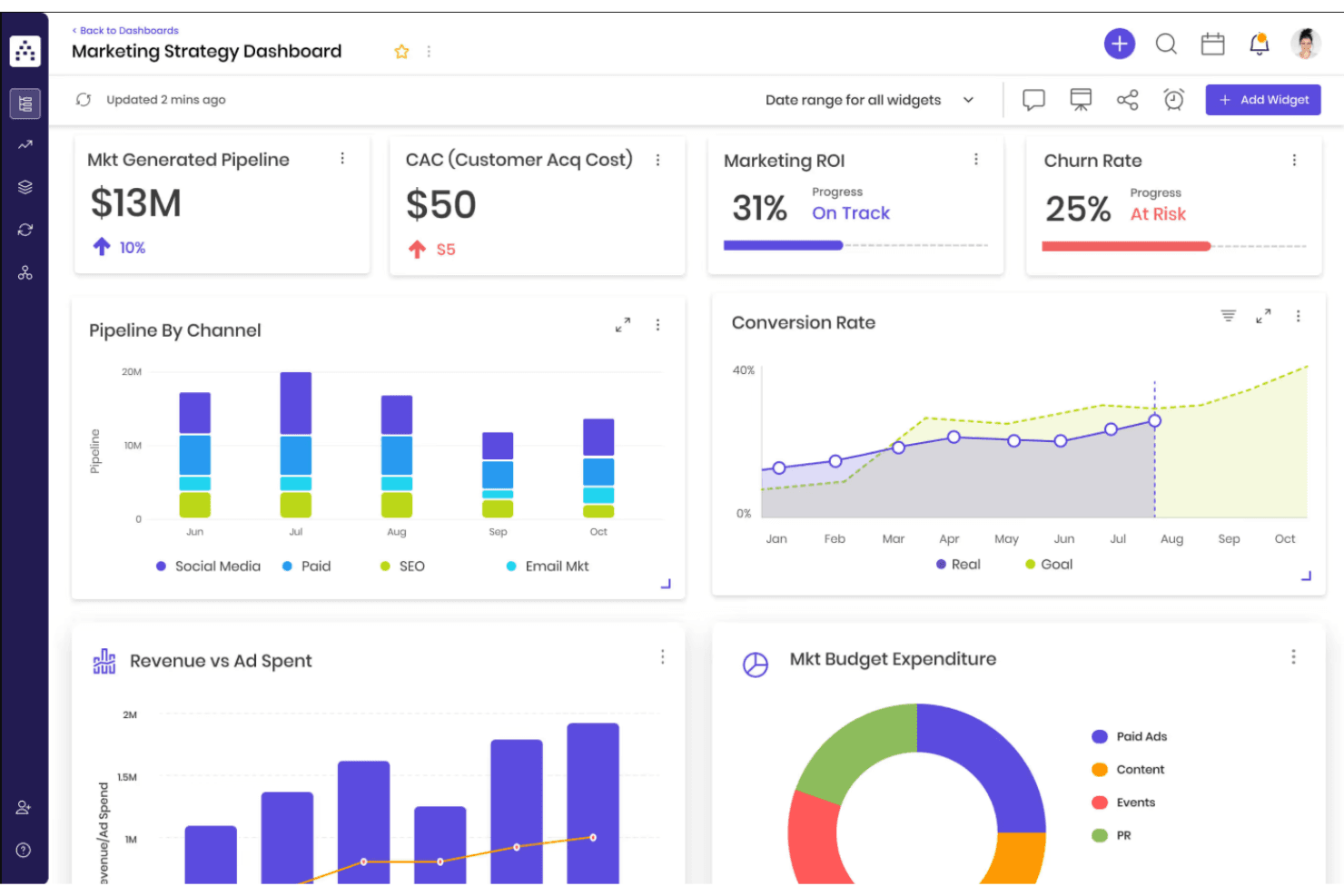
- Real-time dashboards make tracking progress straightforward.
- Visual strategy mapping connects goals, projects, and KPIs.
Cons
- Some users report slow performance with large data sets.
- Mobile app functionality is less developed than desktop.
- Advanced analytics and reporting options are limited.
Is Cascade Right For Your Needs?
Who Would be a Good Fit for Cascade?
Cascade is a strong choice for organizations that need to align multiple teams around shared goals and track progress in real time. Its visual planning, OKR frameworks, and centralized dashboards make it ideal for marketing departments, cross-functional teams, and companies with complex strategies. I think you’ll get the most value if your business relies on structured execution, transparency, and accountability across projects and campaigns.
- Consulting FirmsStrategy mapping and client-facing dashboards support structured client engagements.
- Cross-Functional TeamsReal-time updates and shared dashboards improve collaboration across business units.
- Nonprofit OrganizationsGoal mapping and impact tracking help nonprofits measure and communicate outcomes.
- Project Management OfficesVisual roadmaps and progress dashboards keep projects aligned with business goals.
- Marketing DepartmentsBuilt-in campaign planning and KPI tracking support marketing execution from strategy to results.
- Mid-Sized EnterprisesCascade’s centralized platform helps coordinate strategy across multiple departments and teams.
Who Would be a Bad Fit for Cascade?
Cascade may not be the best fit for very small teams, organizations with highly specialized analytics needs, or industries that require deep customization. If your team needs advanced reporting, heavy automation, or industry-specific compliance features, you might find Cascade’s feature set limiting compared to other options.
- Financial ServicesDoes not offer specialized compliance or regulatory tracking features.
- Field Service TeamsMobile app limitations hinder on-the-go strategy management.
- Manufacturing OperationsLacks industry-specific workflow automation and compliance tracking.
- Data-Driven Analytics TeamsLimited advanced analytics and reporting restrict deep data exploration.
- Small StartupsPricing and feature depth may exceed the needs of early-stage teams.
- Solo ConsultantsCascade’s collaborative features are unnecessary for single-person operations.
How We Test & Score Tools
We’ve spent years building, refining, and improving our software testing and scoring system. The rubric is designed to capture the nuances of software selection and what makes a tool effective, focusing on critical aspects of the decision-making process.
Below, you can see exactly how our testing and scoring works across seven criteria. It allows us to provide an unbiased evaluation of the software based on core functionality, standout features, ease of use, onboarding, customer support, integrations, customer reviews, and value for money.
Core Functionality (25% of final scoring)
The starting point of our evaluation is always the core functionality of the tool. Does it have the basic features and functions that a user would expect to see? Are any of those core features locked to higher-tiered pricing plans? At its core, we expect a tool to stand up against the baseline capabilities of its competitors.
Standout Features (25% of final scoring)
Next, we evaluate uncommon standout features that go above and beyond the core functionality typically found in tools of its kind. A high score reflects specialized or unique features that make the product faster, more efficient, or offer additional value to the user.
We also evaluate how easy it is to integrate with other tools typically found in the tech stack to expand the functionality and utility of the software. Tools offering plentiful native integrations, 3rd party connections, and API access to build custom integrations score best.
Ease of Use (10% of final scoring)
We consider how quick and easy it is to execute the tasks defined in the core functionality using the tool. High scoring software is well designed, intuitive to use, offers mobile apps, provides templates, and makes relatively complex tasks seem simple.
Onboarding (10% of final scoring)
We know how important rapid team adoption is for a new platform, so we evaluate how easy it is to learn and use a tool with minimal training. We evaluate how quickly a team member can get set up and start using the tool with no experience. High scoring solutions indicate little or no support is required.
Customer Support (10% of final scoring)
We review how quick and easy it is to get unstuck and find help by phone, live chat, or knowledge base. Tools and companies that provide real-time support score best, while chatbots score worst.
Customer Reviews (10% of final scoring)
Beyond our own testing and evaluation, we consider the net promoter score from current and past customers. We review their likelihood, given the option, to choose the tool again for the core functionality. A high scoring software reflects a high net promoter score from current or past customers.
Value for Money (10% of final scoring)
Lastly, in consideration of all the other criteria, we review the average price of entry level plans against the core features and consider the value of the other evaluation criteria. Software that delivers more, for less, will score higher.
Core Features
Strategy Mapping
Visually connect goals, projects, and KPIs in a single workspace. This helps teams see how every initiative supports the overall strategy.
OKR and Goal Frameworks
Set, track, and manage objectives using built-in OKR templates. Teams can align individual and departmental goals with company-wide priorities.
Real-Time Dashboards
Monitor progress with live dashboards that update as work happens. Users get instant visibility into campaign status and performance metrics.
Project and Task Management
Assign tasks, set deadlines, and manage deliverables within the platform. This keeps execution tightly linked to strategic plans.
Performance Analytics
Track key metrics and outcomes with customizable reports. Users can quickly identify what’s working and where to adjust strategy.
Collaboration Tools
Share updates, comment on projects, and notify stakeholders directly in Cascade. This streamlines communication and keeps everyone aligned.

Ease of Use
Cascade’s interface is clean and intuitive, making it easy for teams to get started without heavy training. Users often mention that visual strategy mapping and drag-and-drop planning simplify complex workflows. Onboarding is straightforward, and built-in templates help teams quickly set up goals and projects.
While some advanced features require a bit of exploration, most users find day-to-day navigation and collaboration smooth and accessible, even for those new to strategy software.
Integrations
Cascade integrates with Salesforce, Bamboo HR, Gainsight, Hubspot, Microsoft Dynamics, Pipedrive, monday.com, Smartsheet, MS Teams, and Slack, among others.
Cascade also offers an API and connects with third-party integration tools like Zapier and Microsoft Power Automate.

Cascade Specs
- API: Yes
- Batch Permissions & Access: Yes
- Budgeting: No
- Calendar Management: No
- Collaboration Support: No
- Dashboard: No
- Data Export: Yes
- Data Import: Yes
- Data Visualization: No
- Expense Tracking: No
- External Integrations: Yes
- Forecasting: No
- Multi-User: Yes
- Notifications: Yes
- Performance Reviews: No
- Process Reporting: No
- Project Management: No
- Resource Management: No
- Roadmapping: No
- Scheduling: No
- Task Scheduling/Tracking: No
- Third-Party Plugins/Add-Ons: No