

The best CloudTalk alternatives give you flexible, cloud-based calling, strong inbound lead management, and easy CRM integration, so your inbound marketing never misses a beat. If you’re searching for CloudTalk alternatives, you’re likely looking for tools that blend reliable voice features with marketing-focused workflows, analytics, and integrations. This list will help you quickly compare top platforms and find new solutions that fit the way your team attracts, qualifies, and converts inbound leads—without losing time on tools that can’t keep up with your growth.
What Is CloudTalk?
CloudTalk is a cloud-based call center platform designed for sales and support teams who want to manage inbound and outbound calls from anywhere. It offers key features like call routing, IVR, call recording, and real-time analytics. You can integrate CloudTalk with your CRM and marketing tools to centralize communication and gain better insights. This makes it an attractive choice for inbound marketing teams handling high volumes of customer calls.
CloudTalk Alternatives Comparison Table
This comparison table summarizes pricing details for my top CloudTalk alternative selections:
| Tool | Best For | Trial Info | Price | ||
|---|---|---|---|---|---|
| 1 | Best for live call coaching and monitoring tools | 7-day free trial + free demo available | From $15/user/month (billed annually) | Website | |
| 2 | Best for enterprise-grade AI routing features | Free trial available | From $75/user/month (billed annually) | Website | |
| 3 | Best for omnichannel customer engagement options | Free demo available | From $110/agent/month (proactive AI extra) | Website | |
| 4 | Best for outbound call center optimization | Free demo available | Pricing upon request | Website | |
| 5 | Best for advanced sales dialer capabilities | 7-day free trial + free demo available | Pricing upon request | Website | |
| 6 | Best for customizable IVR and workflow automation | Free demo available | Pricing upon request | Website | |
| 7 | Best for built-in AI-powered call transcription | 14-day free trial + free demo available | Pricing upon request | Website | |
| 8 | Best for predictive dialer and call analytics | Free demo available | From $119/seat/month | Website | |
| 9 | Best for all-in-one unified communications | 14-day free trial | From £18/user/month | Website | |
| 10 | Best for multi-country number availability | 14-day free trial | From $29/user/month (billed annually) | Website |


Why Trust Our Software Recommendations
6,700+
Reviews
20
Industry experts
16+
Evaluation factors
14
Years
Our team has been testing and reviewing software since 2012. As marketing leaders ourselves, we know how difficult—and important—it is to choose the right software.
For this guide, we evaluated tools using hands-on testing and independent research, scoring tools using our selection criteria.
Our reviews reflect our human editorial judgment, not a sales pitch.
Expert reviewers:
 Gui DrusinaCreative Director
- Shriya GhateSenior Marketing Lead
 Amanda JacquesMarketing Ops Leader

Best CloudTalk Alternatives Reviews
Below are my detailed summaries of the best CloudTalk alternatives that made it onto my shortlist. My reviews offer a detailed look at the features, integrations, and best use cases of each platform to help you find the best one for you.
 Best for live call coaching and monitoring tools
- 7-day free trial + free demo available
- From $15/user/month (billed annually)
Visit WebsiteCustomer Rating:4.7/5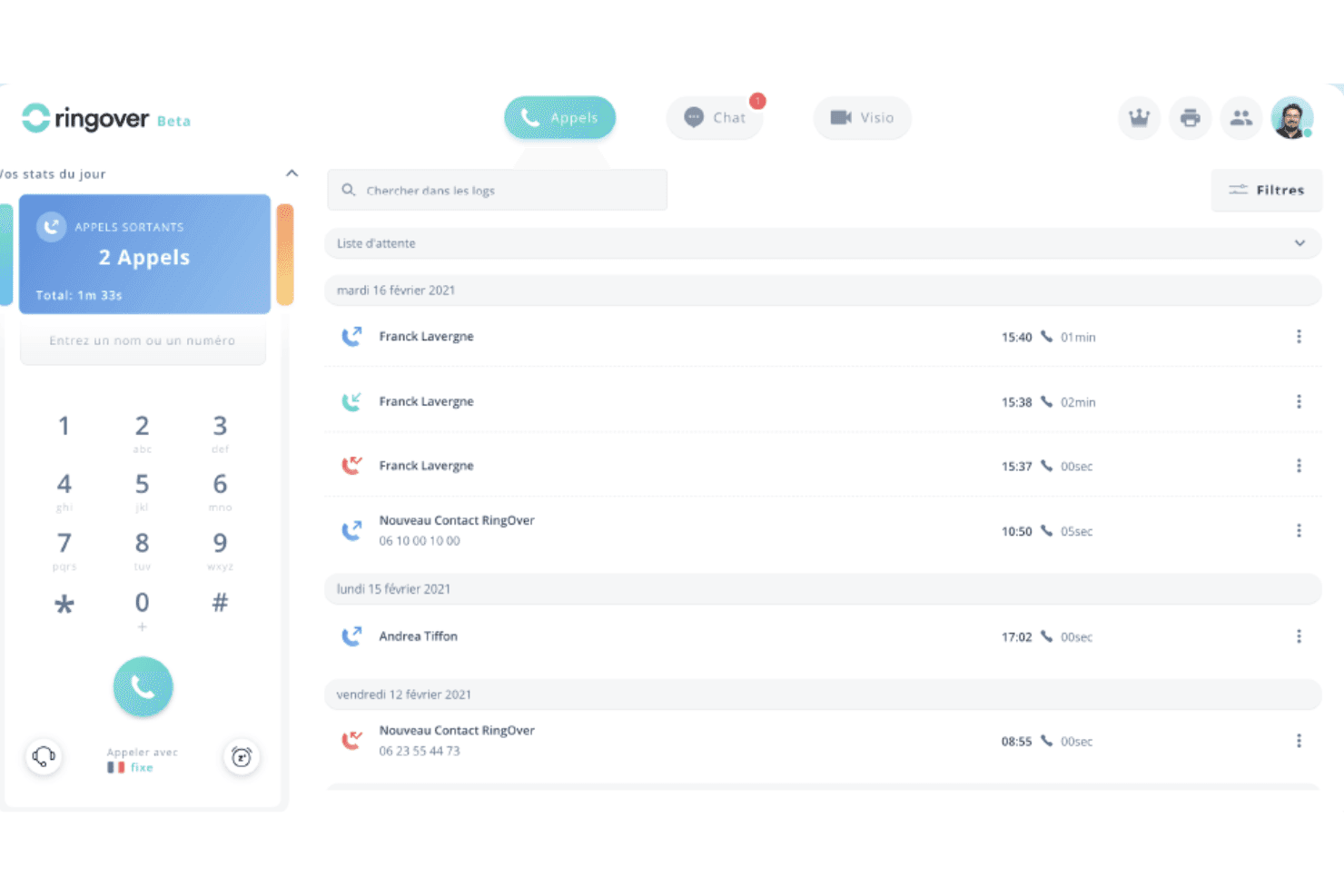
Ringover displays a call log dashboard with outgoing call stats, a dialpad, and a history of recent calls with durations. Ringover is a cloud-based calling and communication platform built for sales and support teams that need AI-powered conversation intelligence, multi-mode outbound dialling, and native CRM integrations without piecing together multiple tools.
Who Is Ringover Best For?
Ringover is a strong fit for sales managers and contact center leads who need to actively coach and monitor agents in real time across distributed teams.
Why Ringover Is a Good CloudTalk Alternative
I've included Ringover in my top picks because its live supervision toolkit goes deeper than most alternatives. I use double listening to monitor calls silently, whisper coaching to guide agents mid-conversation without the customer hearing, and call takeover when a rep needs immediate backup. On top of that, AIRO Coach delivers real-time suggestions during live calls, which turns every interaction into an active coaching opportunity rather than a post-call review.
Ringover Key Features
- Omnichannel messaging: Manage SMS, WhatsApp, Instagram, Messenger, email, and voice interactions from one unified interface.
- Native CRM integrations: Sync call activity and contact data bi-directionally with platforms like Salesforce, HubSpot, and Zoho.
- Automated call transcription: Instantly generate transcripts and conversation summaries for all recorded calls.
- Power dialer: Automate high-volume outbound calling with list imports, local presence, and voicemail drop.
Ringover Integrations
Ringover offers 100+ native integrations, including Salesforce, HubSpot, Pipedrive, Zoho CRM, Zendesk, Bullhorn, Avionté, Slack, Microsoft Teams, and Zapier. An API is available for custom integrations.
Pros and Cons
Pros:
- Allows monthly number swapping options
- Connects to niche recruiter staffing software
- Live whisper and barge coaching tools available
Cons:
- Entry plans restrict CRM integrations to two systems
- Advanced analytics locked to higher-tier plans
Learn more about Ringover: Best for enterprise-grade AI routing features
- Free trial available
- From $75/user/month (billed annually)
Visit WebsiteCustomer Rating:4.4/5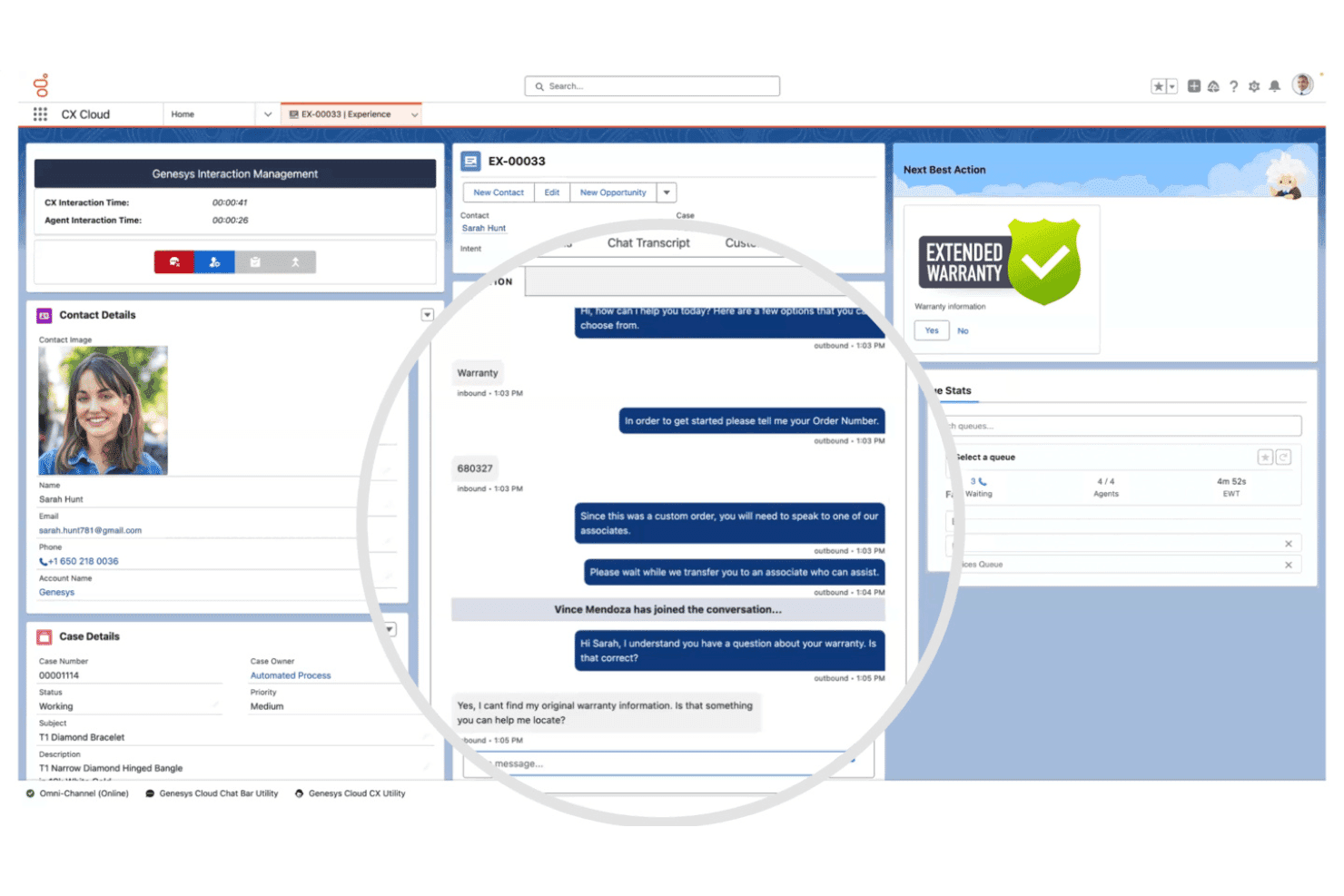
Genesys Cloud CX offers a unified agent workspace with live chat transcripts, contact details, case management, and AI-powered next best action recommendations. Genesys Cloud CX is an enterprise contact center platform built for support and CX teams that need AI-powered omnichannel routing, workforce engagement management, and deep CRM integrations across global operations.
Who Is Genesys Cloud CX Best For?
It's a strong fit for mid-market and enterprise organizations running large-scale contact center operations across multiple regions and channels.
Why Genesys Cloud CX Is a Good CloudTalk Alternative
Genesys Cloud CX earns its spot on my shortlist because its AI routing capabilities go well beyond basic skills-based matching. I'm particularly impressed by Predictive Routing, which uses machine learning to connect customers to the agents most likely to resolve their issue on the first call. Agent Copilot then layers real-time knowledge suggestions and guidance directly into live interactions, reducing handle time without requiring agents to context-switch.
Genesys Cloud CX Key Features
- Omnichannel engagement: Manage voice, email, chat, messaging, and social channels from a single interface.
- Workforce engagement management: Access forecasting, scheduling, and performance monitoring tools in one platform.
- Real-time analytics dashboards: Track call and agent metrics with customizable dashboards and reports.
- AppFoundry marketplace: Expand platform capabilities using 600+ pre-built integrations and add-ons.
Genesys Cloud CX Integrations
Genesys Cloud CX offers native integrations with Salesforce, Zendesk, Microsoft Teams, ServiceNow, Zoom, Tableau, Jira, Google Cloud Platform, and Oracle, plus marketplace integrations via AppFoundry and an API for custom integrations.
Pros and Cons
Pros:
- Native voice bot and IVR self-service
- Built-in workforce management and forecasting tools
- AI-driven predictive routing for complex queues
Cons:
- Interface can feel overwhelming for smaller teams
- Requires dedicated administrative platform setup
Learn more about Genesys Cloud CX: Best for omnichannel customer engagement options
- Free demo available
- From $110/agent/month (proactive AI extra)
Visit WebsiteCustomer Rating:4.3/5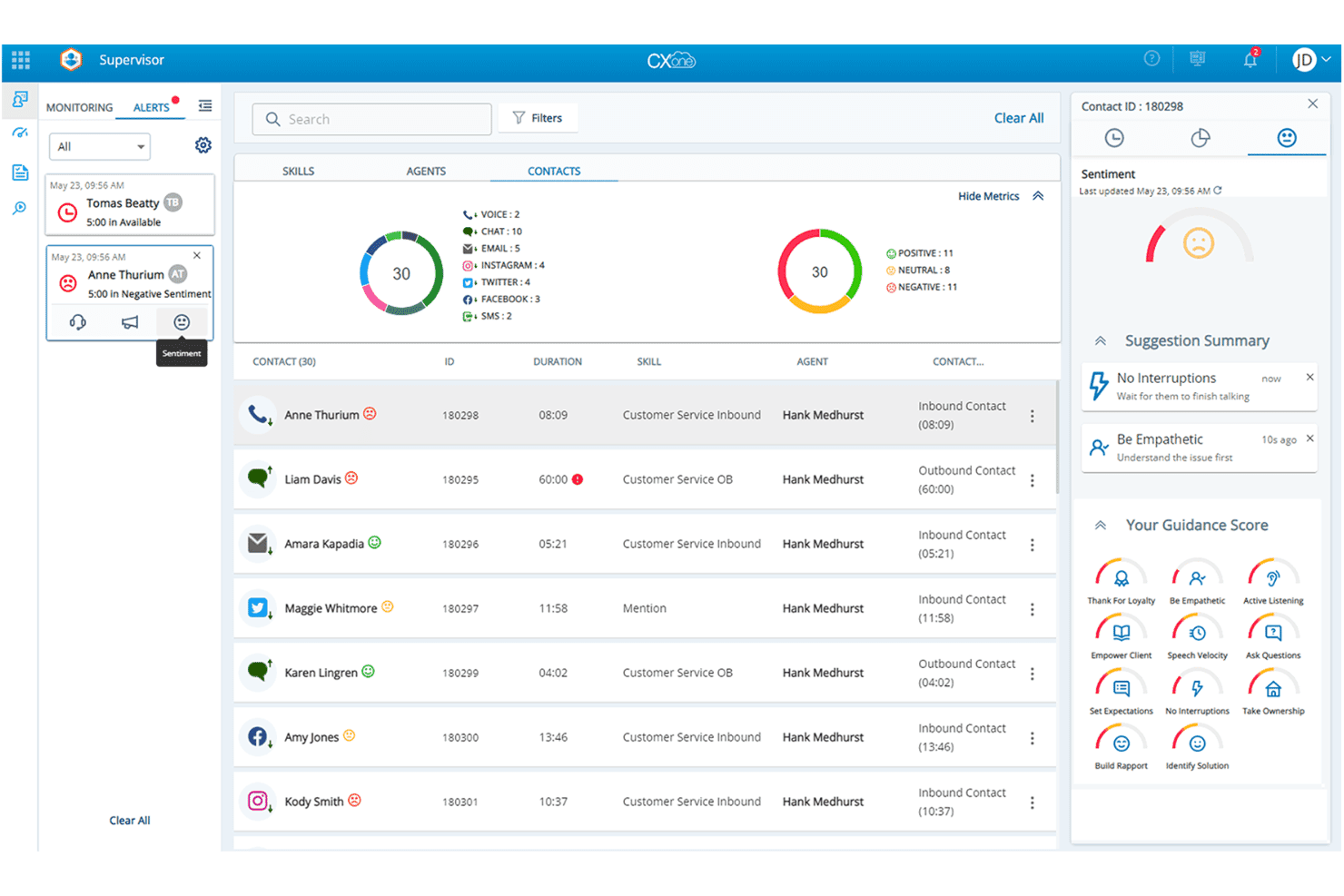
NICE CXone offers a supervisor dashboard with real-time contact monitoring, sentiment analysis, and AI-powered agent guidance scores. NiCE CXone is a cloud contact center platform built for mid-market and enterprise teams that need to manage voice, chat, email, and social interactions alongside AI-driven routing, workforce management, and deep CRM integrations.
Who Is NiCE CXone Best For?
It's a strong fit for contact center managers in regulated industries like banking, insurance, and healthcare who need compliance-ready omnichannel engagement at scale.
Why NiCE CXone Is a Good CloudTalk Alternative
I've included NiCE CXone in my top picks because its omnichannel channel coverage goes well beyond what CloudTalk offers. Where CloudTalk is voice-first, CXone lets my team handle voice, SMS, live chat, email, and social interactions from a single agent workspace, with AI-driven routing that directs each interaction based on agent skills and channel context. I also appreciate the Enlighten Copilot, which gives agents real-time guidance during live conversations, something I haven't seen matched at this depth in most CloudTalk alternatives.
NiCE CXone Key Features
- Studio call flow designer: Build and visualize advanced IVR flows, routing logic, and customer journeys without coding.
- Workforce management module: Forecast demand, schedule agents, and manage shifts and PTO in one unified dashboard.
- Interaction analytics suite: Track conversation sentiment, identify trends, and surface coaching moments from recorded multichannel interactions.
- Quality management tools: Score agent performance, set up automated evaluations, and calibrate reviews for coaching and compliance.
NiCE CXone Integrations
NiCE CXone offers native integrations with Salesforce, Zendesk, Microsoft Teams, Microsoft SharePoint, Confluence, ServiceNow, Oracle Service Cloud, and supports integration across the Microsoft ecosystem, including Microsoft 365 and Azure. An API is available for custom integrations.
Pros and Cons
Pros:
- Built-in workforce management and scheduling tools
- Real-time agent coaching via Enlighten Copilot
- AI routing across multiple channels simultaneously
Cons:
- Custom dashboard reports cannot be edited after creation
- Complex admin setup for smaller contact centers
Learn more about NiCE CXone: Best for outbound call center optimization
- Free demo available
- Pricing upon request
Visit WebsiteCustomer Rating:4.4/5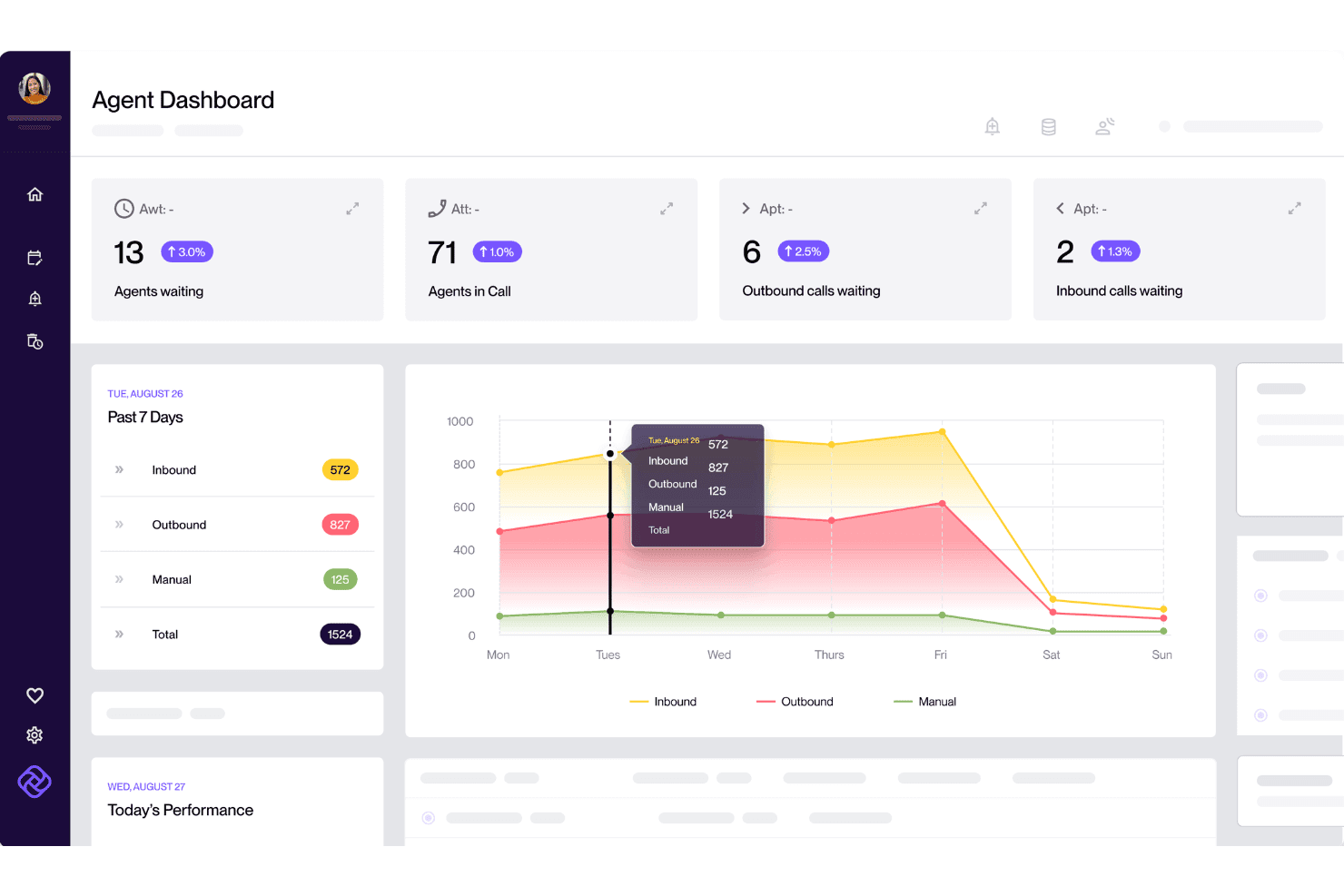
Convoso's Agent Dashboard displays real-time call center metrics including agents waiting, agents in call, inbound and outbound call volumes over a 7-day period. Convoso is a cloud-based contact center platform built for high-volume outbound sales teams that need multi-mode dialling, caller ID reputation management, and real-time analytics to connect with more prospects and keep agent performance on track.
Who Is Convoso Best For?
Convoso is a strong fit for US-based contact centers with 20+ outbound agents in industries like insurance, financial services, and home services.
Why Convoso Is a Good CloudTalk Alternative
I picked Convoso as one of the best because its multi-mode dialer (predictive, power, preview, and progressive) gives outbound teams far more control over call pacing than CloudTalk's single-mode approach. I especially appreciate Convoso Ignite, which actively manages caller ID reputation to prevent spam labelling before it tanks contact rates. Add in 97% accurate answering machine detection, and my team spends far less time burning dials on voicemails.
Convoso Key Features
- Dynamic scripting engine: Build, assign, and trigger personalized agent scripts in real time during live calls.
- Open API and middleware integrations: Connect Convoso with CRMs, lead management platforms, and productivity tools for custom workflows.
- Real-time reporting dashboard: Monitor call metrics, campaign performance, and agent activity with customizable, live-updating dashboards.
- Compliance management tools: Automate DNC scrubbing, manage TCPA consent, and enforce call time restrictions on all outbound campaigns.
Convoso Integrations
Convoso offers native integrations with Salesforce, HubSpot, Zoho CRM, Pipedrive, Zendesk, Microsoft Dynamics, Shopify, Follow Up Boss, Podio, Mojo, and Slack. It also supports Zapier and provides an API for custom integrations.
Pros and Cons
Pros:
- TCPA compliance tools built into campaign workflows
- Caller ID reputation management prevents spam labelling
- Multi-mode dialer maximizes outbound agent talk time
Cons:
- Limited inbound routing compared to CloudTalk
- Steeper setup for smaller sales teams
Learn more about Convoso: Best for advanced sales dialer capabilities
- 7-day free trial + free demo available
- Pricing upon request
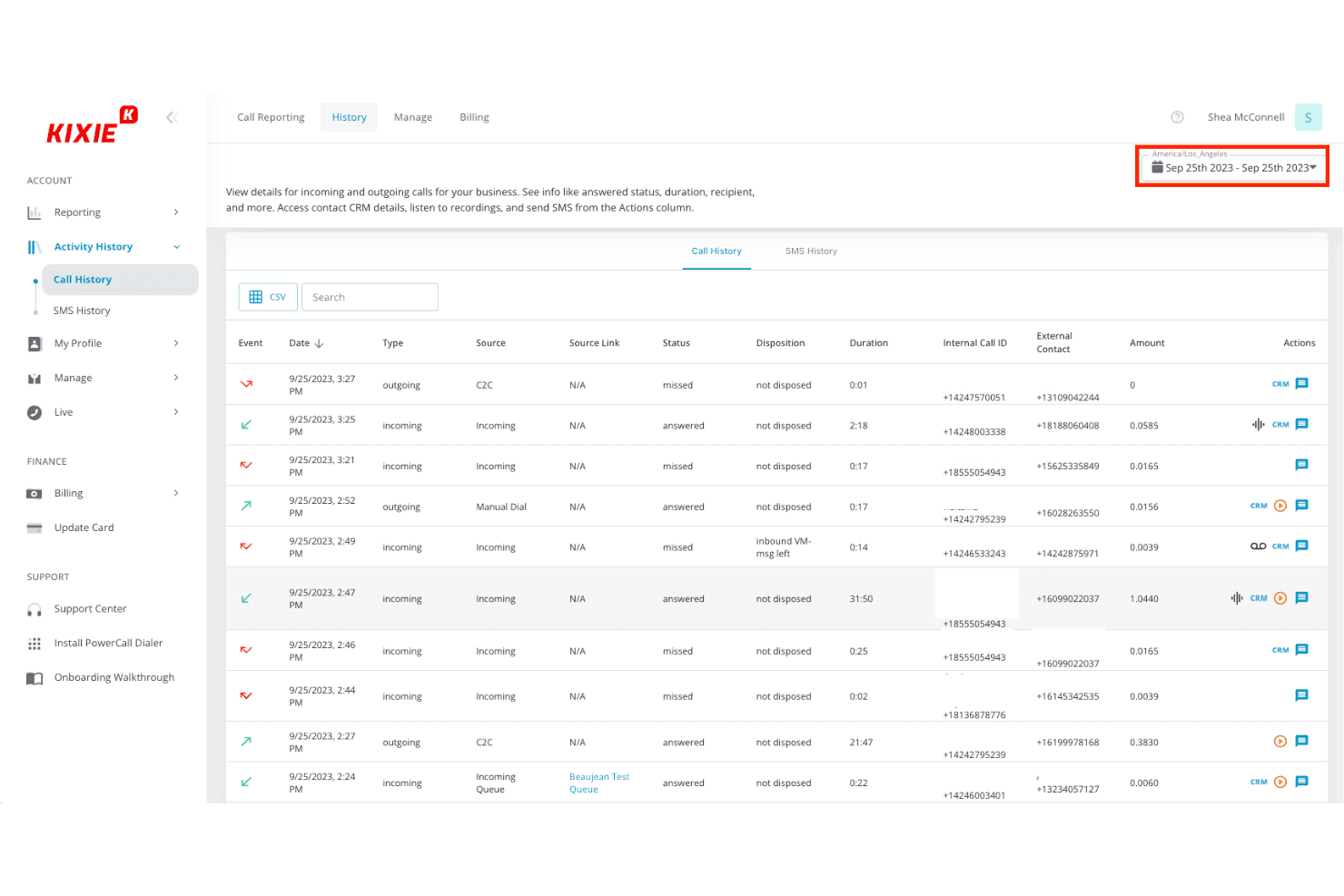
Kixie PowerCall displays a detailed call history log with call types, statuses, durations, and CRM action options for each entry. Kixie PowerCall is a revenue communications platform built for outbound sales teams that need high-volume calling, CRM-connected workflows, and AI-powered dialling tools to increase connection rates and accelerate pipeline.
Who Is Kixie PowerCall Best For?
Kixie PowerCall is a strong fit for SDR and BDR teams at small to mid-sized companies where outbound call volume and CRM automation are central to the sales motion.
Why Kixie PowerCall Is a Good CloudTalk Alternative
I picked Kixie PowerCall as one of the best CloudTalk alternatives because its Multi-Line PowerDialer lets reps dial up to four numbers at once, only connecting when a real person answers. I love the AI Human Voice Detection feature, which filters out voicemails and recordings automatically. Combined with ConnectionBoost, which rotates local area code numbers to reduce spam flags, reps are reaching more live prospects per session than most competing dialers allow.
Kixie PowerCall Key Features
- Automatic call distribution: Routes inbound calls to agents based on CRM fields and skill sets.
- Local and toll-free numbers: Lets teams provision phone numbers in 65+ countries for regional or global campaigns.
- Bi-directional CRM sync: Automatically logs and updates call activity directly within connected CRMs.
- Live call coaching: Supervisors can listen, whisper, or join calls in real time for training and quality assurance.
Kixie PowerCall Integrations
Kixie PowerCall offers native integrations with HubSpot, Salesforce, Pipedrive, Zoho CRM, HighLevel, Zendesk, Intercom, Gorgias, Kustomer, and ActiveCampaign, and connects with Zapier. An API is available for custom integrations.
Pros and Cons
Pros:
- AI voicemail detection skips unanswered calls automatically
- ConnectionBoost reduces spam-flagged caller ID labels
- Dials up to 10 lines simultaneously
Cons:
- No phone support line; forces email-only help
- Limited inbound call routing configuration options
Learn more about Kixie Powercall: Best for customizable IVR and workflow automation
- Free demo available
- Pricing upon request
Visit WebsiteCustomer Rating:4.4/5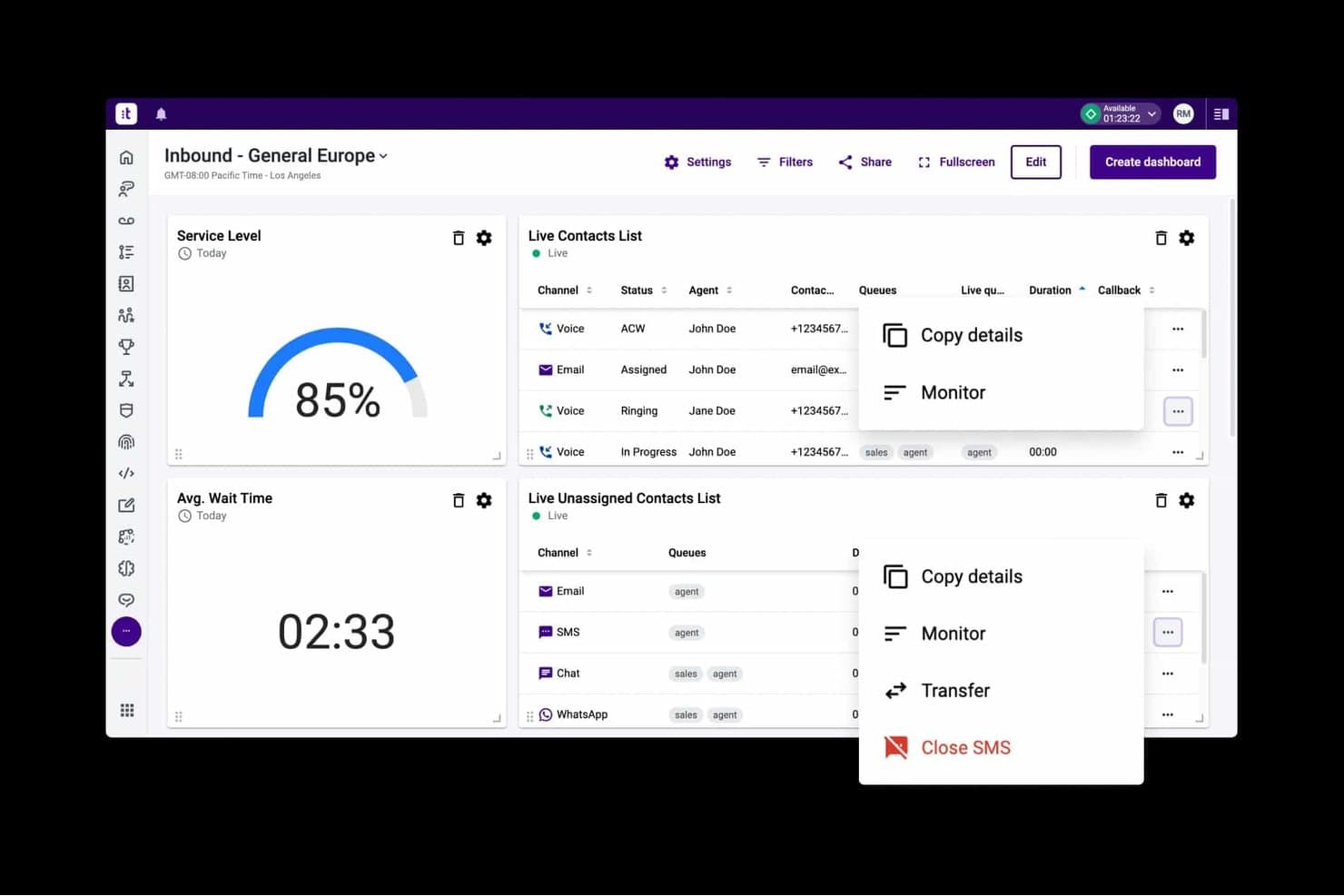
Talkdesk offers a live contact center dashboard with real-time metrics including service level, average wait time, live contacts list, and contextual action menus for managing interactions across voice, email, SMS, chat, and WhatsApp channels. Talkdesk is an AI-powered cloud contact center platform built for mid-market and enterprise teams that need to handle high-volume inbound and outbound calling across voice and digital channels with deep CRM connectivity.
Who Is Talkdesk Best For?
Talkdesk is a strong fit for mid-sized to large support operations in regulated industries like healthcare, financial services, and retail that need structured, compliant CX workflows.
Why Talkdesk Is a Good CloudTalk Alternative
I picked Talkdesk as one of the best because its Studio IVR builder is genuinely one of the most flexible I've used, letting you design and edit multi-level call flows without touching a line of code or filing a support ticket. Pair that with Talkdesk Navigator, which routes callers using natural conversation and real-time context rather than rigid menu trees, and you get a level of workflow control that CloudTalk simply doesn't match. I also appreciate how Autopilot handles routine inbound calls autonomously, so my team fields fewer repetitive queries and focuses on higher-value interactions.
Talkdesk Key Features
- Interaction and quality analytics: Transcribes and analyzes all customer interactions to highlight trends, intent, and sentiment.
- Omnichannel engagement: Lets teams manage voice, email, chat, SMS, and social channels within a single workspace.
- Workforce engagement management: Includes tools for quality management, screen recording, and performance tracking across agents.
- AppConnect integration marketplace: Offers 100+ prebuilt integrations and open APIs to connect Talkdesk with other sales, support, and marketing tools.
Talkdesk Integrations
Talkdesk offers 70+ native integrations, including Salesforce, HubSpot, ServiceNow, Zendesk, Microsoft Teams, Slack, Zoom, Pega, Oracle Service Cloud, and SAP C4C. An API is available for custom integrations.
Pros and Cons
Pros:
- Pre-built industry editions for healthcare and retail
- AI-powered real-time agent assist during calls
- Studio IVR builder requires no coding knowledge
Cons:
- Advanced configurations can extend initial setup timelines
- Reporting customization limited on lower-tier plans
Learn more about Talkdesk: Best for built-in AI-powered call transcription
- 14-day free trial + free demo available
- Pricing upon request
Visit WebsiteCustomer Rating:4.3/5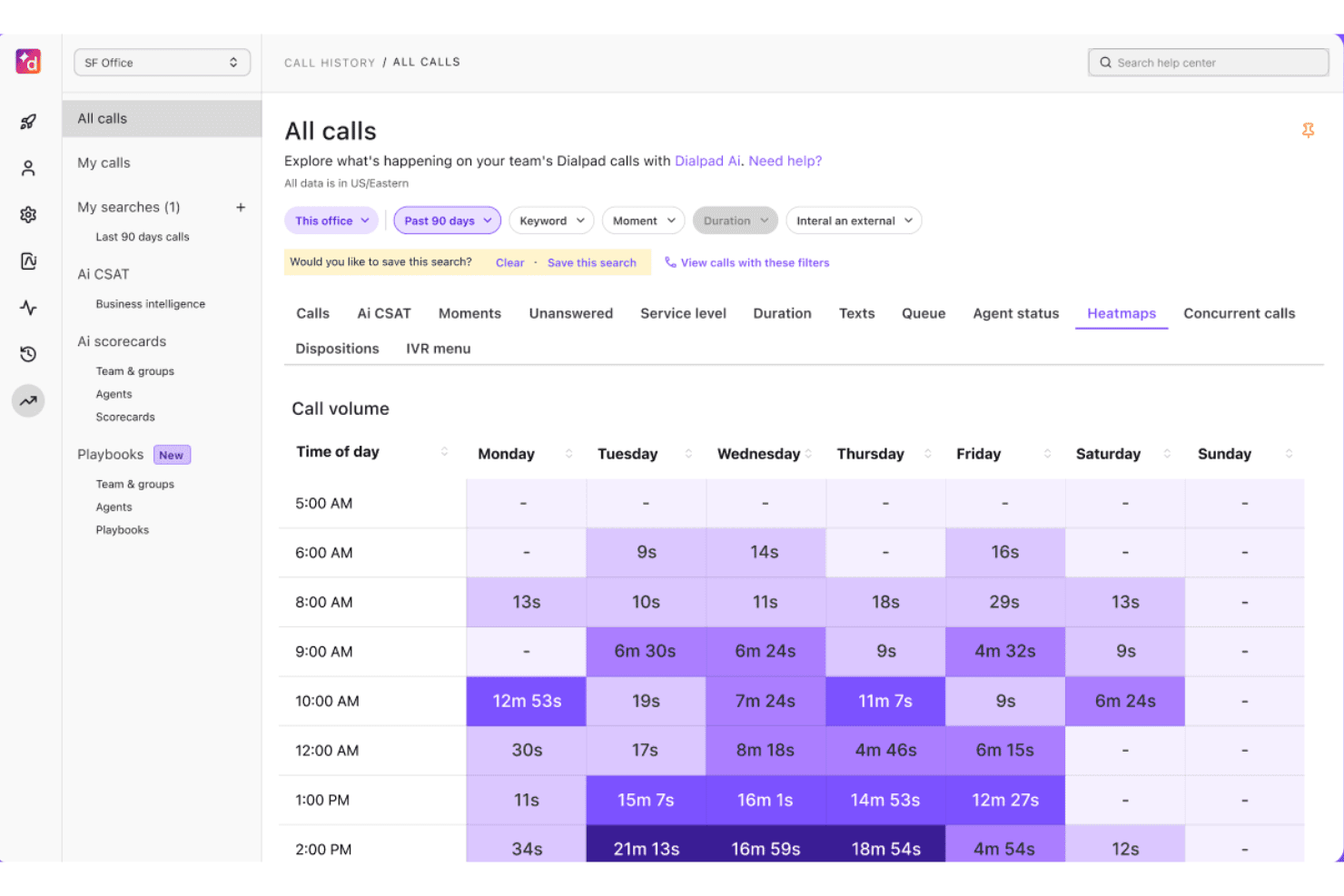
Dialpad offers a heatmap view of call volume by time of day and day of week, helping teams identify peak call periods. Dialpad is an AI-powered cloud communications platform built for sales and support teams that need calling, contact center queuing, and real-time conversation intelligence in a single system.
Who Is Dialpad Best For?
Dialpad suits growing sales teams and contact centers that want AI-powered call coaching and QA built in, without adding a separate conversation intelligence tool.
Why Dialpad Is a Good CloudTalk Alternative
I've included Dialpad in my top picks because its transcription does more than capture what was said. AI Recaps automatically surface action items and call summaries post-call, while Custom Moments flag specific phrases in real time to trigger live coaching prompts. AI Scorecards then score each call against your defined criteria, replacing manual recording review with automated, consistent QA.
Dialpad Key Features
- AI-powered IVR and call routing: Route inbound calls through multi-level menus and intent-based AI to the right agent every time.
- Native CRM integrations: Instantly sync call activity, notes, and contact data with Salesforce, HubSpot, Zendesk, and Microsoft Dynamics.
- Omni-device support: Access all calling, messaging, and meetings features through browser, desktop, iOS, and Android apps.
- Role-based access controls: Define user permissions for calls, recordings, analytics, and integrations from a unified admin dashboard.
Dialpad Integrations
Dialpad offers native integrations with Salesforce, HubSpot, Zendesk, Microsoft 365, Google Workspace, Slack, Okta, Zoho CRM, ServiceNow, and Zapier. An API is available for custom integrations.
Pros and Cons
Pros:
- Single app for calls, messages, and meetings
- AI Scorecards automate call QA scoring
- Built-in AI transcription on all plans
Cons:
- Analytics reporting lacks depth for enterprise teams
- Limited outbound dialer vs. dedicated rivals
Learn more about Dialpad: Best for predictive dialer and call analytics
- Free demo available
- From $119/seat/month
Visit WebsiteCustomer Rating:4.1/5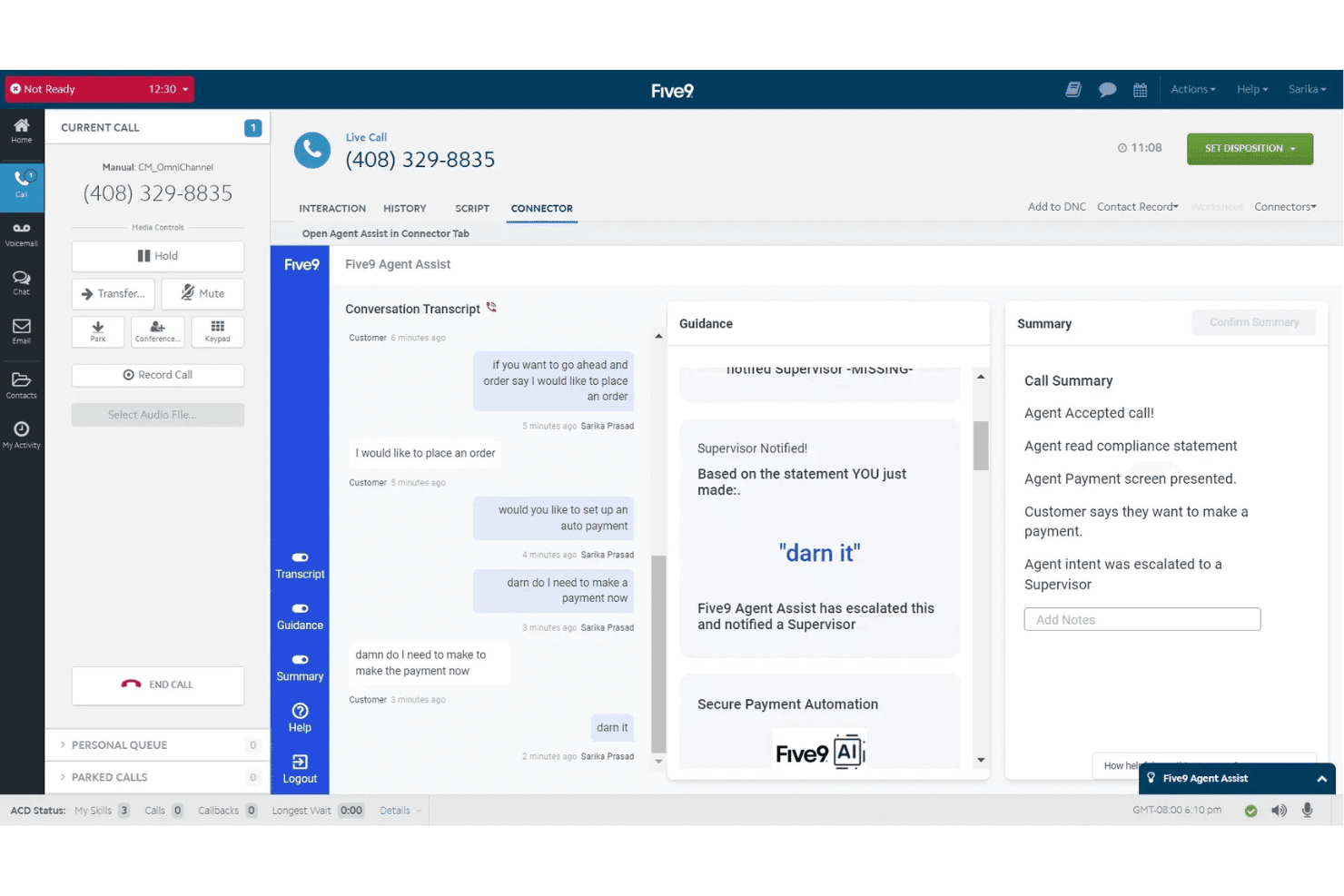
Five9 features an AI-powered Agent Assist tool that provides real-time guidance, call summaries, and supervisor escalation during live customer calls. Five9 is an enterprise cloud contact center platform built for mid-market and larger teams that need to run high-volume outbound dialling campaigns, manage inbound call queues, and connect call activity to their CRM stack.
Who Is Five9 Best For?
Five9 fits mid-market to enterprise contact centers with 50+ agents running blended inbound and outbound operations at scale.
Why Five9 Is a Good CloudTalk Alternative
I picked Five9 as one of the best CloudTalk alternatives because its multi-mode dialer goes well beyond what CloudTalk offers. Five9's predictive dialer uses AI to monitor live contact center activity and automatically adjusts call pacing ratios to connect agents only to answered calls, cutting idle time significantly. On the analytics side, I appreciate the real-time speech analytics and AI Summaries, which let supervisors review call outcomes without listening to every recording.
Five9 Key Features
- Agent desktop plus: Lets agents handle inbound and outbound contacts across channels from a single unified interface.
- Visual IVR editor: Offers a drag-and-drop workflow builder to design and update call flows and menus.
- Workforce engagement management: Includes tools for scheduling, real-time adherence, and agent performance tracking.
- 24/7 live support: Provides all customers with access to around-the-clock technical support staff.
Five9 Integrations
Five9 offers native integrations with Salesforce, ServiceNow, Microsoft Dynamics 365, Zendesk, Oracle, and Zoom. It provides API access for custom integrations.
Pros and Cons
Pros:
- Live call monitoring with whisper and barge
- Multi-mode dialer handles predictive and parallel calling
- AI speech analytics included on every plan
Cons:
- Reporting interface requires significant navigation to configure
- Setup is complex for smaller teams
Learn more about Five9: Best for all-in-one unified communications
- 14-day free trial
- From £18/user/month
Visit WebsiteCustomer Rating:4.2/5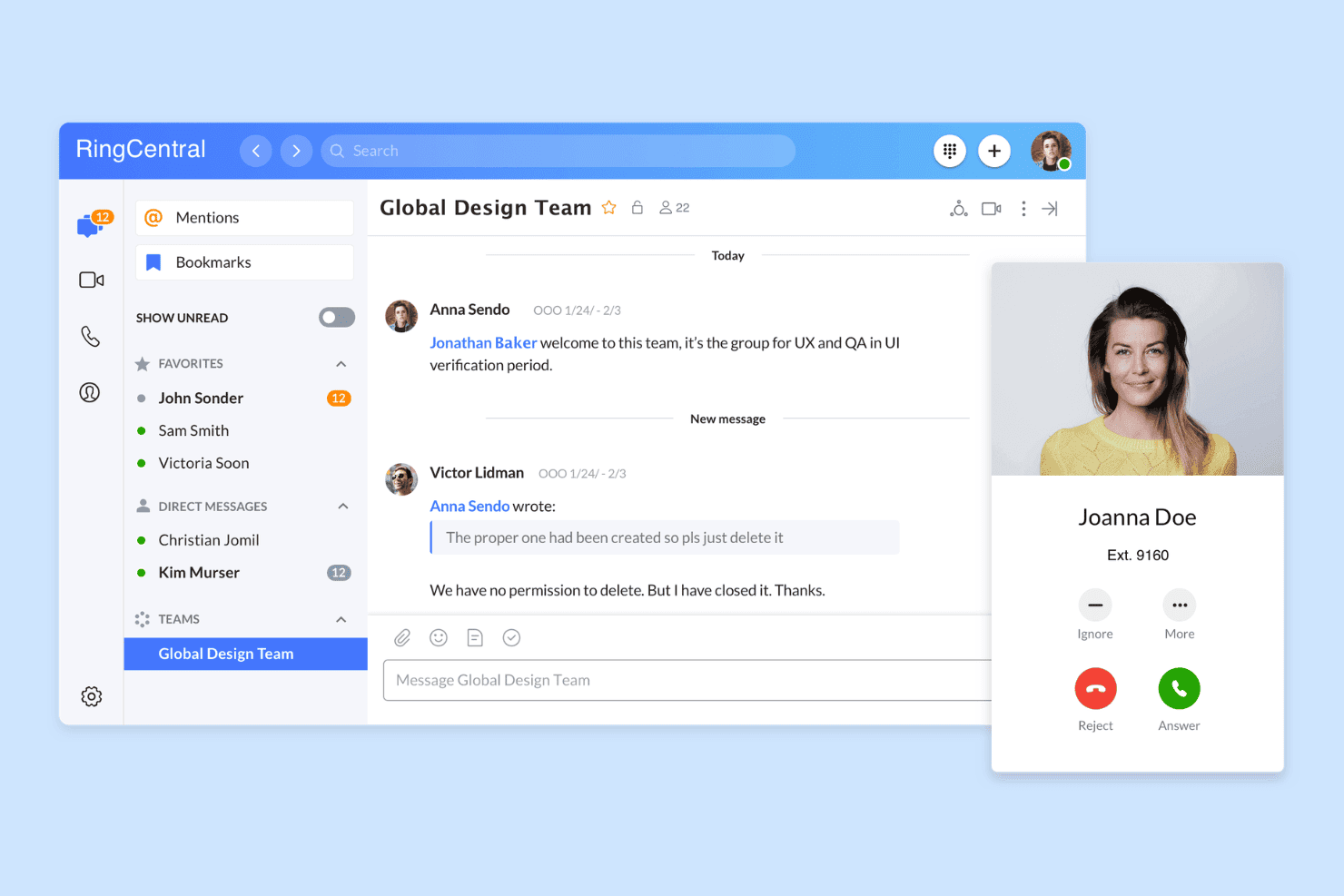
RingCentral offers a unified messaging interface with team chat, direct messages, incoming call notifications, and out-of-office status indicators. RingCentral is a cloud communications platform that brings business calling, video, team messaging, and contact center tools together for mid-market and enterprise teams that need a single system to manage both customer-facing and internal communications.
Who Is RingCentral Best For?
RingCentral is a strong fit for mid-market and enterprise teams that need phone, video, messaging, and contact center tools on one platform.
Why RingCentral Is a Good CloudTalk Alternative
I've included RingCentral in my top picks because it goes well beyond a calling tool. RingEX and RingCX sit on the same platform, so my team can handle inbound support queues, outbound sales calls, and internal video meetings without switching between apps. The AI Receptionist routes calls and captures leads around the clock, and AI-generated transcripts with action items surface automatically after every call.
RingCentral Key Features
- AI-powered meeting highlights: Generates summaries and action items from calls and meetings automatically.
- Multi-level IVR menus: Set up layered phone menus for complex routing and efficient caller self-service.
- 330+ app integrations: Connects with CRM, helpdesk, and collaboration tools like Salesforce, HubSpot, and Zendesk.
- GDPR and HIPAA compliance features: Includes tools for managing data residency, call recording consent, and role-based access controls.
RingCentral Integrations
RingCentral offers 330+ native integrations, including Salesforce, HubSpot, Zendesk, Microsoft 365, Google Workspace, ServiceNow, Okta, Slack, Zoho CRM, and Mailchimp. An API is available for custom integrations.
Pros and Cons
Pros:
- Global number coverage across 100+ countries
- AI transcripts and summaries built in natively
- Unified calling, video, and messaging in one
Cons:
- Admin portal setup can be complex
- Contact center requires a separate paid plan
Learn more about RingCentral: 10Best for multi-country number availability
JustCall
- 14-day free trial
- From $29/user/month (billed annually)
Visit WebsiteCustomer Rating:4.1/5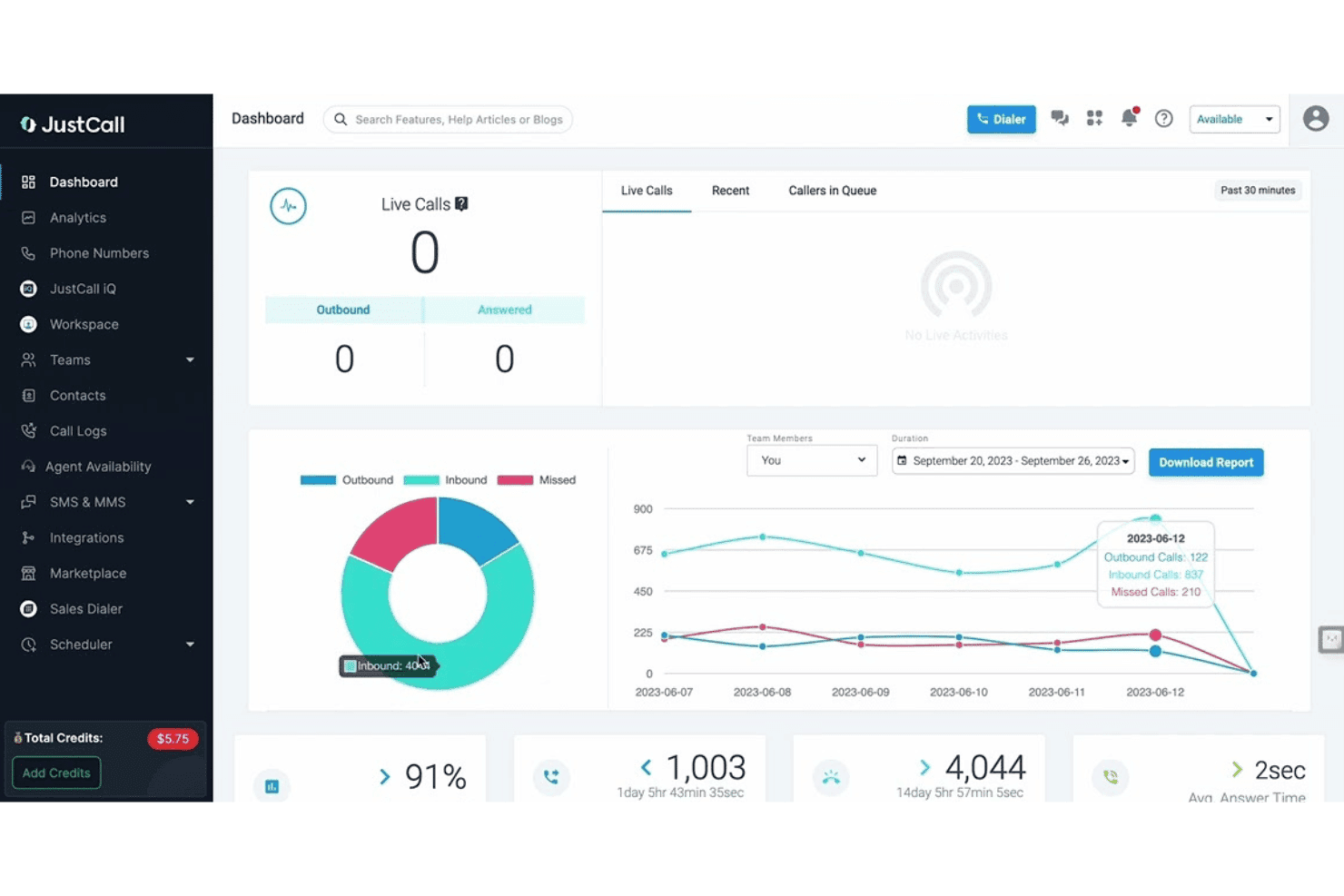
JustCall offers a real-time dashboard with live call tracking, call analytics charts, and team performance metrics including inbound, outbound, and missed call data. JustCall is a cloud-based business phone system built for sales and support teams that need to make and receive calls, send SMS, and sync activity directly into their CRM across a global operation.
Who Is JustCall Best For?
JustCall is a strong fit for small to mid-sized sales and support teams that run outbound calling campaigns or manage inbound queues across multiple countries.
Why JustCall Is a Good Cloudtalk Alternative
I've included JustCall in my top picks because of how far ahead it is on international number provisioning. With local, toll-free, and international numbers available in 70+ countries, my team can establish a local presence in a new market the same day we decide to enter it. I also appreciate the Local Number Bundles feature, which lets you swap underperforming numbers once a month without disrupting your existing call routing setup.
JustCall Key Features
- Omni-channel messaging inbox: Centralize SMS, MMS, and WhatsApp conversations in one unified inbox for your team.
- Advanced analytics dashboard: Access real-time dashboards tracking call metrics, agent performance, and campaign progress.
- Bulk SMS campaigns: Launch targeted text messaging campaigns to reach contacts as part of your marketing workflows.
- Automated call dispositions: Automatically tag and log call outcomes to streamline reporting and post-call follow-up.
JustCall Integrations
JustCall offers 100+ native integrations, including Salesforce, HubSpot, Zoho CRM, Pipedrive, Zendesk, Freshdesk, Intercom, ActiveCampaign, Slack, Microsoft Teams, and Zapier. An API is available for custom integrations.
Pros and Cons
Pros:
- Automates outbound text marketing campaigns
- AI call summaries reduce manual rep note-taking
- Local numbers available in 140+ countries
Cons:
- Reporting dashboards lack deeper customization options
- Call quality inconsistent on weaker internet connections
Learn more about JustCall:
Other CloudTalk Alternatives
Here are some additional CloudTalk alternatives that didn’t make it onto my shortlist, but are still worth checking out:
- 11NextivaBest for simplified setup and onboarding
- 12AircallBest for native CRM and helpdesk integrations
- 13PhoneBurnerBest for high-volume outbound dialing efficiency
- 148x8Best for global coverage with local number options
- 15Amazon ConnectBest for scalable cloud infrastructure management
- 16Zendesk TalkBest for connecting voice with ticketing workflows
- 17Twilio FlexBest for customizable agent desktop experiences
- 18AlowareBest for CRM contact syncing
- 19Vonage Business CommunicationsBest for scalable communications API offerings
- 20Zoom Contact CenterBest for integrated video and voice support
How I Evaluate CloudTalk Alternatives
I split my evaluation into two layers: core functionality CloudTalk alternatives must offer, and differentiators that set vendors apart. The first covers VoIP calling and CRM sync; the second reveals what makes one platform worth choosing.
Core Functionality (Table Stakes For This List)
When I'm selecting tools for my list, I rank each one on a scale from 0 (does not offer the functionality) to 5 (excels in this area) for each core functionality listed below. Then, I calculate the tool's total score as a percentage. Each tool needs to achieve a minimum total score of 65% to be considered for inclusion.
- Cloud-Based Calling: I check whether the platform supports VoIP across browser, desktop, and mobile apps so remote reps can take calls from any device.
- International Numbers: Global sales teams need local presence, so I evaluate how many countries a tool covers with local and toll-free number options.
- Call Routing & IVR: I look for multi-level IVR menus, skills-based routing, and queue callbacks that keep inbound callers connected to the right agent fast.
- CRM Integrations: Platforms should sync call logs and contacts with CRMs like Salesforce, HubSpot, or Pipedrive without requiring third-party middleware.
- Call Recording & Analytics: I evaluate whether dashboards go beyond basic call counts to include agent scorecards, outcome tracking, and real-time reporting.
- Outbound Dialer: Sales teams running high-volume campaigns need more than click-to-call, so I look for power dialers, call scripting, and automated cadences.
Once I have a list of tools that meet the criteria, I consider what sets each platform apart.
Differentiating Factors (What Sets Vendors Apart)
Here's how I compare and contrast different vendors:
Standout Features
AI call intelligence is a major differentiator—I look for automatic transcription, sentiment analysis, and AI-generated summaries that save reps from manual note-taking after every call. Real-time coaching tools matter just as much, especially for growing teams. Features like whisper and barge let managers guide reps during live conversations without the customer hearing. I also evaluate power and predictive dialers closely, since multi-line parallel dialling and automated callback logic can increase talk time on outbound campaigns.
Beyond Features
Pricing transparency matters a lot—I check whether per-user costs include minutes and numbers or if those are billed separately, since hidden fees add up fast when scaling a team seasonally. Call quality is another area I evaluate closely, looking for published uptime SLAs and built-in monitoring like MOS scores and jitter tracking. Open REST APIs and webhook support also play a role, especially for teams that need to push call data into BI dashboards or trigger actions in tools like Outreach or Gong.
Why Look For A CloudTalk Alternative?
While CloudTalk is a good choice of inbound marketing tools, there are a number of reasons why some users seek out alternative solutions. You might be looking for a CloudTalk alternative because…
- Needing more advanced AI call intelligence features
- Wanting broader native integration with niche CRMs
- Requiring better global calling and local number availability
- Seeking more transparent or flexible pricing models
- Preferring dedicated onboarding and 24/7 live support
- Demanding deeper reporting and analytics out of the box
If any of these sound like you, you’ve come to the right place. My list contains several inbound marketing tool options that are better suited for teams facing these challenges with CloudTalk and looking for alternative solutions.
CloudTalk Key Features
Here are some of the key features of CloudTalk to help you contrast and compare what alternative solutions offer:
- VoIP calling: Access inbound and outbound calls using business phone system features directly from your browser, desktop, or mobile app without on-premises hardware, backed by a 99.999% uptime sla so SMBs and distributed teams stay connected.
- Intelligent call routing: Use IVR menus, skills-based routing, call queuing, automatic call distribution, and smart queues to direct inbound calls to the right agent for faster, higher-quality customer support.
- Global numbers: Purchase and manage local, mobile, and toll-free phone numbers in over 160 countries with flexible number porting, so your team can establish a local presence for international sales and support.
- Native CRM integrations: Sync call activity, contacts, and notes bi-directionally with CRM platforms like Salesforce, HubSpot, and Pipedrive to centralize sales and support data.
- Call recording: Record calls automatically or on-demand to monitor call quality, support real-time transcription or voicemail transcription, meet compliance requirements, and power agent coaching.
- Analytics and reporting: View dashboards with real-time and historical data on call volume, agent performance, call outcomes, and trends to inform call center software team management.
- Outbound dialer: Run high-volume outbound campaigns with click-to-call, power dialler, auto-dialer, predictive dialling, and scripting tools that save time and increase sales team productivity.
- Call tagging and notes: Add customizable tags and notes to each call for easier tracking, QA workflows, voicemail drop delivery, and better follow-up with prospects or customers.
- Call monitoring: Empower managers with features like listen-in, whisper, sentiment analysis, and barge, or integrate an AI voice agent and chatbots to provide live feedback and coaching.
- Call monitoring: Empower managers with features like listen-in, whisper, sentiment analysis, and barge, or integrate an AI voice agent and chatbots to provide live feedback and coaching.