

Păstrarea organizării și eficienței echipei într-o lume a marketingului care se mișcă rapid poate părea o luptă grea. Gestionați simultan mai multe campanii, administrați bugete și încercați să valorificați la maximum datele disponibile. Aici intervine software-ul pentru operațiuni de marketing. Acesta este conceput pentru a vă ajuta pe dumneavoastră și echipa dumneavoastră să gestionați cu ușurință aceste provocări.
De ani de zile testez și evaluez programe software de marketing pentru a găsi cele mai bune soluții disponibile. Scopul meu este să vă ofer o perspectivă imparțială asupra instrumentelor de top care pot face cu adevărat diferența. În acest articol, vă voi prezenta alegerile mele principale, concentrându-mă asupra modului în care acestea vă pot răspunde nevoilor și problemelor specifice. Să începem să găsim soluția potrivită pentru echipa dumneavoastră.
Why Trust Our Software Recommendations
6,700+
Reviews
20
Industry experts
16+
Evaluation factors
14
Years
Our team has been testing and reviewing software since 2012. As marketing leaders ourselves, we know how difficult—and important—it is to choose the right software.
For this guide, we evaluated tools using hands-on testing and independent research, scoring tools using our selection criteria.
Our reviews reflect our human editorial judgment, not a sales pitch.
Expert reviewers:
 Gui DrusinaCreative Director
- Shriya GhateSenior Marketing Lead
 Amanda JacquesMarketing Ops Leader

Tabel comparativ al programelor software pentru operațiuni de marketing
Acest tabel comparativ sintetizează detaliile privind prețurile pentru cele mai bune programe software pentru operațiuni de marketing selectate de mine.
Score legend (out of 5)
- Excellent4.5–5
- Good4–4.4
- Average3–3.9
- Below average2–2.9
- Poor1–1.9
Sorted by: Default
| Tool | Starting Price | Website | |||||||
|---|---|---|---|---|---|---|---|---|---|
Best for data unification | 5.0 out of 5 | 5 | 5 | 5 | 5 | 5 | 5 | $25/user/month 30-day free trial | Website |
Best for consumer brand journey orchestration | 4.5 out of 5 | 5 | 5 | 3 | 5 | 4 | 5 | Pricing upon request 14-day free trial | Website |
Best for enterprise B2B lead scoring at scale | 4.7 out of 5 | 5 | 5 | 4 | 5 | 5 | 4 | Pricing upon request Free demo available | Website |
Best for Microsoft-stack marketing ops teams | 4.7 out of 5 | 5 | 5 | 3 | 5 | 5 | 5 | Pricing upon request 30-day free trial | Website |
Best for B2C omnichannel journey orchestration | 4.7 out of 5 | 5 | 5 | 3 | 5 | 5 | 5 | Pricing upon request Free demo available | Website |
Best for account-based GTM orchestration | 4.8 out of 5 | 5 | 5 | 4 | 5 | 5 | 5 | Pricing upon request Free demo available | Website |
Best for inbound marketing | 5.0 out of 5 | 5 | 5 | 5 | 5 | 5 | 5 | $7/user/month Free plan available | Website |
Best for ABM-driven campaign orchestration | 4.8 out of 5 | 5 | 5 | 5 | 4 | 5 | 5 | Pricing upon request Free demo available | Website |
Best for enterprise B2B marketing ops teams | 4.8 out of 5 | 5 | 5 | 4 | 5 | 5 | 5 | Pricing upon request Free demo available | Website |
Best for AI-driven automation | 4.7 out of 5 | 5 | 5 | 3 | 5 | 5 | 5 | $40/user/month Not available | Book Demo |





Recenzii despre cele mai bune programe software pentru operațiuni de marketing
Mai jos găsiți rezumatele mele detaliate ale celor mai bune programe software pentru operațiuni de marketing care au ajuns pe lista mea scurtă. Recenziile mele oferă o analiză detaliată a principalelor funcții, avantajelor și dezavantajelor, integrărilor și cazurilor ideale de utilizare pentru fiecare instrument, pentru a vă ajuta să îl găsiți pe cel mai potrivit pentru dumneavoastră.

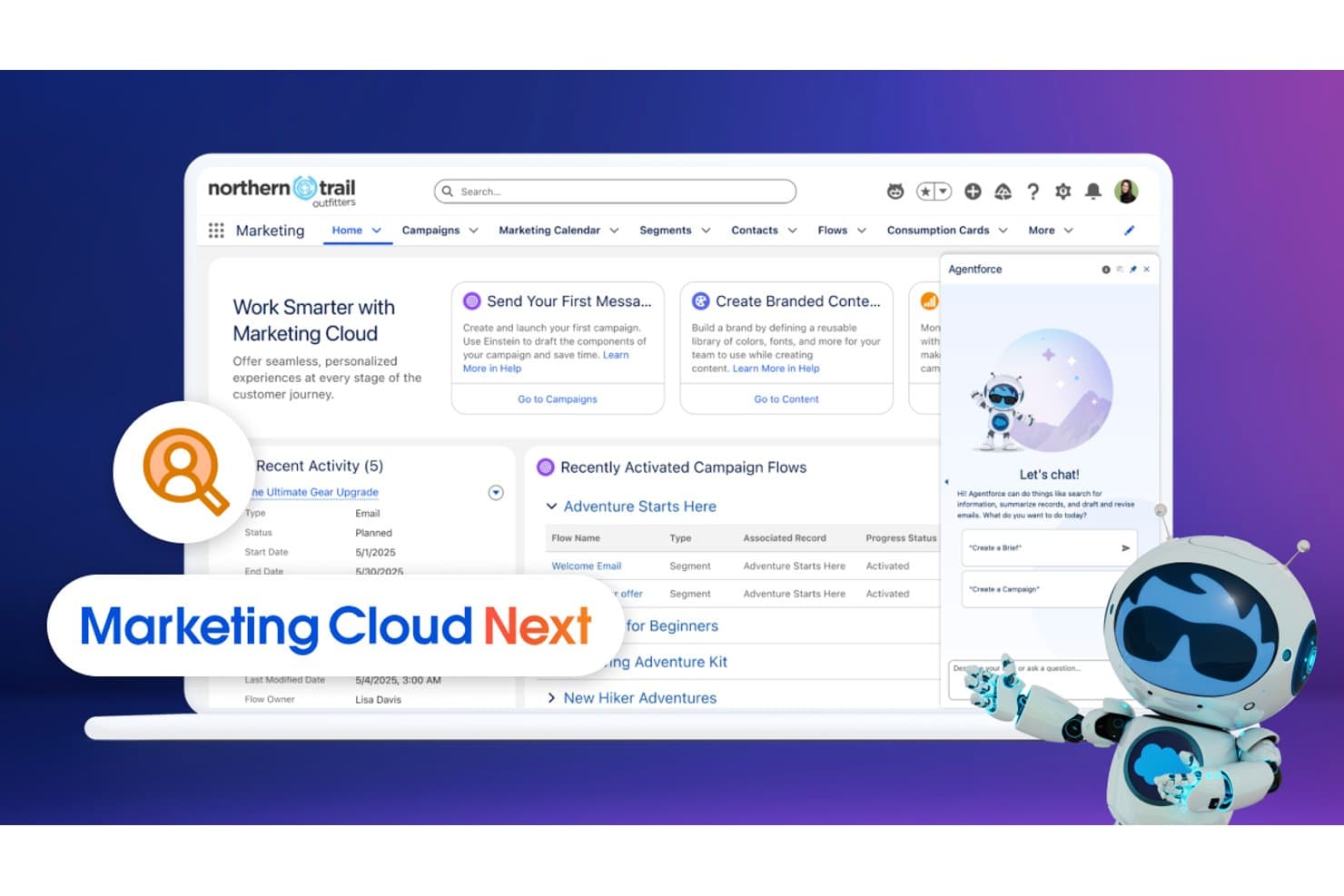
Salesforce CRM unifies campaign flows and AI chat in one marketing hub. Salesforce CRM is an enterprise CRM and marketing operations platform that spans campaign orchestration, AI-driven automation, lead scoring, audience segmentation, and native data unification across email, SMS, paid media, and more.
Who Is Salesforce CRM Best For?
Salesforce CRM is built for enterprise marketing teams that need to unify customer data across multiple sources, channels, and business units in one place.
Why I Picked Salesforce CRM
Salesforce CRM earns its spot on my shortlist because Data 360's zero-copy architecture is unlike anything else I've seen for unifying customer data at scale. It federates live data directly from Snowflake, Databricks, BigQuery, and Redshift without duplicating it, then uses identity resolution to build unified customer profiles across every touchpoint. I also rely on it for real-time audience activation, pushing those unified segments directly into Marketing Cloud, Meta, and Google Ads the moment a profile updates.
Salesforce CRM Key Features
- Journey Builder: A visual, drag-and-drop canvas for building multi-step, cross-channel customer journeys with branching logic and path experimentation.
- Einstein lead scoring: AI-powered scoring that ranks leads and accounts by conversion likelihood based on behavioral and predictive signals.
- Automation Studio: A batch and triggered automation engine for scheduling, sending, and managing multi-step marketing workflows across channels.
- Multi-business-unit support: Organizational partitioning that lets enterprise teams manage separate brands, regions, or departments within a single Salesforce instance.
Salesforce CRM Integrations
Salesforce CRM offers native integrations with Google Ads, Meta, Eventbrite, Olark, Bitly, and Slack, plus thousands of marketplace integrations through AgentExchange. MuleSoft and REST API access support custom connections, including zero-copy links to Snowflake, Databricks, BigQuery, and Amazon Redshift.
Pros and Cons
Pros:
- Enterprise-grade governance and security controls
- Unique zero-copy data warehouse integration
- Real-time audience activation across all channels
Cons:
- Multiple interfaces require technical marketing skills
- Advanced reporting gated behind pricey add-ons
Learn more about Salesforce CRM: Best for consumer brand journey orchestration
- 14-day free trial
- Pricing upon request
Visit WebsiteCustomer Rating:4.6/5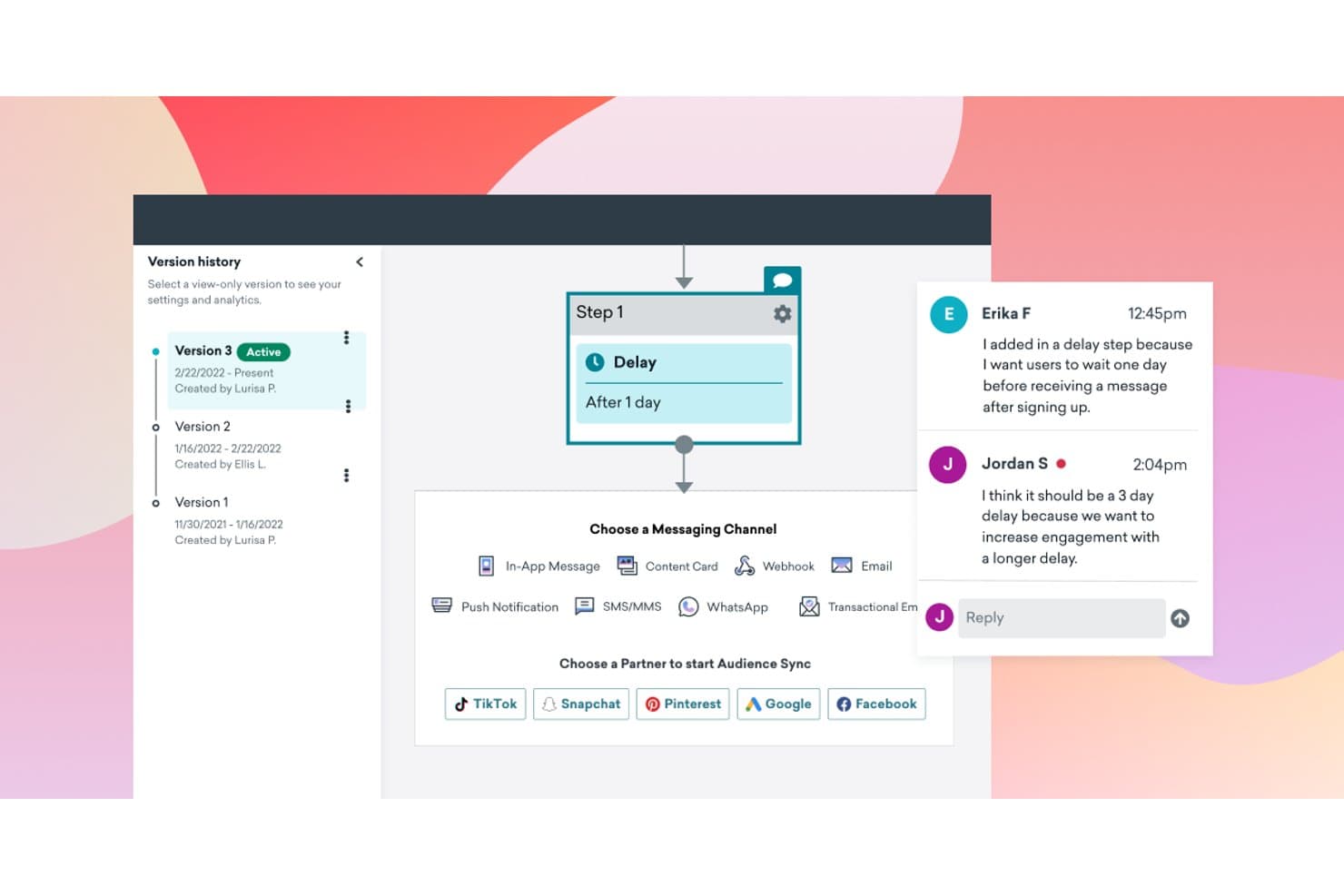
Braze lets teams collaborate on workflow versions with inline comments. Braze is a customer engagement platform built for consumer brands that combines omnichannel campaign orchestration, AI-driven journey automation, real-time segmentation, and warehouse-native data activation across email, SMS, push, WhatsApp, and more.
Who Is Braze Best For?
Braze is a strong fit for consumer brands in retail, media, gaming, and financial services that need to orchestrate high-volume, multi-channel customer engagement at scale.
Why I Picked Braze
Braze earns its spot on my shortlist because Canvas Flow, its visual journey builder, lets consumer marketing teams orchestrate genuinely complex, cross-channel sequences across email, SMS, push, WhatsApp, and more without writing a line of code. I'm especially impressed by BrazeAI Decisioning, which uses reinforcement learning to route each individual user to the highest-converting message variant, channel, and send time automatically. Paired with real-time dynamic segmentation that updates instantly as user behavior changes, Braze is the clearest choice I've found for consumer brands that need journey orchestration at scale.
Braze Key Features
- Predictive churn modeling: Braze identifies users at risk of disengaging so you can trigger proactive retention campaigns before they drop off.
- Zero-copy data warehouse activation: Connect directly to Snowflake, BigQuery, or Redshift to build segments and trigger journeys without duplicating data into Braze.
- Braze Currents: Streams real-time engagement event data to your data warehouse, CDP, or analytics tool for downstream reporting and activation.
- Multi-brand workspace support: Partition your Braze environment into separate workspaces for different brands, regions, or product lines with centralized governance controls.
Braze Integrations
Braze offers 170+ turnkey partner integrations through Braze Alloys, including Snowflake, BigQuery, Redshift, Databricks, Salesforce, HubSpot, Segment, Amplitude, Meta, and Shopify. Its REST API, webhooks, SDKs, and Zapier support custom connectivity.
Pros and Cons
Pros:
- Visual journey builder enables complex automation
- Real-time segmentation updates as behaviors change
- AI-driven journey orchestration for B2C campaigns
Cons:
- Requires technical setup for enterprise implementations
- No native pipeline stage lead scoring
Learn more about Braze: Best for enterprise B2B lead scoring at scale
- Free demo available
- Pricing upon request
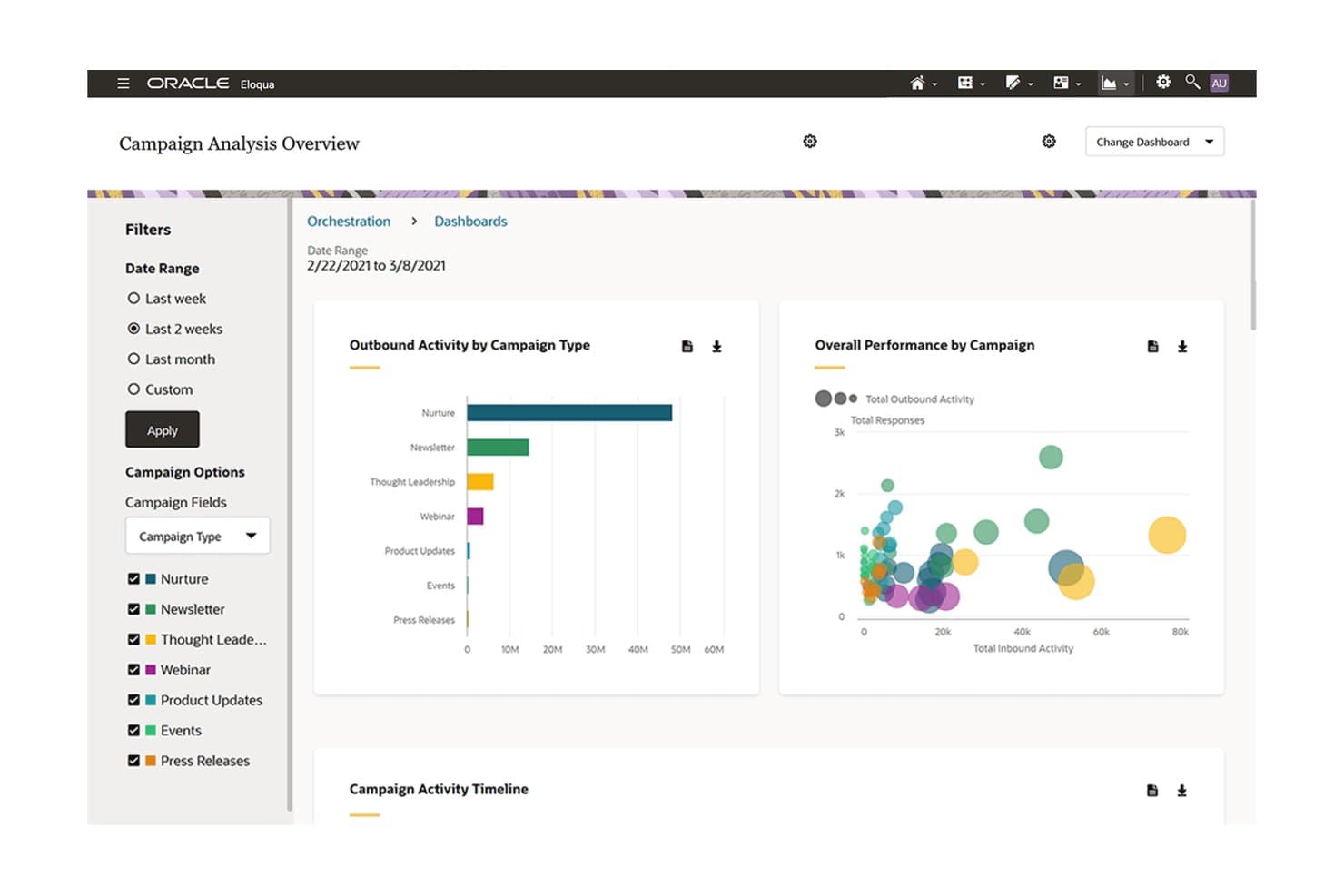
Oracle Eloqua tracks campaign performance across types via visual dashboards. Oracle Eloqua is an enterprise B2B marketing automation platform that combines multi-channel campaign orchestration, real-time lead scoring, Program Canvas workflow automation, and CRM integration into a single system built for complex marketing operations.
Who Is Oracle Eloqua Best For?
Oracle Eloqua fits enterprise B2B organizations with large contact databases, complex buying cycles, and a dedicated marketing operations team to manage the platform.
Why I Picked Oracle Eloqua
Oracle Eloqua earns its spot on my shortlist because of how it handles lead scoring at enterprise scale. I'm talking about running multiple concurrent scoring models simultaneously, updating scores in real time as contacts move through complex buying cycles, without any IT involvement. Its Program Canvas lets you trigger automated routing and lifecycle progression the moment a score threshold is hit. That combination of dynamic scoring and instant CRM sync is what makes it purpose-built for large B2B operations.
Oracle Eloqua Key Features
- Campaign Canvas: A drag-and-drop visual builder for designing multi-channel campaigns with conditional branching, wait steps, and A/B testing across email, display, search, and social.
- Contact washing machine: An automated data hygiene tool built into Program Canvas workflows that applies cleansing rules to contact records as they move through lifecycle stages.
- Guided Campaigns: Prebuilt ABM workflow templates that let both marketing and sales users launch targeted account-based campaigns without needing to build from scratch.
- Closed-loop revenue reporting: A reporting feature that connects campaign activity directly to pipeline and revenue outcomes across 70+ customizable prebuilt dashboards.
Oracle Eloqua Integrations
Oracle Eloqua offers native integrations with Salesforce, Microsoft Dynamics, and Oracle CX Sales. Its AppCloud marketplace provides 500+ partner integrations, while RESTful API access, webhooks, and SFTP support custom data flows.
Pros and Cons
Pros:
- Closed-loop reporting links campaigns to revenue
- Deep account-based marketing workflow templates
- Runs multiple lead scoring models simultaneously
Cons:
- SMS and social features require add-ons
- Segmentation UI complex for non-technical users
Learn more about Oracle Eloqua: Best for Microsoft-stack marketing ops teams
- 30-day free trial
- Pricing upon request
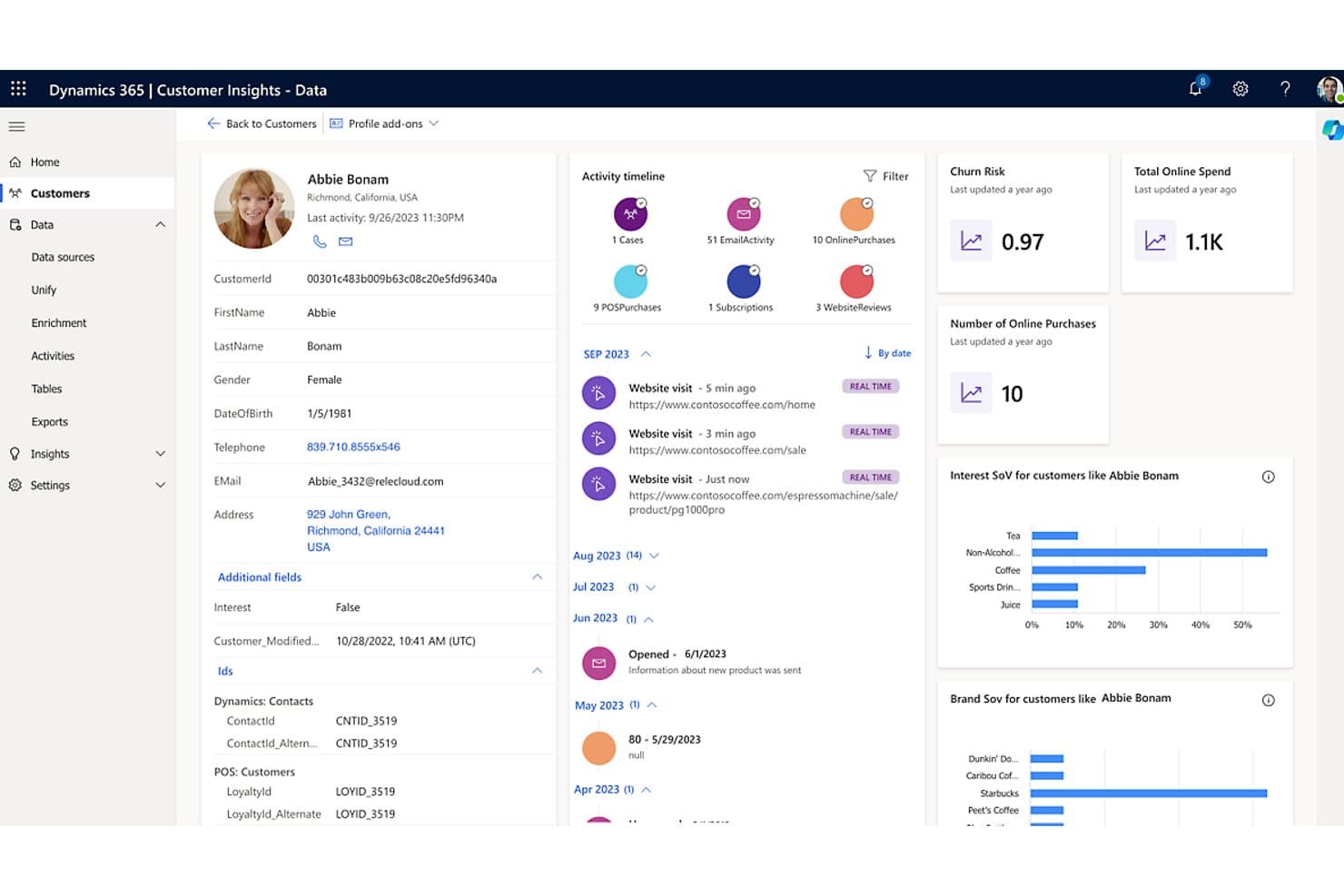
Microsoft Dynamics 365 Customer Insights unifies customer profiles with real-time activity and predictive metrics. Microsoft Dynamics 365 Customer Insights is a combined CDP and marketing automation platform that unifies customer data, journey orchestration, AI-driven segmentation, lead scoring, and multi-channel campaign execution across email, SMS, push, and custom channels.
Who Is Microsoft Dynamics 365 Customer Insights Best For?
It's a natural fit for enterprise marketing teams already operating within the Microsoft ecosystem—Azure, Dynamics 365 Sales, or Power Platform—who want CDP and journey orchestration in one place.
Why I Picked Microsoft Dynamics 365 Customer Insights
I picked Microsoft Dynamics 365 Customer Insights because it's purpose-built for teams already running on the Microsoft stack, where native Dataverse sync and Azure Data Lake attachments make data unification a reality rather than a project. I especially like the Copilot-driven Journey Creation Agent, which lets marketers build full, branching journeys from a plain-language brief without touching a single line of code. The lead scoring model builder connects directly to Dynamics 365 Sales, automatically notifying reps the moment a lead hits qualification threshold.
Microsoft Dynamics 365 Customer Insights Key Features
- Omnichannel journey canvas: A drag-and-drop visual builder for constructing multi-step customer journeys across email, SMS, push, and custom channels with branching logic and wait steps.
- Conversational segment builder: A Copilot-powered tool that lets you describe a target audience in plain language and automatically generates a dynamic, real-time segment from your unified data.
- Contact point consent management: A channel-specific consent framework that captures, stores, and enforces opt-in or opt-out status at the individual contact point level across GDPR, CAN-SPAM, CASL, and CCPA requirements.
- Power Query data connectors: A library of 40+ pre-built connectors for ingesting data from third-party sources—including Salesforce, SAP, Google Analytics, and Amazon Redshift—directly into the platform.
Microsoft Dynamics 365 Customer Insights Integrations
Microsoft Dynamics 365 Customer Insights has 40+ Power Query connectors, including Salesforce, SAP, Google Analytics, Amazon Redshift, SharePoint, and SQL Server, plus native integrations across Microsoft Dynamics 365, Power BI, Teams, Azure, and Microsoft Fabric. Its REST API supports custom integrations.
Pros and Cons
Pros:
- Tenant-based licensing allows unlimited users
- Native sync with Microsoft Dynamics 365 Sales
- Copilot builds complex journeys from plain language
Cons:
- Major updates can disrupt customizations
- Preference center setup is overly complicated
Learn more about Microsoft Dynamics 365 Customer Insights: Best for B2C omnichannel journey orchestration
- Free demo available
- Pricing upon request
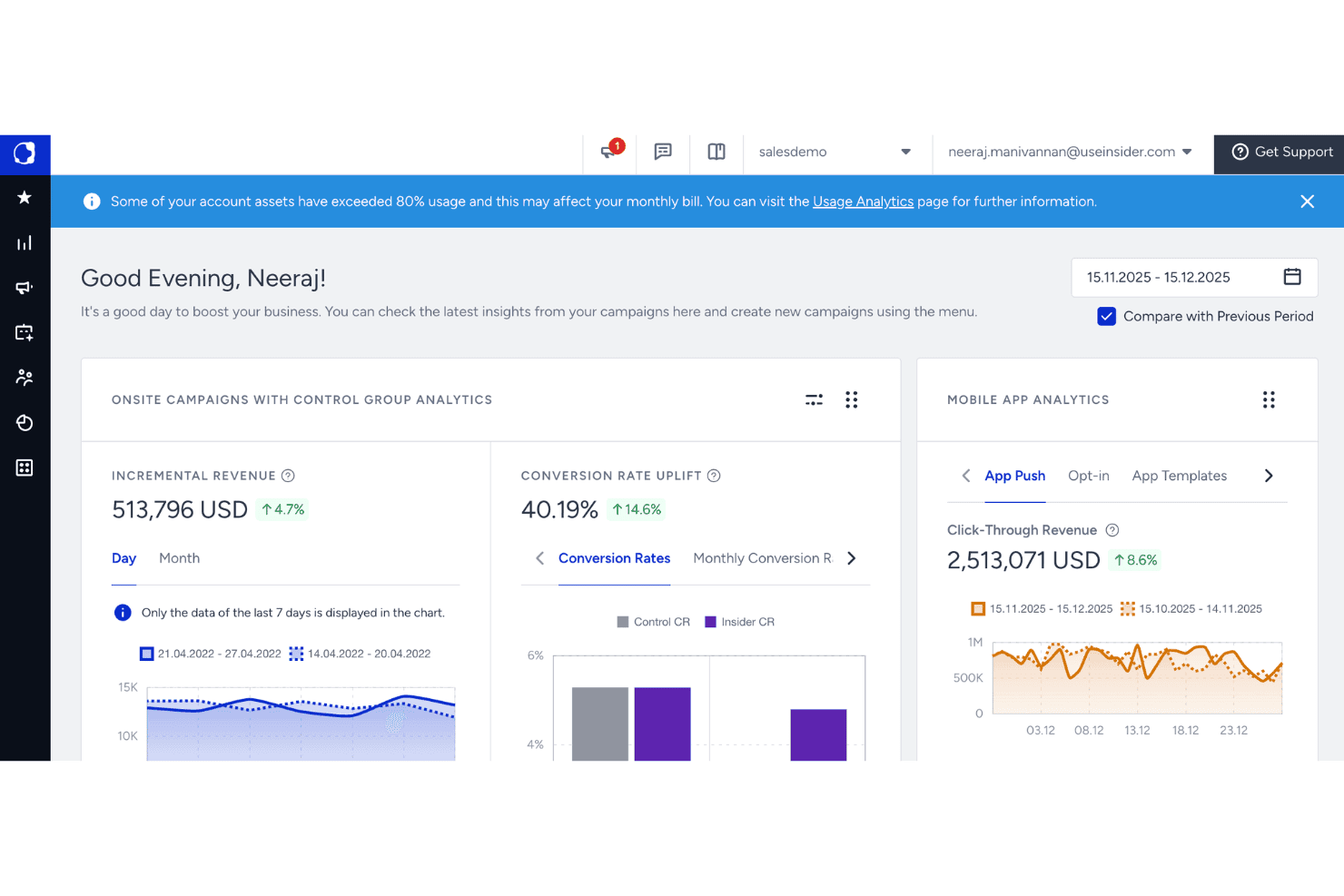
Quantum Metric Felix AI monitors background agents and site health. Insider is a B2C-focused marketing operations platform that combines a native CDP, AI-driven audience segmentation, and omnichannel journey orchestration across 12+ channels including email, SMS, WhatsApp, web push, and paid social.
Who Is Insider Best For?
Insider is a strong fit for B2C marketing teams at mid-market to enterprise brands that need to orchestrate customer journeys across a high volume of channels from a single platform.
Why I Picked Insider
Insider earns its spot on my shortlist because its Architect journey builder lets B2C marketing teams orchestrate customer journeys across 12+ native channels from a single canvas. I love how Next Best Channel routing, retrained daily via AutoML, dynamically moves customers to their highest-engagement touchpoint without manual intervention. The AI-powered Smart Segment Creator also generates predictive audiences from natural language prompts, pulling from 120+ attributes including churn risk and lifetime value scoring.
Insider Key Features
- Architect journey builder: A drag-and-drop canvas for building multi-step customer journeys with branching logic, conditional checks, and event-based triggers across 12+ native channels.
- Warehouse-native CDP connectors: Bi-directional, near-real-time data sync with Snowflake, Google BigQuery, Amazon Redshift, and Databricks for direct data activation without duplication.
- Agent One autonomous agents: AI agents—including a Shopping Agent and Insights Agent—that execute marketing tasks and answer campaign performance questions in natural language.
- Unified consent management: A built-in consent management system within the CDP that tracks and enforces customer permissions across channels to support GDPR and ePrivacy compliance.
Insider One Integrations
Insider One offers 100+ integrations, including Salesforce, HubSpot, Microsoft Dynamics, Snowflake, Google BigQuery, Databricks, Shopify, Marketo Engage, and Google Ads. Open APIs and webhooks support custom connections.
Pros and Cons
Pros:
- 100+ pre-built journey and personalization templates
- Unified CDP with real-time data sync
- AI-driven omnichannel journey orchestration
Cons:
- No self-serve free trial or public pricing
- Lacks native ABM and B2B lead routing
Learn more about Insider: Best for account-based GTM orchestration
- Free demo available
- Pricing upon request
Visit WebsiteCustomer Rating:4.4/5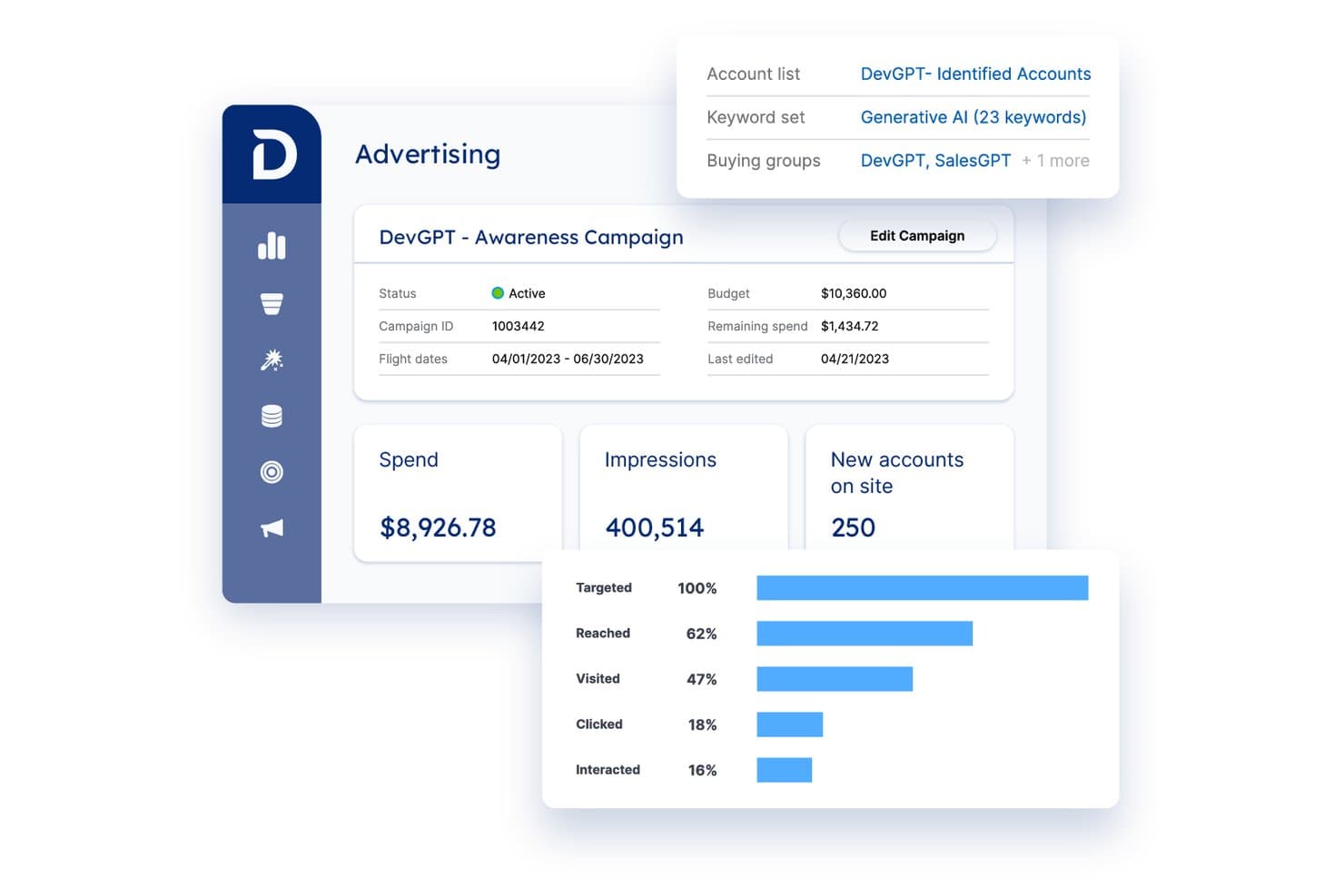
Demandbase tracks ad spend, impressions, and account engagement in one view. Demandbase is a B2B GTM platform that unifies account intelligence, multi-channel campaign orchestration, advertising, website personalization, and sales enablement under a single account-based framework.
Who Is Demandbase Best For?
Demandbase is built for mid-market and enterprise B2B teams that need a dedicated marketing operations resource to run coordinated, account-based programs across sales and marketing.
Why I Picked Demandbase
I picked Demandbase as one of the best because its account-based GTM orchestration goes deeper than most platforms I've seen. JourneyIQ dynamically adjusts ad campaigns in real time based on buying group signals, so your display, CTV, and LinkedIn spend automatically shifts as accounts move through stages. I also love the Demandbase Selector tool, which lets you build cross-object segments from CRM, intent, and behavioral data and instantly activate them across every channel in one coordinated play.
Demandbase Key Features
- AI-powered account scoring: Demandbase uses predictive AI to score accounts and contacts based on intent signals, firmographic fit, website behavior, and CRM data.
- Buying group mapping: Automatically identifies and maps individual stakeholders within target accounts by role and persona for more targeted outreach.
- Website personalization: Customizes web pages, CTAs, images, and content for specific account segments based on account-level identification and engagement data.
- Data warehouse delivery: Exports account and engagement data natively to Snowflake, Google BigQuery, Amazon Redshift, and other major data warehouses for custom BI reporting.
Demandbase Integrations
Demandbase offers native integrations with Salesforce, HubSpot, Microsoft Dynamics 365, Marketo, Eloqua, Outreach, Salesloft, Snowflake, Google BigQuery, and LinkedIn Marketing Solutions, plus an open REST API, Workato, and webhooks for custom connections.
Pros and Cons
Pros:
- Deep ABM and sales marketing alignment features
- B2B-native DSP for targeted programmatic advertising
- Advanced AI-powered account and journey orchestration
Cons:
- Attribution reporting often frustrates direct-response teams
- Requires separate MAP for email campaigns
Learn more about Demandbase: Best for inbound marketing
- Free plan available
- From $7/user/month (billed annually)
Visit WebsiteCustomer Rating:4.4/5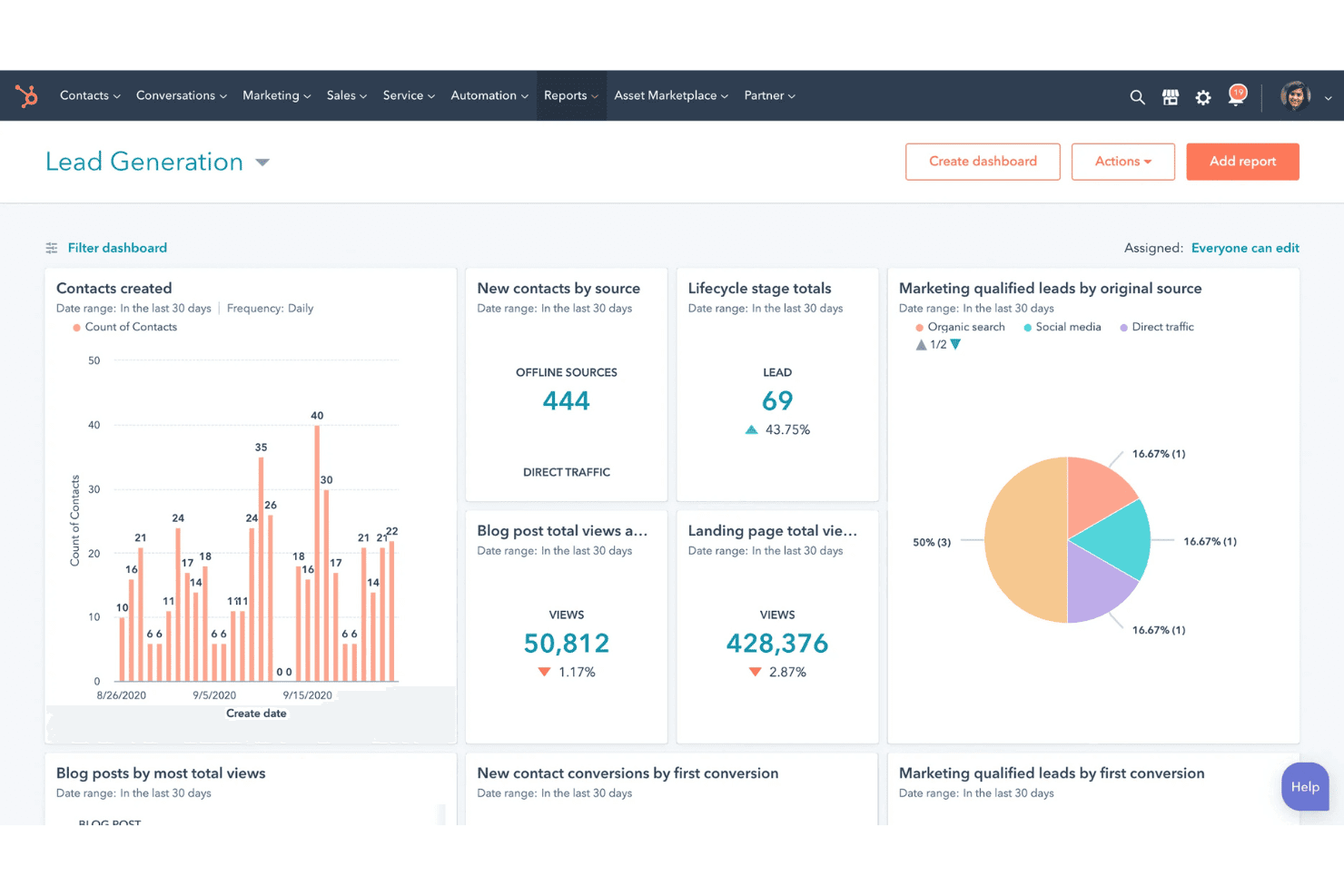
HubSpot Marketing Hub offers a Lead Generation dashboard displaying contacts created, new contacts by source, lifecycle stage totals, blog post views, landing page views, and marketing qualified leads by source. HubSpot Marketing Hub is a marketing operations platform that brings together email marketing, multi-channel campaign orchestration, marketing automation, lead scoring, CRM, and analytics under one unified system.
Who Is HubSpot Marketing Hub Best For?
HubSpot Marketing Hub is a strong fit for growth-stage and mid-market B2B teams that want marketing, CRM, and automation in one place without stitching together a fragmented stack.
Why I Picked HubSpot Marketing Hub
HubSpot Marketing Hub earns its spot on my shortlist because it's built from the ground up around inbound marketing principles, giving teams tools that attract and convert rather than interrupt. I particularly like the visual Journey Builder (launched Spring 2025), which adapts automated campaign paths to real-time buyer behavior across email, paid ads, and web. Pair that with Breeze AI's predictive lead scoring and Lookalike Lists, and you can consistently surface high-intent prospects without manual list-building.
HubSpot Marketing Hub Key Features
- Multi-touch revenue attribution: Tracks every customer interaction across seven attribution models—including first-touch, U-shaped, and full-path—to connect marketing activity directly to closed revenue.
- Native ABM tooling: Builds and tracks target account lists with company scoring, account-level engagement data, and LinkedIn Sales Navigator integration for account-based campaign execution.
- Cloud data warehouse sync: Pushes and pulls data between HubSpot and Snowflake, Google BigQuery, or AWS S3 via bi-directional connectors available through Data Hub Enterprise.
- Role-based team partitioning: Separates assets, content, and domain publishing by team, giving multi-brand or multi-region organizations granular control over who can access and publish what.
HubSpot Marketing Hub Integrations
HubSpot Marketing Hub offers 2,000+ Marketplace integrations, including Salesforce, LinkedIn Sales Navigator, Google Ads, Meta Ads, LinkedIn Ads, TikTok Ads, Slack, Zoom, and WhatsApp. It also supports native Salesforce bi-directional sync, an open API, and Zapier.
Pros and Cons
Pros:
- Multi-touch attribution connects interactions to revenue
- Bi-directional data sync supports data warehouse workflows
- AI-powered journey orchestration adapts in real time
Cons:
- Key automation features locked behind higher tiers
- Pricing escalates sharply with database growth
Learn more about HubSpot Marketing Hub: Best for ABM-driven campaign orchestration
- Free demo available
- Pricing upon request
Visit WebsiteCustomer Rating:4.3/5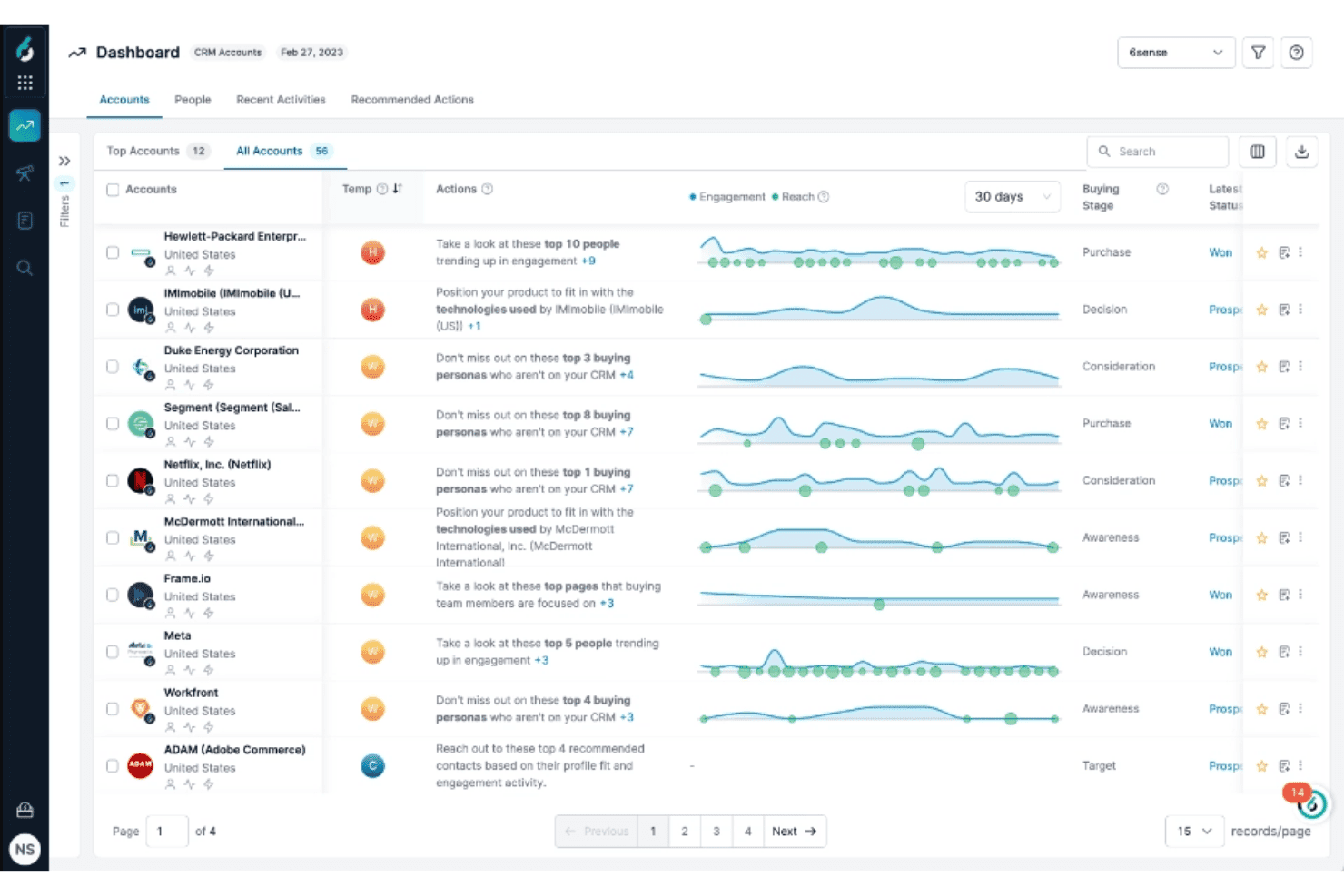
6sense offers a CRM accounts dashboard displaying account temperature, buying stage, engagement trends, and recommended sales actions for top accounts. 6sense is a revenue marketing platform that combines AI-powered audience segmentation, intent data, predictive scoring, multi-channel campaign orchestration, and sales engagement automation.
Who Is 6sense Best For?
6sense is a strong fit for mid-market and enterprise B2B marketing teams running account-based strategies who need intent data, predictive scoring, and multi-channel orchestration in one place.
Why I Picked 6sense
I've included 6sense in my top picks because its Intelligent Workflows product is genuinely built for ABM-driven campaign orchestration in a way most platforms aren't. On a drag-and-drop canvas, I can coordinate display ads, LinkedIn, and AI-powered email sequences so they adapt in real time to buyer signals, not a static schedule. Layered on top of that, buying group-level segmentation using Signalverse™ means campaigns target the full buying committee, not just one contact at an account.
6sense Key Features
- RevvyAI natural language querying: Ask questions about your pipeline and GTM data in plain language and get on-demand intelligence without building custom reports.
- Predictive AI scoring: AI models trained on over a decade of B2B purchase data score accounts by buying stage and surface explainable predictions directly in your CRM.
- Data workflows: Automate CRM account creation, lead routing, contact enrichment, and data cleansing based on real-time signals from Signalverse™.
- Web visitor identification: Deanonymize anonymous site visitors and map them to known accounts for retargeting and re-segmentation.
6sense Integrations
6sense offers native integrations with Salesforce, HubSpot, Microsoft Dynamics, Marketo, Oracle Eloqua, Salesloft, Outreach, Gong, LinkedIn Advertising, and Google Ads. It also supports an Open API and MCP Server for custom connectivity.
Pros and Cons
Pros:
- Buying group segmentation maps full committees
- Intelligent Workflows adapts campaigns to buyer signals
- Signalverse™ identifies in-market accounts early
Cons:
- Only account-level intent signals available
- Contact data accuracy can be inconsistent
Learn more about 6sense: Best for enterprise B2B marketing ops teams
- Free demo available
- Pricing upon request
Visit WebsiteCustomer Rating:4.1/5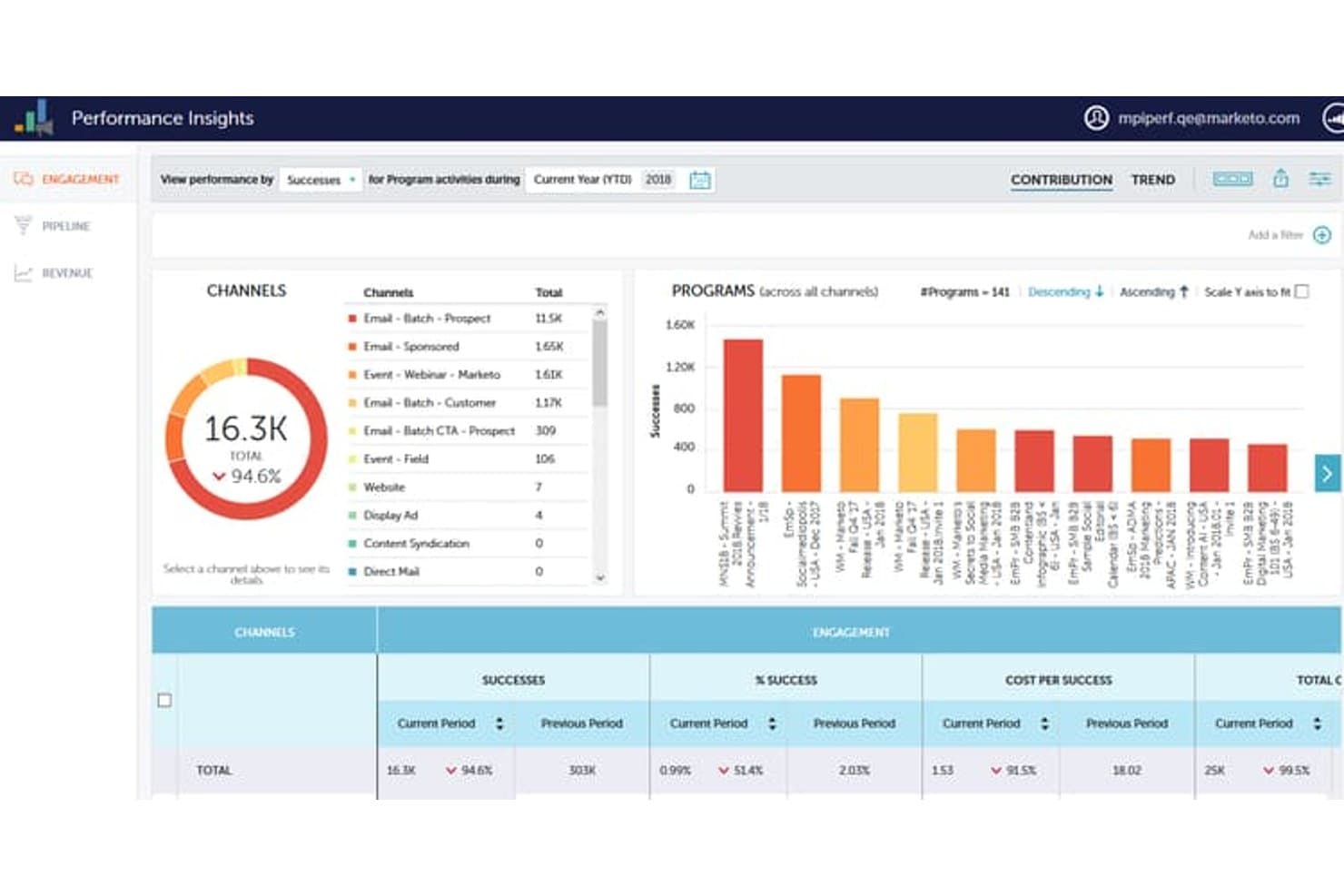
Adobe Marketo Engage tracks engagement metrics across channels and programs. Adobe Marketo Engage is a B2B marketing automation platform built around Smart Campaigns, lead scoring, multi-channel nurture programs, CRM integration, and revenue attribution.
Who Is Adobe Marketo Engage Best For?
Marketo Engage is built for enterprise B2B organizations with a dedicated marketing operations function and the technical resources to run a complex platform.
Why I Picked Adobe Marketo Engage
Adobe Marketo Engage earns its spot on my shortlist because no other platform is as deeply purpose-built for enterprise B2B marketing operations. Smart Campaigns let my team run complex, trigger-based workflows with over 150 audience filters, branching logic, and behavioral scoring with decay built right in. I also rely on Workspaces and Partitions to keep multiple business units, brands, or regions cleanly separated within a single instance, which is something you genuinely can't replicate in lighter-weight tools.
Adobe Marketo Engage Key Features
- Multi-touch revenue attribution: Marketo Measure connects every marketing and sales touchpoint to pipeline and closed revenue using first touch, U-shaped, W-shaped, full-path, and custom attribution models.
- Engagement programs: Always-on nurture programs with per-contact cadence control, content exhaustion logic, and engagement scoring let you run up to 100 active programs simultaneously.
- Sales Insight: An in-CRM dashboard that surfaces lead engagement activity—emails opened, pages visited, forms filled—directly inside Salesforce and Microsoft Dynamics for sales teams.
- Dynamic Chat: An AI-powered conversational marketing chatbot with meeting scheduling, lead routing, and generative AI responses built natively into the platform.
Adobe Marketo Engage Integrations
Adobe Marketo Engage offers native integrations with Salesforce Sales Cloud, Microsoft Dynamics 365, Veeva CRM, and Adobe Experience Cloud. Its LaunchPoint marketplace includes hundreds of partner integrations, with REST and SOAP APIs plus webhooks for custom connectivity.
Pros and Cons
Pros:
- Partitioning supports multi-brand or multi-region teams
- Native account-based marketing and attribution models
- Smart Campaigns handle complex, multi-step workflows
Cons:
- Attribution reporting customization is limited without add-on
- User interface feels dated and cumbersome
Learn more about Adobe Marketo Engage:
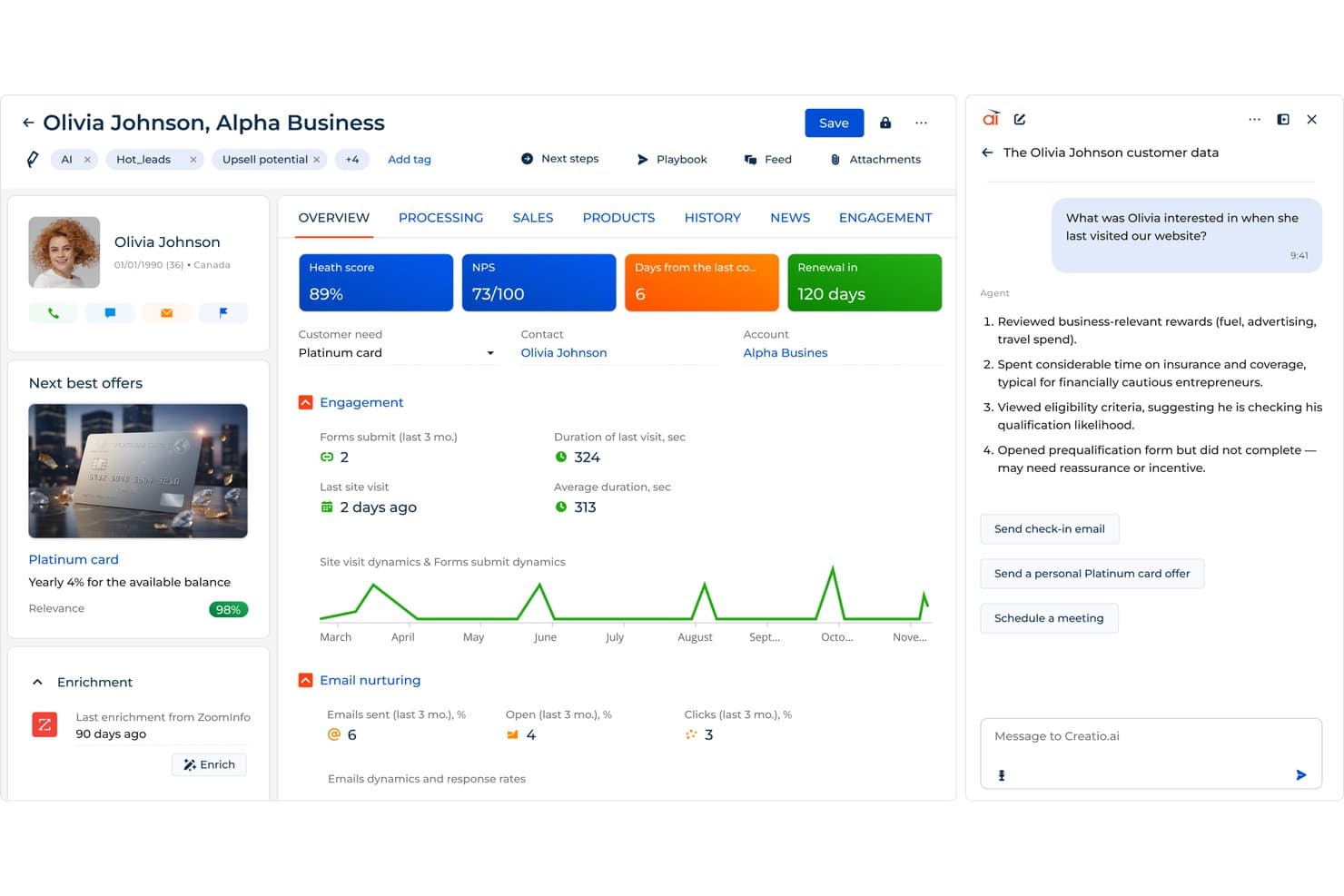
Creatio CRM surfaces AI-driven customer insights to guide marketing outreach. Creatio CRM is a unified no-code CRM and marketing operations platform that combines omnichannel campaign orchestration, AI-powered lead scoring, dynamic audience segmentation, and workflow automation across marketing, sales, and service on a single data model.
Who Is Creatio CRM Best For?
Creatio CRM is a strong fit for mid-market and enterprise marketing and operations teams that want AI-powered automation, omnichannel campaign orchestration, and CRM alignment on a single no-code platform.
Why I Picked Creatio CRM
Creatio CRM earns its spot on my shortlist because its AI automation isn't surface-level. I'm particularly impressed by its AI Campaign Generation Agent, which builds full multi-channel campaign workflows from a natural language brief, and its ML-powered lead scoring model, which assigns predictive readiness scores (1–100) to contacts so my team can prioritize outreach without manual triage. Both capabilities run natively on a unified CRM data model shared across marketing, sales, and service.
Creatio CRM Key Features
- No-code process designer: A drag-and-drop workflow builder that lets you create and modify multi-step automated processes without writing code.
- Visual Campaign Designer: A canvas-based tool for building omnichannel customer journeys across email, SMS, social, push, and events with branching logic and wait steps.
- Dynamic audience segmentation: A segmentation engine that builds and updates audience lists in real time using multi-condition logic across demographic, behavioral, and firmographic data.
- Snowflake data warehouse connector: A native integration that syncs your marketing data directly with Snowflake for extended analytics and reporting.
Creatio CRM Integrations
Creatio CRM offers native integrations with Microsoft 365, Google Workspace, Facebook, LinkedIn, Google Analytics, and Matomo, plus 700+ Marketplace integrations, including Snowflake, Apollo.io, and ZoomInfo. It supports REST, SOAP, and OData APIs, Make, Workato, and Zapier.
Pros and Cons
Pros:
- Native predictive lead scoring for prioritization
- Branching, omnichannel journeys on a shared canvas
- AI builds campaigns from natural language
Cons:
- Fewer ready-made campaign templates available
- No native multi-touch attribution reporting
Learn more about Creatio AI CRM:
Alte programe software pentru operațiuni de marketing
Iată câteva opțiuni suplimentare de programe software pentru operațiuni de marketing care nu au ajuns pe lista mea scurtă, dar care merită totuși analizate:
- 11KlaviyoBest for ecommerce marketing operations
- 12OrttoBest for omnichannel journeys with built-in CDP
- 13CleverTapBest for mobile-first lifecycle orchestration
- 14BloomreachBest for warehouse-native ecommerce campaign ops
- 15ActiveCampaignBest for mid-market multi-channel automation
- 16Iterable Best for warehouse-native lifecycle marketing ops
- 17Salesforce Marketing CloudBest for cross-channel campaign orchestration
How I Evaluate Emotion Detection Software
I split my evaluation into two layers: the baseline capabilities a tool must have to make the list, and the differentiators that separate vendors worth recommending from the rest.
Core Functionality (Table Stakes For This List)
When I'm selecting tools for my list, I rank each one on a scale from 0 (does not offer the functionality) to 5 (excels in this area) for each core functionality listed below. I then calculate the tool's total score into a percentage, using 65% as a benchmark to help assess its overall fit for the list.
- Campaign Orchestration: I evaluate whether the tool enables seamless planning, execution, and coordination of multi-channel campaigns across email, web, social, and paid media from a single interface.
- Marketing Automation & Workflows: I check if it provides automated workflows for lead nurturing, scoring, routing, and lifecycle stage management based on customer behaviors and triggers.
- Data & CRM Integration: I assess native integrations and bi-directional data synchronization with CRMs and martech stacks to unify customer and campaign data.
- Analytics & Attribution: I look for robust reporting dashboards, funnel analytics, and multi-touch attribution to accurately measure campaign effectiveness and ROI.
- Audience Segmentation & Management: I determine if marketers can create, manage, and target dynamic audience segments using demographic, firmographic, and behavioral data.
- Governance & Compliance Controls: I verify the presence of user permissions, data privacy settings, and compliance features (e.g., GDPR, CAN-SPAM, CCPA) to ensure responsible marketing data management.
Once I have a list of tools that meet the criteria, I consider what sets each platform apart.
Differentiating Factors (What Sets Vendors Apart)
Here's how I compare and contrast different vendors:
Standout Features
I pay close attention to whether a tool can map emotion shifts across the full customer journey—not just a single call or chat. Multilingual and accent-robust modeling matters just as much: I look for native emotion detection across languages, not translated keyword lookups. I also evaluate whether a tool links detected emotions to outcomes like churn or CSAT, because knowing why customers feel frustrated is more actionable than knowing that they do.
Beyond Features
Compliance readiness is non-negotiable for me. I check whether vendors align with regulations like GDPR, CCPA, and the EU AI Act—which restricts emotion recognition in certain contexts—and whether they offer configurable consent capture and PII redaction. I also look closely at deployment flexibility. A healthcare or financial services team with strict data residency requirements needs more than a single-tenant cloud option. Finally, I consider how predictably pricing scales as interaction volumes grow, since a per-minute audio model can look affordable at pilot scale and become expensive fast.
Cum să alegeți programele software pentru operațiuni de marketing
Este ușor să vă pierdeți în liste lungi de funcții și structuri complexe de prețuri. Pentru a vă ajuta să rămâneți concentrat în timp ce parcurgeți procesul unic de selectare a programului software, iată o listă de factori de care trebuie să țineți cont:
| Factor | Aspecte de luat în considerare |
| Scalabilitate | Asigurați-vă că programul software poate crește odată cu afacerea dumneavoastră. Verificați dacă poate gestiona un volum mai mare de date și de utilizatori pe măsură ce echipa dumneavoastră se extinde. |
| Integrări | Verificați dacă programul software se integrează cu instrumentele pe care le utilizați deja, precum sistemele CRM sau platformele de analiză, pentru a evita insulele de date și a îmbunătăți eficiența fluxului de lucru. |
| Posibilități de personalizare | Căutați opțiuni pentru a adapta programul software la procesele echipei dumneavoastră. Acestea pot include tablouri de bord personalizate sau rapoarte adaptate. |
| Ușurință în utilizare | Evaluați interfața de utilizator și cerințele de instruire. Un sistem ușor de utilizat reduce perioada de învățare și încurajează adoptarea sa de către echipa dumneavoastră. |
| Buget | Comparați planurile de prețuri pentru a găsi opțiunea care se încadrează în limitele dumneavoastră financiare. Luați în considerare costurile ascunse, precum cele pentru utilizatori suplimentari sau funcții premium, care pot influența prețul. |
| Măsuri de securitate | Acordați prioritate programelor software care oferă funcții de securitate solide pentru protejarea datelor. Căutați conformitatea cu reglementările relevante, precum GDPR. |
| Asistență | Evaluați disponibilitatea și calitatea serviciului de asistență pentru clienți. O asistență de încredere poate fi esențială pentru rezolvarea rapidă a problemelor și asigurarea unei funcționări fără probleme. |
| Analiză | Luați în considerare capacitățile de analiză pentru a vă asigura că puteți urmări și măsura eficient performanța. Căutați rapoarte personalizabile și instrumente de vizualizare a datelor. |
Tendințe în programele software pentru operațiuni de marketing
În cadrul cercetării mele, am consultat nenumărate actualizări de produse, comunicate de presă și jurnale de lansare de la diferiți furnizori de programe software pentru operațiuni de marketing. Iată câteva dintre tendințele emergente pe care le urmăresc:
- Analize bazate pe inteligență artificială: Companiile folosesc inteligența artificială pentru a analiza datele mai eficient. Această tendință îi ajută pe utilizatori să obțină rapid informații utile, îmbunătățind procesele de luare a deciziilor.
- Personalizare la scară largă: Software-ul permite acum interacțiuni mai personalizate cu clienții. Această tendință presupune furnizarea de conținut adaptat unor audiențe numeroase, îmbunătățind ratele de implicare.
- Conformitatea cu reglementările privind confidențialitatea datelor: Pe măsură ce reglementările evoluează, software-ul se adaptează pentru a asigura conformitatea. Această tendință este importantă pentru menținerea încrederii clienților și evitarea problemelor juridice.
- Integrare între platforme: Există o nevoie tot mai mare ca software-ul să se conecteze la diverse platforme. Această tendință urmărește să unifice datele și procesele, oferind o imagine de ansamblu asupra eforturilor de marketing.
- Instrumente de colaborare vizuală: Tot mai multe soluții software includ instrumente de colaborare vizuală pentru a sprijini echipele care lucrează la distanță. Această tendință susține procesele creative și gestionarea proiectelor, permițând echipelor să lucreze împreună în mod asincron.
Ce este software-ul pentru operațiuni de marketing?
Software-ul pentru operațiuni de marketing este conceput pentru a ajuta companiile să își gestioneze și să își optimizeze procesele și campaniile de marketing. Aceste instrumente sunt utilizate, în general, de managerii, coordonatorii și analiștii de marketing pentru a îmbunătăți eficiența și luarea deciziilor bazate pe date.
Funcții esențiale precum gestionarea campaniilor, analiza și monitorizarea bugetului ajută echipele să își organizeze eforturile și să măsoare succesul. În ansamblu, aceste instrumente oferă informații valoroase și capacități de automatizare care sporesc eficiența marketingului și rentabilitatea investiției.
Funcțiile software-ului pentru operațiuni de marketing
Atunci când alegeți un software pentru operațiuni de marketing, urmăriți următoarele funcții esențiale:
- Gestionarea campaniilor: Ajută la planificarea, desfășurarea și monitorizarea eficientă a campaniilor de marketing pentru atingerea obiectivelor stabilite.
- Analiză și raportare: Oferă informații despre indicatorii de performanță, permițând luarea deciziilor bazate pe date și ajustarea strategiilor.
- Monitorizarea bugetului: Urmărește cheltuielile pentru a asigura alocarea eficientă a resurselor și respectarea limitelor bugetare.
- Gestionarea clienților potențiali: Gestionează și dezvoltă clienții potențiali de-a lungul pâlniei de vânzări pentru a îmbunătăți ratele de conversie.
- Gestionarea sarcinilor: Organizează sarcinile și termenele-limită pentru a spori productivitatea și colaborarea echipei.
- Segmentarea audienței: Permite vizarea unor grupuri specifice de clienți pentru eforturi de marketing mai personalizate.
- Testare A/B: Testează diferite variante ale conținutului pentru a determina cea mai eficientă abordare în vederea implicării audienței.
- Instrumente de colaborare vizuală: Susțin procesele creative, permițând echipelor să lucreze împreună la materialele de marketing.
- Conformitatea cu reglementările privind confidențialitatea datelor: Asigură respectarea reglementărilor și protejează integritatea datelor clienților.
- Integrare între platforme: Se conectează la alte platforme pentru a unifica datele și a simplifica procesele între canale.
Beneficiile software-ului pentru operațiuni de marketing
Implementarea unui software pentru operațiuni de marketing oferă mai multe beneficii echipei și companiei dumneavoastră. Iată câteva dintre acestea:
- Eficiență îmbunătățită: Automatizează sarcinile repetitive, eliberând timpul echipei pentru activități strategice.
- Luarea deciziilor îmbunătățită: Oferă date și informații în timp real, ajutându-vă să luați decizii informate.
- Gestionarea mai bună a bugetului: Monitorizează cheltuielile și asigură utilizarea judicioasă a resurselor pentru a evita depășirea bugetului.
- Colaborare sporită: Facilitează munca în echipă prin organizarea sarcinilor și activarea instrumentelor de comunicare vizuală.
- Eforturi de marketing direcționate: Utilizează funcțiile de segmentare a audienței și de personalizare pentru a ajunge la audiența potrivită.
- Sprijin pentru conformitate: Asigură alinierea practicilor de marketing la reglementările privind confidențialitatea datelor, protejând compania.
- Performanță optimizată a campaniilor: Utilizează analizele și testarea A/B pentru a perfecționa strategiile și a îmbunătăți rezultatele.
Costurile și prețurile software-ului pentru operațiuni de marketing
Alegerea unui software pentru operațiuni de marketing necesită înțelegerea diferitelor modele și planuri de preț disponibile. Costurile variază în funcție de funcții, dimensiunea echipei, modulele suplimentare și multe altele. Tabelul de mai jos prezintă planurile comune, prețurile medii ale acestora și funcțiile incluse de obicei în soluțiile software pentru operațiuni de marketing:
Tabel comparativ al planurilor pentru software-ul de operațiuni de marketing
| Tipul planului | Preț mediu | Funcții comune |
| Plan gratuit | $0 | Analize de bază, integrări limitate și asistență esențială. |
| Plan personal | $5-$25/user/month | Marketing prin e-mail, automatizare de bază și gestionarea sarcinilor. |
| Plan pentru companii | $30-$75/user/month | Raportare avansată, instrumente de colaborare în echipă și asistență îmbunătățită pentru clienți. |
| Plan pentru întreprinderi | $100-$300/user/month | Integrări personalizate, analize complete și gestionarea dedicată a contului. |
Întrebări frecvente despre software-ul pentru operațiuni de marketing
Iată câteva răspunsuri la întrebările frecvente despre software-ul pentru operațiuni de marketing:
Cum gestionați operațiunile de marketing?
Gestionați operațiunile de marketing prin crearea unei strategii aliniate la obiectivele echipei dumneavoastră. Totul începe cu identificarea principalelor părți interesate și definirea unor obiective clare. Implementați strategia selectând instrumentele și procesele potrivite pentru a vă susține operațiunile. Măsurați și raportați în mod regulat indicatorii de performanță pentru a asigura îmbunătățirea continuă.
Ce intră în sfera operațiunilor de marketing?
Operațiunile de marketing cuprind o serie de responsabilități, inclusiv gestionarea ecosistemului tehnologic de marketing. Acesta include administrarea sistemelor CRM, a platformelor de automatizare a marketingului, a software-ului pentru gestionarea resurselor de marketing și a instrumentelor de analiză. Este necesar să vă asigurați că aceste sisteme funcționează împreună pentru a vă susține eficient strategiile de marketing.
Cum colaborează marketingul și operațiunile?
Marketingul și operațiunile colaborează pentru a optimiza procesele și a îmbunătăți eficiența. Marketingul oferă informații bazate pe datele despre clienți, în timp ce operațiunile se asigură că produsele îndeplinesc standardele de calitate și producție. Împreună, acestea creează strategii aliniate la obiectivele companiei și la nevoile clienților.
Cum susțin operațiunile de marketing strategia?
Operațiunile de marketing susțin strategia prin furnizarea infrastructurii și instrumentelor necesare pentru implementare. Acestea se asigură că campaniile sunt desfășurate la timp și în limitele bugetului, utilizând datele pentru orientarea deciziilor. Prin alinierea operațiunilor la strategie, sporiți eficiența inițiativelor de marketing.
Care sunt provocările din domeniul operațiunilor de marketing?
Printre provocările din domeniul operațiunilor de marketing se numără gestionarea ecosistemelor tehnologice complexe și integrarea datelor. Asigurarea conformității cu reglementările privind datele și menținerea alinierii între echipe pot fi, de asemenea, dificile. Depășirea acestor provocări necesită o strategie clară și instrumentele potrivite pentru susținerea operațiunilor.