

Programele software pentru crearea videoclipurilor cu ajutorul inteligenței artificiale vă permit să generați automat videoclipuri folosind inteligența artificială pentru editare, elemente vizuale, voice-over-uri și chiar scenarii. Dacă sunteți în căutarea celor mai bune instrumente de creare a videoclipurilor cu ajutorul inteligenței artificiale, probabil doriți să produceți videoclipuri cu aspect profesional mai rapid și mai ușor — fie pentru marketing, instruire sau rețele sociale. În această listă, veți descoperi ce platforme fac procesul de creare a videoclipurilor mai inteligent, cum să adaptați punctele lor forte la fluxul dumneavoastră de lucru și ce trebuie să știți pentru a alege instrumentul potrivit pentru echipa dumneavoastră în acest 2026.
Why Trust Our Software Recommendations
6,700+
Reviews
20
Industry experts
16+
Evaluation factors
14
Years
Our team has been testing and reviewing software since 2012. As marketing leaders ourselves, we know how difficult—and important—it is to choose the right software.
For this guide, we evaluated tools using hands-on testing and independent research, scoring tools using our selection criteria.
Our reviews reflect our human editorial judgment, not a sales pitch.
Expert reviewers:
 Gui DrusinaCreative Director
- Shriya GhateSenior Marketing Lead
 Amanda JacquesMarketing Ops Leader

Tabel comparativ al programelor software pentru crearea videoclipurilor cu ajutorul inteligenței artificiale
Acest tabel comparativ rezumă detaliile privind prețurile pentru selecția mea de top de programe software pentru crearea videoclipurilor cu ajutorul inteligenței artificiale:
Sorted by: Default
| Tool | Starting Price | Website | |
|---|---|---|---|
Best for walkthrough videos without voice recording | 5.0 out of 5 | $29/creator/month Free plan + free demo available | Website |
Best for personalized training videos | 4.6 out of 5 | $59/month Free plan available | Website |
Best for animating still photos into video | 4.6 out of 5 | $4.70/month 14-day free trial | Website |
Best for instant video production from PPTs | 4.3 out of 5 | $24/month Free plan available | Website |
Best for customizable video templates | Not rated | $17/month Not available | Website |
Best for team-based visual branding | 4.6 out of 5 | $144/user/year Free plan + free trial available | Website |
Best for turning scripts into video highlights | 4.8 out of 5 | $29/month Free trial available | Website |
Best for fast subtitle generation | 4.5 out of 5 | $12/user/month Free plan available | Website |
Best for creating lifelike AI presenters | Not rated | $14/month Free plan + free demo available | Website |
Best for multilingual talking avatars | Not rated | $24/month Free plan available | Website |


Recenzii ale celor mai bune programe software pentru crearea videoclipurilor cu ajutorul inteligenței artificiale
Mai jos sunt prezentate rezumatele mele detaliate ale celor mai bune programe software pentru crearea videoclipurilor cu ajutorul inteligenței artificiale care au ajuns pe lista mea scurtă. Recenziile mele oferă o privire detaliată asupra funcțiilor, capacităților și celor mai potrivite cazuri de utilizare ale fiecărei platforme, pentru a vă ajuta să o găsiți pe cea mai potrivită pentru dumneavoastră.
 Best for walkthrough videos without voice recording
- Free plan + free demo available
- From $29/creator/month (billed annually)
Visit WebsiteCustomer Rating:5/5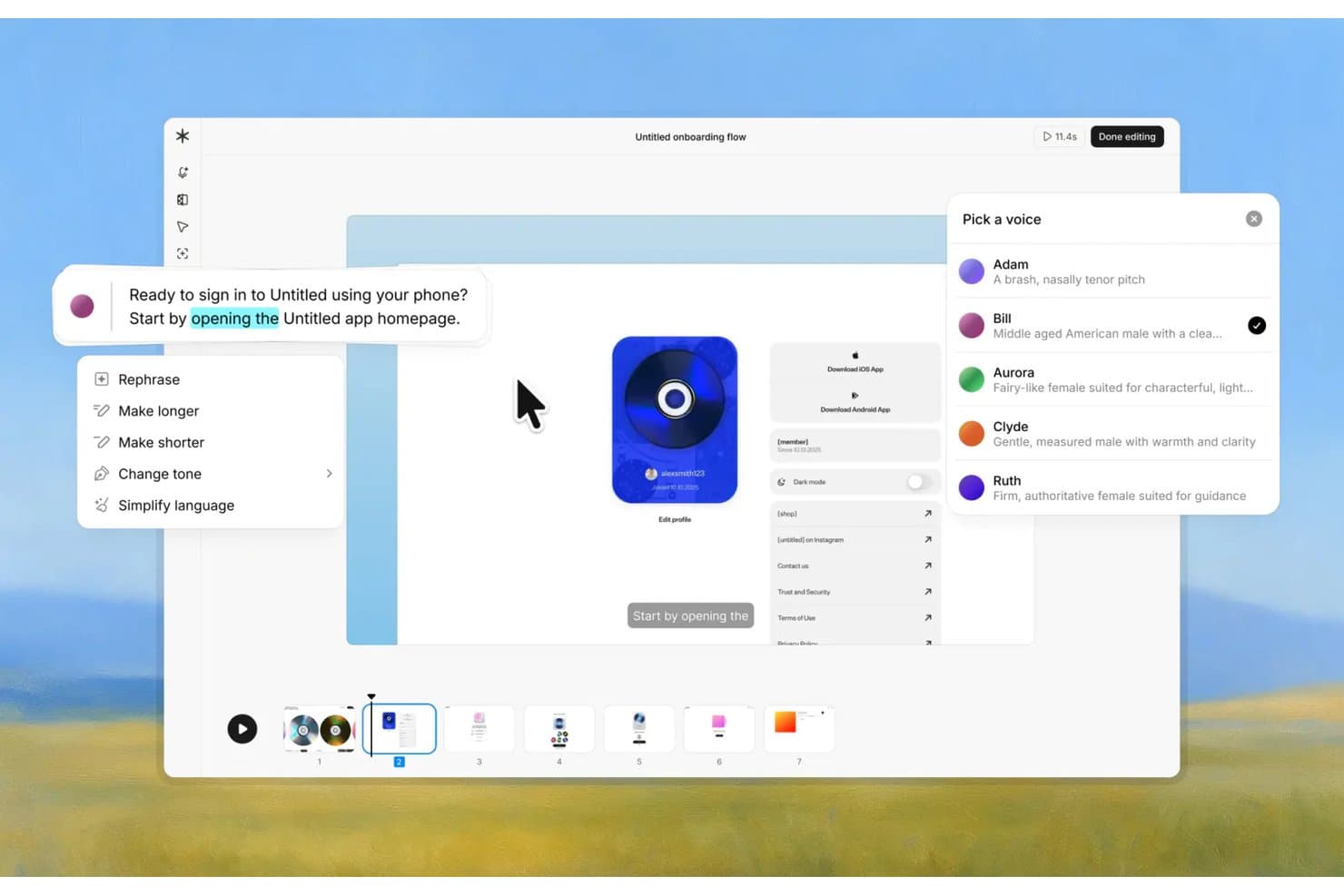
Guideless lets users pick AI voices and edit script text for video guides. Guideless is an AI video tool that turns recorded browser workflows into narrated software walkthrough videos and step-by-step written guides, with automatic captions, voiceovers, and smart zoom highlights.
Who Is Guideless Best For?
Guideless is a strong fit for product and customer success teams that need to turn browser-recorded workflows into polished, narrated training videos without scripting or recording their own voice.
Why I Picked Guideless
I picked Guideless as one of the best because it's the only tool I've found that turns a recorded browser workflow into a fully narrated training video without you ever touching a microphone. You run the Chrome extension, click through your software process, and Guideless writes the narration, generates an AI voiceover in 40+ languages, and applies smart zoom highlights to each step automatically. Its "living guide" model lets you update only the steps that changed and regenerate their voiceover without re-recording the whole thing.
Guideless Key Features
- AI rewrite presets: Apply one-click options like Shorten, Make More Descriptive, or SEO Optimize to individual steps or the full guide transcript.
- Blur and annotation tools: Mark up screenshots or blur sensitive information directly within the editor before publishing.
- Multi-format export: Publish finished guides as MP4 video (up to 4K), PDF, or Markdown for use in Notion, GitHub, or help centers.
- Guide analytics: Track views, play rate, completion, and drop-off points at both the guide and workspace level.
Guideless Integrations
Guideless supports integrations with Slack, Notion, and Confluence for sharing software guides.
Pros and Cons
Pros:
- Exports narrated walkthroughs and written guides
- Living guides update changed steps without rerecording
- Natural-sounding AI voiceovers need little editing
Cons:
- No avatars, timeline editing, or social formats
- Browser workflows only, not general video generation
Learn more about Guideless: Best for personalized training videos
- Free plan available
- From $59/month (billed annually)
Visit WebsiteCustomer Rating:4.6/5
Colossyan offers an AI video creator and course builder dashboard with templates for employee onboarding and internal communications training. Colossyan is an AI video creation platform that focuses on generating professional training and instructional videos with customizable AI presenters, multi-language support, and scenario-based video editing.
Who Is Colossyan Best For?
Corporate learning and development teams who need to create interactive training videos tailored for employee onboarding, skills development, or compliance programs.
Why I Picked Colossyan
I picked Colossyan as one of the best because I can create highly personalized training videos using its AI presenters, auto-translate scripts for multilingual teams, and adapt video scenarios for different learning needs.
Colossyan Key Features
- Script collaboration: Invite teammates to edit and comment on scripts together in real time.
- Video length settings: Set and adjust video duration for any project.
- Multiple slide support: Combine several slides and scenes in a single video.
- Brand kit uploads: Upload your own brand logos, colors, and fonts for consistent branding.
Colossyan Integrations
Integrations include SCORM export, Zapier, and YouTube. A custom API is available for custom integrations.
Pros and Cons
Pros:
- Customizable avatars with expressive gestures
- Auto-translation supports dozens of languages
- Scenario-based branching for interactive training videos
Cons:
- Limited scene-by-scene editing flexibility
- AI-generated voices can sound robotic
Learn more about Colossyan: 3Best for animating still photos into video
D-ID
- 14-day free trial
- From $4.70/month (billed annually)
Visit WebsiteCustomer Rating:4.6/5
D-ID offers an AI video creation interface where users can select a digital presenter, type a script, choose language and voice settings, and generate a talking-head video. D-ID is an AI video creation platform that specializes in animating still photos, generating digital presenters, and turning written text into video content with lifelike movement.
Who Is D-ID Best For?
Creative teams and content marketers at agencies or brands who want to produce engaging video from static images without complex production resources.
Why I Picked D-ID
I picked D-ID because I like how quickly I can animate still photos into video clips, using lifelike AI-driven expressions and synced lip movements from a text or audio script. My team often uses its Creative Reality Studio to turn static portraits into engaging explainer or training content.
D-ID Key Features
- API access: Integrate photo animation and video creation into your existing platforms.
- Batch processing: Upload and animate multiple images in a single workflow.
- Customized AI avatars: Generate branded digital presenters for your videos.
- Multilingual voice support: Create videos using different languages and accents.
D-ID Integrations
Integrations include Canva, PowerPoint, TikTok, Facebook, Instagram, LMS systems, stock media, and API support.
Pros and Cons
Pros:
- Handles multiple languages and voice cloning
- Supports text-to-video with AI avatars
- Animates still photos with realistic movement
Cons:
- No built-in stock media assets
- Limited avatar gesture control options
Learn more about D-ID: Best for instant video production from PPTs
- Free plan available
- From $24/month (billed annually)
Visit WebsiteCustomer Rating:4.3/5
AI Studios is an AI video platform for creating avatar-led videos from scripts and presentations. AI Studios is an AI video creation platform where you can generate videos from scripts, use customizable AI avatars, and convert presentation files directly into narrated video content.
Who Is AI Studios Best For?
Training and internal communications teams who want to quickly turn presentations into AI-narrated videos.
Why I Picked AI Studios
I picked AI Studios because I can upload a PowerPoint file and automatically generate a full-length AI-narrated video, complete with avatars and scene transitions. My team uses its PPT-to-video workflow whenever we need to deliver dynamic training or explainer content fast.
AI Studios Key Features
- Custom AI avatars: Create and personalize digital presenters for your videos.
- Script-based video editing: Modify or generate video content directly from text input.
- Multilingual voice synthesis: Produce narrated videos in a wide range of languages.
- Template library: Access pre-made layouts and styles for faster video creation.
AI Studios Integrations
Integrations include ElevenLabs. A custom API is available for custom integrations.
Pros and Cons
Pros:
- Multilingual voiceover and subtitle support
- Offers diverse AI avatars for narration
- Converts PowerPoint files directly to video
Cons:
- Avatar gestures and expressions feel restricted
- Limited editing options after video generation
Learn more about AI Studios: Best for customizable video templates
- Not available
- From $17/month (billed annually)

InVideo offers a template library with 100+ options including sport, fashion, real estate, and lifestyle templates to jumpstart AI video creation. InVideo is a cloud-based AI video creation platform with a strong focus on customizable templates, drag-and-drop editing, text-to-video generation, stock media, and AI-powered video assistant features.
Who Is InVideo Best For?
Marketing teams and small businesses looking to produce branded social media or promotional videos using a wide range of customizable templates.
Why I Picked InVideo
I picked InVideo as a top contender because I can access thousands of professionally designed video templates, swap media and text in seconds, and use AI-powered recommendations to customize scenes for different brand and content needs.
InVideo Key Features
- AI script generator: Create video scripts from simple prompts or keywords.
- Text-to-video functionality: Quickly convert written text into animated video content.
- Built-in stock media library: Access millions of royalty-free images, video clips, and music tracks.
- Automated voiceovers: Generate realistic AI voiceovers in multiple languages and accents.
InVideo Integrations
InVideo offers native integrations with Pexels, Pixabay, and Unsplash for stock media access. An API is available for custom integrations.
Pros and Cons
Pros:
- Built-in access to extensive stock footage
- AI-powered text-to-video conversion is fast
- Wide selection of dynamic video templates
Cons:
- AI voiceover quality varies by language
- Scene-by-scene editing options are basic
Learn more about InVideo: Best for team-based visual branding
- Free plan + free trial available
- From $144/user/year (billed annually)
Visit WebsiteCustomer Rating:4.6/5
Canva offers an AI-powered video creation interface where users can generate B-roll footage using text prompts and browse video search results directly within the editor. Canva is an online design platform that lets you create, edit, and collaborate on videos, social graphics, presentations, and branded content with AI-powered design tools and templates.
Who Is Canva Best For?
Marketing teams and creative departments in small to midsize companies who need to collaborate on brand assets and video content.
Why I Picked Canva
I picked Canva as one of the best because I can manage brand assets, assign team permissions, and create reusable video and design templates that help our entire team collaborate on branded visual content for all our channels.
Canva Key Features
- AI video generator: Produce videos directly from text and media prompts using built-in AI tools.
- Animation controls: Animate individual elements or complete scenes with timeline editing.
- Stock content library: Access millions of royalty-free stock videos, audio, and images for your projects.
- One-click background removal: Remove backgrounds from video and image assets instantly with AI-powered tools.
Canva Integrations
Canva offers native integrations with Google Drive, Dropbox, Meta, YouTube, Slack, LinkedIn, HubSpot, Mailchimp, OneDrive, Pinterest, and Zapier. An API is available for custom integrations.
Pros and Cons
Pros:
- Quick video resizing for social platforms
- Easy brand kit setup for multiple teams
- Wide variety of AI-powered video templates
Cons:
- No support for AI-generated voiceovers
- Limited advanced video editing tools
Learn more about Canva: Best for turning scripts into video highlights
- Free trial available
- From $29/month
Visit WebsiteCustomer Rating:4.8/5
Pictory is an AI video platform that turns long-form content into short, shareable videos. Pictory is an AI video creation software that lets you transform long-form scripts and video content into short, engaging video highlights using text-to-video technology, automatic scene selection, and subtitle generation.
Who Is Pictory Best For?
Marketing and content teams who need to convert blog posts, webinars, or scripts into short-form video clips for digital channels.
Why I Picked Pictory
I picked Pictory as one of the best because I can upload a script and the platform turns it into video highlights, automatically matching scenes and generating subtitles for social sharing. I like that it pulls visual assets directly from your text.
Pictory Key Features
- Bulk video creation: Produce multiple videos at once from a list of scripts.
- Automatic video summarization: Generate concise highlight reels from long-form videos.
- Caption and subtitle editing: Customize and fine-tune captions and subtitles before export.
- Stock media library access: Search and use royalty-free images, videos, and music directly within the platform.
Pictory Integrations
Pictory offers native integrations with Hootsuite and YouTube. An API is available for custom integrations.
Pros and Cons
Pros:
- Auto-captions with manual editing control
- Bulk video creation from multiple scripts
- Scene detection quickly identifies key moments
Cons:
- AI voices sometimes lack natural tone
- Limited control over advanced video editing
Learn more about Pictory: 8Best for fast subtitle generation
VEED
- Free plan available
- From $12/user/month
Visit WebsiteCustomer Rating:4.5/5
VEED is a browser-based AI video platform for editing, subtitles, transcription, and voice generation. VEED is an online AI video creation platform offering automated video transcription, subtitle generation, audio enhancement, AI video editing, and text-to-speech features in a browser-based workspace.
Who Is VEED Best For?
Video editors, marketers, and social media managers who need fast, automated subtitle and transcription workflows for global video distribution.
Why I Picked VEED
I picked VEED as one of the best for fast subtitle generation because I can instantly auto-generate and edit subtitles, convert speech to text with high accuracy, and export subtitles in multiple formats suitable for YouTube, LinkedIn, and other platforms.
VEED Key Features
- AI video generator: Create new videos from text or prompts using AI automation.
- Green screen editor: Remove and replace video backgrounds directly in your browser.
- Text-to-speech tool: Instantly generate voiceovers from written scripts in multiple languages.
- Video noise reduction: Remove unwanted background noise from audio tracks in your videos.
VEED Integrations
VEED offers native integrations with YouTube, Zoom, Google Drive, and Dropbox. An API is available for custom integrations.
Pros and Cons
Pros:
- Browser-based video creation and editing
- Fast AI-driven transcription processing
- Supports multiple languages for subtitles
Cons:
- No advanced animation or motion graphics
- Limited manual video editing controls
Learn more about VEED: Best for creating lifelike AI presenters
- Free plan + free demo available
- From $14/month (billed annually)

Synthesia offers a dashboard with featured templates and recent AI-generated videos for quick video creation and management. Synthesia is an AI video creation platform where you generate videos from text using customizable avatars, automated voiceovers, and multiple language options.
Who Is Synthesia Best For?
Corporate trainers, marketers, and learning teams who need video content with AI-generated presenters across multiple languages.
Why I Picked Synthesia
I picked Synthesia as one of the best because I can generate videos with digital presenters who look alarmingly real, match voices to 120+ languages, and swap presenters or scripts in minutes for quick updates.
Synthesia Key Features
- Template library: Choose from a large collection of ready-made video templates.
- Screen recording: Capture your screen to add product demos or software walkthroughs.
- Built-in media assets: Access stock images, icons, and background music within the editor.
- Video collaboration tools: Invite teammates to review, comment, and edit projects together.
Synthesia Integrations
Synthesia offers native integrations with 360Learning, HubSpot, Shopify, WordPress, Workato, YouTube, and Zingly. PowerPoint import is available, and an API is available for custom integrations.
Pros and Cons
Pros:
- Script changes update videos instantly
- Supports video generation in over 120 languages
- Digital avatars mimic real presenters convincingly
Cons:
- No built-in interactive video elements
- Limited customization of avatar appearance
Learn more about Synthesia:

HeyGen offers a Video Agent interface that turns ideas into production-ready AI videos using avatars, brand assets, and community style templates. HeyGen is an AI video creation platform that lets you generate talking avatar videos, convert text to speech in multiple languages, and customize video scenes with ease.
Who Is HeyGen Best For?
Marketers and learning teams who need engaging talking avatar videos for audiences in multiple languages.
Why I Picked HeyGen
I picked HeyGen as one of the best because I can create multilingual talking avatar videos by uploading a script and choosing from 300+ avatars, then instantly translate content for global audiences in more than 40 languages.
HeyGen Key Features
- Custom avatar creation: Generate your own avatar using a video upload and voice sample.
- AI video generator: Produce videos directly from scripts with automatic scene composition.
- Expanded stock assets: Access thousands of royalty-free images, videos, and background tracks.
- Collaboration workspace: Invite and manage multiple team members on shared video projects.
HeyGen Integrations
HeyGen offers native integrations with Canva, Zapier, and provides an API for custom integrations.
Pros and Cons
Pros:
- Real-time script editing updates video instantly
- Custom avatar creation from user video uploads
- Multilingual avatar lip-sync is highly accurate
Cons:
- Advanced brand customization features are missing
- Limited control over avatar gestures and movement
Learn more about HeyGen:
Alte programe software pentru crearea videoclipurilor cu ajutorul inteligenței artificiale
Iată câteva opțiuni suplimentare de programe software pentru crearea videoclipurilor cu ajutorul inteligenței artificiale care nu au ajuns pe lista mea scurtă, dar merită totuși analizate:
- 11Hour OneBest for generating talking head updates
- 12CaptionsBest for auto-captioned video reels
- 13Lumen5Best for fast blog-to-video transformation
- 14Steve AIBest for transforming blogs into animated videos
- 15ElaiBest for building localized video content at scale
- 16Vidnoz AIBest for voice cloning for synthetic voices
- 17CreatifyBest for ecommerce product demo videos
- 18AkoolBest for face-swapping in marketing videos
- 19ChatGPTBest for generating video scripts and storyboards
- 20JoggAIBest for script-based avator video creation
How I Evaluate AI Video Creation Software
To make this list, a tool needs to deliver real, measurable AI value—whether that's turning a blog post into a polished social video or generating a localized avatar-led ad without a single camera. I evaluate every tool across two layers: the core functionality it must offer to qualify, and the differentiating factors that separate the best options from the rest.
Core Functionality (Table Stakes For This List)
When I'm selecting tools for my list, I rank each one on a scale from 0 (does not offer the functionality) to 5 (excels in this area) for each core functionality listed below. I then calculate the tool's total score into a percentage, using 75% as a benchmark to help assess its overall fit for the list.
- AI Video Generation: I look for how many input types a platform supports—text prompts, pasted scripts, blog URLs, uploaded docs—and whether it produces coherent scenes with matched visuals and pacing.
- AI Avatars or Voiceovers: The avatar library size, realism of lip-sync and gestures, and availability of custom or cloned avatars all factor into my evaluation here.
- Text-to-Speech & Multilingual Support: I check language count, voice variety per language, and whether the TTS output sounds natural enough to use in customer-facing campaigns without re-recording.
- Template & Scene Library: A strong template library should be categorized by use case—ads, product demos, social posts—and include integrated stock footage, images, and music tracks.
- AI Editing Automation: I evaluate how many editing tasks the platform handles automatically, from auto-captioning and aspect ratio resizing to filler-word removal and smart scene trimming.
- Brand Customization & Export: Saved brand kits with logos, fonts, and color palettes that auto-apply across new projects matter here, along with export options covering multiple resolutions and aspect ratios for channels like TikTok, LinkedIn, and YouTube.
Once I have a list of tools that meet the criteria, I consider what sets each platform apart.
Differentiating Factors (What Sets Vendors Apart)
Here's how I compare and contrast different vendors:
Standout Features
I look for personalization at scale—tools that let you swap in dynamic variables like name, company, or region across thousands of video variants are a must for ABM and outbound campaigns. I also evaluate repurposing capabilities, since an AI clipping agent that turns a 60-minute webinar into short-form clips for Reels or Shorts saves hours of manual editing. Built-in analytics matter too; I check whether a platform tracks watch time and drop-off points so you can iterate on creative with real performance data rather than guesswork.
Beyond Features
I check whether each platform offers native integrations with the tools marketing teams already use—CRMs, marketing automation platforms, and direct social publishing to channels like LinkedIn and TikTok. A tool that can't plug into your existing stack creates bottlenecks between creation and distribution. Content rights also matter more than most buyers realize; I look for clear commercial licensing on AI avatars, voices, and stock media, plus consent controls for voice cloning, since running a paid campaign with unlicensed synthetic media is a legal risk no brand should take.
Cum să alegeți un program software pentru crearea videoclipurilor cu ajutorul inteligenței artificiale
Este ușor să vă pierdeți în liste lungi de funcții și structuri complexe de prețuri. Pentru a vă ajuta să rămâneți concentrați în timp ce parcurgeți procesul unic de selectare a software-ului potrivit, iată o listă de verificare a factorilor de care trebuie să țineți cont:
| Factor | Aspecte de luat în considerare |
| Scalabilitate | Poate platforma să gestioneze loturi mari de videoclipuri sau un număr mare de utilizatori pe măsură ce nevoile dumneavoastră cresc? Căutați automatizarea fluxului de lucru, capacitatea de export a fișierelor și flexibilitatea numărului de licențe pentru utilizatori. |
| Integrări | Se conectează cu instrumentele pe care le utilizați deja, precum sistemele de gestionare a conținutului, spațiile de stocare în cloud sau platformele de învățare? Integrările native pot reduce transferul manual și refacerea activităților. |
| Posibilități de personalizare | Puteți adapta elementele de branding, avatarurile și șabloanele pentru a corespunde standardelor companiei? Asigurați-vă că cerințele vizuale și de comunicare pot fi îndeplinite fără soluții improvizate. |
| Ușurință în utilizare | Va avea nevoie echipa dumneavoastră de instruire extinsă pentru a începe? Prioritizați o soluție care corespunde nivelului de confort al echipei dumneavoastră în utilizarea software-ului nou și care permite revizuirea rapidă a conținutului. |
| Implementare și integrare inițială | Cât de repede puteți începe utilizarea de la achiziție până la lansare? Verificați existența materialelor pentru integrarea inițială, disponibilitatea asistenței și termenele obișnuite pentru utilizatori în vederea implementării complete. |
| Cost | Sunt modelele de preț aliniate cu volumul și tiparele dumneavoastră de utilizare? Analizați costurile per videoclip, licențele pentru utilizatori, costurile suplimentare și previzibilitatea cheltuielilor viitoare. |
| Măsuri de securitate | Furnizorul asigură protecție adecvată pentru conținutul confidențial și datele utilizatorilor? Căutați criptare, controale de acces și respectarea politicilor organizației. |
| Disponibilitatea asistenței | Sunt disponibile resurse de ajutor în timpul programului de lucru al echipei dumneavoastră? Luați în considerare importanța chatului live, a asistenței telefonice sau a asistenței asincrone, în special pentru termenele de producție. |
Ce este un program software pentru crearea videoclipurilor cu ajutorul inteligenței artificiale?
Programele software pentru crearea videoclipurilor cu ajutorul inteligenței artificiale reprezintă un tip de instrument de inteligență artificială pentru crearea de conținut care utilizează inteligența artificială pentru a genera videoclipuri din texte, imagini, prezentări, scenarii sau schițe de scenarii, cu o editare manuală minimă. Aceste platforme combină adesea un generator video cu inteligență artificială, un editor video cu inteligență artificială și un instrument de creare a videoclipurilor cu inteligență artificială într-un singur spațiu de lucru, ajutând echipele să creeze conținut video profesional fără a depinde de resursele tradiționale de producție.
Aceste instrumente utilizează modele de inteligență artificială și tehnologie bazată pe modele video pentru a crea automat elemente vizuale, narațiune, subtitrări și temporizarea scenelor. Sunt utile pentru echipele de creare a conținutului, specialiștii în marketing, instructori și începători care doresc să producă videoclipuri de înaltă calitate mai rapid, reducând în același timp curba de învățare asociată editării manuale a videoclipurilor.
Funcțiile programelor software pentru crearea videoclipurilor cu ajutorul inteligenței artificiale
Atunci când selectați un program software pentru crearea videoclipurilor cu ajutorul inteligenței artificiale, urmăriți următoarele funcții esențiale:
- Avatare AI: Generați prezentatori digitali realiști pentru a nara și personaliza automat conținutul video, fără a avea nevoie de actori umani sau filmări video.
- Conversia scenariului în videoclip: Transformați scenarii scrise sau texte în scene video complete, cu elemente vizuale, tranziții și sincronizare generate automat.
- Narare vocală multilingvă: Creați narațiuni vocale cu sunet natural în mai multe limbi și accente pentru a vă localiza rapid conținutul video pentru diferite categorii de public.
- Generarea subtitrărilor: Generați și sincronizați automat subtitrări pentru videoclipurile dvs., îmbunătățind accesibilitatea și înțelegerea de către spectatori.
- Biblioteca de șabloane: Accesați o gamă largă de șabloane video preproiectate, care permit crearea rapidă și asigură consecvența vizuală în toate proiectele.
- Integrarea elementelor media: Importați imagini, logo-uri și elemente de identitate vizuală direct în videoclipurile dvs. pentru a menține identitatea mărcii și a vă îmbogăți elementele vizuale.
- Instrumente de editare a scenelor: Modificați, rearanjați sau personalizați scene individuale cu ajutorul funcționalității de glisare și plasare și al comenzilor flexibile pentru cronologie.
- Opțiuni de export: Descărcați sau partajați videoclipurile finalizate într-o varietate de formate și rezoluții potrivite pentru internet, rețele sociale sau difuzare.
- Funcții de colaborare: Permiteți mai multor utilizatori să lucreze la aceleași proiecte, să partajeze schițe și să ofere feedback în cadrul platformei.
- Analiză și raportare: Monitorizați implicarea spectatorilor, statisticile de redare a videoclipurilor și indicatorii de performanță pentru a măsura impactul conținutului dvs. video.
Beneficiile software-ului de creare a videoclipurilor cu ajutorul AI
Implementarea software-ului de creare a videoclipurilor cu ajutorul AI oferă mai multe beneficii pentru echipa și compania dvs. Iată câteva dintre avantajele de care vă puteți bucura:
- Producție mai rapidă a conținutului: Instrumentele bazate pe AI automatizează conversia scenariilor, narațiunea și editarea, permițându-vă să creați videoclipuri în câteva minute, în loc de câteva zile.
- Costuri de producție mai mici: Eliminați nevoia de studiouri, actori sau filmări video costisitoare folosind avatare AI și voci sintetice.
- Acces la un public global: Funcțiile de narare vocală multilingvă și subtitrare facilitează personalizarea videoclipurilor pentru publicul din întreaga lume.
- Identitate vizuală consecventă: Șabloanele integrate și integrarea elementelor media contribuie la asigurarea faptului că fiecare videoclip respectă stilul și orientările organizației dvs.
- Scalare mai ușoară: Procesarea în loturi și fluxurile de lucru automatizate vă permit să gestionați volume mari de conținut video pe măsură ce vă dezvoltați.
- Colaborare îmbunătățită: Instrumentele de editare, partajare și feedback în timp real sprijină colaborarea eficientă între departamente.
- Îmbunătățirea accesibilității: Subtitrările generate automat și opțiunile variate de avatare contribuie la un conținut mai incluziv pentru toți spectatorii.
Costurile și prețurile software-ului de creare a videoclipurilor cu ajutorul AI
Selectarea software-ului de creare a videoclipurilor cu ajutorul AI necesită înțelegerea diferitelor modele de preț și planuri disponibile. Costurile variază în funcție de funcții, dimensiunea echipei, suplimente și alți factori. Tabelul de mai jos prezintă pe scurt planurile comune, prețurile medii ale acestora și funcțiile incluse de obicei în soluțiile software de creare a videoclipurilor cu ajutorul AI:
Tabel comparativ al planurilor pentru software-ul de creare a videoclipurilor cu ajutorul AI
| Tipul planului | Preț mediu | Funcții comune |
| Plan gratuit | $0 | Exporturi video limitate, filigran pe videoclipuri, șabloane de bază, opțiuni restricționate pentru avatare și voci și asistență din partea comunității. |
| Plan personal | $5-$25/utilizator/lună | Limite de export mai ridicate, acces la șabloane premium, avatare personalizabile, bibliotecă media extinsă și asistență de bază. |
| Plan pentru companii | $30-$80/utilizator/lună | Instrumente de colaborare în echipă, editare avansată, asistență prioritară, gestionarea elementelor de identitate vizuală și generarea de videoclipuri multilingve. |
| Plan pentru întreprinderi | $100+/utilizator/lună | Integrări personalizate, manager de cont dedicat, securitate avansată, acces la API, integrare inițială adaptată și opțiuni de conformitate. |
Întrebări frecvente despre programele pentru crearea videoclipurilor cu IA
Iată câteva răspunsuri la întrebările frecvente despre programele pentru crearea videoclipurilor cu IA:
Poate un program pentru crearea videoclipurilor cu IA să înlocuiască într-adevăr producția video tradițională?
Da, un program pentru crearea videoclipurilor cu IA poate gestiona multe sarcini realizate în mod tradițional de echipele de producție video, precum narațiunea, editarea și generarea elementelor vizuale. Deși nu înlocuiește filmările personalizate pentru proiectele complexe, este o opțiune eficientă pentru videoclipuri de promovare, instruire sau prezentare, unde viteza și scalabilitatea sunt importante.
Este posibil să folosesc propria identitate de marcă în videoclipurile generate de IA?
Da, majoritatea platformelor vă permit să încărcați sigle, culorile mărcii și imagini personalizate pentru o identitate de marcă consecventă. Unele acceptă și șabloane video personalizate, astfel încât fiecare proiect să respecte identitatea vizuală a organizației fără refacere manuală.
Cât de precise sunt vocile din off și subtitrările generate de IA?
Vocile din off și subtitrările generate de IA sunt foarte precise în majoritatea cazurilor de utilizare, mai ales atunci când se folosesc texte clare și bine structurate. Totuși, este posibil să fie necesar să verificați și să editați rezultatul pentru a vă asigura că numele, termenii din industrie și formulările dificile sunt tratate corect.
În ce formate de fișiere pot exporta videoclipurile?
Majoritatea programelor pentru crearea videoclipurilor cu IA exportă în formate video uzuale, precum MP4, MOV și uneori WebM. Unele instrumente oferă și încărcare directă pe platforme precum YouTube sau LinkedIn pentru publicare și distribuire rapidă.
Cât de sigur este conținutul meu atunci când folosesc instrumente pentru crearea videoclipurilor bazate pe cloud?
Majoritatea platformelor bazate pe cloud folosesc criptarea și oferă controale de acces pentru a vă proteja datele. Dacă videoclipurile conțin informații sensibile sau confidențiale, verificați împreună cu furnizorul conformitatea și certificările de securitate înainte de a încărca materialele.