

Un generator video AI gratuit pentru specialiștii în marketing este un instrument care vă permite să creați videoclipuri folosind inteligența artificială, fără să plătiți în avans — de obicei printr-un plan gratuit sau o perioadă de probă gratuită. Specialiștii în marketing solicită aceste soluții pentru a experimenta crearea de videoclipuri bazată pe inteligență artificială, pentru a evita barierele bugetare și pentru a testa platforma care se potrivește cel mai bine nevoilor campaniilor lor.
Având în vedere că atât de multe canale de marketing se bazează pe videoclipuri, alegerea instrumentului gratuit potrivit vă poate ajuta să testați rapid strategii, să personalizați conținutul și să produceți videoclipuri care mențin publicul implicat. Acest ghid prezintă cele mai bune generatoare video AI gratuite disponibile în prezent, ajutându-vă să comparați funcțiile și să alegeți opțiunea potrivită pentru obiectivele dumneavoastră.
Why Trust Our Software Recommendations
6,700+
Reviews
20
Industry experts
16+
Evaluation factors
14
Years
Our team has been testing and reviewing software since 2012. As marketing leaders ourselves, we know how difficult—and important—it is to choose the right software.
For this guide, we evaluated tools using hands-on testing and independent research, scoring tools using our selection criteria.
Our reviews reflect our human editorial judgment, not a sales pitch.
Expert reviewers:
 Gui DrusinaCreative Director
- Shriya GhateSenior Marketing Lead
 Amanda JacquesMarketing Ops Leader

Tabel comparativ al generatoarelor video AI gratuite pentru specialiștii în marketing
Acest tabel comparativ rezumă detaliile privind prețurile pentru selecția mea de top de generatoare video AI gratuite pentru specialiștii în marketing:
Sorted by: Default
| Tool | Starting Price | Website | |
|---|---|---|---|
Best for transforming articles into short videos | 4.8 out of 5 | $29/month Free trial available | Website |
Best for animated social campaign templates | 4.5 out of 5 | $15/month Free plan available | Website |
Best for script-to-animation automation | 4.5 out of 5 | $29/month Free plan available | Website |
Best for lifelike talking head video generation | 4.6 out of 5 | $4.70/month 14-day free trial | Website |
Best for TikTok-style quick edits | 4.5 out of 5 | $25.99/month Free plan available | Website |
Best for customizable avatar presentations | 4.6 out of 5 | $59/month Free plan available | Website |
Best for brand custom video exports | 4.5 out of 5 | $12/user/month Free plan available | Website |
Best for video creation from text at scale | 4.6 out of 5 | $29/month Free plan available | Website |
Best for AI avatars in explainer videos | Not rated | $14/month Free plan + free demo available | Website |
Best for multilingual video localization | Not rated | $24/month Free plan available | Website |


Recenzii ale generatoarelor video AI gratuite pentru specialiștii în marketing
Mai jos sunt rezumatele mele detaliate ale celor mai bune generatoare video AI gratuite care au ajuns pe lista mea restrânsă. Recenziile mele oferă o analiză detaliată a funcțiilor esențiale, avantajelor și dezavantajelor, integrărilor și cazurilor ideale de utilizare pentru fiecare instrument, pentru a vă ajuta să îl găsiți pe cel mai potrivit pentru dumneavoastră. Deși unele dintre aceste instrumente oferă o versiune complet gratuită, altele oferă o perioadă de probă gratuită. Am adăugat în fiecare recenzie o notă despre ceea ce este gratuit.
 Best for transforming articles into short videos
- Free trial available
- From $29/month
Visit WebsiteCustomer Rating:4.8/5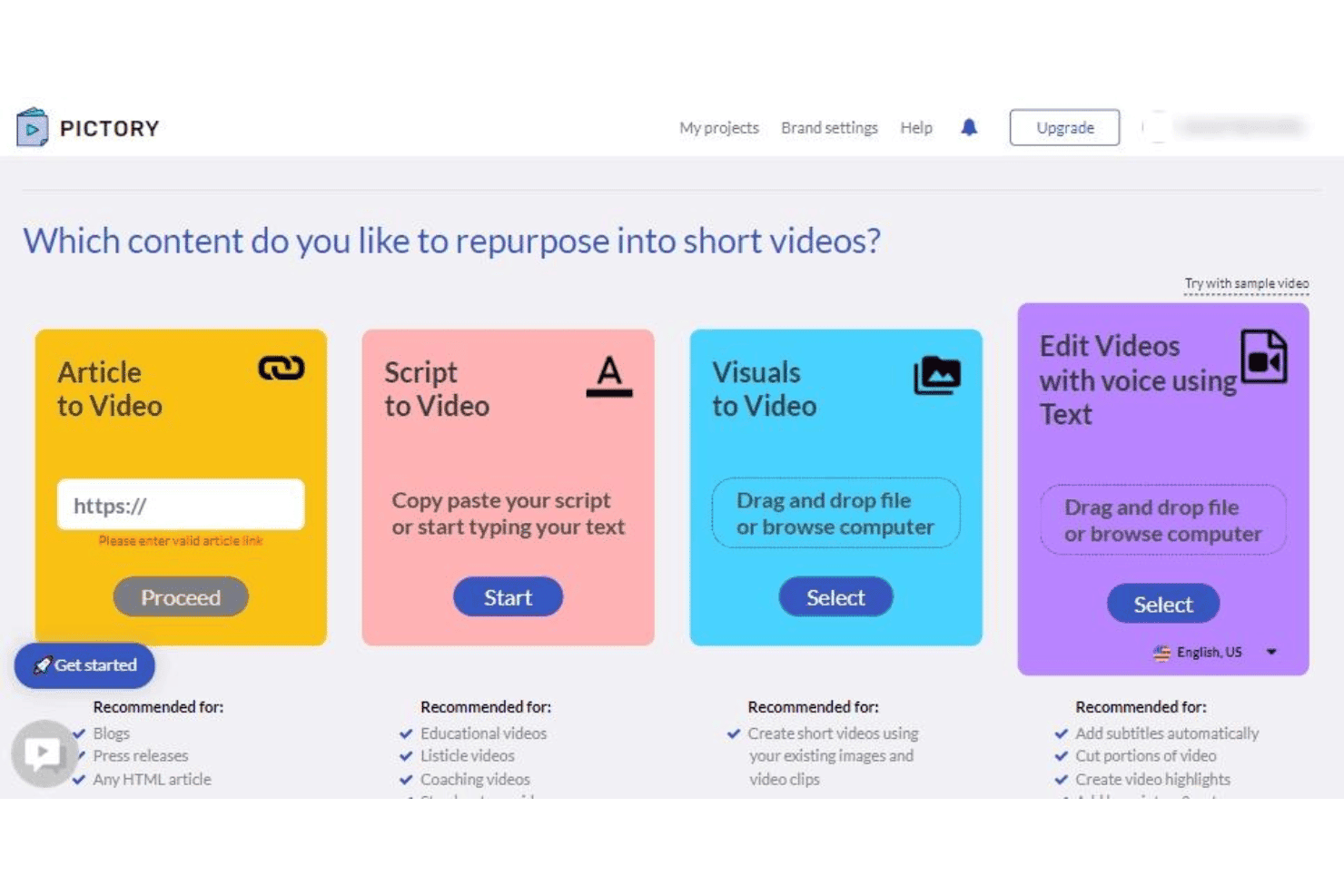
Pictory offers four content repurposing options: Article to Video, Script to Video, Visuals to Video, and Edit Videos with Voice using Text. Pictory is a cloud-based AI video generator that converts written content—articles, blog posts, and scripts—into branded short-form videos using AI scene selection, automated captions, stock footage, and AI voiceovers.
Who Is Pictory Best For?
Pictory is a strong fit for content marketers and small business owners who regularly publish written content and want to extend its reach through video.
Why I Picked Pictory
I've included Pictory in my top picks because its article-to-video pipeline is genuinely one of the fastest I've used. You paste a blog URL or drop in long-form text, and Pictory's AI segments it into scenes, pulls matching stock footage from its 18-million-clip library, and syncs AI-generated captions automatically. I've taken a 1,500-word post and had a publish-ready social cut in under 15 minutes.
Pictory Key Features
- Brand kit storage: Store logos, colors, and fonts for use across all video projects.
- AI avatar presenters: Choose from a selection of digital spokespeople to narrate your videos.
- Multi-language voiceovers: Create AI-generated audio tracks in over two dozen languages.
- Aspect ratio presets: Export videos in vertical, square, or horizontal formats for every social platform.
Pictory Integrations
Pictory offers native integrations with Getty Images, Storyblocks, ElevenLabs, Shopify, WooCommerce, WordPress, Make.com, N8N, and Zapier. An API is available for custom integrations.
What's Free?
Pictory offers a free trial with no credit card required, giving you access to three video projects of up to 10 minutes each. Exported videos include a watermark on the free trial.
Pros and Cons
Pros:
- Covers broad marketing and business topics
- Auto-generated captions sync
- Converts blog URLs into videos
Cons:
- Niche topics often return mismatched stock footage
- No permanently free plan
Learn more about Pictory: Best for animated social campaign templates
- Free plan available
- From $15/month (billed annually)
Visit WebsiteCustomer Rating:4.5/5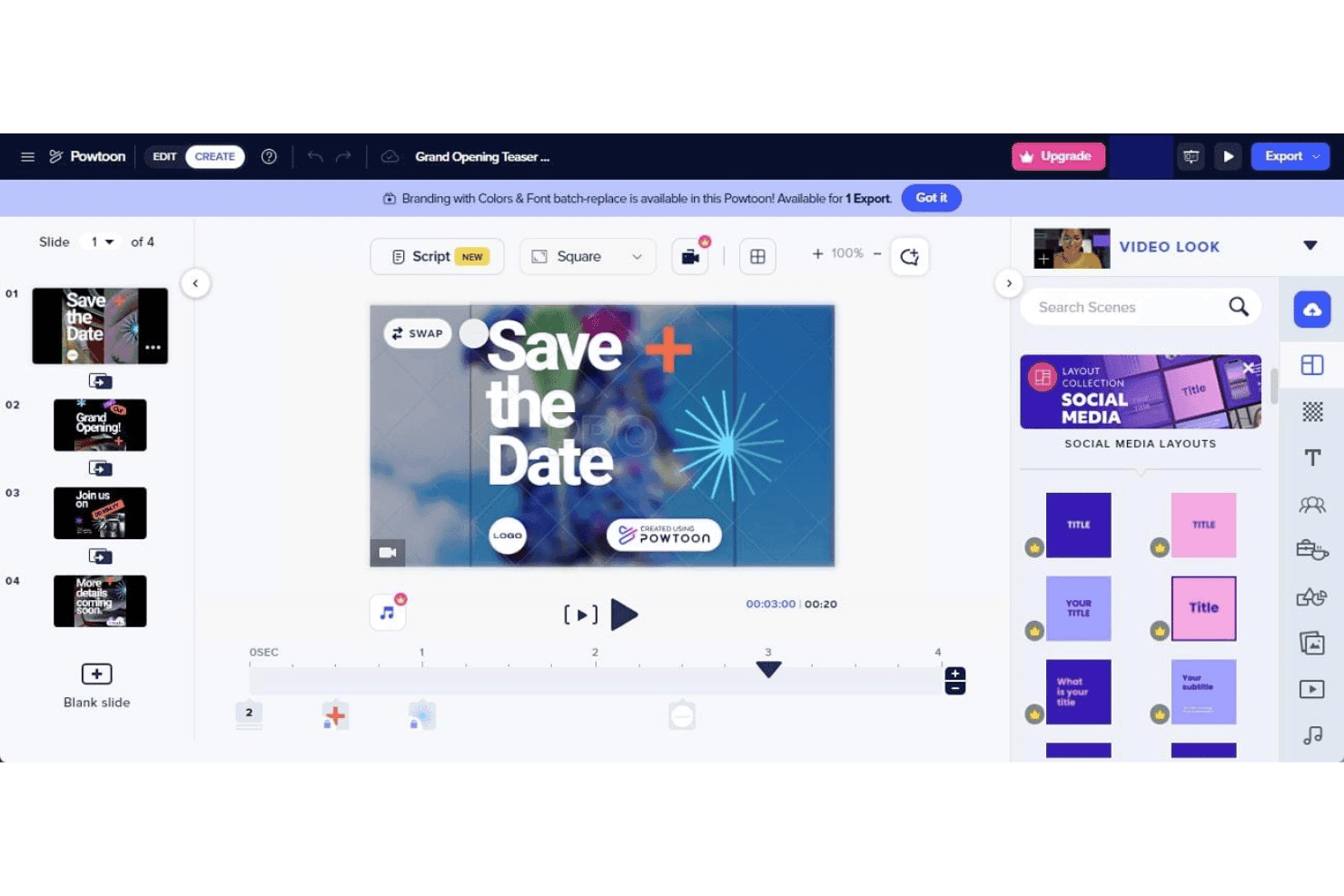
PowToon offers a drag-and-drop video editor with pre-built social media layouts, slide management, and timeline controls for creating animated presentations. PowToon is a cloud-based AI video creation platform that lets marketers produce animated videos, explainer content, and social campaigns using a drag-and-drop editor, AI text-to-video tools, AI avatars, voiceovers, and a built-in stock media library.
Who Is PowToon Best For?
PowToon is a strong fit for small business marketers and solo content creators who need to produce animated video content without a design background or dedicated video production team.
Why I Picked PowToon
I've included PowToon in my top picks because its animated social campaign template library is one of the most purpose-built I've seen in this category. Rather than generic video layouts, the templates are organized around ad formats, explainer structures, and social post styles, with animated characters you can customize directly using the built-in character builder. I also use the AI doc-to-video feature regularly, which converts a PDF or presentation into a fully animated video with minimal manual editing.
PowToon Key Features
- AI text-to-speech and dubbing: Generate natural voiceovers and multi-language narration for videos without recording audio.
- Multi-aspect ratio export: Export videos in vertical, square, and horizontal formats for use across multiple social platforms.
- Stock media library: Access over 4 million stock images, music tracks, video clips, and sound effects directly in the editor.
- Brand kit controls: Upload logos, set fonts, and save brand colors to ensure all videos align with your marketing brand guidelines.
PowToon Integrations
PowToon offers native integrations with HubSpot, Slack, Microsoft Teams, YouTube, Vimeo, Wistia, Facebook, Twitter, and Google Workspace. An API is available for custom integrations.
What's Free?
PowToon offers a free-forever plan with no credit card required, giving you access to the drag-and-drop editor, animated templates, and the stock media library, with exports up to 720p that include a PowToon watermark. AI features like text-to-video and avatar generation are not included on the free plan, as those require paid AI credits.
Pros and Cons
Pros:
- AI doc-to-video converts presentations
- Animated character builder
- Large template library for social campaigns
Cons:
- Free exports capped at 720p resolution
- AI features locked behind paid credits
Learn more about PowToon: Best for script-to-animation automation
- Free plan available
- From $29/month
Visit WebsiteCustomer Rating:4.5/5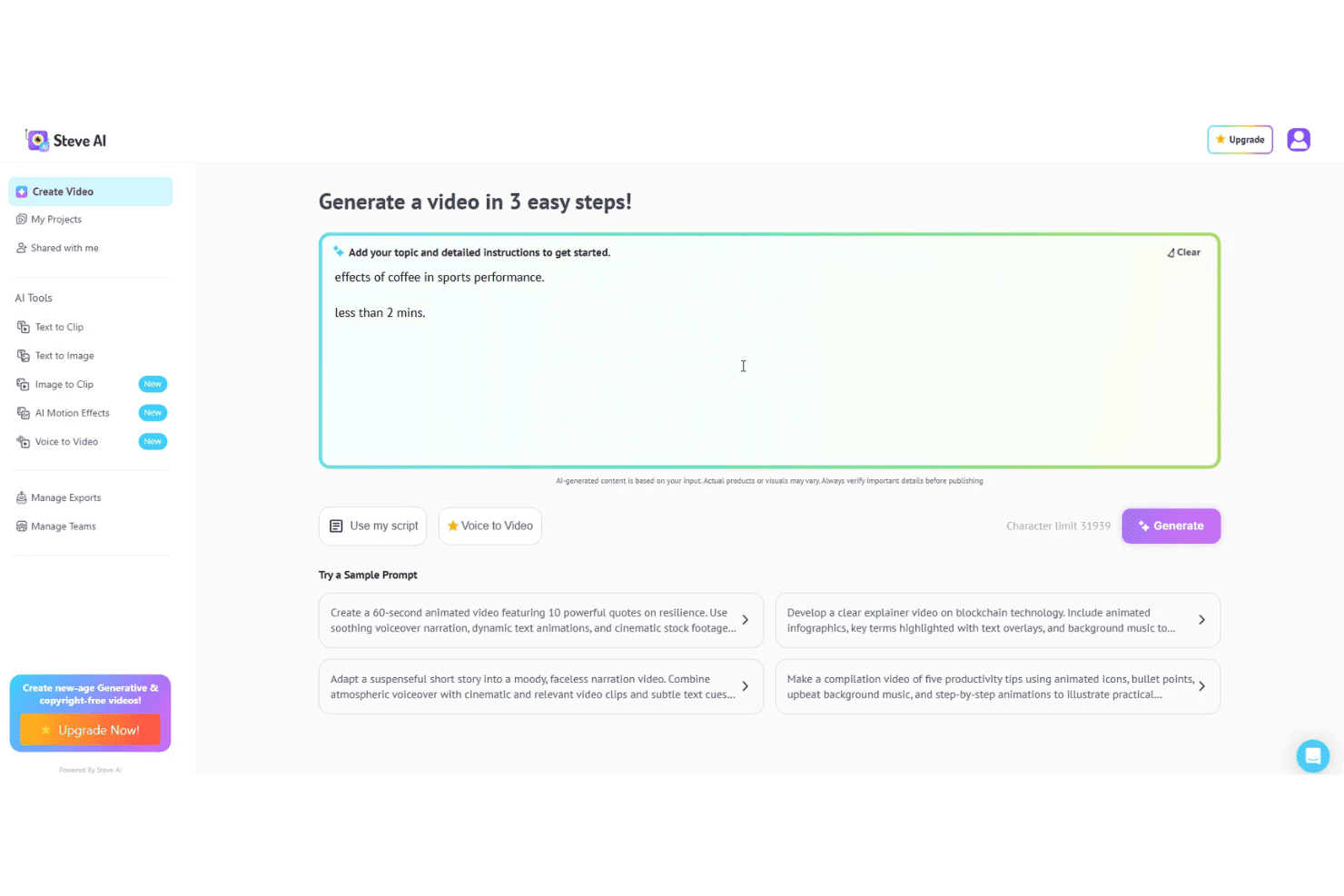
Steve AI lets users generate animated videos from scripts, prompts, or voice input. Steve AI is an AI video generator that converts text prompts, scripts, audio, and blog content into animated, live-action, or generative AI videos, with built-in voiceovers, stock assets, and multi-format export.
Who Is Steve AI Best For?
Steve AI is a strong fit for small business marketers and solo content creators who need to publish video regularly without a dedicated video production team.
Why I Picked Steve AI
Steve AI earns its spot on my shortlist because of how it handles script-to-animation conversion. I paste a script, and the Advanced Prompter builds a fully animated video with AI-selected scenes, motion effects, and synced voiceovers. I also use ClipMaker AI to turn blog posts into short animated clips. The 300+ animated characters and motion effects like kinetic text and camera zooms are all accessible directly in the editor, with no manual animation work required.
Steve AI Key Features
- Marketing-ready templates: Choose from pre-built ad and promo templates designed for popular social platforms and video formats.
- Multi-aspect ratio export: Export videos in vertical, square, and horizontal formats for channels like TikTok, Instagram, and YouTube.
- Brand customization options: Apply your logo, brand colors, and fonts directly within the video editor for brand consistency.
- Premium stock and music library: Access an integrated library of AI images, video clips, and royalty-free music and sound effects.
Steve AI Integrations
Steve AI offers a native integration with YouTube for direct publishing. Native integrations with other platforms are not clearly documented.
What's Free?
Steve AI offers a free-forever plan that includes 1,200 seconds of AI video and 200 credits per month. Exports are available on the free plan but include a watermark and are capped at 720p resolution.
Pros and Cons
Pros:
- Generous free plan monthly video allowance
- Multiple animation styles available
- Converts scripts into animated videos
Cons:
- Limited avatar library
- Free exports include a visible watermark
Learn more about Steve AI: 4Best for lifelike talking head video generation
D-ID
- 14-day free trial
- From $4.70/month (billed annually)
Visit WebsiteCustomer Rating:4.6/5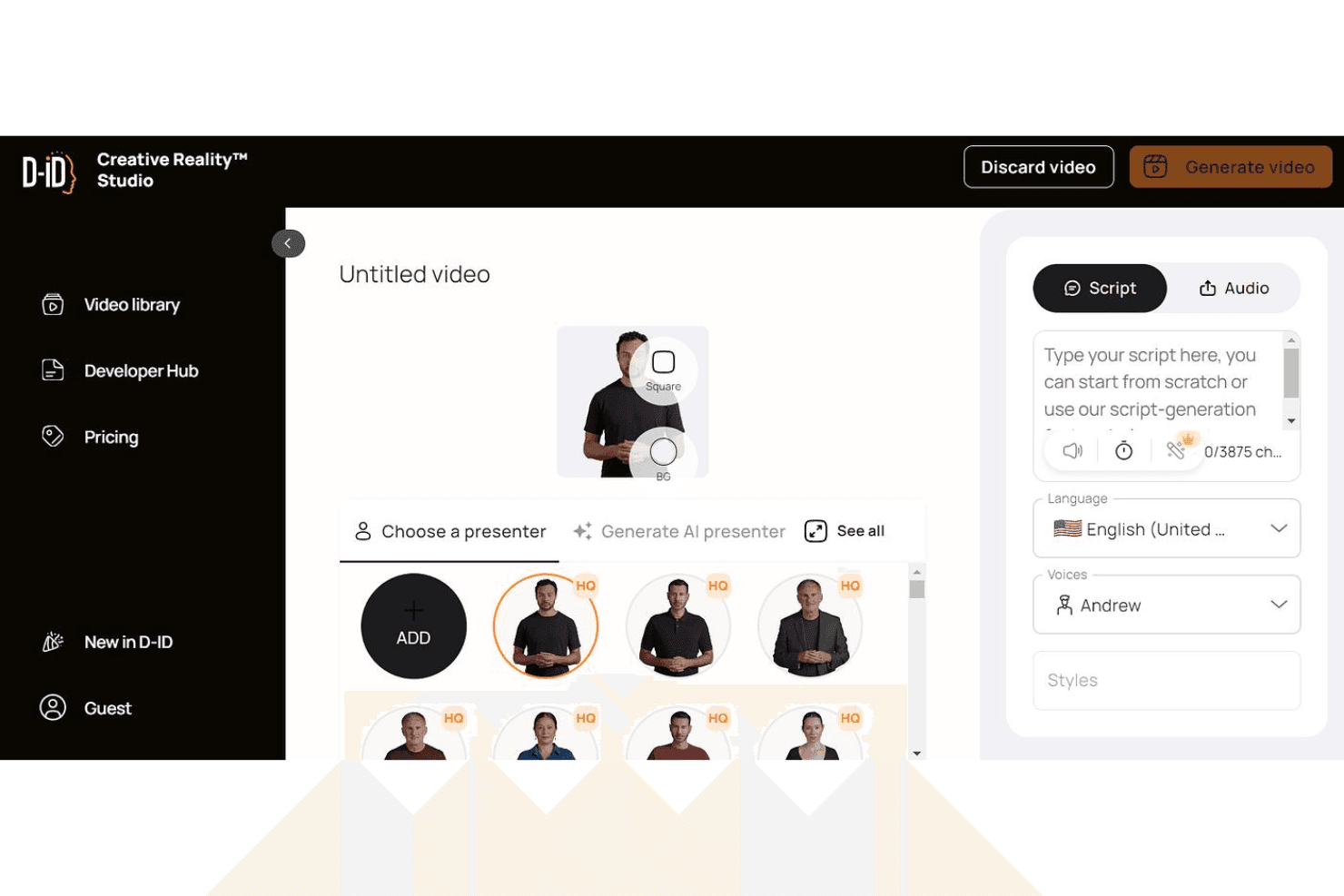
D-ID lets users generate lifelike talking head videos from scripts and AI voices. D-ID is an AI video generation platform that turns text scripts, images, and documents into talking-head videos using realistic digital avatars with multilingual voiceovers and voice cloning.
Who Is D-ID Best For?
D-ID is a strong fit for content marketers and educators who need to produce avatar-driven explainer videos at scale without on-camera talent.
Why I Picked D-ID
D-ID earns its spot on my shortlist because the lip-sync and facial animation quality is genuinely a cut above what I've seen in comparable tools. I use it to create avatar videos from a script or uploaded document, and the output looks like a real presenter rather than an animated cartoon. The voice cloning feature lets me replicate a specific voice across multiple videos, which is especially useful when producing a multilingual series without re-recording.
D-ID Key Features
- Video translate: Generate translations and localized versions of videos in over 120 languages.
- Canva and PowerPoint integrations: Use D-ID directly within Canva or PowerPoint for seamless avatar video generation.
- Custom logo watermarking: Replace D-ID’s watermark with your own logo for branded exports on higher tiers.
- API access: Integrate D-ID’s video generation capabilities into other marketing tools or custom workflows.
D-ID Integrations
D-ID offers native integrations with Canva and Microsoft PowerPoint. An API is available for custom integrations.
What's Free?
D-ID offers a 14-day free trial that includes up to 3 minutes of total video generation with watermarked exports and a personal-use license only, meaning commercial use requires a paid plan.
Pros and Cons
Pros:
- Real-time interactive AI agents available
- 100+ languages supported for voiceover
- Realistic lip-sync on generated avatars
Cons:
- Monthly credits expire and don't roll over
- Avatar gestures are largely static
Learn more about D-ID: Best for TikTok-style quick edits
- Free plan available
- From $25.99/month (billed annually)
Visit WebsiteCustomer Rating:4.5/5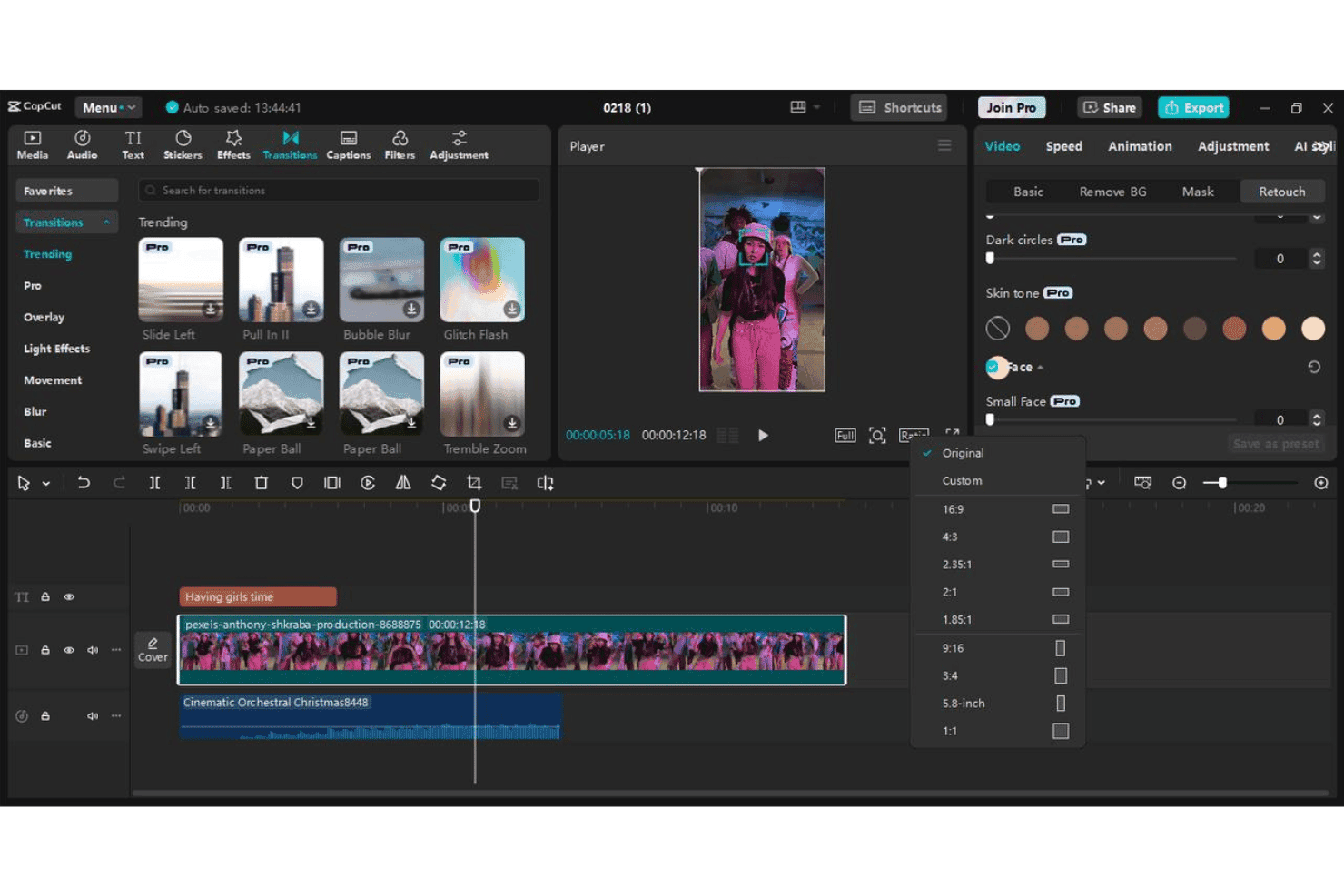
CapCut lets users edit short-form videos with transitions, effects, captions, and aspect ratio presets. CapCut is a free AI video editor from ByteDance that turns text prompts and scripts into short-form videos using AI scene generation, digital avatars, voiceovers, and pre-built marketing templates.
Who Is CapCut Best For?
CapCut is a strong fit for social media marketers and small business owners who produce high volumes of short-form video content for TikTok, Reels, or Shorts.
Why I Picked CapCut
CapCut earns its spot as one of the best on my shortlist because no other free tool is as purpose-built for TikTok-style content production. I use it specifically for its auto-captions, which generate word-by-word highlighted text in the bold, high-contrast style that actually performs in vertical feeds. The platform-specific 9:16 presets and CapCut for Business's URL-to-video feature, which turns a product landing page directly into a short-form ad, make it my go-to for rapid campaign testing.
CapCut Key Features
- AI-driven script writing: Generate complete video scripts from a single prompt or keyword for fast content ideation.
- Digital avatar presenters: Choose from over 100 AI avatars to narrate or present marketing messages in videos.
- Preset marketing templates: Access templates designed for ads, product demos, and branded content tailored for social channels.
- Multi-language voiceovers: Add AI-generated narration in dozens of languages for localized or global campaigns.
CapCut Integrations
CapCut offers native integration with TikTok for direct publishing and supports Google, Facebook, and QR code login options. Native integrations beyond TikTok are not clearly documented.
What's Free?
CapCut offers a free-forever plan across web, desktop, and mobile with no credit card required, including 1080p exports without a watermark on the desktop version. The free tier includes access to templates, text-to-video, and editing tools, but AI-powered features like avatar generation and advanced AI video creation run on a monthly credit allowance that resets each billing cycle.
Pros and Cons
Pros:
- Exports 1080p vertical video without a watermark
- Templates optimized for TikTok and Reels formats
- Templates optimized for TikTok and Reels formats
Cons:
- Commercial licensing requires manual verification
- AI credits cap out quickly on the free plan
 Best for customizable avatar presentations
- Free plan available
- From $59/month (billed annually)
Visit WebsiteCustomer Rating:4.6/5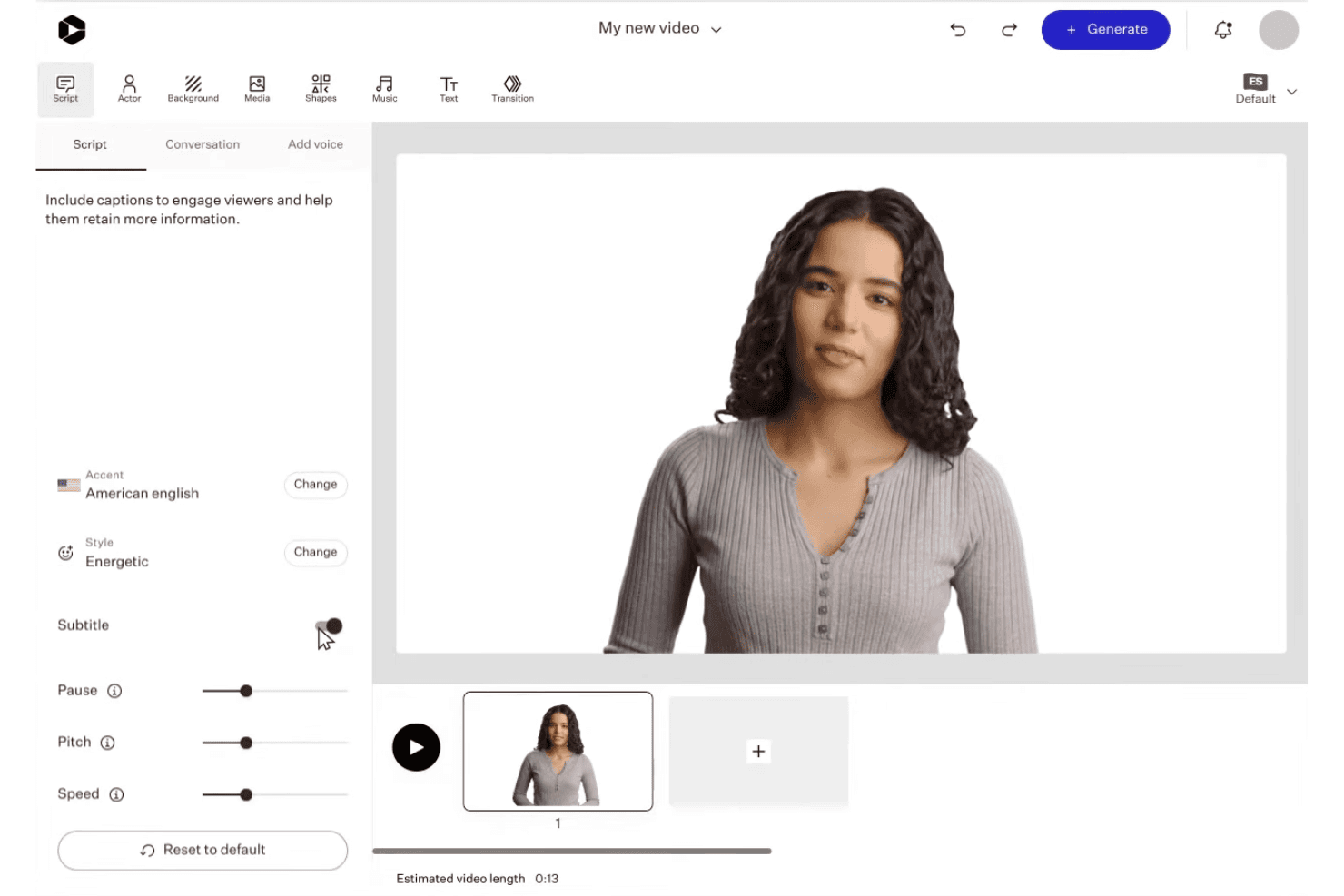
Colossyan lets users customize AI avatar presentations with scripts, voices, and scene editing. Colossyan is an AI video platform that turns text, scripts, PDFs, and URLs into avatar-led videos using 300+ AI presenters, 700+ voices, and built-in brand kits across multiple aspect ratios.
Who Is Colossyan Best For?
Colossyan is a strong fit for content marketing managers and enablement teams who need to produce polished, presenter-style videos from existing written content at scale.
Why I Picked Colossyan
Colossyan earns its spot on my shortlist because no other free AI video tool gives you this much control over how your on-screen presenter looks and behaves. I love that you can adjust avatar emotions, use side-view angles, and drop multiple avatars into a single scene, which lets me build podcast-style explainers that feel genuinely produced. The instant custom avatar feature means I can get a branded presenter on screen without booking a studio shoot.
Colossyan Key Features
- Brand kit management: Store and apply logos, colors, and fonts automatically to every video project.
- Document-to-video workflow: Convert PDFs, PowerPoints, scripts, and URLs directly into draft videos.
- Multi-aspect ratio export: Create videos in vertical, square, or horizontal formats for different social channels.
- Stock media library: Access built-in stock footage, images, and music to enhance your video content.
Colossyan Integrations
Colossyan offers SCORM exports for learning management systems like Workday, Cornerstone, Docebo, Litmos, and Absorb, and provides API access for custom integrations.
What's Free?
Colossyan's free-forever Starter plan includes 20 minutes of AI video generation per month with no credit card required, but all exported videos carry a watermark. Unlimited MP4 downloads are locked behind the paid Professional plan, so free users are limited to share links and course exports.
Pros and Cons
Pros:
- Auto-translation available across 70+ languages
- Up to four avatars in a single scene
- 300+ avatar options with emotion and angle controls
Cons:
- Video rendering times are slower than average
- Fewer templates than HeyGen and Synthesia
Learn more about Colossyan: 7Best for brand custom video exports
VEED
- Free plan available
- From $12/user/month
Visit WebsiteCustomer Rating:4.5/5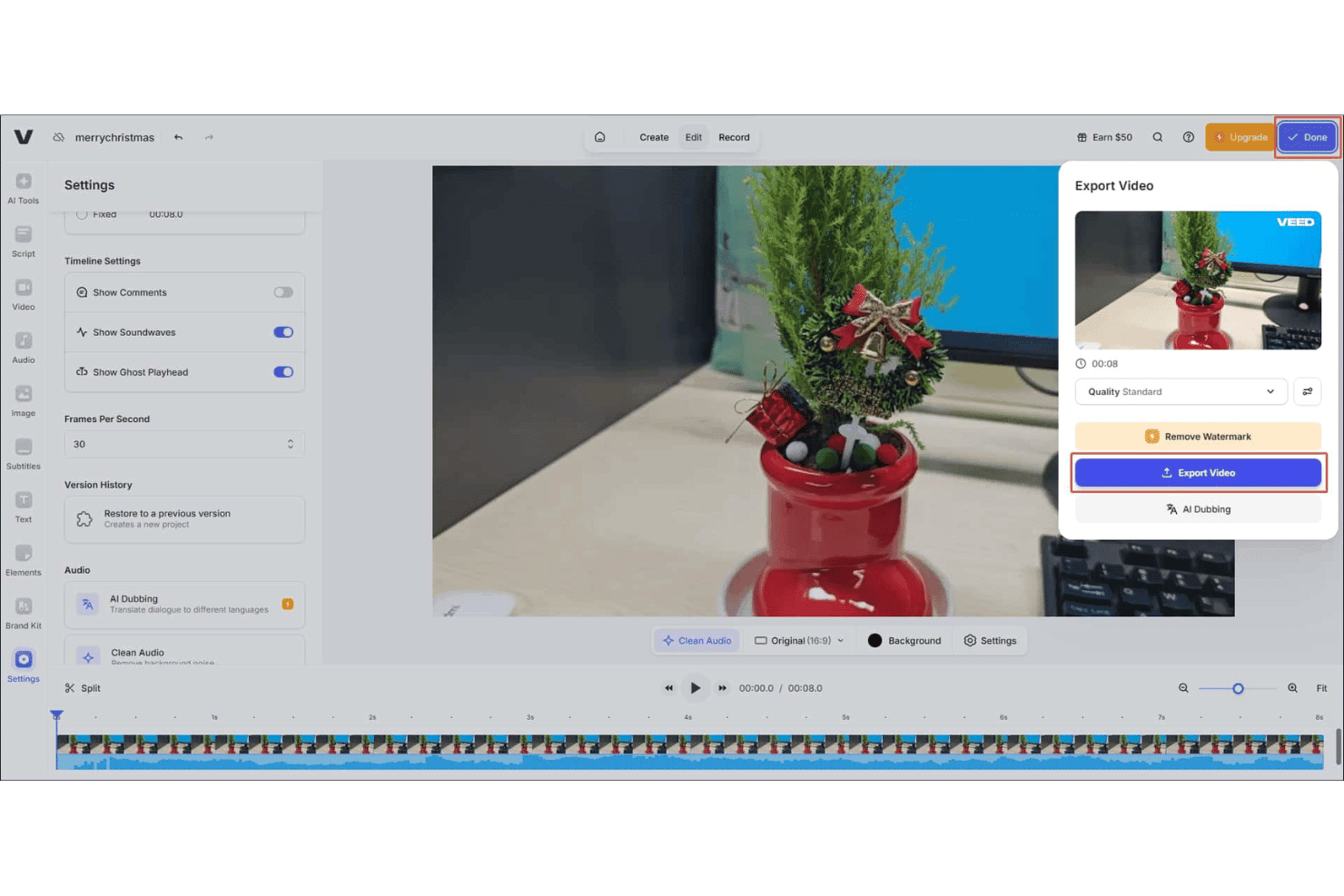
VEED offers a video export panel with quality settings, watermark removal, and AI Dubbing options directly from the editor. VEED is a browser-based AI video generator that lets you create text-to-video content, animate product images, add AI avatars, generate voiceovers in 125+ languages, and apply auto-captions across multiple aspect ratios.
Who Is VEED Best For?
VEED is a strong fit for social media marketers and content teams who need to produce branded, short-form video at volume without a dedicated video production team.
Why I Picked VEED
I picked VEED as one of the best because its Brand Kit lets you lock in your logos, fonts, and colors once and have them carry through every video you generate. That matters when you're running multiple campaigns and need every export to look consistent without rebuilding your brand setup each time. I also like that you can create custom AI avatars tied to your brand identity, so product explainers and ad creatives don't default to a generic AI presenter that has nothing to do with your company.
VEED Key Features
- Multi-model AI video generation: Select from several leading AI video models like Sora 2, Kling, and Seedance to tailor the video style and pacing to your needs.
- Image-to-video animation: Upload product images and generate animated video content directly from static visuals.
- AI voiceover in 125+ languages: Generate natural-sounding audio tracks for your videos in a wide range of languages for global reach.
- Magic B-roll: Instantly add relevant stock B-roll footage to AI-generated videos for more engaging visuals.
VEED Integrations
Native integrations are not clearly documented. VEED offers several APIs, including Fabric 1.0 API, Lip Sync API, Subtitle API, Background Removal API, and Green Screen API, for custom integrations.
What's Free?
VEED offers a free-forever plan with no credit card required, giving you a limited quota of AI video credits to generate and export videos. Free plan exports include a watermark and are capped at 720p resolution; once you use your credit allowance, you'll need to upgrade to a paid plan to continue generating AI video.
Pros and Cons
Pros:
- AI avatar library includes custom avatar creation
- Choose between multiple generative AI video models
- Brand Kit applies across all generated videos
Cons:
- Slow rendering on longer or complex video projects
- Free exports are watermarked and capped at 720p
Learn more about VEED: 8Best for video creation from text at scale
Elai
- Free plan available
- From $29/month
Visit WebsiteCustomer Rating:4.6/5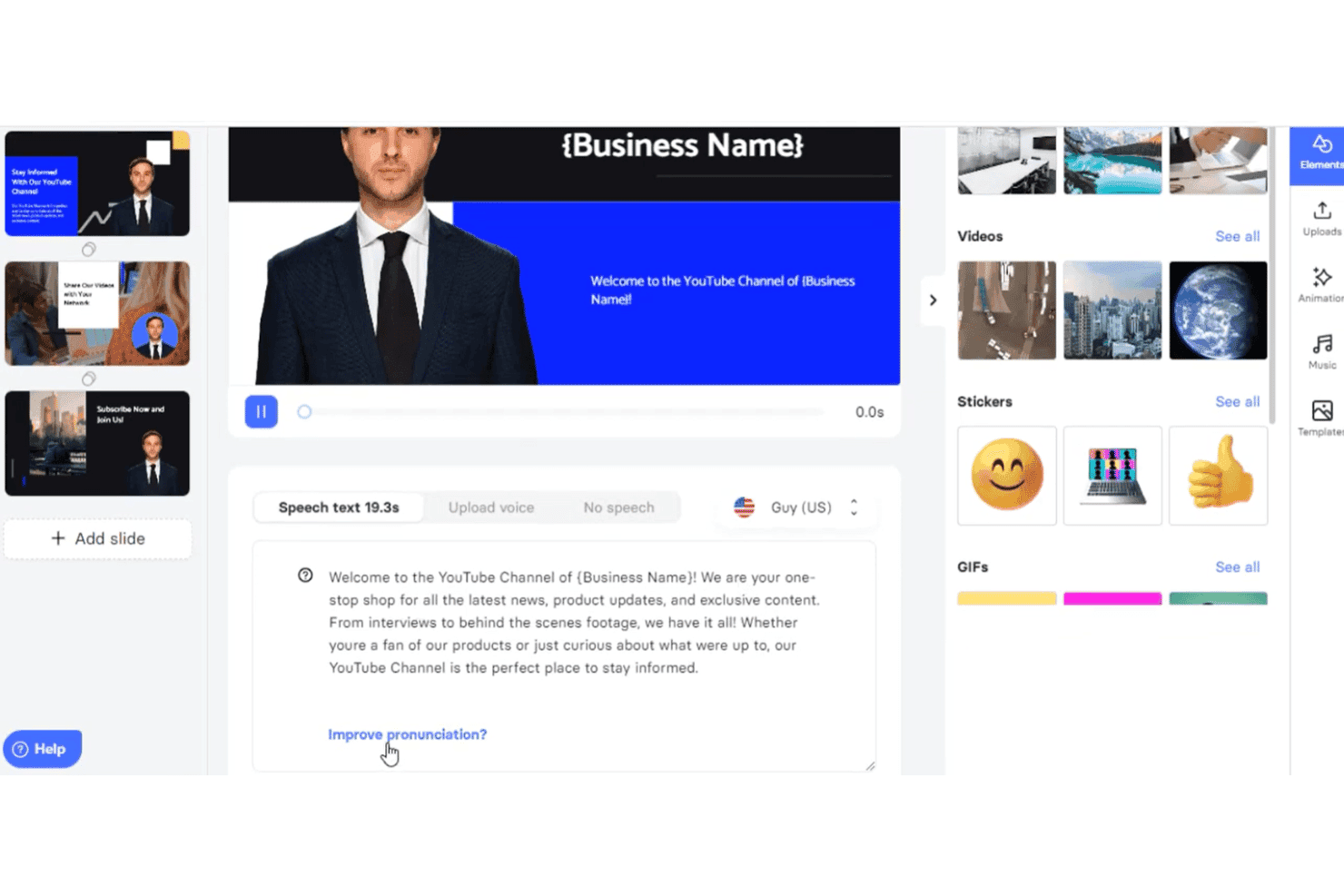
Elai.io lets users create AI videos from text with avatars, voice settings, and slide editing. Elai is an AI video generator that converts text, URLs, scripts, and PowerPoint files into narrated videos using a library of AI avatars and multilingual voiceovers across 75+ languages.
Who Is Elai Best For?
Elai is a strong fit for content marketing teams that regularly repurpose written assets—like blog posts and slide decks—into video at volume.
Why I Picked Elai
I've included Elai in my top picks because it handles text-to-video at volume better than most tools I've tested. I can paste a blog URL directly into the platform and get a narrated AI avatar video without writing a single line of script. The AI Storyboard feature takes that further, letting me turn a rough content outline into a structured, multi-slide video in one workflow.
Elai Key Features
- Brand kit storage: Store your logo, fonts, and brand colors for consistent video branding.
- Multi-language voice cloning: Generate AI narration in 28 languages cloned from your real voice.
- SCORM export: Download completed videos as SCORM files for easy LMS integration.
- Interactive quizzes and branching: Add clickable quizzes and branching elements to create interactive video experiences.
Elai Integrations
Elai.io offers native integrations with Thinkific, uQualio, Tolstoy, Moodle, Medium, Pexels, GIPHY, LottieFiles, and Articulate 360. It also connects with Zapier and provides an API for custom integrations.
What's Free?
Elai's free plan gives you 1 minute of total video rendering credit, which covers a single short video and depletes with every render and re-render. Download availability on the free tier has been flagged as unreliable by users, so treat it as a preview of the platform rather than a functional production tier.
Pros and Cons
Pros:
- Custom AI avatar creation available on paid plans
- Supports 75+ languages for voiceover generation
- Converts blog URLs into videos automatically
Cons:
- Avatar variety is limited on lower-tier plans
- Re-rendering depletes your minutes allotment
Learn more about Elai: Best for AI avatars in explainer videos
- Free plan + free demo available
- From $14/month (billed annually)
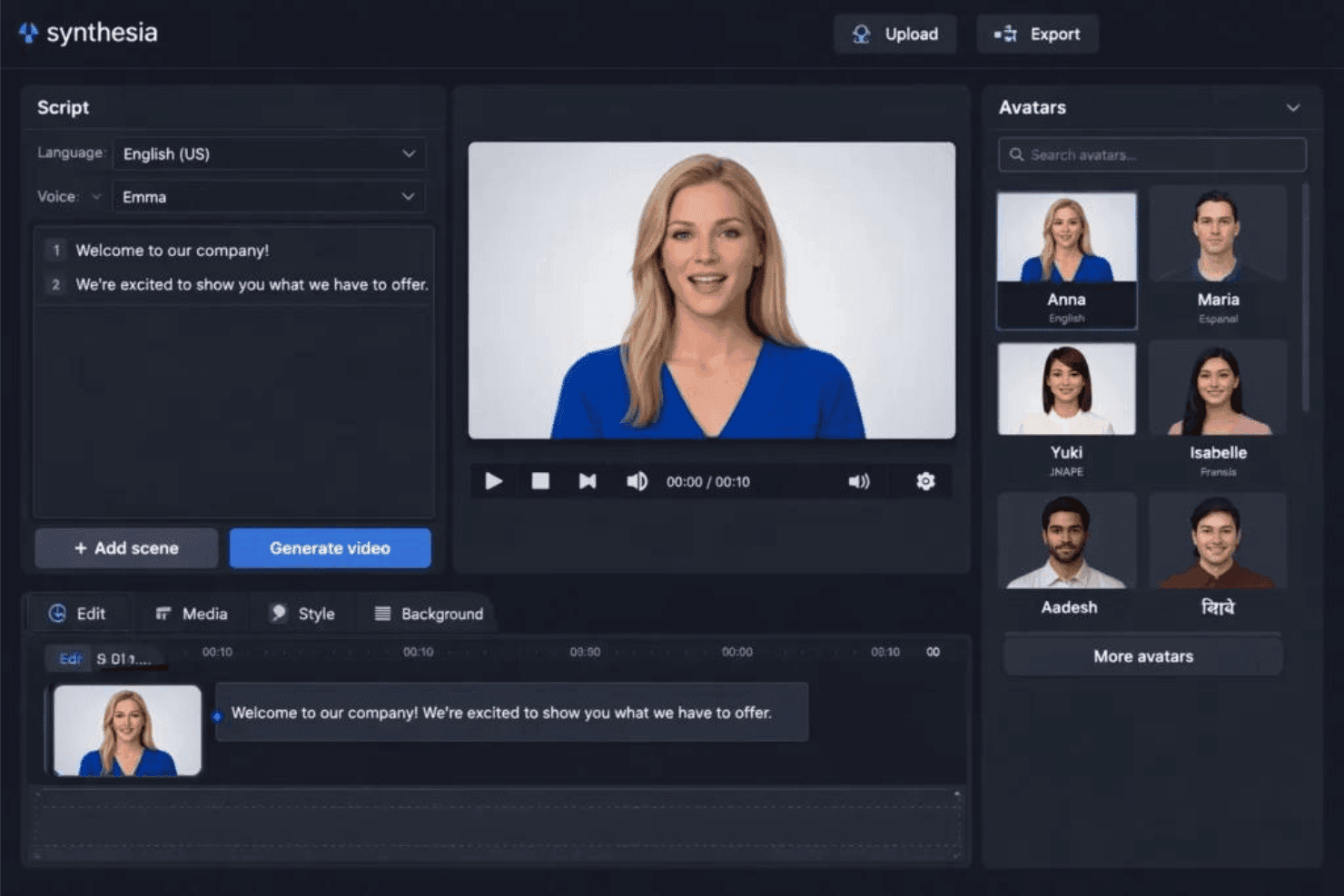
Synthesia offers an AI video editor with customizable avatars, script input, and a one-click video generation feature. Synthesia is an AI video platform that converts text scripts, documents, and prompts into finished videos using AI avatars, multilingual voiceovers, and customizable branded templates.
Who Is Synthesia Best For?
Synthesia works well for content marketing managers and L&D teams who need to produce polished, avatar-led explainer videos without a production crew.
Why I Picked Synthesia
Synthesia earns its spot on my shortlist because its avatar library is genuinely hard to beat. With 240+ stock avatars and the ability to build a personal avatar (a digital likeness of yourself or a brand presenter), I can produce explainer videos that feel presenter-led without booking a studio. I also rely on the 1-Click Translation feature, which re-dubs a finished video into 70+ languages while preserving lip sync, so one explainer asset becomes a full multilingual campaign.
Synthesia Key Features
- AI video assistant: Generate videos from scripts, documents, PDFs, or URLs with a prompt-based AI workflow.
- Brand kit customization: Store and apply logos, colors, and fonts to keep videos on-brand.
- Media library access: Use stock footage, music, and images from Getty Images, Pexels, Soundstripe, and Icons8.
- Multi-aspect ratio export: Export videos in vertical, square, and horizontal formats for various social channels.
Synthesia Integrations
Synthesia offers native integrations with PowerPoint and learning management systems via SCORM export, and provides an API for custom integrations. It also has a Chrome extension for screen recording.
What's Free?
Synthesia offers a free-forever plan that includes 10 minutes of video per month, access to 9 AI avatars, and MP4 exports. Videos on the free plan include a Synthesia watermark, and access to the full avatar library and brand kit requires a paid plan.
Pros and Cons
Pros:
- Free plan includes MP4 video downloads
- 1-click video translation into 70+ languages
- 240+ stock avatars plus custom avatar option
Cons:
- Limited to 9 avatars on free tier
- Free plan adds watermark to all videos
Learn more about Synthesia:
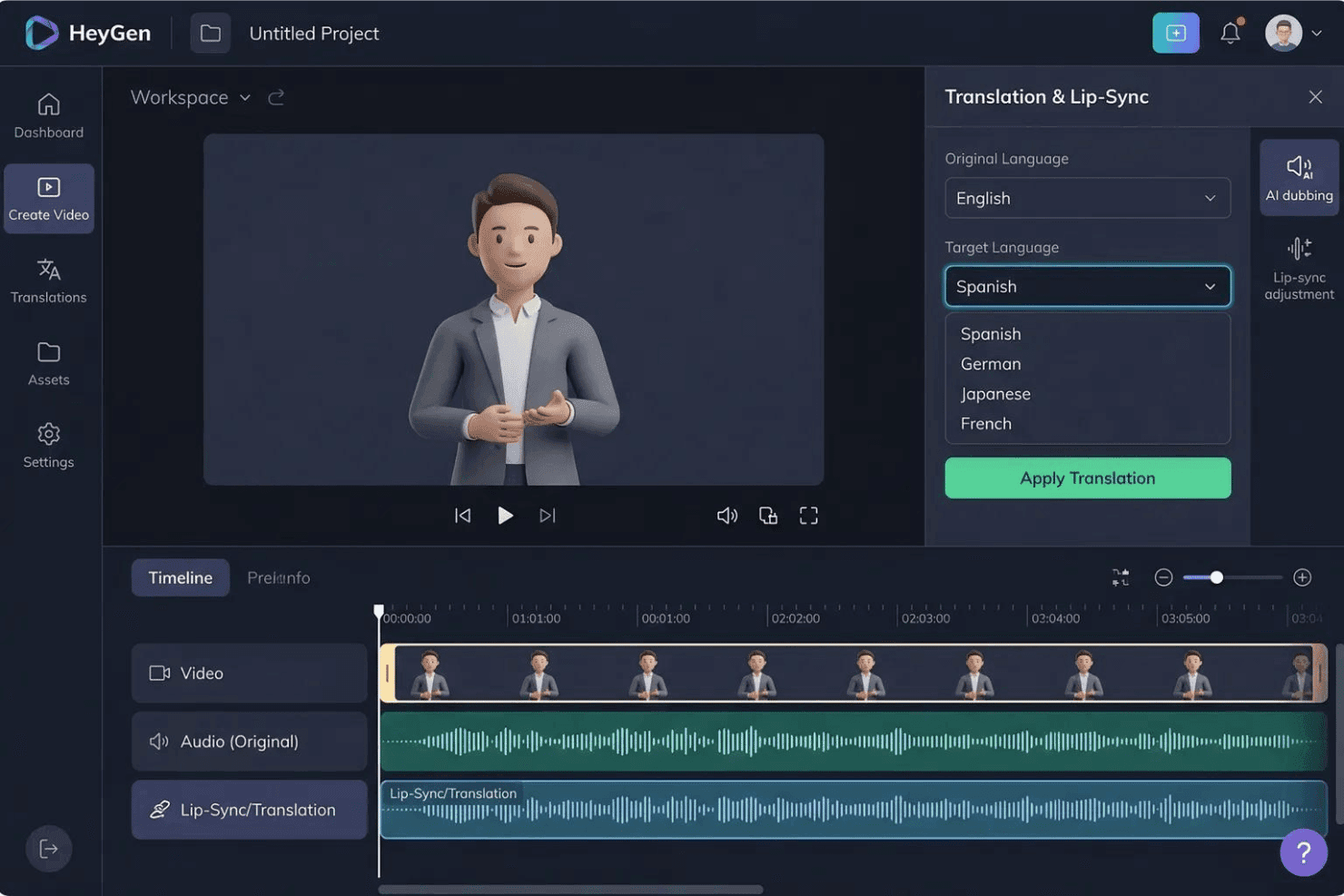
HeyGen offers a Translation & Lip-Sync panel that lets users translate AI avatar videos into multiple languages including Spanish, German, Japanese, and French. HeyGen is an AI video generator built around lifelike avatars, voice cloning, and one-click translation into 175+ languages, with text-to-video, lip-sync localization, and custom digital twin creation.
Who Is HeyGen Best For?
HeyGen is a strong fit for marketing teams at global brands and agencies that regularly produce video content across multiple languages and regional markets.
Why I Picked HeyGen
HeyGen earns its spot on my shortlist because of how it handles video localization at scale. I can take one recorded video and generate lip-synced versions in 175+ languages, with the avatar's voice tone and mouth movement matching each translated script. The custom digital twin feature means I'm not re-shooting or re-casting for each market. HeyGen runs the localization pass automatically, preserving the original speaker's voice characteristics across every language version.
HeyGen Key Features
- AI Studio editor: Create, edit, and preview video scenes using a drag-and-drop timeline with text-based control and real-time feedback.
- Marketing template library: Access ready-made video templates tailored for social ads, promos, explainers, and common marketing formats.
- Multi-aspect ratio export: Export videos in 9:16, 1:1, or 16:9 ratios for TikTok, Instagram, and YouTube without manual cropping.
- Integrated stock asset library: Use a built-in library of stock videos, images, and audio tracks directly within the video editing workflow.
HeyGen Integrations
HeyGen offers native integrations with HubSpot, Salesforce, Adobe Express, Canva, FlowShare, Zoom, and Tolstoy, connects with Zapier, and provides an API for custom integrations.
What's Free?
HeyGen's free-forever plan includes 3 videos per month (up to 1 minute each) with 1080p export, access to 500+ stock avatars, and 1 custom digital twin. Videos export with a watermark, and access to premium features like Avatar V and Video Agent is limited to a short trial period.
Pros and Cons
Pros:
- Realistic custom digital twin creation available
- 175+ languages Instant multi-language video from one recording
- Lip-synced translation across
Cons:
- "Unlimited" plan claims can mislead on actual limits
- Free plan exports are capped at 720p
Learn more about HeyGen:
Alte generatoare video AI gratuite pentru specialiștii în marketing
Iată câteva opțiuni suplimentare de generatoare video AI gratuite pentru specialiștii în marketing care nu au ajuns pe lista mea restrânsă, dar merită totuși analizate:
- 11Lumen5Best for converting blog posts to video instantly
- 12FlikiBest for realistic voiceovers in video ads
- 13Vidnoz AIBest for voiceover-driven promo videos
- 14CreatifyBest for automated ad script generation
- 15RunwayBest for video effects powered by AI
- 16Hailuo AIBest for talking avatar customization
- 17KapwingBest for collaborative editing workflows
- 18EaseMate AIBest for multi-format video exports
- 19RecCloudBest for direct social platform publishing
- 20DreamluxBest for storyboarding from marketing copy
How I Evaluate Free AI Video Generator for Marketers
First, I define what counts as free. For AI video generators, that means a free-forever plan or a full-feature free trial of at least 7 days that lets you export finished videos—watermarks are fine. From there, I split my evaluation into core functionality every tool must meet and the differentiators that set the best options apart.
Core Functionality (Table Stakes For This List)
In addition to my free offer requirements, I also use a scoring system to select tools for my list. Here's how it works:
I rank each one on a scale from 0 (does not offer the functionality) to 5 (excels in this area) for each core functionality listed below. Then, I calculate the tool's total score into a percentage. Each tool needs to achieve a minimum total score of 65% to be considered for inclusion.
- Text-to-video generation: I check whether the tool can take a script or blog excerpt and produce a coherent, multi-scene video—not just a slideshow of static images.
- AI avatars or voiceovers: Having a digital presenter or natural-sounding narration matters for explainer and product demo videos, so I look for variety in voices and avatar options.
- Marketing-ready templates: I evaluate the template library for formats marketers actually use, like short social ads, product promos, and story-format videos for Instagram or TikTok.
- Multi-aspect ratio export: Each tool should support 9:16, 1:1, and 16:9 exports so you can repurpose a single video across YouTube, Reels, and feed posts without recutting.
- Brand customization: I look for the ability to add your logo, brand colors, and fonts to keep generated videos on-brand across campaigns.
- Media library and stock assets: A built-in library of stock footage, images, and music clips helps fill gaps when you don't have original assets ready to go.
Once I have a list of tools that meet the criteria, I consider what sets each platform apart.
Differentiating Factors (What Sets Vendors Apart)
Here's how I compare and contrast different vendors:
Standout Features
Brand kit storage is a feature I pay close attention to—tools that let you save your logo, colors, and fonts mean you're not rebuilding brand elements with every new video. AI avatar presenters are another differentiator, especially for product explainers or onboarding content where a talking head adds credibility without booking a shoot. Multi-language voiceovers round things out for teams running campaigns across regions, letting you localize a single video into multiple languages from one project.
Beyond Features
Free tier limits matter a lot here—I look at how many minutes of video you can generate each month and whether exports come watermarked or resolution-capped, since that affects whether the output is usable in paid campaigns. Content rights are another factor I check, particularly whether the platform's licensing terms allow commercial use of AI-generated videos and avatars. I also consider marketing stack integrations, like direct publishing to social channels or connections with tools like HubSpot and Google Drive.
Cum să alegeți un generator video AI gratuit pentru specialiștii în marketing
Este ușor să vă pierdeți în liste lungi de funcții și structuri complexe de prețuri. Pentru a vă ajuta să rămâneți concentrați în timp ce parcurgeți procesul unic de selecție a software-ului, iată o listă de verificare a factorilor de care trebuie să țineți cont:
| Factor | Aspecte de luat în considerare |
|---|---|
| FactorScalabilitate | Aspecte de luat în considerareVă va permite instrumentul să creșteți volumul de videoclipuri pe măsură ce campaniile dumneavoastră se dezvoltă sau nivelul gratuit limitează prea mult producția pentru utilizarea de către echipe sau mai multe mărci? |
| FactorIntegrări | Aspecte de luat în considerareSe conectează platforma la instrumentele de marketing pe care le utilizați deja — precum Canva sau HubSpot — pentru gestionarea materialelor și fluxurile de lucru ale campaniilor? |
| FactorPosibilitatea de personalizare | Aspecte de luat în considerarePuteți aplica elementele mărcii dumneavoastră și adapta videoclipurile pentru campanii diferite sau există limite privind ceea ce puteți edita în nivelul gratuit? |
| FactorUșurință în utilizare | Aspecte de luat în considerareInterfața este intuitivă, astfel încât echipa să poată începe fără instruire îndelungată sau aveți nevoie de competențe specializate pentru a crea rezultate bine finisate? |
| FactorIntegrarea la implementare | Aspecte de luat în considerareCât de repede poate începe echipa dumneavoastră? Sunt disponibile tutoriale, proiecte demonstrative și resurse de integrare pentru a scurta timpul de acomodare? |
| FactorCost | Aspecte de luat în considerareSunt sustenabile pentru nevoile dumneavoastră limitele nivelului gratuit sau va trebui să faceți rapid upgrade pentru mai multe credite ori o rezoluție mai mare? |
| FactorMăsuri de protecție a securității | Aspecte de luat în considerareCe date ale utilizatorilor, materiale și informații despre campanii stochează platforma și există controale pentru confidențialitate și acces într-un mediu partajat? |
| FactorNecesități interne de resurse | Aspecte de luat în considerareVeți avea nevoie de asistență continuă din partea echipelor de design, IT sau creație pentru a obține valoare de la instrument sau specialiștii în marketing pot utiliza platforma independent după configurare? |
Ce sunt generatoarele video AI gratuite pentru specialiștii în marketing?
Generatoarele video AI gratuite pentru specialiștii în marketing sunt instrumente software care vă permit să creați videoclipuri de marketing folosind inteligența artificială, fără costuri inițiale. Acestea oferă funcții precum transformarea prompturilor text sau a scenariilor în videoclipuri, generarea de avatare AI și voiceover-uri și aplicarea elementelor mărcii. De obicei, aceste platforme includ un plan gratuit sau o perioadă de probă limitată, permițându-le specialiștilor în marketing să experimenteze cu conținut video pentru campanii, reclame sau canale sociale înainte de a-și asuma un angajament financiar.
Funcțiile generatoarelor video AI gratuite pentru specialiștii în marketing
Să analizăm funcțiile întâlnite în mod obișnuit la generatoarele video AI pentru specialiștii în marketing și să vedem care dintre acestea sunt de regulă incluse în planurile gratuite și care în cele plătite.
Funcții disponibile de obicei gratuit ale unui generator video AI pentru specialiști în marketing
- Conversie din text în video: Transformă scenarii scrise, articole de blog sau briefuri în videoclipuri complete cu scene generate automat, ajutând la crearea rapidă de conținut pornind de la textele existente.
- Șabloane de marketing de bază: Accesează șabloane inițiale concepute pentru postări pe rețelele sociale, evidențierea produselor sau videoclipuri explicative, simplificând procesul de creare a videoclipurilor pentru cazurile obișnuite de utilizare în marketing.
- Personalizare simplă a mărcii: Adaugă sigla și culorile de bază la videoclipurile exportate, asigurând un plus de consecvență a mărcii fără personalizare avansată.
- Voci generate de AI: Folosește narațiune vocală automată pentru videoclipuri, de obicei cu o selecție restrânsă de voci naturale în limbile populare.
- Prezentatori avatar de bază: Adaugă prezentatori digitali sau persoane care vorbesc în fața camerei conținutului tău, folosind o bibliotecă standard, care nu poate fi personalizată, de avatare generate de AI.
- Bibliotecă limitată de materiale media de arhivă: Accesează o colecție restrânsă de fotografii, videoclipuri și muzică de arhivă pentru a-ți îmbogăți conținutul fără a avea nevoie de materiale originale.
- Export în mai multe formate: Exportă videoclipuri în formate verticale, pătrate sau orizontale pentru rețelele sociale, astfel încât să le poți publica cu ușurință pe diferite canale pornind de la un singur proiect.
- Descărcări cu filigran: Descarcă videoclipurile finalizate cu un filigran discret, pentru a putea previzualiza materialele sau a le folosi în procesul intern de aprobare.
Funcții disponibile de obicei contra cost ale unui generator video AI pentru specialiști în marketing
- Gestionarea avansată a kitului de marcă: Stochează mai multe sigle, fonturi și palete de culori pentru aplicarea automată, mai detaliată, în toate proiectele, asigurând o identitate vizuală consecventă a mărcii.
- Generarea în serie a videoclipurilor: Generează simultan mai multe videoclipuri din scenarii diferite sau fluxuri de date, facilitând extinderea campaniilor pe diferite formate și platforme.
- Exporturi la rezoluție înaltă: Descarcă videoclipuri la calitate înaltă sau 4K, eliminând filigranele și permițând obținerea unor materiale finale finisate și profesioniste.
- Crearea de avatare personalizate: Creează avatare AI personalizate sau persoane care vorbesc în fața camerei, adaptate unor purtători de cuvânt, personaje sau identități specifice ale mărcii.
- Opțiuni extinse pentru voice-over: Alege dintre zeci de limbi și accente și accesează voci de narațiune AI mai realiste sau mai expresive.
- Bibliotecă de materiale media de arhivă premium: Folosește o colecție vastă, integrată, de videoclipuri, imagini și muzică de arhivă licențiate pentru opțiuni creative mai bogate.
- Publicare directă pe rețelele sociale: Publică instantaneu videoclipuri de pe platformă pe canale precum TikTok, Instagram, Facebook și YouTube, fără a le descărca mai întâi.
- Instrumente de colaborare: Invită membrii echipei să examineze, să editeze sau să aprobe proiecte împreună în cadrul platformei, îmbunătățind fluxul de lucru pentru echipele de marketing distribuite.
- Editare video bazată pe AI: Îmbunătățește videoclipurile cu sugestii de editare bazate pe AI, eliminarea fundalului sau restructurarea scenelor, dincolo de aranjarea manuală a clipurilor.
- Analize îmbunătățite: Accesează direct din instrument informații despre interacțiunile cu videoclipurile, ratele de finalizare sau performanța pe rețelele sociale, pentru a fundamenta viitoarele decizii creative.
Beneficiile unui generator video AI gratuit pentru specialiști în marketing
Implementarea unui generator video AI gratuit pentru specialiști în marketing oferă mai multe beneficii echipei și companiei tale. Iată câteva dintre acestea:
- Creare mai rapidă a materialelor: Transformă instantaneu scenarii sau briefuri în materiale video finisate folosind conversia text-video bazată pe AI și șabloane, reducând dependența de producția video externă.
- Costuri de producție mai mici: Elimină nevoia de videografi, editori și actori — funcții precum avatarele AI, vocile generate și bibliotecile media îți permit să creezi videoclipuri în întregime în platformă.
- Prezență consecventă a mărcii: Personalizarea simplă a mărcii și kiturile de bază ale mărcii ajută la menținerea siglelor și culorilor în prim-plan, chiar și în conținutul publicitar pentru rețelele sociale creat rapid.
- Acoperire pe mai multe canale: Folosește instrumentele de export în mai multe formate pentru a adapta un singur videoclip la TikTok, Instagram, YouTube și alte platforme, fără a-l reedita pentru fiecare.
- Refolosirea ușoară a conținutului: Transformă articole de blog, texte despre produse sau scenarii de webinare în conținut video nou, maximizând impactul materialelor de marketing existente.
- Experimentare la scară largă: Testează mai multe variante creative înainte de a investi într-un plan plătit, deoarece nivelurile gratuite permit testarea flexibilă și iterații rapide.
- Creare video accesibilă: Editorii ușor de utilizat, șabloanele inițiale și resursele de familiarizare permit aproape oricui din echipă să creeze videoclipuri — chiar și fără experiență anterioară.
Costurile și prețurile unui generator video AI pentru specialiști în marketing
Îmi dau seama că ai ajuns la acest articol în căutarea celor mai bune opțiuni gratuite de generatoare video AI pentru specialiști în marketing. Totuși, deoarece planurile gratuite oferă doar funcții limitate, există șanse mari să fie nevoie să-ți extinzi planul în viitor și să explorezi o gamă mai largă de generatoare video AI.
Tabelul de mai jos rezumă planurile obișnuite, prețurile medii ale acestora și funcțiile incluse de regulă într-un generator video AI pentru specialiști în marketing:
Tabel comparativ al planurilor pentru un generator video AI pentru specialiști în marketing
| Tipul planului | Preț mediu | Funcții comune |
|---|---|---|
| Tipul planuluiPlan gratuit | Preț mediu$0 | Funcții comuneConversie de bază a textului în videoclip, exporturi cu filigran, șabloane limitate, o bibliotecă media mică și opțiuni de bază pentru voce din off. |
| Tipul planuluiPlan personal | Preț mediu$10–$25/utilizator/lună | Funcții comuneMai multe șabloane, export HD, conținut media de stoc extins, avatare suplimentare, mai multe opțiuni de voce și personalizare de bază a brandului. |
| Tipul planuluiPlan pentru companii | Preț mediu$30–$60/utilizator/lună | Funcții comunePachete de brand personalizate, asistență premium, descărcări la rezoluție înaltă, exporturi în bloc, instrumente de colaborare și editare video avansată. |
| Tipul planuluiPlan pentru întreprinderi | Preț mediu$75+/utilizator/lună | Funcții comuneSSO și securitate avansată, utilizare nelimitată, acces API, configurare inițială dedicată, asistență prioritară și analize detaliate. |
Întrebări frecvente despre generatoarele video AI gratuite pentru specialiștii în marketing
Iată câteva răspunsuri la întrebările frecvente despre generatoarele video AI gratuite pentru specialiștii în marketing:
Pot folosi în scopuri comerciale videoclipurile realizate cu generatoare video AI gratuite?
Da, multe generatoare video AI gratuite permit utilizarea comercială, dar trebuie să verifici întotdeauna condițiile de licențiere pentru a identifica filigranele, drepturile de utilizare și restricțiile privind conținutul înainte de a publica videoclipurile.
Videoclipurile mele vor avea filigrane dacă folosesc un plan gratuit?
Da, majoritatea planurilor gratuite adaugă un filigran videoclipurilor exportate. Dacă ai nevoie de conținut fără elemente de brand pentru campanii publice, de obicei este necesar să treci la un plan plătit.
Generatoarele video AI gratuite acceptă mai multe limbi?
Da, majoritatea generatoarelor video AI gratuite oferă funcții de bază pentru voce din off în mai multe limbi, dar varietatea vocilor și a limbilor disponibile tinde să fie mai limitată decât cea oferită în nivelurile plătite.
Cât conținut video pot produce cu un plan gratuit?
Planurile gratuite limitează de obicei volumul video în funcție de numărul de minute pe lună sau de numărul de exporturi. De regulă, acest lucru este suficient pentru testare sau proiecte mici, dar este posibil să nu acopere nevoile unei campanii desfășurate în mod continuu.
Am nevoie de experiență în design sau editare pentru a utiliza aceste instrumente?
Nu, generatoarele video AI gratuite sunt concepute pentru echipele de marketing și nespecialiști. Interfețele simple, șabloanele și resursele de inițiere te ajută să creezi videoclipuri fără experiență anterioară în editare.
Ce se întâmplă cu conținutul meu dacă trec la un plan plătit?
Trecerea la un plan plătit îți permite de obicei să elimini filigranele, să deblochezi exporturile anterioare la o rezoluție mai înaltă și să obții drepturi suplimentare sau opțiuni de editare pentru proiectele existente.