

Um criador de sites com IA é uma ferramenta que utiliza inteligência artificial para criar sites com base nos seus dados, normalmente através de instruções, perguntas ou da análise do seu conteúdo existente. Se procura formas de criar um site profissional mais rapidamente através do desenvolvimento orientado por instruções, sem contratar designers ou aprender programação tradicional, estas plataformas foram concebidas para si.
Neste guia, encontrará as melhores opções de criadores de sites com IA para 2026, com informações claras sobre a forma como cada uma aborda o design, a personalização e a colocação online — sempre tendo em conta a sua rapidez e as suas necessidades. Quer pretenda lançar um site com a sua marca, uma página de destino elegante ou gerir vários projetos em simultâneo, terminará o guia a saber exatamente qual o criador que melhor se adapta ao seu fluxo de trabalho e aos seus objetivos.
Why Trust Our Software Recommendations
6,700+
Reviews
20
Industry experts
16+
Evaluation factors
14
Years
Our team has been testing and reviewing software since 2012. As marketing leaders ourselves, we know how difficult—and important—it is to choose the right software.
For this guide, we evaluated tools using hands-on testing and independent research, scoring tools using our selection criteria.
Our reviews reflect our human editorial judgment, not a sales pitch.
Expert reviewers:
 Gui DrusinaCreative Director
- Shriya GhateSenior Marketing Lead
 Amanda JacquesMarketing Ops Leader

Tabela comparativa dos criadores de sites com IA
Esta tabela comparativa resume os detalhes de preços das minhas principais escolhas de criadores de sites com IA:
| Tool | Best For | Trial Info | Price | ||
|---|---|---|---|---|---|
| 1 | Best for marketers managing multiple pages | 14-day free trial | From $24/month (billed annually) | Website | |
| 2 | Best for conversion-focused landing pages | 14-day free trial available | From $29/month | Website | |
| 3 | Best for enterprise-level landing experiences | 14-day free trial + demo available | From $99/month | Website | |
| 4 | Best for building scalable WordPress-based sites | 7-day free trial | From $10/month (billed annually) | Website | |
| 5 | Best for sites tailored to professional services | Free plan available | From $42/month (billed annually) | Website | |
| 6 | Best for design-focused marketing microsites | 14-day free trial available | From $25/month | Website | |
| 7 | Best for launching branded sites using AI prompts | Free plan + free demo available | From $35.54/month (billed annually) | Website | |
| 8 | Best for beginner-friendly multi-page creation | 14-day free trial | From $10.99/month (billed annually) | Website | |
| 9 | Best for granular design customization | Free plan available | From $15/month (billed annually) | Website | |
| 10 | Best for quick publishing with built-in hosting | 7-day free trial | From $9.99/month (billed annually) | Website |


Avaliações dos melhores criadores de sites com IA
Apresentamos abaixo os meus resumos detalhados dos melhores criadores de sites com IA que entraram na minha seleção. As minhas avaliações oferecem uma análise detalhada das funcionalidades, dos melhores casos de utilização e dos preços de cada plataforma, para o ajudar a encontrar a melhor opção para si.
 Best for marketers managing multiple pages
- 14-day free trial
- From $24/month (billed annually)
Visit WebsiteCustomer Rating:4.6/5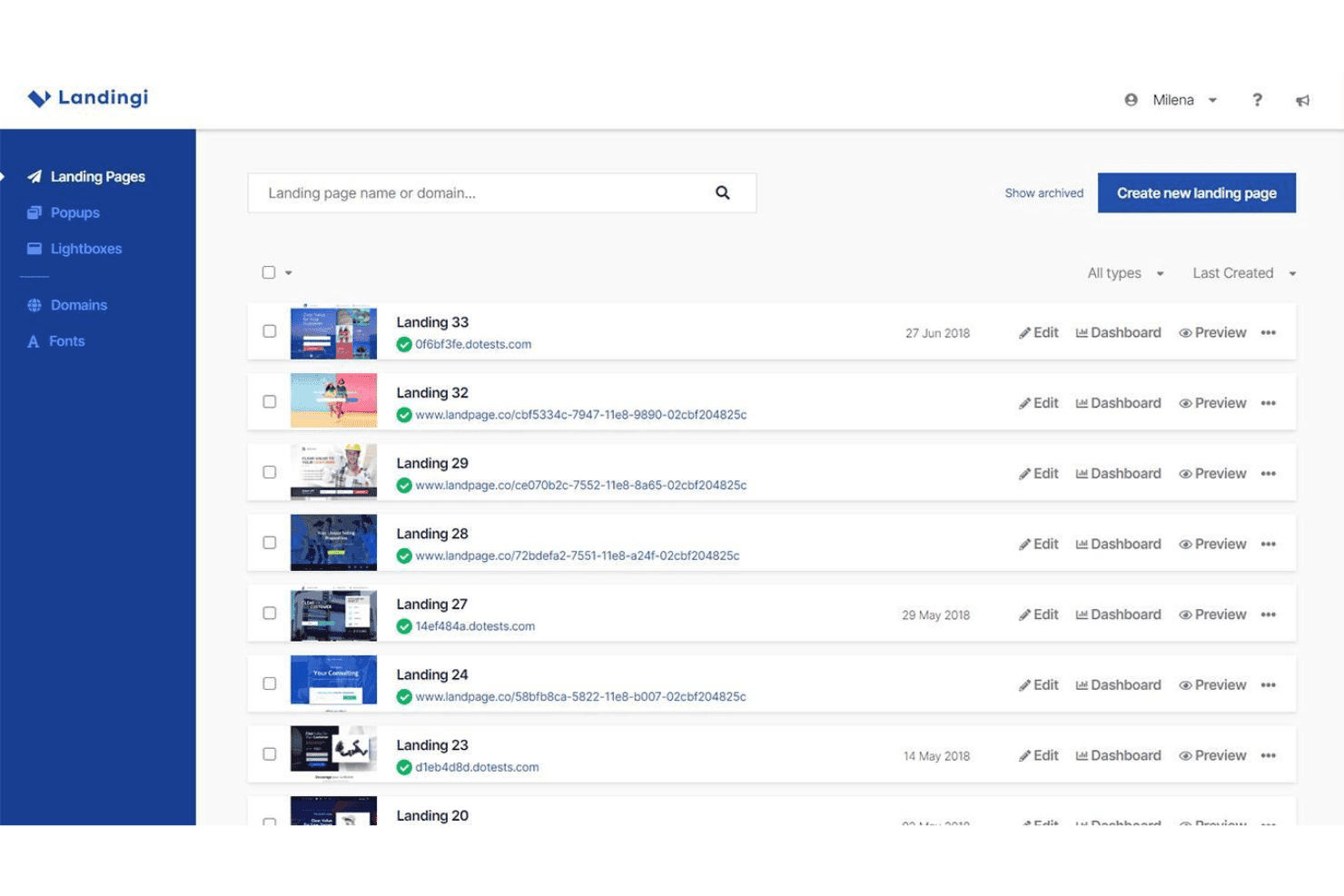
Landingi organizes multiple website landing pages with options to edit, view the Dashboard, and preview each page. Landingi is an AI landing page builder that combines a pixel-perfect drag-and-drop editor with AI page generation, programmatic page creation, A/B testing, and built-in SEO tools.
Who Is Landingi Best For?
Landingi is a strong fit for performance marketers, freelancers, and agencies running high-volume paid campaigns who need to build, manage, and optimize many landing pages at once.
Why I Picked Landingi
Landingi earns its spot on my shortlist because of how well it handles page volume at scale. Smart Sections let me update a repeated element (like a pricing block or CTA banner) in one place and push that change across every page it appears on instantly. Programmatic Landing Pages take it further, letting me build one master template and auto-generate hundreds of campaign-specific variations from it.
Landingi Key Features
- Lunar AI page generator: Quickly creates editable landing pages from a text prompt.
- Solis AI insights: Analyzes landing page performance and recommends optimizations using behavioral data.
- Smart A/B testing: Offers built-in server-side split testing with reliable data and no page performance loss.
- Multi-language translation: Automatically translates pages into 35 languages for global campaign support.
Landingi Integrations
Landingi offers over 170 native integrations, including HubSpot, Mailchimp, Salesforce, ActiveCampaign, Zapier, and provides an API for custom integrations.
Pros and Cons
Pros:
- Server-side A/B testing avoids page slowdowns
- Generates hundreds of page variants from templates
- Smart Sections push bulk edits sitewide instantly
Cons:
- Pop-up and form builder feel underdeveloped
- AI generates landing pages, not full sites
Learn more about Landingi: Best for conversion-focused landing pages
- 14-day free trial available
- From $29/month
Visit WebsiteCustomer Rating:4.4/5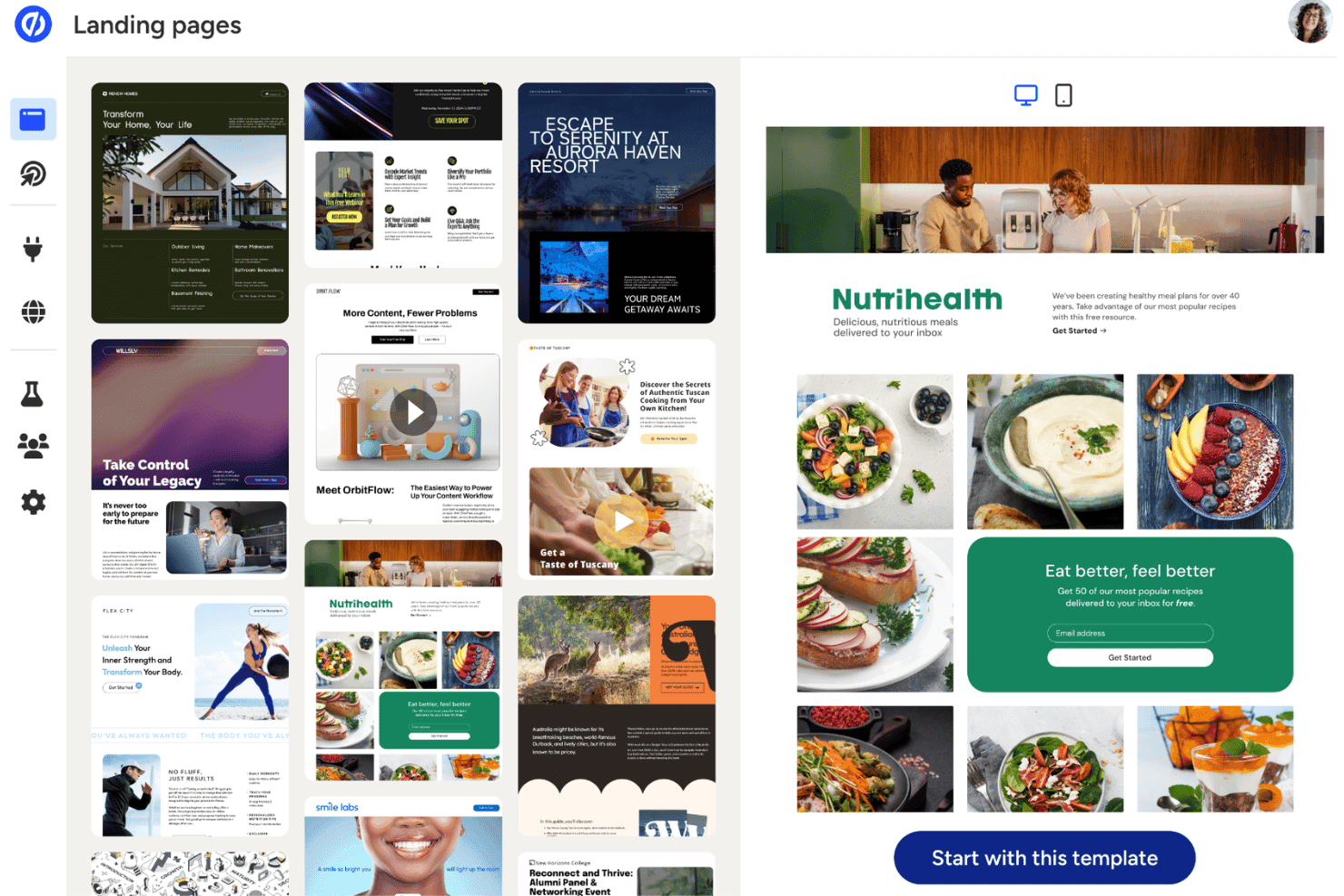
Unbounce offers a website template library with a preview panel, including an email signup form. Unbounce is an AI-powered landing page builder that lets marketers create, test, and optimize conversion-focused campaign pages using a drag-and-drop editor, AI copy generation, and automated traffic routing.
Who Is Unbounce Best For?
Unbounce is a strong fit for small to mid-sized marketing teams running paid ad campaigns who need to build and optimize landing pages without relying on a developer.
Why I Picked Unbounce
Unbounce earns its spot on my shortlist because of Smart Traffic, which routes each visitor to the page variant most likely to convert them based on device, location, and behavior data. I don't have to wait for A/B test results. Smart Traffic makes that call in real time. I also use the Smart Builder to generate a full landing page draft from a short questionnaire, with AI-written headlines and CTAs drawn from over 1.5 billion conversion data points.
Unbounce Key Features
- Dynamic text replacement: Automatically updates landing page text based on each visitor’s search keywords or ad copy.
- Smart Copy AI content generator: Produces headlines, CTAs, and body content from business inputs using AI templates.
- Multi-step forms: Lets you build forms that collect information over several steps for higher conversion rates.
- 1000+ native and Zapier integrations: Connects with major CRMs, email platforms, analytics, and workflow tools for marketing automation.
Unbounce Integrations
Unbounce offers native integrations with HubSpot, Mailchimp, Salesforce, ActiveCampaign, Marketo, Google Analytics, Facebook Ads, Zoho CRM, Shopify, WordPress, and connects with Zapier. An API is available for custom integrations.
Pros and Cons
Pros:
- Built-in A/B testing across page variants
- AI copy trained on 1.5 billion data points
- Smart Traffic routes visitors to best variants
Cons:
- No AI-generated imagery or design assets
- Limited to landing pages, not full websites
Learn more about Unbounce: Best for enterprise-level landing experiences
- 14-day free trial + demo available
- From $99/month
Visit WebsiteCustomer Rating:4.4/5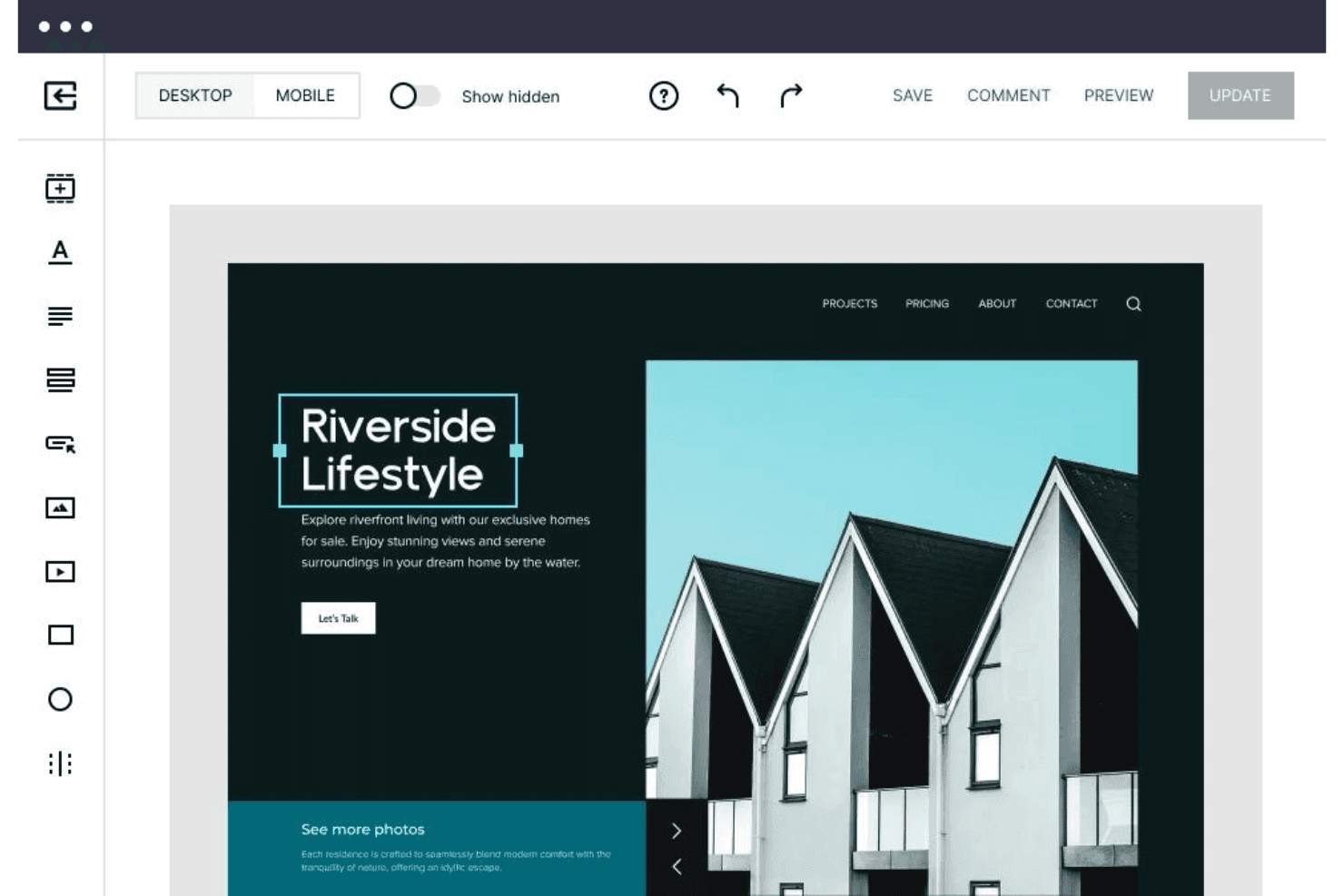
Instapage offers a drag-and-drop website editor with desktop/mobile preview, element tools, and real-time save and update options. Instapage is a landing page platform with AI content generation, server-side A/B testing, ad-to-page personalization, and conversion analytics built for marketing teams running paid campaigns at scale.
Who Is Instapage Best For?
Instapage is a strong fit for growth marketing teams at mid-market and enterprise companies managing high-volume paid search and social campaigns.
Why I Picked Instapage
I've included Instapage in my top picks because AdMap genuinely changes how enterprise teams manage paid campaigns at scale. I can visually connect every ad variant to a dedicated landing page and spot coverage gaps across an entire campaign structure instantly. Pair that with server-side A/B testing and ad-to-page personalization, and my team can run true 1:1 ad-to-page experiences across hundreds of active campaigns simultaneously.
Instapage Key Features
- AI content generation: Automatically generates headlines, body copy, and calls-to-action using OpenAI for every page.
- Drag-and-drop builder: Lets you create and arrange landing page elements without writing any code.
- Real-time visual collaboration: Allows team members and clients to leave direct on-page comments and feedback for faster review cycles.
- Form builder and library: Provides customizable form templates and editing tools for collecting leads and information.
Instapage Integrations
Instapage offers a wide range of native integrations including HubSpot, Salesforce, Marketo, Google Analytics, Google Ads, Facebook Ads, Mailchimp, Zapier, and provides an API for custom integrations.
Pros and Cons
Pros:
- AdMap visually links ads to landing pages
- AI copy generation for all page sections
- Server-side A/B testing at enterprise scale
Cons:
- No built-in AI image generation tools
- Not suited for full multi-page websites
Learn more about Instapage: Best for building scalable WordPress-based sites
- 7-day free trial
- From $10/month (billed annually)
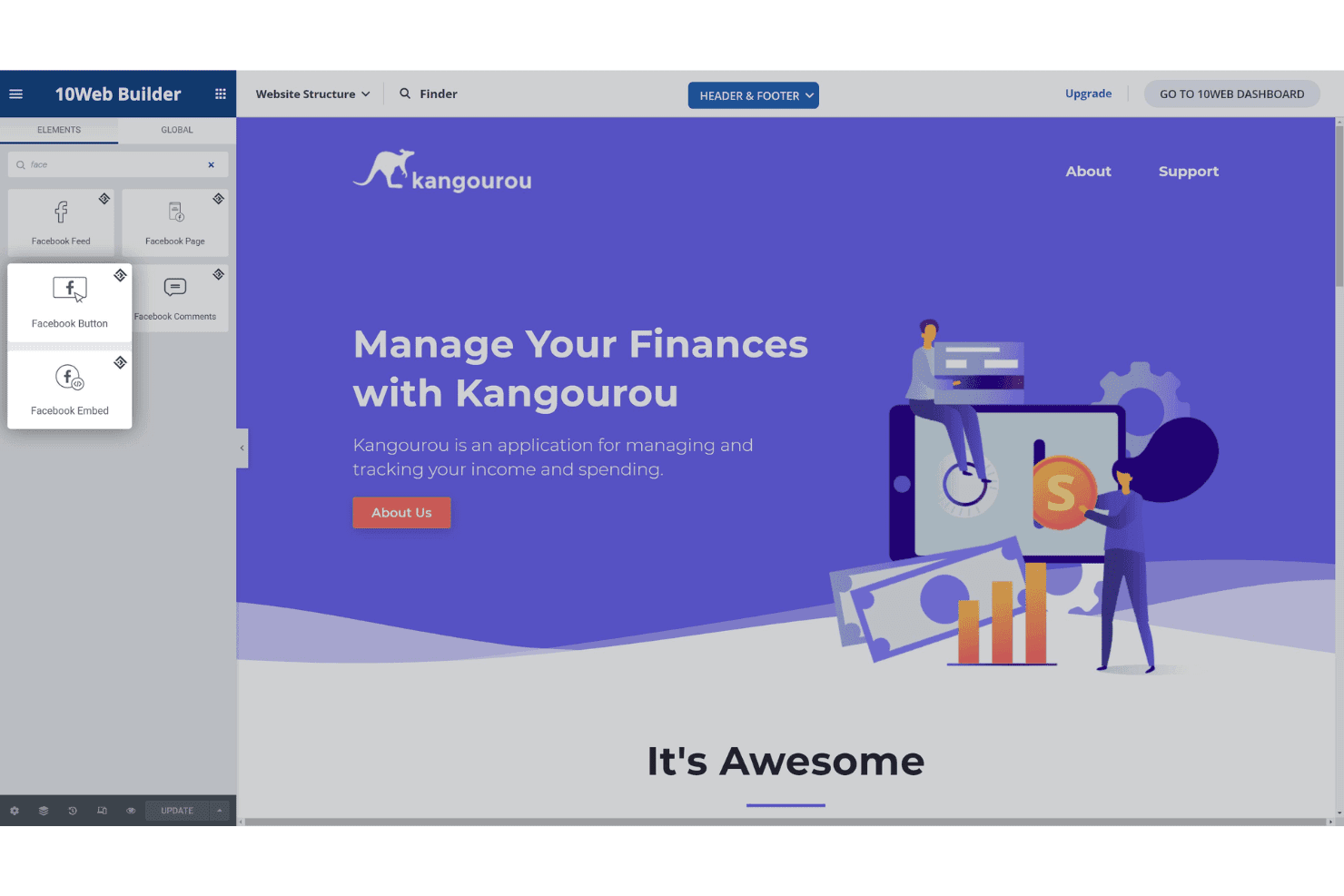
10Web Builder provides a drag-and-drop website editor with a Facebook widget elements panel and a live preview of a finance app landing page. 10Web is an AI website builder that generates full WordPress sites from text prompts, URL cloning, or Figma imports, paired with managed Google Cloud hosting and a visual editor built on Elementor.
Who Is 10Web Best For?
10Web is a strong fit for freelancers, small agencies, and small business marketers who need to launch WordPress sites quickly without relying on a developer.
Why I Picked 10Web
10Web earns its spot as one of the best on my shortlist because it's the only AI website builder that outputs genuine WordPress sites on Google Cloud hosting, with a guaranteed 90+ PageSpeed score built in from launch. I particularly like the URL cloning feature, which lets me recreate and redesign any existing site as a fully editable WordPress install in minutes. The white-label dashboard and multisite controls mean I can scale from one site to dozens of client projects without switching platforms or tools.
10Web Key Features
- Unified smart editor: Combine natural language prompts, visual editing, and custom code in one workspace.
- Figma to WordPress import: Convert Figma design files directly into responsive WordPress websites.
- Dynamic content engine: Add forms, bookings, and calendars as built-in dynamic site elements.
- White-label dashboard: Manage multiple client sites under your agency’s brand with team access controls.
10Web Integrations
10Web offers native integrations with WordPress plugins like Yoast SEO, WooCommerce, and Elementor, and provides an API for custom integrations.
Pros and Cons
Pros:
- Includes managed Google Cloud hosting
- Clones any live website via URL
- Guaranteed 90+ PageSpeed score from launch
Cons:
- AI copy less advanced than competitors
- Locked into WordPress, no alternative CMS
Learn more about 10Web: 5Best for sites tailored to professional services
B12
- Free plan available
- From $42/month (billed annually)
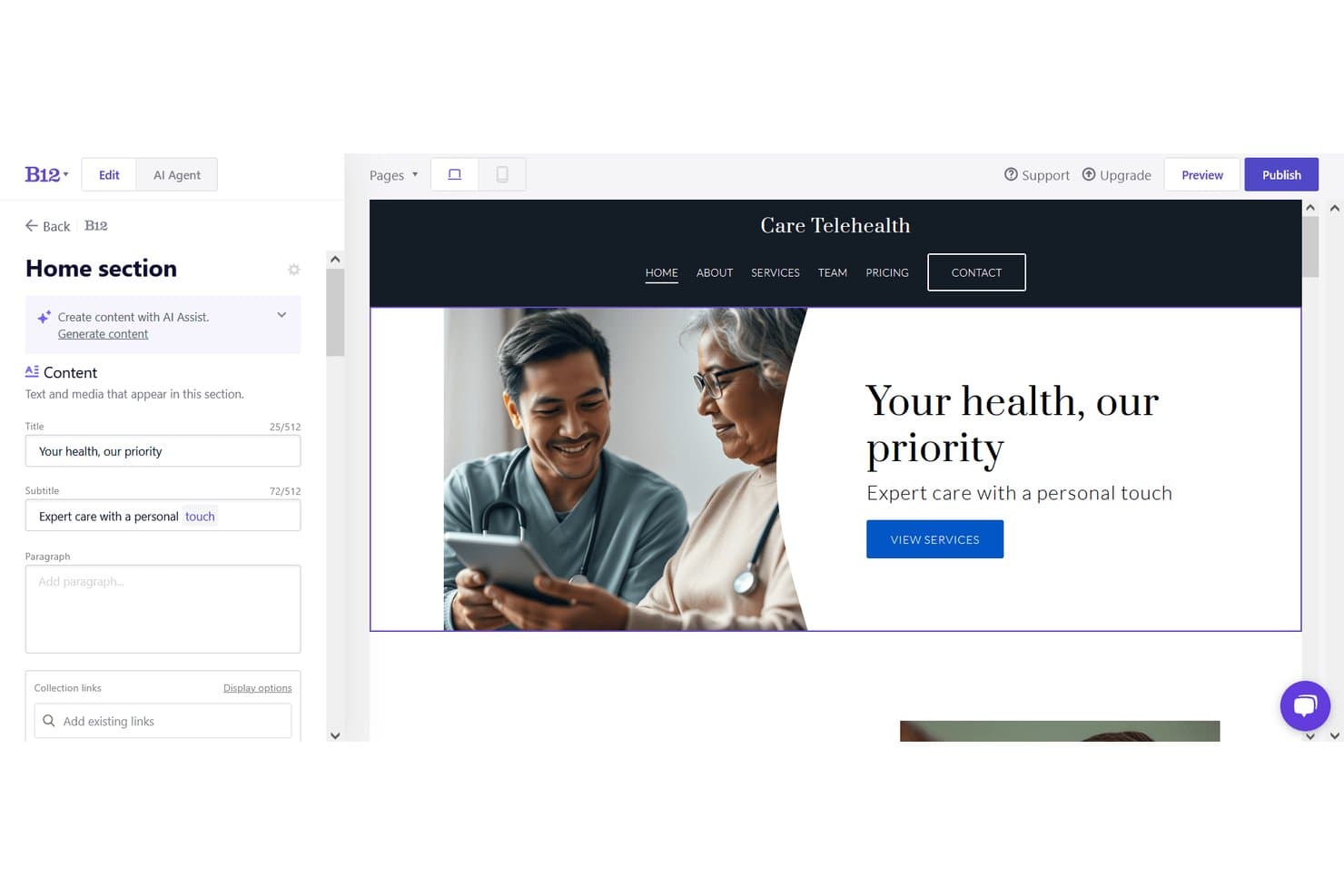
B12 offers an AI-powered website editor with live preview, content fields, and a telehealth site example showing hero text and navigation. B12 is an AI website creator that generates complete, multi-page sites from a text prompt and pairs that generation engine with a visual editor, AI copy tools, built-in scheduling, client intake forms, payments, and email marketing.
Who Is B12 Best For?
B12 is a strong fit for solo practitioners and small professional services firms that need a client-ready web presence without hiring a designer or developer.
Why I Picked B12
I've included B12 in my top picks because its AI generation is trained around professional services verticals, so a generated site for a law firm or financial consultant actually reads and structures like one. What I find genuinely distinctive is that the AI doesn't just build the site: it bundles client intake forms, eSignature contracts, and appointment scheduling directly into the published site. That means a consultant can go from prompt to a live, client-ready workflow in one platform.
B12 Key Features
- Screenshot upload for design reference: Let the AI match layouts by uploading a screenshot of a desired website.
- In-editor AI image generation: Instantly generate new custom images while editing your site content.
- Traffic analytics and reporting: Track website visitors and engagement with built-in analytics dashboards.
- Over 30 native integrations: Connect to tools like Calendly, Shopify, and Google Tag Manager for extended functionality.
B12 Integrations
B12 offers native integrations with Calendly, Shopify, Typeform, Google Tag Manager, Facebook Pixel, Drift, Google Analytics, Mailchimp, Square, and Stripe. An API is available for custom integrations.
Pros and Cons
Pros:
- Built-in eSignature, scheduling, and invoicing on all plans
- AI agent edits site via conversational text prompts
- Industry-specific AI copy generated from business inputs
Cons:
- Less layout flexibility post-generation than competitors
- No native eCommerce without connecting Shopify or Ecwid
Learn more about B12: Best for design-focused marketing microsites
- 14-day free trial available
- From $25/month
Visit WebsiteCustomer Rating:4.6/5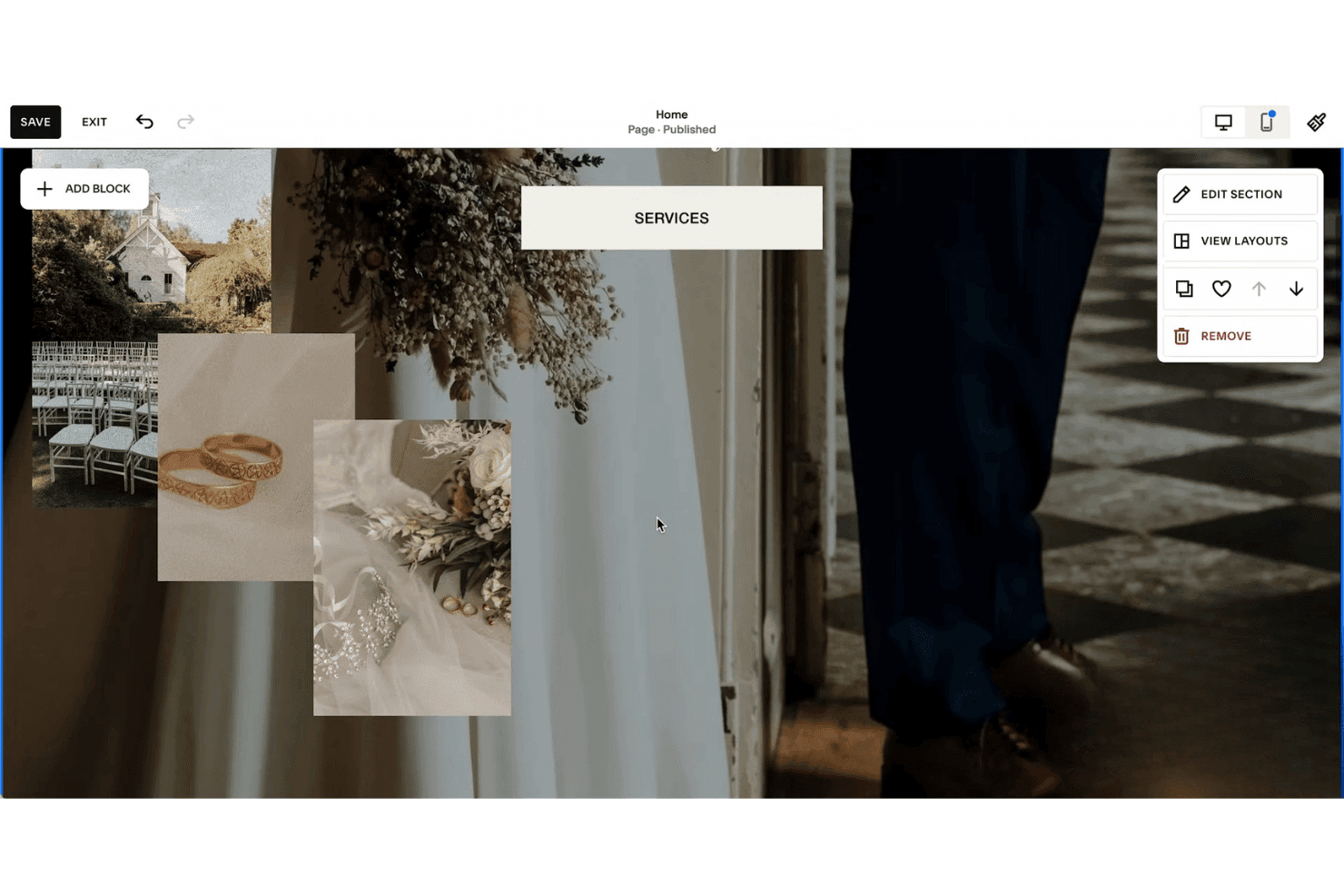
Squarespace's website editor includes a Services section with wedding photography images and a contextual editing menu on the right. Squarespace is an AI website builder that uses its Blueprint AI engine to generate complete, design-forward websites from brand inputs like personality, color palette, and business type, paired with an AI Writer for copy and built-in marketing and SEO tools.
Who Is Squarespace Best For?
Squarespace suits small business owners, freelancers, and independent marketers who need a polished, design-quality web presence without relying on a developer or designer.
Why I Picked Squarespace
I picked Squarespace as one of the best because its Blueprint AI inputs your brand personality (options like Bold, Sophisticated, or Playful), color palette, and business type to generate a fully styled microsite with curated imagery and copy in under four minutes. When I need to iterate on a design direction, the Layout Switcher swaps page compositions with my existing content automatically embedded. Site Themes then let me apply a completely different website design, including font pairings, color palettes, and button styles, in a single click.
Squarespace Key Features
- Mailchimp and Zapier integrations: Connect your site directly to email marketing and automation tools for campaigns.
- Full WYSIWYG editor: Customize AI-generated content and layouts with drag-and-drop and section controls.
- Beacon AI optimization: Scan and optimize your site’s SEO elements like meta data and alt text with AI assistance.
- Video hosting and embeddable blocks: Upload, host, and showcase high-quality video as part of your site content.
Squarespace Integrations
Squarespace offers native integrations with prominent social platforms, GoDaddy, Google Workspace, Dropbox, Unsplash, MailChimp, NameCheap, and more. It also connects with Zapier, and an API is available for custom integrations.
Pros and Cons
Pros:
- Design output quality surpasses most AI competitors
- AI Writer generates on-brand copy automatically
- Blueprint AI builds complete sites in minutes
Cons:
- No AI-driven visitor content personalization
- Follow-up AI prompt editing is limited
Learn more about Squarespace: 7Best for launching branded sites using AI prompts
Wix
- Free plan + free demo available
- From $35.54/month (billed annually)
Visit WebsiteCustomer Rating:4.2/5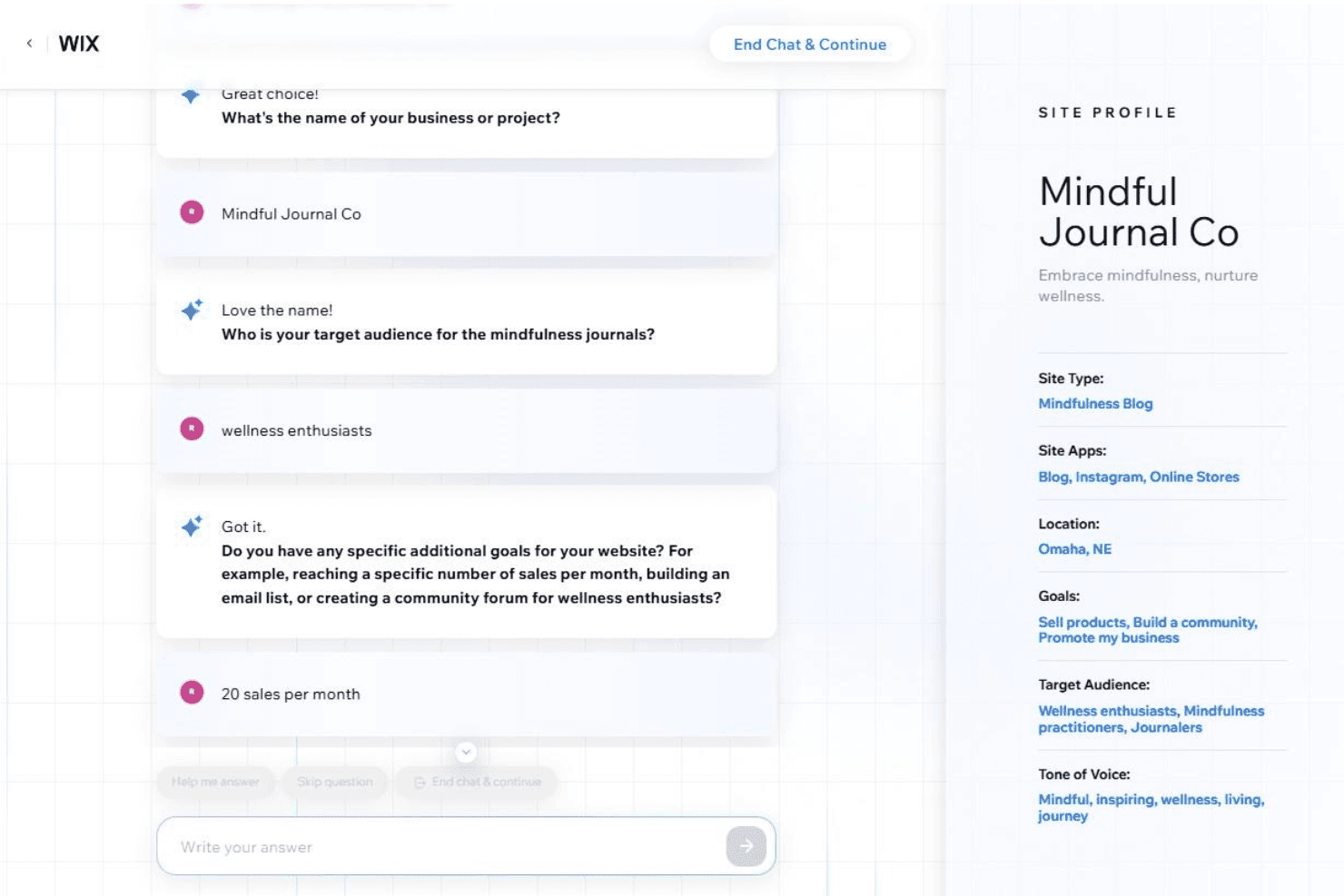
Wix's AI website builder uses a conversational chat interface to gather business details and automatically builds a site profile with goals, audience, and tone of voice. Wix is an AI website generator that creates complete, multi-page sites from conversational prompts, combining a pixel-level drag-and-drop editor with built-in eCommerce, SEO, bookings, and marketing tools.
Who Is Wix Best For?
Wix is a strong fit for small business owners and freelance marketers who need to launch a professional, branded website without relying on a developer.
Why I Picked Wix
Wix earns its spot on my shortlist because of how well its AI handles brand-specific site generation from the very first prompt. Aria, Wix's AI assistant, lets me describe a business and instantly get a complete multi-page site, with tailored sections, navigation, and copy already in place. The AI Text Creator goes further, letting me dial in tone (professional, enthusiastic, informative) and regenerate individual sections until the copy feels on-brand.
Wix Key Features
- AI section and element generator: Instantly create new site sections and components from short prompts to expand or update pages.
- Multi-cloud hosting infrastructure: Hosts all sites with built-in CDN, SSL security, and 99.99% uptime.
- App Market integrations: Offers hundreds of add-ons for e-commerce, marketing, analytics, and visitor interaction.
- SEO and analytics suite: Provides built-in metadata controls, Google Search Console integration, and visitor tracking tools.
Wix Integrations
Wix connects with hundreds of tools via its App Market, including Google Analytics, Mailchimp, PayPal, Facebook, Instagram, QuickBooks, Vimeo, and Hotjar. An API is available for custom integrations.
Pros and Cons
Pros:
- Tone controls adjust AI copy per brand
- Aria refines sites via follow-up prompts
- AI generates complete multi-page sites instantly
Cons:
- AI output varies without detailed prompts
- Sites can't be migrated off Wix
Learn more about Wix: Best for beginner-friendly multi-page creation
- 14-day free trial
- From $10.99/month (billed annually)
Visit WebsiteCustomer Rating:4.4/5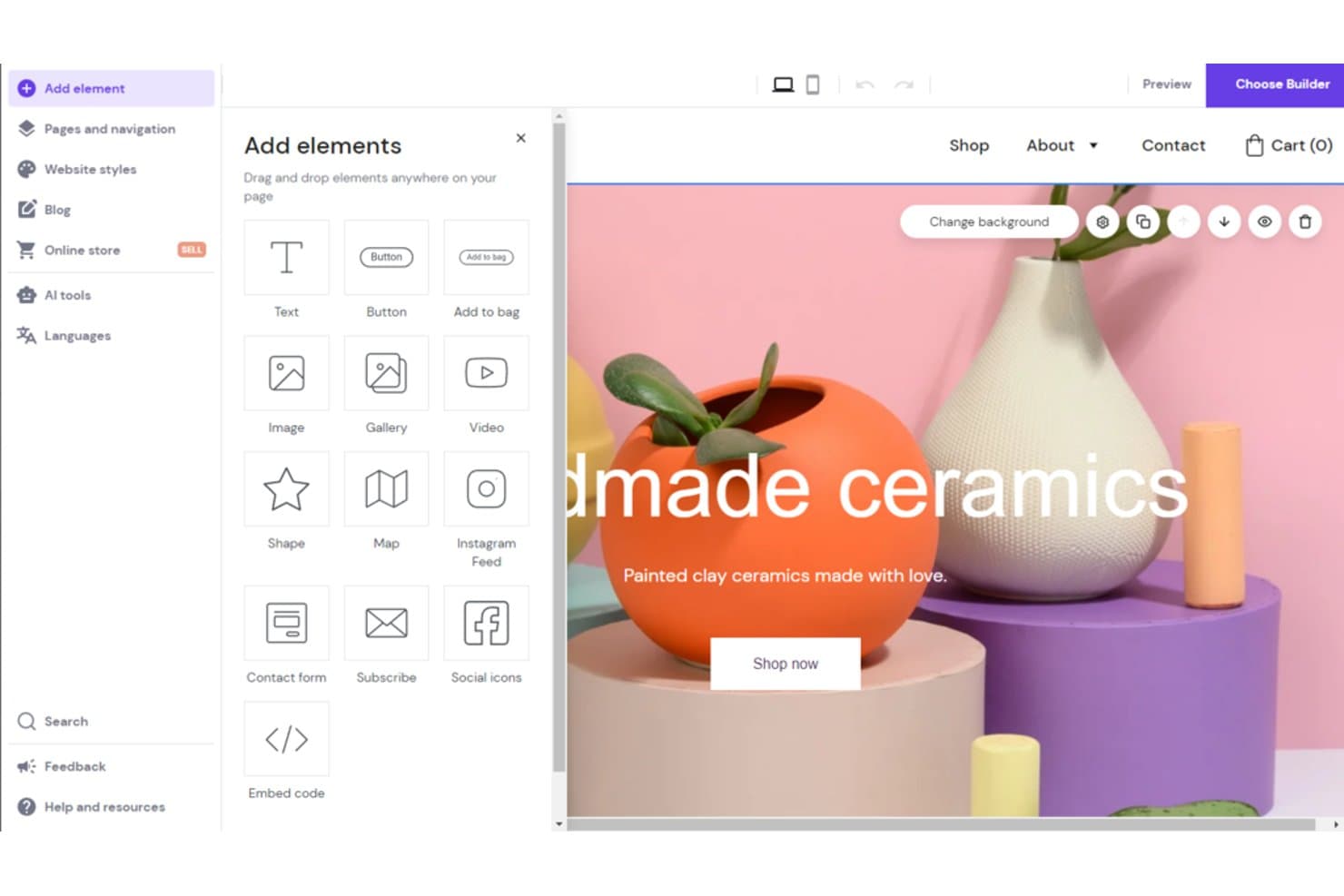
Hostinger Website Builder offers a drag-and-drop editor with AI tools and a variety of elements like text, buttons, images, and forms to customize your website. Hostinger Website Builder is an AI-powered site builder that generates complete multi-page websites from a text prompt, with a drag-and-drop editor, built-in hosting, AI copy and image generation, and ecommerce tools.
Who Is Hostinger Website Builder Best For?
It's a strong fit for small business owners and freelance marketers who need to launch multi-page websites quickly without design or development experience.
Why I Picked Hostinger Website Builder
I picked Hostinger Website Builder as one of the best because its AI site generator builds a complete multi-page site, including navigation, copy, and imagery, from a single prompt in under 60 seconds. The Smart Grid drag-and-drop editor then lets you rearrange sections across unlimited pages without writing any code. I especially like that every plan includes unlimited web pages, so there's no ceiling on how much you can expand from that initial AI-generated draft.
Hostinger Website Builder Key Features
- AI image generator: Instantly creates original visuals for headers, sections, and blog posts based on your prompts.
- AI blog post generator: Produces complete, SEO-ready articles with titles, body copy, and meta information from keywords or prompts.
- Printful integration: Lets you connect print-on-demand products directly to your online store for easy merch and branding.
- Automatic mobile-friendly design: Ensures every page and layout adapts to different devices without manual adjustments.
Hostinger Website Builder Integrations
Hostinger Website Builder offers native integrations with Google Analytics, Google Tag Manager, Meta Pixel, and Printful. An API is available for custom integrations.
Pros and Cons
Pros:
- Built-in AI copy covers every site section
- Unlimited pages included on all paid plans
- AI generates complete multi-page sites instantly
Cons:
- Limited AI design refinement after initial generation
- No A/B testing for landing pages
Learn more about Hostinger Website Builder: Best for granular design customization
- Free plan available
- From $15/month (billed annually)
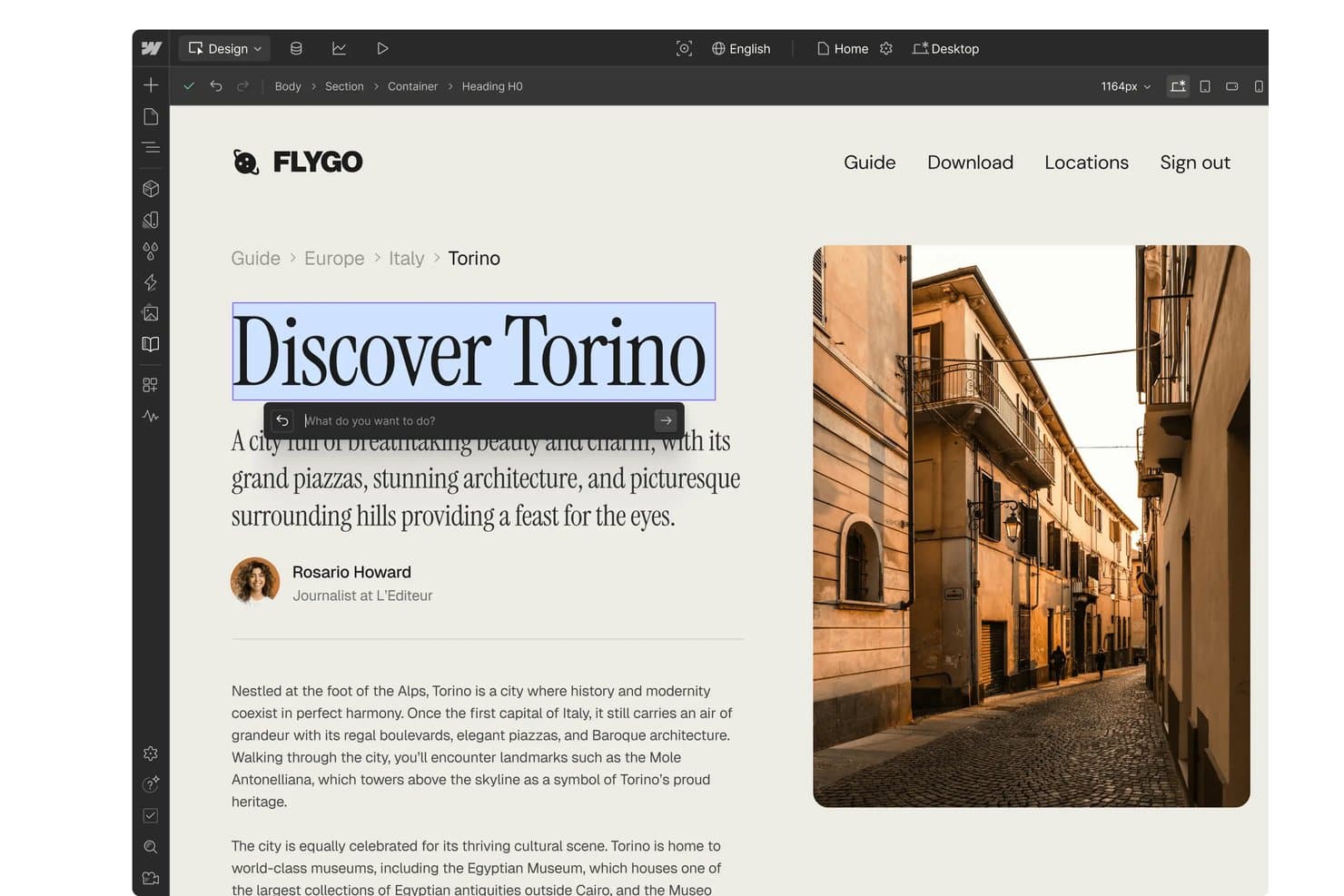
Webflow offers an AI design assistant that allows users to edit and rewrite heading text directly within the visual website builder. Webflow is a visual AI website builder that lets you generate multi-page sites from text prompts, edit layouts with CSS-level design control, and publish with integrated hosting — all without writing code.
Who Is Webflow Best For?
Webflow is a strong fit for marketing teams at SaaS companies and digital agencies that need full design control over campaign sites and landing pages without relying on a developer.
Why I Picked Webflow
Webflow earns its spot as one of the best on my shortlist because the AI output is a fully editable Webflow project, not a locked template. Once the AI generates a site, I can open the Designer and adjust flexbox layouts, CSS grid structures, and custom properties without touching code. What really sets it apart is the Page Building feature: designers define structural templates with page slot elements that control exactly where marketers can add components, keeping the brand intact across every edit.
Webflow Key Features
- AI site generation from prompts: Create entire multi-page sites with navigation and sections by describing your business in simple language.
- Integrated CMS for dynamic content: Manage and publish large volumes of content with dynamic collections and automated landing page creation.
- Native SEO and AEO controls: Directly edit metadata, sitemaps, page titles, and access AI-powered structured data optimization tools.
- App marketplace and API integrations: Extend functionality with marketplace apps for CRM, ecommerce, analytics, or connect custom tools using API access.
Webflow Integrations
Webflow offers native integrations with HubSpot, Google Analytics, Marketo, Salesforce, Mailchimp, Slack, Figma, Jasper, and many more. It also connects with Zapier and Make, and an API is provided for custom integrations.
Pros and Cons
Pros:
- Built-in CMS supports dynamic page generation
- AI-generated sites stay fully editable afterward
- CSS-level control without writing any code
Cons:
- AI generation less mature than dedicated builders
- Complex visual editor for non-designer users
Learn more about Webflow: Best for quick publishing with built-in hosting
- 7-day free trial
- From $9.99/month (billed annually)
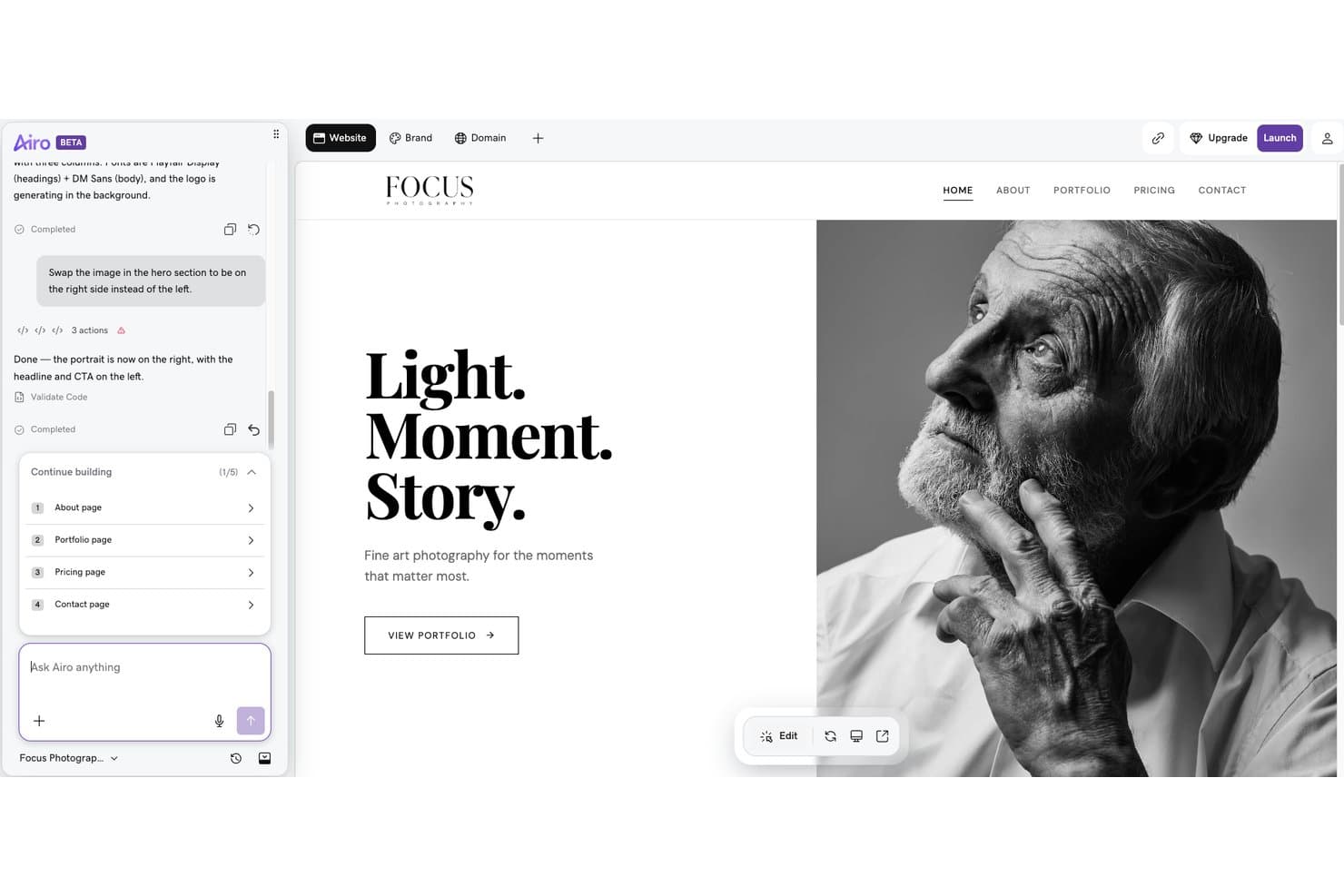
GoDaddy Website Builder offers an AI-powered chat interface that lets users make real-time layout changes, such as repositioning hero images, through simple text commands. GoDaddy Website Builder is an AI-powered site creation tool that generates multi-page websites from conversational prompts, with built-in hosting, an SEO wizard, email marketing, and ecommerce built into a single platform.
Who Is GoDaddy Website Builder Best For?
It's a natural fit for small business owners and non-technical marketers who need to get a site live fast without writing code or managing hosting separately.
Why I Picked GoDaddy Website Builder
I picked GoDaddy Website Builder because the distance between "I have a prompt" and "I have a live site" is genuinely short. Airo AI Builder generates a complete multi-page site from a conversational input, and one-click deploy pushes it live on GoDaddy's hosting with SSL already configured. There's no separate hosting account to provision or DNS records to manage manually.
GoDaddy Website Builder Key Features
- Drag-and-drop editor: Modify layouts, sections, and content visually with point-and-click editing tools.
- SEO Wizard: Set meta titles, descriptions, and basic structured data for every page.
- Integrated email marketing: Send branded marketing emails directly from the platform, with send limits based on your plan.
- Social media integrations: Connect Facebook, Instagram, Pinterest, LinkedIn, and YouTube to manage links and social posting.
GoDaddy Website Builder Integrations
GoDaddy offers integrations with Google Analytics, Facebook, Instagram, Yelp, PayPal, and OpenTable. An API is available for custom integrations.
Pros and Cons
Pros:
- Built-in SEO Wizard covers all pages
- Hosting included with every published site
- Generates full sites from conversational prompts
Cons:
- Template designs feel constrained after AI generation
- Follow-up AI editing prompts aren't available
Learn more about GoDaddy Website Builder:
Outros criadores de sites com IA
Eis alguns criadores de sites com IA adicionais que não entraram na minha seleção, mas que ainda vale a pena consultar:
- 11FramerBest for responsive layout control
- 12DurableBest for auto-generating small business websites
- 13LeadpagesBest for campaign-driven landing site creation
- 14DudaBest for client site management at scale
- 15MixoBest for instant multi-language site generation
- 16Hocoos AI Website BuilderBest for AI-guided site personalization features
- 17ElementorBest for flexible design controls in WordPress
- 18JimdoBest for effortless small business site setup
- 19BluehostBest for easy WordPress hosting integration
- 20CodeDesign.aiBest for editing with natural language prompts
How I Evaluate AI Website Builders
To earn a spot here, a tool's AI needs to produce real output—usable copy, structured layouts, and brand-matched designs from a short prompt. I break my evaluation into core functionality every platform must deliver and the differentiating factors that set the best options apart.
Core Functionality (Table Stakes For This List)
When I'm selecting tools for my list, I rank each one on a scale from 0 (does not offer the functionality) to 5 (excels in this area) for each core functionality listed below. Then, I calculate the tool's total score into a percentage. Each tool needs to achieve a minimum total score of 65% to be considered for inclusion.
- AI site generation: I evaluate whether a prompt like "build a SaaS product launch site with pricing and features pages" produces a usable multi-page structure with logical navigation.
- AI copy generation: The generated headlines, CTAs, and body text should reflect actual business context, not generic filler that you'd need to rewrite from scratch.
- AI design and layout: I look for layout choices, color palettes, and imagery that feel cohesive and brand-appropriate rather than a random template swap.
- Visual editor: After AI does its work, you need a drag-and-drop or WYSIWYG editor to rearrange sections, tweak styles, and add components without touching code.
- Publishing and hosting: I check that the platform includes integrated hosting with custom domain support and SSL so you can go live without a separate hosting provider.
- Marketing features: Built-in SEO controls, form builders, analytics, or landing page tools matter here, especially for teams running campaign-specific pages.
Once I have a list of tools that meet the criteria, I consider what sets each platform apart.
Differentiating Factors (What Sets Vendors Apart)
Here's how I compare and contrast different vendors:
Standout Features
Auto brand kit application is a big one for me. Tools that can ingest a logo or existing URL and apply matching colors, fonts, and imagery across every page save hours of manual styling. I also look for natural language editing, where you can type something like "swap the hero image and make the headline punchier" instead of dragging elements around. Smart SEO optimization matters too—I evaluate whether the platform auto-generates meta tags, alt text, and schema markup as you build, so pages are search-ready from the start.
Beyond Features
Integration options carry a lot of weight. If your AI-built site can't connect to your CRM or email platform, you're adding manual steps to every campaign. I also evaluate pricing transparency, especially how costs scale as you add pages, team seats, or traffic. Design control matters just as much. Some platforms lock you into basic AI output, while others like Webflow and Framer let you inject custom CSS or edit at the component level as your needs grow.
Como escolher um criador de sites com IA
É fácil ficar perdido em listas extensas de funcionalidades e estruturas de preços complexas. Para o ajudar a manter-se focado enquanto analisa o seu processo específico de seleção de software, apresentamos uma lista de verificação dos fatores a ter em conta:
| Fator | O que considerar |
|---|---|
| FatorEscalabilidade | O que considerarA plataforma acompanhará o seu crescimento — novas páginas, gestão de vários sites ou picos de tráfego — ou terá custos adicionais ou maior complexidade à medida que expande? |
| FatorIntegrações | O que considerarSuporta ligações diretas ao seu CRM, às ferramentas de marketing por e-mail ou de análise? Considere em que áreas a automatização é essencial para os fluxos de trabalho das campanhas. |
| FatorPersonalização | O que considerarDe quanta flexibilidade precisa para além do resultado predefinido da IA? Verifique se pode ajustar esquemas, estilos ou adicionar código personalizado para casos de utilização avançados. |
| FatorFacilidade de utilização | O que considerarOs membros da equipa de marketing conseguem lançar ou editar páginas sem formação intensiva, ou precisará de ajuda contínua de designers ou da equipa de TI à medida que as prioridades mudam? |
| FatorImplementação e integração inicial | O que considerarCom que rapidez pode a sua equipa colocar online um site com a sua marca? Procure ferramentas de configuração orientada, modelos ou conteúdos de demonstração que reduzam as dificuldades da configuração. |
| FatorCusto | O que considerarOs níveis de preços, os limites de páginas e as taxas adicionais são claros? Certifique-se de que o investimento se adequa tanto aos seus planos de lançamento como ao crescimento futuro, e não apenas ao seu primeiro site. |
| FatorMedidas de segurança | O que considerarO fornecedor disponibiliza SSL, controlos de privacidade e proteção de dados que considera adequados para proteger os dados do seu público? Consulte a documentação. |
| FatorDisponibilidade do apoio | O que considerarSe surgir um problema urgente — como um site que não é publicado ou um problema com o domínio — consegue contactar rapidamente um serviço de apoio útil ou os atrasos prejudicarão campanhas importantes? |
O que são os criadores de sites com IA?
Um criador de sites com IA é uma plataforma digital que utiliza inteligência artificial para conceber, redigir e montar sites completos com base nas suas instruções ou nos detalhes da sua empresa. Estas ferramentas automatizam a estrutura do site, a redação de conteúdos, as imagens e os estilos, permitindo-lhe lançar rapidamente um site profissional e alinhado com a sua marca — sem necessidade de conhecimentos de programação ou design. Os criadores de sites com IA destinam-se a profissionais de marketing, empreendedores e equipas que pretendem obter resultados sem complexidade.
Funcionalidades
Ao selecionar um criador de sites com IA, tenha em atenção as seguintes funcionalidades principais:
- Geração de sites com IA: Crie rapidamente sites completos com várias páginas ou páginas de destino, introduzindo um breve comando que descreva a sua empresa, produto ou objetivos.
- Redação com IA: Gere instantaneamente títulos, chamadas para ação e conteúdo de texto adaptados à sua empresa, poupando tempo na redação e edição.
- Design e disposição com IA: Produza automaticamente designs visualmente apelativos, com disposições profissionais, esquemas de cores, tipos de letra e imagens que reflitam a identidade da sua marca.
- Editor de arrastar e largar: Ajuste facilmente as secções do site, altere disposições ou adicione elementos sem quaisquer conhecimentos de programação ou competências técnicas.
- Alojamento web e publicação integrados: Coloque o seu site online com apenas alguns cliques, incluindo opções para domínios personalizados e segurança SSL.
- Ferramentas de otimização para SEO: Tenha acesso a funcionalidades como metaetiquetas automatizadas, texto alternativo e mapas do site para ajudar o seu site a obter uma melhor classificação nos motores de pesquisa.
- Capacidades de personalização: Mostre conteúdos ou ofertas diferentes com base no comportamento do utilizador, na localização geográfica ou no dispositivo, para melhorar o envolvimento.
- Formulários e captação de potenciais clientes: Adicione formulários de contacto, widgets interativos de chatbot ou incentivos para captação de potenciais clientes diretamente no seu site, para aumentar a sua lista de marketing.
- Análise e relatórios: Acompanhe o desempenho do site, o comportamento dos visitantes, as conversões e muito mais, para ajudar a sua equipa a iterar e melhorar.
- Integração do kit de marca: Carregue o seu logótipo, utilize um gerador de nomes de empresas ou introduza os dados da sua marca para que as cores, os tipos de letra e o estilo do site sejam aplicados automaticamente em todas as páginas.
Benefícios
A implementação de um criador de sites com IA proporciona vários benefícios à sua equipa e à sua empresa. Eis alguns dos benefícios que pode esperar:
- Lançamento mais rápido: Os fluxos de trabalho alimentados por IA geram sites, conteúdos e elementos de design em poucos minutos, permitindo-lhe lançar campanhas sem depender da disponibilidade dos programadores.
- Consistência com a marca: A integração do kit de marca e a estilização automatizada garantem que todas as páginas correspondem à sua identidade visual, sem necessidade de ajustes manuais.
- Menos trabalho manual: A redação, a disposição e a seleção de imagens automatizadas reduzem a necessidade de edição constante ou de contratar profissionais independentes externos.
- Maior acessibilidade: Os editores sem código permitem que qualquer pessoa da equipa crie páginas ou atualize conteúdos, eliminando obstáculos para utilizadores sem conhecimentos técnicos.
- Melhor preparação para SEO: As ferramentas de SEO integradas e a etiquetagem automática ajudam o seu site a aparecer numa posição mais elevada nos resultados de pesquisa desde o início.
- Experiências personalizadas: A personalização orientada por IA mostra aos visitantes conteúdos adaptados à sua localização ou comportamento, aumentando o envolvimento.
- Escalabilidade para o crescimento: Expanda facilmente o seu site, adicione novas páginas ou suporte um tráfego maior à medida que as suas necessidades mudam, com alojamento integrado e uma infraestrutura de plataforma flexível.
Custos e preços
A seleção de um criador de sites com IA exige uma compreensão dos vários modelos de preços e planos disponíveis. Os custos variam consoante as funcionalidades, o tamanho da equipa, os complementos e outros fatores. A tabela abaixo resume os planos comuns, os seus preços médios e as funcionalidades normalmente incluídas nas soluções de criação de sites com IA:
Tabela de comparação de planos para criador de sites com IA
| Tipo de plano | Preço médio | Funcionalidades comuns |
|---|---|---|
| Tipo de planoPlano gratuito | Preço médio$0 | Funcionalidades comunsGeração básica de sites, número limitado de páginas, marca da plataforma e alojamento partilhado. |
| Tipo de planoPlano pessoal | Preço médio$10-$25/mês | Funcionalidades comunsSuporte para domínios personalizados, mais edições de conteúdos com IA, apoio por e-mail e variedade de modelos. |
| Tipo de planoPlano empresarial | Preço médio$30-$80/mês | Funcionalidades comunsControlos de design avançados, ferramentas de SEO, integração de análise, criadores de formulários e apoio prioritário. |
| Tipo de planoPlano empresarial de grande dimensão | Preço médio$100-$500+/mês | Funcionalidades comunsPáginas ilimitadas, colaboração em equipa, ANS personalizados, marca branca, acesso à API e gestão de conta dedicada. |
Perguntas frequentes sobre construtores de sites com IA
Eis algumas respostas a perguntas comuns sobre construtores de sites com IA:
Posso migrar o meu site existente para um construtor de sites com IA?
Sim, alguns construtores de sites com IA oferecem ferramentas ou serviços de migração para importar conteúdo e páginas existentes. No entanto, é importante verificar se o esquema e a funcionalidade serão transferidos corretamente, uma vez que algumas personalizações avançadas poderão necessitar de ajustes manuais após a importação.
De que conhecimentos técnicos preciso para utilizar um construtor de sites com IA?
Não, normalmente não precisa de conhecimentos técnicos. Estas plataformas foram concebidas para profissionais de marketing e pessoas que não são programadores, oferecendo editores visuais e instruções de IA para que possa criar e atualizar sites sem experiência de programação ou design.
Quão seguros são os construtores de sites com IA para utilização empresarial?
A maioria dos construtores de sites com IA oferece SSL, cópias de segurança regulares e mantém normas de privacidade adequadas à utilização empresarial. É sempre boa ideia consultar a documentação do fornecedor sobre as práticas de tratamento de dados e garantir a conformidade com as suas próprias necessidades de segurança.
Os construtores de sites com IA são adequados para sites com várias páginas ou complexos?
Sim, muitos construtores de sites com IA permitem criar sites com várias páginas e adicionar funcionalidades avançadas através de integrações ou código personalizado. Certifique-se de que confirma se a ferramenta é adequada à escala e à complexidade do seu site antes de avançar.
Posso ligar o meu construtor de sites com IA ao meu CRM e às minhas ferramentas de marketing?
Sim, as principais plataformas suportam normalmente integrações com CRMs populares, ferramentas de análise e plataformas de marketing por email. Isto permite à sua equipa automatizar a recolha de leads, as inscrições por email e acompanhar facilmente os percursos dos visitantes.