

Um assistente de e-mail com IA utiliza inteligência artificial para ajudar em tarefas como escrever e-mails, personalizar mensagens, gerir campanhas e tratar do contacto com potenciais clientes. Para as equipas de comércio eletrónico, isso pode significar criar campanhas direcionadas e percursos de cliente, enquanto as equipas de vendas podem utilizar estas ferramentas para pesquisar potenciais clientes e escrever mensagens de contacto B2B. Analisei os melhores assistentes de e-mail com IA para perceber em que contexto cada um funciona melhor e ajudar a escolher uma ferramenta adequada à forma como utiliza o e-mail.
Why Trust Our Software Recommendations
6,700+
Reviews
20
Industry experts
16+
Evaluation factors
14
Years
Our team has been testing and reviewing software since 2012. As marketing leaders ourselves, we know how difficult—and important—it is to choose the right software.
For this guide, we evaluated tools using hands-on testing and independent research, scoring tools using our selection criteria.
Our reviews reflect our human editorial judgment, not a sales pitch.
Expert reviewers:
 Gui DrusinaCreative Director
- Shriya GhateSenior Marketing Lead
 Amanda JacquesMarketing Ops Leader

Tabela comparativa de assistentes de e-mail com IA
Compare, lado a lado, os preços e as especificações dos assistentes de e-mail com IA que entraram na minha lista restrita.
| Tool | Best For | Trial Info | Price | ||
|---|---|---|---|---|---|
| 1 | Best for AI-personalized prospecting | 14-day free trial | From $49/user/month (billed annually) | Website | |
| 2 | Best for AI campaign planning | Free plan available | From $149/month (billed annually) | Website | |
| 3 | Best for predictive send-time optimization | Free demo available | Pricing upon request | Website | |
| 4 | Best for personalized prospecting | Free trial available | From $29/month | Website | |
| 5 | Best for B2B prospecting workflows | Free plan available | From $180/user/month (billed annually) | Website | |
| 6 | Best for lifecycle personalization | 14-day free trial | Pricing upon request | Website | |
| 7 | Best for CRM-grounded personalization | Free plan available | From $7/user/month (billed annually) | Website | |
| 8 | Best for per-contact send-time optimization | 14-day free trial + free demo available | From $15/month (billed annually) | Website | |
| 9 | Best for agentic campaign creation | Free trial available | From $1,250/month (billed annually) | Website | |
| 10 | Best for enterprise copy optimization | Free demo available | From $81,000/year (billed annually) | Website |


Avaliações de assistentes de e-mail com IA
Apresentamos abaixo os meus resumos detalhados dos melhores assistentes de e-mail com IA que entraram na minha lista restrita. As minhas avaliações oferecem uma análise detalhada das funcionalidades, dos melhores casos de utilização e das integrações de cada ferramenta, para ajudar a encontrar a melhor opção para si.
 Best for AI campaign planning
- Free plan available
- From $149/month (billed annually)
Visit WebsiteCustomer Rating:4.6/5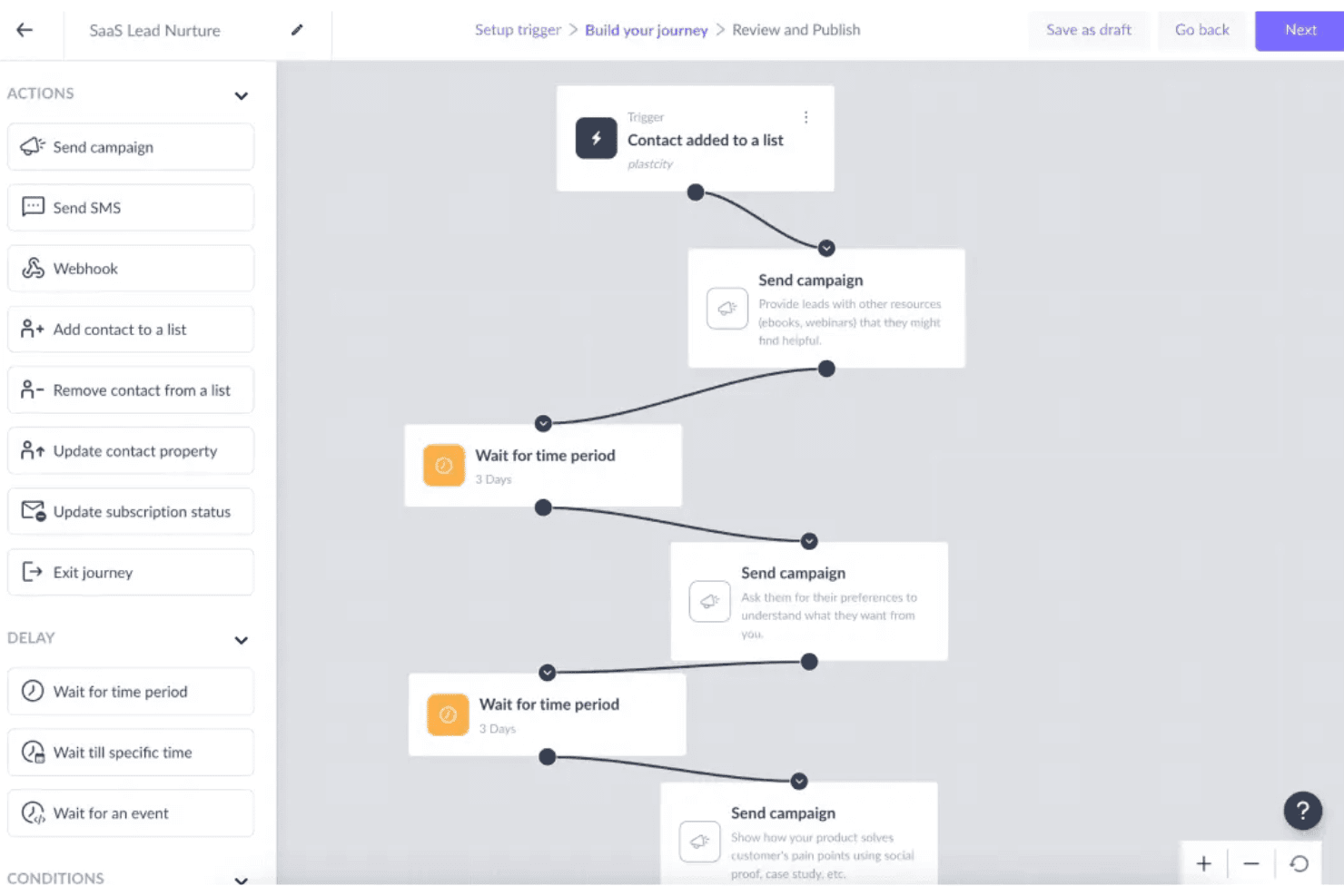
Mailmodo lets users build automated lead nurture journeys visually. Mailmodo is an AI email marketing platform that covers the full campaign lifecycle—from prompt-based email and template generation to automated journey building, AI-driven segmentation, and campaign performance analysis—with a signature capability for building interactive AMP emails.
Who Is Mailmodo Best For?
Mailmodo is a strong fit for email marketing managers who need to run the full campaign lifecycle—from AI-assisted planning and creation to segmentation, automation, and performance analysis—in one platform.
Why I Picked Mailmodo
I've included Mailmodo in my top picks because it covers the full AI campaign lifecycle in one platform, from planning through to post-send analysis. The AI Campaign Planner is what sets it apart: it generates cadence recommendations, subject line suggestions, and segment strategies before you write a single word. Then Mailmodo Co-Pilot reads your campaign results and flags what to fix, from underperforming CTAs to low-engagement segments.
Mailmodo Key Features
- AI Email Writer: Generate full email copy with structured inputs for tone, campaign type, audience, and word count—no sign-up required to access the standalone tool.
- Interactive AMP email widgets: Embed forms, polls, quizzes, NPS ratings, and carousels directly inside emails so recipients can respond without leaving their inbox.
- AI Journey Builder: Build multi-step automated email sequences from a single natural language prompt, including triggers, delays, and branching logic.
- AI Segment Generator: Create dynamic audience segments using plain-language queries that pull on behavioral, demographic, and predictive criteria.
Mailmodo Integrations
Mailmodo offers 40+ integrations, including HubSpot, Salesforce, Segment, Shopify, Google Sheets, and Customer.io. It supports REST API and webhooks for custom connections, plus Zapier.
Pros and Cons
Pros:
- AI Co-Pilot explains and optimizes campaign results
- Enables true interactive AMP email experiences
- Generates full campaigns from single AI prompt
Cons:
- AMP interactivity limited to few email clients
- No AI-powered reply automation available
Learn more about Mailmodo: Best for predictive send-time optimization
- Free demo available
- Pricing upon request
Visit WebsiteCustomer Rating:4.4/5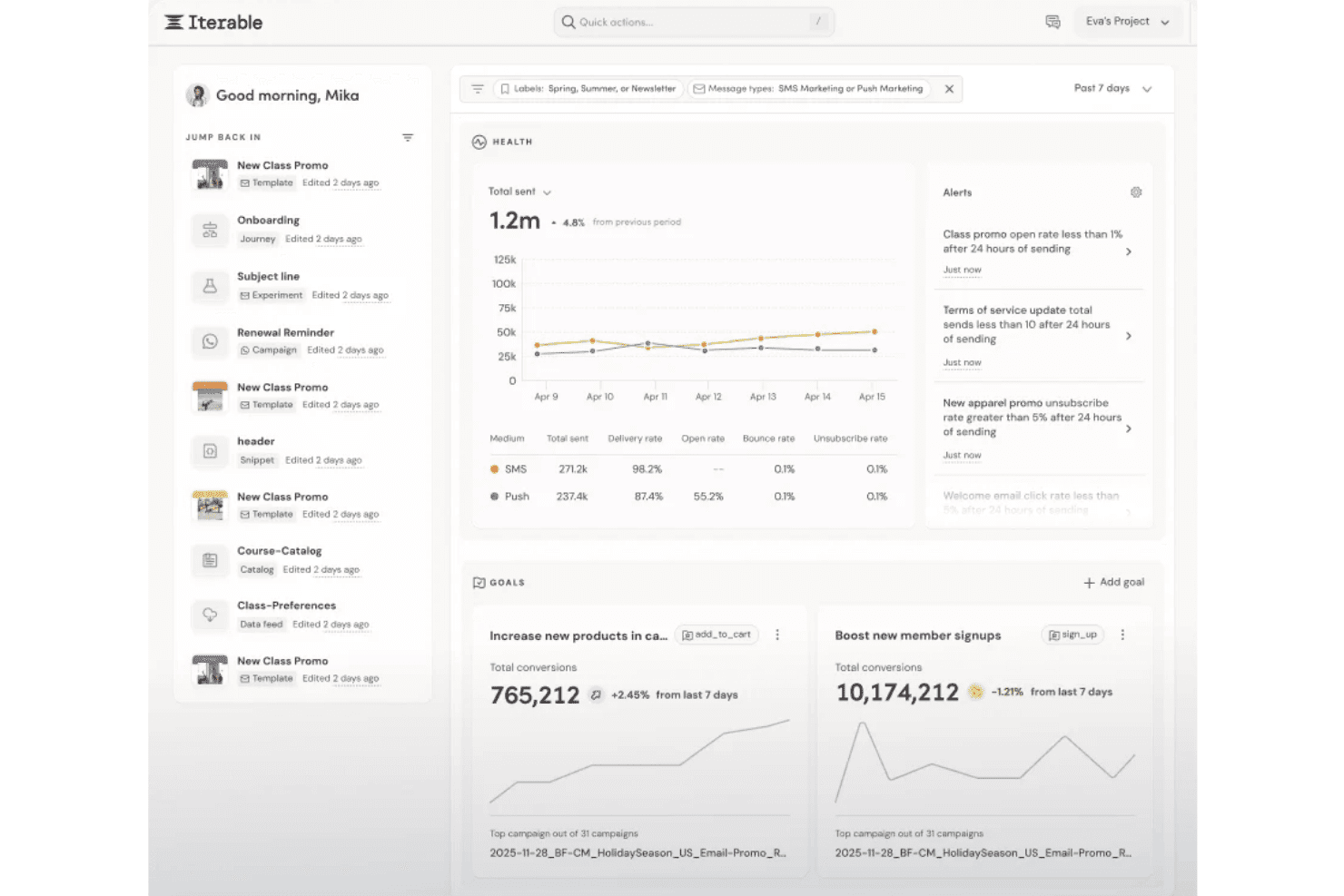
Iterable's dashboard tracks campaign health, goals, and alerts in one view. Iterable is an enterprise email marketing platform that combines AI-driven send-time optimization, cross-channel journey orchestration, behavioral personalization, and campaign automation across email, SMS, push, and in-app channels.
Who Is Iterable Best For?
Iterable is a strong fit for enterprise marketing operations and lifecycle teams managing high-volume, multi-channel programs that need AI-driven send-time and channel optimization at scale.
Why I Picked Iterable
I picked Iterable as one of the best because its Send Time Optimization is genuinely individualized, using each user's historical engagement data to deliver messages at their personal peak response time rather than a segment-wide estimate. Paired with Channel Optimization, which weekly reassesses whether each user responds better to email, SMS, or push, the platform routes messages where they'll actually land. Brand Affinity scoring layers on top, labeling each user's sentiment toward your brand so you can filter high-affinity users into separate journey paths automatically.
Iterable Key Features
- Nova Agent: An agentic AI layer that builds customer journey workflows, generates Handlebars personalization logic, runs experiments, and answers campaign analytics questions in natural language.
- Workflow Studio: A drag-and-drop visual journey builder for designing multi-step, cross-channel lifecycle programs with A/B testing at each stage.
- Catalog-driven dynamic content: A content personalization system that pulls from product datasets to auto-populate emails with relevant recommendations and offers based on behavioral and purchase data.
- Frequency Optimization: A per-user messaging cap tool that uses individual engagement data to limit over-messaging and includes performance and lift metrics to measure impact.
Iterable Integrations
Iterable offers native integrations with Twilio Segment, Hightouch, Snowflake, Mixpanel, Amplitude, Shopify, and Google Ads. It also provides approximately 129 REST API endpoints, webhooks, and an MCP Server for custom integrations and AI assistant connectivity.
Pros and Cons
Pros:
- Supports multi-step, cross-channel journey orchestration
- Delivers individualized behavioral personalization at scale
- Excels at send-time and channel optimization
Cons:
- Lacks trainable brand voice controls
- Only generates snippet-level copy suggestions
Learn more about Iterable : Best for personalized prospecting
- Free trial available
- From $29/month
Visit WebsiteCustomer Rating:4.4/5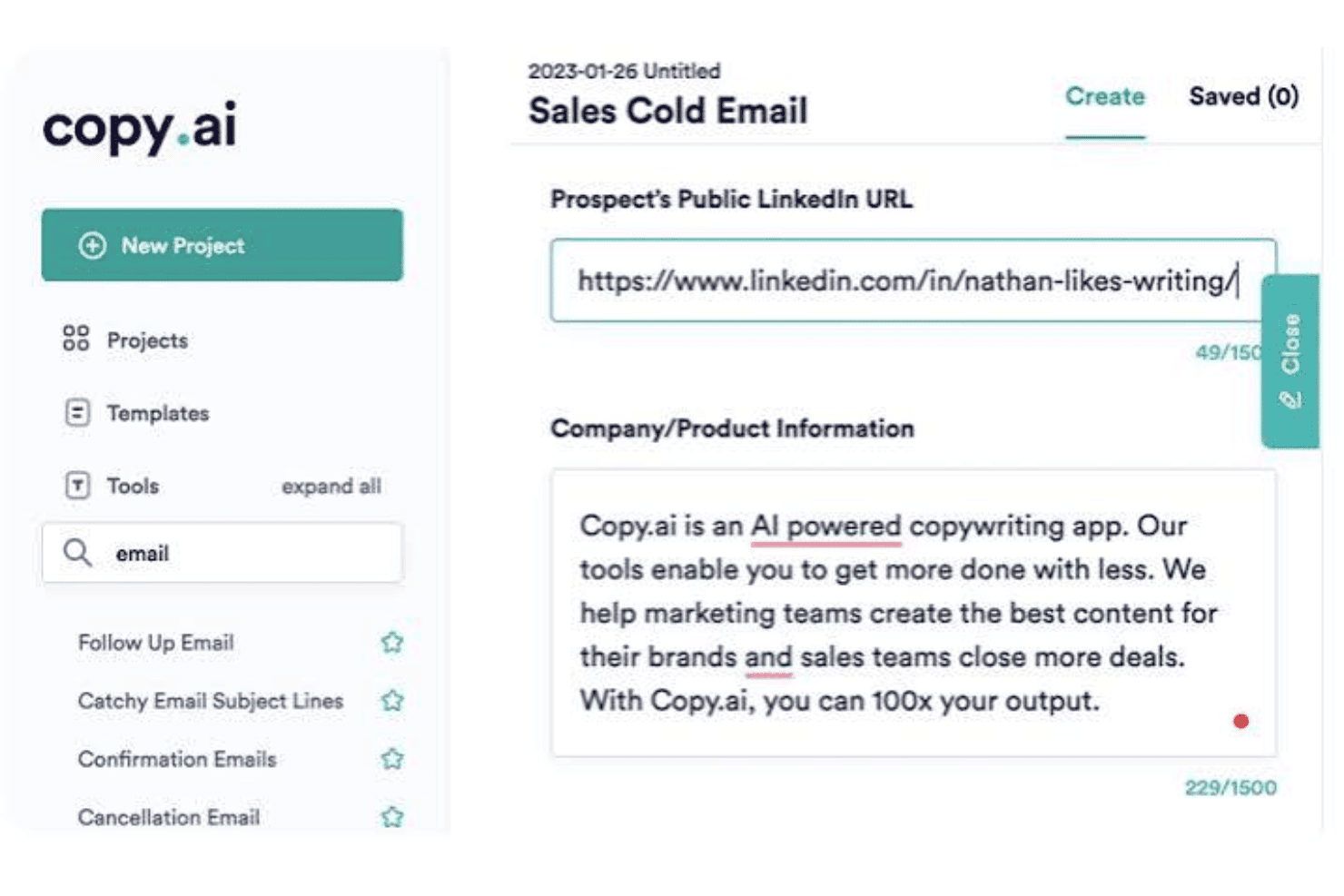
Copy.ai generates personalized sales cold emails using LinkedIn URLs. Copy.ai is a GTM AI platform that generates email copy, automates multi-step outreach workflows, and personalizes prospecting at scale using agentic AI, Brand Voice controls, and integrations with CRMs and sales engagement tools.
Who Is Copy.ai Best For?
Copy.ai is a strong fit for demand generation and sales teams that run high-volume outbound prospecting and need to personalize outreach at scale without manual research.
Why I Picked Copy.ai
I picked Copy.ai as one of the best because its Prospecting Cockpit is purpose-built for personalized outreach at scale, dynamically enriching prospect data with job history, intent signals, and behavioral context before generating 1:1 email copy. I also like how the Brand Voice and Infobase features keep every generated message on-brand, even across large-volume sequences. The agentic workflow layer then writes results back to your CRM automatically.
Copy.ai Key Features
- Brand Voice profiles: Create multiple Brand Voice profiles trained on your existing content to keep AI-generated emails consistent across different audiences and ICPs.
- Infobase knowledge repository: Upload brand guidelines, positioning documents, and value propositions, then reference them in prompts using the
#tagging system to ground email outputs in accurate, on-brand context. - LLM model selection: Choose between OpenAI GPT-4, Anthropic Claude, and Google Gemini models depending on the output quality or style you need for a given email use case.
- Pre-built email workflow templates: Access ready-to-run templates for onboarding, nurture, reactivation, winback, and ABM email sequences inside the Workflow Builder.
Copy.ai Integrations
Copy.ai offers 20+ native integrations, including Salesforce, HubSpot, Outreach, Slack, Mailchimp, and Constant Contact. Enterprise plans include an API for custom integrations, and Copy.ai also supports Zapier.
Pros and Cons
Pros:
- Multilingual localization with native translation support
- Offers brand voice and tone controls
- Generates personalized email sequences at scale
Cons:
- Workflow credit billing limits high-volume use
- No Gmail or Outlook inbox add-in
 Best for B2B prospecting workflows
- Free plan available
- From $180/user/month (billed annually)
Visit WebsiteCustomer Rating:4.4/5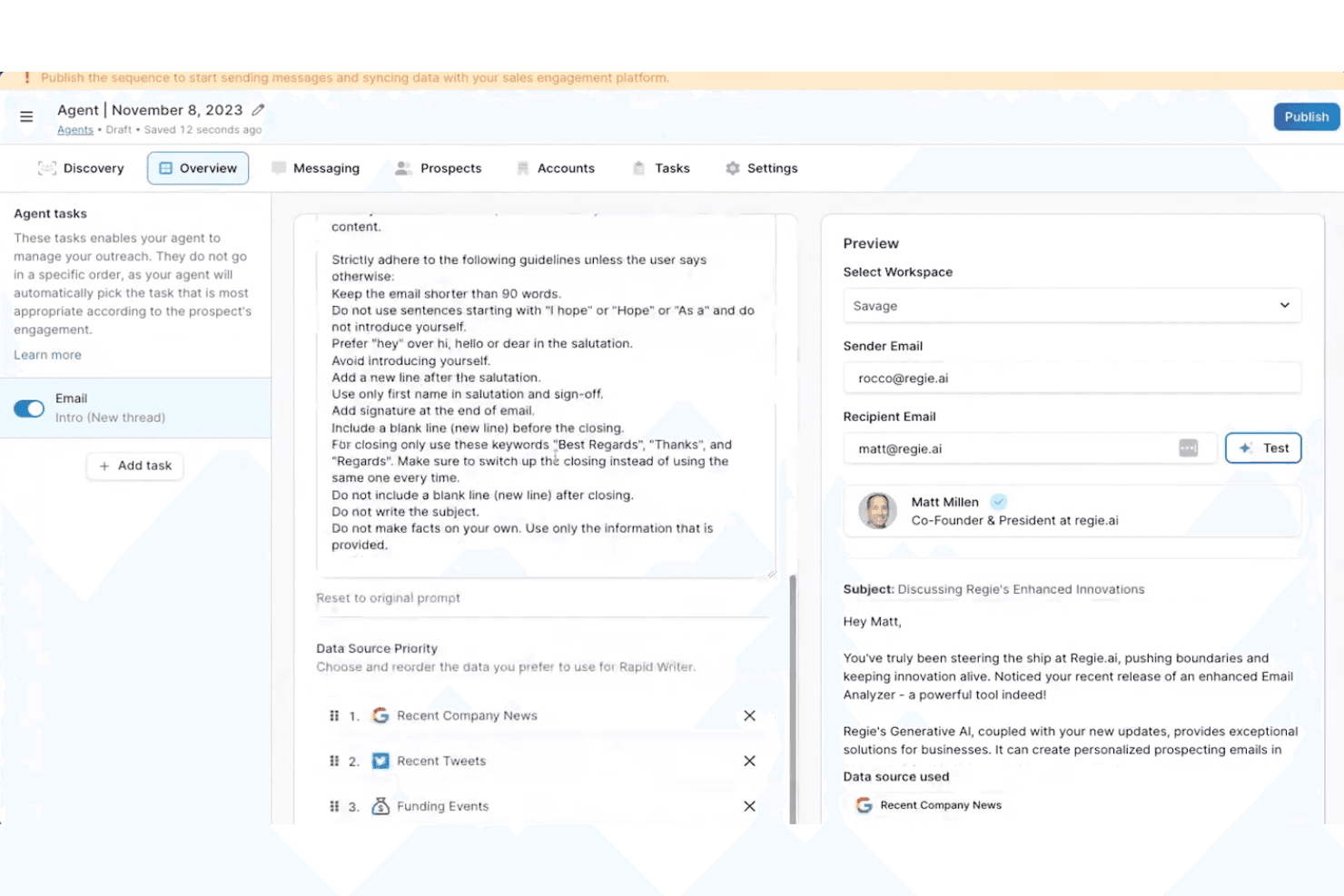
Regie.ai automates personalized sales outreach with AI-driven email agents. Regie.ai is an AI-powered B2B sales engagement platform that combines AI email generation, multi-step sequence building, buyer signal monitoring, and autonomous AI agents to run outbound prospecting across email, LinkedIn, and phone.
Who Is Regie.ai Best For?
Regie.ai is a strong fit for demand generation leaders and SDR teams running high-volume B2B outbound prospecting across email, LinkedIn, and phone.
Why I Picked Regie.ai
I've included Regie.ai in my top picks because it's the strongest option on this list for B2B prospecting workflows. Its Auto-Pilot AI Agents autonomously source, enrich, and contact prospects using 100+ real-time buyer signals, like funding events and job changes, triggering personalized email outreach without manual input. I also like that the AI learns individual writing styles over time, so generated emails reflect how your team actually sounds, not a generic template.
Regie.ai Key Features
- Multi-step sequence builder: Build static or dynamic email sequences that automatically adjust messaging and timing based on prospect engagement behavior.
- Content Management System (CMS): Store approved playbooks, messaging frameworks, and value propositions so the AI pulls from vetted, on-brand material when drafting outreach.
- Email Composer: Draft, edit, and refine AI-generated emails directly within Gmail, Outlook, or Salesloft via a native Chrome extension.
- Campaign Health Score: Monitor multi-channel engagement metrics across active sequences to track outreach performance at a glance.
Regie.ai Integrations
Regie.ai offers native integrations with Gmail, Outlook, HubSpot, Salesforce, Outreach.io, Salesloft, LinkedIn, ZoomInfo, Cognism, 6sense, and Demandbase. No public API or webhook support is documented for custom integrations.
Pros and Cons
Pros:
- Multi-channel outreach in a unified platform
- AI agents autonomously draft outbound sequences
- Real-time signal-driven email personalization
Cons:
- No support for A/B test optimization
- Not built for lifecycle email campaigns
Learn more about Regie.ai: Best for lifecycle personalization
- 14-day free trial
- Pricing upon request
Visit WebsiteCustomer Rating:4.6/5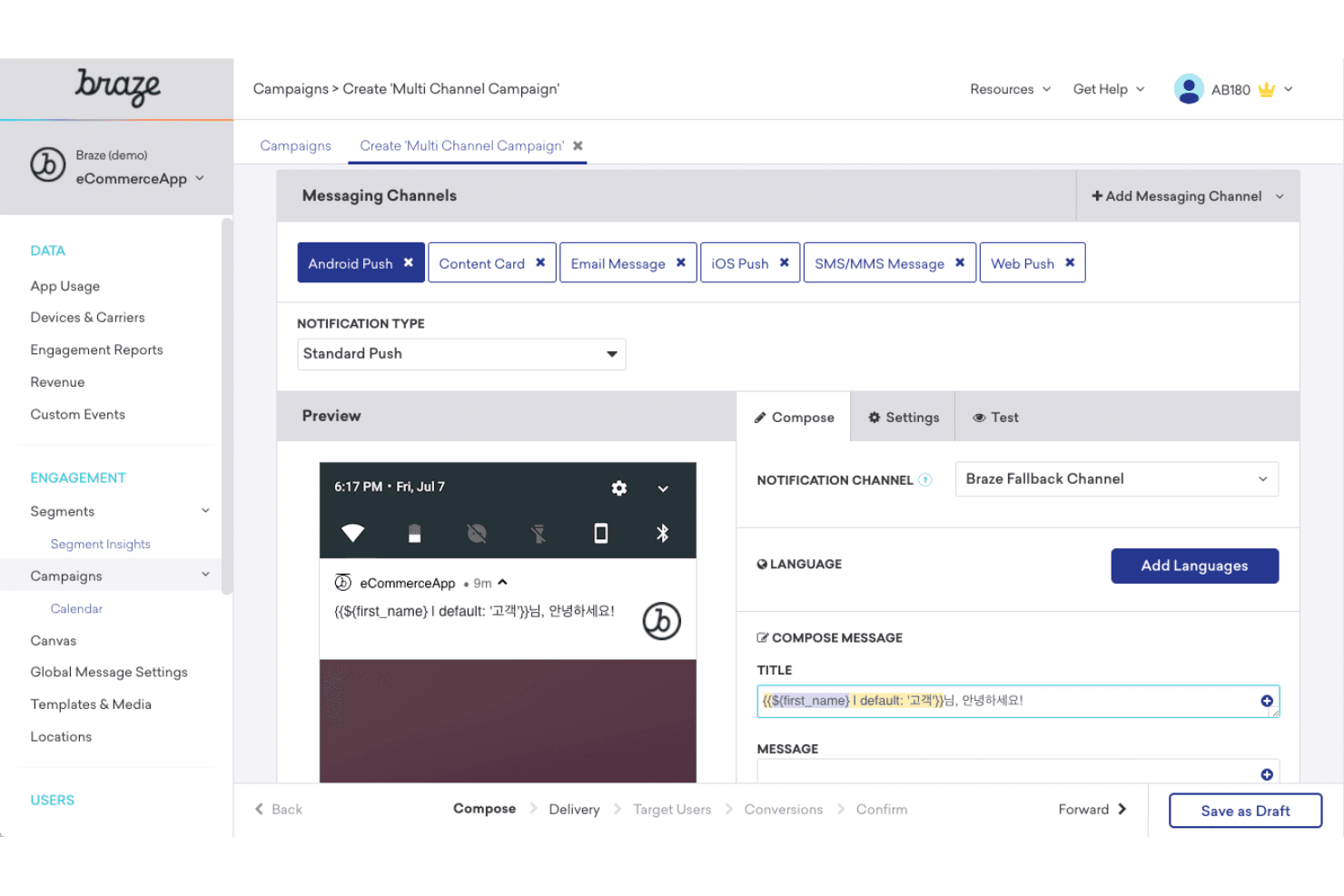
Braze lets users build multi-channel campaigns with personalized messaging. Braze is a customer engagement platform with built-in AI email tools—including generative copy drafting, lifecycle journey orchestration, per-user send-time optimization, and reinforcement learning–based personalization across cross-channel campaigns.
Who Is Braze Best For?
Braze is built for mid-market and enterprise marketing teams running complex, data-driven lifecycle programs across multiple channels.
Why I Picked Braze
I picked Braze as one of the best because of how BrazeAI Decisioning Studio™ handles lifecycle personalization: it uses reinforcement learning to make individual decisions on message, timing, offer, and channel simultaneously for each recipient. I've seen this go well beyond A/B testing. Pair that with Canvas Flow for multi-step journey orchestration and Intelligent Timing for per-user send scheduling, and Braze is genuinely built for complex, data-driven lifecycle programs.
Braze Key Features
- AI Content QA: Automatically reviews email copy for spelling, grammar, tone inconsistencies, offensive language, and Liquid code errors before a campaign sends.
- Intelligent Channel selection: Analyzes each user's engagement history to determine whether email, push, SMS, or another channel is most likely to drive a response.
- Predictive Churn scoring: Scores users by disengagement likelihood so you can prioritize high-value contacts or suppress at-risk segments before they go cold.
- BYO LLM support: Connects your preferred AI model—Anthropic Claude, Amazon Bedrock, or OpenAI—directly into Braze workflows via the Agent Console™.
Braze Integrations
Braze offers 2,400+ marketplace integrations, including Segment, mParticle, Snowflake, Salesforce, HubSpot, Shopify, Anthropic, OpenAI, and Amazon Bedrock. It also supports REST APIs, webhooks, reverse ETL, and MCP; Gmail and Outlook integrations aren't available.
Pros and Cons
Pros:
- AI content QA built into every campaign
- Cross-channel journeys from AI natural-language prompts
- Reinforcement learning for true 1:1 personalization
Cons:
- Not designed for solo or sales workflows
- No Gmail or Outlook inbox integration
Learn more about Braze: Best for CRM-grounded personalization
- Free plan available
- From $7/user/month (billed annually)
Visit WebsiteCustomer Rating:4.4/5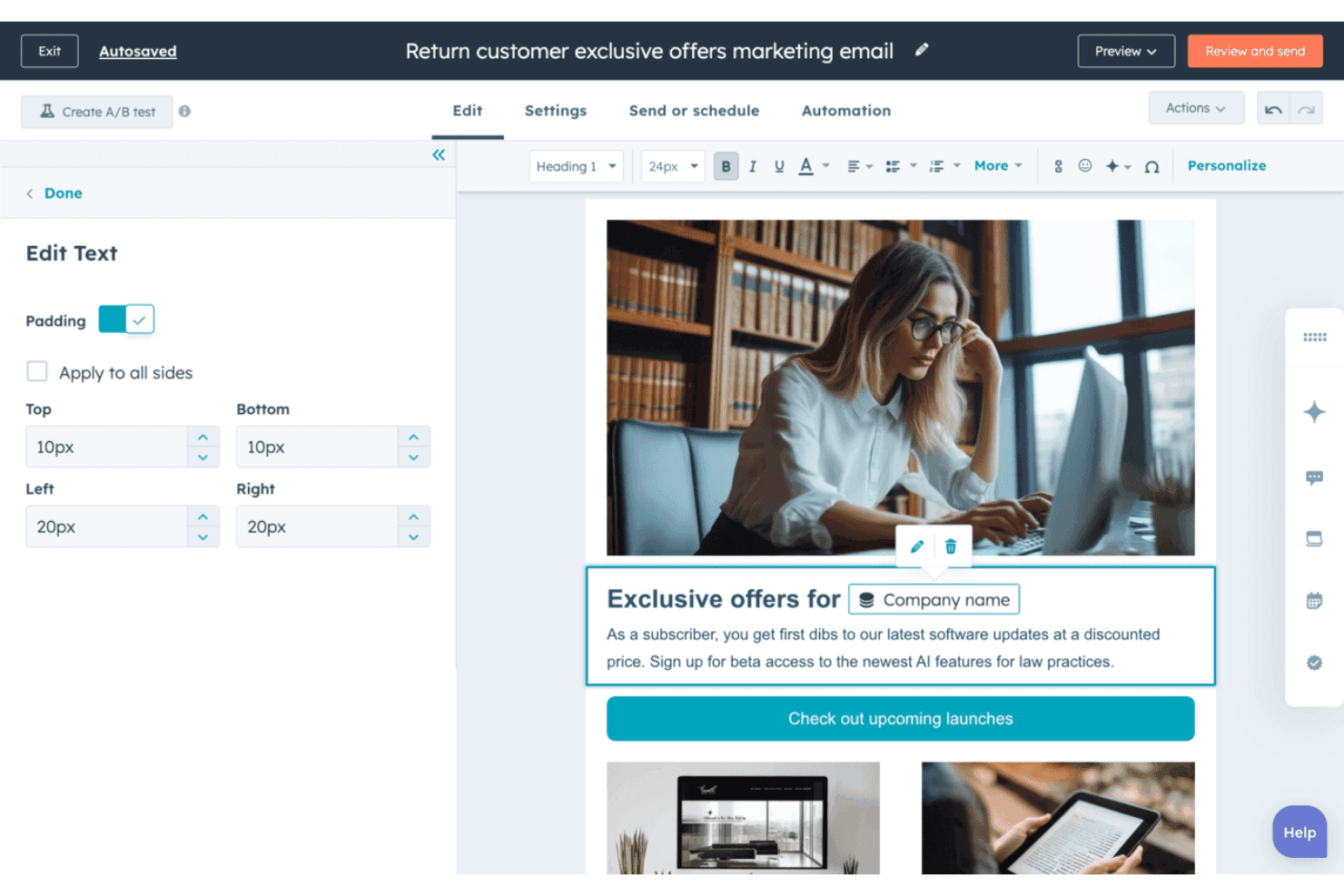
HubSpot Marketing Hub lets users personalize email text with dynamic contact tokens. HubSpot Marketing Hub is a marketing automation platform with AI-powered email generation, CRM-driven personalization, send time optimization, and multi-step lifecycle workflow automation built natively into a unified suite.
Who Is HubSpot Marketing Hub Best For?
HubSpot Marketing Hub is a strong fit for marketing teams that already run—or plan to run—their pipeline through a CRM and want AI email generation tightly connected to that contact data.
Why I Picked HubSpot Marketing Hub
I've included HubSpot Marketing Hub in my top picks because the CRM-native AI personalization goes well beyond first-name merge tags. Breeze AI pulls lifecycle stage, firmographics, and behavioral history directly from the Smart CRM to generate email copy tailored per recipient. I also rely on per-contact send time optimization, which schedules each send based on individual engagement patterns rather than a single blast window.
HubSpot Marketing Hub Key Features
- Breeze AI email drafting: Generate full email drafts—body copy, subject lines, and CTAs—from a natural language prompt directly inside the email editor.
- A/B testing: Test subject line and body content variants at the Professional and Enterprise tiers to identify higher-performing email versions.
- Campaign Agent: Orchestrate multi-channel campaigns from a single goal input, with AI generating email content alongside landing pages, social posts, and blogs.
- Predictive lead scoring: AI ranks contacts by likelihood to engage or convert, letting you prioritize which segments receive email outreach first.
HubSpot Marketing Hub Integrations
Native integrations include HubSpot Smart CRM, Salesforce, and WhatsApp; Gmail and Outlook connect through Sales Hub. Its 2,000+ Marketplace integrations include Slack, Zoom, Shopify, and Mailchimp, with APIs and webhooks for custom connections.
Pros and Cons
Pros:
- Per-contact AI send time optimization
- Embedded tone controls for each email section
- Generates emails using full CRM context
Cons:
- AI outputs lack external knowledge sources
- No native AI reply automation
Learn more about HubSpot Marketing Hub: Best for per-contact send-time optimization
- 14-day free trial + free demo available
- From $15/month (billed annually)
Visit WebsiteCustomer Rating:4.4/5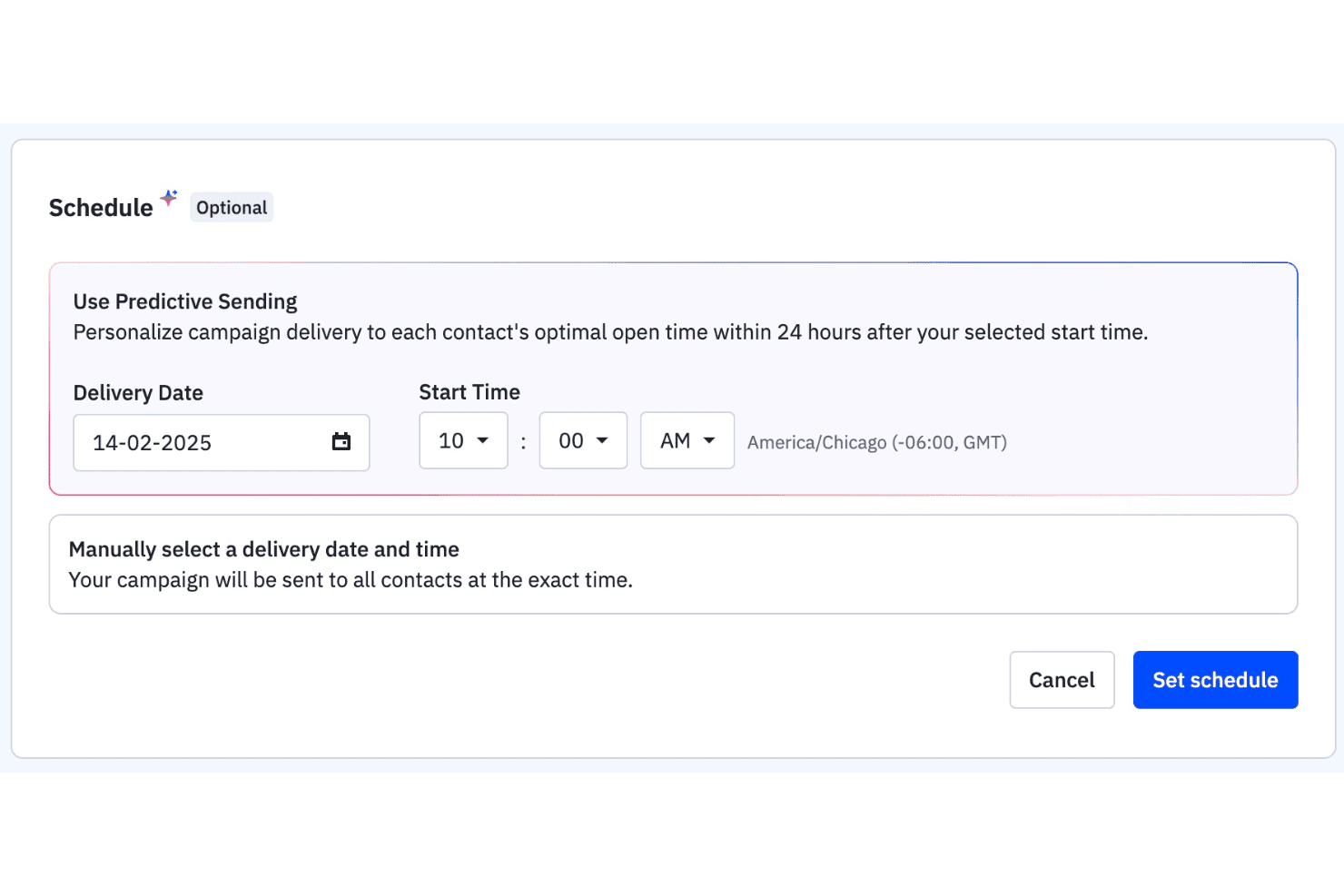
ActiveCampaign lets users schedule campaigns using predictive sending. ActiveCampaign is an AI-native email marketing platform that combines email campaign generation, per-contact send-time optimization, behavioral automation, and cross-channel sequencing across email, SMS, and WhatsApp.
Who Is ActiveCampaign Best For?
ActiveCampaign is a strong fit for marketing teams that run high-volume email programs and need per-contact send-time intelligence built into their automation workflows.
Why I Picked ActiveCampaign
I've included ActiveCampaign in my top picks because its Predictive Sending feature optimizes send time per individual contact, not per list, recalculating each person's ideal window weekly based on their actual engagement history. I also like the AI Campaign Builder, which drafts a full email, including subject line, body copy, and CTA, from a single prompt. Pair that with the Brand Kit and Custom Instructions, and every generated email stays anchored to your voice without manual cleanup.
ActiveCampaign Key Features
- Automations Agent: Builds multi-step drip and nurture sequences from a plain-language prompt, including cross-channel flows across email, SMS, and WhatsApp.
- AI-Suggested Segments: Lets you describe your target audience in natural language and generates the corresponding contact segment automatically.
- SMS AI Reply Suggestions: Drafts replies to incoming SMS messages using your Brand Kit, website content, and FAQs to keep responses on-brand.
- Active Intelligence Insights: A conversational analytics workspace where you ask questions about campaign performance and get instant charts and recommendations in return.
ActiveCampaign Integrations
ActiveCampaign offers 1,000+ integrations, including native Gmail, Outlook, Salesforce, Shopify, LinkedIn Matched Audiences, and Calendly connections, plus a REST API, webhooks, MCP support for ChatGPT and Claude, and Zapier.
Pros and Cons
Pros:
- Brand Kit locks AI output to your voice
- AI drafts multi-step email sequences automatically
- Per-contact send-time optimization increases engagement
Cons:
- Some AI outputs require manual correction
- Full AI features only on higher tiers
Learn more about ActiveCampaign: Best for agentic campaign creation
- Free trial available
- From $1,250/month (billed annually)
Visit WebsiteCustomer Rating:4/5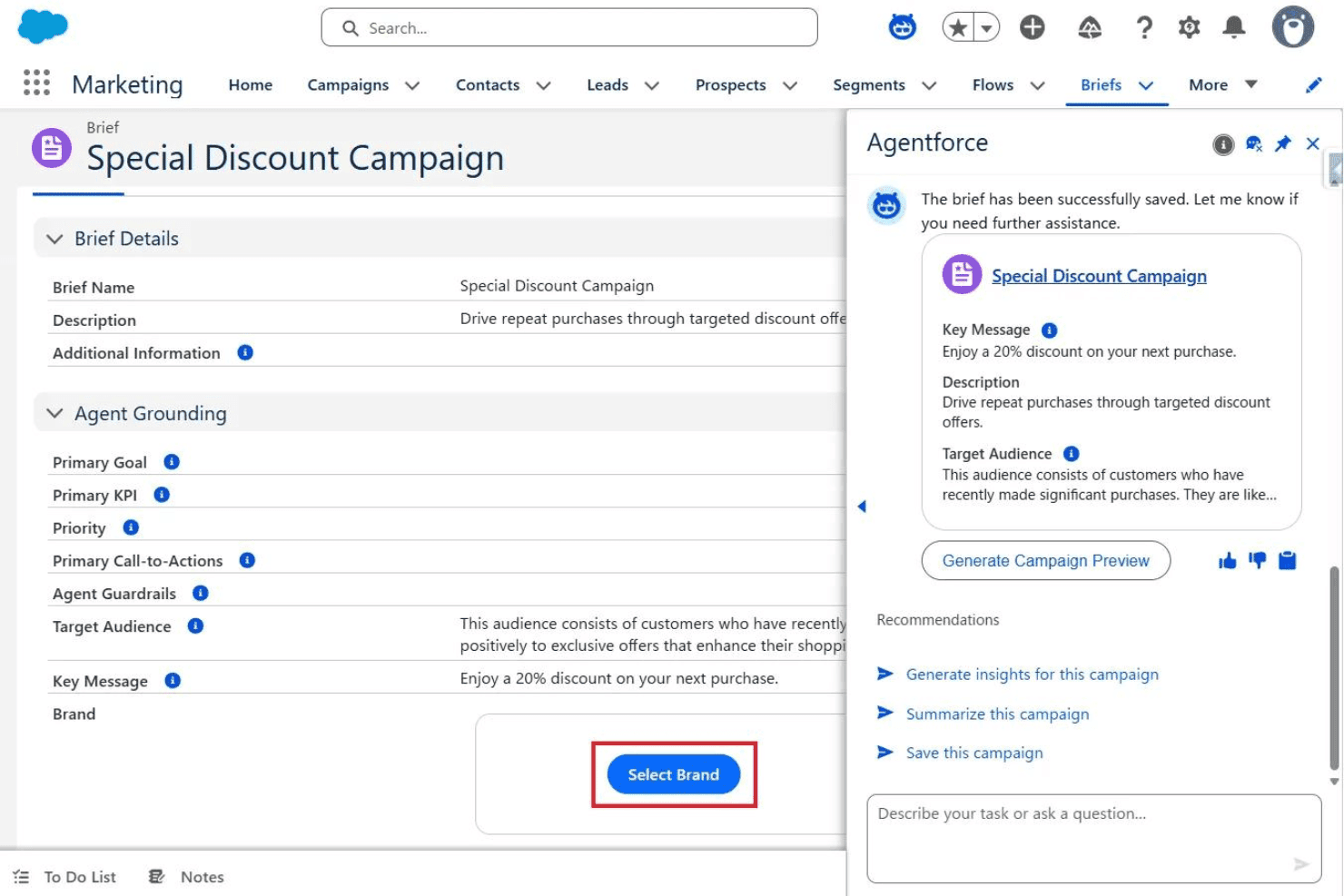
Agentforce helps marketers save briefs and preview discount campaigns instantly. Agentforce Marketing is Salesforce's AI-native email marketing platform, combining agentic campaign creation, Einstein Generative AI for email copy and subject lines, real-time personalization, journey orchestration, and multi-channel campaign automation across email, SMS, and ads.
Who Is Agentforce Marketing Best For?
Agentforce Marketing is built for enterprise marketing teams already operating within the Salesforce ecosystem who need to orchestrate high-volume, multi-channel campaigns with AI-driven personalization at scale.
Why I Picked Agentforce Marketing
I've included Agentforce Marketing in my top picks because its Agentic Campaign Creation feature genuinely sets it apart: AI agents translate a campaign objective into a full brief, audience segments, and drafted messages in minutes rather than weeks. I also love how Two-Way Conversations turns email from a broadcast channel into a live dialogue, with AI reading inbound replies and CRM context to respond in real time. Pair that with Salesforce Personalization's real-time decisioning on every send, and you get a level of agentic depth that's rare.
Agentforce Marketing Key Features
- Einstein Send-Time Optimization: AI predicts the best send time for each individual subscriber based on their historical engagement patterns.
- Journey Builder: Builds multi-step, multi-channel customer journeys spanning email, SMS, mobile push, and social ads from a single workflow.
- Einstein Subject Line Tester: Scores subject lines against a trained model to predict how likely they are to drive contact engagement before you send.
- Multivariate testing: Tests multiple combinations of subject lines, images, and content simultaneously, then surfaces the winning variant automatically.
Agentforce Marketing Integrations
Agentforce Marketing has native integrations across the Salesforce ecosystem, including Sales Cloud, Service Cloud, Commerce Cloud, Data 360, and Slack. It also supports marketplace integrations through AppExchange, including Litmus, plus custom connections through MuleSoft.
Pros and Cons
Pros:
- Handles two-way conversations at high volume
- Personalization adapts emails with real-time data
- AI agents automate full campaign execution
Cons:
- Advanced AI tools gated to high-tier plans
- Core features require Salesforce ecosystem use
Learn more about Agentforce Marketing: 10Best for enterprise copy optimization
Jacquard
- Free demo available
- From $81,000/year (billed annually)
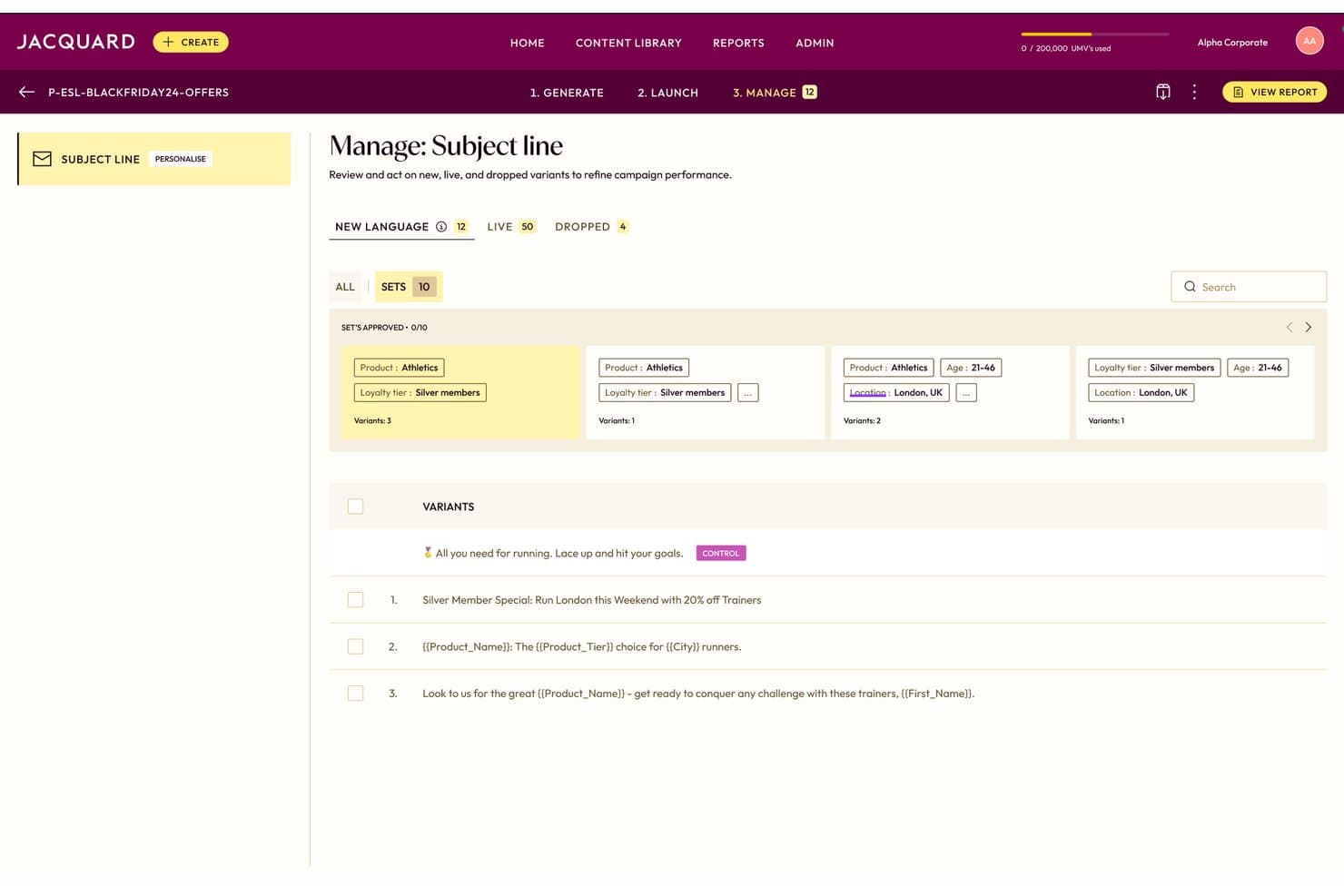
Jacquard lets users manage and approve AI-generated email subject line variants. Jacquard is an enterprise AI copy generation and optimization platform that produces email subject lines, preview text, body copy, CTAs, and SMS and push variants at scale using its proprietary Language² and Neural² architecture.
Who Is Jacquard Best For?
Jacquard is built for enterprise marketing teams running high-volume CRM email programs who need brand-safe copy variants at scale across multiple markets and languages.
Why I Picked Jacquard
I picked Jacquard as one of the best because no other tool on this list matches its depth of enterprise-grade copy optimization. Its Language² architecture generates up to 2,500 brand-safe variants in 30 seconds, with compliance and tone rules baked into generation rather than applied as an afterthought. The Neural² engine then predicts open and click rates before you send, using 60 billion data points from a decade of live experiments.
Jacquard Key Features
- Multi-armed bandit optimization: Automatically reallocates send volume toward top-performing language variants in real time, without manual testing management.
- 27+ language and dialect support: Generates brand-calibrated copy across regional markets, with performance learnings from one market informing generation in another.
- Omnichannel variant generation: Produces channel-specific copy for email, SMS, mobile push, in-app, and web push from a single campaign brief.
- Creative Intelligence reporting: Surfaces explainable performance data that links specific linguistic attributes to engagement outcomes across campaigns.
Jacquard Integrations
Jacquard offers 14 native integrations, including Braze, Salesforce Marketing Cloud, Adobe Experience Cloud, Iterable, Bloomreach, MoEngage, Insider, MessageGears, Airship, and Optimizely. It doesn’t offer Gmail, Outlook, HubSpot, Klaviyo, Mailchimp, or a published API for custom integrations.
Pros and Cons
Pros:
- Predicts open and click rates pre-send
- Multi-armed bandit optimization replaces A/B testing
- Generates up to 2,500 brand-safe variants
Cons:
- Not accessible to small or mid-size teams
- No inbox or reply automation features
Learn more about Jacquard:

Outros assistentes de e-mail com IA
Eis algumas opções adicionais de assistentes de e-mail com IA que não entraram na minha lista restrita, mas que vale a pena conhecer:
- 11Mailchimp Best for AI-assisted campaign creation
- 12KlaviyoBest for ecommerce email personalization at scale
- 13OrttoBest for lifecycle journey optimization
- 14GetResponseBest for full AI email generation
- 15BrevoBest for AI-assisted email design
- 16OmnisendBest for ecommerce AI content creation
- 17JasperBest for on-brand email generation
- 18Hoppy CopyBest for brand-trained email copy
- 19InstantlyBest for AI-powered cold outreach
- 20WriterBest for governed enterprise copy
How I Evaluate AI Email Assistants
To earn a spot on this list, a tool needs to deliver real, measurable AI value—whether that's drafting a full nurture sequence, personalizing sends at the contact level, or surfacing smarter timing recommendations. I split my evaluation into two layers: the core functionality every tool must meet to qualify, and the differentiating factors that separate a good tool from the right one for your team.
Core Functionality (Table Stakes For This List)
When I'm selecting tools for my list, I rank each one on a scale from 0 (does not offer the functionality) to 5 (excels in this area) for each core functionality listed below. I then calculate the tool's total score as a percentage, using 75% as a benchmark to help assess its overall fit for the list.
- AI email generation: I evaluate whether the tool can draft full emails—body, subject lines, and CTAs—from a prompt or brief, not just fill in templates.
- Personalization at scale: Each tool needs to go beyond merge tags. I look for AI that tailors copy using behavioral, CRM, or segment data across large contact lists.
- Tone and brand control: I check whether you can set custom brand voice guidelines or tone profiles so AI outputs stay consistent across campaigns and team members.
- Workflow integration: The tool should plug into your existing stack. I look for native connections to ESPs, CRMs, or inboxes like Gmail and Outlook.
- AI optimization and insights: I evaluate how the tool uses AI to improve results—whether that's send-time recommendations, subject line scoring, or engagement predictions.
- Multi-email workflow support: Tools that only handle one-off drafts fall short. I look for support for drip sequences, nurture campaigns, follow-ups, or lifecycle workflows.
Once I have a list of tools that meet the criteria, I consider what sets each platform apart.
Differentiating Factors (What Sets Vendors Apart)
Here's how I compare and contrast different vendors:
Standout Features
I evaluate how each tool handles multivariate AI testing—not just A/B splits, but automated experiments across subject lines, preview text, and CTAs that reallocate sends toward winners without manual work. I also check for predictive audience scoring, since the ability to suppress low-intent contacts or prioritize high-value segments directly impacts campaign ROI. Deliverability intelligence matters too: tools like Mailchimp and Reply.io approach sender reputation monitoring differently, and I look for AI that flags spam triggers and paces warm-up proactively.
Beyond Features
I evaluate how each tool handles data privacy, especially whether customer email content trains underlying AI models. That matters when your team operates under GDPR or CCPA constraints. I also check time-to-value: tools like HubSpot and Mailchimp offer prompt libraries and brand voice training that get campaigns live fast, while others require heavy setup. Pricing predictability matters too—AI credit costs can spike as personalization complexity grows, so I look for transparent models that scale with send volume.
Como escolher um assistente de e-mail com IA
Se pretende obter resultados com a IA e evitar ficar dependente de uma plataforma genérica, utilize estes critérios para encontrar o melhor assistente de e-mail com IA para os seus fluxos de trabalho reais:
| Se a sua prioridade for | Procure |
|---|---|
| Se a sua prioridade forAjustar a voz da marca | ProcureControlos personalizados de tom e marca por campanha ou segmento |
| Se a sua prioridade forGerir campanhas com vários contactos | ProcureSuporte nativo para sequências, nutrição ou fluxos automatizados |
| Se a sua prioridade forPersonalização baseada no CRM | ProcureIntegrações diretas e mapeamento de dados ao nível do contacto |
| Se a sua prioridade forOtimizar o momento de envio | ProcureFuncionalidades baseadas em IA para definir a hora ou a frequência de envio por contacto |
| Se a sua prioridade forControlo de dados e conformidade | ProcureOpções para desativar o treino do modelo com os seus próprios conteúdos |
Como avaliar a sua lista restrita
- Teste as definições da marca: Execute uma campanha de teste e envie pelo menos três instruções utilizando diferentes diretrizes da marca para avaliar a consistência.
- Valide os fluxos de trabalho com vários e-mails: Crie e envie uma sequência de pelo menos quatro e-mails como teste durante um período experimental gratuito de 7 dias.
- Verifique o tratamento dos dados: Solicite documentação escrita sobre a forma como os dados de e-mail dos clientes são processados, armazenados e utilizados para treinar modelos de IA.
- Experimente as integrações com CRM/ESP: Ligue o seu CRM de produção (ou um ambiente de testes) e confirme o fluxo de dados em tempo real com pelo menos 25 contactos de teste.
- Compromisso entre rapidez e flexibilidade: Decida se precisa de modelos de lançamento rápido com controlos limitados ou de uma personalização mais profunda que exija mais configuração e formação.
O que são os assistentes de e-mail com IA?
Os assistentes de e-mail com IA são ferramentas de software que utilizam inteligência artificial para automatizar a redação, a personalização e a gestão de campanhas de e-mail. Estas ferramentas ajudam a gerar rapidamente conteúdos de e-mail, adaptar mensagens a destinatários ou segmentos individuais e otimizar os momentos de envio com base em dados. Os assistentes de e-mail com IA facilitam o trabalho das equipas de marketing com as listas, ajudam a garantir a consistência da voz da marca e permitem analisar o desempenho das campanhas para uma melhoria contínua.
Funcionalidades dos assistentes de e-mail com IA
Ao selecionar um assistente de e-mail com IA, tenha em atenção as seguintes funcionalidades essenciais:
- Geração de e-mails com IA: O software deve criar e-mails completos — incluindo linhas de assunto, conteúdo do corpo e chamadas para ação — com base num resumo ou pedido. Isto ajuda a aumentar rapidamente a escala da criação de campanhas, mantendo a variedade e a relevância.
- Personalização em grande escala: Procure ferramentas que utilizem dados comportamentais, de CRM ou de segmentos para adaptar os e-mails muito para além das etiquetas de substituição. Isto permite enviar mensagens únicas a cada destinatário, melhorando as taxas de interação e obtendo melhores resultados nas campanhas.
- Controlo do tom e da marca: Escolha um assistente que permita definir regras de voz da marca ou perfis de tom. Isto garante que cada e-mail soa à sua empresa, independentemente de quem o escreve ou da campanha a que se destina.
- Integração com fluxos de trabalho: O seu assistente de IA deve ligar-se ao CRM, a ferramentas de automatização de marketing, a fornecedores de serviços de e-mail ou a caixas de entrada como o Gmail e o Outlook. Isto facilita a obtenção de dados de contacto, a gestão de fluxos de trabalho e a sincronização das ferramentas da sua equipa.
- Otimização e informações com IA: As melhores soluções utilizam a IA para sugerir horários de envio, pontuar linhas de assunto, prever a interação e recomendar melhorias no conteúdo. Isto permite antecipar o que terá melhor desempenho e ajuda a melhorar continuamente os resultados.
- Suporte para fluxos de trabalho com vários e-mails: Procure a possibilidade de criar e gerir sequências, séries de nutrição ou acompanhamentos automatizados — e não apenas e-mails únicos. Isto permite realizar campanhas mais complexas, como campanhas de integração ou marketing gota a gota.
- Monitorização da capacidade de entrega: Alguns assistentes incluem funcionalidades que verificam a reputação do remetente, assinalam fatores desencadeadores de spam e sugerem ritmos de envio para proteger a capacidade de entrega. Isto ajuda a garantir que as suas mensagens chegam à caixa de entrada em vez de serem bloqueadas ou filtradas.
- Controlos de privacidade dos dados: Verifique se pode controlar a forma como os seus dados são utilizados, por exemplo, recusando a utilização dos mesmos no treino de modelos ou garantindo a conformidade com leis de privacidade dos dados, como o GDPR ou o CCPA.
- Testes multivariados: Procure opções avançadas de experimentação, como a realização de testes automatizados a linhas de assunto, texto de pré-visualização e outras variáveis. Isto permite otimizar elementos das suas campanhas para obter os melhores resultados.
- Relatórios e análises: Os painéis e as ferramentas de elaboração de relatórios abrangentes ajudam a acompanhar o desempenho por campanha, segmento ou e-mail individual, permitindo-lhe implementar melhorias baseadas em dados.
Vantagens dos assistentes de e-mail com IA
A implementação de assistentes de e-mail com IA proporciona várias vantagens à sua equipa e à sua empresa. Eis algumas das que pode esperar:
- Criação mais rápida de campanhas: Gere e-mails completos, incluindo linhas de assunto e chamadas para ação, a partir de pedidos, para que a sua equipa possa aumentar rapidamente a escala das campanhas.
- Mensagens personalizadas em grande escala: Utilize dados comportamentais, de CRM ou de segmentos para adaptar as mensagens a cada destinatário sem depender das tradicionais etiquetas de substituição.
- Voz da marca consistente: Aplique controlos personalizados de tom e de marca a cada campanha ou segmento, garantindo que todas as comunicações estão em conformidade com as diretrizes da sua marca.
- Fluxos de trabalho integrados: Ligue-se diretamente ao seu CRM, ESP ou às suas caixas de entrada para sincronizar dados e gerir campanhas a partir das suas plataformas principais.
- Otimização automatizada de campanhas: Aceda a informações baseadas em IA, como recomendações de horários de envio, pontuação de linhas de assunto ou testes multivariados, para aumentar a interação e o desempenho.
- Monitorização avançada da capacidade de entrega: Assinale proativamente riscos relacionados com a reputação do remetente e fatores desencadeadores de spam, ajudando os seus e-mails a chegar à caixa de entrada em vez de serem encaminhados para filtros.
- Governação de dados reforçada: Controle a forma como os seus dados são utilizados e cumpra os regulamentos de privacidade, gerindo se o conteúdo dos seus e-mails é utilizado para treinar modelos de IA.
Custos e preços dos assistentes de e-mail com IA
A seleção de assistentes de e-mail com IA exige uma compreensão dos vários modelos de preços e planos disponíveis. Os custos variam consoante as funcionalidades, o tamanho da equipa, os suplementos e outros fatores. A tabela abaixo resume os planos comuns, os respetivos preços médios e as funcionalidades normalmente incluídas nas soluções de assistentes de e-mail com IA:
Tabela de comparação de planos para assistentes de e-mail com IA
| Tipo de plano | Preço médio | Características comuns |
|---|---|---|
| Tipo de planoPlano gratuito | Preço médio$0 | Características comunsGeração básica de e-mails com IA, personalização limitada, análises mínimas e integrações restritas. |
| Tipo de planoPlano pessoal | Preço médio$10-$25/utilizador/mês | Características comunsGeração completa de e-mails, opções iniciais de personalização, acesso a bibliotecas de prompts e relatórios básicos. |
| Tipo de planoPlano empresarial | Preço médio$30-$75/utilizador/mês | Características comunsPersonalização avançada em grande escala, suporte para fluxos de trabalho com vários e-mails, integrações com CRM e ESP e análises detalhadas. |
| Tipo de planoPlano empresarial de grande dimensão | Preço médio$100-$250/utilizador/mês | Características comunsControlos de marca personalizados, monitorização da capacidade de entrega, ferramentas de privacidade de dados, opções avançadas de integração e suporte premium. |
Perguntas frequentes sobre assistentes de e-mail com IA
Eis algumas respostas a perguntas frequentes sobre assistentes de e-mail com IA:
Como é que os assistentes de e-mail com IA lidam com a privacidade e a conformidade dos dados?
A maioria dos assistentes de e-mail com IA disponibiliza funcionalidades para ajudar a cumprir leis de privacidade como o RGPD e a CCPA. Normalmente, encontrará controlos para impedir que os seus dados de e-mail sejam utilizados no treino de modelos, e os fornecedores devem disponibilizar documentação clara sobre a forma como os seus dados são processados e armazenados. Confirme sempre as definições de privacidade e as práticas de tratamento de dados junto do fornecedor, especialmente se a sua empresa lidar com informações sensíveis ou regulamentadas.
Os assistentes de e-mail com IA podem substituir completamente os redatores ou os membros da equipa de marketing?
Não, os assistentes de e-mail com IA não substituem completamente os redatores ou profissionais de marketing — ajudam a sua equipa a trabalhar mais rapidamente e a aumentar a escala dos conteúdos. Estas ferramentas podem gerar rascunhos, personalizar mensagens e otimizar campanhas, mas continuará a obter os melhores resultados ao rever, editar e aperfeiçoar os conteúdos gerados por IA. Pense neles como um conjunto de ferramentas para aumentar a produtividade, não como uma solução que funciona sem intervenção.
Até que ponto os assistentes de e-mail com IA se integram com plataformas de CRM e de marketing por e-mail?
A maioria dos principais assistentes de e-mail com IA liga-se diretamente a ferramentas de CRM e de marketing por e-mail amplamente utilizadas, como o HubSpot, o Salesforce, o Mailchimp e o Gmail. A profundidade da integração é importante — a sincronização direta de dados permite lançar campanhas personalizadas, manter as listas atualizadas e sincronizar as análises das campanhas. Teste sempre as integrações no seu ambiente para confirmar o fluxo de dados em tempo real e evitar falhas nos fluxos de trabalho.
Que limitações devo esperar nos planos gratuitos ou de entrada dos assistentes de e-mail com IA?
Os planos gratuitos e de entrada costumam impor restrições ao número de e-mails que pode gerar, acesso limitado à personalização com IA, menos opções de integração e relatórios básicos. Alguns fornecedores também reservam funcionalidades avançadas, como testes multivariados ou informações sobre a capacidade de entrega, para os escalões pagos. Para equipas que realizam campanhas de grande dimensão ou complexas, é frequentemente necessário mudar para um plano empresarial ou empresarial de grande dimensão.
Qual é a melhor forma de testar se um assistente de e-mail com IA é adequado para a minha equipa?
Comece com um período de avaliação gratuito e configure uma campanha real, incluindo instruções sobre a voz da marca e um fluxo de trabalho com vários e-mails. Ligue o assistente ao seu CRM ou à plataforma de marketing e realize testes com contactos reais ou fictícios. Analise os resultados da IA quanto à qualidade, consistência e adequação ao fluxo de trabalho. Além disso, peça ao fornecedor documentação clara sobre a privacidade dos dados e as integrações, para garantir que a solução responde às suas necessidades.