

Software voor videopodcasts geeft je alles wat je nodig hebt om visueel boeiende podcasts voor je publiek op te nemen, te bewerken en te publiceren. Als je professionele videopodcasts wilt maken—of je nu gasten op afstand interviewt of grootschalige studioprogramma's produceert—is het vinden van de juiste software erg belangrijk.
Je hebt opties nodig die passen bij je werkproces, samenwerking mogelijk maken en je in staat stellen je op de inhoud te richten zonder te worden opgehouden door technische problemen. In deze gids bespreek ik de beste beschikbare software voor videopodcasts, zodat je de juiste hulpmiddelen kunt kiezen om je programma dit 2026 naar een hoger niveau te tillen.
Waarom u onze softwareaanbevelingen kunt vertrouwen
6,700+
Reviews
20
Industry experts
16+
Evaluation factors
14
Years
Ons team test en beoordeelt software sinds 2012. Als marketingleiders weten we zelf hoe moeilijk — en belangrijk — het is om de juiste software te kiezen.
Voor deze gids hebben we tools geëvalueerd met behulp van praktijktests en onafhankelijk onderzoek, waarbij we tools beoordeelden aan de hand van onze selectiecriteria.
Onze reviews weerspiegelen ons menselijke redactionele oordeel, geen verkooppraatje.
Deskundige beoordelaars:
 Gui DrusinaCreatief directeur
- Shriya GhateSenior Marketing Lead
 Amanda JacquesMarketing Ops Leader

Vergelijkingstabel voor software voor videopodcasts
Deze vergelijkingstabel vat de prijsgegevens samen van mijn belangrijkste keuzes voor software voor videopodcasts:
| Tool | Best For | Trial Info | Price | ||
|---|---|---|---|---|---|
| 1 | Best for open-source video customization | Free to use | Free to use | Website | |
| 2 | Best for AI-powered video content repurposing | Free plan available | From $15/month | Website | |
| 3 | Best for studio-quality remote collaboration | Free plan available | From $16/user/month (billed annually) | Website | |
| 4 | Best for automated podcast video clipping | Free plan available | From $14.5/month (billed annually) | Website | |
| 5 | Best for hosting with built-in distribution tools | Free plan available | From $12/month (billed annually) | Website | |
| 6 | Best for live event integration | Free demo available | Pricing upon request | Website | |
| 7 | Best for remote interviews with HD recordings | 14-day free trial + free plan + free demo available | From $24/month (billed annually) | Website | |
| 8 | Best for fast editing with text-based tools | Free plan available | From $16/user/month (billed annually) | Website | |
| 9 | Best for multi-track audio and video recording | Free plan + free trial available | From $24/month (billed annually) | Website | |
| 10 | Best for browser-based multi-guest production | Free plan available | From $44.99/month | Website |


Beoordelingen van de beste software voor videopodcasts
Hieronder vind je mijn gedetailleerde samenvattingen van de beste software voor videopodcasts die in mijn selectie is terechtgekomen. Mijn beoordelingen bieden een gedetailleerd overzicht van de functies, mogelijkheden en integraties van elk platform, zodat je de beste optie voor jou kunt vinden.

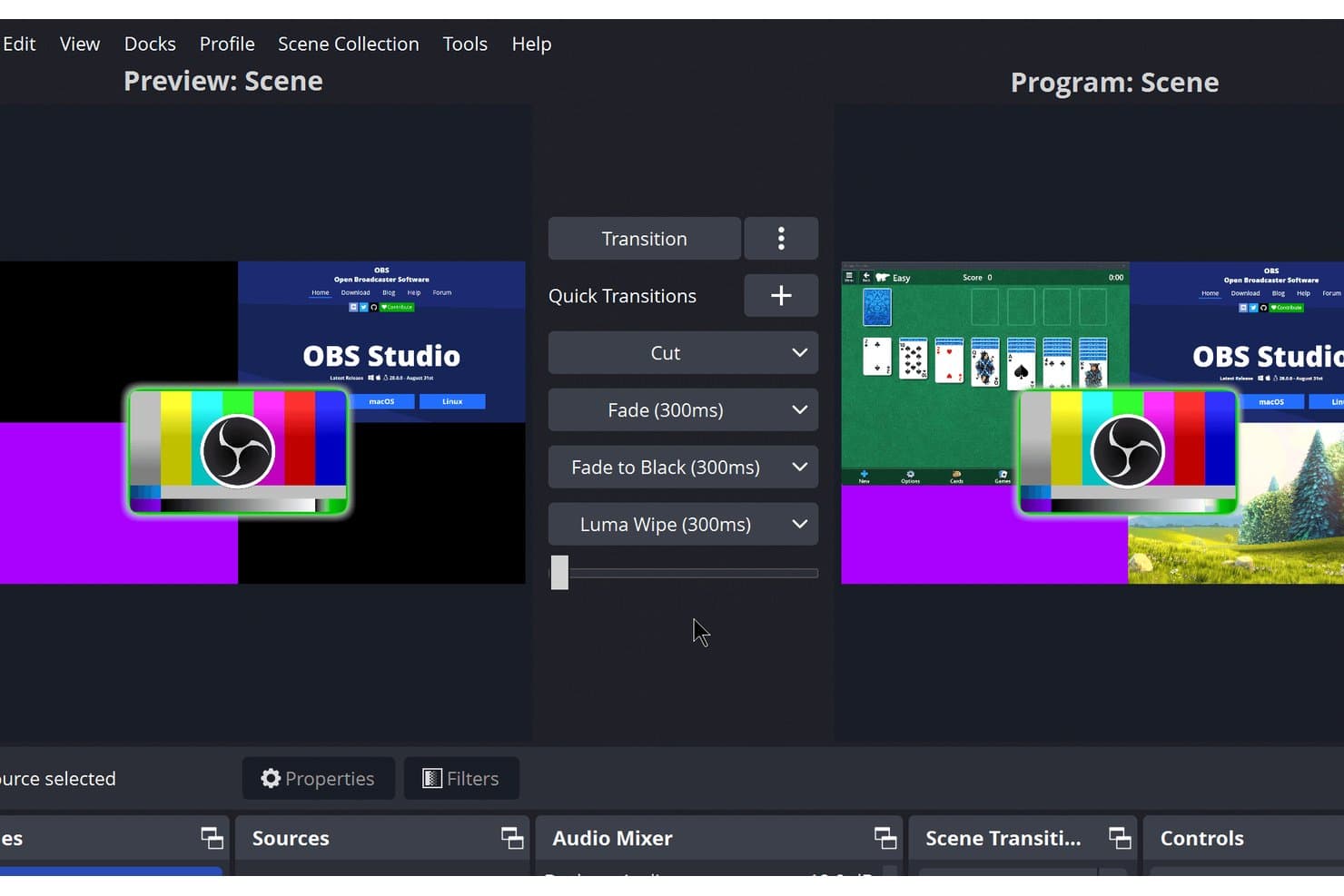
OBS Studio offers a Studio Mode interface with dual preview and program scenes, multiple quick transition options including Cut, Fade, Fade to Black, and Luma Wipe for professional video podcast production. OBS Studio is a free, open-source video recording and live streaming tool that supports scene-based capture, multi-source audio mixing, custom overlays, and broadcasting to platforms like YouTube and Twitch.
Who Is OBS Studio Best For?
OBS Studio is a strong fit for technically inclined content creators and indie podcast producers who want full control over their recording and streaming setup at no cost.
Why I Picked OBS Studio
OBS Studio earns its spot on my shortlist because no other free tool gives you this level of control over your video output. I love that you can build unlimited scenes with custom logos, lower thirds, and branded backgrounds, then switch between them live using Studio Mode. The Lua and Python scripting API lets me automate scene transitions and source behavior in ways no closed platform allows.
OBS Studio Key Features
- Multiview monitor: Preview up to eight scenes at once for live switching control.
- Audio mixer with VST support: Add real-time audio filters and process sound directly inside the mixer.
- Customizable dockable interface: Rearrange panels and pop them out as standalone windows to fit your workflow.
- Scene source variety: Combine screen captures, webcams, images, browser windows, and audio inputs in a single production.
OBS Studio Integrations
OBS Studio offers an API for custom integrations and plugin development.
Pros and Cons
Pros:
- Plugin support expands video workflow capabilities
- Advanced custom overlay and graphic options
- Full scene switching with real-time previews
Cons:
- No native video clip editing tools
- No built-in remote guest recording
Learn more about OBS Studio: Best for AI-powered video content repurposing
- Free plan available
- From $15/month
Visit WebsiteCustomer Rating:4.6/5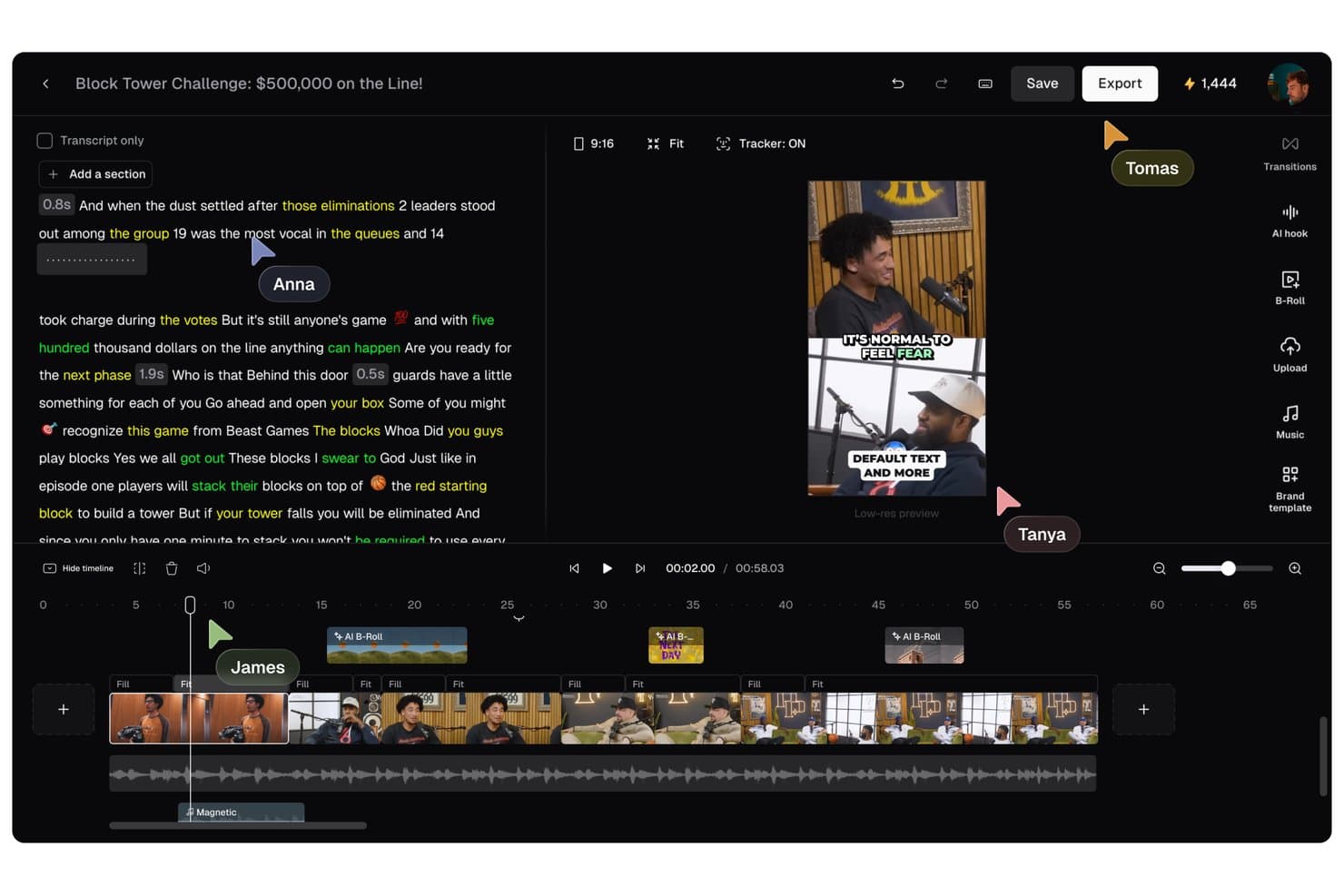
OpusClip offers a collaborative video editing interface with transcript editing, AI B-Roll, multi-track timeline, and real-time cursor tracking for team members. OpusClip is an AI video clipping tool that scans long-form recordings and converts them into short-form vertical clips, with auto-reframing, animated captions, virality scoring, and direct publishing to social platforms.
Who Is OpusClip Best For?
It's a strong fit for social media content leads and content marketing managers who regularly repurpose recorded podcasts, interviews, or long-form videos into clips for TikTok, Reels, and Shorts.
Why I Picked OpusClip
OpusClip earns its spot on my shortlist because ClipAnything scans a full podcast episode and surfaces high-potential moments automatically, each tagged with a Virality Score. I also like the ReframeAnything model, which keeps moving subjects centered in vertical frames without manual tracking adjustments. With animated captions at over 97% accuracy, clips come out nearly publish-ready straight from the tool.
OpusClip Key Features
- AI audio enhancement: Boosts voice clarity and removes background noise from imported podcasts and videos.
- Brand templates: Lets you apply custom logos, fonts, brand colors, intros, and outros to every clip.
- Video import from major platforms: Supports pulling source content directly from YouTube, Google Drive, Vimeo, Zoom, Riverside, and more.
- Multi-language captioning: Auto-generates captions in over 20 languages to support international and multilingual content.
OpusClip Integrations
Native integrations are not clearly documented. It connects with Zapier and provides an API for custom integrations.
Pros and Cons
Pros:
- Animated captions support over 20 languages
- Virality scoring ranks best podcast moments
- AI auto-generation of multiple short clips
Cons:
- No editing tools for full-length episodes
- Cannot record or livestream podcast sessions
Learn more about OpusClip: Best for studio-quality remote collaboration
- Free plan available
- From $16/user/month (billed annually)
Visit WebsiteCustomer Rating:4.4/5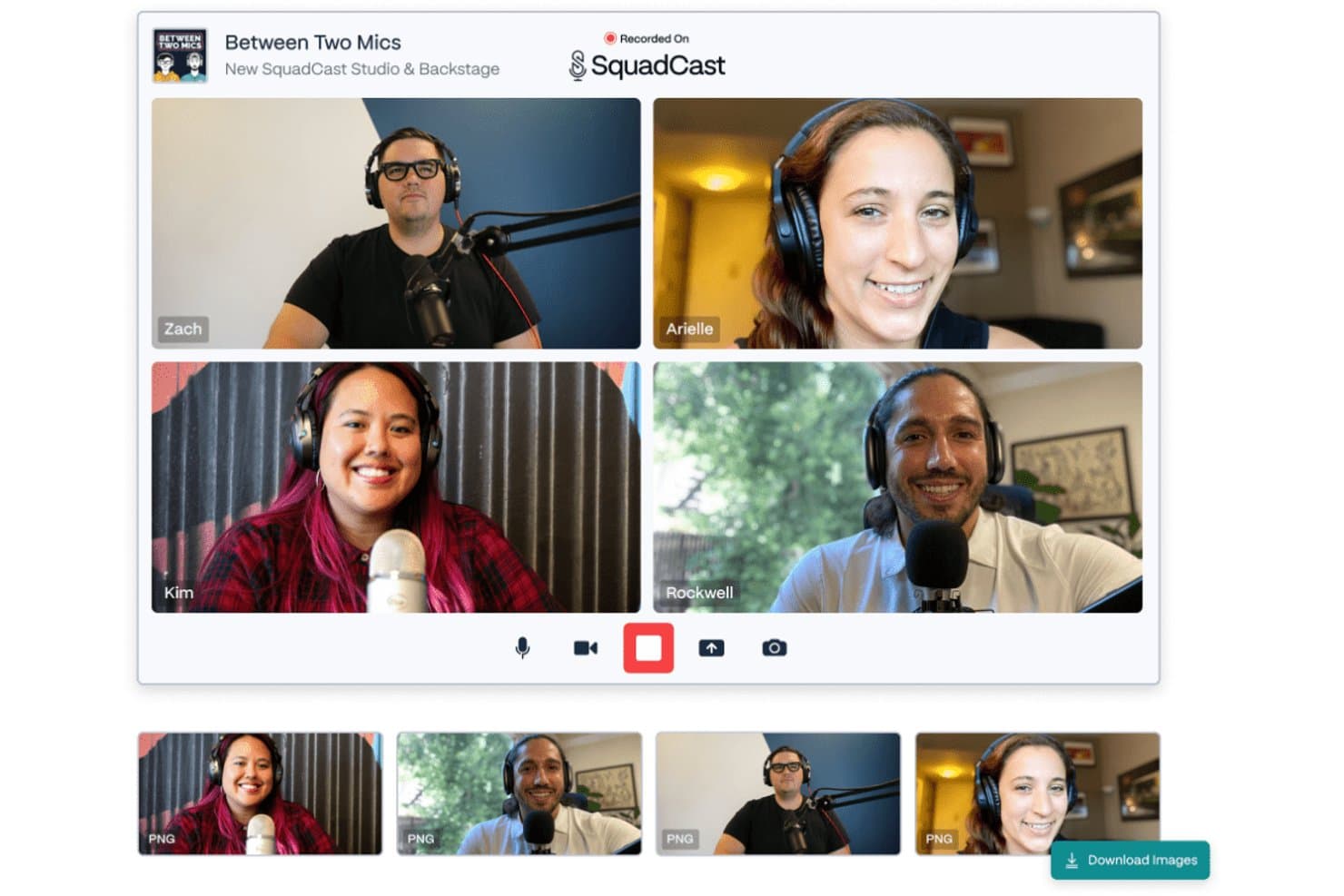
Squadcast offers a multi-participant video recording studio interface with individual video feeds, microphone setups, and a screenshot capture feature for podcast recordings. Squadcast is a browser-based remote recording platform that uses patented Progressive Upload technology to capture separate local audio and video tracks per participant, now bundled with Descript's AI-powered editing and publishing suite.
Who Is Squadcast Best For?
Squadcast is a strong fit for brand podcast producers and content marketing teams who prioritize recording quality over live production features.
Why I Picked Squadcast
Squadcast earns its spot as one of the best on my shortlist because of how it handles the actual moment of recording. The patented Progressive Upload system continuously backs up each participant's local audio and video track to the cloud mid-session, so a dropped connection never means a lost take. I also love that each guest records raw, uncompressed WAV audio at 48kHz locally, which means I'm working with broadcast-quality source files before any editing even begins.
Squadcast Key Features
- AI-powered clip generation: Instantly create short-form social clips with automated vertical video, captions, and transcript search.
- Separate audio and video tracks: Record isolated tracks for each participant to allow flexible post-production edits.
- Guest Backstage mode: Bring producers or talent into a session silently before moving them on mic or camera.
- API and Zapier integration: Automate workflows by connecting Squadcast recording events to other tools in your stack.
Squadcast Integrations
Squadcast offers native integrations with Descript, Dropbox, Google Calendar, Apple iCalendar, Outlook Calendar, Captivate, SavvyCal, Edit Eddy by Headliner, Dolby.io, and Camo, and connects with Zapier. An API is available for custom integrations.
Pros and Cons
Pros:
- Includes AI video editing with Descript
- Progressive upload saves recordings
- Local audio and video tracks for each guest
Cons:
- Maximum video quality is 1080p per participant
- No native multistreaming or livestreaming features
Learn more about Squadcast: Best for automated podcast video clipping
- Free plan available
- From $14.5/month (billed annually)
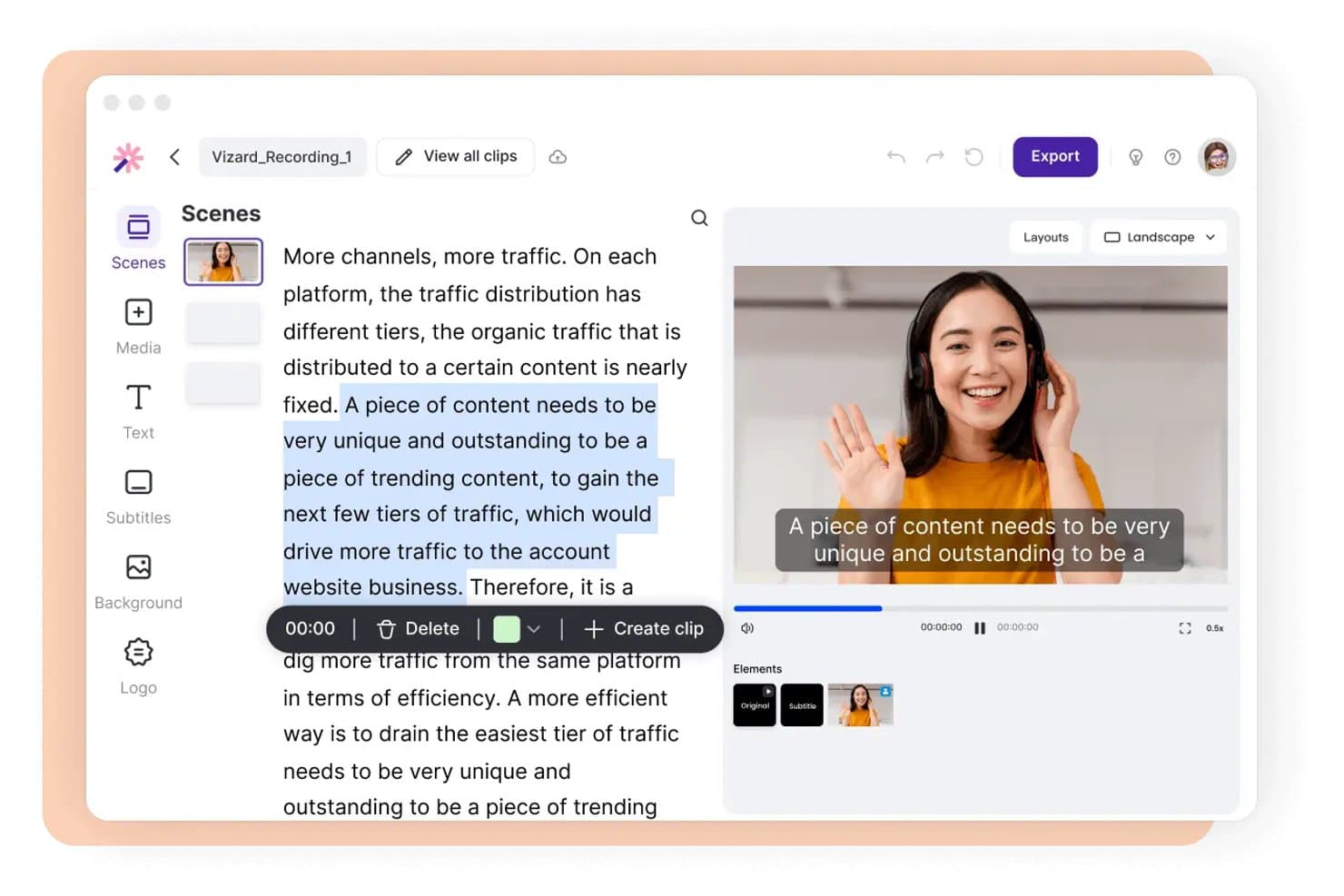
Vizard offers a text-based video editor that lets users select transcript segments and instantly create clips with subtitles. Vizard is an AI-powered video repurposing tool that takes long-form podcast recordings and automatically generates short, captioned, social-ready clips with auto-reframing, transcript-based editing, and direct multi-platform publishing.
Who Is Vizard Best For?
Vizard is a strong fit for social media content leads and content marketing managers who regularly repurpose podcast episodes into short-form clips for TikTok, Reels, and Shorts.
Why I Picked Vizard
Vizard earns its spot on my shortlist because the automated clipping pipeline cuts down the most tedious part of podcast repurposing. I paste a YouTube or Zoom link, and Vizard transcribes the full episode, identifies strong moments, and assigns each one a virality score based on hook strength, pacing, and audio energy. I can then trim clips by editing the transcript directly and export vertically reframed, captioned clips that are ready to publish.
Vizard Key Features
- AI dynamic captions: Automatically generates, customizes, and translates captions in 30+ languages for video clips.
- Team workspace: Lets multiple users collaborate, share projects, and manage brand assets in a centralized interface.
- Direct social publishing: Connects up to 20 social media accounts for scheduling and publishing clips from a content calendar.
- API access: Provides a REST API to automate video clip generation and publishing processes programmatically.
Vizard Integrations
Vizard offers native integrations with YouTube, Zoom, and Google Drive, provides direct social publishing to TikTok, Instagram, Facebook, LinkedIn, and X, and includes an API for custom integrations.
Pros and Cons
Pros:
- Multi-account direct publishing for social platforms
- Auto-captioning supports 30+ languages
- Direct social scheduling across accounts
Cons:
- Export duration limited on standard tiers
- Does not support live recording sessions
Learn more about Vizard: Best for hosting with built-in distribution tools
- Free plan available
- From $12/month (billed annually)
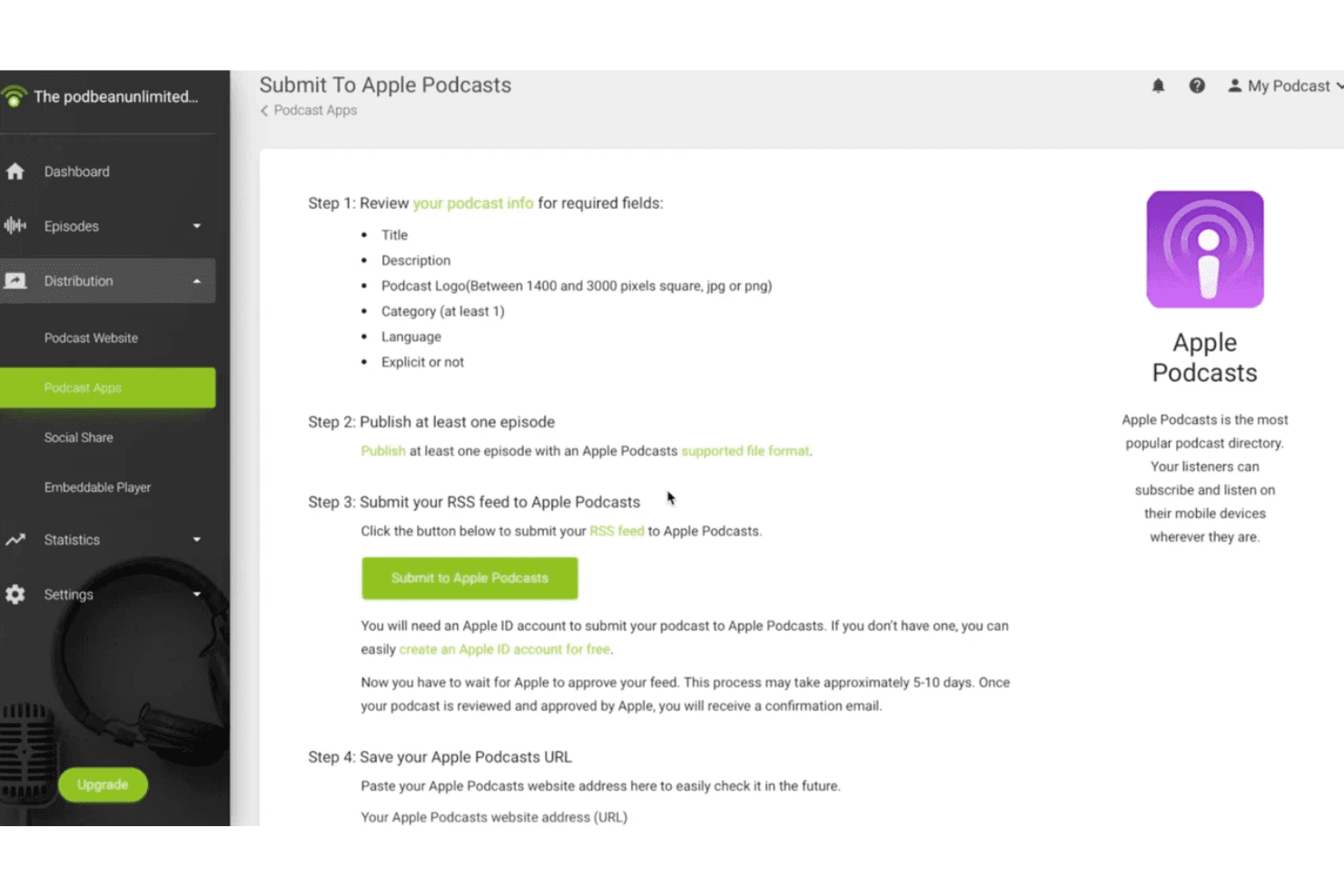
Podbean offers a step-by-step guide to submit your podcast RSS feed directly to Apple Podcasts from its distribution dashboard. Podbean is a podcast hosting platform that supports audio and video podcast publishing, combining unlimited cloud storage, one-click directory distribution, built-in monetization tools, and AI-assisted content creation.
Who Is Podbean Best For?
Podbean suits independent creators and brand content teams who need a centralized hub for hosting, distributing, and monetizing both audio and video podcast content.
Why I Picked Podbean
Podbean earns its spot on my shortlist because one-click distribution to Apple Podcasts, Spotify, Amazon Music, and iHeartRadio means I don't have to manage directory submissions separately. I also like the auto-share feature, which pushes new video episodes directly to YouTube, Facebook, and LinkedIn the moment they publish. The video-to-podcast conversion tool lets me sync a YouTube playlist into a podcast feed automatically, without any manual re-uploading between platforms.
Podbean Key Features
- Video podcast hosting: Upload and host video podcasts on plans that support video alongside audio content.
- Private podcasting: Restrict access to video podcast episodes with private or internal distribution controls.
- AI audio optimization: Use built-in AI tools for noise reduction, audio leveling, and silence removal on uploaded content.
- Custom podcast websites: Generate a mobile-responsive podcast website with customizable themes for your video or audio show.
Podbean Integrations
Podbean offers native integrations with Mailchimp, Dropbox, Google Analytics, Launchsoft, WaveLab, and Dataddo. An API is available for custom integrations.
Pros and Cons
Pros:
- AI-powered audio processing and leveling
- Automated video-to-podcast conversion tool
- Supports video podcast and audiogram uploads
Cons:
- No built-in live video editing tools
- Lacks multi-track video recording support
Learn more about Podbean: Best for live event integration
- Free demo available
- Pricing upon request
Visit WebsiteCustomer Rating:4.9/5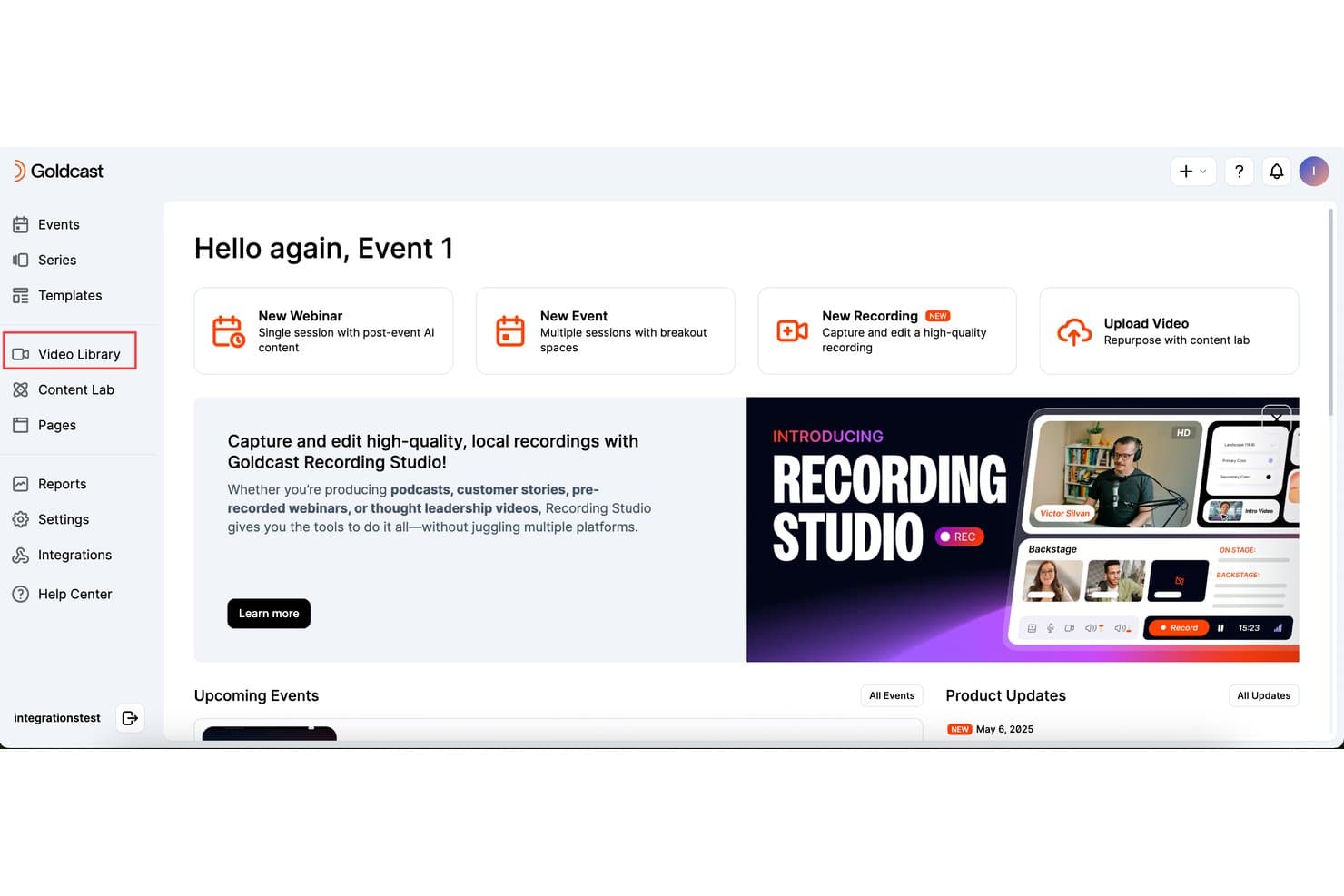
Goldcast offers a Video Library section and a Recording Studio feature for capturing and editing high-quality local recordings, suitable for podcasts and pre-recorded content. Goldcast Recording Studio is a B2B video recording platform that captures HD local multi-track recordings for podcasts, interviews, and pre-recorded webinars, with built-in editing tools and direct publishing to live events and branded video hubs.
Who Is Goldcast Best For?
It's a strong fit for B2B demand generation and content marketing teams that already run webinar or virtual event programs and want to extend that content into a podcast format.
Why I Picked Goldcast
Goldcast earns its spot on my shortlist because no other video podcast tool I've used connects recorded content directly to a live event pipeline the way this one does. I record an interview with per-participant local HD tracks, then publish it straight into a pre-recorded webinar or branded video hub, with no file exporting needed. Content Lab then picks up that same recording and auto-generates clips, captions, and social posts from it automatically.
Goldcast Key Features
- Automatic guest invites and calendar holds: Send scheduling links and calendar blocks automatically to podcast or interview guests.
- Text-based editing tools: Edit video and audio recordings directly by making quick text edits to transcripts.
- Custom branding overlays: Add logos, speaker name cards, backgrounds, and custom layouts during editing.
- Multi-format export options: Download recordings in separate audio and video tracks, suitable for multiple platforms.
Goldcast Integrations
Goldcast offers native integrations with HubSpot, Eloqua, Salesforce Pardot, Salesforce Sales Cloud, Validar, Slack, Wistia, and supports custom integrations via API.
Pros and Cons
Pros:
- Automated calendar holds for interview guests
- Local HD multi-track recording for guests
- Direct publishing to live or simulated events
Cons:
- Editing tools lack multi-clip stitching
- Requires enterprise pricing upon request
Learn more about Goldcast: Best for remote interviews with HD recordings
- 14-day free trial + free plan + free demo available
- From $24/month (billed annually)
Visit WebsiteCustomer Rating:4.8/5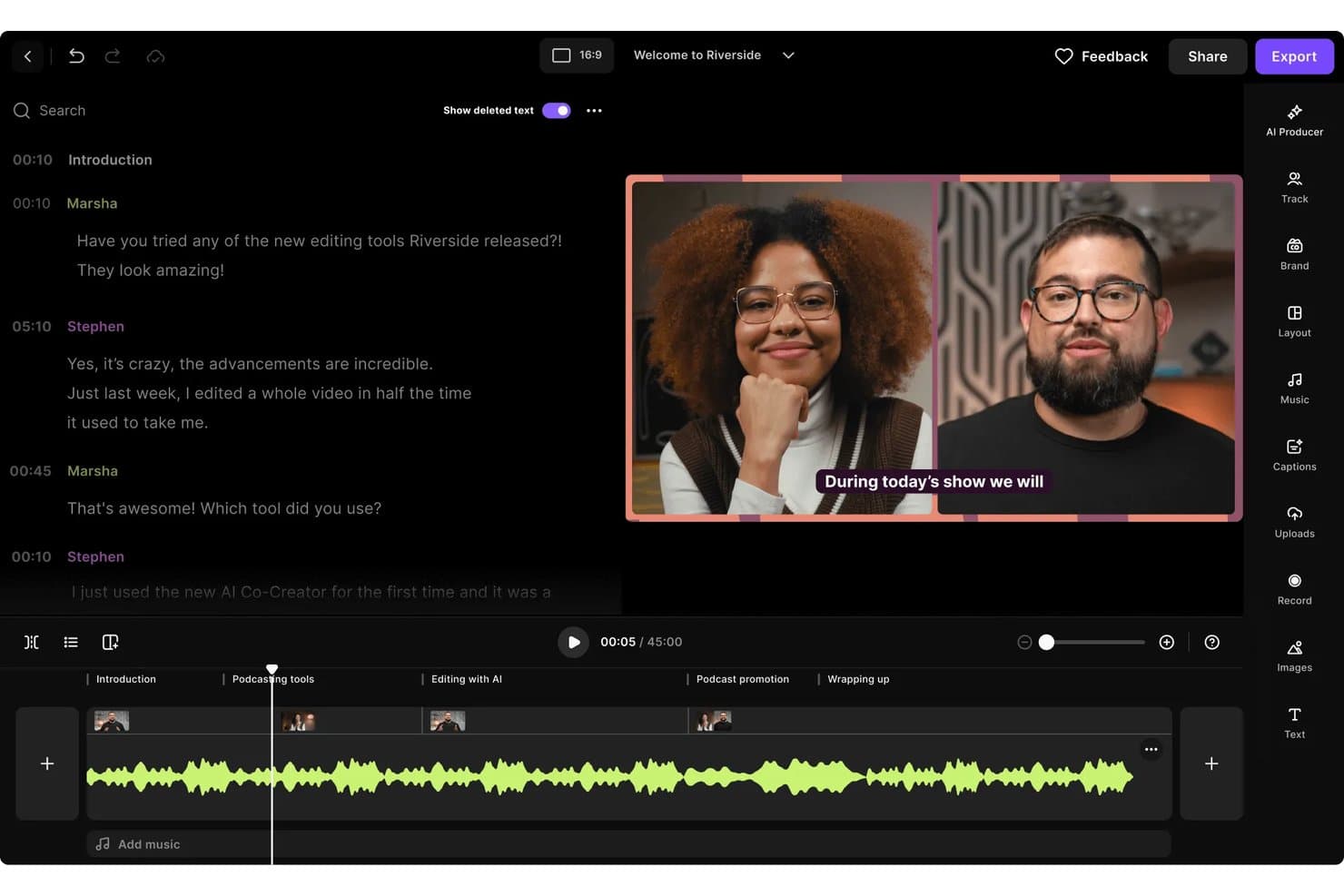
Riverside offers a video podcast editor with transcript-based editing, multi-speaker video preview, captions, and a timeline with labeled sections for easy navigation. Riverside (or Riverside.fm) is an all-in-one video podcast platform that combines local multi-track recording in up to 4K, AI-powered editing, short-form clip generation, multistreaming, and episode publishing tools.
Who Is Riverside Best For?
Riverside is a strong fit for content marketing teams and brand podcast producers who record regularly with remote guests and need quality output without a dedicated production setup.
Why I Picked Riverside
Riverside earns its spot on my shortlist because of how it handles the biggest risk in remote recording: a guest's unstable internet connection. It records each participant's audio and video locally on their device in up to 4K, then uploads automatically, so the output is never at the mercy of a shaky WiFi signal. I also rely on its text-based editor to cut silences and filler words directly from the transcript, turning a raw interview into a clean episode without switching tools.
Riverside Key Features
- AI Magic Clips: Instantly generates vertical, captioned social clips from long-form episodes.
- Multistreaming: Broadcasts live to multiple platforms like YouTube, Facebook, and LinkedIn at once.
- Magic Audio enhancement: Automatically cleans and levels audio tracks during editing.
- Branded studio overlays: Supports custom backgrounds, logos, and lower thirds for consistent brand visuals.
Riverside Integrations
Riverside offers native integrations with Adobe Premiere Pro, Final Cut Pro, Spotify for Podcasters, Transistor, Castos, HubSpot, Salesforce, and Google Calendar. An API is available for custom integrations.
Pros and Cons
Pros:
- Built-in teleprompter for solo recording sessions
- Generates AI transcripts with high accuracy
- Captures local 4K resolution per participant
Cons:
- Mobile recording quality lags behind desktop
- Occasional delays processing large video files
Learn more about Riverside: Best for fast editing with text-based tools
- Free plan available
- From $16/user/month (billed annually)
Visit WebsiteCustomer Rating:4.6/5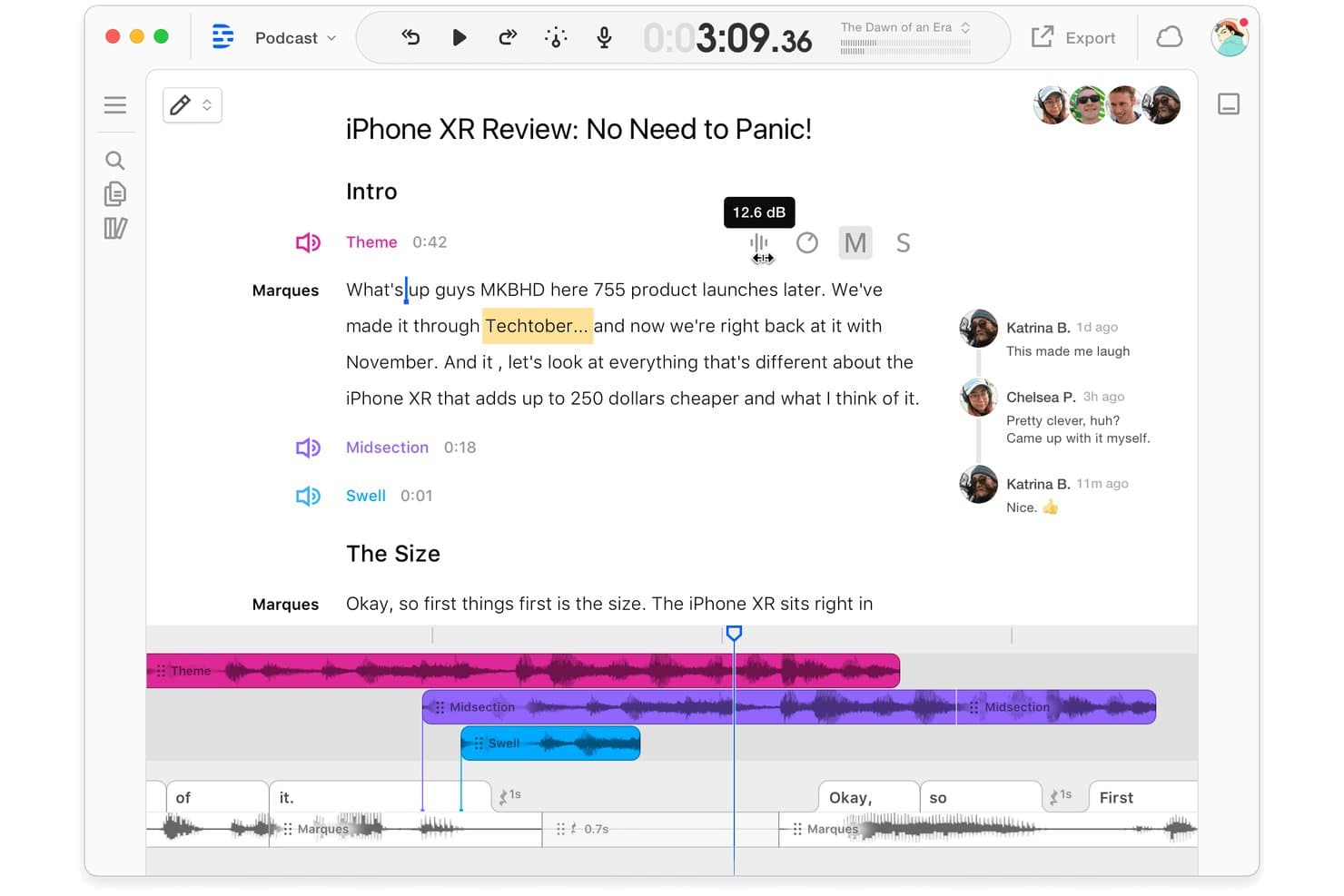
Descript offers a collaborative podcast editing interface with transcript-based editing, multi-track audio timeline, and real-time team commenting. Descript is a video podcast editing platform that combines text-based audio and video editing, remote multi-track recording, AI-powered clip generation, and direct publishing into a single workflow.
Who Is Descript Best For?
Descript works well for solo creators and small marketing teams who need to produce, edit, and distribute video podcasts without a separate post-production setup.
Why I Picked Descript
I picked Descript as one of the best because its text-based editing approach genuinely changes how fast you can cut a video podcast. Instead of scrubbing through a timeline, I edit the auto-generated transcript directly, deleting words or sentences to remove them from the audio and video simultaneously. The Underlord AI co-editor takes this further by automatically identifying and stripping out filler words and retakes across an entire recording in seconds.
Descript Key Features
- Remote multi-track recording: Capture up to 10 participants with local, individual audio and video tracks for each guest.
- Studio Sound audio enhancement: Use AI-powered processing to make every voice recording sound clear and professional.
- Brand Studio customization: Apply custom brand assets, intros, overlays, and templates directly in your editing project.
- AI-powered clip generation: Automatically create short-form, vertical video clips ready for TikTok, Reels, or Shorts.
Descript Integrations
Descript offers native integrations with Zoom, SquadCast, Restream, Wistia, YouTube, Buzzsprout, Captivate, Podbean, Google Drive, and HubSpot.
Pros and Cons
Pros:
- Studio Sound automatically improves vocal clarity
- AI-generated filler word and retake removal
- Overdub feature creates realistic AI voiceovers
Cons:
- Lacks multi-camera video switching features
- Processing speed slows down on large files
Learn more about Descript: Best for multi-track audio and video recording
- Free plan + free trial available
- From $24/month (billed annually)
Visit WebsiteCustomer Rating:3.8/5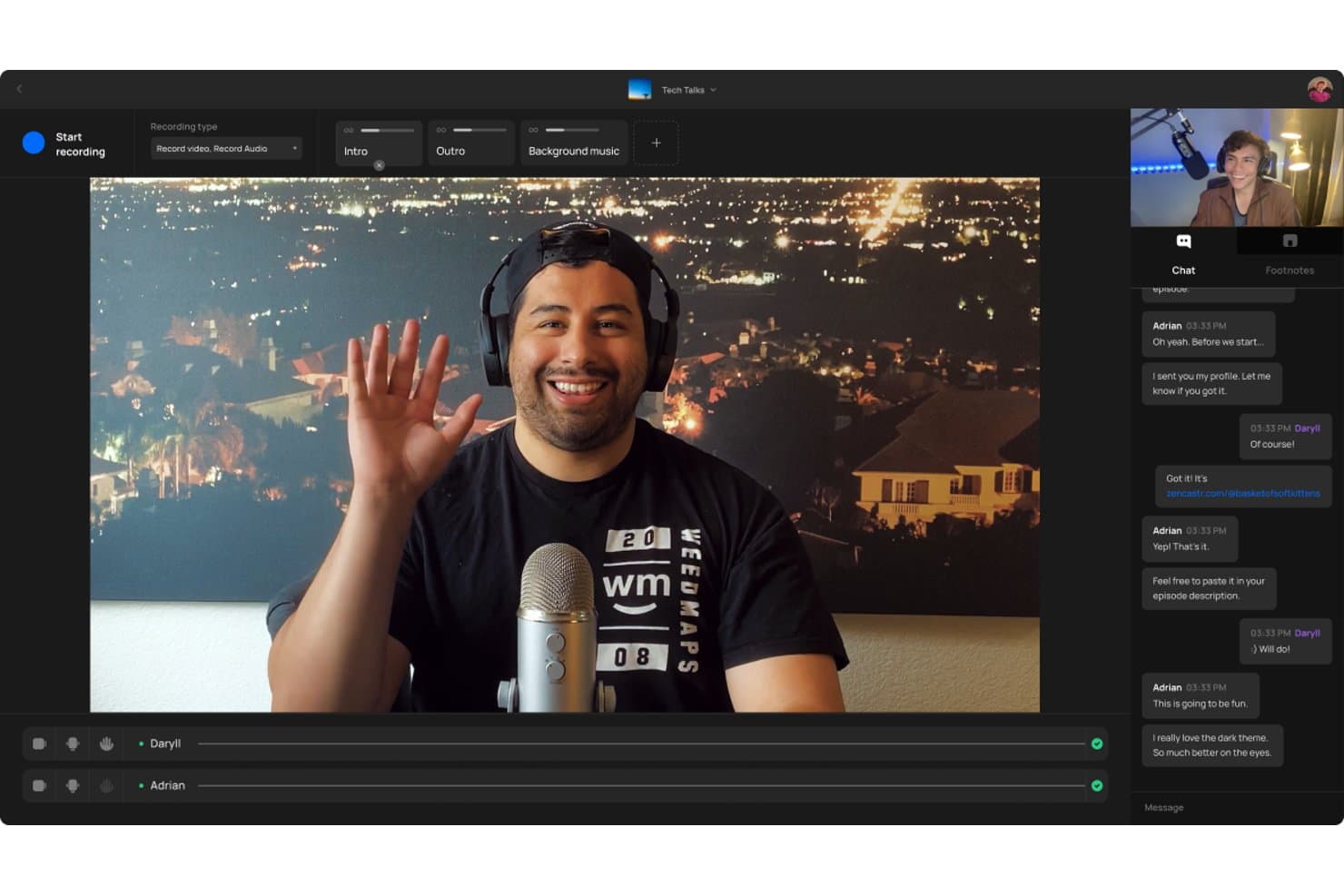
Zencastr offers a video podcast recording interface with multi-participant support, live chat, and audio/video controls including intro, outro, and background music tracks. Zencastr is a browser-based video podcast platform that records separate local audio and video tracks per participant, with built-in AI editing, clip generation, hosting, and social distribution tools.
Who Is Zencastr Best For?
Zencastr is a strong fit for solo creators and small marketing teams who need studio-quality remote recordings without a dedicated post-production setup.
Why I Picked Zencastr
Zencastr earns its spot on my shortlist because of how it handles multi-track recording at the source. Rather than capturing a mixed feed, it records each participant's audio and video locally on their device, so a shaky internet connection won't degrade the final file. I get separate 4K video tracks and lossless 16-bit 48kHz WAV audio per guest, which makes editing in post a much cleaner process.
Zencastr Key Features
- Text-based editing suite: Edit video and audio by editing transcribed text directly in the browser.
- AI-powered clip generation: Automatically create shareable video clips with captions and titles for social platforms.
- Dynamic ad insertion: Insert and manage personalized pre-roll, mid-roll, and post-roll ads in your episodes.
- Team collaboration tools: Invite multiple team members to manage shows, edit content, and handle publishing.
Zencastr Integrations
Zencastr offers native integrations with YouTube, Apple Podcasts, and Spotify.
Pros and Cons
Pros:
- Automatic clip creation with social publishing
- Dynamic ad insertion tools for monetization
- Lossless 16-bit 48kHz WAV audio recording
Cons:
- Customer support response is often delayed
- No live streaming to any platforms
Learn more about Zencastr: Best for browser-based multi-guest production
- Free plan available
- From $44.99/month
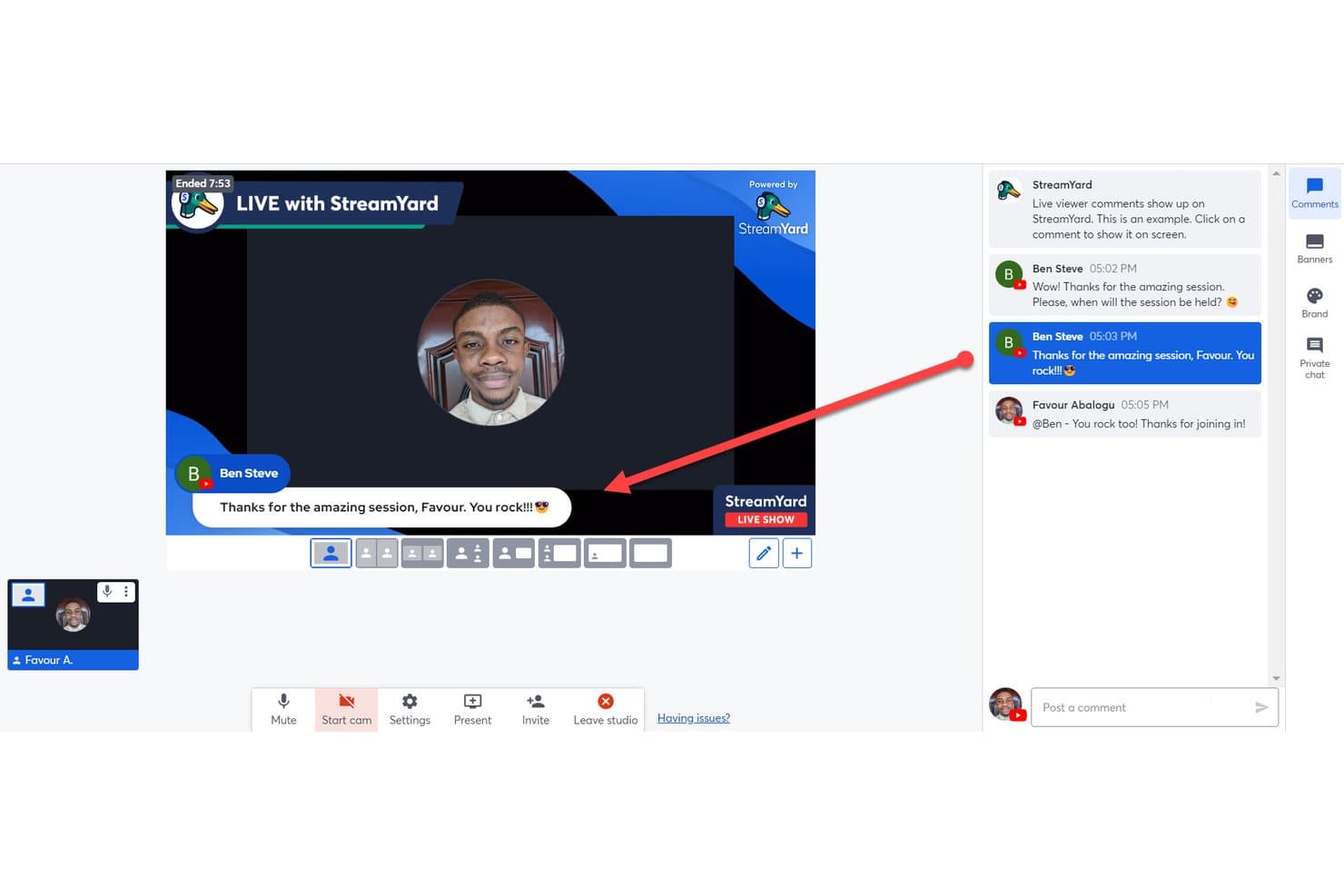
StreamYard offers a live comment display feature that lets hosts pin viewer comments directly onto the broadcast screen during a live show. StreamYard is a browser-based live streaming and video podcast platform that combines multi-guest recording, multi-streaming to social platforms, branded overlays, and AI clip generation in a single studio.
Who Is StreamYard Best For?
StreamYard is a strong fit for content creators, social media teams, and brand podcast producers who prioritize live publishing and multi-guest production over deep post-production editing.
Why I Picked StreamYard
StreamYard earns its spot on my shortlist because no-download, browser-based guest access genuinely removes the biggest friction point in remote podcast production. I can bring up to 10 guests on screen with local recordings captured per participant, so a shaky Wi-Fi connection on someone's end doesn't wreck the final audio or video. The Greenroom feature lets me prep guests off-air before they go live, which I've found invaluable for keeping multi-guest episodes running smoothly.
StreamYard Key Features
- AI Clips: Instantly generate short-form, vertical videos from recorded episodes for social sharing.
- Branded customization tools: Add custom logos, overlays, backgrounds, fonts, and video clips within the studio.
- Multistreaming to multiple platforms: Broadcast live to Facebook, YouTube, LinkedIn, X, Twitch, and custom RTMP destinations at once.
- On-Air webinars: Host webinars with audience registration and embed them directly on your website.
StreamYard Integrations
StreamYard offers native integrations with Facebook, LinkedIn, YouTube, X (Twitter), Twitch, Kick, and Vimeo.
Pros and Cons
Pros:
- Private greenroom simplifies pre-show guest prep
- Supports up to ten on-screen guests
- No-download browser-based guest access
Cons:
- Separate track export is not always available
- Local multi-track recording requires higher plans
Learn more about StreamYard:
Andere software voor videopodcasts
Hier zijn enkele aanvullende opties voor software voor videopodcasts die mijn selectie niet hebben gehaald, maar toch het bekijken waard zijn:
- 11AsyncBest for asynchronous team podcasting
- 12EcammBest for live streaming on Mac devices
- 13MelonBest for instant cloud-based broadcasting
- 14CastMagicBest for AI-powered transcript generation
- 15vMixBest for live video mixing features
- 16Adobe Premiere ProBest for professional-grade editing flexibility
- 17Hindenburg ProBest for intuitive audio story editing
- 18LibsynBest for publishing and monetization options
- 19BuzzsproutBest for detailed listener analytics reports
- 20Streamlabs Talk StudioBest for multi-platform streaming from browser
How I Evaluate Video Podcast Software
I evaluate video podcast software in two layers: the core capabilities a tool must have—like multi-track recording—and the differentiators, like AI clip tools and live streaming, that set it apart.
Core Functionality (Table Stakes For This List)
When I'm selecting tools for my list, I rank each one on a scale from 0 (does not offer the functionality) to 5 (excels in this area) for each core functionality listed below. Then, I calculate the tool's total score into a percentage. Each tool needs to achieve a minimum total score of 65% to be considered for inclusion.
- Remote Multi-Track Recording: I check whether each participant's audio and video are captured as separate local tracks, so a guest's weak Wi-Fi won't tank your final mix.
- High-Resolution Video Capture: The minimum I look for is 1080p per participant, with bonus points for tools that offer 4K and individual track exports for post-production.
- Integrated Video Editing: I evaluate the in-platform editor for trimming, transitions, and layout switching—things like multi-cam views that let you skip a round trip to Premiere.
- Short-Form Clip Generation: I look at how each tool handles turning a 45-minute episode into vertical clips for Reels or Shorts, especially AI-driven reframing and caption options.
- Live Streaming & Multistreaming: Can you go live to YouTube, LinkedIn, and Facebook at the same time? I evaluate destination count, RTMP support, and live producer controls.
- Branded Customization: I look for logo overlays, custom backgrounds, lower thirds, and saved brand templates—everything your team needs to keep episodes visually on-brand.
Once I have a list of tools that meet the criteria, I consider what sets each platform apart.
Differentiating Factors (What Sets Vendors Apart)
Here's how I compare and contrast different vendors:
Standout Features
AI-powered clip generation is a major differentiator. I evaluate whether a tool can identify highlight moments from a full episode and auto-reframe them into vertical clips with animated captions for TikTok or Shorts. Automated show notes and transcripts matter just as much—chapter markers and SEO-ready summaries can save your team hours of post-production work. Live simulcast support also stands out, since broadcasting to YouTube, LinkedIn, and custom RTMP destinations at the same time turns one recording session into a multi-channel content event.
Beyond Features
The guest experience matters a lot. I look for browser-based access with pre-session mic and camera checks so non-technical guests can join without downloading anything. Post-production workflow is another big factor—text-based editing and automatic audio leveling can cut hours from your editing pipeline. I also evaluate distribution integrations, like native connections to hosting platforms and YouTube metadata syncing, since one-click publishing keeps your team from juggling multiple dashboards on release day.
Zo kies je software voor videopodcasts
Het is gemakkelijk om verstrikt te raken in lange lijsten met functies en ingewikkelde prijsstructuren. Om je te helpen gefocust te blijven terwijl je je unieke softwarekeuzeproces doorloopt, volgt hier een controlelijst met factoren om rekening mee te houden:
| Factor | Waar je rekening mee moet houden |
|---|---|
| FactorSchaalbaarheid | Waar je rekening mee moet houdenKan het platform meerdere podcasts of afleveringen aan naarmate je team groeit? Houd rekening met limieten voor deelnemers en opslag. |
| FactorIntegraties | Waar je rekening mee moet houdenWerkt het soepel samen met je favoriete bewerkingstools, publicatieplatforms of analysedashboards? Vermijd handmatige gegevensoverdracht. |
| FactorAanpasbaarheid | Waar je rekening mee moet houdenKun je opnames eenvoudig van je huisstijl voorzien of lay-outs aanpassen aan de visuele identiteit en creatieve behoeften van je bedrijf? |
| FactorGebruiksgemak | Waar je rekening mee moet houdenHoe steil is de leercurve? Kunnen niet-technische gasten of nieuwe teamleden ermee aan de slag zonder lange uitleg? |
| FactorImplementatie en introductie | Waar je rekening mee moet houdenHoeveel configuratie is vereist? Zoek naar begeleide introductie, kennisbanken of ondersteuning in de app om vertragingen bij de lancering te voorkomen. |
| FactorKosten | Waar je rekening mee moet houdenSluiten de abonnementen aan bij je opnamevolume, exportbehoeften en gebruikersrollen? Controleer terugkerende kosten en beperkingen bij upgrades. |
| FactorBeveiligingsmaatregelen | Waar je rekening mee moet houdenWelke maatregelen voor gegevensbescherming beveiligen je onbewerkte beeldmateriaal, gastgegevens en distributiekanalen? Vraag naar versleuteling en privacycontroles. |
| FactorBeschikbaarheid van ondersteuning | Waar je rekening mee moet houdenHeb je toegang tot tijdige hulp als er iets misgaat? Controleer of er opties zijn voor livechat, e-mail of telefonische ondersteuning die bij je werkproces passen. |
Wat is software voor videopodcasts?
Software voor videopodcasts is een verzameling hulpmiddelen die is ontworpen om podcasts met zowel video- als audio-elementen op te nemen, te bewerken en te verspreiden. Je krijgt alles wat je nodig hebt om interviews op afstand vast te leggen, visuele elementen in je huisstijl te maken, clips voor sociale media te genereren en afleveringen vanuit één werkproces op meerdere platforms te publiceren. Deze software helpt je team professionele, visueel boeiende inhoud te produceren zonder technische problemen.
Functies van software voor videopodcasts
Let bij het kiezen van software voor videopodcasts op de volgende belangrijke functies:
- Opnemen op afstand met meerdere sporen: Leg afzonderlijke audio- en videobestanden vast voor elke deelnemer, zodat je maximale flexibiliteit bij het bewerken en hoogwaardige resultaten hebt, ongeacht de internetverbinding.
- Video-opname met hoge resolutie: Neem video op in volledige HD of 4K per deelnemer om professionele, scherpe beelden te leveren die via elk distributiekanaal goed tot hun recht komen.
- Geïntegreerde videobewerking: Bewerk podcasts binnen het platform—knip fragmenten bij, voeg overgangen toe of wissel van indeling—zonder over te schakelen naar externe bewerkingssoftware.
- Creatie van korte videofragmenten: Genereer automatisch of handmatig verticale, voor sociale media geschikte videofragmenten voor platforms zoals TikTok, Instagram Reels en YouTube Shorts.
- Live uitzenden en gelijktijdig uitzenden op meerdere platforms: Zend afleveringen tegelijkertijd live uit naar meerdere bestemmingen, zoals YouTube en LinkedIn, om het publieksbereik vanuit één sessie te vergroten.
- Aanpassing aan je huisstijl: Voeg logo's, achtergronden, overlays en merkmiddelen rechtstreeks toe aan je video-uitvoer voor een consistente, verzorgde uitstraling.
- Door AI aangedreven transcripties en shownotities: Gebruik ingebouwde AI-hulpmiddelen om transcripties, samenvattingen en hoofdstukmarkeringen te maken, zodat je content gemakkelijker opnieuw kan worden gebruikt en geoptimaliseerd voor SEO.
- Gasten laten deelnemen via de browser: Laat gasten via een eenvoudige weblink deelnemen aan opnames zonder dat ze software hoeven te downloaden, waardoor technische drempels voor deelnemers op afstand worden verlaagd.
- Integraties voor direct publiceren: Publiceer voltooide afleveringen met één klik rechtstreeks op podcastplatforms of sociale kanalen, waardoor je nabewerkingsproces sneller verloopt.
Voordelen van software voor videopodcasts
Het implementeren van software voor videopodcasts biedt verschillende voordelen voor je team en je bedrijf. Hier zijn enkele voordelen waar je naar kunt uitkijken:
- Hogere productiekwaliteit: Lokale opnames met meerdere sporen en video met hoge resolutie zorgen ervoor dat je afleveringen er professioneel uitzien en professioneel klinken, ongeacht de locatie van de deelnemers.
- Snellere bewerkingsprocessen: Ingebouwde bewerkingsfuncties en door AI aangestuurde transcriptiefuncties versnellen de nabewerking, zodat je afleveringen sneller kunt publiceren.
- Meer aansprekende content: Ondersteuning voor merkhuisstijl, overlays en live uitzenden creëert een visueel rijke, interactieve ervaring die kijkers aantrekt.
- Eenvoudigere deelname van gasten: Browsergebaseerde werkprocessen maken complexe configuraties overbodig, waardoor gasten op afstand eenvoudig kunnen deelnemen met minimale technische obstakels.
- Groter publieksbereik: Integraties voor direct publiceren en gelijktijdig live uitzenden op meerdere platforms helpen je content tegelijkertijd luisteraars en kijkers op meerdere platforms te bereiken.
- Eenvoudig hergebruik: Het genereren van korte videofragmenten en automatische shownotities maakt het gemakkelijker om elke aflevering om te zetten in meerdere stukken content voor sociale media en SEO.
- Betere samenwerking: Abonnementen voor meerdere gebruikers en op rollen gebaseerde machtigingen helpen teams en bureaus om eenvoudig meerdere programma's en deelnemers te beheren.
Kosten en prijzen van software voor videopodcasts
Bij het kiezen van software voor videopodcasts is inzicht in de verschillende beschikbare prijsmodellen en abonnementen vereist. De kosten variëren op basis van functies, teamgrootte, uitbreidingen en meer. De onderstaande tabel geeft een overzicht van veelvoorkomende abonnementen, hun gemiddelde prijzen en de gebruikelijke functies die in oplossingen voor videopodcasts zijn opgenomen:
Vergelijkingstabel van abonnementen voor software voor videopodcasts
| Type abonnement | Gemiddelde prijs | Veelvoorkomende functies |
|---|---|---|
| Type abonnementGratis abonnement | Gemiddelde prijs$0 | Veelvoorkomende functiesMaakt basisopnames mogelijk, biedt audio met één spoor, een beperkte exportresolutie en basisbewerkingsfuncties. |
| Type abonnementPersoonlijk abonnement | Gemiddelde prijs$10-$30/gebruiker/maand | Veelvoorkomende functiesOndersteunt opnames met meerdere sporen, 1080p-video, het maken van socialemediaclips, beperkte huisstijlaanpassing en eenvoudige AI-transcripties. |
| Type abonnementBedrijfsabonnement | Gemiddelde prijs$35-$80/gebruiker/maand | Veelvoorkomende functiesOmvat 4K-opnames, geavanceerde bewerking, teamsamenwerking, live uitzenden, merkloze huisstijl en analyses. |
| Type abonnementEnterprise-abonnement | Gemiddelde prijs$90+/gebruiker/maand | Veelvoorkomende functiesBiedt speciale accountondersteuning, aangepaste integraties, werkruimten voor bureaus, verbeterde beveiliging en prioriteitsondersteuning. |
Veelgestelde vragen over videopodcastsoftware
Hier vind je antwoorden op veelgestelde vragen over videopodcastsoftware:
Kan ik videopodcastsoftware gebruiken om tegelijkertijd live te streamen en op te nemen?
Ja, met veel programma’s voor het opnemen van podcasts kun je live streamen naar platforms zoals YouTube en LinkedIn terwijl je lokaal audio van hoge kwaliteit en video met meerdere sporen opneemt. Je kunt presentatiemateriaal vastleggen via schermopname en zelfs live telefoongesprekken met je publiek organiseren. Zo beschik je gegarandeerd over onberispelijke, ongecomprimeerde bestanden voor nabewerking, ongeacht de kwaliteit van je live internetverbinding.
Zijn videopodcastsoftwaretools gebruiksvriendelijk voor niet-technische gasten?
Ja, de meeste moderne oplossingen bieden browsergebaseerde begeleiding voor gasten, vereisen geen softwaredownloads en bieden begeleide tutorials of controles vooraf voor camera, microfoon en belichting. Gasten kunnen deelnemen via een desktopbrowser of speciale mobiele apps op een iPhone of iPad, waardoor zelfs gasten die voor het eerst deelnemen dit met minimale moeite kunnen doen.
Hoe werkt het genereren van clips met AI in videopodcastsoftware?
Het genereren van clips met AI identificeert hoogtepunten of momenten die geschikt zijn om te delen in lange afleveringen en zet deze automatisch om in verticale of vierkante videoclips met behulp van een ingebouwde video-editor. Veel tools voegen automatisch ondertiteling, huisstijl en rechtenvrije geluidseffecten toe, waardoor je uren handmatig werk bespaart bij het hergebruiken van content voor sociale media.
Naar welke integraties moet ik zoeken in videopodcastsoftware?
Zoek naar integraties met platforms voor podcasthosting, sociale kanalen, externe audiobewerkingsprogramma’s en analysedashboards. Door je platform rechtstreeks te koppelen aan een uitgebreide audio- of video-editor, vereenvoudig je je workflow doordat je content kunt publiceren, volgen en optimaliseren zonder deze handmatig te downloaden of uploaden.
Is het mogelijk om binnen videopodcastsoftware samen te werken met een team?
Ja, veel platforms bieden abonnementen voor meerdere gebruikers en rolgebaseerde machtigingen, zodat producenten, editors en presentatoren samen afleveringen kunnen beheren, taken kunnen toewijzen en toezicht kunnen houden op de nabewerking binnen één gedeelde werkruimte.