

Gode alternativer til Unbounce gir deg fleksible landingsdesign, reelle konverteringsdata, smidige integrasjoner og enkel kontroll over arbeidsflyten. Hvis du leter etter alternativer til Unbounce, ser du sannsynligvis etter plattformer for inngående markedsføring som hjelper deg med å koble til, fange opp og kvalifisere potensielle kunder uten begrensningene til ett enkelt verktøy.
I denne veiledningen går jeg gjennom de beste alternativene som skiller seg ut for markedsføringsteam som ønsker dra-og-slipp-verktøy, analyse, automatisering og utprøvde integrasjoner med favorittsystemene dine for CRM og e-post. Du får raskt oversikt over hvilke løsninger som gjør det enklere for deg å teste, lære og forbedre den inngående markedsføringen din i 2026.
Hva er Unbounce?
Unbounce er en bygger for landingssider som er utviklet for å hjelpe markedsførere med å opprette, publisere og teste sider med høy konvertering uten koding. Plattformen fokuserer på redigering med dra-og-slipp, A/B-testing og integrasjon med markedsføringsverktøy, slik at du kan fange opp potensielle kunder og øke konverteringene med mindre støtte fra utviklere. Unbounce brukes av markedsførere som trenger detaljert analyse, raske endringer og full kontroll over designet i inngående kampanjer.
Sammenligningstabell for alternativer til Unbounce
Denne sammenligningstabellen oppsummerer prisdetaljer for mine beste utvalgte alternativer til Unbounce:
| Tool | Best For | Trial Info | Price | ||
|---|---|---|---|---|---|
| 1 | Best for simple campaign automation | 14-day free trial + free demo available | From $10.80/month | Website | |
| 2 | Best for AI-powered content generation | 30-day free trial | From $7/month (billed annually) | Website | |
| 3 | Best for personalized onsite conversion paths | Free trial + demo available | From $25/month (billed annually) | Website | |
| 4 | Best for built-in email marketing tools | 14-day free trial + free demo available | From $15.58/month (billed annually) | Website | |
| 5 | Best for contest and promotion campaigns | Free demo available | Pricing upon request | Website | |
| 6 | Best for multi-step funnel creation | 14-day free trial available | From $81/month (billed annually) | Website | |
| 7 | Best for customizable drag-and-drop building | 14-day free trial | From $24/month (billed annually) | Website | |
| 8 | Best for scalable team collaboration | 14-day free trial | From $79/month (billed annually) | Website | |
| 9 | Best for fast lead capture setup | 7-day free trial available | From $23/month (billed annually) | Website | |
| 10 | Best for smooth CRM integration | Free plan + 14-day free trial available | From $7/seat/month (billed annually) | Website |


Hvorfor du kan stole på våre programvareanbefalinger
6,700+
Reviews
20
Industry experts
16+
Evaluation factors
14
Years
Teamet vårt har testet og anmeldt programvare siden 2012. Vi er selv markedsføringsledere, så vi vet hvor vanskelig og hvor viktig det er å velge riktig programvare.
I denne guiden har vi vurdert verktøyene gjennom praktisk testing og uavhengig research og gitt dem poeng ut fra våre utvelgelseskriterier.
Anmeldelsene våre bygger på vår egen redaksjonelle vurdering. De er ikke et salgsargument.
Ekspertanmeldere:
 Gui DrusinaCreative Director
- Shriya GhateSenior Marketing Lead
 Amanda JacquesMarketing Ops Leader

Anmeldelser av de beste alternativene til Unbounce
Nedenfor finner du mine detaljerte sammendrag av de beste alternativene til Unbounce som kom med på kortlisten min. Anmeldelsene mine gir en detaljert oversikt over funksjonene, integrasjonene og de beste bruksområdene for hver plattform, slik at du kan finne det beste alternativet for deg.
 Best for simple campaign automation
- 14-day free trial + free demo available
- From $10.80/month
Visit WebsiteCustomer Rating:4.7/5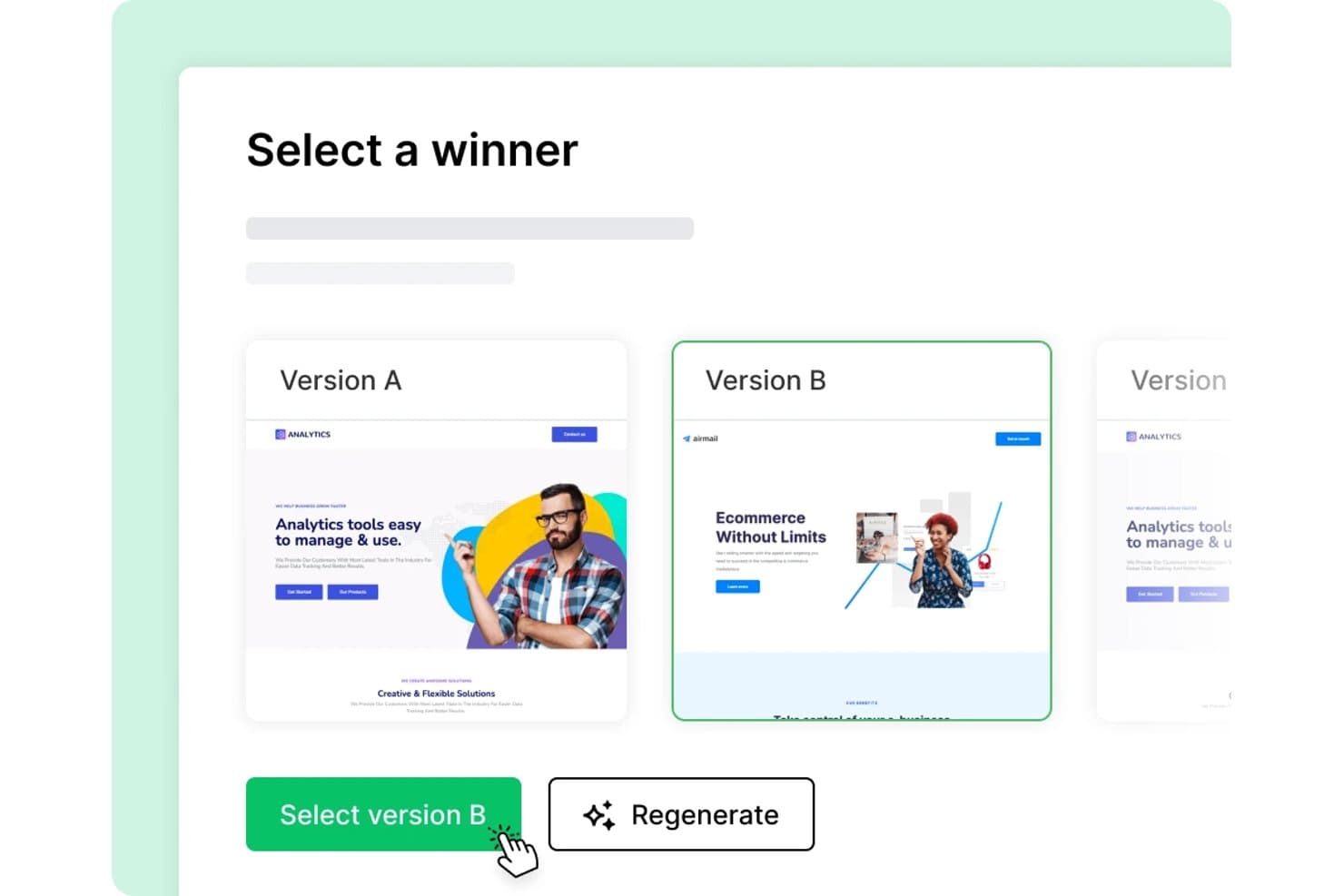
MailerLite offers an AI landing page generator that lets users select between multiple generated versions of a landing page design. MailerLite is an email marketing platform with a built-in landing page builder that appeals to small businesses and ecommerce teams who want to build, publish, and connect campaign pages to automated email workflows without needing a separate tool.
Who Is MailerLite Best For?
MailerLite fits solo marketers and small teams at early-stage companies who need an affordable, all-in-one tool for email and landing pages without managing multiple platforms.
Why MailerLite Is a Good Unbounce Alternative
I picked MailerLite because the connection between its landing pages and email automation workflows is genuinely tight. When a visitor fills out a form on a page I've built, it triggers an automation sequence instantly, no Zapier required. I also use the AI landing page generator to spin up campaign-specific pages fast, then A/B test up to five variants while the automation runs in the background.
MailerLite Key Features
- Custom domain publishing: Create and host landing pages on your own custom domains for brand consistency.
- E-commerce product blocks: Sell digital or physical products directly from landing pages using built-in Stripe and Shopify blocks.
- 70+ prebuilt content sections: Drag and drop sections like hero images, countdown timers, surveys, and testimonials without coding.
- Click heatmaps: Visualize where visitors click on any landing page to better understand and optimize user interactions.
MailerLite Integrations
MailerLite offers 50+ native integrations, including Shopify, WooCommerce, Stripe, HubSpot, Salesforce, WordPress, Facebook Lead Ads, Canva, Typeform, and Zapier. An API is available for custom integrations.
Pros and Cons
Pros:
- Product blocks support digital product sales
- A/B tests allow up to five variants
- Email automations trigger directly from landing pages
Cons:
- Lacks granular control over landing page design
- Lacks personalization options such as dynamic text replacement
 Best for AI-powered content generation
- 30-day free trial
- From $7/month (billed annually)
Visit WebsiteCustomer Rating:4.7/5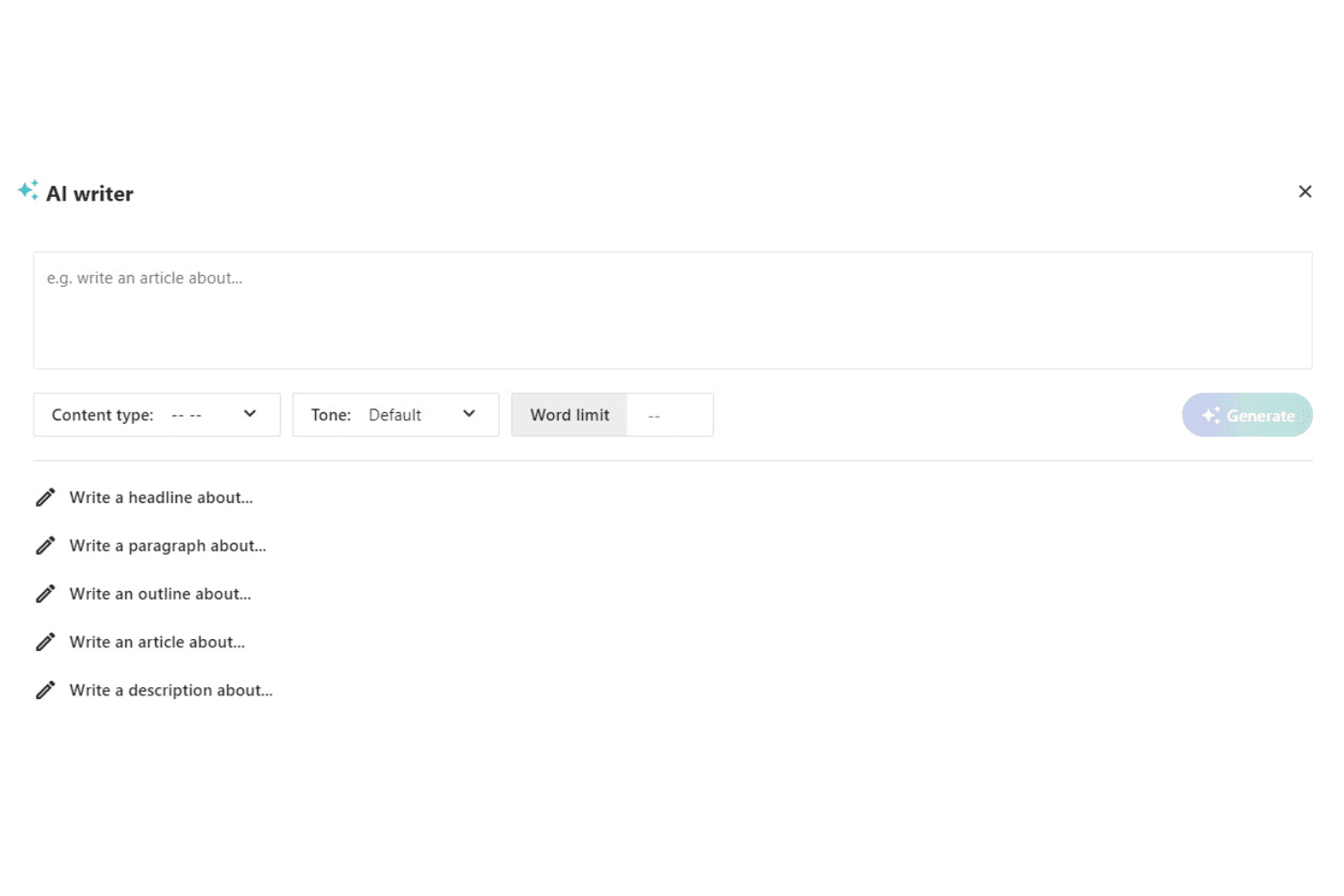
Moosend AI Writer generates marketing content from customizable prompts. Moosend is an email marketing and landing page platform for eCommerce brands and SMBs that want lead capture, automation, and AI-generated copy without juggling multiple tools.
Who Is Moosend Best For?
Moosend suits small to mid-size marketing teams that want landing pages and email automation in one budget-friendly platform.
Why Moosend Is a Good Unbounce Alternative
I've included Moosend in my top picks because of its native AI Writer, which generates landing page copy directly from a prompt inside the builder. When I'm launching a campaign quickly, I can describe my offer and get headline and body copy without switching to a separate tool. Moosend also connects those pages to multi-step automation workflows, so a lead captured on a page immediately triggers a nurture sequence without any manual routing.
Moosend Key Features
- Drag-and-drop landing page builder: Easily assemble pages using pre-made elements and sections without writing code.
- A/B testing for landing pages: Launch two page variants and track conversion rates to optimize performance.
- Conversion tracking integrations: Connect to Facebook Pixel and Google Analytics directly from the builder for end-to-end campaign measurement.
- Gamified popup forms: Use interactive wheel-of-fortune forms to capture leads and increase engagement on landing pages.
Moosend Integrations
Moosend offers 80+ native integrations, including Shopify, WooCommerce, Google Analytics, Facebook Pixel, WordPress, Salesforce, and Zapier, and provides an API for custom integrations.
Pros and Cons
Pros:
- Automated workflows connect pages and email series
- Includes gamified popup forms for lead capture
- Built-in AI copy generator for pages
Cons:
- Limited template variety compared to Unbounce
- No dedicated mobile application
Learn more about Moosend: Best for personalized onsite conversion paths
- Free trial + demo available
- From $25/month (billed annually)
Visit WebsiteCustomer Rating:4.4/5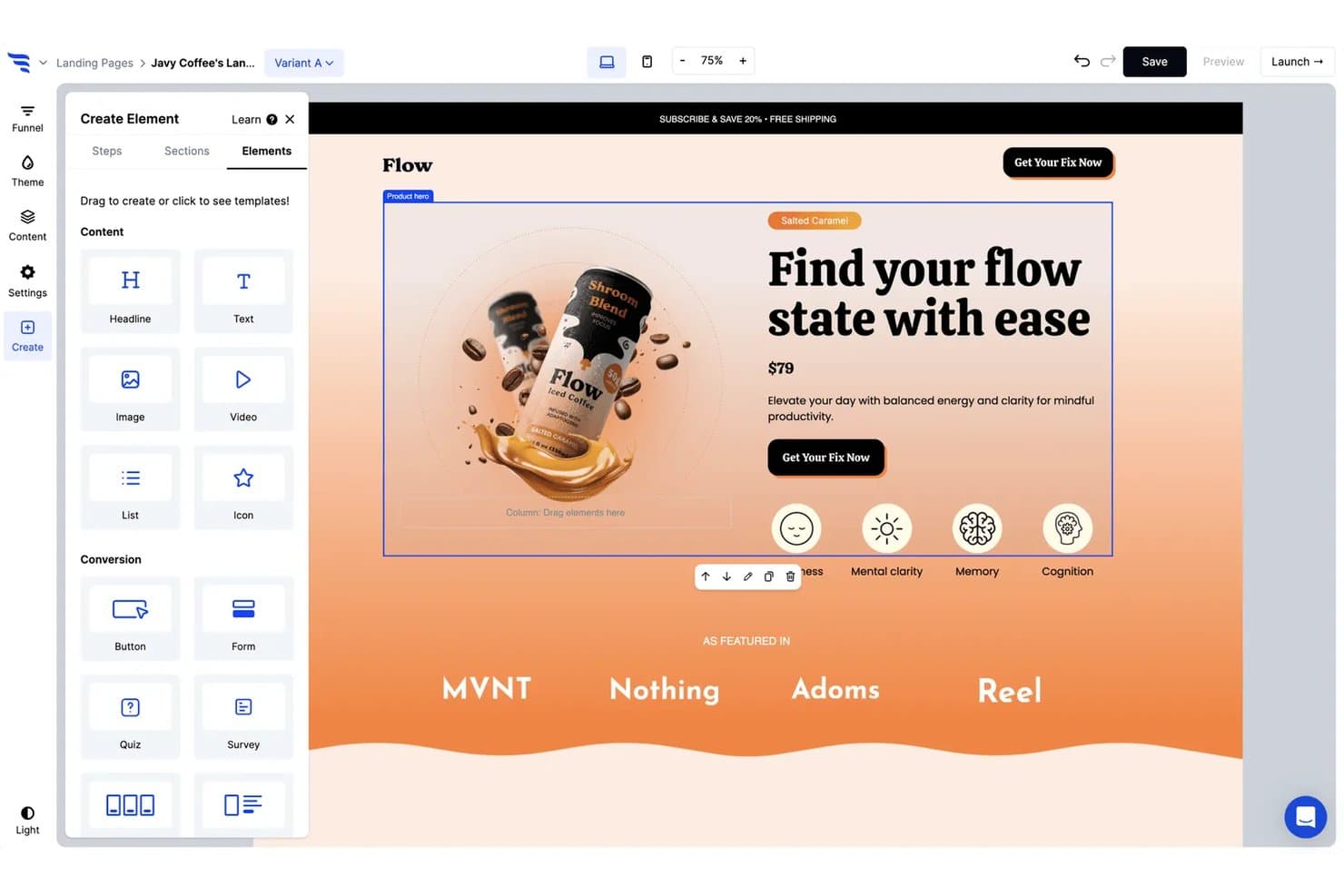
ConvertFlow offers a drag-and-drop landing page builder with product hero sections, content elements, and conversion tools for creating optimized pages. ConvertFlow is a no-code funnel builder for marketers who need more than a landing page—combining page building, quizzes, forms, and popups with conditional personalization logic to tailor the onsite experience to each visitor.
Who Is ConvertFlow Best For?
ConvertFlow is a strong fit for ecommerce and DTC marketing teams that run Shopify stores and need to personalize the buying journey beyond a single landing page.
Why ConvertFlow Is a Good Unbounce Alternative
I picked ConvertFlow because its conditional content blocks let me show different copy, offers, and CTAs to each visitor based on UTM source, quiz answers, or Shopify cart data. That's something Unbounce doesn't do. I also love the quiz builder, which routes visitors to personalized product recommendations mid-funnel, turning a single landing page into a full, segmented conversion path.
ConvertFlow Key Features
- Remix AI template builder: Instantly remix over 400 landing page templates with copy and design suggestions.
- Multi-step forms and popups: Build advanced lead capture forms, upsell popups, and sticky bars with step logic.
- Native Shopify and Klaviyo integration: Sync funnel data to ecommerce and email automation platforms directly.
- Built-in funnel A/B testing: Test multiple page, popup, and form variants within a single campaign and track performance.
ConvertFlow Integrations
ConvertFlow offers 30+ native integrations, including Shopify, Klaviyo, Attentive, HubSpot, Salesforce, ActiveCampaign, Mailchimp, Customer.io, Postscript, and Segment. Zapier is also supported, and an API is available for custom integrations.
Pros and Cons
Pros:
- Direct Shopify checkout and product data support
- Supports multi-step funnels and quizzes
- Advanced conditional logic for content personalization
Cons:
- Template editing flexibility has some limitations
- Page load times can be inconsistent
Learn more about ConvertFlow: Best for built-in email marketing tools
- 14-day free trial + free demo available
- From $15.58/month (billed annually)
Visit WebsiteCustomer Rating:4.2/5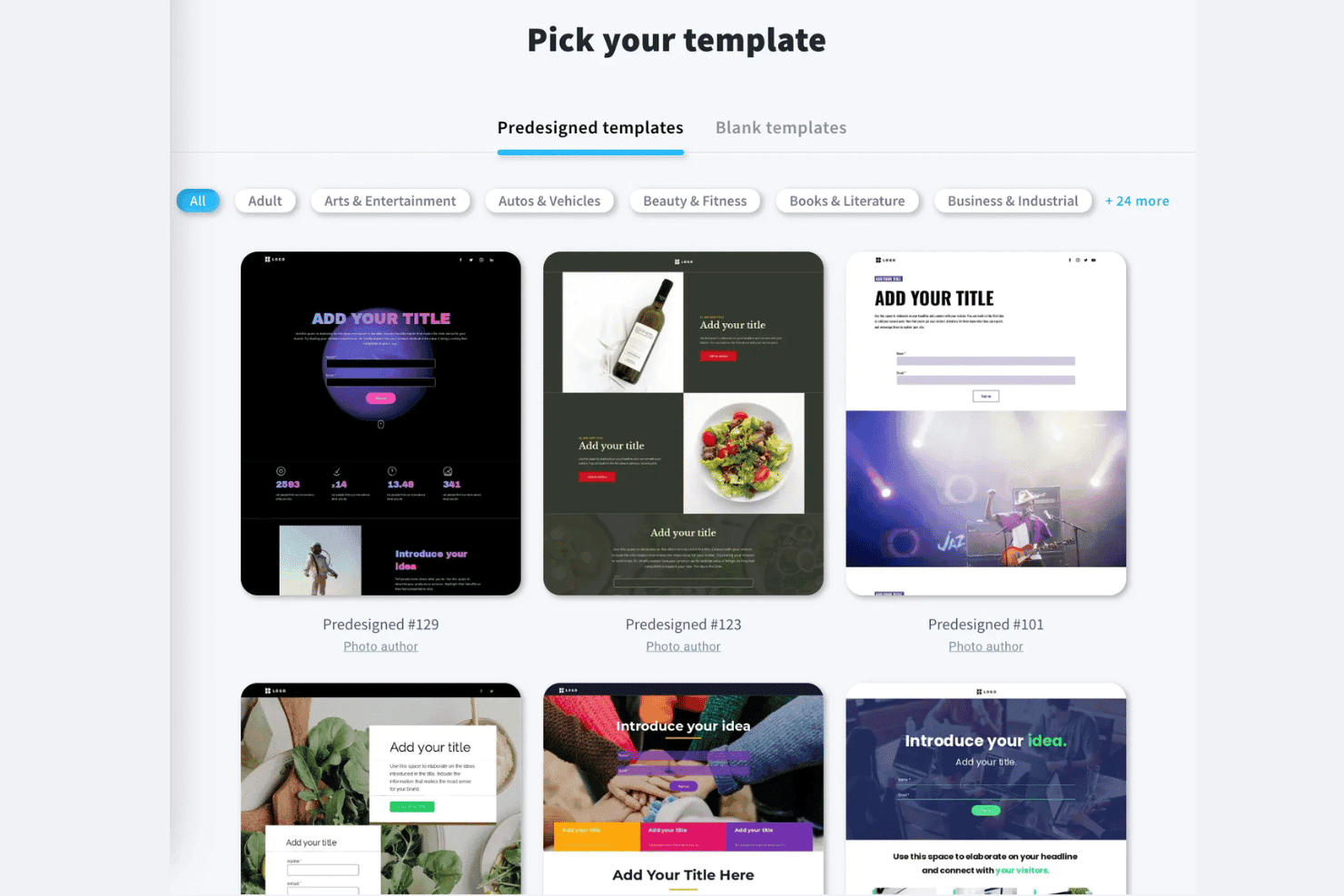
GetResponse offers a predesigned template library for landing page creation. GetResponse is an all-in-one marketing platform that combines landing page creation, email marketing, automation, and lead capture tools for marketers who want to run campaigns without juggling multiple disconnected tools.
Who Is GetResponse Best For?
GetResponse suits small to mid-sized ecommerce teams and solo marketers who need landing pages, email, and automation managed from a single platform.
Why GetResponse Is a Good Unbounce Alternative
I picked GetResponse as one of the best Unbounce alternatives because it connects landing pages directly to email automation, without needing a separate ESP. When a visitor submits a form, I can trigger a segmented welcome sequence, lead scoring, or an abandoned cart email all from the same platform. That native connection between page capture and inbox follow-up is what sets it apart from dedicated landing page builders.
GetResponse Key Features
- AI-powered landing page generator: Instantly create landing pages by describing your campaign or audience and get multiple copy and design variations.
- Webinar hosting: Host live or automated webinars directly within the platform for lead generation and engagement.
- Popups and forms editor: Design and deploy targeted popups, embedded forms, and exit-intent overlays using pre-built templates and display rules.
- Website builder: Launch a branded, multi-page website with customizable sections, fonts, and layouts, right from the same dashboard.
GetResponse Integrations
GetResponse offers over 100 native integrations, including Shopify, WooCommerce, Magento, Stripe, PayPal, Slack, Eventbrite, Microsoft Dynamics 365, Facebook, and Google Analytics. It connects with Zapier and provides an API for custom integrations.
Pros and Cons
Pros:
- AI page and content generators
- Built-in webinar and event tools
- Native email automation tightly integrated
Cons:
- No built-in multivariate or smart testing
- Limited landing page personalization options
Learn more about GetResponse: Best for contest and promotion campaigns
- Free demo available
- Pricing upon request
Visit WebsiteCustomer Rating:3.8/5
Wishpond offers a drag-and-drop landing page builder with content elements like sections, text, image, form, and button options. Wishpond is an all-in-one marketing platform that lets demand gen and growth marketers build landing pages, run contests, capture leads, and automate email follow-ups without stitching together multiple tools.
Who Is Wishpond Best For?
Wishpond suits startups, small marketing teams and SMBs that need a single platform to run lead generation campaigns without relying on developers or a fragmented tool stack.
Why Wishpond Is a Good Unbounce Alternative
I picked Wishpond as one of the best because it's the only platform on this list that pairs a landing page builder directly with native contest and promotion tools. I can build a Photo Contest, Instagram Hashtag Contest, or Sweepstakes campaign and publish it on a dedicated landing page without switching platforms. The built-in lead capture forms then feed contest entrants straight into Wishpond's email automation, so follow-up sequences start the moment someone enters.
Wishpond Key Features
- Drag-and-drop website builder: Create custom landing pages with a visual, code-free editor.
- Pop-up and form builder: Design targeted lead capture pop-ups and web forms for any page.
- Email marketing automation: Set up drip campaigns and automated follow-ups triggered by user actions.
- Lead database and segmentation: Organize, filter, and score leads using user behavior and campaign activity.
Wishpond Integrations
Wishpond offers native integrations with Shopify, Mailchimp, ActiveCampaign, AWeber, Constant Contact, GetResponse, Eventbrite, Pipedrive, Keap, Insightly, and PipeDrive, among others. An API is available for custom integrations.
Pros and Cons
Pros:
- Flexible pop-up and form targeting options
- Automated email follow-up from lead entries
- Built-in apps for running online contests
Cons:
- Outdated landing page template designs
- No dynamic text replacement for campaigns
Learn more about Wishpond: Best for multi-step funnel creation
- 14-day free trial available
- From $81/month (billed annually)
Visit WebsiteCustomer Rating:4.6/5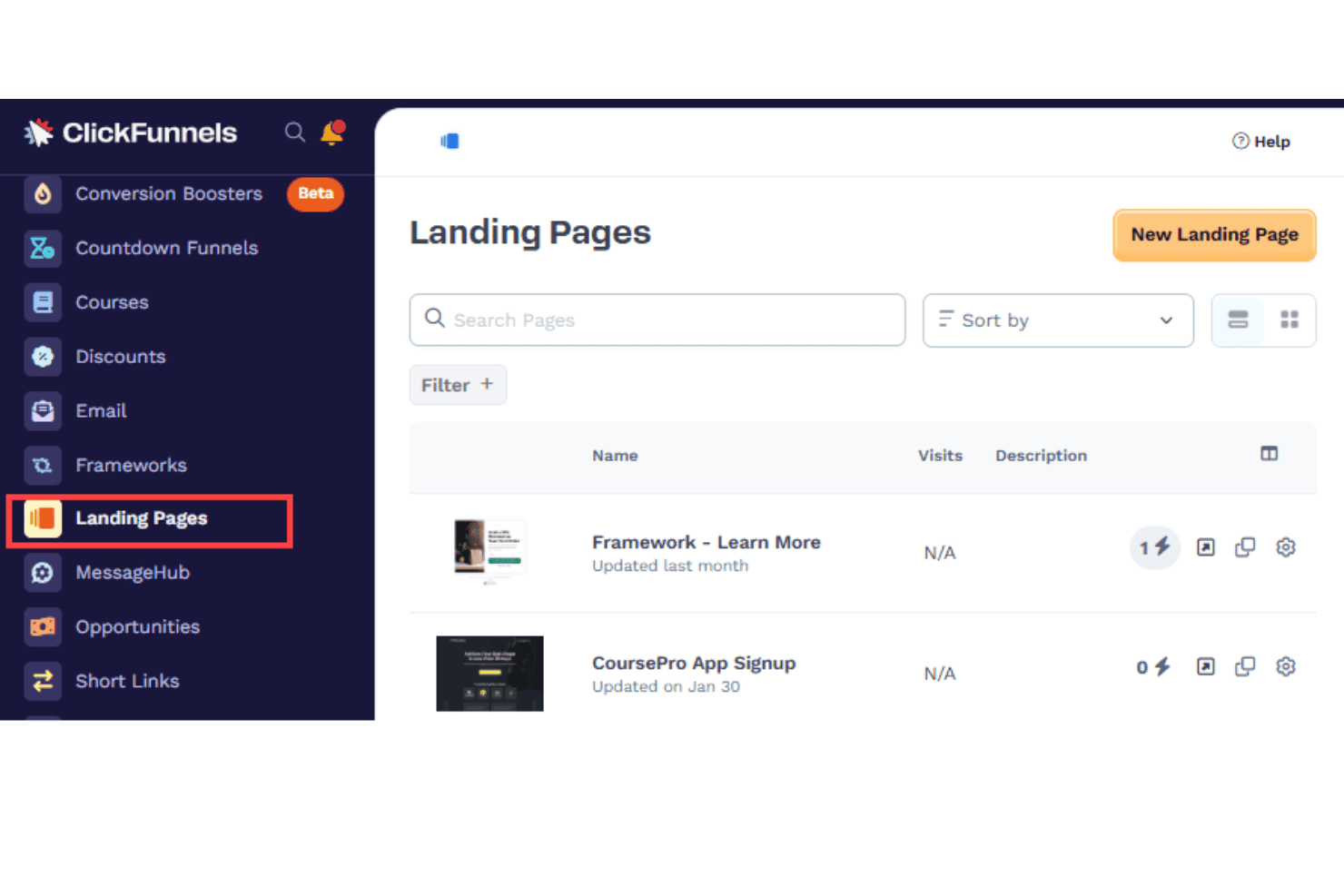
ClickFunnels offers a "Landing Pages" dashboard to track and access all landing pages in one view. ClickFunnels is a sales funnel builder and all-in-one marketing platform that lets marketers build complete, multi-step conversion flows—landing pages, checkout, email, and CRM—without stitching together separate tools.
Who Is ClickFunnels Best For?
ClickFunnels is a strong fit for small business owners, entrepreneurs, and DTC marketers who sell digital products, courses, or physical goods online.
Why ClickFunnels Is a Good Unbounce Alternative
I've included ClickFunnels in my top picks because it goes well beyond what a landing page builder does. Where Unbounce stops at the page, ClickFunnels connects that page to a full funnel for marketing campaigns: order bumps, one-click upsells, and automated email sequences all fire in sequence from a single build. I particularly like the AI Smart Funnel Builder, which generates complete page structures and copy in minutes, letting my team launch and iterate on campaigns faster.
ClickFunnels Key Features
- Course creation and hosting: Build and deliver digital courses directly on the platform.
- Affiliate center: Manage and track affiliate programs and payouts for your offers.
- Survey workflows: Add custom surveys and quizzes to segment leads within your funnels.
- Analytics dashboard: Monitor funnel performance, conversion data, and key metrics in real time.
ClickFunnels Integrations
ClickFunnels offers native integrations with ActiveCampaign, HubSpot, Mailchimp, ConvertKit, Keap, Pipedrive, GetResponse, Constant Contact, GoTo Webinar, Slack, and more. Zapier is supported, and API access is available for custom integrations.
Pros and Cons
Pros:
- Drag-and-drop funnel and page editor
- Built-in affiliate management tools included
- Multi-step funnels with checkout and upsells
Cons:
- Very limited custom design templates
- A/B testing is limited to two variants
Learn more about ClickFunnels: Best for customizable drag-and-drop building
- 14-day free trial
- From $24/month (billed annually)
Visit WebsiteCustomer Rating:4.6/5
Landingi offers a drag-and-drop editor for creating lead capture landing pages. Landingi is a no-code landing page builder for marketers and agencies who need to design, publish, and optimize campaign pages—and connect them to their existing CRM and email stack—without relying on developers.
Who Is Landingi Best For?
Landingi is a strong fit for small to mid-sized marketing teams and digital agencies managing multiple client campaigns simultaneously.
Why Landingi Is a Good Unbounce Alternative
I picked Landingi as one of the best because its drag-and-drop editor is genuinely freeform and provides ease of use, unlike the grid-locked block builders many alternatives use. Smart Sections let me build a component once (like a pricing block) and instantly push that update across dozens of pages. The Lunar AI Page Generator handles first drafts when I need to spin up a campaign page fast.
Landingi Key Features
- Server-side A/B testing: Set up and run native split tests on landing page variants for optimization.
- Multi-language personalization: Automatically translate pages and forms into 35 languages to reach diverse audiences.
- EventTracker analytics: Track micro-conversion events and on-page interactions for deeper campaign insights.
- 170+ native integrations: Connect landing pages directly to popular CRM, email, analytics, and ad tools.
Landingi Integrations
Landingi offers 80+ native integrations, including HubSpot, Salesforce, Mailchimp, ActiveCampaign, GetResponse, Google Analytics, WordPress, Google Ads, Brevo, and Make. It also integrates with Zapier, and an API and webhooks are available for custom integrations.
Pros and Cons
Pros:
- Multi-language support with one-click translation
- Global Smart Sections update across all pages
- True freeform builder with pixel-level control
Cons:
- Strict traffic limits on base plans
- No multivariate testing functionality
Learn more about Landingi: Best for scalable team collaboration
- 14-day free trial
- From $79/month (billed annually)
Visit WebsiteCustomer Rating:4.4/5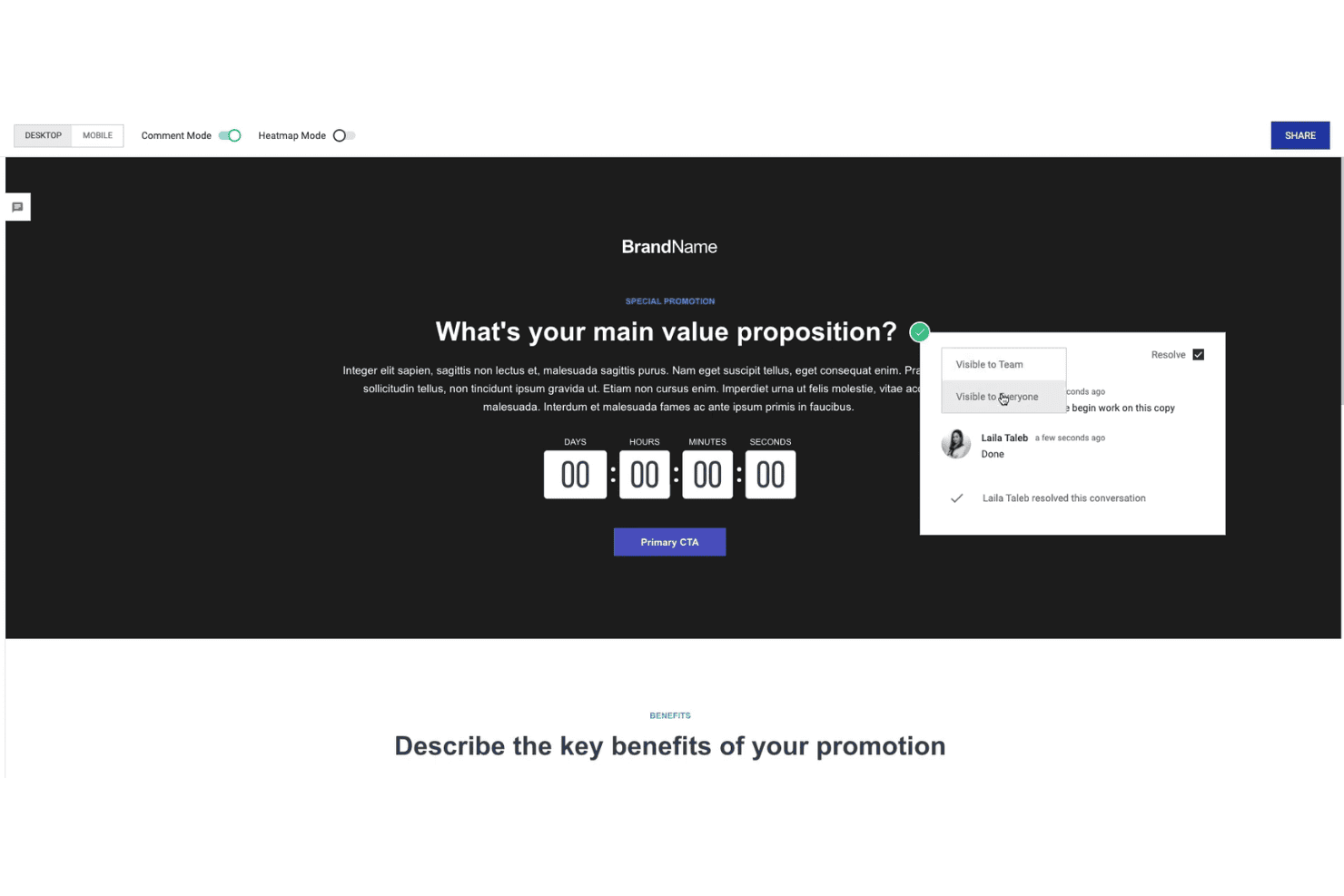
Instapage enables collaborative landing page reviews with comments and approvals. Instapage is an all-in-one platform built for performance marketing teams that need to design, test, and personalize ad-focused pages without relying on developers.
Who Is Instapage Best For?
Instapage is a strong fit for mid-size to enterprise marketing teams running high-volume paid ad campaigns across multiple channels.
Why Instapage Is a Good Unbounce Alternative
I've included Instapage as one of the best Unbounce competitors because its real-time visual collaboration features genuinely set it apart from Unbounce. Teams can leave threaded comments directly on specific page elements and review live edits without leaving the builder. Global Blocks let me update a single section and push that change across every published page simultaneously, which matters when my team is managing dozens of active campaign pages at once.
Instapage Key Features
- AdMap integration: Visually connects each paid ad group to its dedicated landing page for better campaign organization.
- AI content generation: Instantly generates headlines, body copy, and CTAs tailored to different audiences within the landing page builder.
- Heatmaps and analytics: Provides visual heatmaps and performance data to analyze visitor behavior on landing pages.
- A/B and AI-driven experiments: Enables server-side split testing and automated traffic allocation to the highest-performing landing page variants.
Instapage Integrations
Instapage offers over 120 native integrations, including Salesforce, HubSpot, Marketo, ActiveCampaign, Drip, Mailchimp, Iterable, WordPress, Drupal, and Venmo. It also integrates with Zapier and provides an API and webhooks for custom integrations.
Pros and Cons
Pros:
- Pixel-precise drag-and-drop editor
- Global Blocks for large-scale content updates
- Real-time team collaboration in the editor
Cons:
- Steep learning curve for beginners
- Higher-tier features locked behind a paywall
Learn more about Instapage: Best for fast lead capture setup
- 7-day free trial available
- From $23/month (billed annually)
Visit WebsiteCustomer Rating:4.4/5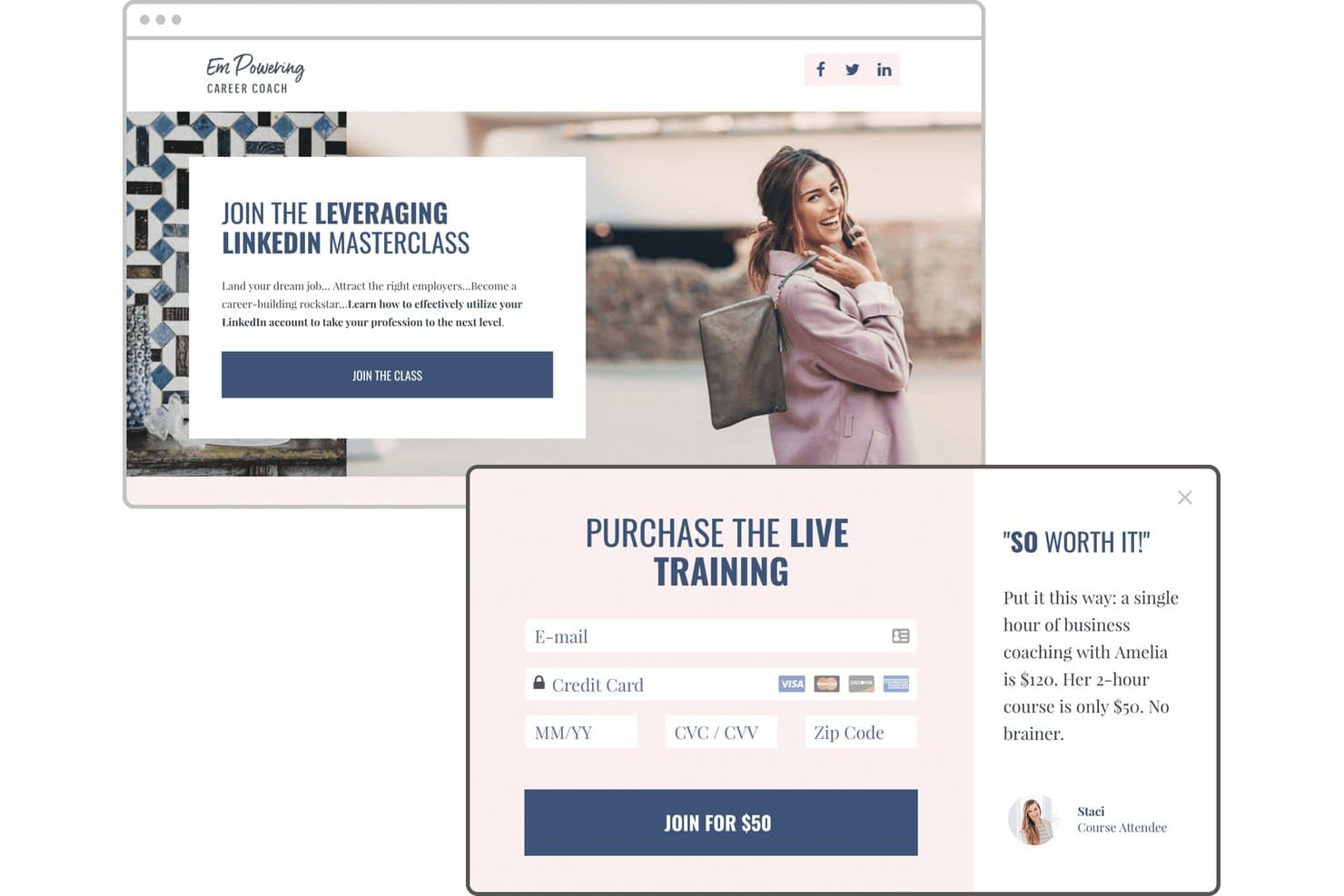
Leadpages offers a conversion-focused landing page builder with embedded checkout forms, testimonials, and a clear call-to-action. Leadpages is an AI-powered landing page builder for small businesses and lean marketing teams who need to launch high-converting pages, run A/B tests, and capture leads without relying on developers.
Who Is Leadpages Best For?
Leadpages is a strong fit for solopreneurs, coaches, consultants, and small marketing teams who need to move fast on campaigns without a dedicated dev or design resource.
Why Leadpages Is a Good Unbounce Alternative
I've included Leadpages in my top picks because the AI Page Creation feature genuinely delivers on fast lead capture, generating a generating high-converting landing pages in about 60 seconds from a plain-language campaign description. What I appreciate most is the self-improving pages feature: the AI builds challenger variants, runs A/B tests, picks winners, and repeats the cycle automatically. In practice, that means a new lead capture page isn't just live fast, it's actively testing and optimizing without any manual follow-up from my team.
Leadpages Key Features
- Heatmaps: Visualize where visitors click and scroll to understand on-page engagement.
- Dynamic text replacement: Swap landing page copy based on ad keywords or UTM parameters.
- Built-in Stripe checkout: Accept payments and manage transactions directly from your landing pages.
- Visitor intelligence: Identify company, industry, job role, and ICP fit on captured leads using IP enrichment.
Leadpages Integrations
Leadpages offers 18+ native integrations, including HubSpot, Salesforce, Mailchimp, Klaviyo, Shopify, Stripe, WordPress, ActiveCampaign, PipeDrive, and Google Ads. It also connects with Zapier and provides an API for custom integrations.
Pros and Cons
Pros:
- Includes dynamic text replacement for paid ads
- AI-assisted headline generation
- Publishes a landing page in under a minute
Cons:
- Customizing designed templates can feel limited
- Advanced layouts require custom CSS
Learn more about Leadpages: Best for smooth CRM integration
- Free plan + 14-day free trial available
- From $7/seat/month (billed annually)
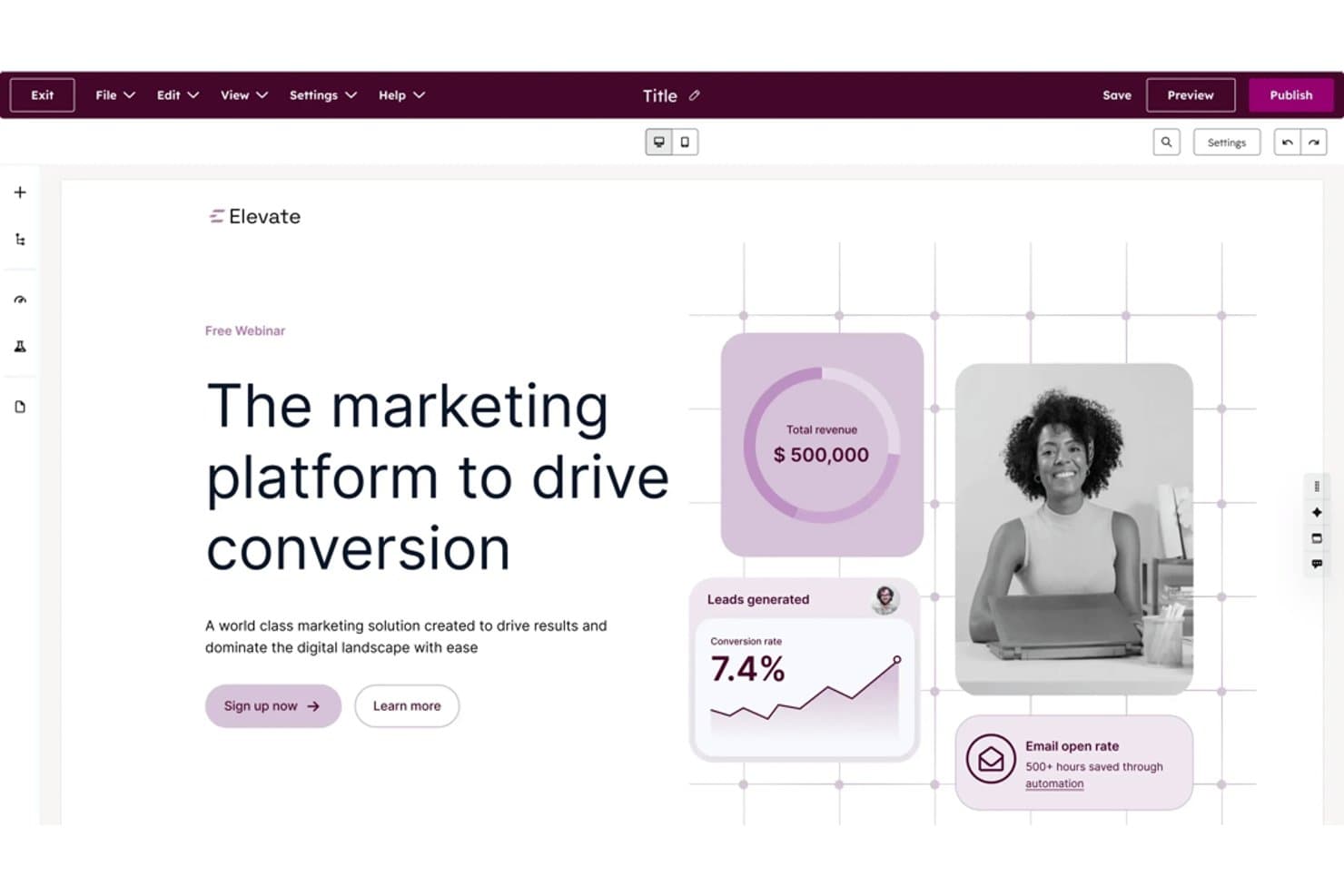
HubSpot Landing Page Builder offers a drag-and-drop visual editor with pre-built templates, live preview, and publish controls for building conversion-focused landing pages. HubSpot Landing Page Builder is a native landing page tool built into the HubSpot ecosystem, giving B2B marketing teams a no-code way to build, test, and personalize campaign pages that feed directly into CRM, lead scoring, and marketing automation.
Who Is HubSpot Landing Page Builder Best For?
Demand generation marketers at mid-market B2B companies who manage the full lead lifecycle from ad click to pipeline will get the most from this tool.
Why HubSpot Landing Page Builder Is a Good Unbounce Alternative
I've included HubSpot Landing Page Builder in my top picks because the CRM connection goes far deeper than a standard form-to-spreadsheet sync. Progressive profiling means forms automatically skip fields a contact has already answered, so returning visitors see a shorter form while my CRM gets richer data over time, and I can gain more monthly visitors. Smart Content lets me swap entire page sections based on lifecycle stage, so a known SQL sees a demo CTA while a new contact sees a lead magnet.
HubSpot Landing Page Builder Key Features
- Drag-and-drop editor: Build landing pages with a visual interface and easily rearrange elements without code.
- 400+ conversion templates: Access a large library of professionally designed landing page templates for different industries and goals.
- Adaptive testing: Run experiments on multiple page variants and let the tool automatically shift traffic to top performers.
- SEO optimization tools: Get real-time recommendations and best practice prompts to help every landing page rank in search engines.
HubSpot Landing Page Builder Integrations
HubSpot Landing Page Builder offers a wide range of native integrations, including Salesforce, Slack, Zoom, Google Analytics, WordPress, Mailchimp, Typeform, Facebook Ads, Asana, and Google Ads. It also supports Zapier, and an API is available for custom integrations.
Pros and Cons
Pros:
- Progressive profiling captures richer lead data
- Dynamic content adapts pages to visitor segments
- Built-in CRM powers advanced lead routing
Cons:
- Multivariate testing is capped at two variants
- Limited pixel-level design flexibility
Learn more about HubSpot Landing Page Builder:
Andre alternativer til Unbounce
Her er noen flere alternativer til Unbounce som ikke kom med på kortlisten min, men som likevel er verdt å sjekke ut:
- 11WebflowBest for visual site and landing customization
- 12Swipe PagesBest for mobile-optimized landing experiences
- 13GemPagesBest for drag-and-drop Shopify layouts
- 14Zoho LandingPageBest for built-in analytics and tracking tools
- 15ShogunBest for Shopify store page building
- 16ElementorBest for advanced design flexibility
- 17KartraBest for integrated sales and checkout features
- 18OptimizePressBest for WordPress-based launches
- 19ConvertriBest for fast page loading speeds
- 20ReploBest for rapid e-commerce page deployment
How I Evaluate Unbounce Alternatives
I first check that a tool covers Unbounce's core capabilities—building campaign pages, split testing, and lead capture. Then I evaluate differentiators like AI copy generation or smart traffic routing that separate one platform from the next.
Core Functionality (Table Stakes for This List)
When I'm selecting tools for my list, I rank each one on a scale from 0 (does not offer the functionality) to 5 (excels in this area) for each core functionality listed below. Then, I calculate the tool's total score into a percentage. Each tool needs to achieve a minimum total score of 75% to be considered for inclusion.
- Drag-and-drop builder: I evaluate whether marketers can build and publish a page without touching code, including mobile-specific layout adjustments and reusable section libraries.
- Pre-built templates: The template library should cover common campaign types like webinar signups, product launches, and lead magnets, with filtering by industry or goal.
- A/B testing: I look for native split testing that lets you run multiple variants with traffic allocation controls and clear conversion reporting.
- Lead capture forms: Forms should support conditional logic, multi-step flows, and pop-ups so you can tailor the capture experience to different campaign needs.
- Dynamic personalization: I check whether the platform can swap headline or CTA copy based on UTM parameters, ad keywords, or audience segments.
- Marketing integrations: Native connections to CRMs, email platforms, and ad networks matter—I evaluate how well a tool fits into a typical martech stack alongside tools like HubSpot, Mailchimp, or Google Ads.
Once I have a list of tools that meet the criteria, I consider what sets each platform apart.
Differentiating Factors (What Sets Vendors Apart)
Here's how I compare and contrast different vendors:
Standout Features
Smart traffic routing is a major differentiator—platforms that use machine learning to auto-allocate visitors to the best-performing variant save you weeks of manual A/B test cycles. Dynamic text replacement matters just as much, since matching ad keywords to landing page headlines directly impacts Quality Score for paid campaigns. I also look for built-in heatmaps and scroll tracking, which let you spot conversion blockers without adding third-party tools to the mix.
Beyond Features
Pricing structure deserves close attention—some platforms charge per conversion while others use flat rates, and this difference compounds fast when you're scaling paid campaigns. Page speed and Core Web Vitals compliance also factor into my evaluation, since slow-loading pages tank both conversion rates and ad Quality Scores. I also consider support and onboarding resources, especially agency-specific features like sub-accounts and white-labeling for teams managing multiple client campaigns.
Hvorfor se etter et alternativ til Unbounce?
Selv om Unbounce er et godt valg blant verktøy for inngående markedsføring, finnes det flere grunner til at noen brukere ser etter alternative løsninger. Det kan hende du ser etter et alternativ til Unbounce fordi …
- Du trenger lavere kostnader eller en fast pris uten konverteringsbegrensninger
- Du ønsker mer avanserte innebygde funksjoner for KI-tekst eller design
- Du ser etter bedre integrasjon med Shopify eller netthandel
- Du trenger et større bibliotek med ferdiglagde bransjemaler
- Du trenger bedre mobiloptimalisering eller raskere sideinnlasting
- Du ønsker sterkere integrasjon med CRM- eller e-postplattformen din
Hvis noe av dette høres kjent ut, har du kommet til rett sted. Listen min inneholder flere alternativer blant verktøy for inngående markedsføring som passer bedre for team som møter disse utfordringene med Unbounce og ser etter alternative løsninger.
Viktige funksjoner i Unbounce
Her er noen av de viktigste funksjonene i Unbounce, slik at du kan sammenligne hva alternative løsninger tilbyr:
- Bygger med dra-og-slipp: Design og publiser landingssider med en visuell redigerer uten kode som er tilgjengelig for markedsførere med alle tekniske bakgrunner.
- Konverteringsfokuserte maler: Få tilgang til en rekke tilpassbare maler utviklet for bransjespesifikke og kampanjespesifikke landingssider, slik at lanseringen går raskere.
- Innebygd A/B-testing: Kjør splittester på ulike sidevarianter, styr trafikkfordelingen og følg med på konverteringsdata i sanntid for å kontinuerlig forbedre resultatene.
- Skjemaer for innhenting av potensielle kunder: Bygg tilpassede skjemaer og popup-vinduer for å samle inn besøksdata, utløse oppfølgingsarbeidsflyter og koble direkte til CRM-systemet eller plattformen for markedsføringsautomatisering.
- Smart trafikkdirigering: Send automatisk hver besøkende til den best presterende varianten av landingssiden ved hjelp av maskinlæring – uten manuell testadministrasjon.
- Dynamisk teksterstatning: Tilpass overskrifter eller viktige budskap på landingssidene dine ved hjelp av UTM-parametere, annonsesøkeord eller andre dynamiske inndata.
- Markedsføringsintegrasjoner: Koble til populære CRM-systemer, verktøy for e-postmarkedsføring, plattformer for betalt annonsering og analyseverktøy direkte, slik at du får en helhetlig teknologistakk for markedsføring.
- Popup-vinduer og klebrige felt: Bruk overlegg og kunngjøringsfelt på landingssider eller til og med på hovednettstedet ditt for å hente inn flere potensielle kunder og dele tidsbegrensede tilbud.
- Mobiltilpasset design: Sørg for at alle landingssider og skjemaer ser bra ut og fungerer godt på alle enheter, slik at du opprettholder høye konverteringsrater fra mobiltrafikk.
- Innebygd analyse: Følg med på viktige måltall som besøk, konverteringer og konverteringsrater i plattformen – i tillegg til avansert innsikt som varmekart og klikksporing.