

En AI-e-postassistent bruker kunstig intelligens til å hjelpe med oppgaver som å skrive e-poster, tilpasse meldinger, administrere kampanjer og håndtere oppsøkende arbeid. For e-handelsteam kan det bety å opprette målrettede kampanjer og kundereiser, mens salgsteam kan bruke disse verktøyene til å undersøke potensielle kunder og skrive B2B-oppsøkende meldinger. Jeg har vurdert de beste AI-e-postassistentene for å se hvor hver av dem fungerer best, og hjelpe deg med å velge et verktøy som passer måten du bruker e-post på.
Why Trust Our Software Recommendations
6,700+
Reviews
20
Industry experts
16+
Evaluation factors
14
Years
Our team has been testing and reviewing software since 2012. As marketing leaders ourselves, we know how difficult—and important—it is to choose the right software.
For this guide, we evaluated tools using hands-on testing and independent research, scoring tools using our selection criteria.
Our reviews reflect our human editorial judgment, not a sales pitch.
Expert reviewers:
 Gui DrusinaCreative Director
- Shriya GhateSenior Marketing Lead
 Amanda JacquesMarketing Ops Leader

Sammenligningstabell for AI-e-postassistenter
Sammenlign priser og spesifikasjoner side om side for AI-e-postassistentene som kom med på kortlisten min.
| Tool | Best For | Trial Info | Price | ||
|---|---|---|---|---|---|
| 1 | Best for AI-personalized prospecting | 14-day free trial | From $49/user/month (billed annually) | Website | |
| 2 | Best for AI campaign planning | Free plan available | From $149/month (billed annually) | Website | |
| 3 | Best for predictive send-time optimization | Free demo available | Pricing upon request | Website | |
| 4 | Best for personalized prospecting | Free trial available | From $29/month | Website | |
| 5 | Best for B2B prospecting workflows | Free plan available | From $180/user/month (billed annually) | Website | |
| 6 | Best for lifecycle personalization | 14-day free trial | Pricing upon request | Website | |
| 7 | Best for CRM-grounded personalization | Free plan available | From $7/user/month (billed annually) | Website | |
| 8 | Best for per-contact send-time optimization | 14-day free trial + free demo available | From $15/month (billed annually) | Website | |
| 9 | Best for agentic campaign creation | Free trial available | From $1,250/month (billed annually) | Website | |
| 10 | Best for enterprise copy optimization | Free demo available | From $81,000/year (billed annually) | Website |


Anmeldelser av AI-e-postassistenter
Nedenfor finner du mine detaljerte sammendrag av de beste AI-e-postassistentene som kom med på kortlisten min. Anmeldelsene mine gir en grundig gjennomgang av funksjonene, de beste bruksområdene og integrasjonene for hvert verktøy, slik at du kan finne det som passer best for deg.
 Best for AI campaign planning
- Free plan available
- From $149/month (billed annually)
Visit WebsiteCustomer Rating:4.6/5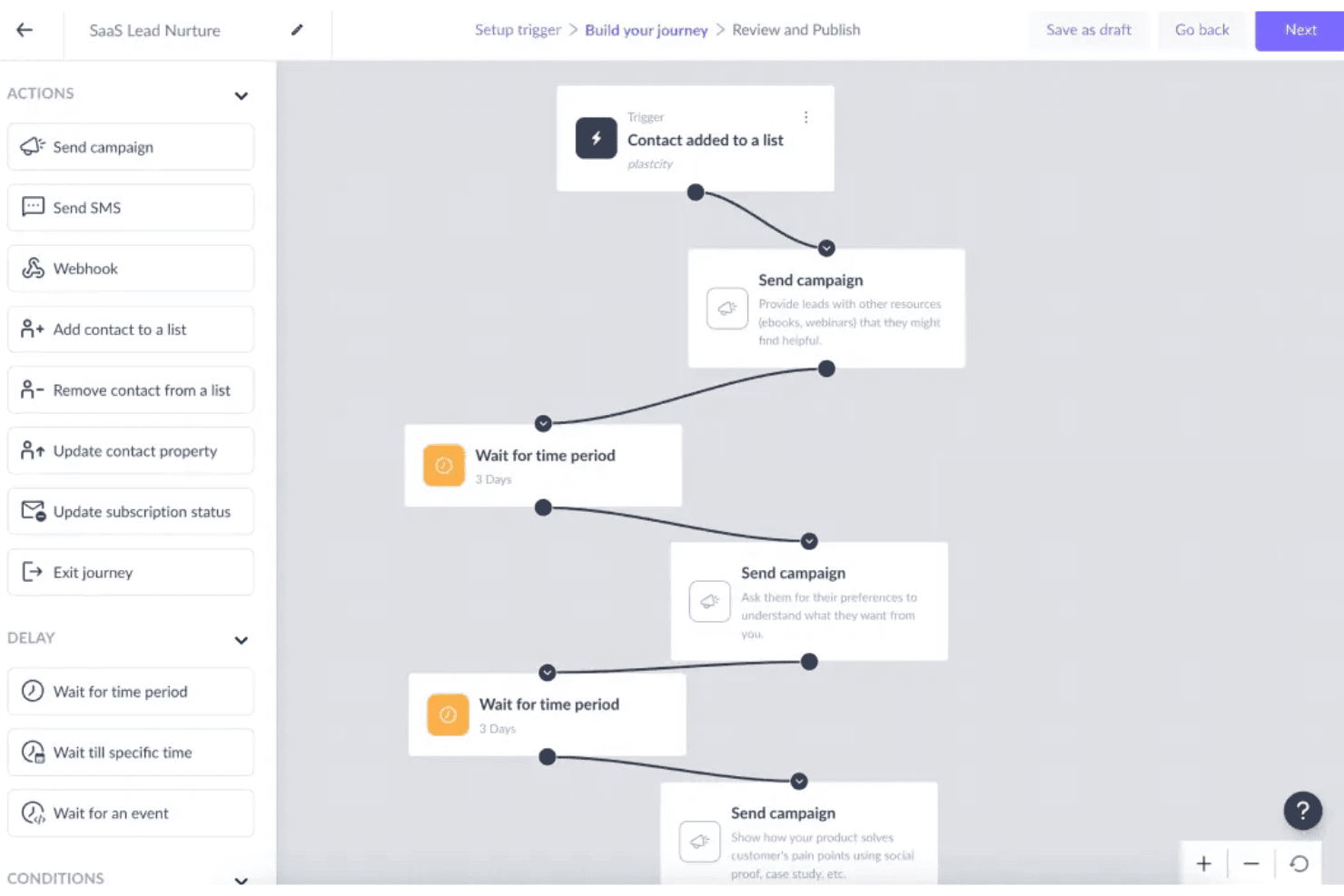
Mailmodo lets users build automated lead nurture journeys visually. Mailmodo is an AI email marketing platform that covers the full campaign lifecycle—from prompt-based email and template generation to automated journey building, AI-driven segmentation, and campaign performance analysis—with a signature capability for building interactive AMP emails.
Who Is Mailmodo Best For?
Mailmodo is a strong fit for email marketing managers who need to run the full campaign lifecycle—from AI-assisted planning and creation to segmentation, automation, and performance analysis—in one platform.
Why I Picked Mailmodo
I've included Mailmodo in my top picks because it covers the full AI campaign lifecycle in one platform, from planning through to post-send analysis. The AI Campaign Planner is what sets it apart: it generates cadence recommendations, subject line suggestions, and segment strategies before you write a single word. Then Mailmodo Co-Pilot reads your campaign results and flags what to fix, from underperforming CTAs to low-engagement segments.
Mailmodo Key Features
- AI Email Writer: Generate full email copy with structured inputs for tone, campaign type, audience, and word count—no sign-up required to access the standalone tool.
- Interactive AMP email widgets: Embed forms, polls, quizzes, NPS ratings, and carousels directly inside emails so recipients can respond without leaving their inbox.
- AI Journey Builder: Build multi-step automated email sequences from a single natural language prompt, including triggers, delays, and branching logic.
- AI Segment Generator: Create dynamic audience segments using plain-language queries that pull on behavioral, demographic, and predictive criteria.
Mailmodo Integrations
Mailmodo offers 40+ integrations, including HubSpot, Salesforce, Segment, Shopify, Google Sheets, and Customer.io. It supports REST API and webhooks for custom connections, plus Zapier.
Pros and Cons
Pros:
- AI Co-Pilot explains and optimizes campaign results
- Enables true interactive AMP email experiences
- Generates full campaigns from single AI prompt
Cons:
- AMP interactivity limited to few email clients
- No AI-powered reply automation available
Learn more about Mailmodo: Best for predictive send-time optimization
- Free demo available
- Pricing upon request
Visit WebsiteCustomer Rating:4.4/5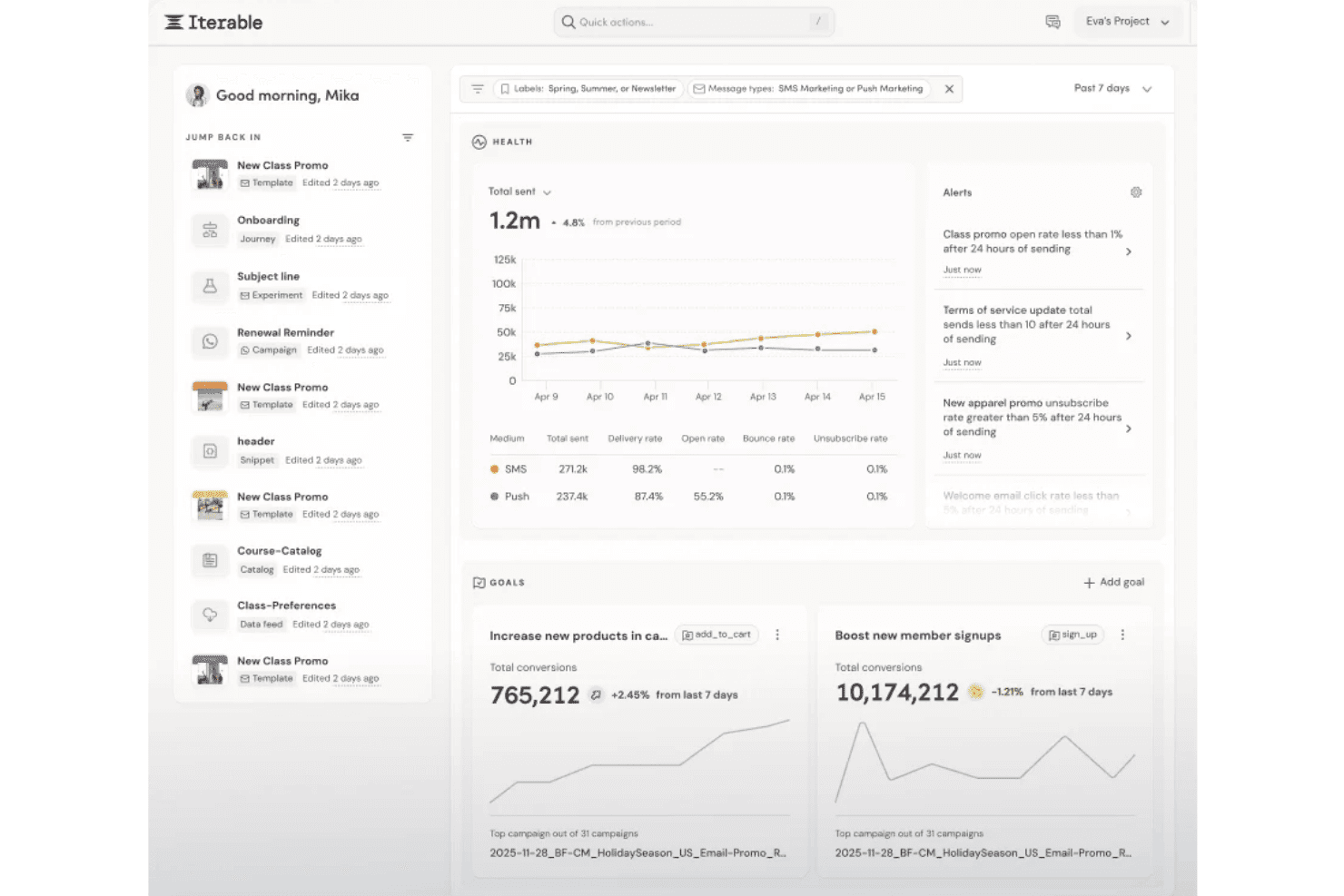
Iterable's dashboard tracks campaign health, goals, and alerts in one view. Iterable is an enterprise email marketing platform that combines AI-driven send-time optimization, cross-channel journey orchestration, behavioral personalization, and campaign automation across email, SMS, push, and in-app channels.
Who Is Iterable Best For?
Iterable is a strong fit for enterprise marketing operations and lifecycle teams managing high-volume, multi-channel programs that need AI-driven send-time and channel optimization at scale.
Why I Picked Iterable
I picked Iterable as one of the best because its Send Time Optimization is genuinely individualized, using each user's historical engagement data to deliver messages at their personal peak response time rather than a segment-wide estimate. Paired with Channel Optimization, which weekly reassesses whether each user responds better to email, SMS, or push, the platform routes messages where they'll actually land. Brand Affinity scoring layers on top, labeling each user's sentiment toward your brand so you can filter high-affinity users into separate journey paths automatically.
Iterable Key Features
- Nova Agent: An agentic AI layer that builds customer journey workflows, generates Handlebars personalization logic, runs experiments, and answers campaign analytics questions in natural language.
- Workflow Studio: A drag-and-drop visual journey builder for designing multi-step, cross-channel lifecycle programs with A/B testing at each stage.
- Catalog-driven dynamic content: A content personalization system that pulls from product datasets to auto-populate emails with relevant recommendations and offers based on behavioral and purchase data.
- Frequency Optimization: A per-user messaging cap tool that uses individual engagement data to limit over-messaging and includes performance and lift metrics to measure impact.
Iterable Integrations
Iterable offers native integrations with Twilio Segment, Hightouch, Snowflake, Mixpanel, Amplitude, Shopify, and Google Ads. It also provides approximately 129 REST API endpoints, webhooks, and an MCP Server for custom integrations and AI assistant connectivity.
Pros and Cons
Pros:
- Supports multi-step, cross-channel journey orchestration
- Delivers individualized behavioral personalization at scale
- Excels at send-time and channel optimization
Cons:
- Lacks trainable brand voice controls
- Only generates snippet-level copy suggestions
Learn more about Iterable : Best for personalized prospecting
- Free trial available
- From $29/month
Visit WebsiteCustomer Rating:4.4/5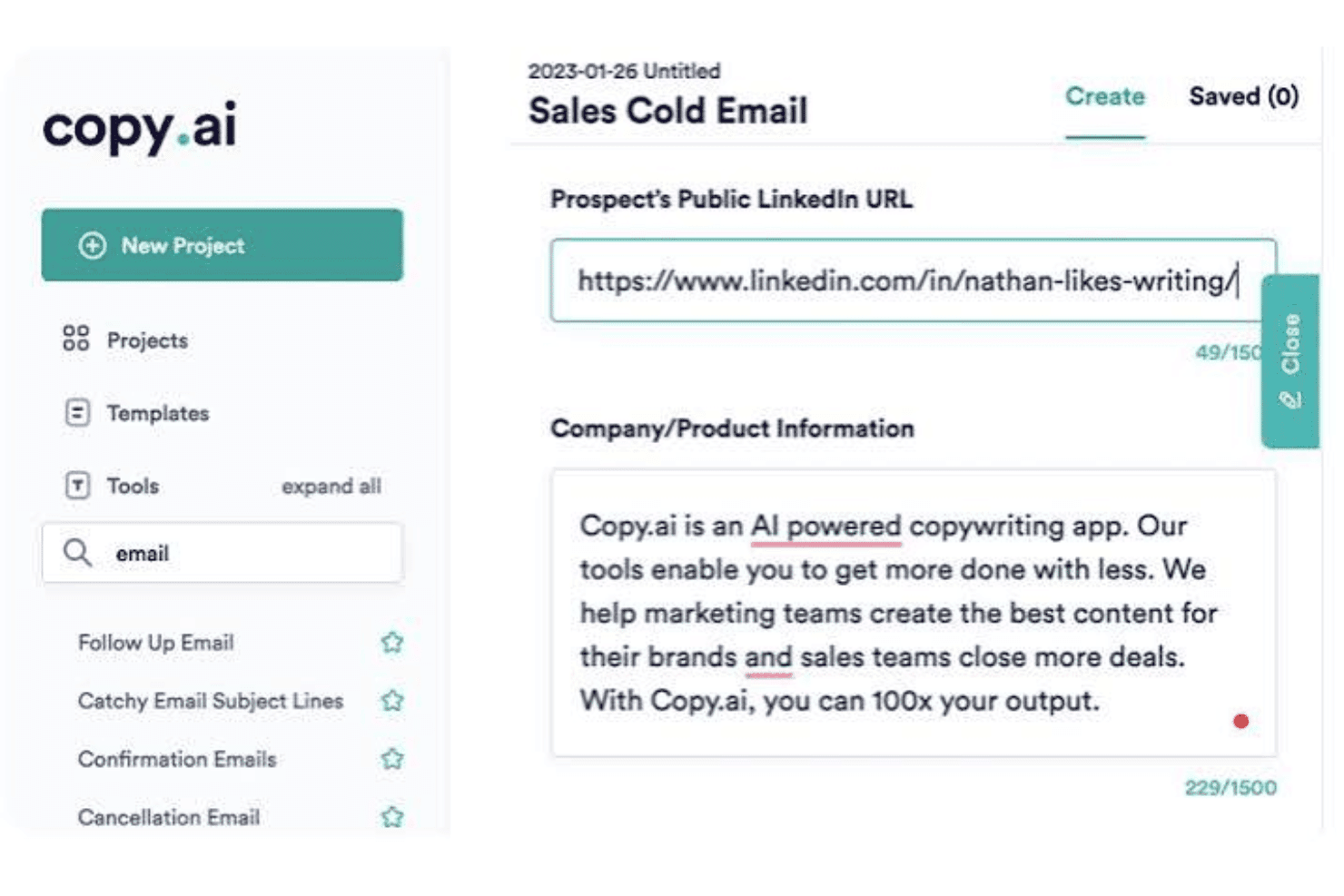
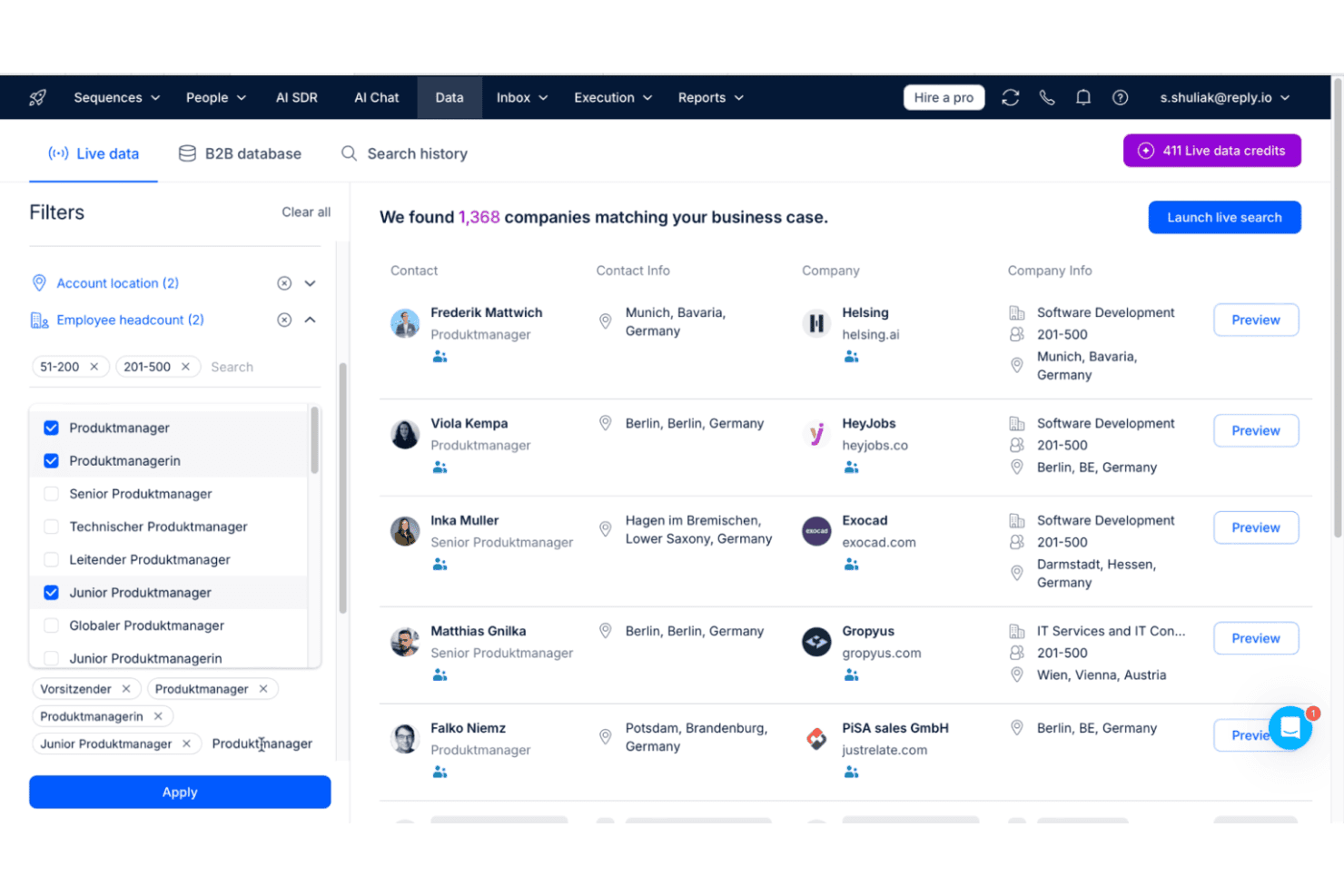
Copy.ai generates personalized sales cold emails using LinkedIn URLs. Copy.ai is a GTM AI platform that generates email copy, automates multi-step outreach workflows, and personalizes prospecting at scale using agentic AI, Brand Voice controls, and integrations with CRMs and sales engagement tools.
Who Is Copy.ai Best For?
Copy.ai is a strong fit for demand generation and sales teams that run high-volume outbound prospecting and need to personalize outreach at scale without manual research.
Why I Picked Copy.ai
I picked Copy.ai as one of the best because its Prospecting Cockpit is purpose-built for personalized outreach at scale, dynamically enriching prospect data with job history, intent signals, and behavioral context before generating 1:1 email copy. I also like how the Brand Voice and Infobase features keep every generated message on-brand, even across large-volume sequences. The agentic workflow layer then writes results back to your CRM automatically.
Copy.ai Key Features
- Brand Voice profiles: Create multiple Brand Voice profiles trained on your existing content to keep AI-generated emails consistent across different audiences and ICPs.
- Infobase knowledge repository: Upload brand guidelines, positioning documents, and value propositions, then reference them in prompts using the
#tagging system to ground email outputs in accurate, on-brand context. - LLM model selection: Choose between OpenAI GPT-4, Anthropic Claude, and Google Gemini models depending on the output quality or style you need for a given email use case.
- Pre-built email workflow templates: Access ready-to-run templates for onboarding, nurture, reactivation, winback, and ABM email sequences inside the Workflow Builder.
Copy.ai Integrations
Copy.ai offers 20+ native integrations, including Salesforce, HubSpot, Outreach, Slack, Mailchimp, and Constant Contact. Enterprise plans include an API for custom integrations, and Copy.ai also supports Zapier.
Pros and Cons
Pros:
- Multilingual localization with native translation support
- Offers brand voice and tone controls
- Generates personalized email sequences at scale
Cons:
- Workflow credit billing limits high-volume use
- No Gmail or Outlook inbox add-in
 Best for B2B prospecting workflows
- Free plan available
- From $180/user/month (billed annually)
Visit WebsiteCustomer Rating:4.4/5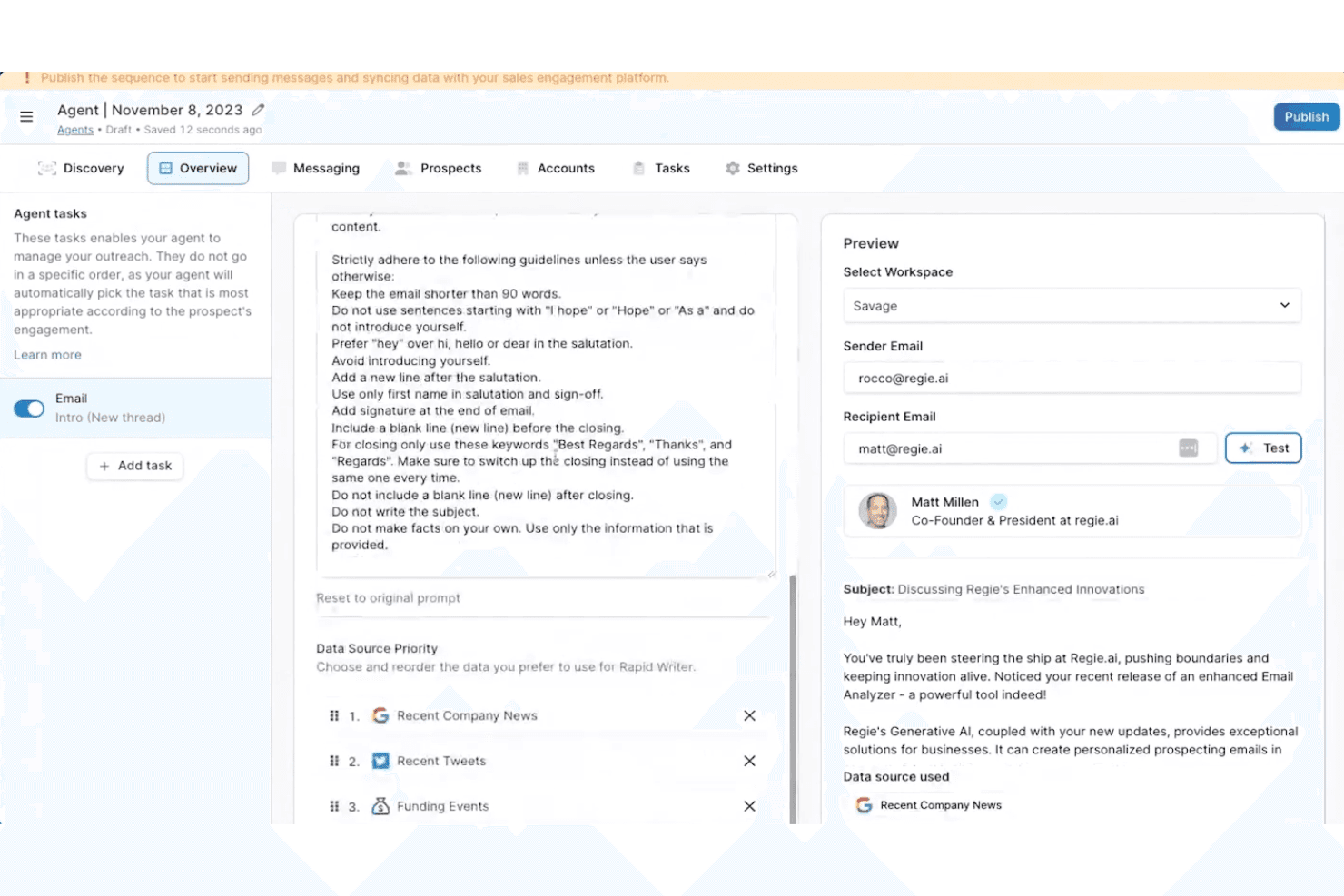
Regie.ai automates personalized sales outreach with AI-driven email agents. Regie.ai is an AI-powered B2B sales engagement platform that combines AI email generation, multi-step sequence building, buyer signal monitoring, and autonomous AI agents to run outbound prospecting across email, LinkedIn, and phone.
Who Is Regie.ai Best For?
Regie.ai is a strong fit for demand generation leaders and SDR teams running high-volume B2B outbound prospecting across email, LinkedIn, and phone.
Why I Picked Regie.ai
I've included Regie.ai in my top picks because it's the strongest option on this list for B2B prospecting workflows. Its Auto-Pilot AI Agents autonomously source, enrich, and contact prospects using 100+ real-time buyer signals, like funding events and job changes, triggering personalized email outreach without manual input. I also like that the AI learns individual writing styles over time, so generated emails reflect how your team actually sounds, not a generic template.
Regie.ai Key Features
- Multi-step sequence builder: Build static or dynamic email sequences that automatically adjust messaging and timing based on prospect engagement behavior.
- Content Management System (CMS): Store approved playbooks, messaging frameworks, and value propositions so the AI pulls from vetted, on-brand material when drafting outreach.
- Email Composer: Draft, edit, and refine AI-generated emails directly within Gmail, Outlook, or Salesloft via a native Chrome extension.
- Campaign Health Score: Monitor multi-channel engagement metrics across active sequences to track outreach performance at a glance.
Regie.ai Integrations
Regie.ai offers native integrations with Gmail, Outlook, HubSpot, Salesforce, Outreach.io, Salesloft, LinkedIn, ZoomInfo, Cognism, 6sense, and Demandbase. No public API or webhook support is documented for custom integrations.
Pros and Cons
Pros:
- Multi-channel outreach in a unified platform
- AI agents autonomously draft outbound sequences
- Real-time signal-driven email personalization
Cons:
- No support for A/B test optimization
- Not built for lifecycle email campaigns
Learn more about Regie.ai: Best for lifecycle personalization
- 14-day free trial
- Pricing upon request
Visit WebsiteCustomer Rating:4.6/5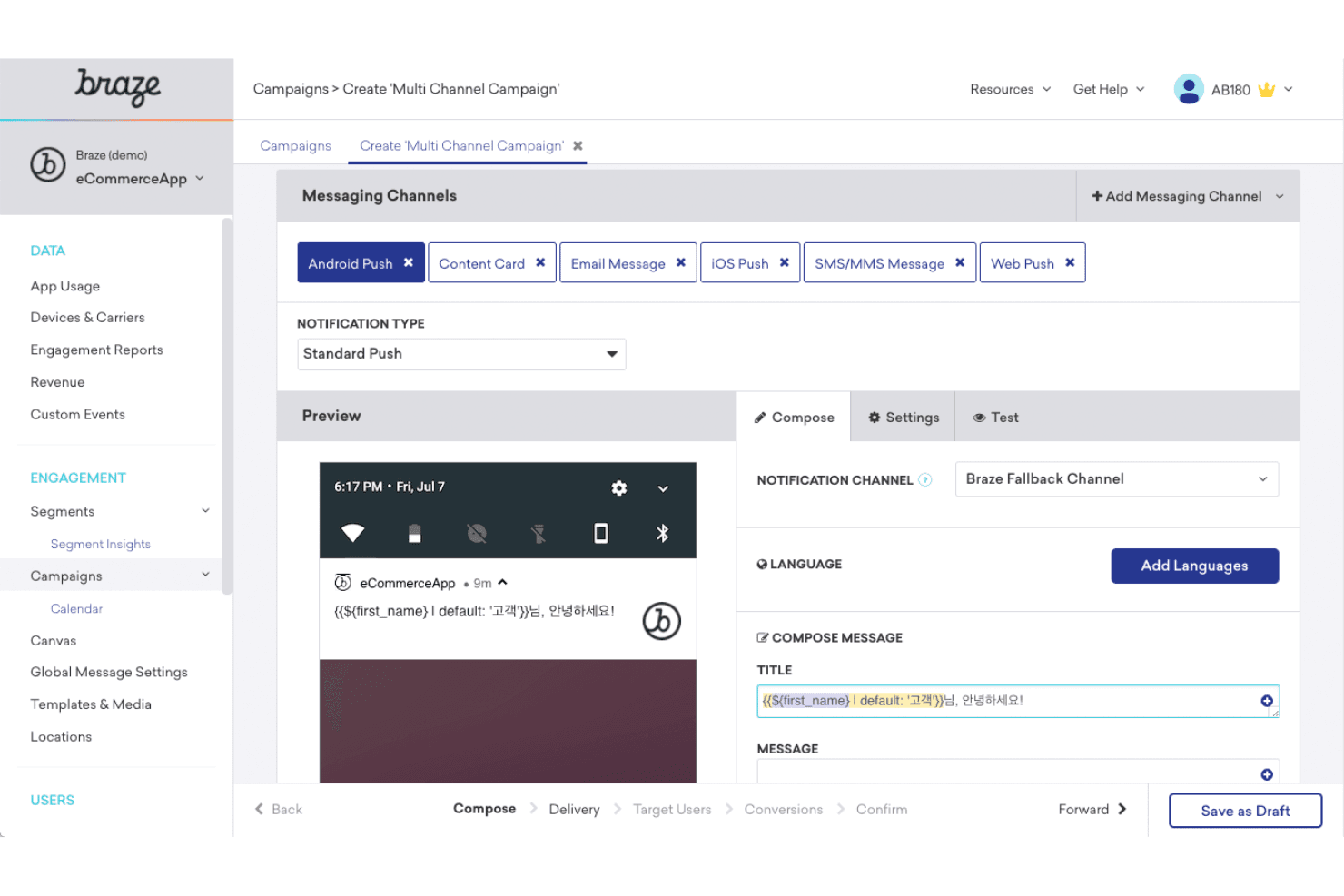
Braze lets users build multi-channel campaigns with personalized messaging. Braze is a customer engagement platform with built-in AI email tools—including generative copy drafting, lifecycle journey orchestration, per-user send-time optimization, and reinforcement learning–based personalization across cross-channel campaigns.
Who Is Braze Best For?
Braze is built for mid-market and enterprise marketing teams running complex, data-driven lifecycle programs across multiple channels.
Why I Picked Braze
I picked Braze as one of the best because of how BrazeAI Decisioning Studio™ handles lifecycle personalization: it uses reinforcement learning to make individual decisions on message, timing, offer, and channel simultaneously for each recipient. I've seen this go well beyond A/B testing. Pair that with Canvas Flow for multi-step journey orchestration and Intelligent Timing for per-user send scheduling, and Braze is genuinely built for complex, data-driven lifecycle programs.
Braze Key Features
- AI Content QA: Automatically reviews email copy for spelling, grammar, tone inconsistencies, offensive language, and Liquid code errors before a campaign sends.
- Intelligent Channel selection: Analyzes each user's engagement history to determine whether email, push, SMS, or another channel is most likely to drive a response.
- Predictive Churn scoring: Scores users by disengagement likelihood so you can prioritize high-value contacts or suppress at-risk segments before they go cold.
- BYO LLM support: Connects your preferred AI model—Anthropic Claude, Amazon Bedrock, or OpenAI—directly into Braze workflows via the Agent Console™.
Braze Integrations
Braze offers 2,400+ marketplace integrations, including Segment, mParticle, Snowflake, Salesforce, HubSpot, Shopify, Anthropic, OpenAI, and Amazon Bedrock. It also supports REST APIs, webhooks, reverse ETL, and MCP; Gmail and Outlook integrations aren't available.
Pros and Cons
Pros:
- AI content QA built into every campaign
- Cross-channel journeys from AI natural-language prompts
- Reinforcement learning for true 1:1 personalization
Cons:
- Not designed for solo or sales workflows
- No Gmail or Outlook inbox integration
Learn more about Braze: Best for CRM-grounded personalization
- Free plan available
- From $7/user/month (billed annually)
Visit WebsiteCustomer Rating:4.4/5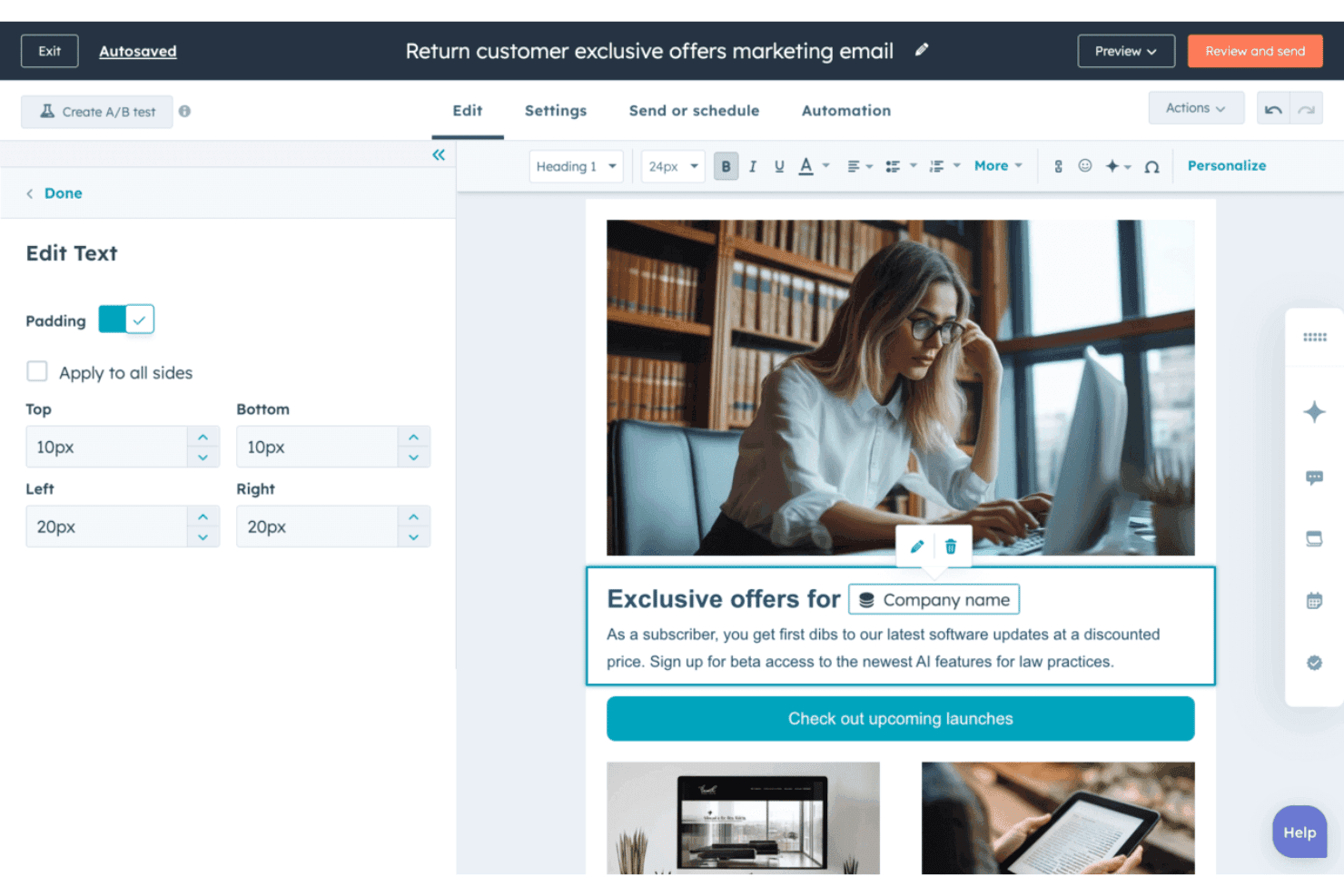
HubSpot Marketing Hub lets users personalize email text with dynamic contact tokens. HubSpot Marketing Hub is a marketing automation platform with AI-powered email generation, CRM-driven personalization, send time optimization, and multi-step lifecycle workflow automation built natively into a unified suite.
Who Is HubSpot Marketing Hub Best For?
HubSpot Marketing Hub is a strong fit for marketing teams that already run—or plan to run—their pipeline through a CRM and want AI email generation tightly connected to that contact data.
Why I Picked HubSpot Marketing Hub
I've included HubSpot Marketing Hub in my top picks because the CRM-native AI personalization goes well beyond first-name merge tags. Breeze AI pulls lifecycle stage, firmographics, and behavioral history directly from the Smart CRM to generate email copy tailored per recipient. I also rely on per-contact send time optimization, which schedules each send based on individual engagement patterns rather than a single blast window.
HubSpot Marketing Hub Key Features
- Breeze AI email drafting: Generate full email drafts—body copy, subject lines, and CTAs—from a natural language prompt directly inside the email editor.
- A/B testing: Test subject line and body content variants at the Professional and Enterprise tiers to identify higher-performing email versions.
- Campaign Agent: Orchestrate multi-channel campaigns from a single goal input, with AI generating email content alongside landing pages, social posts, and blogs.
- Predictive lead scoring: AI ranks contacts by likelihood to engage or convert, letting you prioritize which segments receive email outreach first.
HubSpot Marketing Hub Integrations
Native integrations include HubSpot Smart CRM, Salesforce, and WhatsApp; Gmail and Outlook connect through Sales Hub. Its 2,000+ Marketplace integrations include Slack, Zoom, Shopify, and Mailchimp, with APIs and webhooks for custom connections.
Pros and Cons
Pros:
- Per-contact AI send time optimization
- Embedded tone controls for each email section
- Generates emails using full CRM context
Cons:
- AI outputs lack external knowledge sources
- No native AI reply automation
Learn more about HubSpot Marketing Hub: Best for per-contact send-time optimization
- 14-day free trial + free demo available
- From $15/month (billed annually)
Visit WebsiteCustomer Rating:4.4/5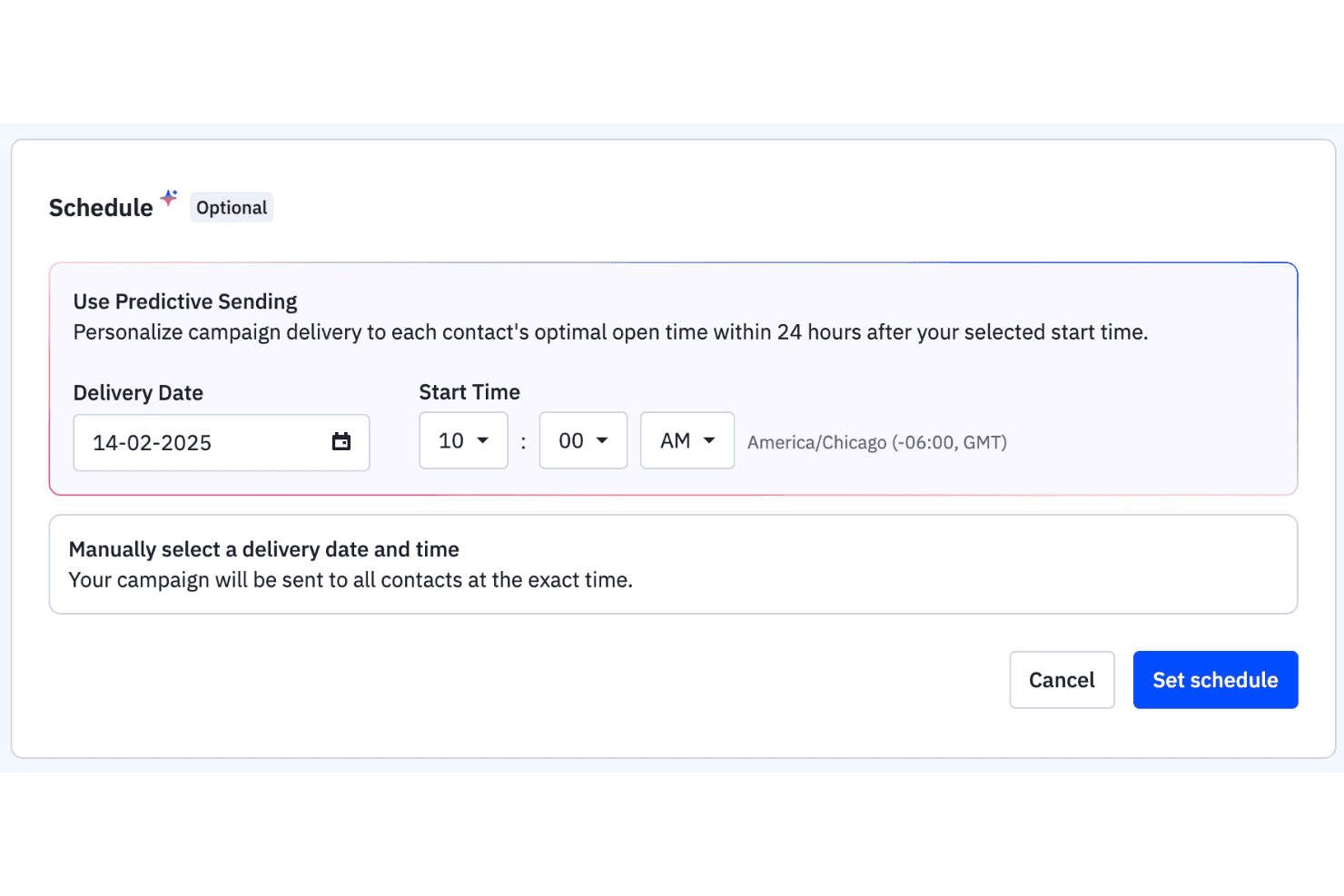
ActiveCampaign lets users schedule campaigns using predictive sending. ActiveCampaign is an AI-native email marketing platform that combines email campaign generation, per-contact send-time optimization, behavioral automation, and cross-channel sequencing across email, SMS, and WhatsApp.
Who Is ActiveCampaign Best For?
ActiveCampaign is a strong fit for marketing teams that run high-volume email programs and need per-contact send-time intelligence built into their automation workflows.
Why I Picked ActiveCampaign
I've included ActiveCampaign in my top picks because its Predictive Sending feature optimizes send time per individual contact, not per list, recalculating each person's ideal window weekly based on their actual engagement history. I also like the AI Campaign Builder, which drafts a full email, including subject line, body copy, and CTA, from a single prompt. Pair that with the Brand Kit and Custom Instructions, and every generated email stays anchored to your voice without manual cleanup.
ActiveCampaign Key Features
- Automations Agent: Builds multi-step drip and nurture sequences from a plain-language prompt, including cross-channel flows across email, SMS, and WhatsApp.
- AI-Suggested Segments: Lets you describe your target audience in natural language and generates the corresponding contact segment automatically.
- SMS AI Reply Suggestions: Drafts replies to incoming SMS messages using your Brand Kit, website content, and FAQs to keep responses on-brand.
- Active Intelligence Insights: A conversational analytics workspace where you ask questions about campaign performance and get instant charts and recommendations in return.
ActiveCampaign Integrations
ActiveCampaign offers 1,000+ integrations, including native Gmail, Outlook, Salesforce, Shopify, LinkedIn Matched Audiences, and Calendly connections, plus a REST API, webhooks, MCP support for ChatGPT and Claude, and Zapier.
Pros and Cons
Pros:
- Brand Kit locks AI output to your voice
- AI drafts multi-step email sequences automatically
- Per-contact send-time optimization increases engagement
Cons:
- Some AI outputs require manual correction
- Full AI features only on higher tiers
Learn more about ActiveCampaign: Best for agentic campaign creation
- Free trial available
- From $1,250/month (billed annually)
Visit WebsiteCustomer Rating:4/5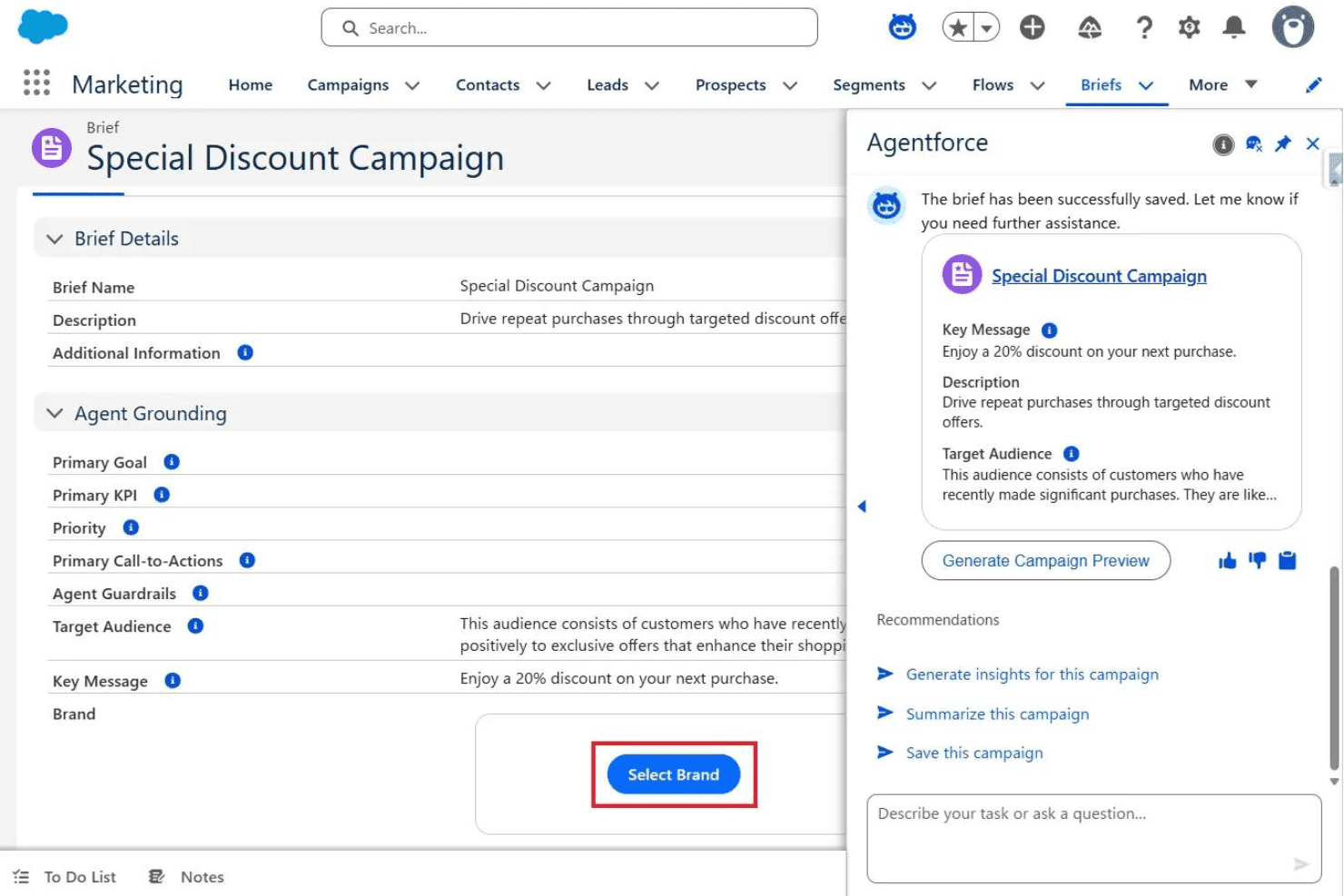
Agentforce helps marketers save briefs and preview discount campaigns instantly. Agentforce Marketing is Salesforce's AI-native email marketing platform, combining agentic campaign creation, Einstein Generative AI for email copy and subject lines, real-time personalization, journey orchestration, and multi-channel campaign automation across email, SMS, and ads.
Who Is Agentforce Marketing Best For?
Agentforce Marketing is built for enterprise marketing teams already operating within the Salesforce ecosystem who need to orchestrate high-volume, multi-channel campaigns with AI-driven personalization at scale.
Why I Picked Agentforce Marketing
I've included Agentforce Marketing in my top picks because its Agentic Campaign Creation feature genuinely sets it apart: AI agents translate a campaign objective into a full brief, audience segments, and drafted messages in minutes rather than weeks. I also love how Two-Way Conversations turns email from a broadcast channel into a live dialogue, with AI reading inbound replies and CRM context to respond in real time. Pair that with Salesforce Personalization's real-time decisioning on every send, and you get a level of agentic depth that's rare.
Agentforce Marketing Key Features
- Einstein Send-Time Optimization: AI predicts the best send time for each individual subscriber based on their historical engagement patterns.
- Journey Builder: Builds multi-step, multi-channel customer journeys spanning email, SMS, mobile push, and social ads from a single workflow.
- Einstein Subject Line Tester: Scores subject lines against a trained model to predict how likely they are to drive contact engagement before you send.
- Multivariate testing: Tests multiple combinations of subject lines, images, and content simultaneously, then surfaces the winning variant automatically.
Agentforce Marketing Integrations
Agentforce Marketing has native integrations across the Salesforce ecosystem, including Sales Cloud, Service Cloud, Commerce Cloud, Data 360, and Slack. It also supports marketplace integrations through AppExchange, including Litmus, plus custom connections through MuleSoft.
Pros and Cons
Pros:
- Handles two-way conversations at high volume
- Personalization adapts emails with real-time data
- AI agents automate full campaign execution
Cons:
- Advanced AI tools gated to high-tier plans
- Core features require Salesforce ecosystem use
Learn more about Agentforce Marketing: 10Best for enterprise copy optimization
Jacquard
- Free demo available
- From $81,000/year (billed annually)
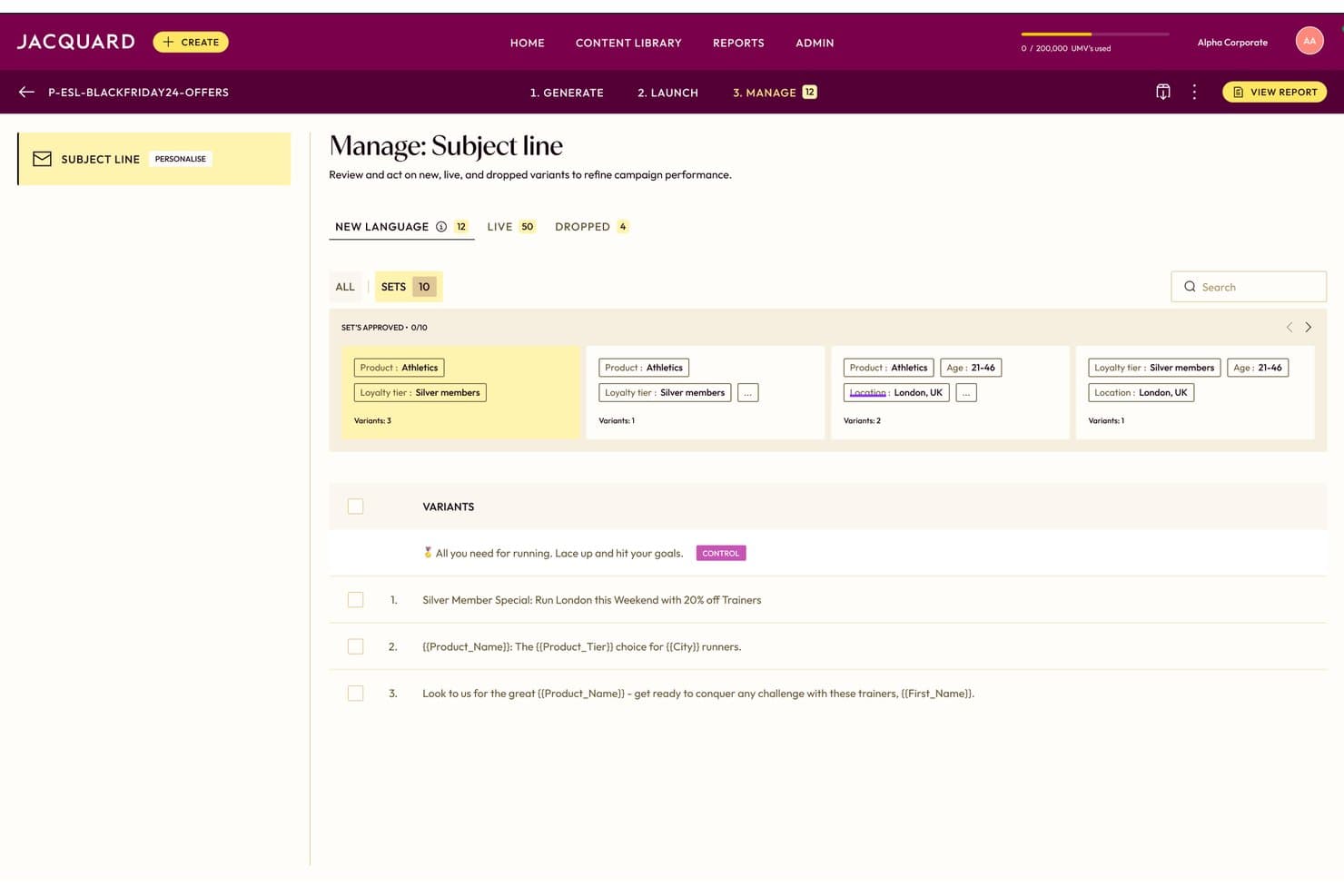
Jacquard lets users manage and approve AI-generated email subject line variants. Jacquard is an enterprise AI copy generation and optimization platform that produces email subject lines, preview text, body copy, CTAs, and SMS and push variants at scale using its proprietary Language² and Neural² architecture.
Who Is Jacquard Best For?
Jacquard is built for enterprise marketing teams running high-volume CRM email programs who need brand-safe copy variants at scale across multiple markets and languages.
Why I Picked Jacquard
I picked Jacquard as one of the best because no other tool on this list matches its depth of enterprise-grade copy optimization. Its Language² architecture generates up to 2,500 brand-safe variants in 30 seconds, with compliance and tone rules baked into generation rather than applied as an afterthought. The Neural² engine then predicts open and click rates before you send, using 60 billion data points from a decade of live experiments.
Jacquard Key Features
- Multi-armed bandit optimization: Automatically reallocates send volume toward top-performing language variants in real time, without manual testing management.
- 27+ language and dialect support: Generates brand-calibrated copy across regional markets, with performance learnings from one market informing generation in another.
- Omnichannel variant generation: Produces channel-specific copy for email, SMS, mobile push, in-app, and web push from a single campaign brief.
- Creative Intelligence reporting: Surfaces explainable performance data that links specific linguistic attributes to engagement outcomes across campaigns.
Jacquard Integrations
Jacquard offers 14 native integrations, including Braze, Salesforce Marketing Cloud, Adobe Experience Cloud, Iterable, Bloomreach, MoEngage, Insider, MessageGears, Airship, and Optimizely. It doesn’t offer Gmail, Outlook, HubSpot, Klaviyo, Mailchimp, or a published API for custom integrations.
Pros and Cons
Pros:
- Predicts open and click rates pre-send
- Multi-armed bandit optimization replaces A/B testing
- Generates up to 2,500 brand-safe variants
Cons:
- Not accessible to small or mid-size teams
- No inbox or reply automation features
Learn more about Jacquard:

Andre AI-e-postassistenter
Her er noen flere alternativer for AI-e-postassistenter som ikke kom med på kortlisten min, men som likevel er verdt å se nærmere på:
- 11Mailchimp Best for AI-assisted campaign creation
- 12KlaviyoBest for ecommerce email personalization at scale
- 13OrttoBest for lifecycle journey optimization
- 14GetResponseBest for full AI email generation
- 15BrevoBest for AI-assisted email design
- 16OmnisendBest for ecommerce AI content creation
- 17JasperBest for on-brand email generation
- 18Hoppy CopyBest for brand-trained email copy
- 19InstantlyBest for AI-powered cold outreach
- 20WriterBest for governed enterprise copy
How I Evaluate AI Email Assistants
To earn a spot on this list, a tool needs to deliver real, measurable AI value—whether that's drafting a full nurture sequence, personalizing sends at the contact level, or surfacing smarter timing recommendations. I split my evaluation into two layers: the core functionality every tool must meet to qualify, and the differentiating factors that separate a good tool from the right one for your team.
Core Functionality (Table Stakes For This List)
When I'm selecting tools for my list, I rank each one on a scale from 0 (does not offer the functionality) to 5 (excels in this area) for each core functionality listed below. I then calculate the tool's total score as a percentage, using 75% as a benchmark to help assess its overall fit for the list.
- AI email generation: I evaluate whether the tool can draft full emails—body, subject lines, and CTAs—from a prompt or brief, not just fill in templates.
- Personalization at scale: Each tool needs to go beyond merge tags. I look for AI that tailors copy using behavioral, CRM, or segment data across large contact lists.
- Tone and brand control: I check whether you can set custom brand voice guidelines or tone profiles so AI outputs stay consistent across campaigns and team members.
- Workflow integration: The tool should plug into your existing stack. I look for native connections to ESPs, CRMs, or inboxes like Gmail and Outlook.
- AI optimization and insights: I evaluate how the tool uses AI to improve results—whether that's send-time recommendations, subject line scoring, or engagement predictions.
- Multi-email workflow support: Tools that only handle one-off drafts fall short. I look for support for drip sequences, nurture campaigns, follow-ups, or lifecycle workflows.
Once I have a list of tools that meet the criteria, I consider what sets each platform apart.
Differentiating Factors (What Sets Vendors Apart)
Here's how I compare and contrast different vendors:
Standout Features
I evaluate how each tool handles multivariate AI testing—not just A/B splits, but automated experiments across subject lines, preview text, and CTAs that reallocate sends toward winners without manual work. I also check for predictive audience scoring, since the ability to suppress low-intent contacts or prioritize high-value segments directly impacts campaign ROI. Deliverability intelligence matters too: tools like Mailchimp and Reply.io approach sender reputation monitoring differently, and I look for AI that flags spam triggers and paces warm-up proactively.
Beyond Features
I evaluate how each tool handles data privacy, especially whether customer email content trains underlying AI models. That matters when your team operates under GDPR or CCPA constraints. I also check time-to-value: tools like HubSpot and Mailchimp offer prompt libraries and brand voice training that get campaigns live fast, while others require heavy setup. Pricing predictability matters too—AI credit costs can spike as personalization complexity grows, so I look for transparent models that scale with send volume.
Slik velger du en AI-e-postassistent
Hvis du vil oppnå resultater med AI og unngå å bli låst til en generell plattform, kan du bruke disse kriteriene for å finne den beste AI-e-postassistenten for de faktiske arbeidsflytene dine:
| Hvis prioriteten din er | Se etter |
|---|---|
| Hvis prioriteten din erFinjustering av merkevarens språk | Se etterTilpassede innstillinger for tone og merkevare per kampanje eller segment |
| Hvis prioriteten din erAdministrasjon av kampanjer med flere kontaktpunkter | Se etterInnebygd støtte for sekvenser, pleie- eller dryppkampanjer |
| Hvis prioriteten din erPersonalisering basert på CRM-data | Se etterDirekte integrasjoner og datatilordning på kontaktnivå |
| Hvis prioriteten din erOptimalisering av tidspunkt | Se etterAI-drevne funksjoner for utsendelsestidspunkt eller frekvens per kontakt |
| Hvis prioriteten din erDatakontroll og samsvar | Se etterAlternativer for å deaktivere modelltrening på ditt eget innhold |
Slik vurderer du kortlisten din
- Test merkevareinnstillingene: Kjør en prøvekampanje og send inn minst tre instruksjoner med ulike merkevareretningslinjer for å vurdere konsistensen.
- Valider arbeidsflyter med flere e-poster: Bygg og send en sekvens på minst fire e-poster som en test i løpet av en 7-dagers gratis prøveperiode.
- Kontroller datahåndteringen: Be om skriftlig dokumentasjon på hvordan kundenes e-postdata behandles, lagres og brukes til trening av AI-modeller.
- Prøv CRM/ESP-integrasjoner: Koble til CRM-systemet du bruker i produksjon (eller et sandkassemiljø), og bekreft direkte dataflyt med minst 25 testkontakter.
- Avveining – hastighet kontra fleksibilitet: Bestem om du trenger maler som kan lanseres raskt, men har begrensede kontrollmuligheter, eller dypere tilpasning som krever mer oppsett og opplæring.
Hva er AI-e-postassistenter?
AI-e-postassistenter er programvareverktøy som bruker kunstig intelligens til å automatisere skriving, personalisering og administrasjon av e-postkampanjer. Disse verktøyene hjelper deg med raskt å generere e-postinnhold, tilpasse meldinger til individuelle mottakere eller segmenter og optimalisere utsendelsestidspunkter basert på data. AI-e-postassistenter gjør det enklere for markedsføringsteam å håndtere lister, sikre en konsekvent merkevareprofil og analysere kampanjeresultater for kontinuerlig forbedring.
Funksjoner i AI-e-postassistenter
Når du velger en AI-e-postassistent, bør du se etter følgende viktige funksjoner:
- Generering av AI-e-poster: Programvaren bør kunne opprette komplette e-poster – inkludert emnelinjer, brødtekst og handlingsoppfordringer – basert på en kort beskrivelse eller instruksjon. Dette hjelper deg med å skalere kampanjeproduksjonen raskt, samtidig som du opprettholder variasjon og relevans.
- Personalisering i stor skala: Se etter verktøy som bruker atferdsdata, CRM-data eller segmentdata til å tilpasse e-poster langt utover flettefelt. Dette lar deg sende unike meldinger til hver mottaker, noe som forbedrer engasjementsratene og gir bedre kampanjeresultater.
- Kontroll over tone og merkevare: Velg en assistent som lar deg angi regler for merkevarens stemme eller toneprofiler. Dette sikrer at hver e-post høres ut som om den kommer fra virksomheten din, uansett hvem som skriver den eller hvilken kampanje den gjelder.
- Integrasjon med arbeidsflyter: AI-assistenten bør kunne kobles til CRM-systemer, verktøy for markedsføringsautomatisering, e-posttjenesteleverandører eller innbokser som Gmail og Outlook. Dette gjør det enklere å hente kontaktdata, administrere arbeidsflyter og holde teamets verktøy synkronisert.
- AI-optimalisering og innsikt: De beste løsningene bruker AI til å foreslå utsendelsestidspunkter, vurdere emnelinjer, forutsi engasjement og anbefale forbedringer av innholdet. Dette gir en prognose for hva som vil fungere best, og hjelper deg med å forbedre resultatene kontinuerlig.
- Støtte for arbeidsflyter med flere e-poster: Se etter muligheten til å bygge og administrere sekvenser, pleieserier eller automatiserte oppfølginger – ikke bare enkeltstående e-poster. Dette støtter mer komplekse kampanjer, som introduksjonsløp eller dryppmarkedsføring.
- Overvåking av leveringsdyktighet: Noen assistenter inkluderer funksjoner som kontrollerer avsenderomdømmet, varsler om utløsere for spam og foreslår utsendelsestakt for å beskytte leveringsdyktigheten. Dette bidrar til å sikre at meldingene havner i innboksen i stedet for å bli blokkert eller filtrert.
- Kontroller for personvern: Kontroller at du kan styre hvordan dataene dine brukes, for eksempel ved å reservere deg mot modelltrening eller sikre samsvar med personvernlover som GDPR eller CCPA.
- Multivariat testing: Se etter avanserte eksperimenteringsalternativer, for eksempel automatiserte tester av emnelinjer, forhåndsvisningstekst og andre variabler. Dette lar deg optimalisere elementer på tvers av kampanjene dine for å oppnå best mulig resultater.
- Rapportering og analyse: Omfattende kontrollpaneler og rapporteringsverktøy hjelper deg med å spore resultater per kampanje, segment eller enkeltstående e-post, slik at du kan gjøre datadrevne forbedringer.
Fordeler med AI-e-postassistenter
Implementering av AI-e-postassistenter gir flere fordeler for teamet og virksomheten din. Her er noen av fordelene du kan se frem til:
- Raskere kampanjeproduksjon: Generer komplette e-poster, inkludert emnelinjer og handlingsoppfordringer, fra instruksjoner, slik at teamet ditt kan skalere kampanjer raskt.
- Personlige meldinger i stor skala: Bruk atferdsdata, CRM-data eller segmentdata til å tilpasse meldinger til hver mottaker uten å være avhengig av tradisjonelle flettefelt.
- Enhetlig merkevarekommunikasjon: Bruk tilpassede tone- og merkekontroller på hver kampanje eller hvert segment, slik at all kommunikasjon følger retningslinjene for merkevaren din.
- Integrerte arbeidsflyter: Koble direkte til CRM-systemet, ESP-en eller innboksene dine for å synkronisere data og administrere kampanjer fra de sentrale plattformene dine.
- Automatisert kampanjeoptimalisering: Få tilgang til AI-drevet innsikt, som anbefalinger om utsendelsestidspunkt, vurdering av emnelinjer eller multivariat testing, for å øke engasjementet og resultatene.
- Avansert overvåking av leveringsdyktighet: Identifiser proaktivt risikoer knyttet til avsenderomdømmet og utløsere for spam, slik at e-postene dine når innboksen i stedet for å bli stoppet av filtre.
- Forbedret datastyring: Kontroller hvordan dataene dine brukes, og overhold personvernregelverket ved å administrere om e-postinnholdet ditt brukes til å trene AI-modeller.
Kostnader og priser for AI-e-postassistenter
Når du velger AI-e-postassistenter, må du forstå de ulike prismodellene og tilgjengelige abonnementene. Kostnadene varierer avhengig av funksjoner, teamstørrelse, tillegg og mer. Tabellen nedenfor oppsummerer vanlige abonnementer, gjennomsnittsprisene deres og typiske funksjoner som er inkludert i løsninger for AI-e-postassistenter:
Sammenligningstabell for abonnementer for AI-e-postassistenter
| Plantype | Gjennomsnittspris | Vanlige funksjoner |
|---|---|---|
| PlantypeGratisplan | Gjennomsnittspris$0 | Vanlige funksjonerGrunnleggende AI-generering av e-post, begrenset personalisering, minimal analyse og begrensede integrasjoner. |
| PlantypePersonlig plan | Gjennomsnittspris$10-$25/bruker/måned | Vanlige funksjonerFull e-postgenerering, grunnleggende personaliseringsalternativer, tilgang til ledetekstbiblioteker og grunnleggende rapportering. |
| PlantypeForretningsplan | Gjennomsnittspris$30-$75/bruker/måned | Vanlige funksjonerAvansert personalisering i stor skala, støtte for arbeidsflyter med flere e-poster, CRM- og ESP-integrasjoner og detaljert analyse. |
| PlantypeForetaksplan | Gjennomsnittspris$100-$250/bruker/måned | Vanlige funksjonerTilpassede merkevarekontroller, overvåking av leveringsgrad, verktøy for personvern, avanserte integrasjonsalternativer og førsteklasses kundestøtte. |
Vanlige spørsmål om AI-e-postassistenter
Her er noen svar på vanlige spørsmål om AI-e-postassistenter:
Hvordan håndterer AI-e-postassistenter personvern og samsvar med regelverk?
De fleste AI-e-postassistenter tilbyr funksjoner som hjelper deg med å overholde personvernlover som GDPR og CCPA. Du finner vanligvis innstillinger for å reservere deg mot at e-postdataene dine brukes til modelltrening, og leverandørene bør gi tydelig dokumentasjon om hvordan dataene dine behandles og lagres. Bekreft alltid personverninnstillinger og praksis for datahåndtering med leverandøren, spesielt hvis virksomheten din håndterer sensitiv eller regulert informasjon.
Kan AI-e-postassistenter fullstendig erstatte tekstforfattere eller medlemmer av markedsføringsteamet?
Nei, AI-e-postassistenter erstatter ikke tekstforfattere eller markedsførere fullstendig – de hjelper teamet ditt med å jobbe raskere og skalere innholdet. Disse verktøyene kan generere utkast, personalisere meldinger og optimalisere kampanjer, men du får fortsatt best resultater ved å gjennomgå, redigere og forme AI-generert innhold. Se på dem som produktivitetsfremmende verktøy, ikke som en løsning som fungerer helt uten oppfølging.
Hvor godt integreres AI-e-postassistenter med CRM- og e-postmarkedsføringsplattformer?
De fleste ledende AI-e-postassistenter kobler seg direkte til mye brukte CRM- og e-postmarkedsføringsverktøy som HubSpot, Salesforce, Mailchimp og Gmail. Integrasjonens dybde er viktig – direkte datasynkronisering lar deg starte personaliserte kampanjer, holde lister oppdatert og synkronisere kampanjeanalyse. Test alltid integrasjonene i ditt eget miljø for å bekrefte dataflyt i sanntid og unngå brudd i arbeidsflyten.
Hvilke begrensninger bør jeg forvente i gratisplaner eller introduksjonsplaner for AI-e-postassistenter?
Gratisplaner og introduksjonsplaner har vanligvis begrensninger på hvor mange e-poster du kan generere, begrenset tilgang til AI-personalisering, færre integrasjonsalternativer og grunnleggende rapportering. Noen leverandører begrenser også avanserte funksjoner som multivariat testing eller innsikt i leveringsgrad til betalte nivåer. For team som kjører store eller komplekse kampanjer, er det ofte nødvendig å oppgradere til en forretningsplan eller foretaksplan.
Hva er den beste måten å teste om en AI-e-postassistent passer for teamet mitt?
Start med en gratis prøveperiode og sett opp en reell kampanje, inkludert ledetekster for merkevarens stemme og en arbeidsflyt med flere e-poster. Koble assistenten til CRM-systemet eller markedsføringsplattformen din, og gjennomfør tester med faktiske eller fiktive kontakter. Gå gjennom AI-resultatet med tanke på kvalitet, konsistens og hvor godt det passer inn i arbeidsflyten. Be også leverandøren om tydelig dokumentasjon av personvern og integrasjoner for å sikre at løsningen oppfyller behovene dine.