

WebinarGeek vs. Zoom Webinars: Confronto e Recensioni Esperte per 2026
Scopri come WebinarGeek e Zoom Webinars si confrontano per aiutarti a scegliere la piattaforma che offre il giusto mix di funzionalità, facilità d'uso e valore per i tuoi webinar.

Recensiamo gli strumenti in modo indipendente, e le commissioni aiutano a finanziare i nostri test. Consulta la nostra politica sulla trasparenza, la nostra metodologia o suggerisci uno strumento.
Scegliere tra WebinarGeek e Zoom Webinars non è così semplice come sembra. Potresti voler organizzare webinar di marketing ad alto tasso di conversione, ospitare grandi eventi interni o semplicemente trovare una piattaforma che non frustri il tuo team o il tuo pubblico. Il problema è che questi strumenti sono progettati per obiettivi leggermente diversi—e scegliere quello sbagliato può costarti tempo, contatti ed engagement.
In questo articolo troverai un confronto fianco a fianco di queste due soluzioni di software per webinar, così potrai scegliere con sicurezza la piattaforma che meglio si adatta ai tuoi obiettivi, al tuo pubblico e al tuo flusso di lavoro.
WebinarGeek


4.5/5
- 14-day free trial + free demo available
- From $85/presenter/month (billed annually)
Zoom
4.5/5
- Free plan available
- From $14.16/user/month (billed annually)
Perché fidarsi dei nostri consigli sui software
6,700+
Reviews
20
Industry experts
16+
Evaluation factors
14
Years
Il nostro team testa e recensisce software dal 2012. In quanto leader del marketing noi stessi, sappiamo quanto sia difficile — e importante — scegliere il software giusto.
Per questa guida, abbiamo valutato gli strumenti attraverso test pratici e ricerche indipendenti, assegnando un punteggio agli strumenti in base ai nostri criteri di selezione.
Le nostre recensioni riflettono il nostro giudizio editoriale umano, non un discorso di vendita.
Revisori esperti:
 Gui DrusinaDirettore creativo
- Shriya GhateSenior Marketing Lead
 Amanda JacquesResponsabile Marketing Ops

| WebinarGeek | Zoom | |
|---|---|---|
| Free Trial | 14-day free trial + free demo available | Free plan available |
| Pricing | From $85/presenter/month (billed annually) | From $14.16/user/month (billed annually) |
Prezzi e costi nascosti di WebinarGeek vs. Zoom Webinars
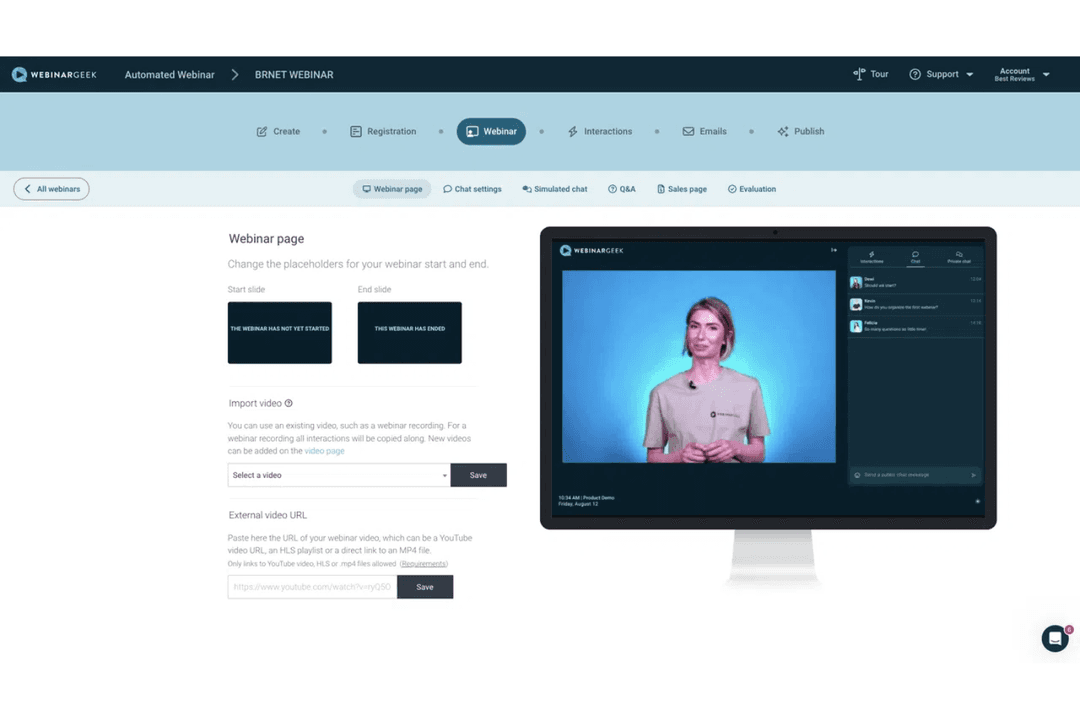
WebinarGeek utilizza un modello di abbonamento a livelli basato sul numero di spettatori live e sulle funzionalità incluse, con componenti aggiuntivi opzionali per funzionalità avanzate come utenti extra, profili di branding, integrazioni e streaming RTMP.
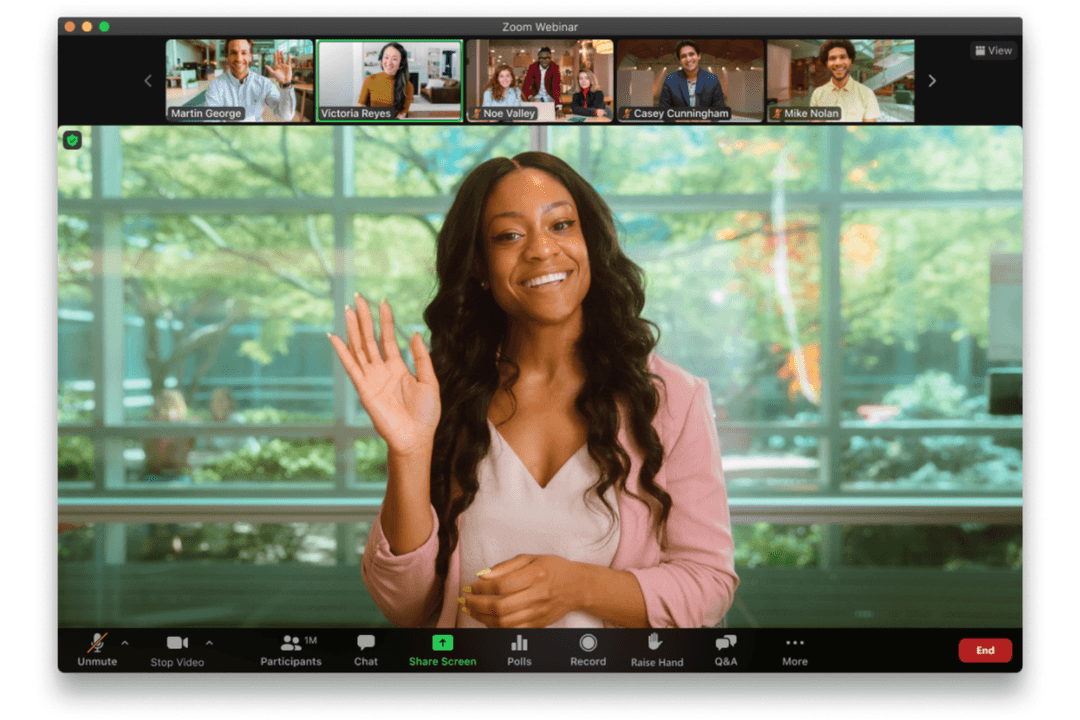
Anche Zoom Webinars segue una struttura di prezzi a livelli basata sulla capacità degli iscritti, ma richiede solitamente un piano Zoom Workplace a pagamento (come Pro) come prerequisito. I prezzi possono variare notevolmente a seconda che tu scelga Zoom Webinars, Webinars Plus o Zoom Events—ognuno dei quali aggiunge capacità di produzione avanzata, reportistica e gestione degli eventi più completa.
Il modo migliore per scegliere è chiarire di cosa hai effettivamente bisogno—quanto sono grandi i tuoi webinar, con quale frequenza li organizzi e quali funzionalità sono più importanti per te. Da lì, guarda oltre il prezzo base e considera eventuali extra come integrazioni, branding o analytics. Capire cosa è incluso (e cosa non lo è) in anticipo può evitarti sorprese in seguito e aiutarti a scegliere una piattaforma che cresca con te.
Quando si tratta di funzionalità principali, sia WebinarGeek che Zoom Webinars offrono le basi—hosting webinar in tempo reale, strumenti per l’interazione con il pubblico e report sul comportamento degli iscritti. Entrambi supportano anche formati flessibili, permettendo di organizzare sessioni live o riutilizzare contenuti per webinar on-demand.
Le differenze emergono nei punti di forza distintivi. WebinarGeek si distingue per l’engagement simulato nei webinar automatizzati e gli strumenti di marketing integrati come branding personalizzabile e automazione email, mentre Zoom Webinars spicca per funzionalità avanzate di produzione eventi, breakout room e la capacità di supportare eventi su larga scala con più sessioni.
| WebinarGeek | Zoom | |
|---|---|---|
| API | Yes | Yes |
| Calendar Management | Yes | Yes |
| Chat | Yes | Yes |
| Contact Management | Yes | Yes |
| Contact Sharing | Yes | Yes |
| External Integrations | Yes | Yes |
| History/Version Control | Yes | No |
| Multi-User | Yes | Yes |
| Notifications | Yes | Yes |
| Scheduling | Yes | Yes |
| Integrazione | WebinarGeek | Zoom Webinars |
| HubSpot | ✅ | ✅ |
| Mailchimp | ✅ | ❌ |
| Salesforce | ✅ | ✅ |
| ActiveCampaign | ✅ | ❌ |
| Microsoft Teams | ❌ | ✅ |
| Slack | ❌ (via Zapier) | ✅ |
| Marketo | ✅ | ✅ |
| Pipedrive | ✅ | ✅ |
| API | ✅ | ✅ |
| Zapier | ✅ | ✅ |
Entrambi i provider supportano integrazioni chiave con strumenti di marketing e CRM, garantendo che i dati del tuo webinar possano fluire nel tuo stack tecnologico più ampio. Zoom Webinars si spinge oltre offrendo una gamma maggiore di integrazioni native per l'enterprise, il che può ridurre la necessità di soluzioni alternative in ambienti complessi. Tuttavia, grazie all’accesso API e al supporto Zapier su entrambe le piattaforme, hai comunque la flessibilità di costruire flussi di lavoro personalizzati e collegarti alla maggior parte degli strumenti secondo necessità.
| Fattore | WebinarGeek | Zoom Webinars |
| Privacy dei dati | Conserva i dati nell'UE ed è progettato per essere conforme al GDPR, con accordi di trattamento dati disponibili. | Offre data center globali e supporta GDPR, CCPA e altri standard. |
| Crittografia | Utilizza la crittografia end-to-end per tutti gli streaming e le registrazioni dei webinar. | Fornisce crittografia AES a 256 bit per riunioni e webinar. |
| Conformità normativa | Si concentra sulla conformità GDPR, con opzioni per DPA personalizzati e residenza dei dati nell'UE. | Rispetta numerosi standard internazionali, incluso SOC 2 Type II, e supporta HIPAA (con i piani/configurazioni idonei). |
| Garanzia di uptime | Riporta un elevato uptime tramite monitoraggio interno, ma i target pubblicati variano (es. ~99,95% fino a 99,99% a seconda del piano). | Basato su infrastruttura di livello enterprise con alta disponibilità e una forte affidabilità comprovata. |
Zoom Webinars offre conformità e affidabilità di livello enterprise, mentre WebinarGeek si distingue per l’attenzione al GDPR e alla residenza dei dati in UE. Zoom è una scelta valida per organizzazioni che richiedono numerose certificazioni e controlli di sicurezza documentati, mentre WebinarGeek è perfetto per team che danno priorità all’allineamento al GDPR e a esigenze di conformità più semplici.
| Fattore | WebinarGeek | Zoom Webinars |
| Interfaccia utente | Presenta una dashboard chiara e intuitiva progettata per una rapida configurazione dei webinar. | Offre un’interfaccia familiare per chiunque abbia già usato lo strumento meeting di Zoom. |
| Onboarding | Fornisce onboarding guidato con webinar demo, walkthrough e guide in-app che aiutano i nuovi utenti a iniziare subito. | Beneficia della familiarità con Zoom, anche se le funzionalità webinar avanzate richiedono comunque un po’ di apprendimento. |
| Processo di configurazione | Semplifica la creazione del webinar con step guidati, rendendo veloce il lancio del primo evento. | Permette un setup rapido per webinar di base, ma configurazioni avanzate possono aumentare la complessità. |
| Assistenza clienti | Offre supporto via chat live e help center durante l’orario lavorativo, con ulteriore supporto onboarding nei piani superiori. | Fornisce documentazione approfondita e supporto a più livelli, incluso il supporto 24/7 sui piani enterprise. |
WebinarGeek è pensato per essere facile da utilizzare, soprattutto per chi ospita un webinar per la prima volta, grazie all’onboarding guidato e al processo di setup strutturato. Zoom Webinars, invece, risulta più familiare per i team che già utilizzano Zoom, anche se le funzionalità più avanzate possono portare a una certa complessità. La scelta migliore dipende dal valore che date a un’esperienza guidata e adatta ai principianti o alla continuità con strumenti già in uso dal vostro team.
WebinarGeek
- Supports multiple webinar formats, including live, automated, hybrid, and on-demand.
- Strong branding and customization options (pages, emails, domains).
- Provides detailed viewer-level analytics and performance insights within the webinar tool.
- Some key integrations (e.g., HubSpot, Salesforce) require paid add-ons on lower-tier plans.
- No native breakout rooms (workarounds required).
- The number of features can feel overwhelming for first-time users, though the basic plan lets you start small.
Zoom
- Supports up to 100,000 live attendees per event.
- Offers polished production tools and branded event pages.
- Provides reliable HD video quality and audio streaming.
- Limited attendee interaction compared to some competitors.
- Lacks built-in marketing automation and evergreen webinar tools.
- Pricing can be high for small or infrequent events.
WebinarGeek
- Demand Generation & Sales TeamsWebinarGeek is well-suited for generating and nurturing leads through webinars, with built-in registration pages, automated emails, integrations, and analytics that help track engagement and conversion.
- Customer EnablementTeams can use live or hybrid webinars to deliver product demos, onboard customers, and share knowledge at scale, combining pre-recorded content with live interaction where needed.
- Evergreen Webinar ProgramsAutomated and on-demand professional webinars—enhanced with simulated chat and interactions—make it easier to scale repeatable content while maintaining an engaging experience.
- Education & TrainingInteractive features like polls, Q&A, and assessments support learning and participation, making WebinarGeek a good fit for training programs, courses, and internal knowledge sharing.
- Internal CommunicationWebinarGeek can be used for internal updates, live event town halls, and company-wide communication, especially when broadcasting to larger audiences is more important than small-group collaboration.
- Healthcare & Professional ServicesWebinars provide a low-cost, accessible way to share expertise, connect with peers, and deliver live streaming and informational sessions without requiring in-person events.
Zoom
- Higher EducationUniversities can host large-scale lectures and virtual graduations with ease.
- Enterprise MarketingMarketing teams can run high-attendance product launches and thought leadership events.
- Corporate Virtual Meeting RequirementsHR and internal comms can deliver company-wide town halls and updates.
- Healthcare TrainingMedical organizations can provide continuing education to large groups securely.
- Government AgenciesPublic sector teams can broadcast policy updates and community forums reliably.
- Event Production TeamsProfessional event planners can manage branded, high-quality virtual conferences.
Chi dovrebbe usare WebinarGeek e chi dovrebbe usare Zoom Webinars?
Se gestite una piccola o media impresa e volete adottare programmi di webinar per il marketing, la formazione interna/meeting o scopi educativi generali, WebinarGeek è una scelta eccellente. Se vi servono strumenti di branding avanzati, automazioni integrate e funzionalità per aumentare il coinvolgimento e la conversione, è studiato appositamente per supportare tutto questo senza richiedere configurazioni complesse. È particolarmente utile se cercate una piattaforma all-in-one per gestire l’intero ciclo di vita del webinar, dalla registrazione al follow-up.
La piattaforma webinar di Zoom è più adatta per organizzazioni già integrate nell’ecosistema Zoom o che devono gestire eventi più grandi e complessi. Se ospitate comunicazioni interne, presentazioni su larga scala o eventi multi-sessione con esigenze di produzione avanzate, la flessibilità e la familiarità di Zoom rappresentano un grande vantaggio. Si adatta bene anche a team che danno priorità alla scalabilità e alle integrazioni di livello enterprise.
| WebinarGeek | Zoom | |
|---|---|---|
| AI Capabilities | WebinarGeek AI is focused on improving webinar performance and engagement, with features like performance analysis, AI email writing, live translation, and replay enhancements. | Zoom AI is broader and more production-focused, with tools for content generation (text, images, video), webinar summaries, chat assistance, and automated event setup. |
| Attendee Capacity | WebinarGeek Supports scalable audiences (up to ~5,000 depending on plan). | Zoom Supports very large audiences (up to one hundred thousand), suited for enterprise-scale virtual events. |
| Breakout Rooms | WebinarGeek Not natively supported (requires workaround). | Zoom Native breakout rooms available. |
| Compliance | WebinarGeek GDPR-focused with EU data residency and data processing agreements. | Zoom Broad compliance coverage, including SOC 2 and support for multiple global standards. |
| Integration Options | WebinarGeek Strong integrations with CRM and marketing tools, plus API and Zapier. | Zoom More extensive native integrations across enterprise, productivity, and event ecosystems. |
| Marketing Features | WebinarGeek Built-in email marketing automation, registration pages, and lead capture. | Zoom Includes registration and reminders, but focuses more on event delivery than marketing workflows. |
| Browser-Based Access | Attendees can join webinars without installing software, making access simple. |
|---|---|
| Engagement Tools | Both include interactive features like chat, polls, and Q&A to engage attendees during webinars. |
| Live Streaming | Both platforms support high-quality live webinars, with stable video, screen sharing, and audio performance. |
| Registration Process | Both offer customizable registration forms and automated confirmation emails to streamline attendee sign-up. |
| Reporting & Analytics | Each provides analytics dashboards to track attendance, engagement, and performance metrics post-event. |