

Recensione di Mighty Networks: Pro, Contro, Funzionalità e Prezzi
Analizzo dove Mighty Networks eccelle—e dove inciampa—come piattaforma per siti di membership, rivelando i veri compromessi di cui nessuno parla.

Recensiamo gli strumenti in modo indipendente, e le commissioni aiutano a finanziare i nostri test. Consulta la nostra politica sulla trasparenza, la nostra metodologia o suggerisci uno strumento.
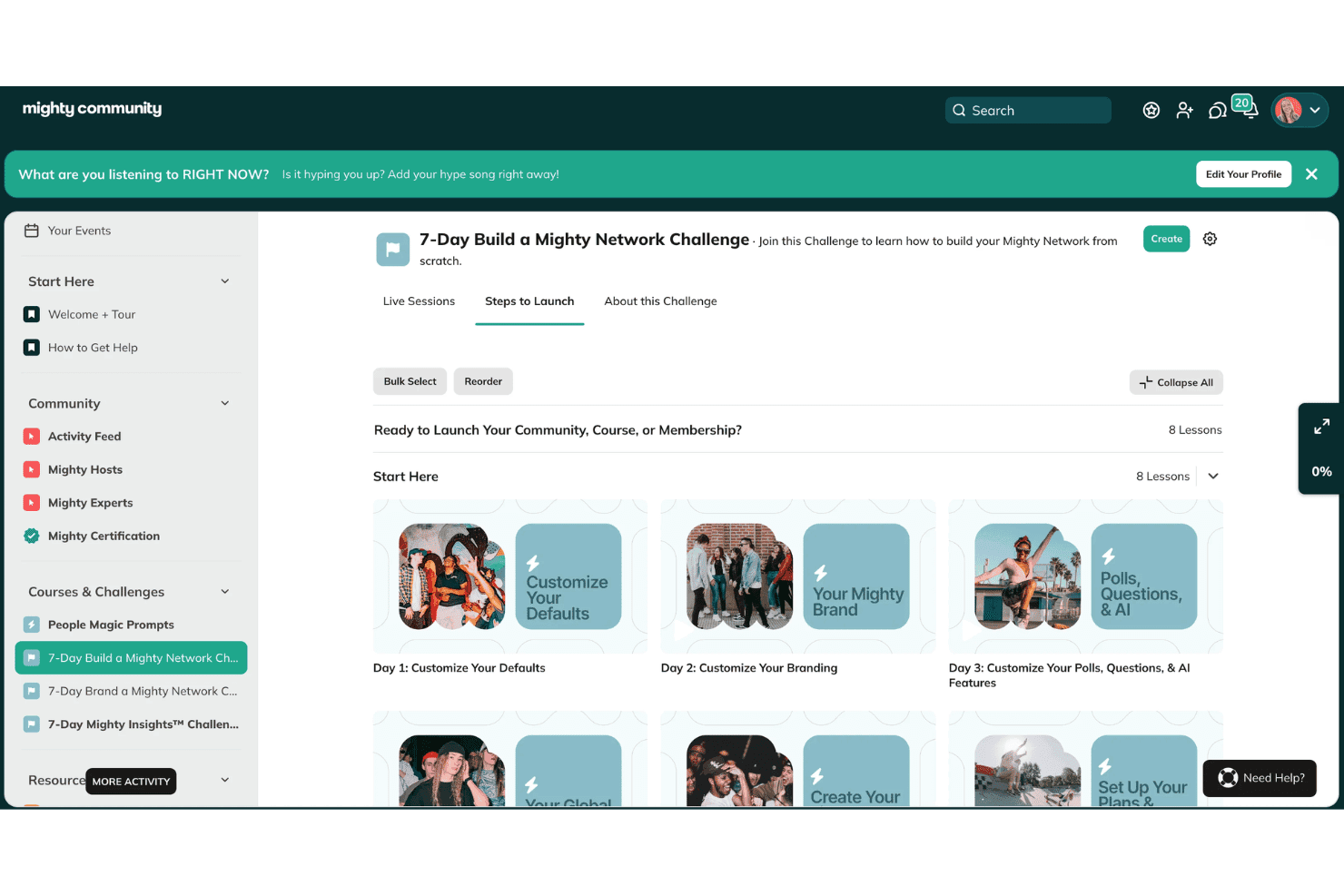
Mighty Networks is a membership site software built for creators and brands that want to combine community, courses, and memberships under one roof. I'd consider it if you're building a paid community where member engagement matters as much as content delivery. It's a stronger fit than Kajabi for teams that want native community features at the core of their member experience, rather than tacked onto a course platform.
Mighty Networks Evaluation Summary
4.6/5
- From $79/month (billed annually)
- 14-day free trial + free demo available
Perché fidarsi dei nostri consigli sui software
6,700+
Reviews
20
Industry experts
16+
Evaluation factors
14
Years
Il nostro team testa e recensisce software dal 2012. In quanto leader del marketing noi stessi, sappiamo quanto sia difficile — e importante — scegliere il software giusto.
Per questa guida, abbiamo valutato gli strumenti attraverso test pratici e ricerche indipendenti, assegnando un punteggio agli strumenti in base ai nostri criteri di selezione.
Le nostre recensioni riflettono il nostro giudizio editoriale umano, non un discorso di vendita.
Revisori esperti:
 Gui DrusinaDirettore creativo
- Shriya GhateSenior Marketing Lead
 Amanda JacquesResponsabile Marketing Ops

Mighty Networks Overview
From my point of view, Mighty Networks stands out for its built-in community features, straightforward onboarding, and branded app experience, making it ideal if you're judging membership site software by community engagement. I think the pricing is competitive given its community and course management tools, though integrations and customization are more limited than some alternatives. If you're choosing software for interactive communities or cohort course delivery, Mighty Networks is a top pick, but if your team needs advanced external integrations or granular analytics functionality, you might find its capabilities more basic. Its ease of use and mobile-first design are strong advantages.
Pros
- Offers branded mobile apps for community and courses
- Built-in event hosting supports live and virtual sessions
- Membership tiers and payments built into the platform
Cons
- Limited reporting and analytics for member activity
- Email tools lack advanced segmentation options
- Community structure can feel rigid for large organizations
Is Mighty Networks Right For Your Needs?
Who Would be a Good Fit for Mighty Networks?
Mighty Networks shines for creators, small businesses, or organizations who want to build community, host online courses, and offer membership subscriptions from a single platform. You'll especially get value if you need community-driven learning, live events, or networking features without heavy technical overhead. The ease of creating multi-tier memberships, organizing conversations, and providing a custom app makes it a strong fit for education, coaching, and specialized interest groups—particularly for those moving audiences away from social media platforms like competing social media groups.
- Online EducatorsYou'll find it great for packaging courses, live sessions, and discussion spaces in one place with branded mobile access.
- AssociationsMighty Networks is a smart choice for associations that want to manage member-only events, networking, and resource hubs with tiered access.
- Mastermind GroupsThe platform enables private courses, group messaging, and event schedules that support collaboration and confidentiality.
- Fitness CommunitiesYou can build interactive health or coaching groups with membership plans and in-app event scheduling for classes.
- CreatorsIt's easy to set up paid content, nurture a fan community, and sell unique access or experiences directly.
- Alumni NetworksMighty Networks supports ongoing engagement, discussion forums, and exclusive opportunities in an organized, branded environment.
Who Would be a Bad Fit for Mighty Networks?
Mighty Networks isn't the best pick for large enterprises requiring advanced integrations, detailed reporting, or heavy compliance. It may also fall short for organizations needing highly customizable workflows, external learning management system compatibility, or broad e-commerce capabilities. Teams with complex IT stacks and a need for granular data control might run into limits with the platform's current flexibility.
- Enterprise IT DepartmentsIf you need advanced user provisioning, SSO, or deep integration with legacy systems, Mighty Networks will not meet your requirements.
- Large CorporationsOrganizations demanding custom branding at every touchpoint, heavy analytics, or regulatory compliance beyond basics may find it limiting.
- Formal Educational InstitutionsThe platform doesn't support SCORM, detailed grading, or other requirements commonly found in universities or large schools.
- Ecommerce TeamsMighty Networks lacks native support for physical product catalogs, shipping, or inventory required for full-scale e-commerce operations.
- Healthcare OrganizationsYou'll struggle with data protection standards and integrations needed for HIPAA or similar healthcare compliance.
- Non-Digital CommunitiesGroups whose members require primarily in-person or offline engagement, or have limited internet access, won't get the intended value from an online-first tool.
Come Testiamo e Valutiamo gli Strumenti
Abbiamo passato anni a costruire, perfezionare e migliorare il nostro sistema di test e valutazione del software. Il nostro metodo è progettato per cogliere le sfumature nella selezione del software e ciò che rende uno strumento efficace, concentrandoci sugli aspetti critici del processo decisionale. Qui sotto puoi vedere esattamente come funziona il nostro sistema di test e valutazione su sette criteri. Questo ci permette di offrire una valutazione imparziale del software basata su funzionalità principali, funzioni distintive, facilità d’uso, onboarding, supporto clienti, integrazioni, recensioni dei clienti e rapporto qualità-prezzo.
Funzionalità principali (25% del punteggio finale)
Il punto di partenza della nostra valutazione è sempre la funzionalità principale dello strumento. Include le caratteristiche e le funzioni basilari che un utente si aspetterebbe di trovare? Alcune di queste funzionalità sono bloccate nei piani premium? Ci aspettiamo che ogni strumento soddisfi almeno le capacità di base dei suoi concorrenti.
Funzionalità distintive (25% del punteggio finale)
Successivamente, valutiamo le funzionalità uniche che vanno oltre la normale funzionalità principale, quelle poco comuni negli strumenti simili. Un punteggio alto riflette caratteristiche specializzate o uniche che rendono il prodotto più veloce, efficiente o offrono un valore aggiunto all’utente. Valutiamo anche quanto sia semplice integrare il software con altri strumenti abitualmente usati in una tech stack, per espandere le funzionalità e l’utilità del prodotto. Sono valutate positivamente soluzioni con molte integrazioni native, connessioni di terze parti e API per creare integrazioni personalizzate.
Facilità d’uso (10% del punteggio finale)
Consideriamo la rapidità e semplicità con cui si possono eseguire le attività principali tramite lo strumento. I software con punteggio più alto sono ben progettati, intuitivi, dispongono di app mobili, offrono template e semplificano compiti complessi.
Onboarding (10% del punteggio finale)
Sappiamo quanto sia importante l’adozione rapida in azienda, quindi valutiamo la facilità di apprendimento e utilizzo di uno strumento con formazione minima. Analizziamo quanto velocemente un utente senza esperienza può iniziare a usare il software. Le soluzioni migliori richiedono poco o nessun supporto.
Supporto clienti (10% del punteggio finale)
Analizziamo la rapidità e facilità nel trovare aiuto tramite telefono, chat dal vivo o knowledge base. Gli strumenti che offrono supporto in tempo reale ottengono il punteggio migliore: i chatbot invece i peggiori.
Recensioni dei clienti (10% del punteggio finale)
Oltre ai nostri test, consideriamo il net promoter score di attuali ed ex clienti. Valutiamo la probabilità che, potendo scegliere, l’utente decida di utilizzare ancora quello strumento per le funzionalità principali. Un software con un punteggio alto corrisponde ad un alto net promoter score tra clienti attuali o passati.
Rapporto qualità-prezzo (10% del punteggio finale)
Infine, tenendo conto di tutti gli altri criteri, confrontiamo il prezzo medio dei piani base rispetto alle funzionalità principali e agli altri fattori di valutazione. I software che offrono di più, a meno, ottengono i punteggi più alti.
Core Features
Branded Mobile App
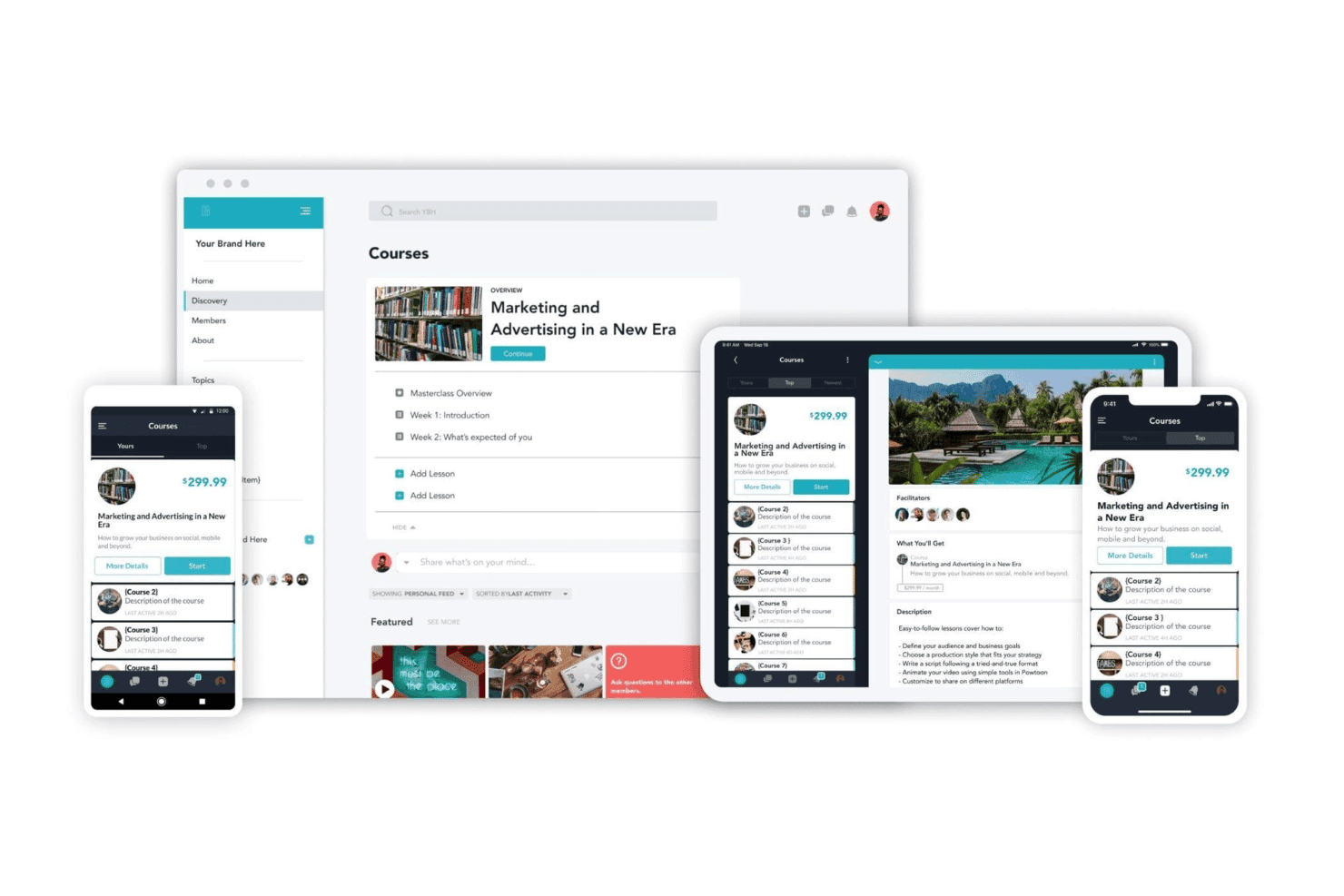
Mighty Networks gives you a fully branded mobile app for your community. Members access courses, events, and discussions right from their iOS or Android devices.
Membership Tiers
Create multiple membership levels with different pricing, content, or access. You control who gets in and what each tier sees.
Course Creation
Build cohort course or evergreen formats with lessons, video, and assignments. Members can learn at their own pace or join scheduled sessions.
Native Events
Host live events or virtual sessions inside your community hub. Members RSVP, join, and connect in real time without leaving the platform.
Community Spaces
Organize discussions, posts, and resources into topic-based spaces. Spaces help community members discover relevant content and connect around shared interests.
Direct Messaging
Members can send private or group messages without leaving Mighty Networks. Messaging keeps engagement and conversations contained in your community.
Ease of Use
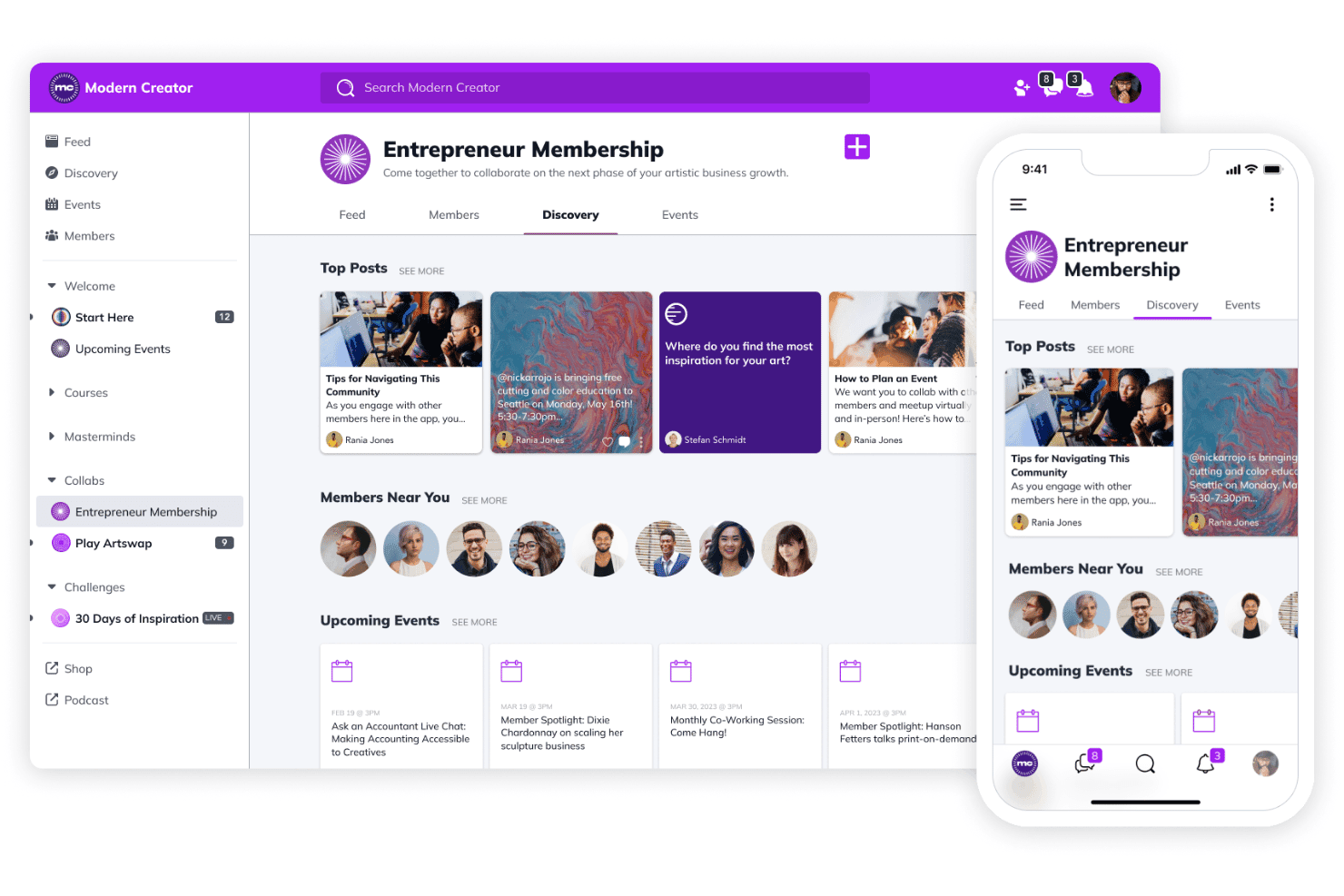
Mighty Networks feels intuitive and user-friendly, especially for non-technical users, thanks to its clean dashboard, straightforward course builder, and drag-and-drop community spaces. I think the platform reduces friction for new members joining or navigating discussions, and many users praise the branded mobile app for seamless access, though some wish for deeper admin controls and faster updates to feature requests.
Integrations
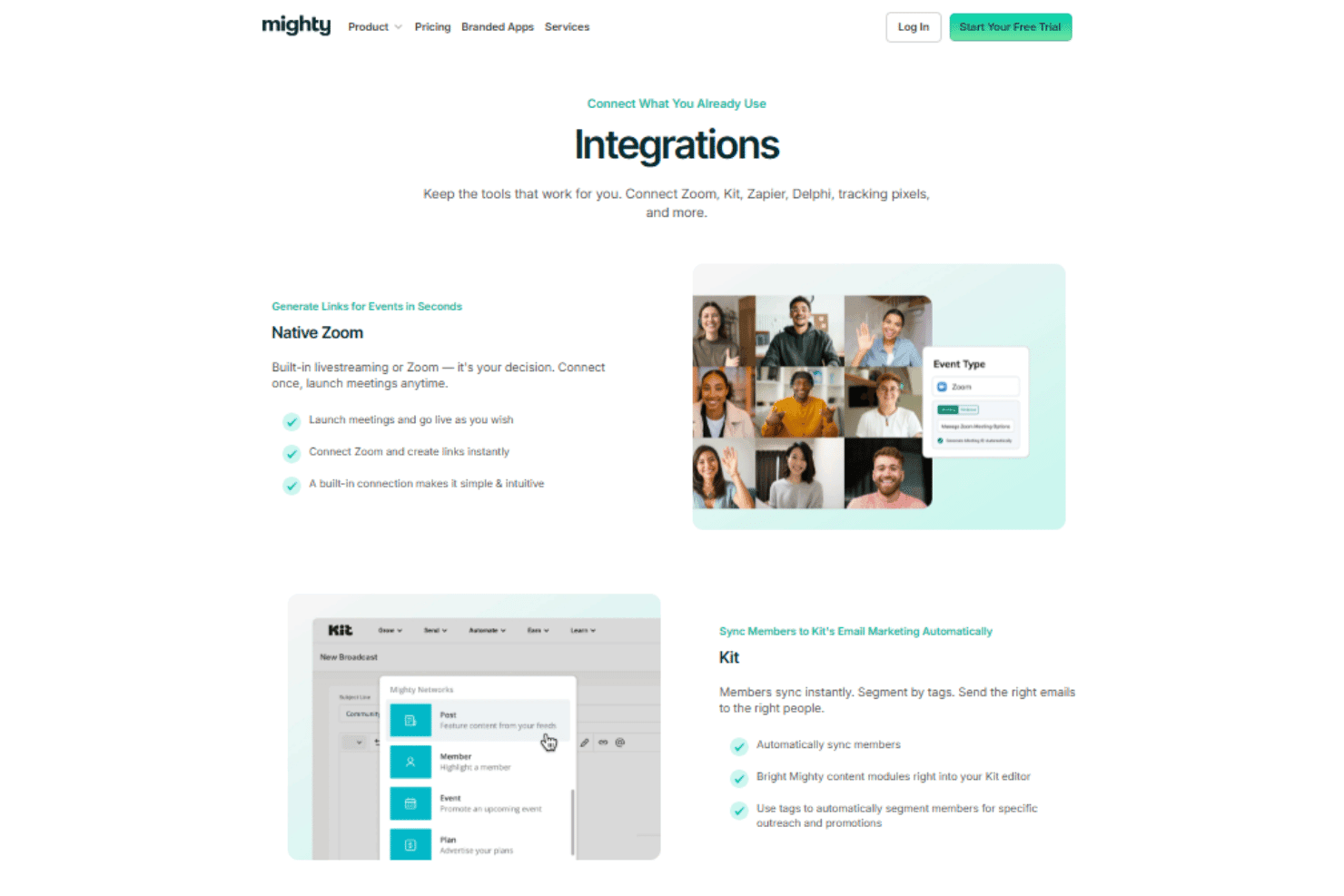
Mighty Networks integrates with Zoom, Kit, Google Analytics, Meta Pixel, TikTok Pixel, and Delphi, among others.
The platform also offers an API and supports third-party connections through Zapier for extended automation and integration options.
Mighty Networks Specs
- API: Yes
- Calendar Management: Yes
- Contact Management: Yes
- Customer Management: Yes
- Dashboard: Yes
- Data Export: Yes
- Data Import: Yes
- Data Visualization: Yes
- External Integrations: Yes
- Forecasting: Yes
- Lead Management: Yes
- Lead Scoring: Yes
- Marketing Automation: Yes
- Multi-User: Yes
- Notifications: Yes
- PayPal: Yes
- Stripe: Yes
- Third-Party Plugins/Add-Ons: Yes


