
Animaker-arvostelu: hyvät ja huonot puolet, ominaisuudet ja hinnoittelu
Animaker erottuu edukseen intuitiivisella käyttöliittymällään ja edullisuudellaan, mikä tekee siitä ihanteellisen tiimeille, jotka haluavat luoda kiinnostavia videoita ilman suuria kustannuksia.

We review tools independently, and commissions help fund our testing. See our transparency policy, our methodology, or suggest a tool.
Animaker is a video marketing software for marketing teams that need to produce animated and live-action videos without a dedicated production team. It covers everything from social media clips and explainer videos to product demos, using a drag-and-drop editor and a large library of pre-built templates. I'd consider it over Vyond if your team needs more template variety at a lower price point—especially if you're producing high volumes of short-form content across multiple channels.
Animaker Evaluation Summary
4.6/5
- From $25.00/month (billed annually)
- Free plan available
Why Trust Our Software Recommendations
6,700+
Reviews
20
Industry experts
16+
Evaluation factors
14
Years
Our team has been testing and reviewing software since 2012. As marketing leaders ourselves, we know how difficult—and important—it is to choose the right software.
For this guide, we evaluated tools using hands-on testing and independent research, scoring tools using our selection criteria.
Our reviews reflect our human editorial judgment, not a sales pitch.
Expert reviewers:
 Gui DrusinaCreative Director
- Shriya GhateSenior Marketing Lead
 Amanda JacquesMarketing Ops Leader

Animaker Overview
In my opinion, Animaker is a solid choice for teams looking to create engaging videos without a steep learning curve. It offers a user-friendly interface and responsive customer support, making it ideal for small businesses and educators. While it excels in ease of use and customer service, some technical issues and pricing concerns might deter users seeking more advanced features or budget-friendly options.
Compared to competitors like Vyond, Animaker provides a more accessible entry point but may lack the depth in customization. For those prioritizing simplicity and support, Animaker is worth considering.
Pros
- You can create professional-looking videos with ease using its intuitive interface.
- Your team will appreciate the extensive library of templates and assets.
- It's great for beginners due to its user-friendly design.
Cons
- You might experience occasional technical glitches during use.
- Advanced users may find the customization options limited.
- Your team could face challenges with exporting larger projects.
Is Animaker Right For Your Needs?
Who Would be a Good Fit for Animaker?
Animaker is perfect for small businesses, educators, and marketing teams needing easy video creation. You’ll find its user-friendly interface and extensive template library ideal for quick content creation. If your team values simplicity and efficiency, Animaker’s capabilities will meet your needs. It's particularly beneficial for those new to video editing, offering a straightforward way to produce professional videos without extensive training.
- Small BusinessesAnimaker provides a cost-effective solution for creating marketing videos without needing a dedicated video team.
- Educational InstitutionsYour educators can create engaging instructional videos quickly, using Animaker's diverse templates and characters.
- Marketing TeamsYou’ll appreciate the ease of creating promotional content and social media videos with Animaker's intuitive tools.
- Content CreatorsAnimaker's ready-made animations and assets allow you to produce high-quality content efficiently.
- Non-Profit OrganizationsYou can craft compelling storytelling videos to raise awareness and engage your audience effectively.
- Training DepartmentsYour trainers can design interactive learning materials that captivate employees and enhance training sessions using Animaker.
Who Would be a Bad Fit for Animaker?
Animaker may not be suitable for large enterprises or specialized video production teams needing advanced customization. If your team requires intricate animation or high-end video editing, Animaker's capabilities might fall short. The platform's simplicity, while a strength for beginners, limits those seeking detailed control over video elements. Professional video editors might find its features lacking compared to more complex software options.
- Large CorporationsYour organization might need more advanced features than Animaker offers for large-scale video production.
- Film Production StudiosAnimaker doesn't provide the sophisticated editing tools your studio needs for high-quality movie creation.
- Advanced AnimatorsIf your work involves complex animations, Animaker's basic tools won't meet your needs.
- Tech CompaniesYour team may require more technical flexibility and integrations than Animaker can provide.
- Advertising AgenciesAnimaker's limited customization options might not fit your creative demands for diverse client projects.
- Professional Video EditorsYou might find Animaker's features too basic for your high-level editing requirements.
How We Test & Score Tools
We’ve spent years building, refining, and improving our software testing and scoring system. The rubric is designed to capture the nuances of software selection and what makes a tool effective, focusing on critical aspects of the decision-making process.
Below, you can see exactly how our testing and scoring works across seven criteria. It allows us to provide an unbiased evaluation of the software based on core functionality, standout features, ease of use, onboarding, customer support, integrations, customer reviews, and value for money.
Core Functionality (25% of final scoring)
The starting point of our evaluation is always the core functionality of the tool. Does it have the basic features and functions that a user would expect to see? Are any of those core features locked to higher-tiered pricing plans? At its core, we expect a tool to stand up against the baseline capabilities of its competitors.
Standout Features (25% of final scoring)
Next, we evaluate uncommon standout features that go above and beyond the core functionality typically found in tools of its kind. A high score reflects specialized or unique features that make the product faster, more efficient, or offer additional value to the user.
We also evaluate how easy it is to integrate with other tools typically found in the tech stack to expand the functionality and utility of the software. Tools offering plentiful native integrations, 3rd party connections, and API access to build custom integrations score best.
Ease of Use (10% of final scoring)
We consider how quick and easy it is to execute the tasks defined in the core functionality using the tool. High scoring software is well designed, intuitive to use, offers mobile apps, provides templates, and makes relatively complex tasks seem simple.
Onboarding (10% of final scoring)
We know how important rapid team adoption is for a new platform, so we evaluate how easy it is to learn and use a tool with minimal training. We evaluate how quickly a team member can get set up and start using the tool with no experience. High scoring solutions indicate little or no support is required.
Customer Support (10% of final scoring)
We review how quick and easy it is to get unstuck and find help by phone, live chat, or knowledge base. Tools and companies that provide real-time support score best, while chatbots score worst.
Customer Reviews (10% of final scoring)
Beyond our own testing and evaluation, we consider the net promoter score from current and past customers. We review their likelihood, given the option, to choose the tool again for the core functionality. A high scoring software reflects a high net promoter score from current or past customers.
Value for Money (10% of final scoring)
Lastly, in consideration of all the other criteria, we review the average price of entry level plans against the core features and consider the value of the other evaluation criteria. Software that delivers more, for less, will score higher.
Core Features
Drag-and-Drop Editor
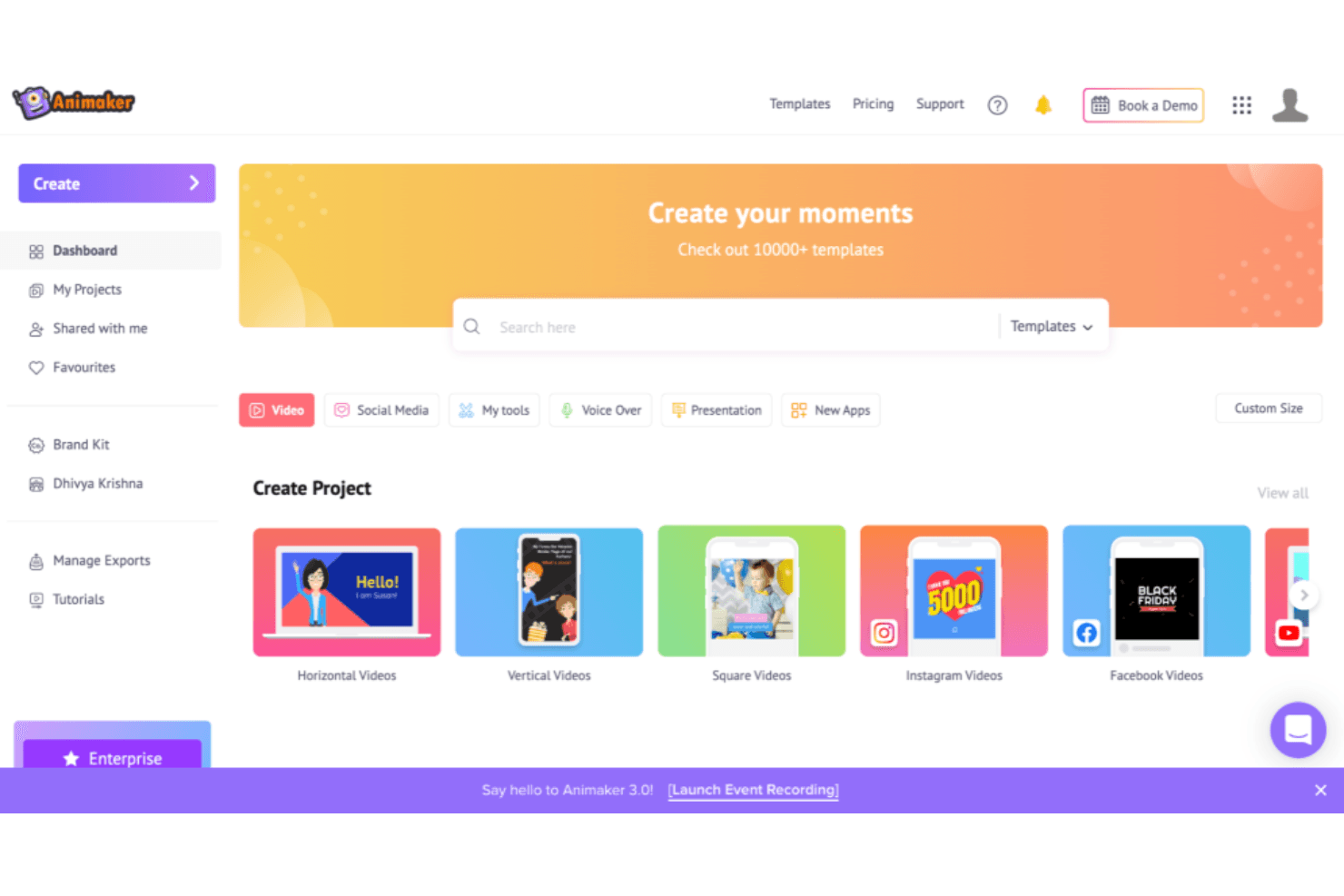
You can easily create videos by moving elements around with Animaker's intuitive drag-and-drop interface. It simplifies video creation for beginners and saves time for your team.
Extensive Template Library
Animaker offers a wide range of templates catering to different themes and industries. This helps you quickly craft videos without starting from scratch.
Character Builder
Your team can design unique characters tailored to your brand using Animaker's character builder. This feature adds a personal touch to your projects.
Text-to-Speech
Animaker's text-to-speech function allows you to add voiceovers effortlessly. It supports multiple languages, enhancing your video's reach.
Animation Effects
You can bring your videos to life with Animaker's diverse animation effects. These effects make your content more engaging and visually appealing.
Asset Library
Your work benefits from access to a vast library of props, icons, and backgrounds. This variety helps in creating diverse and professional-looking videos.
.png&w=3840&q=75)
Ease of Use
Animaker's user-friendliness shines with its intuitive drag-and-drop interface, making video creation accessible for beginners and efficient for your team. The platform's design lets you quickly grasp its functionalities without extensive training. Its extensive library of templates and assets simplifies your work, allowing you to produce professional videos with minimal effort. Compared to other software, Animaker stands out for its straightforward approach, making it a preferred choice for those seeking simplicity and speed in video marketing.
.png&w=3840&q=75)
Integrations
Animaker currently only integrates with Zoom, but they do offer access to their Ultra Gen API through an application process.
.png&w=3840&q=75)
Animaker Specs
- A/B Testing: No
- API: Yes
- Approval Workflows: Yes
- Audience Targeting: No
- Brand Asset Creation: Yes
- Brand Management: Yes
- Calendar Management: No
- Campaign Management: No
- Conversion Tracking: No
- Custom Domains: No
- Custom Reports: No
- Dashboard: Yes
- Data Export: Yes
- Data Import: Yes
- Data Visualization: Yes
- Design Templates: Yes
- Email Integration: No
- External Integrations: Yes
- Feedback Management: No
- Keyword Tracking: No
- Landing Pages: No
- Link Tracking: No
- Marketing Automation: Yes
- Multi-User: Yes
- Notifications: Yes
- Review Monitoring: No
- Scheduling: Yes
- Sentiment Analysis: No
- SEO: No
- Social-Media Integration: Yes
- White-label: Yes
- Workflow Management: Yes


