

Video kişiselleştirme yazılımı, verileri kullanarak mesajları, görselleri ve harekete geçirici mesajları geniş ölçekte kişiselleştirmenize, her izleyiciye özel videolar oluşturup sunmanıza olanak tanır. Gelen kutusu yorgunluğunu aşmanın, sosyal medyada öne çıkmanın veya satış ya da müşteri yolculuklarına insani bir dokunuş katmanın yollarını arıyorsanız, muhtemelen önde gelen video kişiselleştirme araçlarını değerlendiriyorsunuzdur. Doğru platformu seçmek önemlidir; ilgi düzeyi etkileşimi artırır ve daha iyi etkileşim, kampanyalarınız genelinde daha iyi performans anlamına gelir.
Bu kılavuzda, 2026 için en iyi seçeneklerin net bir karşılaştırmasını ve her aracı farklı kılan özelliklere ilişkin pratik ayrıntıları bulabilir, böylece ihtiyaçlarınıza en uygun seçimi yapabilirsiniz.
Why Trust Our Software Recommendations
6,700+
Reviews
20
Industry experts
16+
Evaluation factors
14
Years
Our team has been testing and reviewing software since 2012. As marketing leaders ourselves, we know how difficult—and important—it is to choose the right software.
For this guide, we evaluated tools using hands-on testing and independent research, scoring tools using our selection criteria.
Our reviews reflect our human editorial judgment, not a sales pitch.
Expert reviewers:
 Gui DrusinaCreative Director
- Shriya GhateSenior Marketing Lead
 Amanda JacquesMarketing Ops Leader

Video Kişiselleştirme Yazılımları Karşılaştırma Tablosu
Bu karşılaştırma tablosu, en iyi video kişiselleştirme yazılımı seçimlerimin fiyatlandırma ayrıntılarını özetler.
Sorted by: Default
| Tool | Starting Price | Website | |
|---|---|---|---|
Best for advanced conditional video logic | 4.8 out of 5 | Pricing upon request Free demo available | Website |
Best for quick 1:1 video prospecting | 4.9 out of 5 | $99/workspace/month 7-day free trial | Website |
Best for customizable AI presenter videos | Not rated | $14/month Free plan + free demo available | Website |
Best for multilingual avatar-led presentations | Not rated | $24/month Free plan available | Website |
Best for bulk rendering with API flexibility | Not rated | $48/month Free trial + free demo available | Website |
Best for large-scale real-time personalization | 4.8 out of 5 | Pricing upon request Free demo available | Website |
Best for CRM-integrated personalized campaigns | Not rated | $59/user/month Free plan + free trial + free demo available | Website |
Best for interactive video email outreach | Not rated | $20/user/month Free plan + free trial + free demo available | Website |
Best for easy branded video landing pages | Not rated | $39/month Free trial + free demo available | Website |
Best for dynamic content in enterprise programs | Not rated | Pricing upon request Free demo available | Website |


En İyi Video Kişiselleştirme Yazılımları İncelemeleri
Aşağıda, kısa listeme giren en iyi video kişiselleştirme yazılımlarına ilişkin ayrıntılı özetlerimi bulabilirsiniz. İncelemelerim, her platformun özelliklerine, entegrasyonlarına ve en uygun kullanım alanlarına ayrıntılı bir bakış sunarak sizin için en iyi seçeneği bulmanıza yardımcı olur.
 Best for advanced conditional video logic
- Free demo available
- Pricing upon request
Visit WebsiteCustomer Rating:4.8/5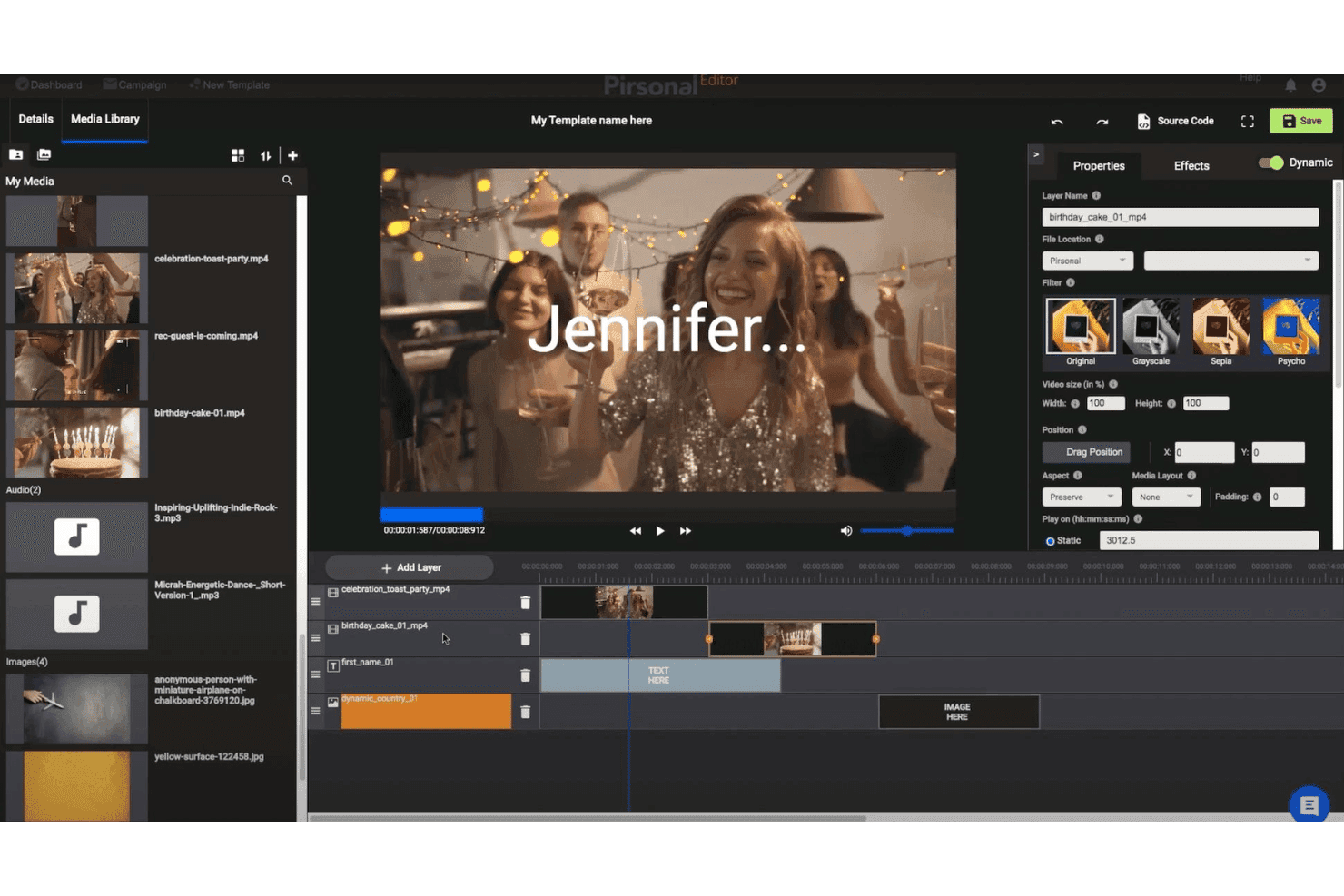
Pirsonal allows users to build personalized video templates using timeline layers, a media library, dynamic fields, and filter options. Pirsonal is a video personalization platform that lets you generate dynamic, data-driven videos at scale using conditional scene logic, personalized landing pages, an interactive video player, and real-time or batch rendering via CSV or API.
Who Is Pirsonal Best For?
Pirsonal is a strong fit for marketing teams at mid-size to enterprise companies running ABM or lifecycle campaigns that require developer-friendly, data-driven video personalization at scale.
Why I Picked Pirsonal
Pirsonal earns its spot on my shortlist because of how it handles conditional scene logic. Using Pirsonal Script, a JSON-based scripting system, I can configure videos to show, skip, or reorder entire scenes based on individual viewer data, so a prospect in finance sees a completely different video flow than one in retail. That kind of per-viewer scene branching goes well beyond simple text or image swaps, and it's genuinely rare to find it built directly into the template layer the way Pirsonal does it.
Pirsonal Key Features
- Pirsonal Editor: Create and customize video templates visually or using JSON for flexible personalization.
- Personalized landing pages: Automatically generate dedicated, branded pages for each recipient with embedded interactive videos.
- Interactive video player: Add clickable calls-to-action, forms, or buttons directly inside any personalized video.
- Real-time analytics: Track viewer engagement and CTA activity on a per-video and per-recipient basis with CSV export and API access.
Pirsonal Integrations
Pirsonal offers native integrations with HubSpot, Salesforce, and Mailchimp, and connects with Zapier. An API is available for custom integrations.
Pros and Cons
Pros:
- Per-recipient personalized landing pages with custom domains
- Batch and real-time rendering in one platform
- JSON-based conditional scene logic is genuinely rare
Cons:
- Animation options are limited within video templates
- Template editor needs polish compared to competitors
Learn more about Pirsonal: Best for quick 1:1 video prospecting
- 7-day free trial
- From $99/workspace/month
Visit WebsiteCustomer Rating:4.9/5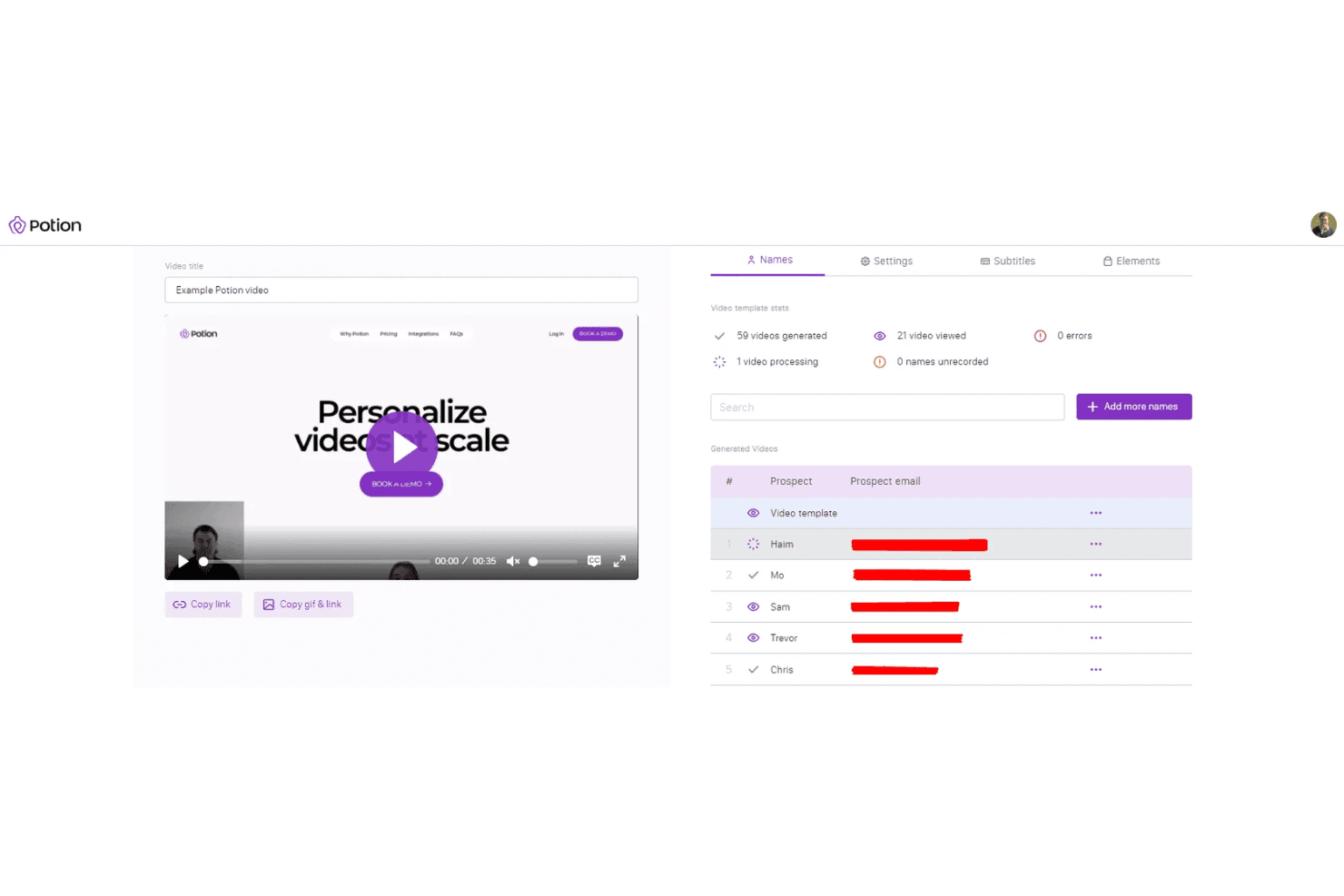
Potion allows users to personalize videos at scale by generating individual prospect videos from a single template, with tracking and email management built in. Potion is an AI video personalization platform that clones your face, voice, and gestures to generate dynamic 1:1 prospecting videos at scale, with personalized landing pages, CRM integrations, and per-recipient video analytics.
Who Is Potion Best For?
Potion is a strong fit for B2B outbound sales teams and SDRs who run high-volume prospecting sequences and want to personalize video outreach without recording individual videos.
Why I Picked Potion
I picked Potion as one of the best because its AI cloning model replicates your face, voice, and gestures so each generated video feels genuinely recorded for that prospect. The dynamic background feature swaps in a personalized screen, like a prospect's website or LinkedIn profile, behind your cloned likeness without re-recording. My team can train a video AI in about four minutes and then push hundreds of individualized clips from a single template into an outbound sequence.
Potion Key Features
- Dynamic backgrounds: Automatically inserts prospect-specific websites or LinkedIn profiles as video backdrops for personalized outreach.
- Custom branded landing pages: Builds unique landing pages for each recipient with custom domains and personalized video embeds.
- Multi-language support: Generates AI-personalized videos in 29 supported languages including English, Japanese, German, and Hindi.
- Video analytics dashboard: Tracks individual engagement metrics like views, watch time, and CTA interactions for every sent video.
Potion Integrations
Potion offers 50+ native integrations, including Salesforce, HubSpot, Outreach, Salesloft, Apollo, Pipedrive, Gmail, Outlook, LinkedIn, and ActiveCampaign. An API is available for custom integrations.
Pros and Cons
Pros:
- Dynamic backgrounds pull live prospect web pages
- Generates personalized videos in 29 languages
- AI model trains in under four minutes
Cons:
- Calendar embedding works best only with Calendly
- Analytics lacks heatmaps and drop-off funnels
Learn more about Potion: Best for customizable AI presenter videos
- Free plan + free demo available
- From $14/month (billed annually)
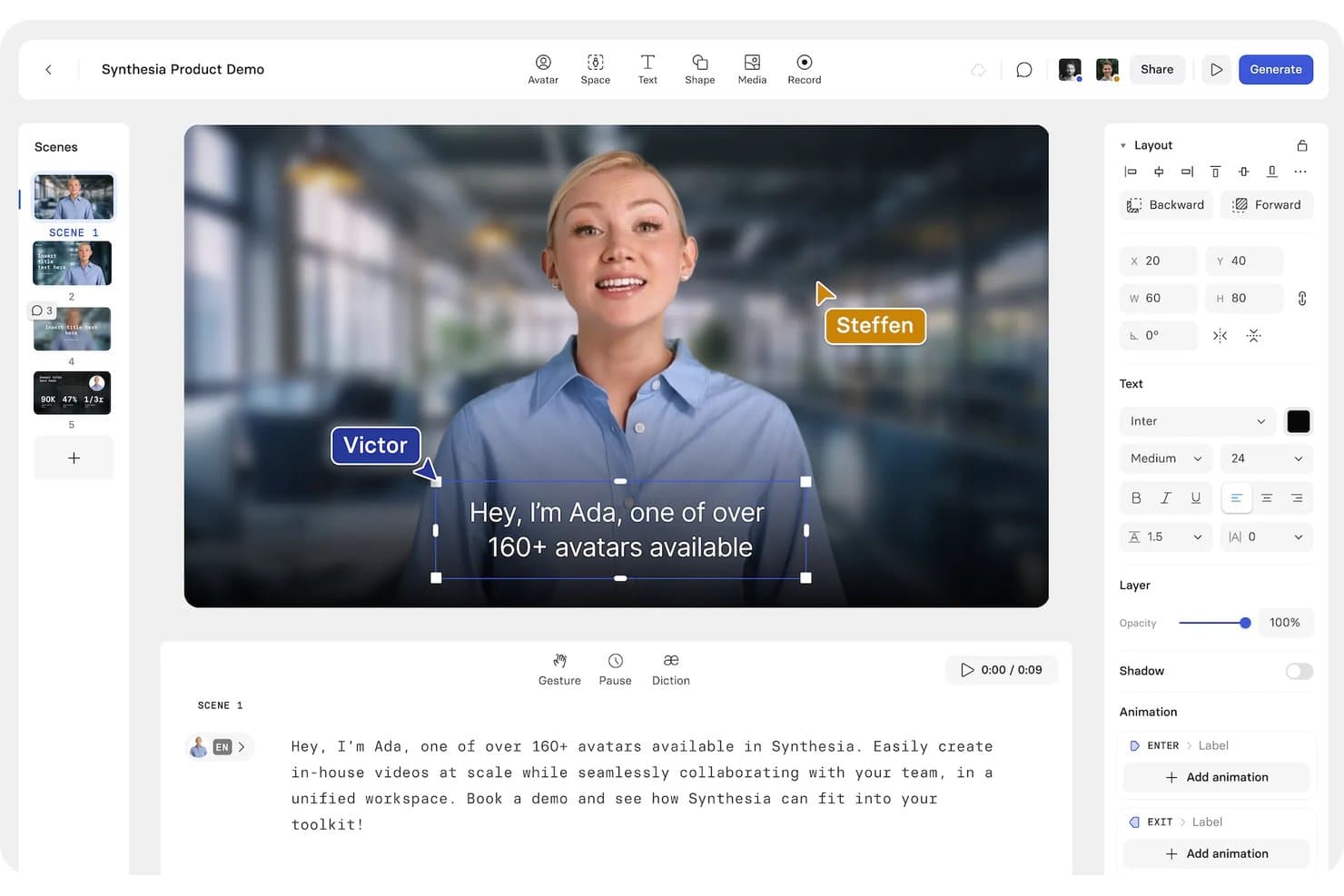
Synthesia lets users personalize AI avatar videos with name labels overlaid on presenters for scalable team communication. Synthesia is an AI video creation platform that generates presenter-led videos using customizable AI avatars, bulk personalization via CSV templates, voice cloning, and multilingual dubbing across 160+ languages.
Who Is Synthesia Best For?
Synthesia is a strong fit for enterprise teams and content marketers who need to produce branded, multilingual video content at scale without a production studio.
Why I Picked Synthesia
I picked Synthesia as one of the best because it lets you build a customizable AI presenter from a single photo, then deploy that avatar across hundreds of personalized video variants via CSV upload. I can prompt my avatar into different outfits, settings, and actions for each campaign. Synthesia's 1-click dubbing into 80+ languages means each personalized video can go out in the recipient's native language with accurate lip-sync.
Synthesia Key Features
- Bulk personalization campaigns: Generate hundreds of unique videos from a single template using CSV or XLSX upload.
- SCORM export for LMS: Export videos as SCORM files ready for use in learning management systems.
- Interactive quizzes and branching: Add in-video quizzes and branching options to increase viewer engagement and collect data.
- Roleplay session generator: Create scenario-based video roleplays with AI avatars for training or customer engagement.
Synthesia Integrations
Synthesia integrates with HubSpot, HiBob, Docebo, Moodle, Slack, Udemy, Vimeo, Workday, Tolstoy, Articulate360, and more. It also integrates with Make, and an API is available for custom integrations.
Pros and Cons
Pros:
- Accurate lip-sync across 80+ languages
- Bulk video variants from a single template
- Realistic AI avatars require no camera setup
Cons:
- Requires API for non-CSV dynamic feeds
- Avatar lip movements occasionally look unnatural
Learn more about Synthesia: Best for multilingual avatar-led presentations
- Free plan available
- From $24/month (billed annually)
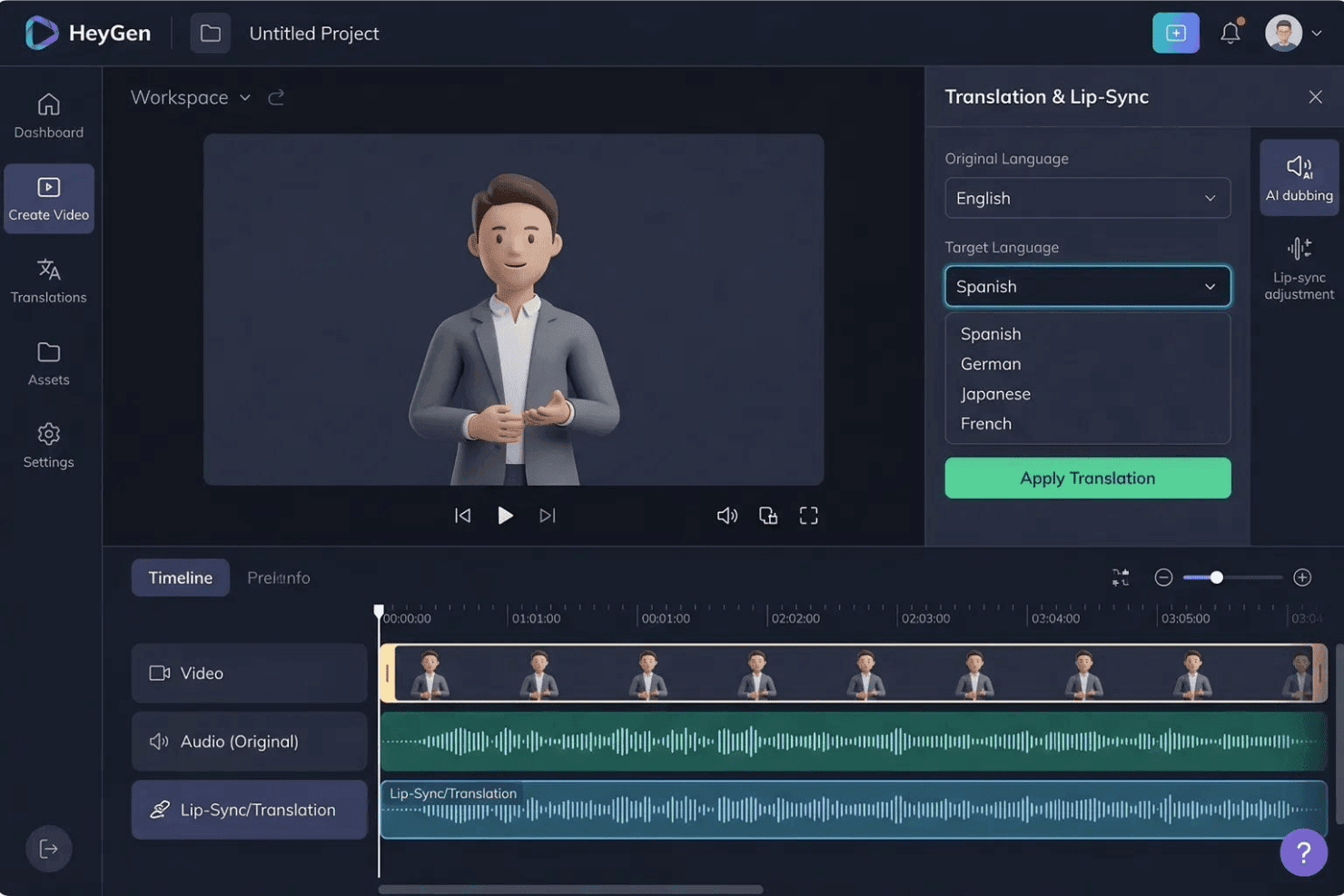
HeyGen lets users translate AI avatar videos into multiple languages, including Spanish, German, Japanese, and French, with one click through its Translation & Lip-Sync panel. HeyGen is an AI avatar video platform that lets you create personalized, lip-synced videos featuring digital twin presenters across 175+ languages using text-based scripts.
Who Is HeyGen Best For?
HeyGen suits marketing and content teams that need to produce spokesperson-style videos at scale across multiple languages without recurring on-camera production.
Why I Picked HeyGen
HeyGen earns its spot on my shortlist because of how its Avatar V model handles multilingual lip-sync at the presenter level. I've used HeyGen to take a single recorded script and generate phoneme-level lip-synced versions in over 175 languages, with voice cloning preserving the presenter's original tone across each output. That means my team can run one spokesperson shoot and push localized avatar-led versions across regional markets without a single additional recording session.
HeyGen Key Features
- Text-based video editor: Lets users control avatar scripts, gestures, and emotions using a simple text editor.
- Zapier integration: Connects HeyGen to major CRMs and marketing tools for automated personalized video creation.
- Interactive video elements: Offers configurable CTAs and workspace collaboration tools within videos for team-based workflows.
- SCORM export support: Enables exporting videos in SCORM format for use in learning management systems.
HeyGen Integrations
HeyGen offers native integrations with Clay, GitHub, Notion, Plainly, Slack, Salesforce, Snowflake, Airtable, Asana, and more. It also supports Zapier, and an API is available for custom integrations.
Pros and Cons
Pros:
- Digital twin avatars eliminate re-recording sessions
- Voice cloning preserves presenter tone at scale
- Phoneme-accurate lip-sync across 175+ languages
Cons:
- No built-in personalized landing page builder
- No native per-recipient video engagement analytics
Learn more about HeyGen: Best for bulk rendering with API flexibility
- Free trial + free demo available
- From $48/month (billed annually)
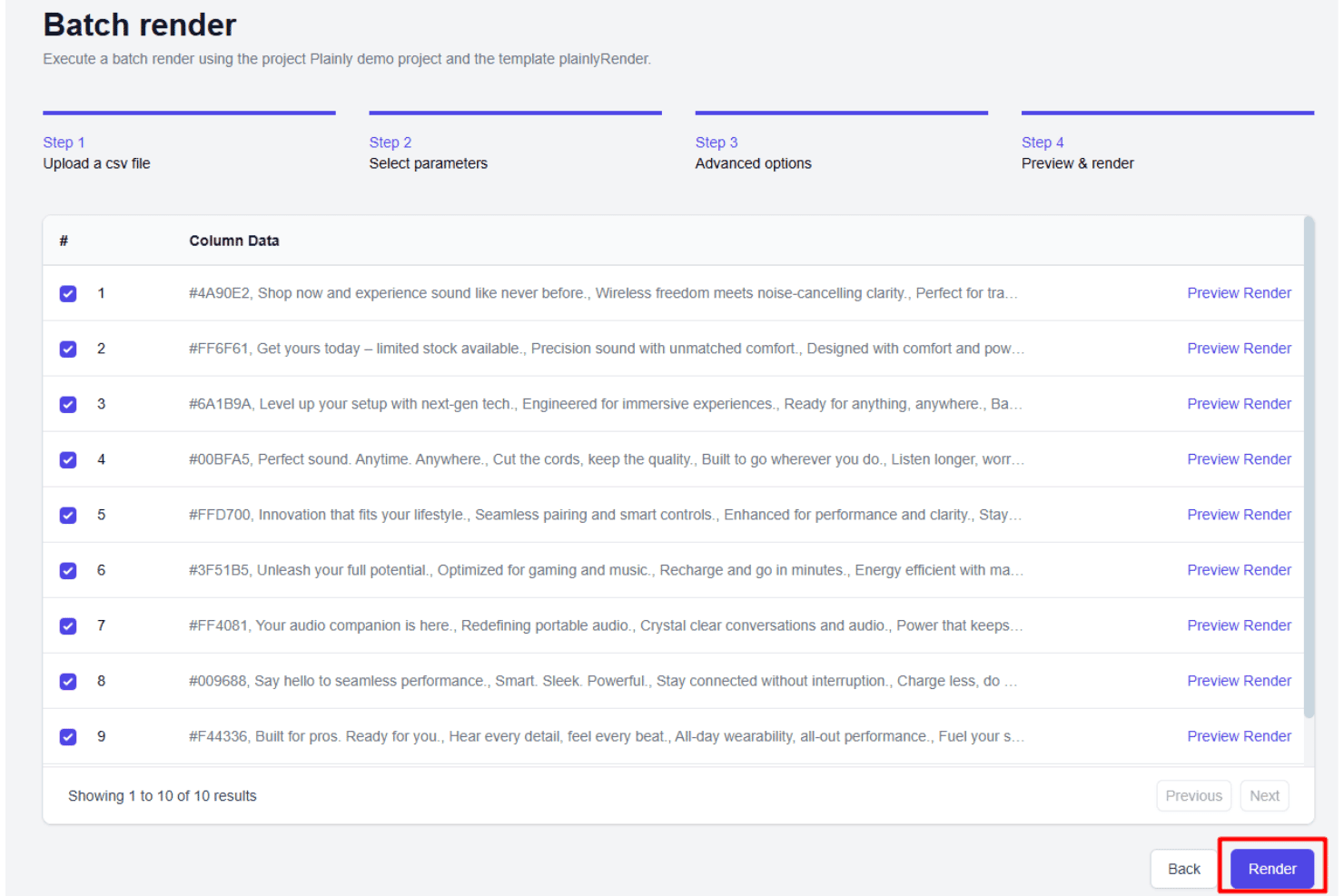
Plainly Videos lets users preview and render multiple video variations from a CSV file through a batch render workflow. Plainly Videos is a cloud-based video automation platform that converts Adobe After Effects templates into data-driven video variants using CSV uploads, native integrations, or a full HTTP API to produce personalized video content at scale.
Who Is Plainly Videos Best For?
Plainly Videos suits creative and marketing ops teams with After Effects expertise who need to render large volumes of personalized or localized video content through API-driven or data-connected workflows.
Why I Picked Plainly Videos
I've included Plainly Videos in my top picks because its open batch rendering system handles a virtually unlimited number of video variants per batch through file-based API ingestion. Its full HTTP API replicates every action available in the web interface, so my team can trigger renders, swap layers, and retrieve outputs programmatically. The layer scripting feature adds conditional rendering rules tied to specific data values, giving me precise control over what changes in each variant.
Plainly Videos Key Features
- After Effects plugin: Uploads templates and assets directly from After Effects for streamlined setup and management.
- Native data integrations: Connects to Google Sheets, Airtable, Excel, and more for automated data-driven personalization.
- Custom output formats: Exports videos in user-specified resolutions and formats, including up to 4K.
- Layer-based variable mapping: Detects and maps variables across text, image, and video layers for flexible dynamic content.
Plainly Videos Integrations
Plainly Videos offers 20+ native integrations, including Google Sheets, Airtable, Microsoft Excel, Typeform, Jotform, RSS, Slack, and HeyGen. It also connects with Zapier and provides an API for custom integrations.
Pros and Cons
Pros:
- API covers every platform action programmatically
- After Effects templates translate directly to automation
- Unlimited video variants per batch render
Cons:
- Requires After Effects skills to get started
- No per-recipient video analytics or view tracking
Learn more about Plainly Videos: Best for large-scale real-time personalization
- Free demo available
- Pricing upon request
Visit WebsiteCustomer Rating:4.8/5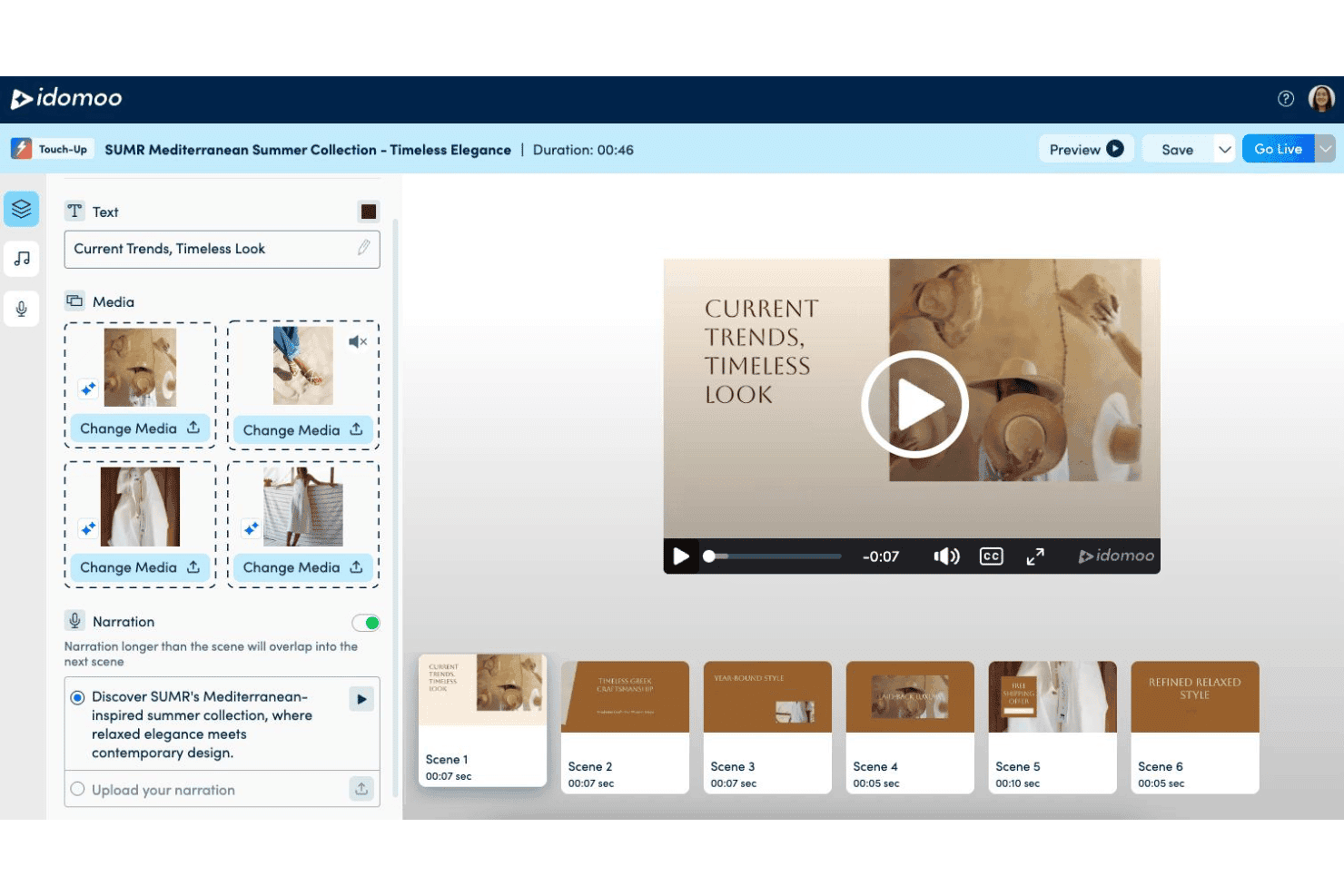
Idomoo lets users customize text, media, and narration across multiple scenes with a video personalization editor for branded video campaigns. Idomoo is an enterprise video personalization platform that uses AI and real-time rendering to generate dynamic, data-driven videos with personalized visuals, audio, scenes, and interactive CTAs.
Who Is Idomoo Best For?
Idomoo is a strong fit for enterprise marketing teams running high-volume, data-driven personalized video campaigns across email, SMS, and paid media channels.
Why I Picked Idomoo
Idomoo earns its spot as one of the best on my shortlist because of its rendering speed and scale. Its 100x real-time rendering engine delivers a playable personalized video in under 3 seconds, and I've seen it sustain over 3 million concurrent renders per hour. I also like the Living Video feature, which pulls from live data sources like inventory or location to update each video dynamically, well after the original send.
Idomoo Key Features
- Adobe After Effects integration: Create dynamic templates using a native plugin for advanced video design control.
- Evergreen Living Video: Update videos in real time using live external data sources like weather, inventory, or location.
- Multilingual and emoji support: Personalize videos in over 40 languages with Unicode and right-to-left support.
- In-player customization: Viewers can modify elements of their personalized video, such as colors, photos, or text, directly within the player.
Idomoo Integrations
Idomoo offers native integrations with Salesforce, HubSpot, and Amazon Q Business. An API is available for custom integrations.
Pros and Cons
Pros:
- Viewers can edit their own personalized video
- Living Video refreshes with real-time external data
- Renders 3M+ personalized videos concurrently per hour
Cons:
- Template creation often requires developer support
- Analytics reporting has documented limitations
Learn more about Idomoo: Best for CRM-integrated personalized campaigns
- Free plan + free trial + free demo available
- From $59/user/month (billed annually)
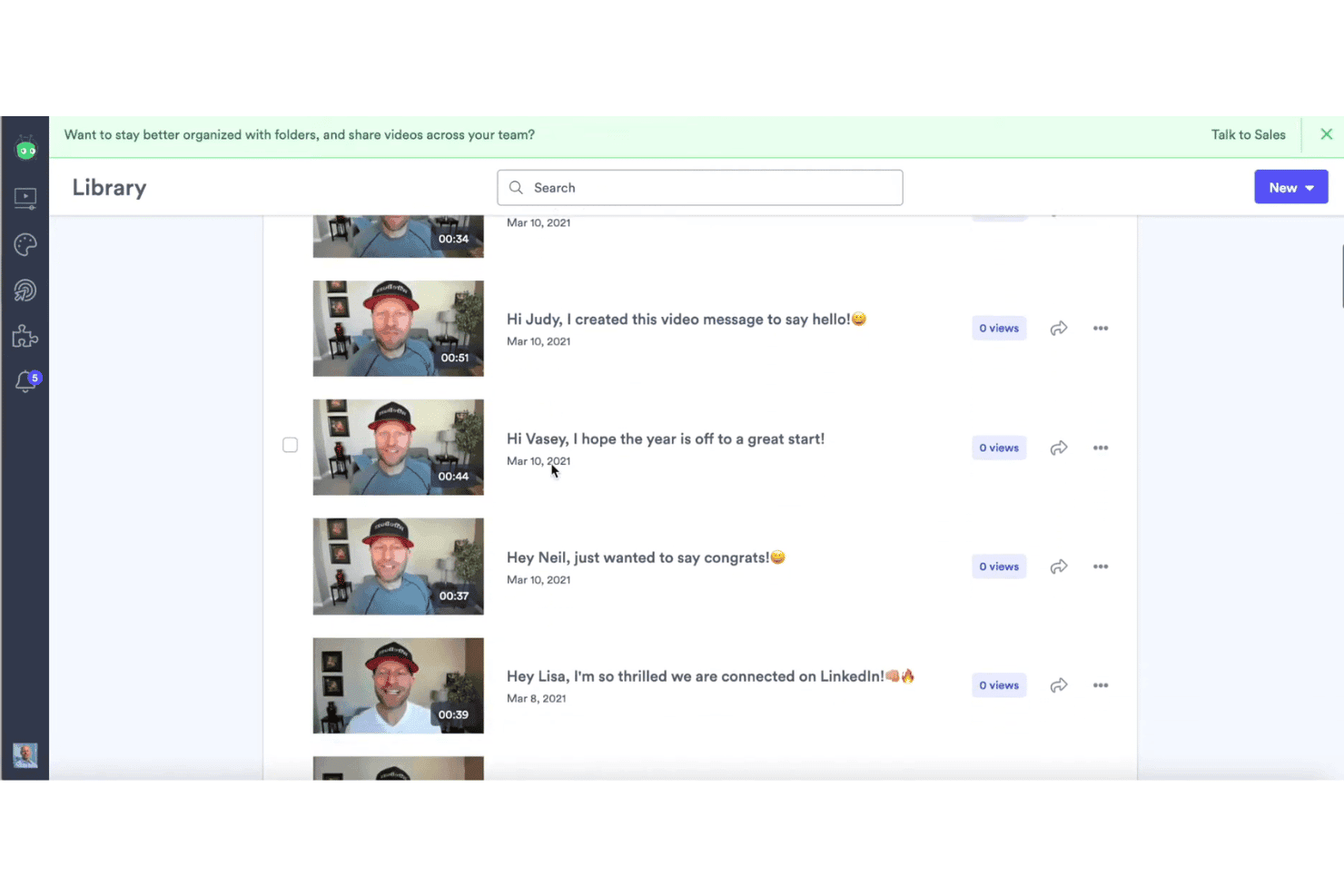
Vidyard lets users store and manage personalized video messages for individual contacts from a centralized video library. Vidyard is an AI-powered video platform for revenue teams that combines 1:1 video messaging, AI Avatar-based personalization, automated video delivery, and CRM-connected video analytics.
Who Is Vidyard Best For?
Vidyard suits B2B sales and marketing teams at mid-market to enterprise companies that already run Salesforce or HubSpot and want to add personalized video to their existing outreach workflows.
Why I Picked Vidyard
I picked Vidyard as one of the best because its Video Agent feature is genuinely impressive for CRM-integrated campaigns. It monitors triggers in Salesforce or HubSpot and automatically generates and sends a personalized video to the right contact at the right moment. I also love that individual engagement data, like watch time and CTA clicks, syncs back into the contact record, so follow-up prioritization is based on actual viewing behavior rather than guesswork.
Vidyard Key Features
- AI avatars and voice cloning: Generate custom AI-powered presenters and automate video narration without manual recording.
- Bulk video campaigns: Personalize and send thousands of unique videos automatically using CRM data or uploaded lists.
- Branded video hubs: Organize and share collections of personalized videos through customizable, company-branded microsites.
- Interactive CTAs and forms: Embed clickable calls-to-action and lead capture forms directly within personalized video content.
Vidyard Integrations
Vidyard offers native integrations with Salesforce, HubSpot, Marketo, Eloqua, Pardot, Salesloft, Outreach, Apollo, Gong, Gmail, and more. It also supports Zapier, and an API is available for custom integrations.
Pros and Cons
Pros:
- Video Agent automates trigger-based personalized sends
- Viewer engagement syncs directly into CRM records
- AI avatar generation scales personalized video output
Cons:
- In-video branching logic is relatively limited
- Bulk CSV rendering less capable than competitors
Learn more about Vidyard: Best for interactive video email outreach
- Free plan + free trial + free demo available
- From $20/user/month (billed annually)
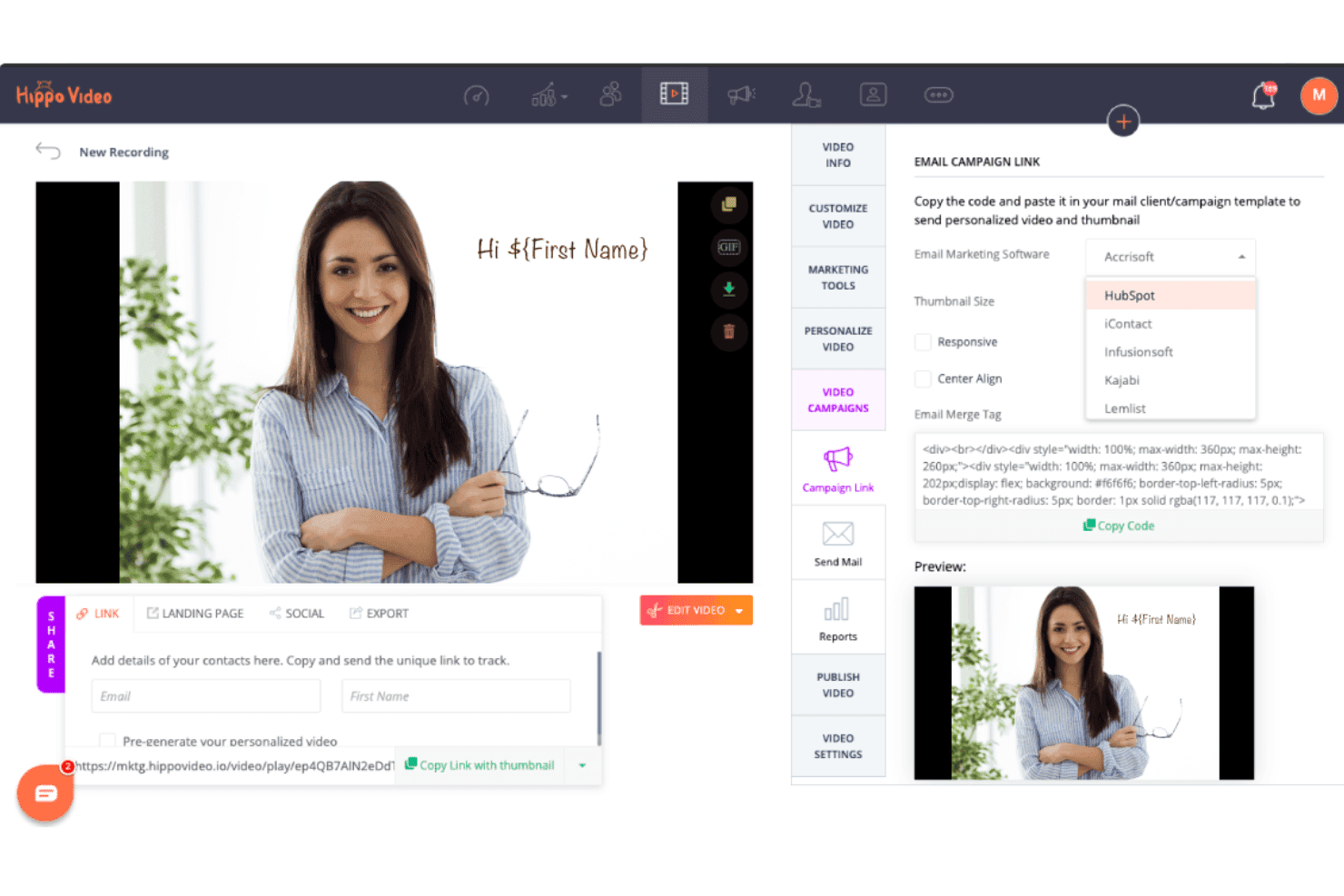
Hippo Video allows users to select their email marketing software and copy personalized video thumbnail code directly into email campaigns through its email campaign link feature. Hippo Video is a video personalization platform built for sales and marketing teams, combining AI avatar creation, screen and webcam recording, hyper-personalized video campaigns, interactive CTAs, and CRM-connected outreach workflows.
Who Is Hippo Video Best For?
Hippo Video is a strong fit for sales and marketing teams at mid-market companies running high-volume outbound prospecting or account-based campaigns.
Why I Picked Hippo Video
Hippo Video earns its spot on my shortlist because of how deeply it bakes interactivity into the video email experience. I can embed polls, quizzes, calendar booking links, and CTAs directly inside a video before sending, so a prospect can respond or book a meeting without leaving the email. The Humanize AI feature then generates individualized versions of a single recording at scale, dynamically personalizing the thumbnail and sales page per recipient.
Hippo Video Key Features
- AI avatar video creation: Generate personalized videos using realistic human avatars for scalable outreach.
- Dynamic background personalization: Swap backgrounds in videos automatically with LinkedIn profiles or custom images for each viewer.
- Custom sales page builder: Build interactive, branded landing pages around each video with recipient-specific customization.
- Advanced CRM integrations: Connect directly to tools like HubSpot, Salesforce, Outreach, and Salesloft to power data-driven video personalization.
Hippo Video Integrations
Hippo Video offers native integrations with Salesforce, HubSpot, Outreach, Salesloft, Pipedrive, Zoho CRM, Freshworks CRM, Apollo, and more. It also connects with Zapier and provides an API for custom integrations.
Pros and Cons
Pros:
- Voice cloning supports multilingual personalized outreach
- AI avatar creation from a single recording
- Interactive CTAs embedded directly inside videos
Cons:
- Analytics lack heatmap-level viewer granularity
- Bulk video caps limit high-volume campaigns
Learn more about Hippo Video: Best for easy branded video landing pages
- Free trial + free demo available
- From $39/month (billed annually)
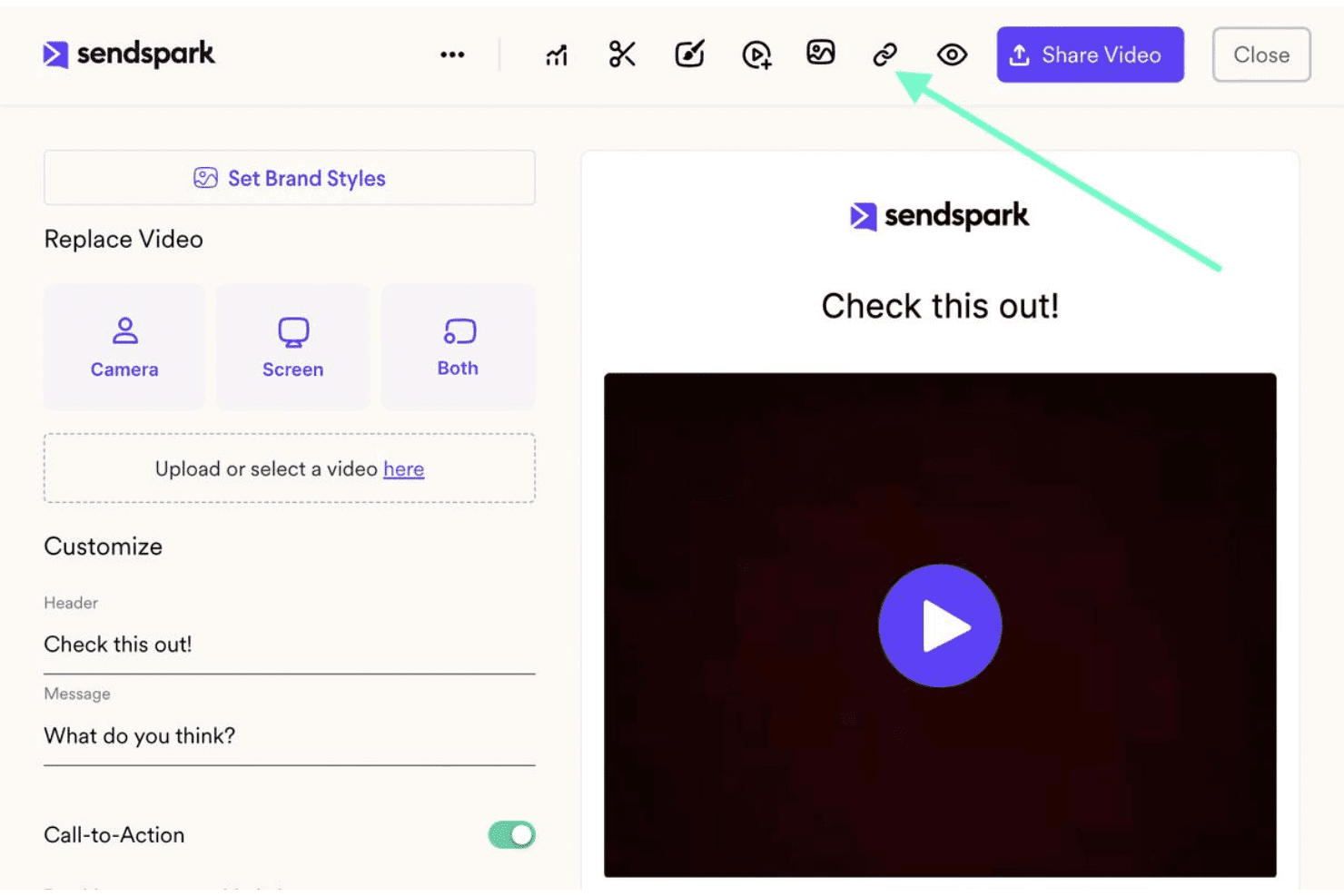
Sendspark allows users to customize video landing pages with headers, messages, call-to-action toggles, and a live preview panel. Sendspark is an AI-powered video personalization platform that lets sales and marketing teams record a single video and automatically generate individualized versions at scale using voice cloning, dynamic backgrounds, and personalized thumbnails.
Who Is Sendspark Best For?
Sendspark is a strong fit for B2B sales and demand generation teams running high-volume outbound campaigns who need personalized video at scale without recording individual messages.
Why I Picked Sendspark
Sendspark earns its spot as one of the best on my shortlist because the branded video landing pages are genuinely production-ready out of the box. Each page carries your logo, custom domain, and a personalized video with the recipient's name spoken in your cloned voice. I also like that you can embed a calendar directly on that same page, so the prospect books a meeting right there rather than being redirected elsewhere.
Sendspark Key Features
- AI voice cloning: Replicates your voice so each personalized video speaks the recipient's name naturally.
- Dynamic video backgrounds: Automatically swaps in each recipient’s own website as the video background for added personalization.
- Agentic workflows: Automates video personalization pipelines by connecting CRM data directly to video generation and sending.
- Per-recipient video analytics: Tracks individual viewer engagement including video plays, watch time, and CTA clicks.
Sendspark Integrations
Sendspark offers native integrations with HubSpot, Salesforce, Outreach, SalesLoft, Apollo, Gmail, Outlook, LinkedIn, Smartlead, and more. It also supports Zapier, and an API is available for custom integrations.
Pros and Cons
Pros:
- Dynamic website backgrounds personalize outreach visually
- Voice cloning eliminates re-recording for each recipient
- Branded landing pages ready with minimal setup
Cons:
- AI-generated voices occasionally sound slightly unnatural
- Monthly dynamic video minute caps limit campaign scale
Learn more about Sendspark: Best for dynamic content in enterprise programs
- Free demo available
- Pricing upon request
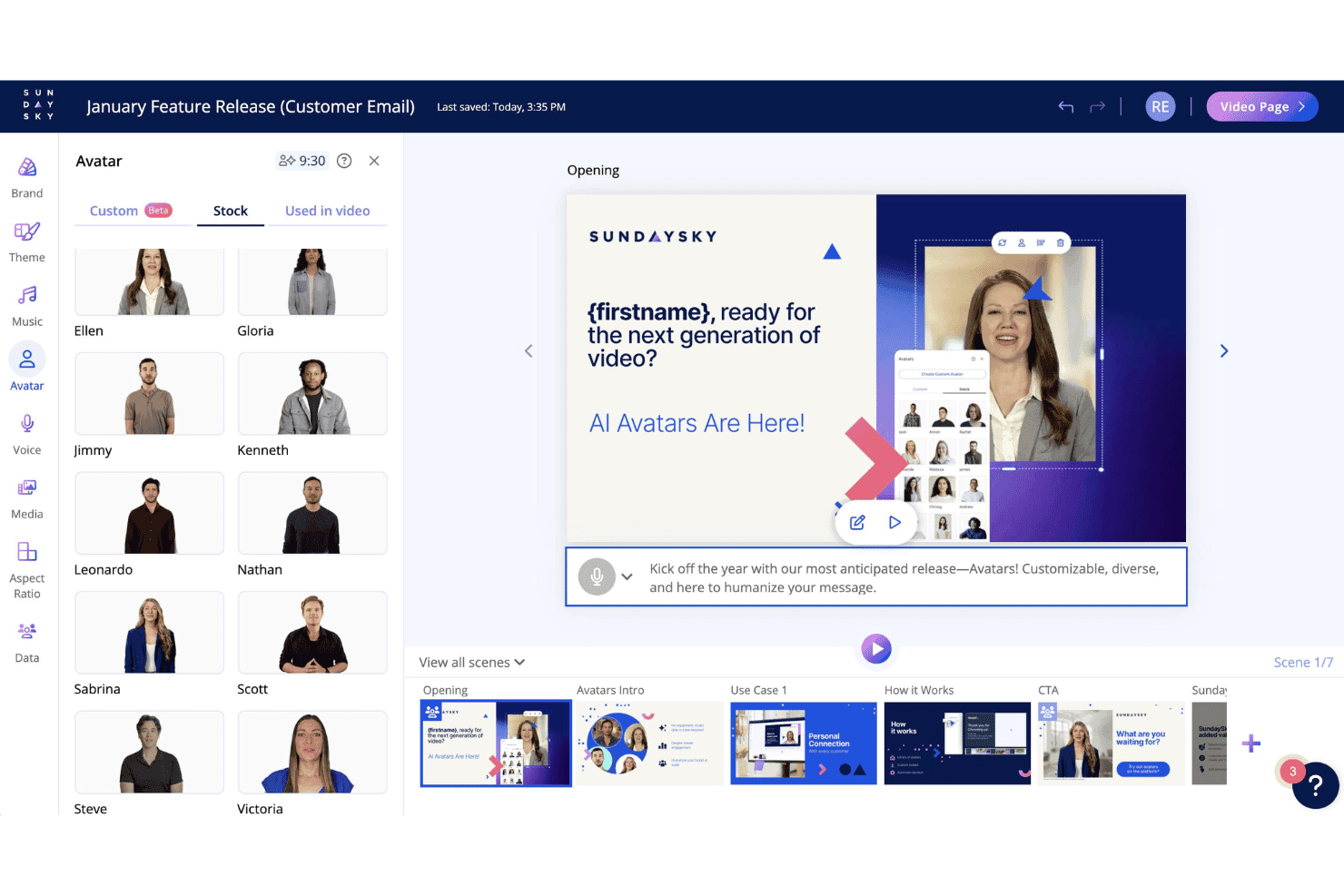
SundaySky lets users choose from diverse stock AI avatars within its video personalization editor for customized video scenes. SundaySky is an enterprise video personalization platform that lets you build, personalize, and distribute dynamic videos using real-time data rendering, AI-assisted creation, and native integrations with CRMs and marketing automation platforms.
Who Is SundaySky Best For?
SundaySky is a strong fit for enterprise marketing and CX teams in regulated industries like financial services, insurance, and healthcare that run high-volume personalized video programs.
Why I Picked SundaySky
I picked SundaySky as one of the best because its real-time rendering model sets it apart from template-based competitors. Every video is generated at the moment a viewer clicks play, pulling live CRM or MAP data to produce a truly 1:1 experience at unlimited scale. I particularly like the brand governance controls, which lock logos, fonts, and colors across every scene, making it practical to run high-volume dynamic content programs without losing brand consistency across thousands of video variants.
SundaySky Key Features
- AI-assisted script and media creation: Quickly convert prompts or documents into video scripts and scenes using built-in AI tools.
- Real-time analytics and viewer sentiment: Track detailed engagement metrics, NPS surveys, and viewer sentiment for each personalized video.
- Native data connector marketplace: Integrate live data from Salesforce, HubSpot, Marketo, Snowflake, Google Sheets, and more for high-volume personalization.
- Brand governance customization: Enforce consistent use of logos, fonts, and colors across all video projects to maintain brand guidelines.
SundaySky Integrations
SundaySky offers native integrations with Salesforce, HubSpot, Marketo, Google Sheets, Meta, AWS, Acquia, and Adobe Experience Cloud. An API is available for custom integrations.
Pros and Cons
Pros:
- Granular per-viewer analytics with sentiment tracking
- Strong brand governance across all video programs
- Real-time rendering supports unlimited personalized variants
Cons:
- Limited in-video branching and interactive options
- Requires significant enterprise buy-in to implement
Learn more about SundaySky:
Diğer Video Kişiselleştirme Yazılımları
Kısa listeme giremeyen ancak yine de göz atmaya değer bazı ek video kişiselleştirme yazılımı seçenekleri şunlardır:
- 11BonjoroBest for personal touch in customer journeys
- 12BHumanBest for AI avatar-driven video automation
- 13BombBombBest for real-time video engagement tracking
- 14CovideoBest for secure one-to-one video messaging
- 15DubbBest for integrated video email campaigns
- 16MaverickBest for ecommerce customer personalization
- 17PitchlaneBest for personalized sales video automation
How I Evaluate Video Personalization Software
I evaluate every tool across two layers: core functionality it must nail—like bulk rendering and CRM sync—and the differentiators that matter for ABM or outbound sales teams.
Core Functionality (Table Stakes for This List)
When I'm selecting tools for my list, I rank each one on a scale from 0 (does not offer the functionality) to 5 (excels in this area) for each core functionality listed below. Then, I calculate the tool's total score into a percentage. Each tool needs to achieve a minimum total score of 65% to be considered for inclusion.
- Dynamic Video Personalization: I look at how many layers a tool can personalize—text overlays, image swaps, background scenes, and audio—using viewer-specific data like name, company, or role.
- Bulk Video Generation: Whether you're running an ABM campaign for 200 target accounts or a nurture sequence for thousands, I check how many variants a tool can render per batch.
- Data & CRM Integrations: I evaluate native connections with platforms like Salesforce, HubSpot, and Marketo, plus whether the tool supports Zapier, webhooks, or API access for custom workflows.
- Personalized Landing Pages: Each video needs a home. I look for branded, recipient-specific landing pages that go beyond a basic embed link to include custom messaging and CTAs.
- Video Analytics & Tracking: Aggregate view counts aren't enough. I check for individual-level metrics like watch time, drop-off points, and CTA clicks tied back to each recipient.
- Interactive CTAs: I evaluate the in-video conversion options available—clickable buttons, embedded forms, calendar links—and whether they can be configured per campaign or audience segment.
Once I have a list of tools that meet the criteria, I consider what sets each platform apart.
Differentiating Factors (What Sets Vendors Apart)
Here's how I compare and contrast different vendors:
Standout Features
AI avatar generation is a major differentiator. I evaluate how realistic the avatars look and whether they can deliver unique, personalized scripts per recipient without any re-recording. Voice cloning pairs well here, letting reps maintain their own voice across hundreds of outbound videos. Dynamic scene insertion also matters—I check whether tools can pull variables like a prospect's company logo or LinkedIn photo directly into video frames in a way that feels native rather than overlaid.
Beyond Features
Scalability is a big factor. I look at batch rendering speed and queue limits—if your ABM team needs thousands of personalized videos for a campaign launch, some tools handle that in hours while others take days. Data privacy also matters, especially with AI avatars and voice cloning. I check for GDPR and SOC 2 compliance plus consent management for synthetic media. Pricing structure shapes fit too—per-seat models suit sales teams, while per-render pricing works better for marketing-led campaigns.
Video Kişiselleştirme Yazılımı Nasıl Seçilir?
Uzun özellik listeleri ve karmaşık fiyatlandırma yapıları arasında kaybolmak kolaydır. Kendinize özgü yazılım seçim sürecinizi yürütürken odağınızı korumanıza yardımcı olmak için göz önünde bulundurmanız gereken faktörlerin bir kontrol listesi aşağıda yer alıyor:
| Faktör | Dikkat Edilmesi Gerekenler |
|---|---|
| FaktörÖlçeklenebilirlik | Dikkat Edilmesi GerekenlerYazılım, ekip genelindeki kampanyalar için mevcut ve öngörülen video hacminizi karşılayabiliyor mu? Kuyruk sınırlarını, oluşturma hızını ve kullanım arttıkça ölçeklenebilme kapasitesini değerlendirin. |
| FaktörEntegrasyonlar | Dikkat Edilmesi GerekenlerPlatform, CRM'nize, pazarlama otomasyonunuza ve satış etkileşimi araçlarınıza doğrudan bağlanabiliyor mu? Yerel bağlantıları arayın ve özel iş akışları için API gereksinimlerini göz önünde bulundurun. |
| FaktörÖzelleştirilebilirlik | Dikkat Edilmesi GerekenlerŞablonları düzenleme, açılış sayfalarını kişiselleştirme ve değişkenleri ayarlama konusunda ne kadar kontrolünüz var? Markalama ve uyarlama seçeneklerinin kampanya hedeflerinizle örtüşüp örtüşmediğini değerlendirin. |
| FaktörKullanım kolaylığı | Dikkat Edilmesi GerekenlerKullanıcılar eğitim almadan ne kadar hızlı video oluşturabilir, kişiselleştirebilir ve gönderebilir? Pazarlama ve satış ekiplerinin benimsemesini yavaşlatan aşırı teknik iş akışlarına dikkat edin. |
| FaktörUygulama ve işe alıştırma | Dikkat Edilmesi GerekenlerBeklenen kurulum süresi nedir? BT desteğine mi ihtiyacınız olacak, yoksa pazarlama ve satış ekipleri kendi başlarına yeterli olabilecek mi? İşe alıştırma hizmetlerini ve sunulan eğitim seçeneklerini kontrol edin. |
| FaktörMaliyet | Dikkat Edilmesi GerekenlerFiyatlandırma modeli kullanım alanınızla örtüşüyor mu: kullanıcı başına, video başına veya sınırsız paket mi? Daha fazla ekip üyesi kullanmaya başladıkça kullanımınız arttığında devam eden maliyetleri hesaba katın. |
| FaktörGüvenlik önlemleri | Dikkat Edilmesi GerekenlerVeri koruma önlemleri, izin yönetimi ve kullanıcı erişim kontrolleri mevcut mu? Müşterilerin kişisel olarak tanımlanabilir bilgilerini işliyorsanız veya yapay zekâ kullanıyorsanız SOC 2 veya GDPR uyumluluğu gibi sertifikaları arayın. |
| FaktörDestek erişilebilirliği | Dikkat Edilmesi GerekenlerÇalışma saatleriniz içinde canlı destek sunuluyor mu? İhtiyacınız olduğunda işe alıştırma, teknik sorun giderme ve acil yardım hizmetlerine erişiminiz olup olmayacağını öğrenin. |
Video Kişiselleştirme Yazılımı Nedir?
Video kişiselleştirme yazılımı, kişisel veya şirket verilerini kullanarak her izleyiciye göre uyarlanmış videolar oluşturup dağıtmanızı sağlayan bir araçtır. Görselleri, metinleri ve eylem çağrılarını her videoda geniş ölçekte otomatik olarak güncelleyerek satış, pazarlama ve müşteri iletişimi kampanyalarınızda daha yüksek etkileşim ve ilgi düzeyi elde etmenize yardımcı olur.
Özellikler
Video kişiselleştirme yazılımı seçerken aşağıdaki temel özelliklere dikkat edin:
- Dinamik video kişiselleştirme: Alıcıya özel verilere göre her videodaki metinleri, görselleri ve hatta sahneleri otomatik olarak özelleştirerek her videonun izleyiciye özel hissettirmesini sağlar.
- Toplu video oluşturma: Listeleri veya CRM verilerini kullanarak tek bir şablondan yüzlerce ya da binlerce benzersiz video oluşturur; aynı anda birden fazla kişiyi hedefleyen kampanyalar için idealdir.
- CRM ve pazarlama entegrasyonları: Mevcut CRM ve pazarlama otomasyonu platformlarınıza bağlanarak kişiselleştirilmiş video oluşturma ve izleme için kesintisiz veri akışı sağlar.
- Kişiselleştirilmiş açılış sayfaları: Her video için markaya ve alıcıya özel açılış sayfaları oluşturarak bire bir deneyimi geliştirir ve etkileşim analizlerini tek bir yerde toplar.
- Etkileşimli eylem çağrıları: İzleyicilerin anında yanıt vermesini ve dönüşüm gerçekleştirmesini sağlamak için tıklanabilir düğmeleri, formları veya toplantı planlayıcılarını doğrudan videolara ekler.
- İzleyici analizleri ve izleme: Her videoyu kimin izlediği, ne kadar süre izlediği, nerede izlemeyi bıraktığı ve herhangi bir eylem çağrısına tıklayıp tıklamadığı hakkında ayrıntılı raporlar sunar.
- Şablon kütüphanesi: Kampanyaya veya kullanım alanına göre özelleştirebileceğiniz kullanıma hazır video şablonları sunarak yaratıcı kaynaklara ihtiyaç duymadan üretimi hızlandırır.
- Yapay zekâ avatarı veya ses özellikleri: Yapay zekâ aracılığıyla otomatik anlatım ve ekranda sunum yapan kişiler oluşturmanızı sağlar; böylece her alıcı için kişiselleştirilmiş videoları manuel olarak kaydetmeniz gerekmez.
- Veri güvenliği ve uyumluluk: Onayları yönetme, kişisel olarak tanımlanabilir bilgileri güvenli biçimde işleme ve operasyonlarınızla ilgili veri gizliliği düzenlemelerine uyma özelliklerini içerir.
- İş birliği araçları: Ekiplerin şablonları, metinleri ve analizleri paylaşmasına olanak tanıyarak pazarlama ve satış ekiplerinin geniş ölçekli video erişim çalışmalarını koordine etmesini kolaylaştırır.
Faydalar
Video kişiselleştirme yazılımını uygulamak, ekibiniz ve işletmeniz için çeşitli faydalar sağlar. Yararlanabileceğiniz birkaç faydayı aşağıda bulabilirsiniz:
- Daha yüksek etkileşim oranları: Dinamik içerik ve alıcıya özel ayrıntılar içeren kişiselleştirilmiş videolar dikkat çeker ve izleyicilerin daha uzun süre izlemeye devam etmesini sağlar.
- Artan yanıt ve dönüşüm: Videolara eklenen etkileşimli CTA'lar, izleyicileri harekete geçmeye yönlendirerek daha fazla yanıt, rezervasyon veya kayıt alınmasını sağlar.
- Ölçeklenebilir bire bir erişim: Toplu video oluşturma ve CRM entegrasyonları, minimum manuel çabayla yüzlerce veya binlerce kişiye son derece ilgili mesajlar iletmenizi sağlar.
- Geliştirilmiş kampanya ilişkilendirmesi: Ayrıntılı analizler kimin izlediğini, ne kadar süre izlediğini ve hangi eylemleri gerçekleştirdiğini takip ederek yatırım getirisi ve performans hakkında net bir içgörü sunar.
- Geliştirilmiş müşteri deneyimi: Markaya özel, kişiselleştirilmiş açılış sayfaları ve yapay zekâ destekli sunum yapan kişiler, işe alıştırma, elde tutma veya müşteri geliştirme süreçleri için akılda kalıcı bir temas noktası oluşturur.
- Zaman ve kaynak tasarrufu: Şablon kütüphaneleri, yapay zekâ avatarı özellikleri ve otomasyon, içerik oluşturmayı kolaylaştırarak manuel kayıt ve düzenleme ihtiyacını azaltır.
- Ekipler arasında daha iyi uyum: İş birliği araçları, pazarlama ve satış koordinasyonunu destekleyerek mesajların tutarlı olmasını ve kampanyaların işletme genelinde sorunsuz yürütülmesini sağlar.
Maliyetler ve Fiyatlandırma
Video kişiselleştirme yazılımı seçmek, sunulan çeşitli fiyatlandırma modellerinin ve planların anlaşılmasını gerektirir. Maliyetler özelliklere, ekip büyüklüğüne, eklentilere ve diğer unsurlara göre değişir. Aşağıdaki tabloda video kişiselleştirme yazılımı çözümlerinde yaygın olarak sunulan planlar, bunların ortalama fiyatları ve tipik olarak dahil edilen özellikler özetlenmektedir:
Video Kişiselleştirme Yazılımı İçin Plan Karşılaştırma Tablosu
| Plan Türü | Ortalama Fiyat | Yaygın Özellikler |
|---|---|---|
| Plan TürüÜcretsiz Plan | Ortalama Fiyat$0 | Yaygın ÖzelliklerSınırlı video oluşturma, temel şablonlar, videolarda marka gösterimi ve minimum düzeyde analiz. |
| Plan TürüKişisel Plan | Ortalama Fiyat$20-$50/kullanıcı/ay | Yaygın ÖzelliklerSınırsız kişiselleştirilmiş video, özelleştirilebilir şablonlar, CRM içe aktarma, e-posta desteği ve standart analiz. |
| Plan Türüİşletme Planı | Ortalama Fiyat$50-$150/kullanıcı/ay | Yaygın ÖzelliklerToplu video oluşturma, gelişmiş CRM entegrasyonları, markalı açılış sayfaları, etkileşimli CTA'lar ve ekip iş birliği. |
| Plan TürüKurumsal Plan | Ortalama Fiyat$150-$500+/kullanıcı/ay | Yaygın ÖzelliklerÖzel AI avatarları, ses klonlama, tam API erişimi, özel işe alıştırma süreci, güvenlik denetimleri ve uyumluluk özellikleri. |
Video Kişiselleştirme Yazılımı SSS
Video kişiselleştirme yazılımı hakkında sık sorulan bazı soruların yanıtları:
Video kişiselleştirme yazılımı CRM verilerini nasıl kullanır?
Video kişiselleştirme yazılımı, benzersiz video öğeleri oluşturmak için alıcı adı, şirketi veya e-posta adresi gibi bilgileri CRM’nizden alır. Bu, her videonun özel olarak hazırlanmış gibi hissettirmesini sağlar ve büyük ölçekli, veriye dayalı kampanyaları kolayca yürütmenize olanak tanır.
Videoları manuel düzenleme yapmadan büyük ölçekte kişiselleştirebilir miyim?
Evet, toplu oluşturma özelliklerini kullanarak binlerce kişiselleştirilmiş video oluşturabilirsiniz. Bir kişi listesi yükleyin veya CRM’nizi bağlayın; yazılım her alıcı için kişiselleştirilmiş videoları otomatik olarak oluşturur.
AI avatarları ve ses klonlamayla ilgili gizlilik endişeleri var mı?
Evet, AI avatarları veya ses klonlama kullanılırken gizlilik kritik önem taşır. Alıcı ve kullanıcı verilerini korumak için onay yönetimi içeren ve GDPR ile CCPA gibi veri koruma yasalarına uyan araçları tercih edin.
Ne tür analizler beklemeliyim?
Görüntüleme sayısı, izlenme süresi, izleyicilerin videodan ayrıldığı noktalar ve CTA tıklamaları dâhil olmak üzere izleyici düzeyinde takip özellikleri beklemelisiniz. Bu veriler, etkileşimi anlamanıza ve kampanyalarınızı optimize etmenize yardımcı olur.
İşe alıştırma süreci genellikle ne kadar sürer?
İşe alıştırma süreleri sağlayıcıya ve plana göre değişir. Birçok platform basit kullanıma sunma süreçleri için hızlı başlangıç kılavuzları sunar; ancak yüksek düzeyde özelleştirilmiş veya kurumsal kullanıma sunma süreçleri birkaç hafta ve özel destek gerektirebilir.