

Yapay zekâ web sitesi oluşturucu, girdilerinize dayalı olarak, genellikle istemler, sorular veya mevcut içeriğinizi analiz ederek web siteleri oluşturmak için yapay zekâ kullanan bir araçtır. Tasarımcılarla çalışmadan veya geleneksel kodlama öğrenmeden sezgisel kodlama yoluyla profesyonel bir web sitesini daha hızlı oluşturmanın yollarını arıyorsanız bu platformlar sizin için tasarlanmıştır.
Bu kılavuzda, 2026 için en iyi yapay zekâ web sitesi oluşturucu seçeneklerini; her birinin tasarım, özelleştirme ve yayına alma süreçlerini nasıl ele aldığına ilişkin net ayrıntılarla bulacaksınız. Tüm bunlar hızınız ve ihtiyaçlarınız göz önünde bulundurularak hazırlanmıştır. Markalı bir site, şık bir açılış sayfası oluşturmak veya aynı anda birden fazla projeyi yönetmek istiyor olabilirsiniz; bu kılavuzun sonunda hangi oluşturucunun iş akışınıza ve hedeflerinize tam olarak uyduğunu bileceksiniz.
Why Trust Our Software Recommendations
6,700+
Reviews
20
Industry experts
16+
Evaluation factors
14
Years
Our team has been testing and reviewing software since 2012. As marketing leaders ourselves, we know how difficult—and important—it is to choose the right software.
For this guide, we evaluated tools using hands-on testing and independent research, scoring tools using our selection criteria.
Our reviews reflect our human editorial judgment, not a sales pitch.
Expert reviewers:
 Gui DrusinaCreative Director
- Shriya GhateSenior Marketing Lead
 Amanda JacquesMarketing Ops Leader

Yapay Zekâ Web Sitesi Oluşturucuları Karşılaştırma Tablosu
En iyi yapay zekâ web sitesi oluşturucusu seçimlerimin fiyatlandırma ayrıntılarını bu karşılaştırma tablosunda özetliyorum:
Sorted by: Default
| Tool | Starting Price | Website | |
|---|---|---|---|
Best for marketers managing multiple pages | 4.6 out of 5 | $24/month 14-day free trial available | Website |
Best for conversion-focused landing pages | 4.4 out of 5 | $29/month 14-day free trial + free demo available | Website |
Best for enterprise-level landing experiences | 4.4 out of 5 | $99/month 14-day free trial + demo available | Website |
Best for building scalable WordPress-based sites | Not rated | $10/month 7-day free trial | Website |
Best for sites tailored to professional services | Not rated | $42/month Free plan available | Website |
Best for design-focused marketing microsites | 4.6 out of 5 | $25/month 14-day free trial available | Website |
Best for launching branded sites using AI prompts | 4.2 out of 5 | $35.54/month Free plan + free demo available | Website |
Best for beginner-friendly multi-page creation | 4.4 out of 5 | $10.99/month 14-day free trial | Website |
Best for granular design customization | Not rated | $15/month Free plan available | Website |
Best for quick publishing with built-in hosting | Not rated | $9.99/month 7-day free trial | Website |


En İyi Yapay Zekâ Web Sitesi Oluşturucuları İncelemeleri
Aşağıda, kısa listeme giren en iyi yapay zekâ web sitesi oluşturucularına ilişkin ayrıntılı özetlerimi bulabilirsiniz. İncelemelerim, size en uygun olanı bulmanıza yardımcı olmak için her platformun özelliklerine, en iyi kullanım alanlarına ve fiyatlandırmasına ayrıntılı bir bakış sunuyor.
 Best for marketers managing multiple pages
- 14-day free trial available
- From $24/month (billed annually)
Visit WebsiteCustomer Rating:4.6/5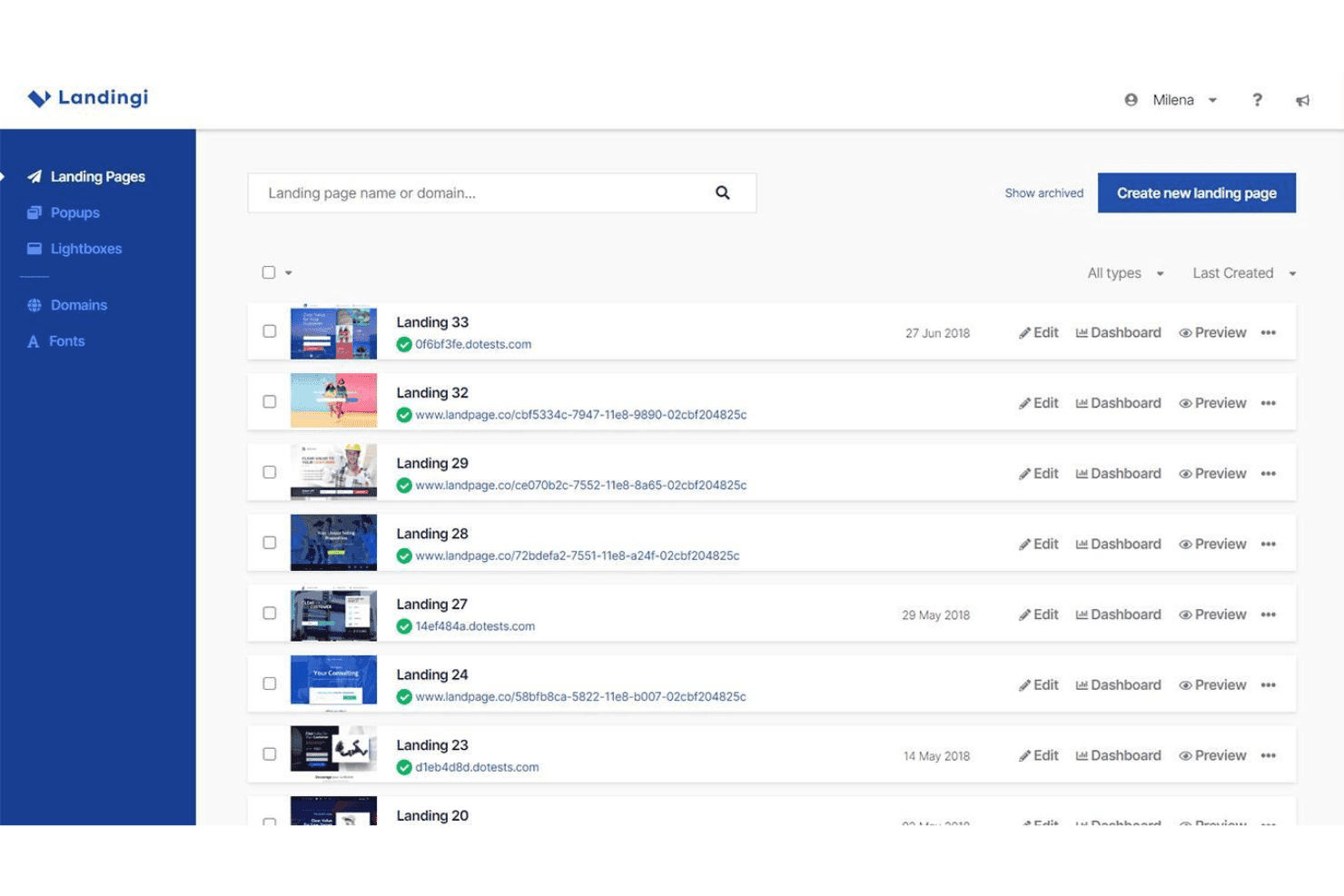
Landingi organizes multiple website landing pages with options to edit, view the Dashboard, and preview each page. Landingi is an AI landing page builder that combines a pixel-perfect drag-and-drop editor with AI page generation, programmatic page creation, A/B testing, and built-in SEO tools.
Who Is Landingi Best For?
Landingi is a strong fit for performance marketers, freelancers, and agencies running high-volume paid campaigns who need to build, manage, and optimize many landing pages at once.
Why I Picked Landingi
Landingi earns its spot on my shortlist because of how well it handles page volume at scale. Smart Sections let me update a repeated element (like a pricing block or CTA banner) in one place and push that change across every page it appears on instantly. Programmatic Landing Pages take it further, letting me build one master template and auto-generate hundreds of campaign-specific variations from it.
Landingi Key Features
- Lunar AI page generator: Quickly creates editable landing pages from a text prompt.
- Solis AI insights: Analyzes landing page performance and recommends optimizations using behavioral data.
- Smart A/B testing: Offers built-in server-side split testing with reliable data and no page performance loss.
- Multi-language translation: Automatically translates pages into 35 languages for global campaign support.
Landingi Integrations
Landingi offers over 170 native integrations, including HubSpot, Mailchimp, Salesforce, ActiveCampaign, Zapier, and provides an API for custom integrations.
Pros and Cons
Pros:
- Server-side A/B testing avoids page slowdowns
- Generates hundreds of page variants from templates
- Smart Sections push bulk edits sitewide instantly
Cons:
- Pop-up and form builder feel underdeveloped
- AI generates landing pages, not full sites
Learn more about Landingi: Best for conversion-focused landing pages
- 14-day free trial + free demo available
- From $29/month
Visit WebsiteCustomer Rating:4.4/5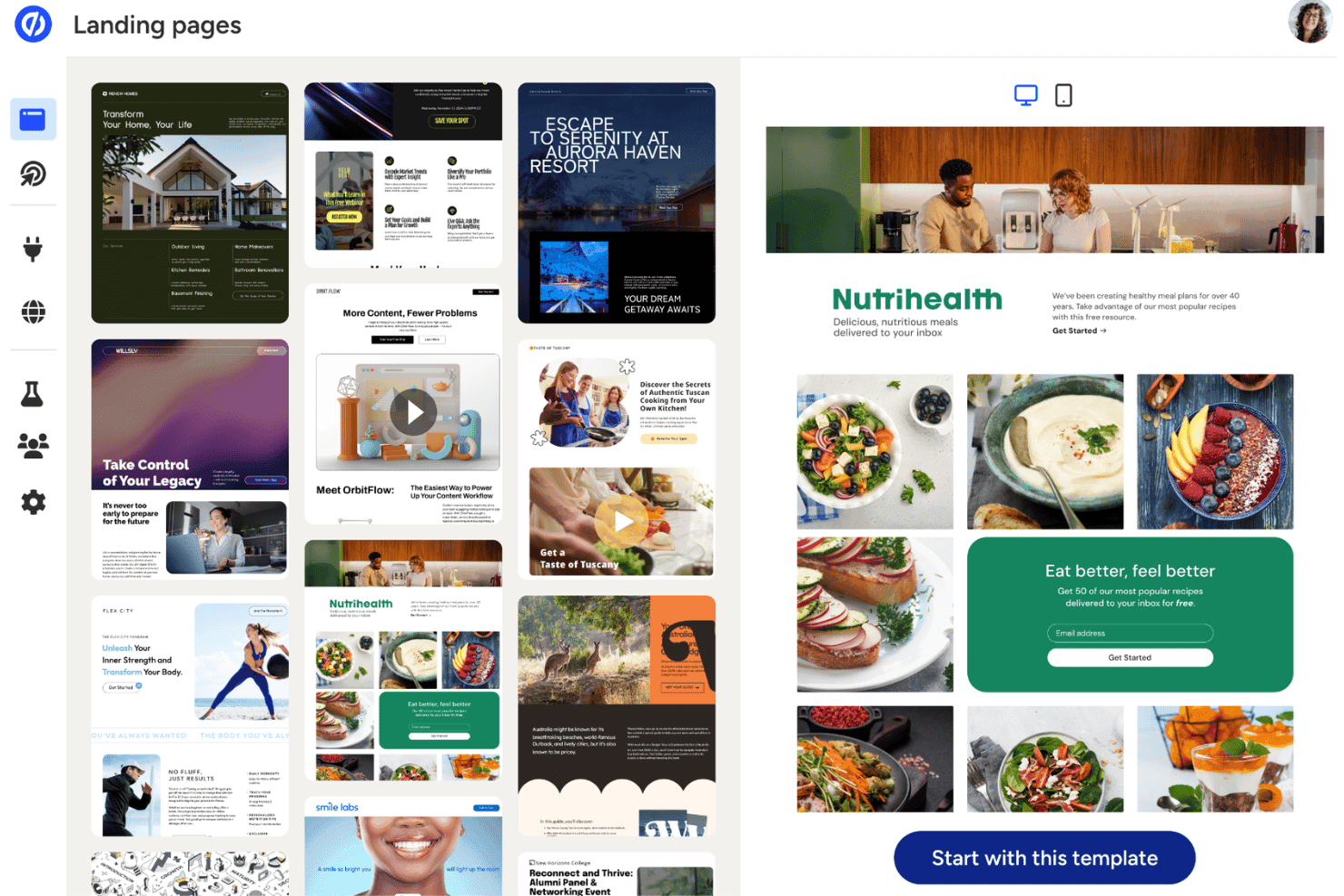
Unbounce offers a website template library with a preview panel, including an email signup form. Unbounce is an AI-powered landing page builder that lets marketers create, test, and optimize conversion-focused campaign pages using a drag-and-drop editor, AI copy generation, and automated traffic routing.
Who Is Unbounce Best For?
Unbounce is a strong fit for small to mid-sized marketing teams running paid ad campaigns who need to build and optimize landing pages without relying on a developer.
Why I Picked Unbounce
Unbounce earns its spot on my shortlist because of Smart Traffic, which routes each visitor to the page variant most likely to convert them based on device, location, and behavior data. I don't have to wait for A/B test results. Smart Traffic makes that call in real time. I also use the Smart Builder to generate a full landing page draft from a short questionnaire, with AI-written headlines and CTAs drawn from over 1.5 billion conversion data points.
Unbounce Key Features
- Dynamic text replacement: Automatically updates landing page text based on each visitor’s search keywords or ad copy.
- Smart Copy AI content generator: Produces headlines, CTAs, and body content from business inputs using AI templates.
- Multi-step forms: Lets you build forms that collect information over several steps for higher conversion rates.
- 1000+ native and Zapier integrations: Connects with major CRMs, email platforms, analytics, and workflow tools for marketing automation.
Unbounce Integrations
Unbounce offers native integrations with HubSpot, Mailchimp, Salesforce, ActiveCampaign, Marketo, Google Analytics, Facebook Ads, Zoho CRM, Shopify, WordPress, and connects with Zapier. An API is available for custom integrations.
Pros and Cons
Pros:
- Built-in A/B testing across page variants
- AI copy trained on 1.5 billion data points
- Smart Traffic routes visitors to best variants
Cons:
- No AI-generated imagery or design assets
- Limited to landing pages, not full websites
Learn more about Unbounce: Best for enterprise-level landing experiences
- 14-day free trial + demo available
- From $99/month
Visit WebsiteCustomer Rating:4.4/5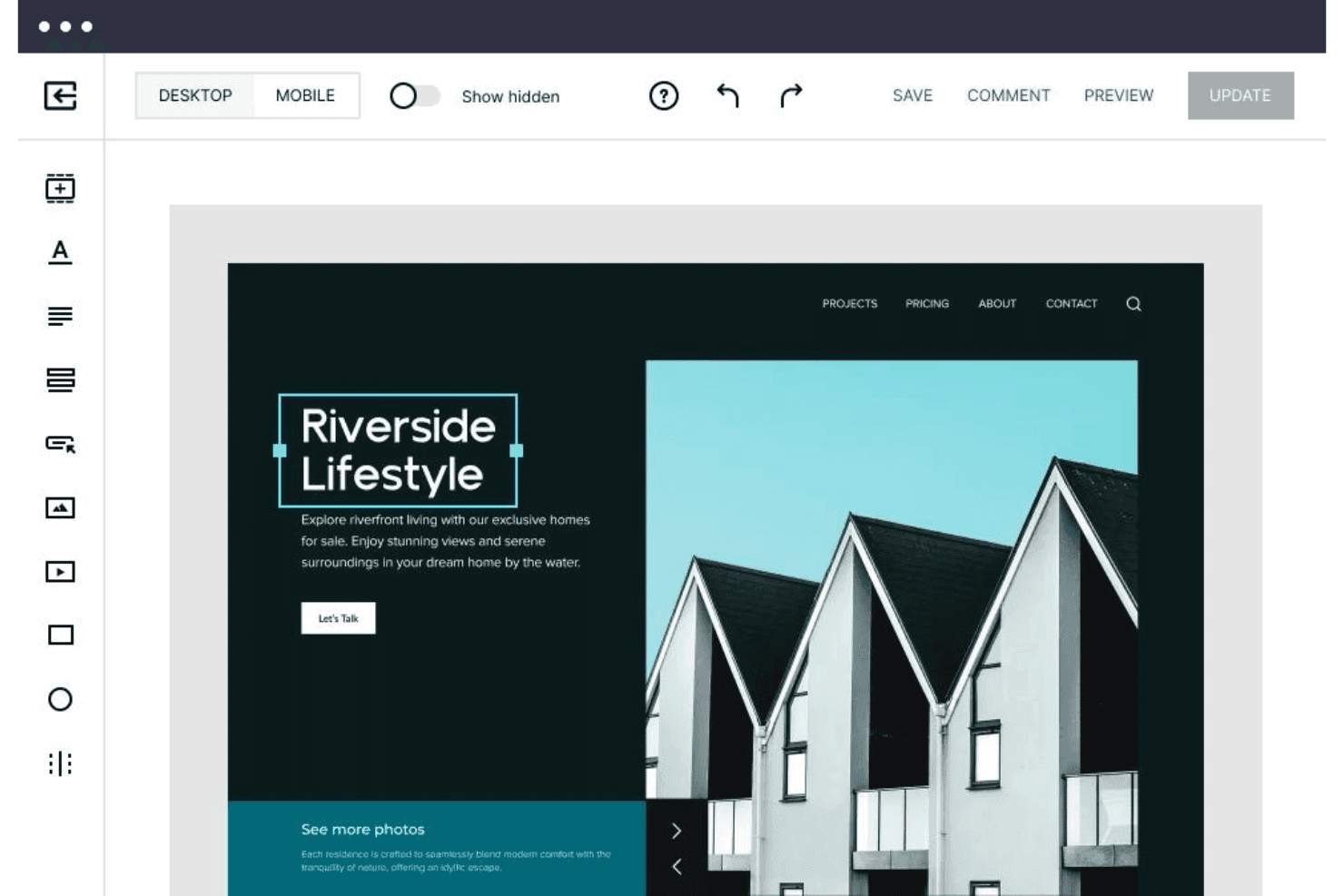
Instapage offers a drag-and-drop website editor with desktop/mobile preview, element tools, and real-time save and update options. Instapage is a landing page platform with AI content generation, server-side A/B testing, ad-to-page personalization, and conversion analytics built for marketing teams running paid campaigns at scale.
Who Is Instapage Best For?
Instapage is a strong fit for growth marketing teams at mid-market and enterprise companies managing high-volume paid search and social campaigns.
Why I Picked Instapage
I've included Instapage in my top picks because AdMap genuinely changes how enterprise teams manage paid campaigns at scale. I can visually connect every ad variant to a dedicated landing page and spot coverage gaps across an entire campaign structure instantly. Pair that with server-side A/B testing and ad-to-page personalization, and my team can run true 1:1 ad-to-page experiences across hundreds of active campaigns simultaneously.
Instapage Key Features
- AI content generation: Automatically generates headlines, body copy, and calls-to-action using OpenAI for every page.
- Drag-and-drop builder: Lets you create and arrange landing page elements without writing any code.
- Real-time visual collaboration: Allows team members and clients to leave direct on-page comments and feedback for faster review cycles.
- Form builder and library: Provides customizable form templates and editing tools for collecting leads and information.
Instapage Integrations
Instapage offers a wide range of native integrations including HubSpot, Salesforce, Marketo, Google Analytics, Google Ads, Facebook Ads, Mailchimp, Zapier, and provides an API for custom integrations.
Pros and Cons
Pros:
- AdMap visually links ads to landing pages
- AI copy generation for all page sections
- Server-side A/B testing at enterprise scale
Cons:
- No built-in AI image generation tools
- Not suited for full multi-page websites
Learn more about Instapage: Best for building scalable WordPress-based sites
- 7-day free trial
- From $10/month (billed annually)
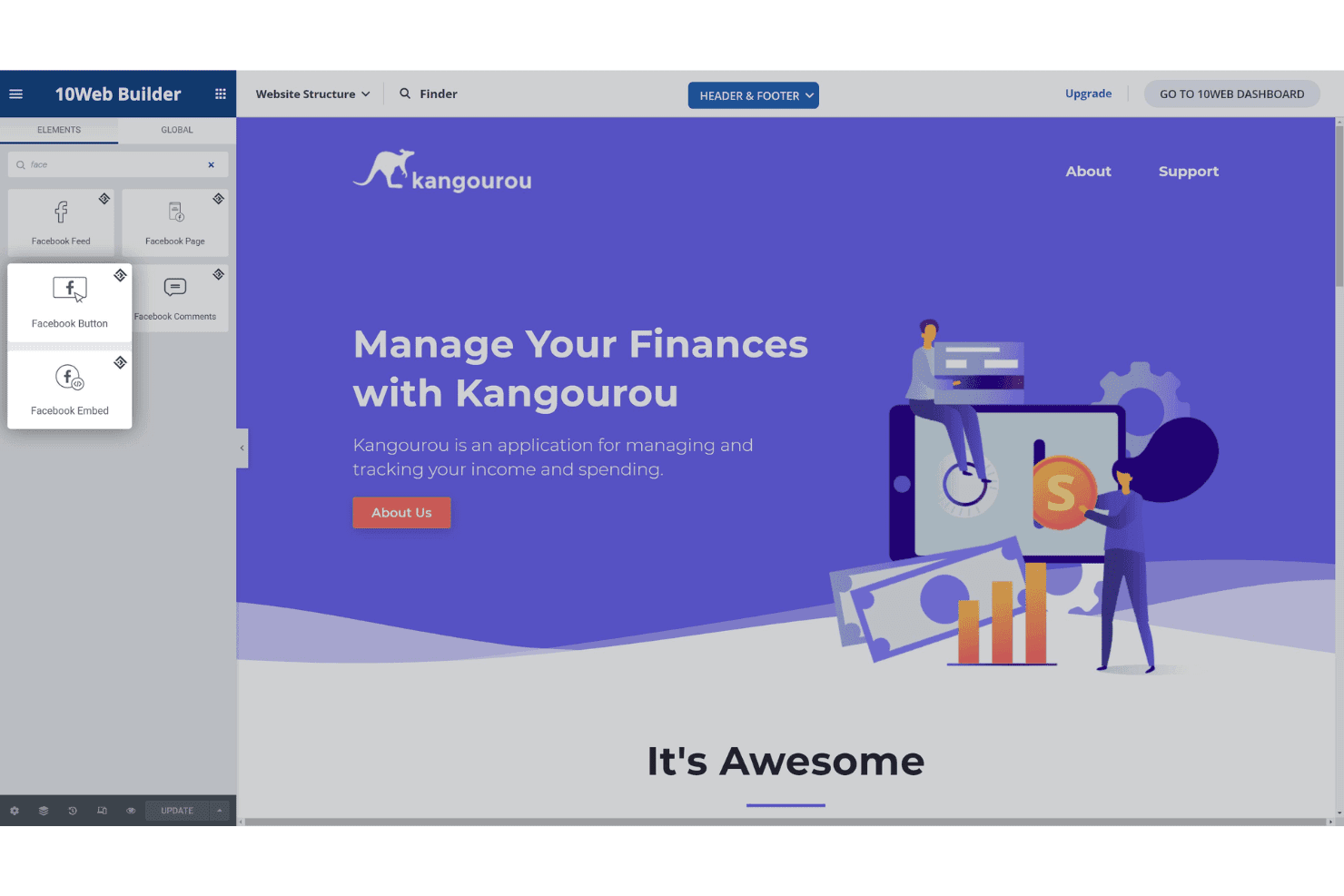
10Web Builder provides a drag-and-drop website editor with a Facebook widget elements panel and a live preview of a finance app landing page. 10Web is an AI website builder that generates full WordPress sites from text prompts, URL cloning, or Figma imports, paired with managed Google Cloud hosting and a visual editor built on Elementor.
Who Is 10Web Best For?
10Web is a strong fit for freelancers, small agencies, and small business marketers who need to launch WordPress sites quickly without relying on a developer.
Why I Picked 10Web
10Web earns its spot as one of the best on my shortlist because it's the only AI website builder that outputs genuine WordPress sites on Google Cloud hosting, with a guaranteed 90+ PageSpeed score built in from launch. I particularly like the URL cloning feature, which lets me recreate and redesign any existing site as a fully editable WordPress install in minutes. The white-label dashboard and multisite controls mean I can scale from one site to dozens of client projects without switching platforms or tools.
10Web Key Features
- Unified smart editor: Combine natural language prompts, visual editing, and custom code in one workspace.
- Figma to WordPress import: Convert Figma design files directly into responsive WordPress websites.
- Dynamic content engine: Add forms, bookings, and calendars as built-in dynamic site elements.
- White-label dashboard: Manage multiple client sites under your agency’s brand with team access controls.
10Web Integrations
10Web offers native integrations with WordPress plugins like Yoast SEO, WooCommerce, and Elementor, and provides an API for custom integrations.
Pros and Cons
Pros:
- Includes managed Google Cloud hosting
- Clones any live website via URL
- Guaranteed 90+ PageSpeed score from launch
Cons:
- AI copy less advanced than competitors
- Locked into WordPress, no alternative CMS
Learn more about 10Web: 5Best for sites tailored to professional services
B12
- Free plan available
- From $42/month (billed annually)
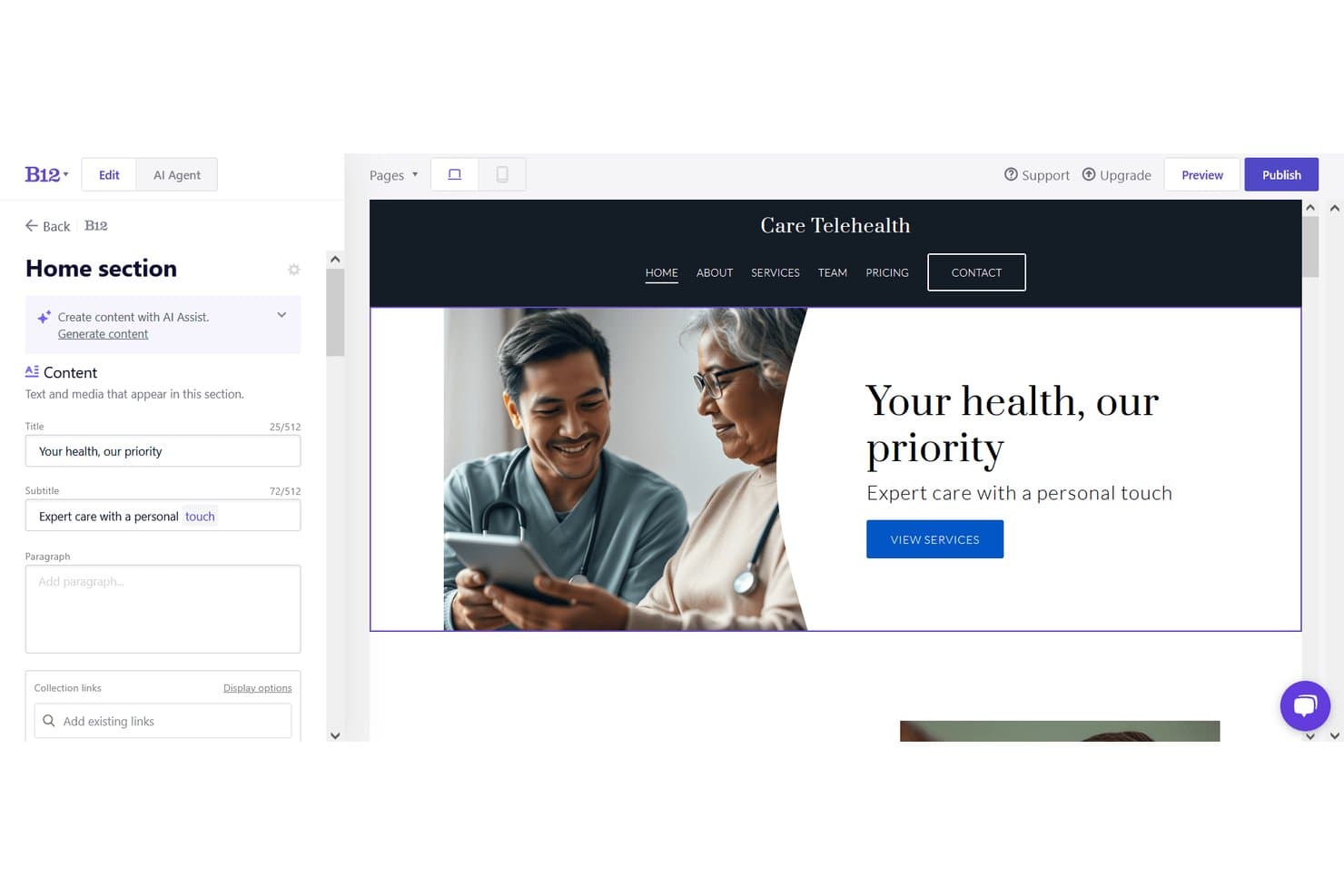
B12 offers an AI-powered website editor with live preview, content fields, and a telehealth site example showing hero text and navigation. B12 is an AI website creator that generates complete, multi-page sites from a text prompt and pairs that generation engine with a visual editor, AI copy tools, built-in scheduling, client intake forms, payments, and email marketing.
Who Is B12 Best For?
B12 is a strong fit for solo practitioners and small professional services firms that need a client-ready web presence without hiring a designer or developer.
Why I Picked B12
I've included B12 in my top picks because its AI generation is trained around professional services verticals, so a generated site for a law firm or financial consultant actually reads and structures like one. What I find genuinely distinctive is that the AI doesn't just build the site: it bundles client intake forms, eSignature contracts, and appointment scheduling directly into the published site. That means a consultant can go from prompt to a live, client-ready workflow in one platform.
B12 Key Features
- Screenshot upload for design reference: Let the AI match layouts by uploading a screenshot of a desired website.
- In-editor AI image generation: Instantly generate new custom images while editing your site content.
- Traffic analytics and reporting: Track website visitors and engagement with built-in analytics dashboards.
- Over 30 native integrations: Connect to tools like Calendly, Shopify, and Google Tag Manager for extended functionality.
B12 Integrations
B12 offers native integrations with Calendly, Shopify, Typeform, Google Tag Manager, Facebook Pixel, Drift, Google Analytics, Mailchimp, Square, and Stripe. An API is available for custom integrations.
Pros and Cons
Pros:
- Built-in eSignature, scheduling, and invoicing on all plans
- AI agent edits site via conversational text prompts
- Industry-specific AI copy generated from business inputs
Cons:
- Less layout flexibility post-generation than competitors
- No native eCommerce without connecting Shopify or Ecwid
Learn more about B12: Best for design-focused marketing microsites
- 14-day free trial available
- From $25/month
Visit WebsiteCustomer Rating:4.6/5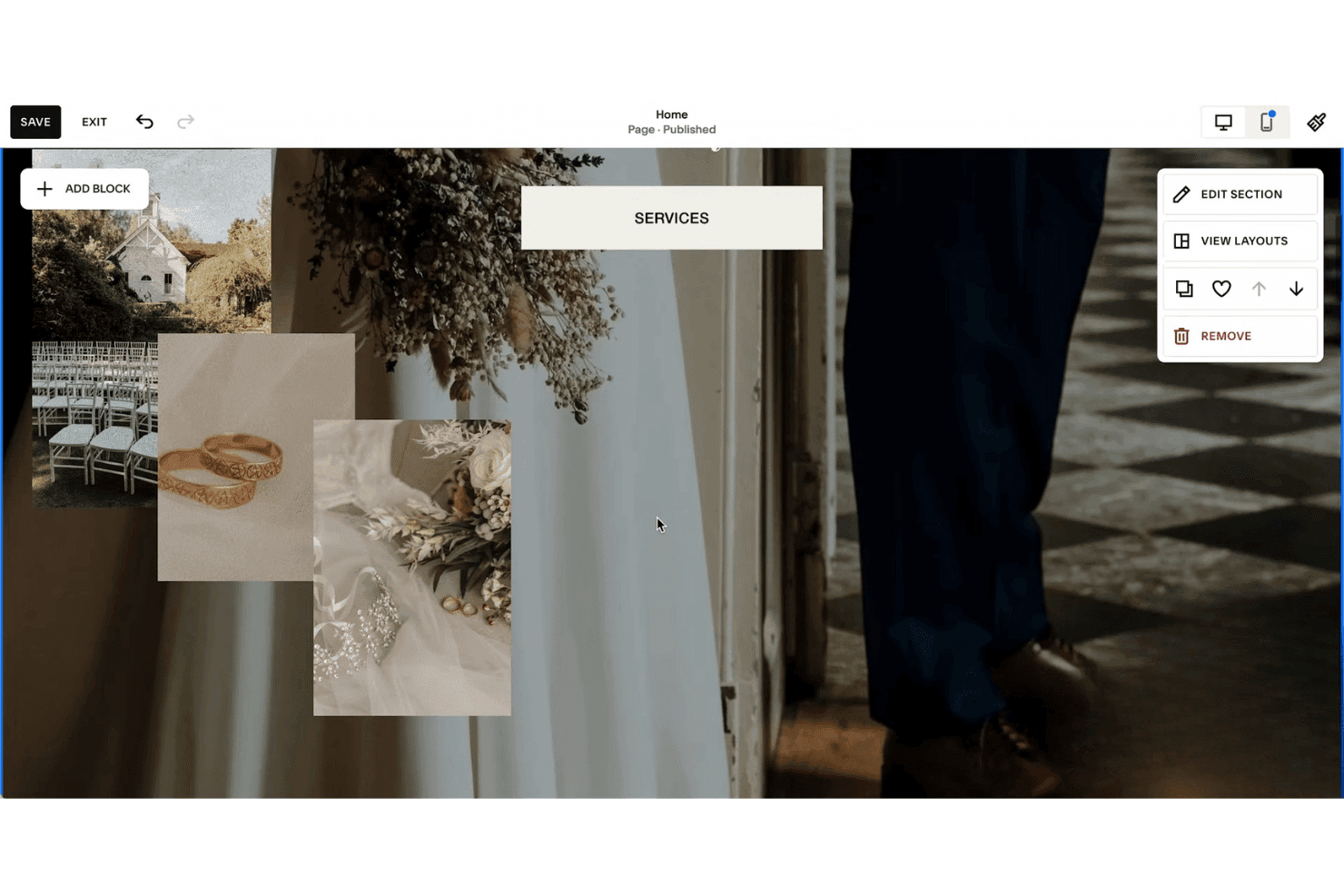
Squarespace's website editor includes a Services section with wedding photography images and a contextual editing menu on the right. Squarespace is an AI website builder that uses its Blueprint AI engine to generate complete, design-forward websites from brand inputs like personality, color palette, and business type, paired with an AI Writer for copy and built-in marketing and SEO tools.
Who Is Squarespace Best For?
Squarespace suits small business owners, freelancers, and independent marketers who need a polished, design-quality web presence without relying on a developer or designer.
Why I Picked Squarespace
I picked Squarespace as one of the best because its Blueprint AI inputs your brand personality (options like Bold, Sophisticated, or Playful), color palette, and business type to generate a fully styled microsite with curated imagery and copy in under four minutes. When I need to iterate on a design direction, the Layout Switcher swaps page compositions with my existing content automatically embedded. Site Themes then let me apply a completely different website design, including font pairings, color palettes, and button styles, in a single click.
Squarespace Key Features
- Mailchimp and Zapier integrations: Connect your site directly to email marketing and automation tools for campaigns.
- Full WYSIWYG editor: Customize AI-generated content and layouts with drag-and-drop and section controls.
- Beacon AI optimization: Scan and optimize your site’s SEO elements like meta data and alt text with AI assistance.
- Video hosting and embeddable blocks: Upload, host, and showcase high-quality video as part of your site content.
Squarespace Integrations
Squarespace offers native integrations with prominent social platforms, GoDaddy, Google Workspace, Dropbox, Unsplash, MailChimp, NameCheap, and more. It also connects with Zapier, and an API is available for custom integrations.
Pros and Cons
Pros:
- Design output quality surpasses most AI competitors
- AI Writer generates on-brand copy automatically
- Blueprint AI builds complete sites in minutes
Cons:
- No AI-driven visitor content personalization
- Follow-up AI prompt editing is limited
Learn more about Squarespace: 7Best for launching branded sites using AI prompts
Wix
- Free plan + free demo available
- From $35.54/month (billed annually)
Visit WebsiteCustomer Rating:4.2/5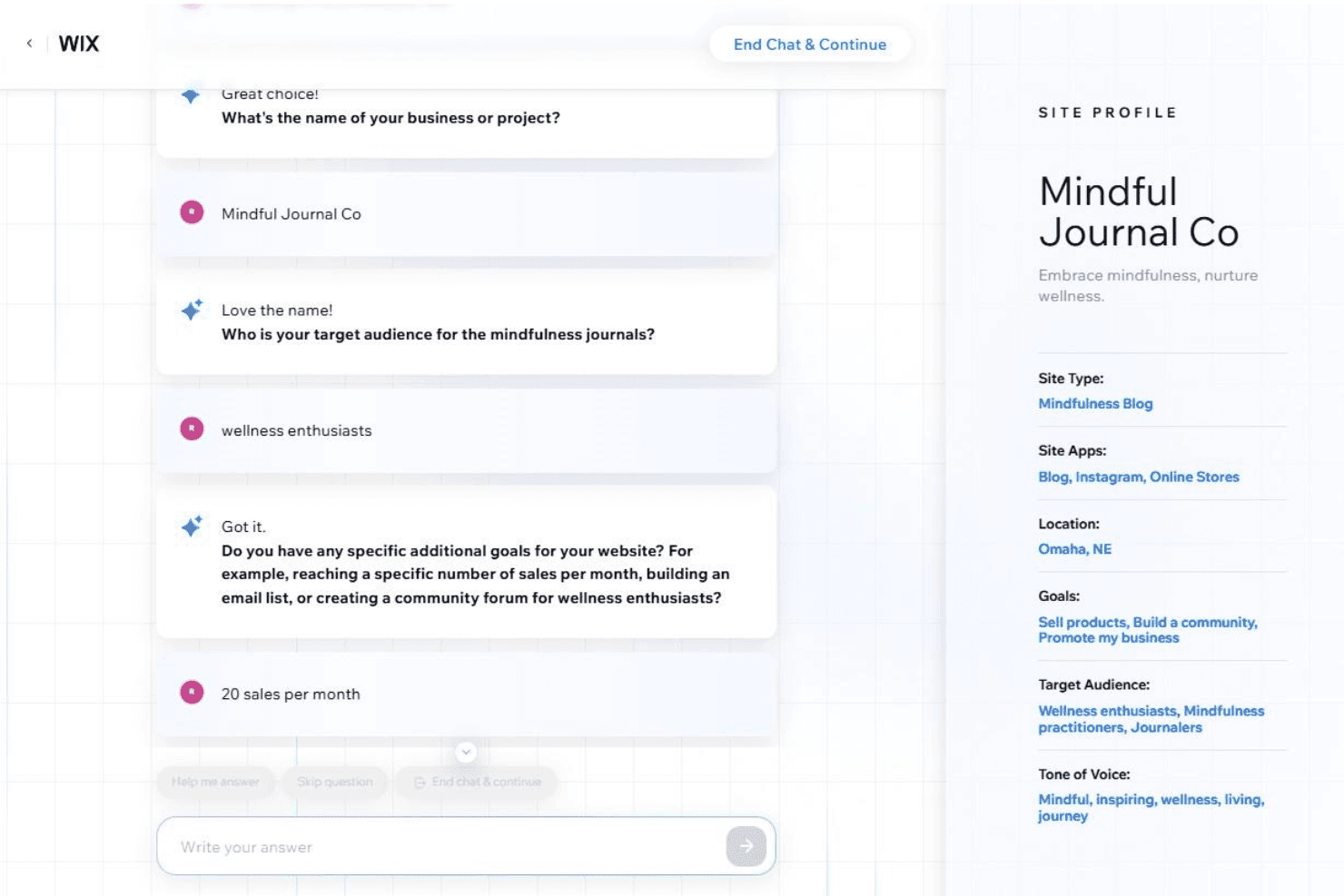
Wix's AI website builder uses a conversational chat interface to gather business details and automatically builds a site profile with goals, audience, and tone of voice. Wix is an AI website generator that creates complete, multi-page sites from conversational prompts, combining a pixel-level drag-and-drop editor with built-in eCommerce, SEO, bookings, and marketing tools.
Who Is Wix Best For?
Wix is a strong fit for small business owners and freelance marketers who need to launch a professional, branded website without relying on a developer.
Why I Picked Wix
Wix earns its spot on my shortlist because of how well its AI handles brand-specific site generation from the very first prompt. Aria, Wix's AI assistant, lets me describe a business and instantly get a complete multi-page site, with tailored sections, navigation, and copy already in place. The AI Text Creator goes further, letting me dial in tone (professional, enthusiastic, informative) and regenerate individual sections until the copy feels on-brand.
Wix Key Features
- AI section and element generator: Instantly create new site sections and components from short prompts to expand or update pages.
- Multi-cloud hosting infrastructure: Hosts all sites with built-in CDN, SSL security, and 99.99% uptime.
- App Market integrations: Offers hundreds of add-ons for e-commerce, marketing, analytics, and visitor interaction.
- SEO and analytics suite: Provides built-in metadata controls, Google Search Console integration, and visitor tracking tools.
Wix Integrations
Wix connects with hundreds of tools via its App Market, including Google Analytics, Mailchimp, PayPal, Facebook, Instagram, QuickBooks, Vimeo, and Hotjar. An API is available for custom integrations.
Pros and Cons
Pros:
- Tone controls adjust AI copy per brand
- Aria refines sites via follow-up prompts
- AI generates complete multi-page sites instantly
Cons:
- AI output varies without detailed prompts
- Sites can't be migrated off Wix
Learn more about Wix: Best for beginner-friendly multi-page creation
- 14-day free trial
- From $10.99/month (billed annually)
Visit WebsiteCustomer Rating:4.4/5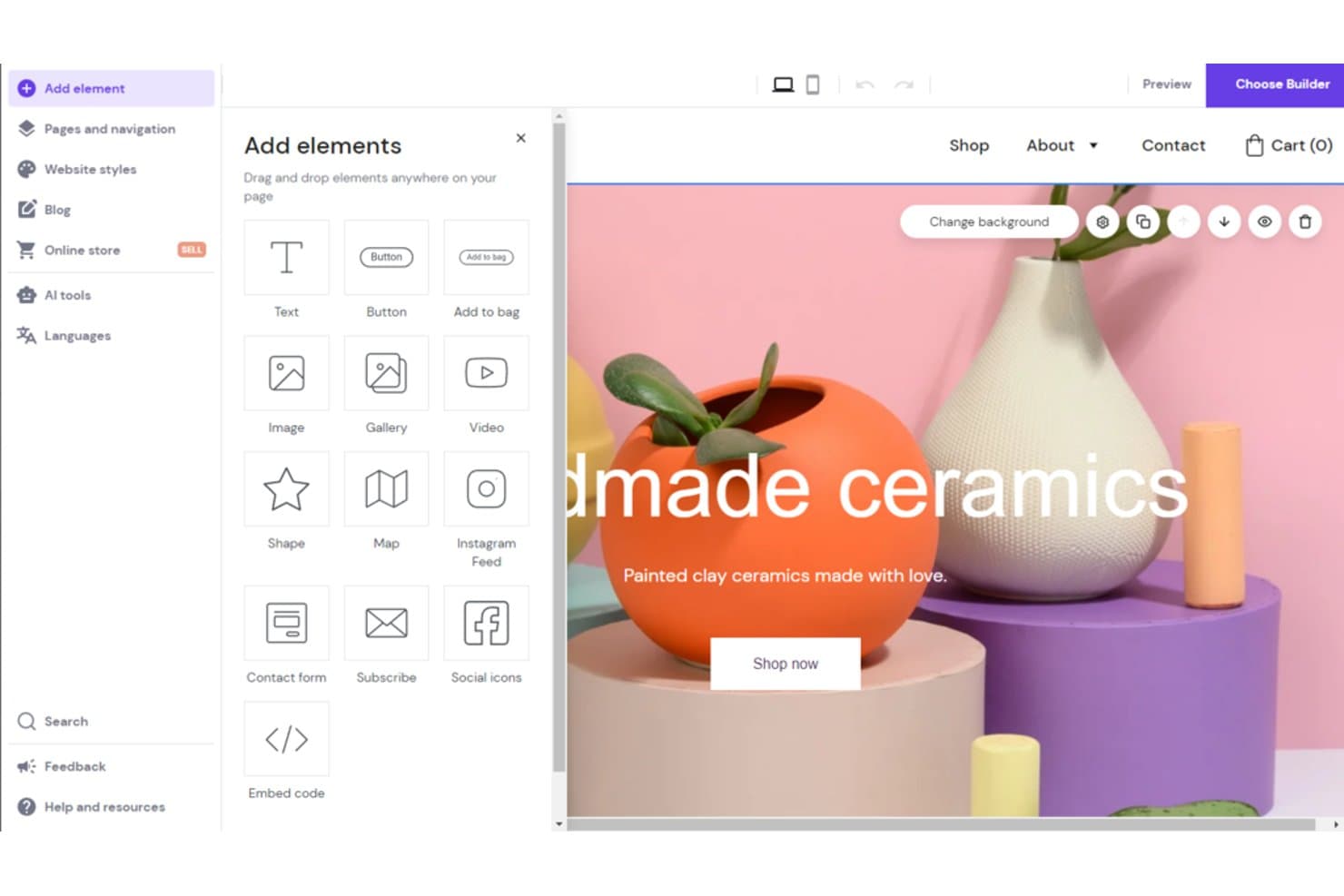
Hostinger Website Builder offers a drag-and-drop editor with AI tools and a variety of elements like text, buttons, images, and forms to customize your website. Hostinger Website Builder is an AI-powered site builder that generates complete multi-page websites from a text prompt, with a drag-and-drop editor, built-in hosting, AI copy and image generation, and ecommerce tools.
Who Is Hostinger Website Builder Best For?
It's a strong fit for small business owners and freelance marketers who need to launch multi-page websites quickly without design or development experience.
Why I Picked Hostinger Website Builder
I picked Hostinger Website Builder as one of the best because its AI site generator builds a complete multi-page site, including navigation, copy, and imagery, from a single prompt in under 60 seconds. The Smart Grid drag-and-drop editor then lets you rearrange sections across unlimited pages without writing any code. I especially like that every plan includes unlimited web pages, so there's no ceiling on how much you can expand from that initial AI-generated draft.
Hostinger Website Builder Key Features
- AI image generator: Instantly creates original visuals for headers, sections, and blog posts based on your prompts.
- AI blog post generator: Produces complete, SEO-ready articles with titles, body copy, and meta information from keywords or prompts.
- Printful integration: Lets you connect print-on-demand products directly to your online store for easy merch and branding.
- Automatic mobile-friendly design: Ensures every page and layout adapts to different devices without manual adjustments.
Hostinger Website Builder Integrations
Hostinger Website Builder offers native integrations with Google Analytics, Google Tag Manager, Meta Pixel, and Printful. An API is available for custom integrations.
Pros and Cons
Pros:
- Built-in AI copy covers every site section
- Unlimited pages included on all paid plans
- AI generates complete multi-page sites instantly
Cons:
- Limited AI design refinement after initial generation
- No A/B testing for landing pages
Learn more about Hostinger Website Builder: Best for granular design customization
- Free plan available
- From $15/month (billed annually)
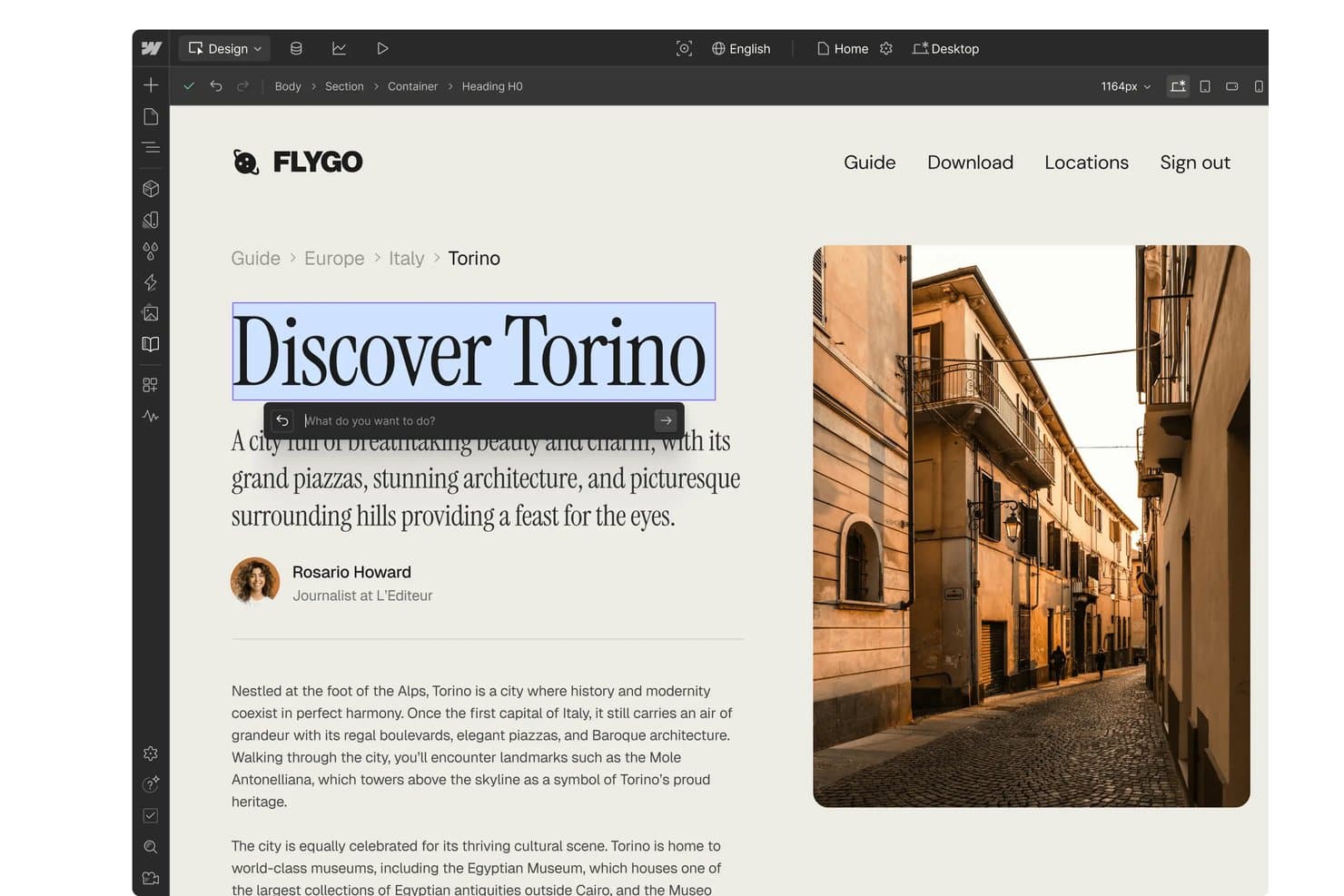
Webflow offers an AI design assistant that allows users to edit and rewrite heading text directly within the visual website builder. Webflow is a visual AI website builder that lets you generate multi-page sites from text prompts, edit layouts with CSS-level design control, and publish with integrated hosting — all without writing code.
Who Is Webflow Best For?
Webflow is a strong fit for marketing teams at SaaS companies and digital agencies that need full design control over campaign sites and landing pages without relying on a developer.
Why I Picked Webflow
Webflow earns its spot as one of the best on my shortlist because the AI output is a fully editable Webflow project, not a locked template. Once the AI generates a site, I can open the Designer and adjust flexbox layouts, CSS grid structures, and custom properties without touching code. What really sets it apart is the Page Building feature: designers define structural templates with page slot elements that control exactly where marketers can add components, keeping the brand intact across every edit.
Webflow Key Features
- AI site generation from prompts: Create entire multi-page sites with navigation and sections by describing your business in simple language.
- Integrated CMS for dynamic content: Manage and publish large volumes of content with dynamic collections and automated landing page creation.
- Native SEO and AEO controls: Directly edit metadata, sitemaps, page titles, and access AI-powered structured data optimization tools.
- App marketplace and API integrations: Extend functionality with marketplace apps for CRM, ecommerce, analytics, or connect custom tools using API access.
Webflow Integrations
Webflow offers native integrations with HubSpot, Google Analytics, Marketo, Salesforce, Mailchimp, Slack, Figma, Jasper, and many more. It also connects with Zapier and Make, and an API is provided for custom integrations.
Pros and Cons
Pros:
- Built-in CMS supports dynamic page generation
- AI-generated sites stay fully editable afterward
- CSS-level control without writing any code
Cons:
- AI generation less mature than dedicated builders
- Complex visual editor for non-designer users
Learn more about Webflow: Best for quick publishing with built-in hosting
- 7-day free trial
- From $9.99/month (billed annually)
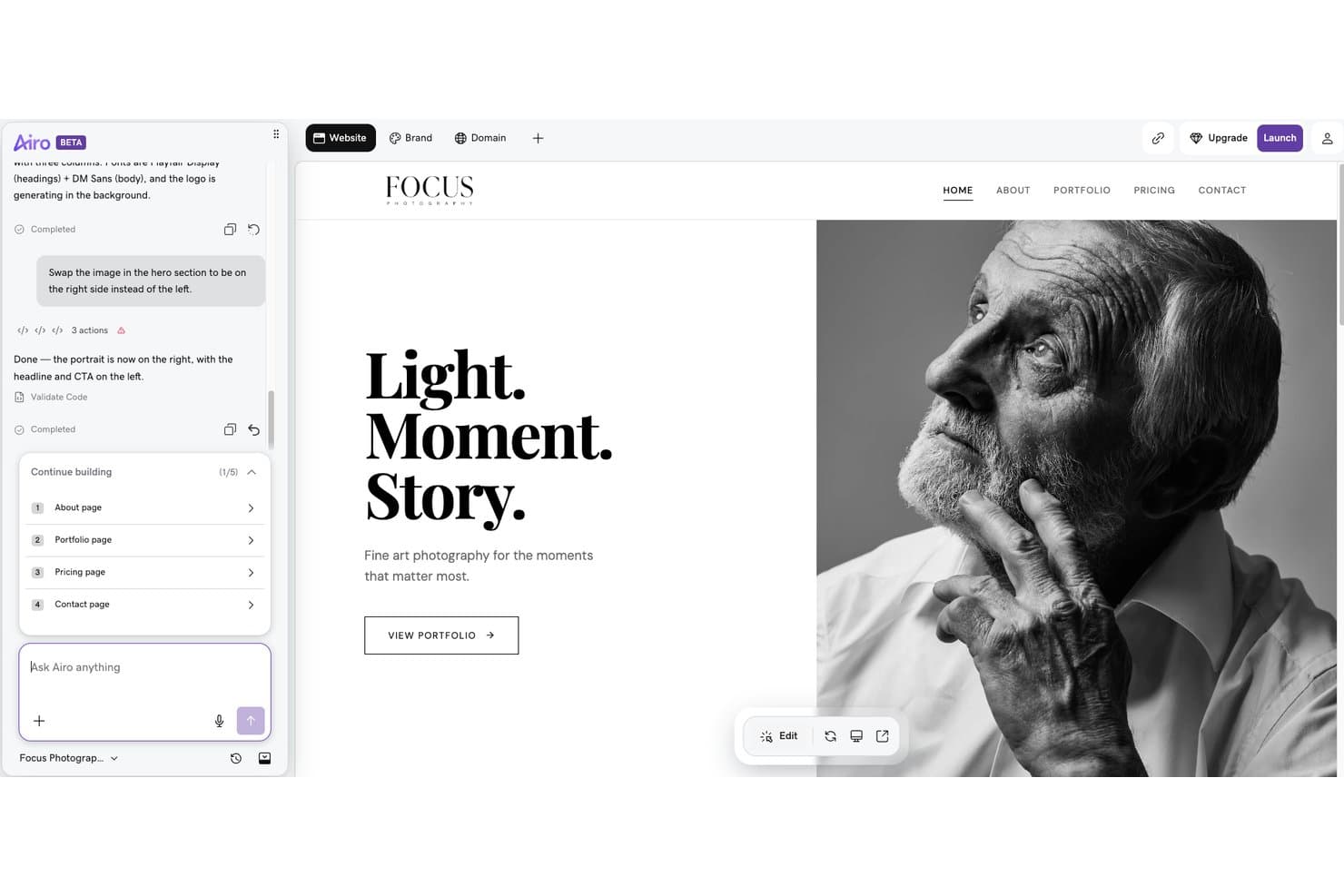
GoDaddy Website Builder offers an AI-powered chat interface that lets users make real-time layout changes, such as repositioning hero images, through simple text commands. GoDaddy Website Builder is an AI-powered site creation tool that generates multi-page websites from conversational prompts, with built-in hosting, an SEO wizard, email marketing, and ecommerce built into a single platform.
Who Is GoDaddy Website Builder Best For?
It's a natural fit for small business owners and non-technical marketers who need to get a site live fast without writing code or managing hosting separately.
Why I Picked GoDaddy Website Builder
I picked GoDaddy Website Builder because the distance between "I have a prompt" and "I have a live site" is genuinely short. Airo AI Builder generates a complete multi-page site from a conversational input, and one-click deploy pushes it live on GoDaddy's hosting with SSL already configured. There's no separate hosting account to provision or DNS records to manage manually.
GoDaddy Website Builder Key Features
- Drag-and-drop editor: Modify layouts, sections, and content visually with point-and-click editing tools.
- SEO Wizard: Set meta titles, descriptions, and basic structured data for every page.
- Integrated email marketing: Send branded marketing emails directly from the platform, with send limits based on your plan.
- Social media integrations: Connect Facebook, Instagram, Pinterest, LinkedIn, and YouTube to manage links and social posting.
GoDaddy Website Builder Integrations
GoDaddy offers integrations with Google Analytics, Facebook, Instagram, Yelp, PayPal, and OpenTable. An API is available for custom integrations.
Pros and Cons
Pros:
- Built-in SEO Wizard covers all pages
- Hosting included with every published site
- Generates full sites from conversational prompts
Cons:
- Template designs feel constrained after AI generation
- Follow-up AI editing prompts aren't available
Learn more about GoDaddy Website Builder:
Diğer Yapay Zekâ Web Sitesi Oluşturucuları
Kısa listeme giremeyen ancak yine de incelemeye değer bazı ek yapay zekâ web sitesi oluşturucuları şunlardır:
- 11FramerBest for responsive layout control
- 12DurableBest for auto-generating small business websites
- 13LeadpagesBest for campaign-driven landing site creation
- 14DudaBest for client site management at scale
- 15MixoBest for instant multi-language site generation
- 16Hocoos AI Website BuilderBest for AI-guided site personalization features
- 17ElementorBest for flexible design controls in WordPress
- 18JimdoBest for effortless small business site setup
- 19BluehostBest for easy WordPress hosting integration
- 20CodeDesign.aiBest for editing with natural language prompts
How I Evaluate AI Website Builders
To earn a spot here, a tool's AI needs to produce real output—usable copy, structured layouts, and brand-matched designs from a short prompt. I break my evaluation into core functionality every platform must deliver and the differentiating factors that set the best options apart.
Core Functionality (Table Stakes For This List)
When I'm selecting tools for my list, I rank each one on a scale from 0 (does not offer the functionality) to 5 (excels in this area) for each core functionality listed below. Then, I calculate the tool's total score into a percentage. Each tool needs to achieve a minimum total score of 65% to be considered for inclusion.
- AI site generation: I evaluate whether a prompt like "build a SaaS product launch site with pricing and features pages" produces a usable multi-page structure with logical navigation.
- AI copy generation: The generated headlines, CTAs, and body text should reflect actual business context, not generic filler that you'd need to rewrite from scratch.
- AI design and layout: I look for layout choices, color palettes, and imagery that feel cohesive and brand-appropriate rather than a random template swap.
- Visual editor: After AI does its work, you need a drag-and-drop or WYSIWYG editor to rearrange sections, tweak styles, and add components without touching code.
- Publishing and hosting: I check that the platform includes integrated hosting with custom domain support and SSL so you can go live without a separate hosting provider.
- Marketing features: Built-in SEO controls, form builders, analytics, or landing page tools matter here, especially for teams running campaign-specific pages.
Once I have a list of tools that meet the criteria, I consider what sets each platform apart.
Differentiating Factors (What Sets Vendors Apart)
Here's how I compare and contrast different vendors:
Standout Features
Auto brand kit application is a big one for me. Tools that can ingest a logo or existing URL and apply matching colors, fonts, and imagery across every page save hours of manual styling. I also look for natural language editing, where you can type something like "swap the hero image and make the headline punchier" instead of dragging elements around. Smart SEO optimization matters too—I evaluate whether the platform auto-generates meta tags, alt text, and schema markup as you build, so pages are search-ready from the start.
Beyond Features
Integration options carry a lot of weight. If your AI-built site can't connect to your CRM or email platform, you're adding manual steps to every campaign. I also evaluate pricing transparency, especially how costs scale as you add pages, team seats, or traffic. Design control matters just as much. Some platforms lock you into basic AI output, while others like Webflow and Framer let you inject custom CSS or edit at the component level as your needs grow.
Yapay Zekâ Web Sitesi Oluşturucusu Nasıl Seçilir?
Uzun özellik listeleri ve karmaşık fiyatlandırma yapıları içinde kaybolmak kolaydır. Kendinize özgü yazılım seçim sürecinizde ilerlerken odağınızı korumanıza yardımcı olmak için göz önünde bulundurmanız gereken faktörlerin bir kontrol listesi aşağıda yer alıyor:
| Faktör | Göz önünde bulundurulması gerekenler |
|---|---|
| FaktörÖlçeklenebilirlik | Göz önünde bulundurulması gerekenlerPlatform; yeni sayfalar, birden fazla site yönetimi veya trafik artışları gibi büyümenizi karşılayabilecek mi, yoksa ölçeğinizi büyüttükçe ek maliyetler ya da karmaşıklıkla mı karşılaşacaksınız? |
| FaktörEntegrasyonlar | Göz önünde bulundurulması gerekenlerCRM'inize, e-posta pazarlama veya analiz araçlarınıza doğrudan bağlantıları destekliyor mu? Kampanya iş akışları için otomasyonun kritik olduğu noktaları göz önünde bulundurun. |
| FaktörÖzelleştirilebilirlik | Göz önünde bulundurulması gerekenlerVarsayılan yapay zekâ çıktısının ötesinde ne kadar esnekliğe ihtiyacınız var? Gelişmiş kullanım alanları için düzenleri ve stilleri değiştirebildiğinizi veya özel kod ekleyebildiğinizi kontrol edin. |
| FaktörKullanım kolaylığı | Göz önünde bulundurulması gerekenlerPazarlama ekibi üyeleri yoğun bir eğitim almadan sayfaları yayına alabilir ya da düzenleyebilir mi, yoksa öncelikler değiştikçe tasarımcılardan veya BT ekibinden sürekli yardım almanız mı gerekecek? |
| FaktörUygulama ve işe alıştırma | Göz önünde bulundurulması gerekenlerEkibiniz markalı, yayındaki bir siteyi ne kadar hızlı kurup çalışır duruma getirebilir? Kurulum sürecindeki zorlukları azaltan yönlendirmeli kurulum araçlarını, şablonları veya örnek içeriklerini arayın. |
| FaktörMaliyet | Göz önünde bulundurulması gerekenlerFiyatlandırma katmanları, sayfa sınırları ve eklenti ücretleri açık mı? Yatırımın yalnızca ilk sitenize değil, yayına alma ve gelecekteki büyüme planlarınızın her ikisine de uygun olduğundan emin olun. |
| FaktörGüvenlik önlemleri | Göz önünde bulundurulması gerekenlerSağlayıcı, hedef kitlenizin verilerini emanet ederken kendinizi rahat hissedeceğiniz SSL, gizlilik denetimleri ve veri koruması sunuyor mu? Belgelerini inceleyin. |
| FaktörDestek erişilebilirliği | Göz önünde bulundurulması gerekenlerBir sitenin yayımlanmaması veya alan adıyla ilgili bir sorun gibi acil problemlerle karşılaşırsanız yararlı desteğe hızlıca ulaşabilir misiniz, yoksa gecikmeler önemli kampanyalara zarar verir mi? |
Yapay Zekâ Web Sitesi Oluşturucuları Nedir?
Yapay zekâ web sitesi oluşturucu, istemlerinize veya işletme ayrıntılarınıza dayalı olarak tüm web sitelerini tasarlamak, yazmak ve bir araya getirmek için yapay zekâ kullanan dijital bir platformdur. Bu araçlar site yapısını, metin yazarlığını, görselleri ve stilleri otomatikleştirerek profesyonel, markalı bir web sitesini hızlıca yayına almanızı sağlar; kodlama veya tasarım geçmişi gerekmez. Yapay zekâ web sitesi oluşturucuları, karmaşıklıkla uğraşmadan sonuç almak isteyen pazarlamacılar, girişimciler ve ekipler için geliştirilmiştir.
Özellikler
Bir AI web sitesi oluşturucu seçerken aşağıdaki temel özelliklere dikkat edin:
- AI ile site oluşturma: İşletmenizi, ürününüzü veya hedeflerinizi açıklayan kısa bir komut girerek, tam kapsamlı çok sayfalı web siteleri veya açılış sayfaları hızla oluşturun.
- AI metin yazarlığı: Şirketinize özel başlıkları, CTA'ları ve gövde metinlerini anında oluşturarak yazma ve düzenleme için harcanan zamandan tasarruf edin.
- AI tasarımı ve düzeni: Markanızın kimliğini yansıtan profesyonel düzenler, renk şemaları, yazı tipleri ve görsellerle görsel açıdan hoş tasarımları otomatik olarak oluşturun.
- Sürükle ve bırak düzenleyicisi: Kodlama veya teknik beceri gerektirmeden site bölümlerini kolayca düzenleyin, düzenleri değiştirin veya ögeler ekleyin.
- Entegre web barındırma ve yayınlama: Özel alan adı ve SSL güvenliği seçenekleri de dahil olmak üzere, canlı sitenizi yalnızca birkaç tıklamayla kullanıma sunun.
- SEO optimizasyon araçları: Web sitenizin arama motorlarında daha üst sıralarda yer almasına yardımcı olmak için otomatik meta etiketler, alternatif metin ve site haritaları gibi özelliklere erişin.
- Kişiselleştirme yetenekleri: Etkileşimi artırmak için kullanıcı davranışına, coğrafi konuma veya cihaza göre farklı içerikler ya da teklifler gösterin.
- Form ve potansiyel müşteri toplama: Pazarlama listenizi büyütmek için iletişim formlarını, etkileşimli sohbet robotu bileşenlerini veya potansiyel müşteri kazanma tekliflerini doğrudan sitenize ekleyin.
- Analiz ve raporlama: Ekibinizin yineleme yapmasına ve iyileştirmeler gerçekleştirmesine yardımcı olmak için site performansını, ziyaretçi davranışını, dönüşümleri ve daha fazlasını takip edin.
- Marka kiti aktarımı: Logonuzu yükleyin, bir işletme adı oluşturucuyu çalıştırın veya marka ayrıntılarınızı girin; böylece sitenin renkleri, yazı tipleri ve stili her sayfaya otomatik olarak uygulansın.
Faydalar
Bir AI web sitesi oluşturucuyu uygulamak ekibiniz ve işletmeniz için çeşitli faydalar sağlar. Yararlanmayı bekleyebileceğiniz birkaç fayda şunlardır:
- Daha hızlı kullanıma sunma: AI destekli iş akışları siteleri, içerikleri ve tasarım ögelerini dakikalar içinde oluşturur; böylece geliştirici darboğazları olmadan kampanyalarınızı kullanıma sunabilirsiniz.
- Markayla tutarlı görünüm: Marka kiti aktarımı ve otomatik stillendirme, hiç manuel düzenleme yapmadan her sayfanın görsel kimliğinizle eşleşmesini sağlar.
- Daha az manuel çalışma: Otomatik metin yazarlığı, düzen ve görsel seçimi, sürekli düzenleme yapma veya dışarıdan serbest çalışanlar tutma ihtiyacını azaltır.
- Daha geniş erişilebilirlik: Kodsuz düzenleyiciler, ekipteki herkesin sayfalar oluşturmasına veya içeriği güncellemesine olanak tanıyarak teknik bilgisi olmayan kullanıcıların önündeki engelleri kaldırır.
- Geliştirilmiş SEO hazırlığı: Yerleşik SEO araçları ve otomatik etiketleme, sitenizin daha en başından arama sonuçlarında daha üst sıralarda görünmesine yardımcı olur.
- Kişiselleştirilmiş deneyimler: AI destekli kişiselleştirme, ziyaretçilere konumlarına veya davranışlarına göre uyarlanmış içerikler göstererek etkileşimi artırır.
- Büyümeye uygun ölçeklenebilirlik: İhtiyaçlarınız değiştikçe sitenizi kolayca genişletin, yeni sayfalar ekleyin veya daha yüksek trafiği destekleyin; yerleşik barındırma ve esnek platform altyapısından yararlanın.
Maliyetler ve Fiyatlandırma
Bir AI web sitesi oluşturucu seçmek, mevcut çeşitli fiyatlandırma modellerinin ve planların anlaşılmasını gerektirir. Maliyetler özelliklere, ekip büyüklüğüne, eklentilere ve daha fazlasına göre değişir. Aşağıdaki tablo, AI web sitesi oluşturucu çözümlerinde yaygın planları, ortalama fiyatlarını ve genellikle sunulan özellikleri özetlemektedir:
AI Web Sitesi Oluşturucu Plan Karşılaştırma Tablosu
| Plan Türü | Ortalama Fiyat | Yaygın Özellikler |
|---|---|---|
| Plan TürüÜcretsiz Plan | Ortalama Fiyat$0 | Yaygın ÖzelliklerTemel site oluşturma, sınırlı sayıda sayfa, platform markası ve paylaşımlı barındırma. |
| Plan TürüKişisel Plan | Ortalama Fiyat$10-$25/ay | Yaygın ÖzelliklerÖzel alan adı desteği, daha fazla AI içerik düzenlemesi, e-posta desteği ve çeşitli şablonlar. |
| Plan Türüİşletme Planı | Ortalama Fiyat$30-$80/ay | Yaygın ÖzelliklerGelişmiş tasarım denetimleri, SEO araçları, analiz entegrasyonu, form oluşturucular ve öncelikli destek. |
| Plan TürüKurumsal Plan | Ortalama Fiyat$100-$500+/ay | Yaygın ÖzelliklerSınırsız sayfa, ekip iş birliği, özel SLA'lar, beyaz etiketleme, API erişimi ve özel hesap yönetimi. |
AI Web Sitesi Oluşturucuları Hakkında SSS
AI web sitesi oluşturucuları hakkında sık sorulan bazı soruların yanıtlarını burada bulabilirsiniz:
Mevcut web sitemi bir AI web sitesi oluşturucusuna taşıyabilir miyim?
Evet, bazı AI web sitesi oluşturucuları mevcut içerikleri ve sayfaları içe aktarmak için taşıma araçları veya hizmetleri sunar. Ancak düzenin ve işlevlerin sorunsuz bir şekilde aktarılıp aktarılmayacağını kontrol etmek önemlidir; çünkü bazı gelişmiş özelleştirmelerin içe aktarma sonrasında manuel olarak düzenlenmesi gerekebilir.
Bir AI web sitesi oluşturucusunu kullanmak için ne kadar teknik uzmanlığa ihtiyacım var?
Hayır, genellikle teknik uzmanlığa ihtiyacınız yoktur. Bu platformlar pazarlamacılar ve geliştirici olmayan kullanıcılar için tasarlanmıştır; kodlama veya tasarım deneyimi olmadan siteler oluşturabilmeniz ve güncelleyebilmeniz için görsel düzenleyiciler ve AI komutları sunar.
AI web sitesi oluşturucuları işletme kullanımı için ne kadar güvenlidir?
Çoğu AI web sitesi oluşturucusu, işletme kullanımı için uygun SSL, düzenli yedeklemeler ve gizlilik standartları sunar. Veri işleme uygulamaları hakkında bilgi edinmek ve kendi güvenlik gereksinimlerinizle uyumluluğu sağlamak için sağlayıcının belgelerini incelemek her zaman iyi bir fikirdir.
AI web sitesi oluşturucuları çok sayfalı veya karmaşık siteler için uygun mudur?
Evet, birçok AI web sitesi oluşturucusu çok sayfalı web siteleri oluşturmayı ve entegrasyonlar veya özel kod aracılığıyla gelişmiş özellikler eklemeyi destekler. Karar vermeden önce aracın sitenizin ölçeğine ve karmaşıklığına uygun olduğunu doğruladığınızdan emin olun.
AI web sitesi oluşturucumu CRM sistemime ve pazarlama araçlarıma bağlayabilir miyim?
Evet, önde gelen platformlar genellikle popüler CRM sistemleri, analiz araçları ve e-posta pazarlama platformlarıyla entegrasyonları destekler. Bu sayede ekibiniz potansiyel müşteri yakalamayı ve e-posta kayıtlarını otomatikleştirebilir, ziyaretçi yolculuklarını kolayca takip edebilir.