

Ücretsiz podcast düzenleme yazılımları, ücretsiz planlar veya ücretsiz denemeler sayesinde ön ödeme yapmadan bölümleri kaydetmenize, kesmenize ve iyileştirmenize olanak tanıyan araçları içerir. Masrafları artırmadan podcast'inizi oluşturmanın ve düzenlemenin yollarını arıyorsanız kalite ve kullanım kolaylığı açısından güvenebileceğiniz çözümlere ihtiyacınız var. Piyasada çok sayıda ücretsiz seçenek bulunduğundan, hangilerinin gerçekten harika sesler üretmenize yardımcı olacağını bilmek zor olabilir. Bu kılavuz, en iyi puan alan ücretsiz podcast düzenleme yazılımlarını gösterecek ve iş akışınıza ve hedeflerinize uygun araçları güvenle seçmeniz için ihtiyacınız olan her şeyi sunacak.
Why Trust Our Software Recommendations
6,700+
Reviews
20
Industry experts
16+
Evaluation factors
14
Years
Our team has been testing and reviewing software since 2012. As marketing leaders ourselves, we know how difficult—and important—it is to choose the right software.
For this guide, we evaluated tools using hands-on testing and independent research, scoring tools using our selection criteria.
Our reviews reflect our human editorial judgment, not a sales pitch.
Expert reviewers:
 Gui DrusinaCreative Director
- Shriya GhateSenior Marketing Lead
 Amanda JacquesMarketing Ops Leader

Ücretsiz Podcast Düzenleme Yazılımları Karşılaştırma Tablosu
Bu karşılaştırma tablosu, en iyi ücretsiz podcast düzenleme yazılımı seçimlerimin fiyatlandırma ayrıntılarını özetlemektedir.
Sorted by: Default
| Tool | Starting Price | Website | |
|---|---|---|---|
Best for loudness normalization and metadata | 4.7 out of 5 | $11/month Free plan available | Website |
Best for Mac users producing music-rich shows | Not rated | Free plan available Free plan available | Website |
Best for simplified episode assembly | Not rated | $38/month 7-day free trial + free demo available | Website |
Best for AI-powered audio polishing | Not rated | $15/month Free plan available | Website |
Best for advanced customizable audio workflows | Not rated | $60/license 60-day free trial | Website |
Best for remote multitrack recording | 4.8 out of 5 | $24/month 14-day free trial + free plan + free demo available | Website |
Best for text-based audio editing | 4.6 out of 5 | $16/user/month Free plan available | Website |
Best for free multitrack waveform editing | Not rated | Free plan available Free plan available | Website |
Best for asynchronous team collaboration | Not rated | $11.99/month Free plan + free trial | Website |
Best for AI-powered audio cleanup | Not rated | Pricing upon request Free plan available | Website |


Ücretsiz Podcast Düzenleme Yazılımı İncelemeleri
Aşağıda, kısa listeme giren ücretsiz podcast düzenleme yazılımlarına ilişkin ayrıntılı özetlerimi bulabilirsiniz. İncelemelerim, her aracın özelliklerine, en uygun kullanım alanlarına ve fiyatlandırmasına ayrıntılı bir bakış sunarak sizin için en iyi seçeneği bulmanıza yardımcı olur.
 Best for loudness normalization and metadata
- Free plan available
- From $11/month (billed annually)
Visit WebsiteCustomer Rating:4.7/5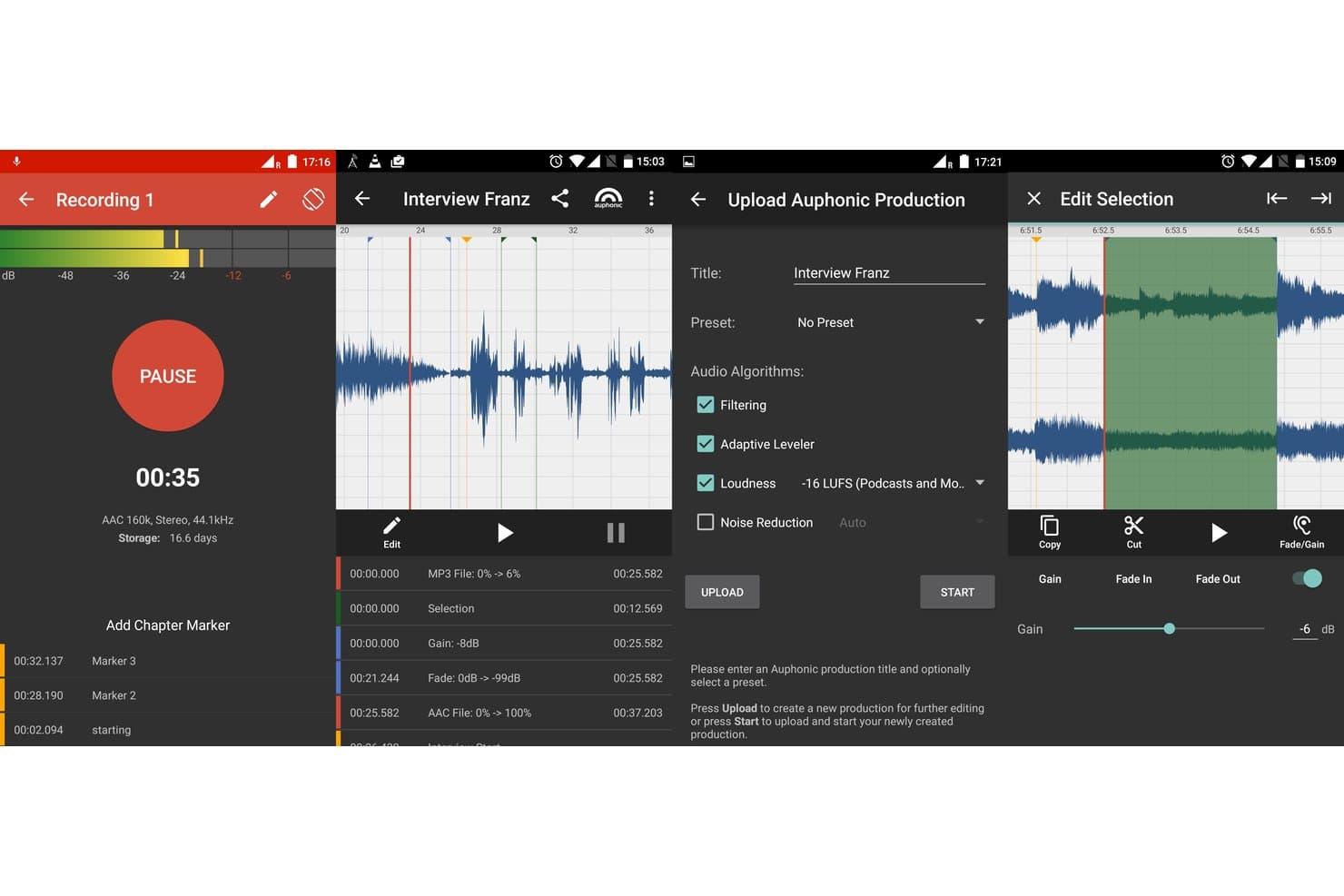
Auphonic offers a mobile editing suite with recording, waveform editing, chapter markers, audio algorithm settings, and selection-based fade/gain controls for podcast production. Auphonic is an automated audio post-production tool that applies AI-driven noise reduction, loudness normalization, multitrack levelling, filler word removal, and transcription to podcast recordings.
Who Is Auphonic Best For?
Auphonic is a strong fit for solo podcasters and brand podcast producers who already have a recording workflow and need a reliable, automated finishing step.
Why I Picked Auphonic
Auphonic earns its spot on my shortlist because no other free tool handles loudness normalization with this level of precision. I can set exact integrated loudness, true peak, and dialogue normalization targets to match Spotify, Audible, or EBU R128 specs in a single production run. I also love that Auphonic auto-generates chapter marks, shownotes, and metadata tags, cutting out a significant chunk of manual work before uploading to a podcast host.
Auphonic Key Features
- Multitrack audio processing: Automatically processes individual and combined tracks for up to four speakers with adaptive noise gates and mic bleed removal.
- AI filler word detection: Identifies and removes filler words like "um" and "uh" in multiple languages from recordings.
- Audiogram creation: Generates short audiograms with waveform visuals and chapter images for social media promotion.
- Automatic shownotes and chapters: Auto-generates shownotes, episode summaries, and timestamped chapter markers for podcast distribution.
Auphonic Integrations
Auphonic offers native integrations with Dropbox, Google Drive, OneDrive, Amazon S3, Libsyn, Blubrry, PodBean, Spreaker, Podlove, YouTube, SoundCloud, and Facebook. An API is available for custom integrations.
What's Free?
Auphonic's free-forever plan includes 2 hours of processed audio per month, with access to core features like loudness normalization, noise reduction, and multitrack processing. Free plan outputs include an Auphonic jingle; speech recognition is not available, and multitrack productions are capped at 20 minutes.
Pros and Cons
Pros:
- Normalizes audio loudness to broadcast standards
- Includes automated metadata and chapter creation
- Adjusts track levels to match podcast guidelines
Cons:
- Multitrack processing capped at 20 minutes free
- Limited editing control over individual tracks
Learn more about Auphonic: Best for Mac users producing music-rich shows
- Free plan available
- Free plan available
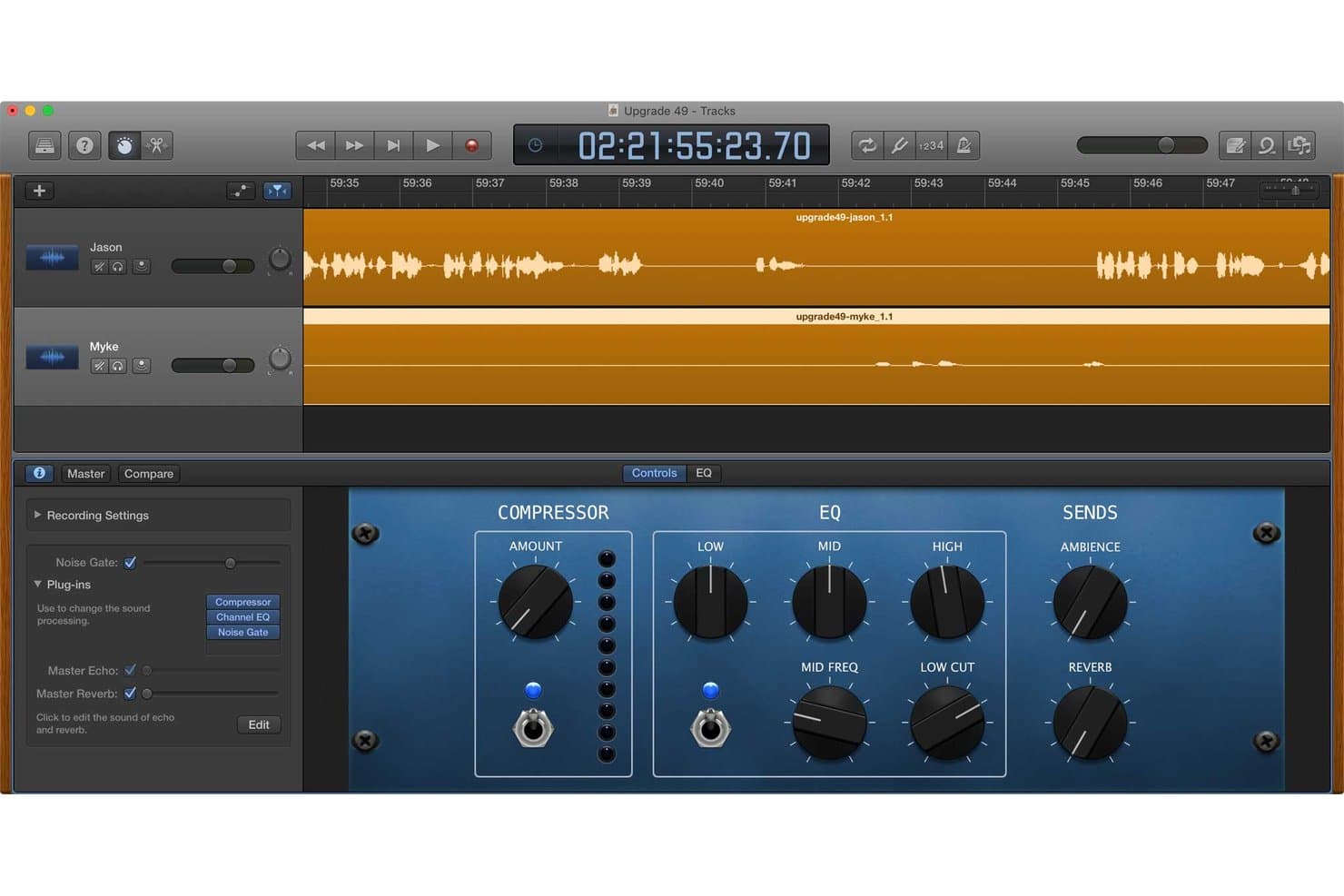
GarageBand offers a multi-track podcast editing interface with compressor, EQ, and reverb controls for polishing audio recordings. GarageBand is a free Mac-native DAW with multitrack recording, audio editing, a built-in loop and effects library, and music production tools that podcasters use to record and mix episodes.
Who Is GarageBand Best For?
GarageBand suits Mac-based solo podcasters and brand producers who want to layer music, intros, and sound effects into episodes without paying for software.
Why I Picked GarageBand
GarageBand earns its spot on my shortlist because no other free podcast editor gives you this depth of music production capability out of the box. I love that the built-in Sound Library includes thousands of genre-spanning loops, plus 28 virtual session drummers across styles like Hip Hop, Blues, and EDM, so you can score original intros, outros, and music beds without sourcing outside assets. Layering those elements across up to 255 tracks makes producing a music-rich show on zero budget genuinely achievable.
GarageBand Key Features
- Multi-take recording: Record several versions of an audio segment and select the best take for each section.
- Flex Time editing: Adjust timing of notes and phrases within tracks to fix rhythm or sync issues.
- iCloud project sync: Start editing a podcast on iPad or iPhone and continue on Mac with direct cloud syncing.
- Track automation controls: Use automation lanes to change volume, pan, and effects across time in each track.
GarageBand Integrations
GarageBand has native integrations with iCloud for project syncing across Apple devices, the Logic Remote app for wireless control, and direct export to the Music app.
What's Free?
GarageBand is a completely free-forever download for Mac and iOS users, with no paid tiers, no feature restrictions, and no trial period. The only limitation is platform: it's exclusive to Apple devices (Mac, iPhone, and iPad) and isn't available on Windows or Android.
Pros and Cons
Pros:
- Works across Mac, iPhone, and iPad
- Built-in royalty-free loops and sound effects
- Includes virtual drums and session musicians
Cons:
- Only available on Apple devices
- No text-based editing or transcription
Learn more about GarageBand: Best for simplified episode assembly
- 7-day free trial + free demo available
- From $38/month
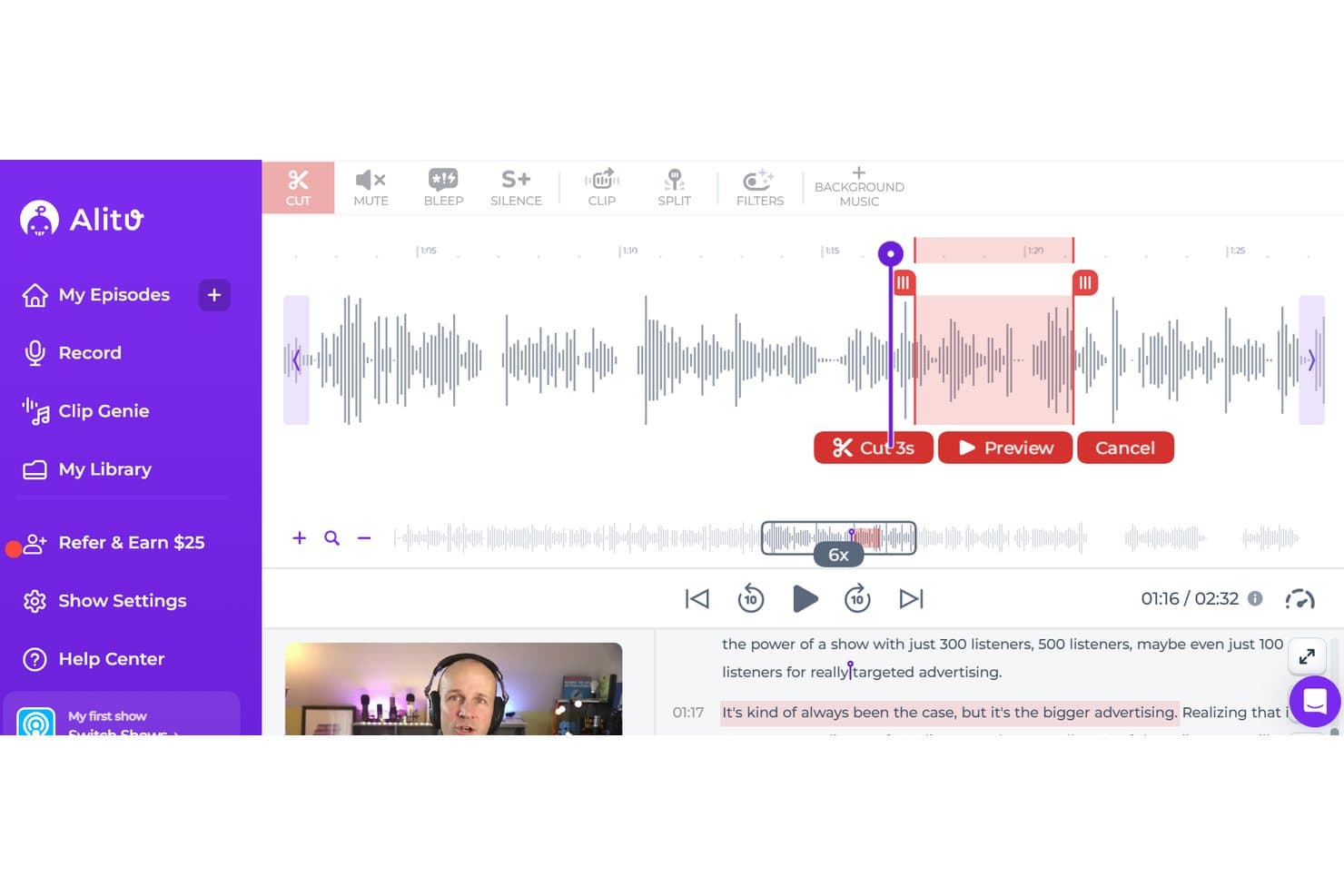
Alitu offers a waveform-based podcast editor with cut, mute, bleep, silence, clip, split, and filter tools, plus a transcript view for precise audio editing. Alitu is a browser-based podcast production tool that combines in-app recording, automated audio cleanup, text-based editing, transcription, a royalty-free music library, and episode hosting in a single dashboard.
Who Is Alitu Best For?
Alitu is a strong fit for solo podcasters and small marketing teams who want to produce clean, structured episodes without any audio engineering experience.
Why I Picked Alitu
Alitu earns its spot on my shortlist because the drag-and-drop episode builder makes assembly fast. You slot your intro, main content, and outro into pre-arranged positions, and the structure comes together without any timeline juggling. I also like that Magic Filters run automatically on every upload, cutting filler words and levelling volume before you touch a single edit.
Alitu Key Features
- AI-powered transcription: Automatically generates transcripts in 17 languages for every podcast episode.
- Royalty-free music library: Provides built-in music tracks and transitions to use in episodes without external licensing.
- In-app multitrack recording: Records solo or guest conversations inside the browser with lossless backups for each track.
- Episode hosting and direct publishing: Lets you host your podcast and publish to platforms like Apple Podcasts and Spotify from one dashboard.
Alitu Integrations
Alitu offers native integrations with Apple Podcasts, Spotify, Buzzsprout, and Captivate for publishing and hosting. An API is not clearly documented.
What's Free?
Alitu offers a 7-day free trial with no credit card required, giving you full access to all features and up to 2 hours of processed audio. There's no free-forever plan, so continued use requires a paid subscription after the trial ends.
Pros and Cons
Pros:
- Built-in royalty-free music and sound effects
- Automatic removal of silences and filler words
- Drag-and-drop assembly for quick episode arrangement
Cons:
- No advanced manual audio mixing tools
- No free-forever plan available
Learn more about Alitu:
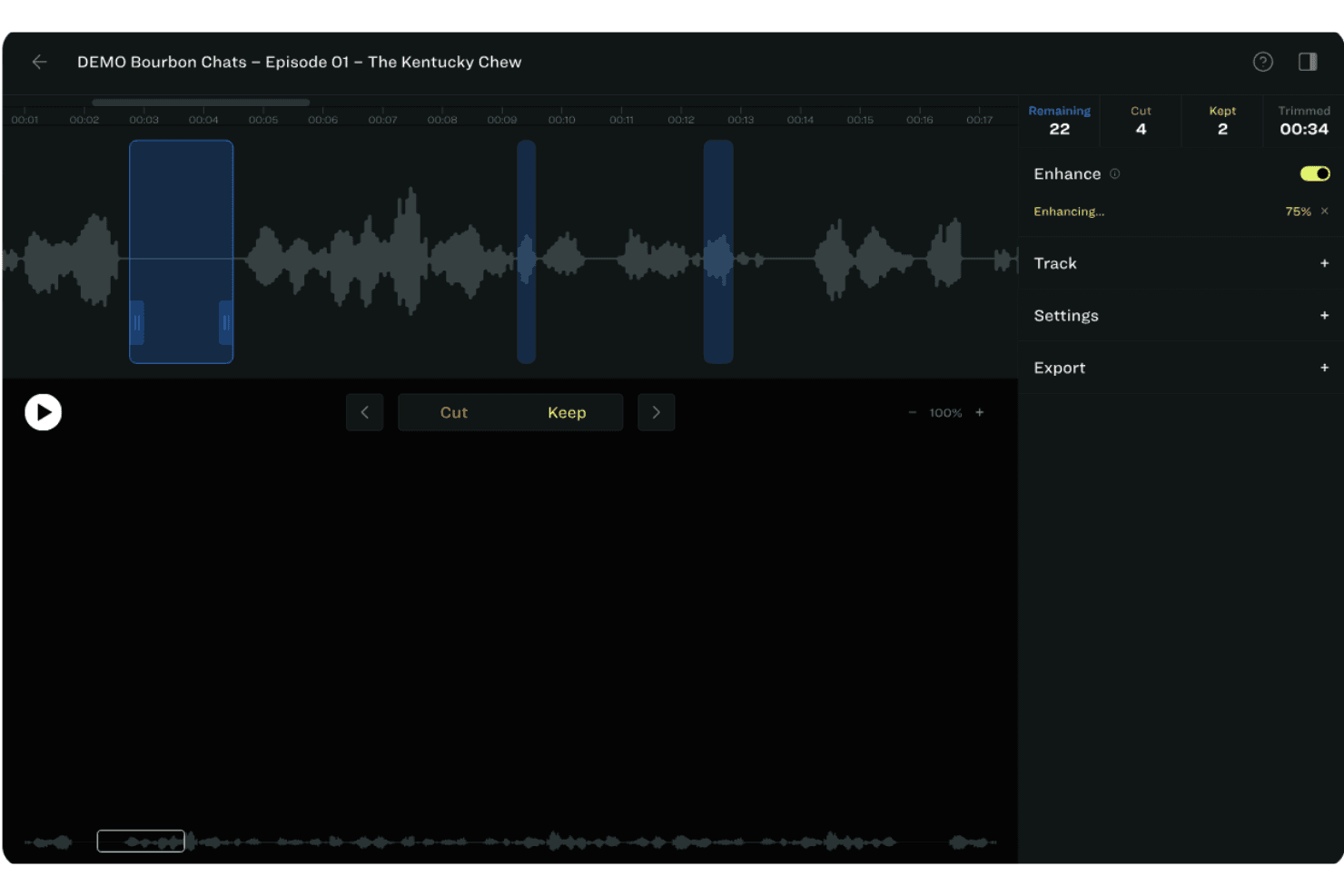
Resound offers an audio editing interface with waveform visualization, cut/keep controls, and an AI Enhance feature for podcast episode trimming. Resound is an AI-powered podcast audio editor that automatically detects filler sounds, trims silences, and applies mix-and-master enhancement to raw single-track and multitrack audio files.
Who Is Resound Best For?
Resound suits solo podcast hosts and small production teams who prioritize clean, polished audio over complex, multitrack production workflows.
Why I Picked Resound
I picked Resound as one of the best because its AI-powered audio polishing is genuinely unlike what most free tools offer. The Enhance module runs a full mix-and-master pass automatically, handling background noise removal, levelling, and loudness normalization in a single step. On top of that, its proprietary ML models scan your recording for filler sounds like umms and ahhs, flagging each one so you can cut or keep them individually.
Resound Key Features
- Multitrack project support: Edit and process up to four individual tracks per podcast episode.
- Automatic silence detection: Finds long silences in recordings for quick review and removal.
- API access for developers: Integrate Resound’s AI editing features into other apps and workflows.
- Export to multiple formats: Download finished episodes in MP3, WAV, or AAF for hosting and further editing.
Resound Integrations
Native integrations are not clearly documented. Resound offers an API for custom integrations and supports exporting to formats compatible with DAWs like Logic Pro, Pro Tools, and GarageBand.
What's Free?
Resound offers a free-forever plan that includes 20 minutes of processed audio per month, with access to filler sound detection, silence detection, trimming, and MP3 export. There's also a 14-day free trial that unlocks all features, including the Enhance module, with 1 hour of AI processing time.
Pros and Cons
Pros:
- AI mix-and-master Enhance module included
- Automatic silence trimming per episode
- Filler word detection with easy review
Cons:
- Four-track project limit on free plan
- Projects are automatically deleted after days
Learn more about Resound:
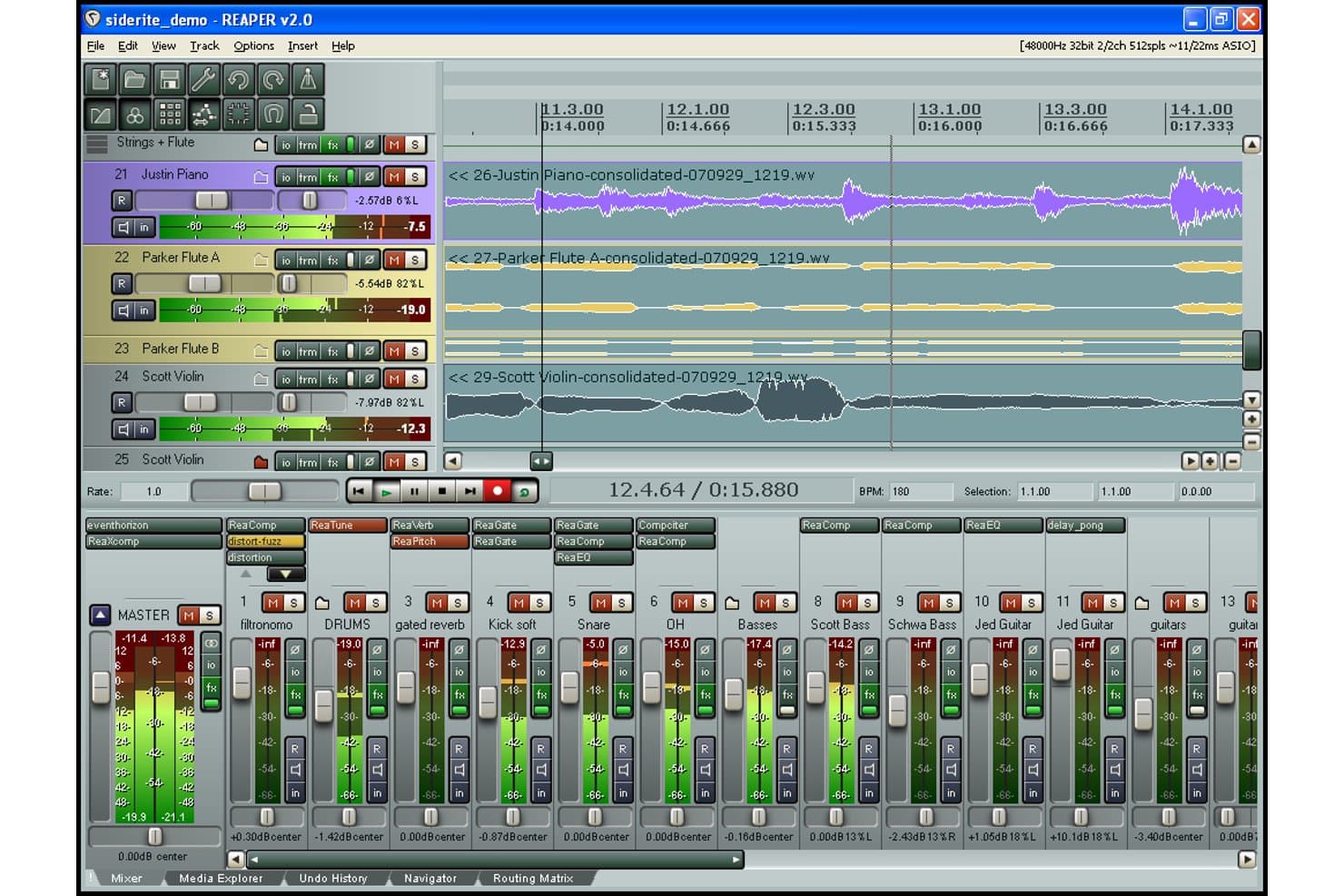
REAPER offers a multi-track editing interface with mixer, effects plugins, and waveform timeline for audio production. REAPER is a full-featured digital audio workstation with multitrack recording, audio editing, MIDI support, and deep customization through scripting, macros, and third-party plugin integration across Windows, macOS, and Linux.
Who Is REAPER Best For?
REAPER suits technically proficient podcasters and independent audio producers who prioritize deep workflow customization over a beginner-friendly interface.
Why I Picked REAPER
REAPER earns its spot on my shortlist because the customization depth is unlike anything else in the podcast editing space. I like that ReaScript lets you write Lua or Python scripts to automate repetitive tasks, like batch normalizing tracks or stripping silences across a full episode. Razor Edits add surgical precision for cutting and rearranging audio without disrupting the rest of the timeline.
REAPER Key Features
- Track lanes and comping: Organize alternate takes, create playlists, and composite multiple recordings on a single track.
- Razor edits: Perform precise selections across tracks for fast copy, move, or stretch of portions of your podcast timeline.
- ReaSurroundPan support: Mix in surround or 3D audio for immersive sound design directly within your project.
- Customizable keyboard and mouse control: Assign custom shortcuts or gestures to speed up editing tasks and navigation.
REAPER Integrations
REAPER offers native integrations with Wwise, Pro Tools, GoldWave, and Waves. It supports thousands of third-party plugins and provides an API for custom integrations.
What's Free?
REAPER offers a 60-day free trial with full access to every feature, no watermarks, and no export restrictions. After the trial period, you'll need to purchase a license to continue using it.
Pros and Cons
Pros:
- Runs natively on Windows, macOS, and Linux
- Installs portably from a USB drive
- Supports custom automation scripting with Lua
Cons:
- Transcription and text-based editing not included
- No built-in podcast export presets
Learn more about REAPER: Best for remote multitrack recording
- 14-day free trial + free plan + free demo available
- From $24/month (billed annually)
Visit WebsiteCustomer Rating:4.8/5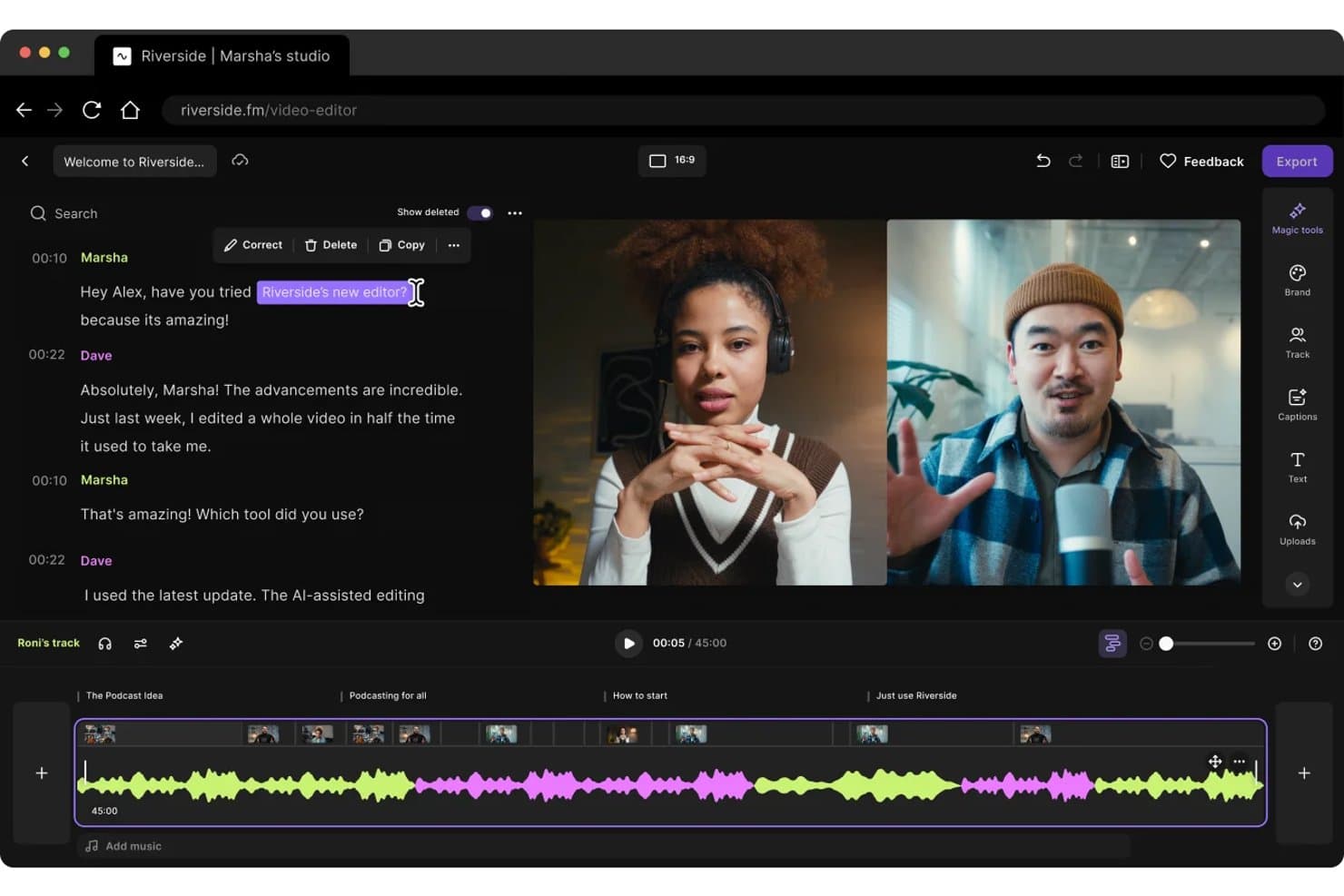
Riverside offers a text-based podcast editor with transcript editing, multi-track timelines, and side-by-side video layouts for streamlined post-production. Riverside is a browser-based recording and editing platform that combines local multitrack audio and video capture, AI-powered transcript editing, filler-word and noise removal, and short-form clip creation in one tool.
Who Is Riverside Best For?
Riverside is a strong fit for content marketing teams and brand podcast producers who record with remote guests and need to edit, repurpose, and publish episodes from a single platform.
Why I Picked Riverside
Riverside earns its spot on my shortlist because it solves the biggest headache in remote podcast production: getting clean, separate audio from every participant regardless of internet quality. It records locally on each participant's device, so I always get uncompressed, isolated tracks even if the call drops mid-episode. I also love the text-based editor, which lets me cut an "um" or trim a rambling tangent just by highlighting and deleting it in the transcript, with the audio edit happening instantly underneath.
Riverside Key Features
- AI-powered Magic Clips: Instantly creates short video or audio clips optimized for social platforms from full podcast episodes.
- Automatic transcription and multi-language dubbing: Provides transcripts and enables AI-generated dubbing in over 30 languages directly from your recording.
- Podcast hosting and episode analytics: Offers integrated podcast hosting with analytics to track listeners, downloads, and engagement.
- Custom video export ratios and branding: Supports exporting in multiple aspect ratios and adding overlays or lower-thirds for branded content.
Riverside Integrations
Riverside offers native integrations with Adobe Premiere Pro, Final Cut Pro, Descript, HubSpot, Salesforce, Marketo, and Transistor, and provides an API for custom integrations.
What's Free?
Riverside has a free-forever plan that includes up to 2 hours of multitrack recording, the full editing suite, and Magic Clips, though exports are capped at 720p and include a watermark. Paid plans (Pro, Grow, and Business) come with a 14-day free trial that unlocks 4K recording, watermark-free exports, unlimited transcription, and the AI editing agent.
Pros and Cons
Pros:
- Export projects directly to podcast hosting platforms
- Captures separate local uncompressed audio tracks
- Local tracks recorded regardless of internet quality
Cons:
- Upload or import of external audio restricted
- Free exports have a watermark and 720p limit
Learn more about Riverside: Best for text-based audio editing
- Free plan available
- From $16/user/month (billed annually)
Visit WebsiteCustomer Rating:4.6/5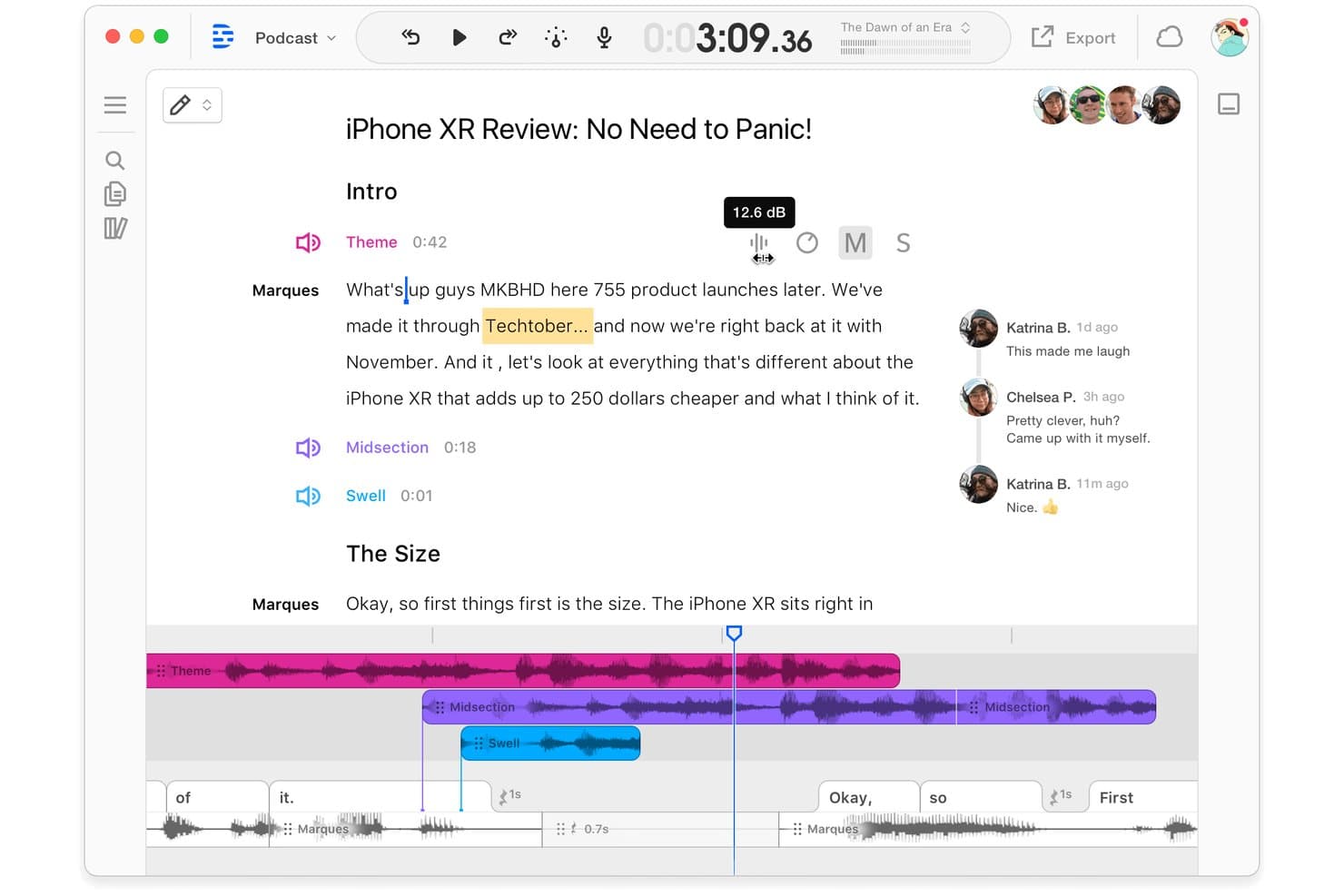
Descript offers collaborative commenting alongside a script-based podcast editor with multi-track audio waveforms and speaker labels. Descript is a text-based audio and video editor that combines automatic transcription, multitrack editing, AI noise removal, filler word detection, and social clip creation in a single platform.
Who Is Descript Best For?
Descript works well for solo content creators and small marketing teams who produce podcasts or talking-head video without a dedicated audio engineer on staff.
Why I Picked Descript
Descript earns its spot on my shortlist because of how its text-based editing changes the way I work through a podcast episode. Instead of scrubbing a waveform to hunt down an "um," I delete the word from the transcript and the audio cut happens automatically. I also rely on Remove Filler Words to batch-clean an entire recording in one pass, and Studio Sound to rescue audio that was captured in a noisy home office or makeshift recording setup.
Descript Key Features
- Multitrack timeline editor: Edit multiple hosts, guests, music, and effects on separate tracks within a single timeline.
- Royalty-free media library: Access a built-in library of intros, outros, and sound effects for branded episodes.
- Clip creation for social channels: Generate short video or audiogram clips from podcast episodes for social sharing.
- Remote guest recording: Record high-quality audio from remote guests directly into a project via Descript Rooms.
Descript Integrations
Descript offers native integrations with Zoom, SquadCast, Captivate, Wistia, Google Drive, Podbean, Buzzsprout, Headliner, YouTube, and Slack. An API is available for custom integrations.
What's Free?
Descript's free-forever plan includes 1 media hour per month, 100 one-time AI credits, 720p watermark-free export, and 5 GB of cloud storage. The free tier gives you access to core text-based editing, but filler word removal, Studio Sound, and other AI tools require a paid plan once your AI credits run out.
Pros and Cons
Pros:
- Social clip creation for podcast promotion
- AI-powered transcription included on free plan
- Transcribe audio files automatically
Cons:
- Advanced AI tools require paid upgrade
- Free plan limits audio hours monthly
Learn more about Descript: Best for free multitrack waveform editing
- Free plan available
- Free plan available
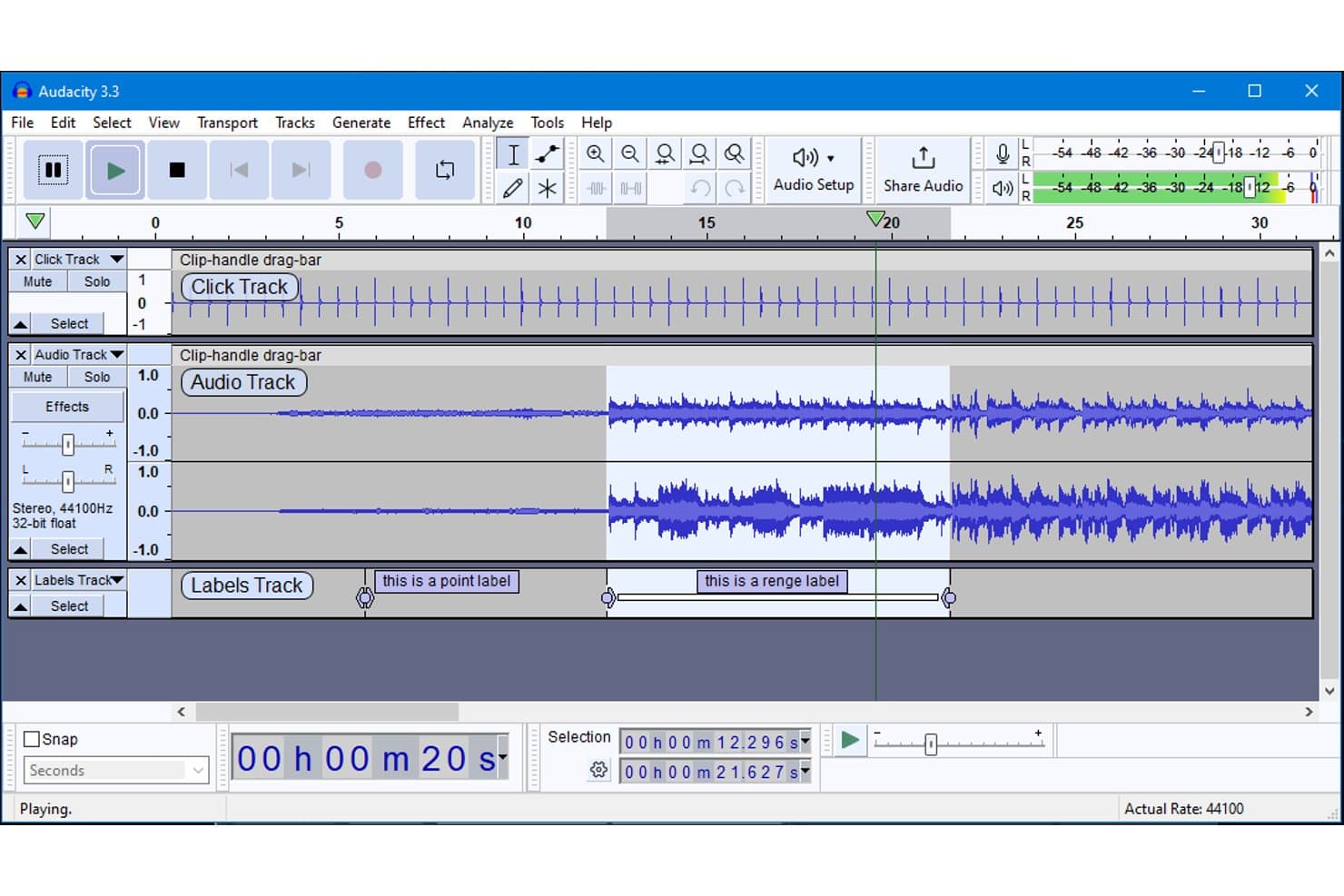
Audacity offers a multi-track editing interface with waveform visualization, labels track, and playback controls for podcast editing. Audacity is a free, open-source, cross-platform audio editor that supports multitrack recording, waveform editing, noise reduction, AI transcription, and a wide range of effects and plugin formats.
Who Is Audacity Best For?
Audacity is a strong fit for solo podcasters and independent creators who need a capable, zero-cost editing tool and don't mind a hands-on, manual workflow.
Why I Picked Audacity
Audacity earns its spot as one of the best on my shortlist because no other free tool matches its multitrack waveform editing depth. I use it to layer host audio, guest tracks, intro music, and sound effects across unlimited tracks, with per-track volume envelopes and effects applied independently. The Noise Reduction tool combined with Normalize and Compression handles the core cleanup work I rely on for every episode.
Audacity Key Features
- AI-powered transcription: Generate audio transcripts locally using Whisper AI without upload limits or subscriptions.
- Plugin support: Extend editing capabilities with VST3, LADSPA, LV2, and Nyquist plugins.
- FFmpeg integration: Import and export a wide variety of audio file formats beyond MP3 and WAV.
- Cloud saving with Audio.com: Save and share projects securely through the integrated cloud companion platform.
Audacity Integrations
Audacity supports native integrations with VST3, LADSPA, LV2, and Nyquist audio plugins, enables extended file format support through FFmpeg, and offers cloud saving and sharing via Audio.com. An API for custom integrations is not documented.
What's Free?
Audacity is entirely free and open-source under the GPLv3 license, with no feature gating, no watermarks, no export limits, and no time restrictions. Every feature, including AI transcription, multitrack editing, noise reduction, and plugin support, is available at no cost.
Pros and Cons
Pros:
- Offline AI transcription with Whisper
- Unlimited track editing and mixing
- No export limits or watermarks
Cons:
- Lacks direct publishing to podcast hosts
- No automatic filler word removal
Learn more about Audacity: Best for asynchronous team collaboration
- Free plan + free trial
- From $11.99/month (billed annually)
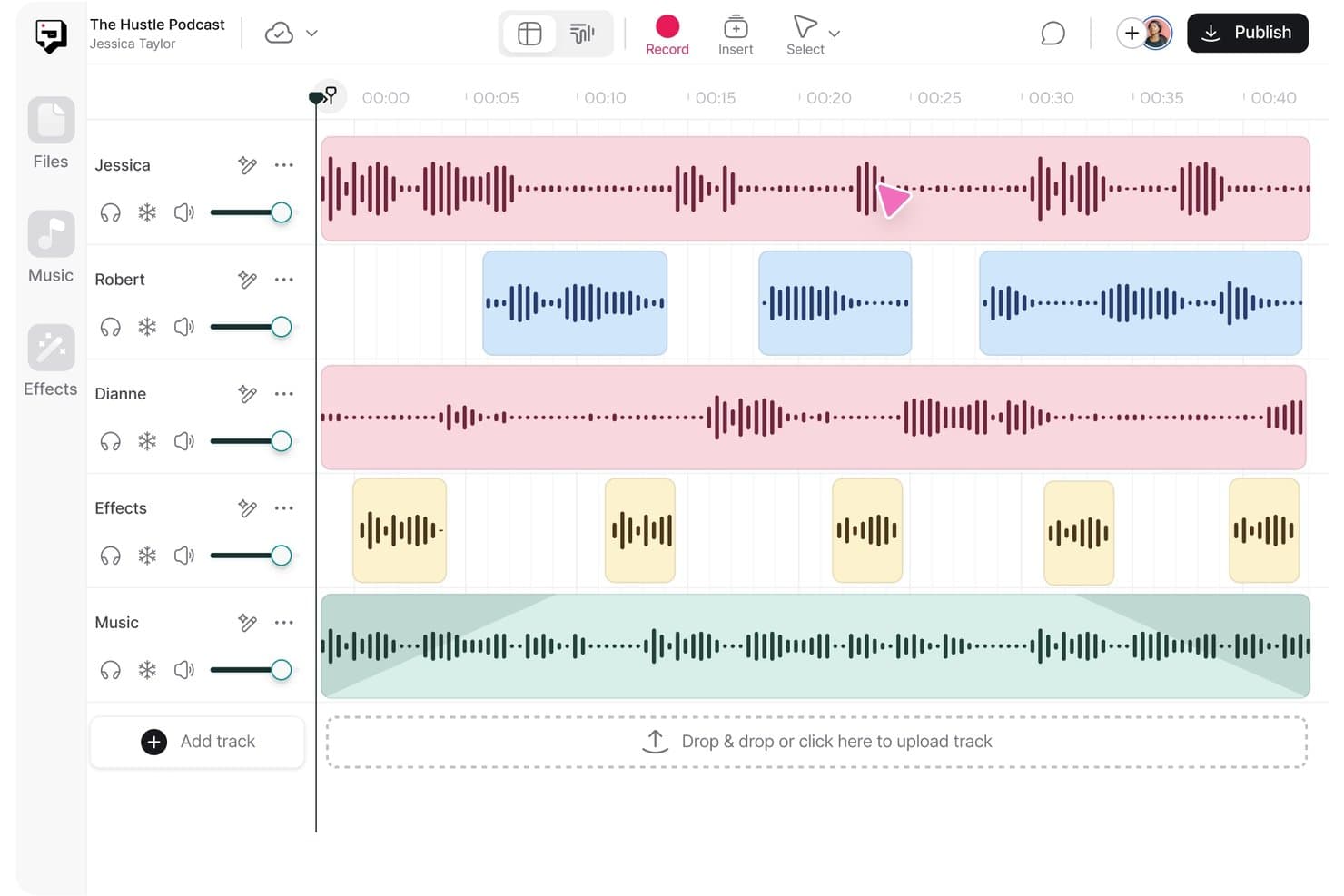
Async offers a multi-track podcast editing interface with labeled speaker tracks, effects, music layers, and a timeline for precise audio arrangement. Async is a browser-based AI podcast and video editor with multi-track editing, text-based editing via auto-transcription, Magic Dust AI noise removal, and AI-powered social clip generation.
Who Is Async Best For?
Async is a good fit for solo content creators and small marketing teams who need an all-in-one recording, editing, and publishing workflow without dedicated audio software.
Why I Picked Async
I picked Async as one of the best because its text-based editing workflow genuinely supports team review without scheduling a live session. A teammate records their segment, uploads it to a shared workspace, and I edit by deleting words in the auto-generated transcript. Per-participant local recording also means each host's audio is captured independently, so I can mix and clean individual tracks after a remote recording.
Async Key Features
- Royalty-free music and SFX library: Access over 7,000 tracks and sound effects directly within your editing workspace.
- Cloud-based editing environment: Edit, store, and collaborate on projects entirely in the browser without installing software.
- Automatic episode transcript generation: Generate searchable, downloadable transcripts for every podcast episode in just a few clicks.
- Direct publishing to podcast platforms: Publish finished episodes with a single click to all major podcast networks via RSS feed integration.
Async Integrations
Async offers native integrations for direct podcast publishing to platforms like Apple Podcasts and Spotify via RSS feed, and provides an API for custom integrations.
What's Free?
Async's free plan is free forever and includes multi-track audio editing, Magic Dust AI noise removal, silence removal, and MP3 export at up to 160kbps. Key restrictions include 2GB storage, 1 hour of transcription, 10 lifetime AI credits, and a watermark on any video exports.
Pros and Cons
Pros:
- Exports MP3s in multiple quality options
- Cloud-based with no software installation required
- Text-based editing from AI-generated transcripts
Cons:
- Watermarks all video exports on free tier
- Only 1 hour of transcription on free plan
Learn more about Async: Best for AI-powered audio cleanup
- Free plan available
- Pricing upon request
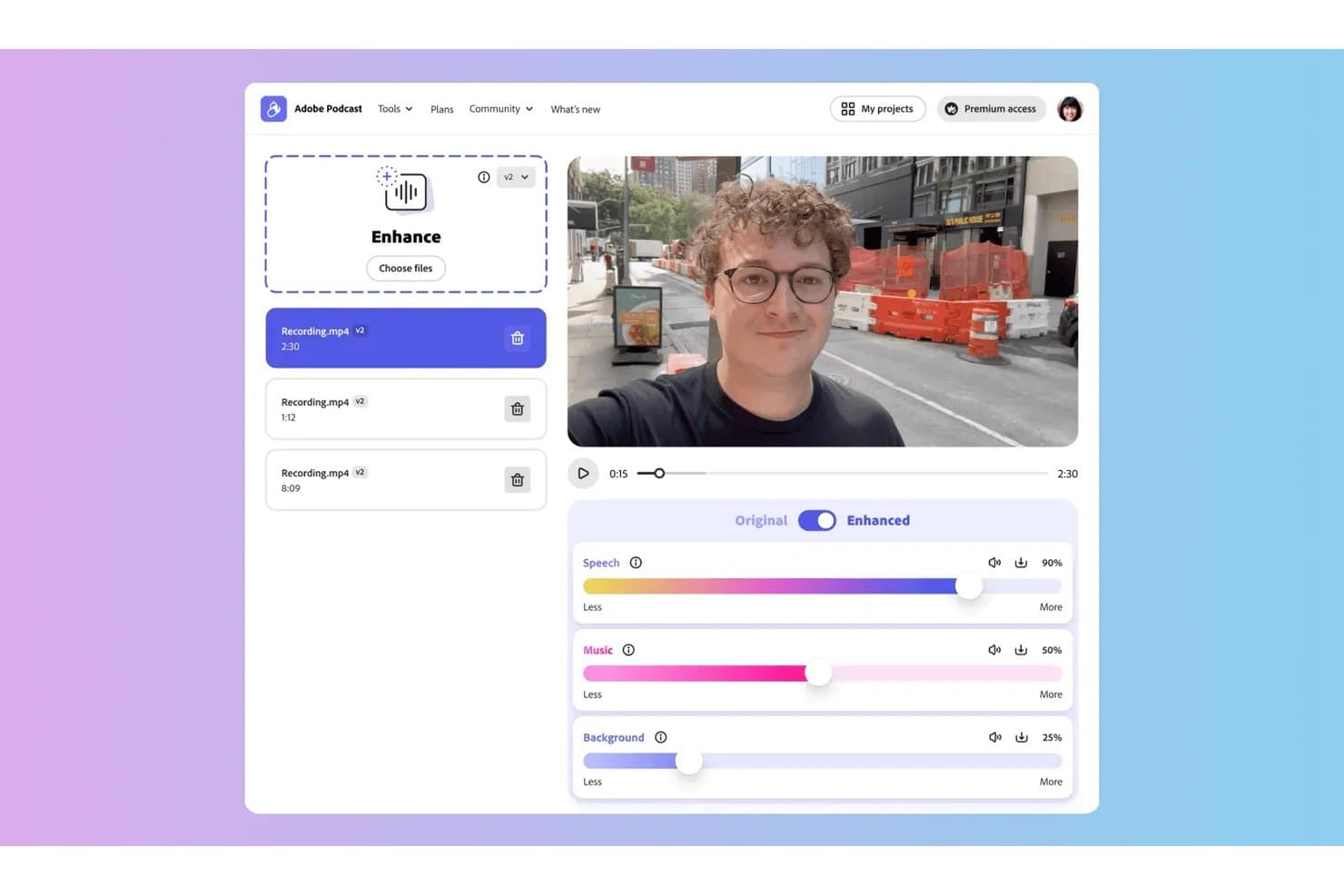
Adobe Podcast offers an audio enhancement tool with adjustable Speech, Music, and Background sliders, allowing users to fine-tune recorded audio directly in the browser. Adobe Podcast is a browser-based AI audio tool from Adobe that combines speech enhancement, remote recording, transcription-based editing, and audiogram creation for podcast producers.
Who Is Adobe Podcast Best For?
Adobe Podcast suits solo content creators and marketing consultants who need quick, high-quality audio cleanup without investing in a full desktop editing suite.
Why I Picked Adobe Podcast
Adobe Podcast earns its spot on my shortlist because the Enhance Speech model is the strongest AI audio cleanup I've tested at the free tier level. Unlike most tools that watermark or limit free output, Adobe Podcast processes real files and removes background noise, room echo, and low-fidelity artifacts. I also use Mic Check before recording sessions: it analyzes gain, echo, and mic distance and gives corrective feedback before a single word is recorded.
Adobe Podcast Key Features
- Studio recording in browser: Record remote guest interviews at high quality without needing desktop software.
- Transcription-based editing: Edit recorded audio directly by modifying the generated transcript.
- Royalty-free music collections: Access curated music for intros, outros, and transitions within your project.
- Audiogram creation tools: Generate shareable audio clips with visual waveforms for social media platforms.
Adobe Podcast Integrations
Adobe Podcast integrates directly with Adobe Audition and Adobe Premiere Pro as an audio plugin filter. An API is available for custom enterprise workflows.
What's Free?
Adobe Podcast has a free-forever plan that includes Enhance Speech (up to 30-minute files, 1 hour per day), Studio recording (30-minute projects, 2 downloads per day), transcription-based editing, and Mic Check. A 30-day free trial of the Premium plan is also available.
Pros and Cons
Pros:
- Mic Check for audio quality feedback
- In-browser transcription editing for podcasts
- AI-driven noise and echo removal
Cons:
- No built-in publishing to podcast hosts
- Limited multitrack timeline editing
Learn more about Adobe Podcast:
Diğer Ücretsiz Podcast Düzenleme Yazılımları
Kısa listeme giremeyen ancak yine de göz atmaya değer bazı ek ücretsiz podcast düzenleme yazılımı seçenekleri şunlardır:
- 11CleanvoiceBest for automatic filler word removal
- 12OcenaudioBest for real-time audio effects preview
- 13ScreenAppBest for browser-based editing with no setup
- 14CastMagicBest for automated episode show notes
- 15WavveBest for branded social media audio snippets
- 16KapwingBest for auto speaker focus tracking
- 17NCH WavePadBest for spectral audio restoration
- 18HeadlinerBest for generating shareable podcast audiograms
- 19Recast StudioBest for customizing podcast video templates
- 20PodsqueezeBest for converting episodes into content assets
How I Evaluate Free Podcast Editing Software
First, I define what counts as free. For podcast editing software, that means a free-forever plan or a full-featured free trial of at least 7 days. From there, I split my evaluation into core functionality a tool must meet to make the list and the differentiators that separate one tool from another.
Core Functionality (Table Stakes for This List)
In addition to my free offer requirements, I also use a scoring system to select tools for my list. Here's how it works:
I rank each one on a scale from 0 (does not offer the functionality) to 5 (excels in this area) for each core functionality listed below. Then, I calculate the tool's total score as a percentage. Each tool needs to achieve a minimum total score of 65% to be considered for inclusion.
- Multitrack audio editing: I check whether you can layer host, guest, music, and sound effect tracks on a timeline and adjust each one independently.
- Noise and filler removal: Clean audio matters, so I evaluate how each tool handles background hiss, "ums," "uhs," and dead air in real recordings.
- Transcription or text-based editing: Some tools like Descript and Riverside let you cut audio by deleting words in a transcript, which I look for because it speeds up rough cuts dramatically.
- Multi-format export: I look at whether you can export finished episodes in MP3 and WAV at quality bitrates that meet podcast hosting standards.
- Music and effects support: Adding branded intros, outros, and music beds is part of every polished episode, so I evaluate import options and any built-in royalty-free libraries.
- Social clip repurposing: Marketing teams need to turn full episodes into short clips for social promotion, so I check for audiogram creation, video clip export, and caption support.
Once I have a list of tools that meet the criteria, I consider what sets each platform apart.
Differentiating Factors (What Sets Vendors Apart)
Here's how I compare and contrast different vendors:
Standout Features
AI transcription with text-based editing changes how you approach rough cuts. Tools like Descript and Riverside let you delete a sentence from the transcript, and the audio updates to match. That alone speeds up editing on interview-heavy episodes. I also look for built-in royalty-free sound libraries, since having intros and stingers inside the editor means you don't need to source audio separately. Export presets tuned to major podcast hosts handle bitrate and loudness standards for you.
Beyond Features
I pay close attention to what "free" actually gets you. Some tools are fully open-source, while others cap transcription minutes or storage on free plans, which can stall you mid-episode. Learning curve matters too, especially for marketers who aren't audio engineers. I look for clear documentation, community forums, and a simplified interface rather than a full DAW layout. Collaboration is another factor I evaluate. If your co-host or editor needs access to the same project, cloud-based sessions and shareable project links make handoffs much smoother.
Ücretsiz Podcast Düzenleme Yazılımı Nasıl Seçilir?
Uzun özellik listeleri ve karmaşık fiyatlandırma yapılarına takılıp kalmak kolaydır. Kendinize özgü yazılım seçim süreciniz üzerinde çalışırken odağınızı korumanıza yardımcı olmak için aklınızda bulundurmanız gereken faktörlerin bir kontrol listesi aşağıda yer alıyor:
| Faktör | Dikkate Alınması Gerekenler |
|---|---|
| FaktörKullanım kolaylığı | Dikkate Alınması GerekenlerEkibiniz kısa sürede çalışmaya başlayabilecek mi, yoksa öğrenme eğrisi dik mi? Açık öğreticilere ve rahatlık seviyenize uygun bir kullanıcı arayüzüne sahip bir araç seçin. |
| FaktörUygulama ve işe alıştırma | Dikkate Alınması GerekenlerKurulum yapıp ilk bölümünüzü üretmeniz ne kadar sürecek? Başlangıç kılavuzları, şablonlar ve hızlı kurulum seçenekleri arayın. |
| FaktörMaliyet | Dikkate Alınması GerekenlerÜcretsiz plan veya deneme, projenizin süresi boyunca size tam erişim sağlıyor mu? Gizli sınırlamaları veya ödeme duvarlarının arkasında kilitli özellikleri kontrol edin. |
| FaktörÖlçeklenebilirlik | Dikkate Alınması GerekenlerZaman içinde daha fazla bölüm, parça veya katkı sağlayan kişiyle çalışırken platform ekibinizin ihtiyaçlarına uyum sağlayarak büyüyecek mi? |
| FaktörEntegrasyonlar | Dikkate Alınması GerekenlerAraç mevcut podcast barındırma hizmetinize, bulut depolamanıza veya pazarlama yazılımınıza kolayca bağlanıyor mu? Doğrudan yayımlama veya dışa aktarma seçeneklerini değerlendirin. |
| FaktörGüvenlik önlemleri | Dikkate Alınması Gerekenlerİçeriğiniz güvenli bir şekilde depolanıyor mu? Özellikle konuklar veya sponsorlar söz konusu olduğunda dosya erişimi, saklama ve paylaşım konularındaki açık politikaları arayın. |
| FaktörÖzelleştirilebilirlik | Dikkate Alınması Gerekenlerİş akışlarını, şablonları veya dışa aktarma ayarlarını markanızın ihtiyaçlarına uyacak şekilde düzenleyebilir misiniz? Gerçekte ne kadar esnekliğe ihtiyaç duyduğunuzu düşünün. |
| FaktörDestek erişilebilirliği | Dikkate Alınması GerekenlerTeknik bir sorunla karşılaşırsanız sağlayıcıdan veya kullanıcı topluluğundan zamanında yardım alabilir misiniz? Destek kanallarını ve yanıt verme hızlarını değerlendirin. |
Ücretsiz Podcast Düzenleme Yazılımı Nedir?
Ücretsiz podcast düzenleme yazılımı, ücretsiz planlar veya tüm özellikleri sunan denemeler sayesinde podcast bölümlerini ön ödeme yapmadan kaydetmenize, düzenlemenize ve dışa aktarmanıza olanak tanıyan bir araçtır. Bu platformlar çok kanallı düzenleme, gürültü azaltma ve müzik ya da efekt ekleme gibi temel podcast iş akışlarını destekler. Finansal bir taahhütte bulunmadan profesyonel ses üretimi özelliklerine ihtiyaç duyan pazarlamacılar ve içerik üreticileri için tasarlanmıştır.
Ücretsiz Podcast Düzenleme Yazılımı Özellikleri
Podcast düzenleme yazılımlarında yaygın olarak bulunan özellikleri ve bunların ücretsiz ve ücretli planlarda genellikle hangilerinin sunulduğunu ele alalım.
Genellikle Ücretsiz Podcast Düzenleme Yazılımı Özellikleri
- Temel çok kanallı düzenleme: Sunucular, konuklar ve müzik için birden fazla ses kanalını düzenleyerek farklı öğeleri tek bir zaman çizelgesinde kesmenize, taşımanıza veya katmanlamanıza olanak tanır.
- Gürültü azaltma: Evde veya uzaktan yapılan kayıtları temizleyen, kullanımı kolay araçlarla arka plan uğultusunu veya düşük seviyeli gürültüyü kaldırın.
- Klipleri kırpma ve bölme: Basit kırpma, bölme ve silme işlevleriyle hataları çıkarın, röportajları sıkılaştırın ve bölümleri yeniden düzenleyin.
- Sesi açma/kapatma kontrolleri: Daha özenli ve profesyonel ses veren bir bölüm için sesin giriş ve çıkış geçişlerini yumuşak hâle getirin.
- Müzik ve efekt içe aktarma: Bölümlerinizde kullanmak üzere kendi giriş müziklerinizi, ses efektlerinizi ve kısa geçiş seslerinizi kısıtlama olmadan yükleyin.
- Sosyal medya klibi oluşturma: Programınızı sosyal kanallarda tanıtmak için genellikle temel dalga biçimi görselleriyle kısa klipler veya sesli grafikler dışa aktarın.
- MP3 veya WAV olarak dışa aktarma: Tamamlanan bölümleri, yayınlama platformlarının kabul ettiği standart ses biçimlerinde kaydedin.
- Sürükle ve bırak arayüzü: Sezgisel, fare tabanlı kontrolleri kullanarak ses dosyalarını veya bölümleri görsel bir zaman çizelgesinde yeniden düzenleyin.
- Temel transkripsiyon: Düzenlemeyi hızlandırmak ve erişilebilirliği desteklemek için sesinizin otomatik dökümlerini alın.
- Geri alma/yineleme geçmişi: Son düzenleme işlemlerinizi hızlıca geri alın veya yineleyin ve yanlışlıkla yapılan hataların riskini azaltın.
Genellikle Ücretli Podcast Düzenleme Yazılımı Özellikleri
- Gelişmiş metin tabanlı düzenleme: Dökümü doğrudan değiştirerek podcast'inizi düzenleyin; bir belgeyi düzenliyormuş gibi kelimeleri silin, taşıyın veya değiştirin.
- Yapay zekâ ile dolgu kelimesi kaldırma: Daha temiz ve sıkı bir ses elde etmek için "ııı", "eee" ve tekrarlanan ifadeleri geniş ölçekte otomatik olarak algılayıp kaldırın.
- Uzaktan çok kanallı kayıt: Uzaktan yapılan röportajlar sırasında bile her konuğu veya sunucuyu ayrı bir yerel kanala kaydederek ses kalitesini koruyun.
- Telif ücreti gerektirmeyen ses kütüphanesi: Markalı bölümlerde kullanıma hazır, lisanslı müzik altyapılarına, geçişlere ve ses efektlerine yönelik yerleşik bir seçkiye erişin.
- Otomatik seviye ayarlama ve son işlem: Manuel ayarlama yapmadan yayına hazır bir ses elde etmek için ses düzeyini, EQ'yu ve gürlük seviyesini otomatik olarak dengeleyin.
- Özel dışa aktarma ön ayarları: Büyük barındırma platformları için LUFS normalleştirmesi, meta veriler ve bölüm işaretleri gibi podcast'e özel ayarlarla dosyaları kaydedin.
- İş birliği araçları: Birden fazla editörün veya ekip üyesinin aynı proje üzerinde çalışmasını ve yorum, düzenleme veya öneri bırakmasını sağlayın.
- Sınırsız transkripsiyon dakikası: Tam uzunluktaki bölümleri veya arşivinizin tamamını sınır ya da ek ücret olmadan yazıya dökün.
- Doğrudan yayınlama entegrasyonu: Tamamlanan bölümleri tek tıklamayla doğrudan düzenleyiciden podcast platformlarında, RSS akışlarında veya bulut depolamada yayınlayın.
- Gelişmiş analizler: İçerik stratejinizi geliştirmek için dinleyici etkileşimi, tamamlanma oranları ve indirme eğilimleri hakkında ayrıntılı verilere erişin.
Ücretsiz Podcast Düzenleme Yazılımının Faydaları
Ücretsiz podcast düzenleme yazılımını kullanıma almak, ekibiniz ve işletmeniz için çeşitli faydalar sağlar. Yararlanabileceğiniz birkaç fayda şunlardır:
- Ön yatırım gerektirmez: Bütçe onayı veya ücretli abonelik gerektirmeden markalı podcast içerikleri üretmeye, düzenlemeye ve yayınlamaya başlayın.
- Daha hızlı üretim iş akışı: Çok kanallı zaman çizelgeleri ve metin tabanlı düzenleme, yoğun pazarlama ekipleri için kaba kurguları ve bölüm montajını hızlandırır.
- Sosyal medya için kolayca yeniden kullanma: Klip oluşturma ve sesli grafikler gibi özellikler, kanallar arası tanıtım için ilgi çekici kısa ses parçaları oluşturmanıza yardımcı olur.
- Erişilebilir ses temizleme: Gürültü azaltma ve dolgu kelimesi kaldırma için yerleşik araçlar, herkesin net ve profesyonel ses veren bölümler üretmesini sağlar.
- Marka tutarlılığı: Müzik içe aktarmak, sponsor girişleri eklemek ve özel efektleri entegre etmek, ses ve görsellerden başlayarak her bölümün markayla uyumlu kalmasına yardımcı olur.
- Verimli iş birliği: Proje paylaşımı ve yorum özelliklerine sahip bulut tabanlı platformlar, ortak sunucular, yapımcılar ve editörler arasındaki sorunsuz iş devirlerini kolaylaştırır.
- Düşük teknik gereksinim: Basit arayüzler, ücretsiz eğitimler ve yeni başlayanlara uygun proje şablonları, mühendis olmayan kişilerin işe başlamasını ve yüksek kaliteli ses yayınlamasını kolaylaştırır.
Podcast Düzenleme Yazılımlarının Maliyetleri ve Fiyatlandırması
Bu makaleye ücretsiz olarak kullanılabilen en iyi podcast düzenleme yazılımı seçeneklerini aradığınız için geldiğinizin farkındayım. Ancak ücretsiz planlar yalnızca sınırlı özellikler sunduğundan, gelecekte planınızı yükseltmeniz gerekme ihtimali oldukça yüksektir.
Aşağıdaki tablo, podcast düzenleme yazılımlarındaki yaygın planları, ortalama fiyatlarını ve genellikle sunulan özellikleri özetlemektedir:
Podcast Düzenleme Yazılımları İçin Plan Karşılaştırma Tablosu
| Plan Türü | Ortalama Fiyat | Yaygın Özellikler |
|---|---|---|
| Plan TürüÜcretsiz Plan | Ortalama Fiyat$0 | Yaygın ÖzelliklerTemel çok kanallı düzenleme, gürültü azaltma, sınırlı dışa aktarma biçimleri, küçük projeler için filigransız dışa aktarma ve topluluk desteği. |
| Plan TürüBireysel Plan | Ortalama Fiyat$10-$25/kullanıcı/ay | Yaygın ÖzelliklerGenişletilmiş ses biçimleri, daha uzun transkripsiyon sınırları, yapay zekâ ile düzenleme araçları, başlangıç düzeyinde telifsiz müzik ve temel metin tabanlı düzenleme. |
| Plan Türüİşletme Planı | Ortalama Fiyat$25-$50/kullanıcı/ay | Yaygın ÖzelliklerGelişmiş iş birliği, sınırsız bulut depolama, premium ses kitaplıkları, tam kapsamlı uzaktan kayıt ve doğrudan yayınlama entegrasyonları. |
| Plan TürüKurumsal Plan | Ortalama Fiyat$50-$100/kullanıcı/ay | Yaygın ÖzelliklerÖzel başlangıç süreci, öncelikli destek, özel güvenlik ve uyumluluk, ihtiyaca göre uyarlanmış analizler ve özel roller ile izinler. |
Ücretsiz Podcast Düzenleme Yazılımı Hakkında Sıkça Sorulan Sorular
Ücretsiz podcast düzenleme yazılımları hakkında sık sorulan bazı soruların yanıtları burada yer almaktadır:
Yalnızca ücretsiz düzenleme yazılımı kullanarak profesyonel bir podcast yayınlayabilir misiniz?
Evet, ücretsiz bir podcast düzenleyici, ses düzenleyici veya ses düzenleme yazılımı kullanarak yüksek kaliteli ses içeren profesyonel bir podcast yayınlayabilirsiniz. Birçok ücretsiz düzenleme aracı çok kanallı düzenleme, ses dosyalarını temizlemek için arka plan gürültüsü azaltma ve MP3 veya WAV gibi dışa aktarma biçimleri sunar. Bu özellikler, yeni başlayanların ses kalitesini iyileştirmesine ve ek maliyet olmadan özenli bir podcast bölümü için profesyonel bir ses elde etmesine yardımcı olur.
Ücretsiz podcast düzenleme yazılımlarında ne gibi sınırlamalarla karşılaşmayı beklemeliyim?
Ücretsiz planlar genellikle transkripsiyon dakikalarını, dışa aktarma biçimlerini veya proje kanallarını sınırlar. Bazıları video düzenleme sırasında filigran eklerken, bazıları gelişmiş iş akışı özelliklerini, telifsiz müzikleri, ses efektlerini, geçişleri veya üçüncü taraf eklentilerini kısıtlar. Ayrıca yapay zekâ araçlarına veya otomatik dolgu sözcüğü kaldırma özelliğine erişiminiz sınırlı olabilir.
Açık kaynaklı podcast düzenleme araçları var mı?
Evet, herhangi bir maliyet veya kullanım sınırı olmadan kullanılabilen çeşitli açık kaynaklı ses düzenleme yazılımları ve dijital ses iş istasyonu (DAW) seçenekleri mevcuttur. Geliştirici toplulukları tarafından sürdürülen bu kullanıcı dostu platformlar Windows, macOS veya Linux’a yüklenebilir; ses düzenlemenize, gerçek zamanlı efektler uygulamanıza ve özellik kısıtlamaları olmadan müzik prodüksiyonunu yönetmenize olanak tanır.
Ücretsiz planlarda ekip arkadaşlarımla iş birliği yapabilir miyim?
Bazı ücretsiz araçlar, proje dosyalarını paylaşma veya iş akışınız için yorum bırakma gibi temel iş birliği özelliklerini destekler. Ancak hepsi bir arada bulut iş birliği, gerçek zamanlı eş zamanlı düzenleme veya gelişmiş podcast barındırma entegrasyonları genellikle ücretli bir plan gerektirir. Yararlı eğitimler ve topluluk kılavuzları, daha küçük ekiplerin dosyaları manuel olarak yönetmesine yardımcı olabilir.
Ücretsiz podcast düzenleme araçları video podcast yayıncılığını destekliyor mu?
Bazı ücretsiz araçlar video kliplerini kırpmak, ek görüntüler eklemek veya video podcast’leri dışa aktarmak için temel bir video düzenleyici içerir; ancak ücretsiz planlar genellikle video dışa aktarmalarına filigran ekler veya video düzenleme özelliklerini sınırlar. Metinden sese dönüştürme ya da doğrudan sosyal medya dışa aktarmaları gibi özelliklere ihtiyacınız varsa, karar vermeden önce yazılımın belgelerini kontrol edin.