

Dijital tabela CMS'i, dijital ekranlarınızdaki içerikleri tek bir panodan kontrol etmenizi ve güncellemenizi sağlayan bir içerik yönetim sistemi platformudur. Dijital ekranları yönetiyor ve dikkat çekici içerikleri yayınlamak için güvenilir, kolay bir yol arıyorsanız ihtiyaçlarınıza uygun en iyi dijital tabela CMS'ini arıyor olabilirsiniz. İster tek bir konumda ister yüzlerce konumda ekranlar kullanıma sunuyor olun, doğru CMS'i seçmek bitmek bilmeyen sorunlardan kurtulmanızı sağlayabilir.
Bu kılavuzda, önde gelen araçları yan yana görebilir; böylece ekibinize, iş akışınıza ve ekran hedeflerinize en uygun platformun hangisi olduğuna güvenle karar verebilirsiniz.
Why Trust Our Software Recommendations
6,700+
Reviews
20
Industry experts
16+
Evaluation factors
14
Years
Our team has been testing and reviewing software since 2012. As marketing leaders ourselves, we know how difficult—and important—it is to choose the right software.
For this guide, we evaluated tools using hands-on testing and independent research, scoring tools using our selection criteria.
Our reviews reflect our human editorial judgment, not a sales pitch.
Expert reviewers:
 Gui DrusinaCreative Director
- Shriya GhateSenior Marketing Lead
 Amanda JacquesMarketing Ops Leader

Dijital Tabela CMS Karşılaştırma Tablosu
Bu karşılaştırma tablosu, en iyi dijital tabela CMS seçimlerimin fiyatlandırma ayrıntılarını özetlemektedir.
Sorted by: Default
| Tool | Starting Price | Website | |
|---|---|---|---|
Best for cross-platform setup and scheduling | 5.0 out of 5 | $5/screen/month 14-day free trial + free demo available | Website |
Best for intuitive drag-and-drop editing | 4.9 out of 5 | $14/screen/month Free demo + 30-day free trial available | Website |
Best for education-focused display solutions | 4.8 out of 5 | $11/screen/month Free demo + 14-day free trial available | Website |
Best for robust app integrations and automation | 4.8 out of 5 | $20/screen/month 14-day free trial | Website |
Best for data-driven screen content management | 4.9 out of 5 | $8/device/month Free trial + free demo available | Website |
Best for AI-driven content personalization | 4.7 out of 5 | Pricing upon request Free demo available | Website |
Best for advanced rule-based content triggers | 4.3 out of 5 | $14/player/month Free demo + 30-day free trial available | Website |
Best for workplace and employee communications | Not rated | Pricing upon request Free demo available | Website |
Best for enterprise-grade dynamic campaigns | Not rated | Pricing upon request Not available | Website |
Best for in-store experience enhancement | Not rated | Pricing upon request Not available | Website |


En İyi Dijital Tabela CMS İncelemeleri
Aşağıda, kısa listeme giren en iyi dijital tabela CMS’lerinin ayrıntılı özetlerini bulabilirsiniz. İncelemelerim, size en uygun seçeneği bulmanıza yardımcı olmak için her platformun özelliklerine, entegrasyonlarına ve en iyi kullanım alanlarına ayrıntılı bir bakış sunmaktadır.
 Best for cross-platform setup and scheduling
- 14-day free trial + free demo available
- From $5/screen/month
Visit WebsiteCustomer Rating:5/5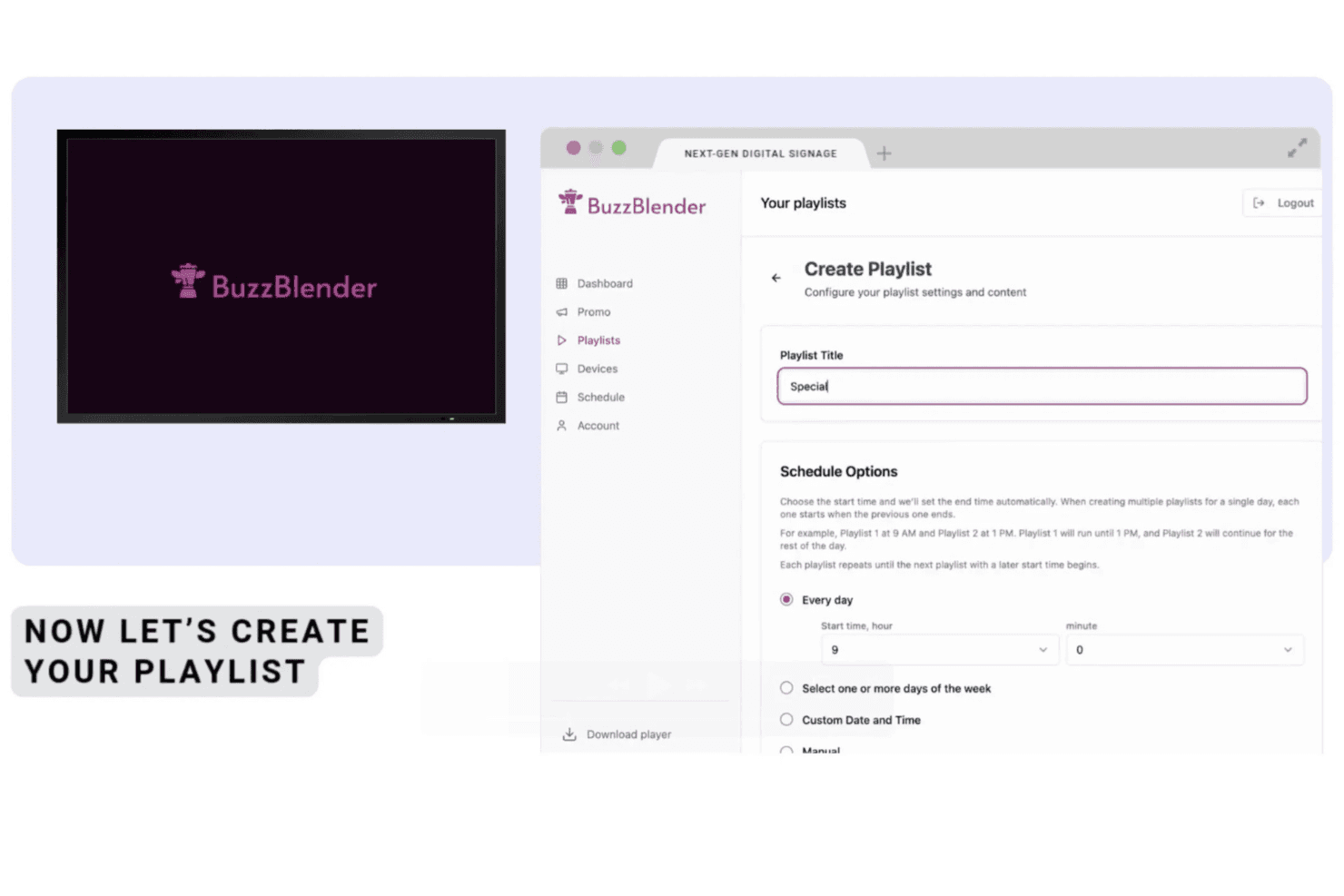
BuzzBlender allows users to create and schedule playlists with customizable titles and time-based scheduling options for digital signage displays. Buzzblender is a cloud-based digital signage CMS that lets you upload, schedule, and remotely manage content across LG webOS, Samsung Tizen, Android, Windows, and Linux screens from a single dashboard.
Who Is Buzzblender Best For?
Buzzblender suits small to mid-size businesses in retail, hospitality, and wellness that need to manage screens across multiple locations without a large IT team.
Why I Picked Buzzblender
Buzzblender earns its spot as one of the best on my shortlist because its native app support across LG webOS, Samsung Tizen, and Android TV means I can get screens live without browser workarounds or sideloading. I particularly like the calendar-based playlist scheduler, which lets me set dayparted content across multiple locations in a single session. Its certified LG webOS partner status also matters: it's not just compatible, it's purpose-built for the platform in a way most CMS tools simply aren't.
Buzzblender Key Features
- Dynamic QR code overlay: Add QR codes to any screen and track scan analytics for in-store campaigns.
- Multi-user team roles: Assign admin, editor, or viewer permissions to team members for controlled access.
- Video wall support: Display synchronized content across multiple screens, including Android and LG/Samsung commercial units.
- Free template library: Access ready-made layouts for menus and office content to speed up design work.
Buzzblender Integrations
Native integrations include Canva. An API is available for custom integrations.
Pros and Cons
Pros:
- Calendar scheduler handles dayparting across locations
- Quick screen setup without browser workarounds
- Supports LG, Samsung, and Android natively
Cons:
- Smaller app content library
- Limited reporting compared to enterprise CMS tools
Learn more about Buzzblender: Best for intuitive drag-and-drop editing
- Free demo + 30-day free trial available
- From $14/screen/month (billed annually)
Visit WebsiteCustomer Rating:4.9/5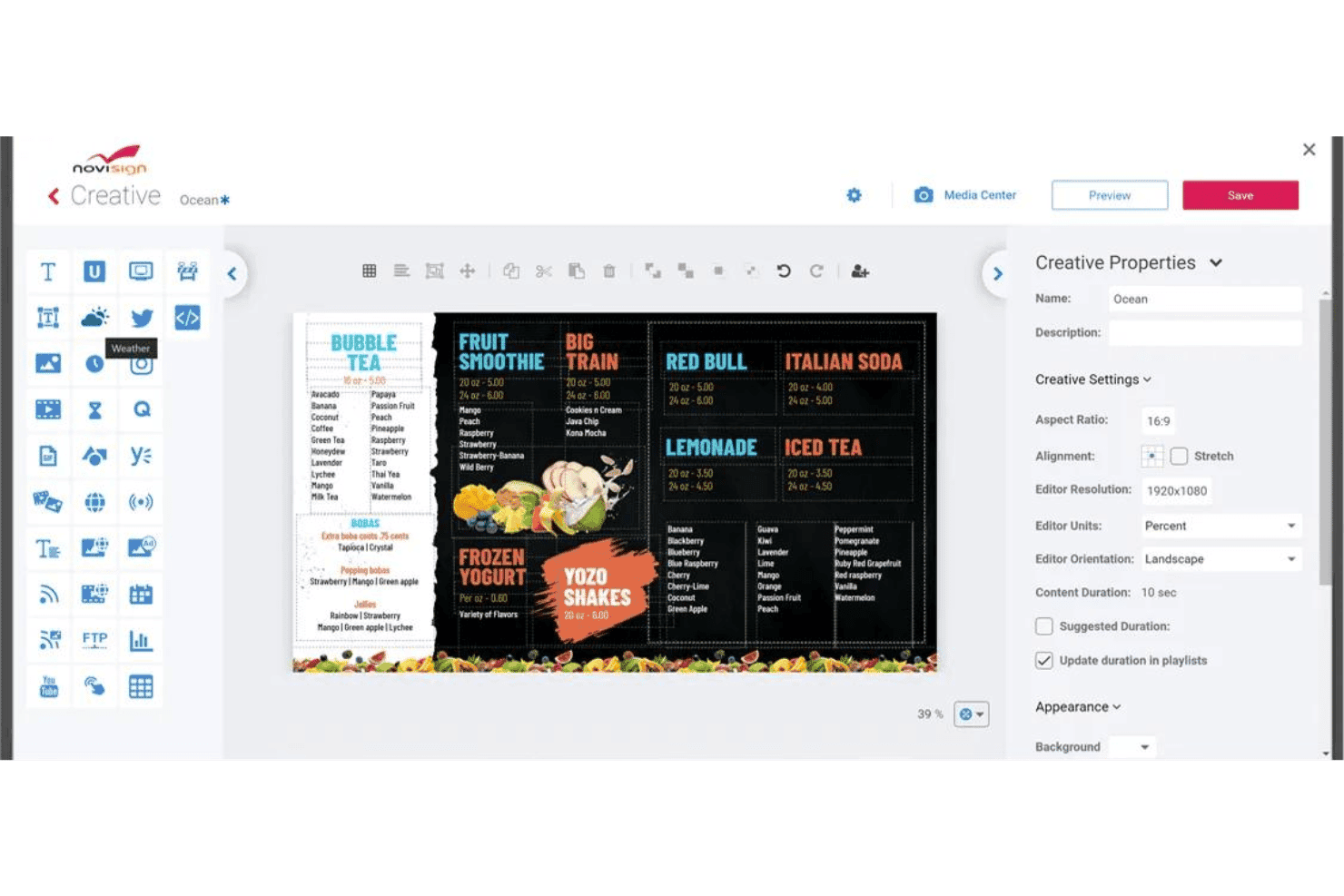
NoviSign offers a drag-and-drop digital signage creative editor with customizable menu board templates and content properties. NoviSign is a cloud-based digital signage CMS that lets you design, schedule, and remotely manage content with enhanced interactivity across distributed screen networks using a drag-and-drop editor, 50+ widgets, and multi-platform device support.
Who Is NoviSign Best For?
NoviSign is a strong fit for retail and hospitality marketing teams managing content across multiple locations who need a low-technical-barrier platform.
Why I Picked NoviSign
NoviSign earns its spot on my shortlist because the drag-and-drop design studio makes it genuinely fast to build polished signage content. I like that the 400+ customizable templates give my team a real starting point, and the 50+ widgets (weather, live social feeds, countdown timers) slot directly into layouts without any code. The videowall editor and IoT/RFID event triggers are features I've used to push real-time, context-aware content to grouped displays across locations.
NoviSign Key Features
- Offline playback resilience: Content automatically continues playing on screens during network outages with local storage.
- Proof-of-play reporting: Detailed logs and reports verify which content played on each screen and when.
- Multi-zone layouts: Create custom display zones to show video, tickers, weather, and other widgets simultaneously on a single screen.
- POS and business system integrations: Connect digital signage to POS, PowerBI, Google Drive, and other platforms for automated, real-time content updates.
NoviSign Integrations
NoviSign offers native integrations with Power BI, DataBox, Chartio, Tableau, Clover, Lightspeed, Salesforce, Canva, Ominalert, and more. An API is available for custom integrations.
Pros and Cons
Pros:
- Supports live content and real-time triggers
- Over 400 ready-made, customizable templates
- Fast editing with drag-and-drop studio
Cons:
- No built-in stock media or asset search
- Advanced permissions require higher-tier plan
Learn more about NoviSign: Best for education-focused display solutions
- Free demo + 14-day free trial available
- From $11/screen/month (USD, billed monthly)
Visit WebsiteCustomer Rating:4.8/5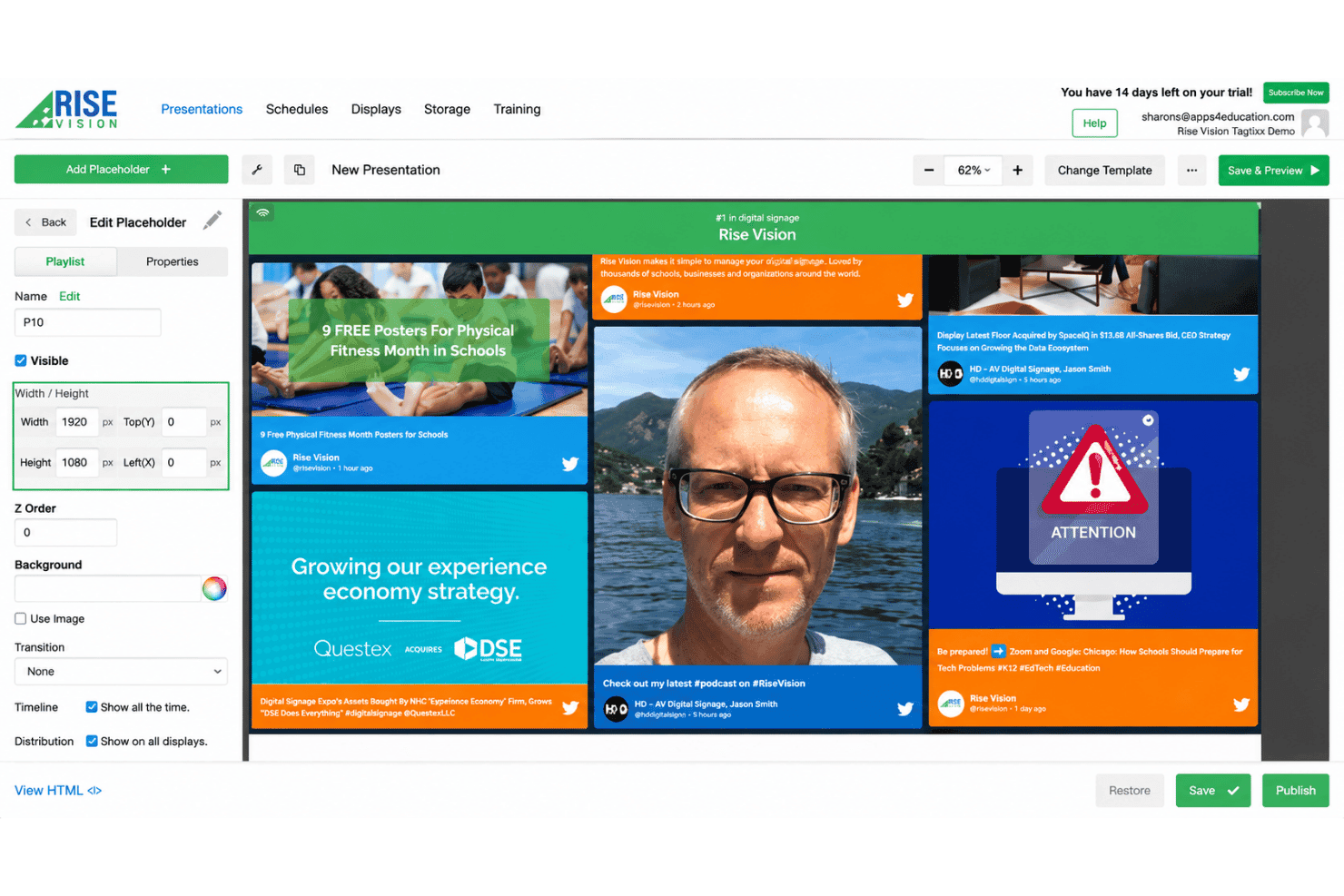
Rise Vision offers a drag-and-drop presentation editor with playlist management, placeholder properties, and live social media feed previews for digital signage displays. Rise Vision is a cloud-based digital signage CMS that combines content management, screen sharing, and emergency alerts across hardware-agnostic displays.
Who Is Rise Vision Best For?
Rise Vision is a strong fit for K-12 schools and school districts that need to manage signage, classroom screen sharing, and emergency alerts from one platform.
Why I Picked Rise Vision
Rise Vision earns its spot on my shortlist because no other digital signage CMS is built this specifically for how schools operate. The Enterprise plan covers unlimited displays per school for a flat $1,399/year, which makes district rollouts realistic on school budgets. I also like the teacher-specific user role, which lets classroom staff manage their own screens without affecting district content, plus native CAP alert integrations with E2Campus and CrisisGo.
Rise Vision Key Features
- Multi-zone layouts: Split displays into sections to show different content, like video, weather, or announcements simultaneously.
- Offline playback: Content keeps running on screens even during internet outages, syncing updates once back online.
- CAP emergency alert integration: Directly connect with services like Singlewire, Rave, or CrisisGo to trigger alerts across all displays.
- Device screenshot monitoring: View current snapshots of any display from the dashboard to quickly confirm what is playing.
Rise Vision Integrations
Rise Vision offers native integrations with Canva, Google Slides, Power BI, Domo, Google Sheets, Microsoft PowerPoint, Microsoft Calendar, Google Calendar, Meta (Facebook and Instagram), YouTube, and more.
Pros and Cons
Pros:
- Unlimited cloud storage for media files
- Custom roles for teachers and administrators
- Extensive template library for schools and events
Cons:
- Few retail or POS data integrations
- Limited analytics for measuring content performance
Learn more about Rise Vision: Best for robust app integrations and automation
- 14-day free trial
- From $20/screen/month (billed annually)
Visit WebsiteCustomer Rating:4.8/5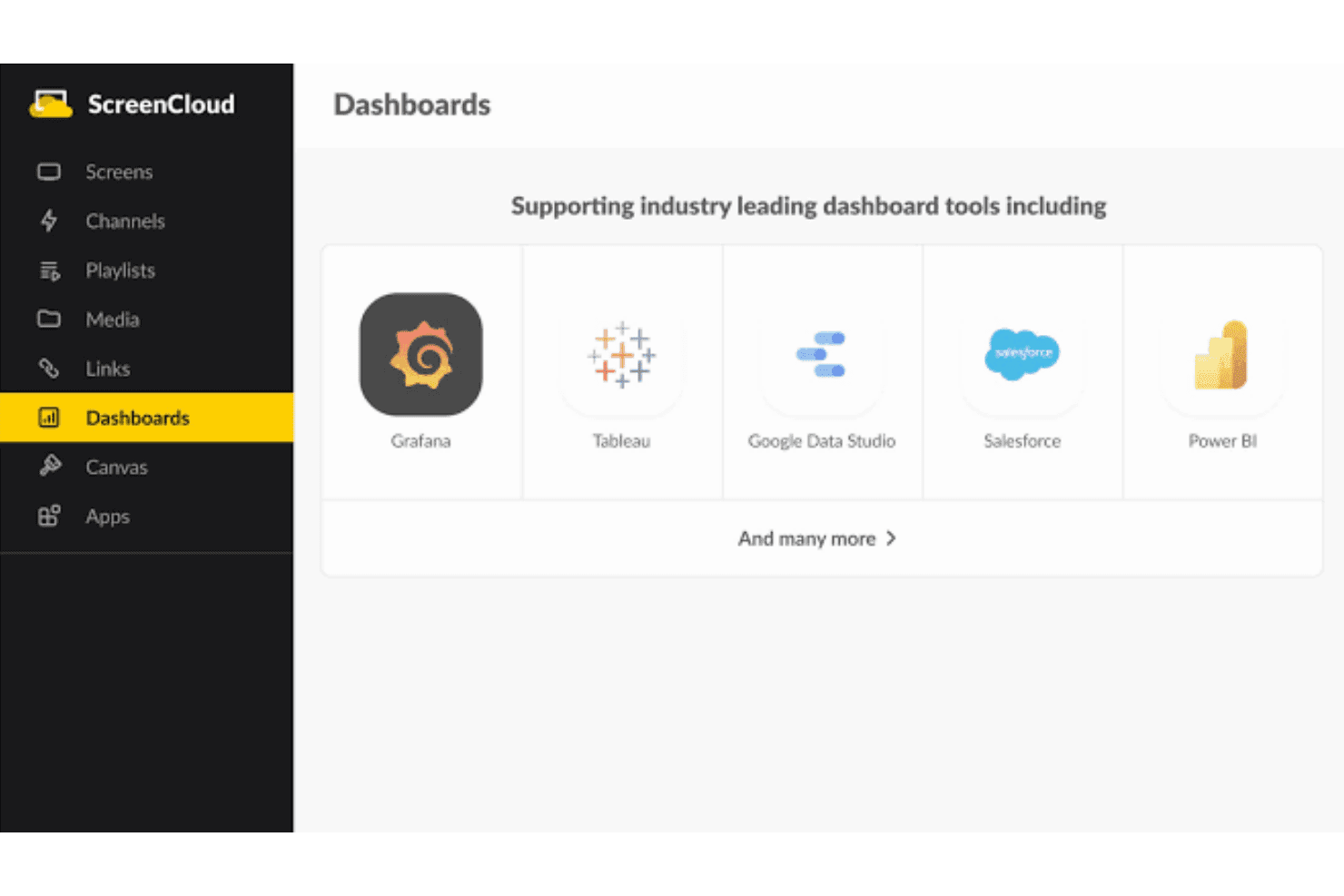
ScreenCloud supports industry-leading dashboard tools including Grafana, Tableau, Google Data Studio, Salesforce, and Power BI. ScreenCloud is a cloud-based digital signage CMS that lets you manage, schedule, and display content across screen networks, with built-in app integrations, a custom app builder, and remote device management across distributed locations.
Who Is ScreenCloud Best For?
ScreenCloud suits mid-market and enterprise teams optimizing content creation and managing screens across multiple locations, particularly in retail, manufacturing, and healthcare.
Why I Picked ScreenCloud
ScreenCloud earns its spot on my shortlist because of how far its integration layer actually goes. I love that the Dashboards feature lets me pull in gated tools like Salesforce or Datadog directly onto screens, without needing workarounds. The Playgrounds custom app builder and GraphQL API also mean my team can build and automate content logic that goes well beyond what most digital signage CMS platforms support out of the box.
ScreenCloud Key Features
- Multi-zone layouts: Create displays with separate content zones for video, tickers, weather, and social feeds on one screen.
- Proof-of-play reporting: Access detailed logs that show exactly which content played on each screen and when.
- ScreenCloud OS compatibility: Deploy signage using ScreenCloud’s proprietary operating system or integrate with supported third-party hardware.
- Bulk device management: Monitor, group, and update multiple screens remotely from a single cloud dashboard.
ScreenCloud Integrations
ScreenCloud offers over 80 native integrations, including Bonusly, Firstup, Unily, Canva, YouTube, Power BI, Vimeo, Simpplr, and Slack. An API and webhooks are available for custom integrations.
Pros and Cons
Pros:
- Reliable offline playback for uninterrupted display
- Multi-zone layouts with custom content widgets
- Supports live dashboards from Salesforce and Tableau
Cons:
- Advanced device remediation options not included
- Approval workflows and asset governance limited
Learn more about ScreenCloud: Best for data-driven screen content management
- Free trial + free demo available
- From $8/device/month (billed annually)
Visit WebsiteCustomer Rating:4.9/5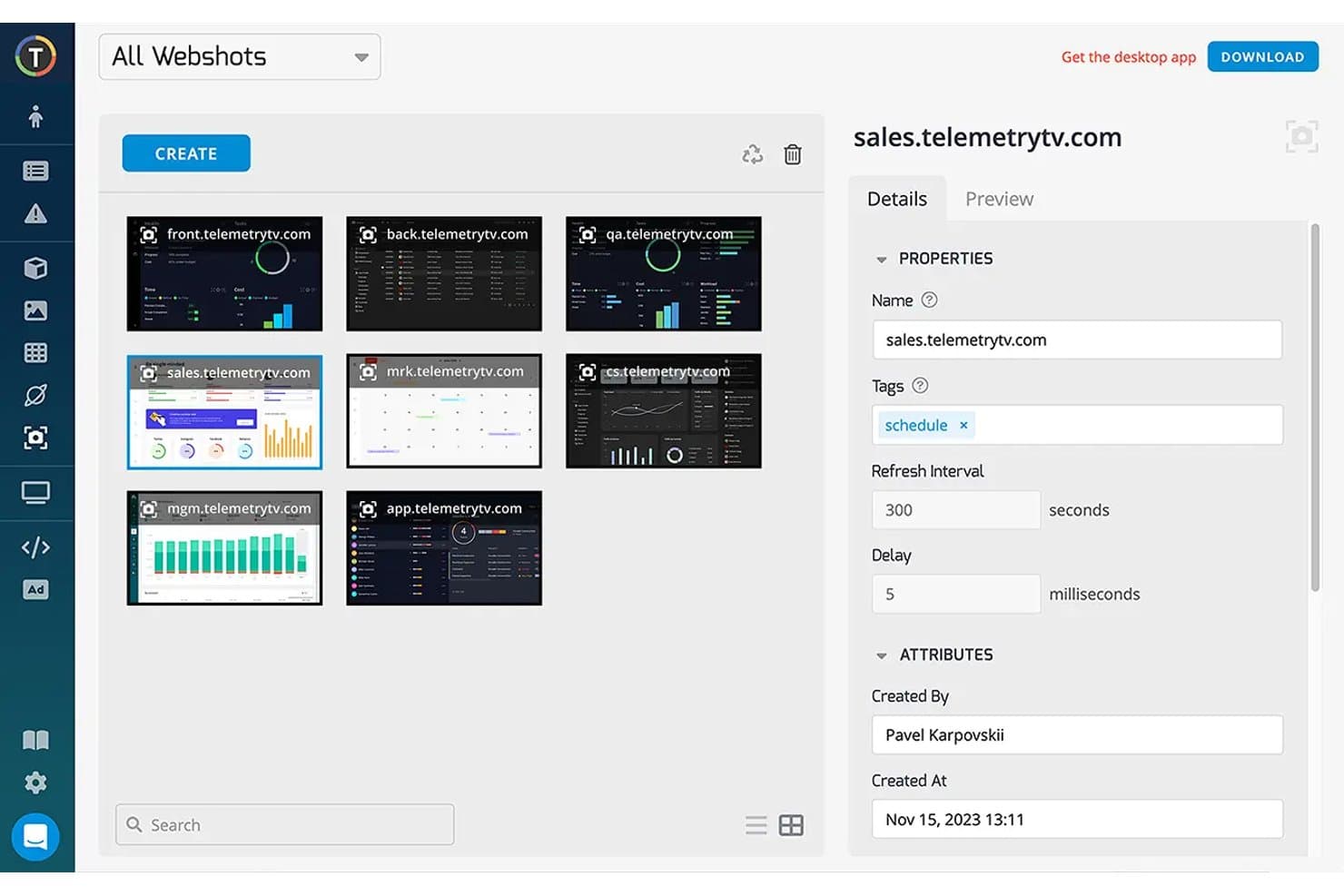
TelemetryTV offers a Webshots management interface where users can create, organize, and configure screenshot captures of web dashboards for digital signage displays. TelemetryTV is a cloud-based digital signage CMS built around live data broadcasting, letting you push BI dashboards, dynamic feeds, and custom web apps to distributed screen networks from a single interface.
Who Is TelemetryTV Best For?
It's a strong fit for mid-market and enterprise teams in retail, QSR, and logistics who manage large screen fleets and need to display live operational data alongside branded content.
Why I Picked TelemetryTV
TelemetryTV earns its spot on my shortlist because of how it handles live data broadcasting directly on screens. I use it to push live Grafana and Power BI dashboards to floor displays, so teams see real-time operational metrics without any manual content updates. The proof-of-play reporting on the Elite plan is something I rely on to confirm that time-sensitive content actually ran when and where it was scheduled.
TelemetryTV Key Features
- Multi-zone layout editor: Split screens into customizable zones to show video, tickers, weather, or social feeds at the same time.
- Remote device fleet management: Monitor device health, trigger remote reboots, and deploy over-the-air updates across all connected displays.
- Native app ecosystem: Use pre-built apps for calendar boards, wayfinding, menu boards, and internal communications directly from the platform.
- Role-based access controls: Assign user roles and permissions to manage who can create, schedule, or approve content for different locations.
TelemetryTV Integrations
TelemetryTV offers native integrations with Canva, Vimeo, Grafana, Slack, YouTube, WindyTV, and more. An API and JavaScript SDK are available for custom integrations.
Pros and Cons
Pros:
- Flexible content zoning for multitasking screens
- Live dashboards display with no manual refresh
- Reliable offline playback for all screen content
Cons:
- Limited built-in franchise hierarchy management
- Approval workflows lack formal multi-step controls
Learn more about TelemetryTV: Best for AI-driven content personalization
- Free demo available
- Pricing upon request
Visit WebsiteCustomer Rating:4.7/5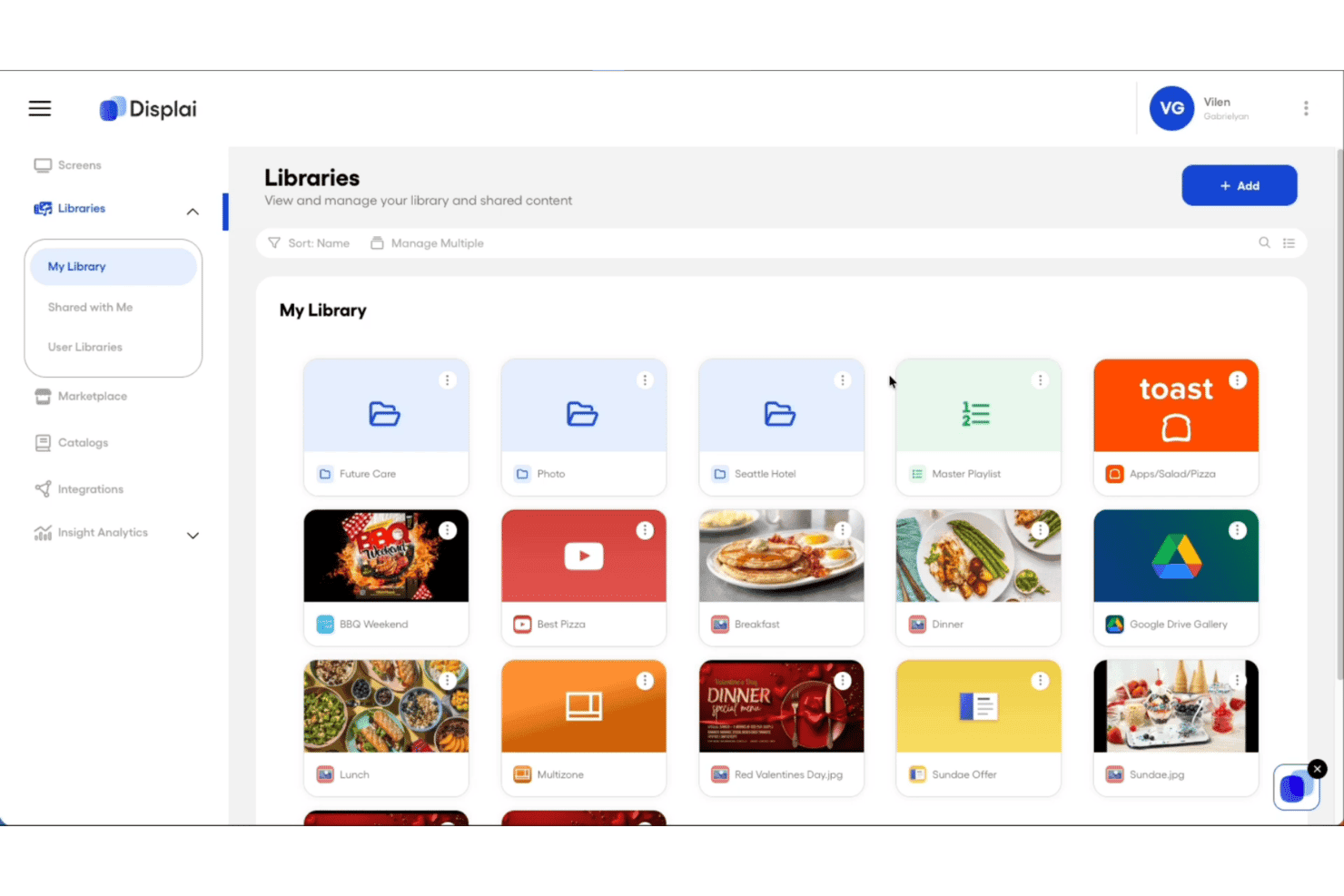
Displai offers a Libraries section where users can manage and organize media content such as images, videos, playlists, and app integrations in a grid view. Displai is a cloud-based digital signage CMS that combines multi-location content management, POS-integrated dynamic menu boards, AI-powered visitor analytics, and support for interactive kiosks for brick-and-mortar businesses.
Who Is Displai Best For?
Displai is a strong fit for multi-location restaurant groups and retail chains managing POS-connected signage and branded in-location experiences across dozens or hundreds of sites.
Why I Picked Displai
I've included Displai in my top picks because of Displai InSight, its built-in AI analytics layer that tracks visitor demographics, sentiment, and content performance in real time. That data feeds directly into content decisions, so a restaurant group can identify which menu board creative drives the most engagement by daypart and adjust accordingly. Paired with the On-Brand Menu API, screens update automatically when POS data changes, making personalization genuinely dynamic rather than manual.
Displai Key Features
- Remote device management: Monitor display status, push content updates, and control playback remotely for screens in any location.
- App marketplace: Access a large catalog of pre-built apps for menu boards, social media feeds, news tickers, and more.
- POS-powered dynamic menus: Connect menu boards directly to Toast, Square, or Lightspeed POS for real-time menu and pricing updates.
- Multi-location content scheduling: Assign campaigns, dayparted playlists, and content updates by location, region, or as network-wide broadcasts.
Displai Integrations
Displai offers native integrations with Toast, Square, Lightspeed, 7Shifts, Instagram, YouTube, PosterMyWall, DS Menu, RetailNext, and BrightSign, and provides an API for custom integrations.
Pros and Cons
Pros:
- Multi-location controls for centralized campaign scheduling
- POS-driven menu boards update content automatically
- Built-in AI analyzes in-store audience engagement
Cons:
- Enterprise pricing not published or self-service
- Device network connectivity issues occasionally reported
Learn more about Displai: Best for advanced rule-based content triggers
- Free demo + 30-day free trial available
- From $14/player/month (USD, Cloud Essential)
Visit WebsiteCustomer Rating:4.3/5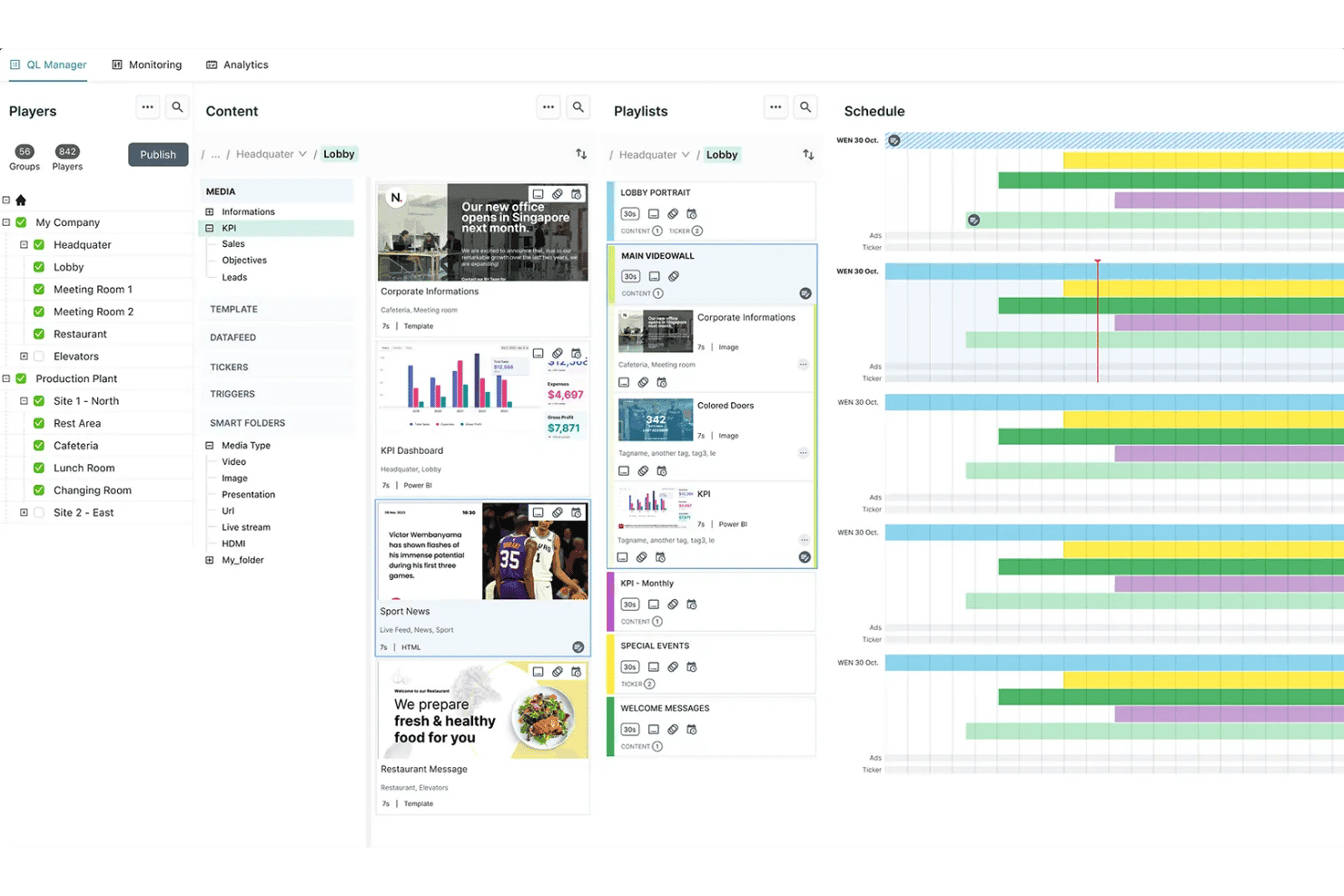
Navori offers a digital signage management interface with player organization, content library, playlist management, and scheduling tools in one dashboard. Navori is a digital signage CMS that combines a cloud-based content management dashboard, hardware-agnostic player support, live data integration, rule-based content automation, and AI-powered audience analytics across distributed screen networks.
Who Is Navori Best For?
Navori is a strong fit for enterprise marketing and operations teams managing large, distributed screen networks across retail, hospitality, or multi-location environments.
Why I Picked Navori
Navori earns its spot on my shortlist because of how its Live Data Manager handles rule-based content automation. I can connect JSON, XML, CRM, or POS data feeds and let the system automatically select and serve the right content based on live data lookups, with no manual intervention. On top of that, the AQUAJI layer uses AI-driven audience detection to add demographic triggers, so content decisions compound across both data rules and real-time viewer context.
Navori Key Features
- Multi-zone layouts: Divide screens into multiple zones to display video, tickers, weather, or social feeds at the same time.
- Proof-of-play reporting: Track and verify when and where each piece of content was displayed across your network.
- Offline playback resilience: Content keeps playing during network outages, with syncing updates once the connection returns.
- Native app ecosystem: Access pre-built apps and templates for deployments like menu boards, wayfinding, and corporate communications.
Navori Integrations
Navori offers native integrations with ServiceNow, Grafana, Workplace, Tableau, Firstup, ScreenFeed, Power BI, xMatters, and more. An open API is available for custom integrations.
Pros and Cons
Pros:
- AI-powered audience and engagement analytics
- Multi-zone and 4K video wall support
- Advanced conditional content scheduling engine
Cons:
- Complex setup for smaller screen networks
- Limited pre-built content templates
Learn more about Navori: Best for workplace and employee communications
- Free demo available
- Pricing upon request
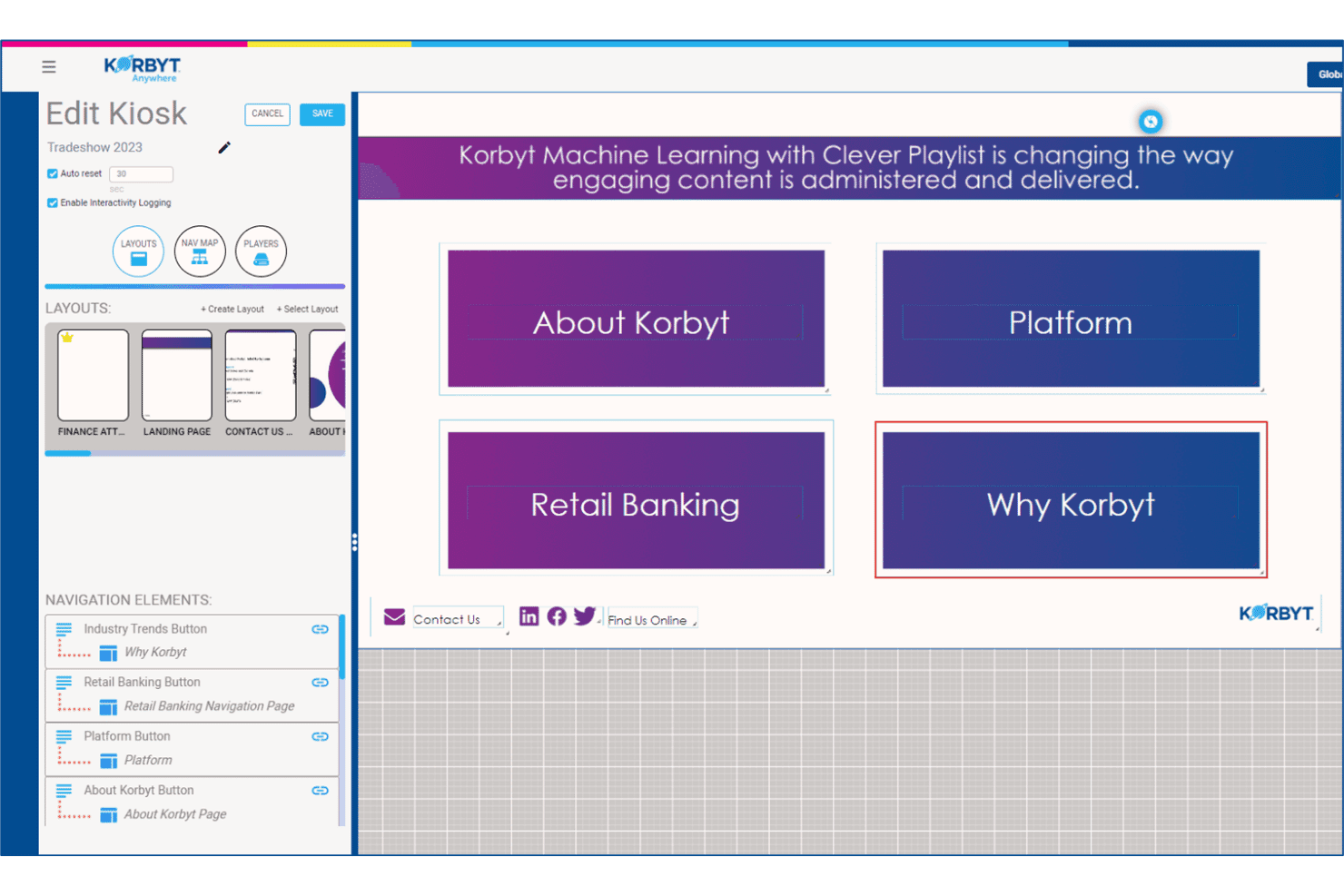
Korbyt offers an interactive kiosk editor with navigation elements, layout management, and a live preview of touchscreen content. Korbyt Anywhere is an enterprise digital signage CMS that distributes content across screens, desktops, and mobile with data-driven scheduling, 200+ integrations, and support for cloud, on-premises, or hybrid deployment.
Who Is Korbyt Best For?
Korbyt is a strong fit for enterprise and mid-market organizations managing large, distributed screen networks across corporate campuses, retail locations, or multi-site operations.
Why I Picked Korbyt
Korbyt earns its spot on my shortlist because of how it handles employee-targeted content at scale. I particularly like the Clever Playlists feature, which uses machine learning to determine which messages resonate with which employee segments and adjusts delivery automatically over time. My team can segment content by role, department, or location and push it simultaneously across screens, desktops, and mobile from a single publish action.
Korbyt Key Features
- Multi-zone layouts: Split screens into multiple zones to display different content types simultaneously.
- Remote device management: Monitor screen health, push updates, and troubleshoot devices from a centralized dashboard.
- Dynamic data triggers: Change content automatically based on real-time inputs like weather, inventory, or sensor data.
- Proof-of-play reporting: View detailed logs showing exactly what content played, when, and on which screens.
Korbyt Integrations
Korbyt offers native integrations with Salesforce, Tableau, Microsoft 365, Cisco, ServiceNow, Five9, Paylocity, Box, Power BI, and more. An API is available for custom integrations.
Pros and Cons
Pros:
- AI-powered audience segmentation and targeting
- Multi-zone layouts for advanced screen setups
- Resilient offline playback across endpoints
Cons:
- Interface can be slow with large asset libraries
- Focuses more on workplace communications use cases
Learn more about Korbyt:
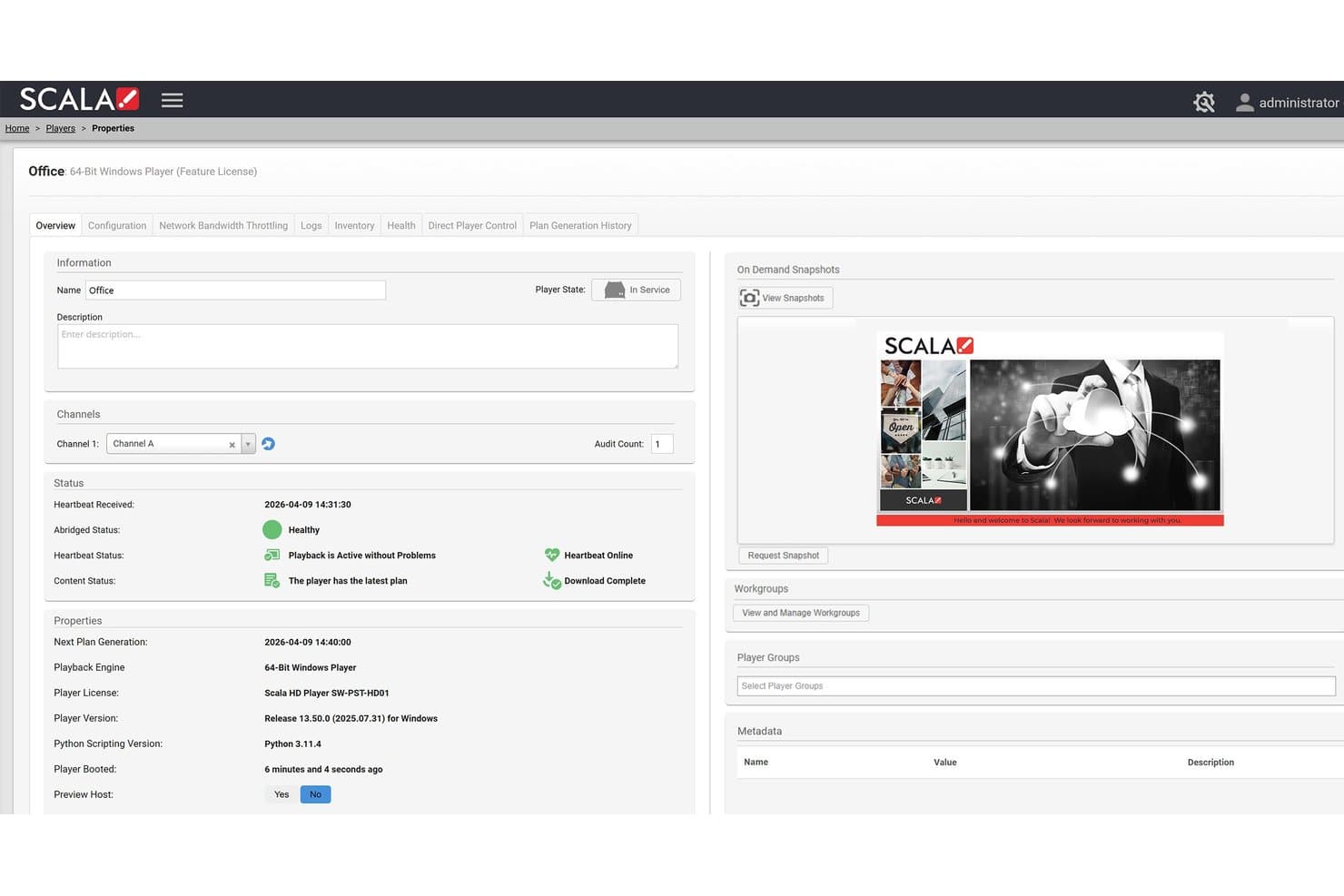
Scala offers a detailed player properties dashboard showing real-time playback status, channel assignment, snapshots, and device health for digital signage management. Scala is an enterprise digital signage CMS built around a centralized Content Manager, a purpose-built Designer tool, and a dedicated media player stack for managing dynamic, data-driven content across large distributed screen networks.
Who Is Scala Best For?
Scala is a strong fit for mid-market and enterprise organizations running large, multi-location screen networks across retail, QSR, hospitality, or corporate environments.
Why I Picked Scala
Scala earns its spot on my shortlist because of how it handles dynamic, data-driven content at scale. I love that ScalaScript lets my team connect live data sources like POS systems, inventory feeds, and weather triggers directly into templates, so content updates automatically without manual rebuilds. The Scala Player also uses delta updates, pushing only changed files to screens, which keeps large-network deployments stable and responsive during active campaigns.
Scala Key Features
- Multi-screen scheduling: Push playlists and campaigns to specific screens, groups, or entire networks from a central dashboard.
- Proof-of-play reporting: Generate logs to verify exactly which content played on each screen for compliance or ad billing.
- Multi-zone screen layouts: Segment displays into dedicated areas showing varied content types like videos, tickers, or social feeds.
- Role-based content approvals: Manage user permissions and approval workflows to govern brand standards across multiple locations.
Scala Integrations
Native integrations are not publicly listed.
Pros and Cons
Pros:
- Detailed proof-of-play analytics and logging
- Reliable playback during network outages
- Advanced multi-zone and video wall support
Cons:
- Setup can require specialized player hardware
- No published pricing or online signup
Learn more about Scala:
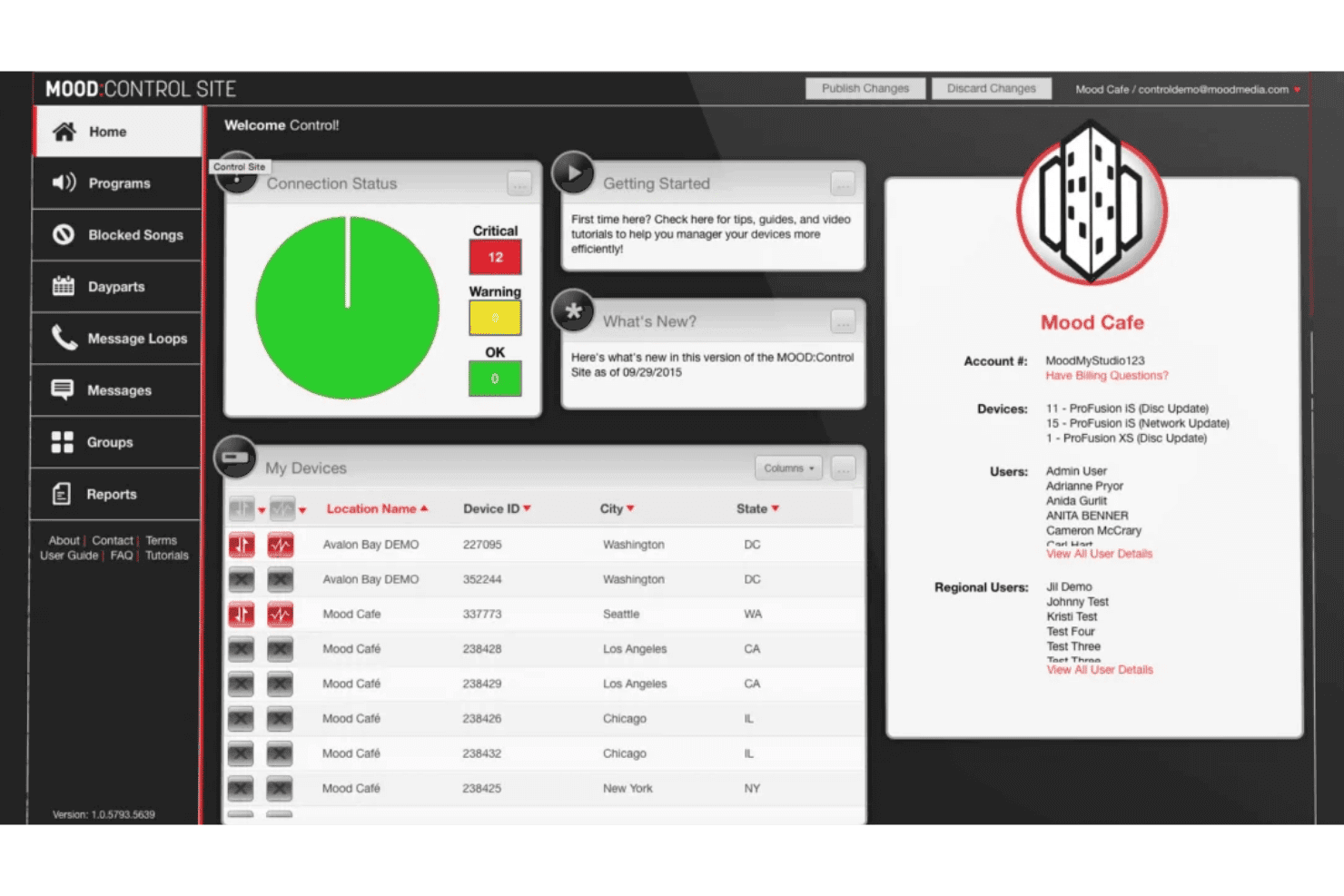
Mood Media's Control Site dashboard offers device connection status, location management, and account details for multi-site audio program control. Mood Media is a digital signage CMS and multi-sensory brand experience platform that unifies screen content, music, on-hold messaging, and scent marketing under a single cloud-based dashboard called Harmony.
Who Is Mood Media Best For?
Mood Media suits enterprise retail, QSR, and hospitality brands managing digital signage alongside music and messaging across large, distributed location networks.
Why I Picked Mood Media
I picked Mood Media because no other digital signage CMS on my shortlist lets you control screens, music, scent, and on-hold messaging from a single login inside one platform. In practice, that means my team can schedule a digital menu board update and a matching audio promotion for the same daypart without switching tools. Mood TV adds another layer, letting us replace competitive advertising on in-store screens with branded content alongside short-form programming.
Mood Media Key Features
- Centralized monitoring dashboard: Monitor the health and status of all connected screens and Harmony devices from one interface.
- Multi-zone layout editor: Customize screens with multiple content zones, including video, widgets, and message tickers.
- Digital menu board preview: Preview and adjust menu board content with instant updates for price or item changes.
- System-on-chip display support: Deploy digital signage directly to smart displays from Samsung and Philips without external media players.
Mood Media Integrations
Native integrations are not publicly listed.
Pros and Cons
Pros:
- Supports offline playback and content resilience
- Centralized dashboard for multi-location management
- Multi-sensory platform includes music and scent
Cons:
- No free trial or transparent self-serve pricing
- Lacks robust POS or CRM data integrations
Learn more about Mood Media:
Diğer Dijital Tabela CMS'leri
İşte kısa listeme giremeyen ancak yine de göz atmaya değer bazı ek dijital tabela CMS çözümleri:
- 11AppspaceBest for unified corporate communications
- 12BrightSignBest for dedicated hardware integration
- 13OptiSignsBest for rapid deployment across locations
- 14YodeckBest for simple cloud-first remote management
- 15PoppuloBest for large-scale corporate deployments
- 16ScreenlyBest for Raspberry Pi-based display networks
- 17SpectrioBest for retail customer engagement features
- 18XiboBest for open-source customization and control
How I Evaluate Digital Signage CMS
I split my evaluation into two layers: the baseline a platform must meet to make the list, and the differentiators that separate strong performers from the rest.
Core Functionality (Table Stakes For This List)
When I'm selecting tools for my list, I rank each one on a scale from 0 (does not offer the functionality) to 5 (excels in this area) for each core functionality listed below. Then, I calculate the tool's total score into a percentage. Each tool needs to achieve a minimum total score of 65% to be considered for inclusion.
- Centralized content management: I look for a cloud-based dashboard where you can upload, tag, and push assets to any screen from one place—like updating menu boards across 50 locations in minutes.
- Multi-screen scheduling: The platform should let you schedule playlists and dayparted campaigns across screen groups, so a lunch promo only runs from 11 a.m. to 2 p.m. at selected sites.
- Media format support: I check whether the CMS handles images, video, HTML5, live streams, and web apps—the full range of formats modern marketing teams actually use on their displays.
- Remote device management: Managing screens spread across dozens of locations means I evaluate remote reboot, health monitoring, and over-the-air update capabilities from the central dashboard.
- Dynamic content and data integration: Real-time triggers matter. I look for API, RSS, social feed, and data-driven template support so content can shift based on inputs like weather or inventory.
- User roles and multi-location permissions: For multi-location teams, I evaluate whether HQ can lock brand assets while still letting local managers contribute region-specific content through role-based controls.
Once I have a list of tools that meet the criteria, I consider what sets each platform apart.
Differentiating Factors (What Sets Vendors Apart)
Here's how I compare and contrast different vendors:
Standout Features
Offline playback resilience is a big differentiator—screens in a retail store or airport need to keep running even when Wi-Fi drops. I also look at proof-of-play reporting, which gives you verified logs of what content played, where, and when. That's essential if you're running ad networks or need compliance documentation. Multi-zone layouts matter too, since splitting a screen into zones for video, social feeds, and tickers gives you more flexibility without adding hardware.
Beyond Features
Hardware compatibility is one of the first things I check—whether a platform supports SoC displays, Android, BrightSign, and other player types determines how much you'll spend on hardware alongside your subscription. Pricing transparency matters just as much, since hidden costs for premium apps or storage tiers can inflate your total cost of ownership fast. I also evaluate integrations with tools like Google Slides, Canva, Power BI, and POS systems, which reveal how well the CMS fits into your existing marketing stack.
Dijital Tabela CMS Nasıl Seçilir
Uzun özellik listeleri ve karmaşık fiyatlandırma yapıları arasında kaybolmak kolaydır. Benzersiz yazılım seçim sürecinizde ilerlerken odağınızı korumanıza yardımcı olmak için aşağıda aklınızda bulundurmanız gereken faktörleri içeren bir kontrol listesi yer alıyor:
| Faktör | Dikkat Edilmesi Gerekenler |
|---|---|
| FaktörÖlçeklenebilirlik | Dikkat Edilmesi GerekenlerŞimdi ve gelecekte kaç ekranı yönetmeniz gerekiyor? CMS, kontrol veya görünürlük kaybı olmadan büyük ya da birden fazla konuma yapılan kurulumları yönetebilir mi? |
| FaktörEntegrasyonlar | Dikkat Edilmesi GerekenlerKullandığınız pazarlama, POS, analiz veya içerik sistemlerine bağlanabiliyor mu? Yerel bağlayıcıları ve açık API erişimini kontrol edin. |
| FaktörÖzelleştirilebilirlik | Dikkat Edilmesi GerekenlerKullanıcı izinlerini, markalamayı, düzenleri ve iş akışlarını kuruluşunuzun yapısına ve stil yönergelerine uyacak şekilde düzenleyebilir misiniz? |
| FaktörKullanım kolaylığı | Dikkat Edilmesi GerekenlerPlatform, hem merkez ofis pazarlamacıları hem de yerel katkıda bulunanlar için sezgisel mi? Yeni kullanıcıları eğitmenin ve içeriği anında güncellemenin ne kadar kolay olduğunu değerlendirin. |
| FaktörUygulama ve kullanıma alıştırma | Dikkat Edilmesi GerekenlerKurulum süreci BT ve pazarlama ekiplerinizden neler gerektiriyor? Kullanıma sunma veya hızlıca başlamak için şablonlar konusunda dışarıdan yardıma ihtiyacınız olacak mı? |
| FaktörMaliyet | Dikkat Edilmesi GerekenlerFiyatlandırma ne kadar açık ve ekran, kullanıcı veya özellik başına nasıl ölçekleniyor? Depolama, entegrasyonlar veya gerekli donanım için gizli masraflara dikkat edin. |
| FaktörGüvenlik önlemleri | Dikkat Edilmesi GerekenlerPlatform uygun kullanıcı kontrolleri, şifreleme ve kimlik doğrulama sunuyor mu? Finans veya sağlık hizmetleri gibi düzenlemelere tabi sektörlerdeki uyumluluk gereksinimlerini göz önünde bulundurun. |
| FaktörDestek erişilebilirliği | Dikkat Edilmesi Gerekenlerİhtiyacınız olduğunda yardım kaynaklarına erişebiliyor musunuz? Sağlayıcı 7/24, canlı veya destek talebi tabanlı destek sunuyor mu ve tipik yanıt süreleri ne kadar? |
Dijital Tabela CMS'leri Nelerdir?
Dijital tabela CMS'si, birden fazla konumdaki dijital ekranlarda görüntülenen içeriği yönetmenizi, planlamanızı ve güncellemenizi sağlayan bir platformdur. Bu sistemler, pazarlama ekiplerinin tanıtım videolarından gerçek zamanlı güncellemelere kadar her şeyi tek bir panodan kontrol etmesine olanak tanır. Birden fazla konumun kontrolü ve dinamik içerik için tasarlanan dijital tabela CMS araçları, marka standartlarının korunmasına ve zamana, kitleye veya veri tetikleyicilerine göre hedefli mesajların iletilmesine yardımcı olur.
Dijital Tabela CMS'sinin Özellikleri
Bir dijital tabela CMS'si seçerken aşağıdaki temel özelliklere dikkat edin:
- Merkezi içerik yönetimi: Tüm dijital varlıklarınızı tek bir panodan yükleyin, düzenleyin ve güncelleyin; böylece herhangi bir ekran ağı genelindeki içeriği kolayca kontrol edebilirsiniz.
- Birden fazla ekran için planlama: Belirli kampanyaları veya oynatma listelerini ekranlara ya da ekran gruplarına göre zamana, tarihe veya günün bölümüne göre planlayarak içeriğin en alakalı olduğu zamanda ve yerde görüntülenmesini sağlayın.
- Uzaktan cihaz yönetimi: Cihaz durumunu izleyin, güncellemeleri gönderin ve ekran oynatımını uzaktan kontrol edin; böylece yerinde müdahale ihtiyacını azaltırken güvenilir çalışmayı sağlayın.
- Medya formatı desteği: Görselleri, videoları, HTML5'i, canlı yayınları ve etkileşimli içerikleri görüntüleyin; bu esneklik, pazarlama çalışmalarınızın görsel açıdan güncel ve ilgi çekici kalmasına yardımcı olur.
- Dinamik içerik entegrasyonu: Ekranların gerçek zamanlı güncellemeleri, stok durumunu, hava durumunu veya bağlamsal diğer bilgileri otomatik olarak görüntüleyebilmesi için API'lere, sosyal medya akışlarına veya veri kaynaklarına bağlanın.
- Kullanıcı rolleri ve izinleri: Merkez ofis, bölge ve mağaza düzeyindeki kullanıcılar için ayrıntılı izinler belirleyin; bu sayede marka yönetimini korurken yerel içerik kontrolü sağlayabilirsiniz.
- Yayın kanıtı raporlaması: Hangi içeriğin nerede ve ne zaman görüntülendiğini tam olarak takip edip doğrulayın; bu özellik, reklamcılıkta veya düzenlemeye tabi ortamlarda uyumluluk ve performans ölçümü için faydalıdır.
- Çok bölgeli düzenler: Ekranları, farklı medya türlerini aynı anda gösterecek birden fazla içerik alanına (bölgeye) ayırarak ekran alanını ve etkiyi en üst düzeye çıkarın.
- Çevrimdışı oynatma dayanıklılığı: Ağ kesintileri sırasında planlanan içeriğin oynatılmaya devam etmesini ve bağlantı yeniden kurulduğunda yeni güncellemelerin senkronize edilmesini sağlayın.
- Şablon ve uygulama kitaplığı: Dağıtım ve tasarım süreçlerini hızlandırmak için menü panoları, duyurular veya yönlendirme gibi yaygın kullanım alanlarına yönelik hazır şablonlara ya da bileşenlere erişin.
Dijital Tabela CMS'sinin Faydaları
Bir dijital tabela CMS'si uygulamak, ekibiniz ve işletmeniz için çeşitli faydalar sağlar. Yararlanabileceğiniz bazı avantajlar şunlardır:
- Merkezi kontrol: Ağınızdaki her ekrandaki içeriği tek bir panodan yönetin ve güncelleyin; böylece mesajlarınızı tutarlı ve zamanında tutabilirsiniz.
- Esnek içerik planlama: İçeriğinizin ne zaman ve nerede görüneceğini otomatikleştirerek promosyonları ve kampanyaları çalışma saatleri ya da özel etkinlikler etrafında kolayca planlamanızı sağlayın.
- Gerçek zamanlı güncellemeler: Stok durumunu, sosyal medya akışlarını veya hava durumunun tetiklediği içerikleri dinamik olarak görüntüleyin; böylece ekranlarınız her zaman en alakalı bilgileri gösterir.
- Geliştirilmiş marka tutarlılığı: Onaylanmış varlıkları ve şablonları sabitleyerek her konumun marka standartlarını izlemesini sağlayın ve kontrollü yerel katkıya olanak tanıyın.
- Operasyonel verimlilik: Cihazların durumunu izleyin, güncellemeleri gönderin ve sorunları uzaktan giderin; bu, BT veya pazarlama personeli için yerinde müdahaleleri en aza indirir.
- Uygulanabilir performans verileri: Yayın kanıtı raporlamasıyla içgörüler elde ederek kampanya erişimini analiz edin ve uyumluluk için içerik iletimini doğrulayın.
- Maliyet tasarrufu: Birden fazla donanım türü ve çevrimdışı oynatma desteğinden yararlanarak dijital tabela yatırımınızı optimize edin ve yinelenen maliyetleri azaltın.
Dijital Tabela CMS'sinin Maliyetleri ve Fiyatlandırması
Bir dijital tabela CMS'si seçmek, mevcut çeşitli fiyatlandırma modellerinin ve planların anlaşılmasını gerektirir. Maliyetler özelliklere, ekip büyüklüğüne, eklentilere ve diğer unsurlara göre değişir. Aşağıdaki tablo, dijital tabela CMS çözümlerinde yaygın planları, bunların ortalama fiyatlarını ve genellikle dahil edilen özellikleri özetlemektedir:
Dijital Tabela CMS'si için Plan Karşılaştırma Tablosu
| Plan Türü | Ortalama Fiyat | Yaygın Özellikler |
|---|---|---|
| Plan TürüÜcretsiz Plan | Ortalama Fiyat$0 | Yaygın ÖzelliklerTemel içerik yükleme, sınırlı zamanlama, tek kullanıcı desteği ve standart medya formatı uyumluluğu. |
| Plan TürüKişisel Plan | Ortalama Fiyat$10-$25/ekran/ay | Yaygın ÖzelliklerÇoklu ekran desteği, uzaktan güncellemeler, şablon erişimi, basit raporlama ve temel kullanıcı izinleri. |
| Plan Türüİşletme Planı | Ortalama Fiyat$25-$60/ekran/ay | Yaygın ÖzelliklerGelişmiş zamanlama, genişletilmiş entegrasyonlar, çoklu konum denetimi, yayın kanıtı raporları ve cihaz izleme. |
| Plan TürüKurumsal Plan | Ortalama Fiyat$60-$150/ekran/ay | Yaygın ÖzelliklerÖzel markalama, API erişimi, SSO, gelişmiş güvenlik, özel destek, çevrimdışı oynatma ve çalışma süresi için SLA'lar. |
Dijital Tabela CMS SSS'leri
Dijital tabela CMS’leri hakkında sık sorulan bazı soruların yanıtları:
Dijital tabela CMS'si, geleneksel medya oynatıcılardan nasıl farklıdır?
Dijital tabela CMS’si, içeriği birden fazla ekranda uzaktan yönetmenize, zamanlamanıza ve güncellemenize olanak tanırken geleneksel medya oynatıcılar genellikle manuel güncellemeler gerektirir ve sınırlı denetim sunar.
Mevcut donanımımı çoğu dijital tabela CMS platformuyla kullanabilir miyim?
Evet, birçok platform çok çeşitli ticari ekranları ve medya oynatıcı donanımlarını destekler; ancak yatırım yapmadan önce mevcut kurulumunuzla uyumluluğu her zaman doğrulamalısınız.
Farklı konumlardaki kullanıcılara farklı izinler atamak mümkün mü?
Evet, çoğu dijital tabela CMS aracı özelleştirilebilir kullanıcı rolleri sunar; böylece temel markalama ve zamanlama kararlarını merkezi olarak korurken yerel ekiplere sınırlı denetim verebilirsiniz.
Yayın kanıtı raporları pazarlama ekiplerine nasıl yardımcı olur?
Yayın kanıtı raporları, hangi içeriğin tam olarak ne zaman oynatıldığını doğrular; böylece kampanya yayınını kanıtlamak, uyumluluğu yönetmek ve reklamverenlere veri sağlamak kolaylaşır.
Ağ kesintisi sırasında içeriğin yayınlanmaya devam etmesini sağlamak için nelere dikkat etmeliyim?
Çevrimdışı oynatma dayanıklılığına sahip CMS çözümlerini tercih edin; böylece bağlantı kesilse bile planlanan içerik ekranlarınızda gösterilmeye devam eder ve ağ geri geldiğinde senkronize edilir.