

Günümüzde pazarlama alanında çalışmak; sıkışık teslim tarihlerini, artan beklentileri ve sınırlı kaynaklarla sonuç sunma baskısını dengelemek anlamına geliyor. Ücretsiz yapay zekâ pazarlama araçları, bütçenize ek yük getirmeden otomasyon, içgörüler ve yaratıcı destek sağlayarak gerçekten yardımcı olabilir.
Bu araçları, pazarlama sektöründeki deneyimimden yararlanarak bağımsız şekilde test edip inceledim. Amacım ister küçük bir işletme ister büyüyen bir ekip olun, mevcut en iyi ücretsiz seçeneklere tarafsız bir bakış sunmak.
Bu makalede, ihtiyaçlarınızı karşılayacak benzersiz bir avantaja sahip, ücretsiz yapay zekâ pazarlama araçları arasından en iyi seçimlerimi bulacaksınız. Gelin, bu araçların pazarlama çalışmalarınızı nasıl daha verimli ve etkili hâle getirebileceğini keşfedelim.
Why Trust Our Software Recommendations
6,700+
Reviews
20
Industry experts
16+
Evaluation factors
14
Years
Our team has been testing and reviewing software since 2012. As marketing leaders ourselves, we know how difficult—and important—it is to choose the right software.
For this guide, we evaluated tools using hands-on testing and independent research, scoring tools using our selection criteria.
Our reviews reflect our human editorial judgment, not a sales pitch.
Expert reviewers:
 Gui DrusinaCreative Director
- Shriya GhateSenior Marketing Lead
 Amanda JacquesMarketing Ops Leader

Karşılaştırma Tablosu: Ücretsiz Yapay Zekâ Pazarlama Araçları
Bu karşılaştırma tablosu, en iyi ücretsiz yapay zekâ pazarlama aracı seçimlerimin fiyatlandırma ayrıntılarını özetlemektedir.
Sorted by: Default
| Tool | Starting Price | Website | |
|---|---|---|---|
Best for repurposing content as social posts | 4.5 out of 5 | Free for Archie Standalone Starting at $79 per user/month for Archie inside Agorapulse | Website |
Best for AI-powered social scheduling | 4.3 out of 5 | $29/month 14-day free trial | Website |
Best for user-friendly graphic design tools | 4.6 out of 5 | $144/user/year Free plan + free trial available | Website |
Best for team task management | 4.6 out of 5 | $20/month Free plan available | Website |
Best for versatile workspace integration | 4.6 out of 5 | $20/user/month Free plan available | Website |
Best for newsletter creation | 4.5 out of 5 | $43/month 30-day free trial + free plan + free demo available | Website |
Best for ad design templates | 4.1 out of 5 | $39/month Free trial available | Website |
Best for presentation creation | 4.5 out of 5 | $8.33/month Free plan available | Website |
Best for multi-app workflow automation | Not rated | $19.99/month Free plan available | Website |
Best for optimizing content for search engines | Not rated | $49/month Free trial + free demo available | Website |


En İyi Ücretsiz Yapay Zekâ Pazarlama Araçları İncelemeleri
Aşağıda, kısa listeme giren en iyi ücretsiz yapay zekâ pazarlama araçlarının ayrıntılı özetlerini bulabilirsiniz. İncelemelerim; her aracın temel özelliklerine, artılarına ve eksilerine, entegrasyonlarına ve ideal kullanım alanlarına ayrıntılı bir bakış sunarak sizin için en iyi aracı bulmanıza yardımcı olur. Bu araçlardan bazıları tamamen ücretsiz bir sürüm sunarken diğerleri ücretsiz deneme süresi sunar. İncelemelerimin her birinde nelerin ücretsiz olduğuna dair bir not ekledim.
 Best for repurposing content as social posts
- Starting at $79 per user/month for Archie inside Agorapulse
- Free for Archie Standalone
Visit WebsiteCustomer Rating:4.5/5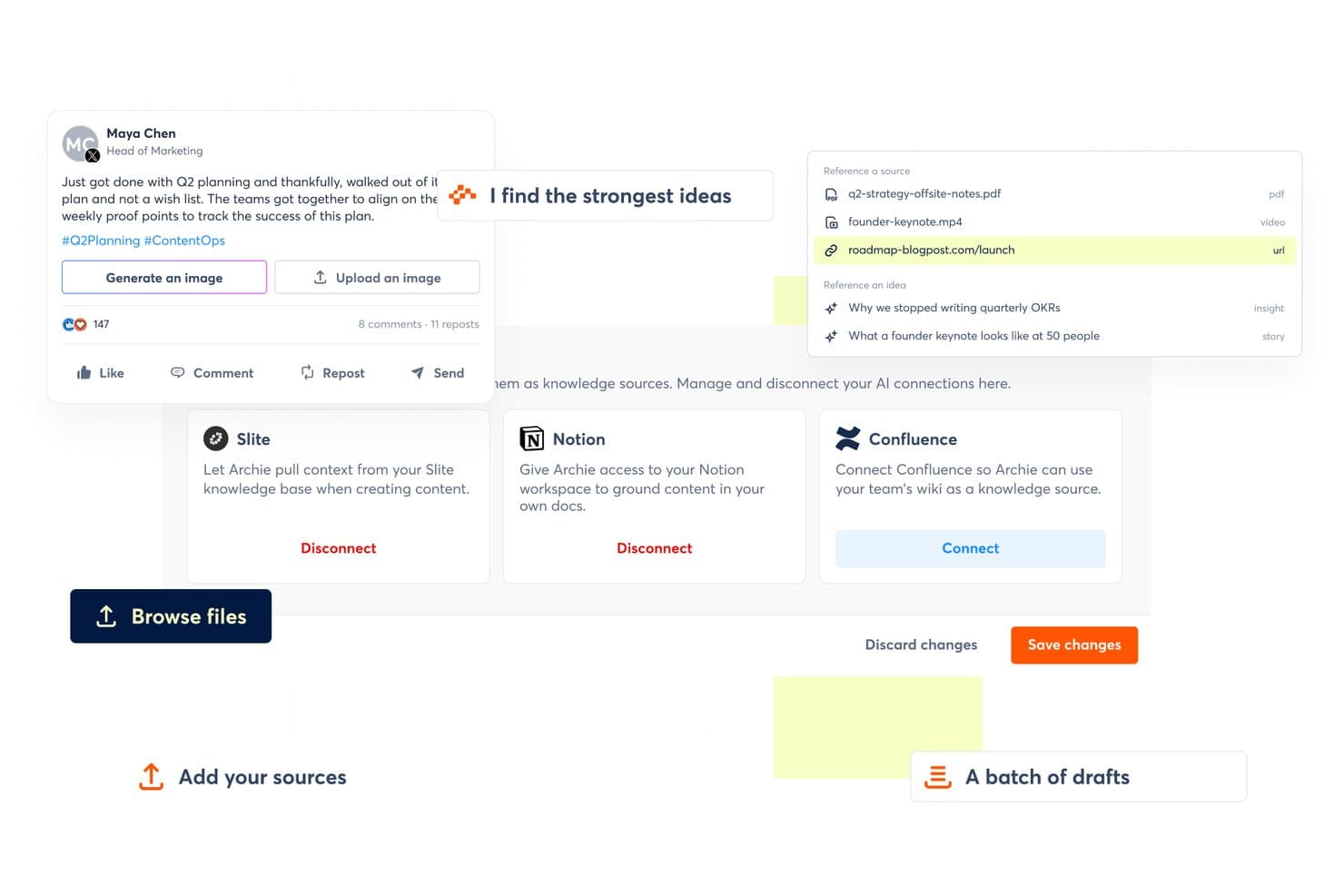
Archie by Agorapulse finds strong ideas from connected knowledge sources. Archie by Agorapulse is a free AI marketing tool that analyzes supplied articles, videos, documents, and other sources to draft platform-native social posts, create branded images and clips, and schedule publishing.
Who Is Archie by Agorapulse Best For?
Small-business marketers and social media managers who want to turn existing content into branded, platform-ready posts.
Why I Picked Archie by Agorapulse
I picked Archie by Agorapulse because its source-first workflow turns articles, webinars, and documents into platform-native social posts. Its fit is clear: Best for repurposing content as social posts. I like that its Playbooks apply your audience, voice, and visual identity, while Archie can also create branded images and captioned video clips from existing material.
Archie Key Features
- Source Q&A: Ask questions about information in supplied material.
- Post performance ranking: Find posts from the past 12 months and rank them by reach, impressions, or engagement.
- Draft review and editing: Review and revise generated posts before approving them for publishing.
- Playbook language options: Set a Playbook to use English, French, German, Spanish, Dutch, Swedish, Norwegian, or Finnish.
Archie Integrations
Archie supports native scheduling and publishing to LinkedIn, Facebook, Instagram, YouTube, and TikTok through the Agorapulse calendar. It can also use documents from Google Drive, Slite, Notion, and Confluence as source material via URL.
What’s Free?
Archie offers a free plan, not just a time-limited trial, and doesn’t require a credit card. It includes 10 monthly credits (not tracked during beta), one owner and up to 100 limited-permission users, and up to 50 Facebook, Instagram, LinkedIn, or YouTube profiles; new posts must be created in Archie.
Pros and Cons
Pros:
- Produces branded images and captioned clips
- Reuses saved brand voice across drafts
- Turns existing material into platform-ready posts
Cons:
- Playbooks cannot be shared with teammates
- Requires source material for every workflow
Learn more about Archie by Agorapulse: 2Best for AI-powered social scheduling
Enji
- 14-day free trial
- From $29/month
Visit WebsiteCustomer Rating:4.3/5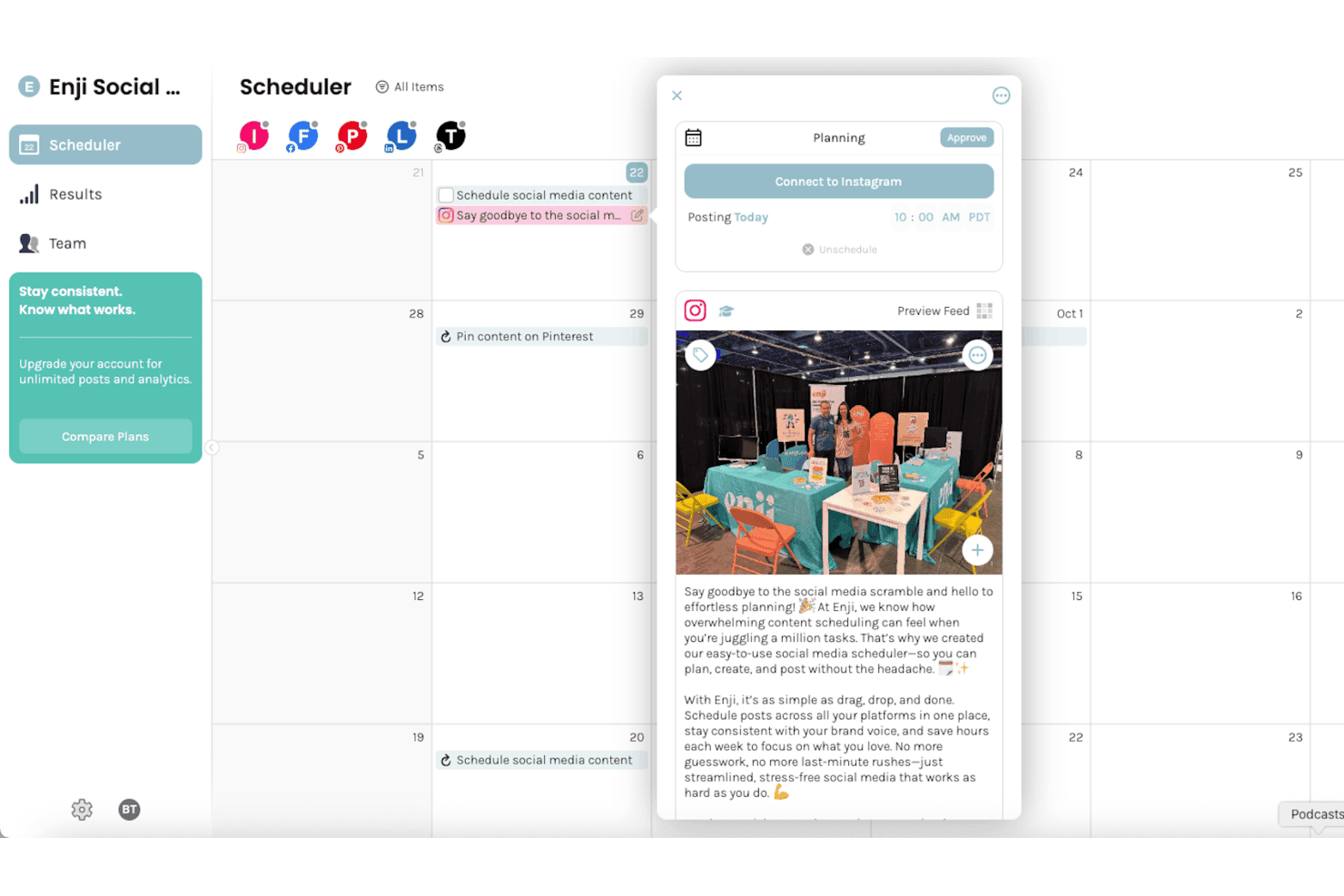
Enji lets users schedule and preview social media posts on a calendar. Enji is a social media marketing platform with a free plan for AI-drafted, brand-voiced captions, content planning, and post scheduling across social channels.
Who Is Enji Best For?
Enji suits small-business social media managers who need AI-powered social scheduling to maintain a consistent posting cadence with a lean team.
Why I Picked Enji
I picked Enji because it uses my custom brand profile to write social media captions and drop them straight into my publishing queue. I can turn high-level marketing goals into ready-to-publish social queues in minutes. It saves me from starting with a blank calendar and guessing what to say next. I can plan captions on the calendar, then approve posts for auto-publishing. The free tier supports 8 scheduled posts monthly and roughly five AI captions, enough to test a modest posting rhythm.
Enji Key Features
- Instagram grid preview: Preview how planned posts appear on your Instagram grid.
- Reels audio tools: Add and preview music or original audio for scheduled Reels.
- Post tagging: Add saved hashtags, account tags, and location tags to posts.
- Social media metrics: Review social media metrics and post-level analytics on the paid Social Media Only plan.
Enji Integrations
Enji has native integrations with Instagram, Facebook, TikTok, Pinterest, LinkedIn, Threads, YouTube, and Canva. Canva integration is paid-plan only; the free plan connects two social accounts, and no API is documented.
What's Free?
Enji offers a free plan alongside a 14-day trial. The free plan supports two connected social accounts, eight scheduled posts per month, and roughly five AI captions.
Pros and Cons
Pros:
- Reviewers praise responsive, hands-on marketing guidance
- Calendar brings captions and plans together
- Brand-voiced drafts need light editing
Cons:
- Reviewers want a mobile app for posting on the go
- AI caption allowance limits monthly output
Learn more about Enji: Best for user-friendly graphic design tools
- Free plan + free trial available
- From $144/user/year (billed annually)
Visit WebsiteCustomer Rating:4.6/5
Canva lets users create professional visuals easily with templates and editing tools. Canva is a graphic design platform aimed at businesses, marketers, and individuals looking to create visually appealing designs with ease. It provides tools for designing social media graphics, presentations, posters, and other visual content without requiring extensive design skills.
Why I picked Canva: Canva offers a free-forever plan that includes access to thousands of templates and design types, which aligns with its USP of graphic design tools. You can use its drag-and-drop editor to create professional designs quickly. The free version also includes basic photo editing tools and a library of images and icons to enhance your projects. This makes it perfect for teams and individuals looking to craft quality visuals without incurring costs.
Standout features & integrations:
Features include a user-friendly drag-and-drop editor that simplifies design creation. Canva offers a wide variety of templates for different design needs, from social media posts to marketing materials. You can also access a library of stock images and elements to enhance your designs.
Integrations include Google Workspace, Dropbox, Asana, Salesforce, Instagram, Facebook, Slack, Pinterest, Microsoft Teams, LinkedIn, HubSpot, and Mailchimp.
What's free? Canva provides a free-forever plan with access to a wide range of templates and design tools without charge.
Pros and Cons
Pros:
- Supports collaboration on designs
- Suitable for non-designers
- Access to stock images
Cons:
- Some elements require additional payment
- Has some design restrictions
Learn more about Canva:

Taskade helps teams organize tasks and collaborate in real time to boost productivity. Taskade is a collaborative task management tool designed for teams and individuals to organize projects, track tasks, and enhance productivity. It helps users with their workflow by offering a unified workspace for task management, note-taking, and collaboration.
Why I picked Taskade: Taskade offers a free plan that includes features like task lists, mind maps, and collaborative notes. You can create unlimited tasks and projects to keep your team organized. The free version also supports real-time collaboration, allowing your team to work together effectively. This makes it an ideal choice for teams looking to stay productive without incurring extra costs.
Standout features & integrations:
Features include a user-friendly interface that simplifies task management and project planning. Taskade offers templates for different project types to help you get started quickly. The platform also supports video conferencing, enabling internal communication with your team.
Integrations include Slack, Google Drive, X/Twitter, Microsoft Teams, Typeform, GitHub, Gmail, YouTube, HubSpot, and OneDrive.
What's free? Taskade provides a free-forever plan with essential task management and collaboration features available without charge.
Pros and Cons
Pros:
- Encourages team collaboration
- Easy to customize templates
- Supports multiple project views
Cons:
- Some features are limited by usage caps
- May need initial setup time
Learn more about Taskade: Best for versatile workspace integration
- Free plan available
- From $20/user/month
Visit WebsiteCustomer Rating:4.6/5
Notion AI simplifies teamwork with notes, tasks, and automation organized in one workspace. Notion AI is a productivity platform that combines note-taking, task automation, and project management, targeting startups, SMBs, and enterprises. It enhances team collaboration and workflow processing through its integrated workspace features.
Why I picked Notion AI: Notion AI provides a free plan that allows you to explore its core functionalities without any initial cost. You can create custom agents for workflow automation and connect various tools to improve productivity. The free version includes basic features like note-taking and task management, which align with its USP of offering a versatile workspace. This makes it particularly useful if you're looking to enhance collaboration and efficiency within your team.
Standout features & integrations:
Features include document translation, flowchart generation, and database autofill. You can also automate tasks and manage projects efficiently. The platform's AI capabilities help ease daily workflow and improve team productivity.
Integrations include Google Drive, Slack, Trello, Asana, Zapier, GitHub, and many others.
What's free? Notion AI offers a free plan that includes basic features for note-taking and task management, with limited trial access to advanced AI functionalities.
Pros and Cons
Pros:
- Easy task automation
- Suitable for teams of all sizes
- Versatile workspace for various needs
Cons:
- Small teams may find it too complex at first
- Most users will need time to learn full features
Learn more about Notion AI: Best for newsletter creation
- 30-day free trial + free plan + free demo available
- From $43/month (billed annually)
Visit WebsiteCustomer Rating:4.5/5
beehiiv offers tools for creating and growing newsletters with built-in analytics. beehiiv is an email marketing platform tailored for content creators and marketers looking to build and grow their audience through newsletters. It provides tools for designing, sending, and analyzing newsletter performance to enhance audience engagement.
Why I picked beehiiv: beehiiv offers a free plan that allows you to send newsletters to up to 2,500 subscribers. This makes it accessible for small teams or individuals starting with email marketing. The free version includes features like drag-and-drop email design and basic analytics. You can also access a variety of templates for your newsletter process.
Standout features & integrations:
Features include a drag-and-drop editor that simplifies email design. It provides advanced analytics to help you understand your audience better. beehiiv offers customizable templates to fit your brand's style.
Integrations include Stripe, Google Analytics, WordPress, Shopify, Zapier, Patreon, Giphy, and Unsplash.
What's free? beehiiv offers a free-forever plan, allowing users to manage up to 500 subscribers without any charge.
Pros and Cons
Pros:
- Offers various templates
- Access to basic analytics
- Suitable for small audiences
Cons:
- Advanced analytics not included
- Limited to basic features only
Learn more about Beehiiv:

AdCreative.ai generates ad designs to boost engagement and streamline ad creation. AdCreative.ai is a creative design platform aimed at marketers and businesses looking to enhance their advertising efforts. It specializes in generating visually appealing ad designs that can improve engagement and conversion rates.
Why I picked AdCreative.ai: The platform offers a free trial that gives you access to its ad design templates. These templates are beneficial for quickly creating professional ads without needing design skills. You can generate multiple variations to test which ads perform best. This makes it ideal for teams looking to organize their ad creation process.
Standout features & integrations:
Features include AI-driven design suggestions to optimize your ad creatives. It provides performance predictions to help you choose the best designs. You can also utilize the platform to generate multiple ad variations in seconds.
Integrations include Facebook, Google Ads, Instagram, LinkedIn, Canva, HubSpot, Shopify, Mailchimp, and Hootsuite.
What's free? AdCreative.ai offers a limited-time free trial where users can explore its features without a long-term commitment.
Pros and Cons
Pros:
- Suitable for non-designers
- Supports creative testing
- Quick ad design process
Cons:
- Most users will need marketing knowledge for best results
- Advanced features need time to learn
Learn more about AdCreative.ai: Best for presentation creation
- Free plan available
- From $8.33/month (billed annually)
Visit WebsiteCustomer Rating:4.5/5
SlidesAI automatically creates clean presentations from text to save time and improve visuals. SlidesAI is an AI-powered presentation tool designed for educators, professionals, and students to quickly create visually appealing presentations. It simplifies the process of generating slides by allowing users to input topics, scripts, or notes, and then automatically creates slide outlines and themes.
Why I picked SlidesAI: SlidesAI offers a free version that includes essential features for presentation creation. You can create presentations in Google Slides and PowerPoint without needing design skills. The free version supports multiple languages and provides basic customization options. This makes it ideal for those looking to save time and enhance engagement with minimal effort.
Standout features & integrations:
Features include the ability to edit themes and remix slides to fit your needs. SlidesAI supports over 100 languages, allowing for diverse use. The platform also provides add-ons for Google Slides and PowerPoint to improve the presentation process.
Integrations include Google Slides and PowerPoint.
What's free? SlidesAI offers a free-forever plan with basic presentation creation features available without charge.
Pros and Cons
Pros:
- Increases audience engagement
- No design skills required
- Supports multiple languages
Cons:
- Generated slides may require further editing
- Limited customization for branding or visual style
Learn more about SlidesAI: Best for multi-app workflow automation
- Free plan available
- From $19.99/month (billed annually)

Zapier automates workflows between apps with free tools to improve efficiency. Zapier is an automation tool designed for businesses and individuals looking to connect different apps and automate workflows. It enables users to create automated actions between apps, saving time and reducing manual tasks.
Why I picked Zapier: Zapier offers a free plan that allows you to automate workflows between apps, which aligns with its USP of workflow automation. You can set up "Zaps" to automate repetitive tasks without coding knowledge. The free version includes access to basic apps and allows for single-step automation. This makes it an excellent choice for small teams looking to improve efficiency without extra costs.
Standout features & integrations:
Features include a simple interface for creating automated workflows that connect your favorite apps. Zapier provides customizable triggers and actions to fit your specific needs. The platform also offers a task history feature to track and manage your Zaps effectively.
Integrations include Google Sheets, Slack, Trello, Mailchimp, Salesforce, Asana, Gmail, HubSpot, Dropbox, and Shopify.
What's free? Zapier offers a free-forever plan with basic automation features and limited task runs per month.
Pros and Cons
Pros:
- Reduces manual work
- Suitable for small teams
- No coding required
Cons:
- New users will need time to learn the platform
- Some apps require a paid plan
Learn more about Zapier: Best for optimizing content for search engines
- Free trial + free demo available
- From $49/month (billed annually)

Surfer SEO helps optimize content and improve search visibility with built-in AI tools. Surfer SEO is a content optimization platform designed for marketing managers, SEO specialists, and content creators. It focuses on enhancing online visibility by optimizing content for search engines and conducting site audits.
Why I picked Surfer SEO: Surfer SEO offers a free Chrome extension that provides essential SEO insights directly in your browser. You can access AI writing tools to help create optimized content without additional costs. The platform also includes free courses on SEO optimization, making it a valuable resource for users looking to improve their SEO skills. These free offerings align with its USP, providing tools to optimize content effectively.
Standout features & integrations:
Features include a content editor for crafting high-quality content and a SERP analyzer for competitor comparison. The platform also offers AI tools for generating and refining articles, which can save you time and improve search rankings.
Integrations include Google Docs, WordPress, ChatGPT, Jasper, Gemini, Semrush, Zapier, Ahrefs, Perplexity, and many others.
What's free? Surfer SEO offers a free Chrome extension and AI writing tools, along with free SEO courses, without any time restrictions.
Pros and Cons
Pros:
- Actionable feedback on content
- Access to free SEO courses
- AI writing tools included
Cons:
- Some users may need additional tools for a complete SEO strategy
- Beginners will need time to learn the platform
Learn more about Surfer SEO:
Diğer Ücretsiz Yapay Zekâ Pazarlama Araçları
Ücretsiz planlar veya deneme sürümleri sunan bazı ek yapay zekâ pazarlama aracı seçenekleri şunlardır. Bu araçlar kısa listeme girmemiş olsa da göz atmaya değer:
- 11Lexica ArtBest for AI-generated art
- 12ElicitBest for research assistance
- 13Koala AIBest for AI-driven content ideas
- 14Browse AIBest for web data extraction
- 15GumloopBest for automating repetitive marketing tasks
- 16FounderPalBest for startup guidance
- 17IndexlyBest for index monitoring
- 18MidjourneyBest for AI-driven artistic visuals
- 19ThryvBest for small business management
- 20Sivi AIBest for AI-generated graphic designs
- 21ClayBest for personal relationship management
- 22NotebookLMBest for organizing research notes
- 23Outbound.comBest for targeted email campaigns
How I Evaluate Free AI Marketing Tools
I evaluate every tool against baseline criteria—like whether the free plan actually covers ad copy and social posts—then weigh differentiators like AI model quality and integration depth.
Core Functionality (Table Stakes For This List)
When I'm selecting tools for my list, I rank each one on a scale from 0 (does not offer the functionality) to 5 (excels in this area) for each core functionality listed below. Then, I calculate the tool's total score into a percentage. Each tool needs to achieve a minimum total score of 65% to be considered for inclusion.
- AI Content Generation: I look for tools that can produce usable marketing copy across formats—think blog intros, Google Ads headlines, product descriptions, and email subject lines—without heavy editing.
- Genuinely Free Plan: The tool needs a perpetual free tier, not a 14-day trial. I check whether the free plan includes enough usage to actually write a week's worth of social posts or a couple of blog drafts.
- Marketing-Specific Use Cases: General-purpose chatbots don't qualify. I evaluate whether the platform is built around marketing workflows like campaign briefs, landing page copy, or ad variations.
- Multi-Format Output Support: A tool that only writes tweets isn't enough. I look for coverage across at least a few channels—social captions, email sequences, blog content, or ad copy within one platform.
- Brand & Tone Controls: I check whether you can set parameters like tone, target audience, or brand voice so outputs match your guidelines instead of sounding generic across every generation.
- Templates or Prompt Library: Pre-built templates for common tasks—like a product launch email or a LinkedIn carousel outline—save real time. I evaluate the library's depth and how well templates map to actual marketing jobs.
Once I have a list of tools that meet this criteria, I consider what sets each platform apart.
Differentiating Factors (What Sets Vendors Apart)
Here's how I compare and contrast different vendors:
Standout Features
Multimodal generation is a major differentiator. Tools that combine text, image, and video creation in one place save you from juggling a copywriting app, a design tool, and a video editor for a single campaign. I also look for built-in SEO scoring that evaluates drafts against target keywords and SERP data before you hit publish. Campaign workflow automation matters for teams running recurring content calendars, where chaining blog-to-social-to-email sequences into a repeatable flow cuts hours of manual coordination each week.
Beyond Features
Free plan limits matter more than most people realize. I check whether a tool's monthly word or credit cap can actually sustain a real content calendar—say, a week's worth of social posts and a couple of blog drafts—rather than running dry after a few test generations. Integration support is another key factor, particularly whether a tool connects to your CMS or email platform so you're not copy-pasting every output manually. Content ownership policies deserve attention too, since some free tiers reserve the right to use your inputs for model training or restrict commercial use of generated assets.
Ücretsiz Yapay Zekâ Pazarlama Araçları Nasıl Seçilir?
Karmaşık özellik listeleri ve fiyatlandırma yapıları, ücretsiz bir yapay zekâ pazarlama aracından gerçekten ne elde ettiğinizi anlamanızı zorlaştırabilir. Yazılım seçimi sürecinizde ilerlerken odağınızı korumanıza yardımcı olmak için göz önünde bulundurmanız gereken bazı faktörleri aşağıda bulabilirsiniz:
| Faktör | Dikkat Edilmesi Gerekenler |
| Ücretsiz Teklifin Kapsamı | Ücretsiz planda nelerin bulunduğunu kontrol edin. Gizli maliyetler olmadan temel ihtiyaçlarınızı karşıladığından emin olun. |
| Ölçeklenebilirlik | Aracın ekibinizle birlikte büyüyebileceğinden emin olun. Artan veri ve kullanıcı taleplerini karşılayabilmelidir. |
| Entegrasyonlar | Zaten kullandığınız araçlarla uyumluluk arayın. Bu, iş akışına sorunsuz entegrasyon sağlar. |
| Kullanım Kolaylığı | Kullanıcı dostu bir arayüze sahip bir araç seçin. Ekibiniz için minimum düzeyde eğitim gerektirmelidir. |
| Destek Seçenekleri | Mevcut destek kaynaklarını değerlendirin. Eğitimlere, sık sorulan sorulara ve canlı desteğe erişim kritik olabilir. |
| Özelleştirme | Aracı özel ihtiyaçlarınıza göre uyarlayıp uyarlayamayacağınızı kontrol edin. Bu esneklik üretkenliği artırabilir. |
| Güvenlik | Veri korumasını ve düzenlemelere uyumluluğu sağlayın. Güvenlik, müşteri güveni açısından hayati önem taşır. |
| Kullanıcı İncelemeleri | Diğer kullanıcıların geri bildirimlerini okuyun. Deneyimleri, aracın etkililiği hakkında değerli içgörüler sağlayabilir. |
Ücretsiz Yapay Zekâ Pazarlama Araçları Nedir?
Yapay zekâ pazarlama araçları, pazarlama görevlerini otomatikleştirmek ve optimize etmek için yapay zekâ kullanan yazılım çözümleridir. Bu araçlar genellikle ücretsiz planlar veya deneme sürümleri sunarak kullanıcıların temel özellikleri herhangi bir ücret ödemeden keşfetmesine olanak tanır. Bu araçlar; üretkenliği artırmak ve kampanya etkinliğini geliştirmek için pazarlamacılar, küçük işletme sahipleri ve içerik üreticileri tarafından yaygın olarak kullanılır. Otomasyon, veri analizi ve içerik oluşturma gibi özellikler kullanıcıların zamandan tasarruf etmesine, verimliliği artırmasına ve daha iyi sonuçlar elde etmesine yardımcı olur.
Ücretsiz Yapay Zekâ Pazarlama Araçlarının Özellikleri
Yapay zekâ pazarlama araçlarında yaygın olarak bulunan özellikleri ve bunlardan hangilerinin genellikle ücretsiz ve ücretli planlara dâhil edildiğini inceleyelim.
Genellikle Ücretsiz Yapay Zekâ Pazarlama Araçlarının Özellikleri
- Otomasyon: Zamandan tasarruf etmek ve verimliliği artırmak için tekrarlayan görevleri otomatikleştirir.
- Temel analizler: Veriye dayalı kararlar alınmasına yardımcı olmak için kampanya performansı hakkında içgörüler sunar.
- Şablon erişimi: Pazarlama materyallerine hızlı bir başlangıç yapmak için kullanıma hazır şablonlar sunar.
- İçerik oluşturma: Kampanya oluşturma ve etkileşim süreçlerine yardımcı olmak için pazarlama içerikleri oluşturur.
- Basit entegrasyonlar: İş akışlarını kolaylaştırmak ve üretkenliği artırmak için temel uygulamalara bağlanır.
Genellikle Ücretli Yapay Zekâ Pazarlama Araçlarının Özellikleri
- Gelişmiş analizler: Stratejik planlama için daha kapsamlı içgörüler ve öngörüsel analiz sunar.
- Gelişmiş özelleştirme: Geliştirilmiş işlevsellik için kullanıcıların aracı belirli iş gereksinimlerine göre uyarlamasına olanak tanır.
- Çok adımlı iş akışları: Karmaşık pazarlama görevlerini yönetmek için kapsamlı otomasyon süreçlerinin kullanılmasını sağlar.
- Gerçek zamanlı iş birliği: Canlı güncellemeler ve geri bildirimlerle ekiplerin projeler üzerinde iş birliği yapmasını destekler.
- Geliştirilmiş güvenlik: Veri korumasını ve uyumluluğu sağlamak için ek güvenlik katmanları sunar.
Ücretsiz Yapay Zekâ Pazarlama Araçlarının Faydaları
Ücretsiz yapay zekâ pazarlama araçlarını uygulamak, ekibiniz ve işletmeniz için çeşitli faydalar sağlar. Yararlanabileceğiniz birkaç fayda şunlardır:
- Maliyet tasarrufu: Para harcamadan temel pazarlama özelliklerine erişin; bu, küçük işletmeler ve yeni girişimler için idealdir.
- Zaman verimliliği: Daha stratejik faaliyetlere zaman ayırabilmek için tekrarlayan görevleri otomatikleştirin.
- Artan üretkenlik: Pazarlama materyallerini ve kampanyaları hızlı bir şekilde oluşturmak için şablon ve içerik oluşturma özelliklerini kullanın.
- Veriye dayalı içgörüler: Bilinçli kararlar almak ve pazarlama stratejilerini geliştirmek için temel analizlerden yararlanın.
- Esneklik: Mevcut iş akışlarını geliştirmek ve ekibinizin ihtiyaçlarına uyum sağlamak için temel uygulamalarla entegre olun.
- Erişilebilirlik: Mali bir yükümlülük altına girmeden işletmeniz için en uygun seçeneği bulmak amacıyla farklı araçları deneyin.
Ücretsiz Yapay Zekâ Pazarlama Araçlarının Maliyetleri ve Fiyatlandırması
Bu makaleye, ücretsiz olarak kullanılabilen en iyi yapay zekâ pazarlama aracı seçeneklerini aradığınız için geldiğinizi biliyorum. Ancak ücretsiz planlar yalnızca sınırlı özellikler sunduğundan, gelecekte planınızı yükseltmeniz gerekme ihtimali yüksektir.
Aşağıdaki tablo, yapay zekâ pazarlama aracı çözümlerindeki yaygın planları, ortalama fiyatlarını ve genellikle dâhil edilen özellikleri özetlemektedir:
Yapay Zekâ Pazarlama Araçları İçin Plan Karşılaştırma Tablosu
| Plan Türü | Ortalama Fiyat | Yaygın Özellikler |
| Ücretsiz Plan | $0 | Temel otomasyon, temel analizler, şablon erişimi, içerik oluşturma ve basit entegrasyonlar. |
| Kişisel Plan | $8-$149/kullanıcı/ay | Geliştirilmiş şablonlar, gelişmiş analizler, çok adımlı iş akışları, öncelikli destek ve ek depolama alanı. |
| İşletme Planı | $14.99-$800/kullanıcı/ay | Gelişmiş özelleştirme, gerçek zamanlı iş birliği, geliştirilmiş güvenlik, veri dışa aktarma seçenekleri ve üst düzey destek. |
| Kurumsal Plan | $60+/kullanıcı/ay | Özel çözümler, özel hesap yönetimi, API erişimi, ölçeklenebilirlik seçenekleri ve kurumsal düzeyde güvenlik. |
Ücretsiz Yapay Zekâ Pazarlama Araçları Hakkında SSS
Ücretsiz yapay zekâ pazarlama araçları hakkında sık sorulan soruların bazı yanıtları:
Ücretsiz yapay zekâ pazarlama araçları ücretli olanlarla nasıl karşılaştırılır?
Ücretsiz yapay zekâ pazarlama araçları genellikle otomasyon ve analiz gibi temel özellikler sunar. Finansal bir taahhütte bulunmadan başlamanıza yardımcı olurlar. Bununla birlikte ücretli araçlar genellikle gelişmiş özellikler, daha fazla entegrasyon ve daha iyi destek sunar. Hangisinin sizin için doğru olduğuna karar vermek için ihtiyaçlarınızı ve bütçenizi göz önünde bulundurun.
Ücretsiz yapay zekâ pazarlama araçları diğer yazılımlarla entegre olabilir mi?
Evet, birçok ücretsiz yapay zekâ pazarlama aracı Google Sheets ve Slack gibi popüler uygulamalarla temel entegrasyonlar sunar. Bu entegrasyonlar iş akışlarını kolaylaştırmanıza ve verimliliği artırmanıza yardımcı olur. Ancak daha gelişmiş entegrasyonlar ücretli bir plan gerektirebilir.
Ücretsiz yapay zekâ pazarlama araçlarında veri kullanımıyla ilgili sınırlamalar var mı?
Ücretsiz planlar genellikle veri kullanımı veya otomatikleştirebileceğiniz görev sayısı konusunda kısıtlamalar içerir. Bu, ekibiniz büyürse veya ihtiyaçlarınız genişlerse bir sınıra ulaşabileceğiniz anlamına gelir. Kapsamlı kullanım için ücretsiz bir plana güvenmeden önce sınırlamaları kontrol edin.
Ücretsiz yapay zekâ pazarlama araçları müşteri desteği sunuyor mu?
Çoğu ücretsiz yapay zekâ pazarlama aracı, genellikle e-posta veya bilgi tabanı aracılığıyla sınırlı müşteri desteği sağlar. Canlı sohbet veya telefonla yardım gibi daha kapsamlı destek için ücretli bir plana yükseltme yapmanız gerekebilir.
Ücretsiz yapay zekâ pazarlama araçları ne kadar güvenli?
Güvenlik sağlayıcıya göre değişir, ancak çoğu ücretsiz yapay zekâ pazarlama aracı verilerinizi korumak için temel güvenlik özellikleri sunar. Güvenlik en önemli önceliğinizse sektör standartlarına uyan araçları arayın veya gelişmiş güvenlik seçeneklerine sahip ücretli bir planı değerlendirin.
Ücretsiz yapay zekâ pazarlama araçları işletmemle birlikte ölçeklenebilir mi?
Ücretsiz yapay zekâ pazarlama araçları iyi bir başlangıç noktası olabilir, ancak büyüyen işletmelerle birlikte iyi ölçeklenmeyebilir. İhtiyaçlarınız geliştikçe daha fazla ölçeklenebilirlik ve gelişmiş özellikler sunan ücretli bir plana geçmeniz veya başka araçları değerlendirmeniz gerekebilir.