
YouScan is a social listening tool for brands and marketing teams that need to monitor online conversations, track brand mentions, and analyze visual content across social media. I'd reach for it over something like Brandwatch if image recognition matters to your strategy—YouScan's AI-powered visual analysis picks up logo appearances and brand scenes in photos and videos that text-based monitoring misses entirely.
YouScan Evaluation Summary
4.8/5
- From $499/month (billed annually)
- Free demo available
Why Trust Our Software Recommendations
6,700+
Reviews
20
Industry experts
16+
Evaluation factors
14
Years
Our team has been testing and reviewing software since 2012. As marketing leaders ourselves, we know how difficult—and important—it is to choose the right software.
For this guide, we evaluated tools using hands-on testing and independent research, scoring tools using our selection criteria.
Our reviews reflect our human editorial judgment, not a sales pitch.
Expert reviewers:
 Gui DrusinaCreative Director
- Shriya GhateSenior Marketing Lead
 Amanda JacquesMarketing Ops Leader

YouScan Overview
If you’re judging social media listening tools by AI-powered image recognition, visual analytics, and intuitive dashboards, YouScan is a top contender. I think its interface is easy to navigate, onboarding is quick, and support is responsive. Pricing is mid-tier, but you get advanced features like logo detection and sentiment analysis that many tools lack. Integration options are solid, though not the most extensive.
I’d suggest YouScan is best for brands and agencies that need deep visual insights and want to move fast, but it may not be ideal if you need highly customized integrations or niche data sources.
Pros
- AI-powered image and logo recognition for visual mentions
- Highly accurate sentiment analysis across multiple languages
- Real-time alerts for brand and competitor mentions
Cons
- Filtering out irrelevant mentions can require manual effort
- Limited audience analysis compared to some competitors
- Dashboards and reporting options can feel rigid
Is YouScan Right For Your Needs?
Who Would be a Good Fit for YouScan?
YouScan is a strong choice for teams that need advanced visual analytics, real-time brand monitoring, and multilingual sentiment analysis. I think it’s especially valuable for industries where brand visuals and public perception drive business outcomes. If your team relies on tracking visual content, managing brand reputation, or responding quickly to online trends, YouScan’s AI-powered features and real-time alerts can give you a clear edge.
- Consumer BrandsYouScan’s image recognition helps track logo usage and brand visuals.
- Marketing AgenciesAgencies can monitor multiple brands and deliver visual analytics to clients.
- PR DepartmentsReal-time alerts and sentiment analysis support crisis management.
- Retail ChainsVisual listening uncovers in-store product placement and customer experience.
- Hospitality GroupsTrack guest feedback and brand visuals across social platforms.
- Multinational EnterprisesMultilingual sentiment analysis supports global brand monitoring.
Who Would be a Bad Fit for YouScan?
YouScan may not be the best option for organizations that need deep audience analytics, highly customized integrations, or niche data sources. If your team’s focus is on granular demographic breakdowns, technical integrations, or monitoring platforms outside mainstream social media, you’ll likely find YouScan’s feature set limiting compared to other tools.
- Small StartupsPricing and advanced features may exceed basic monitoring needs.
- B2B SaaS CompaniesLimited focus on niche industry forums and technical communities.
- Government AgenciesLacks specialized compliance and public sector data integrations.
- Healthcare ProvidersDoesn’t offer HIPAA-compliant monitoring or medical-specific sources.
- Financial ServicesMisses out on finance-specific sentiment and regulatory monitoring.
- Academic ResearchersLimited tools for deep audience segmentation and custom data exports.
How We Test & Score Tools
We’ve spent years building, refining, and improving our software testing and scoring system. The rubric is designed to capture the nuances of software selection and what makes a tool effective, focusing on critical aspects of the decision-making process.
Below, you can see exactly how our testing and scoring works across seven criteria. It allows us to provide an unbiased evaluation of the software based on core functionality, standout features, ease of use, onboarding, customer support, integrations, customer reviews, and value for money.
Core Functionality (25% of final scoring)
The starting point of our evaluation is always the core functionality of the tool. Does it have the basic features and functions that a user would expect to see? Are any of those core features locked to higher-tiered pricing plans? At its core, we expect a tool to stand up against the baseline capabilities of its competitors.
Standout Features (25% of final scoring)
Next, we evaluate uncommon standout features that go above and beyond the core functionality typically found in tools of its kind. A high score reflects specialized or unique features that make the product faster, more efficient, or offer additional value to the user.
We also evaluate how easy it is to integrate with other tools typically found in the tech stack to expand the functionality and utility of the software. Tools offering plentiful native integrations, 3rd party connections, and API access to build custom integrations score best.
Ease of Use (10% of final scoring)
We consider how quick and easy it is to execute the tasks defined in the core functionality using the tool. High scoring software is well designed, intuitive to use, offers mobile apps, provides templates, and makes relatively complex tasks seem simple.
Onboarding (10% of final scoring)
We know how important rapid team adoption is for a new platform, so we evaluate how easy it is to learn and use a tool with minimal training. We evaluate how quickly a team member can get set up and start using the tool with no experience. High scoring solutions indicate little or no support is required.
Customer Support (10% of final scoring)
We review how quick and easy it is to get unstuck and find help by phone, live chat, or knowledge base. Tools and companies that provide real-time support score best, while chatbots score worst.
Customer Reviews (10% of final scoring)
Beyond our own testing and evaluation, we consider the net promoter score from current and past customers. We review their likelihood, given the option, to choose the tool again for the core functionality. A high scoring software reflects a high net promoter score from current or past customers.
Value for Money (10% of final scoring)
Lastly, in consideration of all the other criteria, we review the average price of entry level plans against the core features and consider the value of the other evaluation criteria. Software that delivers more, for less, will score higher.
Core Features
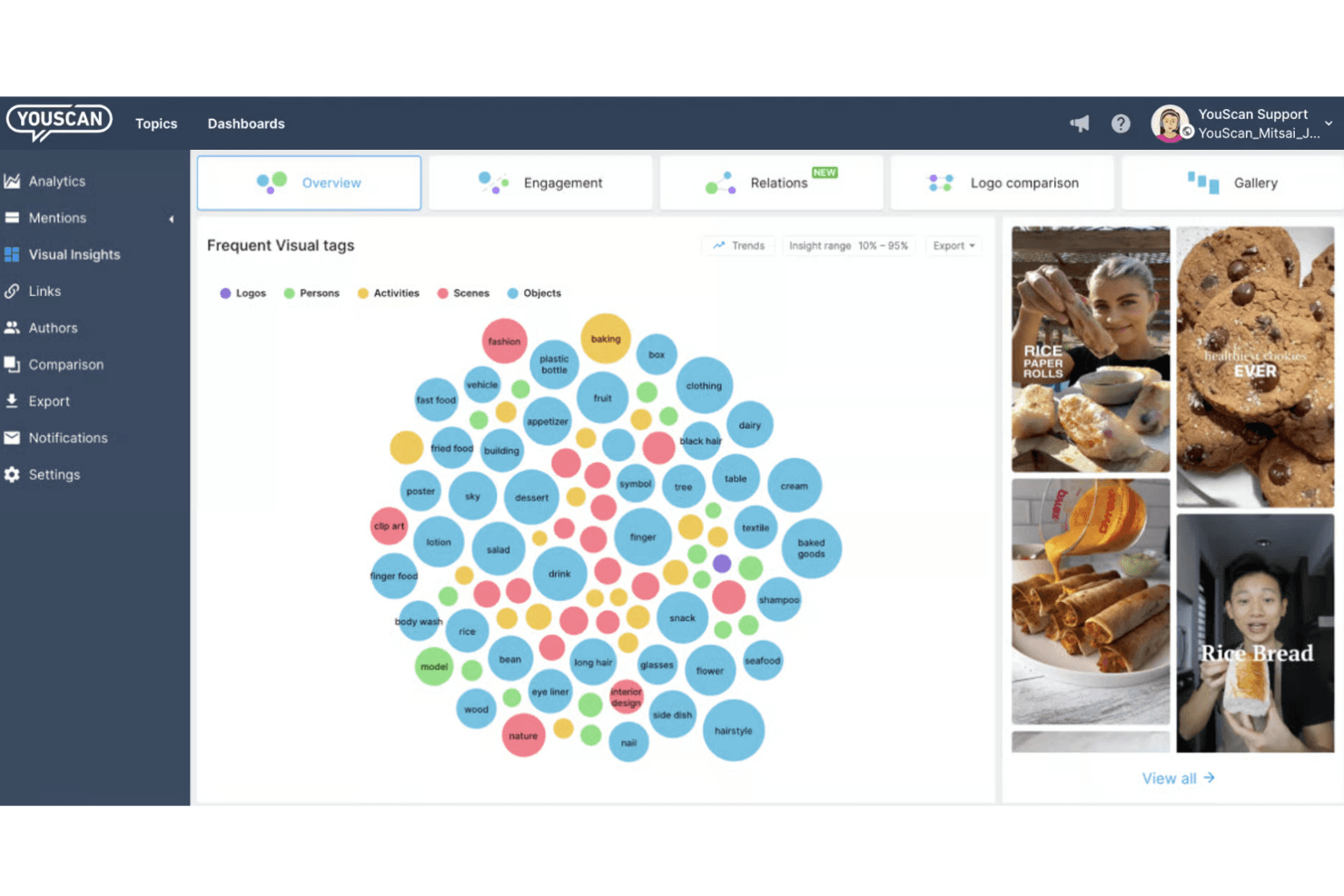
AI-Powered Visual Insights
Detects logos, objects, and scenes in images for deep visual analytics. Brands can see real-world product usage and measure brand visibility.
Sentiment Analysis
Analyzes text and images to determine sentiment in multiple languages. This helps teams quickly spot shifts in public opinion.
Real-Time Alerts
Sends instant notifications for brand and competitor mentions. Teams can respond to crises or trends as they happen.
Insights Copilot (AI Agent)
Conversational AI agent delivers actionable insights and answers queries. Users can interact with data in plain language for faster decision-making.
Brand Reputation Management
Tracks customer perceptions and satisfaction across social channels. Teams can identify what delights or disappoints customers.
Competitor Analysis
Monitors competitor mentions and visual presence online. Users can benchmark brand performance and discover new market opportunities.
Ease of Use
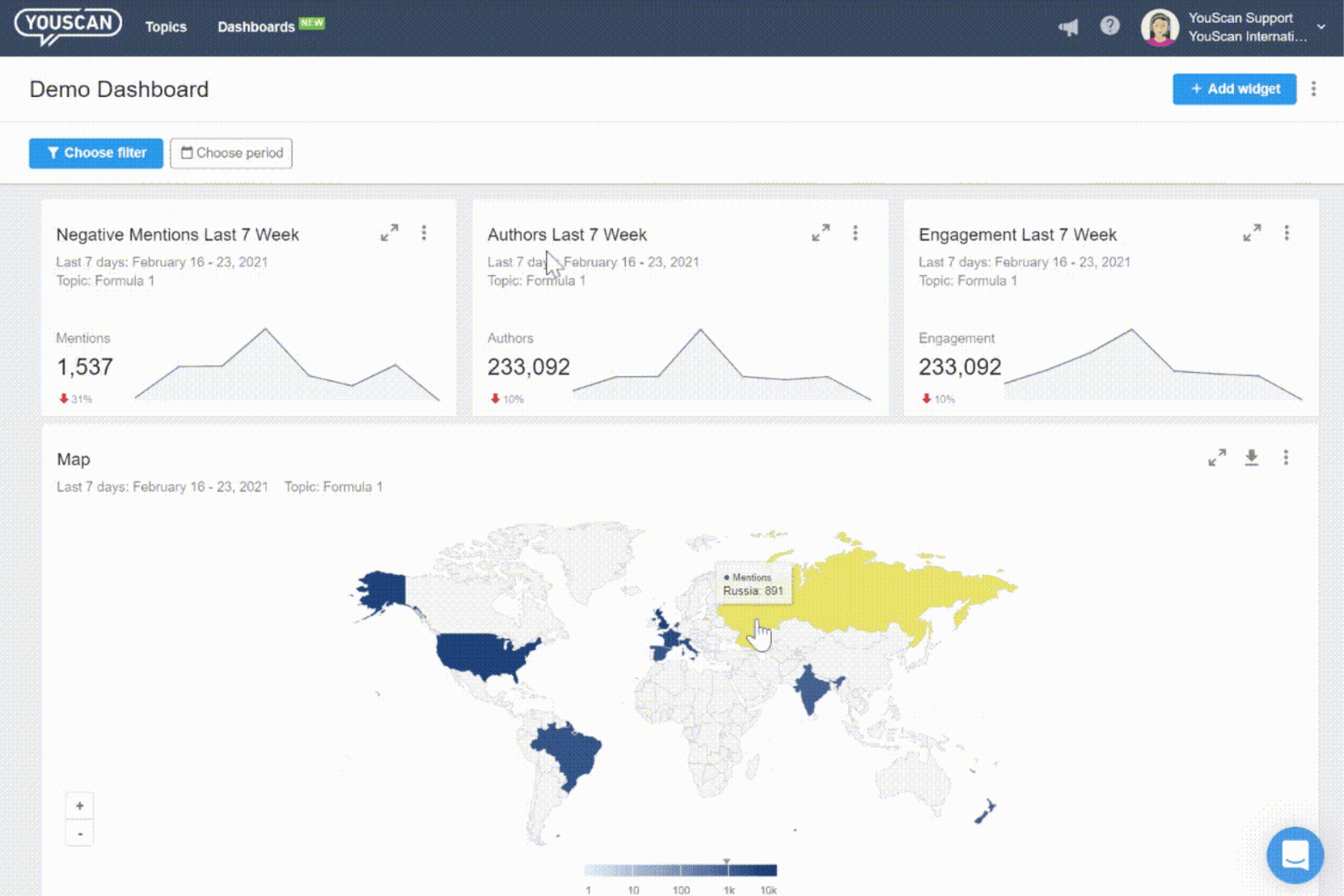
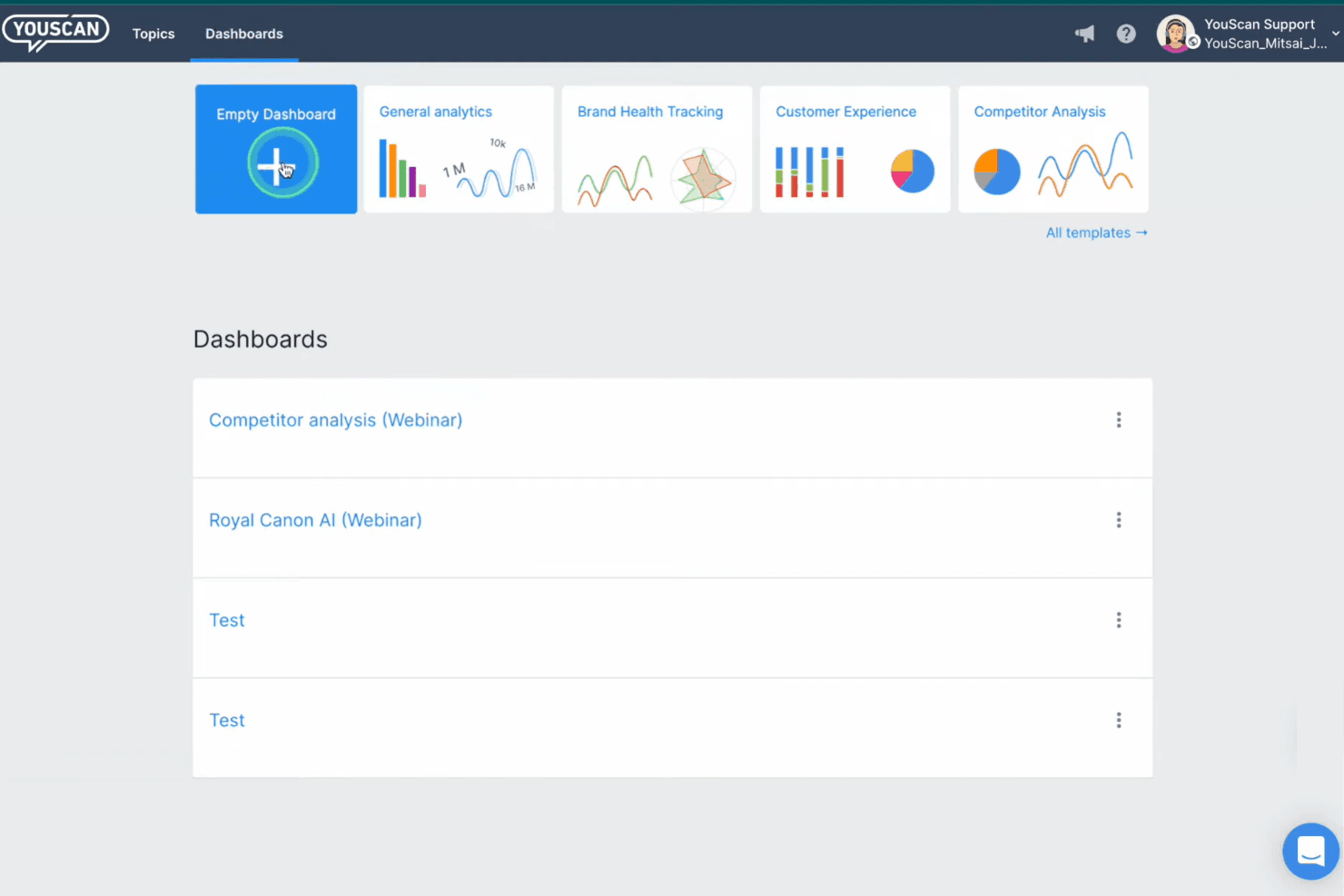
YouScan’s interface is clean, modern, and easy to navigate, making onboarding straightforward even for new users. I’ve seen users mention that dashboards are intuitive and that setting up monitoring queries is quick.
The Insights Copilot AI agent adds to the usability by letting you ask questions in plain language. While some advanced reporting features can feel a bit rigid, most teams will find day-to-day tasks simple and efficient.
Integrations
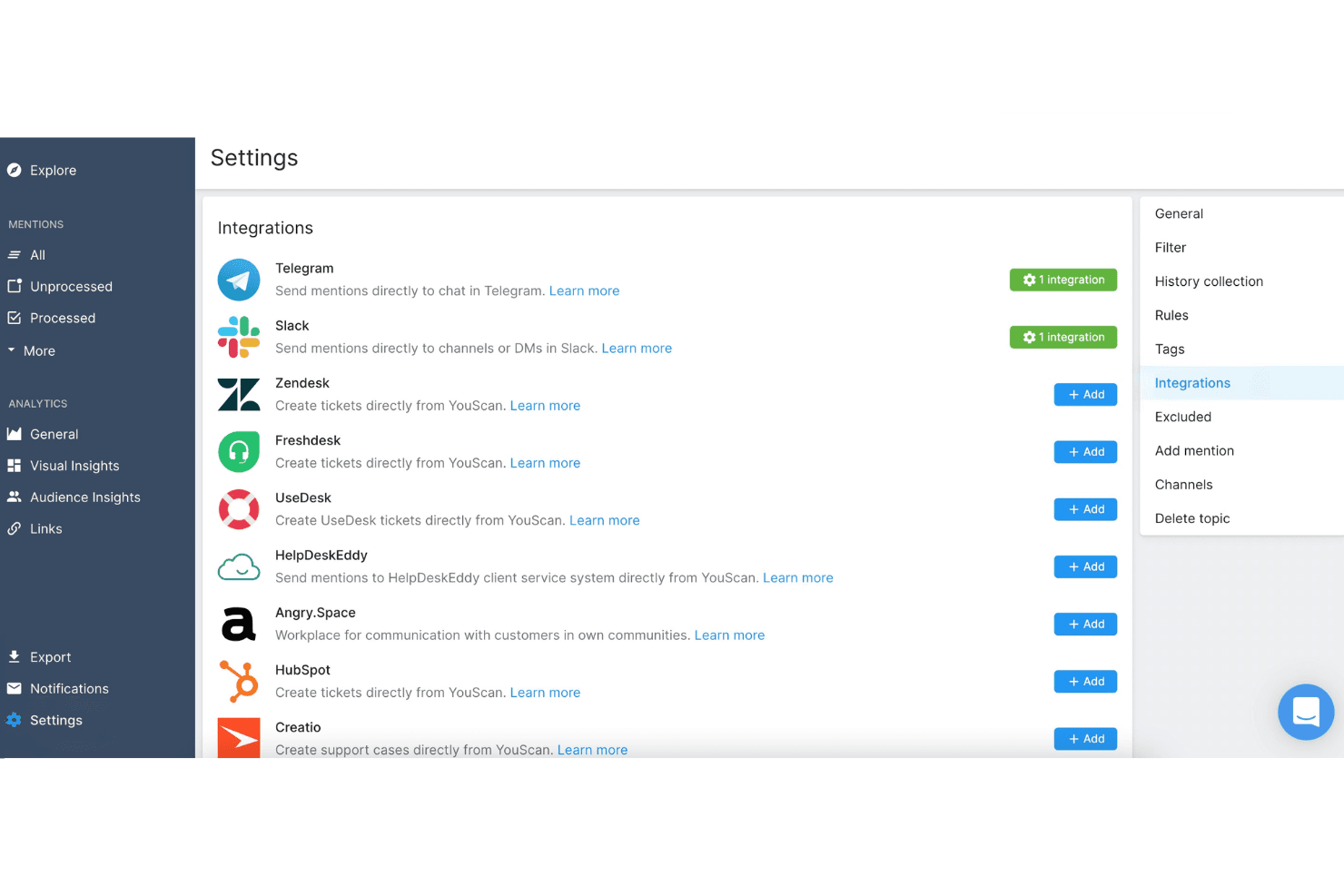
YouScan integrates with Slack, Telegram, Microsoft Teams, Zendesk, HubSpot, Google Data Studio, Power BI, Sprout Social, Hootsuite, and Brandwatch, among others.
YouScan also offers a Social Intelligence API for custom integrations and data exports.
YouScan Specs
- Analytics: Yes
- API: Yes
- Approval Workflows: Yes
- Audience Targeting: Yes
- Brand Management: Yes
- Calendar Management: No
- Campaign Management: No
- Collaboration Support: Yes
- Conversion Tracking: No
- Custom Reports: No
- Dashboard: Yes
- Data Export: Yes
- Data Import: No
- Data Visualization: Yes
- External Integrations: Yes
- Feedback Management: Yes
- Keyword Tracking: Yes
- Knowledge Base: No
- Landing Pages: No
- Link Tracking: Yes
- Marketing Automation: No
- Multi-Account: Yes
- Multi-User: Yes
- Notifications: Yes
- Review Monitoring: Yes
- Scheduling: No
- Sentiment Analysis: Yes
- Social Media Monitoring: Yes
- Social-Media Integration: No
- Third-Party Plugins/Add-Ons: No
- Workflow Management: Yes


