

Un CMS pentru semnalizare digitală este o platformă de gestionare a conținutului care vă permite să controlați și să actualizați conținutul de pe ecranele digitale dintr-un singur tablou de bord. Dacă gestionați afișaje digitale și doriți o modalitate fiabilă și simplă de a publica conținut atractiv, probabil că sunteți în căutarea celui mai bun CMS pentru semnalizare digitală, potrivit nevoilor dumneavoastră. Alegerea CMS-ului potrivit vă poate scuti de nenumărate probleme, indiferent dacă instalați ecrane într-o singură locație sau în sute de locații.
În acest ghid, veți putea compara direct instrumentele de top, astfel încât să decideți cu încredere ce platformă se potrivește echipei, fluxului de lucru și obiectivelor dumneavoastră privind afișajele.
Why Trust Our Software Recommendations
6,700+
Reviews
20
Industry experts
16+
Evaluation factors
14
Years
Our team has been testing and reviewing software since 2012. As marketing leaders ourselves, we know how difficult—and important—it is to choose the right software.
For this guide, we evaluated tools using hands-on testing and independent research, scoring tools using our selection criteria.
Our reviews reflect our human editorial judgment, not a sales pitch.
Expert reviewers:
 Gui DrusinaCreative Director
- Shriya GhateSenior Marketing Lead
 Amanda JacquesMarketing Ops Leader

Tabel comparativ pentru CMS-urile de semnalizare digitală
Acest tabel comparativ rezumă detaliile privind prețurile pentru selecțiile mele de top de CMS-uri pentru semnalizare digitală.
Sorted by: Default
| Tool | Starting Price | Website | |
|---|---|---|---|
Best for cross-platform setup and scheduling | 5.0 out of 5 | $5/screen/month 14-day free trial + free demo available | Website |
Best for intuitive drag-and-drop editing | 4.9 out of 5 | $14/screen/month Free demo + 30-day free trial available | Website |
Best for education-focused display solutions | 4.8 out of 5 | $11/screen/month Free demo + 14-day free trial available | Website |
Best for robust app integrations and automation | 4.8 out of 5 | $20/screen/month 14-day free trial | Website |
Best for data-driven screen content management | 4.9 out of 5 | $8/device/month Free trial + free demo available | Website |
Best for AI-driven content personalization | 4.7 out of 5 | Pricing upon request Free demo available | Website |
Best for advanced rule-based content triggers | 4.3 out of 5 | $14/player/month Free demo + 30-day free trial available | Website |
Best for workplace and employee communications | Not rated | Pricing upon request Free demo available | Website |
Best for enterprise-grade dynamic campaigns | Not rated | Pricing upon request Not available | Website |
Best for in-store experience enhancement | Not rated | Pricing upon request Not available | Website |


Recenzii ale celor mai bune CMS-uri pentru semnalizare digitală
Mai jos sunt prezentate rezumatele mele detaliate ale celor mai bune CMS-uri pentru semnalizare digitală care au ajuns pe lista mea scurtă. Recenziile mele oferă o analiză detaliată a funcțiilor, integrărilor și celor mai potrivite cazuri de utilizare pentru fiecare platformă, pentru a vă ajuta să o găsiți pe cea mai bună pentru dumneavoastră.
 Best for cross-platform setup and scheduling
- 14-day free trial + free demo available
- From $5/screen/month
Visit WebsiteCustomer Rating:5/5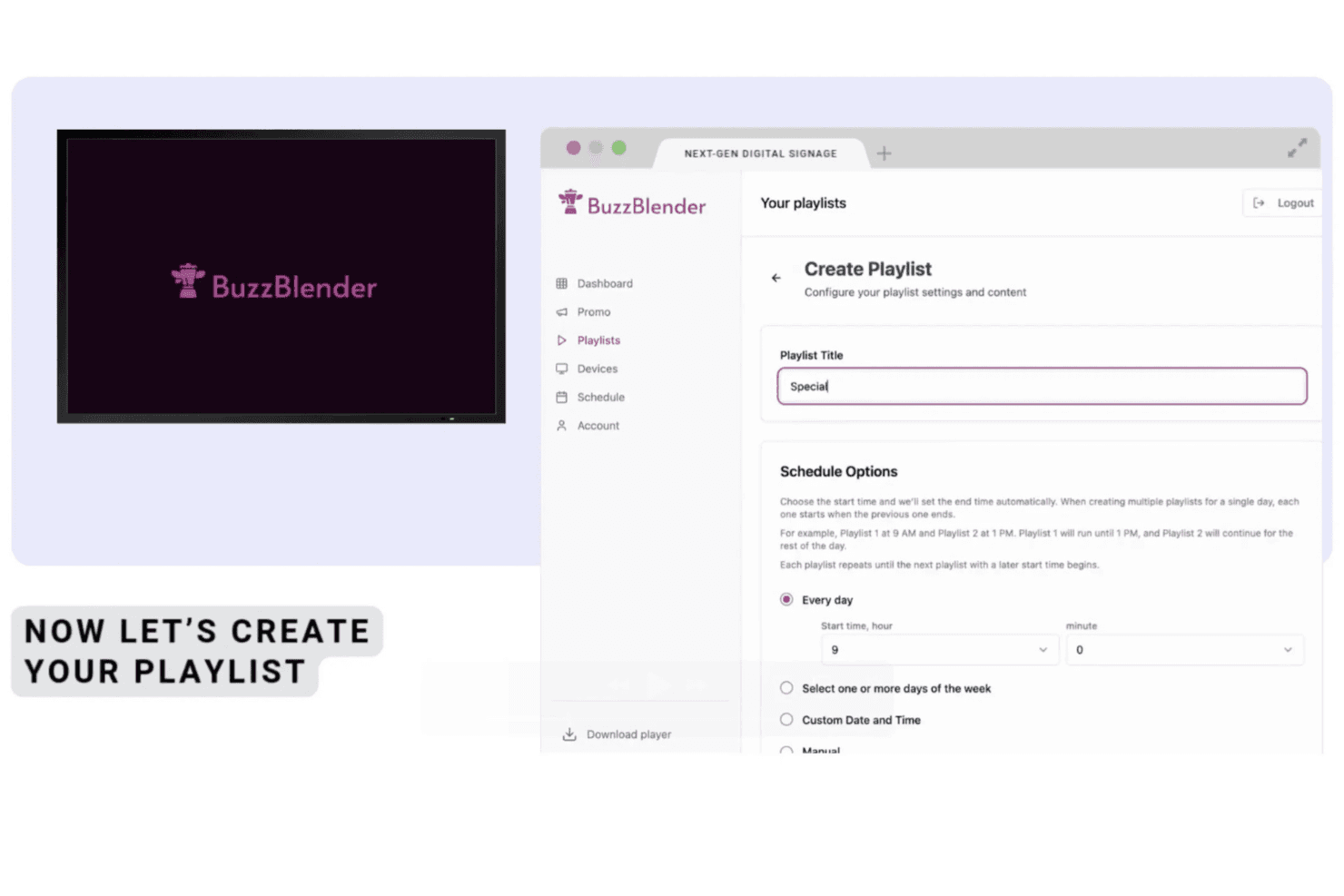
BuzzBlender allows users to create and schedule playlists with customizable titles and time-based scheduling options for digital signage displays. Buzzblender is a cloud-based digital signage CMS that lets you upload, schedule, and remotely manage content across LG webOS, Samsung Tizen, Android, Windows, and Linux screens from a single dashboard.
Who Is Buzzblender Best For?
Buzzblender suits small to mid-size businesses in retail, hospitality, and wellness that need to manage screens across multiple locations without a large IT team.
Why I Picked Buzzblender
Buzzblender earns its spot as one of the best on my shortlist because its native app support across LG webOS, Samsung Tizen, and Android TV means I can get screens live without browser workarounds or sideloading. I particularly like the calendar-based playlist scheduler, which lets me set dayparted content across multiple locations in a single session. Its certified LG webOS partner status also matters: it's not just compatible, it's purpose-built for the platform in a way most CMS tools simply aren't.
Buzzblender Key Features
- Dynamic QR code overlay: Add QR codes to any screen and track scan analytics for in-store campaigns.
- Multi-user team roles: Assign admin, editor, or viewer permissions to team members for controlled access.
- Video wall support: Display synchronized content across multiple screens, including Android and LG/Samsung commercial units.
- Free template library: Access ready-made layouts for menus and office content to speed up design work.
Buzzblender Integrations
Native integrations include Canva. An API is available for custom integrations.
Pros and Cons
Pros:
- Calendar scheduler handles dayparting across locations
- Quick screen setup without browser workarounds
- Supports LG, Samsung, and Android natively
Cons:
- Smaller app content library
- Limited reporting compared to enterprise CMS tools
Learn more about Buzzblender: Best for intuitive drag-and-drop editing
- Free demo + 30-day free trial available
- From $14/screen/month (billed annually)
Visit WebsiteCustomer Rating:4.9/5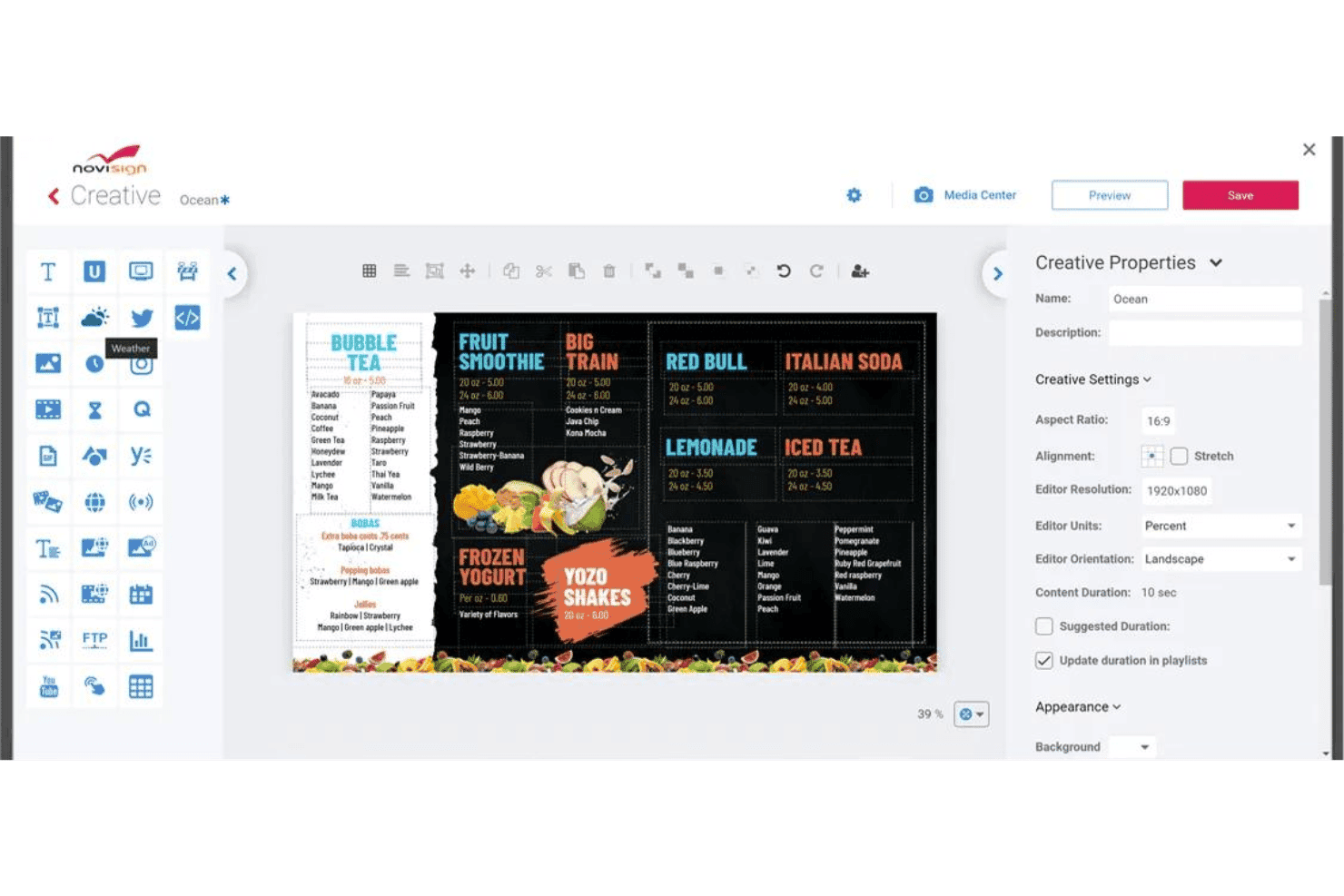
NoviSign offers a drag-and-drop digital signage creative editor with customizable menu board templates and content properties. NoviSign is a cloud-based digital signage CMS that lets you design, schedule, and remotely manage content with enhanced interactivity across distributed screen networks using a drag-and-drop editor, 50+ widgets, and multi-platform device support.
Who Is NoviSign Best For?
NoviSign is a strong fit for retail and hospitality marketing teams managing content across multiple locations who need a low-technical-barrier platform.
Why I Picked NoviSign
NoviSign earns its spot on my shortlist because the drag-and-drop design studio makes it genuinely fast to build polished signage content. I like that the 400+ customizable templates give my team a real starting point, and the 50+ widgets (weather, live social feeds, countdown timers) slot directly into layouts without any code. The videowall editor and IoT/RFID event triggers are features I've used to push real-time, context-aware content to grouped displays across locations.
NoviSign Key Features
- Offline playback resilience: Content automatically continues playing on screens during network outages with local storage.
- Proof-of-play reporting: Detailed logs and reports verify which content played on each screen and when.
- Multi-zone layouts: Create custom display zones to show video, tickers, weather, and other widgets simultaneously on a single screen.
- POS and business system integrations: Connect digital signage to POS, PowerBI, Google Drive, and other platforms for automated, real-time content updates.
NoviSign Integrations
NoviSign offers native integrations with Power BI, DataBox, Chartio, Tableau, Clover, Lightspeed, Salesforce, Canva, Ominalert, and more. An API is available for custom integrations.
Pros and Cons
Pros:
- Supports live content and real-time triggers
- Over 400 ready-made, customizable templates
- Fast editing with drag-and-drop studio
Cons:
- No built-in stock media or asset search
- Advanced permissions require higher-tier plan
Learn more about NoviSign: Best for education-focused display solutions
- Free demo + 14-day free trial available
- From $11/screen/month (USD, billed monthly)
Visit WebsiteCustomer Rating:4.8/5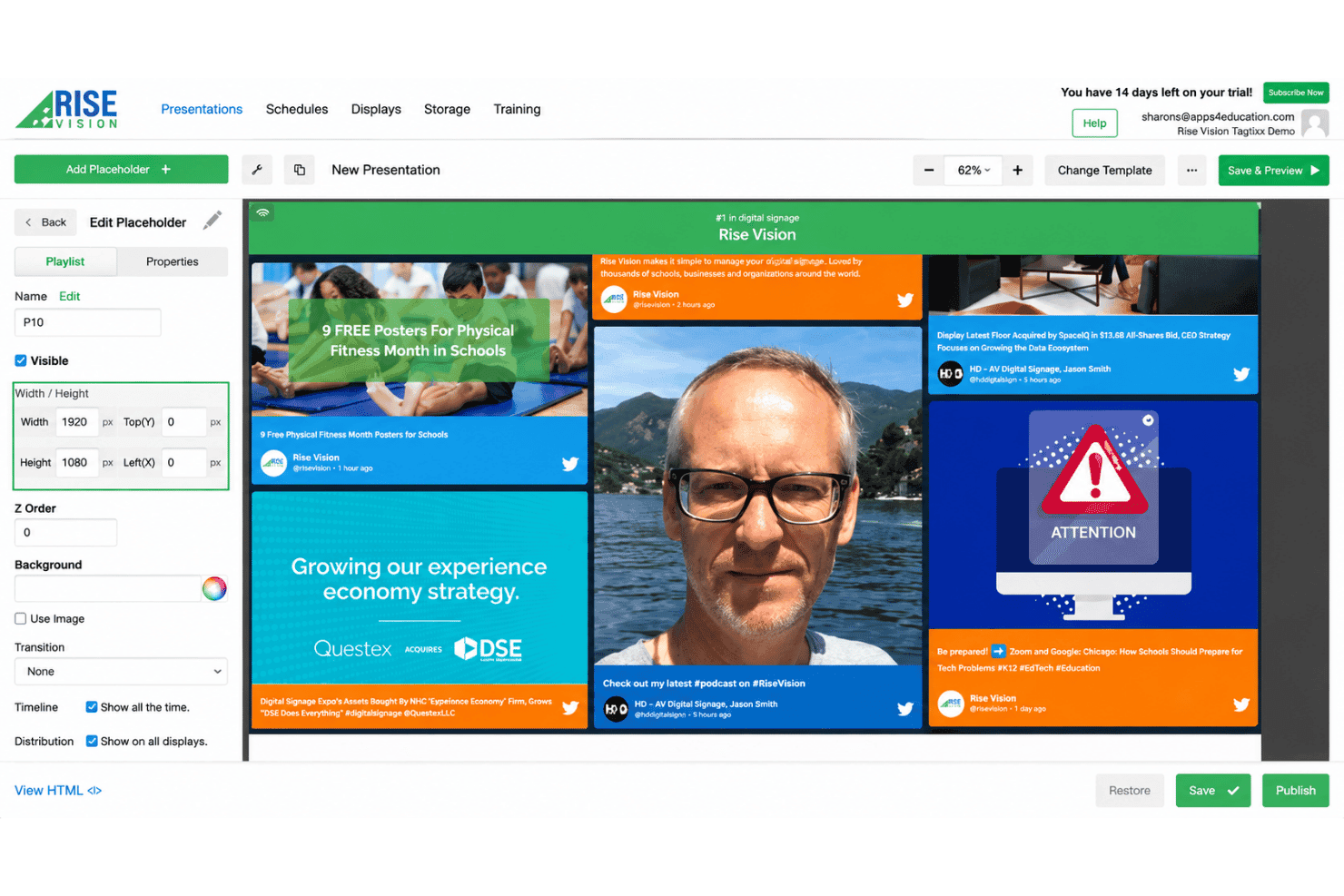
Rise Vision offers a drag-and-drop presentation editor with playlist management, placeholder properties, and live social media feed previews for digital signage displays. Rise Vision is a cloud-based digital signage CMS that combines content management, screen sharing, and emergency alerts across hardware-agnostic displays.
Who Is Rise Vision Best For?
Rise Vision is a strong fit for K-12 schools and school districts that need to manage signage, classroom screen sharing, and emergency alerts from one platform.
Why I Picked Rise Vision
Rise Vision earns its spot on my shortlist because no other digital signage CMS is built this specifically for how schools operate. The Enterprise plan covers unlimited displays per school for a flat $1,399/year, which makes district rollouts realistic on school budgets. I also like the teacher-specific user role, which lets classroom staff manage their own screens without affecting district content, plus native CAP alert integrations with E2Campus and CrisisGo.
Rise Vision Key Features
- Multi-zone layouts: Split displays into sections to show different content, like video, weather, or announcements simultaneously.
- Offline playback: Content keeps running on screens even during internet outages, syncing updates once back online.
- CAP emergency alert integration: Directly connect with services like Singlewire, Rave, or CrisisGo to trigger alerts across all displays.
- Device screenshot monitoring: View current snapshots of any display from the dashboard to quickly confirm what is playing.
Rise Vision Integrations
Rise Vision offers native integrations with Canva, Google Slides, Power BI, Domo, Google Sheets, Microsoft PowerPoint, Microsoft Calendar, Google Calendar, Meta (Facebook and Instagram), YouTube, and more.
Pros and Cons
Pros:
- Unlimited cloud storage for media files
- Custom roles for teachers and administrators
- Extensive template library for schools and events
Cons:
- Few retail or POS data integrations
- Limited analytics for measuring content performance
Learn more about Rise Vision: Best for robust app integrations and automation
- 14-day free trial
- From $20/screen/month (billed annually)
Visit WebsiteCustomer Rating:4.8/5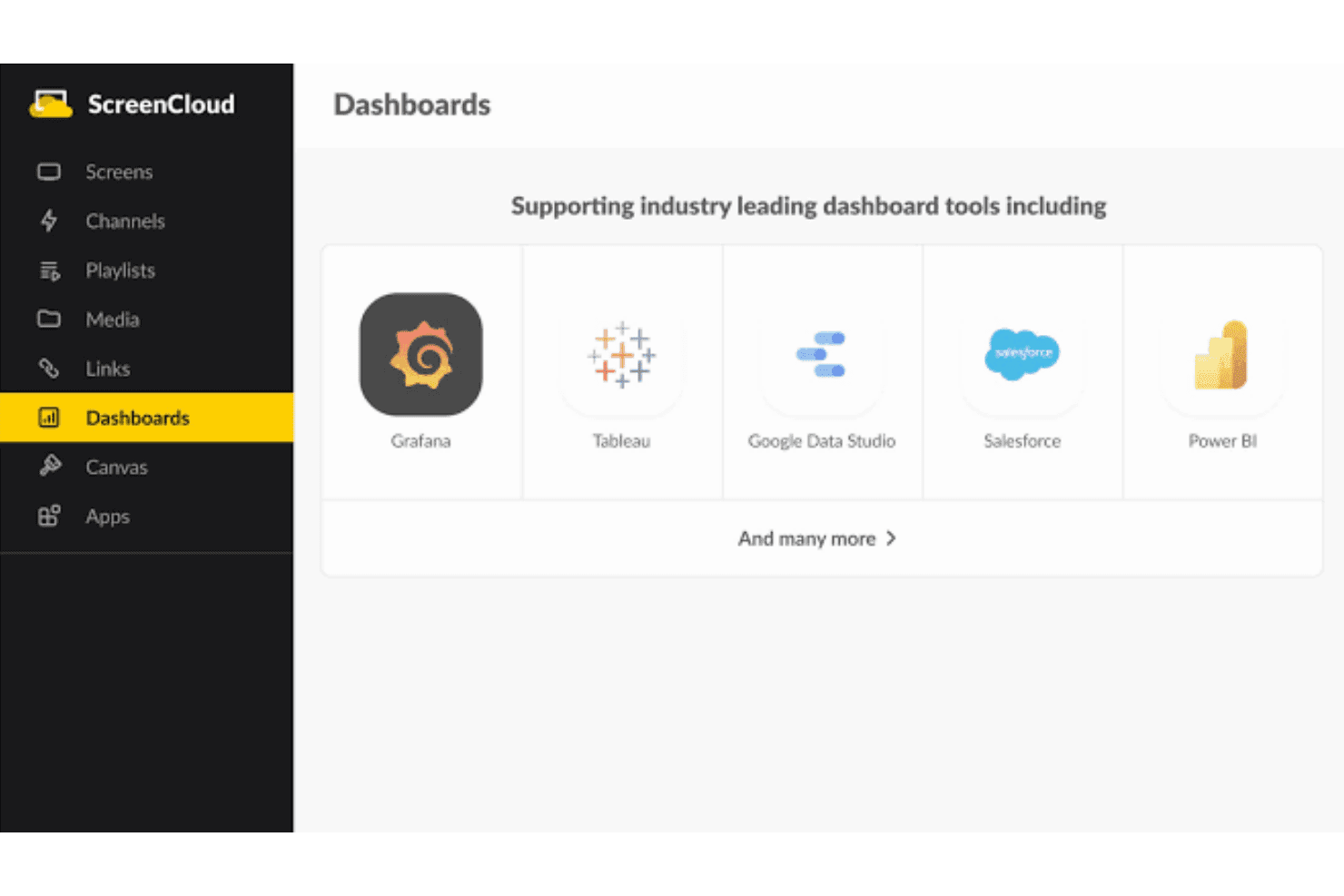
ScreenCloud supports industry-leading dashboard tools including Grafana, Tableau, Google Data Studio, Salesforce, and Power BI. ScreenCloud is a cloud-based digital signage CMS that lets you manage, schedule, and display content across screen networks, with built-in app integrations, a custom app builder, and remote device management across distributed locations.
Who Is ScreenCloud Best For?
ScreenCloud suits mid-market and enterprise teams optimizing content creation and managing screens across multiple locations, particularly in retail, manufacturing, and healthcare.
Why I Picked ScreenCloud
ScreenCloud earns its spot on my shortlist because of how far its integration layer actually goes. I love that the Dashboards feature lets me pull in gated tools like Salesforce or Datadog directly onto screens, without needing workarounds. The Playgrounds custom app builder and GraphQL API also mean my team can build and automate content logic that goes well beyond what most digital signage CMS platforms support out of the box.
ScreenCloud Key Features
- Multi-zone layouts: Create displays with separate content zones for video, tickers, weather, and social feeds on one screen.
- Proof-of-play reporting: Access detailed logs that show exactly which content played on each screen and when.
- ScreenCloud OS compatibility: Deploy signage using ScreenCloud’s proprietary operating system or integrate with supported third-party hardware.
- Bulk device management: Monitor, group, and update multiple screens remotely from a single cloud dashboard.
ScreenCloud Integrations
ScreenCloud offers over 80 native integrations, including Bonusly, Firstup, Unily, Canva, YouTube, Power BI, Vimeo, Simpplr, and Slack. An API and webhooks are available for custom integrations.
Pros and Cons
Pros:
- Reliable offline playback for uninterrupted display
- Multi-zone layouts with custom content widgets
- Supports live dashboards from Salesforce and Tableau
Cons:
- Advanced device remediation options not included
- Approval workflows and asset governance limited
Learn more about ScreenCloud: Best for data-driven screen content management
- Free trial + free demo available
- From $8/device/month (billed annually)
Visit WebsiteCustomer Rating:4.9/5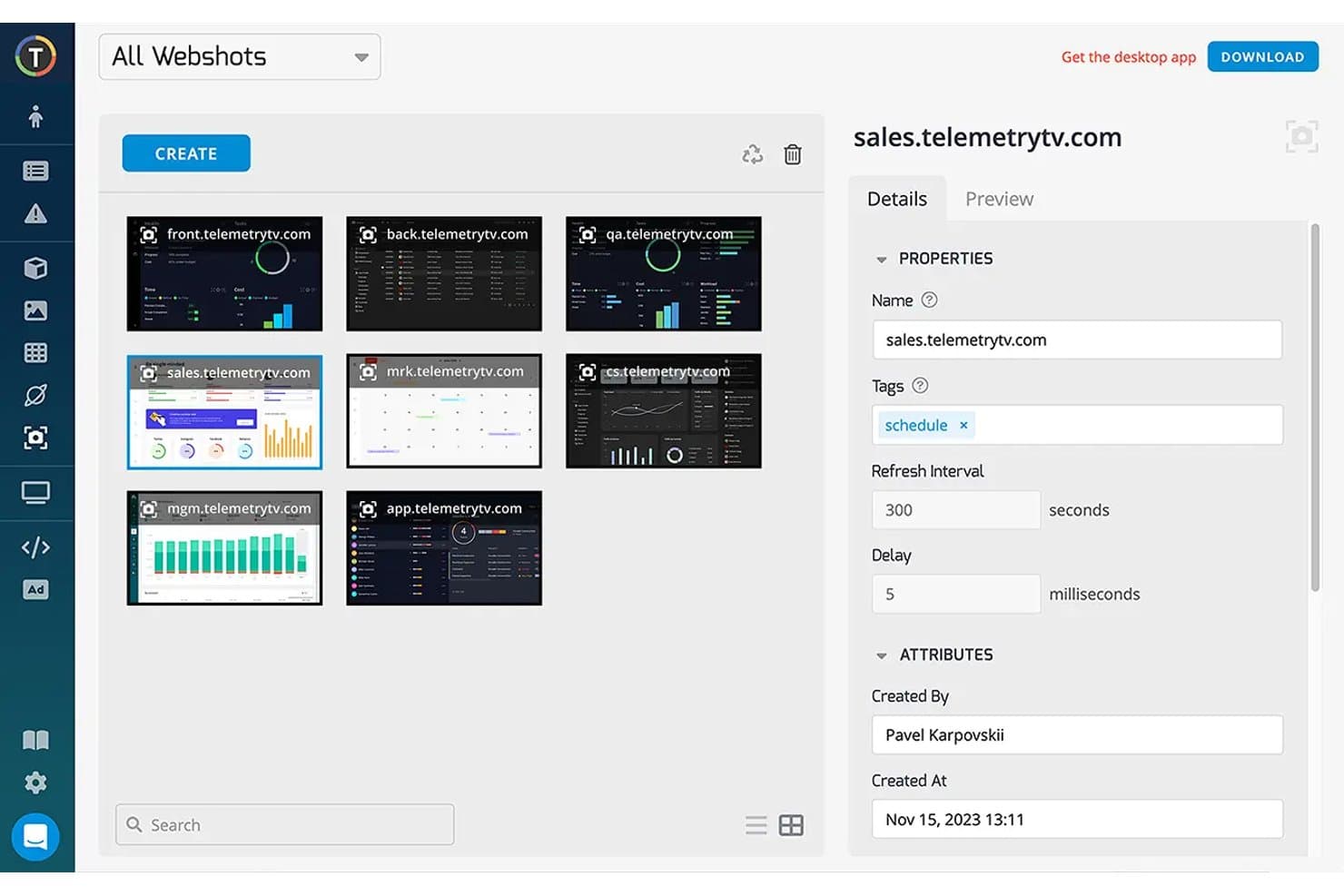
TelemetryTV offers a Webshots management interface where users can create, organize, and configure screenshot captures of web dashboards for digital signage displays. TelemetryTV is a cloud-based digital signage CMS built around live data broadcasting, letting you push BI dashboards, dynamic feeds, and custom web apps to distributed screen networks from a single interface.
Who Is TelemetryTV Best For?
It's a strong fit for mid-market and enterprise teams in retail, QSR, and logistics who manage large screen fleets and need to display live operational data alongside branded content.
Why I Picked TelemetryTV
TelemetryTV earns its spot on my shortlist because of how it handles live data broadcasting directly on screens. I use it to push live Grafana and Power BI dashboards to floor displays, so teams see real-time operational metrics without any manual content updates. The proof-of-play reporting on the Elite plan is something I rely on to confirm that time-sensitive content actually ran when and where it was scheduled.
TelemetryTV Key Features
- Multi-zone layout editor: Split screens into customizable zones to show video, tickers, weather, or social feeds at the same time.
- Remote device fleet management: Monitor device health, trigger remote reboots, and deploy over-the-air updates across all connected displays.
- Native app ecosystem: Use pre-built apps for calendar boards, wayfinding, menu boards, and internal communications directly from the platform.
- Role-based access controls: Assign user roles and permissions to manage who can create, schedule, or approve content for different locations.
TelemetryTV Integrations
TelemetryTV offers native integrations with Canva, Vimeo, Grafana, Slack, YouTube, WindyTV, and more. An API and JavaScript SDK are available for custom integrations.
Pros and Cons
Pros:
- Flexible content zoning for multitasking screens
- Live dashboards display with no manual refresh
- Reliable offline playback for all screen content
Cons:
- Limited built-in franchise hierarchy management
- Approval workflows lack formal multi-step controls
Learn more about TelemetryTV: Best for AI-driven content personalization
- Free demo available
- Pricing upon request
Visit WebsiteCustomer Rating:4.7/5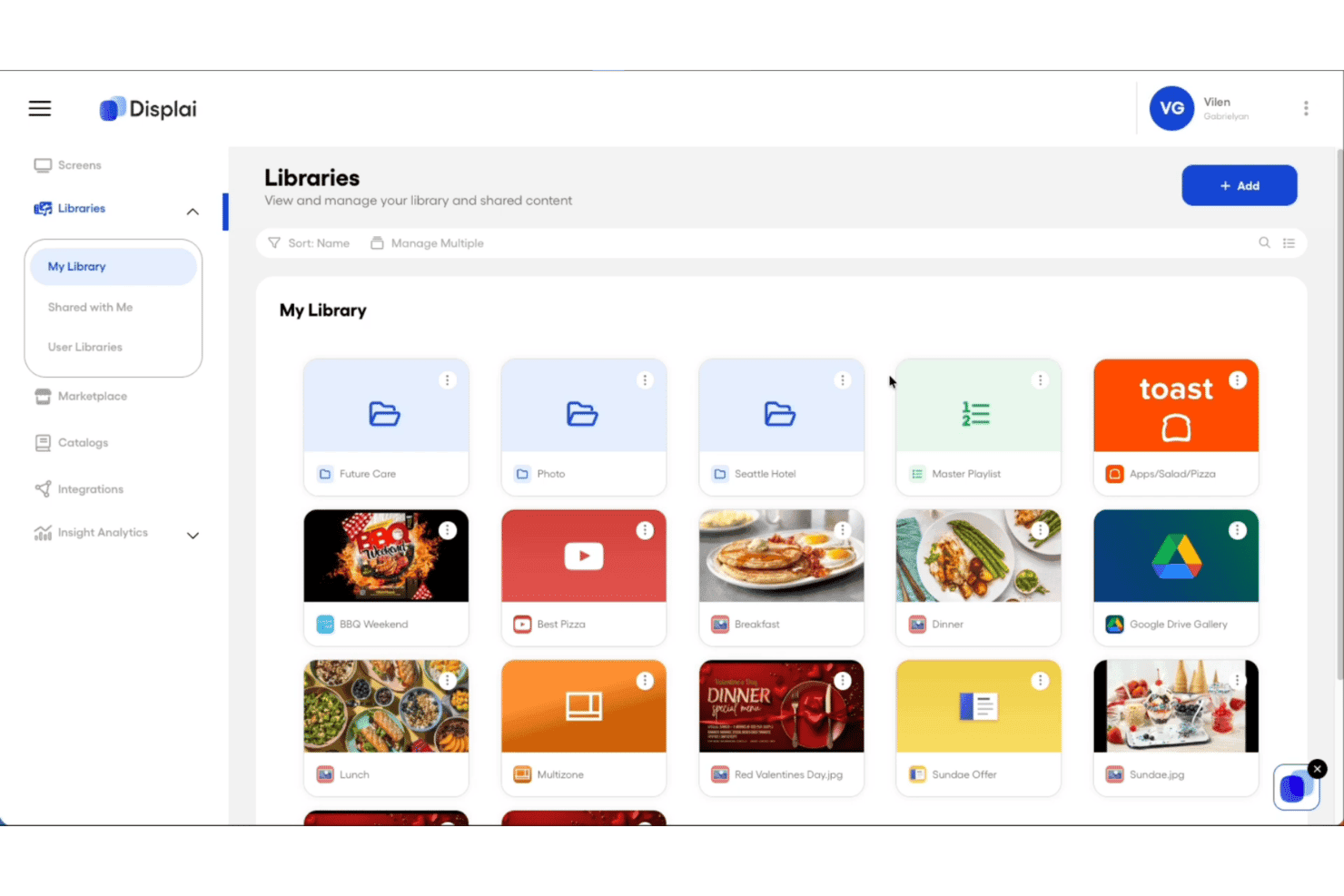
Displai offers a Libraries section where users can manage and organize media content such as images, videos, playlists, and app integrations in a grid view. Displai is a cloud-based digital signage CMS that combines multi-location content management, POS-integrated dynamic menu boards, AI-powered visitor analytics, and support for interactive kiosks for brick-and-mortar businesses.
Who Is Displai Best For?
Displai is a strong fit for multi-location restaurant groups and retail chains managing POS-connected signage and branded in-location experiences across dozens or hundreds of sites.
Why I Picked Displai
I've included Displai in my top picks because of Displai InSight, its built-in AI analytics layer that tracks visitor demographics, sentiment, and content performance in real time. That data feeds directly into content decisions, so a restaurant group can identify which menu board creative drives the most engagement by daypart and adjust accordingly. Paired with the On-Brand Menu API, screens update automatically when POS data changes, making personalization genuinely dynamic rather than manual.
Displai Key Features
- Remote device management: Monitor display status, push content updates, and control playback remotely for screens in any location.
- App marketplace: Access a large catalog of pre-built apps for menu boards, social media feeds, news tickers, and more.
- POS-powered dynamic menus: Connect menu boards directly to Toast, Square, or Lightspeed POS for real-time menu and pricing updates.
- Multi-location content scheduling: Assign campaigns, dayparted playlists, and content updates by location, region, or as network-wide broadcasts.
Displai Integrations
Displai offers native integrations with Toast, Square, Lightspeed, 7Shifts, Instagram, YouTube, PosterMyWall, DS Menu, RetailNext, and BrightSign, and provides an API for custom integrations.
Pros and Cons
Pros:
- Multi-location controls for centralized campaign scheduling
- POS-driven menu boards update content automatically
- Built-in AI analyzes in-store audience engagement
Cons:
- Enterprise pricing not published or self-service
- Device network connectivity issues occasionally reported
Learn more about Displai: Best for advanced rule-based content triggers
- Free demo + 30-day free trial available
- From $14/player/month (USD, Cloud Essential)
Visit WebsiteCustomer Rating:4.3/5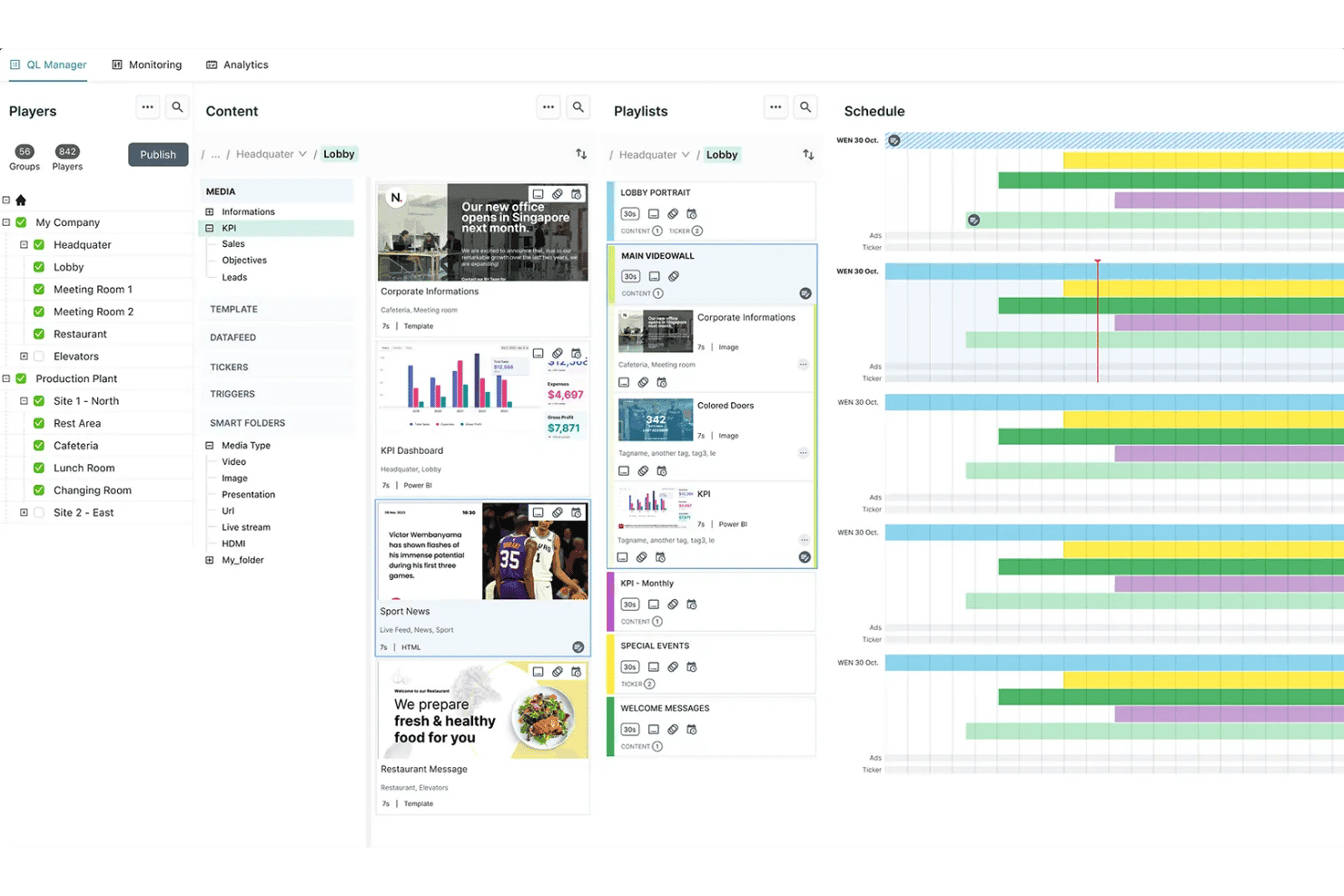
Navori offers a digital signage management interface with player organization, content library, playlist management, and scheduling tools in one dashboard. Navori is a digital signage CMS that combines a cloud-based content management dashboard, hardware-agnostic player support, live data integration, rule-based content automation, and AI-powered audience analytics across distributed screen networks.
Who Is Navori Best For?
Navori is a strong fit for enterprise marketing and operations teams managing large, distributed screen networks across retail, hospitality, or multi-location environments.
Why I Picked Navori
Navori earns its spot on my shortlist because of how its Live Data Manager handles rule-based content automation. I can connect JSON, XML, CRM, or POS data feeds and let the system automatically select and serve the right content based on live data lookups, with no manual intervention. On top of that, the AQUAJI layer uses AI-driven audience detection to add demographic triggers, so content decisions compound across both data rules and real-time viewer context.
Navori Key Features
- Multi-zone layouts: Divide screens into multiple zones to display video, tickers, weather, or social feeds at the same time.
- Proof-of-play reporting: Track and verify when and where each piece of content was displayed across your network.
- Offline playback resilience: Content keeps playing during network outages, with syncing updates once the connection returns.
- Native app ecosystem: Access pre-built apps and templates for deployments like menu boards, wayfinding, and corporate communications.
Navori Integrations
Navori offers native integrations with ServiceNow, Grafana, Workplace, Tableau, Firstup, ScreenFeed, Power BI, xMatters, and more. An open API is available for custom integrations.
Pros and Cons
Pros:
- AI-powered audience and engagement analytics
- Multi-zone and 4K video wall support
- Advanced conditional content scheduling engine
Cons:
- Complex setup for smaller screen networks
- Limited pre-built content templates
Learn more about Navori: Best for workplace and employee communications
- Free demo available
- Pricing upon request
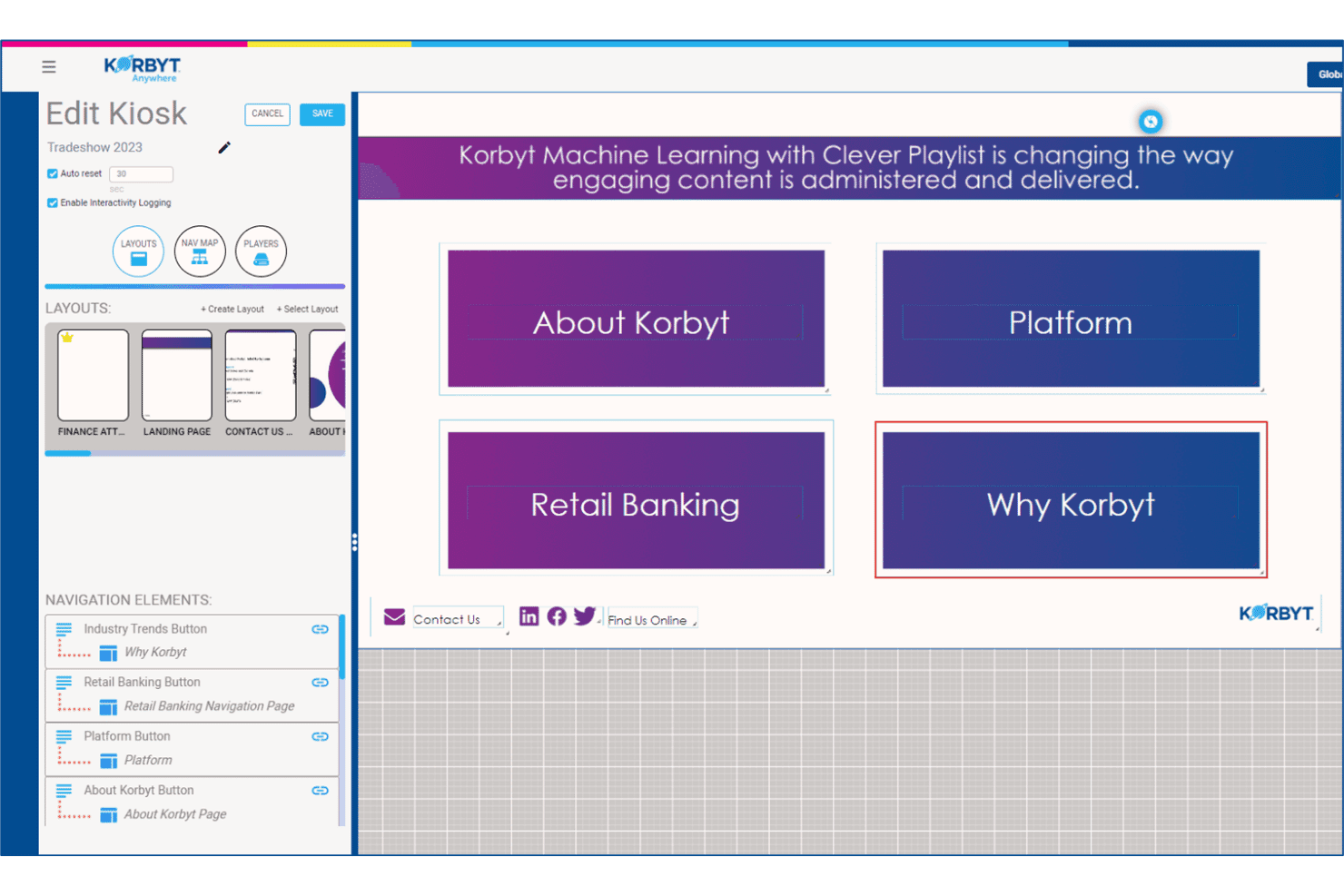
Korbyt offers an interactive kiosk editor with navigation elements, layout management, and a live preview of touchscreen content. Korbyt Anywhere is an enterprise digital signage CMS that distributes content across screens, desktops, and mobile with data-driven scheduling, 200+ integrations, and support for cloud, on-premises, or hybrid deployment.
Who Is Korbyt Best For?
Korbyt is a strong fit for enterprise and mid-market organizations managing large, distributed screen networks across corporate campuses, retail locations, or multi-site operations.
Why I Picked Korbyt
Korbyt earns its spot on my shortlist because of how it handles employee-targeted content at scale. I particularly like the Clever Playlists feature, which uses machine learning to determine which messages resonate with which employee segments and adjusts delivery automatically over time. My team can segment content by role, department, or location and push it simultaneously across screens, desktops, and mobile from a single publish action.
Korbyt Key Features
- Multi-zone layouts: Split screens into multiple zones to display different content types simultaneously.
- Remote device management: Monitor screen health, push updates, and troubleshoot devices from a centralized dashboard.
- Dynamic data triggers: Change content automatically based on real-time inputs like weather, inventory, or sensor data.
- Proof-of-play reporting: View detailed logs showing exactly what content played, when, and on which screens.
Korbyt Integrations
Korbyt offers native integrations with Salesforce, Tableau, Microsoft 365, Cisco, ServiceNow, Five9, Paylocity, Box, Power BI, and more. An API is available for custom integrations.
Pros and Cons
Pros:
- AI-powered audience segmentation and targeting
- Multi-zone layouts for advanced screen setups
- Resilient offline playback across endpoints
Cons:
- Interface can be slow with large asset libraries
- Focuses more on workplace communications use cases
Learn more about Korbyt:
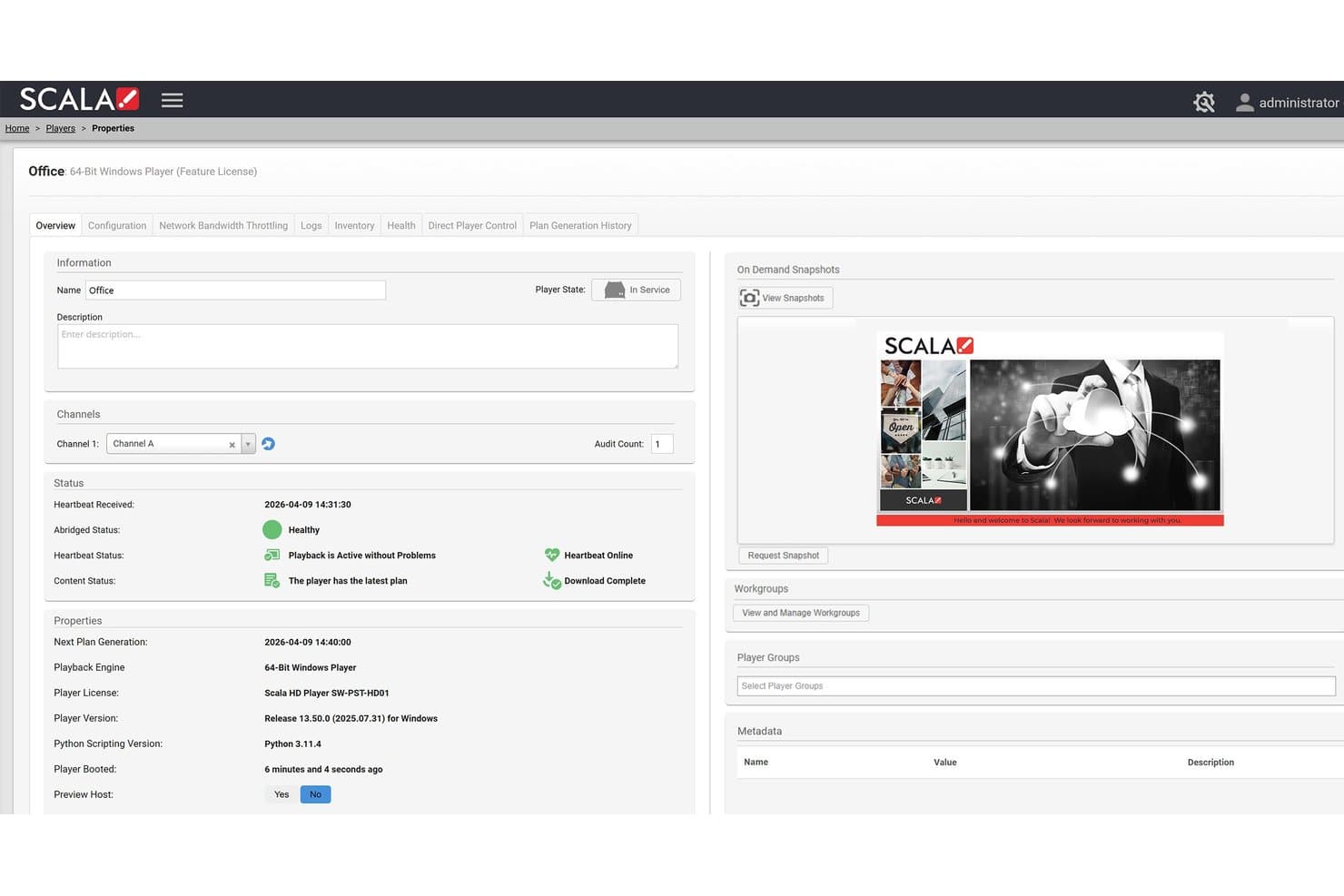
Scala offers a detailed player properties dashboard showing real-time playback status, channel assignment, snapshots, and device health for digital signage management. Scala is an enterprise digital signage CMS built around a centralized Content Manager, a purpose-built Designer tool, and a dedicated media player stack for managing dynamic, data-driven content across large distributed screen networks.
Who Is Scala Best For?
Scala is a strong fit for mid-market and enterprise organizations running large, multi-location screen networks across retail, QSR, hospitality, or corporate environments.
Why I Picked Scala
Scala earns its spot on my shortlist because of how it handles dynamic, data-driven content at scale. I love that ScalaScript lets my team connect live data sources like POS systems, inventory feeds, and weather triggers directly into templates, so content updates automatically without manual rebuilds. The Scala Player also uses delta updates, pushing only changed files to screens, which keeps large-network deployments stable and responsive during active campaigns.
Scala Key Features
- Multi-screen scheduling: Push playlists and campaigns to specific screens, groups, or entire networks from a central dashboard.
- Proof-of-play reporting: Generate logs to verify exactly which content played on each screen for compliance or ad billing.
- Multi-zone screen layouts: Segment displays into dedicated areas showing varied content types like videos, tickers, or social feeds.
- Role-based content approvals: Manage user permissions and approval workflows to govern brand standards across multiple locations.
Scala Integrations
Native integrations are not publicly listed.
Pros and Cons
Pros:
- Detailed proof-of-play analytics and logging
- Reliable playback during network outages
- Advanced multi-zone and video wall support
Cons:
- Setup can require specialized player hardware
- No published pricing or online signup
Learn more about Scala:
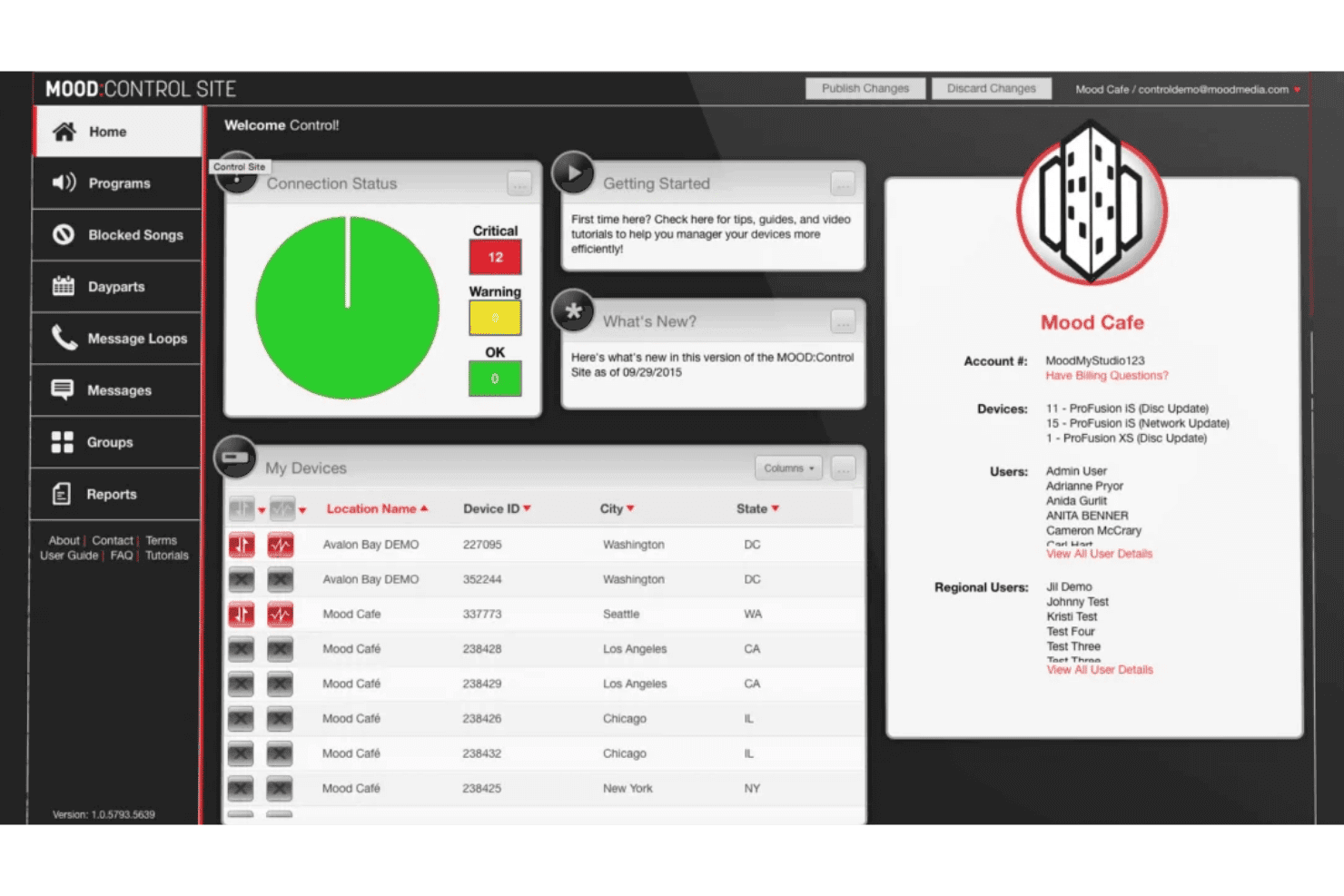
Mood Media's Control Site dashboard offers device connection status, location management, and account details for multi-site audio program control. Mood Media is a digital signage CMS and multi-sensory brand experience platform that unifies screen content, music, on-hold messaging, and scent marketing under a single cloud-based dashboard called Harmony.
Who Is Mood Media Best For?
Mood Media suits enterprise retail, QSR, and hospitality brands managing digital signage alongside music and messaging across large, distributed location networks.
Why I Picked Mood Media
I picked Mood Media because no other digital signage CMS on my shortlist lets you control screens, music, scent, and on-hold messaging from a single login inside one platform. In practice, that means my team can schedule a digital menu board update and a matching audio promotion for the same daypart without switching tools. Mood TV adds another layer, letting us replace competitive advertising on in-store screens with branded content alongside short-form programming.
Mood Media Key Features
- Centralized monitoring dashboard: Monitor the health and status of all connected screens and Harmony devices from one interface.
- Multi-zone layout editor: Customize screens with multiple content zones, including video, widgets, and message tickers.
- Digital menu board preview: Preview and adjust menu board content with instant updates for price or item changes.
- System-on-chip display support: Deploy digital signage directly to smart displays from Samsung and Philips without external media players.
Mood Media Integrations
Native integrations are not publicly listed.
Pros and Cons
Pros:
- Supports offline playback and content resilience
- Centralized dashboard for multi-location management
- Multi-sensory platform includes music and scent
Cons:
- No free trial or transparent self-serve pricing
- Lacks robust POS or CRM data integrations
Learn more about Mood Media:
Alte CMS-uri pentru semnalizare digitală
Iată câteva soluții suplimentare de CMS pentru semnalizare digitală care nu au ajuns pe lista mea scurtă, dar care merită totuși analizate:
- 11AppspaceBest for unified corporate communications
- 12BrightSignBest for dedicated hardware integration
- 13OptiSignsBest for rapid deployment across locations
- 14YodeckBest for simple cloud-first remote management
- 15PoppuloBest for large-scale corporate deployments
- 16ScreenlyBest for Raspberry Pi-based display networks
- 17SpectrioBest for retail customer engagement features
- 18XiboBest for open-source customization and control
How I Evaluate Digital Signage CMS
I split my evaluation into two layers: the baseline a platform must meet to make the list, and the differentiators that separate strong performers from the rest.
Core Functionality (Table Stakes For This List)
When I'm selecting tools for my list, I rank each one on a scale from 0 (does not offer the functionality) to 5 (excels in this area) for each core functionality listed below. Then, I calculate the tool's total score into a percentage. Each tool needs to achieve a minimum total score of 65% to be considered for inclusion.
- Centralized content management: I look for a cloud-based dashboard where you can upload, tag, and push assets to any screen from one place—like updating menu boards across 50 locations in minutes.
- Multi-screen scheduling: The platform should let you schedule playlists and dayparted campaigns across screen groups, so a lunch promo only runs from 11 a.m. to 2 p.m. at selected sites.
- Media format support: I check whether the CMS handles images, video, HTML5, live streams, and web apps—the full range of formats modern marketing teams actually use on their displays.
- Remote device management: Managing screens spread across dozens of locations means I evaluate remote reboot, health monitoring, and over-the-air update capabilities from the central dashboard.
- Dynamic content and data integration: Real-time triggers matter. I look for API, RSS, social feed, and data-driven template support so content can shift based on inputs like weather or inventory.
- User roles and multi-location permissions: For multi-location teams, I evaluate whether HQ can lock brand assets while still letting local managers contribute region-specific content through role-based controls.
Once I have a list of tools that meet the criteria, I consider what sets each platform apart.
Differentiating Factors (What Sets Vendors Apart)
Here's how I compare and contrast different vendors:
Standout Features
Offline playback resilience is a big differentiator—screens in a retail store or airport need to keep running even when Wi-Fi drops. I also look at proof-of-play reporting, which gives you verified logs of what content played, where, and when. That's essential if you're running ad networks or need compliance documentation. Multi-zone layouts matter too, since splitting a screen into zones for video, social feeds, and tickers gives you more flexibility without adding hardware.
Beyond Features
Hardware compatibility is one of the first things I check—whether a platform supports SoC displays, Android, BrightSign, and other player types determines how much you'll spend on hardware alongside your subscription. Pricing transparency matters just as much, since hidden costs for premium apps or storage tiers can inflate your total cost of ownership fast. I also evaluate integrations with tools like Google Slides, Canva, Power BI, and POS systems, which reveal how well the CMS fits into your existing marketing stack.
Cum să alegeți un CMS pentru semnalizare digitală
Este ușor să vă pierdeți în liste lungi de funcții și structuri complexe de prețuri. Pentru a rămâne concentrat pe parcursul procesului unic de selectare a programului informatic, iată o listă de verificare a factorilor de care trebuie să țineți cont:
| Factor | Aspecte de luat în considerare |
|---|---|
| FactorScalabilitate | Aspecte de luat în considerareCâte ecrane trebuie să gestionați acum și în viitor? Poate CMS-ul să facă față implementărilor de amploare sau din mai multe locații fără pierderea controlului sau a vizibilității? |
| FactorIntegrări | Aspecte de luat în considerareSe conectează la sistemele de marketing, POS, analiză sau gestionare a conținutului pe care le utilizați deja? Verificați existența conectorilor nativi și a accesului la un API deschis. |
| FactorPosibilitate de personalizare | Aspecte de luat în considerarePuteți adapta permisiunile utilizatorilor, elementele de identitate vizuală, machetele și fluxurile de lucru pentru a corespunde structurii și ghidurilor de stil ale organizației dumneavoastră? |
| FactorUșurință în utilizare | Aspecte de luat în considerareEste platforma intuitivă atât pentru specialiștii în marketing de la sediul central, cât și pentru colaboratorii locali? Luați în considerare cât de simplu este să instruiți utilizatorii noi și să actualizați conținutul din mers. |
| FactorImplementare și integrare inițială | Aspecte de luat în considerareCe presupune procesul de configurare pentru echipele dumneavoastră de IT și marketing? Veți avea nevoie de ajutor extern pentru implementare sau de șabloane pentru a începe rapid? |
| FactorCost | Aspecte de luat în considerareCât de clare sunt prețurile și cum se modifică acestea în funcție de numărul de ecrane, utilizatori sau funcții? Fiți atenți la costurile ascunse pentru stocare, integrări sau componentele fizice necesare. |
| FactorMăsuri de securitate | Aspecte de luat în considerareOferă platforma controale adecvate pentru utilizatori, criptare și autentificare? Luați în considerare cerințele de conformitate din sectoare reglementate, precum cel financiar sau medical. |
| FactorDisponibilitatea asistenței | Aspecte de luat în considerareSunt resursele de ajutor accesibile atunci când aveți nevoie de ele? Furnizorul oferă asistență non-stop, în timp real sau pe bază de tichete și care sunt, de obicei, timpii de răspuns? |
Ce sunt CMS-urile pentru semnalizare digitală?
Un CMS pentru semnalizare digitală este o platformă care vă permite să gestionați, programați și actualizați conținutul afișat pe ecrane digitale din mai multe locații. Aceste sisteme permit echipelor de marketing să controleze totul, de la videoclipuri promoționale la actualizări în timp real, dintr-un singur tablou de bord. Concepute pentru controlul mai multor locații și pentru conținut dinamic, instrumentele CMS pentru semnalizare digitală ajută la menținerea standardelor de marcă și la transmiterea unor mesaje țintite în funcție de oră, public sau declanșatori bazați pe date.
Funcțiile CMS-urilor pentru semnalizare digitală
Când alegeți un CMS pentru semnalizare digitală, urmăriți următoarele funcții esențiale:
- Gestionarea centralizată a conținutului: Încărcați, organizați și actualizați toate elementele digitale dintr-un singur panou de control, facilitând controlul conținutului pe orice rețea de ecrane.
- Programarea pe mai multe ecrane: Programați anumite campanii sau liste de redare pentru ecrane individuale sau grupuri, în funcție de oră, dată sau interval al zilei, asigurând afișarea conținutului atunci și acolo unde este cel mai relevant.
- Gestionarea de la distanță a dispozitivelor: Monitorizați starea dispozitivelor, trimiteți actualizări și controlați de la distanță redarea pe ecrane, reducând nevoia intervențiilor la fața locului și asigurând funcționarea fiabilă.
- Compatibilitatea cu formatele media: Afișați imagini, videoclipuri, conținut HTML5, transmisiuni live și conținut interactiv; această flexibilitate vă ajută să mențineți marketingul atractiv din punct de vedere vizual și captivant.
- Integrarea conținutului dinamic: Conectați-vă la API-uri, fluxuri sociale sau surse de date, astfel încât ecranele să poată afișa automat actualizări în timp real, stocuri, informații despre vreme sau alte informații contextuale.
- Roluri și permisiuni pentru utilizatori: Stabiliți permisiuni detaliate pentru utilizatorii de la sediul central, regionali și la nivel de magazin; acest lucru permite controlul local al conținutului, menținând în același timp guvernanța mărcii.
- Raportarea afișărilor: Urmăriți și verificați exact ce conținut a fost afișat, unde și când — un aspect util pentru conformitate și măsurarea performanței în publicitate sau în medii reglementate.
- Aspecte cu mai multe zone: Împărțiți ecranele în mai multe zone de conținut, care afișează simultan diferite tipuri de materiale media, pentru a maximiza spațiul disponibil pe ecran și impactul.
- Rezistența redării offline: Asigurați continuarea redării conținutului programat în timpul întreruperilor rețelei, sincronizând noile actualizări după restabilirea conexiunii.
- Bibliotecă de șabloane și aplicații: Accesați șabloane sau widgeturi gata pregătite pentru cazuri de utilizare obișnuite, precum panouri de meniu, anunțuri sau orientare, pentru a accelera implementarea și designul.
Beneficiile unui CMS pentru semnalizare digitală
Implementarea unui CMS pentru semnalizare digitală oferă mai multe beneficii echipei și companiei dumneavoastră. Iată câteva dintre avantajele pe care le puteți obține:
- Control centralizat: Gestionați și actualizați conținutul de pe fiecare ecran al rețelei dintr-un singur panou de control, astfel încât mesajele să rămână consecvente și actualizate.
- Programarea flexibilă a conținutului: Automatizați momentul și locul în care apare conținutul, planificând cu ușurință promoțiile și campaniile în funcție de programul de lucru sau de evenimente speciale.
- Actualizări în timp real: Afișați dinamic stocuri, fluxuri sociale sau conținut declanșat de condițiile meteo, astfel încât ecranele să prezinte întotdeauna cele mai relevante informații.
- Coerență îmbunătățită a mărcii: Blocați elementele și șabloanele aprobate, asigurând respectarea standardelor mărcii în fiecare locație, permițând în același timp contribuții locale controlate.
- Eficiență operațională: Monitorizați starea dispozitivelor, trimiteți actualizări și depanați problemele de la distanță, reducând astfel la minimum intervențiile la fața locului pentru personalul IT sau de marketing.
- Date de performanță utile: Obțineți informații prin rapoarte privind afișările, ajutându-vă să analizați acoperirea campaniilor și să validați difuzarea conținutului în scopul conformității.
- Economii de costuri: Utilizați compatibilitatea cu mai multe tipuri de hardware și redarea offline pentru a optimiza investiția în semnalizare digitală și a reduce costurile recurente.
Costurile și prețurile unui CMS pentru semnalizare digitală
Selectarea unui CMS pentru semnalizare digitală necesită înțelegerea diferitelor modele de preț și planuri disponibile. Costurile variază în funcție de funcții, dimensiunea echipei, suplimente și alți factori. Tabelul de mai jos rezumă planurile obișnuite, prețurile medii ale acestora și funcțiile incluse de regulă în soluțiile CMS pentru semnalizare digitală:
Tabel comparativ al planurilor pentru CMS-uri de semnalizare digitală
| Tipul planului | Preț mediu | Funcții obișnuite |
|---|---|---|
| Tipul planuluiPlan gratuit | Preț mediu$0 | Funcții obișnuiteÎncărcare de bază a conținutului, programare limitată, compatibilitate cu un singur utilizator și formate media standard. |
| Tipul planuluiPlan personal | Preț mediu$10-$25/ecran/lună | Funcții obișnuiteCompatibilitate cu mai multe ecrane, actualizări de la distanță, acces la șabloane, raportare simplă și permisiuni de bază pentru utilizatori. |
| Tipul planuluiPlan pentru companii | Preț mediu$25-$60/ecran/lună | Funcții obișnuiteProgramare avansată, integrări extinse, control pentru mai multe locații, rapoarte privind afișările și monitorizarea dispozitivelor. |
| Tipul planuluiPlan pentru întreprinderi | Preț mediu$60-$150/ecran/lună | Funcții obișnuiteBranding personalizat, acces la API, SSO, securitate avansată, asistență dedicată, redare offline și SLA-uri pentru timpul de funcționare. |
Întrebări frecvente despre CMS-ul pentru semnalizare digitală
Iată câteva răspunsuri la întrebările frecvente despre CMS-ul pentru semnalizare digitală:
Cum diferă un CMS pentru semnalizare digitală de playerele media tradiționale?
Un CMS pentru semnalizare digitală vă permite să gestionați, programați și actualizați conținutul de la distanță pe mai multe ecrane, în timp ce playerele media tradiționale necesită de obicei actualizări manuale și oferă un control limitat.
Pot folosi hardware-ul existent cu majoritatea platformelor CMS pentru semnalizare digitală?
Da, multe platforme acceptă o gamă largă de ecrane comerciale și hardware pentru playere media, însă trebuie să confirmați întotdeauna compatibilitatea cu configurația actuală înainte de a investi.
Este posibil să atribui permisiuni diferite utilizatorilor din diverse locații?
Da, majoritatea instrumentelor CMS pentru semnalizare digitală oferă roluri de utilizator personalizabile, permițându-vă să acordați echipelor locale un control limitat, păstrând în același timp centralizate deciziile importante privind brandingul și programarea.
Cum ajută rapoartele de verificare a redării echipele de marketing?
Rapoartele de verificare a redării confirmă exact ce conținut a fost redat și când, facilitând demonstrarea difuzării campaniei, gestionarea conformității și furnizarea de date către advertiseri.
Ce ar trebui să iau în considerare pentru a mă asigura că redarea conținutului continuă în timpul unei întreruperi a rețelei?
Căutați soluții CMS cu redare offline rezilientă, astfel încât conținutul programat să continue să fie afișat pe ecrane chiar dacă se pierde conexiunea și să se sincronizeze când rețeaua revine.