

Un generator de coduri QR este o platformă software care vă permite să creați coduri QR pentru a conecta publicul offline la experiențe, campanii sau conținut digital. Dacă comparați instrumente de generare a codurilor QR, probabil că sunteți în căutarea unor modalități mai eficiente de a face legătura dintre materialele tipărite și mediul digital, de a măsura impactul campaniilor și de a susține totul, de la colectarea de clienți potențiali până la utilizarea linkurilor dinamice. Această listă prezintă cele mai importante aspecte — confidențialitatea, analiza datelor, scalabilitatea și operațiunile în masă — pentru a vă ajuta să alegeți soluția potrivită pentru următoarea inițiativă de marketing.
Why Trust Our Software Recommendations
6,700+
Reviews
20
Industry experts
16+
Evaluation factors
14
Years
Our team has been testing and reviewing software since 2012. As marketing leaders ourselves, we know how difficult—and important—it is to choose the right software.
For this guide, we evaluated tools using hands-on testing and independent research, scoring tools using our selection criteria.
Our reviews reflect our human editorial judgment, not a sales pitch.
Expert reviewers:
 Gui DrusinaCreative Director
- Shriya GhateSenior Marketing Lead
 Amanda JacquesMarketing Ops Leader

Tabel comparativ: generatoare de coduri QR
Comparați prețurile și specificațiile alăturat pentru generatoarele de coduri QR incluse în selecția mea scurtă.
Sorted by: Default
| Tool | Starting Price | Website | |
|---|---|---|---|
Best for high-resolution QR code exports | 4.9 out of 5 | $30/month 14-day free trial | Website |
Best for scheduled QR code campaigns | 4.6 out of 5 | Pricing upon request 7-day free trial | Website |
Best for QR codes with link analytics | 4.5 out of 5 | $10/month Free plan available | Website |
Best for bulk digital business cards | 5.0 out of 5 | $6.99/month Free plan available | Website |
Best for multilingual QR code content | 3.5 out of 5 | $16.99/month Free plan available | Website |
Best for enterprise QR code management | 4.9 out of 5 | $9/month 14-day free trial | Website |
Best for QR code lead capture forms | 4.6 out of 5 | $5/month 14-day free trial | Website |
Best for no-signup static QR codes | 4.7 out of 5 | $10/month 14-day free trial | Website |
Best for privacy-focused QR analytics | 4.9 out of 5 | $12/month Free plan available | Website |
Best for offline campaign attribution | 4.6 out of 5 | $25/month Free plan available | Website |


Recenzii ale generatoarelor de coduri QR
Mai jos sunt rezumatele mele detaliate ale celor mai bune generatoare de coduri QR incluse în selecția mea scurtă. Recenziile mele oferă o analiză detaliată a funcțiilor, celor mai potrivite cazuri de utilizare și integrărilor fiecărei platforme, pentru a vă ajuta să o găsiți pe cea mai potrivită pentru dumneavoastră.
 Best for high-resolution QR code exports
- 14-day free trial
- From $30/month
Visit WebsiteCustomer Rating:4.9/5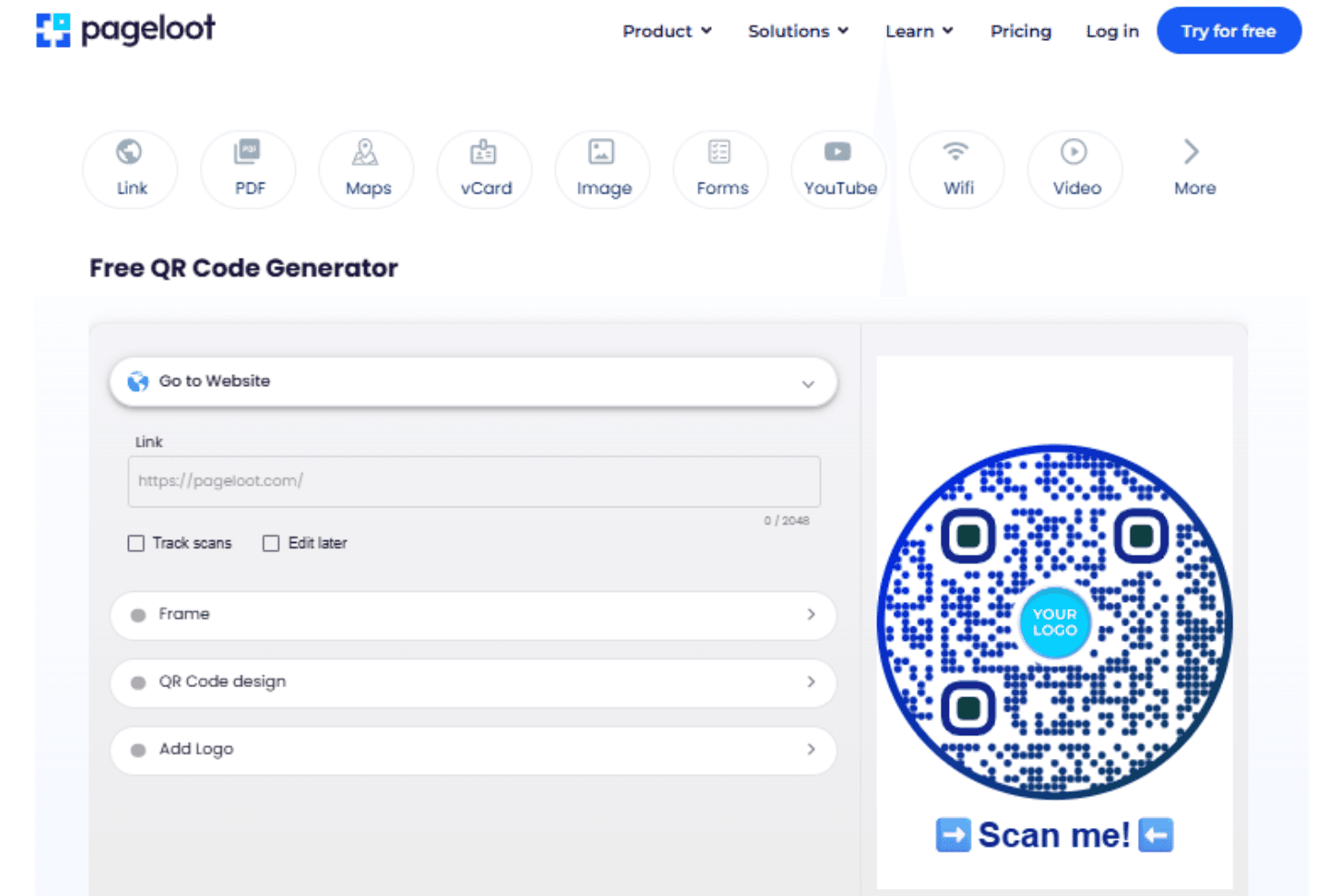
Pageloot offers a free QR code generator with customizable design options including frames, logos, and link tracking. Pageloot is a QR code generator that lets you create, customize, and manage dynamic and static QR codes across 25+ content types, including URLs, vCards, PDFs, app links, and Wi-Fi.
Who Is Pageloot Best For?
Pageloot is a good fit for marketing agencies and brand teams that regularly produce print collateral and need QR codes that meet commercial printing standards.
Why I Picked Pageloot
Pageloot earns its spot on my shortlist because of how seriously it handles print output. It exports QR codes in SVG, EPS, and PDF formats, which are the formats commercial print vendors actually require. I also like the built-in readability score, which flags contrast issues before I send a design to print. That catches errors I'd otherwise only notice after wasting an entire print run.
Pageloot Key Features
- Dynamic QR code editing: Change destination URLs or content at any time without generating a new code.
- Bulk QR code generation: Create large batches of unique QR codes using CSV uploads or the Pageloot API.
- Multi-language support: Dashboard available in 16 languages, with 37 landing page languages for global campaigns.
- Analytics with CSV export: View real-time scans by location, date, and device, and export data for reporting.
Pageloot Integrations
Native integrations are not clearly documented. The tool supports integrations via API and Zapier.
Pros and Cons
Pros:
- Supports 25+ distinct QR code content types
- Built-in readability score catches contrast issues
- Print-ready SVG, EPS, and PDF exports
Cons:
- Folder organization limited for large code libraries
- Dynamic QR codes unavailable on free plan
Learn more about Pageloot: 2Best for scheduled QR code campaigns
QRFY
- 7-day free trial
- Pricing upon request
Visit WebsiteCustomer Rating:4.6/5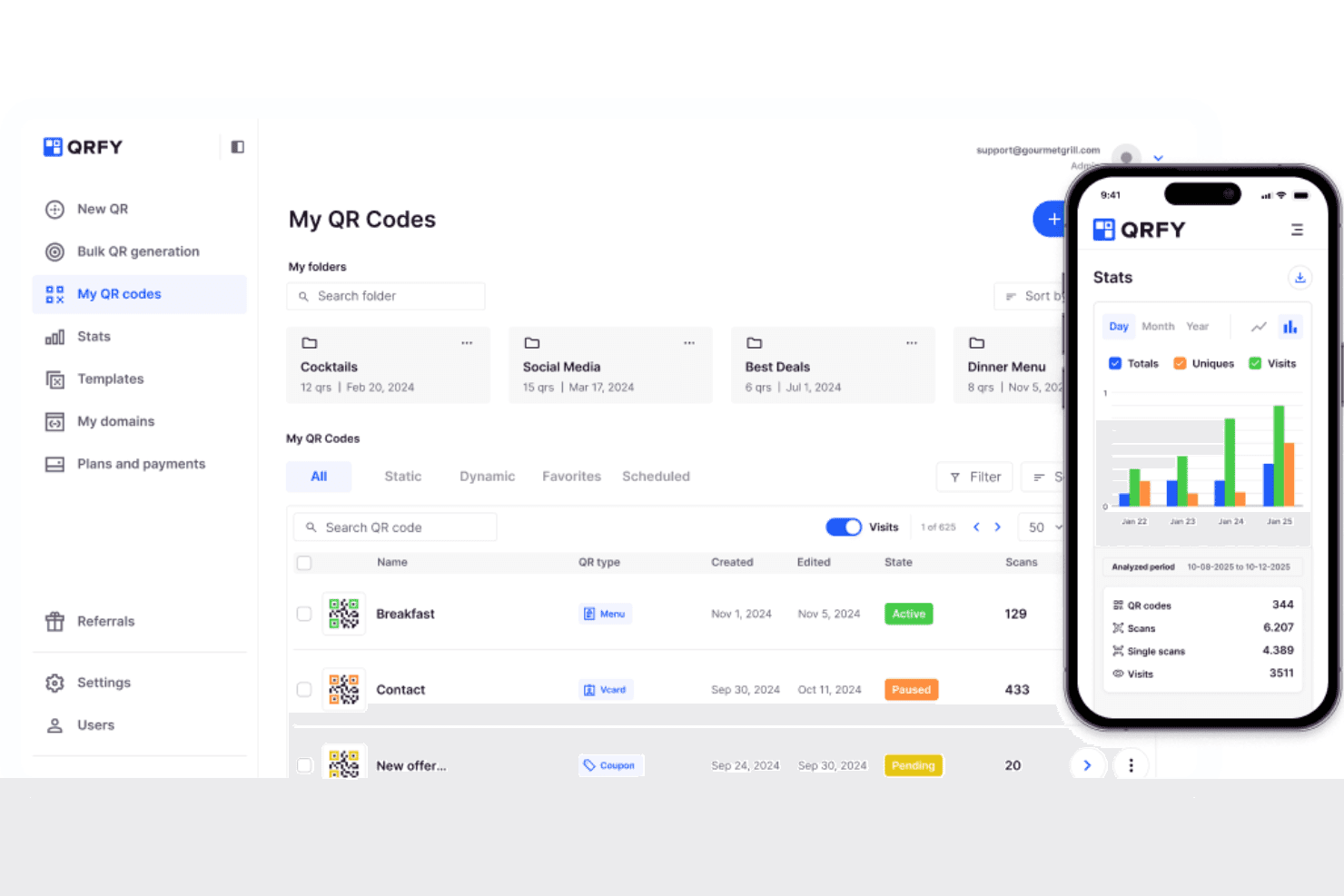
QRFY offers a centralized dashboard to manage, organize, and track QR codes with detailed scan analytics. QRFY is a dynamic QR code generator that lets you create, brand, and manage unlimited editable QR codes across content types including URLs, vCards, PDFs, menus, and landing pages, with built-in scan analytics and bulk CSV creation.
Who Is QRFY Best For?
QRFY is a strong fit for marketing teams running multiple simultaneous print-and-digital campaigns who need unlimited dynamic codes without worrying about per-code limits.
Why I Picked QRFY
I picked QRFY as one of the best because of how it handles dynamic code management across print campaigns. The redirect feature lets me point an already-printed QR code at a new destination URL when a campaign goes live or wraps up, with no reprint needed. I also rely on the scan analytics, which break down results by country, city, and device, to evaluate which campaign placements actually drove engagement.
QRFY Key Features
- Bulk CSV creation: Generate up to 500 dynamic QR codes at once from a spreadsheet upload.
- Custom branding editor: Apply your logo, colors, and frames to every code to match your brand.
- Scan analytics by device and geography: View detailed reports filtered by device type, country, and city, exportable to CSV or XLSX.
- Multi-content support: Generate codes for links, PDFs, vCards, videos, menus, reviews, and more content types.
QRFY Integrations
Native integrations are not clearly documented. QRFY provides an API for custom integrations.
Pros and Cons
Pros:
- Print-ready SVG and EPS export formats included
- Unlimited dynamic codes on paid plans
- Scheduled QR code campaigns with date-based activation
Cons:
- Analytics dashboard lacks real-time refresh capabilities
- No clearly documented native third-party integrations
Learn more about QRFY: Best for QR codes with link analytics
- Free plan available
- From $10/month (billed annually)
Visit WebsiteCustomer Rating:4.5/5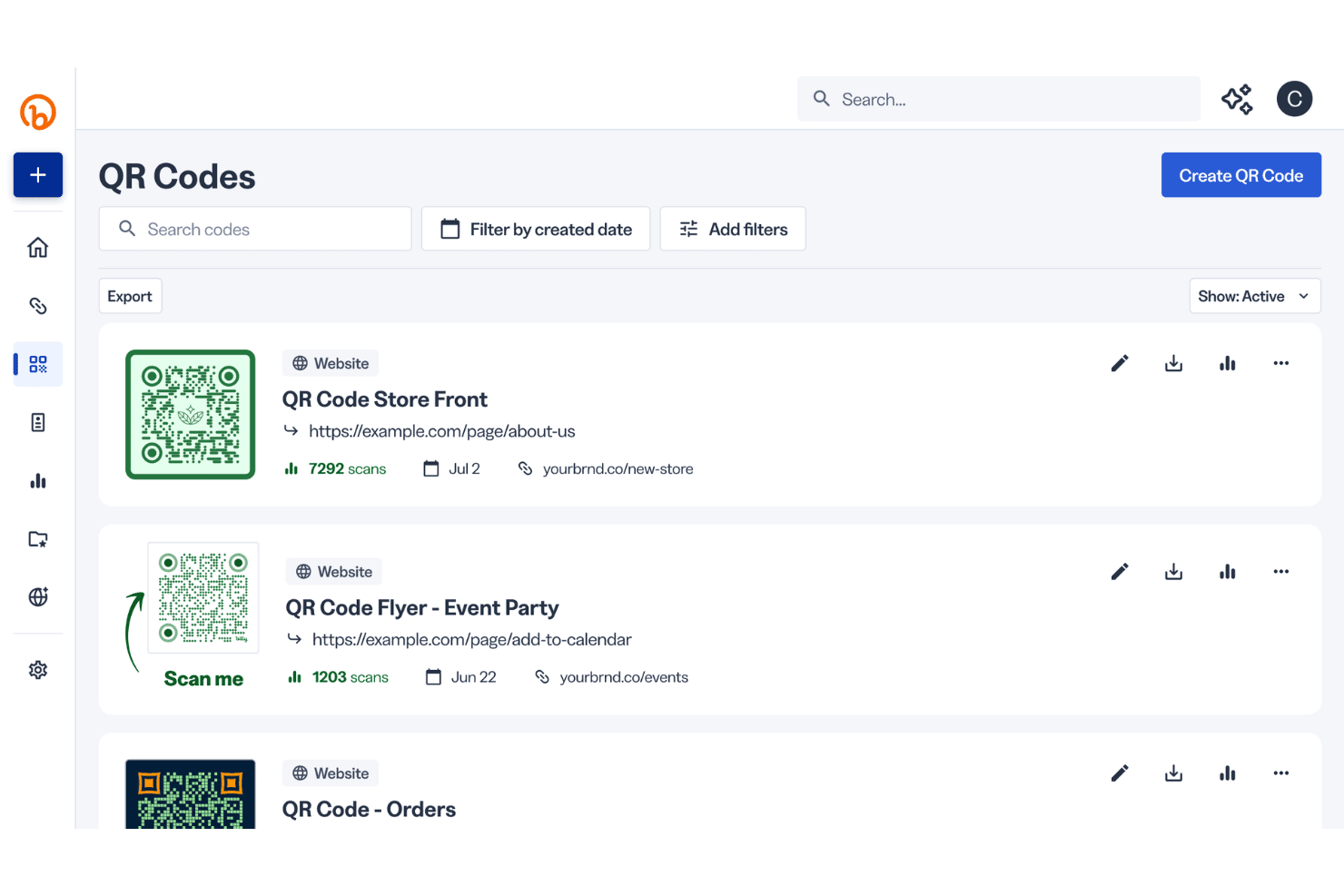
Bitly displays a QR Codes dashboard where users can manage, track scans, and create new QR codes linked to websites. Bitly Codes is a QR code generator built into Bitly's link management platform, offering dynamic QR code creation, branded customization, bulk generation, and scan analytics across a unified dashboard.
Who Is Bitly Codes Best For?
It's a strong fit for mid-market and enterprise marketing teams that need QR codes integrated into a broader link management and campaign analytics workflow.
Why I Picked Bitly Codes
Bitly Codes earns its spot on my shortlist because no other QR code generator ties scan data this deeply into a link management workflow. I love that scan breakdowns go down to city, device, OS, and browser, and Bitly Assist lets me ask performance questions in plain language rather than digging through reports. Dynamic routing by country and device type means one printed code can send iOS users to the App Store while directing desktop users to a campaign landing page.
Bitly Codes Key Features
- Bulk code creation: Generate multiple QR codes at once with CSV upload for campaign and print runs.
- Brand templates: Save and reuse QR code design templates for consistent branding across projects.
- Custom domain support: Use branded links with your own domain to reinforce trust and recognition.
- Centralized dashboard: Manage QR codes, links, and landing pages from a unified, searchable workspace.
Bitly Codes Integrations
Bitly Codes offers native integrations with HubSpot and Google Analytics, and provides an API for custom integrations.
Pros and Cons
Pros:
- Country and device-based URL routing
- Dynamic codes editable after printing
- City-level scan breakdowns available
Cons:
- QR features secondary to link management
- Visual customization limited vs. dedicated QR tools
Learn more about Bitly Codes: Best for bulk digital business cards
- Free plan available
- From $6.99/month (billed annually)
Visit WebsiteCustomer Rating:5/5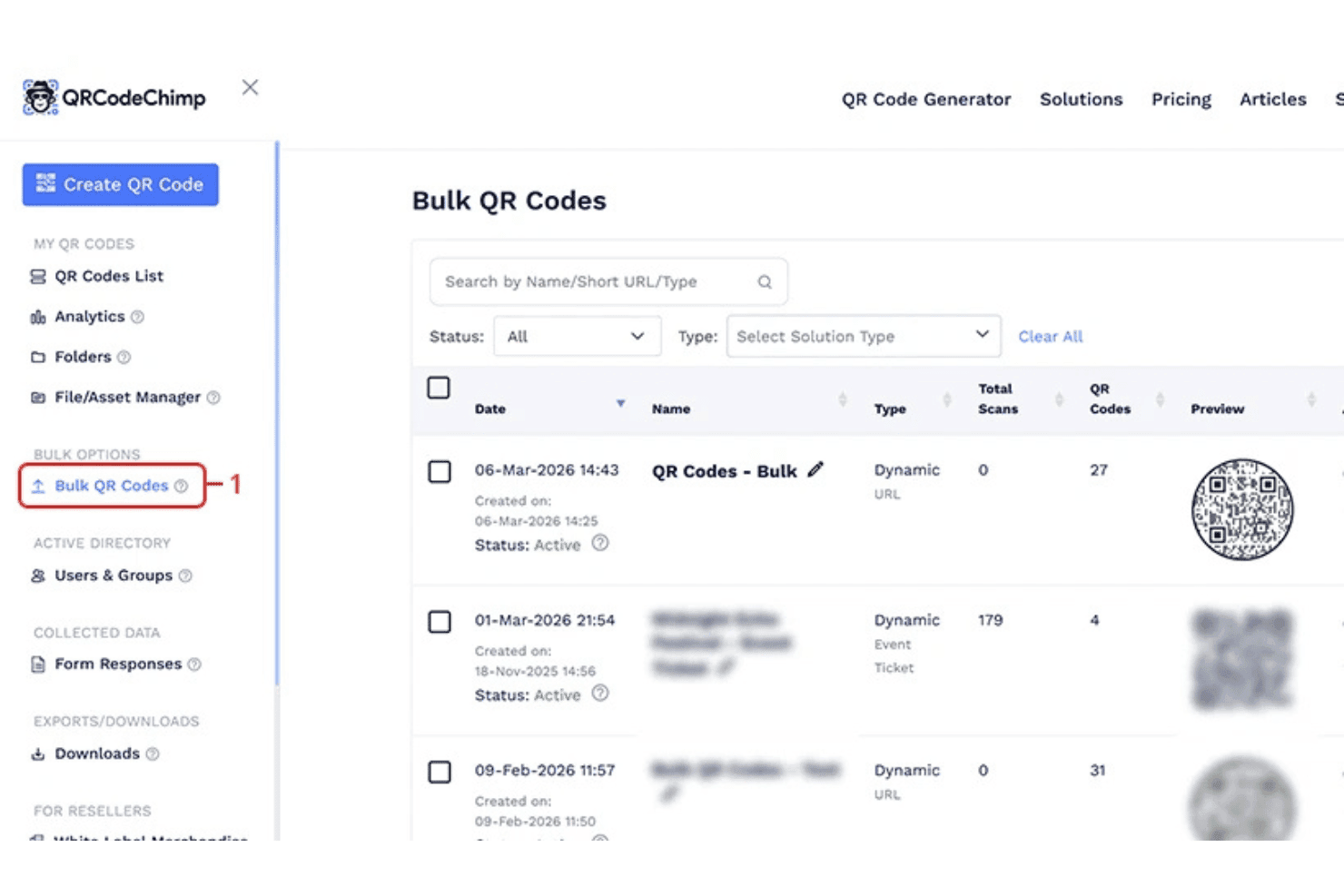
QRCodeChimp offers a Bulk QR Codes management dashboard where users can view, filter, and track multiple QR code campaigns by status, type, and total scans. QRCodeChimp is a QR code generator and management platform for creating static and dynamic QR codes, digital business cards, and branded landing pages, with bulk creation tools, NFC support, and campaign-level scan analytics built in.
Who Is QRCodeChimp Best For?
QRCodeChimp is a strong fit for enterprise marketing and HR teams managing large-scale digital business card rollouts across distributed workforces.
Why I Picked QRCodeChimp
I picked QRCodeChimp as one of the best because its bulk digital business card workflow is genuinely purpose-built for scale. I can upload a spreadsheet with employee data and generate hundreds of branded, NFC-enabled cards at once, each with its own unique QR code and tracking. Field locking lets me enforce brand consistency across every card in the batch, so individual employees can't override approved design or contact fields after distribution.
QRCodeChimp Key Features
- Dynamic QR code editing: Update the content or destination of a QR code at any time without creating a new code.
- Scan analytics dashboard: Track scans by city, device, browser, operating system, and timestamp for individual or bulk codes.
- Advanced branding controls: Customize QR codes with unique shapes, gradients, CTA frames, and brand logos for campaign consistency.
- Multi-content type support: Generate QR codes for URLs, PDFs, event tickets, app store links, menus, social profiles, and Wi-Fi.
QRCodeChimp Integrations
Native integrations are not clearly documented. QRCodeChimp provides an API for custom integrations.
Pros and Cons
Pros:
- Field locking enforces brand consistency at scale
- NFC card support built in natively
- Bulk card generation via CSV upload
Cons:
- Folder organization becomes unwieldy at large volumes
- Analytics depth limited compared to dedicated platforms
Learn more about QRCodeChimp: Best for multilingual QR code content
- Free plan available
- From $16.99/month
Visit WebsiteCustomer Rating:3.5/5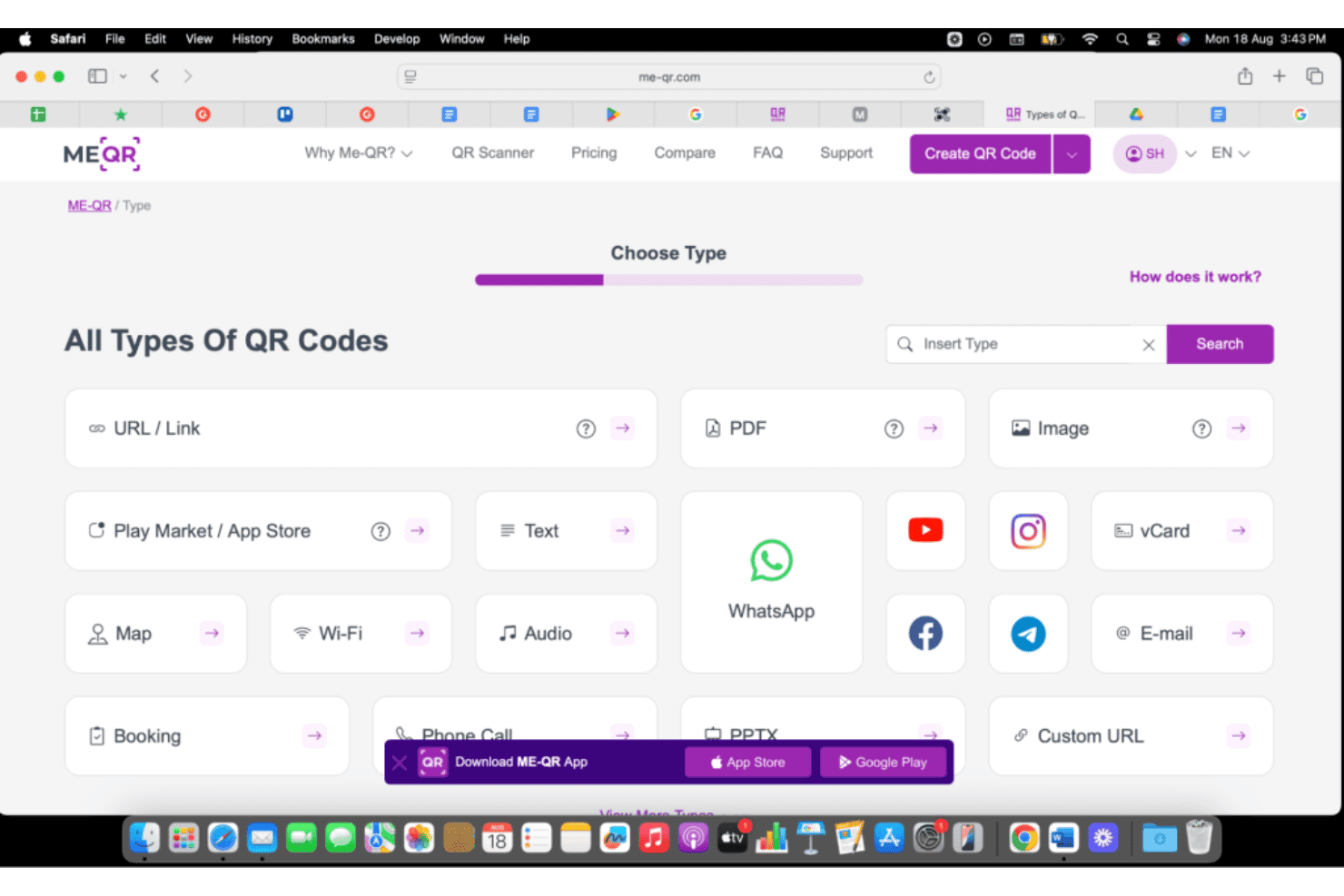
Me-QR offers a wide variety of QR code types including URL, PDF, Image, WhatsApp, vCard, and more from its type selection page. ME-QR is a QR code generator supporting 40+ content types—URLs, vCards, PDFs, Wi-Fi, and more—with dynamic code editing, branded customization, bulk generation, and built-in scan analytics.
Who Is Me-QR Best For?
ME-QR is a strong fit for marketing teams running campaigns across multiple regions or languages, given its 30+ language interface and globally accessible platform.
Why I Picked Me-QR
I've included ME-QR in my top picks because its 30+ language interface is genuinely rare in this space, supporting teams that run QR campaigns across multiple regions. What I particularly like is the Logo QR feature: it embeds brand marks directly into the code's dot pattern, keeping visual identity consistent across every language version you print. I also rely on the PDF and landing page content types to connect region-specific audiences to localized collateral from a single dynamic code.
Me-QR Key Features
- Bulk code creation: Generate multiple QR codes at once using CSV upload for large campaigns or inventory needs.
- Scan analytics dashboard: Access detailed reports on total and unique scans, locations, device type, and browser statistics.
- High-res SVG/PNG downloads: Export codes as high-quality PNG or SVG files suitable for professional print and packaging.
- API integration: Connect via public REST API to automate QR code generation directly from your systems or workflows.
Me-QR Integrations
Native integrations are not clearly documented. The tool supports integrations via a public REST API for custom workflows.
Pros and Cons
Pros:
- Logo embedded directly in code pattern
- Editable dynamic codes post-print deployment
- Multilingual QR content across 30+ languages
Cons:
- No geo-based or device redirect targeting
- Scan analytics lack depth vs. competitors
Learn more about Me-QR: Best for enterprise QR code management
- 14-day free trial
- From $9/month (billed annually)
Visit WebsiteCustomer Rating:4.9/5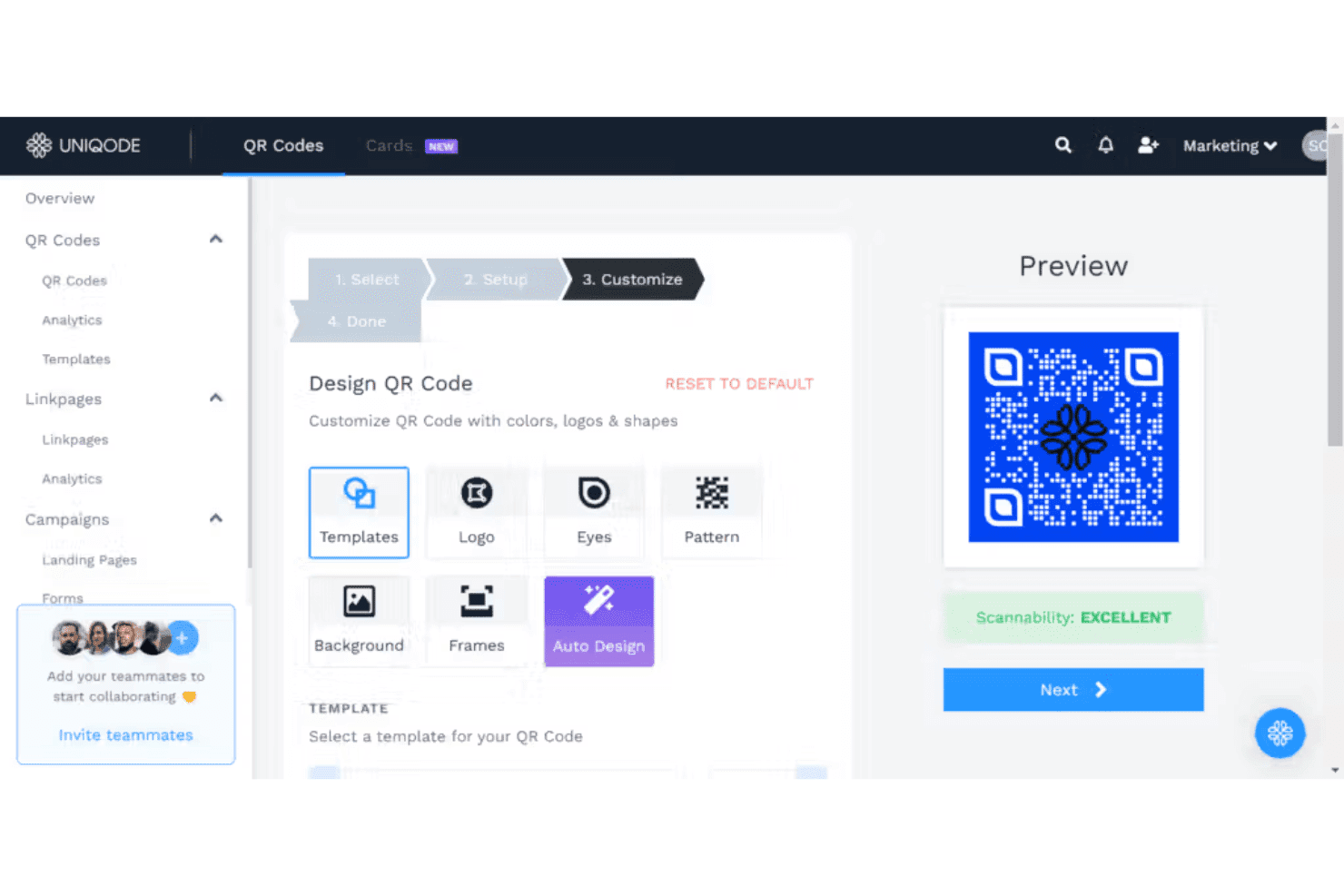
Uniqode QR Codes offers a customizable QR code designer with options for templates, logos, eyes, patterns, backgrounds, frames, and auto design, along with a live preview showing scannability rating. Uniqode is a QR code generator platform that supports 20+ dynamic and static code types, branded customization, bulk creation, real-time scan analytics, and enterprise security features including SOC 2, HIPAA, and GDPR compliance.
Who Is Uniqode QR Codes Best For?
Uniqode is a strong fit for enterprise marketing teams that need to manage QR code campaigns at scale across multiple brands, regions, or departments.
Why I Picked Uniqode QR Codes
I've included Uniqode in my top picks because it handles the organizational complexity that comes with QR campaigns at enterprise scale. Multi-team workspaces with role-based access let different departments or agencies manage their own codes without overlap. I also like the geo and device-based redirect logic, which lets a single printed code serve different landing pages depending on where or how someone scans it.
Uniqode QR Codes Key Features
- Scan analytics dashboard: See real-time stats for total and unique scans by location, device, and time.
- Custom landing page builder: Design mobile-optimized landing pages to link from QR codes.
- Bulk generation and CSV import: Create thousands of unique QR codes at once using batch CSV upload tools.
- High-res export formats: Download codes as print-ready PNG, SVG, PDF, JPG, and EPS files.
Uniqode QR Codes Integrations
Uniqode QR Codes offers native integrations with HubSpot, Salesforce, Google Analytics, Google Ads, and Meta Pixel. An API is available for custom integrations.
Pros and Cons
Pros:
- Post-print URL edits without reprinting codes
- Real-time scan data by city and device type
- Strong enterprise-grade security and compliance controls
Cons:
- Bulk generation features not available on entry plans
- Scan analytics depth requires higher-tier plans
Learn more about Uniqode QR Codes:
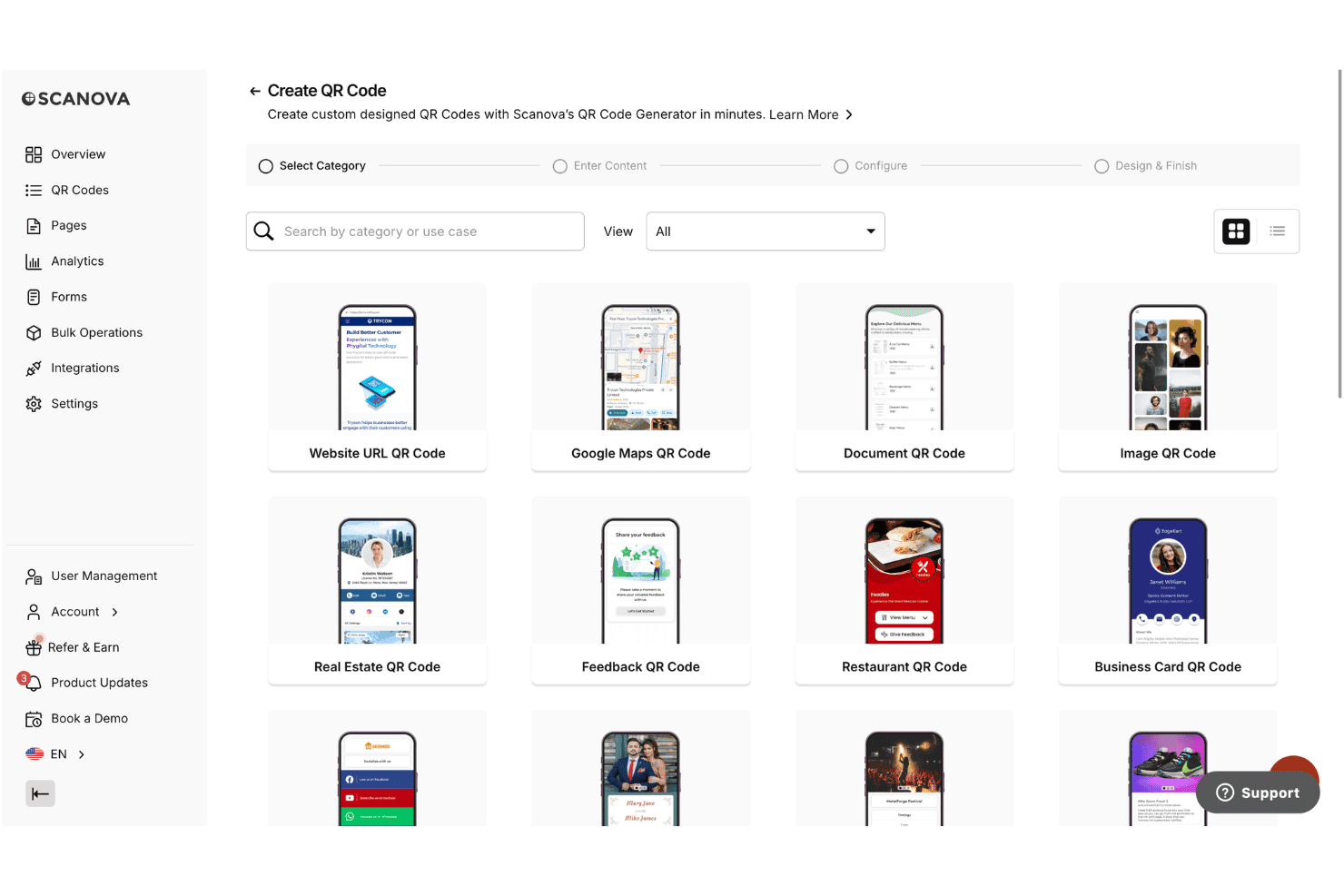
Scanova offers a QR Code creation wizard with multiple category options including Website URL, Google Maps, Document, Image, Real Estate, Feedback, Restaurant, and Business Card QR Codes. Scanova is a QR code management platform that lets you create, design, and track dynamic and static QR codes across 26 content types, including landing pages, lead forms, vCards, and app store links.
Who Is Scanova Best For?
Scanova is a strong fit for mid-market and enterprise marketing teams running print-to-digital campaigns where branded QR codes, lead capture, and scan-level analytics need to work together.
Why I Picked Scanova
I picked Scanova as one of the best because its QR Code Forms feature turns a printed code into a direct lead capture point, with customizable fields and CRM-ready exports built in. I also like Conditional Redirection, which routes scanners by country or device so one printed code can serve multiple audience segments. The event and click tracking on landing page buttons then shows exactly which form elements drive conversions, not just raw scan counts.
Scanova Key Features
- Mobile landing page builder: Create customizable, mobile-optimized landing pages for QR codes without coding.
- Bulk QR code generation: Generate dozens or thousands of unique QR codes at once with batch upload or QR API.
- Advanced branding options: Customize QR codes with logos, colors, gradient patterns, and CTA frames for full brand alignment.
- Audit logs and user management: Assign roles, track user actions, and manage permissions for multi-user workspaces.
Scanova Integrations
Scanova offers native integrations with Google Analytics, Meta Pixel (Facebook), LinkedIn Insight Tag, and Microsoft Advertising. It connects with Zapier and provides an API for custom integrations.
Pros and Cons
Pros:
- 26 QR code content types supported
- Geo and device-based conditional redirects available
- QR code forms capture leads directly
Cons:
- Reporting dashboard less visual than competitors
- Dynamic features locked behind higher-tier plans
Learn more about Scanova: Best for no-signup static QR codes
- 14-day free trial
- From $10/month (billed annually)
Visit WebsiteCustomer Rating:4.7/5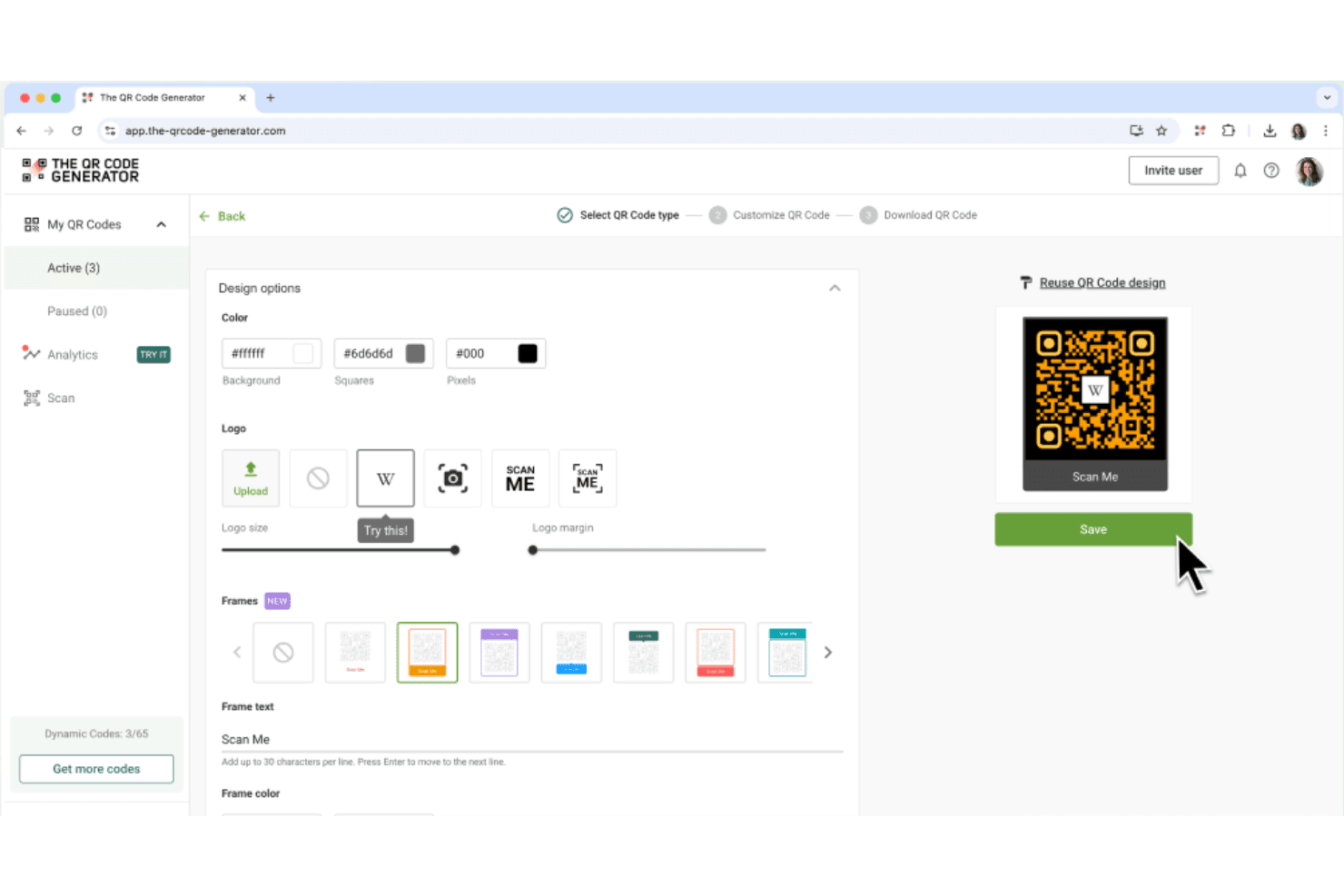
The QR Code Generator (TQRCG) allows users to customize QR codes with color options, logos, frames, and frame text before saving. The QR Code Generator (TQRCG) is a QR code platform that lets you create static and dynamic QR codes across content types like URLs, PDFs, vCards, SMS, and social profiles, with scan analytics and visual customization built in.
Who Is The QR Code Generator (TQRCG) Best For?
It's a strong fit for small businesses and marketing teams in retail, hospitality, and events who need quick, low-friction QR code creation without a steep learning curve.
Why I Picked The QR Code Generator (TQRCG)
I picked The QR Code Generator (TQRCG) as one of the best because it's the only tool on my list where you can generate unlimited static QR codes without signing up. It covers 10 content types (URLs, PDFs, vCards, App links, and SMS, among others) and exports in both PNG and SVG, so I can hand files directly to a print vendor without reformatting. I also like that the two free dynamic codes never expire, which keeps low-volume campaigns running long-term without a subscription.
The QR Code Generator (TQRCG) Key Features
- Scan analytics dashboard: Track scan totals, unique scans, GPS locations, devices, and time distribution in real time.
- Visual QR customization: Change colors and insert logos or images to match branding requirements.
- Bulk QR creation tool: Upload a CSV file to create multiple QR codes for products or campaigns in one step.
- Multiple content types supported: Generate codes for URLs, PDFs, vCards, SMS, app links, and social profiles.
The QR Code Generator (TQRCG) Integrations
Native integrations are not clearly documented. No API or Zapier support is available for custom integrations.
Pros and Cons
Pros:
- Direct URL embedding with no forced short-link redirects
- Two free dynamic codes never expire or deactivate
- Static codes generate instantly without account creation
Cons:
- Scan analytics only available on dynamic codes
- Dynamic code limit capped at two on free plan
Learn more about The QR Code Generator (TQRCG): Best for privacy-focused QR analytics
- Free plan available
- From $12/month
Visit WebsiteCustomer Rating:4.9/5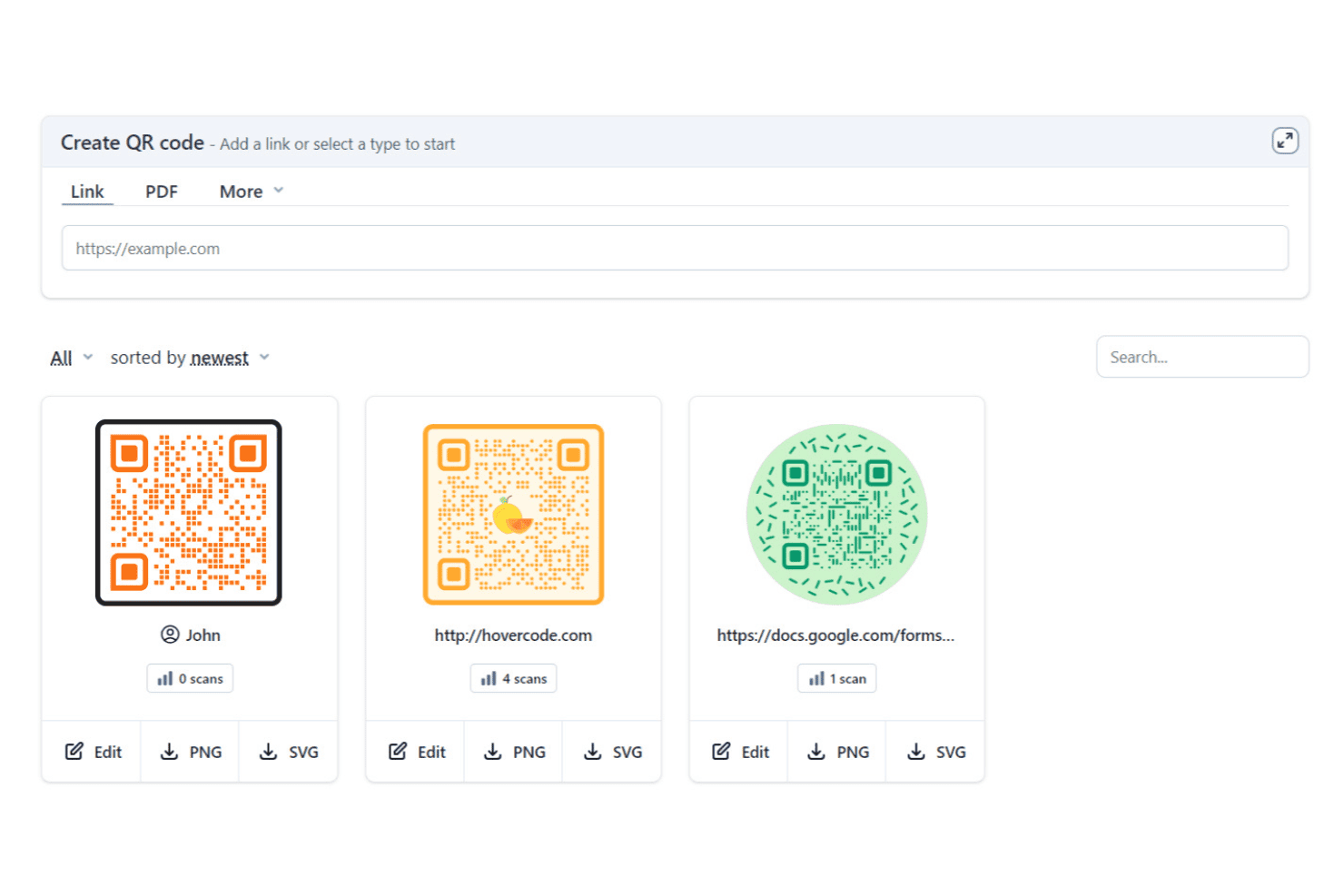
Hovercode allows users to create, manage, and track custom QR codes with scan analytics from a simple dashboard. Hovercode is a QR code generator for creating dynamic, fully branded QR codes across content types including links, vCards, PDFs, Wi-Fi, and GS1 Digital Links, with built-in scan analytics and landing page tools.
Who Is Hovercode Best For?
Hovercode is a good fit for small-to-midsize marketing teams that need branded, trackable QR codes without the complexity of an enterprise platform.
Why I Picked Hovercode
I've included Hovercode in my top picks because of how it handles scan data without compromising the scan experience. There are no ads shown when someone scans a code, and the mobile app is confirmed to collect no user data. I also like that you can route scans through your own custom domain (like qr.yoursite.com) rather than a generic Hovercode URL, which keeps the analytics flow clean and brand-controlled.
Hovercode Key Features
- GS1 Digital Link support: Generate QR codes compliant with GS1 standards for product packaging and retail use.
- Bulk QR code generator: Create multiple dynamic QR codes at once using CSV upload for large campaigns or asset tracking.
- Custom QR templates: Choose from a range of ready-made layouts, including circular, 3D, and patterned designs.
- Multi-link landing pages: Build and link mobile-optimized micro landing pages directly from QR codes.
Hovercode Integrations
Native integrations are not clearly documented. Hovercode provides an API for custom integrations.
Pros and Cons
Pros:
- GS1 Digital Link support for retail packaging
- Custom domain routing for branded scan URLs
- Privacy-respecting analytics with no user data
Cons:
- Smaller code template library than category leaders
- Analytics dashboard lacks real-time scan refresh
Learn more about Hovercode: 10Best for offline campaign attribution
Flowcode
- Free plan available
- From $25/month (billed annually)
Visit WebsiteCustomer Rating:4.6/5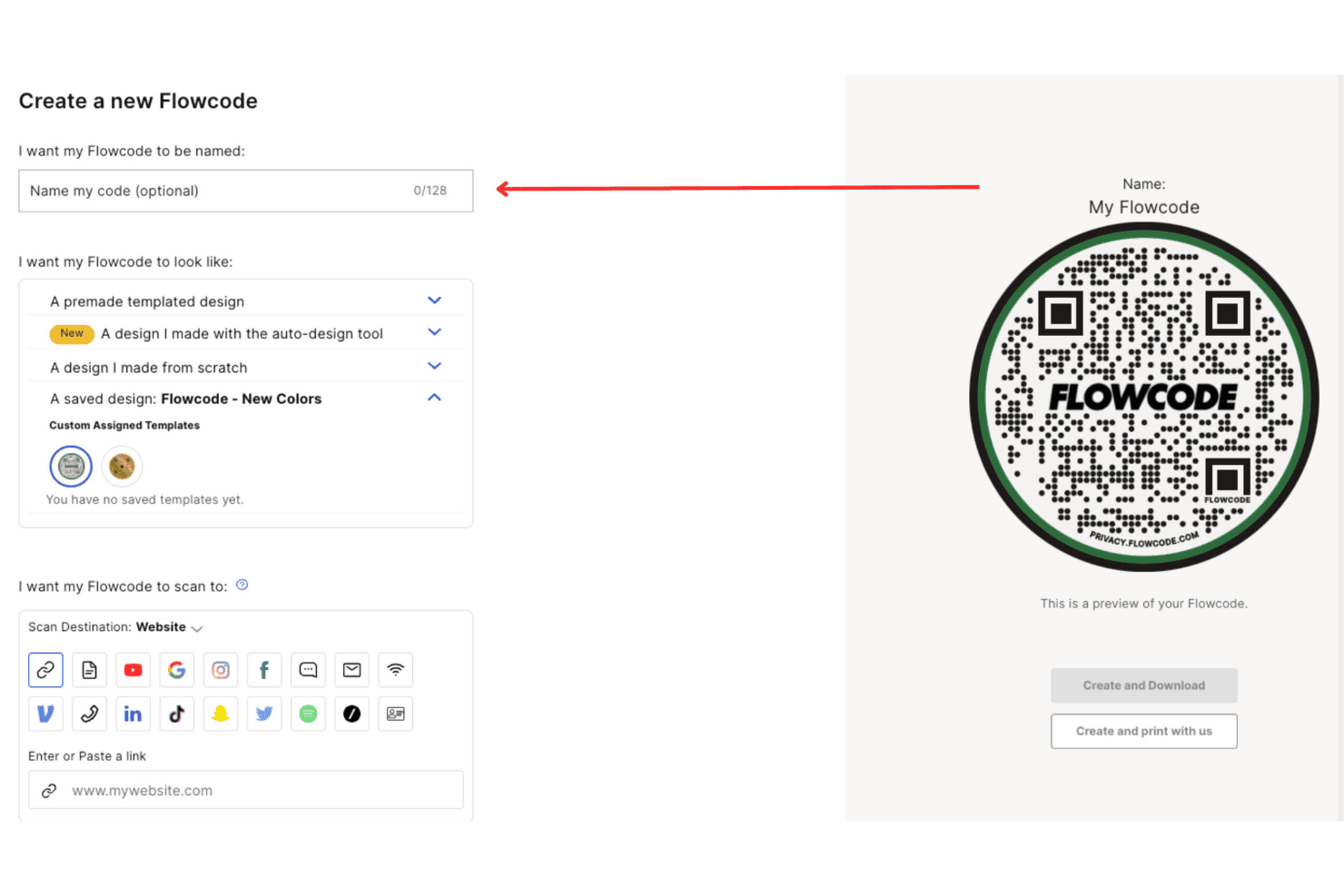
Flowcode offers a QR code creation interface where users can name their code, choose a design style, and set a scan destination URL. Flowcode is a dynamic QR code platform that combines branded code design, mobile landing pages, smart routing, and first-party scan analytics built specifically around physical marketing touchpoints.
Who Is Flowcode Best For?
Flowcode is a strong fit for mid-size to enterprise marketing teams running multi-channel campaigns that include print, events, or retail touchpoints alongside digital channels.
Why I Picked Flowcode
I picked Flowcode as one of the best because it goes further than any other QR tool I've used for measuring what actually happens after someone scans a code in the real world. Advanced geolocation analytics and UTM traffic charts let my team trace a scan at a trade show or billboard back to a specific campaign. Smart routing by device, day, or location also means I can send mobile users in different cities to different landing pages without reprinting a single code.
Flowcode Key Features
- Bulk code creation: Generate up to 1,000 QR codes at a time with batch tools or API access.
- Brand Kits: Lock in logos, colors, and fonts for consistent branding across all codes.
- Custom redirect domains: Assign branded shortened URLs to QR codes for added trust and recognition.
- Enterprise team workspaces: Manage user roles, permissions, and organize codes for large teams or agencies.
Flowcode Integrations
Flowcode offers native integrations with HubSpot, Salesforce, Snowflake, and Braze, with an API available for custom integrations.
Pros and Cons
Pros:
- Real-time scan dashboards with exportable reports
- Dynamic codes updatable without reprinting
- Deep offline scan attribution by location and device
Cons:
- Landing page builder feels basic for advanced needs
- Free plan limited to static codes only
Learn more about Flowcode:
Alte generatoare de coduri QR
Iată câteva opțiuni suplimentare de generatoare de coduri QR care nu au ajuns în selecția mea scurtă, dar merită totuși verificate:
- 11QR.ioBest for multi-link QR code pages
- 12QR Code TigerBest for bulk QR code generation
- 13UnitagBest for artistic QR code customization
- 14Canva QR Code GeneratorBest for QR codes in Canva designs
- 15Qr Code MonkeyBest for free custom static QR codes
Related Reviews
How I Evaluate QR Code Generators
I evaluate QR code generators across two layers: baseline functionality every tool must meet and the differentiators—like analytics depth and bulk generation—that set the best apart.
Core Functionality (Table Stakes For This List)
When I'm selecting tools for my list, I rank each one on a scale from 0 (does not offer the functionality) to 5 (excels in this area) for each core functionality listed below. I then calculate the tool's total score into a percentage, using 75% as a benchmark to help assess its overall fit for the list.
- Dynamic QR Codes: I look for editable destinations so you can swap a printed flyer's URL without reprinting, plus scheduling or geo-based redirects for advanced campaigns.
- Scan Analytics: Each tool should track scans by location, device, and time so you can measure which trade show booth or packaging variant drives more traffic.
- Branded Customization: Logo uploads, brand colors, and CTA frames matter—your QR code on event signage should look like part of the design, not an afterthought.
- Multiple Content Types: Beyond URLs, I check for vCards, PDFs, app store links, and Wi-Fi codes so one platform covers everything from menus to event badges.
- Bulk Generation: Large campaigns like product packaging or event ticketing need CSV-based batch creation with unique tracking per code.
- High-Res Export Formats: Print-ready vector formats like SVG and EPS are key—low-res exports won't hold up on billboards or large retail signage.
Once I have a list of tools that meet the criteria, I consider what sets each platform apart.
Differentiating Factors (What Sets Vendors Apart)
Here's how I compare and contrast different vendors:
Standout Features
Built-in landing page builders are a major differentiator. Some tools let you create mobile-optimized pages with menus, vCards, or social links directly from the QR code, removing the need for a separate site. I also evaluate API access for bulk generation, since teams running product packaging or event ticketing campaigns need programmatic code creation at scale. Real-time scan analytics with GA or CRM integrations push a tool further, connecting offline scans to your broader attribution model.
Beyond Features
Integrations matter a lot here. I check whether scan events can flow into your CRM or marketing automation platform via native connectors or Zapier, since that's how you tie a billboard scan to a closed deal. Data privacy is another factor I evaluate—GDPR and CCPA compliance, SSL-secured redirects, and password-protected codes all come into play when handling scan data. For agency or enterprise teams, I also look at multi-user workspaces with role-based permissions and white-label options for client-facing deliverables.
Cum să alegeți un generator de coduri QR
Având în vedere că atât de multe generatoare de coduri QR promit analiză de date, personalizare și scalabilitate, cum vă concentrați asupra platformei potrivite pentru următoarea campanie?
| Dacă prioritatea dumneavoastră este... | Prioritizați... |
|---|---|
| Dacă prioritatea dumneavoastră este...Destinații editabile după tipărire | Prioritizați...Funcționalitatea de cod QR dinamic și actualizarea URL-ului |
| Dacă prioritatea dumneavoastră este...Atribuirea și rentabilitatea investiției campaniei | Prioritizați...Analize avansate ale scanărilor și rapoarte exportabile |
| Dacă prioritatea dumneavoastră este...Consecvența mărcii pe toate materialele | Prioritizați...Personalizare extinsă a siglei, culorilor și stilului |
| Dacă prioritatea dumneavoastră este...Implementare la scară largă sau în francize | Prioritizați...Crearea în masă/CSV și controale pentru permisiunile utilizatorilor |
| Dacă prioritatea dumneavoastră este...Conectarea scanărilor fizice la fluxurile digitale | Prioritizați...Integrări cu CRM, marketing și automatizare |
Cum să vă evaluați selecția scurtă
- Solicitați un exemplu de analiză: Cereți o captură de ecran a tabloului de bord pentru analiza scanărilor, care să prezinte distribuția pe orașe/dispozitive, sau un exemplu de export.
- Testați actualizările dinamice: Desfășurați un test pilot de 24 de ore, tipărind coduri QR, apoi actualizați destinațiile și verificați dacă redirecționarea funcționează.
- Verificați afirmațiile privind integrările: Conectați un cod QR demonstrativ la CRM-ul sau automatizarea dumneavoastră prin Zapier sau API, apoi verificați existența unui eveniment real de scanare.
- Solicitați dovezi privind conformitatea: Cereți documentație care să demonstreze conformitatea datelor cu GDPR sau CCPA în ceea ce privește stocarea și gestionarea scanărilor.
- Decideți între amploare și identitatea mărcii: Comparați generarea în masă/concentrată pe accesul la API cu controalele avansate pentru designul mărcii, pentru a alege ceea ce contează cel mai mult pentru echipa dumneavoastră.
Ce sunt generatoarele de coduri QR?
Generatoarele de coduri QR sunt platforme software care vă permit să creați coduri QR pentru a conecta materiale tipărite la conținut digital, precum pagini de destinație, meniuri sau promoții. Specialiștii în marketing, managerii de campanii și echipele din retail le folosesc pentru a face legătura dintre canalele offline și online pentru orice scaner de coduri QR de pe smartphone, pentru a colecta date despre scanări și pentru a personaliza codurile cu elemente ale mărcii. Aceste instrumente oferă de obicei editare dinamică, monitorizarea scanărilor, suport pentru mai multe tipuri de conținut și opțiuni de export pentru cazuri de utilizare tipărite și digitale de înaltă calitate.
Funcții
Atunci când selectați generatoare de coduri QR, urmăriți următoarele funcții esențiale:
- Coduri dinamice: Editați adresa URL de destinație sau conținutul codului chiar și după imprimare, ceea ce vă permite să actualizați destinațiile campaniilor fără a modifica fizic materialele promoționale.
- Analize ale scanărilor: Urmăriți numărul de scanări, utilizatorii unici, ora, dispozitivul și datele privind locația pentru a măsura performanța campaniei și a optimiza strategiile de marketing viitoare.
- Personalizarea mărcii: Personalizați culorile, formele și cadrele și adăugați sigle ale mărcii pentru ca codurile QR să aibă un aspect uniform pe toate canalele tipărite și digitale.
- Tipuri multiple de conținut: Generați coduri pentru URL-uri, PDF-uri, vCard-uri, linkuri către magazine de aplicații, meniuri, rețele Wi-Fi și profiluri sociale, pentru a susține diverse experiențe de la offline la online.
- Opțiuni de export la rezoluție înaltă: Descărcați codurile în formate vectoriale pregătite pentru tipar, precum SVG sau PDF, și în formate raster standard, pentru utilizare versatilă și de înaltă calitate pe orice canal.
- Generare în masă: Creați sute sau mii de coduri QR simultan prin încărcarea unui fișier CSV sau folosind instrumente de procesare în loturi, simplificând implementări de amploare precum etichetarea produselor și permisele pentru evenimente.
- Acces API: Utilizați API-uri pentru a automatiza crearea codurilor, a actualiza destinațiile sau a extrage analize, asigurând integrarea cu sistemele interne și fluxurile de lucru personalizate ale campaniilor.
- Creator de pagini de destinație: Unele instrumente oferă pagini de destinație integrate și optimizate pentru dispozitive mobile, astfel încât să puteți direcționa utilizatorii către meniuri, vCard-uri, descărcări sau promoții fără a întreține un site separat.
- Protecție prin parolă și expirare: Controlați accesul la codurile sensibile adăugând parole sau setând date de expirare automate, aspect util în special pentru emiterea biletelor, validarea accesului la evenimente sau ofertele cu durată limitată.
- Controale pentru utilizatori și permisiuni: Atribuiți roluri și gestionați accesul utilizatorilor, facilitând colaborarea și controlul modificărilor campaniilor pentru echipele agențiilor sau grupurile de marketing ale companiilor.
Soluțiile de generare a codurilor QR nu includ, de obicei, inteligența artificială în oferta lor de funcționalități.
Beneficii
Implementarea generatoarelor de coduri QR oferă mai multe beneficii pentru echipa și compania dumneavoastră. Iată câteva dintre avantajele de care vă puteți bucura:
- Actualizări flexibile ale campaniilor: Codurile dinamice vă permit să actualizați destinațiile după imprimare, economisind timp și reducând risipa de materiale tipărite în timpul modificării campaniilor.
- Date de performanță utile: Analizele integrate arată care campanii, locații sau dispozitive generează cel mai mult trafic, sprijinind decizii de marketing mai bine fundamentate.
- Consecvența mărcii peste tot: Opțiunile de personalizare asigură alinierea vizuală a fiecărui cod cu marca dumneavoastră pe materiale tipărite, ambalaje sau puncte de contact digitale.
- Acces simplificat pe mai multe canale: Codurile QR conectează experiențele din mediul fizic la pagini de destinație, meniuri, descărcări digitale sau magazine de aplicații — totul printr-o singură scanare.
- Implementare la volum mare: Funcțiile de generare în masă și API facilitează generarea și gestionarea a mii de coduri unice pentru ambalarea produselor sau emiterea biletelor pentru evenimente.
- Securitate îmbunătățită a datelor: Protecția prin parolă, linkurile SSL și funcțiile de conformitate contribuie la păstrarea în siguranță a datelor scanărilor și la îndeplinirea cerințelor de reglementare.
- Fluxuri de lucru simplificate pentru echipe: Gestionarea utilizatorilor și rolurile sprijină colaborarea dintre echipele de marketing, comerț cu amănuntul și agenții care lucrează la campanii comune.
Costuri și prețuri
Alegerea generatoarelor de coduri QR necesită înțelegerea diferitelor modele de tarifare și planuri disponibile. Costurile variază în funcție de funcționalități, dimensiunea echipei, suplimente și alți factori. Tabelul de mai jos rezumă planurile obișnuite, prețurile lor medii și funcționalitățile incluse de obicei în soluțiile de generare a codurilor QR:
Tabel comparativ al planurilor pentru generatoarele de coduri QR
| Tipul planului | Preț mediu | Funcționalități comune |
|---|---|---|
| Tipul planuluiPlan gratuit | Preț mediu$0 | Funcționalități comuneCreează coduri statice, oferă personalizare de bază, analize limitate ale scanărilor și export în format PNG. |
| Tipul planuluiPlan personal | Preț mediu$5-$20/utilizator/lună | Funcționalități comuneInclude coduri dinamice, opțiuni extinse de design, analize mai bune și acceptă mai multe tipuri de conținut. |
| Tipul planuluiPlan pentru companii | Preț mediu$25-$60/utilizator/lună | Funcționalități comuneAdaugă generarea în masă, gestionarea echipelor, analize avansate, integrări și asistență prioritară. |
| Tipul planuluiPlan pentru întreprinderi | Preț mediu$75-$200+/utilizator/lună | Funcționalități comuneInclude acces API, autentificare unică, conformitate avansată, personalizare cu etichetă albă, gestionarea dedicată a contului și SLA-uri personalizate. |
Întrebări frecvente despre generatorul de coduri QR
Iată câteva răspunsuri la întrebările frecvente despre generatoarele de coduri QR:
Care este diferența dintre codurile QR statice și cele dinamice?
Codurile QR statice conțin date fixe și nu pot fi modificate după tipărire, în timp ce codurile QR dinamice vă permit să actualizați oricând destinația sau conținutul, ceea ce le face mai flexibile pentru marketing și utilizarea pe termen lung.
Pot urmări cine îmi scanează codurile QR?
Nu, generatoarele de coduri QR pot colecta date despre locația scanării, dispozitiv și oră de la cititorul de coduri QR al unui utilizator, dar nu pot identifica utilizatorii individuali fără pași suplimentari de acord explicit. Analizele arată tendințe și nivelul de implicare fără a captura informații personale.
Sunt generatoarele de coduri QR sigure pentru conținut sensibil?
Da, mai ales dacă folosiți protecție prin parolă, linkuri securizate prin SSL și setați date de expirare. Dacă gestionați informații sensibile, căutați platforme conforme cu reglementările privind confidențialitatea datelor, precum GDPR.
Acceptă generatoarele de coduri QR crearea de coduri în serie?
Da, majoritatea generatoarelor de coduri QR destinate companiilor vă permit să creați sute sau mii de coduri simultan, folosind încărcări CSV sau acces API. Acest lucru este ideal pentru ambalarea produselor, gestionarea activelor sau emiterea biletelor pentru evenimente.
Pot personaliza designul codurilor mele QR?
Da, majoritatea soluțiilor oferă opțiuni de branding personalizat. Puteți adăuga sigla, seta culorile brandului, ajusta modelele și folosi cadre sau îndemnuri la acțiune, păstrând în același timp codurile ușor de scanat.