

Un sistem de gestionare a conținutului pentru întreprinderi (ECMS) este un software care vă ajută compania să organizeze, să stocheze și să controleze accesul la documente și conținut digital la scară largă. Dacă sunteți în căutarea celui mai bun sistem de gestionare a conținutului pentru întreprinderi, probabil vă confruntați cu fișiere dispersate, cerințe de conformitate sau colaborarea între echipe și departamente. Alegerea software-ului ECM potrivit vă poate ajuta să centralizați informațiile, să automatizați fluxurile de lucru și să păstrați în siguranță datele sensibile. În acest ghid veți găsi opțiuni evaluate de experți pentru 2026, cu detalii clare despre punctele forte ale fiecărui sistem, astfel încât să puteți identifica cu încredere soluțiile ECM potrivite pentru nevoile companiei dumneavoastră.
Why Trust Our Software Recommendations
6,700+
Reviews
20
Industry experts
16+
Evaluation factors
14
Years
Our team has been testing and reviewing software since 2012. As marketing leaders ourselves, we know how difficult—and important—it is to choose the right software.
For this guide, we evaluated tools using hands-on testing and independent research, scoring tools using our selection criteria.
Our reviews reflect our human editorial judgment, not a sales pitch.
Expert reviewers:
 Gui DrusinaCreative Director
- Shriya GhateSenior Marketing Lead
 Amanda JacquesMarketing Ops Leader

Tabel comparativ al sistemelor de gestionare a conținutului pentru întreprinderi
Acest tabel comparativ sintetizează detaliile privind prețurile pentru selecția mea de top de software de gestionare a conținutului pentru întreprinderi:
Sorted by: Default
| Tool | Starting Price | Website | |
|---|---|---|---|
Best for SAP-integrated records compliance | 4.8 out of 5 | Pricing upon request Free demo available | Website |
Best for process automation in organizations | 4.6 out of 5 | $73/user/month Free demo available | Website |
Best for automated document workflows | 4.5 out of 5 | Pricing upon request Free demo available | Website |
Best for digital asset management integration | 4.5 out of 5 | Pricing upon request Not available | Website |
Best with advanced file sharing controls | 4.3 out of 5 | $7/user/month Free plan + trial + demo available | Website |
Best for team collaboration on documentation | 4.3 out of 5 | $5.78/user/month Free plan + 7-day trial available | Website |
Best for metadata-driven document organization | 4.4 out of 5 | $65/user/month Free demo available | Website |
Best for large-scale compliance management | 4.2 out of 5 | Pricing upon request Free demo available | Website |
Best for case management solutions | 4.4 out of 5 | Pricing upon request Free demo available | Website |
Best for structured content across channels | Not rated | $15/user/month Free plan + free demo available | Website |


Recenzii ale sistemelor de gestionare a conținutului pentru întreprinderi
Mai jos sunt rezumatele mele detaliate ale sistemelor de gestionare a conținutului pentru întreprinderi care au ajuns pe lista mea scurtă. Recenziile mele oferă o analiză detaliată a funcționalităților, a celor mai potrivite cazuri de utilizare și a integrărilor fiecărui sistem, pentru a vă ajuta să îl găsiți pe cel mai potrivit pentru compania dumneavoastră.
 Best for SAP-integrated records compliance
- Free demo available
- Pricing upon request
Visit WebsiteCustomer Rating:4.8/5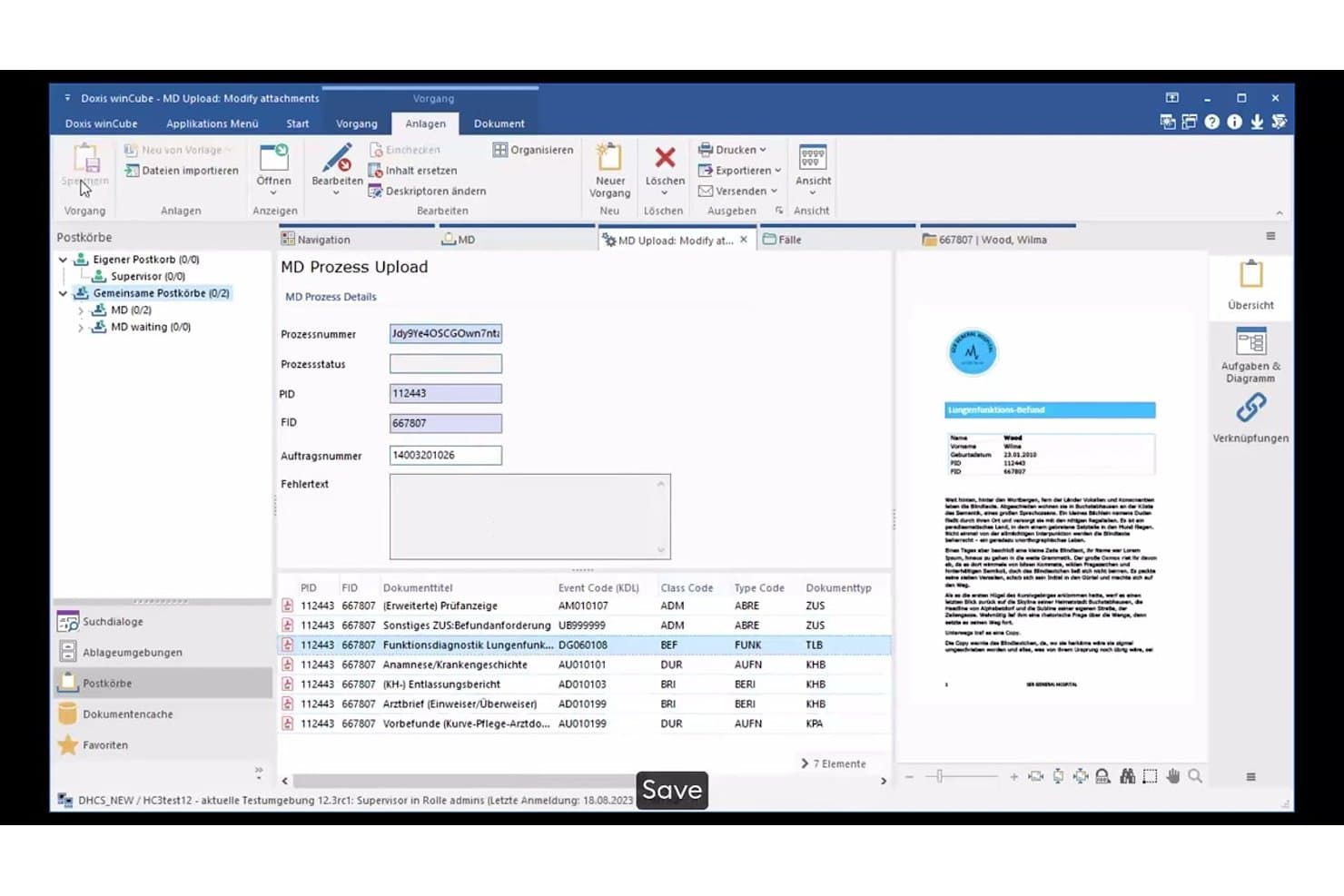
Doxis manages document uploads with metadata and process tracking. Doxis is an intelligent content automation platform that combines document management, workflow automation, intelligent document processing, records compliance, and archiving in a single repository.
Who Is Doxis Best For?
Doxis is a strong fit for large enterprises in compliance-heavy industries—banking, insurance, manufacturing, and the public sector—that run SAP and need tight records management alongside document-driven process automation.
Why I Picked Doxis
I picked Doxis as one of the best because its SAP integration goes well beyond a basic connector. It's SAP-certified, covers S/4HANA, Ariba, and SuccessFactors, and automates full purchase-to-pay and order-to-cash cycles with documents filed directly into compliance-ready eFiles. On top of that, I love how retention schedules, WORM locking, and legal holds are built into the same repository, so records compliance isn't a separate system you have to reconcile with your SAP data.
Doxis Key Features
- AI.dp intelligent document processing: Automatically classifies 50+ document types and extracts 150+ data fields using OCR, machine learning, and LLMs in seconds.
- BPMN 2.0 workflow engine: Models document-driven processes with rules-based routing, deputy handling, escalation paths, and event-triggered workflow starts.
- Doxis iRoom external sharing: Provides a secure portal for sharing documents with external stakeholders outside your organization.
- Migration consolidation service: Transfers metadata first so users keep working while content migrates in the background from sources like OpenText, IBM FileNet, and Alfresco.
Doxis Integrations
Doxis claims 200+ integrations, including SAP S/4HANA, Salesforce, Workday, ServiceNow, and Microsoft 365, SharePoint, Outlook, Teams, and Dynamics 365. REST, CMIS, webhooks, and database connections support custom integrations, with SAP-certified connectors for enterprise workflows.
Pros and Cons
Pros:
- Applies retention schedules, legal holds, and WORM controls
- Automates approvals with audit trails and deputy routing
- Scales from small archives to billions of documents
Cons:
- Some users report large-file and external-sharing problems
- Reviewers report inconsistent support and outage follow-up
Learn more about Doxis: Best for process automation in organizations
- Free demo available
- From $73/user/month (billed annually)
Visit WebsiteCustomer Rating:4.6/5
Laserfiche updates content while automating repetitive tasks. Laserfiche stands out for organizations that want to automate complex business processes alongside managing documents. It’s a strong fit for teams in government, education, and financial services that need to digitize workflows, enforce compliance, and reduce manual paperwork. With its process automation tools, Laserfiche helps you design, monitor, and optimize content-driven operations at scale.
Why I Picked Laserfiche
For organizations that need more than just document storage, Laserfiche offers process automation tools that set it apart in the enterprise content management system space. The platform lets you build custom workflows using a visual designer, so you can automate document routing, approvals, and notifications without coding. I appreciate how Laserfiche includes built-in analytics to help you monitor process performance and identify bottlenecks. These features make it a strong choice for teams looking to digitize and optimize their business processes alongside managing content.
Laserfiche Key Features
In addition to its process automation capabilities, Laserfiche offers several other features that support enterprise content management:
- Document Capture and Scanning: Import paper documents and digital files directly into the system for centralized management.
- Records Management: Apply retention schedules and automate compliance with regulatory requirements.
- Granular Permission Controls: Set detailed access rights for users, groups, and roles across repositories.
- Mobile App Access: View, upload, and manage documents from iOS and Android devices.
Laserfiche Integrations
Integrations include Microsoft Dynamics CRM, Salesforce, Laserfiche API, DocuSign, and Workday.
Pros and Cons
Pros:
- Highly scalable platform
- Strong user community
- Easy audit compliance
Cons:
- Initial setup takes time
- Add-ons get expensive
Learn more about Laserfiche: Best for automated document workflows
- Free demo available
- Pricing upon request
Visit WebsiteCustomer Rating:4.5/5
DocuWare digitizes business documents. DocuWare is a document management system that is designed for organizations that need to automate document-driven processes and reduce manual paperwork. It’s a strong fit for finance, HR, and operations teams that handle high volumes of forms, invoices, or approvals. DocuWare helps you digitize, route, and secure documents, so your workflows move faster and compliance is easier to manage.
Why I Picked DocuWare
Automating document workflows is a top priority for many enterprise content management system buyers, which is why DocuWare caught my attention. The platform’s workflow designer lets you build custom, rule-based automations for routing, reviewing, and approving documents. I like that DocuWare includes intelligent indexing, so documents are automatically categorized and searchable as soon as they’re uploaded. Its electronic forms feature also helps teams capture and process information digitally, reducing manual data entry and speeding up approvals.
DocuWare Key Features
Some other features in DocuWare that are valuable for enterprise content management include:
- Document Version Control: Track changes and maintain a full history of document edits and updates.
- Role-Based Access Control: Assign permissions to the right people based on user roles to protect sensitive information.
- Mobile App: Capture, access, and approve documents from smartphones or tablets.
- Audit Trail: Monitor all document activity with detailed logs for compliance and security.
DocuWare Integrations
Integrations include Microsoft Outlook, SAP, Oracle, Sage, QuickBooks, and OneDrive.
Pros and Cons
Pros:
- Built-in compliance
- Intuitive interface
- Strong security controls
Cons:
- High cost for small teams
- Mobile app is basic
Learn more about DocuWare: Best for digital asset management integration
- Not available
- Pricing upon request
Visit WebsiteCustomer Rating:4.5/5
Adobe Experience Manager streamlines the creation of digital content. If your team manages a high volume of digital assets across multiple channels, Adobe Experience Manager brings content and asset management together in one platform. It’s especially useful for marketing teams and creative departments that need to deliver consistent, on-brand experiences at scale. With Adobe Experience Manager, you can build a centralized repository of digital assets, automate content workflows, and connect creative tools directly to your content library.
Why I Picked Adobe Experience Manager
For organizations that need to tightly connect digital asset management with enterprise content workflows, Adobe Experience Manager stands out. The platform’s native digital asset management lets you store, organize, and reuse creative files directly within your content management environment. I like that you can automate asset tagging and versioning, which helps teams keep content up to date and on brand. Its integration with Adobe Creative Cloud also means designers and marketers can work with assets in real time, reducing bottlenecks between creative and publishing teams.
Adobe Experience Manager Key Features
Some other features in Adobe Experience Manager that are valuable for enterprise content management include:
- Headless Content Delivery: Deliver content to any channel or device using APIs.
- Personalization Engine: Tailor content experiences based on user profiles and behaviors.
- Multi-Site Management: Manage and localize content across multiple websites from a single interface.
- Content Fragment Authoring: Create and reuse structured content blocks for consistent messaging.
Adobe Experience Manager Integrations
Integrations include Adobe Creative Cloud, Adobe Target, Adobe Analytics, Salesforce, Marketo, and Sitecore.
Pros and Cons
Pros:
- Deep analytics tools
- Great marketing sync
- World-class DAM
Cons:
- Heavy resource drain
- Needs AEM developers
Learn more about Adobe Experience Manager: 5Best with advanced file sharing controls
Box
- Free plan + trial + demo available
- From $7/user/month
Visit WebsiteCustomer Rating:4.3/5
Box stores files and data for businesses. Box is an enterprise content management solution that stands out for organizations that need strict control over file sharing and document access. It’s especially useful for legal, finance, and IT teams that manage sensitive content and require detailed permission settings. With Box, you can set granular sharing policies and monitor document activity to help meet compliance and security requirements.
Why I Picked Box
Advanced file sharing controls are a must for many enterprise content management system buyers, and Box delivers on this front. The platform lets you set detailed permissions at the file, folder, and user level, so you can control exactly who can view, edit, or share certain types of content. I appreciate that Box includes features like expiring links and watermarking, which help protect sensitive documents even after they’re shared. Its activity tracking also gives you a clear audit trail of who accessed or changed files, which is important for compliance-focused teams.
Box Key Features
Some other features in Box that are valuable for enterprise content management include:
- Document Collaboration Tools: Multiple users can comment, annotate, and edit documents in real time.
- Automated Workflow Management: Set up custom workflows to automate document review and approval processes.
- Full-Text Search: Search across all stored documents using keywords, phrases, or metadata.
- Mobile Access: Access, upload, and manage files securely from iOS and Android devices.
Box Integrations
Integrations includeSalesforce, Google Workspace, Microsoft Office 365, Slack, Adobe Sign, and ServiceNow.
Pros and Cons
Pros:
- Massive app integration
- Enterprise-grade security
- Superb external sharing
Cons:
- Basic workflow tools
- Gets pricey at scale
Learn more about Box: Best for team collaboration on documentation
- Free plan + 7-day trial available
- From $5.78/user/month (billed annually)
Visit WebsiteCustomer Rating:4.3/5
Confluence organizes team content efficiently. Confluence offers a centralized workspace for teams that need to collaborate on documentation, knowledge bases, and project materials. It’s especially useful for organizations with distributed teams or those managing complex projects that require clear, accessible documentation. Confluence helps you organize, share, and update content in real time, making it easier to keep everyone aligned and informed.
Why I Picked Confluence
When I look for a solution that supports team collaboration on documentation, Confluence stands out for its structured approach to content creation and sharing. The platform’s page hierarchy and space organization features make it easy for large teams to manage and locate documentation across departments or projects. I appreciate how Confluence supports real-time editing and commenting, which helps teams work together on documents without confusion or version conflicts. Its built-in templates also help standardize documentation, so your organization can maintain consistency as content grows.
Confluence Key Features
Some other features in Confluence that are valuable for enterprise content management include:
- Advanced Search: Quickly locate pages, attachments, or keywords across all spaces using powerful search filters.
- Permissions Management: Control access to spaces and pages with detailed user and group permissions.
- Page Analytics: Track page views and engagement metrics to monitor content usage and relevance.
- Macros Library: Enhance pages with dynamic content like task lists, calendars, and embedded media using built-in macros.
Confluence Integrations
Integrations include Jira, Slack, Trello, Google Drive, and Microsoft Teams.
Pros and Cons
Pros:
- Excellent text search
- Strong version control
- Very user-friendly
Cons:
- Lacks advanced workflows
- Formatting can break
Learn more about Confluence: Best for metadata-driven document organization
- Free demo available
- From $65/user/month
Visit WebsiteCustomer Rating:4.4/5
M-Files compiles files and metadata for streamlined access. M-Files takes a unique approach to enterprise content management by organizing documents based on metadata rather than traditional folder structures. This system is especially useful for organizations with complex information management needs, such as legal, engineering, or professional services firms. If your team struggles to find, classify, or control documents across multiple repositories, M-Files offers a way to make content instantly searchable and context-aware.
Why I Picked M-Files
Unlike traditional enterprise content management systems that rely on folders, M-Files organizes documents using metadata, which makes it much easier to locate and manage information across your organization. This metadata-driven approach means you can search for documents by project, client, document type, or any custom tag you define. I appreciate how M-Files automatically applies metadata and version control, reducing manual work and the risk of misfiling. For teams that need to manage large volumes of documents with complex relationships, this system offers a more dynamic and scalable way to keep content organized and accessible.
M-Files Key Features
Some other features that make M-Files valuable for enterprise content management include:
- Automated Workflow Engine: Design and manage document approval and review processes with customizable workflows.
- Offline Access: Work with documents and metadata even when you’re not connected to the internet.
- Audit Trail: Track every action taken on a document for compliance and security purposes.
- Microsoft 365 Integration: Access, edit, and manage documents directly from familiar Microsoft 365 applications.
M-files Integrations
Integrations include Microsoft SharePoint, Salesforce, Google Drive, HubSpot, Microsoft Network Folders, and Autodesk.
Pros and Cons
Pros:
- Integrates with Windows
- Good offline access
- Strong version control
Cons:
- Setup is labor-intensive
- Slows on huge queries
Learn more about M-Files: Best for large-scale compliance management
- Free demo available
- Pricing upon request
Visit WebsiteCustomer Rating:4.2/5
OpenText automates document workflows to improve business efficiency. OpenText is designed for enterprises that need to manage complex compliance requirements across large volumes of content. It’s a strong fit for regulated industries like healthcare, energy, and financial services, where strict governance and audit trails are essential. With OpenText, you can centralize records, automate retention policies, and support detailed regulatory reporting.
Why I Picked OpenText
When large-scale compliance management is a top priority, OpenText offers capabilities that are hard to match. The platform supports advanced records management, letting you automate retention schedules and enforce legal holds across millions of documents. I appreciate that OpenText includes detailed audit trails and reporting tools, which help organizations demonstrate compliance with industry regulations. Its policy-driven content classification also makes it easier to manage sensitive information according to strict governance standards.
OpenText Key Features
Some other features in OpenText that are valuable for enterprise content management include:
- Document Capture and Imaging: Digitize paper documents and automatically extract metadata for easier indexing.
- Collaboration Workspaces: Create secure, project-based spaces for teams to share and manage content.
- Advanced Search and Discovery: Use metadata, full-text, and faceted search to quickly locate documents.
- Mobile Content Management: Access, review, and approve documents securely from mobile devices.
OpenText Integrations
Integrations include SAP, Oracle, Salesforce, Salesforce, and Microsoft SharePoint.
Pros and Cons
Pros:
- Advanced AI capabilities
- Deep SAP integrations
- Robust security features
Cons:
- Needs heavy IT support
- Lengthy implementation
Learn more about OpenText: Best for case management solutions
- Free demo available
- Pricing upon request
Visit WebsiteCustomer Rating:4.4/5
Hyland OnBase catalogs enterprise files for easier retrieval. When your organization needs to manage complex, document-heavy processes, Hyland OnBase offers a unified ECM platform built for case management. It’s a strong fit for industries like government, healthcare, and financial services that require secure, auditable workflows and detailed records tracking. OnBase helps teams centralize documents, automate case routing, and maintain compliance across every stage of a case lifecycle.
Why I Picked Hyland OnBase
What sets Hyland OnBase apart for enterprise content management is its focus on case management solutions. The platform lets you build custom case workflows, so you can automate document routing, approvals, and escalations based on your organization’s rules. I appreciate how OnBase links related documents, emails, and notes to each case, giving teams a complete view of every process. Its audit trails and granular permissions also help organizations meet strict compliance and security requirements, which is essential for regulated industries.
Hyland OnBase Key Features
Some other features in Hyland OnBase that are valuable for enterprise content management include:
- Document Capture and Imaging: Convert paper documents into digital files for secure storage and retrieval.
- Records Management: Apply retention policies and automate document lifecycle management.
- Integration with Core Business Systems: Connect OnBase with ERP, CRM, and other enterprise platforms.
- Mobile Access: View and manage content from smartphones and tablets using dedicated mobile apps.
Hyland Onbase Integrations
Integrations include Epic, Cerner, Microsoft Outlook, SAP, and Lawson.
Pros and Cons
Pros:
- Robust custom workflows
- Strong healthcare focus
- Flexible module licensing
Cons:
- Upgrades take too long
- Expensive add-on modules
Learn more about Hyland OnBase: 10Best for structured content across channels
Sanity
- Free plan + free demo available
- From $15/user/month

Sanity synchronizes multi-channel content. Sanity is a content management platform designed for teams that need to manage structured content across multiple digital channels. It’s a strong fit for organizations with complex content models, such as media companies, ecommerce brands, or enterprises with omnichannel publishing needs. Sanity helps you centralize, structure, and deliver content consistently, even as your channels and requirements evolve.
Why I Picked Sanity
Sanity stands out for its ability to handle structured content across a wide range of digital channels, which is a core challenge for many enterprise content management system users. I picked Sanity because its content modeling tools let you define custom schemas and formats, so your team can manage everything from product data to editorial content in a single platform. The real-time collaboration features help distributed teams work together on content updates without versioning headaches. Sanity’s API-first approach also makes it easy to deliver content to websites, apps, and other endpoints, keeping everything consistent as your channels grow.
Sanity Key Features
Some other features in Sanity that are useful for enterprise content management include:
- Content Versioning: Track changes and revert to previous versions of any content item as needed.
- Role-Based Access Control: Assign granular permissions to users and teams to manage who can view or edit specific content.
- Custom Workflows: Set up approval processes and publishing workflows tailored to your organization’s needs.
- Asset Management: Organize, store, and retrieve images, videos, and other media files within the same platform.
Sanity Integrations
Integrations include Mux, Vercel, Netlify, Algolia, and Shopify.
Pros and Cons
Pros:
- Structured content focus
- Highly customizable
- Real-time collaboration
Cons:
- Confusing for non-techs
- Setup can be complex
Learn more about Sanity:
Alte sisteme de gestionare a conținutului pentru întreprinderi
Iată câteva opțiuni suplimentare de sisteme de gestionare a conținutului pentru întreprinderi care nu au ajuns pe lista mea scurtă, dar care merită totuși analizate:
- 11IBM FileNet Content ManagerBest with AI-powered content classification
- 12DokmeeBest for multi-language content support
- 13WrikeBest for project-based document collaboration
- 14dotCMSBest with hybrid headless architecture
- 15ContentfulBest for API-first content delivery
- 16Square 9Best with intelligent data capture tools
- 17StoryblokBest for visual content editing workflows
- 18Builder.ioBest for no-code content customization
How I Evaluate Enterprise Content Management Systems
When a global marketing team needs one place to govern, version, and distribute campaign content, I split evaluation into baseline requirements and the differentiators that separate good from great.
Core Functionality (Table Stakes For This List)
When I'm selecting tools for my list, I rank each one on a scale from 0 (does not offer the functionality) to 5 (excels in this area) for each core functionality listed below. Then, I calculate the tool's total score into a percentage. Each tool needs to achieve a minimum total score of 65% to be considered for inclusion.
- Centralized Content Repository: I evaluate whether the platform can store and organize high volumes of diverse assets—PDFs, videos, images, HTML—at enterprise scale without performance issues.
- Metadata & Taxonomy Management: Custom tagging, hierarchical taxonomies, and faceted search matter here, especially when marketing teams manage thousands of campaign assets across regions.
- Workflow & Lifecycle Automation: I look for configurable review, approval, and versioning workflows that mirror real marketing processes like multi-stakeholder campaign sign-offs and scheduled content archival.
- Access Control & Permissions: Granular role-based permissions, SSO/SAML support, and audit trails are what I check, since marketing teams often share assets with agencies and external partners.
- Omnichannel Content Delivery: The platform should publish or deliver content to websites, apps, and marketing channels via APIs or native connectors rather than manual export alone.
- Integrations & Extensibility: I check for native connections to tools marketing teams already use—CRM, marketing automation, creative suites—plus open APIs for custom martech stacks.
Once I have a list of tools that meet this criteria, I consider what sets each platform apart.
Differentiating Factors (What Sets Vendors Apart)
Here's how I compare and contrast different vendors:
Standout Features
AI-powered tagging and search save hours when marketing teams manage thousands of campaign assets, so I evaluate how well each platform handles auto-classification and semantic discovery. Brand governance tools matter just as much—template locking and brand portals let distributed teams stay on-brand without bottlenecking through a central creative group. I also look at content performance analytics, especially dashboards that show which assets drive engagement across channels so marketers can invest in what's actually working.
Beyond Features
Compliance certifications like SOC 2 and ISO 27001 matter when your marketing team handles regulated content or manages asset licensing with expiration tracking. I also evaluate implementation and time-to-value—some vendors offer pre-configured marketing templates and migration support that get teams productive in weeks, while others require heavy IT involvement. Pricing transparency is another factor I check, particularly how storage overages and per-user costs scale as marketing teams grow and content libraries expand.
Cum să alegeți un sistem de gestionare a conținutului pentru întreprinderi
Este ușor să vă pierdeți în liste lungi de funcționalități și structuri complexe de prețuri. Pentru a vă menține concentrarea în timp ce parcurgeți procesul unic de selectare a software-ului, iată o listă de factori de care trebuie să țineți cont:
| Factor | Ce trebuie analizat |
|---|---|
| FactorScalabilitate | Ce trebuie analizatVa putea sistemul să gestioneze volumul de documente pe măsură ce compania dumneavoastră se dezvoltă? Întrebați despre limitele de stocare, numărul maxim de utilizatori și opțiunile de upgrade. |
| FactorIntegrări | Ce trebuie analizatSe conectează platforma nativ la instrumentele existente (CRM, ERP, e-mail, stocare de fișiere)? Verificați existența integrărilor directe, nu doar a accesului prin API. |
| FactorPosibilități de personalizare | Ce trebuie analizatPuteți adapta fluxurile de lucru, metadatele și permisiunile la nevoile echipei dumneavoastră? Luați în considerare dacă va trebui să adaptați sistemul pentru diferite departamente. |
| FactorUșurință în utilizare | Ce trebuie analizatVa adopta rapid echipa dumneavoastră sistemul? Căutați o navigare intuitivă, etichete clare și cerințe minime de instruire. Testați sistemul printr-o demonstrație, dacă este posibil. |
| FactorImplementare și integrare inițială | Ce trebuie analizatCât timp va dura să fie pus în funcțiune? Întrebați despre asistența pentru migrare, resursele pentru integrarea inițială și dacă va fi necesară implicarea departamentului IT. |
| FactorCost | Ce trebuie analizatCe este inclus în preț? Fiți atenți la costurile suplimentare pentru stocare, utilizatori sau module avansate. Comparați costul total de deținere pe o perioadă de 1-3 ani. |
| FactorMăsuri de securitate | Ce trebuie analizatÎndeplinește sistemul standardele dumneavoastră de protecție a datelor? Căutați criptare, controale de acces, jurnale de audit și certificări de conformitate relevante pentru domeniul dumneavoastră. |
| FactorCerințe de conformitate | Ce trebuie analizatVă va ajuta sistemul să respectați obligațiile de reglementare (GDPR, HIPAA, SOX)? Verificați existența funcționalităților de conformitate integrate și a asistenței pentru audit. |
Ce este un sistem de gestionare a conținutului pentru întreprinderi?
Un sistem de gestionare a conținutului pentru întreprinderi este o platformă software care ajută organizațiile să stocheze, să organizeze, să gestioneze și să protejeze volume mari de documente și conținut digital. Aceste sisteme oferă funcții de versionare a documentelor, controale de acces, automatizarea fluxurilor de lucru și conformitate cu cerințele de reglementare. Sistemele de gestionare a conținutului pentru întreprinderi sunt concepute pentru a centraliza informațiile, facilitând colaborarea echipelor, regăsirea fișierelor și menținerea controlului asupra conținutului sensibil al companiei în toate departamentele.
Funcționalități
Atunci când selectați un sistem de gestionare a conținutului pentru întreprinderi, acordați atenție următoarelor funcționalități esențiale:
- Stocarea documentelor: Centralizează fișierele digitale într-un depozit securizat și ușor de căutat, facilitând organizarea și regăsirea documentelor după cum este necesar.
- Controlul versiunilor: Urmărește modificările aduse documentelor în timp, permițând utilizatorilor să vizualizeze, să restaureze sau să compare versiunile anterioare și să mențină un istoric clar al auditului.
- Permisiuni de acces: Permite administratorilor să stabilească roluri pentru utilizatori și să controleze cine poate vizualiza, edita sau șterge anumite documente, sprijinind securitatea datelor și conformitatea.
- Automatizarea fluxurilor de lucru: Automatizează direcționarea documentelor, aprobările și notificările, ajutând echipele să gestioneze eficient procese precum verificarea contractelor sau aprobarea facturilor.
- Gestionarea metadatelor: Permite utilizatorilor să eticheteze documentele cu câmpuri și categorii personalizate, îmbunătățind posibilitatea de căutare și sprijinind filtrarea avansată.
- Istoricul auditurilor: Înregistrează toate acțiunile utilizatorilor și modificările documentelor, oferind transparență și sprijinind conformitatea cu reglementările și auditurile interne.
- Politici de păstrare a documentelor: Permite organizațiilor să stabilească reguli pentru arhivarea sau ștergerea documentelor pe baza cerințelor legale sau de afaceri.
- Suport pentru semnături electronice: Facilitează colectarea și gestionarea semnăturilor digitale cu caracter juridic obligatoriu direct în sistem.
- Capacități de integrare: Se conectează la alte instrumente de afaceri, precum e-mailul, CRM-ul sau platformele de stocare a fișierelor, pentru a eficientiza fluxurile de lucru și a reduce munca manuală.
Beneficii
Implementarea unui sistem de gestionare a conținutului la nivel de întreprindere oferă mai multe beneficii pentru echipa și afacerea dumneavoastră. Iată câteva dintre acestea:
- Acces centralizat la informații: Echipele pot găsi și regăsi rapid documente dintr-un singur depozit organizat, reducând timpul petrecut pentru căutarea fișierelor.
- Securitate și conformitate îmbunătățite: Controalele de acces, istoricul auditurilor și politicile de păstrare contribuie la protejarea datelor sensibile și la respectarea cerințelor de reglementare.
- Fluxuri de lucru eficientizate: Procesele automatizate de direcționare și aprobare reduc sarcinile manuale și mențin proiectele în desfășurare eficientă între departamente.
- Colaborare îmbunătățită: Controlul versiunilor și setările permisiunilor permit mai multor utilizatori să lucreze la documente fără confuzii sau pierderi de date.
- Reducerea riscului de pierdere a datelor: Funcțiile de stocare și backup ale documentelor protejează informațiile esențiale pentru afacere împotriva ștergerii accidentale sau a defectării hardware-ului.
- Integrare și instruire mai rapide: Interfețele intuitive și resursele de integrare îi ajută pe utilizatorii noi să devină productivi cu un timp minim de acomodare.
- Scalabilitate pentru dezvoltare: Sistemul poate gestiona volume tot mai mari de documente și un număr tot mai mare de utilizatori pe măsură ce organizația dumneavoastră se extinde.
Costuri și prețuri
Selectarea unui sistem de gestionare a conținutului la nivel de întreprindere necesită înțelegerea diferitelor modele de tarifare și planuri disponibile. Costurile variază în funcție de caracteristici, dimensiunea echipei, suplimente și multe altele. Tabelul de mai jos prezintă pe scurt planurile comune, prețurile medii ale acestora și caracteristicile incluse de obicei în soluțiile de gestionare a conținutului la nivel de întreprindere:
Tabel comparativ al planurilor pentru sistemul de gestionare a conținutului la nivel de întreprindere
| Tipul planului | Preț mediu | Caracteristici comune |
|---|---|---|
| Tipul planuluiPlan gratuit | Preț mediu$0 | Caracteristici comuneStocare de bază a documentelor, număr limitat de utilizatori, căutare simplă și controale de bază ale accesului. |
| Tipul planuluiPlan personal | Preț mediu$5–$40/utilizator/lună | Caracteristici comuneGestionarea individuală a documentelor, controlul versiunilor, automatizarea de bază a fluxurilor de lucru și integrări limitate. |
| Tipul planuluiPlan pentru afaceri | Preț mediu$15–$100/utilizator/lună | Caracteristici comuneColaborare în echipă, permisiuni avansate, automatizarea fluxurilor de lucru, istoricul auditurilor și opțiuni de integrare. |
| Tipul planuluiPlan pentru întreprinderi | Preț mediu$1500+/lună | Caracteristici comuneFluxuri de lucru personalizate, instrumente de conformitate, securitate avansată, acces API, asistență dedicată și scalabilitate. |
Întrebări frecvente despre sistemul de gestionare a conținutului pentru întreprinderi
Iată câteva răspunsuri la întrebările frecvente despre sistemele de gestionare a conținutului pentru întreprinderi:
Prin ce diferă un sistem de gestionare a conținutului pentru întreprinderi de stocarea de bază a documentelor?
Un sistem de gestionare a conținutului pentru întreprinderi depășește simpla stocare a fișierelor, oferind controlul versiunilor, automatizarea fluxurilor de lucru, permisiuni de acces și instrumente pentru conformitate. Aceste funcții ajută organizațiile să gestioneze, să urmărească și să protejeze documentele la scară largă, sprijinind colaborarea și respectarea cerințelor de reglementare.
Se pot integra sistemele de gestionare a conținutului pentru întreprinderi cu instrumentele de afaceri existente?
Da, majoritatea sistemelor de gestionare a conținutului pentru întreprinderi oferă integrări cu instrumente precum CRM, ERP, e-mail și platforme de stocare a fișierelor. Astfel, echipele pot conecta fluxurile de lucru pentru documente cu alte procese de afaceri și pot reduce introducerea manuală sau duplicarea datelor.
Ce măsuri de securitate ar trebui să caut într-un sistem de gestionare a conținutului pentru întreprinderi?
Căutați criptare, controale de acces granulare, piste de audit și certificări de conformitate precum ISO 27001 sau SOC 2. Aceste măsuri de protecție ajută la protejarea informațiilor sensibile și sprijină politicile organizației dumneavoastră privind protecția datelor.
Cât timp durează implementarea unui sistem de gestionare a conținutului pentru întreprinderi?
Durata implementării variază în funcție de complexitatea sistemului și de necesitățile de migrare a datelor. Echipele mici pot începe să utilizeze sistemul în câteva zile, în timp ce organizațiile mari, cu fluxuri de lucru complexe și date vechi, pot avea nevoie de câteva săptămâni sau luni.
Sistemele de gestionare a conținutului pentru întreprinderi sprijină conformitatea cu reglementările?
Da, multe sisteme includ funcții pentru păstrarea documentelor, jurnalizarea auditurilor și controale de acces, pentru a ajuta organizațiile să îndeplinească cerințe precum GDPR, HIPAA sau SOX. Confirmați întotdeauna că sistemul respectă reglementările specifice industriei dumneavoastră.