

En AI-nettstedbygger er et verktøy som bruker kunstig intelligens til å opprette nettsteder basert på det du skriver inn, vanligvis gjennom instruksjoner, spørsmål eller ved å analysere det eksisterende innholdet ditt. Hvis du ser etter måter å bygge et profesjonelt nettsted raskere ved hjelp av vibe-koding, uten å ansette designere eller lære tradisjonell programmering, er disse plattformene laget for deg.
I denne veiledningen finner du de beste alternativene for AI-nettstedbyggere for 2026, med tydelig informasjon om hvordan hver av dem håndterer design, tilpasning og publisering – alt med tanke på hastigheten og behovene dine. Enten du vil lansere et profilert nettsted, en elegant landingsside eller administrere flere prosjekter samtidig, vil du vite nøyaktig hvilken nettstedbygger som passer arbeidsflyten og målene dine.
Hvorfor du kan stole på våre programvareanbefalinger
6,700+
Reviews
20
Industry experts
16+
Evaluation factors
14
Years
Teamet vårt har testet og anmeldt programvare siden 2012. Vi er selv markedsføringsledere, så vi vet hvor vanskelig og hvor viktig det er å velge riktig programvare.
I denne guiden har vi vurdert verktøyene gjennom praktisk testing og uavhengig research og gitt dem poeng ut fra våre utvelgelseskriterier.
Anmeldelsene våre bygger på vår egen redaksjonelle vurdering. De er ikke et salgsargument.
Ekspertanmeldere:
 Gui DrusinaCreative Director
- Shriya GhateSenior Marketing Lead
 Amanda JacquesMarketing Ops Leader

Sammenligningstabell for AI-nettstedbyggere
Denne sammenligningstabellen oppsummerer prisopplysningene for mine beste utvalgte AI-nettstedbyggere:
| Tool | Best For | Trial Info | Price | ||
|---|---|---|---|---|---|
| 1 | Best for marketers managing multiple pages | 14-day free trial | From $24/month (billed annually) | Website | |
| 2 | Best for conversion-focused landing pages | 14-day free trial | From $22/month (billed annually) | Website | |
| 3 | Best for enterprise-level landing experiences | 14-day free trial | From $79/month (billed annually) | Website | |
| 4 | Best for building scalable WordPress-based sites | 7-day free trial | From $10/month (billed annually) | Website | |
| 5 | Best for sites tailored to professional services | Free plan available | From $42/month (billed annually) | Website | |
| 6 | Best for design-focused marketing microsites | 14-day free trial | From $19/month (billed annually) | Website | |
| 7 | Best for launching branded sites using AI prompts | Not available | Pricing upon request | Website | |
| 8 | Best for beginner-friendly multi-page creation | 14-day free trial | From $10.99/month (billed annually) | Website | |
| 9 | Best for granular design customization | Free plan available | From $15/month (billed annually) | Website | |
| 10 | Best for quick publishing with built-in hosting | 7-day free trial | From $9.99/month (billed annually) | Website |


Anmeldelser av de beste AI-nettstedbyggerne
Nedenfor finner du mine detaljerte oppsummeringer av de beste AI-nettstedbyggerne som kom med på kortlisten. Anmeldelsene mine gir en detaljert gjennomgang av funksjonene, de beste bruksområdene og prisene for hver plattform, slik at du kan finne den som passer best for deg.
 Best for marketers managing multiple pages
- 14-day free trial
- From $24/month (billed annually)
Visit WebsiteCustomer Rating:4.6/5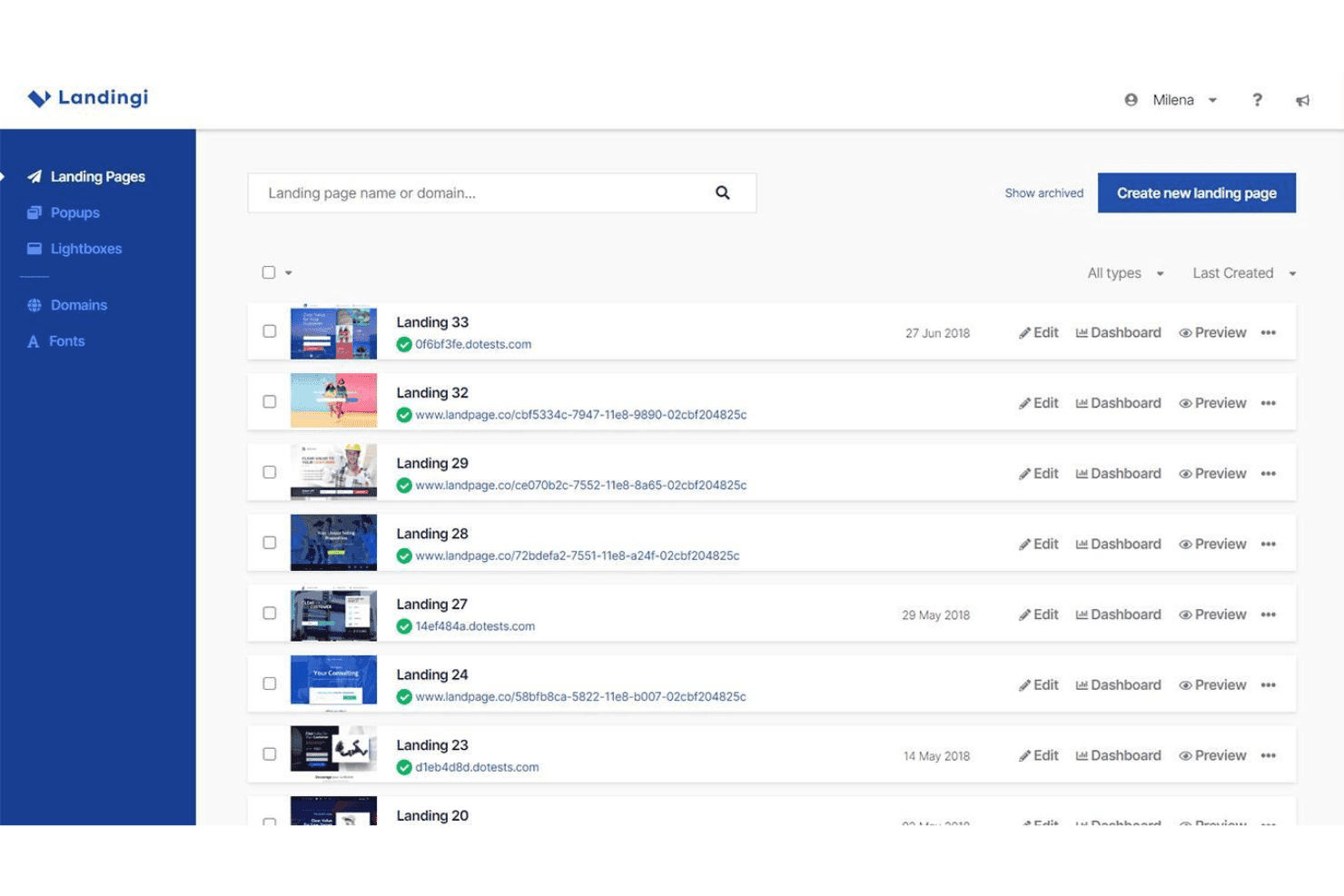
Landingi organizes multiple website landing pages with options to edit, view the Dashboard, and preview each page. Landingi is an AI landing page builder that combines a pixel-perfect drag-and-drop editor with AI page generation, programmatic page creation, A/B testing, and built-in SEO tools.
Who Is Landingi Best For?
Landingi is a strong fit for performance marketers, freelancers, and agencies running high-volume paid campaigns who need to build, manage, and optimize many landing pages at once.
Why I Picked Landingi
Landingi earns its spot on my shortlist because of how well it handles page volume at scale. Smart Sections let me update a repeated element (like a pricing block or CTA banner) in one place and push that change across every page it appears on instantly. Programmatic Landing Pages take it further, letting me build one master template and auto-generate hundreds of campaign-specific variations from it.
Landingi Key Features
- Lunar AI page generator: Quickly creates editable landing pages from a text prompt.
- Solis AI insights: Analyzes landing page performance and recommends optimizations using behavioral data.
- Smart A/B testing: Offers built-in server-side split testing with reliable data and no page performance loss.
- Multi-language translation: Automatically translates pages into 35 languages for global campaign support.
Landingi Integrations
Landingi offers over 170 native integrations, including HubSpot, Mailchimp, Salesforce, ActiveCampaign, Zapier, and provides an API for custom integrations.
Pros and Cons
Pros:
- Server-side A/B testing avoids page slowdowns
- Generates hundreds of page variants from templates
- Smart Sections push bulk edits sitewide instantly
Cons:
- Pop-up and form builder feel underdeveloped
- AI generates landing pages, not full sites
Learn more about Landingi: Best for conversion-focused landing pages
- 14-day free trial
- From $22/month (billed annually)
Visit WebsiteCustomer Rating:4.4/5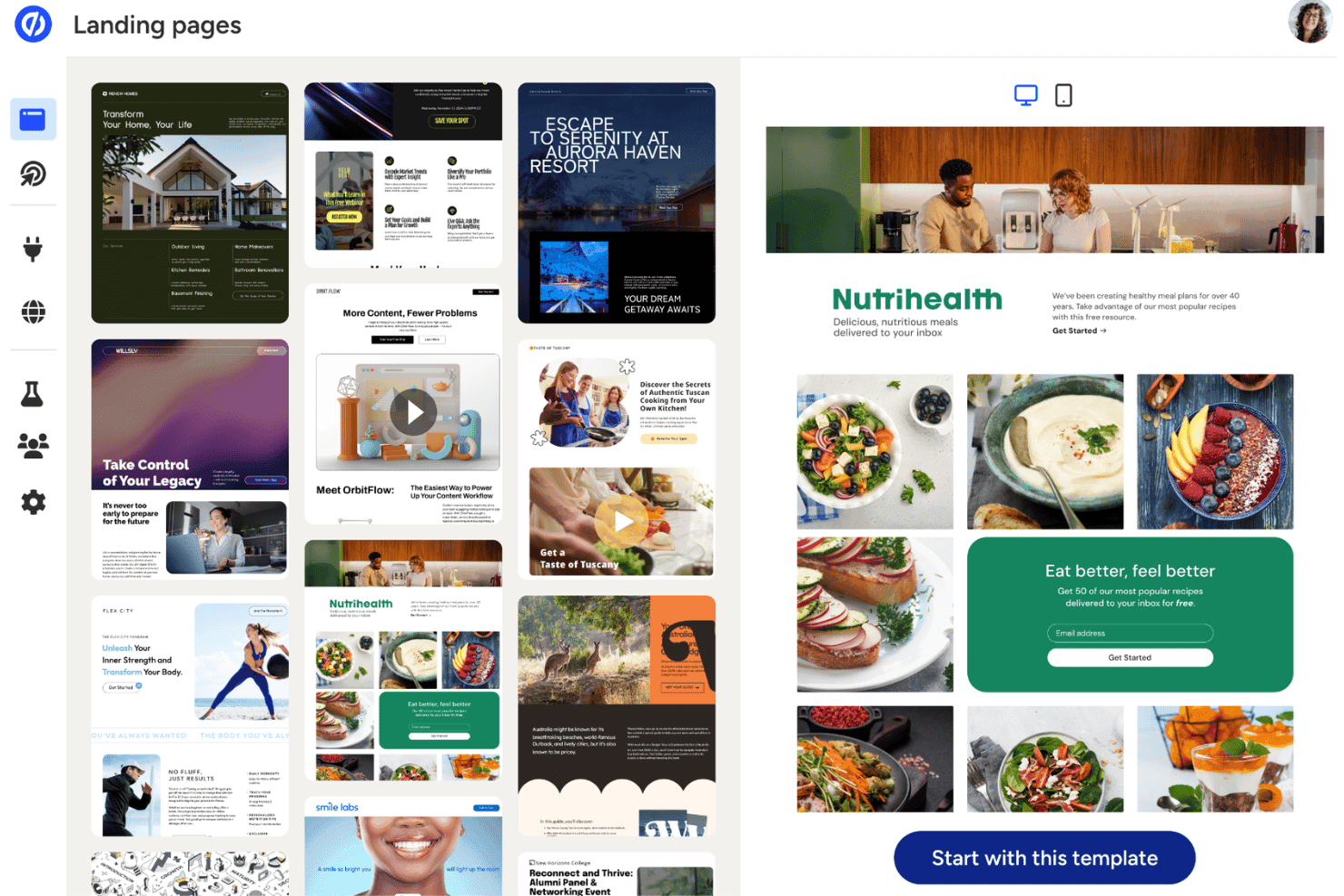
Unbounce offers a website template library with a preview panel, including an email signup form. Unbounce is an AI-powered landing page builder that lets marketers create, test, and optimize conversion-focused campaign pages using a drag-and-drop editor, AI copy generation, and automated traffic routing.
Who Is Unbounce Best For?
Unbounce is a strong fit for small to mid-sized marketing teams running paid ad campaigns who need to build and optimize landing pages without relying on a developer.
Why I Picked Unbounce
Unbounce earns its spot on my shortlist because of Smart Traffic, which routes each visitor to the page variant most likely to convert them based on device, location, and behavior data. I don't have to wait for A/B test results. Smart Traffic makes that call in real time. I also use the Smart Builder to generate a full landing page draft from a short questionnaire, with AI-written headlines and CTAs drawn from over 1.5 billion conversion data points.
Unbounce Key Features
- Dynamic text replacement: Automatically updates landing page text based on each visitor’s search keywords or ad copy.
- Smart Copy AI content generator: Produces headlines, CTAs, and body content from business inputs using AI templates.
- Multi-step forms: Lets you build forms that collect information over several steps for higher conversion rates.
- 1000+ native and Zapier integrations: Connects with major CRMs, email platforms, analytics, and workflow tools for marketing automation.
Unbounce Integrations
Unbounce offers native integrations with HubSpot, Mailchimp, Salesforce, ActiveCampaign, Marketo, Google Analytics, Facebook Ads, Zoho CRM, Shopify, WordPress, and connects with Zapier. An API is available for custom integrations.
Pros and Cons
Pros:
- Built-in A/B testing across page variants
- AI copy trained on 1.5 billion data points
- Smart Traffic routes visitors to best variants
Cons:
- No AI-generated imagery or design assets
- Limited to landing pages, not full websites
Learn more about Unbounce: Best for enterprise-level landing experiences
- 14-day free trial
- From $79/month (billed annually)
Visit WebsiteCustomer Rating:4.4/5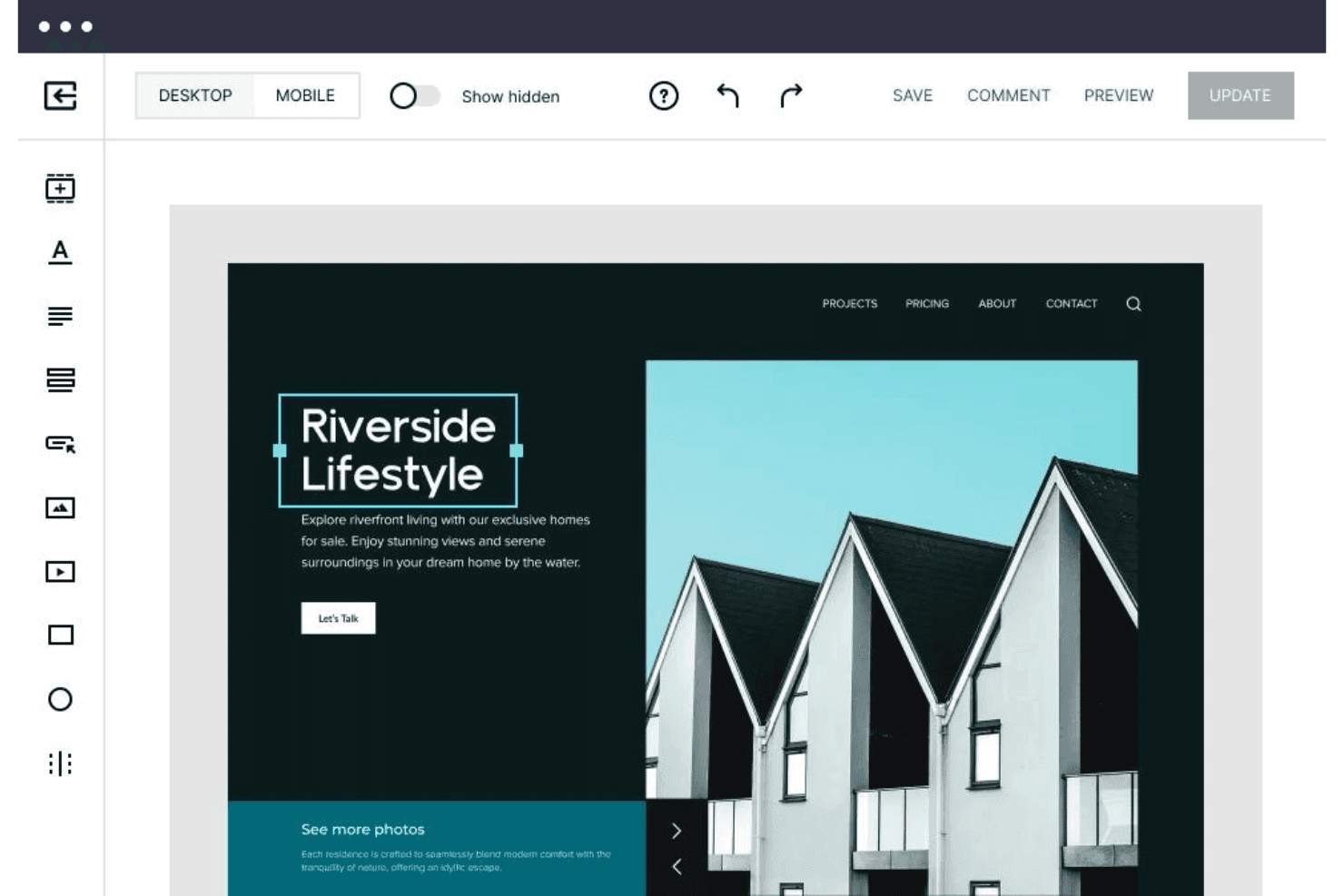
Instapage offers a drag-and-drop website editor with desktop/mobile preview, element tools, and real-time save and update options. Instapage is a landing page platform with AI content generation, server-side A/B testing, ad-to-page personalization, and conversion analytics built for marketing teams running paid campaigns at scale.
Who Is Instapage Best For?
Instapage is a strong fit for growth marketing teams at mid-market and enterprise companies managing high-volume paid search and social campaigns.
Why I Picked Instapage
I've included Instapage in my top picks because AdMap genuinely changes how enterprise teams manage paid campaigns at scale. I can visually connect every ad variant to a dedicated landing page and spot coverage gaps across an entire campaign structure instantly. Pair that with server-side A/B testing and ad-to-page personalization, and my team can run true 1:1 ad-to-page experiences across hundreds of active campaigns simultaneously.
Instapage Key Features
- AI content generation: Automatically generates headlines, body copy, and calls-to-action using OpenAI for every page.
- Drag-and-drop builder: Lets you create and arrange landing page elements without writing any code.
- Real-time visual collaboration: Allows team members and clients to leave direct on-page comments and feedback for faster review cycles.
- Form builder and library: Provides customizable form templates and editing tools for collecting leads and information.
Instapage Integrations
Instapage offers a wide range of native integrations including HubSpot, Salesforce, Marketo, Google Analytics, Google Ads, Facebook Ads, Mailchimp, Zapier, and provides an API for custom integrations.
Pros and Cons
Pros:
- AdMap visually links ads to landing pages
- AI copy generation for all page sections
- Server-side A/B testing at enterprise scale
Cons:
- No built-in AI image generation tools
- Not suited for full multi-page websites
Learn more about Instapage: Best for building scalable WordPress-based sites
- 7-day free trial
- From $10/month (billed annually)
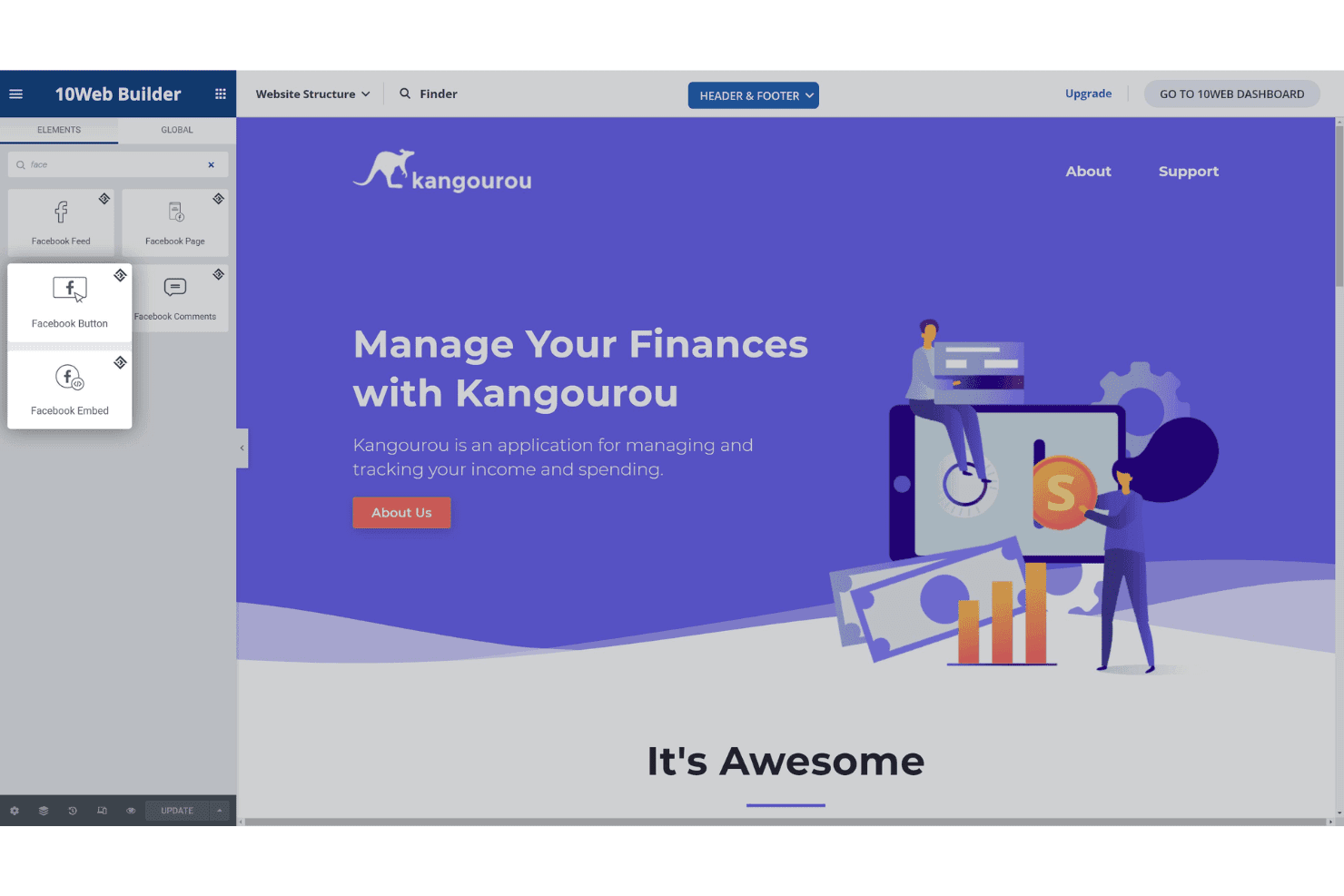
10Web Builder provides a drag-and-drop website editor with a Facebook widget elements panel and a live preview of a finance app landing page. 10Web is an AI website builder that generates full WordPress sites from text prompts, URL cloning, or Figma imports, paired with managed Google Cloud hosting and a visual editor built on Elementor.
Who Is 10Web Best For?
10Web is a strong fit for freelancers, small agencies, and small business marketers who need to launch WordPress sites quickly without relying on a developer.
Why I Picked 10Web
10Web earns its spot as one of the best on my shortlist because it's the only AI website builder that outputs genuine WordPress sites on Google Cloud hosting, with a guaranteed 90+ PageSpeed score built in from launch. I particularly like the URL cloning feature, which lets me recreate and redesign any existing site as a fully editable WordPress install in minutes. The white-label dashboard and multisite controls mean I can scale from one site to dozens of client projects without switching platforms or tools.
10Web Key Features
- Unified smart editor: Combine natural language prompts, visual editing, and custom code in one workspace.
- Figma to WordPress import: Convert Figma design files directly into responsive WordPress websites.
- Dynamic content engine: Add forms, bookings, and calendars as built-in dynamic site elements.
- White-label dashboard: Manage multiple client sites under your agency’s brand with team access controls.
10Web Integrations
10Web offers native integrations with WordPress plugins like Yoast SEO, WooCommerce, and Elementor, and provides an API for custom integrations.
Pros and Cons
Pros:
- Includes managed Google Cloud hosting
- Clones any live website via URL
- Guaranteed 90+ PageSpeed score from launch
Cons:
- AI copy less advanced than competitors
- Locked into WordPress, no alternative CMS
Learn more about 10Web: 5Best for sites tailored to professional services
B12
- Free plan available
- From $42/month (billed annually)
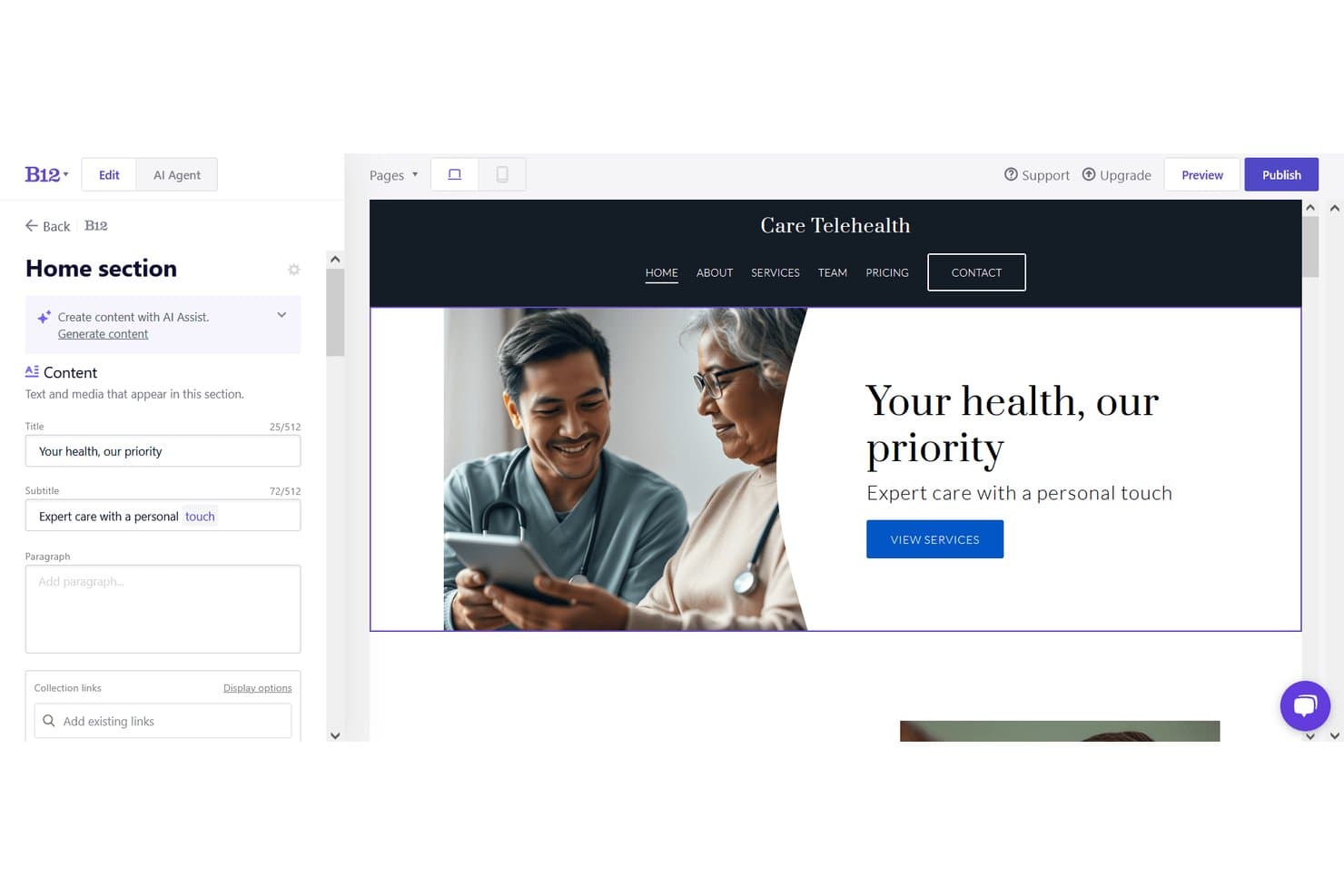
B12 offers an AI-powered website editor with live preview, content fields, and a telehealth site example showing hero text and navigation. B12 is an AI website creator that generates complete, multi-page sites from a text prompt and pairs that generation engine with a visual editor, AI copy tools, built-in scheduling, client intake forms, payments, and email marketing.
Who Is B12 Best For?
B12 is a strong fit for solo practitioners and small professional services firms that need a client-ready web presence without hiring a designer or developer.
Why I Picked B12
I've included B12 in my top picks because its AI generation is trained around professional services verticals, so a generated site for a law firm or financial consultant actually reads and structures like one. What I find genuinely distinctive is that the AI doesn't just build the site: it bundles client intake forms, eSignature contracts, and appointment scheduling directly into the published site. That means a consultant can go from prompt to a live, client-ready workflow in one platform.
B12 Key Features
- Screenshot upload for design reference: Let the AI match layouts by uploading a screenshot of a desired website.
- In-editor AI image generation: Instantly generate new custom images while editing your site content.
- Traffic analytics and reporting: Track website visitors and engagement with built-in analytics dashboards.
- Over 30 native integrations: Connect to tools like Calendly, Shopify, and Google Tag Manager for extended functionality.
B12 Integrations
B12 offers native integrations with Calendly, Shopify, Typeform, Google Tag Manager, Facebook Pixel, Drift, Google Analytics, Mailchimp, Square, and Stripe. An API is available for custom integrations.
Pros and Cons
Pros:
- Built-in eSignature, scheduling, and invoicing on all plans
- AI agent edits site via conversational text prompts
- Industry-specific AI copy generated from business inputs
Cons:
- Less layout flexibility post-generation than competitors
- No native eCommerce without connecting Shopify or Ecwid
Learn more about B12: Best for design-focused marketing microsites
- 14-day free trial
- From $19/month (billed annually)
Visit WebsiteCustomer Rating:4.6/5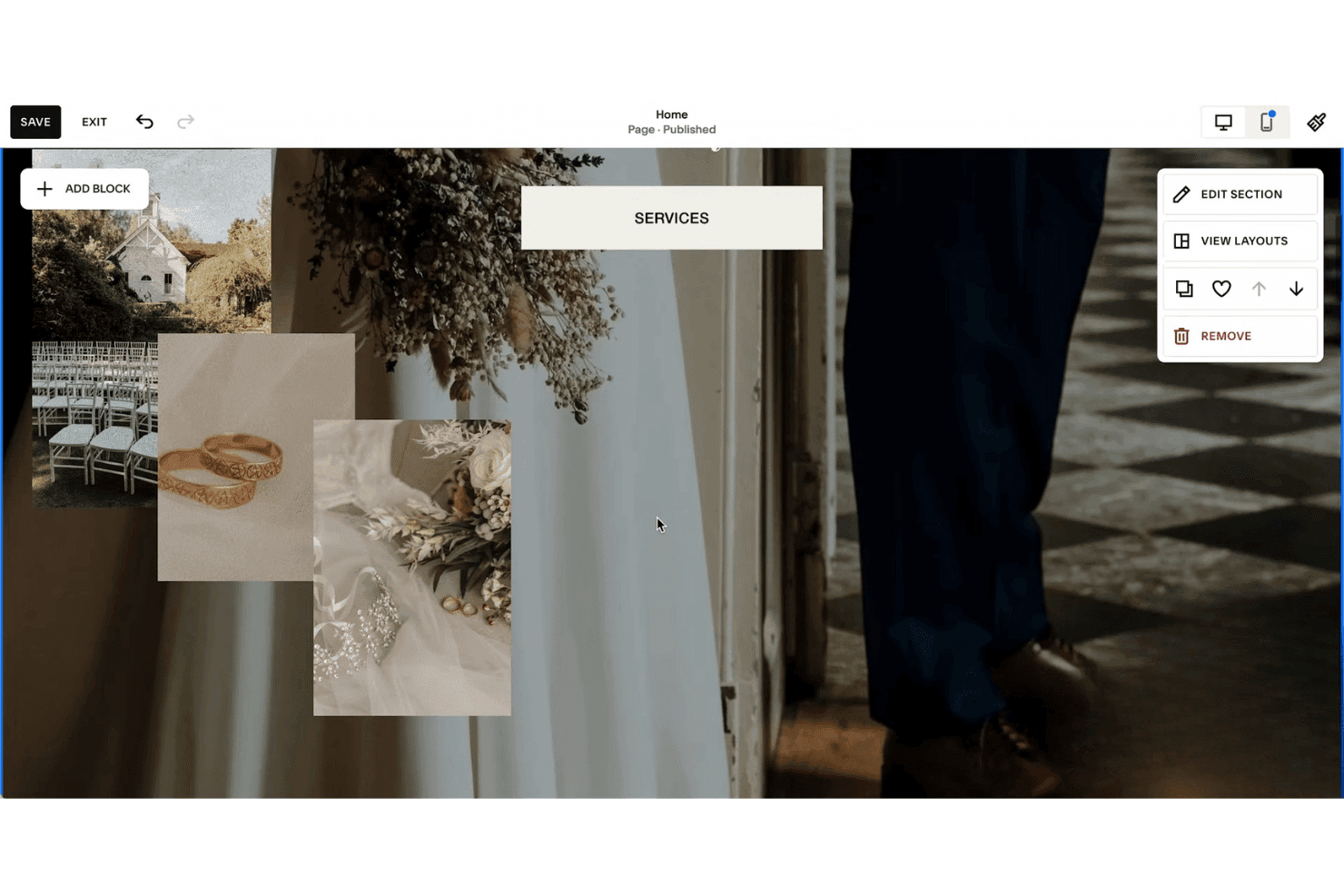
Squarespace's website editor includes a Services section with wedding photography images and a contextual editing menu on the right. Squarespace is an AI website builder that uses its Blueprint AI engine to generate complete, design-forward websites from brand inputs like personality, color palette, and business type, paired with an AI Writer for copy and built-in marketing and SEO tools.
Who Is Squarespace Best For?
Squarespace suits small business owners, freelancers, and independent marketers who need a polished, design-quality web presence without relying on a developer or designer.
Why I Picked Squarespace
I picked Squarespace as one of the best because its Blueprint AI inputs your brand personality (options like Bold, Sophisticated, or Playful), color palette, and business type to generate a fully styled microsite with curated imagery and copy in under four minutes. When I need to iterate on a design direction, the Layout Switcher swaps page compositions with my existing content automatically embedded. Site Themes then let me apply a completely different website design, including font pairings, color palettes, and button styles, in a single click.
Squarespace Key Features
- Mailchimp and Zapier integrations: Connect your site directly to email marketing and automation tools for campaigns.
- Full WYSIWYG editor: Customize AI-generated content and layouts with drag-and-drop and section controls.
- Beacon AI optimization: Scan and optimize your site’s SEO elements like meta data and alt text with AI assistance.
- Video hosting and embeddable blocks: Upload, host, and showcase high-quality video as part of your site content.
Squarespace Integrations
Squarespace offers native integrations with prominent social platforms, GoDaddy, Google Workspace, Dropbox, Unsplash, MailChimp, NameCheap, and more. It also connects with Zapier, and an API is available for custom integrations.
Pros and Cons
Pros:
- Design output quality surpasses most AI competitors
- AI Writer generates on-brand copy automatically
- Blueprint AI builds complete sites in minutes
Cons:
- No AI-driven visitor content personalization
- Follow-up AI prompt editing is limited
Learn more about Squarespace: 7Best for launching branded sites using AI prompts
Wix
- Not available
- Pricing upon request
Visit WebsiteCustomer Rating:4.2/5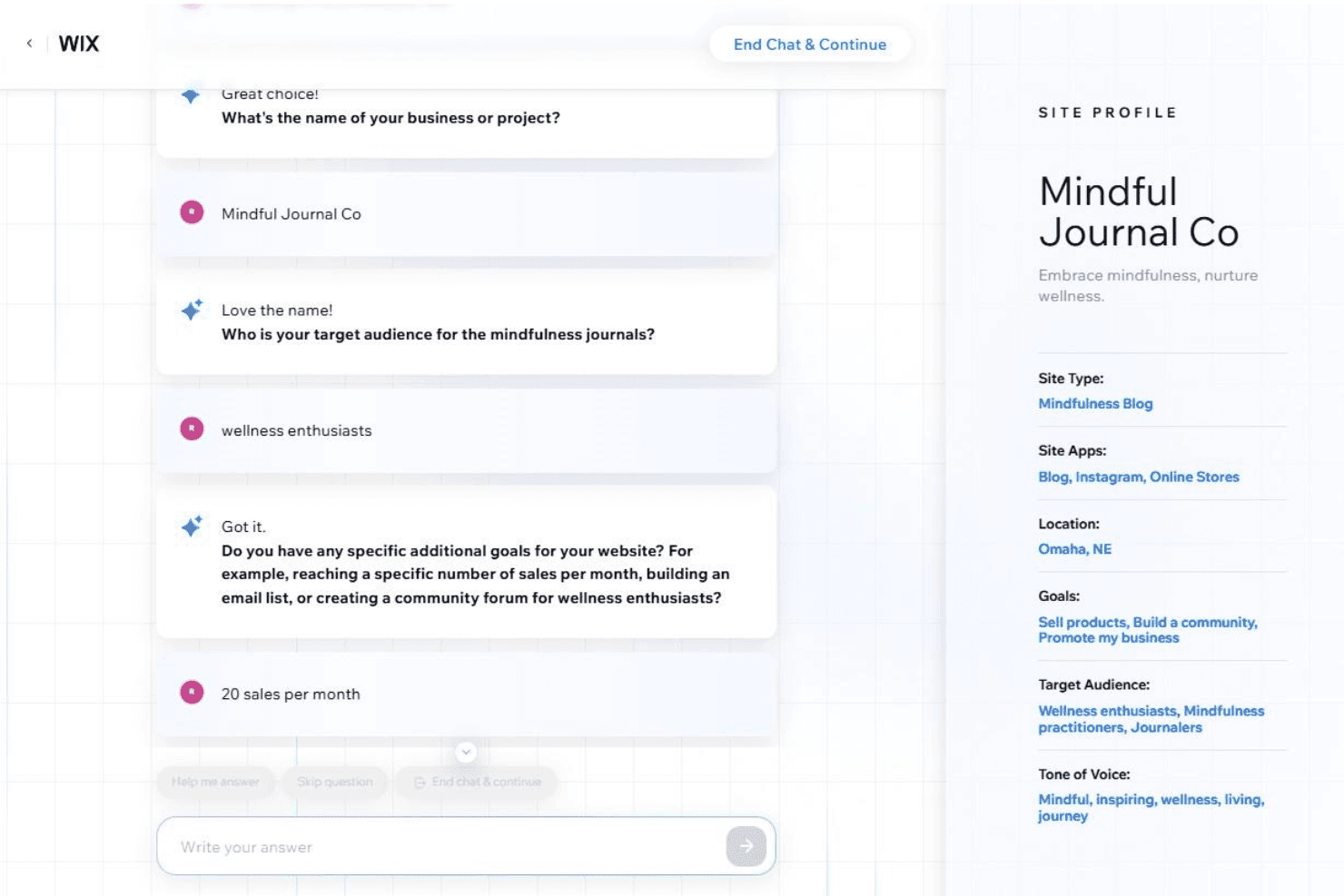
Wix's AI website builder uses a conversational chat interface to gather business details and automatically builds a site profile with goals, audience, and tone of voice. Wix is an AI website generator that creates complete, multi-page sites from conversational prompts, combining a pixel-level drag-and-drop editor with built-in eCommerce, SEO, bookings, and marketing tools.
Who Is Wix Best For?
Wix is a strong fit for small business owners and freelance marketers who need to launch a professional, branded website without relying on a developer.
Why I Picked Wix
Wix earns its spot on my shortlist because of how well its AI handles brand-specific site generation from the very first prompt. Aria, Wix's AI assistant, lets me describe a business and instantly get a complete multi-page site, with tailored sections, navigation, and copy already in place. The AI Text Creator goes further, letting me dial in tone (professional, enthusiastic, informative) and regenerate individual sections until the copy feels on-brand.
Wix Key Features
- AI section and element generator: Instantly create new site sections and components from short prompts to expand or update pages.
- Multi-cloud hosting infrastructure: Hosts all sites with built-in CDN, SSL security, and 99.99% uptime.
- App Market integrations: Offers hundreds of add-ons for e-commerce, marketing, analytics, and visitor interaction.
- SEO and analytics suite: Provides built-in metadata controls, Google Search Console integration, and visitor tracking tools.
Wix Integrations
Wix connects with hundreds of tools via its App Market, including Google Analytics, Mailchimp, PayPal, Facebook, Instagram, QuickBooks, Vimeo, and Hotjar. An API is available for custom integrations.
Pros and Cons
Pros:
- Tone controls adjust AI copy per brand
- Aria refines sites via follow-up prompts
- AI generates complete multi-page sites instantly
Cons:
- AI output varies without detailed prompts
- Sites can't be migrated off Wix
Learn more about Wix: Best for beginner-friendly multi-page creation
- 14-day free trial
- From $10.99/month (billed annually)
Visit WebsiteCustomer Rating:4.4/5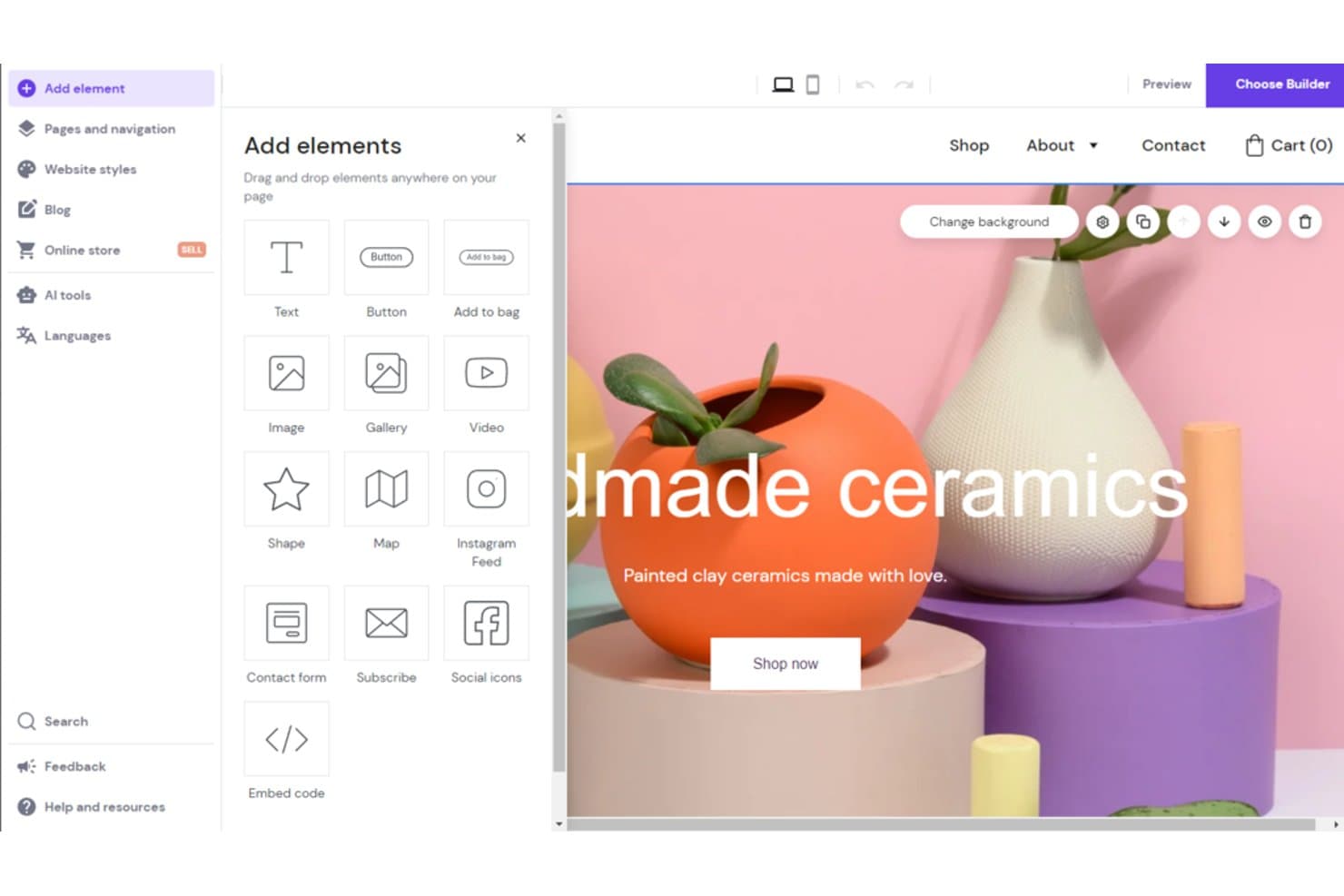
Hostinger Website Builder offers a drag-and-drop editor with AI tools and a variety of elements like text, buttons, images, and forms to customize your website. Hostinger Website Builder is an AI-powered site builder that generates complete multi-page websites from a text prompt, with a drag-and-drop editor, built-in hosting, AI copy and image generation, and ecommerce tools.
Who Is Hostinger Website Builder Best For?
It's a strong fit for small business owners and freelance marketers who need to launch multi-page websites quickly without design or development experience.
Why I Picked Hostinger Website Builder
I picked Hostinger Website Builder as one of the best because its AI site generator builds a complete multi-page site, including navigation, copy, and imagery, from a single prompt in under 60 seconds. The Smart Grid drag-and-drop editor then lets you rearrange sections across unlimited pages without writing any code. I especially like that every plan includes unlimited web pages, so there's no ceiling on how much you can expand from that initial AI-generated draft.
Hostinger Website Builder Key Features
- AI image generator: Instantly creates original visuals for headers, sections, and blog posts based on your prompts.
- AI blog post generator: Produces complete, SEO-ready articles with titles, body copy, and meta information from keywords or prompts.
- Printful integration: Lets you connect print-on-demand products directly to your online store for easy merch and branding.
- Automatic mobile-friendly design: Ensures every page and layout adapts to different devices without manual adjustments.
Hostinger Website Builder Integrations
Hostinger Website Builder offers native integrations with Google Analytics, Google Tag Manager, Meta Pixel, and Printful. An API is available for custom integrations.
Pros and Cons
Pros:
- Built-in AI copy covers every site section
- Unlimited pages included on all paid plans
- AI generates complete multi-page sites instantly
Cons:
- Limited AI design refinement after initial generation
- No A/B testing for landing pages
Learn more about Hostinger Website Builder: Best for granular design customization
- Free plan available
- From $15/month (billed annually)
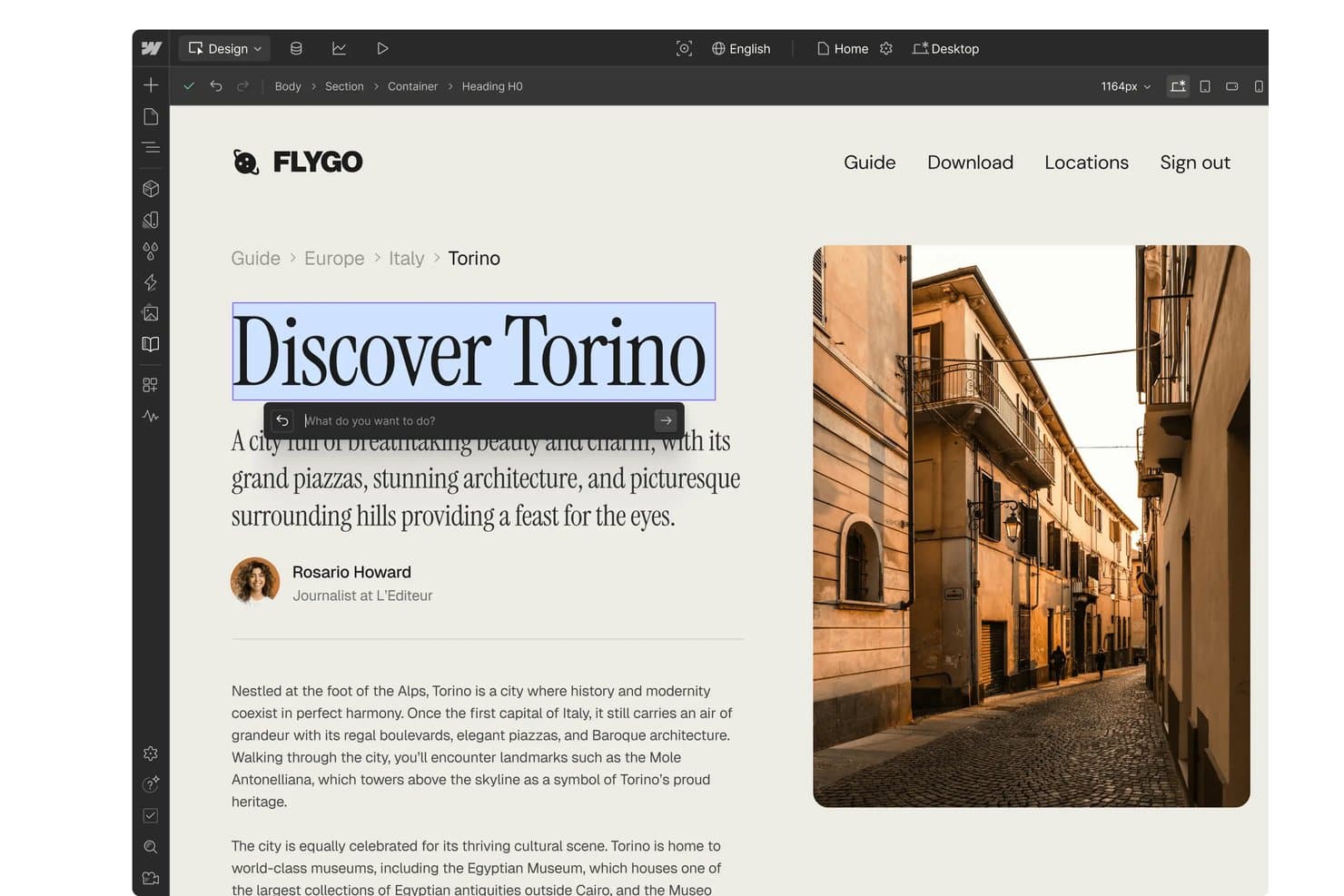
Webflow offers an AI design assistant that allows users to edit and rewrite heading text directly within the visual website builder. Webflow is a visual AI website builder that lets you generate multi-page sites from text prompts, edit layouts with CSS-level design control, and publish with integrated hosting — all without writing code.
Who Is Webflow Best For?
Webflow is a strong fit for marketing teams at SaaS companies and digital agencies that need full design control over campaign sites and landing pages without relying on a developer.
Why I Picked Webflow
Webflow earns its spot as one of the best on my shortlist because the AI output is a fully editable Webflow project, not a locked template. Once the AI generates a site, I can open the Designer and adjust flexbox layouts, CSS grid structures, and custom properties without touching code. What really sets it apart is the Page Building feature: designers define structural templates with page slot elements that control exactly where marketers can add components, keeping the brand intact across every edit.
Webflow Key Features
- AI site generation from prompts: Create entire multi-page sites with navigation and sections by describing your business in simple language.
- Integrated CMS for dynamic content: Manage and publish large volumes of content with dynamic collections and automated landing page creation.
- Native SEO and AEO controls: Directly edit metadata, sitemaps, page titles, and access AI-powered structured data optimization tools.
- App marketplace and API integrations: Extend functionality with marketplace apps for CRM, ecommerce, analytics, or connect custom tools using API access.
Webflow Integrations
Webflow offers native integrations with HubSpot, Google Analytics, Marketo, Salesforce, Mailchimp, Slack, Figma, Jasper, and many more. It also connects with Zapier and Make, and an API is provided for custom integrations.
Pros and Cons
Pros:
- Built-in CMS supports dynamic page generation
- AI-generated sites stay fully editable afterward
- CSS-level control without writing any code
Cons:
- AI generation less mature than dedicated builders
- Complex visual editor for non-designer users
Learn more about Webflow: Best for quick publishing with built-in hosting
- 7-day free trial
- From $9.99/month (billed annually)
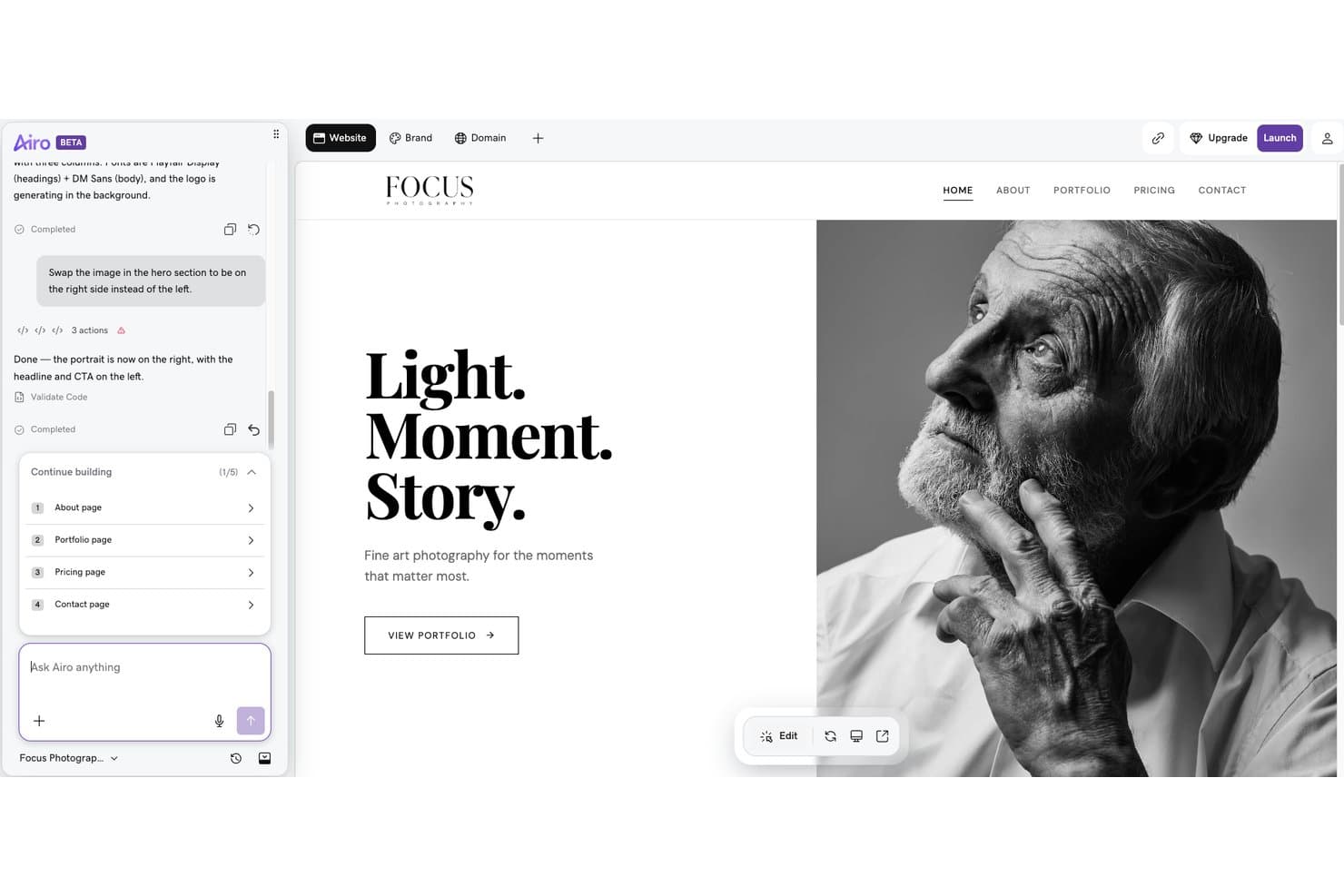
GoDaddy Website Builder offers an AI-powered chat interface that lets users make real-time layout changes, such as repositioning hero images, through simple text commands. GoDaddy Website Builder is an AI-powered site creation tool that generates multi-page websites from conversational prompts, with built-in hosting, an SEO wizard, email marketing, and ecommerce built into a single platform.
Who Is GoDaddy Website Builder Best For?
It's a natural fit for small business owners and non-technical marketers who need to get a site live fast without writing code or managing hosting separately.
Why I Picked GoDaddy Website Builder
I picked GoDaddy Website Builder because the distance between "I have a prompt" and "I have a live site" is genuinely short. Airo AI Builder generates a complete multi-page site from a conversational input, and one-click deploy pushes it live on GoDaddy's hosting with SSL already configured. There's no separate hosting account to provision or DNS records to manage manually.
GoDaddy Website Builder Key Features
- Drag-and-drop editor: Modify layouts, sections, and content visually with point-and-click editing tools.
- SEO Wizard: Set meta titles, descriptions, and basic structured data for every page.
- Integrated email marketing: Send branded marketing emails directly from the platform, with send limits based on your plan.
- Social media integrations: Connect Facebook, Instagram, Pinterest, LinkedIn, and YouTube to manage links and social posting.
GoDaddy Website Builder Integrations
GoDaddy offers integrations with Google Analytics, Facebook, Instagram, Yelp, PayPal, and OpenTable. An API is available for custom integrations.
Pros and Cons
Pros:
- Built-in SEO Wizard covers all pages
- Hosting included with every published site
- Generates full sites from conversational prompts
Cons:
- Template designs feel constrained after AI generation
- Follow-up AI editing prompts aren't available
Learn more about GoDaddy Website Builder:
Andre AI-nettstedbyggere
Her er noen flere AI-nettstedbyggere som ikke kom med på kortlisten min, men som likevel er verdt å sjekke ut:
- 11FramerBest for responsive layout control
- 12DurableBest for auto-generating small business websites
- 13LeadpagesBest for campaign-driven landing site creation
- 14DudaBest for client site management at scale
- 15MixoBest for instant multi-language site generation
- 16Hocoos AI Website BuilderBest for AI-guided site personalization features
- 17ElementorBest for flexible design controls in WordPress
- 18JimdoBest for effortless small business site setup
- 19BluehostBest for easy WordPress hosting integration
- 20CodeDesign.aiBest for editing with natural language prompts
How I Evaluate AI Website Builders
To earn a spot here, a tool's AI needs to produce real output—usable copy, structured layouts, and brand-matched designs from a short prompt. I break my evaluation into core functionality every platform must deliver and the differentiating factors that set the best options apart.
Core Functionality (Table Stakes For This List)
When I'm selecting tools for my list, I rank each one on a scale from 0 (does not offer the functionality) to 5 (excels in this area) for each core functionality listed below. Then, I calculate the tool's total score into a percentage. Each tool needs to achieve a minimum total score of 65% to be considered for inclusion.
- AI site generation: I evaluate whether a prompt like "build a SaaS product launch site with pricing and features pages" produces a usable multi-page structure with logical navigation.
- AI copy generation: The generated headlines, CTAs, and body text should reflect actual business context, not generic filler that you'd need to rewrite from scratch.
- AI design and layout: I look for layout choices, color palettes, and imagery that feel cohesive and brand-appropriate rather than a random template swap.
- Visual editor: After AI does its work, you need a drag-and-drop or WYSIWYG editor to rearrange sections, tweak styles, and add components without touching code.
- Publishing and hosting: I check that the platform includes integrated hosting with custom domain support and SSL so you can go live without a separate hosting provider.
- Marketing features: Built-in SEO controls, form builders, analytics, or landing page tools matter here, especially for teams running campaign-specific pages.
Once I have a list of tools that meet the criteria, I consider what sets each platform apart.
Differentiating Factors (What Sets Vendors Apart)
Here's how I compare and contrast different vendors:
Standout Features
Auto brand kit application is a big one for me. Tools that can ingest a logo or existing URL and apply matching colors, fonts, and imagery across every page save hours of manual styling. I also look for natural language editing, where you can type something like "swap the hero image and make the headline punchier" instead of dragging elements around. Smart SEO optimization matters too—I evaluate whether the platform auto-generates meta tags, alt text, and schema markup as you build, so pages are search-ready from the start.
Beyond Features
Integration options carry a lot of weight. If your AI-built site can't connect to your CRM or email platform, you're adding manual steps to every campaign. I also evaluate pricing transparency, especially how costs scale as you add pages, team seats, or traffic. Design control matters just as much. Some platforms lock you into basic AI output, while others like Webflow and Framer let you inject custom CSS or edit at the component level as your needs grow.
Slik velger du en AI-nettstedbygger
Det er lett å gå seg vill i lange funksjonslister og komplekse prismodeller. For å hjelpe deg med å holde fokus mens du går gjennom den unike prosessen din for valg av programvare, er dette en sjekkliste over faktorer du bør ha i mente:
| Faktor | Hva du bør vurdere |
|---|---|
| FaktorSkalerbarhet | Hva du bør vurdereVil plattformen håndtere veksten din – nye sider, administrasjon av flere nettsteder eller trafikkøkninger – eller vil du møte ekstra kostnader eller økt kompleksitet når du utvider? |
| FaktorIntegrasjoner | Hva du bør vurdereStøtter den direkte tilkoblinger til CRM-, e-postmarkedsførings- eller analyseverktøyene dine? Vurder hvor avgjørende automatisering er for kampanjearbeidsflytene dine. |
| FaktorTilpasningsmuligheter | Hva du bør vurdereHvor mye fleksibilitet trenger du utover standardresultatet fra AI-en? Sjekk om du kan justere oppsett og stil, eller legge til egendefinert kode for avanserte bruksområder. |
| FaktorBrukervennlighet | Hva du bør vurdereKan medlemmer av markedsføringsteamet lansere eller redigere sider uten omfattende opplæring, eller trenger du løpende hjelp fra designere eller IT når prioriteringene endres? |
| FaktorImplementering og innføring | Hva du bør vurdereHvor raskt kan teamet ditt få et profilert nettsted publisert og klart? Se etter veiledede oppsettsverktøy, maler eller demoinnhold som gjør oppsettet enklere. |
| FaktorKostnad | Hva du bør vurdereEr prisnivåer, sidebegrensninger og gebyrer for tilleggstjenester tydelige? Sørg for at investeringen passer både lanseringsplanene og de fremtidige vekstplanene dine, ikke bare det første nettstedet. |
| FaktorSikkerhetstiltak | Hva du bør vurdereTilbyr leverandøren SSL, personvernkontroller og databeskyttelse som gjør at du føler deg trygg på å beskytte målgruppens data med løsningen? Gå gjennom dokumentasjonen deres. |
| FaktorTilgjengelig kundestøtte | Hva du bør vurdereHvis du støter på hastesaker – for eksempel at et nettsted ikke publiseres eller at det oppstår et domeneproblem – kan du raskt få hjelp fra kundestøtten, eller vil forsinkelser skade viktige kampanjer? |
Hva er AI-nettstedbyggere?
En AI-nettstedbygger er en digital plattform som bruker kunstig intelligens til å utforme, skrive og sette sammen komplette nettsteder basert på instruksjonene eller bedriftsopplysningene dine. Disse verktøyene automatiserer nettstedsstruktur, tekstinnhold, bilder og stil, slik at du raskt kan lansere et profesjonelt nettsted med en tydelig merkevare – uten at du trenger erfaring med programmering eller design. AI-nettstedbyggere er laget for markedsførere, gründere og team som ønsker resultater uten kompleksitet.
Funksjoner
Vær oppmerksom på følgende viktige funksjoner når du velger en AI-nettsidebygger:
- Generering av AI-nettsider: Opprett raskt komplette nettsteder med flere sider eller landingssider ved å skrive inn en kort instruksjon som beskriver virksomheten, produktet eller målene dine.
- AI-tekstforfatting: Generer overskrifter, handlingsoppfordringer og brødtekst tilpasset bedriften din umiddelbart, slik at du sparer tid på skriving og redigering.
- AI-design og layout: Lag automatisk visuelt tiltalende design med profesjonelle oppsett, fargekombinasjoner, skrifttyper og bilder som gjenspeiler merkevareidentiteten din.
- Dra-og-slipp-redigering: Juster enkelt seksjoner på nettstedet, endre oppsett eller legg til elementer uten behov for programmerings- eller tekniske ferdigheter.
- Integrert webhotell og publisering: Publiser nettstedet ditt med bare noen få klikk, inkludert alternativer for egendefinerte domener og SSL-sikkerhet.
- Verktøy for SEO-optimalisering: Få tilgang til funksjoner som automatiske metakoder, alternativ tekst og nettstedskart for å hjelpe nettstedet ditt med å få bedre rangering i søkemotorer.
- Muligheter for personalisering: Vis forskjellig innhold eller ulike tilbud basert på brukeratferd, geografisk plassering eller enhet for å øke engasjementet.
- Skjemaer og innsamling av potensielle kunder: Legg til kontaktskjemaer, interaktive chatbotmoduler eller innholdstilbud direkte på nettstedet for å bygge opp markedsføringslisten din.
- Analyse og rapportering: Følg med på nettstedets ytelse, besøkendes atferd, konverteringer og mer for å hjelpe teamet med å forbedre og videreutvikle nettstedet.
- Innhenting av merkevareelementer: Last opp logoen din, bruk en navnegenerator for bedrifter eller oppgi merkevareinformasjonen din, slik at nettstedets farger, skrifttyper og stil automatisk brukes på alle sider.
Fordeler
Implementering av en AI-nettsidebygger gir flere fordeler for teamet og virksomheten din. Her er noen av fordelene du kan se frem til:
- Raskere lansering: AI-drevne arbeidsflyter genererer nettsteder, innhold og designelementer på få minutter, slik at du kan lansere kampanjer uten flaskehalser hos utviklerne.
- Konsekvent merkevareprofil: Innhenting av merkevareelementer og automatisert stilsetting sørger for at hver side samsvarer med den visuelle identiteten din uten manuelle justeringer.
- Mindre manuelt arbeid: Automatisert tekstforfatting, layout og bildevalg reduserer behovet for kontinuerlig redigering eller innleie av eksterne frilansere.
- Bedre tilgjengelighet: Redigeringsverktøy uten kode lar alle i teamet bygge sider eller oppdatere innhold, og fjerner hindringer for brukere uten teknisk bakgrunn.
- Bedre SEO-klarhet: Innebygde SEO-verktøy og automatisk tagging hjelper nettstedet med å vises høyere i søkeresultatene helt fra starten.
- Personlige opplevelser: AI-drevet personalisering viser besøkende innhold som er tilpasset plasseringen eller atferden deres, noe som øker engasjementet.
- Skalerbar vekst: Utvid enkelt nettstedet, legg til nye sider eller håndter økt trafikk etter hvert som behovene endrer seg – med innebygd webhotell og fleksibel plattforminfrastruktur.
Kostnader og priser
Ved valg av en AI-nettsidebygger er det viktig å forstå de ulike prismodellene og abonnementene som er tilgjengelige. Kostnadene varierer basert på funksjoner, teamstørrelse, tillegg og mer. Tabellen nedenfor oppsummerer vanlige abonnementer, gjennomsnittsprisene deres og typiske funksjoner som er inkludert i løsninger for AI-nettsidebyggere:
Sammenligningstabell for abonnementer for AI-nettsidebyggere
| Abonnementstype | Gjennomsnittspris | Vanlige funksjoner |
|---|---|---|
| AbonnementstypeGratisabonnement | Gjennomsnittspris$0 | Vanlige funksjonerGrunnleggende nettstedsgenerering, begrenset antall sider, plattformens merkevareprofil og delt webhotell. |
| AbonnementstypePersonlig abonnement | Gjennomsnittspris$10-$25/måned | Vanlige funksjonerStøtte for egendefinert domene, flere AI-baserte innholdsredigeringer, e-poststøtte og et større utvalg maler. |
| AbonnementstypeBedriftsabonnement | Gjennomsnittspris$30-$80/måned | Vanlige funksjonerAvanserte designkontroller, SEO-verktøy, integrasjon med analyseverktøy, skjemabygger og prioritert kundestøtte. |
| AbonnementstypeVirksomhetsabonnement | Gjennomsnittspris$100-$500+/måned | Vanlige funksjonerUbegrenset antall sider, teamsamarbeid, egendefinerte tjenestenivåavtaler, hvitmerking, API-tilgang og dedikert kontoadministrasjon. |
Vanlige spørsmål om AI-nettstedbyggere
Her er noen svar på vanlige spørsmål om AI-nettstedbyggere:
Kan jeg flytte det eksisterende nettstedet mitt til en AI-nettstedbygger?
Ja, noen AI-nettstedbyggere tilbyr verktøy eller tjenester for flytting, slik at du kan importere eksisterende innhold og sider. Det er imidlertid viktig å kontrollere om layouten og funksjonaliteten overføres korrekt, ettersom enkelte avanserte tilpasninger kan måtte justeres manuelt etter importen.
Hvor mye teknisk kompetanse trenger jeg for å bruke en AI-nettstedbygger?
Nei, vanligvis trenger du ikke teknisk kompetanse. Disse plattformene er utviklet for markedsførere og personer som ikke er utviklere, og tilbyr visuelle redigeringsverktøy og AI-instruksjoner slik at du kan bygge og oppdatere nettsteder uten erfaring med koding eller design.
Hvor sikre er AI-nettstedbyggere for bruk i virksomheter?
De fleste AI-nettstedbyggere tilbyr SSL, regelmessige sikkerhetskopier og personvernstandarder som er egnet for bruk i virksomheter. Det er alltid lurt å gjennomgå leverandørens dokumentasjon om praksis for datahåndtering og sikre at løsningen oppfyller dine egne sikkerhetsbehov.
Er AI-nettstedbyggere gode for nettsteder med flere sider eller kompleks struktur?
Ja, mange AI-nettstedbyggere støtter bygging av nettsteder med flere sider og muligheten til å legge til avanserte funksjoner gjennom integrasjoner eller tilpasset kode. Sørg for å bekrefte at verktøyet passer til nettstedets størrelse og kompleksitet før du bestemmer deg.
Kan jeg koble AI-nettstedbyggeren min til CRM- og markedsføringsverktøyene mine?
Ja, ledende plattformer støtter vanligvis integrasjoner med populære CRM-systemer, analyseverktøy og plattformer for e-postmarkedsføring. Dette gjør det enkelt for teamet ditt å automatisere innsamling av potensielle kunder og e-postpåmeldinger, samt følge de besøkendes reiser.