

Hvis du ser etter de beste WordPress-alternativene for teamet ditt, har du kommet til rett sted. Disse plattformene tilbyr raskere ytelse, enklere arbeidsflyter og mer pålitelig skalerbarhet for team som er frustrert over tungvinte plugin-stakker, rigide maler eller flaskehalser hos utviklere. Hvis du sliter med begrenset designfleksibilitet, løpende sikkerhetsoppdateringer eller håndtering av innhold på flere nettsteder på tvers av regioner eller merkevarer, kan et plattformbytte gi betydelige effektiviseringsgevinster.
Jeg har brukt over 1 200 timer på å teste CMS-verktøy og gi råd om innholdsinfrastruktur de siste 10 årene. I denne veiledningen deler jeg de beste alternativene jeg anbefaler, basert på praktisk erfaring, slik at du kan velge en plattform som faktisk passer til hvordan teamet ditt arbeider og vokser.
Hva er WordPress?
WordPress er et innholdsforvaltningssystem som brukes til å bygge og vedlikeholde nettsteder. Det er populært blant bloggere, småbedriftseiere og utviklere på grunn av fleksibiliteten og det brede utvalget av programtillegg. Tilpassede temaer, omfattende alternativer for programtillegg og et brukervennlig grensesnitt gjør det enkelt å opprette og administrere nettstedet ditt. Alt i alt tilbyr WordPress en allsidig plattform for å lage alt fra personlige blogger til komplekse bedriftsnettsteder.
Why Trust Our Software Recommendations
6,700+
Reviews
20
Industry experts
16+
Evaluation factors
14
Years
Our team has been testing and reviewing software since 2012. As marketing leaders ourselves, we know how difficult—and important—it is to choose the right software.
For this guide, we evaluated tools using hands-on testing and independent research, scoring tools using our selection criteria.
Our reviews reflect our human editorial judgment, not a sales pitch.
Expert reviewers:
 Gui DrusinaCreative Director
- Shriya GhateSenior Marketing Lead
 Amanda JacquesMarketing Ops Leader

Sammenligningstabell for WordPress-alternativer
Denne sammenligningstabellen oppsummerer prisopplysningene for mine beste utvalgte WordPress-alternativer:
| Tool | Best For | Trial Info | Price | ||
|---|---|---|---|---|---|
| 1 | Best for collaborative interface design | Free plan available | From $3/user/month | Website | |
| 2 | Best for agency-focused features | 14-day free trial + free demo available | From $25/month | Website | |
| 3 | Best for enterprise ecommerce growth | 15-day free trial | From $39/month | Website | |
| 4 | Best for digital content management | Free plan available | From $300/month | Website | |
| 5 | Best for multi-channel content delivery | Free demo available | From $699/month | Website | |
| 6 | Best for scalable ecommerce websites | 3-day free trial | From $29/month (billed annually) | Website | |
| 7 | Best for design-focused sites | 14-day free trial | From $19/month (billed annually) | Website | |
| 8 | Best for open-source headless CMS | Free plan available | From $35/month | Website | |
| 9 | Best for visual design capabilities | Free plan available | From $15/month (billed annually) | Website | |
| 10 | Best for user-friendly site building | Free plan available | From $17.77/month (billed annually) | Website |


Anmeldelser av de beste WordPress-alternativene
Nedenfor finner du mine detaljerte sammendrag av de beste WordPress-alternativene som kom med på kortlisten. Anmeldelsene mine gir en detaljert gjennomgang av de viktigste funksjonene, fordelene & ulempene, integrasjonene og ideelle bruksområdene for hvert verktøy, slik at du kan finne det som passer best for deg.
 Best for collaborative interface design
- Free plan available
- From $3/user/month
Visit WebsiteCustomer Rating:4.7/5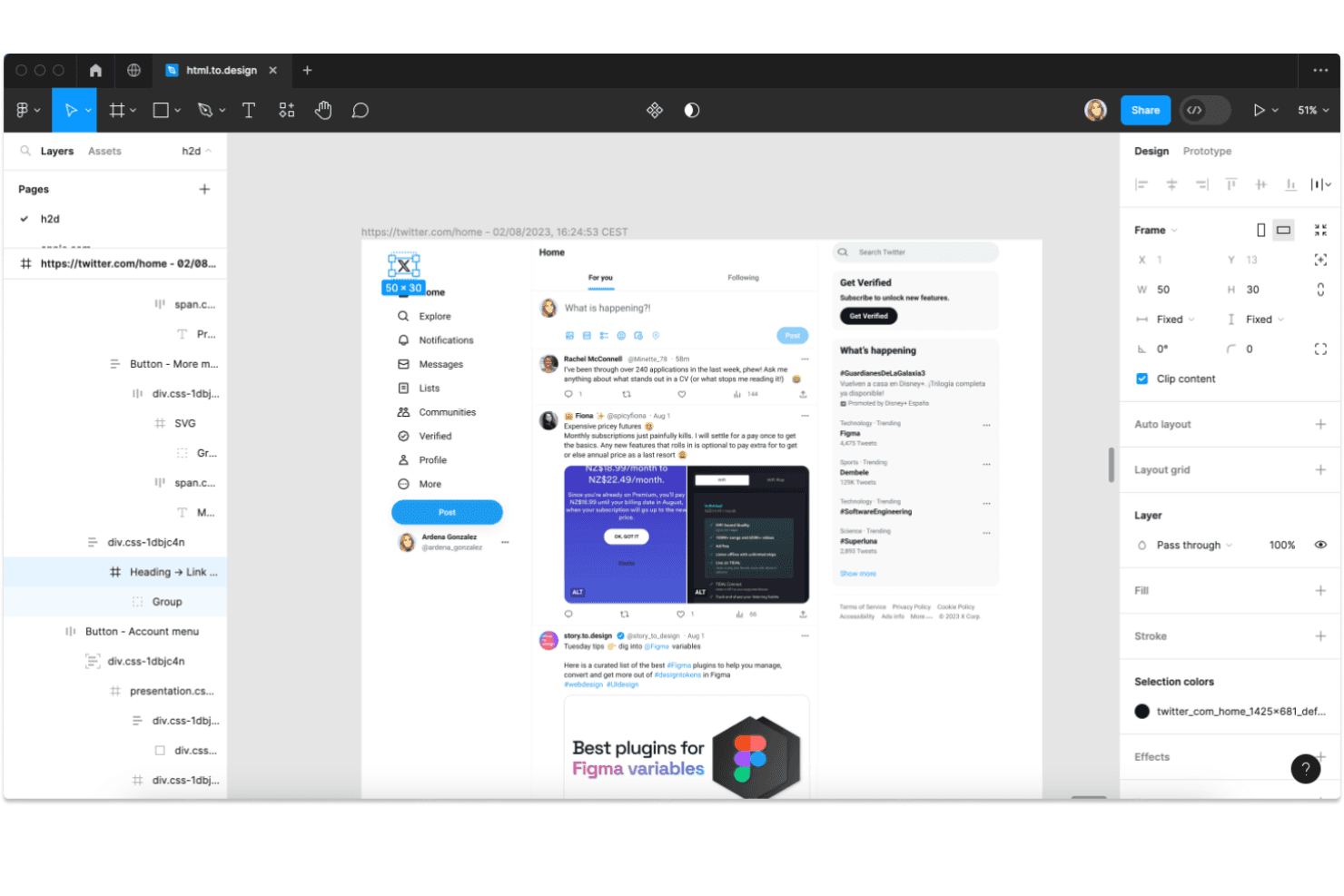
Figma lets users import and inspect web pages as editable design layers. Figma gives product and marketing teams a shared workspace to design interfaces, prototype user journeys, and resolve feedback without scattering decisions across separate tools.
Who Is Figma Best For?
Figma suits product design teams creating and refining web or mobile interfaces with input from product, engineering, and marketing partners.
Why I Picked Figma
I picked Figma for collaborative interface design because it lets my team shape website layouts together in shared design files. We can connect screens into interactive prototypes and leave comments directly on specific elements, which helps resolve feedback before a WordPress build begins.
Figma Key Features
- Auto layout: Set spacing, padding, and alignment rules that adjust as content changes.
- Components and variants: Create reusable interface elements with options for different states and styles.
- Variables: Store reusable values for colors, numbers, strings, and booleans.
- Dev Mode: Inspect design specifications and access assets prepared for development.
Figma Integrations
Figma documents integrations with Slack, Google Workspace, Jira, Confluence, Asana, Notion, Linear, Zoom, and Microsoft Teams, and supports Zapier. Figma also provides an API for custom integrations.
Pros and Cons
Pros:
- Clickable prototypes clarify journeys before WordPress development
- Pin feedback directly to specific design elements
- Collaborators edit interface files in real time
Cons:
- Large design files can experience performance lag
- No WordPress-style CMS for managing content
Learn more about Figma: 2Best for agency-focused features
Duda
- 14-day free trial + free demo available
- From $25/month
Visit WebsiteCustomer Rating:4.6/5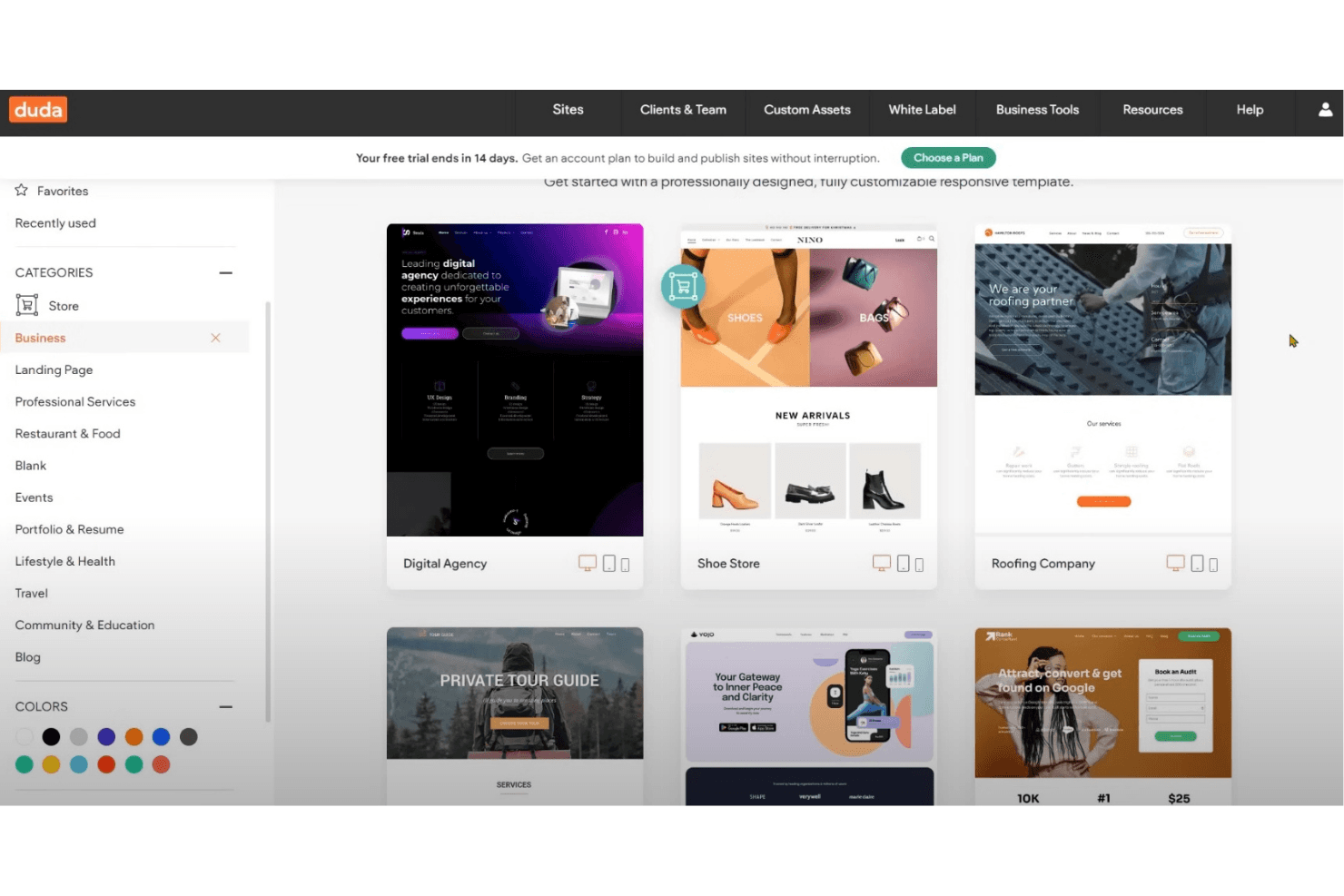
Duda offers professionally designed, customizable business website templates. Duda is a no-code website builder that helps agencies and small businesses create responsive client websites without managing WordPress hosting or plugins.
Who Is Duda Best For?
Duda is a good fit for web design agencies that build and manage websites for multiple clients.
Why I Picked Duda
I picked Duda as “Best for agency-focused features” because its white-label editor and client dashboard let agencies brand the editing experience and manage multiple client sites with role-based permissions. I also value Dynamic Pages, which can populate landing pages from structured data instead of rebuilding each page by hand.
Duda Key Features
- AI site generation: Create site copy, sections, or full websites from prompts and uploaded content.
- Responsive editing: Adjust site layouts for desktop, tablet, and mobile devices.
- SEO metadata generation: Generate page titles, descriptions, and image alt text across a site.
- Automatic backups: Save site backups and restore an earlier version when needed.
Duda Integrations
Duda documents integrations with Google Analytics, Meta Pixel, Mailchimp, Constant Contact, HubSpot, and Google Sheets, and it connects with Zapier; additional apps are available through its App Store. Duda also provides a REST API for custom integrations.
Pros and Cons
Pros:
- Dynamic Pages populate sites from structured data
- Responsive editing speeds multi-device site production
- White-label tools simplify agency client handoffs
Cons:
- Blogging and advanced SEO tools feel limited
- Template layouts restrict precise design control
Learn more about Duda: Best for enterprise ecommerce growth
- 15-day free trial
- From $39/month
Visit WebsiteCustomer Rating:4.3/5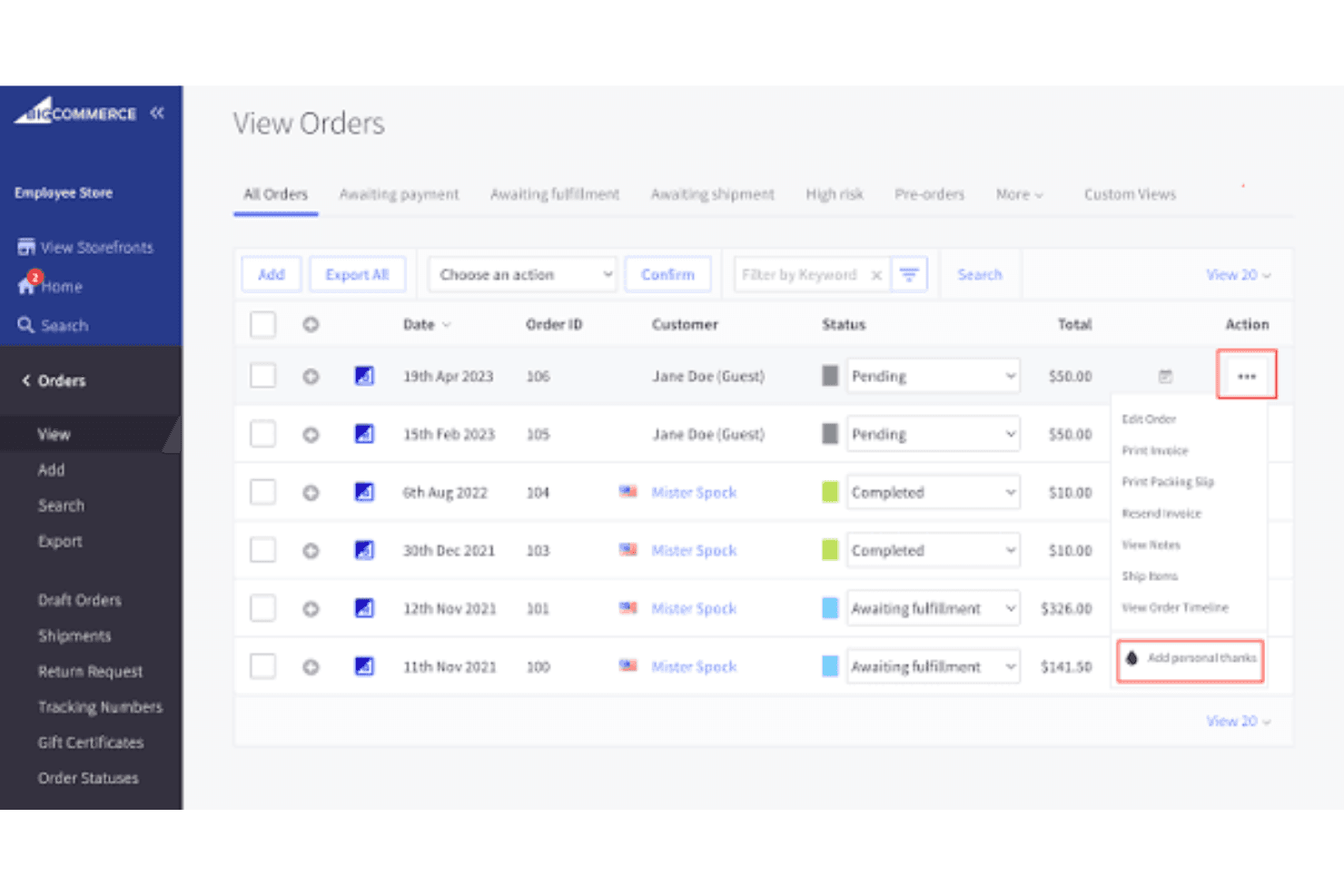
BigCommerce lets users manage and take action on orders from one view. For businesses seeking a WordPress alternative built around online sales, BigCommerce combines ecommerce management with storefront content tools to help marketing and growth teams manage products, customer journeys, and commerce operations.
Who Is BigCommerce Best For?
BigCommerce suits enterprise ecommerce teams scaling online revenue across complex product catalogs and multiple sales channels.
Why I Picked BigCommerce
I picked BigCommerce for Best for enterprise ecommerce growth because its catalog and channel management support complex selling operations. I like that marketing teams can manage storefront content alongside products, while multi-storefront capabilities help businesses run distinct brand or regional experiences.
BigCommerce Key Features
- Built-in blog: Create and manage draft and published blog posts.
- Custom URLs: Set URLs for products, categories, and webpages.
- SEO metadata: Edit page titles and meta descriptions.
- 301 redirects: Redirect old URLs when page addresses change.
BigCommerce Integrations
BigCommerce’s marketplace offers 1,200+ apps, including QuickBooks Online and ShipStation. It also connects with Zapier and provides APIs for custom integrations.
Pros and Cons
Pros:
- Includes built-in SEO fields and redirects
- Combines B2B and B2C storefront management
- Supports complex catalogs and product variants
Cons:
- On-site search can need third-party tools
- Deep theme edits can require developer help
Learn more about BigCommerce: Best for digital content management
- Free plan available
- From $300/month
Visit WebsiteCustomer Rating:4.5/5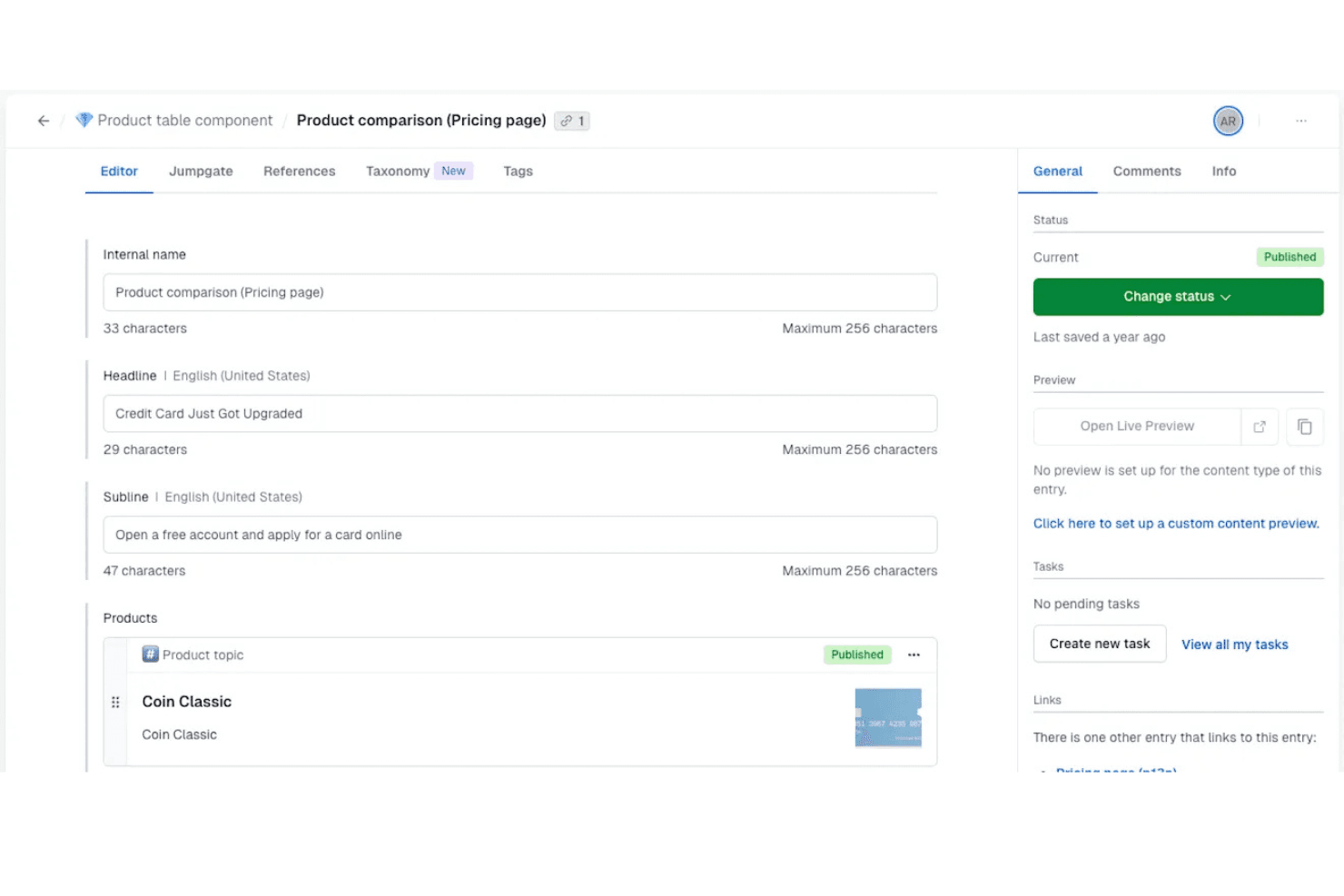
Contentful lets users manage and publish structured content entries with ease. Contentful is an API-first CMS for marketing and product teams that need to create, manage, and publish content across websites and digital channels without tying it to a single front end.
Who Is Contentful Best For?
Contentful suits content and digital experience teams that need editors and developers to manage structured content across websites, apps, and channels.
Why I Picked Contentful
I picked Contentful as my “Best for digital content management” choice because its structured content models let editors manage reusable page and campaign entries, while APIs deliver them to websites and apps. That gives my team a WordPress alternative when the same approved content needs to reach multiple digital experiences without tying publishing to one front end.
Contentful Key Features
- Localization: Create locale-specific versions of entries and manage translations.
- Scheduled publishing: Set entries to publish or unpublish at a chosen date and time.
- Roles and permissions: Assign user roles with permissions for content spaces and actions.
- Content workflows: Set up review steps and assign tasks before publication.
Contentful Integrations
Contentful’s marketplace lists 100+ apps and integrations, including Slack, HubSpot, Shopify, Google Drive, Vercel, and Google Analytics 4. Contentful provides APIs for custom integrations, and Zapier is documented for Contentful Personalization.
Pros and Cons
Pros:
- Scheduled workflows support editorial reviews
- Localization supports multilingual publishing
- Reusable structured content across channels
Cons:
- Content modeling demands technical planning
- Live previews require frontend configuration
Learn more about Contentful: Best for multi-channel content delivery
- Free demo available
- From $699/month
Visit WebsiteCustomer Rating:4.4/5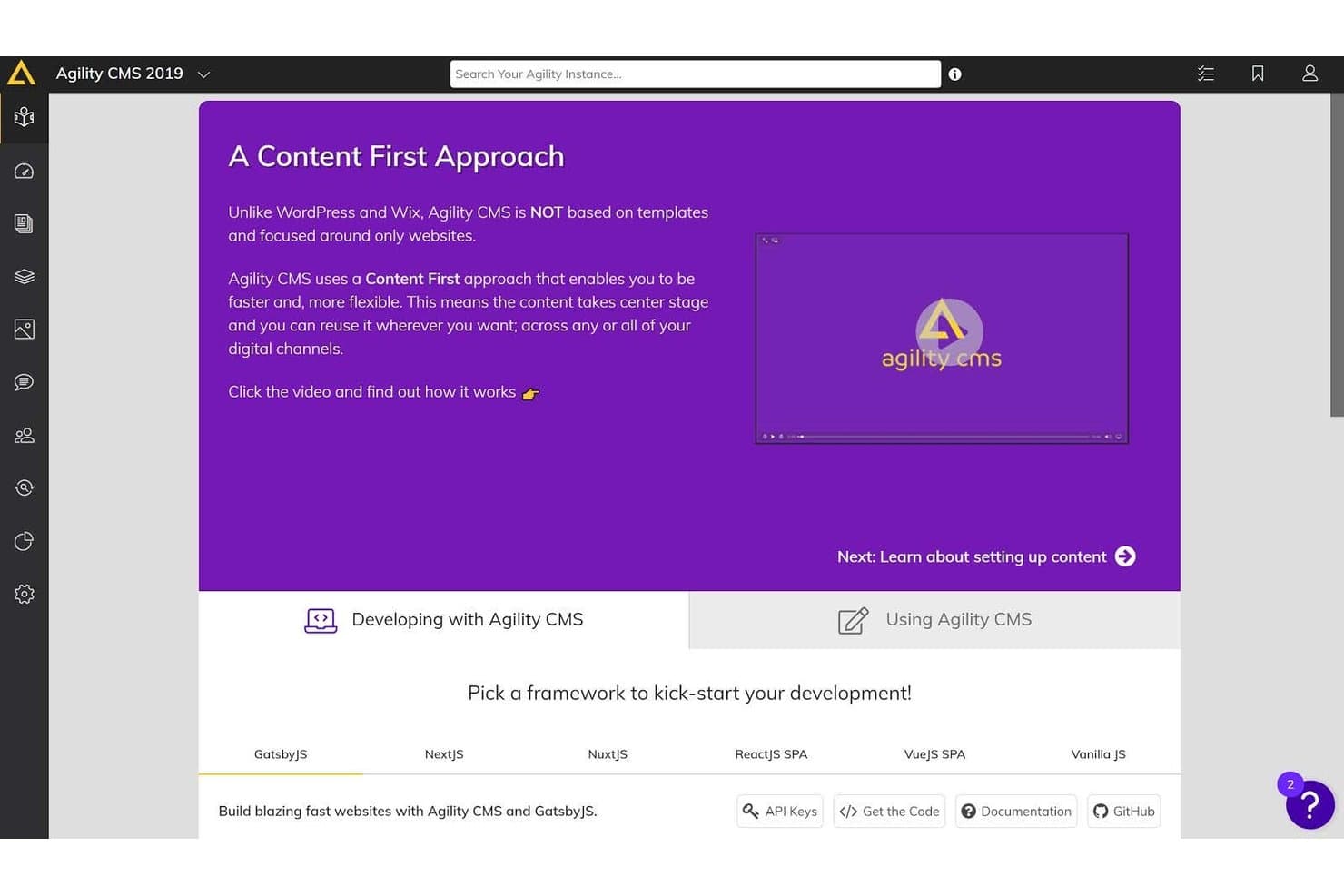
Agility CMS offers a Content First approach dashboard with framework options like GatsbyJS, NextJS, and NuxtJS to kick-start development. Agility CMS gives marketing and digital teams a headless alternative to WordPress, separating content from presentation so they can manage updates while developers build tailored digital experiences.
Who Is Agility CMS Best For?
Agility CMS suits marketing teams that need to manage content across websites, apps, and other digital channels.
Why I Picked Agility CMS
I picked Agility CMS as a WordPress alternative for “Best for multi-channel content delivery.” Its REST and GraphQL APIs send structured content to websites and mobile apps, while the visual page builder lets marketers shape pages without tying content to one front end. I also like its centralized hub for managing brand and regional sites.
Agility CMS Key Features
- Content scheduling : Set content to publish at a chosen time.
- Workflow management : Set up editorial workflows for content review.
- Digital asset management : Store and manage digital assets in the CMS.
- Version history : Review earlier content versions and restore them.
Agility CMS Integrations
Agility CMS’s integrations directory lists Algolia, HubSpot, Google Analytics, Shopify, BigCommerce, Salesforce Sales Cloud, Cloudinary, Vercel, and Zapier. RESTful and GraphQL APIs are available for custom integrations.
Pros and Cons
Pros:
- Framework-agnostic delivery reaches web and app channels
- Shared content supports brand and regional sites
- Visual page editing reduces routine developer tickets
Cons:
- Preview delays and formatting glitches disrupt publishing
- Advanced setup and modeling require developer expertise
Learn more about Agility CMS: Best for scalable ecommerce websites
- 3-day free trial
- From $29/month (billed annually)
Visit WebsiteCustomer Rating:4.5/5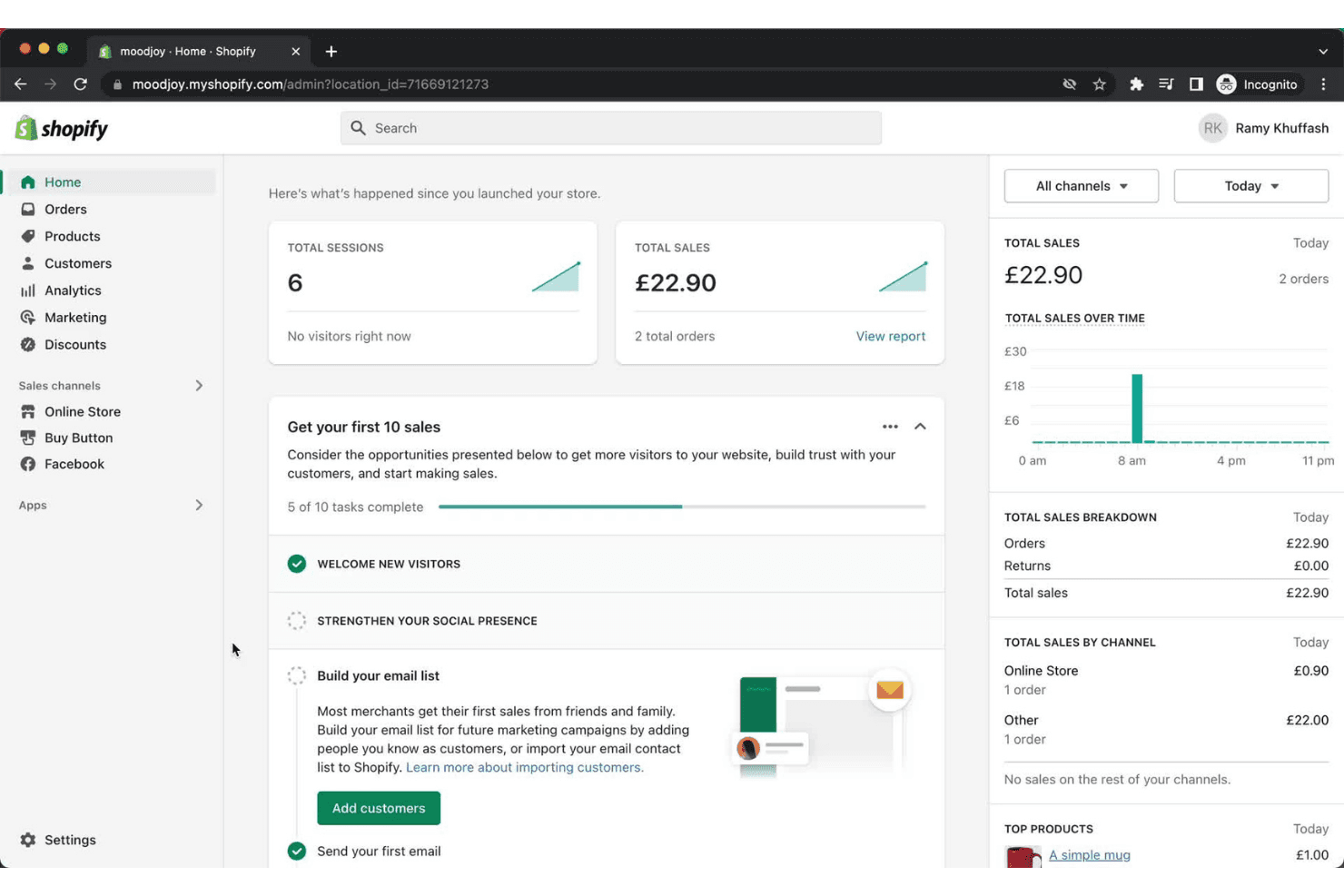
Shopify's dashboard gives merchants a real-time overview of sales and tasks. Shopify is an ecommerce website builder for retailers who want storefront creation and sales management in one place, and it’s Best for scalable ecommerce websites.
Who Is Shopify Best For?
Shopify suits retail and direct-to-consumer teams that need room to expand product catalogs, sales channels, and operations as demand grows.
Why I Picked Shopify
I picked Shopify as a WordPress alternative because it earns the label “Best for scalable ecommerce websites.” I like that its product catalog supports variants and centralized inventory, while sales channels let retailers manage website and social commerce orders in one system. A growing brand can add products and channels without rebuilding its storefront.
Shopify Key Features
- Theme editor: Customize storefront layouts, colors, and typography without editing code.
- Blogging: Publish articles and organize posts within your online store.
- SEO tools: Edit page titles, meta descriptions, and image alt text.
- Custom domains: Connect an existing domain or buy one through Shopify.
Shopify Integrations
Shopify offers marketplace integrations through the Shopify App Store, including Google & YouTube and Facebook and Instagram by Meta; it also connects with Zapier. Shopify’s APIs support custom integrations.
Pros and Cons
Pros:
- Centralized catalog supports expanding product ranges
- Online and in-person inventory syncs centrally
- Responsive themes help launch storefronts without code
Cons:
- Advanced storefront edits often require Liquid coding
- Blog tools lack categories and related posts
Learn more about Shopify: Best for design-focused sites
- 14-day free trial
- From $19/month (billed annually)
Visit WebsiteCustomer Rating:4.6/5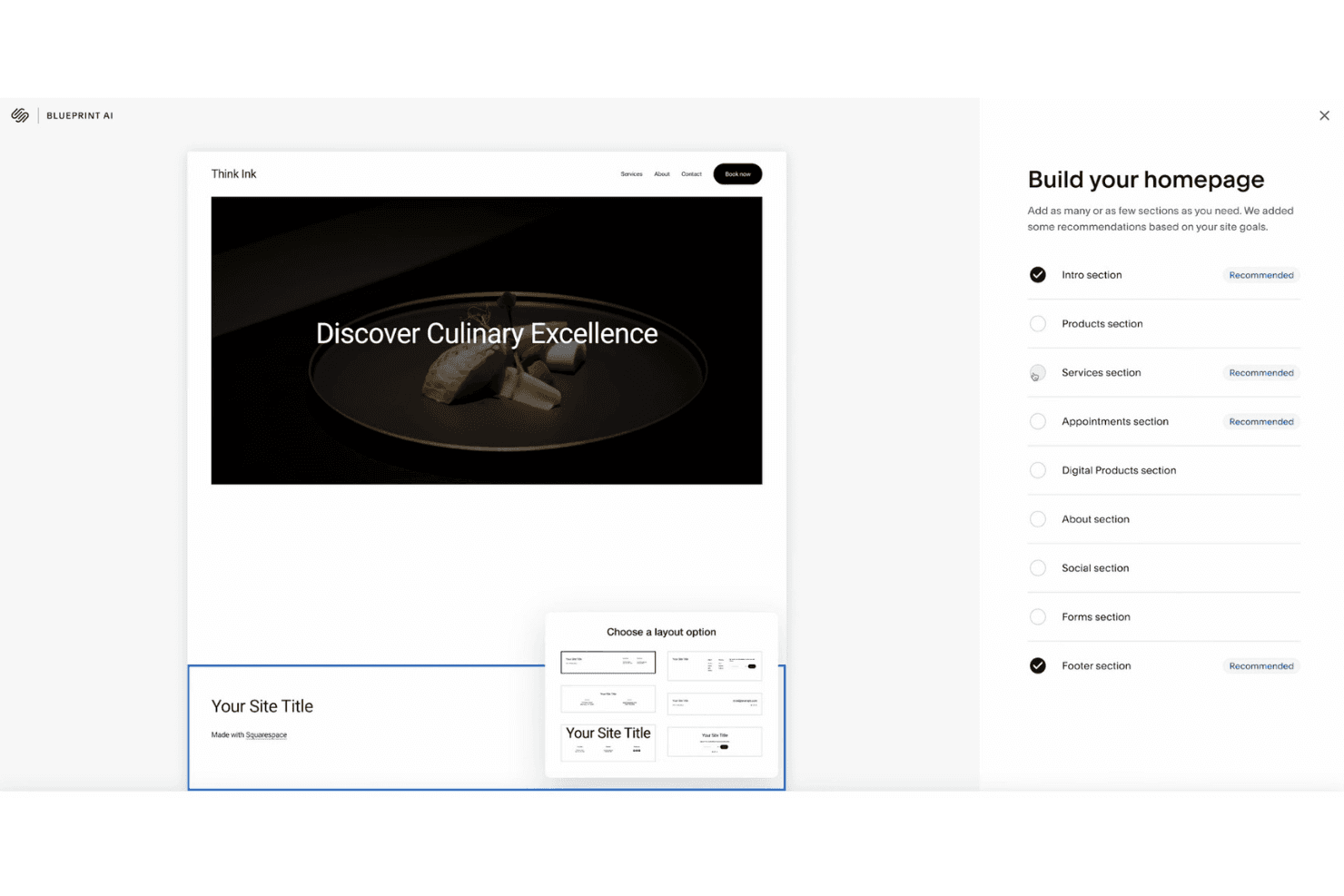
Squarespace lets users build a homepage by selecting recommended sections. Squarespace is a hosted website builder for small businesses and marketing teams that want to create polished branded sites without managing a self-hosted WordPress setup.
Who Is Squarespace Best For?
Squarespace suits creative professionals and studios that need a portfolio site to showcase work and capture inquiries without managing hosting.
Why I Picked Squarespace
I picked Squarespace as a WordPress alternative when the site’s visual presentation needs to lead. Its design-focused templates and Fluid Engine editor help me shape campaign pages, while portfolio pages and gallery blocks give creative work a clear home. I can pair project showcases with inquiry forms to capture leads.
Squarespace Key Features
- Blogging tools: Create posts and organize them with categories and tags.
- SEO settings: Edit page titles, descriptions, URL slugs, and image alt text.
- Website analytics: Review traffic, referral sources, and popular content from your dashboard.
- Product management: Add products, set prices, and track inventory in your store.
Squarespace Integrations
Squarespace officially supports integrations with Google Analytics, Google Search Console, Mailchimp, Facebook Pixel, Instagram, Stripe, PayPal, and Google Workspace, and connects with Zapier. Commerce APIs are available for custom integrations.
Pros and Cons
Pros:
- Built-in analytics track traffic and referrals
- Fluid Engine shapes campaign pages visually
- Polished, responsive templates showcase creative work
Cons:
- No autosave or post revision history
- Blog posts lack Fluid Engine layout controls
Learn more about Squarespace: Best for open-source headless CMS
- Free plan available
- From $35/month
Visit WebsiteCustomer Rating:4.5/5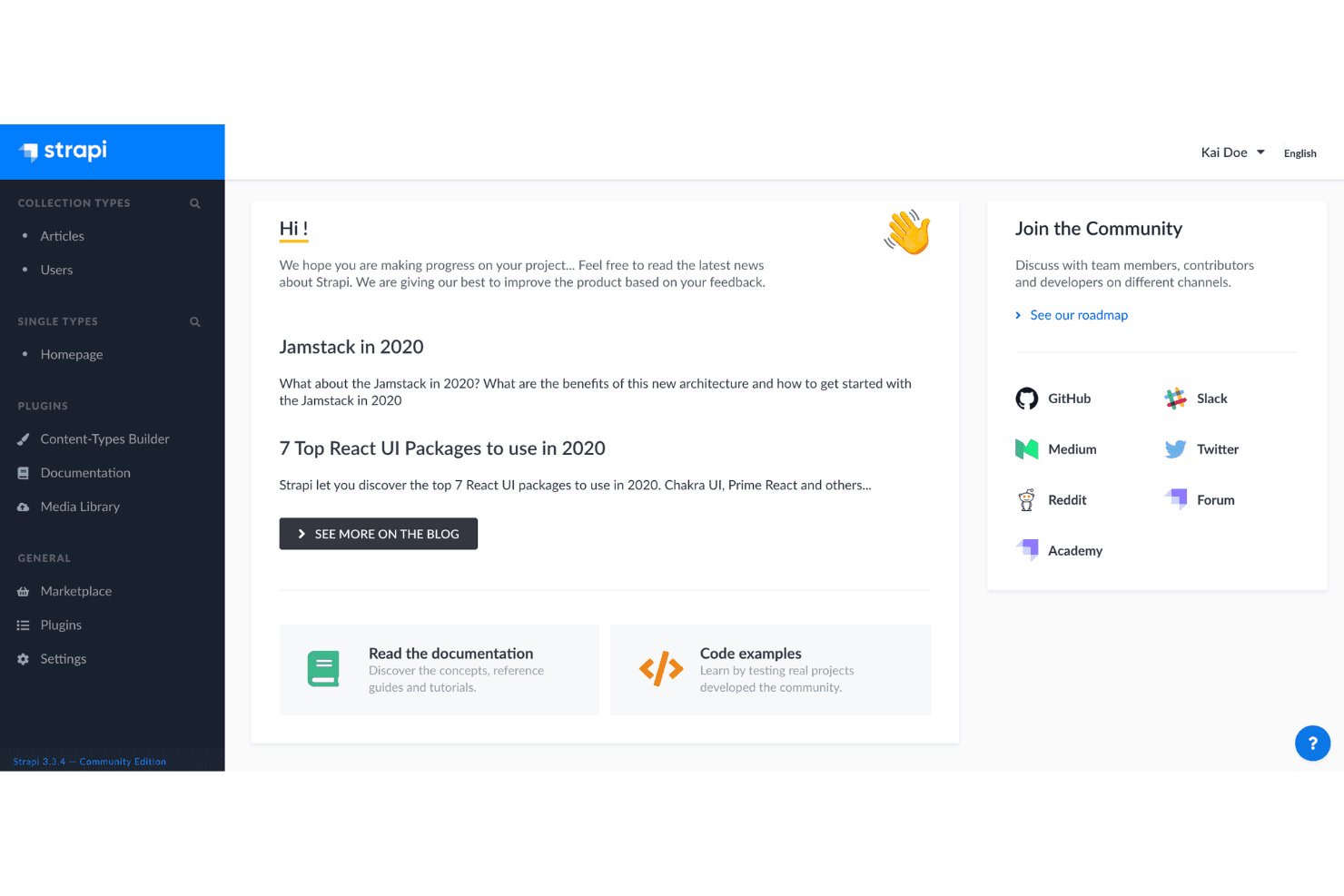
Strapi's dashboard connects users to content types, plugins, and community resources. Strapi is an open-source headless CMS for marketing and web teams that need to manage structured content centrally and publish it across websites and digital channels without tying content to a single front end.
Who Is Strapi Best For?
Strapi suits development-led marketing teams that want an open-source CMS they can customize for their websites, apps, and content workflows.
Why I Picked Strapi
I picked Strapi as an open-source headless CMS because its content-type builder lets me model reusable campaign pages and product updates. Its REST API delivers that structured content to separate website and app front ends, while self-hosting gives my team control over deployment.
Strapi Key Features
- Draft and publish: Save content as a draft, then publish it when it’s ready.
- Media library: Upload, organize, and manage images and other media assets.
- Internationalization: Create and manage localized versions of content.
- Role-based access control: Set permissions for admin users based on their roles.
Strapi Integrations
Strapi includes a built-in Sentry plugin, and its Marketplace offers additional plugins and providers. REST APIs and webhooks support custom integrations.
Pros and Cons
Pros:
- Open-source self-hosting keeps data under your control
- Reusable components support flexible campaign page layouts
- Content models generate REST and GraphQL APIs
Cons:
- Self-hosting requires developer-led deployment and ongoing maintenance
- Rich text editor omits tables and embeds
Learn more about Strapi: Best for visual design capabilities
- Free plan available
- From $15/month (billed annually)
Visit WebsiteCustomer Rating:4.4/5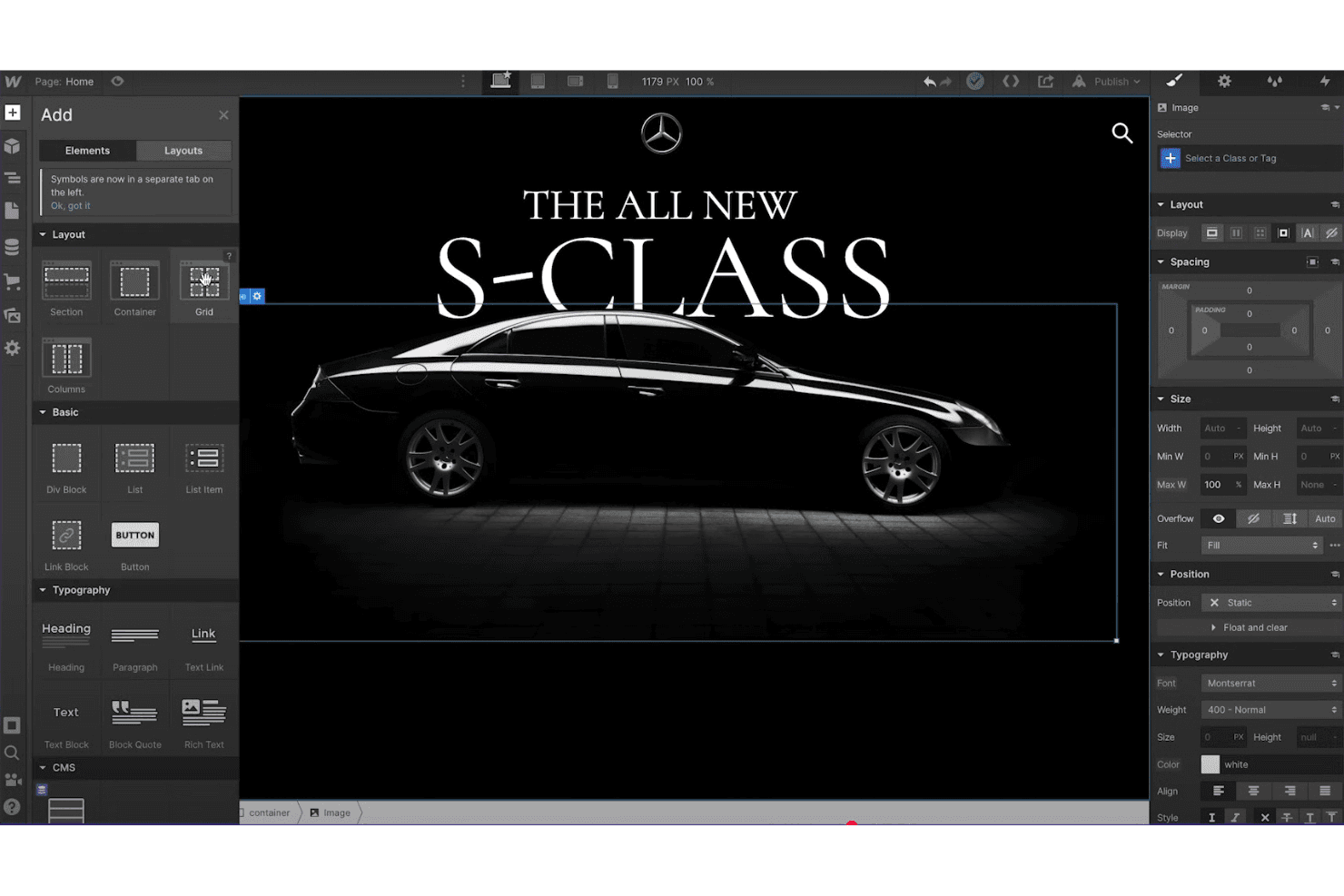
Webflow lets users design and style pages visually with drag-and-drop elements. Webflow is a visual website builder for marketing teams and designers who need to create branded websites and campaign landing pages while reducing reliance on developer queues.
Who Is Webflow Best For?
Webflow suits web designers and creative teams who want hands-on control over site layouts, interactions, and responsive presentation.
Why I Picked Webflow
I picked Webflow, my choice for “Best for visual design capabilities,” as a WordPress alternative when a campaign page needs precise art direction. In the visual Designer, I adjust responsive layouts, grids, typography, and breakpoints on the page itself. I also build timed interactions for page reveals or hover states without writing custom code.
Webflow Key Features
- CMS collections: Structure content with custom fields and use it to populate dynamic pages.
- SEO controls: Set page titles, meta descriptions, Open Graph settings, and indexing preferences.
- Form submissions: Create website forms and manage the submissions they collect.
- Ecommerce tools: Add products, configure a shopping cart, and set up checkout.
Webflow Integrations
Webflow’s Apps marketplace lists 428 apps, including HubSpot, Adobe Marketo Engage, Google site tools for Webflow, Slack, Make, and Zapier. Webflow’s Data API v2 is available for custom integrations.
Pros and Cons
Pros:
- CMS fields power dynamic pages
- Visual interactions without custom code
- Pixel-level responsive layout and typography control
Cons:
- CMS capabilities trail WordPress at scale
- Complex workflows often require custom code
Learn more about Webflow: 10Best for user-friendly site building
Wix
- Free plan available
- From $17.77/month (billed annually)
Visit WebsiteCustomer Rating:4.4/5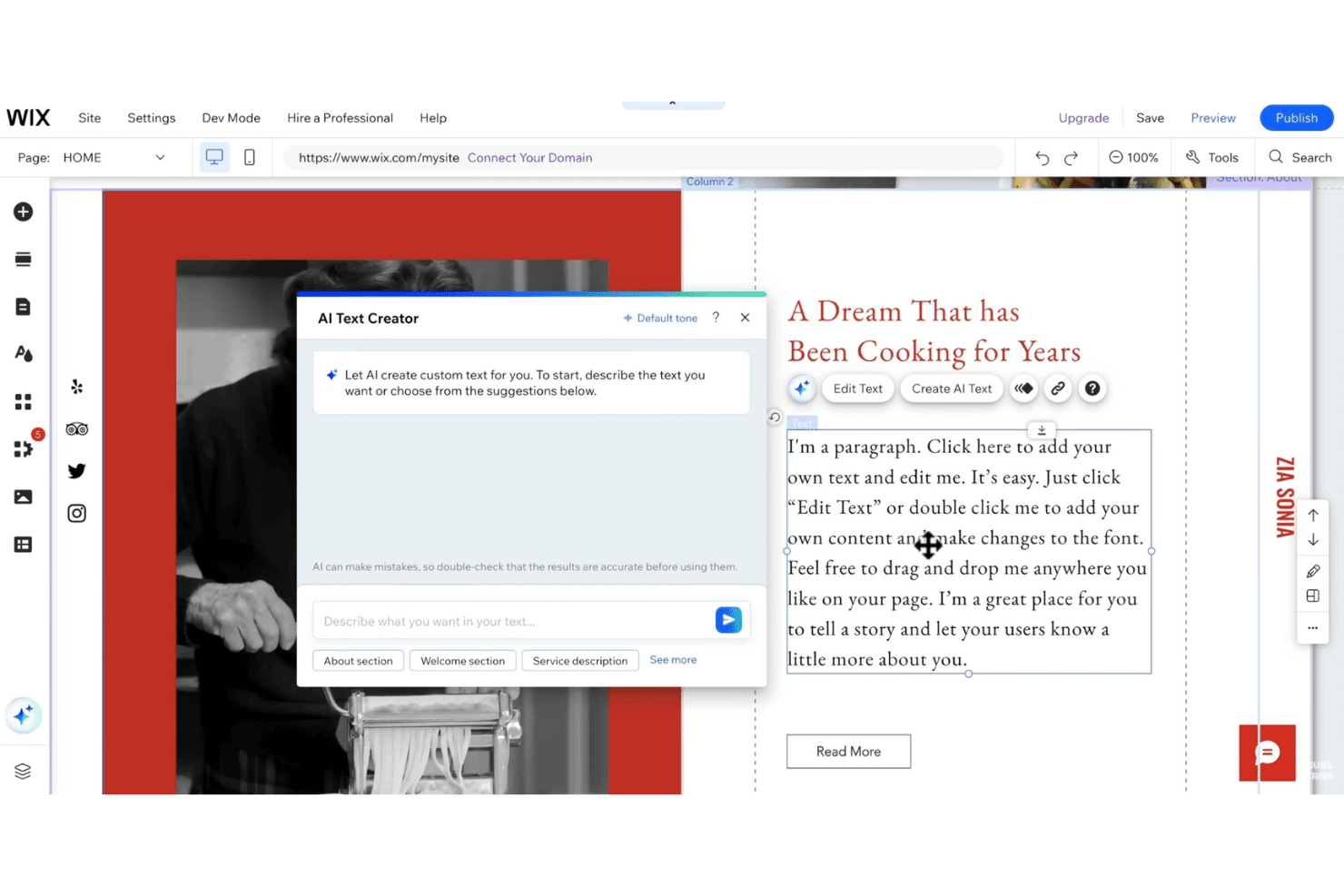
Wix lets users generate paragraph text with an AI Text Creator tool. Wix is a website builder for small businesses and marketing teams that need to create branded websites, landing pages, or ecommerce stores without relying on custom development.
Who Is Wix Best For?
Wix is a good fit for nontechnical marketers who want hands-on control over site design, content updates, and campaign launches.
Why I Picked Wix
I picked Wix because it fits its “Best for user-friendly site building” promise: its visual editor lets me arrange page sections directly on the canvas. I also use CMS collections and dynamic pages to build campaign landing pages from structured content instead of recreating each page.
Wix Key Features
- SEO settings: Edit meta tags, URL slugs, canonical tags, and 301 redirects.
- Online store tools: Manage product pages, checkout, shipping, discounts, and abandoned-cart emails.
- Appointment booking: Set staff availability, manage booking calendars, and send email or SMS reminders.
- Analytics reports: Review traffic and marketing reports to track site activity and campaign results.
Wix Integrations
Wix offers marketplace apps and third-party integrations, including Mailchimp and Google Analytics. It also has a built-in Zapier integration and developer APIs for custom connections.
Pros and Cons
Pros:
- Built-in booking tools support service lead capture
- CMS collections reuse landing-page content
- Canvas-based editing speeds campaign page changes
Cons:
- Full-site exports don’t preserve design
- Template changes require rebuilding published sites
Learn more about Wix:
Andre WordPress-alternativer
Her er noen flere WordPress-alternativer som ikke kom med på kortlisten min, men som likevel er verdt å sjekke ut:
- 11FramerBest for AI-powered website design
- 12WeeblyBest for e-commerce integration
- 13JoomlaBest for multilingual site capabilities
- 14SimvolyBest for websites and sales funnels
- 15GoDaddyBest for domain registration and hosting
- 16Hostinger ReachBest for affordable hosting
- 17Wix StudioBest for agency website creation
- 18ElementorBest for WordPress visual design
- 19WebnodeBest for fast website setup
- 20SuncelBest for real-time content editing
How I Evaluate WordPress Alternatives
My evaluation has two layers: core capabilities every platform must have to qualify, and differentiators—like native A/B testing, martech integrations, and migration tools—that set the best apart.
Core Functionality (Table Stakes For This List)
When I'm selecting tools for my list, I rank each one on a scale from 0 (does not offer the functionality) to 5 (excels in this area) for each core functionality listed below. Then, I calculate the tool's total score into a percentage. Each tool needs to achieve a minimum total score of 75% to be considered for inclusion.
- Content management system: I evaluate how each platform handles page and post creation, media libraries, content types, and multi-user workflows—things like scheduling a blog series across contributors with role-based permissions.
- Visual page building: Each tool should let marketers design and update pages without writing code. I look at component variety, responsive controls, and whether you can build a campaign landing page in minutes.
- Templates and theming: A strong template library saves weeks of design time. I check for industry-relevant templates, brand customization depth, and global style controls that keep assets consistent across pages.
- SEO and marketing tools: Beyond basic meta fields, I look for built-in redirects, schema markup, form builders, and landing page tools—the kind of features that reduce your dependency on third-party plugins.
- Hosting and publishing: Managed hosting is a big reason marketers move away from WordPress. I evaluate SSL, CDN coverage, uptime reliability, and whether staging environments are available before going live.
- Integrations and extensibility: Marketing teams run on connected tools. I check for native integrations with platforms like HubSpot, Salesforce, and Google Analytics, plus open APIs and webhook support for custom workflows.
Once I have a list of tools that meet this criteria, I consider what sets each platform apart.
Differentiating Factors (What Sets Vendors Apart)
Here's how I compare and contrast different vendors:
Standout Features
Native A/B testing is a big differentiator—I look for platforms that let you test headlines, CTAs, or full page variants without adding a third-party tool. AI content assistance also matters when your team needs to draft landing page copy or generate image assets at scale. For teams running multiple brand sites or regional campaign microsites, I evaluate whether the platform offers centralized multi-site controls rather than forcing separate accounts.
Beyond Features
Migration support is one of the first things I check. Moving from WordPress means transferring years of content, URL structures, and SEO equity—platforms that offer import tools or guided migration services make that transition far less risky. I also evaluate total cost of ownership, since WordPress's real expense often hides in plugin fees, hosting, and developer time. Performance matters too; I look at Core Web Vitals benchmarks and CDN coverage, because slow pages directly hurt campaign ROI and search rankings.
Hvorfor se etter et WordPress-alternativ?
Selv om WordPress er et godt valg av innholdsforvaltningssystem, finnes det flere grunner til at noen brukere ser etter alternative løsninger. Det kan hende du ser etter et WordPress-alternativ fordi …
- Du trenger flere tilpasningsmuligheter
- Teamet ditt ønsker bedre sikkerhetsfunksjoner
- Du trenger støtte for flerspråklige nettsteder
- Du trenger et grensesnitt som er enklere å bruke
- Nettstedet ditt har vokst forbi WordPress' skalerbarhet
- Du ønsker integrerte funksjoner for netthandel
Hvis noe av dette høres kjent ut, har du kommet til rett sted. Listen min inneholder flere alternativer for innholdsforvaltning som er bedre egnet for team som møter disse utfordringene med WordPress og ser etter alternative løsninger.
Viktige WordPress-funksjoner
Her er noen av de viktigste funksjonene i WordPress, slik at du kan sammenligne hva alternative løsninger tilbyr:
- Enkelhet: Lar deg raskt sette opp og publisere nettstedet ditt med et brukervennlig grensesnitt.
- Fleksibilitet: Støtter ulike nettstedstyper med tilpassbare temaer og utvidelser.
- Enkel publisering: Tilbyr intuitive verktøy for innholdsoppretting, planlegging og revisjoner.
- Brukeradministrasjon: Tilbyr ulike tilgangsnivåer som muliggjør samarbeid om innholdsoppretting.
- Mediehåndtering: Gjør det enkelt å laste opp medier med dra-og-slipp og grunnleggende redigeringsverktøy.
- SEO-optimalisering: Inkluderer innebygde SEO-funksjoner og ekstra utvidelser for avansert kontroll.
- Flerspråklig støtte: Tilgjengelig på over 70 språk for global tilgjengelighet.
- Temasystem: Tilbyr en omfattende katalog for tematilpasning og enkel opplasting.
- Utvidbarhet med programtillegg: Tusenvis av programtillegg for å forbedre funksjonaliteten, noe som gjør det tilpasningsdyktig.
- Støtte fra fellesskapet: Støttes av et aktivt fellesskap for læring og samarbeid.