

Håndtering av merkevareelementer kan være en hodepine for markedssjefer. Du må holde styr på logoer, bilder og dokumenter, samtidig som du prøver å opprettholde en konsekvent profil. Programvare for håndtering av merkevareelementer (BAM-programvare) kan hjelpe ved å organisere alt på ett sentralt sted, slik at jobben blir enklere og du sparer tid.
Jeg har testet og vurdert disse verktøyene med fokus på det som faktisk betyr noe for deg og teamet ditt. Målet mitt er å gi deg en objektiv oversikt over de beste alternativene som finnes. I denne artikkelen finner du mine beste anbefalinger, og hvert verktøy er vurdert ut fra sine unike styrker.
Hvorfor du kan stole på våre programvareanbefalinger
6,700+
Reviews
20
Industry experts
16+
Evaluation factors
14
Years
Teamet vårt har testet og anmeldt programvare siden 2012. Vi er selv markedsføringsledere, så vi vet hvor vanskelig og hvor viktig det er å velge riktig programvare.
I denne guiden har vi vurdert verktøyene gjennom praktisk testing og uavhengig research og gitt dem poeng ut fra våre utvelgelseskriterier.
Anmeldelsene våre bygger på vår egen redaksjonelle vurdering. De er ikke et salgsargument.
Ekspertanmeldere:
 Gui DrusinaCreative Director
- Shriya GhateSenior Marketing Lead
 Amanda JacquesMarketing Ops Leader

Sammenligningstabell for programvare for håndtering av merkevareelementer
Denne sammenligningstabellen oppsummerer prisdetaljene for mine beste utvalgte programmer for håndtering av merkevareelementer:
| Tool | Best For | Trial Info | Price | ||
|---|---|---|---|---|---|
| 1 | Best for AI-driven metadata tagging | Not available | Pricing upon request | Website | |
| 2 | Best for cloud storage | Free demo available | Pricing upon request | Website | |
| 3 | Best for maintaining brand consistency | Free plan available; 7-day free trial | From $12/user/month | Website | |
| 4 | Best for end-to-end project collaboration | Free demo available | Pricing upon request | Website | |
| 5 | Best with unlimited users on every plan | Free plan + 14-day free trial + demo available | From $99/month | Website | |
| 6 | Best for branded portals for asset sharing | Free demo available | Pricing upon request | Website | |
| 7 | Best for AI-powered asset discovery | Free plan + demo available | From $900/month (billed annually) | Website | |
| 8 | Best for brand assets with built-in rules | 30-day free trial + free demo available | From $80/month + $16/user/month (billed annually) | Website | |
| 9 | Best for creative approvals | Free plan available | From $39/user/month | Website | |
| 10 | Best for design teams | Free demo available | Pricing upon request | Website |


Anmeldelser av den beste programvaren for håndtering av merkevareelementer
Nedenfor finner du mine detaljerte sammendrag av den beste programvaren for håndtering av merkevareelementer som kom med på listen min. Anmeldelsene mine gir en detaljert oversikt over de viktigste funksjonene, fordelene og ulempene, integrasjonene og de ideelle bruksområdene for hvert verktøy, slik at du kan finne det beste alternativet for deg.
 Best for AI-driven metadata tagging
- Not available
- Pricing upon request
Visit WebsiteCustomer Rating:4.4/5
Papirfly brand portal centralizes brand guidelines, assets, and campaign creation in one interface. For those looking for a brand asset management solution that prioritizes brand consistency and compliance, Papirfly is a strong option. The platform is built for organizations that need to manage and distribute brand materials efficiently, from logos to marketing templates, while making sure every asset aligns with their brand identity. Its focus on brand-critical assets, along with AI-driven tools and compliance management, helps address the challenge of maintaining brand integrity across global teams.
Why I Picked Papirfly
I chose Papirfly for its ability to centralize brand management with features like AI-driven metadata tagging and customizable brand portals. These tools let your team categorize assets based on specific needs and deliver brand guidelines in a structured, accessible way. Its compliance management is another key feature, ensuring that assets meet regulatory standards and reducing the risk of non-compliance. Together, these capabilities make Papirfly a solid choice for teams that need a focused brand asset management platform.
Papirfly Key Features
In addition to its core functionalities, I also found the following helpful:
- Campaign Management: Enables you to plan, execute, and monitor marketing campaigns while maintaining brand consistency.
- Approval Workflows: Streamlines the review process with customizable workflows to ensure all assets meet brand standards before release.
- Digital Asset Library: Provides a secure, centralized repository for storing and managing brand assets.
- User Permission Controls: Allows you to set role-specific access to ensure that only authorized users can modify or distribute brand materials.
Papirfly Integrations
Native integrations are not currently listed by Papirfly.
Pros and Cons
Pros:
- Centralized campaign performance analytics
- Built-in enterprise design templates
- AI-powered asset search functionality
Cons:
- May require onboarding for templates
- Limited publicly listed integrations
Learn more about Papirfly:

MediaValet offers secure, scalable cloud storage for brand assets. MediaValet is a digital asset management platform designed for teams that require extensive cloud storage capabilities for their brand assets. It offers secure and scalable storage solutions tailored for businesses with large volumes of digital content.
Why I picked MediaValet: MediaValet provides extensive cloud storage, ideal for teams managing large amounts of digital assets. It offers high-level security features to protect your valuable content. The platform's scalability ensures it can grow with your business needs. Additionally, it provides easy access and sharing capabilities, making collaboration straightforward for your team.
Standout features & integrations:
Features include advanced security measures to keep your assets safe. Scalable storage options accommodate growing digital content needs, ensuring you always have space. Easy access and sharing capabilities make collaboration simple and efficient for your team.
Integrations include Adobe Creative Cloud, Microsoft Office 365, Slack, Salesforce, WordPress, Google Workspace, Dropbox, Hootsuite, SharePoint, and Canva.
Pros and Cons
Pros:
- Supports large file uploads
- Simple access and sharing
- Scalable with business growth
- High-level security features
- Extensive cloud storage
Cons:
- Customization options are basic
- Requires a stable internet connection
- Limited offline access
- May require training for new users
- Initial setup can be complex
Learn more about MediaValet: 3Best for maintaining brand consistency
Marq
- Free plan available; 7-day free trial
- From $12/user/month
Visit WebsiteCustomer Rating:4.5/5
marq showcases brand asset management tools. marq is a brand enablement software that helps teams create, customize, and share branded content. It offers tools to maintain brand consistency and manage content efficiently across various industries.
Why I Picked marq: I picked marq for its robust template creation that lets you lock elements like logos and fonts, ensuring brand consistency across all assets. Its smart fields automate data population, saving time on updates. Plus, marq’s centralized content management simplifies access to templates and assets, while its content distribution tools make publishing across multiple platforms seamless.
Standout features & integrations:
Features include a self-service model that empowers your team to manage their own content requests, reducing backlog and wait times. marq also offers real-time approval processes, enabling quick reviews and approvals of designs, which is crucial for timely content deployment. Additionally, marq provides analytics that offer insights into how your branded content is performing, allowing you to make data-driven decisions.
Integrations include Bynder, PhotoShelter, Flowcode, CANTO, Brandfolder, Acquia, HubSpot, Asana, Google Sheets, and Slack.
Pros and Cons
Pros:
- Offers custom page sizes and easy template creation
- Centralized storage of brand assets
- Intuitive drag-and-drop editor
Cons:
- May come with additional setup costs
- No mobile app
Learn more about Marq: Best for end-to-end project collaboration
- Free demo available
- Pricing upon request
Visit WebsiteCustomer Rating:4.6/5
Screendragon marketing dashboard summarizing budget allocation, brand spend performance, capacity vs. demand, cycle time, and project health. Screendragon is a no-code workflow management platform built for enterprise marketing and agency teams that combines project management, digital approvals, resource planning, brand asset libraries, and budget tracking in a single system.
Who Is Screendragon Best For?
Screendragon is well-suited for enterprise marketing teams, in-house agencies, and large creative departments that manage high volumes of complex, multi-stakeholder projects.
Why I Picked Screendragon
I picked Screendragon as one of the best because it covers the full arc of brand asset work, from brief intake to final approval, without handing off to a separate tool. What I find genuinely useful is the AI-powered briefing and intake system: adaptive forms capture brand requests with built-in business rules, so projects start with the right context before a single asset is created. From there, automated approval workflows route content through legal, regulatory, and brand checkpoints, with Compliance and Proofing AI Agents reducing the manual review load at each stage.
Screendragon Key Features
- Brand asset library: Store, tag, and organize brand assets with custom metadata, filters, and controlled access permissions including expiry dates tied to usage rights.
- Version control: Track every iteration of a brand asset with a full audit trail, so teams always know which version is current and who made changes.
- Localization toolkit management: Package and distribute brand templates and assets to regional teams with built-in rules that preserve global brand standards.
- Configurable project dashboards: Build custom views across active brand campaigns, displaying task status, deadlines, and workload data in a single snapshot.
Screendragon Integrations
Screendragon offers pre-built integrations that connect with tools teams already use, including Aprimo, HubSpot, Microsoft Power BI, Amazon S3, Sitecore, Ziflow, Brandfolder, Smartsheet, and Workato, plus connectors for Jira, Salesforce, Adobe, Google Drive, Box, OneDrive, SAP, and Microsoft 365. An In-house Connection Manager provides centralized control for monitoring and troubleshooting integrations, and a REST-based open API with OAuth 2.0 authentication is available for custom integrations.
Pros and Cons
Pros:
- Granular role-based asset access controls
- Built-in rate cards for agency billing
- Dynamic forms automate creative brief intake
Cons:
- Initial platform setup is time-intensive
- No dedicated mobile app available
Learn more about Screendragon: Best with unlimited users on every plan
- Free plan + 14-day free trial + demo available
- From $99/month
Visit WebsiteCustomer Rating:4.9/5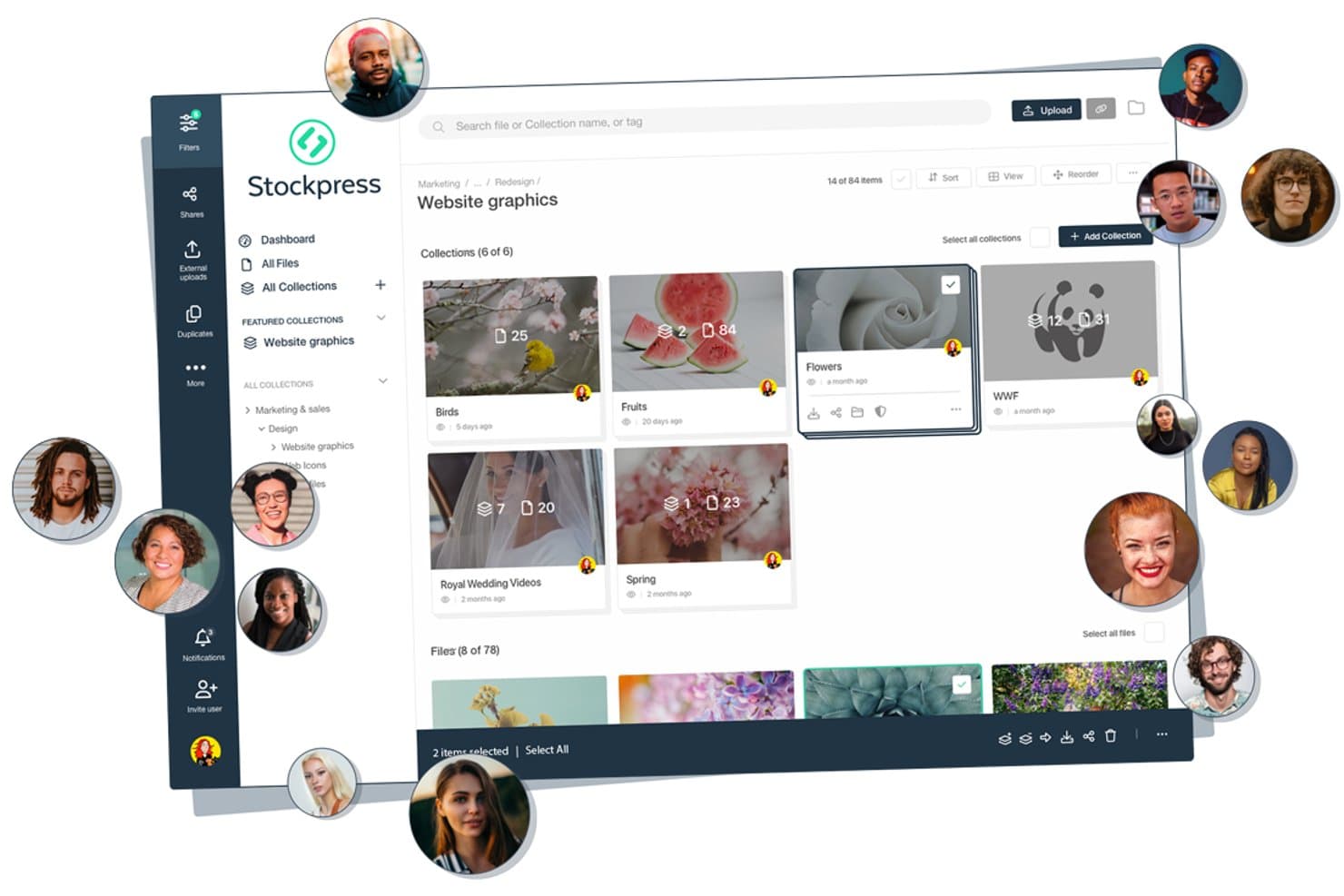
Stockpress offers a visual asset management dashboard where teams can organize files into named collections, collaborate with multiple users, and manage brand assets in a structured folder hierarchy. Stockpress is a cloud-based digital asset management platform that centralizes brand assets—logos, images, video, fonts, and documents—with AI-powered search, metadata tagging, version control, and customizable sharing and permissions.
Who Is Stockpress Best For?
Stockpress suits marketing and creative teams at growing companies that regularly collaborate with external agencies, partners, or resellers.
Why I Picked Stockpress
Stockpress earns its spot on my shortlist because the unlimited users model genuinely changes how brand teams operate. I can add every agency, reseller, and freelancer to the workspace without watching costs multiply. Features like custom user roles, guest upload pages, and password-protected share links with view tracking mean I can give each external partner exactly the right level of access, whether that's uploading raw files or downloading approved brand assets.
Stockpress Key Features
- AI-powered search and tagging: Quickly locate assets using AI-generated tags, facial recognition, and visual search technology.
- Smart collections and sub-collections: Organize assets by project, campaign, or brand with dynamic collections and unlimited nesting.
- Integrated image editing tools: Crop, resize, remove backgrounds, and apply other edits directly within the platform.
- Detailed activity tracking: Monitor file uploads, downloads, and sharing history with comprehensive asset-level reporting.
Stockpress Integrations
Stockpress offers native integrations with Adobe Creative Cloud, Figma, Canva, Box, Dropbox, Google Drive, Slack, Klaviyo, Mailchimp, WordPress, and Webflow. An API is available for custom integrations.
Pros and Cons
Pros:
- Supports all file types without limits
- AI tagging plus facial recognition search
- Unlimited users on every plan
Cons:
- Lacks automated rights enforcement workflows
- No dedicated brand guidelines microsite
Learn more about Stockpress: Best for branded portals for asset sharing
- Free demo available
- Pricing upon request
Visit WebsiteCustomer Rating:4.6/5
Acquia DAM (Widen) provides insights on asset usage through its dashboard. Acquia DAM, formerly known as Widen, is a digital asset management platform designed to centralize and organize brand materials. It provides marketing and creative teams with a single location to store, manage, and distribute digital content while maintaining brand consistency.
Why I picked Acquia DAM: I picked Acquia DAM for its ability to keep brand assets organized and accessible across teams. The platform includes an asset library that makes it easy to categorize, find, and use creative files, which is especially helpful for large organizations managing diverse content. I also like its branded portals for securely sharing assets with external partners, ensuring everyone works from the same brand standards. AI-powered features, such as auto-tagging and translation, add another layer of efficiency by reducing repetitive manual work.
Standout features & integrations:
Features include branded portals for external sharing, templates to create on-brand materials, and a built-in video creator that supports editing and translation. Its content publishing tools allow you to embed optimized assets across websites while tracking their performance.
Integrations include Salesforce, HubSpot, Slack, Microsoft Dynamics Customer Relationship Management (CRM), Microsoft Teams, Zendesk, Dropbox, Google Drive, Microsoft Office 365, Smartsheet, Asana, and Google Sheets.
Pros and Cons
Pros:
- Branded portals for secure sharing
- AI-powered tagging and translation
- Centralized digital asset storage
Cons:
- Challenging onboarding process
- Limited customization options
Learn more about Acquia DAM (Widen): 7Best for AI-powered asset discovery
Air
- Free plan + demo available
- From $900/month (billed annually)
Visit WebsiteCustomer Rating:4.6/5
Air’s visual workspace helps creative teams preview and organize brand assets with AI-powered search and tagging. Air is a platform designed to help you manage and scale your creative assets. It centralizes workflows, allowing your team to collaborate, approve, and share content smoothly.
Why I picked Air: I picked Air for its visual-first approach to managing creative assets. The scrubbable previews let you see inside design files, videos, and documents instantly, which helps your team locate what they need faster. Its AI-powered search goes beyond filenames to recognize objects, faces, and even spoken words, making asset retrieval intuitive. I also like that you can manage approvals, feedback, and file versions in one place, reducing communication gaps and maintaining a clear creative trail.
Standout features & integrations:
Features include AI smart tags that automatically generate searchable keywords and summaries for your content, helping you and your team stay organized. Version stacking keeps track of every file iteration while preserving original assets, so nothing gets lost. Air also offers video and audio transcription to make media files instantly searchable, plus in-context commenting for smoother approvals.
Integrations include Adobe Creative Cloud, Google Calendar, Slack, Google Drive, Photoshop, Figma, WooCommerce, Shopify, Salesforce, Microsoft Office tools, Microsoft Excel, and Adobe Experience Manager.
Pros and Cons
Pros:
- Built-in feedback and approval tools
- AI-powered search and tagging
- Visual previews for fast browsing
Cons:
- Learning curve for new users
- Limited offline functionality
Learn more about Air: Best for brand assets with built-in rules
- 30-day free trial + free demo available
- From $80/month + $16/user/month (billed annually)
Visit WebsiteCustomer Rating:4.6/5
Lingo organizes brand assets into a searchable library with detailed tags, formats, and version history. Lingo is a cloud-based brand asset management software that helps your team store, organize, and distribute assets like logos, images, templates, videos and guidelines in one central place. It ties each asset to your brand guidelines so you and your team always know how and when to use the right version.
Why I picked Lingo: I picked Lingo because it manages brand assets with built-in brand rules and self-serve kits. You can build asset kits that combine files with usage context (guidelines, notes, instructions) so non-designers can access what they need without calling the creative team. Lingo also offers automatic file conversion and export control, so whenever someone needs a variant (e.g., PNG instead of SVG or a particular size), you don’t have to manually produce it.
Standout features & integrations:
Features include real-time usage insights to see what assets your team is using most (or not using at all), which helps you prune, optimize or invest in the right brand collateral. It also includes direct links, meaning when you update an asset in Lingo, every place that uses that link updates automatically — helping avoid outdated or off-brand materials.
Integrations include Figma, Dropbox, and Google Drive. You can also use the Lingo API to build your own connections.
Pros and Cons
Pros:
- Automatic file conversions save production time
- AI search removes need for manual tagging
- Unlimited kits support flexible asset grouping
Cons:
- Fewer enterprise-scale integrations available
- Lacks complex approval workflow tools
Learn more about Lingo:

Artwork Flow streamlines asset approvals for compliance and efficiency. Artwork Flow is a brand asset management tool tailored for creative teams seeking to streamline the approval process. It caters to industries like pharma, food and beverages, and cosmetics, focusing on compliance and efficiency in managing digital assets.
Why I picked Artwork Flow: Artwork Flow excels in creative approvals with its AI-powered online proofing tools that simplify the review process. Workflow automation reduces manual tasks, allowing your team to focus on creativity. Compliance automation ensures you meet industry standards without hassle. The platform's version control and smart search capabilities make managing and finding assets straightforward.
Standout features & integrations:
Features include AI-powered proofing, which enhances the review process by catching design errors early. The software's compliance automation helps you maintain industry standards effortlessly. Additionally, its version control and smart tagging make asset management efficient.
Integrations include Adobe Creative Cloud, Slack, Trello, Asana, Microsoft Teams, Google Drive, Dropbox, Box, Jira, and Monday.com.
Pros and Cons
Pros:
- Fast go-to-market speed
- User-friendly interface
- Efficient workflow automation
- Comprehensive compliance checks
- AI-powered proofing tool
Cons:
- Initial setup complexity
- Limited customization options
- Requires internet for full functionality
- Learning curve for new users
- Direct pricing not transparent
Learn more about Artwork Flow:

Frontify helps design teams manage and share brand guidelines efficiently. Frontify is a digital asset management platform designed for design teams that need to manage and collaborate on brand assets. It provides tools for creating, organizing, and sharing brand guidelines to ensure consistency across all materials.
Why I picked Frontify: Frontify caters to design teams with its intuitive interface and collaborative features. It offers customizable brand guidelines that help maintain consistency across all channels. The platform's collaborative workspace allows your team to work together efficiently, regardless of location. Its version control ensures everyone is working with the most up-to-date assets, which is vital for maintaining brand integrity.
Standout features & integrations:
Features include customizable templates that allow you to maintain brand consistency across all visual elements. The collaborative workspace supports teamwork, enabling your team to work together effectively. Version control ensures everyone is using the most current assets, which helps maintain brand integrity.
Integrations include Adobe Creative Cloud, Sketch, Slack, Microsoft Teams, Google Workspace, Dropbox, Trello, Asana, Jira, and InVision.
Pros and Cons
Pros:
- Supports remote collaboration
- Strong version control
- Collaborative workspace
- Customizable brand guidelines
- Ideal for design teams
Cons:
- Direct support may be limited
- Customization options can be complex
- Requires stable internet connection
- Limited offline functionality
- May need initial training
Learn more about Frontify:
Annen programvare for håndtering av merkevareelementer
Her er noen flere alternativer for programvare for håndtering av merkevareelementer som ikke kom med på listen min, men som likevel er verdt å undersøke:
- 11Acquia DAMBest for integration capabilities
- 12BrandyBest for brand guidelines
- 13EthosBest for small businesses
- 14ioMoVoBest for AI-driven insights
- 15SparkfiveBest for compliance needs
- 16FilecampBest for unlimited users
- 17BrandfolderBest for user-friendly interface
- 18BynderBest for scalability
- 194ALLPORTALBest for custom workflows
- 20RocketiumBest for marketing automation
How I Evaluate Brand Asset Management Software
I evaluate these tools in two layers: the baseline a platform must hit—like hosting live brand guidelines, not just storing PDFs—and the differentiators that set tools apart.
Core Functionality (Table Stakes For This List)
When I'm selecting tools for my list, I rank each one on a scale from 0 (does not offer the functionality) to 5 (excels in this area) for each core functionality listed below. Then, I calculate the tool's total score into a percentage. Each tool needs to achieve a minimum total score of 65% to be considered for inclusion.
- Centralized Asset Library: I look for a single, cloud-based hub where teams store logos, videos, fonts, and templates—organized into collections rather than buried in generic folder trees.
- Brand Guidelines Hosting: The platform should let you publish interactive, living guidelines—not just static PDFs—so updates to colour codes or logo usage rules go live instantly.
- Metadata & Search Capabilities: I evaluate how quickly you can find a specific asset variant, like a white-on-transparent logo in SVG format, using tags, filters, and AI-assisted search.
- Access Controls & Permissions: Role-based sharing matters here. I check whether you can grant an external agency download-only access to a campaign folder without exposing internal assets.
- Rights & Version Tracking: Expired licenses and outdated files create real risk. I look for automated expiration alerts, version history, and the ability to flag assets with usage restrictions.
- Creative Tool Integrations: Teams pull assets into Adobe Creative Cloud, Figma, Canva, or their CMS daily. I evaluate native plugin support and whether the connector keeps assets synced in real time.
Once I have a list of tools that meet the criteria, I consider what sets each platform apart.
Differentiating Factors (What Sets Vendors Apart)
Here's how I compare and contrast different vendors:
Standout Features
Brand templates are a major differentiator. I look for platforms that let non-designers customize locked-down layouts—swapping images or copy without touching logo placement or fonts. Approval workflows also matter, especially when regional teams need sign-off before publishing co-branded materials. I check whether the tool routes assets through reviewers with inline annotations. Usage analytics round things out by showing which assets get downloaded and which collect dust, helping brand managers retire underperforming content and focus on what resonates.
Beyond Features
Scalability matters a lot here. A five-person creative team and a global enterprise managing dozens of sub-brands need very different structures, so I evaluate whether a platform supports multi-brand hierarchies and scales without performance hits. Security and compliance also weigh heavily—I check for SOC 2 Type II certification and audit logging, especially when external partners access assets. Pricing transparency rounds out my review. I look at whether costs are tied to users, storage, or asset volume, and whether features like branded portals come bundled or carry add-on fees.
Slik velger du programvare for håndtering av merkevareelementer
Det er lett å gå seg vill i lange funksjonslister og kompliserte prismodeller. For å hjelpe deg med å holde fokus mens du går gjennom den unike prosessen med å velge programvare, har jeg satt sammen en sjekkliste over faktorer du bør ha i tankene:
| Faktor | Hva du bør vurdere |
| Skalerbarhet | Sørg for at programvaren kan vokse sammen med virksomheten din. Se etter løsninger som kan håndtere økte datamengder og flere brukere etter hvert som teamet ditt vokser. |
| Integrasjoner | Kontroller om programvaren kan integreres med verktøyene du allerede bruker, for eksempel Adobe Creative Cloud eller Slack, for å effektivisere arbeidsflyten. |
| Tilpasningsmuligheter | Velg programvare som lar deg tilpasse arbeidsflyter og grensesnitt etter teamets spesifikke behov, slik at det blir enklere å tilpasse løsningen til kravene for merkevaren din. |
| Brukervennlighet | Velg et brukervennlig grensesnitt som reduserer læringskurven, slik at teamet raskt kan ta i bruk programvaren uten omfattende opplæring. |
| Budsjett | Vurder de totale kostnadene, inkludert eventuelle tillegg og fremtidige oppgraderinger, for å sikre at løsningen passer innenfor de økonomiske planene dine. |
| Sikkerhetstiltak | Prioriter løsninger som tilbyr sterke funksjoner for databeskyttelse, som kryptering og tilgangskontroller, for å holde merkevareelementene dine sikre. |
| Brukerstøtte | Vurder nivået på kundestøtten som er tilgjengelig, inkludert kanaler som livechat eller telefon, for å sikre rask hjelp når det trengs. |
| Ytelse | Se etter programvare med høy pålitelighet og oppetid, slik at teamet ditt får tilgang til elementene uten avbrudd. |
Trender innen programvare for håndtering av merkevareelementer
I undersøkelsene mine hentet jeg inn utallige produktoppdateringer, pressemeldinger og lanseringslogger fra ulike leverandører av programvare for håndtering av merkevareaktiva. Her er noen av de fremvoksende trendene jeg følger med på:
- KI-drevet tagging: KI bidrar til å tagge og kategorisere aktiva automatisk, noe som sparer tid og reduserer manuelle feil. Denne funksjonen blir stadig vanligere ettersom leverandører som Bynder og MediaValet tar i bruk KI for å forbedre søkbarheten og organiseringen av aktiva.
- Avansert analyse: Flere verktøy tilbyr nå analyse for å spore aktivas ytelse og bruk. Disse dataene hjelper team med å ta informerte beslutninger om innholdsstrategi. Leverandører som Brandfolder gir innsikt i hvordan og hvor aktiva brukes.
- Verktøy for merkevarekonsistens: Det er avgjørende å sikre konsekvent merkevarebygging på tvers av alle materialer. Verktøy som Frontify tilbyr merkevareretningslinjer og maler for å holde alle samkjørte, noe som blir stadig viktigere for å opprettholde merkevareintegriteten.
- Håndtering av brukertillatelser: Forbedrede brukertillatelser gir bedre kontroll over hvem som kan få tilgang til og redigere aktiva. Dette er avgjørende for å opprettholde sikkerheten, og funksjonene blir forbedret på plattformer som 4ALLPORTAL.
- Skybasert samarbeid: Funksjoner for samarbeid i sanntid blir stadig vanligere, slik at team kan jobbe sømløst sammen uansett hvor de befinner seg. Løsninger som Acquia DAM forbedrer samarbeidsmulighetene og gjør det enklere for eksterne team å holde kontakten.
Hva er programvare for håndtering av merkevareaktiva?
Programvare for håndtering av merkevareaktiva er et verktøy som hjelper virksomheter med å organisere, lagre og administrere digitale merkevareaktiva, for eksempel logoer, bilder og videoer. Markedsførere, merkevareansvarlige og kreative team bruker vanligvis disse verktøyene for å opprettholde merkevarekonsistens og forbedre samarbeidet. Funksjoner som KI-drevet tagging, avansert analyse og skybasert samarbeid støtter effektiv håndtering av aktiva og forbedrer teamets produktivitet. Samlet sett tilbyr disse verktøyene en sentralisert plattform som effektiviserer håndteringen av merkevareaktiva, og sikrer at de er lett tilgjengelige og brukes konsekvent i hele organisasjonen.
Funksjoner i programvare for håndtering av merkevareaktiva
Når du velger programvare for håndtering av merkevareaktiva, bør du se etter følgende nøkkelfunksjoner:
- KI-drevet tagging: Tagger og kategoriserer aktiva automatisk, noe som sparer tid og forbedrer søkbarheten.
- Avansert analyse: Gir innsikt i bruk og ytelse for aktiva, slik at team kan ta informerte innholdsbeslutninger.
- Verktøy for merkevarekonsistens: Sikrer at alt materiell følger merkevareretningslinjene, og opprettholder enhetlighet på tvers av plattformer.
- Håndtering av brukertillatelser: Kontrollerer tilgangen til aktiva, forbedrer sikkerheten, beskytter sensitiv immateriell eiendom og informasjon.
- Skybasert samarbeid: Gjør det mulig for team å jobbe sammen i sanntid fra hvor som helst, og forbedrer kommunikasjon og produktivitet.
- Tilpassbare arbeidsflyter: Lar deg tilpasse prosesser etter teamets spesifikke behov, og forbedrer driftseffektiviteten.
- Skalerbar lagring: Håndterer økende mengder digitalt innhold og sikrer at du har plassen du trenger.
- Sikker fildeling: Beskytter innholdet ditt samtidig som det gjøres tilgjengelig for autoriserte brukere, og sikrer datasikkerheten.
Fordeler med programvare for håndtering av merkevareaktiva
Implementering av programvare for håndtering av merkevareaktiva gir flere fordeler for teamet og virksomheten din. Her er noen av fordelene du kan se frem til:
- Forbedret merkevarekonsistens: Sikrer at alle teammedlemmer bruker de samme merkevareretningslinjene, og opprettholder et enhetlig merkevarebilde i alt materiell.
- Bedre samarbeid: Skybaserte verktøy muliggjør teamarbeid i sanntid, slik at team enkelt kan samarbeide uansett hvor de befinner seg.
- Tidsbesparelser: KI-drevet tagging og automatiserte arbeidsflyter reduserer manuelle oppgaver og frigjør tid til mer strategisk arbeid.
- Økt sikkerhet: Håndtering av brukertillatelser og sikker fildeling beskytter sensitive aktiva mot uautorisert tilgang.
- Bedre beslutningstaking: Avansert analyse gir innsikt i aktivas ytelse, slik at team kan ta informerte innholdsvalg.
- Skalerbarhet: Skalerbare lagringsløsninger vokser sammen med virksomheten din og sikrer at du alltid har nok plass til aktivaene dine.
Kostnader og priser for programvare for håndtering av merkevareaktiva
Valg av programvare for håndtering av merkevareaktiva krever en forståelse av de ulike prismodellene og abonnementene som er tilgjengelige. Kostnadene varierer basert på funksjoner, teamstørrelse, tillegg og mer. Tabellen nedenfor oppsummerer vanlige abonnementer, gjennomsnittsprisene deres og typiske funksjoner som er inkludert i programvareløsninger for håndtering av merkevareaktiva:
Sammenligningstabell for programvare for administrasjon av merkevareressurser
| Plantype | Gjennomsnittspris | Vanlige funksjoner |
| Gratisplan | $0 | Grunnleggende lagring, begrenset antall brukere og grunnleggende søkefunksjonalitet. |
| Personlig plan | $5-$25/ bruker/måned | Utvidet lagring, individuell brukertilgang og grunnleggende delingsfunksjoner. |
| Forretningsplan | $30-$75/ bruker/måned | Avansert analyse, verktøy for teamsamarbeid og tilpassbare arbeidsflyter. |
| Virksomhetsplan | $100-$200/bruker/måned | Skalerbar lagring, avanserte sikkerhetsfunksjoner og omfattende integrasjonsalternativer. |
Vanlige spørsmål om programvare for administrasjon av merkevareressurser
Her er noen svar på vanlige spørsmål om programvare for administrasjon av merkevareressurser:
Hvordan fungerer programvare for ressursadministrasjon?
Programvare for ressursadministrasjon tilbyr en sentralisert database for å spore og overvåke alle ressursene dine. Du får enkelt tilgang til informasjon som ressursens plassering, status og vedlikeholdshistorikk. Denne oversikten hjelper deg med å administrere ressurser effektivt og ta informerte beslutninger om bruk og vedlikehold.
Hva er den største utfordringen i ressursadministrasjonsbransjen?
En stor utfordring er å sikre datahåndtering og sikkerhet. Når virksomheter håndterer stadig større mengder digitale ressurser, blir det avgjørende å holde dem trygge og organiserte. Løsninger som tilbyr robuste sikkerhetsfunksjoner og effektive verktøy for datahåndtering, kan bidra til å redusere disse utfordringene.
Hva er de tre prinsippene for ressursadministrasjon?
Kjerneprinsippene omfatter livssyklusadministrasjon, risikostyring og optimalisering av ytelse. Livssyklusadministrasjon sikrer at ressursene brukes effektivt gjennom hele levetiden. Risikostyring bidrar til å beskytte ressursene mot potensielle trusler, mens optimalisering av ytelse fokuserer på å maksimere ressursenes effektivitet.
Hvorfor er administrasjon av merkevareressurser viktig?
Administrasjon av merkevareressurser er viktig fordi det sikrer konsekvens i alt markedsføringsmateriell. Det bidrar til å opprettholde et enhetlig merkevareuttrykk, noe som er avgjørende for merkevarekjennskap og tillit. Ved å organisere og kontrollere merkevareressurser kan team unngå feil og spare tid.
Hvordan kan programvare for administrasjon av merkevareressurser forbedre samarbeidet?
Disse verktøyene forbedrer samarbeidet ved å la team få tilgang til og arbeide med ressurser i sanntid, uavhengig av hvor de befinner seg. Funksjoner som skybasert lagring og innstillinger for brukertillatelser gjør det mulig for flere brukere å samarbeide effektivt, samtidig som kontrollen over tilgangen til ressursene opprettholdes.
Hva bør jeg vurdere når jeg velger programvare for administrasjon av merkevareressurser?
Vurder programvarens skalerbarhet, integrasjonsmuligheter og brukervennlighet. Sørg for at den samsvarer med teamets behov og kan vokse sammen med virksomheten. Se etter løsninger som tilbyr sterke sikkerhetstiltak og tilpassbare arbeidsflyter som passer kravene til arbeidsflyten din.