

Å velge riktig plattform for innholdsopplevelse kan være utfordrende med så mange alternativer tilgjengelig. Du ønsker å opprette, administrere og optimalisere innhold effektivt, men må finne ut hvilket verktøy som passer best. Jeg hjelper deg! I dette innlegget bruker jeg min omfattende erfaring med ulike innholdsstyringssystemer og plattformer til å presentere mine beste valg av plattformer for innholdsopplevelse.
Disse verktøyene hjelper deg med å levere personlig tilpasset og engasjerende innhold på tvers av flere kanaler. De løser store utfordringer som fragmentert innhold, uensartede brukeropplevelser og ineffektive arbeidsflyter. La meg veilede deg til de beste alternativene og forenkle beslutningsprosessen.
Hvorfor du kan stole på våre programvareanbefalinger
6,700+
Reviews
20
Industry experts
16+
Evaluation factors
14
Years
Teamet vårt har testet og anmeldt programvare siden 2012. Vi er selv markedsføringsledere, så vi vet hvor vanskelig og hvor viktig det er å velge riktig programvare.
I denne guiden har vi vurdert verktøyene gjennom praktisk testing og uavhengig research og gitt dem poeng ut fra våre utvelgelseskriterier.
Anmeldelsene våre bygger på vår egen redaksjonelle vurdering. De er ikke et salgsargument.
Ekspertanmeldere:
 Gui DrusinaCreative Director
- Shriya GhateSenior Marketing Lead
 Amanda JacquesMarketing Ops Leader

Sammenligningstabell for plattformer for innholdsopplevelse
Denne sammenligningstabellen oppsummerer prisdetaljene for mitt utvalg av de beste plattformene for innholdsopplevelse:
| Tool | Best For | Trial Info | Price | ||
|---|---|---|---|---|---|
| 1 | Best for no-code interactive content and deal rooms | 15-day free trial | From $30/user/month | Website | |
| 2 | Best for experimentation-led content personalization | Free demo available | Pricing upon request | Website | |
| 3 | Best for account-based content hub experiences | Free demo available | Pricing upon request | Website | |
| 4 | Best for flexible multi-site content management | Free demo available | Pricing upon request | Website | |
| 5 | Best for Adobe ecosystem content operations | Not available | Pricing upon request | Website | |
| 6 | Best for data-driven multisite personalization at scale | Free demo available | Pricing upon request | Website | |
| 7 | Best for seller-led buyer content experiences | Free demo available | Pricing upon request | Website | |
| 8 | Best for value-selling content and revenue proof | Free demo available | From $30/user/month | Website | |
| 9 | Best for AI-guided content binge experiences | Free demo available | From $30,000/year (billed annually) | Website | |
| 10 | Best for turning static docs into interactive hubs | Free demo available | $750/month (billed annually) | Website |


Anmeldelser av de beste plattformene for innholdsopplevelse
Denne delen gir en grundig analyse og oversikt over hver plattform for innholdsopplevelse. Vi går gjennom fordeler og ulemper ved hvert verktøy, funksjonene deres og de beste bruksområdene.
 Best for no-code interactive content and deal rooms
- 15-day free trial
- From $30/user/month
Visit WebsiteCustomer Rating:4.8/5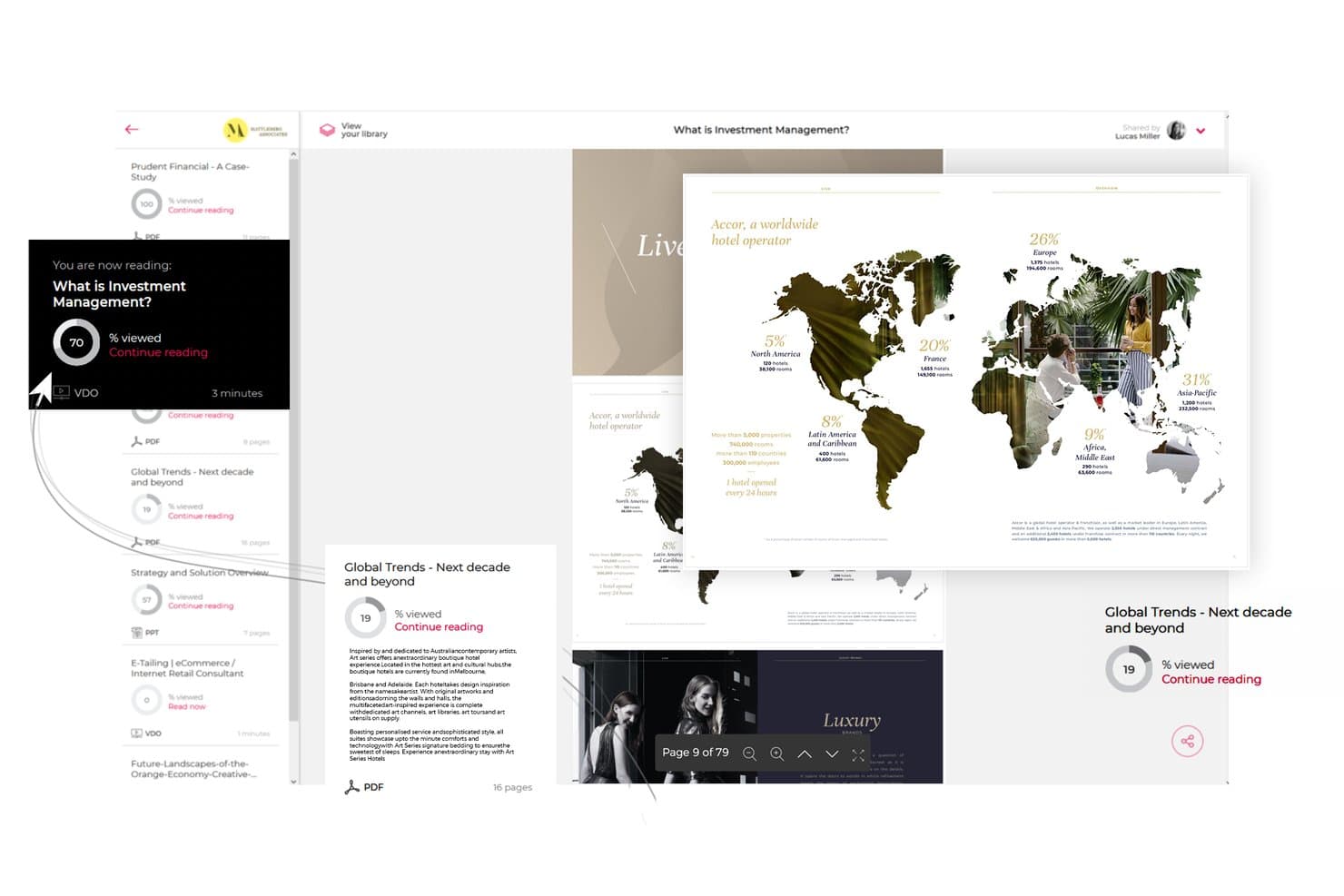
Paperflite lets users track content engagement progress across shared documents. Paperflite is a content experience platform that centralizes marketing and sales assets into branded hubs, personalized microsites, and interactive experiences, with AI-powered search, engagement analytics, and digital deal rooms built in.
Who Is Paperflite Best For?
Paperflite is a strong fit for B2B marketing and sales teams that need to create interactive content experiences and buyer-facing deal rooms without relying on designers or developers.
Why I Picked Paperflite
Paperflite earns its spot on my shortlist because of Cleverstory, its no-code interactive content builder that lets marketers create quizzes, calculators, and clickable infographics without touching a line of code. I also love the Digital Deal Rooms, which give buyers and sellers a shared, trackable workspace where every stakeholder's engagement is logged from the first click. Paired with SEEK, an AI search layer trained on your content library, finding and sharing the right asset at the right deal stage becomes much faster.
Paperflite Key Features
- Content hub streams: Organize and distribute marketing and sales assets into curated, permission-controlled streams that teams can subscribe to with one click.
- Real-time engagement alerts: Get instant notifications when a prospect opens shared content, including section-level data on time spent and scroll depth.
- CRM and email integrations: Sync engagement data directly with Salesforce, HubSpot, Pipedrive, Freshsales, and Microsoft Dynamics, plus Gmail and Outlook.
- Personalized microsites: Build branded, multi-asset portals for individual accounts or prospects using FliteView, shareable as a single trackable link.
Paperflite Integrations
Paperflite offers native integrations with Salesforce, HubSpot, Microsoft Dynamics, Pipedrive, Freshsales, Oracle Eloqua, Gmail, and Outlook. It also connects with SharePoint, Google Drive, Dropbox, Box, and OneDrive, while Enterprise plans support custom API access.
Pros and Cons
Pros:
- Branded deal rooms for buyer collaboration
- Real-time content engagement alerts for reps
- Interactive experiences built with no code
Cons:
- Full interactive features need separate subscription
- Advanced personalization requires higher-tier plan
Learn more about Paperflite: Best for experimentation-led content personalization
- Free demo available
- Pricing upon request
Visit WebsiteCustomer Rating:4.2/5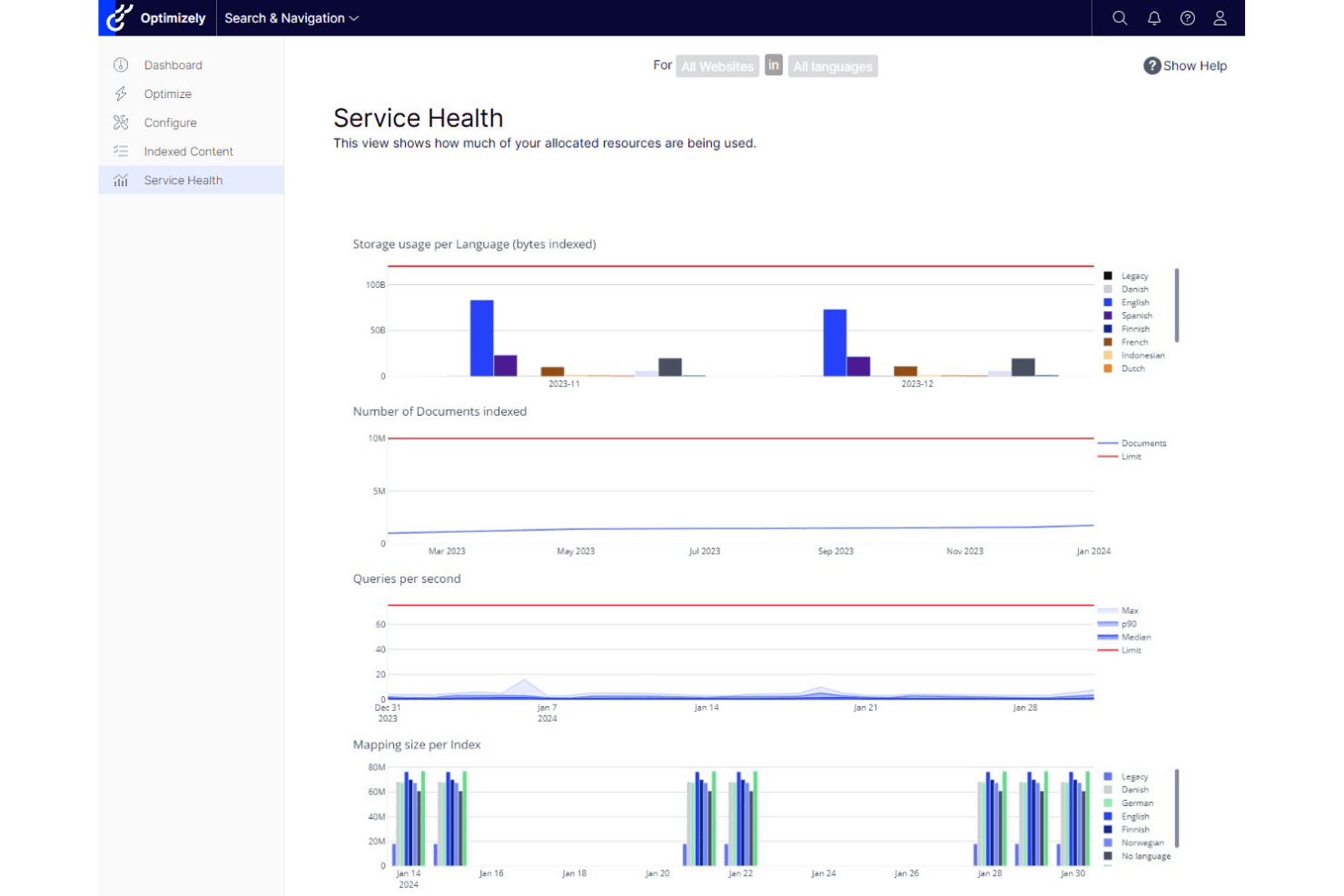
Optimizely is distinguished by its robust web experimentation and tailored content delivery. Optimizely is a digital experience platform that combines an agentic CMS, DAM, content marketing tools, AI-driven personalization, and built-in experimentation into a single suite.
Who Is Optimizely Best For?
Optimizely is a strong fit for enterprise marketing teams that want to run content experiments and personalization from the same platform, without stitching together separate tools.
Why I Picked Optimizely
Optimizely earns its spot on my shortlist because no other platform pairs content personalization with built-in experimentation as tightly. I particularly like the Stats Engine, which brings statistical rigor to A/B and multivariate tests run directly against content variations. Pair that with the NLP-powered Content Recommendations product, which builds real-time visitor interest profiles and swaps content to match, and you get a feedback loop where experiments inform personalization and vice versa.
Optimizely Key Features
- Agentic CMS: A no-code visual editor with multi-site publishing, reusable templates, and front-end edge delivery for managing content across channels from one place.
- Embedded DAM: A built-in digital asset management system with AI-powered auto-tagging and semantic search to organize and retrieve brand assets quickly.
- Warehouse-native analytics: Direct connections to Snowflake, BigQuery, and Redshift let you analyze content performance without duplicating data or writing SQL.
- Optimizely Forms with gated content workflows: Native form builder that captures leads, triggers confirmation emails, and automatically exports submissions to Salesforce and connected MAPs.
Optimizely Integrations
Optimizely offers native integrations with Salesforce, Salesforce Marketing Cloud, Pardot, HubSpot, Marketo, Oracle Eloqua, Delivra, Google Analytics, Figma, Jira, and Bynder. Its API-first architecture and webhooks support custom integrations and event-driven data pipelines.
Pros and Cons
Pros:
- Salesforce-triggered 1:1 personalization at scale
- Advanced AI-powered content recommendations system
- Combines CMS, personalization, and experimentation
Cons:
- Interactive assets need third-party or custom builds
- Requires sales conversation for pricing details
 Best for account-based content hub experiences
- Free demo available
- Pricing upon request
Visit WebsiteCustomer Rating:4.3/5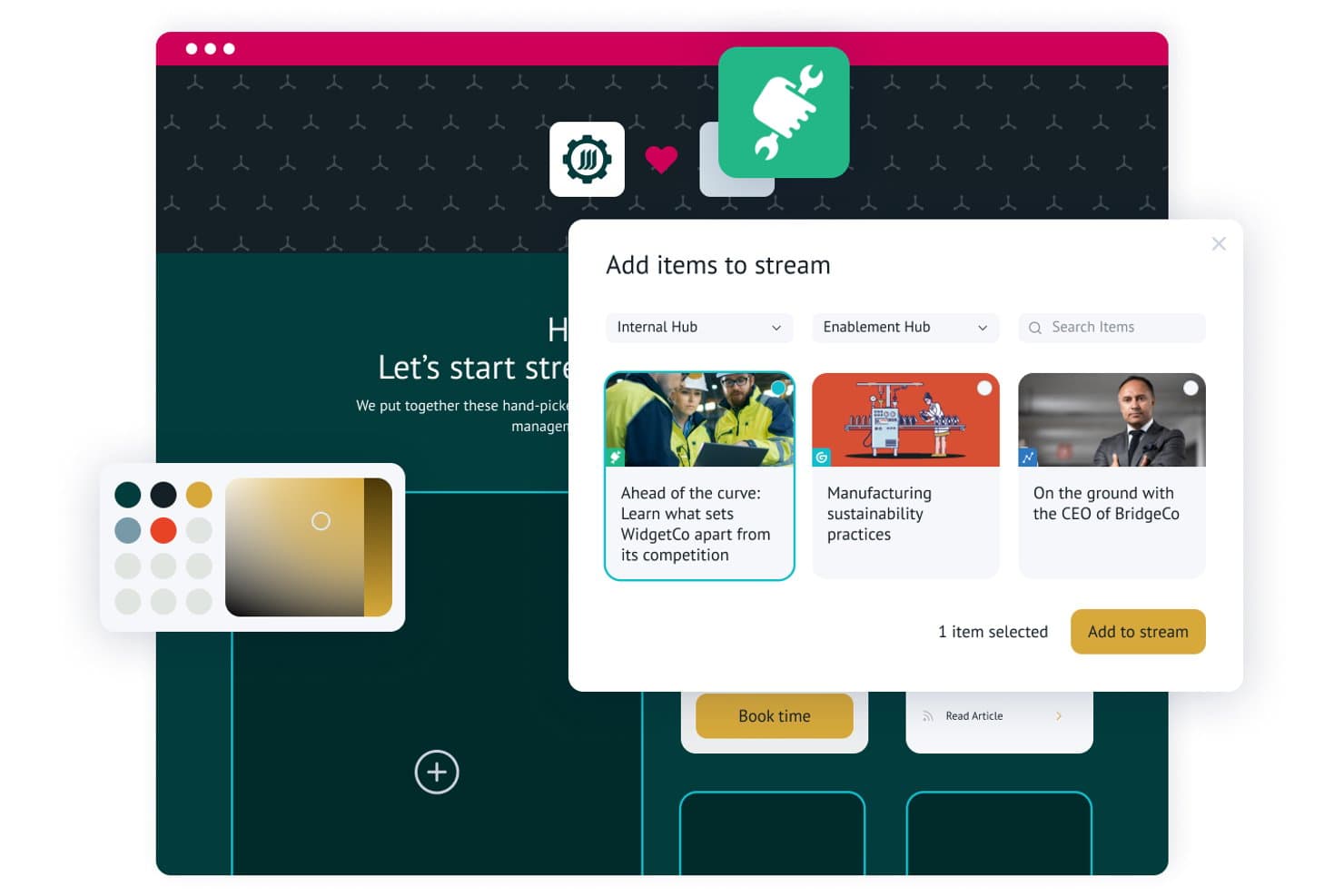
Uberflip lets users add and curate content items into personalized streams. Uberflip is a content experience platform that lets marketing teams build centralized content hubs, organize assets into curated streams, personalize experiences for target accounts, and capture leads through native form integrations across MAP and CRM systems.
Who Is Uberflip Best For?
Uberflip is a strong fit for B2B marketing teams running account-based programs who need to build personalized content destinations for named accounts at scale.
Why I Picked Uberflip
Uberflip earns its spot on my shortlist because it's genuinely built around account-based content hub experiences in a way most platforms aren't. I love that you can spin up a fully personalized content destination for a named account, complete with that account's logo and a curated stream of relevant assets, without touching a line of code. The AI-powered Smart Tags automatically organize your library at scale, and the Site Engager widget surfaces recommendations across existing web pages to keep buyers in your content ecosystem longer.
Uberflip Key Features
- Gated form CTAs: Embed native lead capture forms directly within content streams, replacing standalone gated landing pages.
- Flipbook conversion: Automatically transforms uploaded PDFs into interactive HTML5 Flipbooks with page-level engagement tracking.
- Digital sales rooms: Lets sales reps build personalized, marketing-approved content destinations for individual prospects without developer support.
- Explore custom reporting: A built-in reporting tool that lets you compare content KPIs and build custom performance views across hubs and streams.
Uberflip Integrations
Uberflip offers native integrations with Marketo, HubSpot, Salesforce Pardot, Oracle Eloqua, Salesforce, Demandbase, and Bombora. It also connects with 6sense, Clearbit, RollWorks, Google Analytics, YouTube, Vidyard, Wistia, Vimeo, and Brightcove, with API documentation available for custom integrations.
Pros and Cons
Pros:
- Digital sales rooms for sales collaboration
- AI-driven content recommendations for web visitors
- ABM features enable deep account personalization
Cons:
- Advanced analytics require MAP or CRM integration
- Uncertain product roadmap post-acquisition
Learn more about Uberflip: Best for flexible multi-site content management
- Free demo available
- Pricing upon request
Visit WebsiteCustomer Rating:4.5/5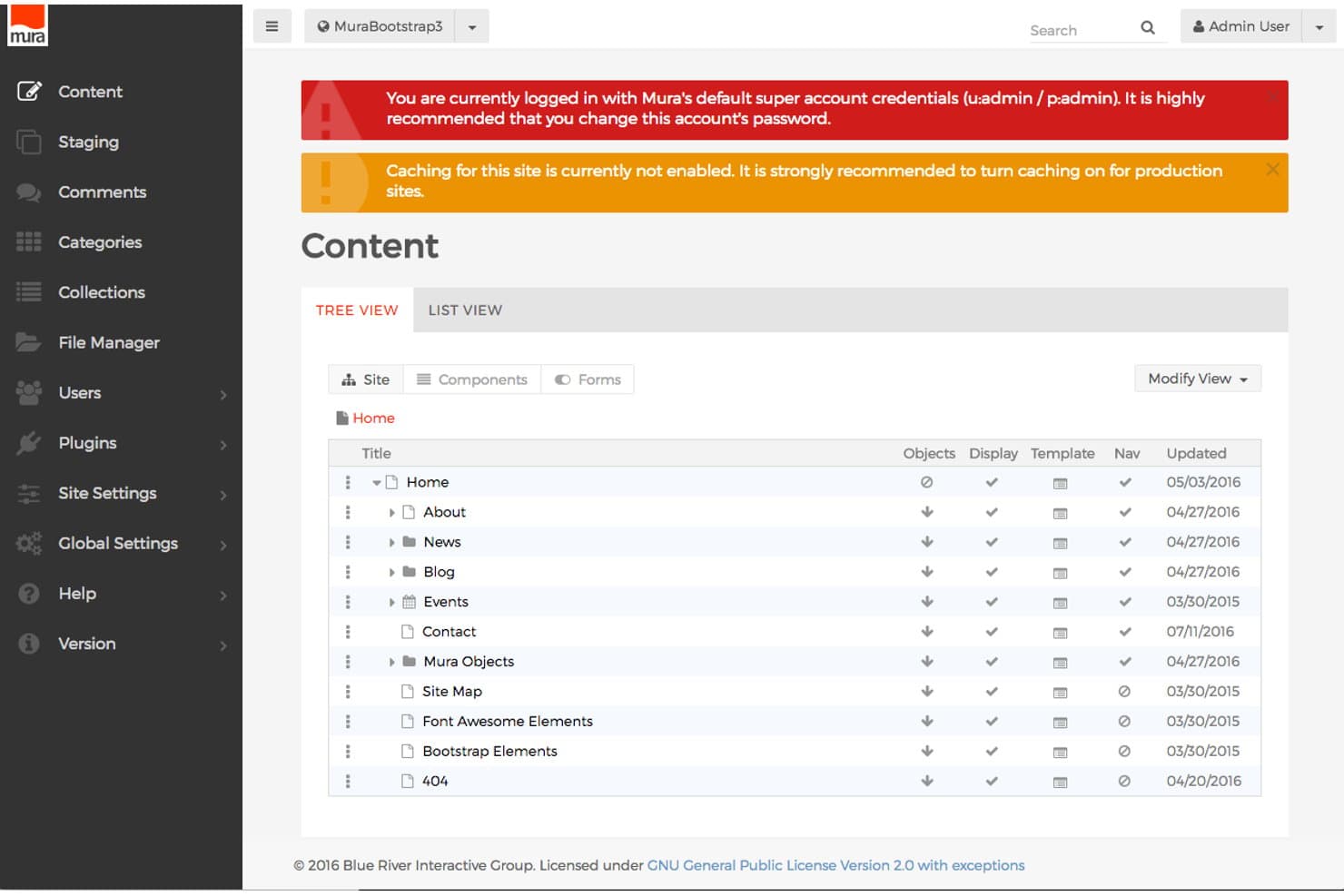
Mura CMS organizes site content in a clear tree view hierarchy. Mura CMS is a digital experience platform that combines multi-site content management, persona-based personalization, content scoring, and MAP/CRM integration to deliver targeted web experiences across multiple owned channels.
Who Is Mura CMS Best For?
Mura CMS is a strong fit for enterprise marketing teams managing multiple branded sites or regional microsites from a single platform.
Why I Picked Mura CMS
I picked Mura CMS as one of the best because its multi-site architecture lets you manage unlimited branded sites and microsites from a single install, which is genuinely rare at this level. I love how the DXP layer maps content to specific personas and buyer stages, then uses Change Sets to dynamically swap page components based on triggered experiences. Content scoring tracks cumulative engagement per visitor and fires those personalized experiences automatically, without manual intervention.
Mura CMS Key Features
- Content scoring: Assigns weighted point values to individual content assets per persona, then automatically triggers personalized experiences once a visitor crosses a defined engagement threshold.
- Experience Matrix tool: A dashboard that displays visitor counts across every persona and buyer stage combination, with associated ROI data including opportunities, wins, and close time.
- Progressive profiling forms: Persona-driven forms that collect visitor data incrementally across multiple interactions rather than in a single submission.
- Content campaign management: Groups related content assets into trackable campaigns and compares performance across updated content versions to measure acquisition impact.
Mura CMS Integrations
Mura CMS has documented integrations with Marketo, HubSpot, Eloqua, Pardot, Salesforce, Microsoft Dynamics, DemandBase, Google Analytics 360, and Adobe Analytics. Its open REST API supports custom integrations.
Pros and Cons
Pros:
- Tracks content influence on pipeline and revenue
- Persona-based content personalization across buyer stages
- Manages unlimited branded sites and microsites
Cons:
- Smaller developer community limits plugin options
- No native interactive content builder
Learn more about Mura CMS: Best for Adobe ecosystem content operations
- Not available
- Pricing upon request
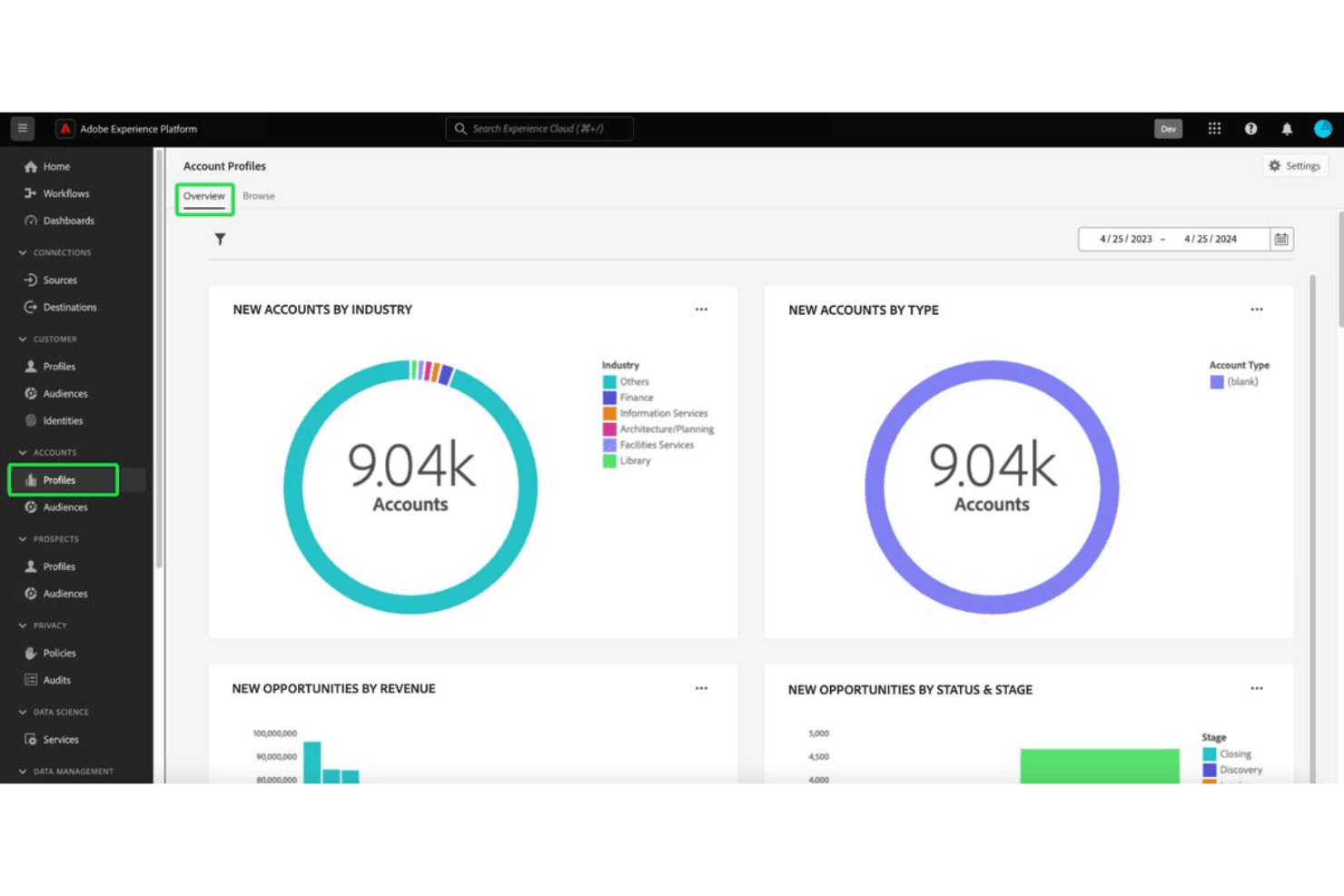
Adobe Experience Manager excels in enterprise-level digital content and comprehensive marketing management. Adobe Experience Manager is an enterprise CMS and digital asset management platform that combines multi-site content creation, asset storage and delivery, adaptive forms, and personalization capabilities powered by integrations across the Adobe Experience Cloud.
Who Is Adobe Experience Manager Best For?
AEM is built for large enterprises running complex, multi-brand content operations that are already invested in the Adobe Experience Cloud stack.
Why I Picked Adobe Experience Manager
I've included Adobe Experience Manager in my top picks because it's the strongest option on this list for teams already running on Adobe Experience Cloud. I love how AEM Assets Content Hub creates a purpose-built, branded asset portal where internal teams and external partners can find, filter, and share approved assets without chasing down a creative. The multi-site manager with Live Copy is also genuinely impressive for managing content across dozens of brands or regions from one place, keeping everything consistent at scale.
Adobe Experience Manager Key Features
- Adaptive forms builder: AEM Forms lets you create responsive, conditional forms with drag-and-drop authoring, dynamic logic, and e-signature support for content gating and lead capture.
- Headless content delivery: AEM Sites delivers content via GraphQL API, enabling you to publish structured content across web, mobile, and app channels from a single repository.
- Adobe Firefly generative AI: Non-creative users can generate and remix brand-compliant asset variations directly inside Content Hub without leaving the platform.
- Rule-based audience targeting: AEM Sites includes built-in client context targeting that lets you define audience segments and serve dynamic content variations based on user data.
Adobe Experience Manager Integrations
Adobe Experience Manager has documented native integrations across the Adobe ecosystem, including Adobe Analytics, Adobe Target, Marketo Engage, Real-Time CDP, Journey Optimizer, Commerce, Creative Cloud, and Adobe Sign. It supports GraphQL, events, webhooks, and Adobe Developer App Builder for custom integrations.
Pros and Cons
Pros:
- Enterprise-grade security and compliance certifications
- Deep Adobe ecosystem integration for content ops
- Best-in-class branded content hub capabilities
Cons:
- Not purpose-built for sales enablement
- No native interactive content builder
Learn more about Adobe Experience Manager: Best for data-driven multisite personalization at scale
- Free demo available
- Pricing upon request
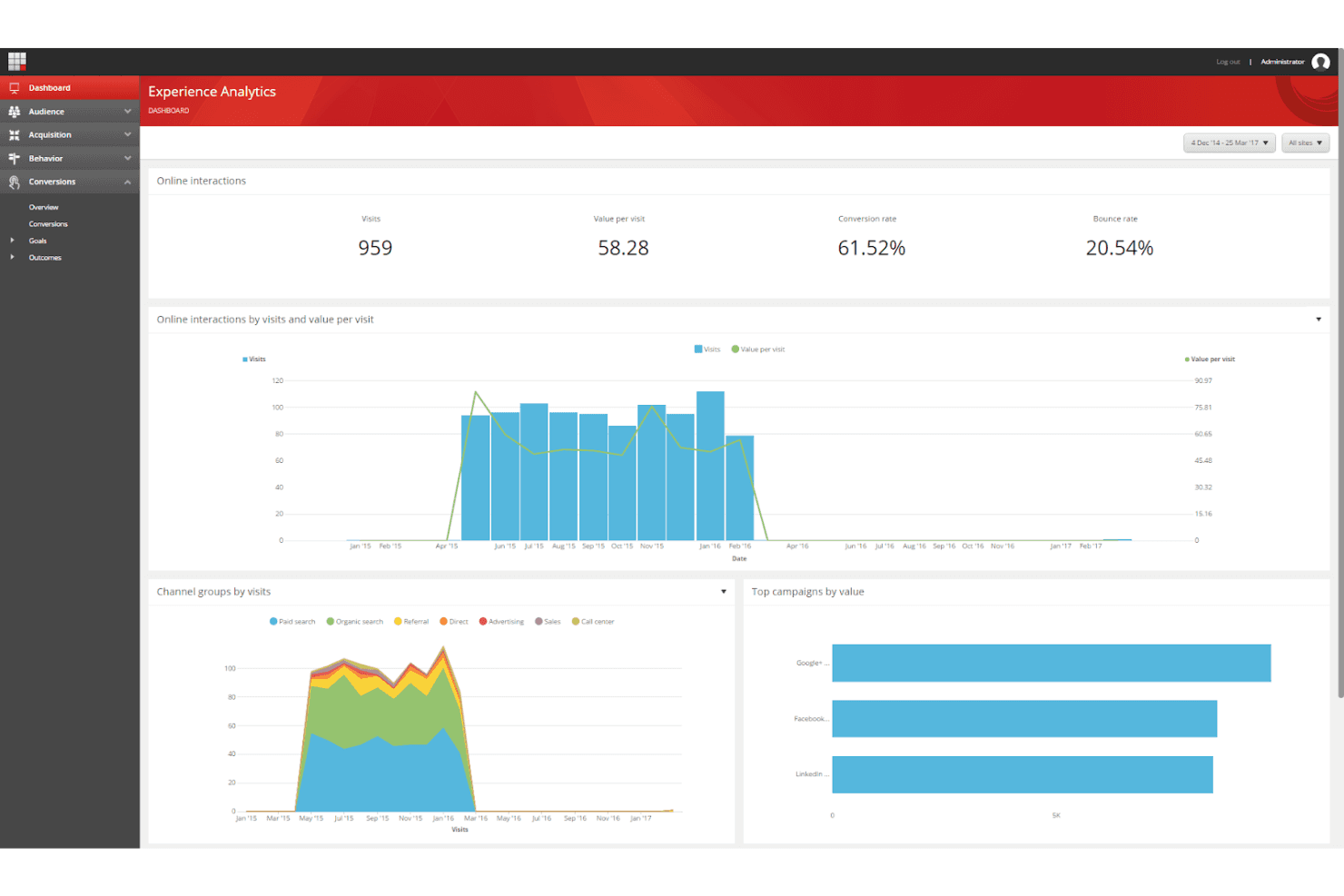
Sitecore Experience Platform offers advanced tools for creating data-driven, personalized customer journeys. Sitecore Experience Platform is an enterprise digital experience platform (DXP) that combines multisite content management, a digital asset management (DAM) layer, CDP-driven personalization, A/B testing, and marketing automation integrations.
Who Is Sitecore Experience Platform Best For?
Sitecore Experience Platform is a strong fit for enterprise marketing teams managing multiple brands, regions, or sites that need CDP-driven personalization at scale.
Why I Picked Sitecore Experience Platform
I picked Sitecore Experience Platform because no other tool on this list matches its depth of CDP-driven personalization across multiple sites and brands simultaneously. Its Site Collections feature lets you spin up and manage unlimited branded sites from one interface, while the integrated CDP builds real-time visitor profiles that power dynamic content swapping at the segment, account, and behavior level. I'm also impressed by how SitecoreAI Stream automates A/B testing and serves winning variants without manual intervention.
Sitecore Experience Platform Key Features
- Sitecore Connect integrations: A built-in iPaaS layer with 1,000+ pre-built connectors links Sitecore XP to tools like Marketo, HubSpot, Salesforce, and Microsoft Dynamics for bi-directional data sync.
- Engagement value scoring: The platform assigns numerical engagement scores to visitor interactions, giving you a real-time measure of how meaningfully each user engages with your content.
- Content Hub DAM: A centralized digital asset management layer handles the full content lifecycle—planning, production, metadata tagging, and omnichannel publishing—from one interface.
- Agentic Studio: A no-code visual builder lets you create custom generative AI agents that enforce brand guardrails across content creation and delivery workflows.
Sitecore Experience Platform Integrations
Sitecore Connect offers 1,000+ pre-built connectors, including Salesforce, Microsoft Dynamics, Marketo, HubSpot, and Eloqua. It also supports REST APIs, webhooks, and custom data pipelines.
Pros and Cons
Pros:
- Advanced engagement analytics with goal tracking
- Real-time AI-driven content personalization
- Supports unlimited branded content hubs and microsites
Cons:
- Experience Editor can be slow for marketers
- Requires developer support for site changes
Learn more about Sitecore Experience Platform: Best for seller-led buyer content experiences
- Free demo available
- Pricing upon request
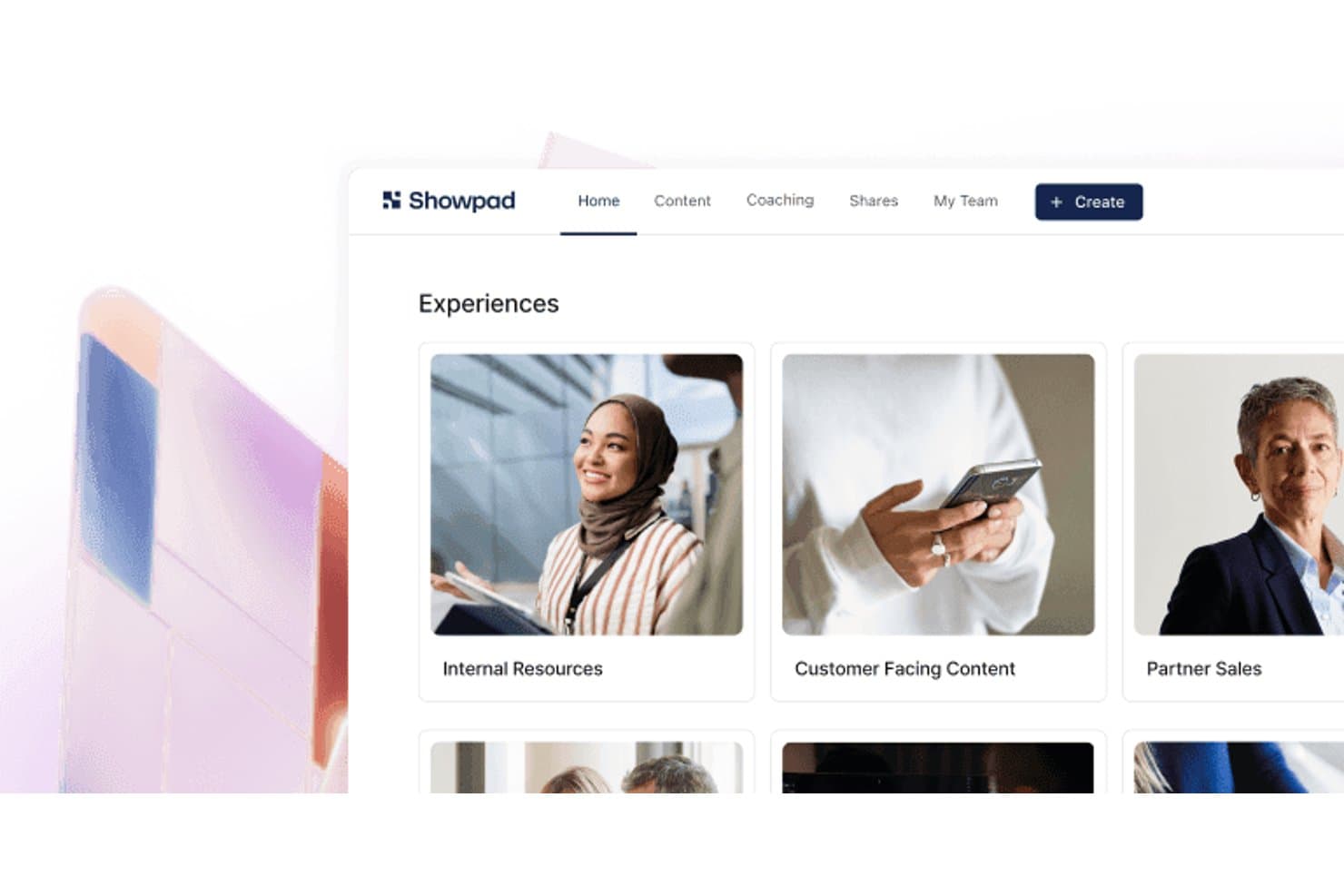
Showpad organizes sales content into browsable experience collections. Showpad is a sales enablement and content experience platform that combines a centralized content library, interactive buyer-facing deal rooms, AI-driven content recommendations, and deep engagement analytics.
Who Is Showpad Best For?
Showpad is a strong fit for enterprise sales and marketing teams that need seller-led content experiences, buyer engagement tracking, and revenue attribution across complex, multi-stakeholder deals.
Why I Picked Showpad
I picked Showpad as one of the best because it's built specifically for seller-led buyer content experiences, which is a distinct motion that pure-play content experience platforms don't serve as well. Shared Spaces let sellers build co-branded, deal-specific destinations where buying committees can view curated content, track mutual action plans, and signal engagement. I especially like that every interaction inside a Shared Space feeds directly into CRM records, so you can connect specific content to pipeline progress and closed-won revenue without any manual attribution work.
Showpad Key Features
- AI-powered content recommendations: Showpad Genie surfaces deal-specific asset suggestions directly within CRM workflows based on deal stage and account data.
- Multi-format asset support: The platform hosts PDFs, videos, 3D models, 360° showrooms, AR assets, and interactive apps within a single content library.
- Revenue attribution reporting: Content engagement data syncs with CRM records to connect specific assets to pipeline progress and closed-won revenue.
- Marketo integration: Showpad pushes buyer engagement signals into Marketo to enrich lead scoring and trigger automated marketing campaigns.
Showpad Integrations
Showpad offers 75+ pre-built integrations, including Marketo, Salesforce, HubSpot, Microsoft Dynamics, SharePoint, Google Drive, Box, Dropbox, Salesloft, and Outreach. Its REST API, webhooks, Reporting API, and SDK support custom integrations and BI pipelines.
Pros and Cons
Pros:
- Broad support for 3D and AR content
- Shared Spaces create seller-led deal rooms
- Best-in-class buyer engagement analytics
Cons:
- Lacks anonymous visitor personalization features
- No native gated content or lead capture
Learn more about Showpad: Best for value-selling content and revenue proof
- Free demo available
- From $30/user/month
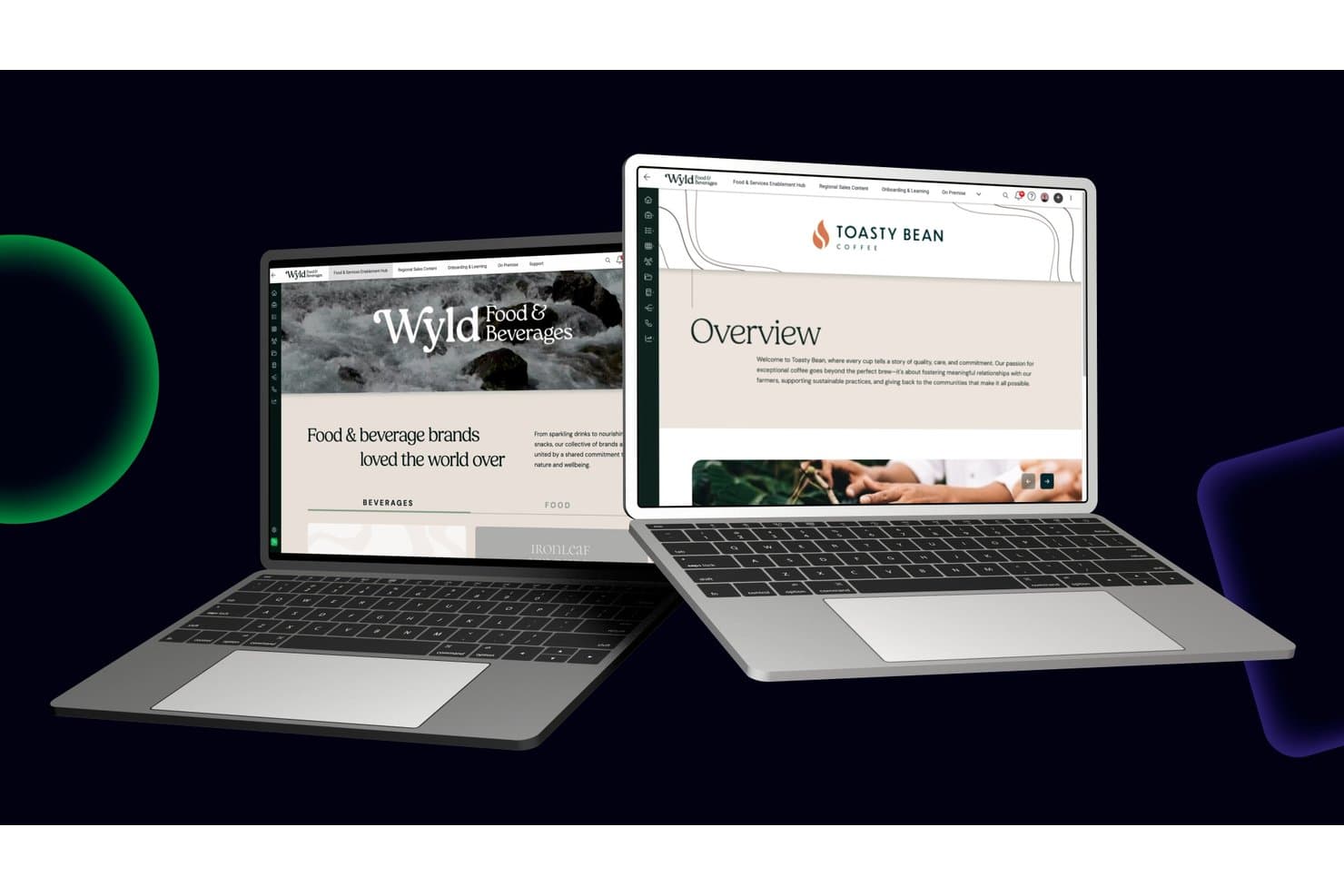
Mediafly organizes brand content into structured, browsable sales portals. Mediafly is a revenue enablement platform that combines branded content workspaces, digital sales rooms, interactive content creation, AI-driven content recommendations, and value selling tools like ROI calculators and business value assessments.
Who Is Mediafly Best For?
Mediafly is a strong fit for enterprise sales and marketing teams that need to prove the revenue impact of their content through ROI tools, value assessments, and closed-deal attribution.
Why I Picked Mediafly
Mediafly earns its spot on my shortlist because no other content experience platform ties content directly to revenue proof the way it does. The Value Suite lets you build ROI calculators and business value assessments without developer support, so your team can quantify deal impact at every stage of the customer lifecycle. Paired with the Advanced Insights module's closed-deal attribution, I can see exactly which content assets influenced pipeline and won revenue inside Salesforce.
Mediafly Key Features
- Digital sales rooms: Build personalized, branded microsites for individual accounts that house multiple content assets in a single shared space.
- AI content tagging: Automatically applies metadata, content summaries, and tags to assets to improve discoverability across the content library.
- StoryGuide: An AI-powered tool that guides sellers to assemble on-brand presentations by recommending relevant slides and assets based on the selling scenario.
- Offline access: Lets sellers download and present content without an internet connection, supporting field sales and in-person meetings.
Mediafly Integrations
Mediafly offers documented integrations with Salesforce, SAP Sales Cloud, Microsoft Dynamics 365, HubSpot, Marketo, Pardot, SharePoint, Bynder, and Adobe Experience Manager. OAuth and API connectors support custom integrations.
Pros and Cons
Pros:
- Revenue attribution connects content to pipeline
- Account-level content personalization features included
- Value selling tools for revenue proof
Cons:
- Quote-based pricing increases upfront friction
- Lacks native SEO controls for content hubs
Learn more about Mediafly: Best for AI-guided content binge experiences
- Free demo available
- From $30,000/year (billed annually)
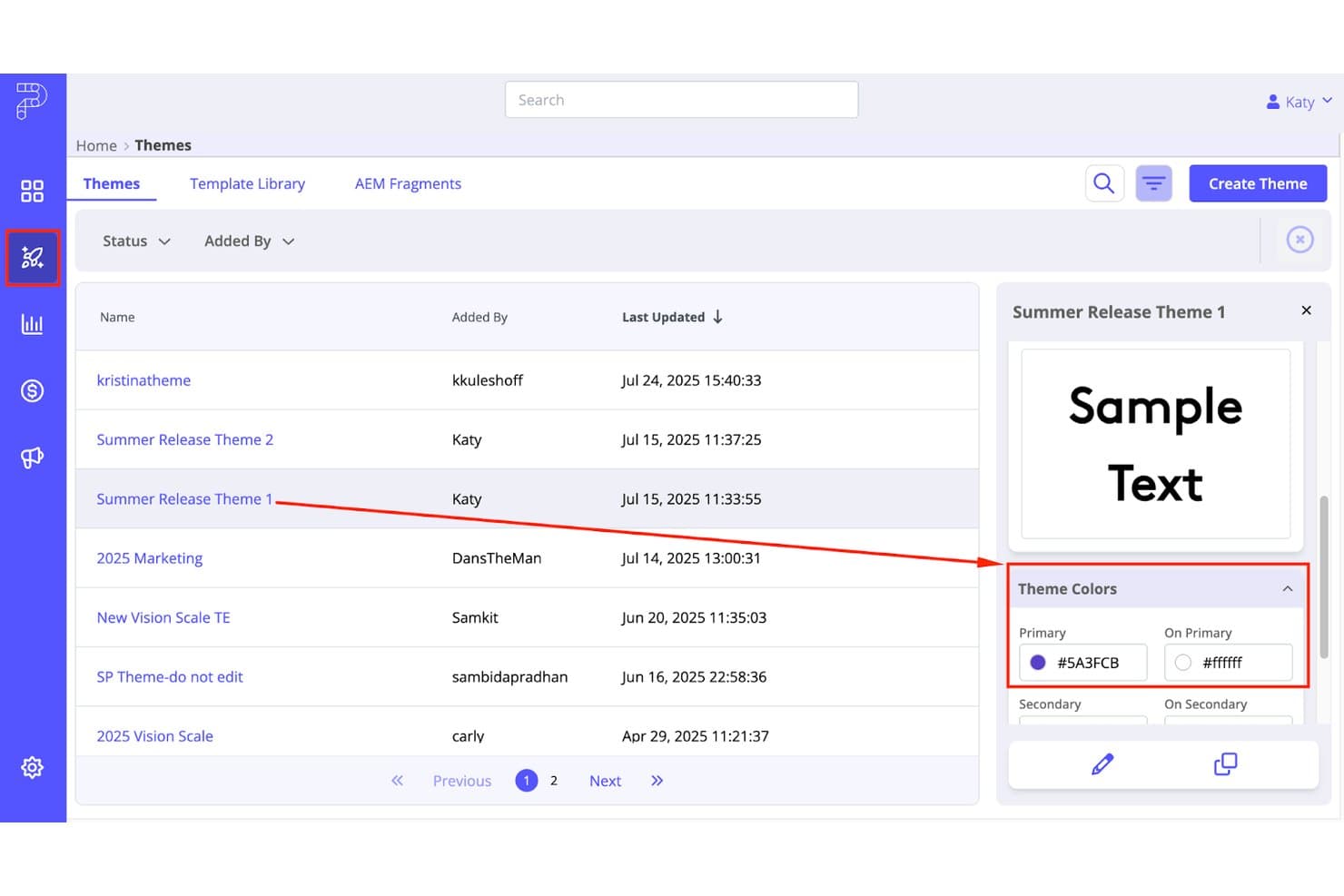
PathFactory lets users preview and manage branded content themes. PathFactory is a content experience platform that lets you build AI-guided content hubs, personalized account-based destinations, and binge-style content playlists with deep MAP, CRM, and intent data integrations.
Who Is PathFactory Best For?
PathFactory is a strong fit for mid-market and enterprise marketing teams running ABM or demand generation programs who need to connect content engagement directly to pipeline.
Why I Picked PathFactory
PathFactory earns its spot on my shortlist because its AI recommendation engine is purpose-built to turn single-asset visits into multi-asset binge sessions. I love how Content Playlists sequence PDFs, videos, case studies, and webinars into a guided journey that adapts in real time to each visitor's behavior. The Content Intelligence Center then analyzes your entire asset library to surface what's actually driving engagement, so I'm never guessing which content to sequence next.
PathFactory Key Features
- Intelligent gating: Automatically shows forms to unknown visitors while giving known accounts frictionless access to content without filling out a form.
- ChatFactory AI buying agent: A GenAI-powered conversational agent that answers buyer questions, recommends assets, and generates personalized microsites from each interaction.
- PathFactory for Revenue Intelligence (PFRI): A revenue attribution dashboard that maps content engagement data directly to pipeline and open opportunities in Salesforce.
- AI content tagging: Automatically analyzes and tags your entire asset library by topic, benchmarks content against your strategy, and flags gaps in your content coverage.
PathFactory Integrations
PathFactory offers 17 native integrations, including Salesforce, Marketo, HubSpot, Eloqua, Pardot, 6sense, Demandbase, ZoomInfo, Adobe Experience Manager, and Snowflake. Its public API and webhooks support custom data pipelines and real-time CRM workflows.
Pros and Cons
Pros:
- Dynamic personalization for ABM and industry segments
- AI-powered playlists drive higher content consumption
- Connects content engagement directly to pipeline
Cons:
- Chatbot lacks handoff to live agents
- No interactive content builders like quizzes
Learn more about PathFactory: 10Best for turning static docs into interactive hubs
RELAYTO
- Free demo available
- $750/month (billed annually)
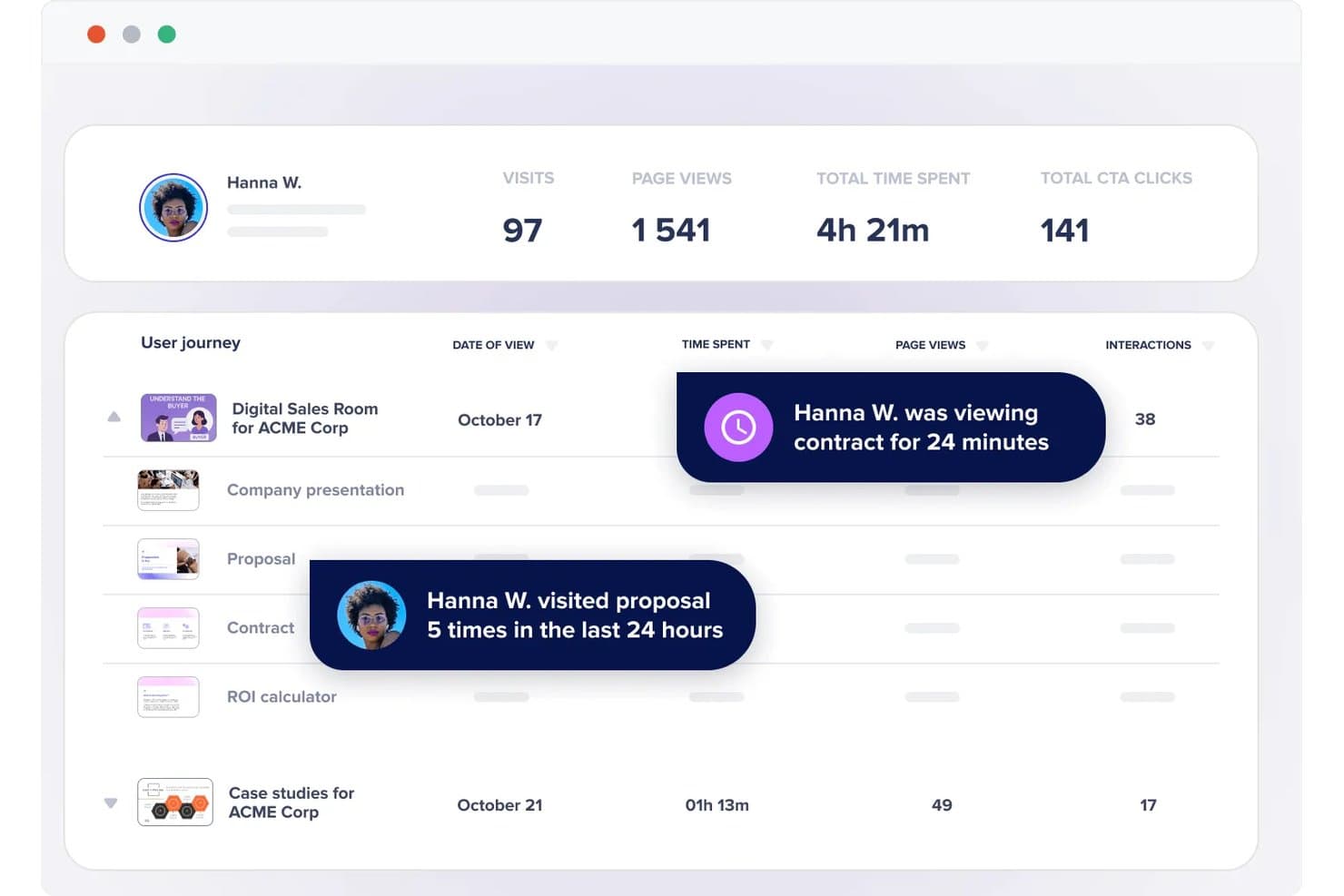
RELAYTO tracks buyer intent signals like time spent and visit frequency. RELAYTO is a content experience platform that lets you transform static documents—PDFs, presentations, and more—into interactive microsites, content hubs, and digital sales rooms using a no-code editor and AI-powered tools.
Who Is RELAYTO Best For?
RELAYTO is a strong fit for content and demand gen teams that regularly work with PDFs and presentations and want to turn those assets into trackable, branded experiences without leaning on developers.
Why I Picked RELAYTO
I picked RELAYTO as one of the best because its AI Experience Builder can take a static PDF or PowerPoint and turn it into a fully interactive microsite in minutes, complete with hotspots, video narration, and animated elements. I also love the AI Content Chat, which lets visitors search across an entire content hub using natural language, so even large asset libraries stay navigable. The no-code Interactivity Studio means my team can add gated forms, clickable CTAs, and embedded third-party tools without touching a single line of code.
RELAYTO Key Features
- Engagement analytics: Tracks visitor journeys, interaction-level events like hotspot and CTA clicks, referral sources, and device types across your content experiences.
- Lead capture forms: Supports native forms and embedded Marketo forms to gate content and capture leads directly within an experience.
- Audience access controls: Restricts or grants content access by email domain whitelisting, blacklisting, and corporate email rules to target specific account segments.
- Sales enablement digital sales rooms: Lets sales teams create personalized, password-protected microsites for individual prospects with real-time engagement notifications.
RELAYTO Integrations
RELAYTO offers native integrations with Salesforce, HubSpot, Marketo, Google Analytics, and Google Tag Manager. It also connects with Google Drive, OneDrive, and Box, while Business and Enterprise plans support custom integrations through its API.
Pros and Cons
Pros:
- Visitor journeys reveal hotspot and CTA engagement
- Content hubs organize multi-format asset libraries
- AI converts PDFs into interactive microsites
Cons:
- Behavior-based recommendations remain limited
- Advanced interactivity takes practice to master
Learn more about RELAYTO:
Andre plattformer for innholdsopplevelse
Nedenfor finner du en liste over flere plattformer for innholdsopplevelse som vi tok med i kortlisten, men som ikke kom med på topplisten. Selv om de ikke kom blant de 10 beste, er de fortsatt verdifulle og verdt å undersøke nærmere.
- 11FollozeBest for account-based content personalization at scale
- 12HushlyBest for AI-driven account microsite creation
- 13AcquiaBest for Drupal-optimized digital experiences
- 14ON24Best for webinar-to-hub content repurposing
- 15HighspotBest for sales-to-buyer content engagement tracking
- 16WordPress VIPBest for enterprise content hubs
- 17FoleonBest for brand-governed interactive content creation
- 18TurtlBest for ABM-driven content personalization at scale
- 19IonBest for rules-based interactive lead experiences
How I Evaluate Content Experience Platforms
I split my evaluation into three parts. Core functionality—pulling varied content into a unified hub and personalizing it per visitor—carries the most weight, with standout features like AI content recommendations coming next. Finally, I consider onboarding support and martech ecosystem fit.
Core Functionality (Table Stakes For This List)
When I'm selecting tools for my list, I score each one on a scale from 0 (does not offer the functionality) to 5 (excels in this area) for each core functionality listed below. I then convert the total into a percentage to help assess each tool's overall fit, with extra weight on any functionalities I've deemed essential.
- Content Aggregation (Essential): I check whether the platform can pull blogs, videos, PDFs, and third-party assets into a single hub with flexible tagging and organization.
- Audience Personalization (Essential): Each tool gets evaluated on how it tailors content by visitor attributes like industry, persona, behavior, or intent signals.
- Engagement Analytics: I look for content-level metrics—time spent, scroll depth, asset completion—that go beyond basic page views and tie back to individual accounts.
- Experience Building: The drag-and-drop editor matters here. I evaluate how quickly you can spin up branded microsites or resource hubs without pulling in a developer.
- Lead Capture & CRM Integration: Syncing engagement data to platforms like HubSpot or Salesforce is what I'm checking, including whether the connection is bidirectional and near real time.
- Journey Orchestration: I evaluate how the tool sequences content—whether it can recommend a next asset based on what a visitor already consumed or where they sit in the funnel.
Once I have a list of tools that meet the criteria, I consider what sets each platform apart.
Differentiating Factors (What Sets Vendors Apart)
Here's how I compare and contrast different vendors:
Standout Features
Content scoring and attribution is where I start. I look for platforms that assign weighted engagement scores to individual assets, so you can trace which white paper or video actually influenced a deal rather than guessing. Sales-shareable playlists also matter. When reps can assemble personalized micro-hubs for a prospect directly from their workflow, content gets used instead of buried. I evaluate AI content recommendations too, checking whether the engine adapts in real time to serve a next-best asset based on behavior, not just static rules.
Beyond Features
I evaluate how quickly a non-technical marketer can go from zero to a live content hub. Vendors that offer pre-built templates and migration support for existing libraries cut weeks off launch timelines. I also check martech ecosystem fit—specifically whether CRM and MAP integrations are bidirectional and near real time, since one-way syncs leave sales teams working with stale engagement data. For enterprise buyers, I confirm privacy compliance and security certifications like SOC 2, especially when gated content captures visitor data across regions.
Slik velger du en plattform for innholdsopplevelse
Det er lett å sette seg fast i lange funksjonslister og kompliserte prisstrukturer. For å hjelpe deg med å holde fokus mens du går gjennom din unike prosess for valg av programvare, får du her en sjekkliste over faktorer du bør ha i mente:
| Faktor | Hva du bør vurdere |
|---|---|
| FaktorSkalerbarhet | Hva du bør vurdereKan plattformen vokse med virksomheten din? Vurder fremtidige behov og om verktøyet kan håndtere økt innhold og flere brukerkrav etter hvert som du utvider. |
| FaktorIntegrasjoner | Hva du bør vurdereFungerer den med de eksisterende verktøyene dine? Sjekk om den kan kobles til CRM-, markedsføringsautomatiserings- og analyseplattformene dine for å forenkle arbeidsflytene. |
| FaktorTilpasningsmuligheter | Hva du bør vurdereKan du tilpasse den til behovene dine? Se etter alternativer for å justere oppsett, merkevareprofilering og brukerbaner slik at de samsvarer med de unike prosessene og merkevareidentiteten din. |
| FaktorBrukervennlighet | Hva du bør vurdereEr den brukervennlig for teamet ditt? Se etter intuitive grensesnitt og enkel navigering for å redusere behovet for opplæring og brukerstøtte. |
| FaktorImplementering og oppstart | Hva du bør vurdereHvor raskt kan du komme i gang? Vurder tiden og ressursene som kreves for oppsett, og om leverandøren tilbyr støtte under oppstarten. |
| FaktorKostnad | Hva du bør vurderePasser den inn i budsjettet ditt? Sammenlign prismodeller, skjulte kostnader og verdien som tilbys på hvert nivå for å sikre at løsningen samsvarer med de økonomiske planene dine. |
| FaktorSikkerhetstiltak | Hva du bør vurdereEr dataene dine beskyttet? Vurder kryptering, datalagring og samsvar med bransjestandarder for å holde informasjonen din sikker. |
| FaktorTilgjengelig brukerstøtte | Hva du bør vurdereKan du få hjelp når du trenger det? Vurder tilgjengeligheten til kundestøtten, inkludert svartider og tilgang til kanaler med direkte brukerstøtte. |
Trender for plattformer for innholdsopplevelser
Plattformer for innholdsopplevelser utvikler seg raskt. Her er de viktigste trendene som former bransjen i år.
- Personalisering drevet av kunstig intelligens: Personalisering drevet av kunstig intelligens blir stadig mer utbredt og legger til rette for svært tilpassede innholdsopplevelser. Denne teknologien bruker data til å forutsi og levere innhold som treffer den enkelte bruker. Dette er viktig fordi det forbedrer brukerengasjementet og tilfredsheten betydelig.
- Økt bruk av hodeløse CMS: Bruken av hodeløse CMS øker og gir utviklere større fleksibilitet. Denne trenden gjør det mulig å administrere og levere innhold på tvers av flere kanaler uten å være knyttet til en bestemt frontende. Dette er avgjørende for å skape en konsekvent brukeropplevelse på tvers av enheter.
- Forbedret analyse og rapportering: Forbedrede verktøy for analyse og rapportering gir dypere innsikt i innholdets resultater. Disse verktøyene hjelper organisasjoner med å ta datadrevne beslutninger for å optimalisere innholdsstrategiene sine. Denne trenden er avgjørende for å maksimere avkastningen på investeringen og forstå målgruppens atferd.
- Integrasjon med markedsføringsautomatisering: Integrasjon med verktøy for markedsføringsautomatisering blir standard. Dette muliggjør effektive innholdsmarkedsføringsstrategier. Det er viktig fordi det forenkler driften og forbedrer effektiviteten til markedsføringskampanjene.
- Fokus på brukeropplevelse (UX): Det er et økende fokus på å forbedre brukeropplevelsen gjennom bedre grensesnittdesign og brukervennlige funksjoner. Plattformene investerer i intuitiv design for å redusere læringskurven og øke produktiviteten. Denne trenden er betydningsfull fordi den direkte påvirker brukertilfredsheten og bruken av plattformen.
Etter hvert som plattformer for innholdsopplevelser utvikler seg, er kombinasjonen av personalisering drevet av kunstig intelligens, hodeløse CMS, forbedret analyse og markedsføringsautomatisering ikke bare en teknologisk oppgradering, men et strategisk skifte mot mer tilpasningsdyktige og brukersentrerte miljøer. Denne utviklingen viser en fremtid der innhold er foregripende og svært tilpasset, og dekker brukernes behov i sanntid.
Hva er en plattform for innholdsopplevelser?
En plattform for innholdsopplevelser er et verktøy som gjør det mulig for virksomheter å opprette, administrere og optimalisere digitalt innhold på tvers av ulike kanaler. Vanlige brukere omfatter markedsføringsteam, innholdsprodusenter og digitale strateger som trenger å levere personlig tilpasset og engasjerende innhold til målgruppen sin.
Hovedformålet med en plattform for innholdsopplevelser er å forbedre kundereisen ved å tilby relevante og konsekvente innholdsopplevelser. Den hjelper brukere med å forenkle innholdsarbeidsflyter, måle innholdets resultater og forbedre engasjementet gjennom avanserte analyse- og personaliseringsfunksjoner.
Funksjoner
Når jeg vurderer plattformer for innholdsopplevelser, ser jeg etter viktige funksjoner som forbedrer oppretting, administrasjon og levering av innhold. Disse funksjonene bidrar til å sikre at plattformen dekker behovene til markedsføringsteam og innholdsprodusenter, og gir en effektiv brukeropplevelse.
- Verktøy for innholdsproduksjon: Gjør det enkelt for brukere å opprette og redigere digitalt innhold.
- Administrasjon av digitale ressurser: Gjør det mulig å organisere og hente frem digitale ressurser.
- Personalisering: Leverer tilpasset innhold til ulike målgruppesegmenter.
- Distribusjon i flere kanaler: Distribuerer innhold på tvers av ulike kanaler og plattformer.
- Analyse og rapportering: Gir innsikt i innholdets resultater og brukernes engasjement.
- SEO-verktøy: Bidrar til å optimalisere innhold for søkemotorer og forbedre synligheten.
- Integrasjonsmuligheter: Kobler seg til andre markedsførings- og CRM-verktøy for å forenkle arbeidsflyter.
- Samarbeidsfunksjoner: Legger til rette for teamsamarbeid om innholdsprosjekter.
- Automatisering av arbeidsflyter: Automatiserer gjentakende oppgaver for å spare tid og forbedre effektiviteten.
- Oppdateringer i sanntid: Sørger for at innholdet oppdateres i sanntid på alle plattformer.
Disse funksjonene er avgjørende for å utvikle en helhetlig og effektiv innholdsstrategi og sikre at innholdet er engasjerende, personlig tilpasset og enkelt å administrere.
Fordeler
Plattformer for innholdsopplevelser gir virksomheter som ønsker å styrke sin digitale tilstedeværelse og sitt engasjement, en rekke fordeler. Her er fem viktige fordeler disse plattformene tilbyr brukere og organisasjoner.
- Forbedret personalisering av innhold: Tilpasset innhold til bestemte målgruppesegmenter øker engasjementet og konverteringsfrekvensen.
- Økt effektivitet: Forenkling av prosessene for oppretting og administrasjon av innhold sparer tid og reduserer driftskostnadene.
- Bedre datainnsikt: Avanserte analyse- og rapporteringsverktøy gir verdifull innsikt i innholdets resultater og brukeratferd.
- Enkel distribusjon i flere kanaler: Distribusjon av innhold på tvers av flere kanaler sikrer en konsekvent brukeropplevelse.
- Bedre samarbeid: Samarbeidsfunksjoner gjør det mulig for team å jobbe mer effektivt sammen, noe som forbedrer produktiviteten og kvaliteten på resultatene.
Disse fordelene gjør plattformer for innholdsopplevelser til et viktig verktøy for virksomheter som ønsker å optimalisere sin digitale innholdsstrategi og oppnå bedre resultater. Ved å ta i bruk slike plattformer kan virksomheter oppnå mer effektiv markedsføring og en sterkere forbindelse med målgruppen.
Kostnader & priser
Det er viktig for virksomheter å forstå kostnadene og prisene for plattformer for innholdsopplevelser for å kunne ta en informert beslutning. Disse plattformene tilbyr vanligvis en rekke abonnementer tilpasset ulike behov og budsjetter. Nedenfor har jeg beskrevet vanlige abonnementstyper, gjennomsnittsprisene deres og funksjoner for å hjelpe programvarekjøpere med å vurdere alternativene sine.
Sammenligningstabell for abonnementer for plattformer for innholdsopplevelser
| Abonnementstype | Gjennomsnittspris | Vanlige funksjoner |
|---|---|---|
| AbonnementstypeGratis | Gjennomsnittspris$0 | Vanlige funksjonerGrunnleggende verktøy for innholdsproduksjon, begrenset lagringsplass, grunnleggende analyse |
| AbonnementstypeGrunnleggende | Gjennomsnittspris$25/user/month | Vanlige funksjonerOppretting og redigering av innhold, grunnleggende personalisering, standard brukerstøtte |
| AbonnementstypeProfesjonell | Gjennomsnittspris$75/user/month | Vanlige funksjonerAvansert personalisering, distribusjon i flere kanaler, forbedret analyse |
| AbonnementstypeVirksomhet | GjennomsnittsprisPris på forespørsel | Vanlige funksjonerTilpassede integrasjoner, KI-drevet innsikt, dedikert kundeansvarlig, brukerstøtte døgnet rundt |
Vanlige spørsmål om plattform for innholdsopplevelser
Hvordan skiller en plattform for innholdsopplevelser seg fra et innholdsstyringssystem?
Mens et innholdsstyringssystem (CMS) fokuserer på å opprette og administrere digitalt innhold, går en plattform for innholdsopplevelser et skritt videre ved å tilpasse og optimalisere leveringen av dette innholdet. En CXP tilbyr verktøy for innholdstilpasning, analyse og distribusjon i flere kanaler, noe som sikrer en mer engasjerende og relevant opplevelse for brukerne.
Kan en plattform for innholdsopplevelser integreres med andre markedsføringsverktøy?
Ja, de fleste plattformer for innholdsopplevelser er utviklet for å integreres enkelt med andre markedsføringsverktøy, for eksempel systemer for kunderelasjonshåndtering (CRM), programvare for e-postmarkedsføring og verktøy for administrasjon av sosiale medier. Denne integrasjonen gir en mer helhetlig og effektiv markedsføringsstrategi.
Hvordan forbedrer en plattform for innholdsopplevelser kundeengasjementet?
En plattform for innholdsopplevelser forbedrer kundeengasjementet ved å levere personlig tilpasset og relevant innhold til brukerne basert på preferansene og atferden deres. Ved å tilby en skreddersydd innholdsopplevelse kan bedrifter fange oppmerksomheten til målgruppen, øke interaksjonen og bygge sterkere relasjoner.
Passer en plattform for innholdsopplevelser for alle typer virksomheter?
Ja, en plattform for innholdsopplevelser kan være nyttig for virksomheter i alle størrelser og bransjer. Enten du er en liten bedrift som ønsker å forbedre innholdsstrategien, eller en stor virksomhet som vil levere personlig tilpassede opplevelser i stor skala, kan en CXP hjelpe deg med å nå målene dine.
Hvordan velger jeg den beste plattformen for innholdsopplevelser for virksomheten min?
For å velge den beste plattformen for innholdsopplevelser for virksomheten din bør du begynne med å identifisere de konkrete behovene og målene dine. Undersøk ulike plattformer, sammenlign funksjonene deres og les brukeranmeldelser. Vurder faktorer som brukervennlighet, integrasjonsmuligheter, kundestøtte og priser. En grundig evaluering vil hjelpe deg med å velge en plattform som samsvarer med virksomhetens mål.