

Et CMS for digital skilting er en plattform for innholdsadministrasjon som lar deg styre og oppdatere innhold på de digitale skjermene dine fra ett kontrollpanel. Hvis du administrerer digitale skjermer og ønsker en pålitelig og enkel måte å publisere iøynefallende innhold på, leter du sannsynligvis etter det beste CMS-et for digital skilting som passer behovene dine. Å velge riktig CMS kan spare deg for utallige problemer – enten du ruller ut skjermer på ett enkelt sted eller på tvers av hundrevis av lokasjoner.
I denne veiledningen får du en sammenligning av ledende verktøy, slik at du trygt kan avgjøre hvilken plattform som passer teamet, arbeidsflyten og målene dine for skjermene.
Hvorfor du kan stole på våre programvareanbefalinger
6,700+
Reviews
20
Industry experts
16+
Evaluation factors
14
Years
Teamet vårt har testet og anmeldt programvare siden 2012. Vi er selv markedsføringsledere, så vi vet hvor vanskelig og hvor viktig det er å velge riktig programvare.
I denne guiden har vi vurdert verktøyene gjennom praktisk testing og uavhengig research og gitt dem poeng ut fra våre utvelgelseskriterier.
Anmeldelsene våre bygger på vår egen redaksjonelle vurdering. De er ikke et salgsargument.
Ekspertanmeldere:
 Gui DrusinaCreative Director
- Shriya GhateSenior Marketing Lead
 Amanda JacquesMarketing Ops Leader

Sammenligningstabell for CMS-er for digital skilting
Denne sammenligningstabellen oppsummerer prisopplysningene for mine beste utvalgte CMS-er for digital skilting.
| Tool | Best For | Trial Info | Price | ||
|---|---|---|---|---|---|
| 1 | Best for cross-platform setup and scheduling | 14-day free trial + free demo available | From $5/screen/month | Website | |
| 2 | Best for intuitive drag-and-drop editing | 30-day free trial + free demo available | From $14/screen/month (billed annually) | Website | |
| 3 | Best for education-focused display solutions | Free trial + free demo available | From $11/display/month | Website | |
| 4 | Best for data-driven screen content management | Free trial + free demo available | From $8/device/month (billed annually) | Website | |
| 5 | Best for robust app integrations and automation | 14-day free trial | From $20/screen/month (billed annually) | Website | |
| 6 | Best for AI-driven content personalization | Free demo available | Pricing upon request | Website | |
| 7 | Best for advanced rule-based content triggers | 30-day free trial | From $14/month per player | Website | |
| 8 | Best for workplace and employee communications | Free demo available | Pricing upon request | Website | |
| 9 | Best for enterprise-grade dynamic campaigns | Not available | Pricing upon request | Website | |
| 10 | Best for in-store experience enhancement | Not available | Pricing upon request | Website |


Anmeldelser av de beste CMS-ene for digital skilting
Nedenfor finner du mine detaljerte sammendrag av de beste CMS-ene for digital skilting som kom med på kortlisten min. Anmeldelsene mine gir et detaljert innblikk i funksjonene, integrasjonene og de beste bruksområdene for hver plattform, slik at du kan finne den som passer best for deg.
 Best for cross-platform setup and scheduling
- 14-day free trial + free demo available
- From $5/screen/month
Visit WebsiteCustomer Rating:5/5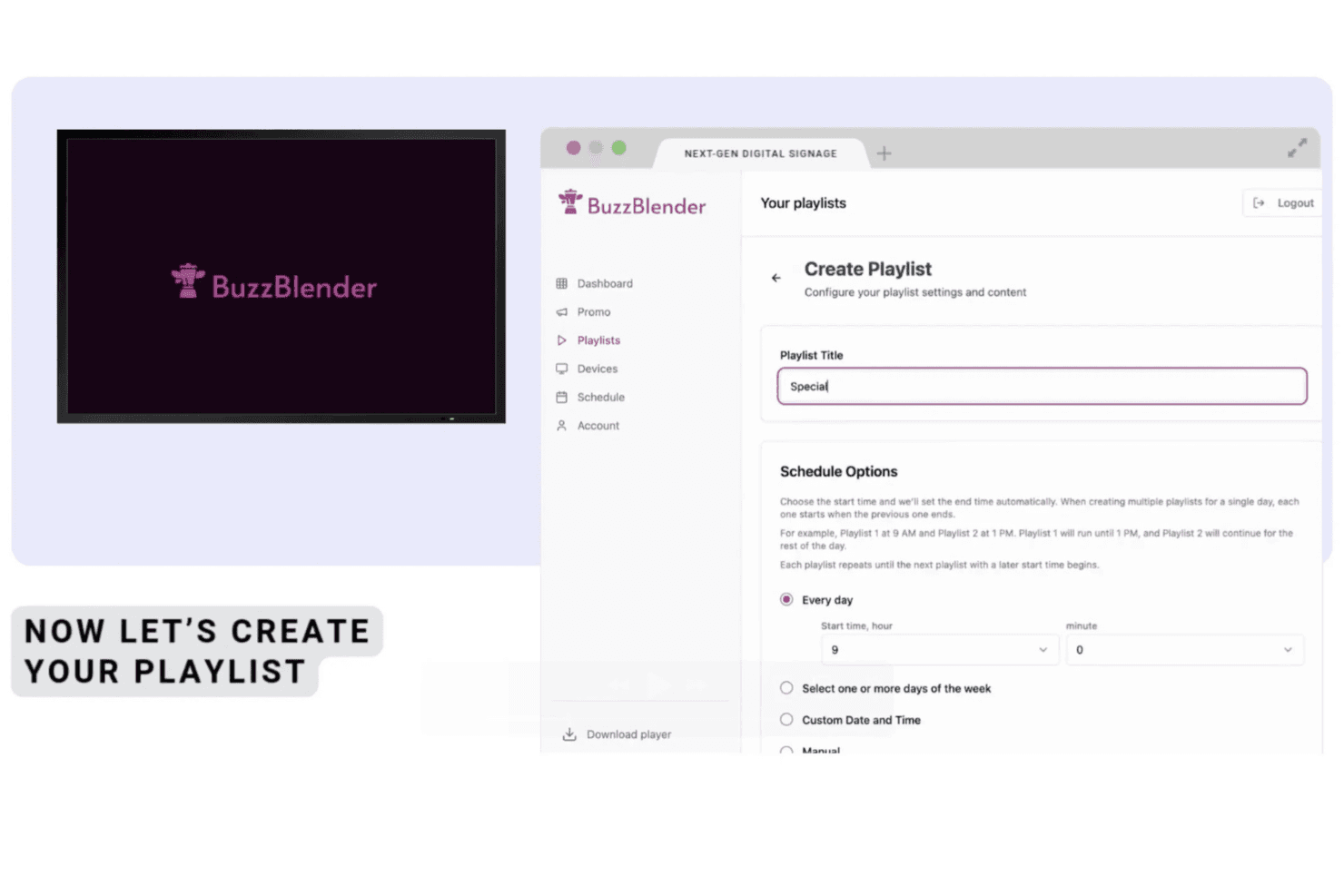
BuzzBlender allows users to create and schedule playlists with customizable titles and time-based scheduling options for digital signage displays. Buzzblender is a cloud-based digital signage CMS that lets you upload, schedule, and remotely manage content across LG webOS, Samsung Tizen, Android, Windows, and Linux screens from a single dashboard.
Who Is Buzzblender Best For?
Buzzblender suits small to mid-size businesses in retail, hospitality, and wellness that need to manage screens across multiple locations without a large IT team.
Why I Picked Buzzblender
Buzzblender earns its spot as one of the best on my shortlist because its native app support across LG webOS, Samsung Tizen, and Android TV means I can get screens live without browser workarounds or sideloading. I particularly like the calendar-based playlist scheduler, which lets me set dayparted content across multiple locations in a single session. Its certified LG webOS partner status also matters: it's not just compatible, it's purpose-built for the platform in a way most CMS tools simply aren't.
Buzzblender Key Features
- Dynamic QR code overlay: Add QR codes to any screen and track scan analytics for in-store campaigns.
- Multi-user team roles: Assign admin, editor, or viewer permissions to team members for controlled access.
- Video wall support: Display synchronized content across multiple screens, including Android and LG/Samsung commercial units.
- Free template library: Access ready-made layouts for menus and office content to speed up design work.
Buzzblender Integrations
Native integrations include Canva. An API is available for custom integrations.
Pros and Cons
Pros:
- Calendar scheduler handles dayparting across locations
- Quick screen setup without browser workarounds
- Supports LG, Samsung, and Android natively
Cons:
- Smaller app content library
- Limited reporting compared to enterprise CMS tools
Learn more about Buzzblender: Best for intuitive drag-and-drop editing
- 30-day free trial + free demo available
- From $14/screen/month (billed annually)
Visit WebsiteCustomer Rating:4.9/5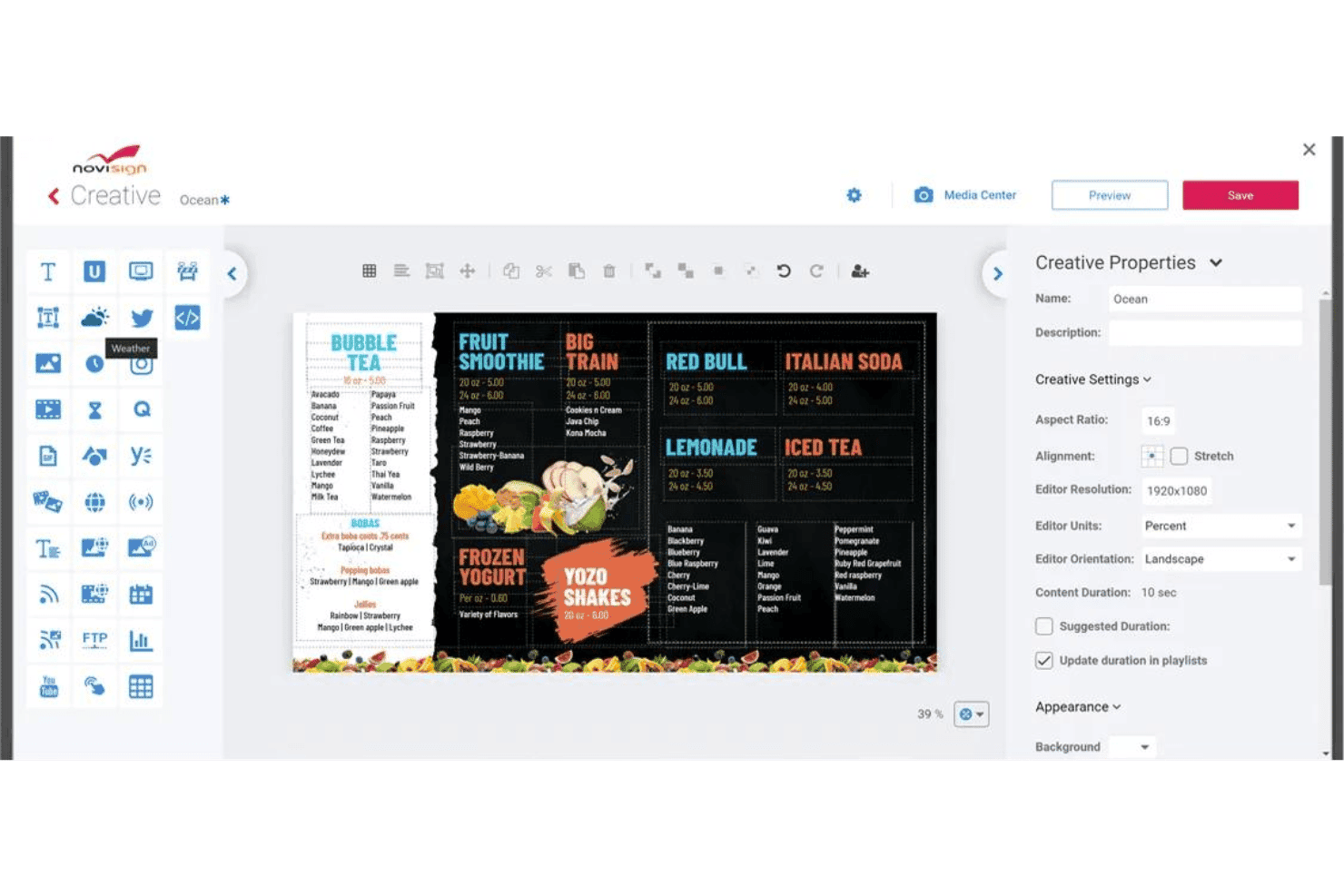
NoviSign offers a drag-and-drop digital signage creative editor with customizable menu board templates and content properties. NoviSign is a cloud-based digital signage CMS that lets you design, schedule, and remotely manage content with enhanced interactivity across distributed screen networks using a drag-and-drop editor, 50+ widgets, and multi-platform device support.
Who Is NoviSign Best For?
NoviSign is a strong fit for retail and hospitality marketing teams managing content across multiple locations who need a low-technical-barrier platform.
Why I Picked NoviSign
NoviSign earns its spot on my shortlist because the drag-and-drop design studio makes it genuinely fast to build polished signage content. I like that the 400+ customizable templates give my team a real starting point, and the 50+ widgets (weather, live social feeds, countdown timers) slot directly into layouts without any code. The videowall editor and IoT/RFID event triggers are features I've used to push real-time, context-aware content to grouped displays across locations.
NoviSign Key Features
- Offline playback resilience: Content automatically continues playing on screens during network outages with local storage.
- Proof-of-play reporting: Detailed logs and reports verify which content played on each screen and when.
- Multi-zone layouts: Create custom display zones to show video, tickers, weather, and other widgets simultaneously on a single screen.
- POS and business system integrations: Connect digital signage to POS, PowerBI, Google Drive, and other platforms for automated, real-time content updates.
NoviSign Integrations
NoviSign offers native integrations with Power BI, DataBox, Chartio, Tableau, Clover, Lightspeed, Salesforce, Canva, Ominalert, and more. An API is available for custom integrations.
Pros and Cons
Pros:
- Supports live content and real-time triggers
- Over 400 ready-made, customizable templates
- Fast editing with drag-and-drop studio
Cons:
- No built-in stock media or asset search
- Advanced permissions require higher-tier plan
Learn more about NoviSign: Best for education-focused display solutions
- Free trial + free demo available
- From $11/display/month
Visit WebsiteCustomer Rating:4.8/5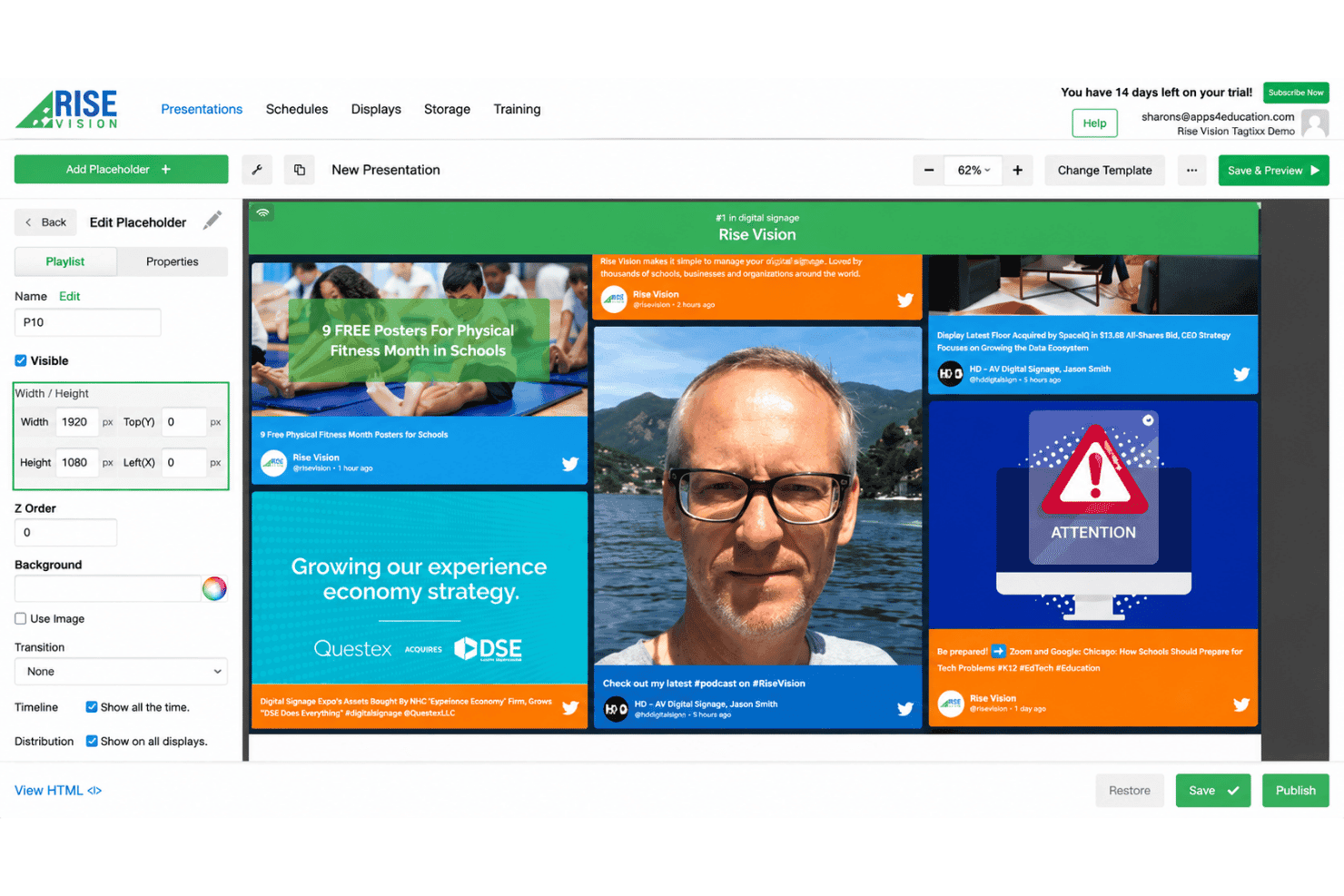
Rise Vision offers a drag-and-drop presentation editor with playlist management, placeholder properties, and live social media feed previews for digital signage displays. Rise Vision is a cloud-based digital signage CMS that combines content management, screen sharing, and emergency alerts across hardware-agnostic displays.
Who Is Rise Vision Best For?
Rise Vision is a strong fit for K-12 schools and school districts that need to manage signage, classroom screen sharing, and emergency alerts from one platform.
Why I Picked Rise Vision
Rise Vision earns its spot on my shortlist because no other digital signage CMS is built this specifically for how schools operate. The Enterprise plan covers unlimited displays per school for a flat $1,399/year, which makes district rollouts realistic on school budgets. I also like the teacher-specific user role, which lets classroom staff manage their own screens without affecting district content, plus native CAP alert integrations with E2Campus and CrisisGo.
Rise Vision Key Features
- Multi-zone layouts: Split displays into sections to show different content, like video, weather, or announcements simultaneously.
- Offline playback: Content keeps running on screens even during internet outages, syncing updates once back online.
- CAP emergency alert integration: Directly connect with services like Singlewire, Rave, or CrisisGo to trigger alerts across all displays.
- Device screenshot monitoring: View current snapshots of any display from the dashboard to quickly confirm what is playing.
Rise Vision Integrations
Rise Vision offers native integrations with Canva, Google Slides, Power BI, Domo, Google Sheets, Microsoft PowerPoint, Microsoft Calendar, Google Calendar, Meta (Facebook and Instagram), YouTube, and more.
Pros and Cons
Pros:
- Unlimited cloud storage for media files
- Custom roles for teachers and administrators
- Extensive template library for schools and events
Cons:
- Few retail or POS data integrations
- Limited analytics for measuring content performance
Learn more about Rise Vision: Best for data-driven screen content management
- Free trial + free demo available
- From $8/device/month (billed annually)
Visit WebsiteCustomer Rating:4.9/5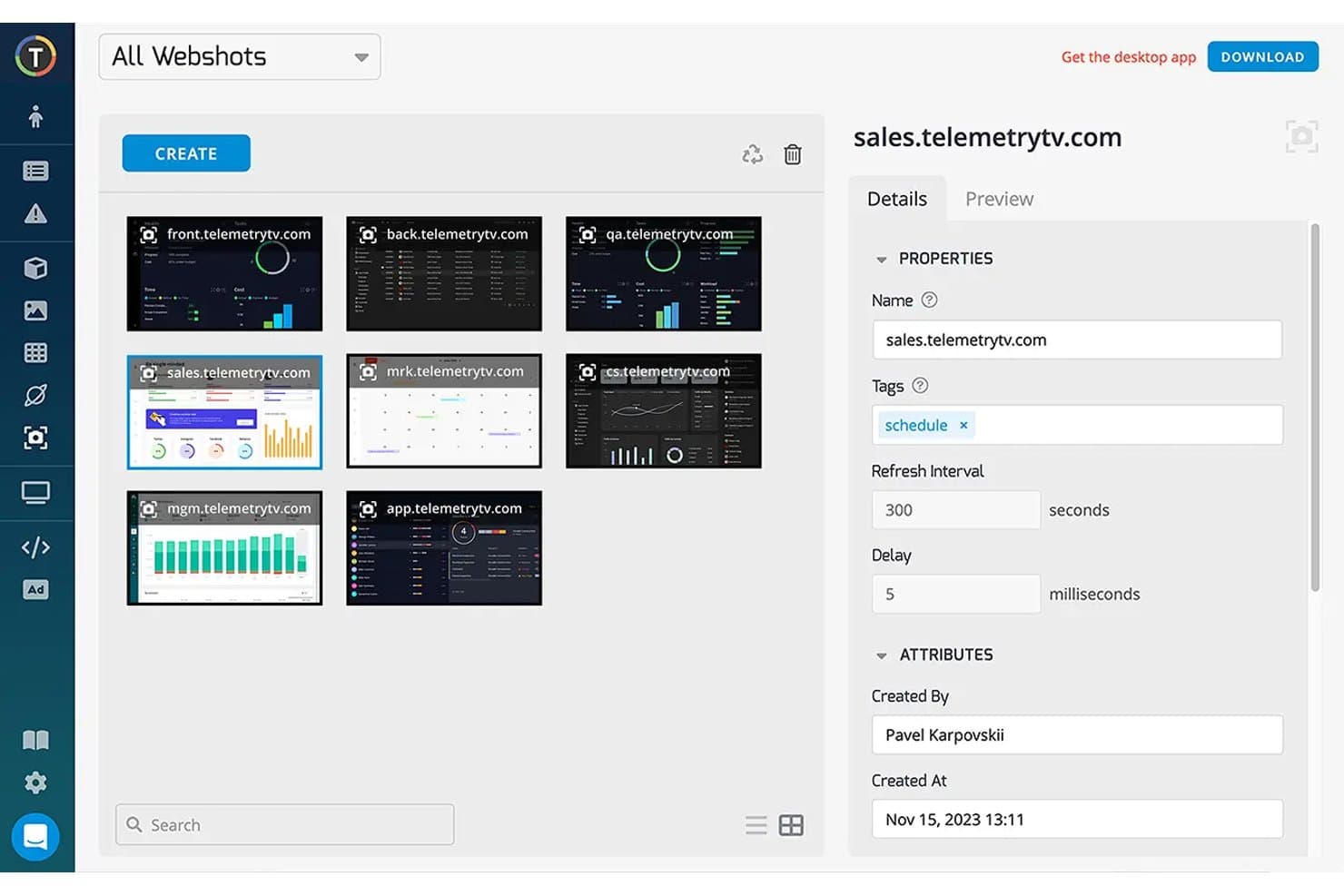
TelemetryTV offers a Webshots management interface where users can create, organize, and configure screenshot captures of web dashboards for digital signage displays. TelemetryTV is a cloud-based digital signage CMS built around live data broadcasting, letting you push BI dashboards, dynamic feeds, and custom web apps to distributed screen networks from a single interface.
Who Is TelemetryTV Best For?
It's a strong fit for mid-market and enterprise teams in retail, QSR, and logistics who manage large screen fleets and need to display live operational data alongside branded content.
Why I Picked TelemetryTV
TelemetryTV earns its spot on my shortlist because of how it handles live data broadcasting directly on screens. I use it to push live Grafana and Power BI dashboards to floor displays, so teams see real-time operational metrics without any manual content updates. The proof-of-play reporting on the Elite plan is something I rely on to confirm that time-sensitive content actually ran when and where it was scheduled.
TelemetryTV Key Features
- Multi-zone layout editor: Split screens into customizable zones to show video, tickers, weather, or social feeds at the same time.
- Remote device fleet management: Monitor device health, trigger remote reboots, and deploy over-the-air updates across all connected displays.
- Native app ecosystem: Use pre-built apps for calendar boards, wayfinding, menu boards, and internal communications directly from the platform.
- Role-based access controls: Assign user roles and permissions to manage who can create, schedule, or approve content for different locations.
TelemetryTV Integrations
TelemetryTV offers native integrations with Canva, Vimeo, Grafana, Slack, YouTube, WindyTV, and more. An API and JavaScript SDK are available for custom integrations.
Pros and Cons
Pros:
- Flexible content zoning for multitasking screens
- Live dashboards display with no manual refresh
- Reliable offline playback for all screen content
Cons:
- Limited built-in franchise hierarchy management
- Approval workflows lack formal multi-step controls
Learn more about TelemetryTV: Best for robust app integrations and automation
- 14-day free trial
- From $20/screen/month (billed annually)
Visit WebsiteCustomer Rating:4.8/5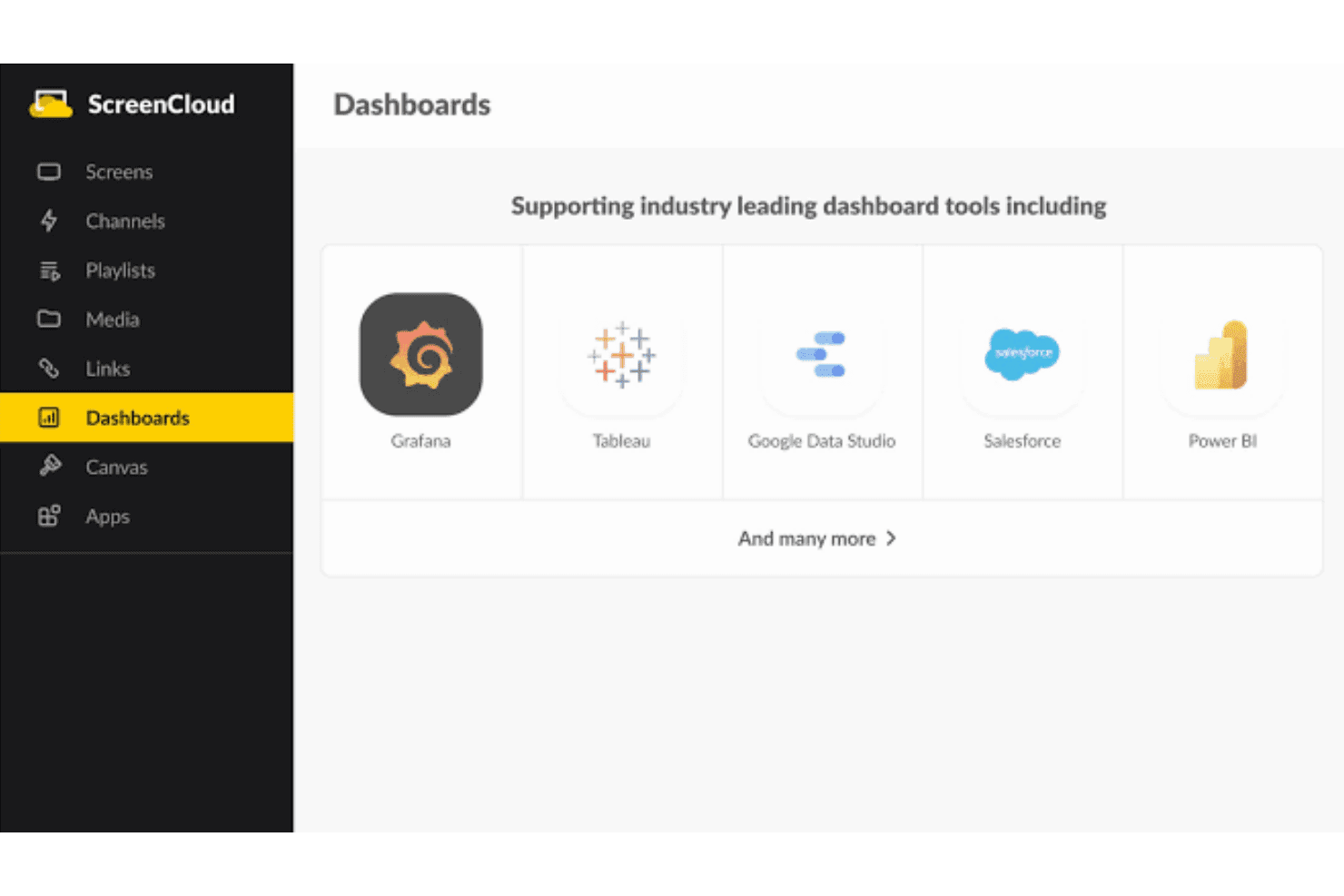
ScreenCloud supports industry-leading dashboard tools including Grafana, Tableau, Google Data Studio, Salesforce, and Power BI. ScreenCloud is a cloud-based digital signage CMS that lets you manage, schedule, and display content across screen networks, with built-in app integrations, a custom app builder, and remote device management across distributed locations.
Who Is ScreenCloud Best For?
ScreenCloud suits mid-market and enterprise teams optimizing content creation and managing screens across multiple locations, particularly in retail, manufacturing, and healthcare.
Why I Picked ScreenCloud
ScreenCloud earns its spot on my shortlist because of how far its integration layer actually goes. I love that the Dashboards feature lets me pull in gated tools like Salesforce or Datadog directly onto screens, without needing workarounds. The Playgrounds custom app builder and GraphQL API also mean my team can build and automate content logic that goes well beyond what most digital signage CMS platforms support out of the box.
ScreenCloud Key Features
- Multi-zone layouts: Create displays with separate content zones for video, tickers, weather, and social feeds on one screen.
- Proof-of-play reporting: Access detailed logs that show exactly which content played on each screen and when.
- ScreenCloud OS compatibility: Deploy signage using ScreenCloud’s proprietary operating system or integrate with supported third-party hardware.
- Bulk device management: Monitor, group, and update multiple screens remotely from a single cloud dashboard.
ScreenCloud Integrations
ScreenCloud offers over 80 native integrations, including Bonusly, Firstup, Unily, Canva, YouTube, Power BI, Vimeo, Simpplr, and Slack. An API and webhooks are available for custom integrations.
Pros and Cons
Pros:
- Reliable offline playback for uninterrupted display
- Multi-zone layouts with custom content widgets
- Supports live dashboards from Salesforce and Tableau
Cons:
- Advanced device remediation options not included
- Approval workflows and asset governance limited
Learn more about ScreenCloud: Best for AI-driven content personalization
- Free demo available
- Pricing upon request
Visit WebsiteCustomer Rating:4.7/5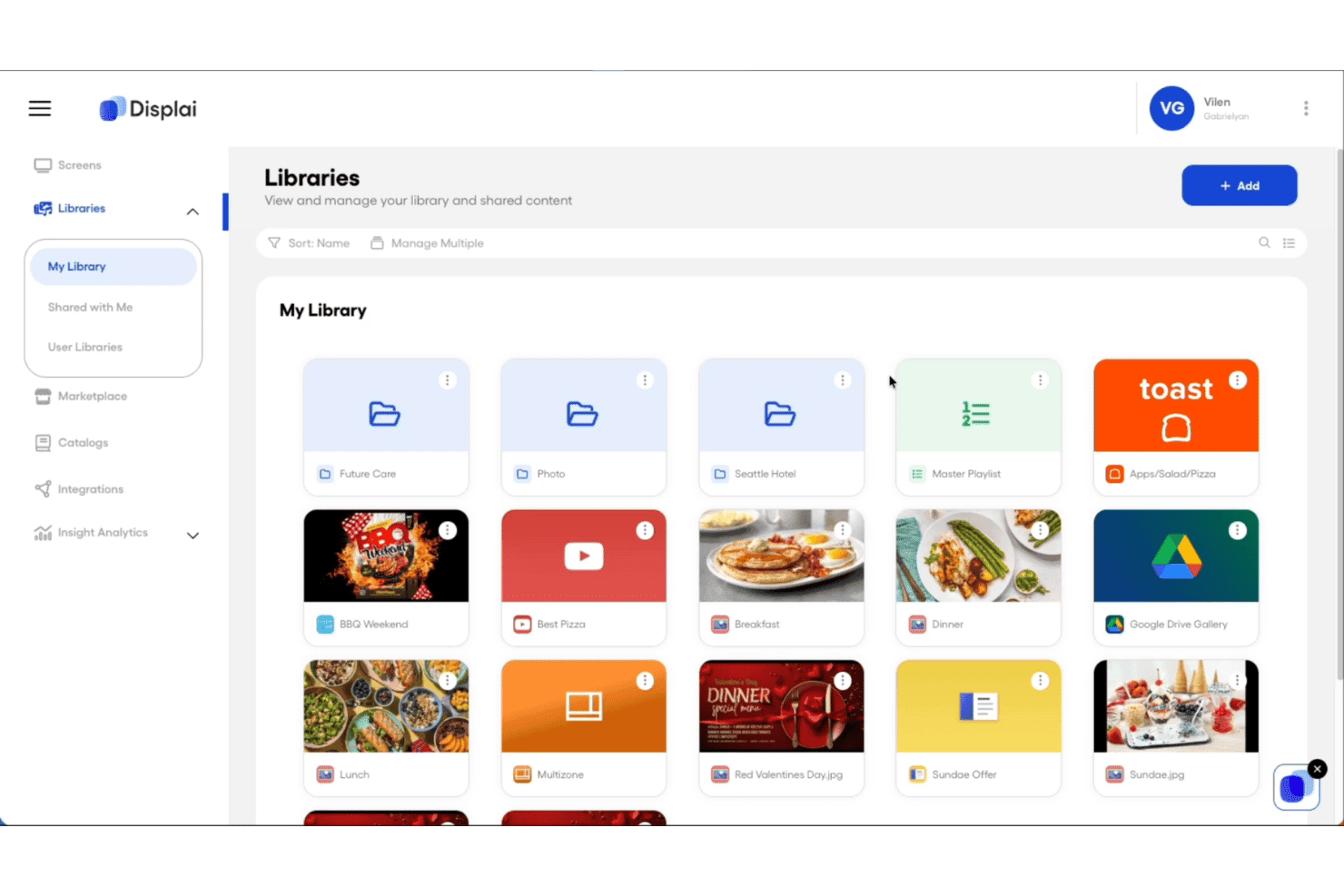
Displai offers a Libraries section where users can manage and organize media content such as images, videos, playlists, and app integrations in a grid view. Displai is a cloud-based digital signage CMS that combines multi-location content management, POS-integrated dynamic menu boards, AI-powered visitor analytics, and support for interactive kiosks for brick-and-mortar businesses.
Who Is Displai Best For?
Displai is a strong fit for multi-location restaurant groups and retail chains managing POS-connected signage and branded in-location experiences across dozens or hundreds of sites.
Why I Picked Displai
I've included Displai in my top picks because of Displai InSight, its built-in AI analytics layer that tracks visitor demographics, sentiment, and content performance in real time. That data feeds directly into content decisions, so a restaurant group can identify which menu board creative drives the most engagement by daypart and adjust accordingly. Paired with the On-Brand Menu API, screens update automatically when POS data changes, making personalization genuinely dynamic rather than manual.
Displai Key Features
- Remote device management: Monitor display status, push content updates, and control playback remotely for screens in any location.
- App marketplace: Access a large catalog of pre-built apps for menu boards, social media feeds, news tickers, and more.
- POS-powered dynamic menus: Connect menu boards directly to Toast, Square, or Lightspeed POS for real-time menu and pricing updates.
- Multi-location content scheduling: Assign campaigns, dayparted playlists, and content updates by location, region, or as network-wide broadcasts.
Displai Integrations
Displai offers native integrations with Toast, Square, Lightspeed, 7Shifts, Instagram, YouTube, PosterMyWall, DS Menu, RetailNext, and BrightSign, and provides an API for custom integrations.
Pros and Cons
Pros:
- Multi-location controls for centralized campaign scheduling
- POS-driven menu boards update content automatically
- Built-in AI analyzes in-store audience engagement
Cons:
- Enterprise pricing not published or self-service
- Device network connectivity issues occasionally reported
Learn more about Displai: Best for advanced rule-based content triggers
- 30-day free trial
- From $14/month per player
Visit WebsiteCustomer Rating:4.3/5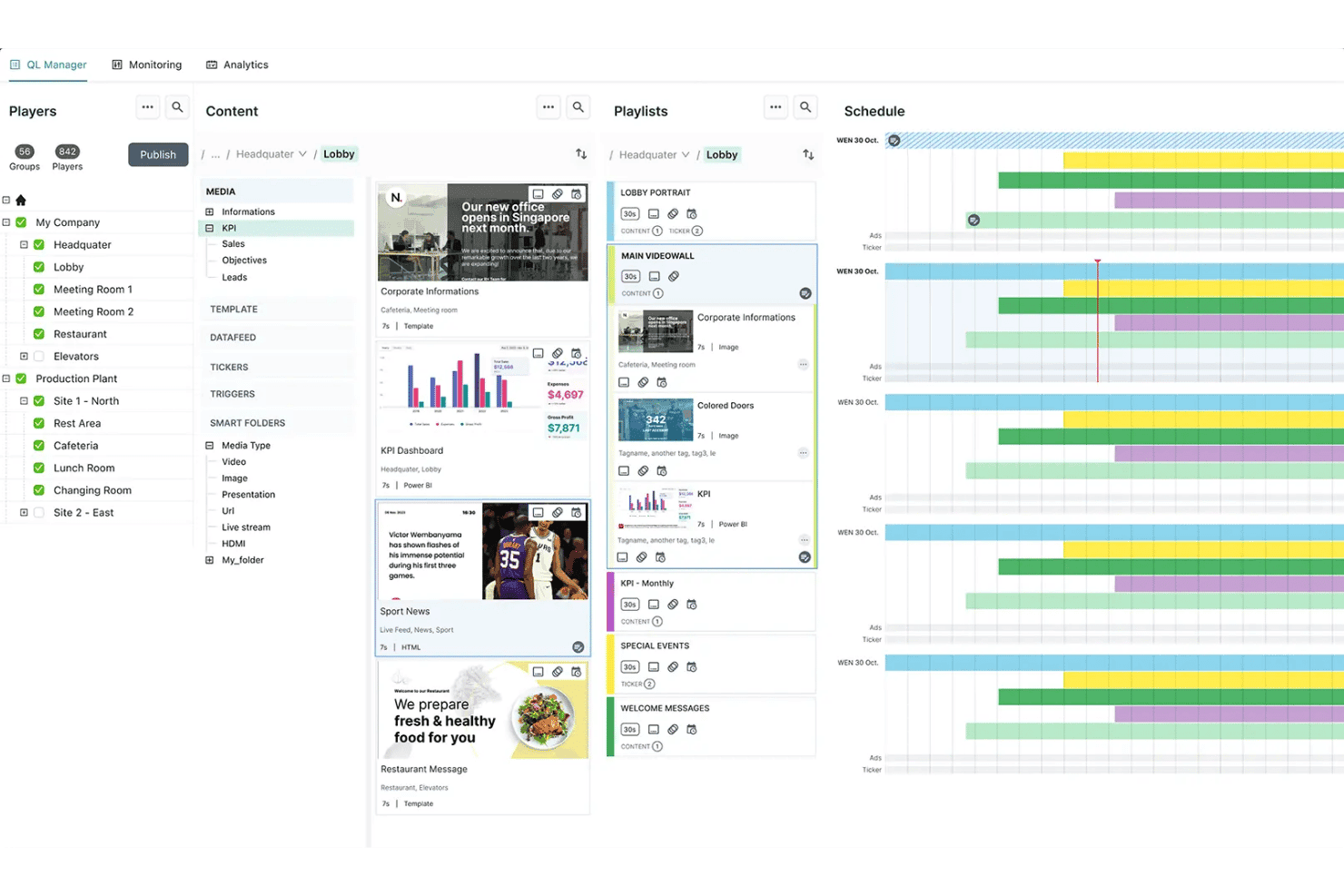
Navori offers a digital signage management interface with player organization, content library, playlist management, and scheduling tools in one dashboard. Navori is a digital signage CMS that combines a cloud-based content management dashboard, hardware-agnostic player support, live data integration, rule-based content automation, and AI-powered audience analytics across distributed screen networks.
Who Is Navori Best For?
Navori is a strong fit for enterprise marketing and operations teams managing large, distributed screen networks across retail, hospitality, or multi-location environments.
Why I Picked Navori
Navori earns its spot on my shortlist because of how its Live Data Manager handles rule-based content automation. I can connect JSON, XML, CRM, or POS data feeds and let the system automatically select and serve the right content based on live data lookups, with no manual intervention. On top of that, the AQUAJI layer uses AI-driven audience detection to add demographic triggers, so content decisions compound across both data rules and real-time viewer context.
Navori Key Features
- Multi-zone layouts: Divide screens into multiple zones to display video, tickers, weather, or social feeds at the same time.
- Proof-of-play reporting: Track and verify when and where each piece of content was displayed across your network.
- Offline playback resilience: Content keeps playing during network outages, with syncing updates once the connection returns.
- Native app ecosystem: Access pre-built apps and templates for deployments like menu boards, wayfinding, and corporate communications.
Navori Integrations
Navori offers native integrations with ServiceNow, Grafana, Workplace, Tableau, Firstup, ScreenFeed, Power BI, xMatters, and more. An open API is available for custom integrations.
Pros and Cons
Pros:
- AI-powered audience and engagement analytics
- Multi-zone and 4K video wall support
- Advanced conditional content scheduling engine
Cons:
- Complex setup for smaller screen networks
- Limited pre-built content templates
Learn more about Navori: Best for workplace and employee communications
- Free demo available
- Pricing upon request
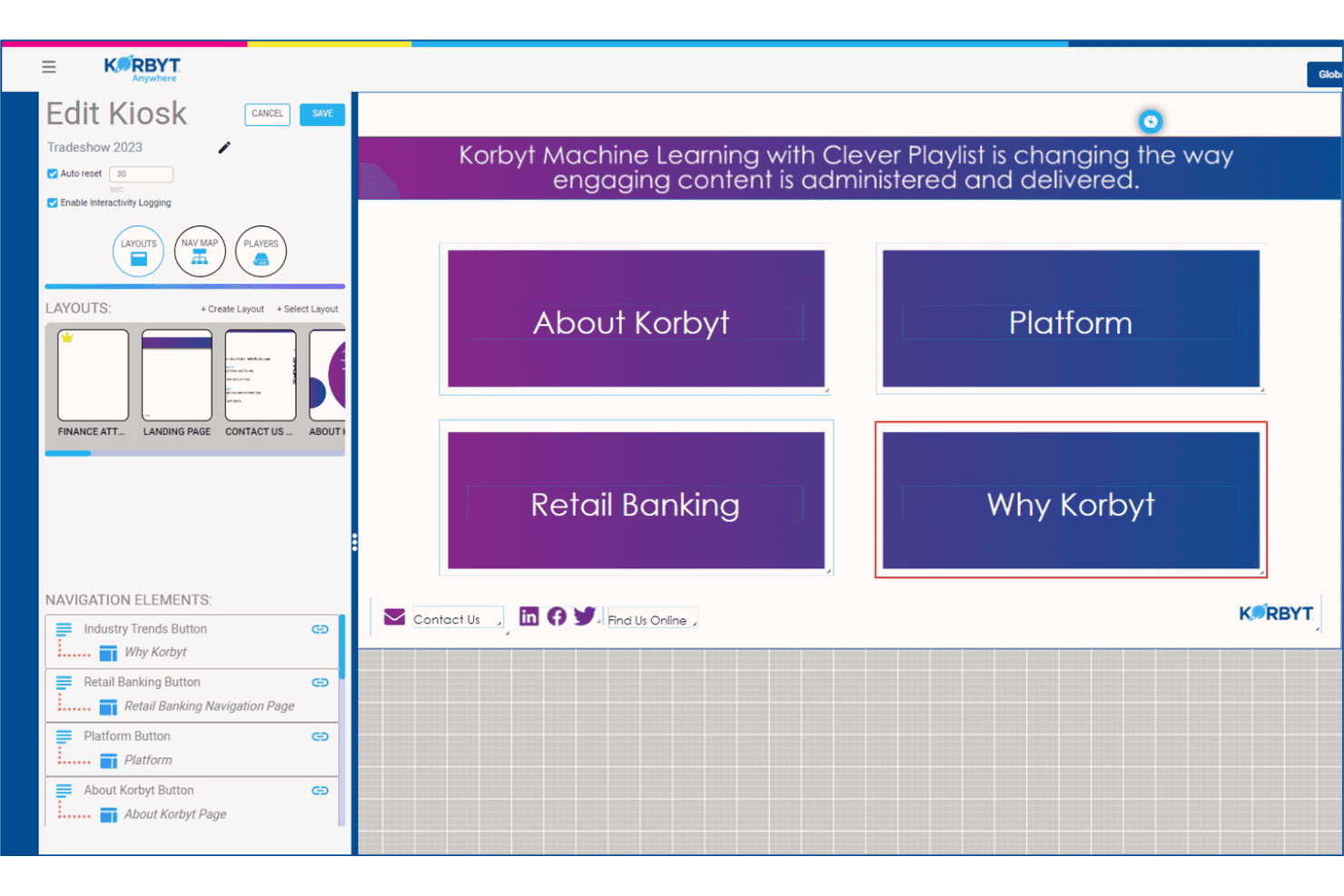
Korbyt offers an interactive kiosk editor with navigation elements, layout management, and a live preview of touchscreen content. Korbyt Anywhere is an enterprise digital signage CMS that distributes content across screens, desktops, and mobile with data-driven scheduling, 200+ integrations, and support for cloud, on-premises, or hybrid deployment.
Who Is Korbyt Best For?
Korbyt is a strong fit for enterprise and mid-market organizations managing large, distributed screen networks across corporate campuses, retail locations, or multi-site operations.
Why I Picked Korbyt
Korbyt earns its spot on my shortlist because of how it handles employee-targeted content at scale. I particularly like the Clever Playlists feature, which uses machine learning to determine which messages resonate with which employee segments and adjusts delivery automatically over time. My team can segment content by role, department, or location and push it simultaneously across screens, desktops, and mobile from a single publish action.
Korbyt Key Features
- Multi-zone layouts: Split screens into multiple zones to display different content types simultaneously.
- Remote device management: Monitor screen health, push updates, and troubleshoot devices from a centralized dashboard.
- Dynamic data triggers: Change content automatically based on real-time inputs like weather, inventory, or sensor data.
- Proof-of-play reporting: View detailed logs showing exactly what content played, when, and on which screens.
Korbyt Integrations
Korbyt offers native integrations with Salesforce, Tableau, Microsoft 365, Cisco, ServiceNow, Five9, Paylocity, Box, Power BI, and more. An API is available for custom integrations.
Pros and Cons
Pros:
- AI-powered audience segmentation and targeting
- Multi-zone layouts for advanced screen setups
- Resilient offline playback across endpoints
Cons:
- Interface can be slow with large asset libraries
- Focuses more on workplace communications use cases
Learn more about Korbyt:
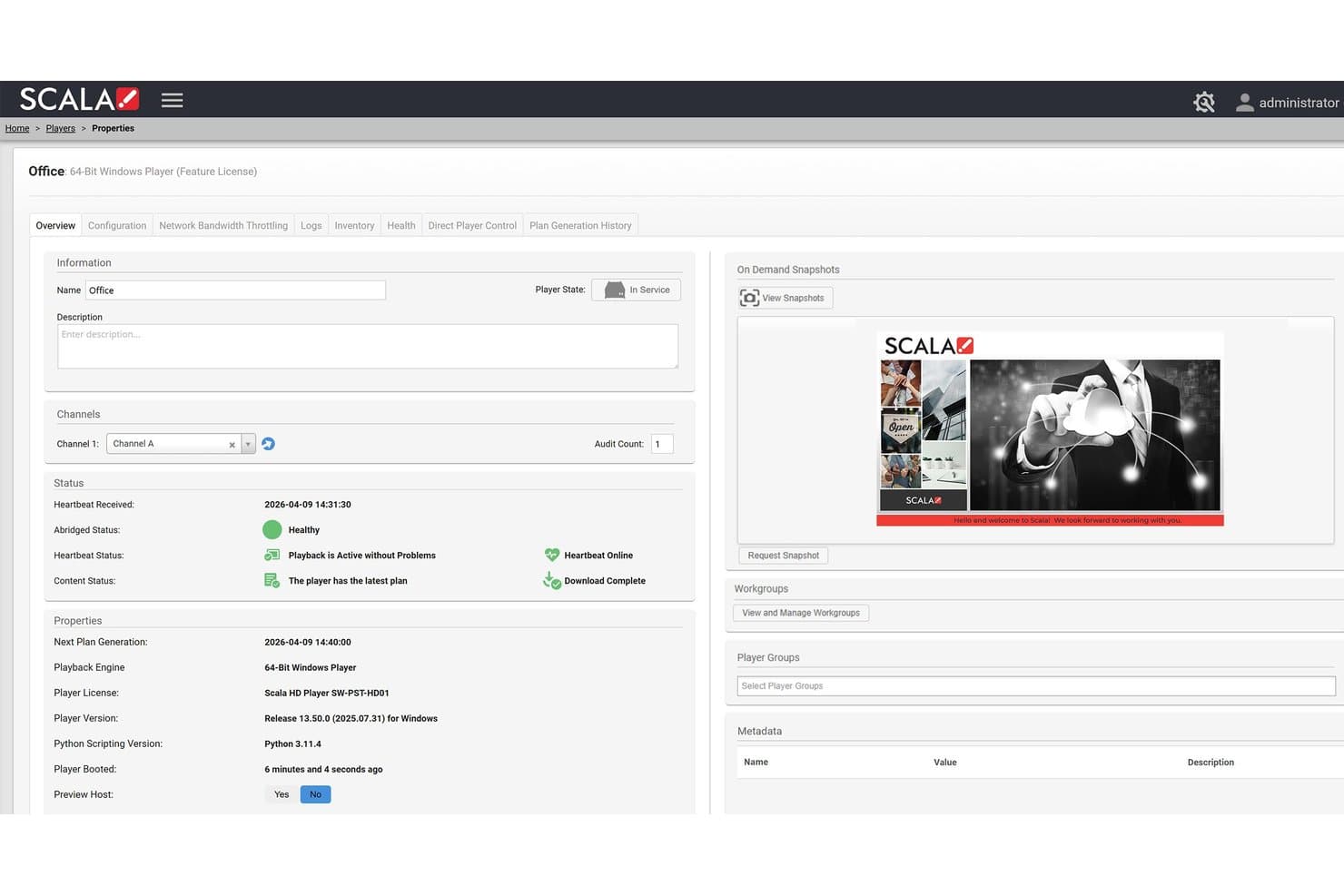
Scala offers a detailed player properties dashboard showing real-time playback status, channel assignment, snapshots, and device health for digital signage management. Scala is an enterprise digital signage CMS built around a centralized Content Manager, a purpose-built Designer tool, and a dedicated media player stack for managing dynamic, data-driven content across large distributed screen networks.
Who Is Scala Best For?
Scala is a strong fit for mid-market and enterprise organizations running large, multi-location screen networks across retail, QSR, hospitality, or corporate environments.
Why I Picked Scala
Scala earns its spot on my shortlist because of how it handles dynamic, data-driven content at scale. I love that ScalaScript lets my team connect live data sources like POS systems, inventory feeds, and weather triggers directly into templates, so content updates automatically without manual rebuilds. The Scala Player also uses delta updates, pushing only changed files to screens, which keeps large-network deployments stable and responsive during active campaigns.
Scala Key Features
- Multi-screen scheduling: Push playlists and campaigns to specific screens, groups, or entire networks from a central dashboard.
- Proof-of-play reporting: Generate logs to verify exactly which content played on each screen for compliance or ad billing.
- Multi-zone screen layouts: Segment displays into dedicated areas showing varied content types like videos, tickers, or social feeds.
- Role-based content approvals: Manage user permissions and approval workflows to govern brand standards across multiple locations.
Scala Integrations
Native integrations are not publicly listed.
Pros and Cons
Pros:
- Detailed proof-of-play analytics and logging
- Reliable playback during network outages
- Advanced multi-zone and video wall support
Cons:
- Setup can require specialized player hardware
- No published pricing or online signup
Learn more about Scala:
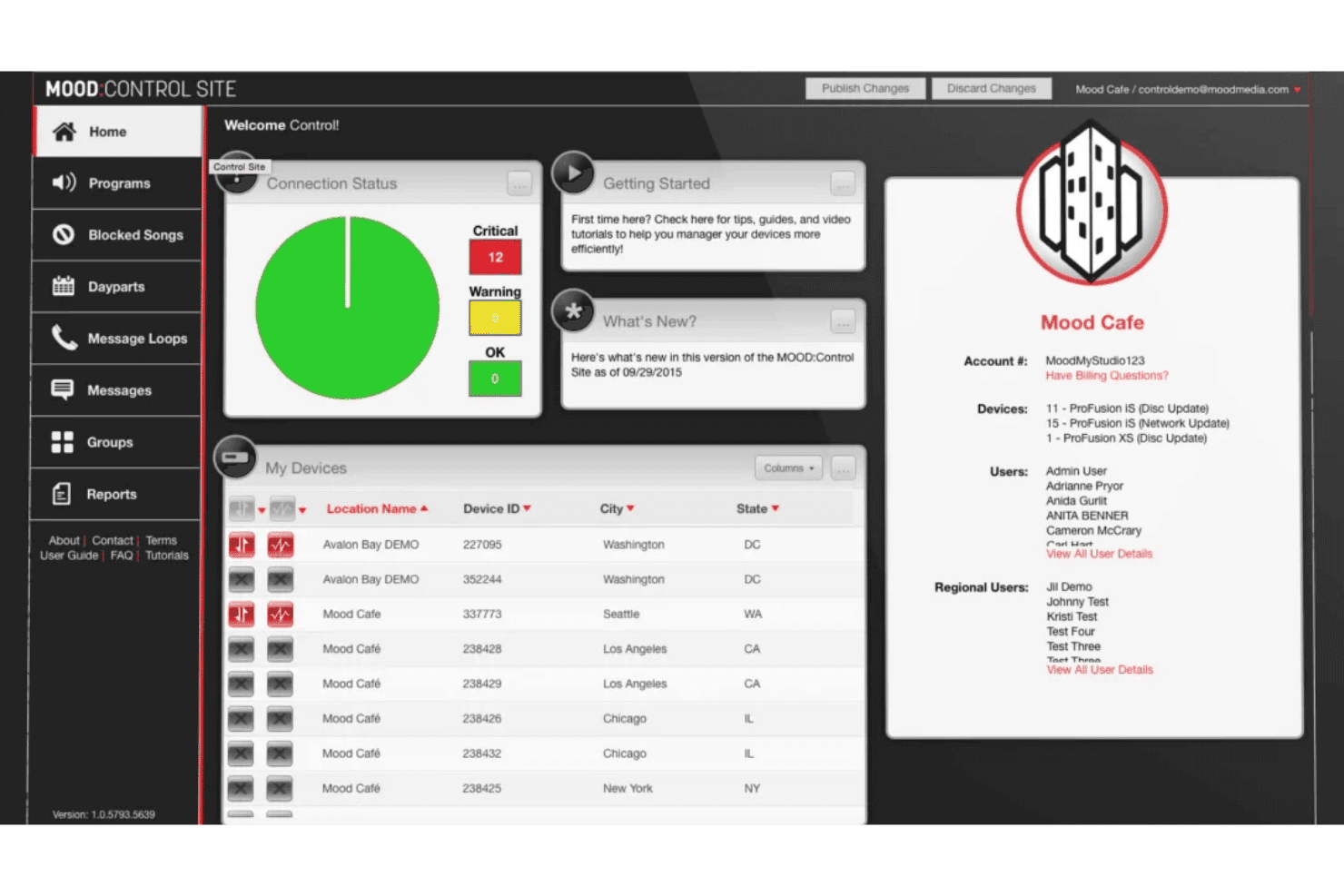
Mood Media's Control Site dashboard offers device connection status, location management, and account details for multi-site audio program control. Mood Media is a digital signage CMS and multi-sensory brand experience platform that unifies screen content, music, on-hold messaging, and scent marketing under a single cloud-based dashboard called Harmony.
Who Is Mood Media Best For?
Mood Media suits enterprise retail, QSR, and hospitality brands managing digital signage alongside music and messaging across large, distributed location networks.
Why I Picked Mood Media
I picked Mood Media because no other digital signage CMS on my shortlist lets you control screens, music, scent, and on-hold messaging from a single login inside one platform. In practice, that means my team can schedule a digital menu board update and a matching audio promotion for the same daypart without switching tools. Mood TV adds another layer, letting us replace competitive advertising on in-store screens with branded content alongside short-form programming.
Mood Media Key Features
- Centralized monitoring dashboard: Monitor the health and status of all connected screens and Harmony devices from one interface.
- Multi-zone layout editor: Customize screens with multiple content zones, including video, widgets, and message tickers.
- Digital menu board preview: Preview and adjust menu board content with instant updates for price or item changes.
- System-on-chip display support: Deploy digital signage directly to smart displays from Samsung and Philips without external media players.
Mood Media Integrations
Native integrations are not publicly listed.
Pros and Cons
Pros:
- Supports offline playback and content resilience
- Centralized dashboard for multi-location management
- Multi-sensory platform includes music and scent
Cons:
- No free trial or transparent self-serve pricing
- Lacks robust POS or CRM data integrations
Learn more about Mood Media:
Andre CMS-er for digital skilting
Her er noen flere løsninger for CMS-er for digital skilting som ikke kom med på kortlisten min, men som likevel er verdt å se nærmere på:
- 11AppspaceBest for unified corporate communications
- 12BrightSignBest for dedicated hardware integration
- 13OptiSignsBest for rapid deployment across locations
- 14YodeckBest for simple cloud-first remote management
- 15PoppuloBest for large-scale corporate deployments
- 16ScreenlyBest for Raspberry Pi-based display networks
- 17SpectrioBest for retail customer engagement features
- 18XiboBest for open-source customization and control
How I Evaluate Digital Signage CMS
I split my evaluation into two layers: the baseline a platform must meet to make the list, and the differentiators that separate strong performers from the rest.
Core Functionality (Table Stakes For This List)
When I'm selecting tools for my list, I rank each one on a scale from 0 (does not offer the functionality) to 5 (excels in this area) for each core functionality listed below. Then, I calculate the tool's total score into a percentage. Each tool needs to achieve a minimum total score of 65% to be considered for inclusion.
- Centralized content management: I look for a cloud-based dashboard where you can upload, tag, and push assets to any screen from one place—like updating menu boards across 50 locations in minutes.
- Multi-screen scheduling: The platform should let you schedule playlists and dayparted campaigns across screen groups, so a lunch promo only runs from 11 a.m. to 2 p.m. at selected sites.
- Media format support: I check whether the CMS handles images, video, HTML5, live streams, and web apps—the full range of formats modern marketing teams actually use on their displays.
- Remote device management: Managing screens spread across dozens of locations means I evaluate remote reboot, health monitoring, and over-the-air update capabilities from the central dashboard.
- Dynamic content and data integration: Real-time triggers matter. I look for API, RSS, social feed, and data-driven template support so content can shift based on inputs like weather or inventory.
- User roles and multi-location permissions: For multi-location teams, I evaluate whether HQ can lock brand assets while still letting local managers contribute region-specific content through role-based controls.
Once I have a list of tools that meet the criteria, I consider what sets each platform apart.
Differentiating Factors (What Sets Vendors Apart)
Here's how I compare and contrast different vendors:
Standout Features
Offline playback resilience is a big differentiator—screens in a retail store or airport need to keep running even when Wi-Fi drops. I also look at proof-of-play reporting, which gives you verified logs of what content played, where, and when. That's essential if you're running ad networks or need compliance documentation. Multi-zone layouts matter too, since splitting a screen into zones for video, social feeds, and tickers gives you more flexibility without adding hardware.
Beyond Features
Hardware compatibility is one of the first things I check—whether a platform supports SoC displays, Android, BrightSign, and other player types determines how much you'll spend on hardware alongside your subscription. Pricing transparency matters just as much, since hidden costs for premium apps or storage tiers can inflate your total cost of ownership fast. I also evaluate integrations with tools like Google Slides, Canva, Power BI, and POS systems, which reveal how well the CMS fits into your existing marketing stack.
Slik velger du et CMS for digital skilting
Det er lett å gå seg vill i lange funksjonslister og kompliserte prisstrukturer. For å hjelpe deg med å holde fokus mens du går gjennom den unike prosessen med å velge programvare, har vi laget en sjekkliste over faktorer du bør ha i tankene:
| Faktor | Hva bør du vurdere? |
|---|---|
| FaktorSkalerbarhet | Hva bør du vurdere?Hvor mange skjermer trenger du å administrere nå og i fremtiden? Kan CMS-et håndtere store utrullinger eller utrullinger på flere lokasjoner uten at du mister kontroll eller oversikt? |
| FaktorIntegrasjoner | Hva bør du vurdere?Kan det kobles til markedsførings-, kassasystem-, analyse- eller innholdssystemene du allerede bruker? Se etter innebygde koblinger og åpen API-tilgang. |
| FaktorTilpasningsmuligheter | Hva bør du vurdere?Kan du tilpasse brukertillatelser, merkevareprofilering, oppsett og arbeidsflyter slik at de passer organisasjonens struktur og stilretningslinjer? |
| FaktorBrukervennlighet | Hva bør du vurdere?Er plattformen intuitiv både for markedsførere ved hovedkontoret og lokale bidragsytere? Vurder hvor enkelt det er å lære opp nye brukere og oppdatere innhold underveis. |
| FaktorImplementering og oppstart | Hva bør du vurdere?Hva krever oppsettprosessen av IT- og markedsføringsteamene dine? Trenger du ekstern hjelp til utrulling eller maler for å komme raskt i gang? |
| FaktorKostnad | Hva bør du vurdere?Hvor tydelig er prissettingen, og hvordan skalerer den per skjerm, bruker eller funksjon? Vær oppmerksom på skjulte kostnader for lagring, integrasjoner eller nødvendig maskinvare. |
| FaktorSikkerhetstiltak | Hva bør du vurdere?Tilbyr plattformen passende brukerkontroller, kryptering og autentisering? Tenk på krav til etterlevelse i regulerte bransjer som finans og helsevesen. |
| FaktorTilgjengelig kundestøtte | Hva bør du vurdere?Er hjelperessursene tilgjengelige når du trenger dem? Tilbyr leverandøren kundestøtte døgnet rundt, direkte eller via supportsaker, og hva er de typiske svartidene? |
Hva er CMS-er for digital skilting?
Et CMS for digital skilting er en plattform som lar deg administrere, planlegge og oppdatere innholdet som vises på digitale skjermer på tvers av flere lokasjoner. Disse systemene gjør det mulig for markedsføringsteam å styre alt fra reklamevideoer til sanntidsoppdateringer fra ett enkelt kontrollpanel. CMS-verktøy for digital skilting er utviklet for styring på tvers av flere lokasjoner og dynamisk innhold, og bidrar til å opprettholde merkevarestandarder og levere målrettede budskap basert på tid, målgruppe eller datatriggere.
Funksjoner i CMS for digital skilting
Når du velger et CMS for digital skilting, bør du se etter følgende viktige funksjoner:
- Sentralisert innholdsadministrasjon: Last opp, organiser og oppdater alle digitale ressurser fra ett enkelt kontrollpanel, slik at det blir enkelt å styre innhold på tvers av alle skjermnettverk.
- Planlegging på tvers av skjermer: Planlegg bestemte kampanjer eller spillelister for individuelle skjermer eller grupper etter klokkeslett, dato eller tidsperiode, slik at innholdet vises når og der det er mest relevant.
- Fjernadministrasjon av enheter: Overvåk enhetsstatus, send ut oppdateringer og styr avspillingen på skjermene eksternt. Dette reduserer behovet for inngrep på stedet og sikrer pålitelig drift.
- Støtte for medieformater: Vis bilder, videoer, HTML5, direktestrømmer og interaktivt innhold. Denne fleksibiliteten bidrar til å holde markedsføringen visuelt variert og engasjerende.
- Integrasjon av dynamisk innhold: Koble til API-er, sosiale medier eller datakilder, slik at skjermene automatisk kan vise sanntidsoppdateringer, lagerbeholdning, vær eller annen kontekstuell informasjon.
- Brukerroller og tillatelser: Angi detaljerte tillatelser for brukere på hovedkontor-, region- og butikknivå. Dette muliggjør lokal innholdsstyring samtidig som merkevareforvaltningen opprettholdes.
- Rapportering av avspilt innhold: Spor og bekreft nøyaktig hvilket innhold som ble vist, hvor og når – nyttig for samsvarskontroll og resultatmåling innen annonsering eller regulerte miljøer.
- Oppsett med flere soner: Del skjermene inn i flere innholdsområder (soner) som viser ulike medietyper samtidig, for å utnytte skjermarealet og effekten maksimalt.
- Robust frakoblet avspilling: Sørg for at planlagt innhold fortsetter å spilles av ved nettverksbrudd, og at nye oppdateringer synkroniseres når forbindelsen gjenopprettes.
- Mal- og appbibliotek: Få tilgang til ferdige maler eller widgeter for vanlige bruksområder, for eksempel menytavler, kunngjøringer eller veivisning, for å gjøre utrulling og utforming raskere.
Fordeler med CMS for digital skilting
Implementering av et CMS for digital skilting gir flere fordeler for teamet og virksomheten din. Her er noen av fordelene du kan se frem til:
- Sentralisert styring: Administrer og oppdater innholdet på alle skjermene i nettverket fra ett kontrollpanel, slik at du kan holde budskapene konsekvente og aktuelle.
- Fleksibel innholdsplanlegging: Automatiser når og hvor innholdet vises, slik at du enkelt kan planlegge kampanjer og tilbud rundt åpningstider eller spesielle arrangementer.
- Sanntidsoppdateringer: Vis dynamisk lagerbeholdning, innhold fra sosiale medier eller værutløst innhold, slik at skjermene alltid viser den mest relevante informasjonen.
- Mer konsekvent merkevare: Lås fast godkjente ressurser og maler, slik at alle lokasjoner følger merkevarestandardene dine, samtidig som du tillater kontrollert lokal medvirkning.
- Operasjonell effektivitet: Overvåk enhetenes tilstand, send ut oppdateringer og feilsøk eksternt. Dette reduserer behovet for inngrep på stedet fra IT- eller markedsføringspersonell.
- Handlingsrettede resultatdata: Få innsikt gjennom rapportering av avspilt innhold, slik at du kan analysere kampanjerekkevidde og bekrefte innholdslevering for samsvarskontroll.
- Kostnadsbesparelser: Dra nytte av støtte for flere maskinvaretyper og frakoblet avspilling for å optimalisere investeringen i digital skilting og redusere løpende kostnader.
Kostnader og priser for CMS for digital skilting
Valg av CMS for digital skilting krever en forståelse av de ulike prismodellene og abonnementene som er tilgjengelige. Kostnadene varierer basert på funksjoner, teamstørrelse, tillegg og mer. Tabellen nedenfor oppsummerer vanlige abonnementer, gjennomsnittsprisene deres og typiske funksjoner som er inkludert i CMS-løsninger for digital skilting:
Sammenligningstabell for abonnementer for CMS for digital skilting
| Plantype | Gjennomsnittlig pris | Vanlige funksjoner |
|---|---|---|
| PlantypeGratisabonnement | Gjennomsnittlig pris$0 | Vanlige funksjonerGrunnleggende innholdsopplasting, begrenset planlegging, støtte for én bruker og kompatibilitet med standard medieformater. |
| PlantypePersonlig abonnement | Gjennomsnittlig pris$10-$25/skjerm/måned | Vanlige funksjonerStøtte for flere skjermer, fjernoppdateringer, tilgang til maler, enkel rapportering og grunnleggende brukertillatelser. |
| PlantypeBedriftsabonnement | Gjennomsnittlig pris$25-$60/skjerm/måned | Vanlige funksjonerAvansert planlegging, utvidede integrasjoner, styring av flere lokasjoner, rapporter som bekrefter avspilling og enhetsovervåking. |
| PlantypeVirksomhetsabonnement | Gjennomsnittlig pris$60-$150/skjerm/måned | Vanlige funksjonerTilpasset merkevarebygging, API-tilgang, SSO, avansert sikkerhet, dedikert brukerstøtte, avspilling uten nettverk og SLA-er for oppetid. |
Vanlige spørsmål om CMS for digital skilting
Her er noen svar på vanlige spørsmål om CMS for digital skilting:
Hvordan skiller et CMS for digital skilting seg fra tradisjonelle mediespillere?
Et CMS for digital skilting lar deg administrere, planlegge og oppdatere innhold eksternt på flere skjermer, mens tradisjonelle mediespillere vanligvis krever manuelle oppdateringer og gir begrenset kontroll.
Kan jeg bruke eksisterende maskinvare med de fleste plattformer for CMS for digital skilting?
Ja, mange plattformer støtter et bredt utvalg av kommersielle skjermer og maskinvare for mediespillere, men du bør alltid bekrefte kompatibiliteten med ditt nåværende oppsett før du investerer.
Er det mulig å tildele ulike tillatelser til brukere på forskjellige lokasjoner?
Ja, de fleste CMS-verktøy for digital skilting tilbyr tilpassbare brukerroller, slik at du kan gi lokale team begrenset kontroll samtidig som viktige beslutninger om merkevarebygging og planlegging forblir sentraliserte.
Hvordan hjelper rapporter som bekrefter avspilling markedsføringsteam?
Rapporter som bekrefter avspilling, viser nøyaktig hvilket innhold som ble vist og når, noe som gjør det enklere å dokumentere kampanjegjennomføring, håndtere samsvarskrav og gi annonsører data.
Hva bør jeg vurdere for å sikre at innholdet fortsetter å vises under et nettverksavbrudd?
Se etter CMS-løsninger med robust støtte for avspilling uten nettverk, slik at planlagt innhold fortsetter å vises på skjermene dine selv om forbindelsen blir brutt, og synkroniseres når nettverket er tilbake.