

Recensione SiteGround: Pro, Contro, Caratteristiche e Prezzi Spiegati
SiteGround si distingue per il suo hosting condiviso affidabile e strumenti per siti facili da usare, ideale per siti in crescita, anche se gli utenti avanzati potrebbero trovare le sue funzionalità di site builder meno potenti rispetto ad altri provider di hosting.

Recensiamo gli strumenti in modo indipendente, e le commissioni aiutano a finanziare i nostri test. Consulta la nostra politica sulla trasparenza, la nostra metodologia o suggerisci uno strumento.
SiteGround is a website builder built around managed hosting, giving you a site builder alongside server-level performance tools and dedicated support. It's a strong fit if you're building on WordPress and want more control over hosting infrastructure than a pure drag-and-drop builder provides. I'd consider it over Wix if your site needs room to grow—SiteGround's caching tools, staging environments, and hosting configuration give you more flexibility without having to migrate to a separate host down the line.
SiteGround Evaluation Summary

4.1/5
- $3.99/month
- Premium
Perché fidarsi dei nostri consigli sui software
6,700+
Reviews
20
Industry experts
16+
Evaluation factors
14
Years
Il nostro team testa e recensisce software dal 2012. In quanto leader del marketing noi stessi, sappiamo quanto sia difficile — e importante — scegliere il software giusto.
Per questa guida, abbiamo valutato gli strumenti attraverso test pratici e ricerche indipendenti, assegnando un punteggio agli strumenti in base ai nostri criteri di selezione.
Le nostre recensioni riflettono il nostro giudizio editoriale umano, non un discorso di vendita.
Revisori esperti:
 Gui DrusinaDirettore creativo
- Shriya GhateSenior Marketing Lead
 Amanda JacquesResponsabile Marketing Ops

SiteGround Overview
SiteGround stands out for its reliable uptime, responsive support, and intuitive onboarding, making it a strong choice for teams prioritizing stability and ease of use. While its builder tools are less advanced than some other site builders, the platform's integration with popular CMS options and clear pricing structure make it easy to judge value.
Marketing managers who want straightforward site management will find SiteGround especially appealing. However, those needing highly customizable design features or advanced integrations may find it underperforms in those areas. For most small to midsize businesses, SiteGround offers a balanced, user-friendly solution with solid shared hosting and cloud hosting options.
Pros
- Reliable uptime and fast site loading speeds with built-in CDN
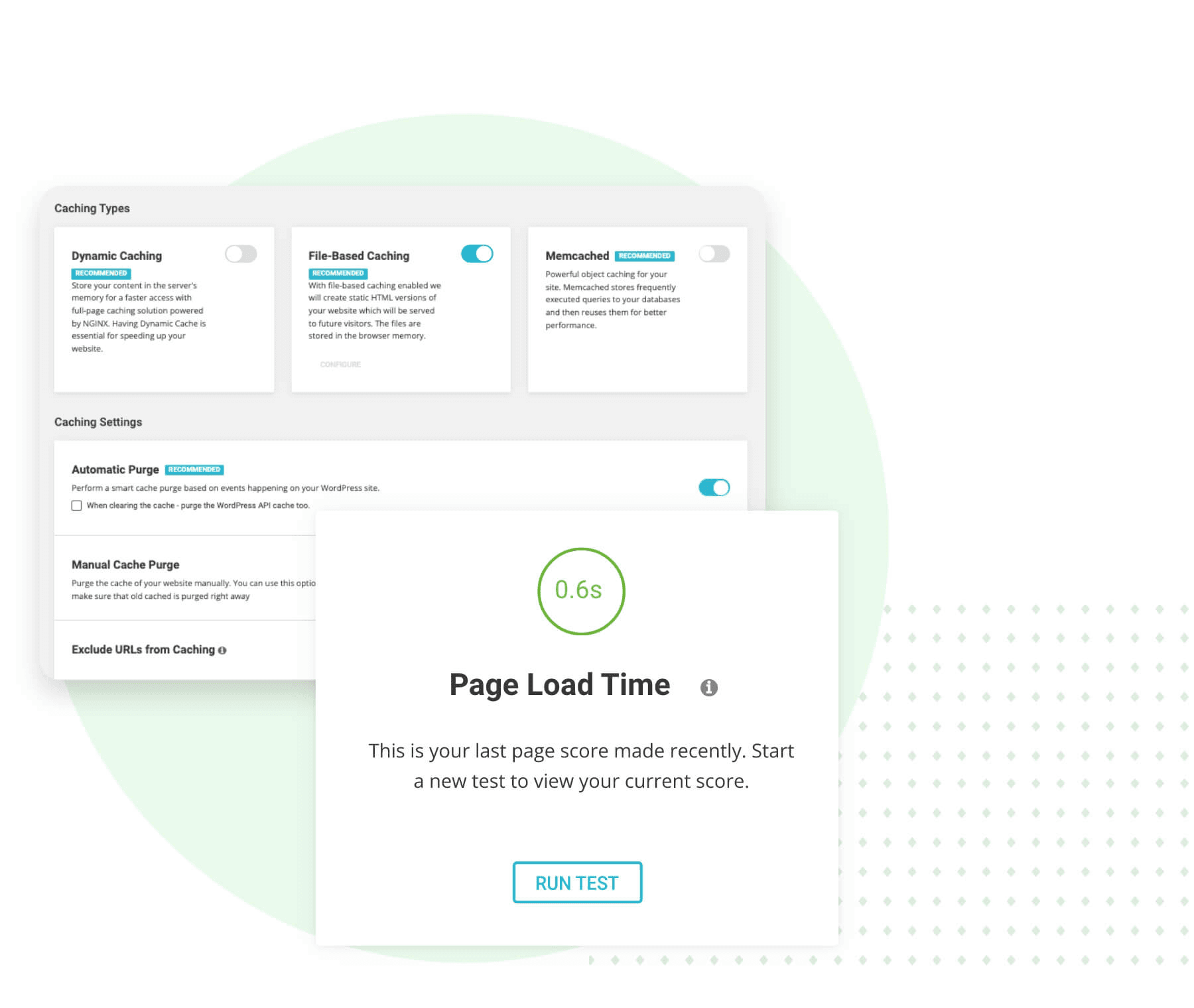
- Advanced caching optimizer for superior performance
- Modern PHP versions and server configurations for speed
Cons
- Renewal pricing increases significantly after first term
- Limited advanced design and customization options
- Storage and site limits on lower-tier shared hosting plans
Is SiteGround Right For Your Needs?
Who Would be a Good Fit for SiteGround?
SiteGround hosting is a strong choice for small to midsize businesses, marketing teams, and agencies that need reliable web hosting services, straightforward site management, and responsive support. Its daily backups, fast loading speeds enhanced by CDN integration, and easy onboarding make it especially appealing for organizations that value stability and want to avoid technical headaches. SiteGround's clear pricing and managed services also suit beginners and non-technical users who prioritize uptime over advanced design flexibility. The platform's shared hosting plans offer excellent functionality for teams just getting started, while cloud hosting options provide scalability for growing sites.
- Small BusinessesSiteGround's managed hosting services and simple site tools reduce IT overhead while providing enterprise-grade functionality.
- Marketing TeamsFast site speeds powered by CDN and optimizer tools, combined with daily backups, support campaign reliability and performance.
- Creative AgenciesMultiple site management through intuitive site tools and client support features are included across hosting plans.
- NonprofitsAffordable shared hosting plans and responsive support help limited-resource teams maintain professional web presence.
- Educational InstitutionsEasy onboarding for beginners and security features protect student and staff sites across shared and cloud hosting environments.
- FreelancersStraightforward setup with beginner-friendly site tools and 24/7 support help solo professionals stay online.
Who Would be a Bad Fit for SiteGround?
SiteGround may not suit large enterprises, ecommerce-heavy businesses, or teams needing highly customized web experiences. Its builder tools are less advanced than some hosting companies, and storage or site limits on shared hosting plans can restrict fast-growing or resource-intensive projects. Organizations with complex integration needs or those seeking granular design control may find SiteGround's platform limiting compared to more specialized hosting providers. High-traffic sites requiring dedicated CPU resources may outgrow shared hosting quickly.
- Large EnterprisesSiteGround's storage and site limits on shared hosting plans can restrict large-scale operations requiring extensive CPU and server resources.
- Ecommerce StoresWhile offering basic e-commerce functionality, it lacks advanced storefront customization compared to specialized platforms.
- Web DevelopersLimited access to advanced development tools, though modern PHP support is solid.
- SaaS CompaniesNot ideal for complex integrations or custom application hosting despite cloud hosting availability.
- Design AgenciesBuilder lacks granular design controls for bespoke client projects, even with available site tools.
- Media PublishersStorage caps and bandwidth limits on lower-tier plans can hinder high-traffic content sites despite optimizer features.
Come Testiamo e Valutiamo gli Strumenti
Abbiamo passato anni a costruire, perfezionare e migliorare il nostro sistema di test e valutazione del software. Il nostro metodo è progettato per cogliere le sfumature nella selezione del software e ciò che rende uno strumento efficace, concentrandoci sugli aspetti critici del processo decisionale. Qui sotto puoi vedere esattamente come funziona il nostro sistema di test e valutazione su sette criteri. Questo ci permette di offrire una valutazione imparziale del software basata su funzionalità principali, funzioni distintive, facilità d’uso, onboarding, supporto clienti, integrazioni, recensioni dei clienti e rapporto qualità-prezzo.
Funzionalità principali (25% del punteggio finale)
Il punto di partenza della nostra valutazione è sempre la funzionalità principale dello strumento. Include le caratteristiche e le funzioni basilari che un utente si aspetterebbe di trovare? Alcune di queste funzionalità sono bloccate nei piani premium? Ci aspettiamo che ogni strumento soddisfi almeno le capacità di base dei suoi concorrenti.
Funzionalità distintive (25% del punteggio finale)
Successivamente, valutiamo le funzionalità uniche che vanno oltre la normale funzionalità principale, quelle poco comuni negli strumenti simili. Un punteggio alto riflette caratteristiche specializzate o uniche che rendono il prodotto più veloce, efficiente o offrono un valore aggiunto all’utente. Valutiamo anche quanto sia semplice integrare il software con altri strumenti abitualmente usati in una tech stack, per espandere le funzionalità e l’utilità del prodotto. Sono valutate positivamente soluzioni con molte integrazioni native, connessioni di terze parti e API per creare integrazioni personalizzate.
Facilità d’uso (10% del punteggio finale)
Consideriamo la rapidità e semplicità con cui si possono eseguire le attività principali tramite lo strumento. I software con punteggio più alto sono ben progettati, intuitivi, dispongono di app mobili, offrono template e semplificano compiti complessi.
Onboarding (10% del punteggio finale)
Sappiamo quanto sia importante l’adozione rapida in azienda, quindi valutiamo la facilità di apprendimento e utilizzo di uno strumento con formazione minima. Analizziamo quanto velocemente un utente senza esperienza può iniziare a usare il software. Le soluzioni migliori richiedono poco o nessun supporto.
Supporto clienti (10% del punteggio finale)
Analizziamo la rapidità e facilità nel trovare aiuto tramite telefono, chat dal vivo o knowledge base. Gli strumenti che offrono supporto in tempo reale ottengono il punteggio migliore: i chatbot invece i peggiori.
Recensioni dei clienti (10% del punteggio finale)
Oltre ai nostri test, consideriamo il net promoter score di attuali ed ex clienti. Valutiamo la probabilità che, potendo scegliere, l’utente decida di utilizzare ancora quello strumento per le funzionalità principali. Un software con un punteggio alto corrisponde ad un alto net promoter score tra clienti attuali o passati.
Rapporto qualità-prezzo (10% del punteggio finale)
Infine, tenendo conto di tutti gli altri criteri, confrontiamo il prezzo medio dei piani base rispetto alle funzionalità principali e agli altri fattori di valutazione. I software che offrono di più, a meno, ottengono i punteggi più alti.
Core Features
Drag-and-Drop Editor
Build pages without coding, perfect for beginners managing their first website and connecting it to a custom domain name.
AI Content Generator
Create website copy quickly using built-in AI writing tools that enhance site functionality.
SEO Optimization Tools
Manage meta titles, descriptions, and on-page SEO settings directly through intuitive site tools.
Free Daily Backups
Restore your site to a previous version with one click if needed, protecting your content investment.
Built-in CDN Integration
Global content delivery network accelerates page loading speeds by serving content from servers closest to your visitors.
Advanced Caching Optimizer
Proprietary caching technology dramatically reduces load times and improves site performance under traffic spikes.
Ease of Use
SiteGround is widely praised for its intuitive interface and straightforward setup, making it accessible for beginners with limited technical experience. The drag-and-drop builder, guided onboarding through comprehensive site tools, and clear navigation help users launch sites quickly. Many reviewers highlight the responsive support team as a key factor in resolving issues fast, whether they're tackling their first website or managing multiple domains. While advanced customization is limited compared to some hosting companies, the platform's focus on simplicity and reliability makes it a strong fit for small businesses and non-technical teams. The control panel interface offers essential functionality without overwhelming new users.

Integrations
SiteGround integrates with WordPress, popular e-commerce platforms, Joomla, and Drupal, among others.
SiteGround also offers a RESTful API and supports connections with some third-party integration tools, expanding functionality for teams with specific workflow requirements.

SiteGround Specs
- API: Yes
- Bulk Domain Management: Yes
- Calendar Management: No
- Dashboard: Yes
- External Integrations: Yes
- Multi-User: Yes
- Notifications: Yes
- Scheduling: Yes


