

Se stai cercando le migliori alternative a WordPress per il tuo team, sei nel posto giusto. Queste piattaforme offrono prestazioni più rapide, flussi di lavoro più semplici e una scalabilità più affidabile per i team frustrati da insiemi di plugin macchinosi, modelli rigidi o colli di bottiglia legati agli sviluppatori. Se hai difficoltà con una flessibilità di progettazione limitata, aggiornamenti di sicurezza continui o la gestione di contenuti multisito tra diverse regioni o marchi, cambiare piattaforma può sbloccare notevoli efficienze.
Negli ultimi 10 anni ho trascorso oltre 1.200 ore a testare strumenti CMS e a fornire consulenza sull'infrastruttura dei contenuti. In questa guida condividerò le migliori alternative che consiglio sulla base dell'esperienza diretta, così potrai scegliere una piattaforma che si adatti davvero al modo in cui il tuo team lavora e cresce.
Che cos'è WordPress?
WordPress è un software per la gestione dei contenuti utilizzato per creare e mantenere siti web. È popolare tra blogger, piccoli imprenditori e sviluppatori grazie alla sua flessibilità e all'ampia gamma di plugin. I temi personalizzati, le numerose opzioni di plugin e l'interfaccia intuitiva aiutano a creare e gestire il proprio sito web in modo efficace. Nel complesso, WordPress offre una piattaforma versatile per creare qualsiasi cosa, dai blog personali ai siti aziendali complessi.
Perché fidarsi dei nostri consigli sui software
6,700+
Reviews
20
Industry experts
16+
Evaluation factors
14
Years
Il nostro team testa e recensisce software dal 2012. In quanto leader del marketing noi stessi, sappiamo quanto sia difficile — e importante — scegliere il software giusto.
Per questa guida, abbiamo valutato gli strumenti attraverso test pratici e ricerche indipendenti, assegnando un punteggio agli strumenti in base ai nostri criteri di selezione.
Le nostre recensioni riflettono il nostro giudizio editoriale umano, non un discorso di vendita.
Revisori esperti:
 Gui DrusinaDirettore creativo
- Shriya GhateSenior Marketing Lead
 Amanda JacquesResponsabile Marketing Ops

Tabella comparativa delle alternative a WordPress
Questa tabella comparativa riassume i dettagli dei prezzi delle mie principali alternative a WordPress:
| Tool | Best For | Trial Info | Price | ||
|---|---|---|---|---|---|
| 1 | Best for samarbeid om grensesnittdesign | Gratisabonnement tilgjengelig | Fra $3/bruker/måned | Website | |
| 2 | Ideale per funzionalità dedicate alle agenzie | Prova gratuita di 14 giorni + demo gratuita disponibile | A partire da $25/mese | Website | |
| 3 | Best for vekst innen netthandel i større virksomheter | 15 dagers gratis prøveperiode | Fra $39/måned | Website | |
| 4 | Beste voor digitaal contentbeheer | Gratis abonnement beschikbaar | Vanaf $300/maand | Website | |
| 5 | Beste voor contentlevering via meerdere kanalen | Gratis demo beschikbaar | Vanaf $699/maand | Website | |
| 6 | La scelta migliore per siti di e-commerce scalabili | Prova gratuita di 3 giorni | A partire da $29/mese (con fatturazione annuale) | Website | |
| 7 | Ideale per siti incentrati sul design | Prova gratuita di 14 giorni | A partire da $19/mese (fatturati annualmente) | Website | |
| 8 | Il miglior CMS headless open source | Piano gratuito disponibile | A partire da $35/mese | Website | |
| 9 | Ideale per funzionalità di progettazione visuale | Piano gratuito disponibile | A partire da $15/mese (con fatturazione annuale) | Website | |
| 10 | Ideale per la creazione intuitiva di siti | Piano gratuito disponibile | A partire da $17.77/al mese (con fatturazione annuale) | Website |


Recensioni delle migliori alternative a WordPress
Di seguito trovi le mie sintesi dettagliate delle migliori alternative a WordPress incluse nel mio elenco ristretto. Le mie recensioni offrono uno sguardo approfondito alle funzionalità principali, ai pro & contro, alle integrazioni e ai casi d’uso ideali di ogni strumento, per aiutarti a trovare quello più adatto a te.
 Best for samarbeid om grensesnittdesign
- Gratisabonnement tilgjengelig
- Fra $3/bruker/måned
Visit WebsiteCustomer Rating:4.7/5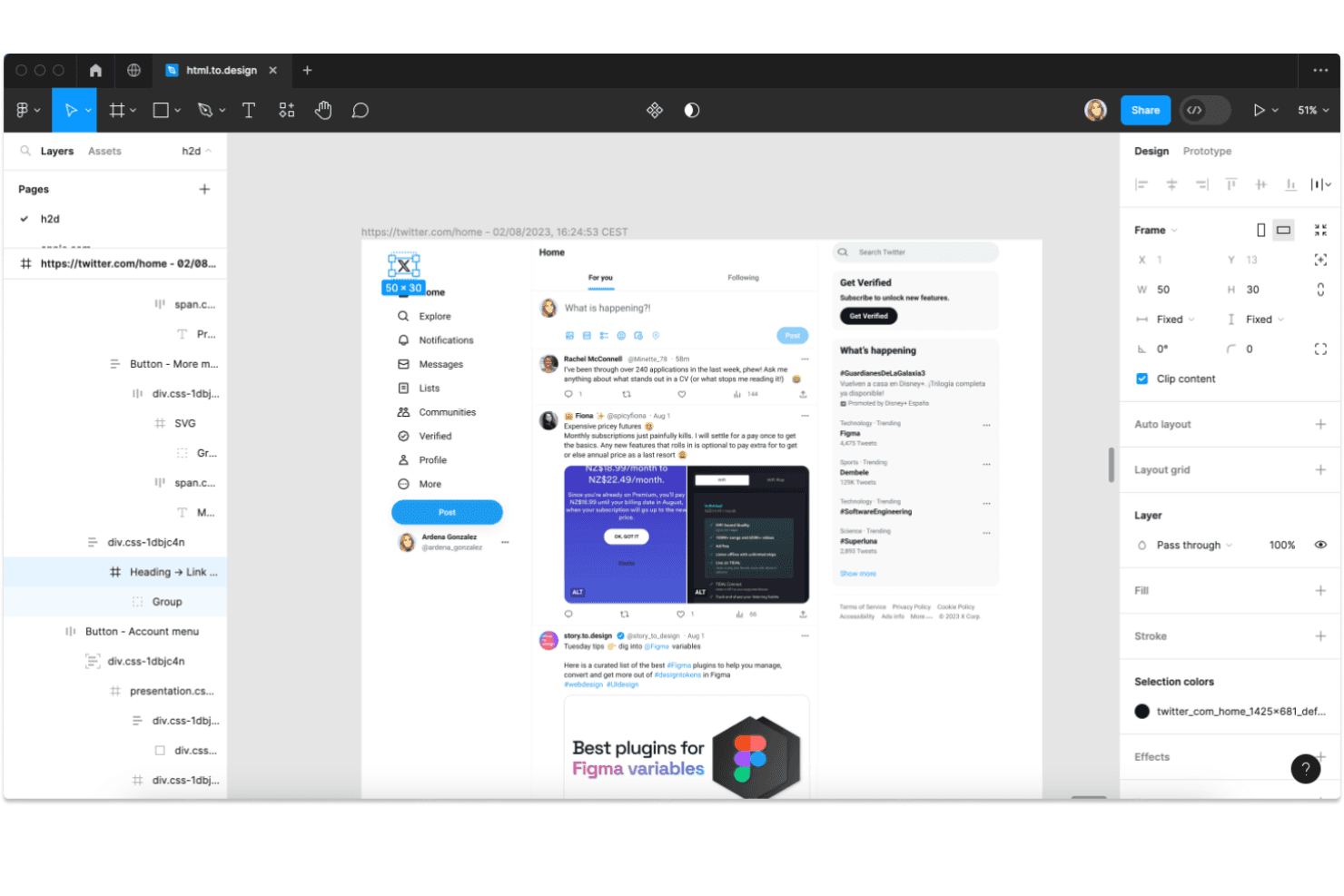
Figma lar brukere importere og undersøke nettsider som redigerbare designlag. Figma gir produkt- og markedsføringsteam et delt arbeidsområde for å utforme grensesnitt, lage prototyper av brukerreiser og håndtere tilbakemeldinger uten å spre beslutninger på tvers av separate verktøy.
Hvem passer Figma best for?
Figma passer for produktdesignteam som lager og videreutvikler nett- eller mobilgrensesnitt med innspill fra produkt-, utviklings- og markedsføringspartnere.
Hvorfor jeg valgte Figma
Jeg valgte Figma for samarbeid om grensesnittdesign fordi det lar teamet mitt utforme nettstedslayouter sammen i delte designfiler. Vi kan koble skjermer sammen til interaktive prototyper og legge igjen kommentarer direkte på bestemte elementer, noe som gjør det enklere å håndtere tilbakemeldinger før en WordPress-implementering begynner.
Viktige funksjoner i Figma
- Automatisk layout: Angi regler for avstand, innvendig marg og justering som tilpasses når innholdet endres.
- Komponenter og varianter: Opprett gjenbrukbare grensesnittelementer med alternativer for ulike tilstander og stiler.
- Variabler: Lagre gjenbrukbare verdier for farger, tall, strenger og boolske verdier.
- Utviklermodus: Undersøk designspesifikasjoner og få tilgang til ressurser som er klargjort for utvikling.
Figma-integrasjoner
Figma dokumenterer integrasjoner med Slack, Google Workspace, Jira, Confluence, Asana, Notion, Linear, Zoom og Microsoft Teams, og støtter Zapier. Figma tilbyr også et API for tilpassede integrasjoner.
Pros and Cons
Pros:
- Samarbeidspartnere redigerer grensesnittfiler i sanntid
- Fest tilbakemeldinger direkte til bestemte designelementer
- Klikkbare prototyper tydeliggjør brukerreiser før WordPress-utvikling
Cons:
- Ingen innholdsstyringssystem i WordPress-stil for håndtering av innhold
- Store designfiler kan oppleve ytelsesforsinkelser
Learn more about Figma: 2Ideale per funzionalità dedicate alle agenzie
Duda
- Prova gratuita di 14 giorni + demo gratuita disponibile
- A partire da $25/mese
Visit WebsiteCustomer Rating:4.6/5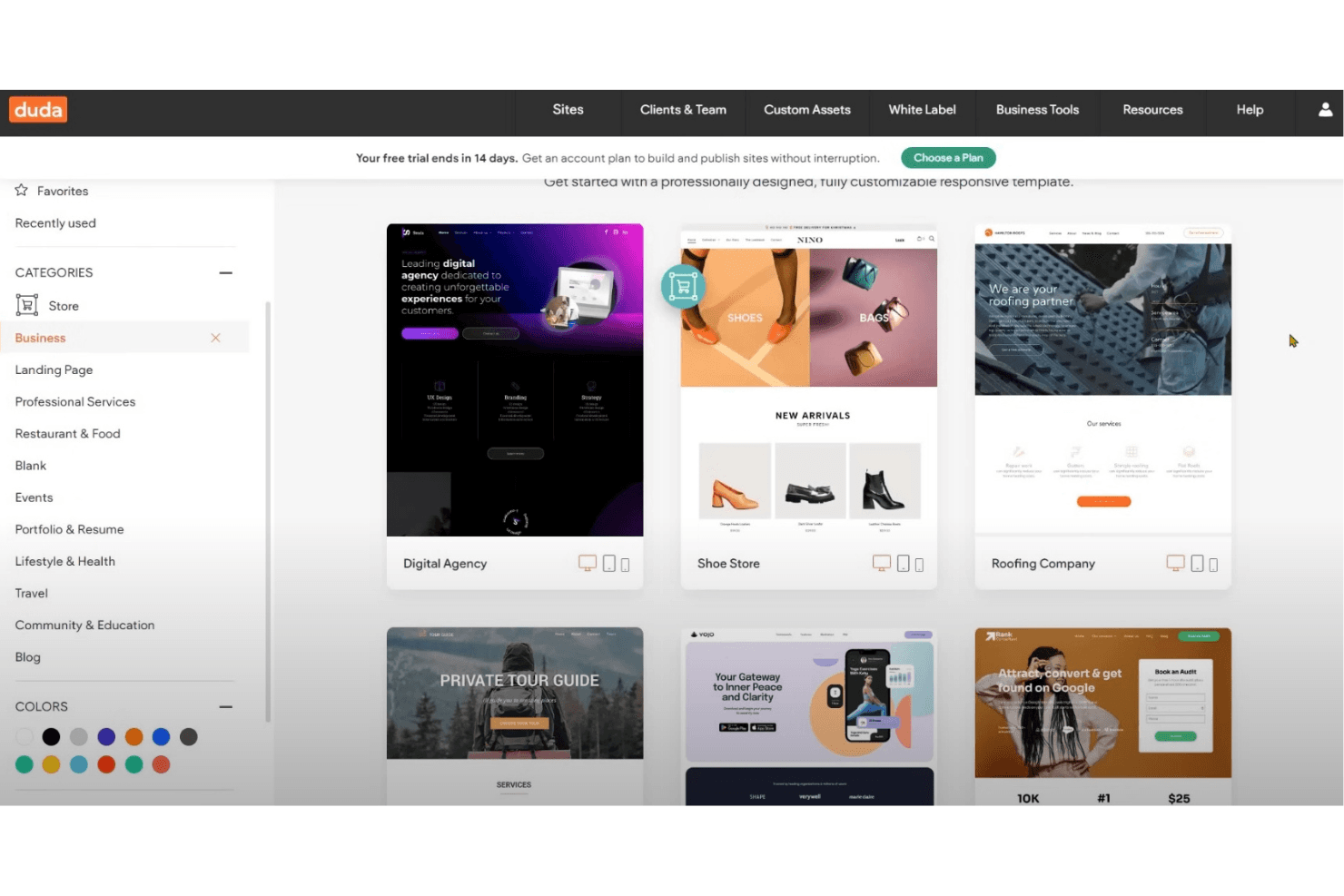
Duda offre modelli di siti web aziendali progettati professionalmente e personalizzabili. Duda è un costruttore di siti web senza codice che aiuta agenzie e piccole imprese a creare siti web responsive per i clienti senza dover gestire l’hosting o i plugin di WordPress.
Per chi è più adatto Duda?
Duda è una buona soluzione per le agenzie di web design che creano e gestiscono siti web per più clienti.
Perché ho scelto Duda
Ho scelto Duda come “Ideale per funzionalità dedicate alle agenzie” perché il suo editor con marchio personalizzato e il pannello di controllo per i clienti consentono alle agenzie di personalizzare con il proprio marchio l’esperienza di modifica e di gestire più siti dei clienti con autorizzazioni basate sui ruoli. Apprezzo anche le Pagine dinamiche, che possono popolare le pagine di destinazione a partire da dati strutturati invece di dover ricreare ogni pagina manualmente.
Funzionalità principali di Duda
- Generazione di siti con IA: Crea testi, sezioni o interi siti web a partire da richieste e contenuti caricati.
- Modifica responsive: Adatta i layout dei siti per computer desktop, tablet e dispositivi mobili.
- Generazione dei metadati SEO: Genera titoli delle pagine, descrizioni e testo alternativo delle immagini in tutto il sito.
- Backup automatici: Salva copie di backup del sito e ripristina una versione precedente quando necessario.
Integrazioni di Duda
Duda documenta le integrazioni con Google Analytics, Meta Pixel, Mailchimp, Constant Contact, HubSpot e Google Sheets e si collega a Zapier; altre app sono disponibili tramite il suo App Store. Duda offre inoltre un’API REST per le integrazioni personalizzate.
Pros and Cons
Pros:
- Gli strumenti con marchio personalizzato semplificano il passaggio dei progetti ai clienti delle agenzie
- La modifica responsive velocizza la produzione di siti per più dispositivi
- Le Pagine dinamiche popolano i siti a partire da dati strutturati
Cons:
- I layout dei modelli limitano il controllo preciso del design
- Gli strumenti per blog e SEO avanzata sembrano limitati
Learn more about Duda: Best for vekst innen netthandel i større virksomheter
- 15 dagers gratis prøveperiode
- Fra $39/måned
Visit WebsiteCustomer Rating:4.3/5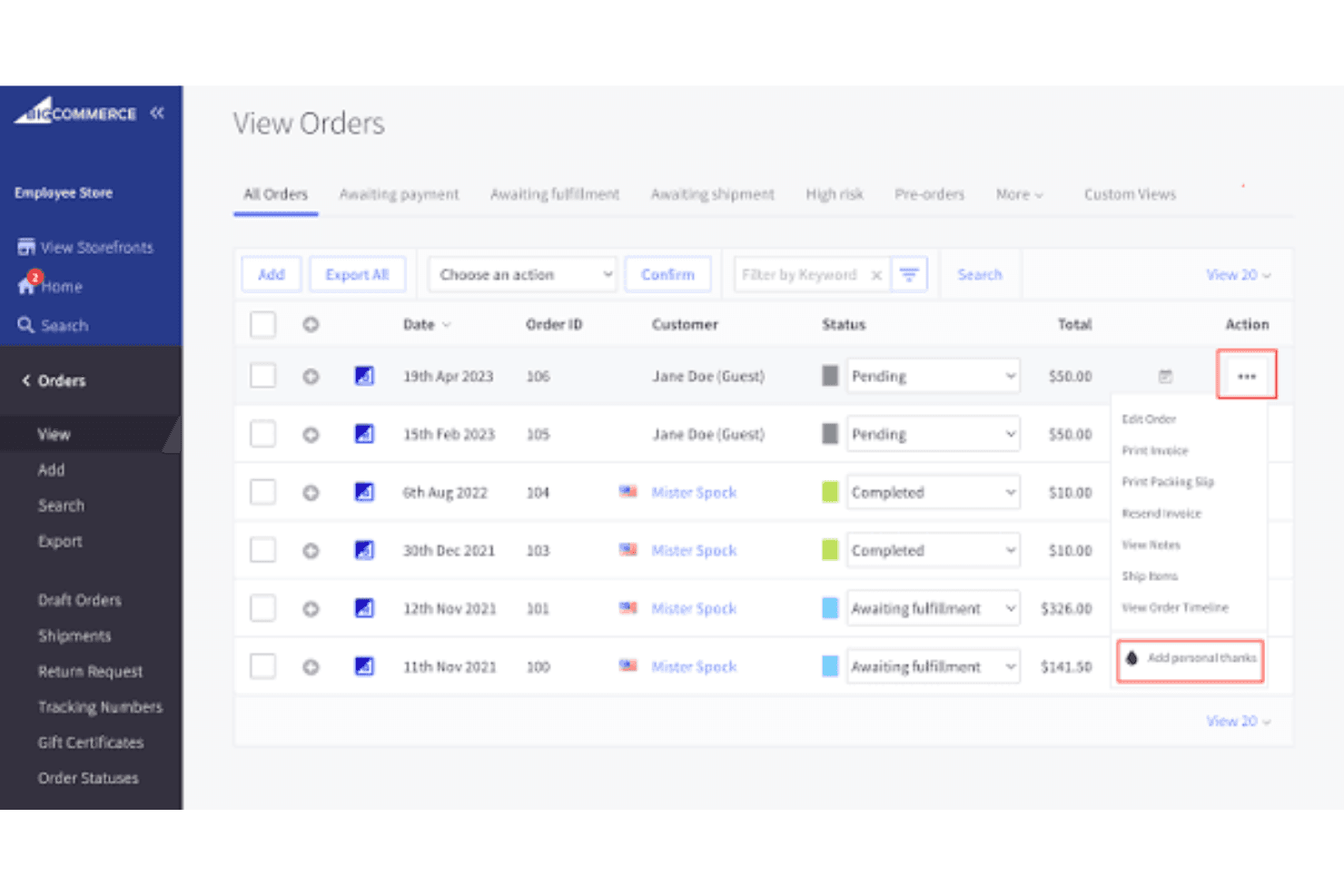
BigCommerce lar brukere administrere og utføre handlinger på bestillinger fra én visning. For bedrifter som ønsker et WordPress-alternativ bygget rundt nettsalg, kombinerer BigCommerce administrasjon av netthandel med innholdsverktøy for nettbutikken, slik at markedsførings- og vekstteam kan administrere produkter, kundereiser og handelsoperasjoner.
Hvem passer BigCommerce best for?
BigCommerce passer for netthandelsteam i større virksomheter som skalerer nettbaserte inntekter på tvers av komplekse produktkataloger og flere salgskanaler.
Hvorfor jeg valgte BigCommerce
Jeg valgte BigCommerce som det beste alternativet for vekst innen netthandel i større virksomheter fordi katalog- og kanaladministrasjonen støtter komplekse salgsoperasjoner. Jeg liker at markedsføringsteam kan administrere innholdet i nettbutikken sammen med produktene, mens funksjoner for flere nettbutikker hjelper bedrifter med å drive separate merkevare- eller regionale opplevelser.
Viktige funksjoner i BigCommerce
- Innebygd blogg: Opprett og administrer klargjorte og publiserte blogginnlegg.
- Tilpassede nettadresser: Angi nettadresser for produkter, kategorier og nettsider.
- SEO-metadata: Rediger sidetitler og metabeskrivelser.
- 301-viderekoblinger: Omdiriger gamle nettadresser når sideadressene endres.
Integrasjoner med BigCommerce
BigCommerce-markedsplassen tilbyr over 1 200 apper, blant annet QuickBooks Online og ShipStation. Plattformen kan også kobles til Zapier og tilbyr API-er for tilpassede integrasjoner.
Pros and Cons
Pros:
- Støtter komplekse kataloger og produktvarianter
- Kombinerer administrasjon av B2B- og B2C-nettbutikker
- Inkluderer innebygde SEO-felt og viderekoblinger
Cons:
- Omfattende temaredigering kan kreve hjelp fra en utvikler
- Søk på nettstedet kan kreve tredjepartsverktøy
Learn more about BigCommerce: Beste voor digitaal contentbeheer
- Gratis abonnement beschikbaar
- Vanaf $300/maand
Visit WebsiteCustomer Rating:4.5/5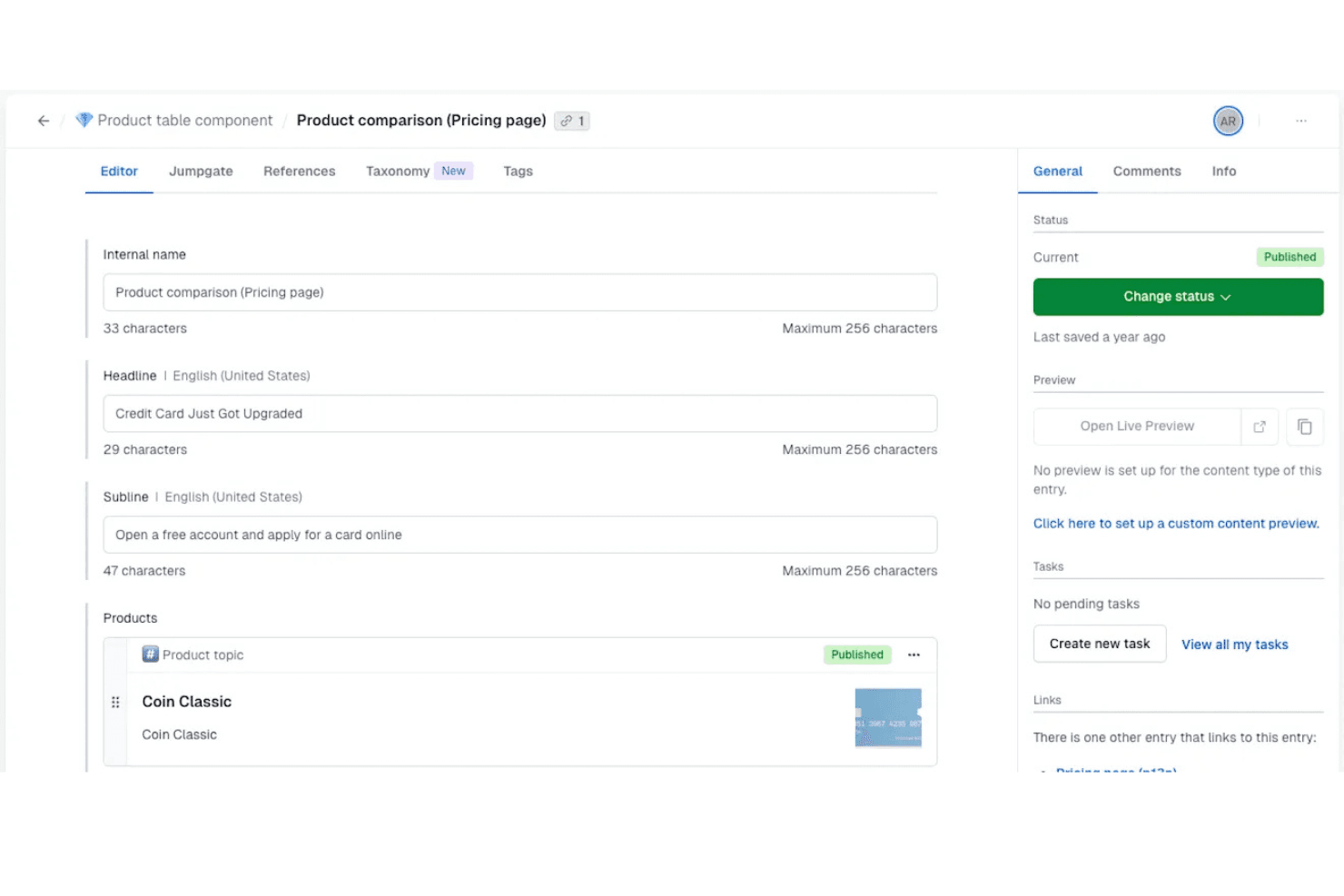
Met Contentful kunnen gebruikers eenvoudig gestructureerde contentitems beheren en publiceren. Contentful is een API-eerst-CMS voor marketing- en productteams die content willen creëren, beheren en publiceren op websites en digitale kanalen zonder deze aan één frontend te koppelen.
Voor wie is Contentful het meest geschikt?
Contentful is geschikt voor teams voor content en digitale ervaringen die editors en ontwikkelaars nodig hebben om gestructureerde content te beheren op websites, in apps en op verschillende kanalen.
Waarom ik voor Contentful heb gekozen
Ik heb Contentful gekozen als mijn keuze voor ‘Beste voor digitaal contentbeheer’, omdat de gestructureerde contentmodellen editors in staat stellen herbruikbare pagina- en campagne-items te beheren, terwijl API’s deze aan websites en apps leveren. Daardoor heeft mijn team een alternatief voor WordPress wanneer dezelfde goedgekeurde content meerdere digitale ervaringen moet bereiken zonder publicatie aan één frontend te koppelen.
Belangrijkste functies van Contentful
- Lokalisatie: Maak versies van items voor specifieke landinstellingen en beheer vertalingen.
- Geplande publicatie: Stel in dat items op een gekozen datum en tijd worden gepubliceerd of gedepubliceerd.
- Rollen en machtigingen: Wijs gebruikersrollen toe met machtigingen voor contentruimtes en acties.
- Contentworkflows: Stel beoordelingsstappen in en wijs taken toe vóór publicatie.
Integraties van Contentful
De marketplace van Contentful vermeldt meer dan 100 apps en integraties, waaronder Slack, HubSpot, Shopify, Google Drive, Vercel en Google Analytics 4. Contentful biedt API’s voor aangepaste integraties, en Zapier wordt gedocumenteerd voor Contentful Personalization.
Pros and Cons
Pros:
- Herbruikbare gestructureerde content op verschillende kanalen
- Lokalisatie ondersteunt meertalige publicatie
- Geplande workflows ondersteunen redactionele beoordelingen
Cons:
- Livevoorbeelden vereisen frontendconfiguratie
- Voor contentmodellering is technische planning nodig
Learn more about Contentful: Beste voor contentlevering via meerdere kanalen
- Gratis demo beschikbaar
- Vanaf $699/maand
Visit WebsiteCustomer Rating:4.4/5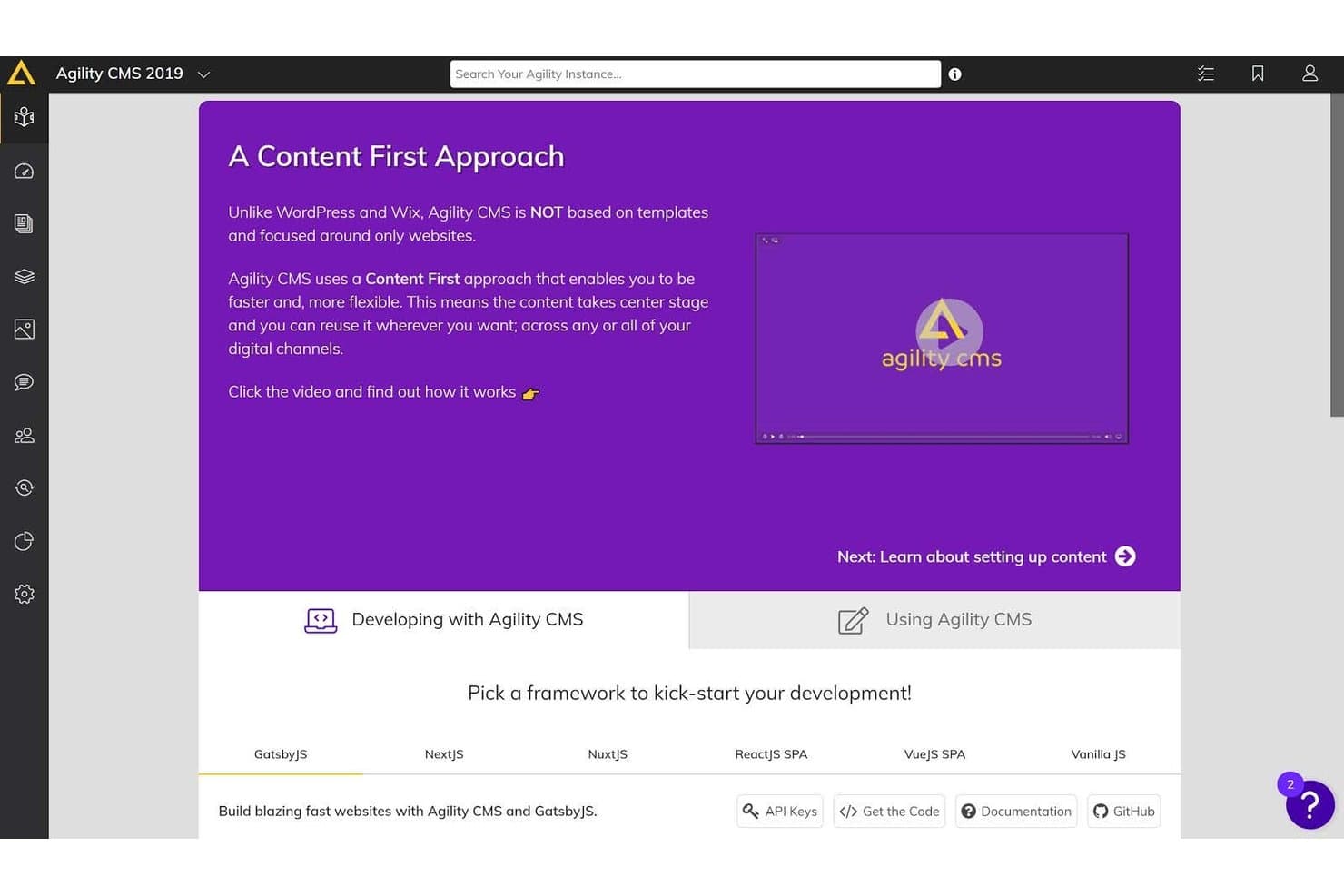
Agility CMS biedt een dashboard met content als uitgangspunt en opties voor ontwikkelframeworks zoals GatsbyJS, NextJS en NuxtJS om de ontwikkeling op gang te brengen. Agility CMS biedt marketing- en digitale teams een alternatief voor WordPress waarbij content en presentatie van elkaar zijn gescheiden, zodat zij updates kunnen beheren terwijl ontwikkelaars digitale ervaringen op maat bouwen.
Voor wie is Agility CMS het meest geschikt?
Agility CMS is geschikt voor marketingteams die content moeten beheren voor websites, apps en andere digitale kanalen.
Waarom ik voor Agility CMS heb gekozen
Ik heb Agility CMS gekozen als WordPress-alternatief voor “Het beste voor contentlevering via meerdere kanalen”. De REST- en GraphQL-API's sturen gestructureerde content naar websites en mobiele apps, terwijl de visuele paginabuilder marketeers laat vormgeven aan pagina's zonder content aan één gebruikersinterface te koppelen. Ik waardeer ook de centrale hub voor het beheren van merk- en regionale websites.
Belangrijkste functies van Agility CMS
- Contentplanning : Stel in dat content op een gekozen tijdstip wordt gepubliceerd.
- Workflowbeheer : Richt redactionele workflows in voor contentbeoordeling.
- Beheer van digitale middelen : Sla digitale middelen op in het CMS en beheer ze.
- Versiegeschiedenis : Bekijk eerdere contentversies en herstel deze.
Integraties van Agility CMS
De integratiegids van Agility CMS vermeldt Algolia, HubSpot, Google Analytics, Shopify, BigCommerce, Salesforce Sales Cloud, Cloudinary, Vercel en Zapier. REST- en GraphQL-API's zijn beschikbaar voor aangepaste integraties.
Pros and Cons
Pros:
- Visuele paginabewerking vermindert routinematige ontwikkelaarsverzoeken
- Gedeelde content ondersteunt merk- en regionale websites
- Frameworkonafhankelijke levering bereikt web- en appkanalen
Cons:
- Geavanceerde configuratie en modellering vereisen expertise van ontwikkelaars
- Vertragingen in de voorbeeldweergave en opmaakfouten verstoren de publicatie
Learn more about Agility CMS: La scelta migliore per siti di e-commerce scalabili
- Prova gratuita di 3 giorni
- A partire da $29/mese (con fatturazione annuale)
Visit WebsiteCustomer Rating:4.5/5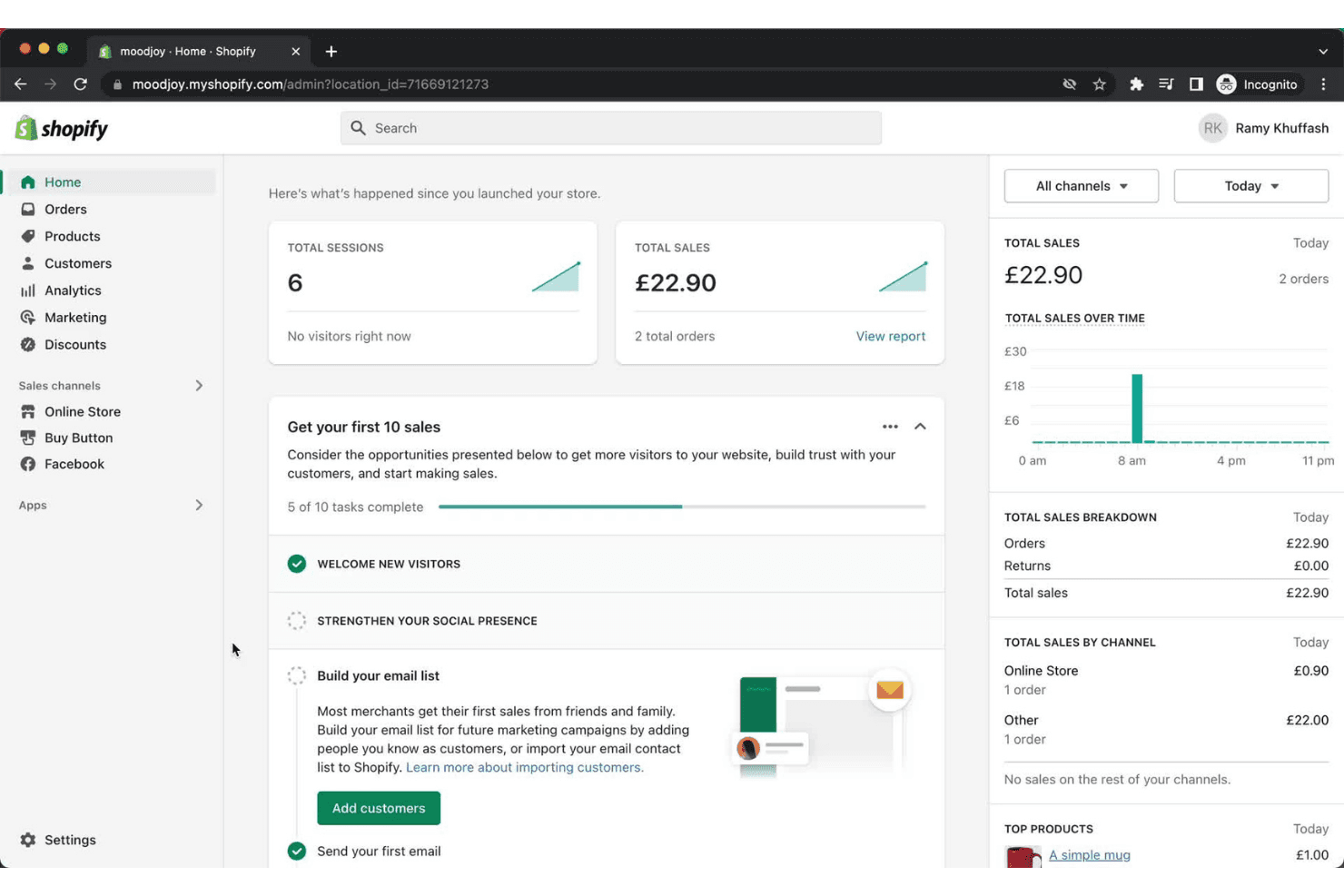
Il pannello di controllo di Shopify offre ai commercianti una panoramica in tempo reale delle vendite e delle attività. Shopify è uno strumento per creare siti web di e-commerce, destinato ai rivenditori che desiderano creare il proprio negozio e gestire le vendite in un unico posto; è la scelta migliore per siti di e-commerce scalabili.
Per chi è più adatto Shopify?
Shopify è adatto ai team della vendita al dettaglio e della vendita diretta ai consumatori che hanno bisogno di spazio per ampliare i cataloghi dei prodotti, i canali di vendita e le operazioni man mano che cresce la domanda.
Perché ho scelto Shopify
Ho scelto Shopify come alternativa a WordPress perché merita l'etichetta “La scelta migliore per siti di e-commerce scalabili”. Apprezzo il fatto che il suo catalogo prodotti supporti le varianti e l'inventario centralizzato, mentre i canali di vendita consentono ai rivenditori di gestire gli ordini dal sito web e dalle vendite sui social in un unico sistema. Un marchio in crescita può aggiungere prodotti e canali senza ricostruire il proprio negozio online.
Caratteristiche principali di Shopify
- Editor dei temi: Personalizza layout, colori e tipografia del negozio senza modificare il codice.
- Blog: Pubblica articoli e organizza i post all'interno del tuo negozio online.
- Strumenti SEO: Modifica i titoli delle pagine, le meta descrizioni e il testo alternativo delle immagini.
- Domini personalizzati: Collega un dominio esistente o acquistane uno tramite Shopify.
Integrazioni di Shopify
Shopify offre integrazioni del marketplace tramite lo Shopify App Store, tra cui Google & YouTube e Facebook e Instagram di Meta; si collega anche a Zapier. Le API di Shopify supportano integrazioni personalizzate.
Pros and Cons
Pros:
- I temi adattivi aiutano ad avviare negozi online senza codice
- L'inventario online e quello dei negozi fisici si sincronizzano centralmente
- Il catalogo centralizzato supporta l'ampliamento delle gamme di prodotti
Cons:
- Gli strumenti per i blog non supportano categorie e post correlati
- Le modifiche avanzate al negozio spesso richiedono la codifica Liquid
Learn more about Shopify: Ideale per siti incentrati sul design
- Prova gratuita di 14 giorni
- A partire da $19/mese (fatturati annualmente)
Visit WebsiteCustomer Rating:4.6/5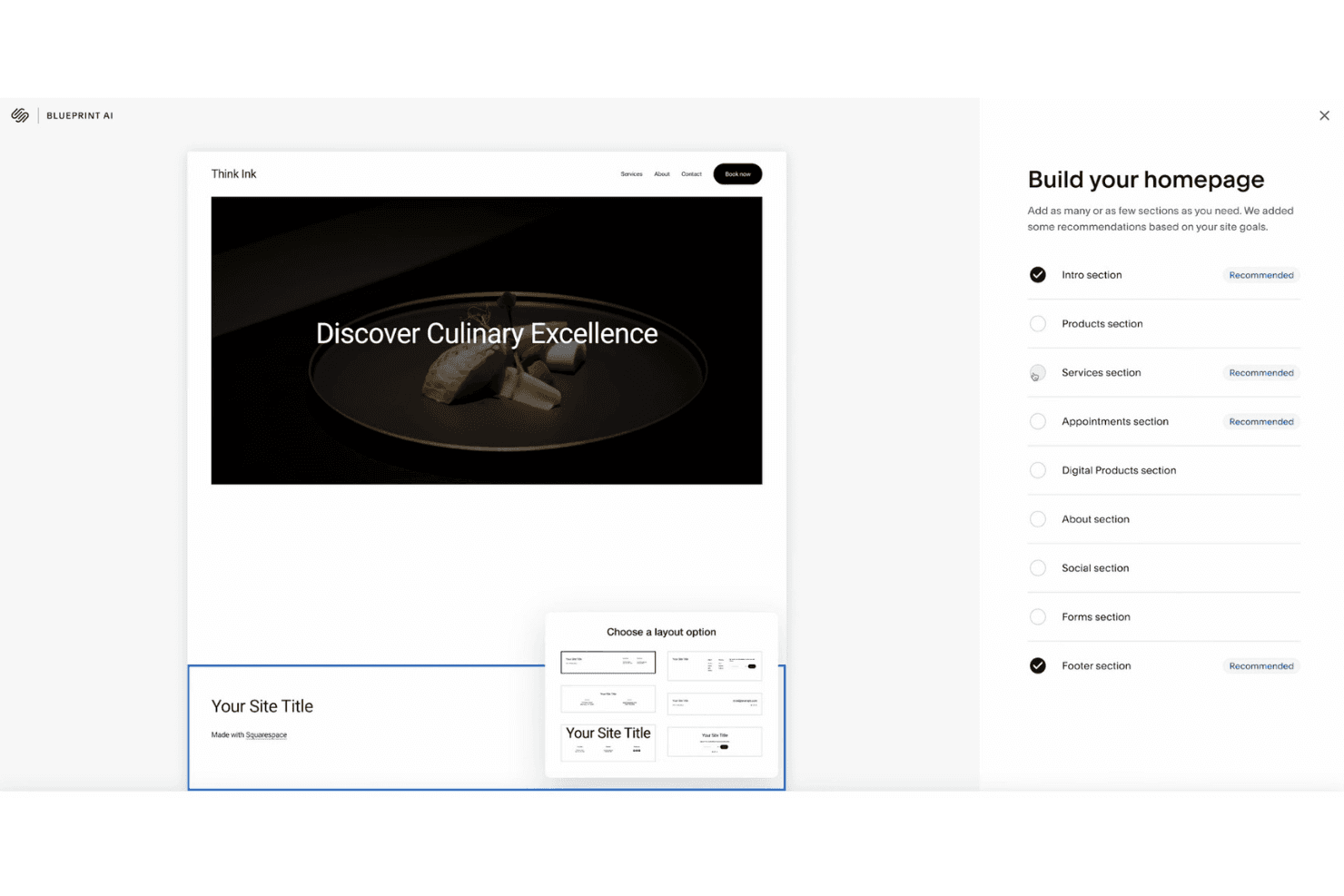
Squarespace consente agli utenti di creare una home page selezionando sezioni consigliate. Squarespace è un creatore di siti web ospitato per piccole imprese e team di marketing che desiderano creare siti con un'immagine del marchio curata senza gestire un'installazione di WordPress auto-ospitata.
Per chi è più adatto Squarespace?
Squarespace è adatto a professionisti creativi e studi che hanno bisogno di un sito portfolio per presentare il proprio lavoro e raccogliere richieste senza gestire l'hosting.
Perché ho scelto Squarespace
Ho scelto Squarespace come alternativa a WordPress quando la presentazione visiva del sito deve essere prioritaria. I suoi modelli incentrati sul design e l'editor con motore fluido mi aiutano a creare pagine per le campagne, mentre le pagine portfolio e i blocchi galleria offrono al lavoro creativo uno spazio ben definito. Posso abbinare le presentazioni dei progetti ai moduli di richiesta per acquisire contatti.
Caratteristiche principali di Squarespace
- Strumenti per blog: crea articoli e organizzali con categorie e tag.
- Impostazioni SEO: modifica i titoli delle pagine, le descrizioni, gli slug degli URL e il testo alternativo delle immagini.
- Analisi del sito web: esamina il traffico, le fonti dei referral e i contenuti più popolari dalla tua bacheca.
- Gestione dei prodotti: aggiungi prodotti, imposta i prezzi e monitora l'inventario nel tuo negozio.
Integrazioni di Squarespace
Squarespace supporta ufficialmente le integrazioni con Google Analytics, Google Search Console, Mailchimp, Facebook Pixel, Instagram, Stripe, PayPal e Google Workspace, oltre a collegarsi a Zapier. Le API per il commercio sono disponibili per le integrazioni personalizzate.
Pros and Cons
Pros:
- I modelli curati e reattivi valorizzano il lavoro creativo
- Il motore di layout fluido modella visivamente le pagine delle campagne
- L'analisi integrata monitora il traffico e i referral
Cons:
- Gli articoli del blog non dispongono dei controlli di layout del motore fluido
- Nessun salvataggio automatico o cronologia delle revisioni degli articoli
Learn more about Squarespace: Il miglior CMS headless open source
- Piano gratuito disponibile
- A partire da $35/mese
Visit WebsiteCustomer Rating:4.5/5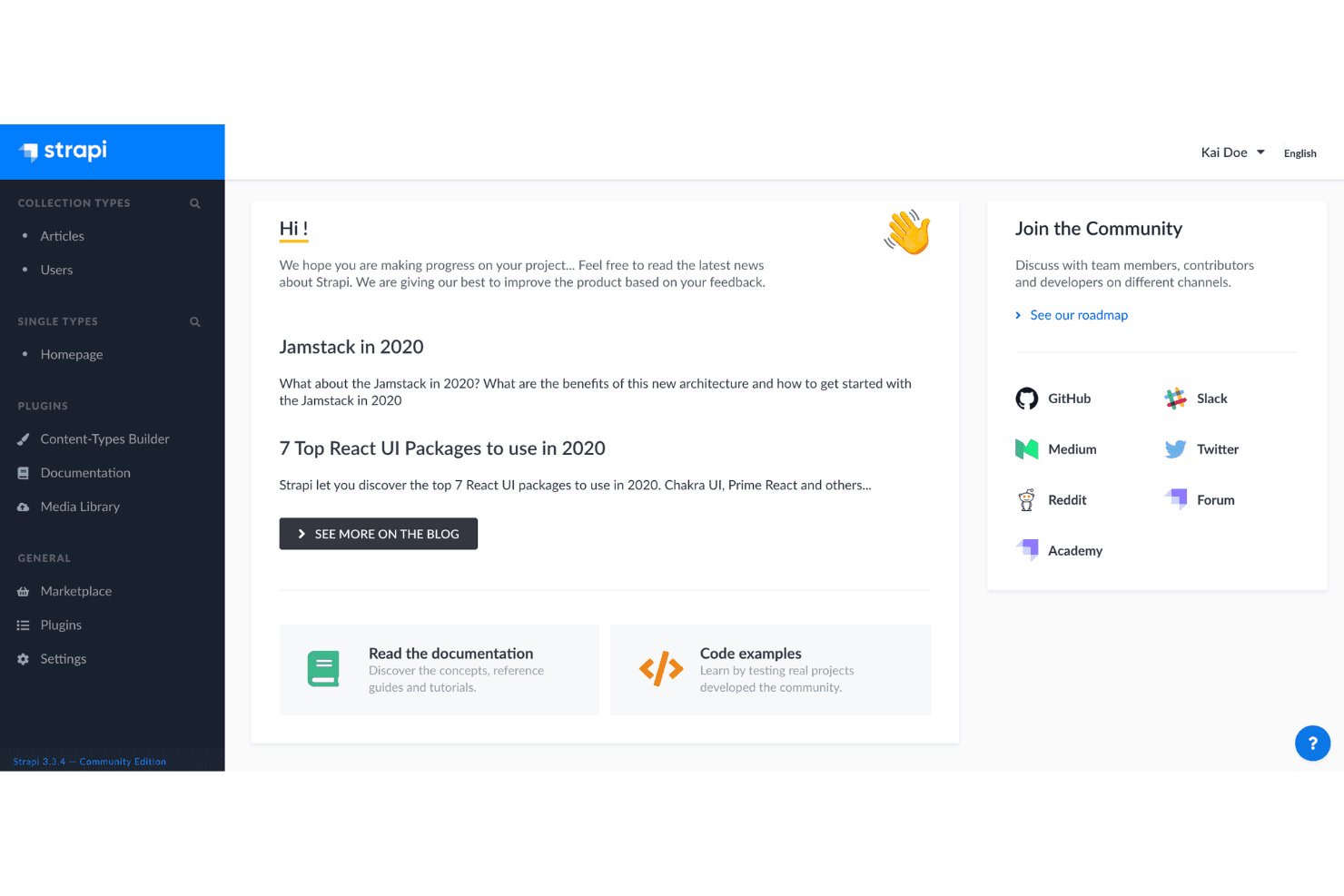
Il pannello di controllo di Strapi collega gli utenti ai tipi di contenuto, ai plugin e alle risorse della community. Strapi è un CMS headless open source per i team di marketing e web che devono gestire centralmente contenuti strutturati e pubblicarli su siti web e canali digitali senza vincolare i contenuti a un'unica interfaccia front-end.
Per chi è più adatto Strapi?
Strapi è adatto ai team di marketing guidati dallo sviluppo che desiderano un CMS open source personalizzabile per i propri siti web, app e flussi di lavoro dei contenuti.
Perché ho scelto Strapi
Ho scelto Strapi come CMS headless open source perché il suo generatore di tipi di contenuto mi permette di modellare pagine di campagne e aggiornamenti di prodotto riutilizzabili. La sua API REST distribuisce questi contenuti strutturati a interfacce front-end separate per siti web e app, mentre l'hosting autonomo offre al mio team il controllo sulla distribuzione.
Funzionalità principali di Strapi
- Bozze e pubblicazione: Salva i contenuti come bozze e pubblicali quando sono pronti.
- Libreria multimediale: Carica, organizza e gestisci immagini e altre risorse multimediali.
- Internazionalizzazione: Crea e gestisci versioni localizzate dei contenuti.
- Controllo degli accessi basato sui ruoli: Imposta le autorizzazioni per gli utenti amministratori in base ai loro ruoli.
Integrazioni di Strapi
Strapi include un plugin Sentry integrato e il suo Marketplace offre plugin e provider aggiuntivi. Le API REST e i webhook supportano le integrazioni personalizzate.
Pros and Cons
Pros:
- I modelli di contenuto generano API REST e GraphQL
- I componenti riutilizzabili supportano layout flessibili per le pagine delle campagne
- L'hosting autonomo open source mantiene i dati sotto il tuo controllo
Cons:
- L'editor di testo avanzato non supporta tabelle e contenuti incorporati
- L'hosting autonomo richiede una distribuzione guidata dagli sviluppatori e una manutenzione continua
Learn more about Strapi: Ideale per funzionalità di progettazione visuale
- Piano gratuito disponibile
- A partire da $15/mese (con fatturazione annuale)
Visit WebsiteCustomer Rating:4.4/5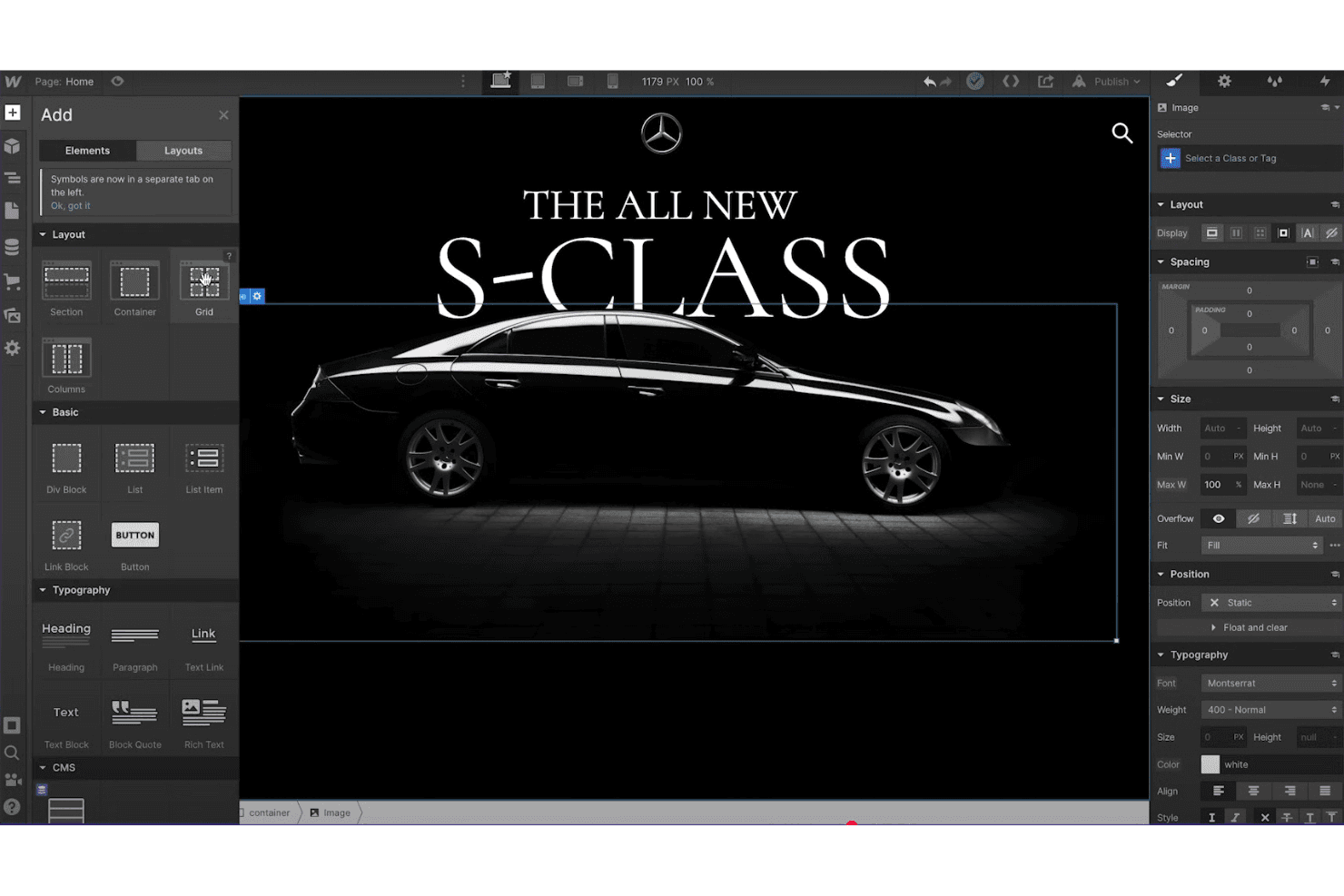
Webflow consente agli utenti di progettare e applicare stili alle pagine visivamente con elementi trascinabili. Webflow è un creatore visuale di siti web per team di marketing e designer che devono creare siti web con un'identità coerente e pagine di destinazione per campagne, riducendo al contempo la dipendenza dalle code di lavoro degli sviluppatori.
A chi è più adatto Webflow?
Webflow è adatto a web designer e team creativi che desiderano un controllo diretto sui layout dei siti, sulle interazioni e sulla presentazione adattiva.
Perché ho scelto Webflow
Ho scelto Webflow, la mia scelta per le “Migliori funzionalità di progettazione visuale”, come alternativa a WordPress quando una pagina di campagna richiede una direzione artistica precisa. Nell'editor visuale, modifico layout adattivi, griglie, tipografia e punti di interruzione direttamente sulla pagina. Creo inoltre interazioni temporizzate per la comparsa degli elementi della pagina o per gli stati al passaggio del mouse senza scrivere codice personalizzato.
Funzionalità principali di Webflow
- Raccolte CMS: Struttura i contenuti con campi personalizzati e utilizzali per popolare pagine dinamiche.
- Controlli SEO: Imposta titoli delle pagine, meta descrizioni, impostazioni Open Graph e preferenze di indicizzazione.
- Invio dei moduli: Crea moduli per il sito web e gestisci gli invii che raccolgono.
- Strumenti per l'e-commerce: Aggiungi prodotti, configura un carrello e imposta la procedura di pagamento.
Integrazioni di Webflow
Il mercato delle app di Webflow elenca 428 app, tra cui HubSpot, Adobe Marketo Engage, gli strumenti per siti web di Google per Webflow, Slack, Make e Zapier. La Data API v2 di Webflow è disponibile per integrazioni personalizzate.
Pros and Cons
Pros:
- Controllo adattivo a livello di pixel sul layout e sulla tipografia
- Interazioni visuali senza codice personalizzato
- I campi CMS alimentano le pagine dinamiche
Cons:
- I flussi di lavoro complessi richiedono spesso codice personalizzato
- Le funzionalità CMS sono inferiori a quelle di WordPress su larga scala
Learn more about Webflow: 10Ideale per la creazione intuitiva di siti
Wix
- Piano gratuito disponibile
- A partire da $17.77/al mese (con fatturazione annuale)
Visit WebsiteCustomer Rating:4.4/5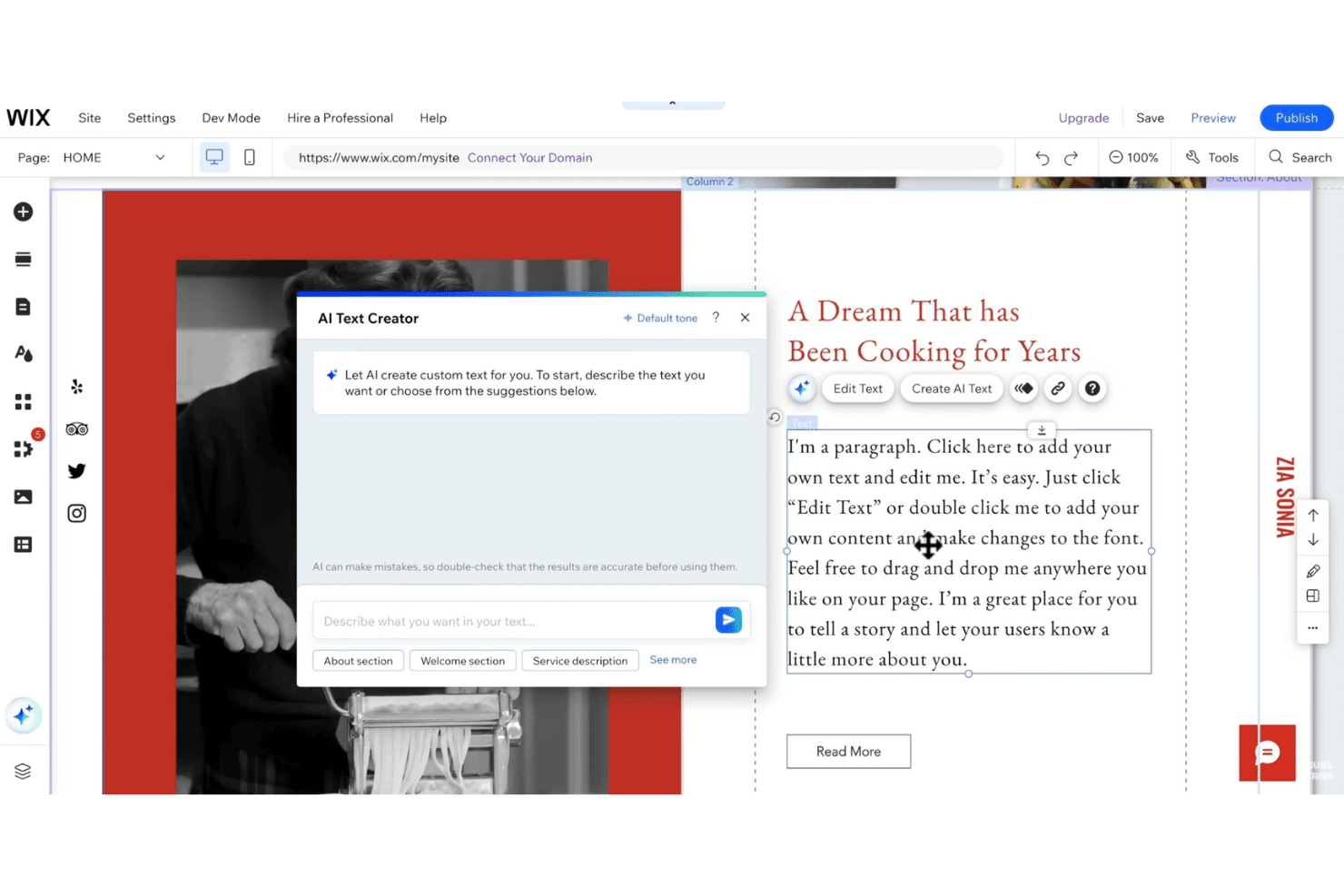
Wix consente agli utenti di generare testo per paragrafi con uno strumento di creazione di testo tramite IA. Wix è un creatore di siti web per piccole imprese e team di marketing che devono creare siti web con il proprio marchio, pagine di destinazione o negozi di commercio elettronico senza affidarsi a uno sviluppo personalizzato.
Per chi è più adatto Wix?
Wix è una buona soluzione per i professionisti del marketing non tecnici che desiderano avere il controllo diretto sul design del sito, sugli aggiornamenti dei contenuti e sul lancio delle campagne.
Perché ho scelto Wix
Ho scelto Wix perché rispetta la promessa di essere il migliore per la creazione intuitiva di siti: il suo editor visuale mi consente di disporre le sezioni della pagina direttamente sulla tela. Utilizzo anche raccolte CMS e pagine dinamiche per creare pagine di destinazione per le campagne a partire da contenuti strutturati, invece di ricreare ogni pagina.
Caratteristiche principali di Wix
- Impostazioni SEO: Modifica i meta tag, gli slug degli URL, i tag canonici e i reindirizzamenti 301.
- Strumenti per negozi online: Gestisci le pagine dei prodotti, la procedura di pagamento, le spedizioni, gli sconti e le email per i carrelli abbandonati.
- Prenotazione di appuntamenti: Imposta la disponibilità del personale, gestisci i calendari delle prenotazioni e invia promemoria via email o SMS.
- Report di analisi: Esamina i report sul traffico e sul marketing per monitorare l'attività del sito e i risultati delle campagne.
Integrazioni di Wix
Wix offre app del marketplace e integrazioni di terze parti, tra cui Mailchimp e Google Analytics. Dispone inoltre di un'integrazione Zapier integrata e di API per sviluppatori per connessioni personalizzate.
Pros and Cons
Pros:
- La modifica basata sulla tela accelera gli aggiornamenti delle pagine delle campagne
- Le raccolte CMS consentono di riutilizzare i contenuti delle pagine di destinazione
- Gli strumenti di prenotazione integrati supportano l'acquisizione di contatti interessati ai servizi
Cons:
- Le modifiche ai template richiedono la ricostruzione dei siti pubblicati
- Le esportazioni dell'intero sito non preservano il design
Learn more about Wix:
Altre alternative a WordPress
Ecco alcune ulteriori alternative a WordPress che non sono state incluse nel mio elenco ristretto, ma che vale comunque la pena valutare:
- 11FramerIdeale per la progettazione di siti web con intelligenza artificiale
- 12WeeblyIdeale per integrazione e-commerce
- 13JoomlaIdeale per le capacità multilingue del sito
- 14GoDaddyIdeale per la registrazione di domini e l'hosting
- 15Hostinger ReachIdeale per hosting economico
- 16ElementorIdeale per la progettazione visiva di WordPress
- 17WebnodeIdeale per una configurazione rapida del sito web
- 18SuncelIdeale per la modifica dei contenuti in tempo reale
Come Valuto le Alternative a WordPress
La mia valutazione si basa su due livelli: le capacità fondamentali che ogni piattaforma deve possedere per qualificarsi e i fattori differenzianti—come test A/B nativi, integrazioni martech e strumenti di migrazione—che distinguono le migliori.
Funzionalità di Base (Requisiti Minimi per Questa Lista)
Quando seleziono gli strumenti per la mia lista, valuto ciascuno su una scala da 0 (non offre la funzionalità) a 5 (eccelle in questo ambito) per ogni funzionalità di base elencata di seguito. Poi calcolo il punteggio totale dello strumento come percentuale. Ogni strumento deve raggiungere un punteggio minimo totale del 75% per poter essere incluso.
- Sistema di gestione dei contenuti: Valuto come ogni piattaforma gestisce la creazione di pagine e post, le librerie multimediali, i tipi di contenuto e i flussi di lavoro multiutente—come la programmazione di una serie di blog con permessi basati sui ruoli tra i collaboratori.
- Creazione visiva di pagine: Ogni strumento dovrebbe permettere ai marketer di progettare e aggiornare pagine senza scrivere codice. Valuto la varietà dei componenti, i controlli per la reattività e se si può costruire una landing page di una campagna in pochi minuti.
- Template e temi: Una solida libreria di template fa risparmiare settimane di progettazione. Controllo la presenza di template rilevanti per vari settori, la profondità di personalizzazione del brand e i controlli di stile globali che mantengono gli asset coerenti tra le pagine.
- SEO e strumenti di marketing: Oltre ai campi meta di base, cerco reindirizzamenti integrati, markup di schema, builder di moduli e strumenti per landing page—quelle funzionalità che riducono la dipendenza da plugin di terze parti.
- Hosting e pubblicazione: L’hosting gestito è una delle principali ragioni per cui i marketer abbandonano WordPress. Valuto SSL, copertura CDN, affidabilità dell’uptime e la presenza di ambienti di staging prima della messa online.
- Integrazioni ed estendibilità: I team di marketing lavorano con strumenti connessi. Verifico la presenza di integrazioni native con piattaforme come HubSpot, Salesforce e Google Analytics, oltre ad API aperte e supporto webhook per flussi di lavoro personalizzati.
Una volta che ho una lista di strumenti che soddisfano questi criteri, considero ciò che distingue ogni piattaforma.
Fattori Differenzianti (Cosa Distingue i Fornitori)
Ecco come confronto e metto in evidenza i diversi fornitori:
Funzionalità Distintive
Il test A/B nativo è un grande elemento di differenziazione—cerco piattaforme che permettano di testare titoli, CTA o varianti di intere pagine senza aggiungere strumenti di terze parti. Anche l’assistenza nella creazione di contenuti tramite AI è importante quando il team deve scrivere il testo di una landing page o generare immagini su larga scala. Per i team che gestiscono diversi siti di brand o micrositi per campagne regionali, valuto se la piattaforma offre controlli multisito centralizzati invece di richiedere account separati.
Oltre le Funzionalità
Il supporto alla migrazione è una delle prime cose che verifico. Passare da WordPress significa trasferire anni di contenuti, strutture URL e valore SEO—le piattaforme che offrono strumenti di importazione o servizi guidati di migrazione rendono la transizione molto meno rischiosa. Valuto anche il costo totale di proprietà, dato che il vero costo di WordPress spesso si nasconde tra plugin, hosting e tempo degli sviluppatori. Anche le prestazioni contano; esamino i benchmark dei Core Web Vitals e la copertura CDN, perché pagine lente incidono direttamente su ROI delle campagne e posizionamento nei motori di ricerca.
Perché cercare un'alternativa a WordPress?
Sebbene WordPress sia una buona scelta come software per la gestione dei contenuti, ci sono diversi motivi per cui alcuni utenti cercano soluzioni alternative. Potresti essere alla ricerca di un'alternativa a WordPress perché…
- Hai bisogno di più opzioni di personalizzazione
- Il tuo team desidera funzionalità di sicurezza migliori
- Hai bisogno del supporto per siti multilingue
- Hai bisogno di un'interfaccia più facile da usare
- Il tuo sito ha superato i limiti di scalabilità di WordPress
- Desideri funzionalità di commercio elettronico integrate
Se ti riconosci in una di queste situazioni, sei nel posto giusto. Il mio elenco comprende diverse opzioni di software per la gestione dei contenuti più adatte ai team che affrontano queste difficoltà con WordPress e cercano soluzioni alternative.
Principali funzionalità di WordPress
Ecco alcune delle principali funzionalità di WordPress, per aiutarti a mettere a confronto ciò che offrono le soluzioni alternative:
- Semplicità: consente di configurare e pubblicare rapidamente il sito grazie a un'interfaccia intuitiva.
- Flessibilità: supporta vari tipi di siti web con temi e plugin personalizzabili.
- Facilità di pubblicazione: offre strumenti intuitivi per la creazione, la pianificazione e la revisione dei contenuti.
- Gestione degli utenti: offre diversi livelli di accesso, consentendo la creazione collaborativa dei contenuti.
- Gestione dei media: consente di caricare facilmente i media tramite trascinamento e offre strumenti di modifica di base.
- Ottimizzazione SEO: include funzionalità SEO integrate e plugin aggiuntivi per un controllo avanzato.
- Supporto multilingue: disponibile in oltre 70 lingue per garantire l'accessibilità a livello globale.
- Sistema dei temi: offre un'ampia directory per personalizzare i temi e caricarli facilmente.
- Estensibilità tramite plugin: migliaia di plugin per migliorare le funzionalità, rendendolo adattabile.
- Supporto della comunità: sostenuto da una comunità vivace per l'apprendimento e la collaborazione.